
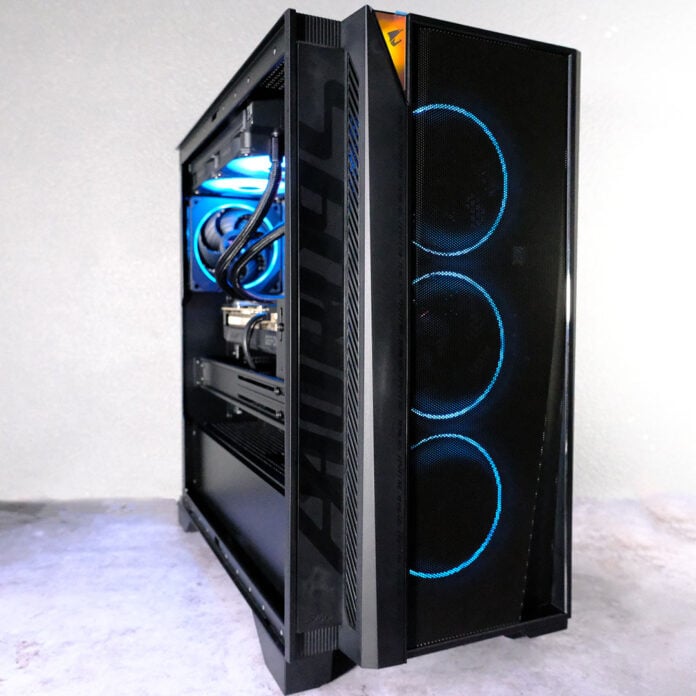
Gigabyte has recently launched a barrage of fresh desktop PCs, with the Aorus Prime serving as the brand’s new mid-range offering. Available with a selection of high-end components, this rig packs a powerful performance punch, but pricing does somewhat diminish its potency.

Gigabyte Aorus Prime 5
£2,799
Pros
- Great QHD and FHD pace
- Solid thermal management
- Wonderfully quiet under load
- Good connection options
- Reasonable power draw
Cons
- Relatively expensive compared to DIY and independent system integrator builds
- SSD is prone to thermal throttling under extreme load
Club386 may earn an affiliate commission when you purchase products through links on our site.
How we test and review products.
Gigabyte offers the Aorus Prime 5 in four configurations with identical specifications, save for CPU and GPU. For processors, you have a choice between a Ryzen 7 9700X or 9800X3D, while your graphics card options amount to either a GeForce RTX 5080 or RTX 5070 Ti.
Specs
For our review sample, we have the ‘AP5A7N7T-5102’ variant of the Aorus Prime 5, featuring a Ryzen 7 9800X3D and RTX 5070 Ti.
| Gigabyte Aorus Prime 5 (AP5A7N7T-5102) | |
|---|---|
| CPU | AMD Ryzen 7 9800X3D |
| CPU cooler | Gigabyte Aorus Gaming 240mm |
| Motherboard | Gigabyte B850M C |
| GPU | Gigabyte GeForce RTX 5070 Ti Windforce OC SFF |
| RAM | 32GB (2x16GB) TeamGroup T-Force DDR5-5600 CL40 |
| SSD | Gigabyte Aorus Gen4 7300 2TB |
| PSU | Gigabyte UD850GM PG5 V2 |
| Networking and wireless | 2.5Gb Ethernet Bluetooth 5.4 Wi-Fi 7 |
| Case | Gigabyte Aorus Prime 5 |
| Operating system | Windows 11 Home |
| Warranty | Two-years (EU) / One-year (US) |
| Price | £2,799 |
Second only to the Ryzen 7 9850X3D, AMD’s 9800X3D is one of the best processors you could want in a gaming PC. The chip’s 5.2GHz maximum boost clock gives it plenty of speed to tackle single-threaded workloads, such as most games, while its eight Zen 5 cores mean it’s no slouch should an application call for more processing grunt.
What makes the Ryzen 7 9800X3D so desirable, however, is its 96MB of L3 cache. This super-fast on-board memory pool allows the CPU to be less reliant on system RAM, potentially boosting frame rates to a substantial degree. Such gains are application dependent, though, and more likely to manifest in scenarios where processor performance is the primary bottleneck.
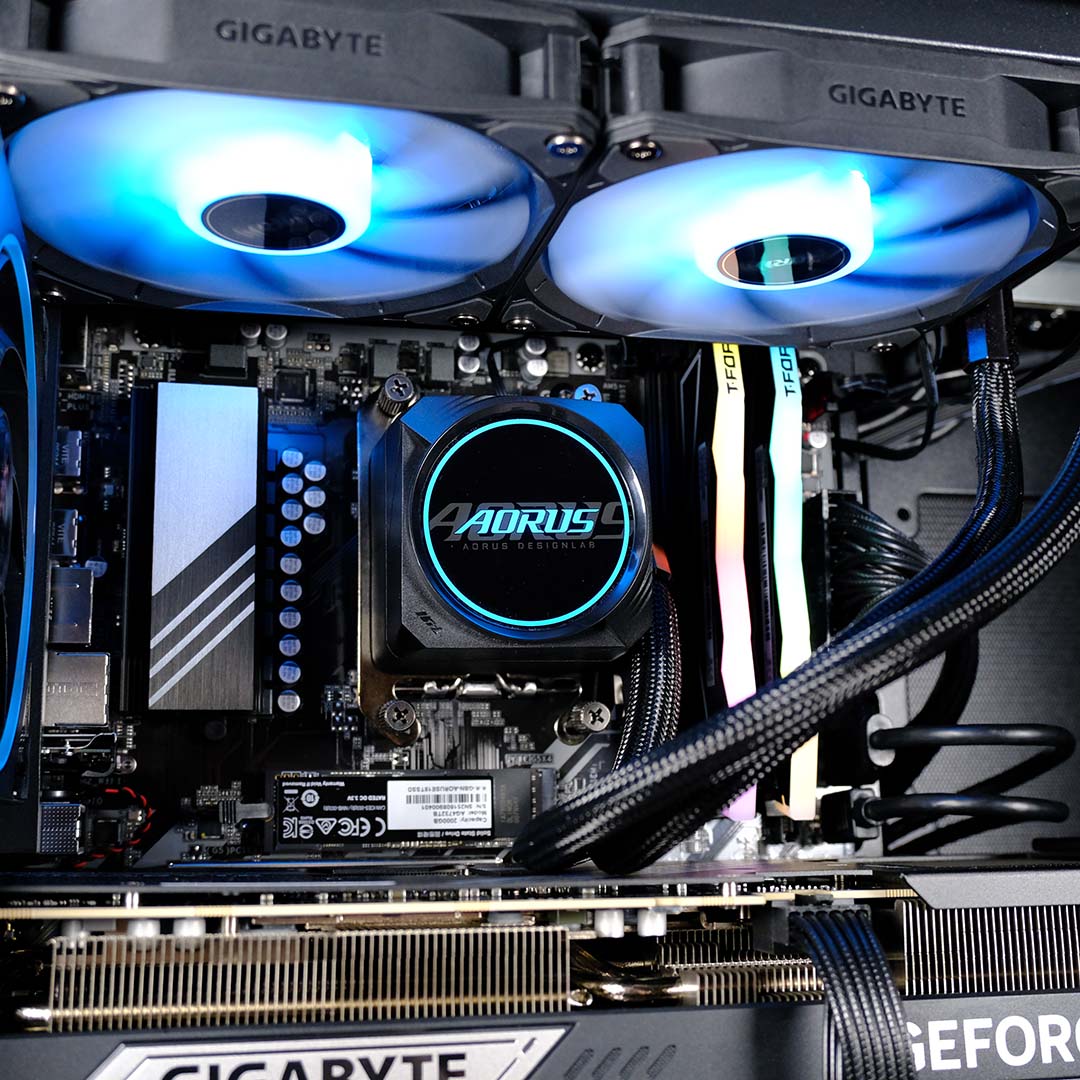
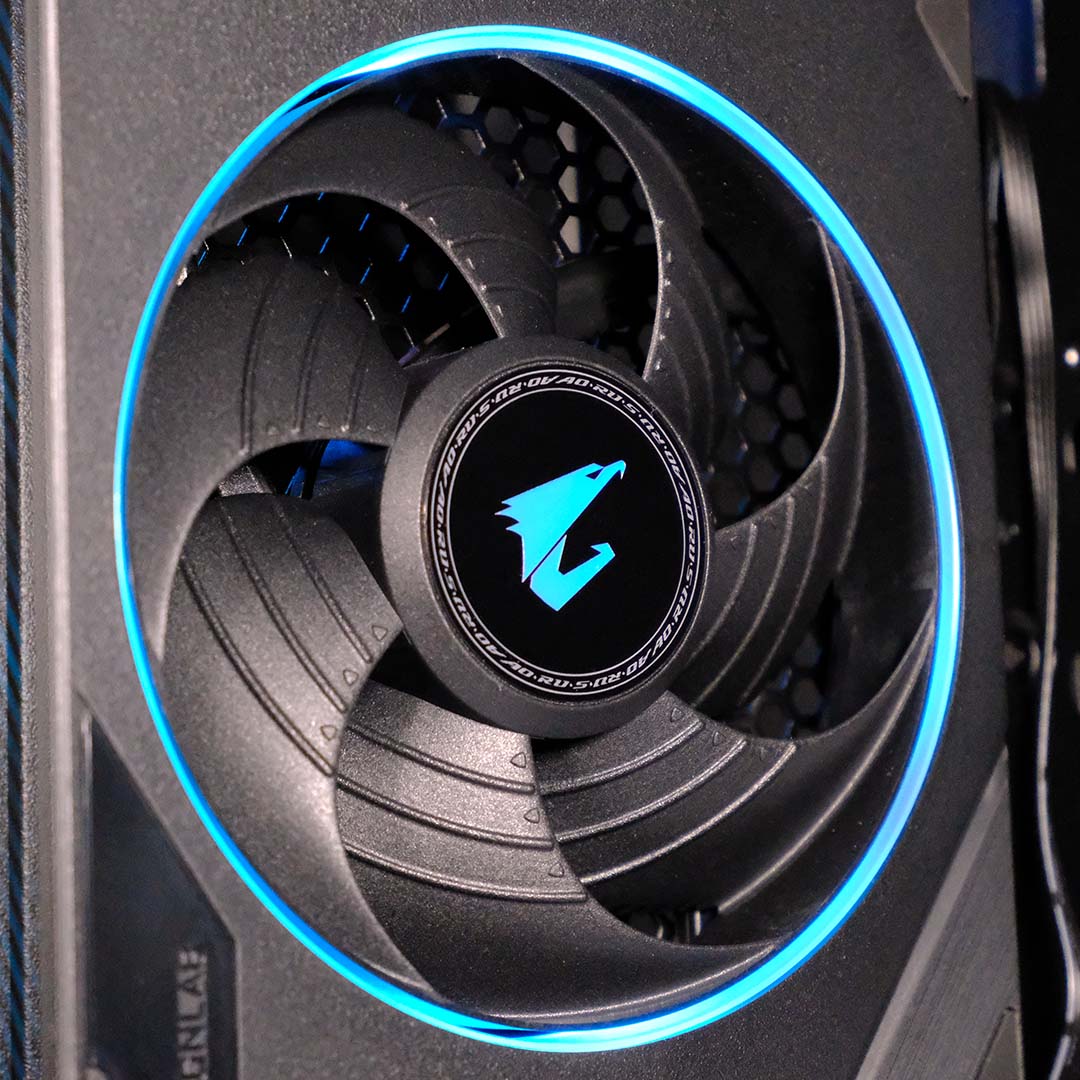
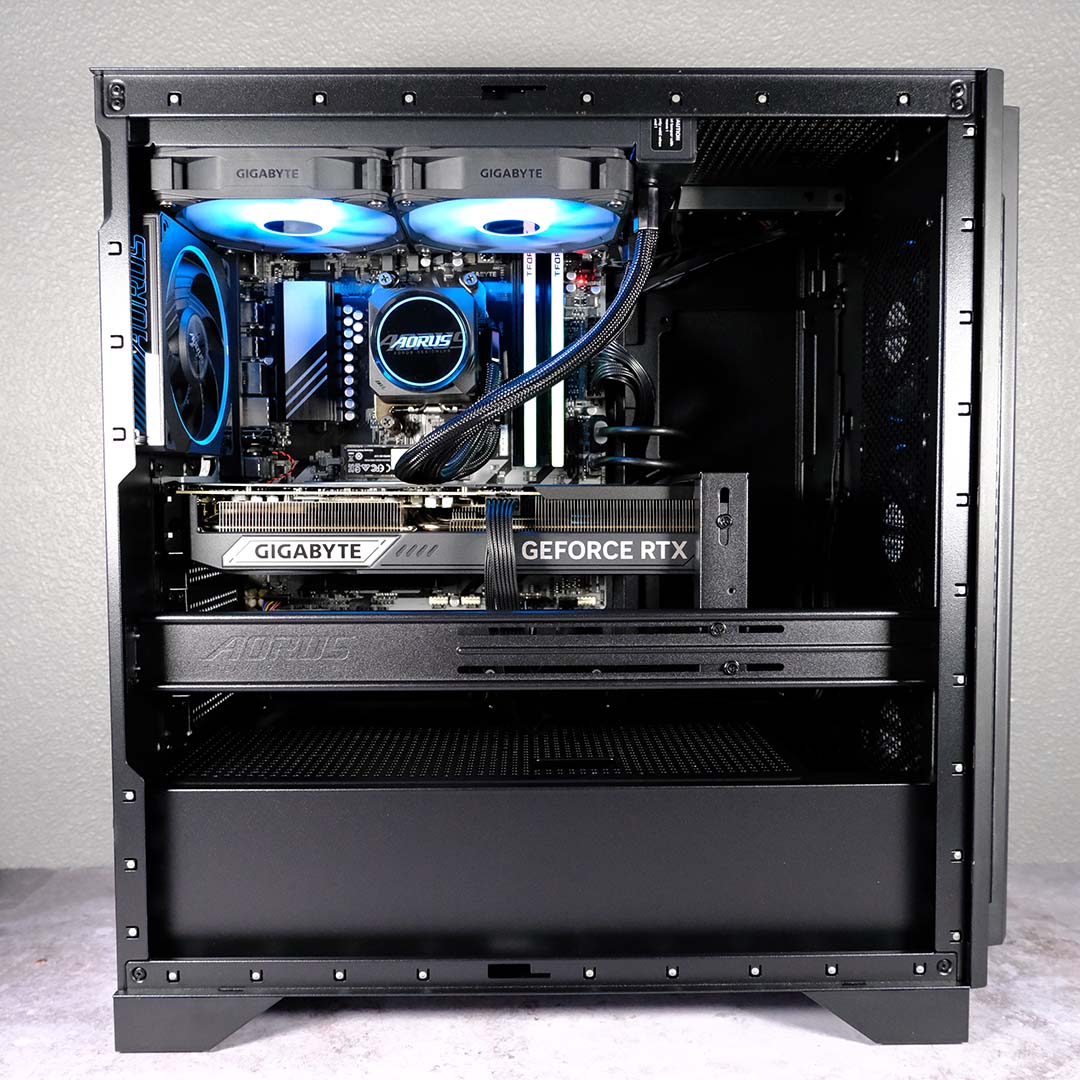
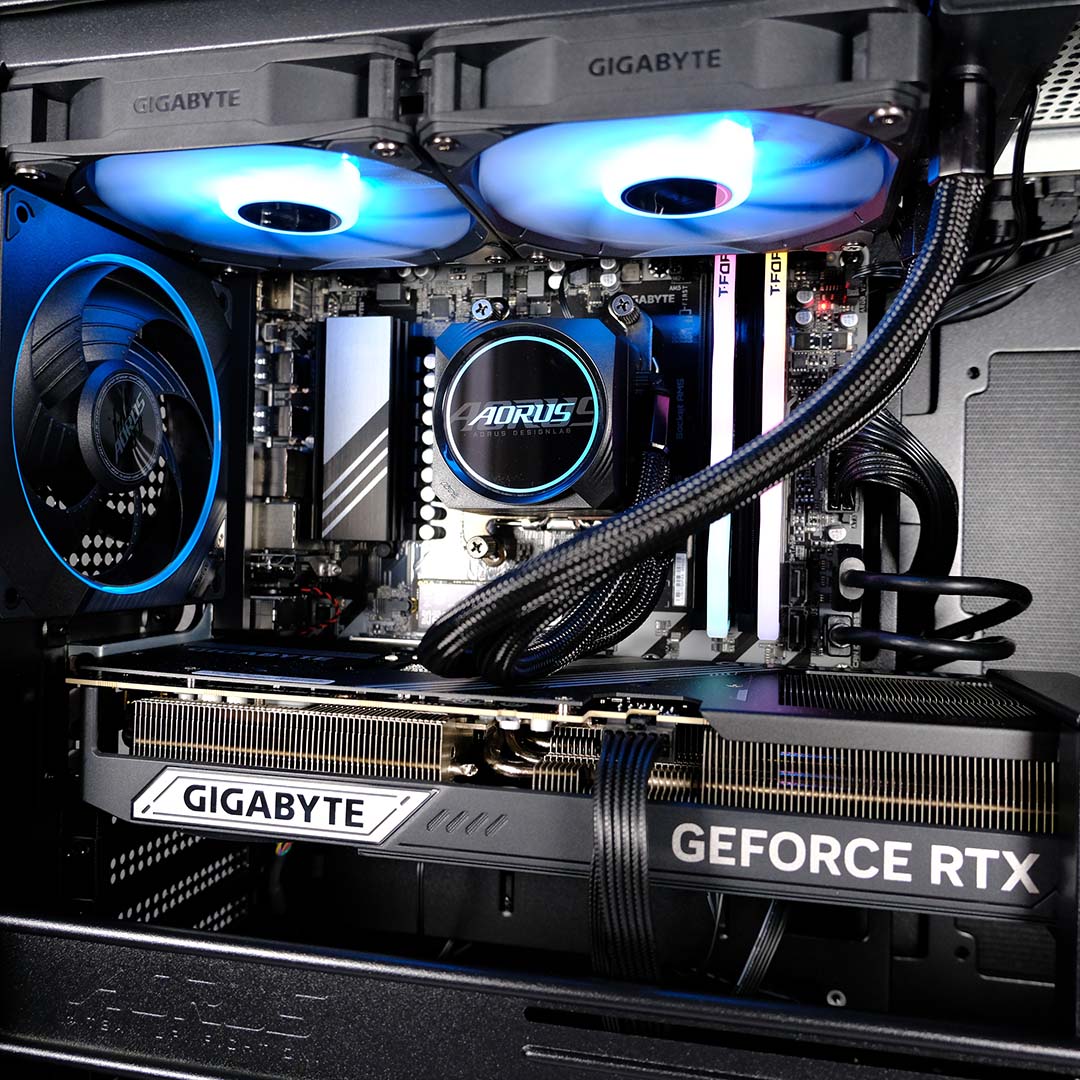
Keeping the Ryzen 7 9800X3D temperatures in check is a 240mm AIO water cooler, complete with flashy ARGB LEDs across the block and fans. Given that the processor only has a TDP of 120W, this setup has more than enough power to keep the chip cool under load, with temperatures falling well short of the CPU’s 95°C thermal throttling threshold in my testing.
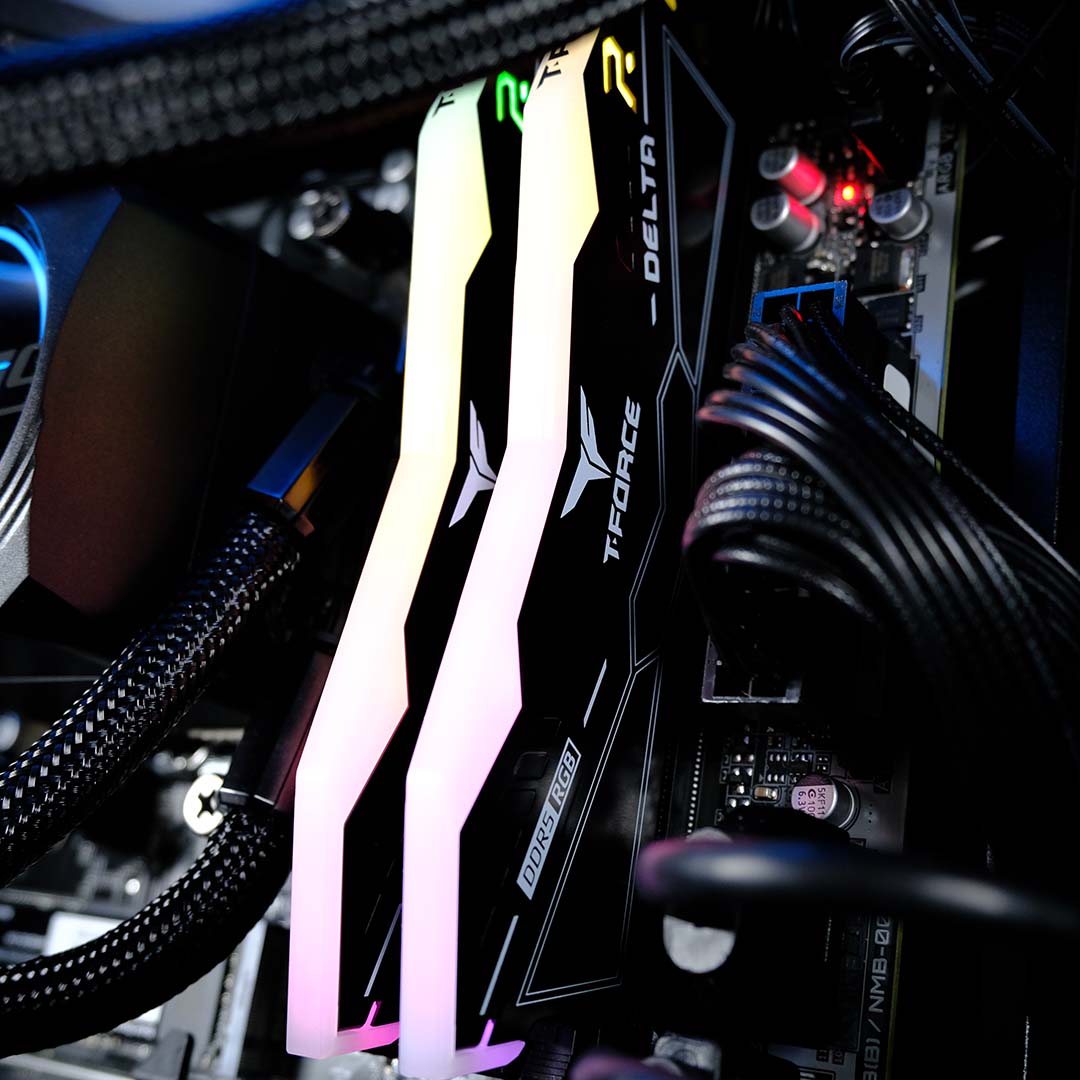
To the right of the AIO pump block, you’ll find a 32GB of DDR5 RAM. In my case, I have a set of TeamGroup T-Force Delta RGB, running at 5,600MT/s with CL40 CAS timings. Processors with 3D V-cache aren’t as sensitive to memory transfer speeds as other Ryzen CPUs, but I would prefer to see tighter timings on a build of this specification. That said, given the current component shortage, I wouldn’t complain too much.
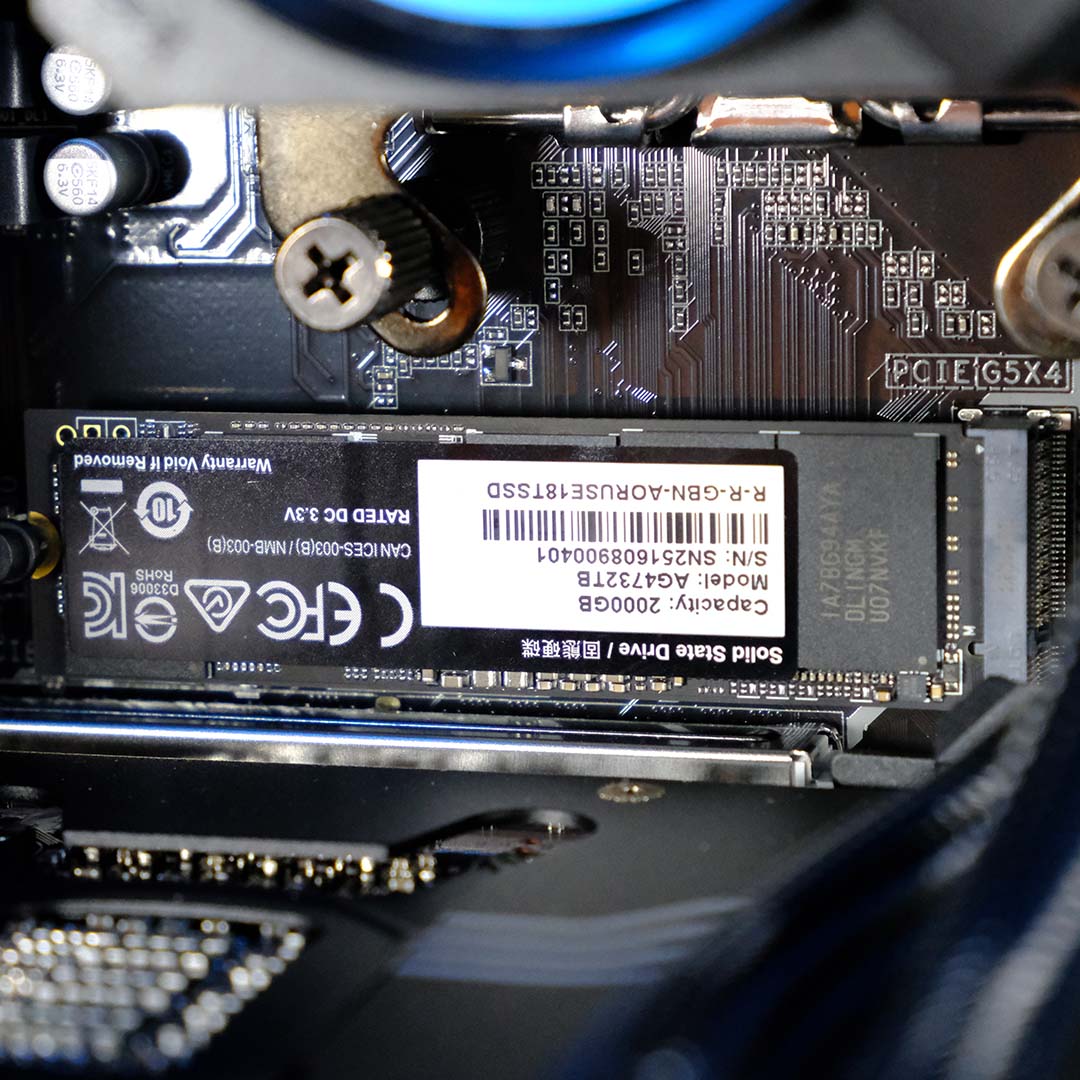
Keeping focus on the top half of the Aorus Prime 5, we find an Aorus Gen4 7300 2TB SSD sat in its primary PCIe Gen 5 slot. This is a solid choice of storage as far as capacity and speed go, but the lack of cooling is concerning. This is a knock-on effect from Gigabyte’s choice of motherboard, a B850M C, which doesn’t come with any M.2 heatsinks. This is a big faux pas in my book, as many basic boards come with such provisions for modern SSDs.
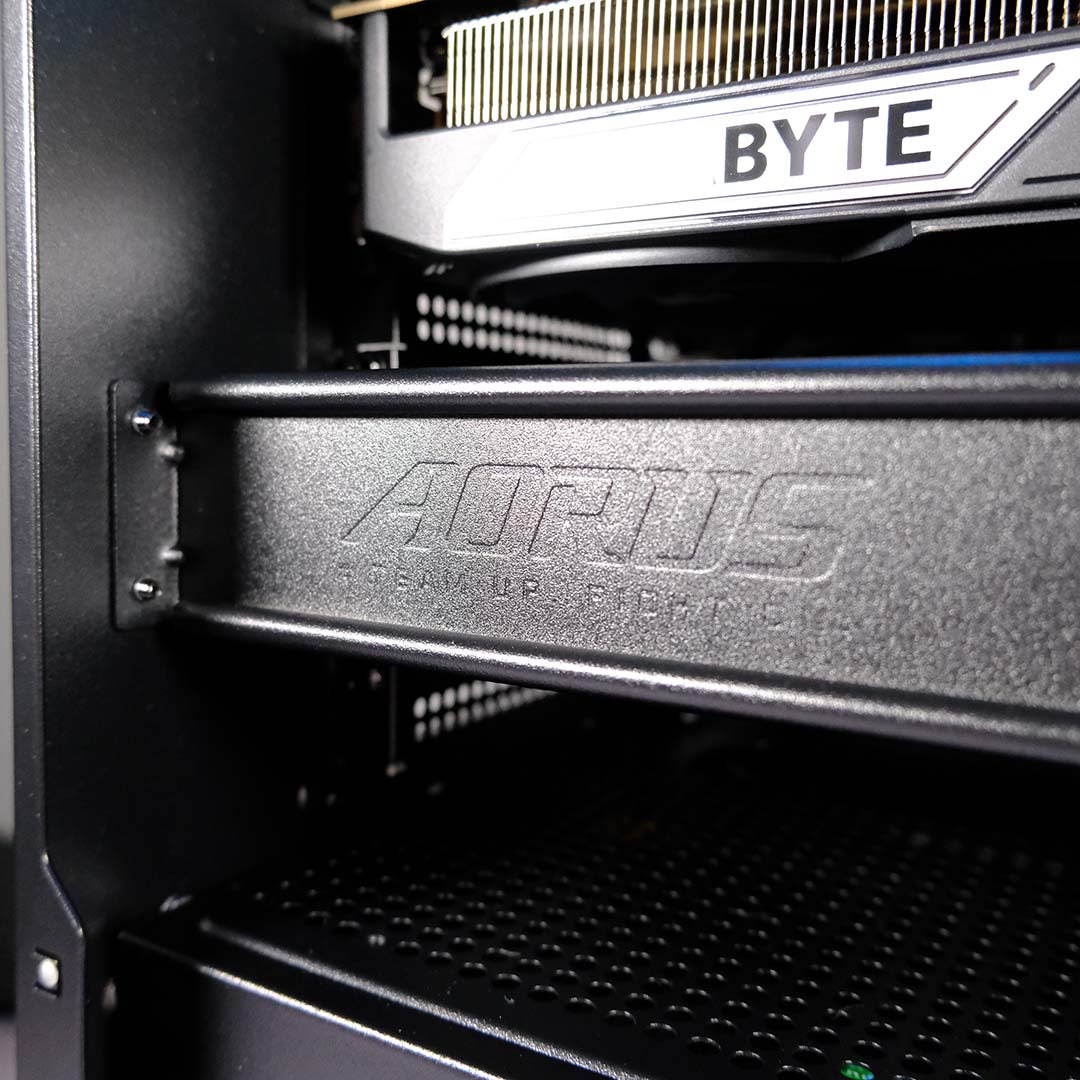
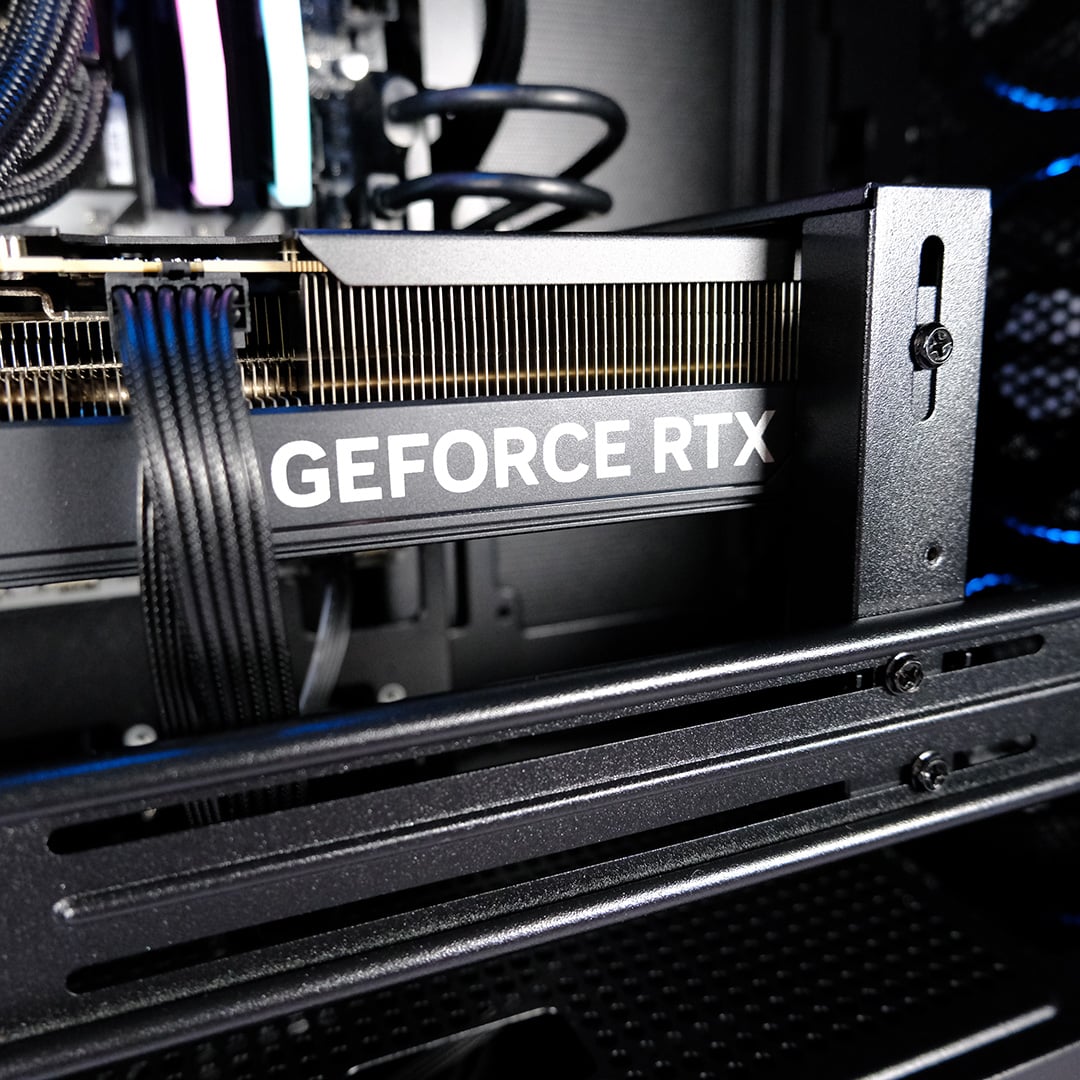
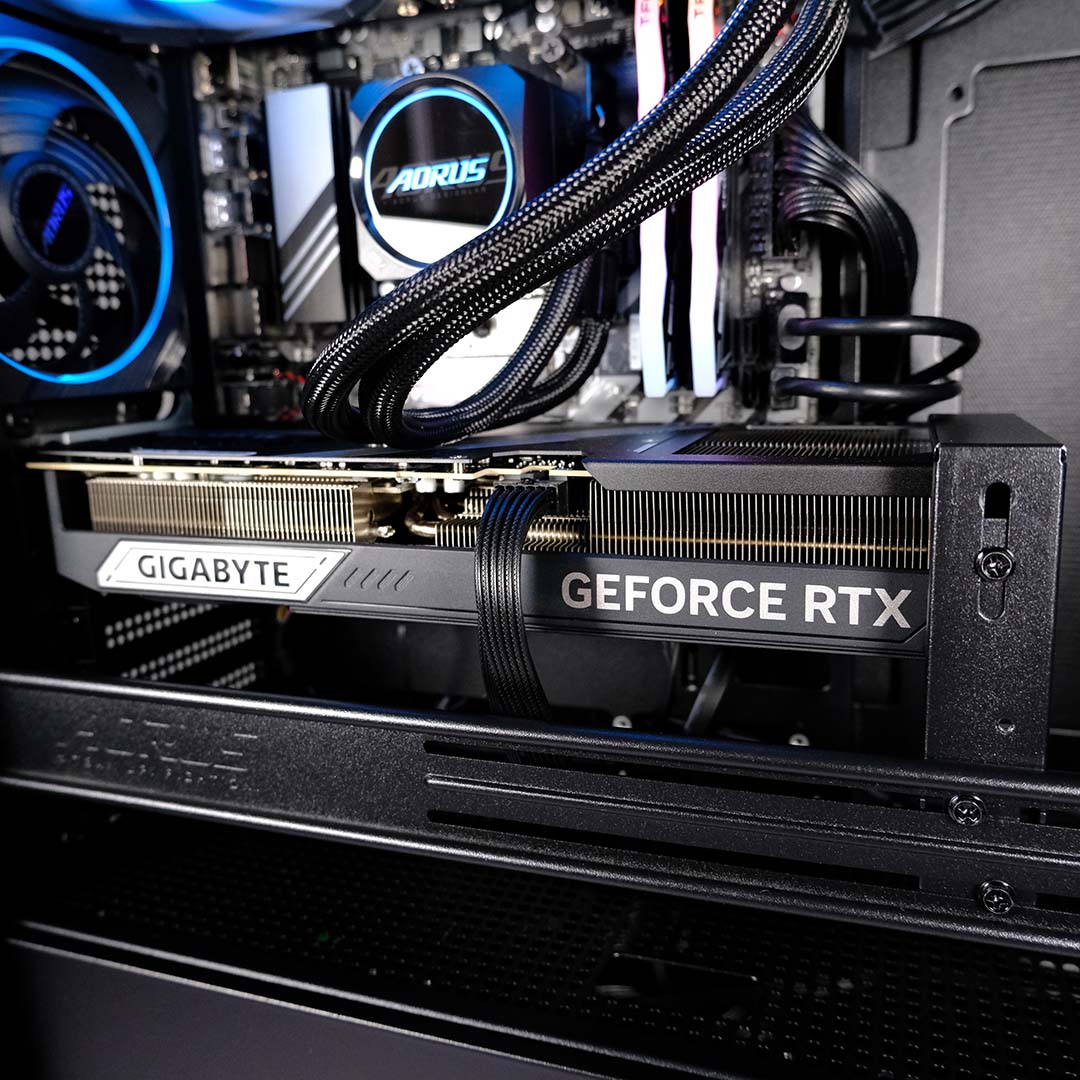
Taking pride of place inside the Aorus Prime 5 is a Gigabyte GeForce RTX 5070 Ti Windforce OC SFF graphics card. This is one of the brand’s less flashy cooler designs, sans any RGB lighting, but its triple fan array is still plenty capable of cooling its GB203 GPU and 16GB of GDDR7 VRAM.
As an SFF (small form factor) design, this graphics card is relatively trim in size, measuring 304mm (L) x 126mm (W) x 50mm (H). These reasonable dimensions make the elaborate GPU support bracket, which mounts to the front and back of the case, feel a bit like overkill. Credit where it’s due, though, the finish is better than a piddly bit of plastic or fiddly metal piece that takes up PCIe brackets.
In terms of factory overclocks, we’re looking at a 2,497MHz core clock. That’s a mere 45MHz over stock, which won’t lead to any meaningful improvements over a non-OC model. Regardless, the GPU will frequently push frequencies well beyond these values should thermal headroom allow.
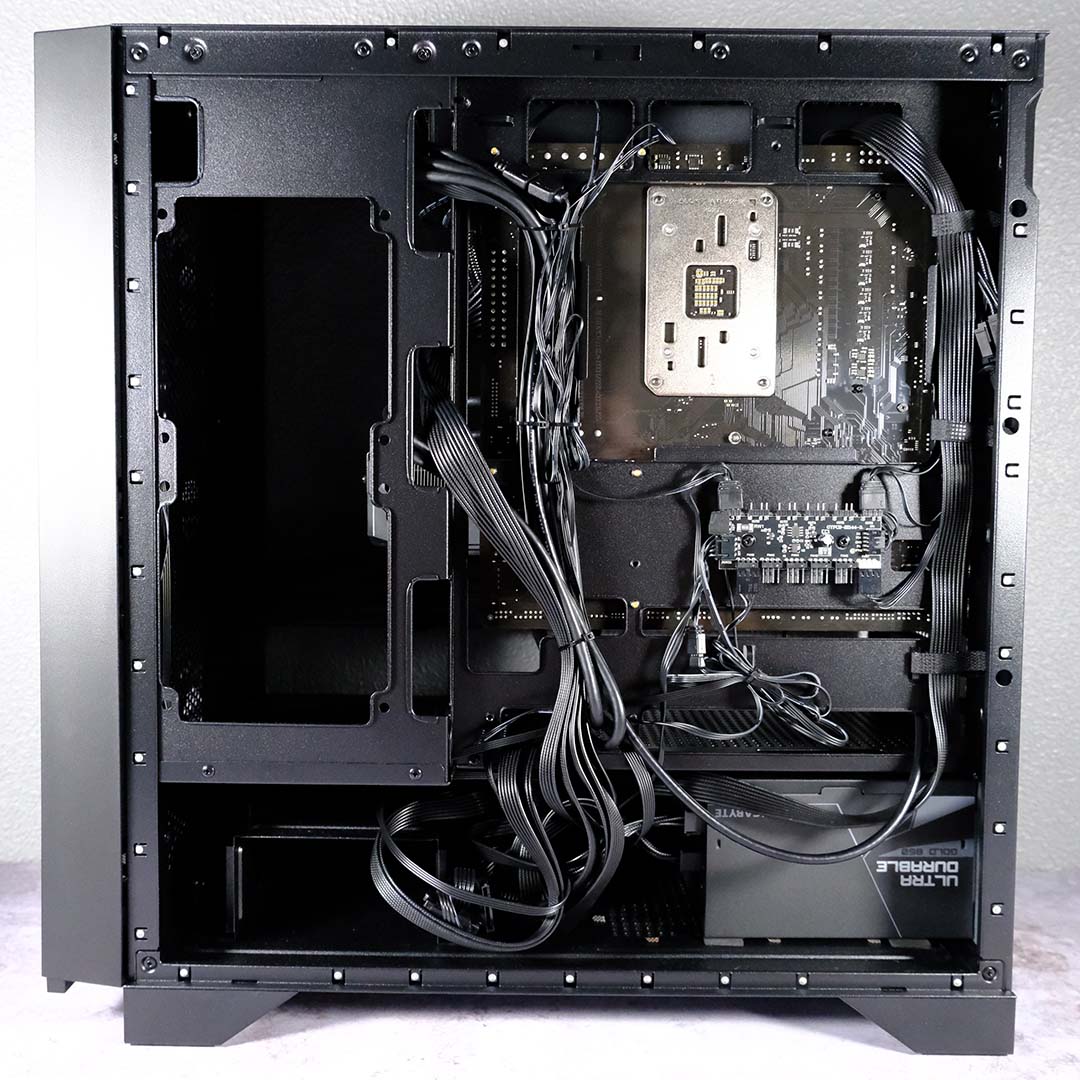
Turning attention to the Aorus Prime 5’s other side panel, a Gigabyte UD850GM PG5 V2 appears in the under chamber, next to a 2.5/3.5in storage cage. This is a fully modular power supply, and you’ll only find the cables necessary for the build already inside the case, with surplus going inside a zip-lock bag in the system’s packaging.
There’s plenty of room to manage cables here, and I’m glad to see Gigabyte include Velcro cable ties. However, I wish the Aorus Prime 5 spread this Velcro love across its spine, as zip ties make up the majority of cable management along the middle of the case. The finish is fine, but any modifications will become difficult as you’ll need to separate currently tidy wires with no way to group them up again.
The inclusion of a fan hub, complete with ARGB headers, is a welcome sight as well. Many premium chassis forgo this invaluable addition, which helps keep cable clutter to a minimum inside the main chamber, at which you’ll frequently gaze through the tempered glass side panel.
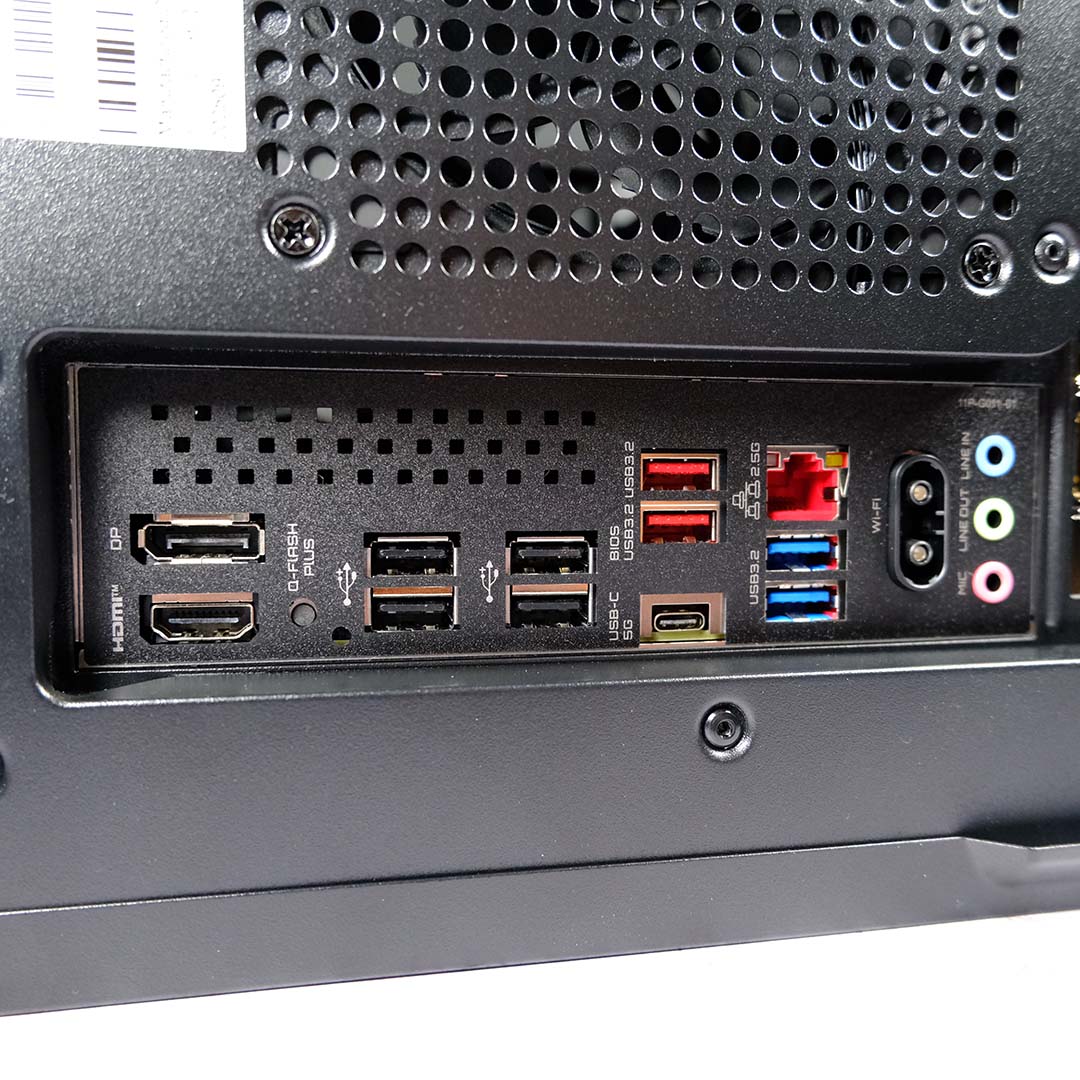
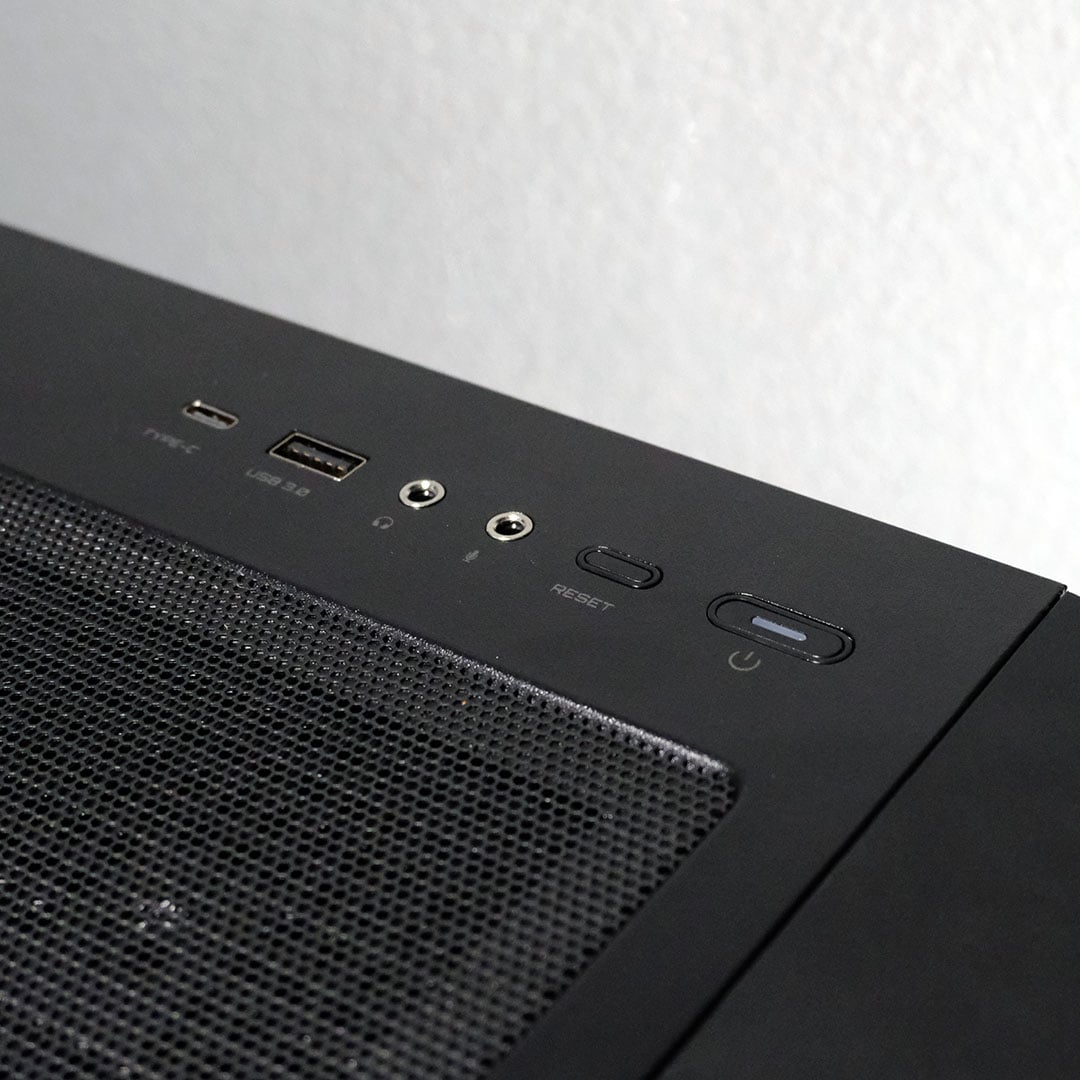
There’s a healthy number of connections for the plugging on this machine. Round back, you’ll find two 10Gb Type-A ports, alongside two 5Gb Type-As, a single 5Gb Type-C, and four 480Mb USB 2.0 inputs. Meanwhile, on the case itself, you’ll find a single Type-C and Type-A port, alongside separate 3.5mm inputs for your microphone and headphones.
A 2.5Gb Ethernet port takes care of wired networking, which downscaled perfectly to my 1Gb local area network and broadband. I similarly had no issues pairing the Wi-Fi 7 dongle to my Wi-Fi 6E network.
Gigabyte is launching this variant of the Aorus Prime 5 for £2,799. This price is much higher than similar systems we reviewed in the past year, but such is the reality of the market in 2026, where many internal components are now exorbitantly more expensive.
Even taking into account current market conditions, the system feels expensive. Crafting a similar build through PCPartPicker, I was able to put together a PC for ~£2,200. Alternatively, I can hit up a system integrator such as PCSpecialist and get a rig at the same price, complete with a more powerful processor. Making matters more frustrating for value, Gigabyte only offers a one-year warranty in the US, rising to two-years in Europe with the Aorus Prime 5. While system integrators often don’t go beyond a year for parts as standard, many offer longer coverage periods for labour should anything go awry.
Given the volatility of the market, the Aorus Prime 5 price isn’t entirely surprising. Still, the fact remains that better deals are available elsewhere at the time of writing. The extra expense for Gigabyte’s system doesn’t write off its value, but it would most certainly benefit from a trimmer cost.
Performance
I’m expecting the Aorus Prime 5 to shine brightest while gaming at FHD (1080p) and QHD (1440p), with some favourable results at 4K (2160p) too, so I’ll be testing the system’s gaming performance across all three resolutions. I’ll also benchmark the CPU, RAM, and SSD individually via other applications.
Here are the six other systems I will be comparing to Gigabyte’s PC, complete with a summary of their core components and links to their reviews:
- PCSpecialist Cruiser iCue Stealth (£3,099)
- AMD Ryzen 7 9850X3D
- Nvidia GeForce RTX 5080
- Asus TUF Gaming X870-Plus WiFi
- 32GB DDR5-6000 CL30
- 4TB Corsair MP600 Pro
- PCSpecialist Vortex BF 25 (£1,799 when tested – no longer available)
- AMD Ryzen 7 9800X3D
- Nvidia GeForce RTX 5070 Ti
- Asus Prime B850-Plus
- 32GB DDR5-6000 CL30
- 2TB Samsung 990 Evo Plus
- Novatech Reign Sentinel (£2,269 when tested – now £2,849)
- AMD Ryzen 7 9800X3D
- Nvidia GeForce RTX 5070 Ti
- MSI B850 Gaming Plus WiFi PZ
- 32GB DDR5-5600 CL40
- 2TB Samsung 990 Evo Plus
- CyberpowerPC Ultra XT (£2,599 when tested – no longer available)
- AMD Ryzen 9 9950X3D
- AMD Radeon RX 9070 XT 16GB
- MSI MPG X870E Edge Ti WiFi
- 32GB DDR5-6400 CL32
- 2TB Corsair MP700 Pro
- CyberpowerPC Ultra 5080 Pro (£2,799 when tested – no longer available)
- AMD Ryzen 7 9800X3D
- Nvidia GeForce RTX 5080
- MSI MAG B650 Tomahawk WiFi
- 32GB DDR5-6000 CL36
- 2TB Kingston Fury Renegade
- PCSpecialist Nebula Ultra R (£2,299 when tested – no longer available)
- Intel Core Ultra 7 265KF
- Nvidia GeForce RTX 5080
- Asus Prime Z890-P WiFi
- 32GB DDR5-6000 CL36
- 2TB Solidigm P41 Plus
CPU
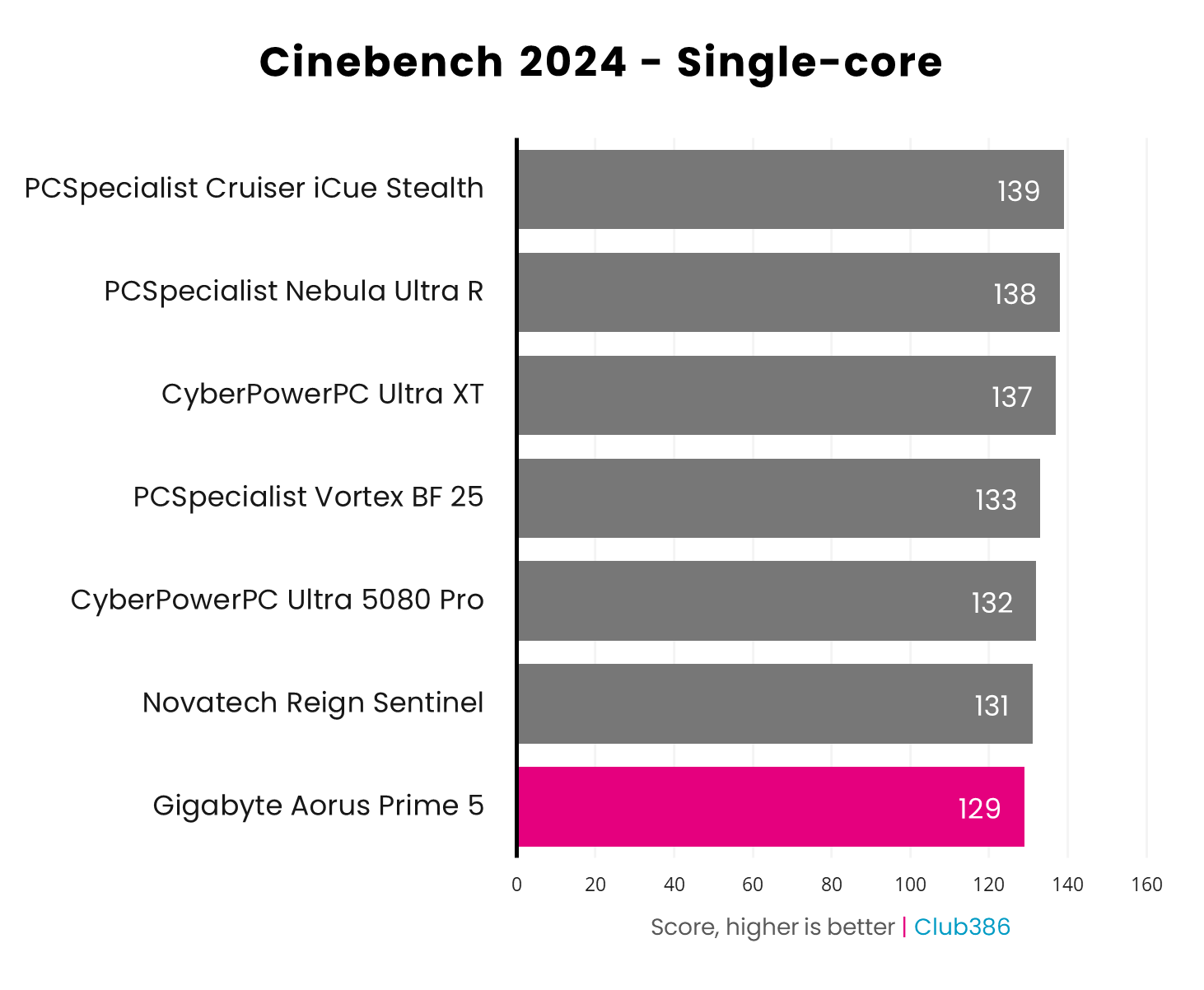
In competition with three other systems containing Ryzen 7 9800X3D CPUs, the Aorus Prime places last with a score of 129 points in the Cinebench 2024 single-core benchmark. However, the gap is slim at 2-4 points.
While every point matters in this test, I’m confident in describing the processor’s performance as falling within expectations. Looking at my HWInfo logs, the chip was able to achieve and maintain its 5.2GHz maximum boost clock with no issue. As such, I think we’re more likely to be looking at changes brought by updates to Windows 11 and/or chipset drivers.
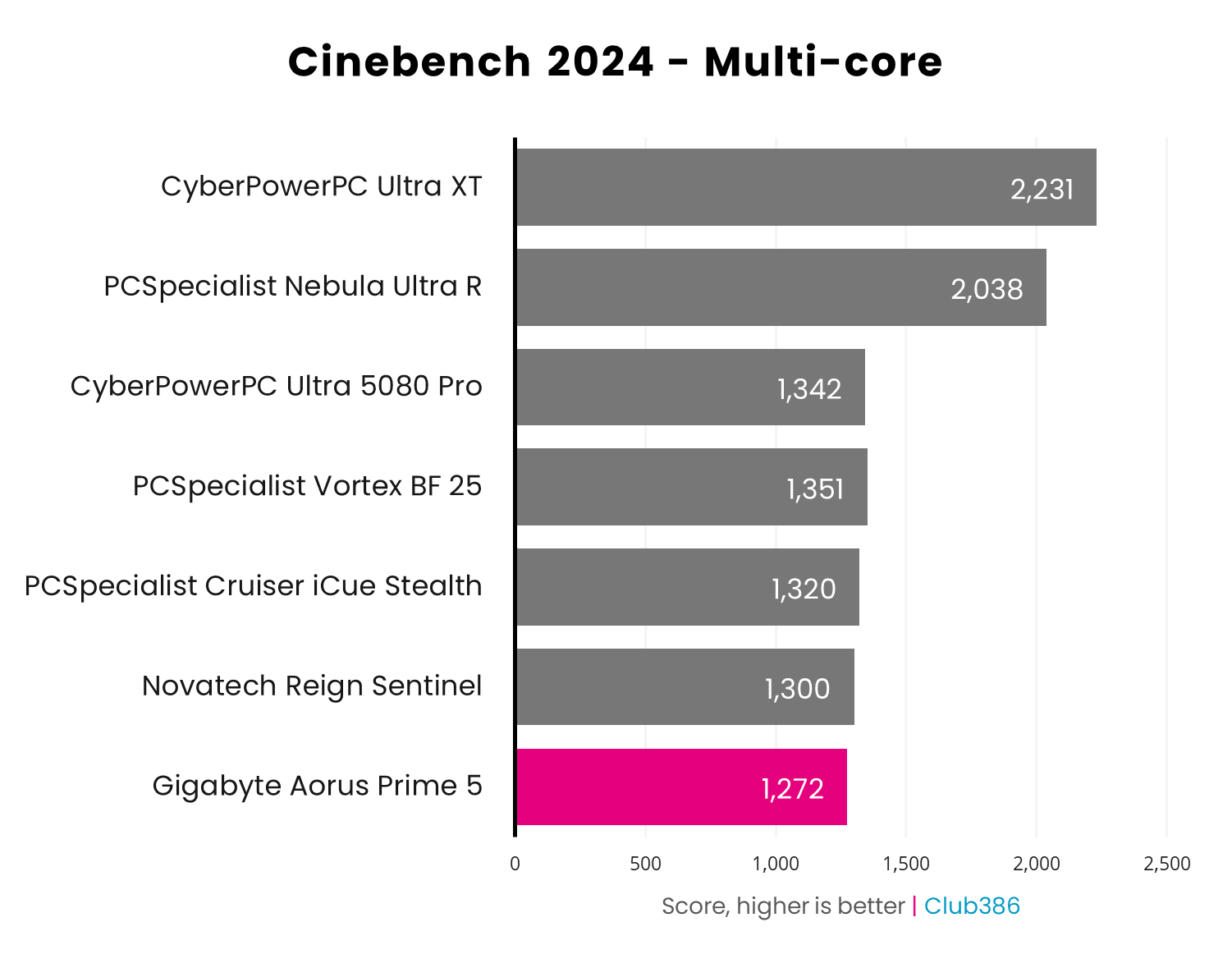
Swapping to Cinebench’s 2024 multi-core benchmark, the Aorus Prime 5 once again lands at the bottom of the chart but still turns in a solid performance with 1,272 points scored. We’re looking at differences of 28-70pts relative to similar systems, which aren’t worth sweating.
While a Ryzen 7 9800X3D will net you decent multi-core performance, both the CyberPowerPC Ultra XT (Ryzen 9 9950X3D) and PCSpecialist Nebula Ultra R (Core Ultra 7 265KF) demonstrate how much of a difference additional cores make in these workloads.
RAM
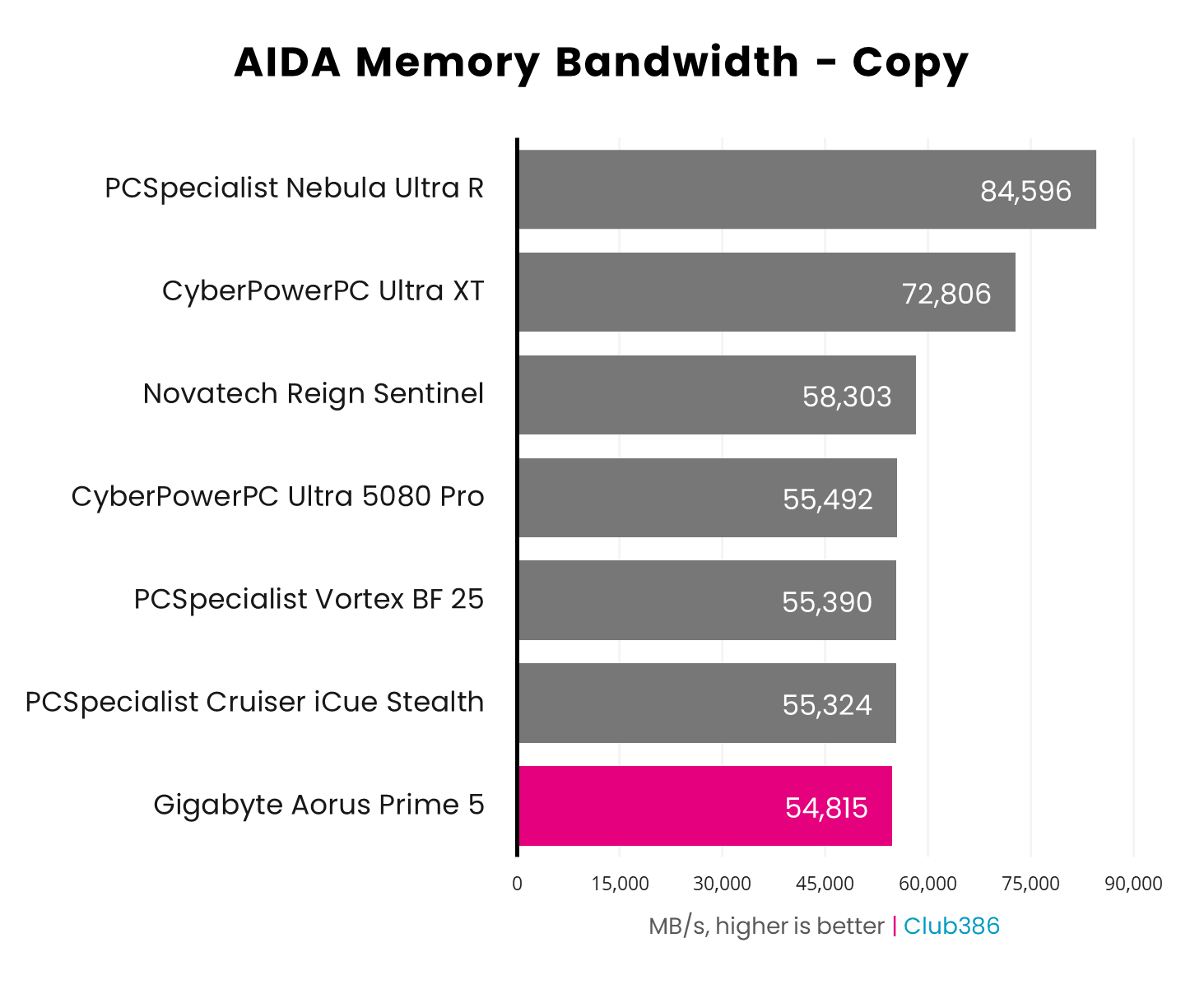
Memory copy performance is near-identical across the Ryzen 7 systems, with Aorus Prime 5 falling slightly below the 55,865MB/s average. It isn’t until you introduce more cores into the equation that scores notably increase, as the CyberPowerPC Ultra XT and PCSpecialist Nebula Ultra R demonstrate.
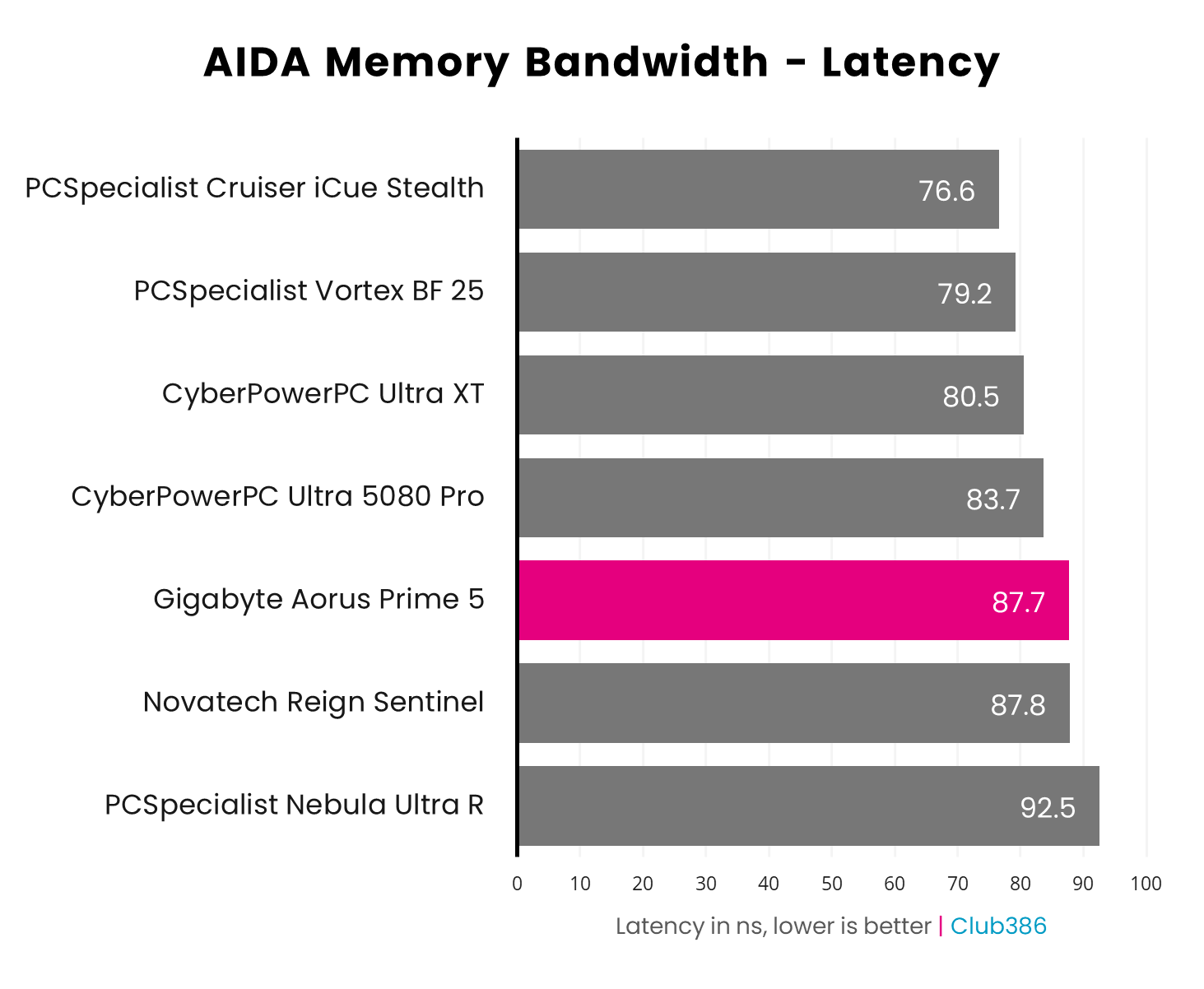
The Aorus Prime 5 expectedly falls towards the bottom of the chart for latency, side-by-side with the Novatech Reign Sentinel, which also features memory with CL40 timings. As this CAS figure tightens, latency improves on the Ryzen systems.
Meanwhile, the PCSpecialist Nebula Ultra R places dead last on account of Intel Arrow Lake’s typically poor performance in this area.
Storage
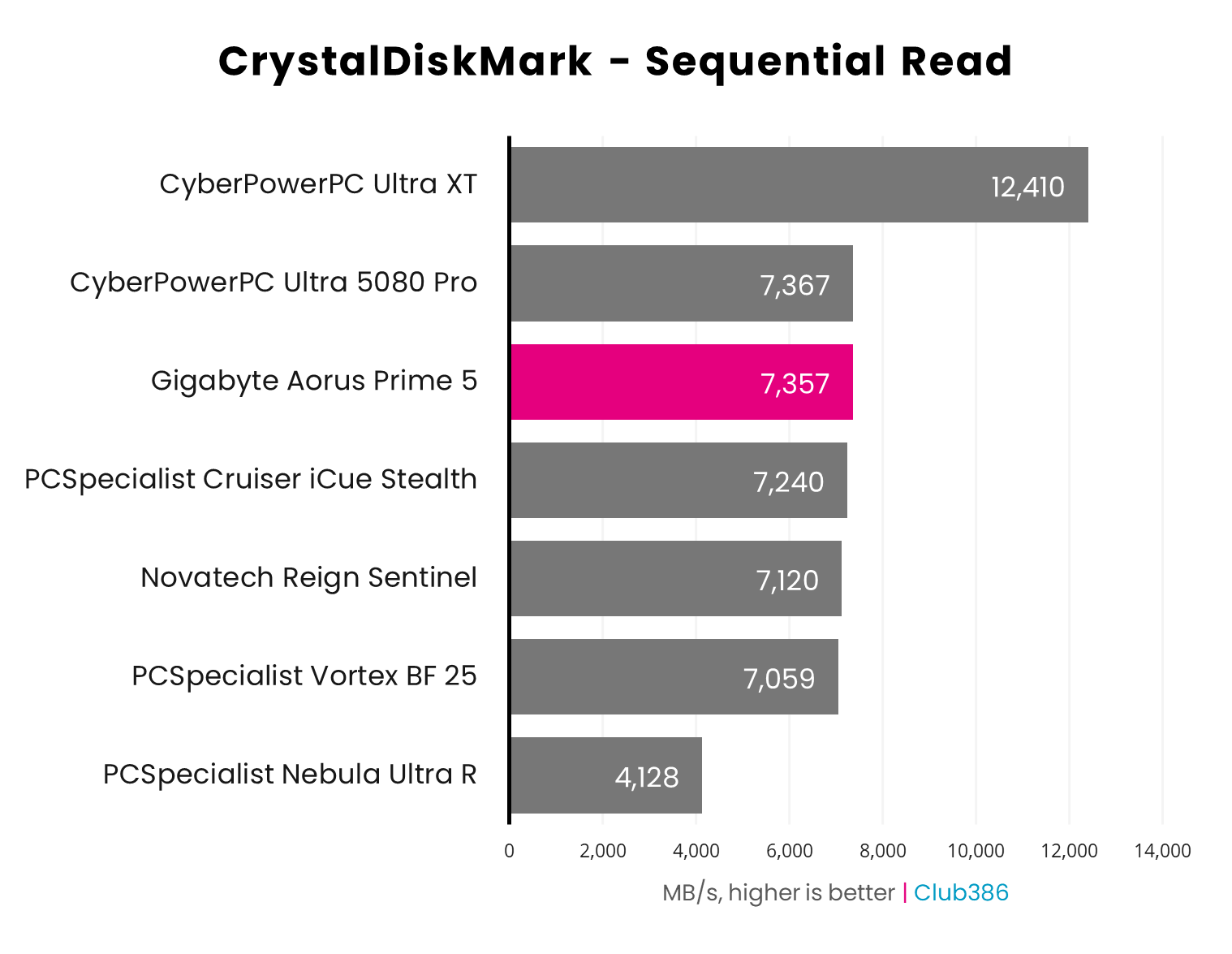
Hammering the Aorus Gen4 7300 2TB SSD via CrystalDiskMark sees the drive turn in expectedly high sequential read speeds of 7,357MB/s. That’s plenty of speed for file transfers, and this drive will have no trouble keeping down game load times and maintaining general operating system responsiveness.
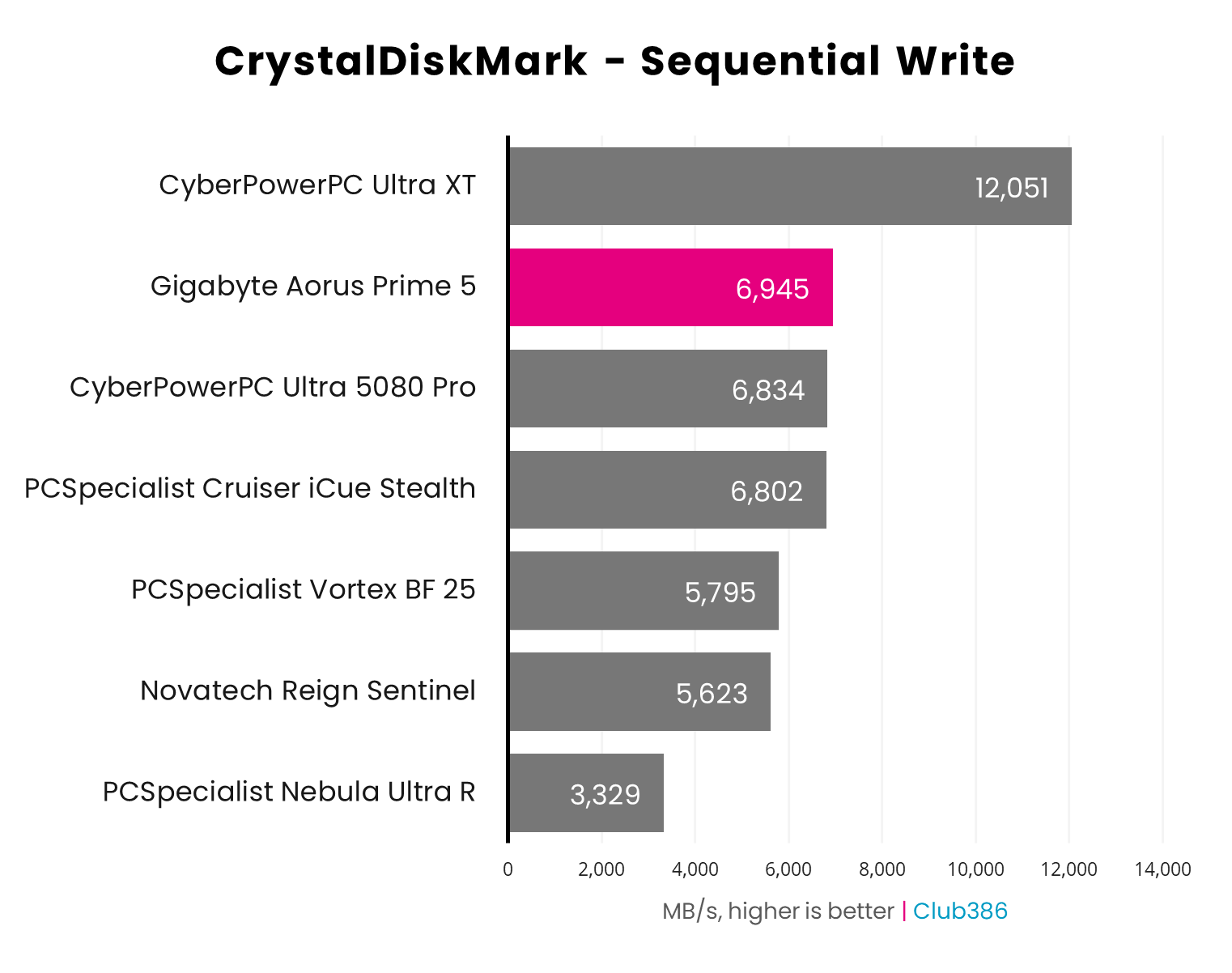
While the Aorus Gen4 7300 2TB is capable of hitting its advertised sequential write speeds, getting there proves difficult via CrystalDiskMark on account of operating temperatures. The drive was able to complete a single back-to-back run of read and write benchmarks before thermal throttling at 79°C.
The lack of a heatsink can hamper performance under extreme use, however the drive’s normal operating range is between 0°C and 70°C, providing sufficient headroom for regular workloads. Throttling wasn’t a problem while installing the hundreds of gigabytes our test suite demands, nor did it stifle gaming performance. The lack of passive cooling here still surprises me, though – adding a heatsink would improve the SSD’s lifespan through lower temperatures, as well as preventing throttling.
[Update – 24/03/26] In response to our review, Gigabyte tells me “we will be incorporating enhanced thermal designs for future high-speed models.”
Gaming
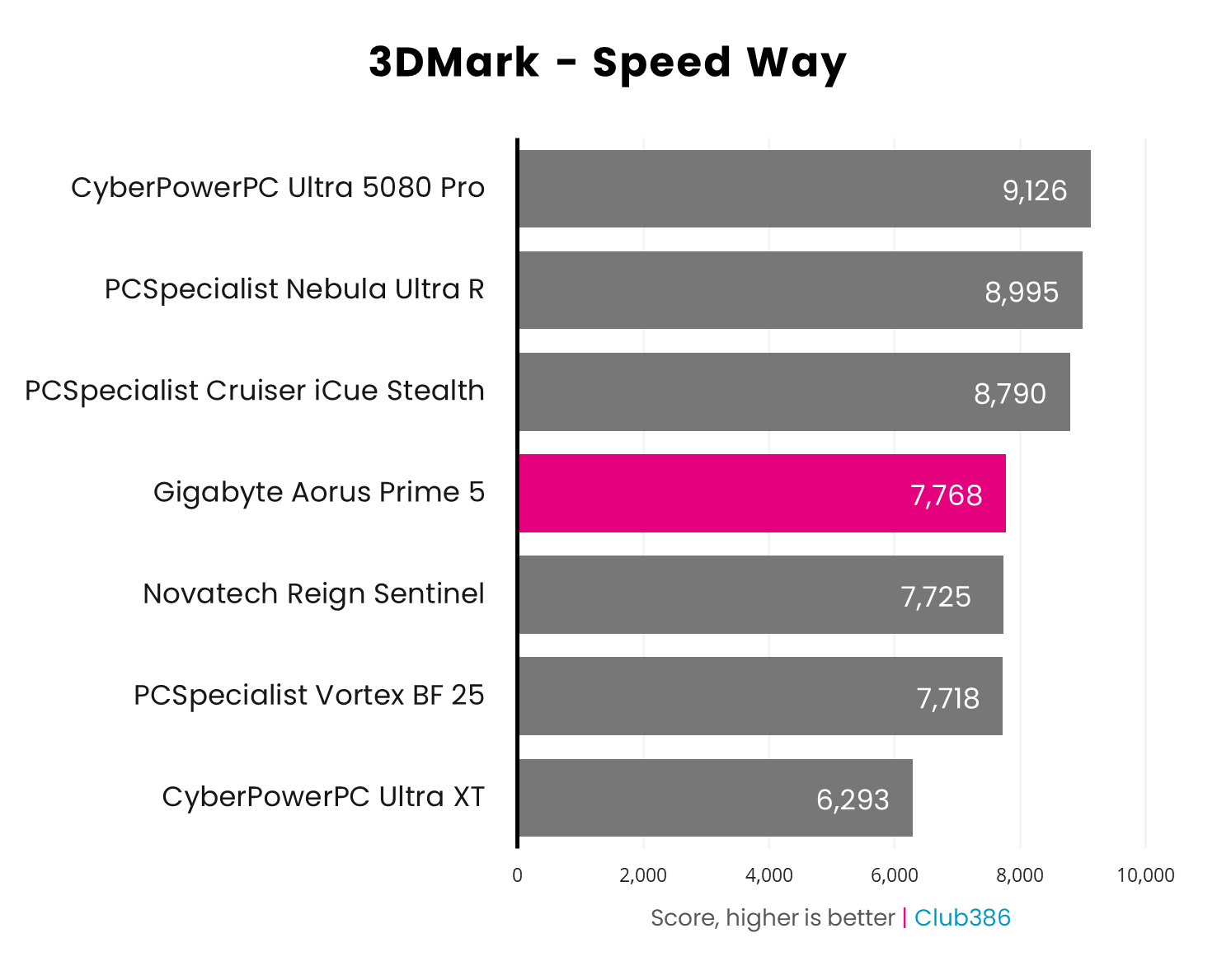
Turning up the pressure, the Aorus Prime 5’s RTX 5070 Ti manages a win over other systems with the same graphics card. That said, the gap is small against the Novatech Reign Sentinel (+43 points) and PCSpecialist Vortex BF 25 (+50 points), translating to less than a single frame in real terms.
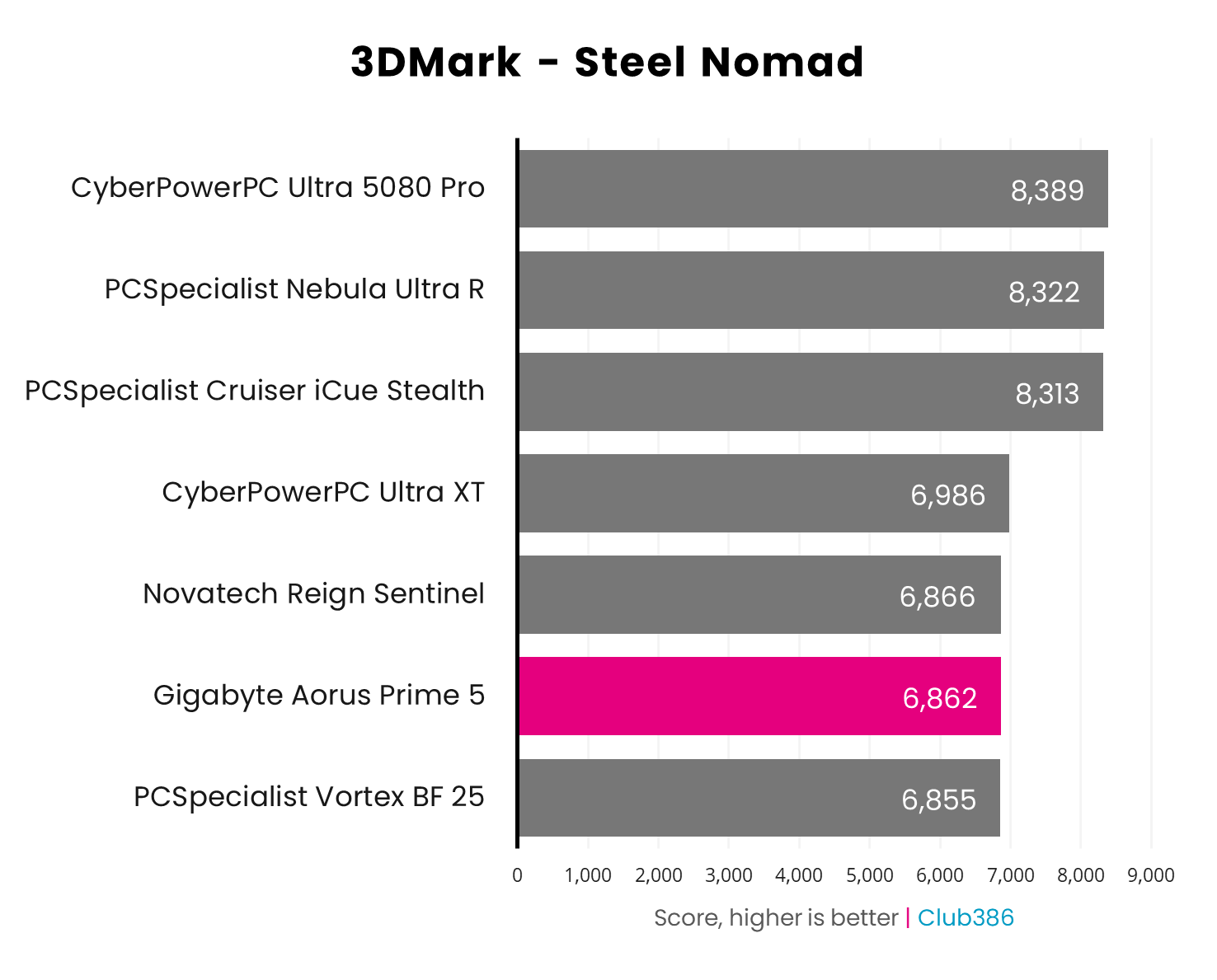
A 4K run of 3DMark Steel Nomad creates another close race between the Aorus Prime 5 and other RTX 5070 Ti systems. We’re looking at a ~69fps average, pointing to the system’s ability to run games at this lofty resolution at a push.
The GeForce RTX 5080 rigs expectedly race ahead, but the CyberPowerPC Ultra XT’s Radeon RX 9070 XT claims a slim victory against the RTX 5070 Ti cohort.
| Game | 1920×1080 (Min / Avg) | 2560×1440 (Min / Avg) | 3840×2160 (Min / Avg) |
|---|---|---|---|
| Assassin’s Creed Shadows | 54 / 64fps | 43 / 49fps | 29 / 33fps |
| Final Fantasy XIV: Dawntrail | 123 / 253fps | 118 / 185fps | 62 / 96fps |
| Forza Motorsport | 102 / 124fps | 74 / 91fps | 41 / 49fps |
| Mount & Blade II | 215 / 335fps | 186 / 254fps | 111 / 152fps |
| Rainbow Six Siege X | 254 / 338fps | 173 / 224fps | 89 / 118fps |
| Total War: Warhammer III | 89 / 131fps | 77 / 105fps | 43 / 62fps |
Running our entire test suite of games, the Aorus Prime 5 delivers expectedly strong gaming performance across all three resolutions.
Mount & Blade II and Rainbow Six Siege X demonstrate the power of a GeForce RTX 5070 Ti and Ryzen 7 9800X3D combo. The two components push frame rates in each game north of 300fps at FHD and even manage 100+fps at UHD, making for silky smooth experiences.
Total War: Warhammer III and Final Fantasy XIV: Dawntrail place a much heavier load on these components. Nonetheless, the CPU and GPU deliver triple-digit frame rates at FHD and QHD, and keep average performance above 60fps at UHD.
Forza Motorsport drives along at a welcomingly high 124fps at FHD and 91fps at QHD, even after revving up all its ray tracing effects. However, the ride gets bumpier at UHD with average frame rates falling to 49fps, but DLSS Super Resolution frees up some horsepower to get the game back up to over 60fps.
Assassin’s Creed Shadows is the most taxing game of all our benchmarks, as frame rates on the Aorus Prime 5 indicate. The system keeps ray-traced feudal Japan running at a steady 64fps average at FHD, but QHD and UHD stumble a little at 49fps and 33fps, respectively. Again, though, a splash of DLSS is all that’s necessary here to get the game back up to that 60fps threshold.
| Cyberpunk 2077 | 1920×1080 (Min / Avg) | 2560×1440 (Min / Avg) | 3840×2160 (Min / Avg) |
|---|---|---|---|
| Native | 49 / 56fps | 29 / 33fps | 14 / 15fps |
| DLSS 4 (Quality) | 85 / 95fps | 57 / 64fps | 30 / 34fps |
| DLSS 4 (Q) + FG x2 | 151 / 168fps | 101 / 112fps | 54 / 61fps |
| DLSS 4 (Q) + FG x3 | 218 / 241fps | 144 / 159fps | 79 / 87fps |
| DLSS 4 (Q) + FG x4 | 276 / 305fps | 183 / 203fps | 101 / 112fps |
Exploring the performance benefits of Nvidia DLSS 4 in more detail, I’m tagging in the path-traced cityscape of Cyberpunk 2077 in its Overdrive ray tracing mode. DLSS Super Resolution can salvage otherwise unplayable frame rates with minimal loss to visual fidelity, but these tools come with a few caveats.
Try as it might, the Aorus Prime 5 reasonably can’t natively hit 60fps frame rates at these settings. However, even DLSS ‘Quality’ brings both FHD and QHD above that threshold. UHD is further behind at 34fps, but that’s still more than double the system’s 15fps average prior to upscaling’s helping hand.
The GeForce RTX 5070 Ti, like other Blackwell graphics cards, supports multi frame generation. Turning on the feature allows frame rates to skyrocket, up to 305fps at FHD. This greatly boosts motion clarity but at a small cost to latency, as the rendering pipeline interpolates generated frames between normal rendered ones.
It’s important to stress that frame generation, single or multi, requires a solid base frame rate from which to build, in order to keep latency in check. I recommend ~60fps at a minimum, making the DLSS ‘Quality’ frame rate at 4K unworkable, but dropping to the upscaler’s Balanced or Performance preset does mitigate this limitation.
Vitals
The Aorus Prime 5 makes an exceptionally positive impression when it comes to acoustics. Sitting idle, the system hums along at ≤30dBA, too quiet for my sound meter to pick up.
Even under load, the PC keeps itself impressively quiet. Cinebench 2024 saw noise levels rise to a more than tolerable 37dBA, with a gaming load only pushing this value up to 38dBA.
| Idle | Load (Max) | |
|---|---|---|
| CPU temperature | 40°C | 70°C |
| GPU temperature | 41°C | 71°C |
| Noise | ≤30dBA | 37-38dBA |
| Power consumption | 92W | 203-402W |
Such low noise levels initially had me concerned for the Aorus 5’s operating temperatures, but Gigabyte hasn’t dropped the ball here. Idling at 40-41°C and peaking at 70-71°C under load, there’s no danger of thermal throttling here.
In terms of power consumption, the system pulls a reasonable amount of ‘leccy from the wall, peaking at 402W. That’s ~25W more than other 9800X3D/RTX 5070 Ti systems we’ve tested, but more than reasonable for these specifications.
Conclusion
From a performance standpoint, Gigabyte’s Aorus Prime 5 delivers on the promise of its components. The RTX 5070 Ti and Ryzen 7 9800X3D make for a mighty combination, pumping out sky-high frame rates at FHD that are ideal for esports gamers. However, I’d sooner put the system to work with a higher pixel count, as there’s enough performance here to enjoy the splendours of QHD and even some gaming at 4K.
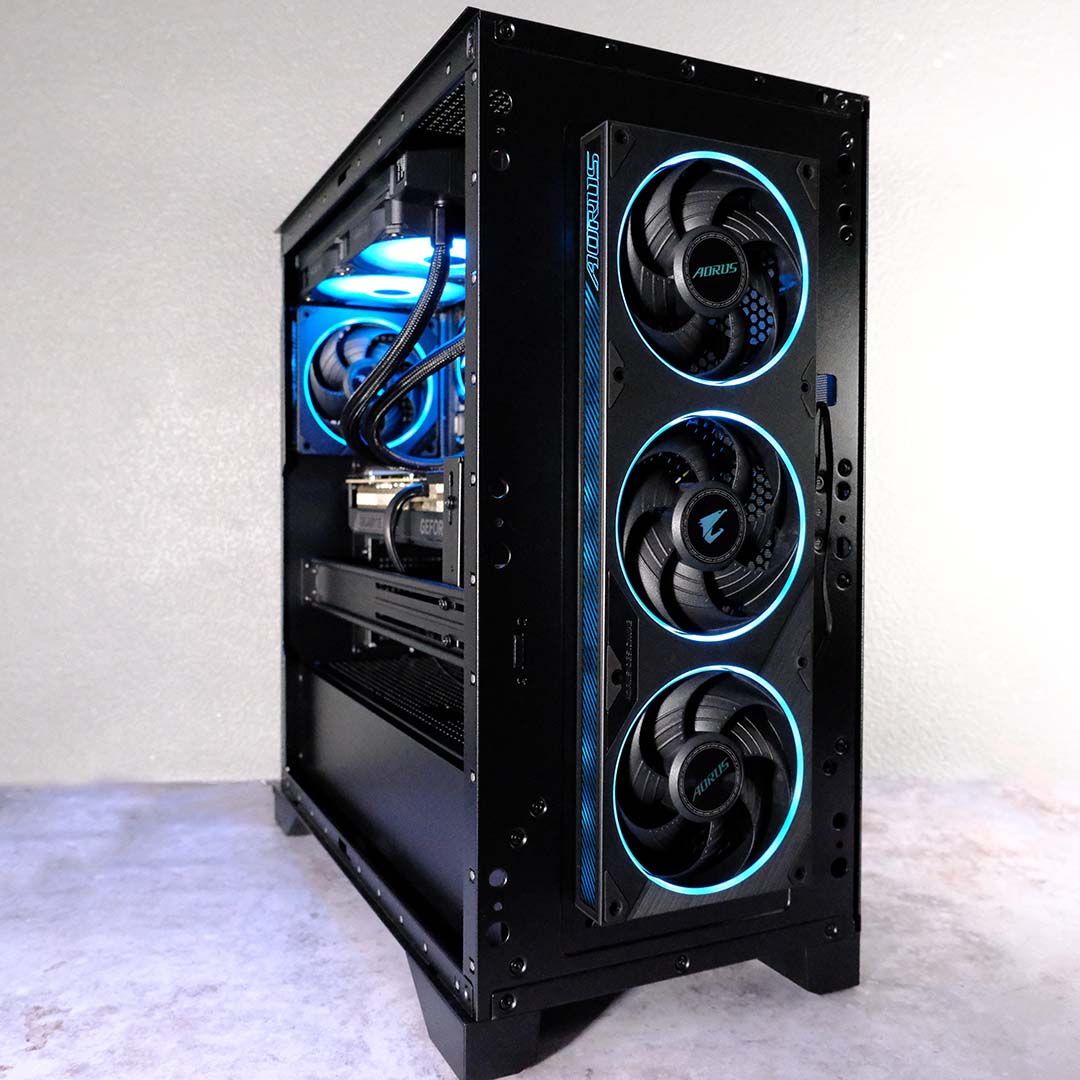
Gigabyte delivers impressive thermal and acoustic performance too, as the system purrs along without much heat or noise under load. I wish I could say this applies across the build, but SSD operating temperatures stick out like a sore thumb.
However, it’s price that weighs the Aorus Prime 5 down most of all. At £2,799, it’s difficult to suggest outright purchasing the system when there are better-value alternatives for the taking if you know where to look. Still, this is a quiet and fast gaming PC that’s worth shortlisting, as component availability and costing remain very much in flux.
