
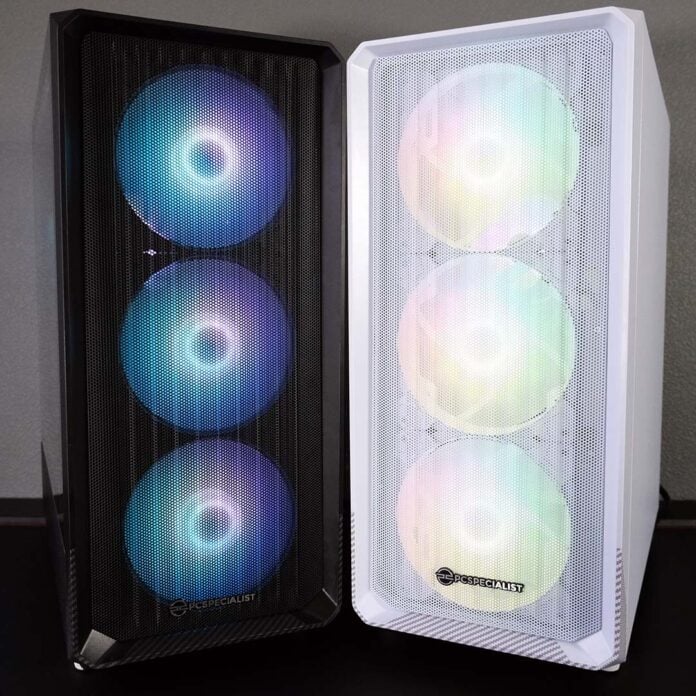
Deciding between DDR5 and DDR4 RAM for your next, or first, system can feel difficult without knowing how much of a performance difference there is between the two types of memory. Should you spend more cash on the newer, faster standard or scoop up a high-value hero by going with older memory, particularly if you already have some of the latter? Through a showdown of two PCSpecialist gaming rigs, I intend to shed some light on just how much of a difference you can expect.
Comparing DDR5 and DDR4 sounds simple on paper, but you can’t chop and change between memory standards as you like across motherboards and processors. It’s important to remember that, when you’re choosing between either RAM type, you’re also buying into different ecosystems.
Intel LGA1700 processors are a rare exception to this rule, supporting both DDR4 and DDR5 RAM, but you’ll need specific motherboards for each standard. In the case of AMD, no such cross-compatibility exists, as its older AM4 socket exclusively uses DDR4 while the newer AM5 platform is only compatible with DDR5.
In my case, I’m testing two mid-range AM4 and AM5 gaming PCs in a DDR5 vs. DDR4 showdown. So, without further ado, let’s meet the rigs.
Specs
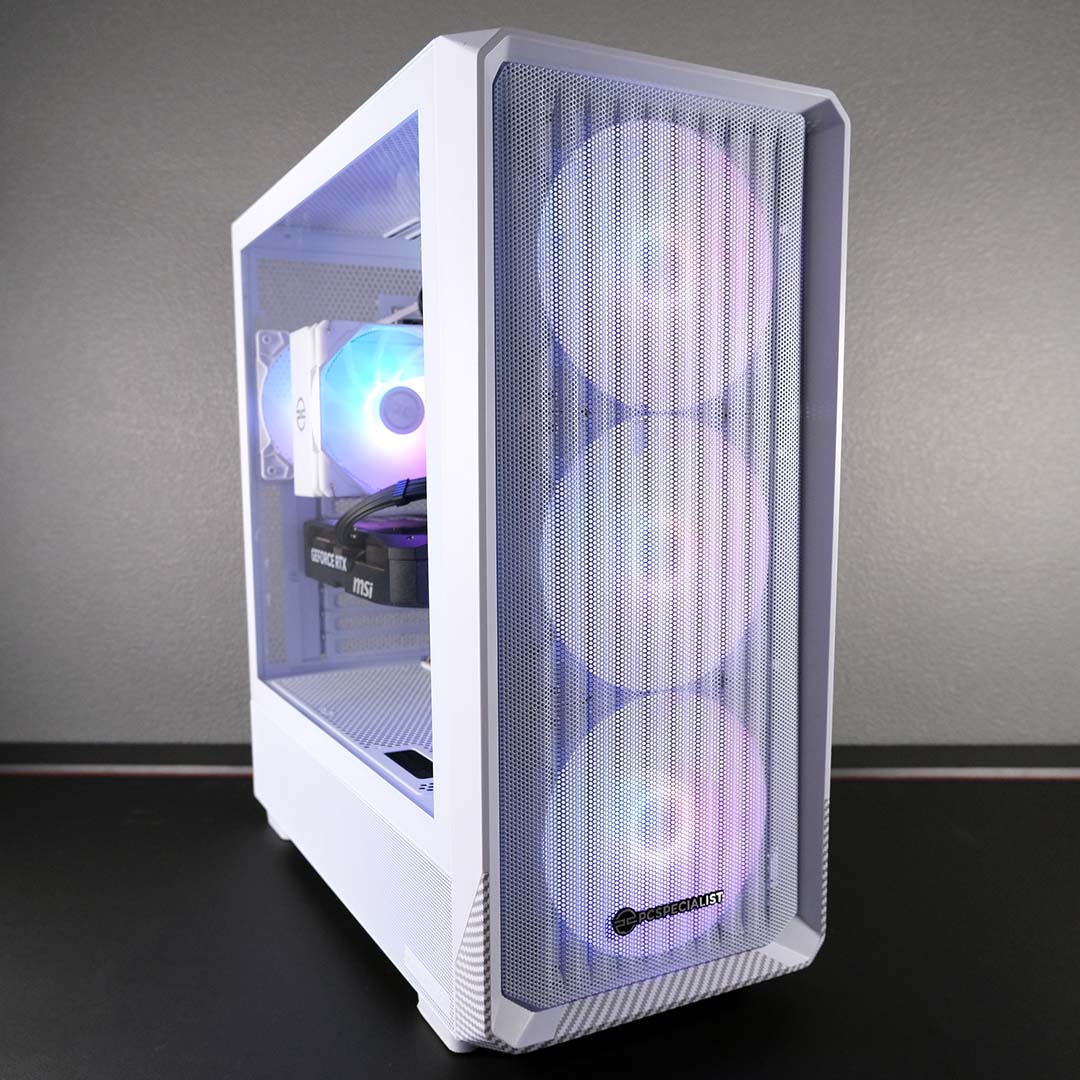
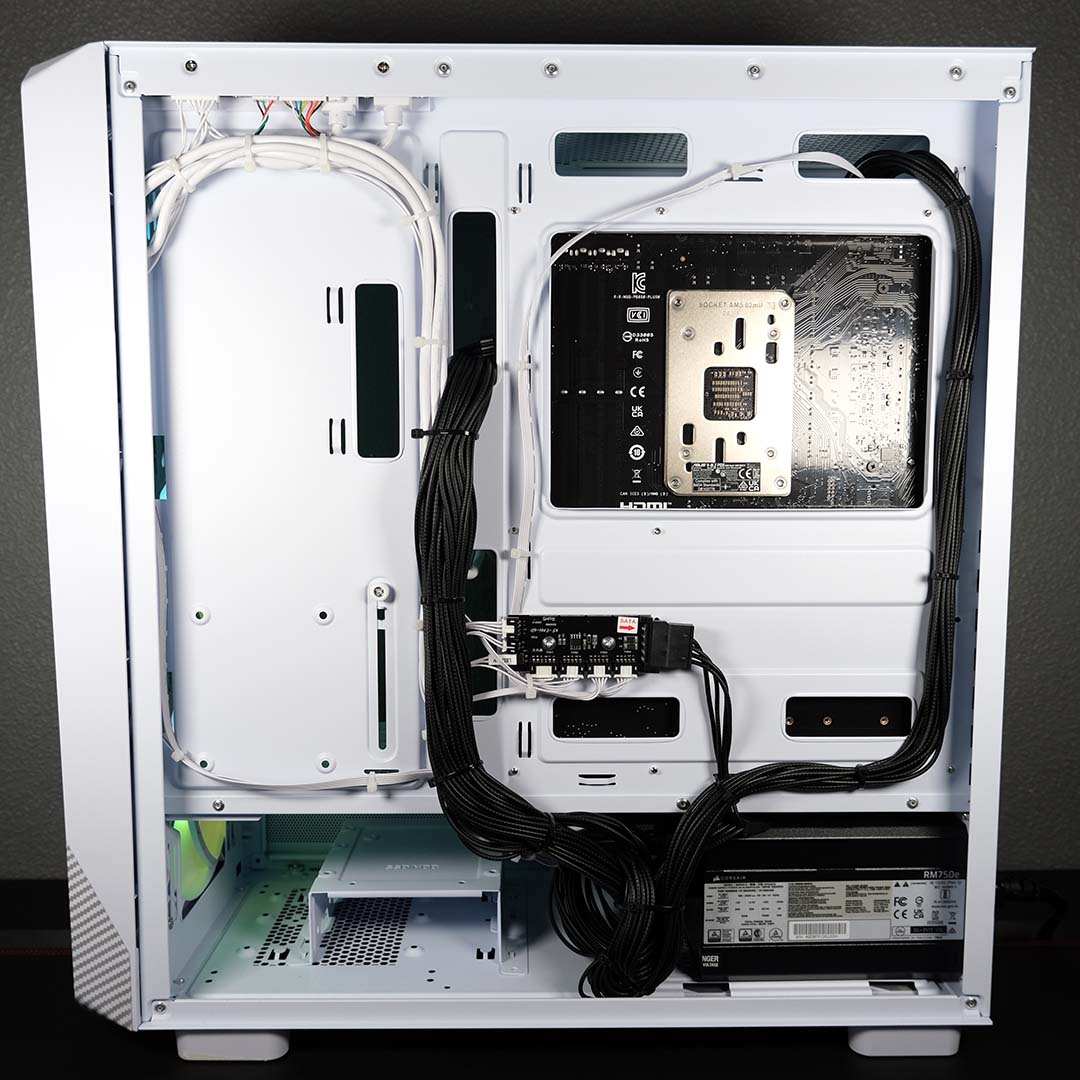
First up, in the white chassis, is a PCSpecialist Spectrum Pro. This system sports a Ryzen 7 9700X with eight Zen 5 cores, 16 threads, and a 5.5GHz maximum boost clock. These specifications offer plenty of processing power for general computing and gaming, not forgetting the IPC (instructions per clock) advantages that the Zen 5 CPU architecture affords the chip relative to older alternatives.
In the Spectrum Pro, I have 32GB of dual-channel 6,000MT/s DDR5 CL30 RAM, an ideal pair of spacious and speedy sticks for a Ryzen 7 9700X. Unfortunately, this configuration is no longer available for purchase, but PCSpecialist is able to provide a near-identical system with a single 32GB stick using the same speed and timings.
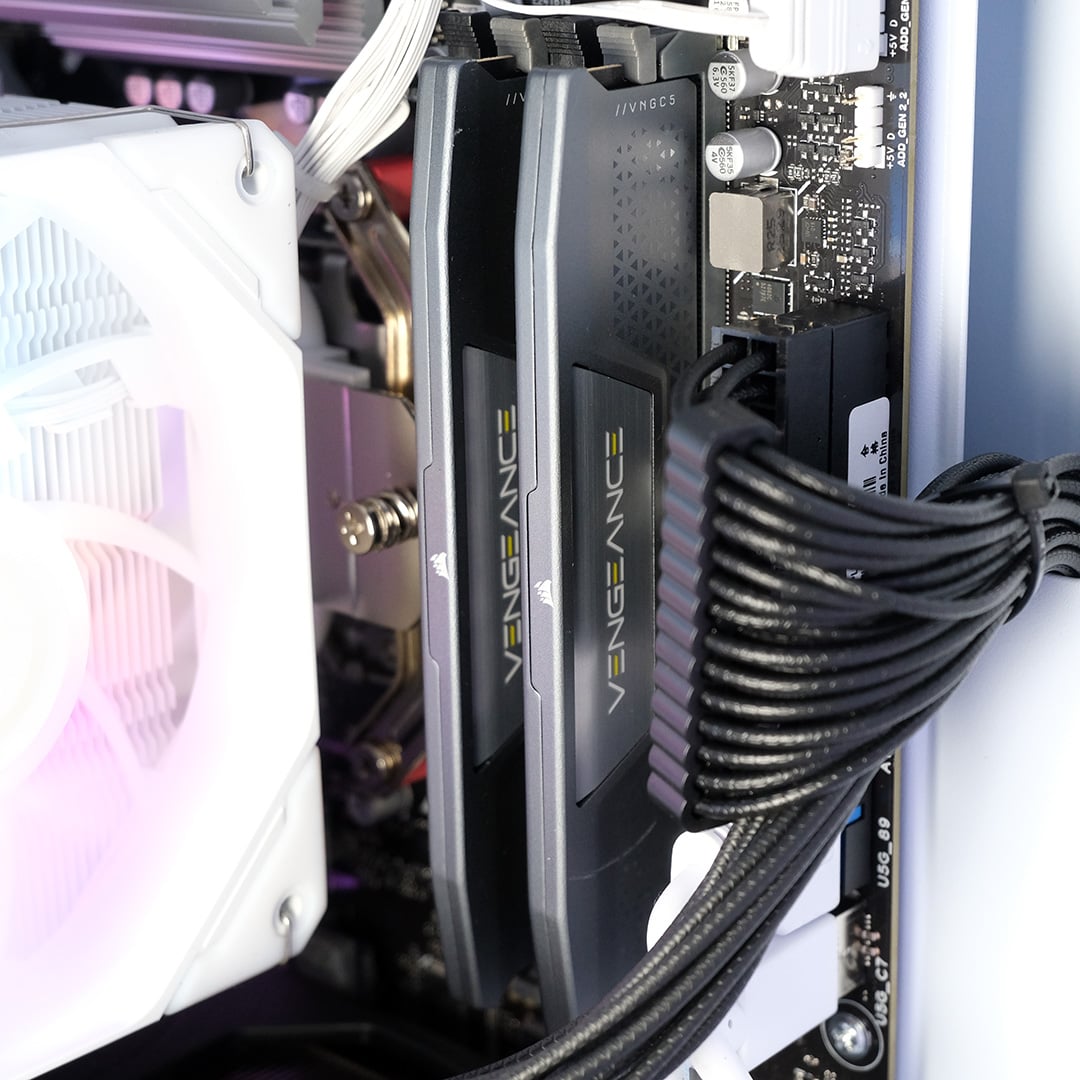
When I asked about the discrepancy here, and RAM availability more broadly, PCSpecialist provided the following statement to Club386:
“Due to the global shortage in DRAM, maintaining consistency in supply is proving difficult across the industry. We are working closely with our partners to ensure minimal disruption and we thank our customers and community for their patience during this period.”
Availability of DDR5 RAM is as volatile as its cost, making such stock issues a problem across the entire consumer market. Whether you’re purchasing a pre-built PC or looking to assemble a system yourself, these issues are omnipresent with no sign of letting up anytime soon.
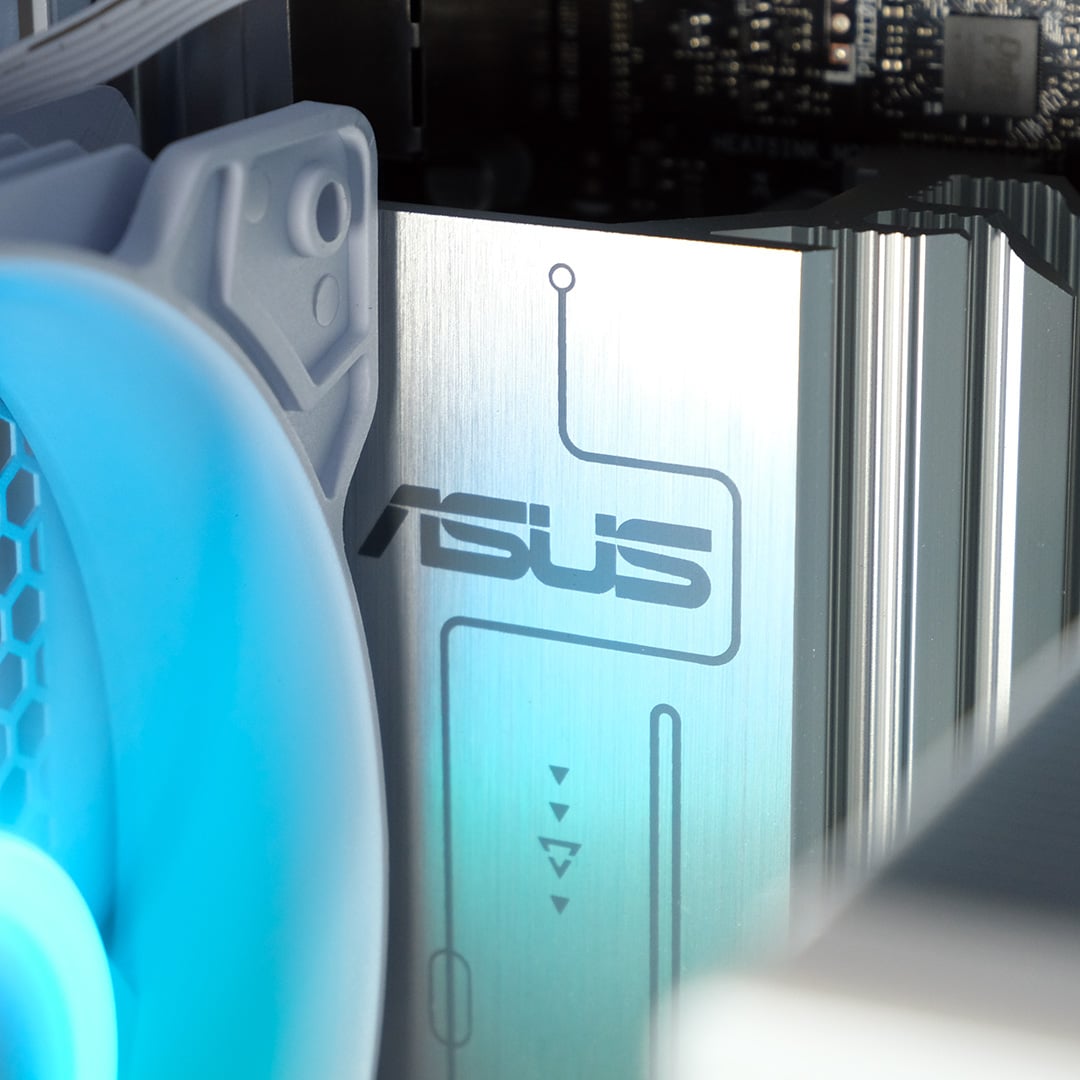
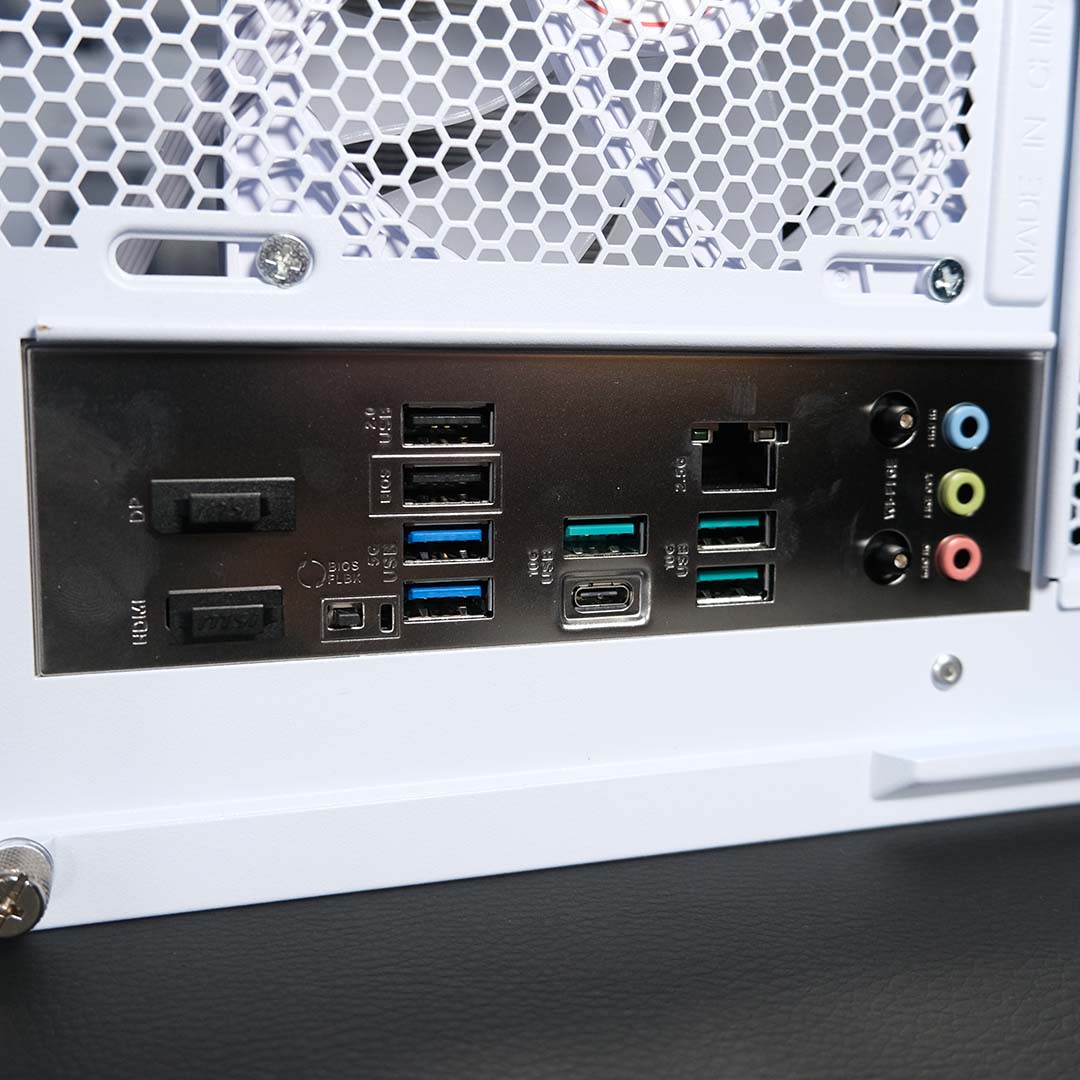
Finally, the last unique component inside the Spectrum Pro is its motherboard, an Asus Prime B850-Plus WiFi. This entry-level board still supports the latest PCIe Gen 5 interface, as well as speedy networking via 2.5Gb Ethernet and built-in Wi-Fi 6E.
There’s a healthy number of USB ports round back too, with three 10Gb USB-A sockets, a single 10Gb USB-C, two 5Gb USB-A, and another two 480Mb USB-A connectors. Suffice to say, you won’t be short on ports for your peripherals here.
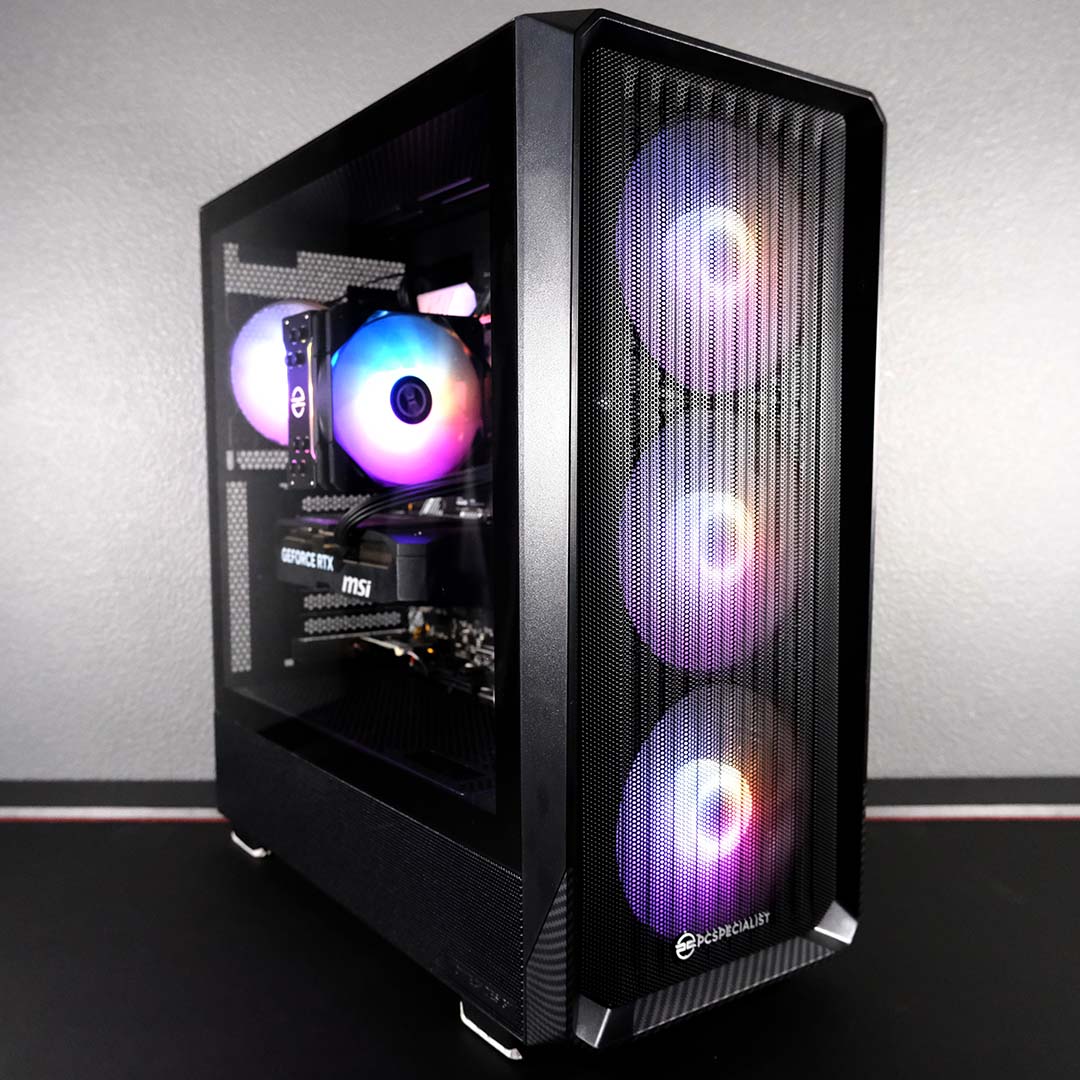
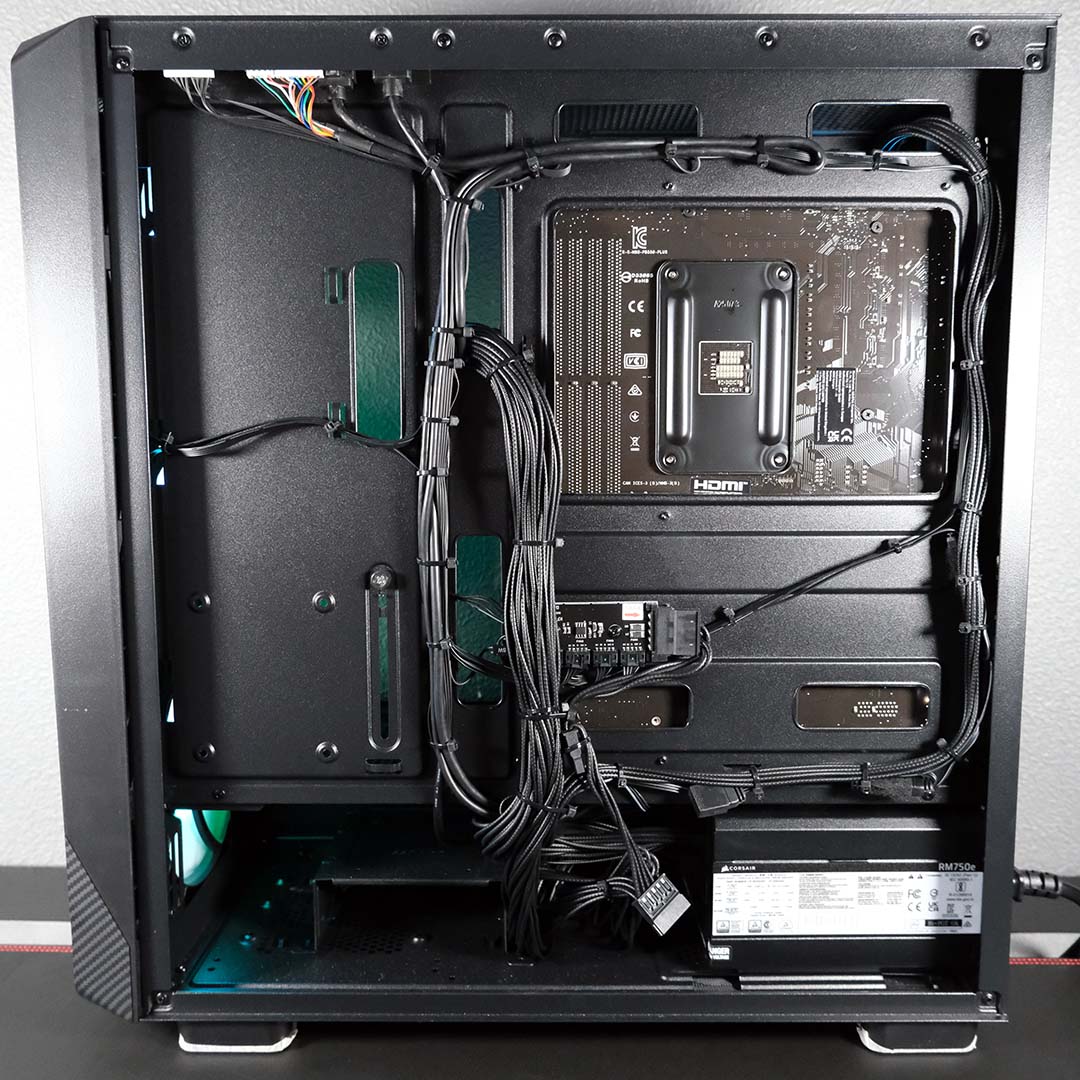
In the other corner, dressed in black, we have the PCSpecialist Spectrum Elite. This PC houses a Ryzen 7 5700X, arriving with the same core and thread count as AMD’s 9700X but with a few key differences. Firstly, its eight Zen 3 cores are two generations older than AMD’s current Zen 5 chips, meaning we should expect a decrease in IPC. The maximum boost clock of this CPU is also much lower, at 4.6GHz, which will hamper relative single-threaded performance.
Riding alongside the Ryzen 7 5700X is 32GB of dual-channel 3,200MT/s DDR4 CL16 RAM, making for another ideal partnership between memory and processor. This type of RAM is comparatively more affordable than DDR5, as demand for DDR4 is far lower, but production volume is smaller as a result, not forgetting the age of the standard.
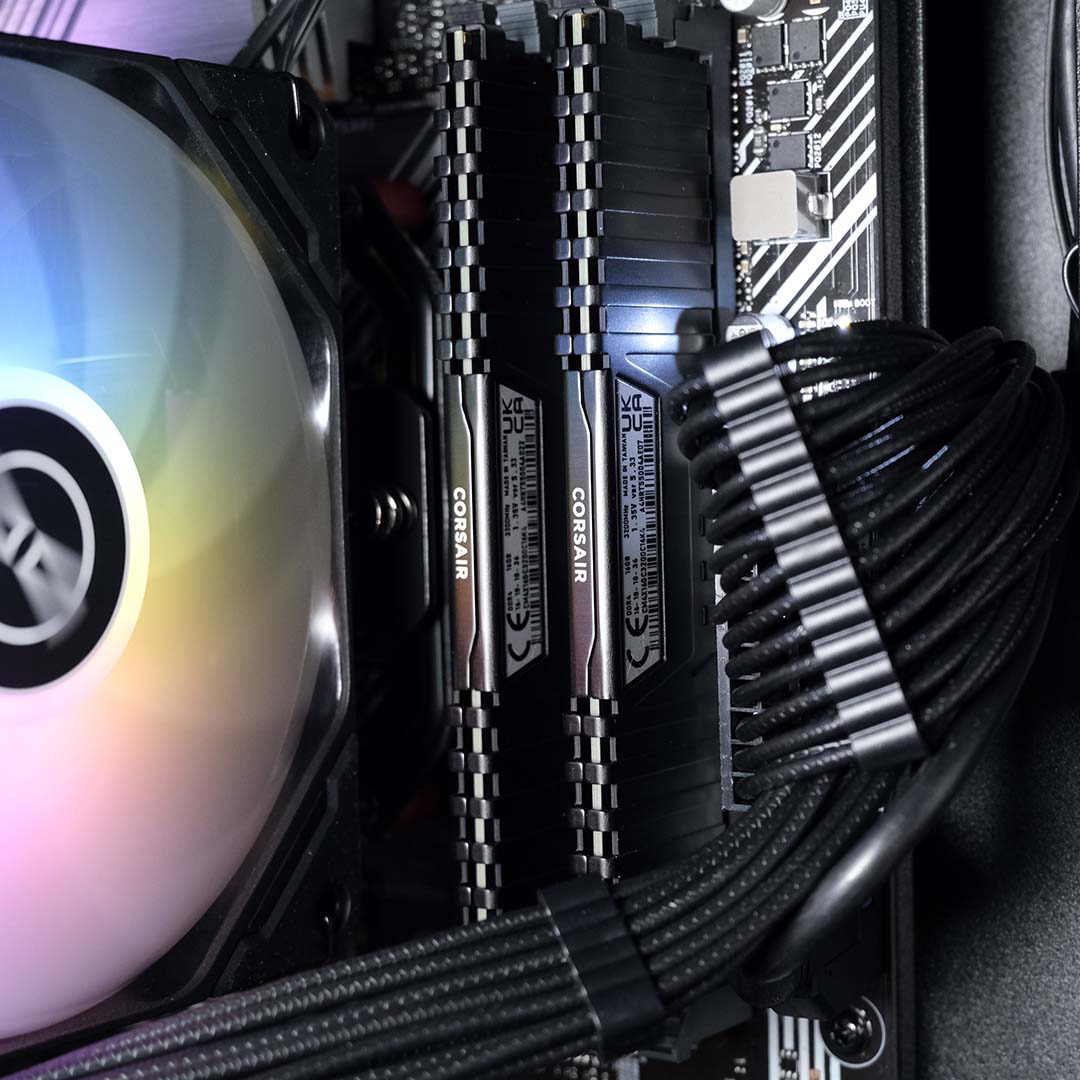
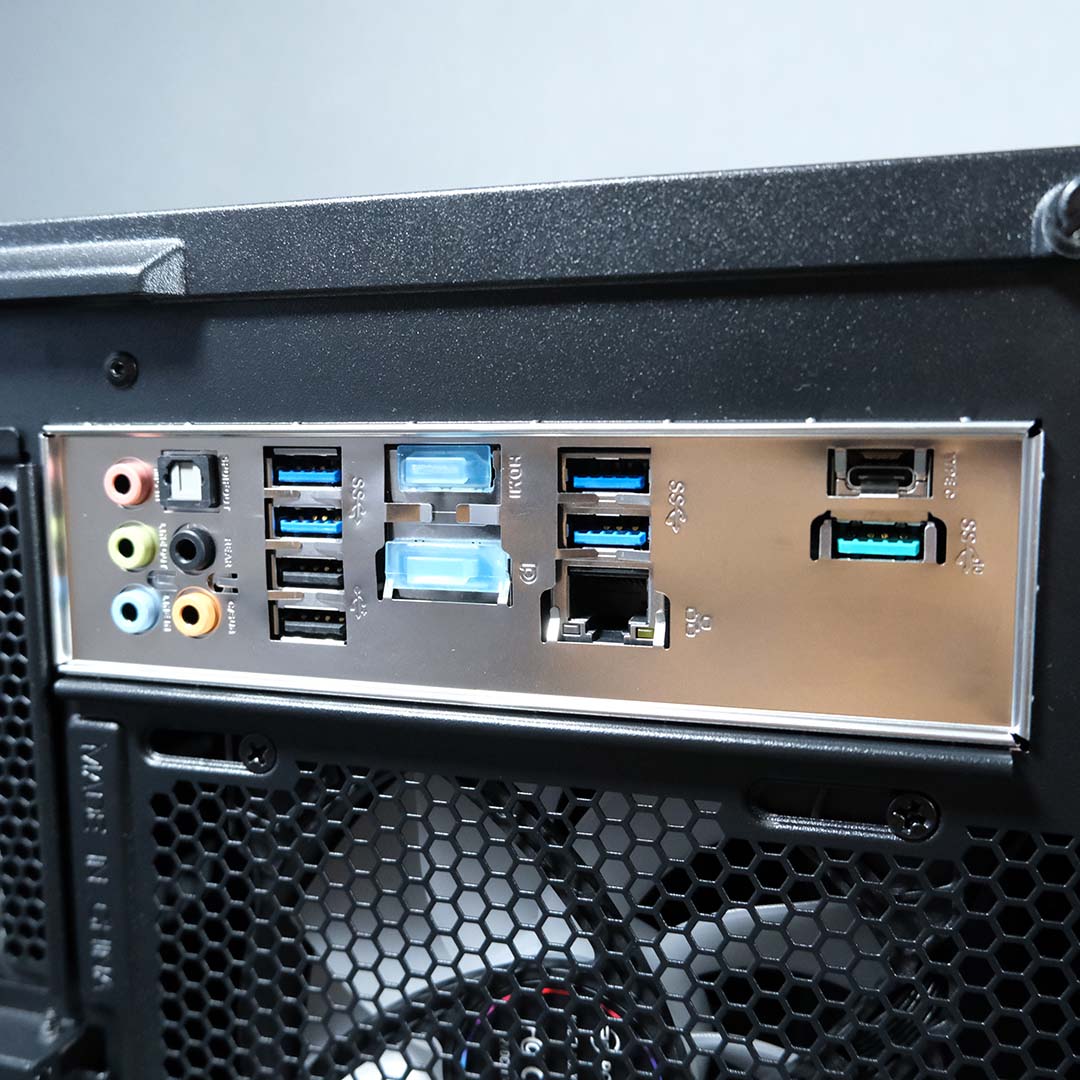
An Asus Prime B550-Plus motherboard forms the bedrock of our DDR4 system. This is another entry-level board, and its lack of PCIe Gen 5 betrays its age, but it’s still a solid choice for a value-focused AM4 build. There’s no Wi-Fi adaptor integrated into this board, but PCSpecialist thankfully circumvents this omission by providing a separate Wi-Fi 6E card that plugs into one of the PCIe expansion slots.
This older platform also shows its age through a shrunken palette of USB connections. This collection includes a 10Gb Type-C port, four 5Gb Type-A connectors, and two 480Mb Type-A sockets. That’s still a decent selection for a modern collection of peripherals, but one that’s decidedly slower and easier to fill than our AM5 system.
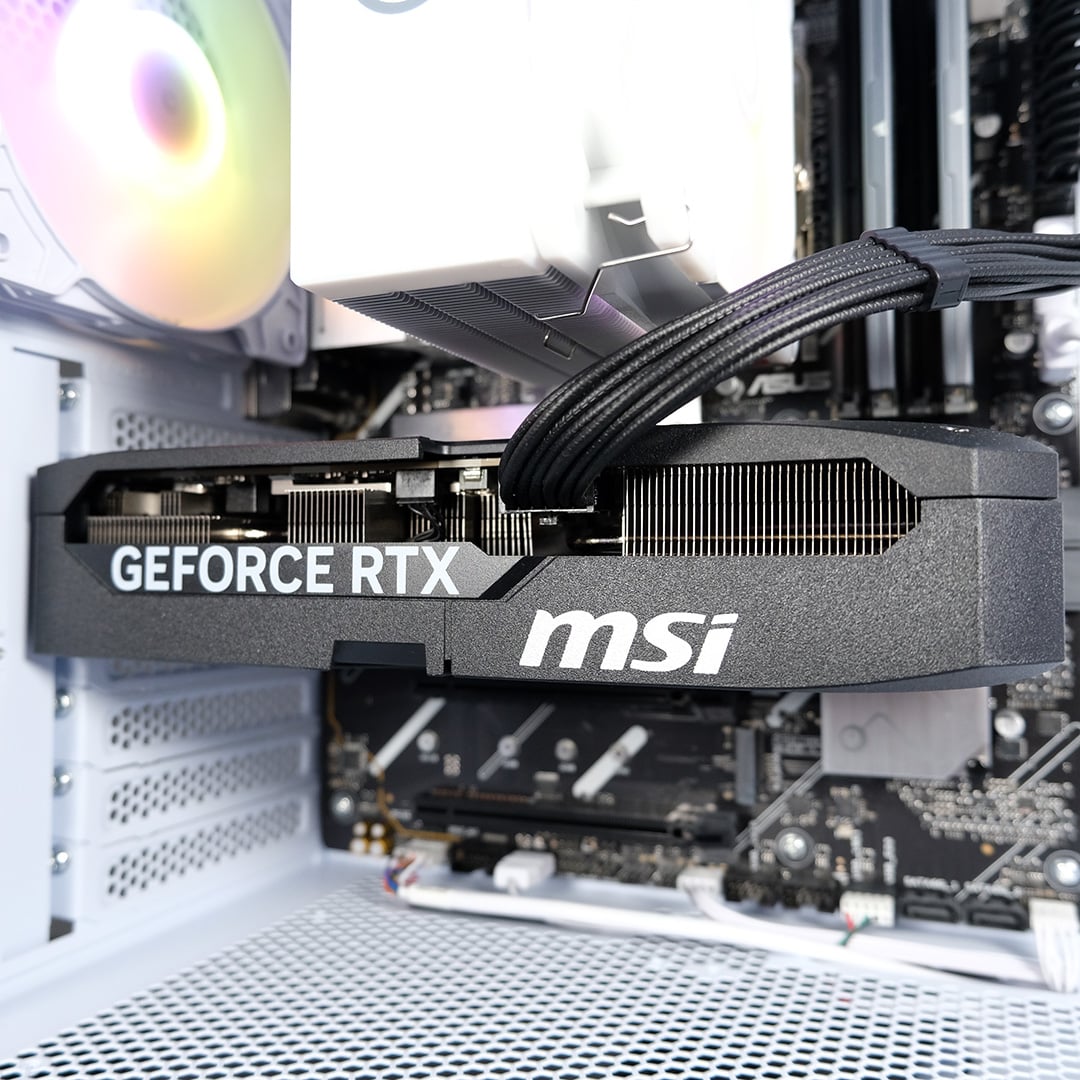
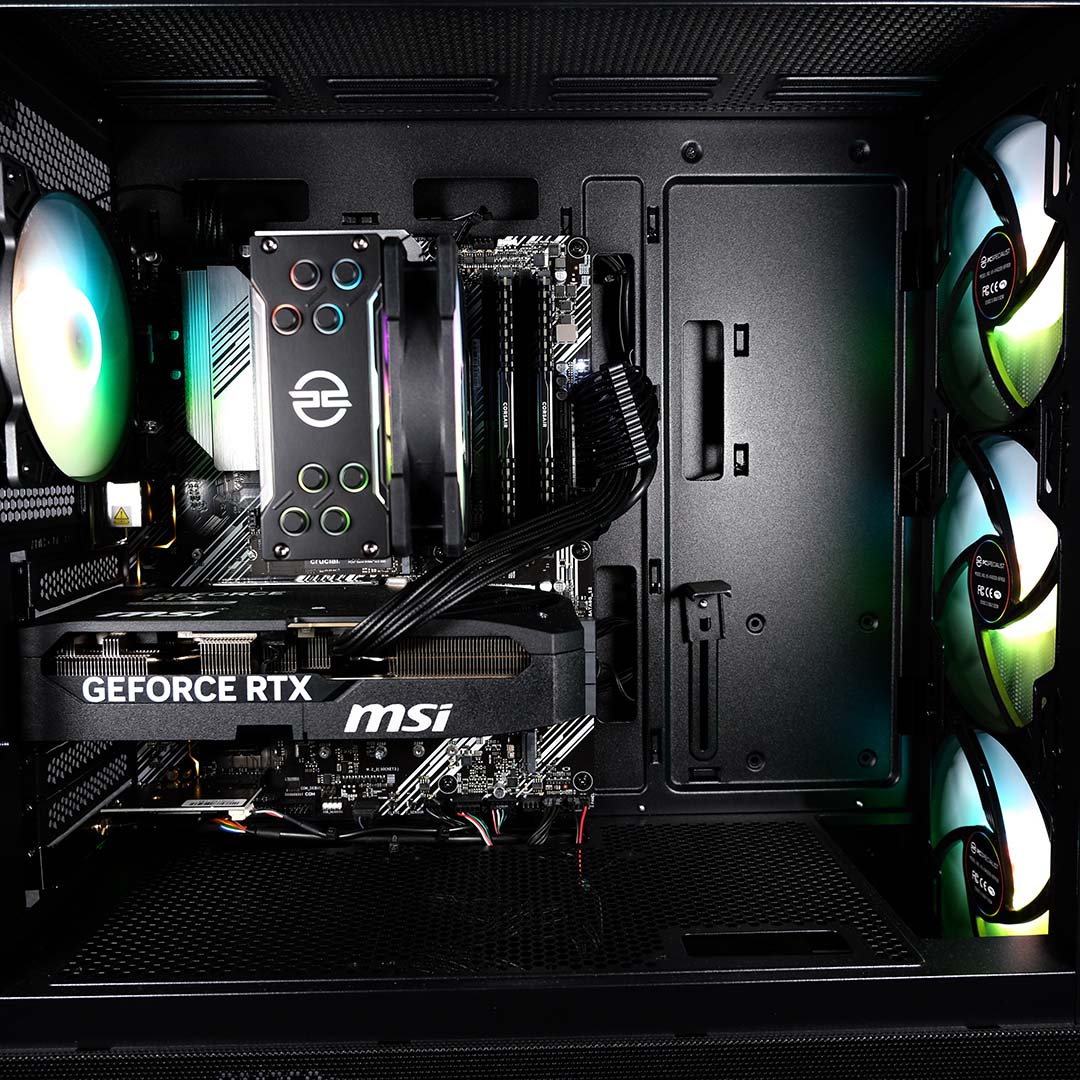
Outside of the aforementioned components I’ve highlighted, the two systems are otherwise identical. Both PCs feature an MSI GeForce RTX 5070 Shadow 2X OC graphics card, a petite example of Nvidia’s mid-range pixel pusher that doesn’t sacrifice any performance, despite its small footprint. Some will prefer a flashier cooler, but I’m happy with the subtle matte black stylings and dual-fan setup.
Without getting too ahead of myself, a more-powerful graphics card would unveil more acute differences in processor and platform performance. However, even with a mainstream offering like this under the wings of each PC, differences are readily apparent in a number of gaming benchmarks.
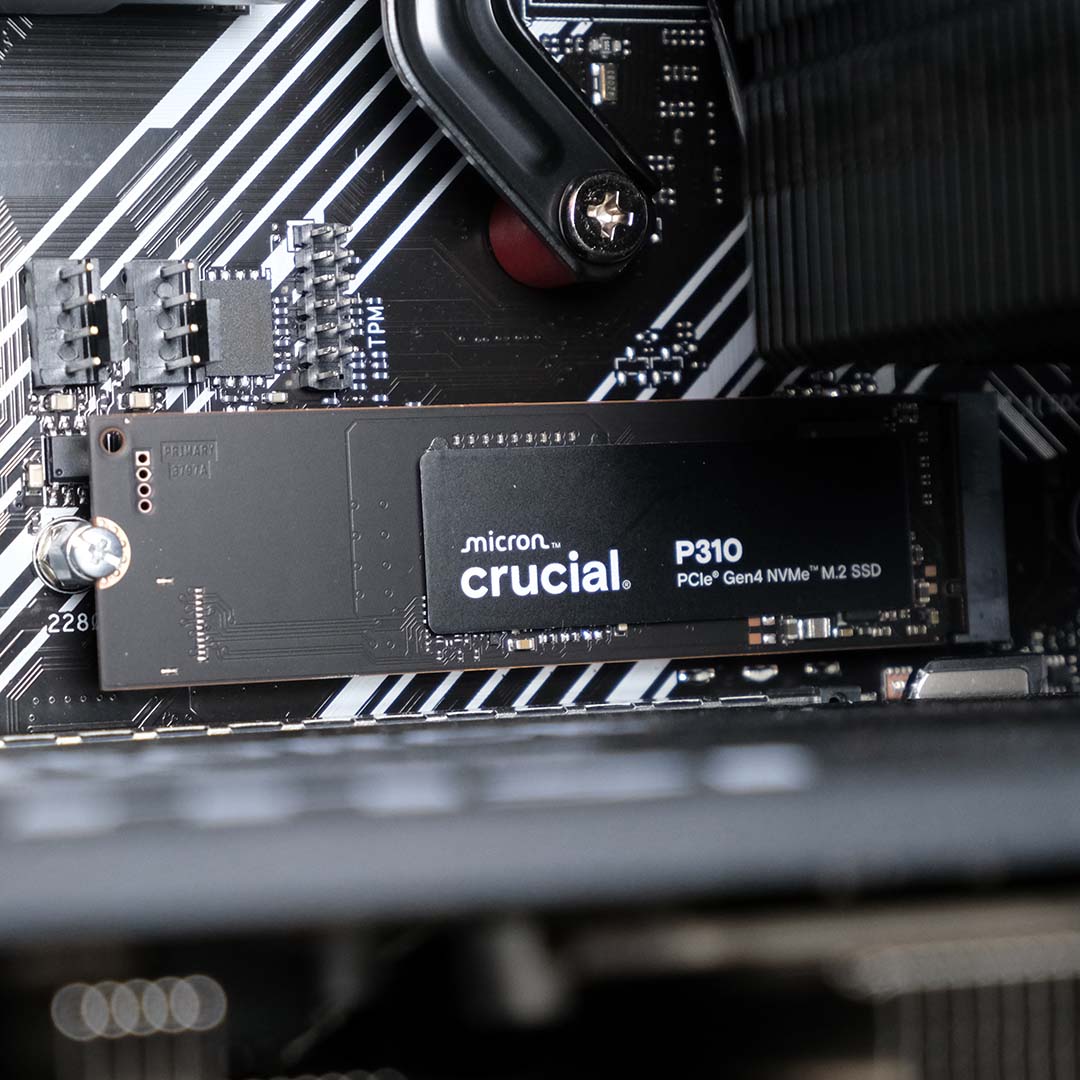
Storage duties fall to a 1TB Crucial P310. This is a PCIe Gen 4 drive, so both systems should be able to unlock the full read and write speed of the SSD without issue. Note, if we had a Gen 5 M.2 drive in play, the DDR4 PC would still be able to use it (as its M.2 ports only support PCIe Gen 4), but at half its rated throughput, while the DDR5 system would enjoy it without compromise.
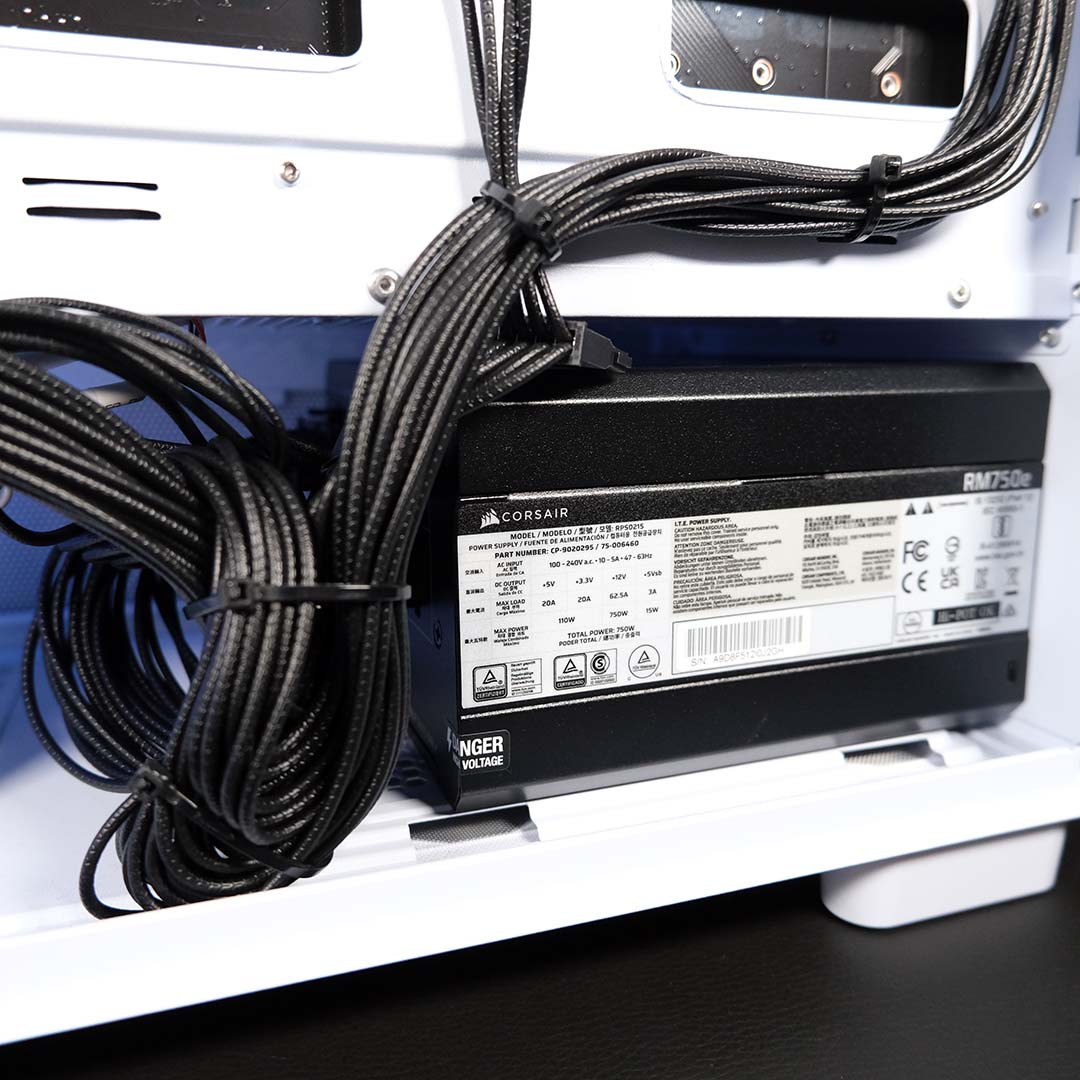
Finally, a Corsair RM750e power supply sates each PC’s appetite for watts. This fully modular PSU makes for a tidy setup, as PCSpecialist’s excellent cable management shows. More importantly, we have access to a native 12V-2×6 cable for our RTX 5070, and efficient power delivery to the tune of Cybernetics Gold certification.
I appreciate that was a lot to digest, so here’s a specifications table featuring the two PCSpecialist systems:
| Spectrum Pro | Spectrum Elite | |
|---|---|---|
| CPU | AMD Ryzen 7 9700X | AMD Ryzen 7 5700X |
| Motherboard | Asus Prime B850-Plus WiFi | Asus Prime B550-Plus |
| RAM | 32GB (2x16GB) 6,000MT/s DDR5 CL30 | 32GB (2x16GB) 3,200MT/s DDR4 CL16 |
| CPU cooler | PCS IceFlow White 100 ARGB | PCS FrostGlow 100 ARGB V3 |
| GPU | MSI GeForce RTX 5070 Shadow 2X OC | MSI GeForce RTX 5070 Shadow 2X OC |
| SSD | 1TB Crucial P310 | 1TB Crucial P310 |
| PSU | Corsair RM750e | Corsair RM750e |
| Other features | 2.5Gb Ethernet Bluetooth 5.3 PCIe Gen 5 Wi-Fi 6E | 1Gb Ethernet Bluetooth 5.3 PCIe Gen 4 Wi-Fi 6E |
| Case | PCS Spectrum III White ARGB | PCS Spectrum III Black ARGB |
| Operating system | Windows 11 Home | Windows 11 Home |
| Warranty | Three-years | Three-years |
| Price | £1,900 | £1,399 |
At the time of writing, RAM and GPU pricing is constantly in flux. This makes the relevance of price comparisons to DIY builds via the likes of PCPartPicker fleeting at best.
In the spirit of completeness, though, I was able to fashion a similar DIY DDR5 build for ~£1,750, whereas my equivalent DDR4 build cost ~£1,420. Comparing both these prices to those of the PCSpecialist builds, the brand is clearly charging a reasonable amount for each system.
The DDR4 win is obvious, being cheaper than the DIY build. For the DDR5 system, much as my own configuration was a touch cheaper, this figure doesn’t take into account build assembly, testing, nor PCSpecialist’s three-year warranty. That’s easily worth about £150 in my book.
How we test
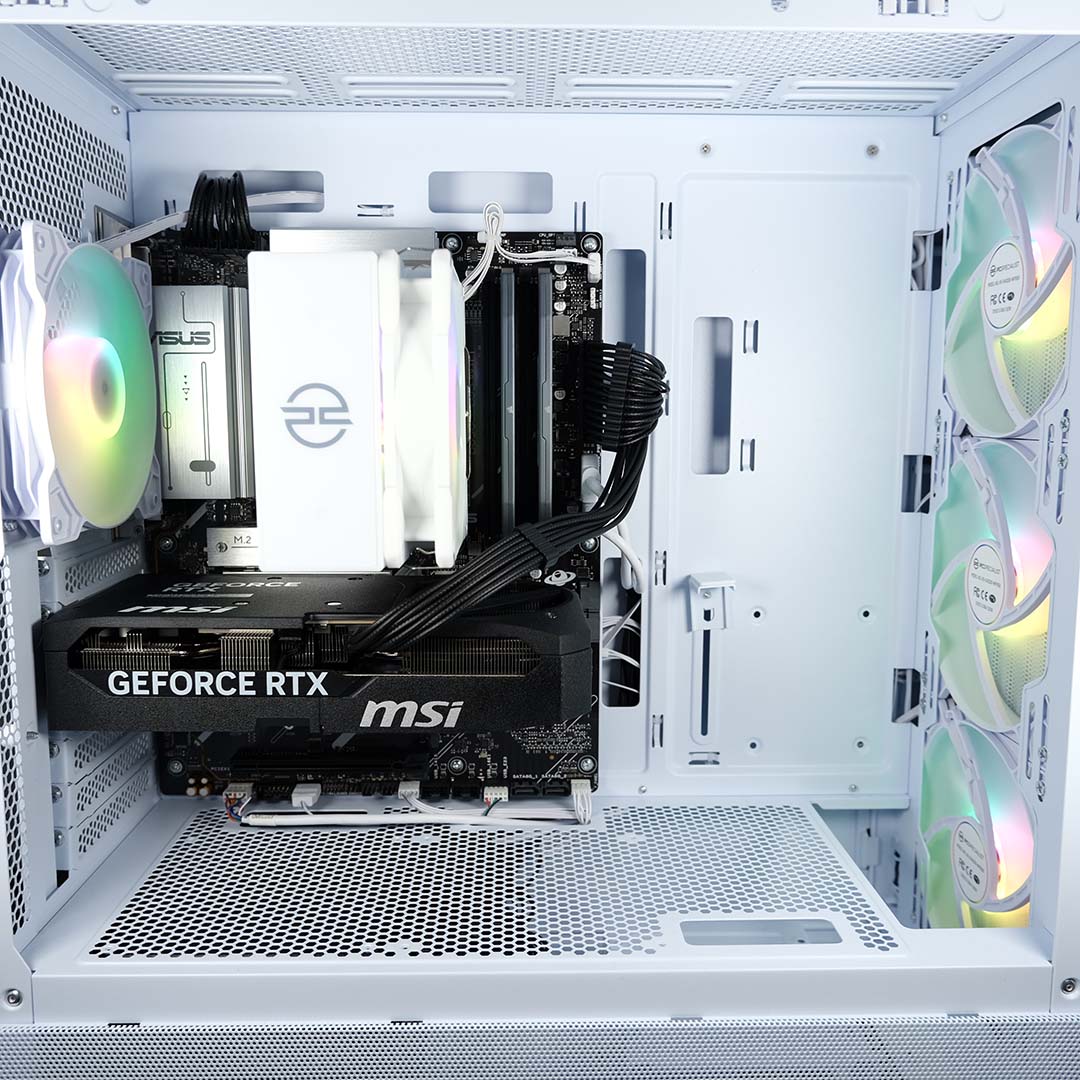
To demonstrate the differences and similarities in gaming performance between the DDR4 and DDR5 systems, I’m adopting a two-prong approach. I’ve benchmarked the Spectrum Elite and Pro at 1080p (FHD) resolution using each game’s medium and maximum settings. The former will showcase the differences between each processor and platform, while the other serves as a more realistic use case for these specifications.
In addition to measuring frame rates, I’ve put both PCSpecialist rigs through a series of tests pertinent to general computing and content creation. After all, gaming PCs frequently double up as productivity workstations, whether you’re a professional cranking out video projects or a student writing up a thesis.
Finally, to eliminate variability beyond platform capabilities, each system is using the same version of Windows 11 Home 25H2 (26200.7623) and GeForce Game Ready Driver (591.86).
Apps
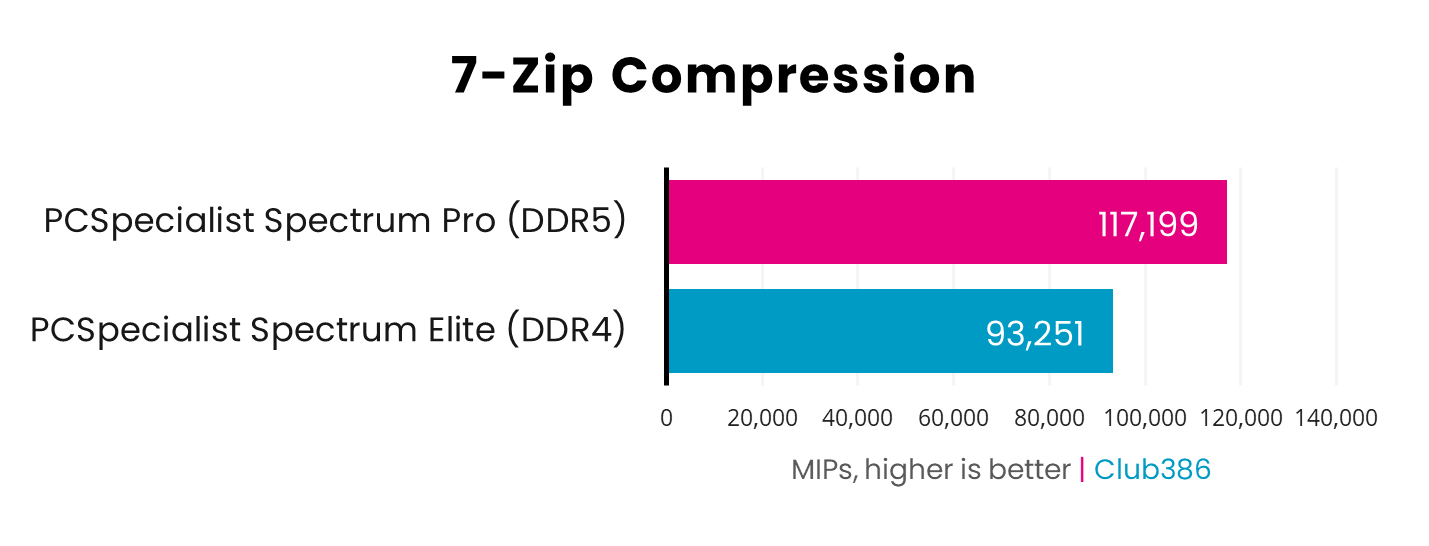
The more-powerful processor inside the Spectrum Pro easily runs away with a win in 7-Zip Compression. We’re looking at a 26% lead. These podium positions will rarely change as we progress through all our benchmark results.
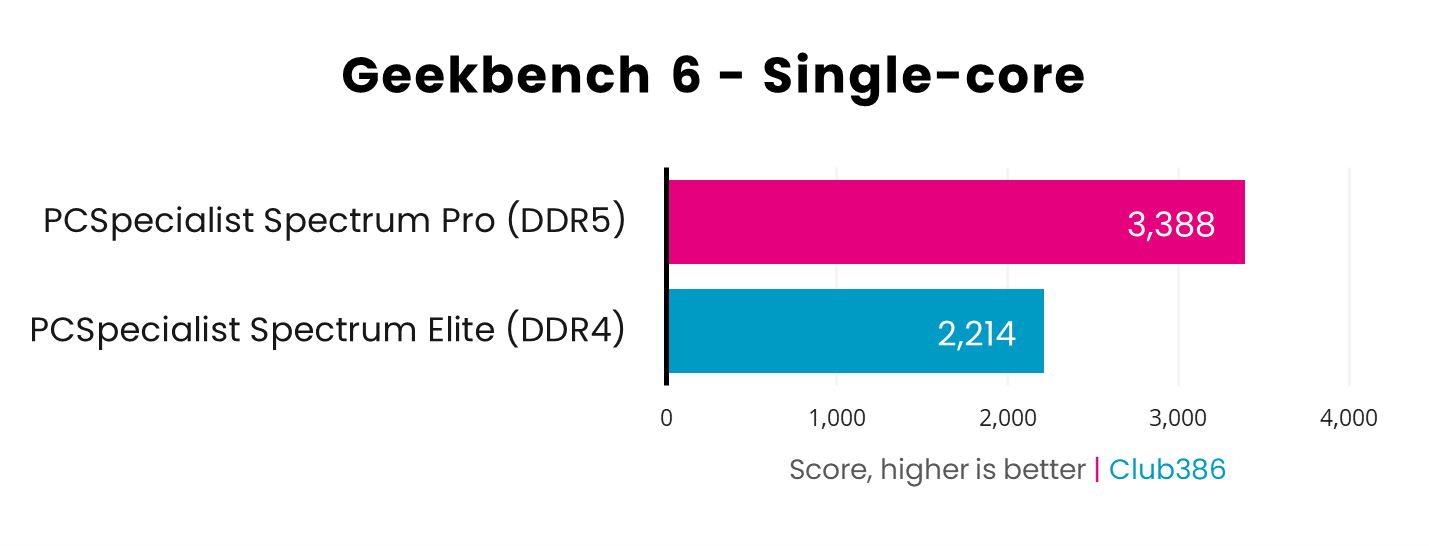
The 1,174-point gulf that separates the Spectrum Pro and Elite in Geekbench 6 illustrates four years of architectural innovation in single-core performance. There’s a massive 53% win for the DDR5 system, which should prove transformative in some gaming benchmarks.
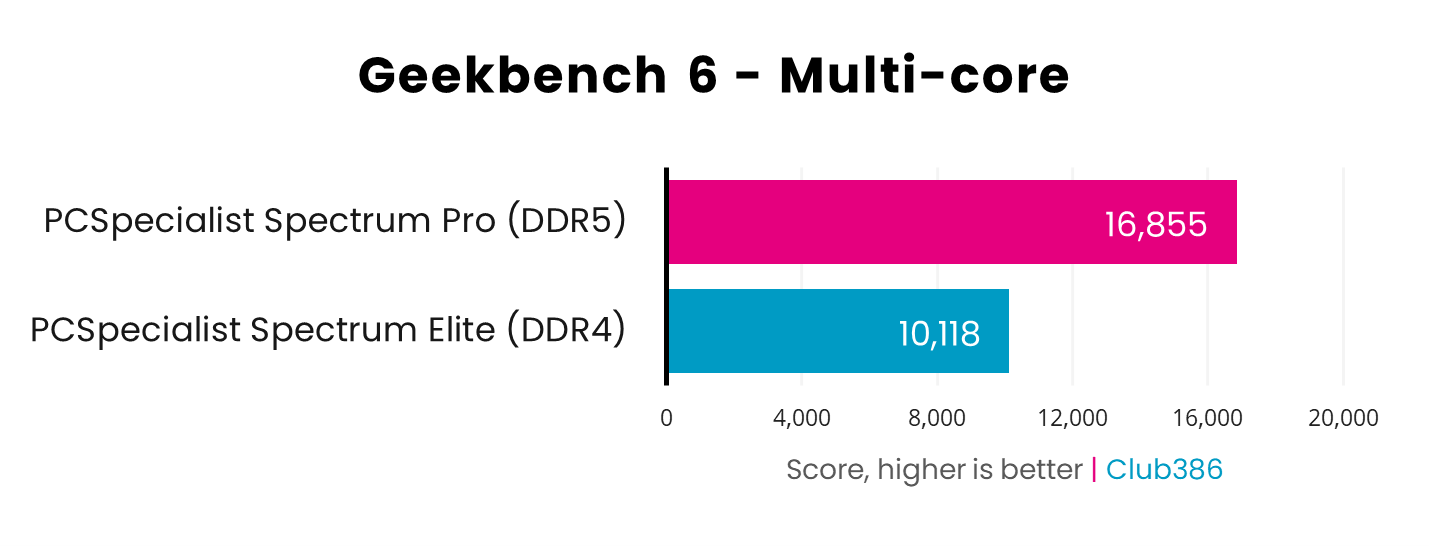
The gap between the Spectrum Pro and Elite only grows as we swap to Geekbench 6’s multi-core test, rising to a whopping 67%. Remember that both these systems boast identical core counts, but IPC improvements, higher boost clocks, and a helping hand from speedier RAM give the Spectrum Pro a distinct advantage over the Elite.
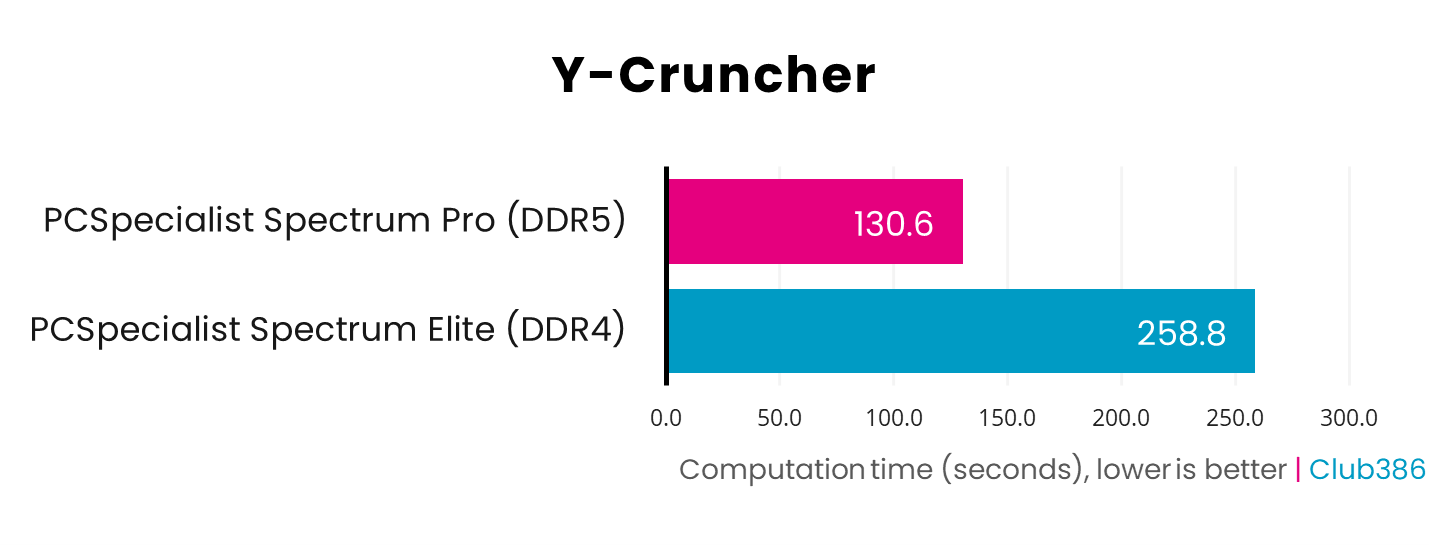
Calculating Pi to 5b digits is difficult for any processor, but memory speed and capacity proves a game-changer in speeding up calculations. Both systems have 32GB of RAM at their disposal, but the Spectrum Pro is nearly twice as fast in terms of transfer speed (3,200MT/s vs. 6,000MT/s). Combine that with the higher processing power we saw in earlier tests, and computation time almost halves from the Spectrum Elite.
Content creation
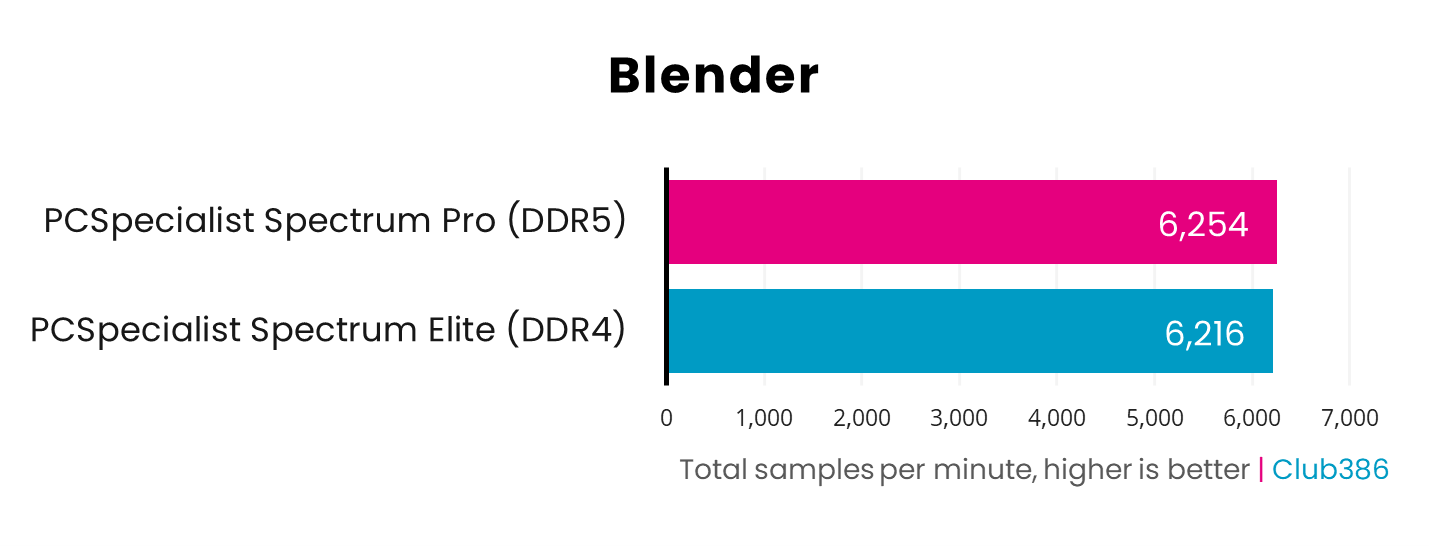
Our first graphics card benchmark sees the DDR4 and DDR5 systems neck-and-neck in terms of total samples per minute. Neither CPU nor RAM are of particular consequence when it comes to workloads that predominantly rely on the graphics card, resulting in negligible performance difference between the two PCs.
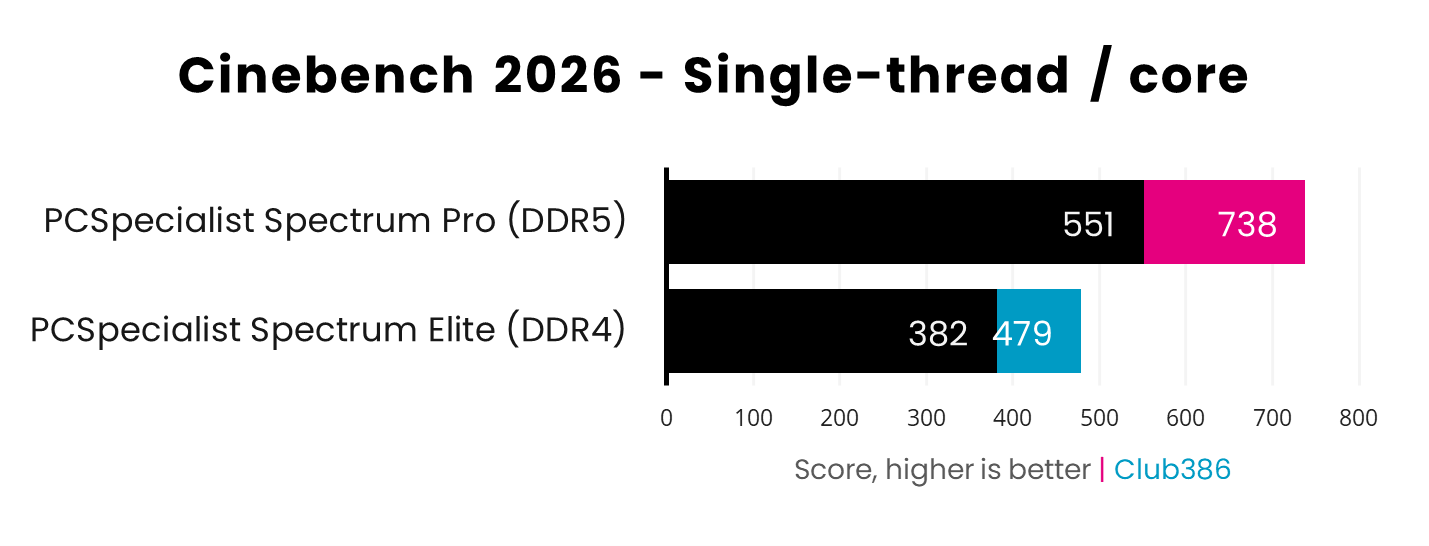
Differences in Cinebench 2026 single-core scores mirror those we saw earlier in Geekbench 6, with a 54% advantage to the Spectrum Pro. Stripping each processor of their simultaneous multithreading strength and focusing on single-threaded performance, the gap shrinks slightly to 44% but remains resolutely in favour of the DDR5 system.
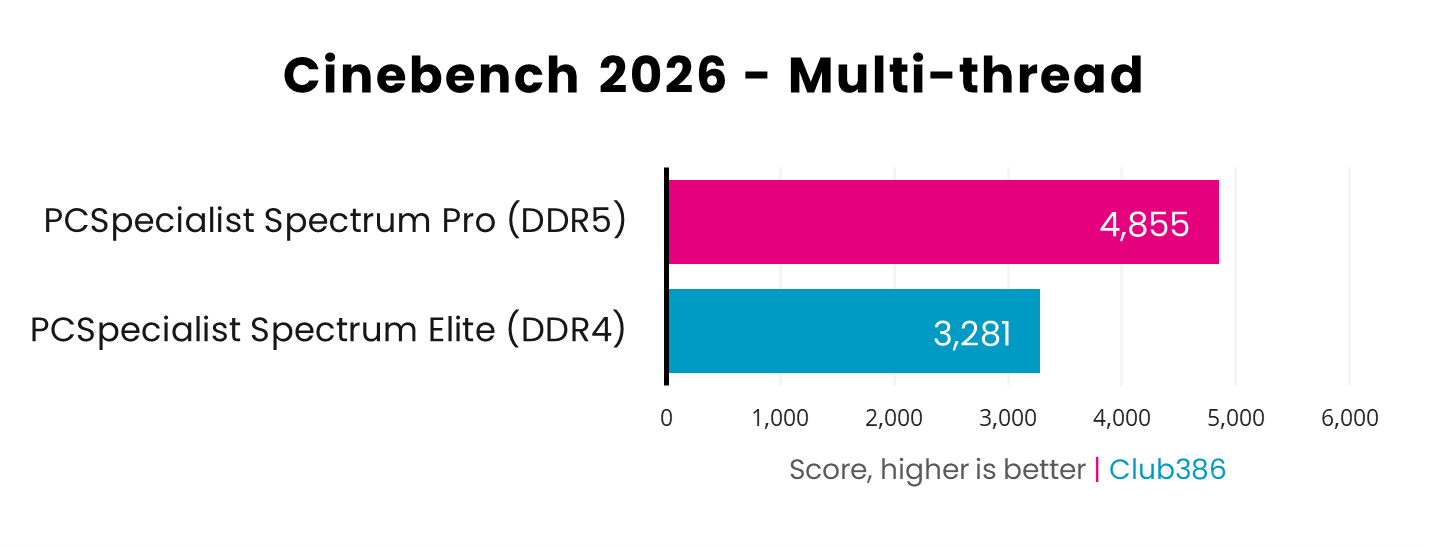
Firing up all eight cores on each rig’s CPU in Cinebench 2026, the Spectrum Pro emerges as the winner with a 48% lead over the Elite. That advantage will translate into notable time savings in applications that are heavily reliant on multi-core performance.
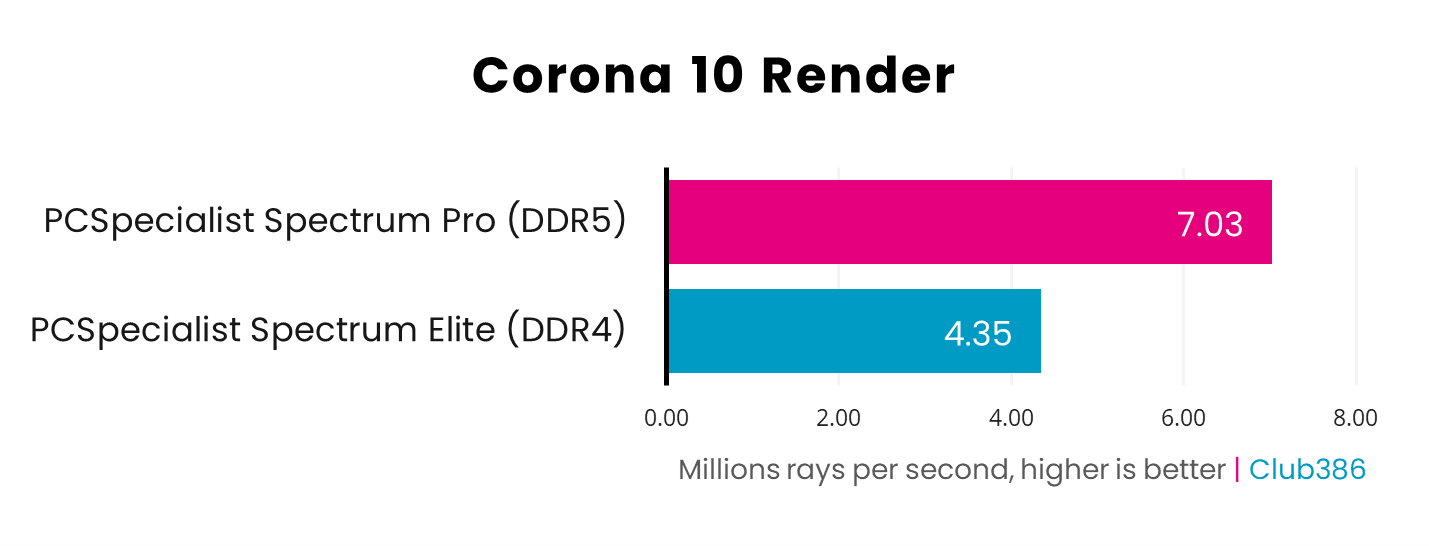
Corona 10 Render puts each processor to work by calculating the colour of pixels in a scene through ray tracing. Cores, threads, and frequency all play their part here, putting the Spectrum Pro a sizeable 62% ahead of the Elite.
Memory
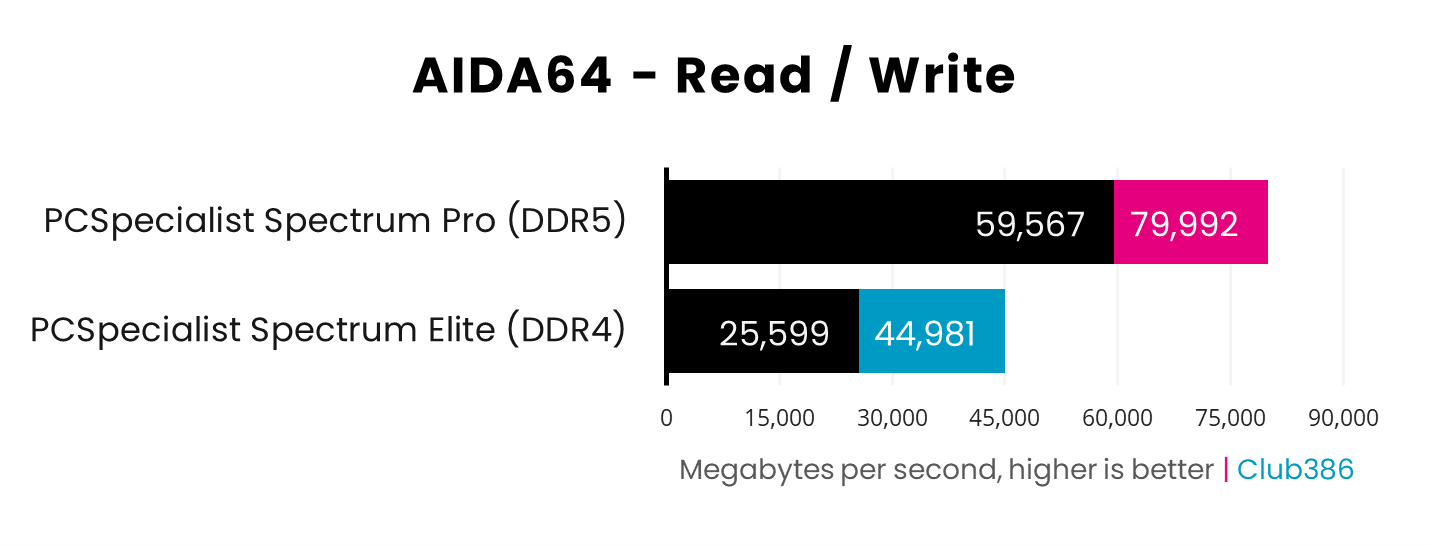
The Spectrum Pro unsurprisingly thrashes the Elite in AIDA64. As this benchmark puts each system’s memory read and write bandwidth to the test, the difference in transfer speed (6,000MT/s vs. 3,200MT/s) comes home to roost, and the DDR5 kit speeds along at 1.78x the speed in writes, and a whopping 2.33x in reads.
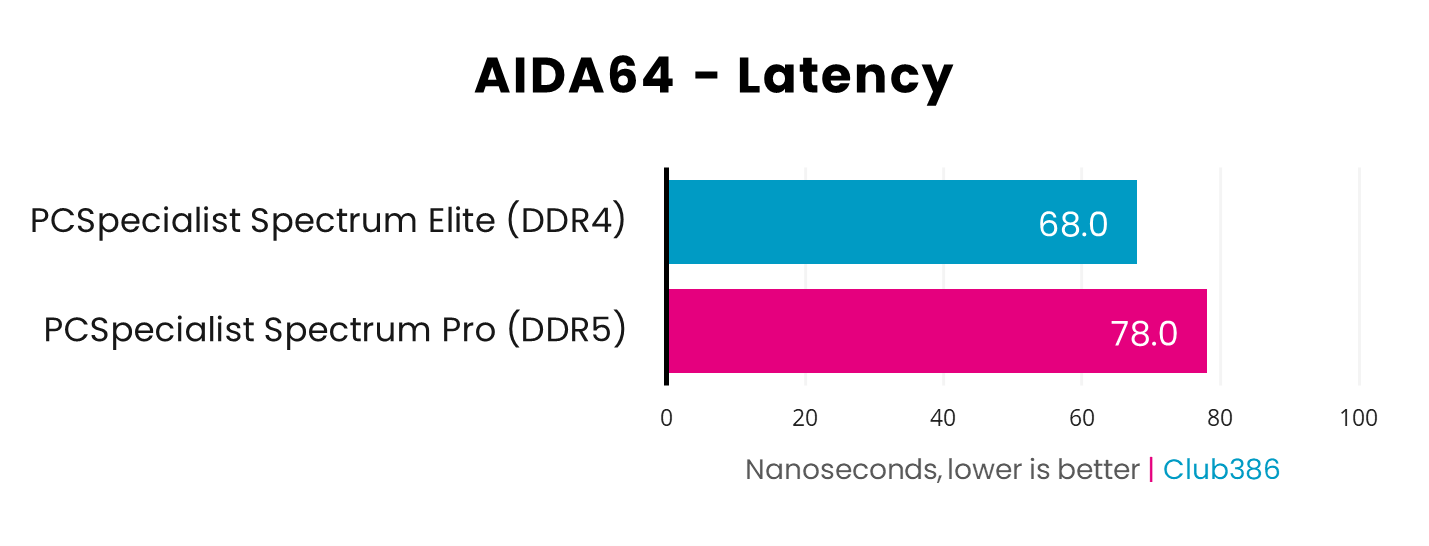
Tighter memory timings give the Spectrum Elite (CL16) a win over the Pro (CL30) in terms of RAM latency, with architectural differences between the Ryzen 7 5700X and 9700X also playing a small part. Even so, at 10ns, the difference is a blink-and-miss-it advantage.
Gaming
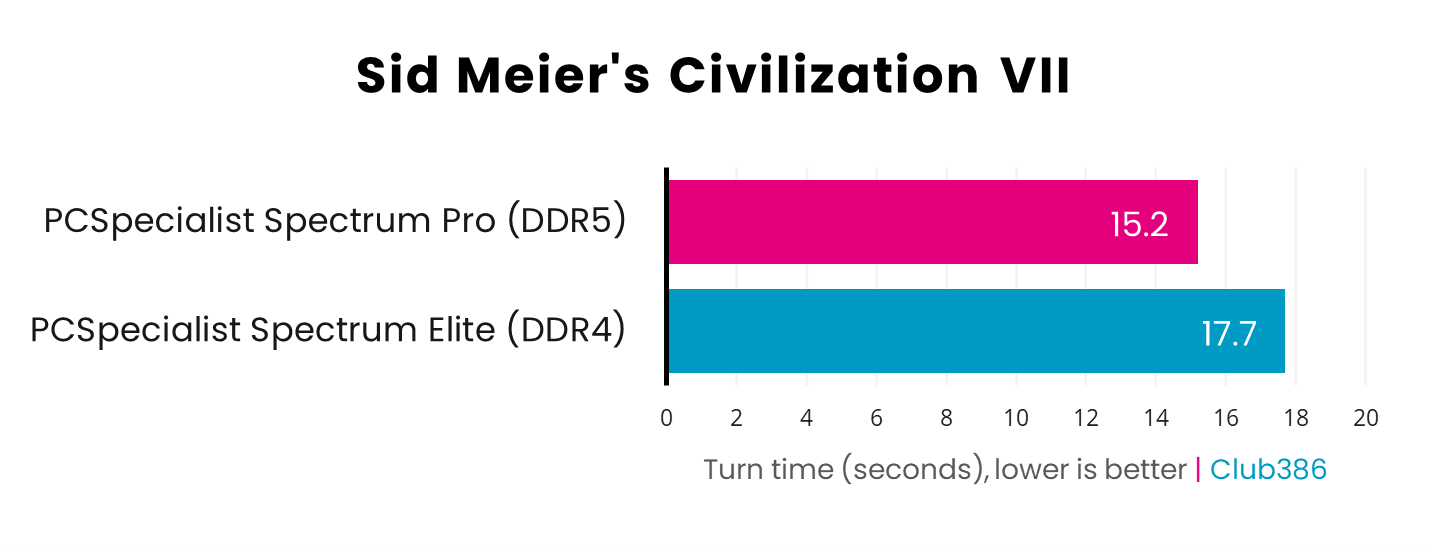
Coming at last to gaming, Sid Meier’s Civilization VII puts both systems to work in calculating the many moves of your rivals’ AI. Clock speed makes a big difference in this test, so it’s no surprise to see the Spectrum Pro proving quicker than the Elite by 2.5s.
Still, that’s only four minutes of game time you’ll save over a 100-turn game, making both systems a viable choice for some 4X fun.
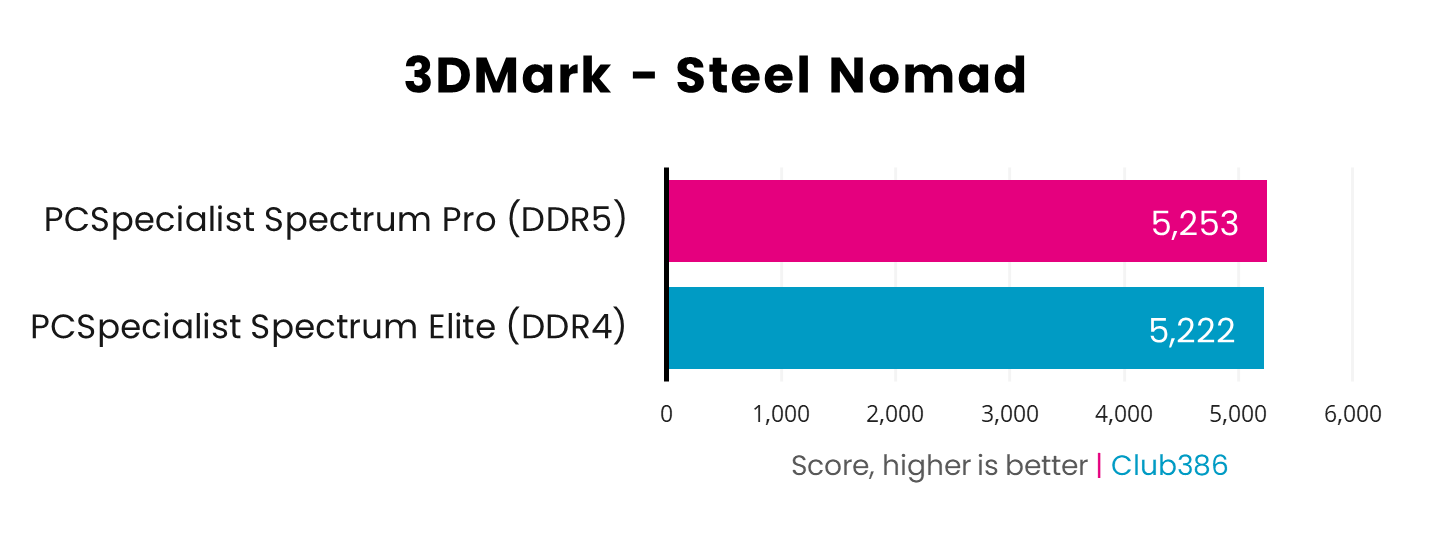
Running at 4K, 3DMark Steel Nomad raster results are practically indistinguishable across the two systems. Even with a more powerful processor and faster RAM at its disposal, the Spectrum Pro can’t use brute force to get past the same GPU bottleneck that the Elite faces.
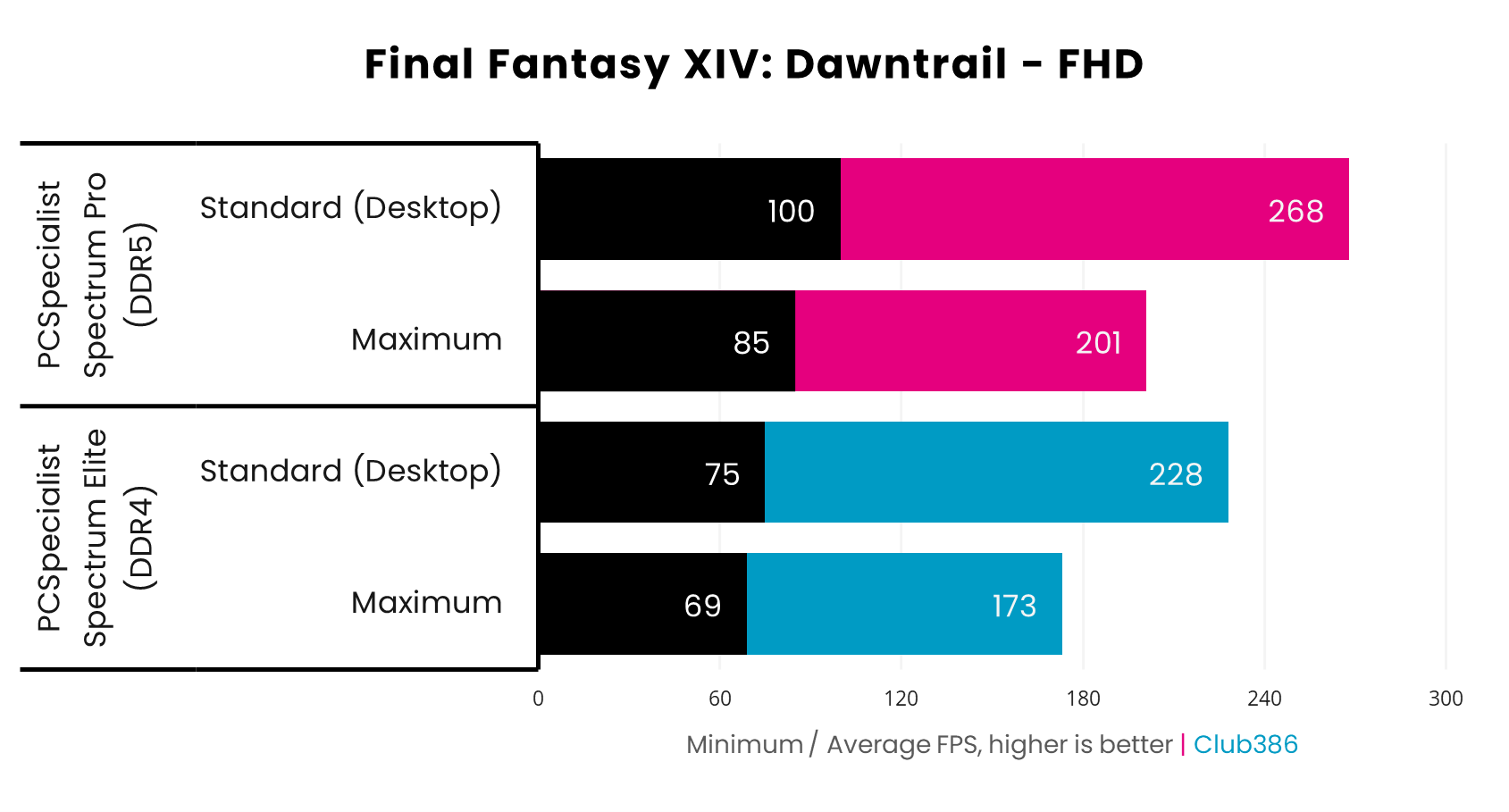
Final Fantasy XIV: Dawntrail shows a definite difference between the two systems. The Spectrum Pro’s average frame rates nicely pull ahead of the Elite by 16/18% across Standard (Desktop) and Maximum settings.
However, it’s the minimum frame rates that see the largest transformation, being cool 23-33% faster on the DDR5 system in this RPG. While both PCs deliver respectable results, the DDR4 rig is leaving a sizeable chunk of performance on the table owing to platform bottlenecks.
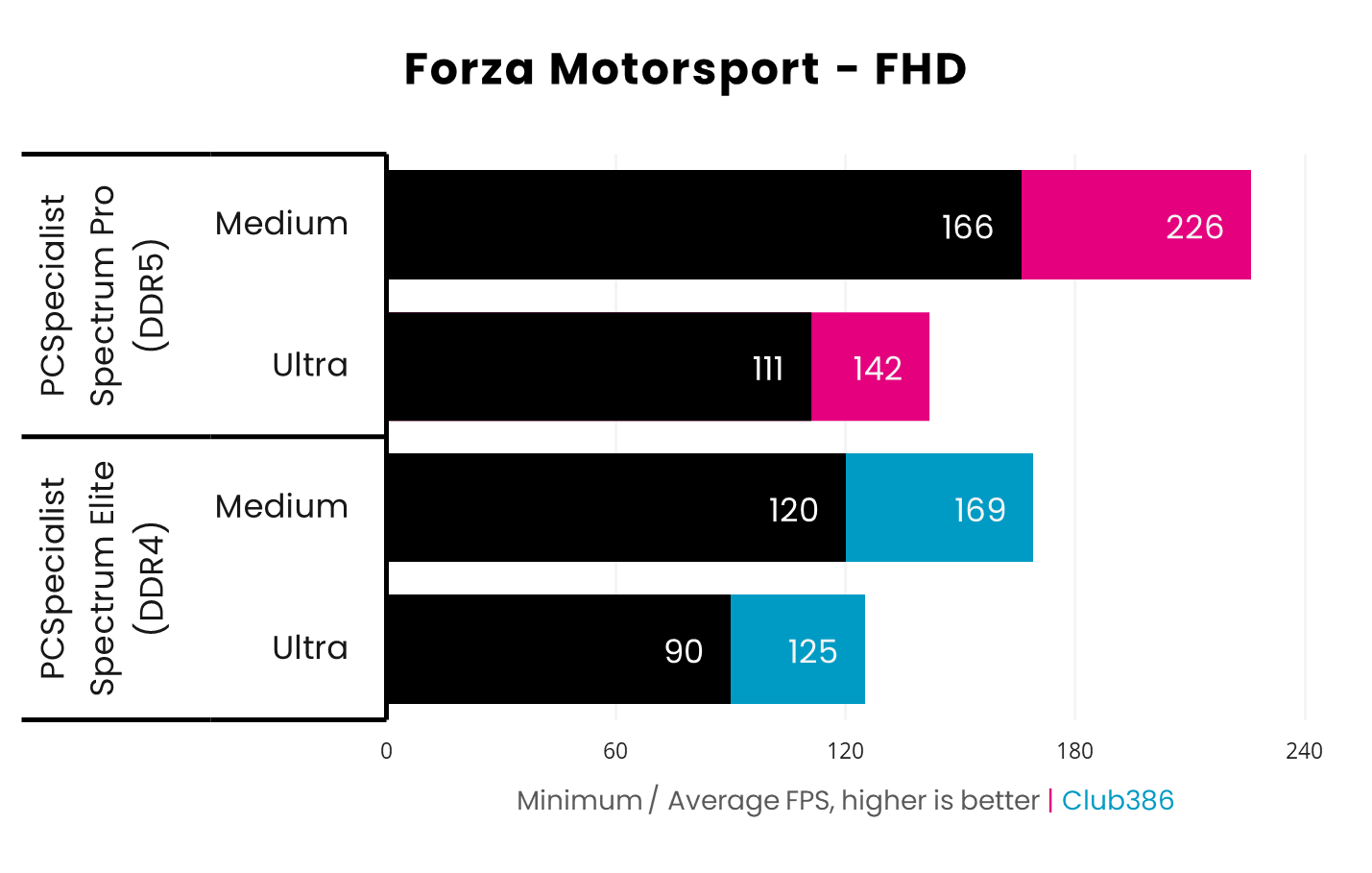
As both systems hit the tarmac in Forza Motorsport, it’s clear the Spectrum Pro has more horsepower under the hood. The game’s medium preset sees the biggest performance differential between the PCs, as the DDR5 PC’s superior processor and RAM allow it to race ahead by 38/34% (+46/57fps) across minimum and average frame rates.
Turning up the eye-candy to Ultra makes for a closer race, but the Spectrum Pro is once again speedier, this time by 14% (+17fps). It also navigates the track more smoothly, with a welcome 23% (+21fps) lead in minimum frame rates.
Both PCs cross the finish line with respectable frame rates, but the Spectrum Elite is once again holding back overall performance relative to the Pro.
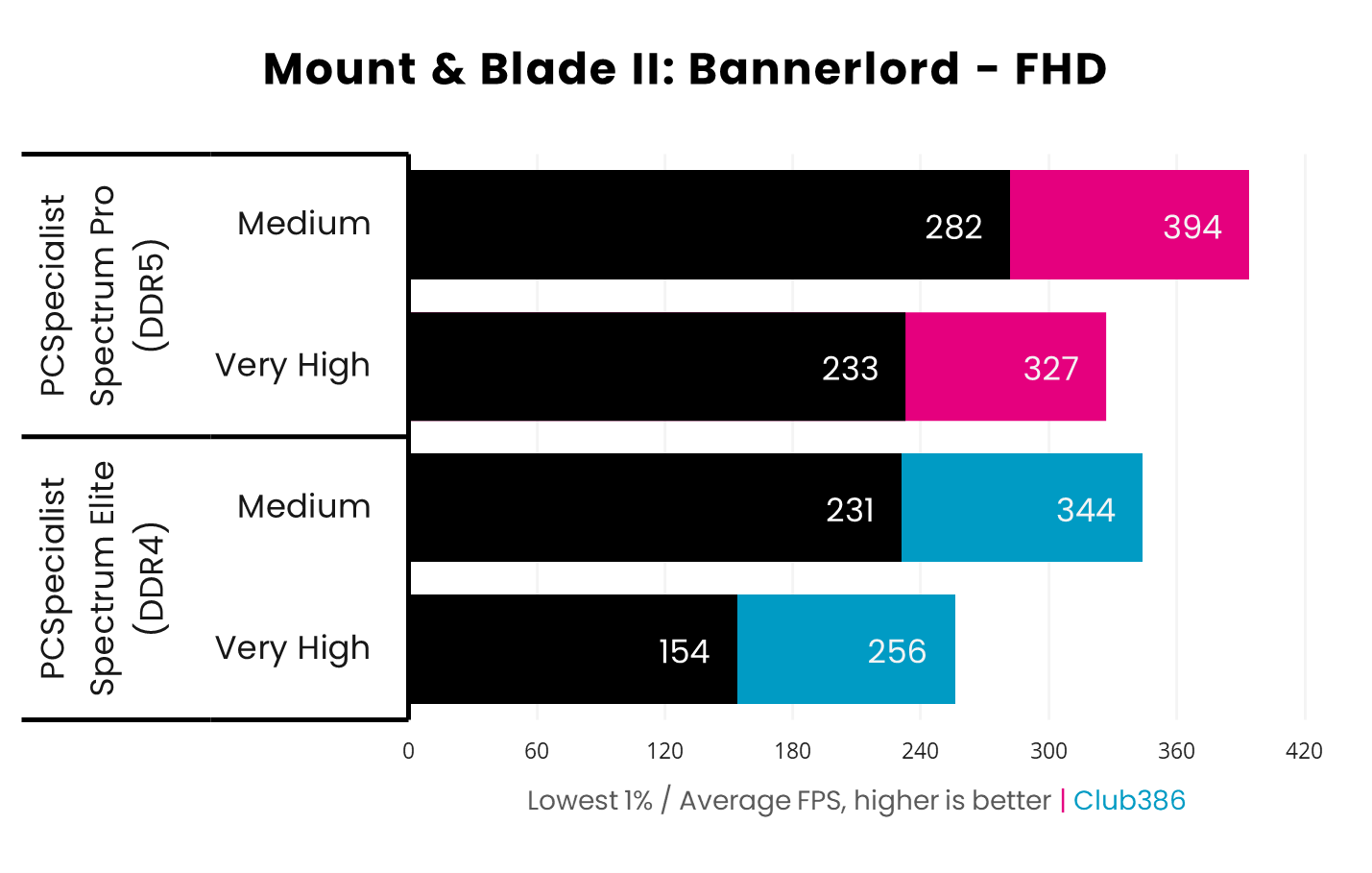
Mount & Blade II: Bannerlord runs well on the Spectrum Elite, with performance north of 150fps across the board, even using the game’s ‘Very High’ preset. However, tagging in the Pro sees average frame rates increase by a meaty 27% (+71fps), while minimum frames leap by an earth-shattering 51% (+79fps)
Such increases are transformative when it comes to perceived input lag, as well as motion clarity on a monitor with a high refresh rate. You would need to run this title at Medium settings on the DDR4 PC to get a taste of these highs on the DDR5 system, which doesn’t have to compromise on visual quality.
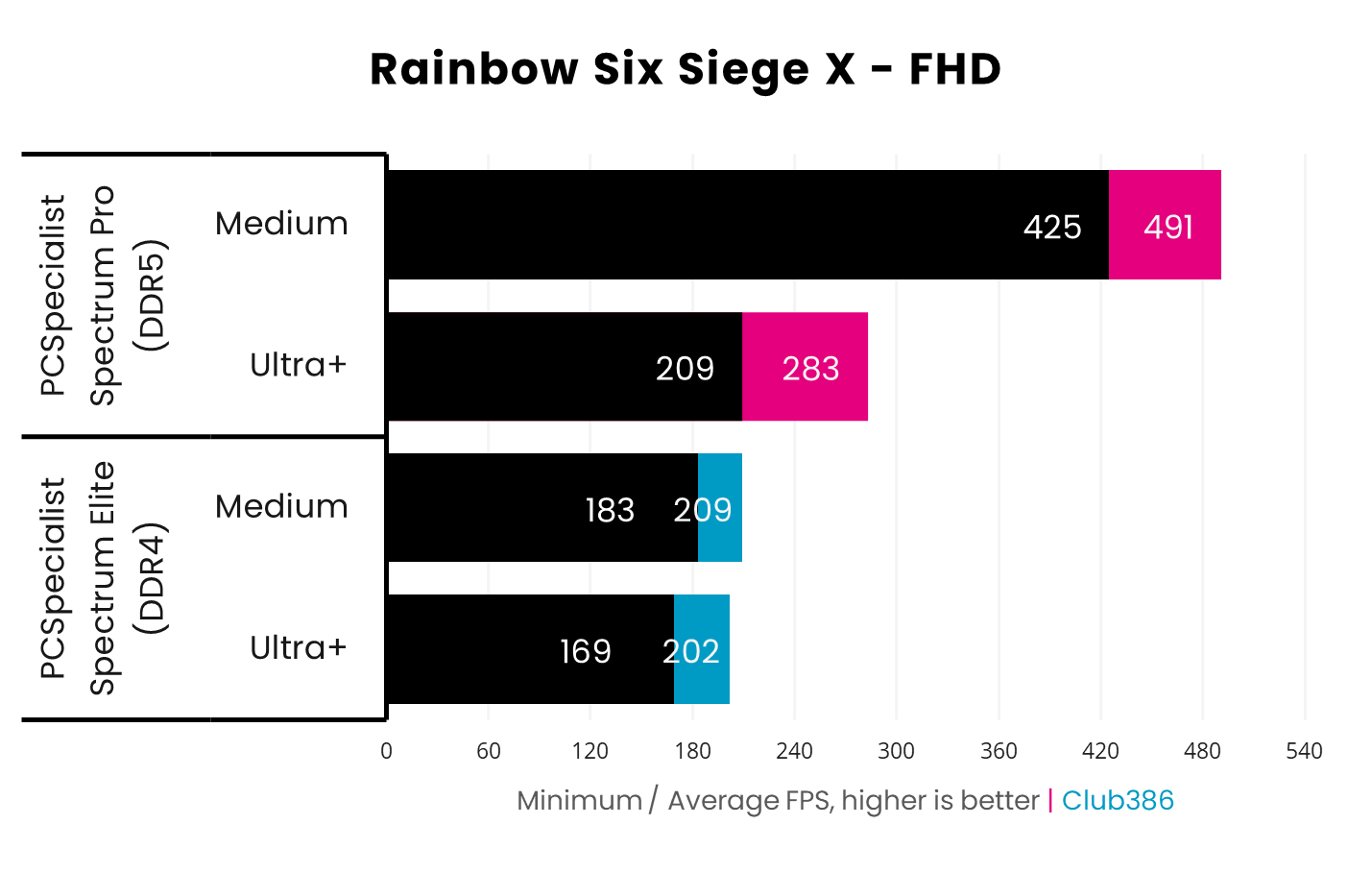
When benchmarking Rainbow Six Siege X, I couldn’t believe my eyes. At first, it seemed unreal that there was so little difference between Medium and Ultra+ settings on the Spectrum Elite, to the point I almost suspected I’d left a frame limiter on. It wasn’t until I ran the game on the Pro that everything became much clearer.
I’ve included a screenshot from the results screen below to help illustrate the severe this CPU bottleneck on the DDR4 PC. Yes, that is a 132-135% improvement to frame rates at Medium settings by virtue of the Spectrum Pro’s more-powerful processor and speedier RAM.
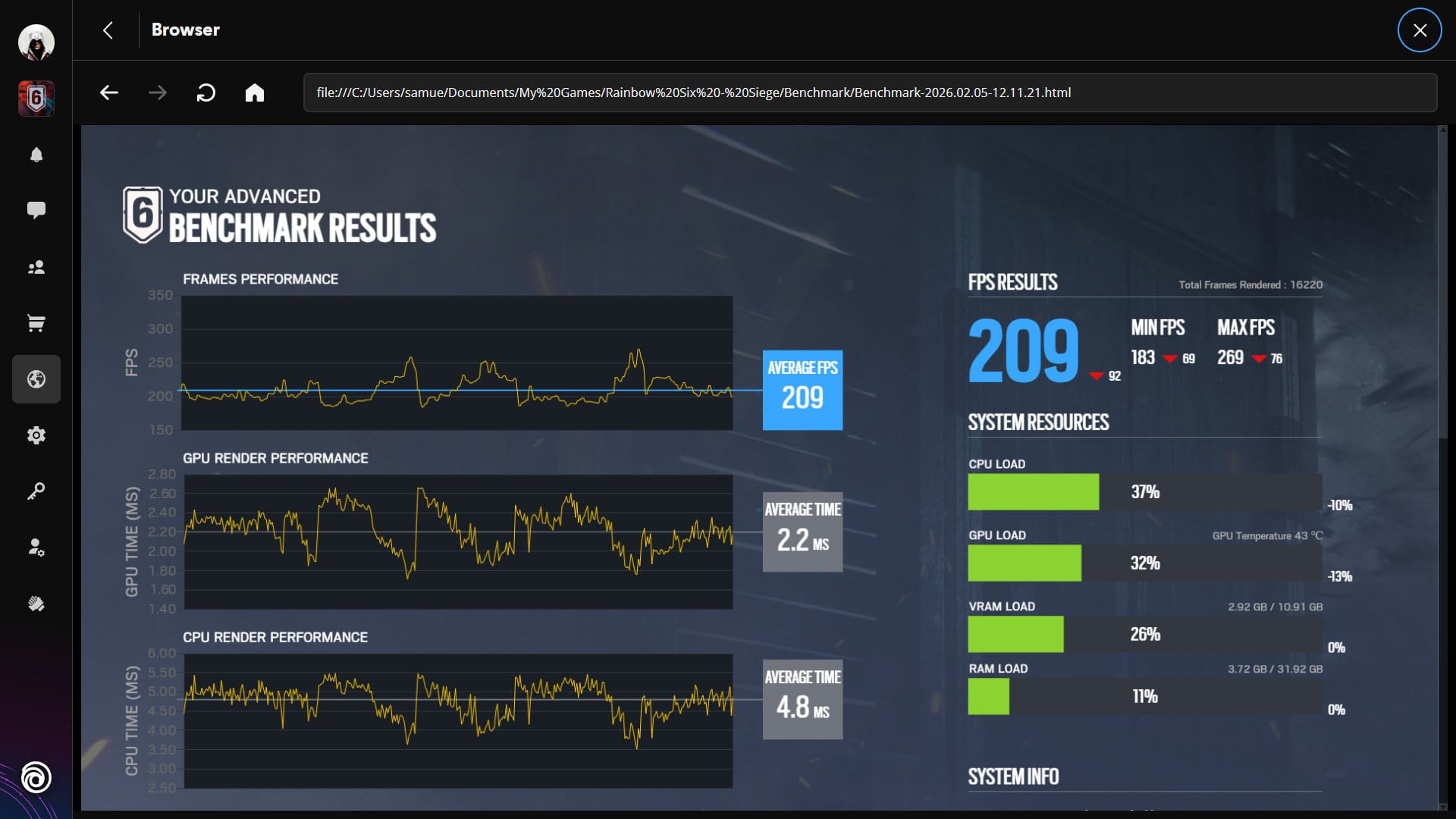
Pay close attention to the ‘CPU Load’ and ‘GPU Load’ bars, and note how the former is higher than the other, as well as how the GPU temperature reads at a mere 43°C. As much as the RTX 5070 would love to throw out hundreds of additional frames, it simply can’t do it, as it’s waiting for the Ryzen 5 5700X to catch up.
If you’re an esports gamer and can’t get your hands on a CPU with 3D V-cache for an AM4/DDR4 system, such as the Ryzen 7 5700X3D, then going with an AM5/DDR5 alternative is the smarter play. Even standard X-series Ryzen 9000 processors, such as the Ryzen 7 9700X, will often provide vastly superior frame rates, and you’ll have the option to upgrade to a 9800X3D down the line, should you wish.
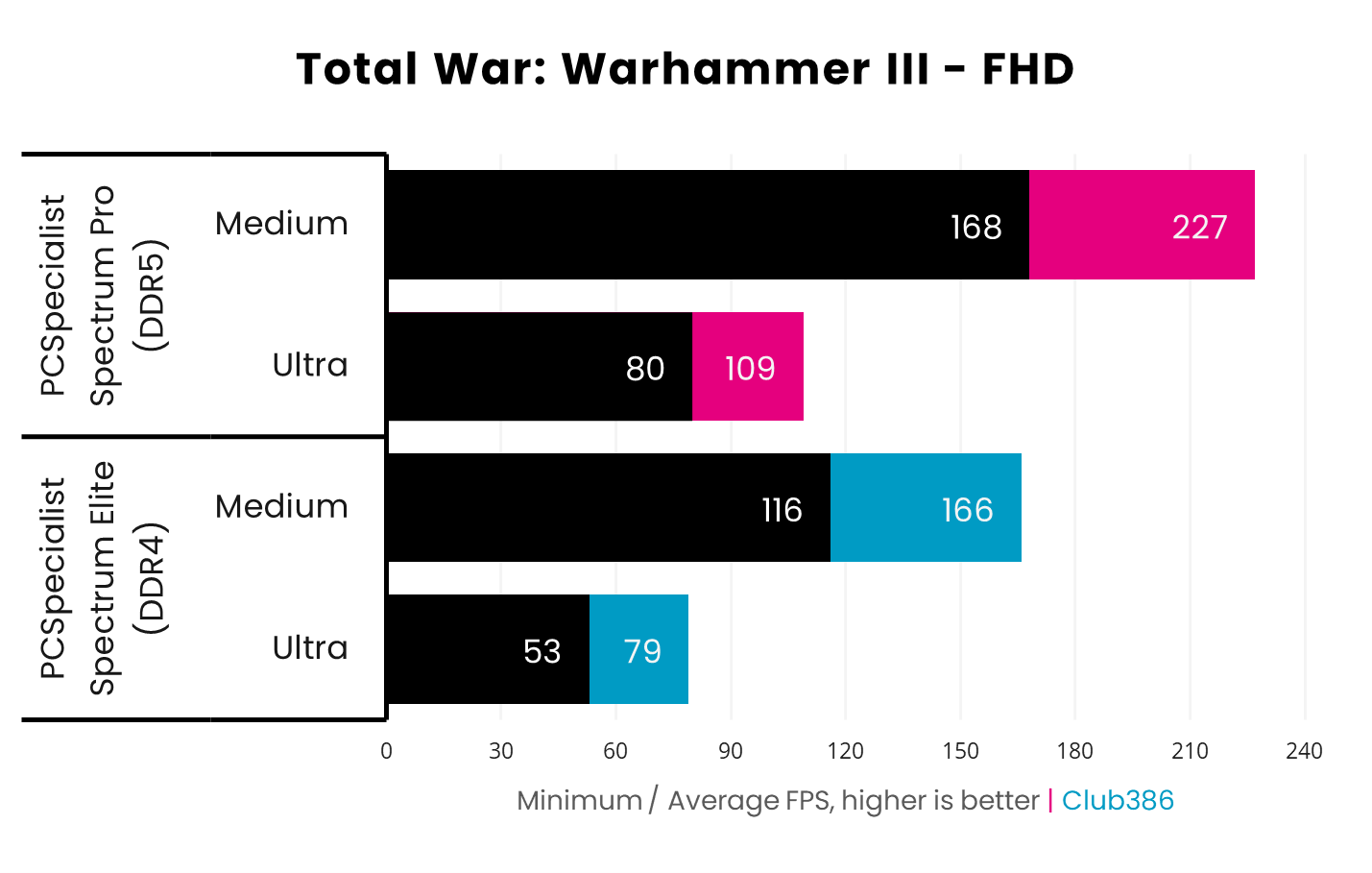
The Spectrum Elite leaves the battlefields of Total War: Warhammer III thoroughly beaten by the Pro, as the latter’s stronger multi-core chops come into play. Relative performance using the Medium preset isn’t even worth discussing, as the gains are higher using Ultra settings.
We’re looking at a brutal 51% (+27fps) advantage in minimum frame rates, bringing performance comfortably above that all-important 60fps threshold. Average frame rates are up by a keen 38% (+30fps) as well, allowing the Spectrum Elite to enjoy triple-digit strategy shenanigans.
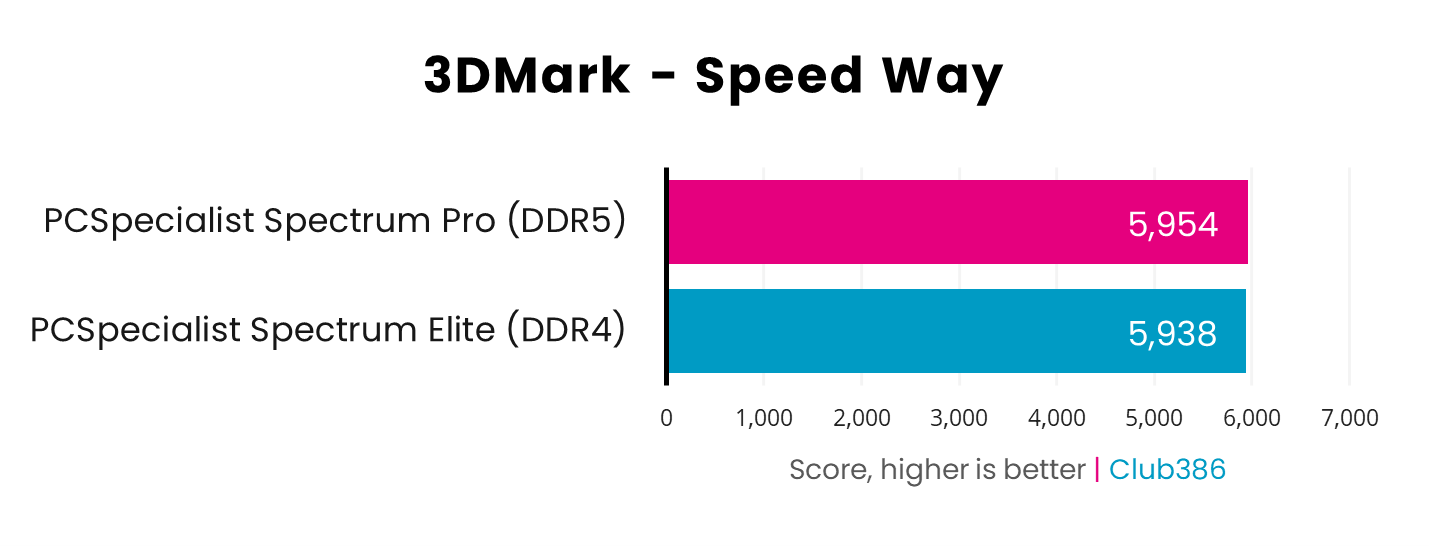
The GeForce RTX 5070 handily faces off the ray-traced demands of 3DMark Speed Way in both systems. As with Steel Nomad, we’re firmly in graphics card bottleneck territory, with no hope to gain higher performance unless you upgrade your GPU.
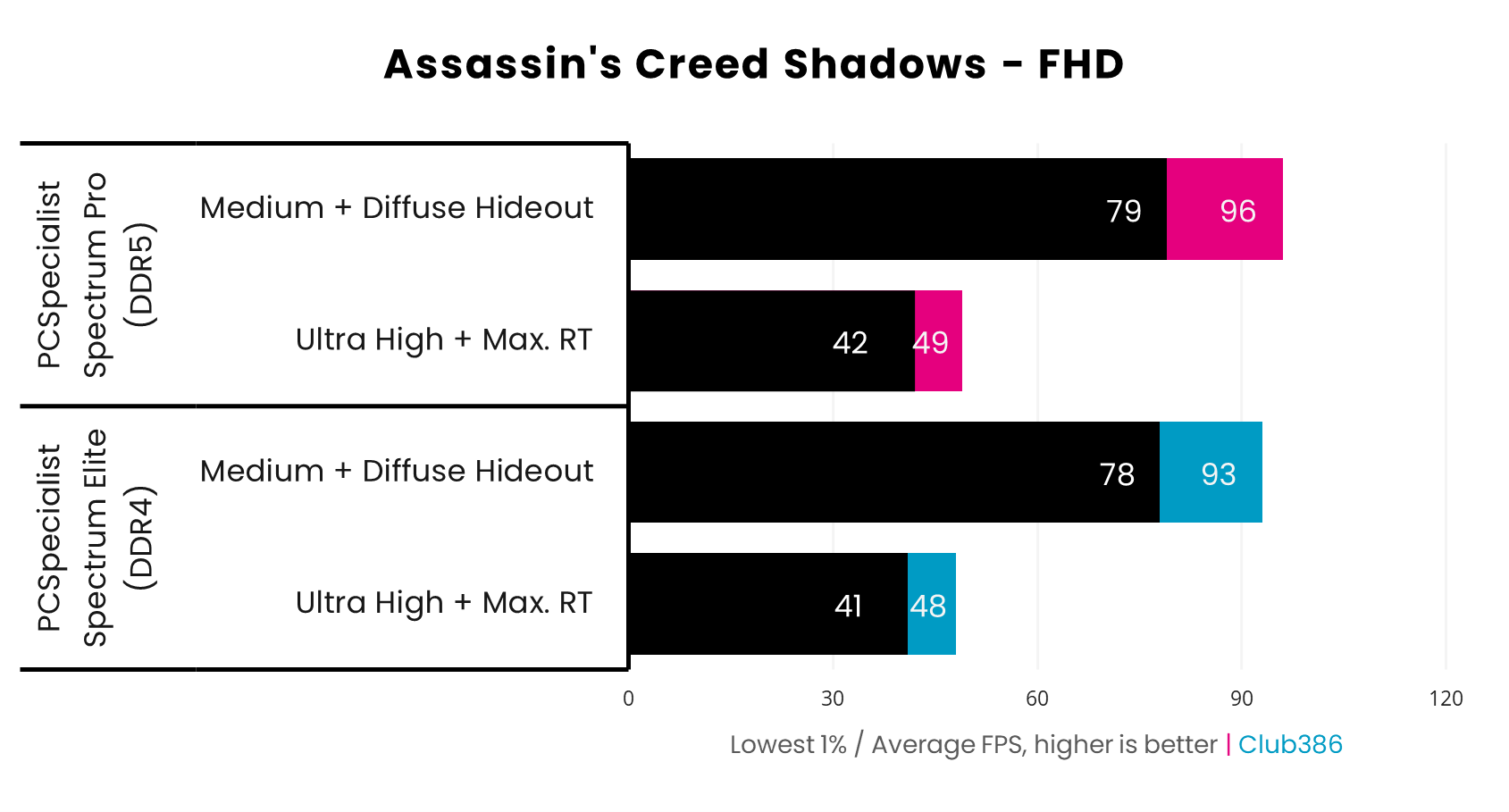
Assassin’s Creed Shadows is one of a growing number of games that mandate the use of ray tracing. I’ve turned down these effects as much as possible for our Medium settings shootout.
Despite efforts to lessen the load, the burden remains heavy on the graphics card in both systems. Performance is near-identical on the Spectrum Pro and Elite, with minor differences of 1-3%.
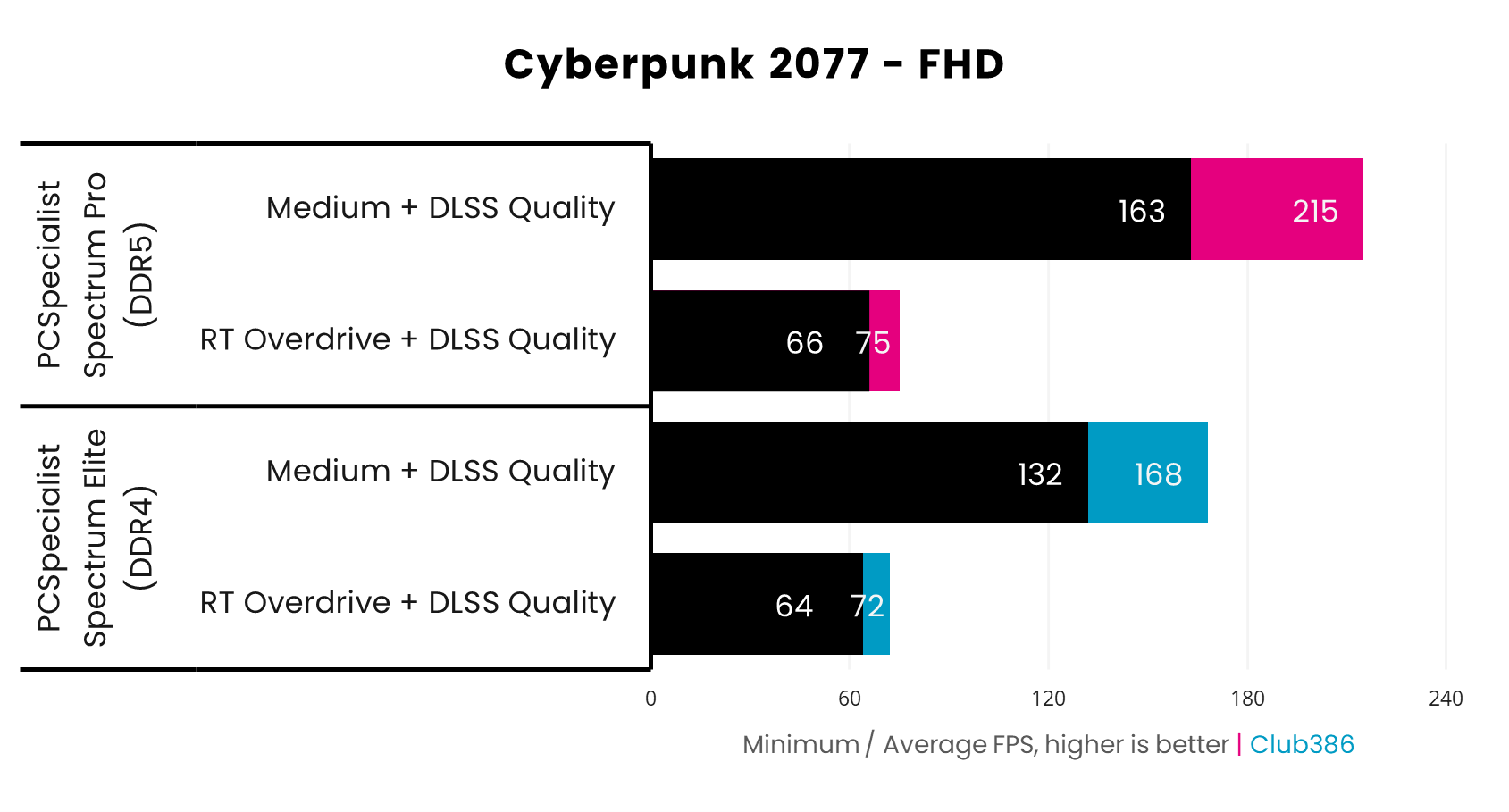
The last game in our test suite, Cyberpunk 2077, provides another example of how processors and RAM typically make little difference in ray tracing workloads. Both the Spectrum Pro and Elite keep Night City running smoothly, with the former system enjoying a small 3-4% lead.
Turn out the ray-traced lights for raster rendering, and a more sizeable difference between the DDR5 and DDR4 PCS emerges. There’s a 23-28% advantage for the newer system, which pushes over 200fps in average frame rates, but both systems deliver pleasing three-digit performance.
Vitals
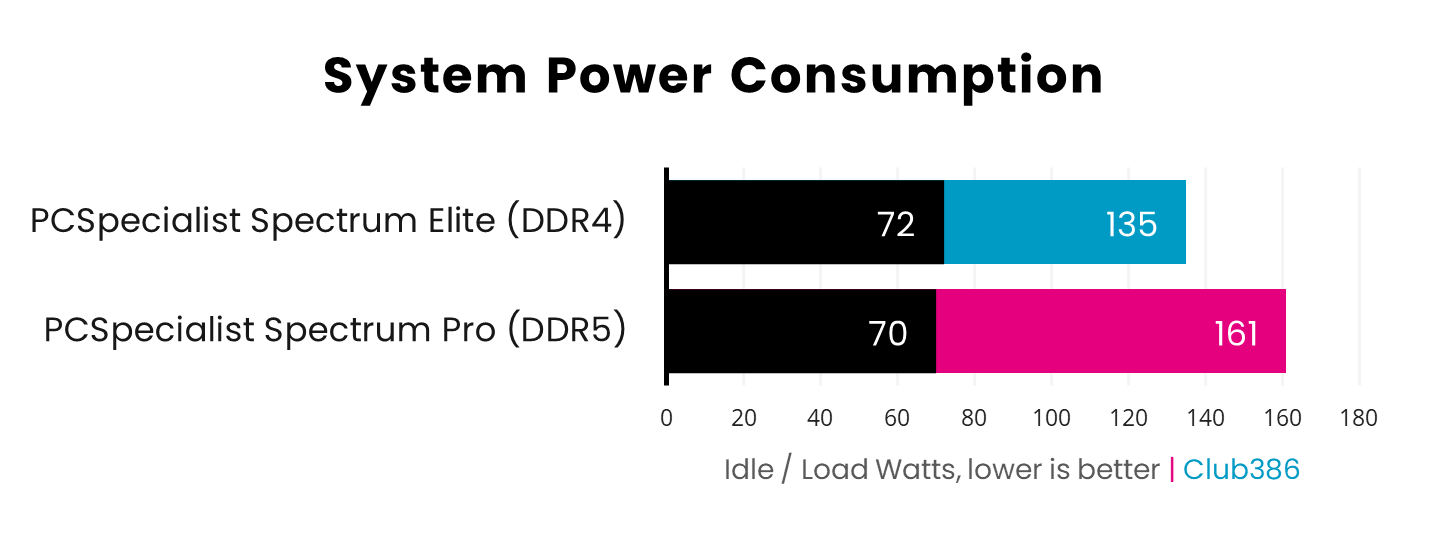
Both the Ryzen 7 5700X and 9700X have a 65W TDP by default. However, system power consumption, both when idle and under a Cinebench 2026 load, isn’t identical across the two systems.
DDR5 RAM plays a negligible role in boosting the Spectrum Pro’s higher wattage footprint, with chipset and other system components playing a much larger part.
All this considered, we’re only staring at a difference of 19% (+26W). What matters more is how the systems put all that ‘leccy to use.
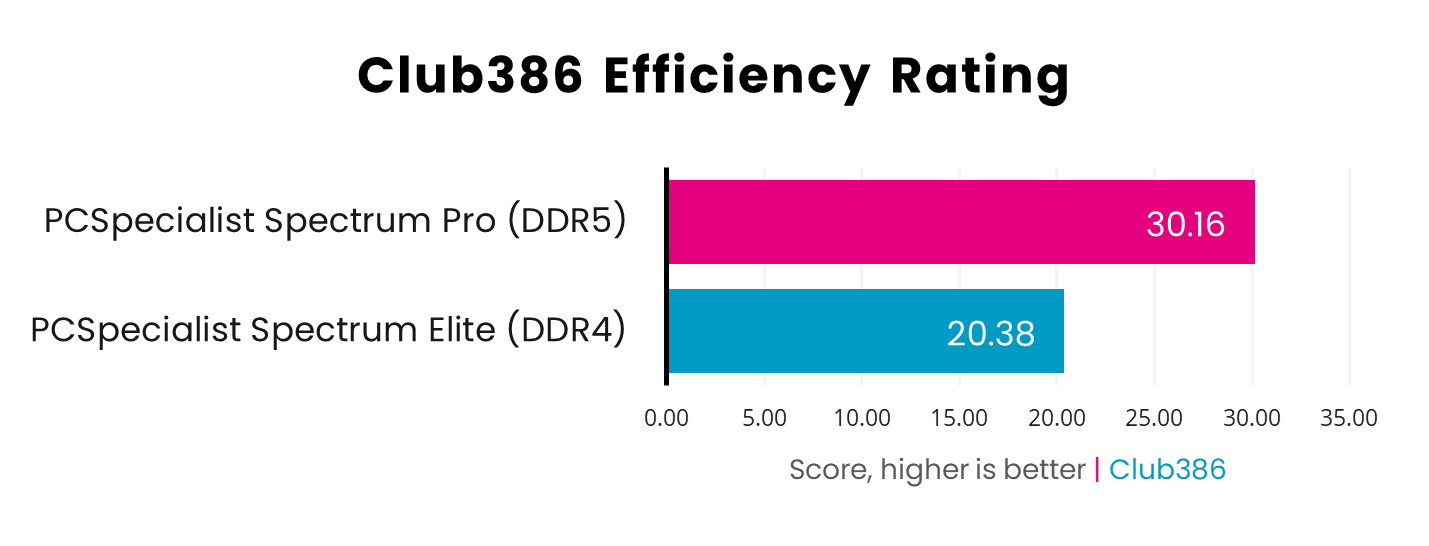
Taking each system’s Cinebench 2026 multi-score and dividing it by its respective peak power consumption, we arrive at the Club386 Efficiency Rating. Think of this score as a points-per-watt indicator.
The Ryzen 7 9700X, with its DDR5 RAM, is a mighty 48% more efficient than the 5700X and its DDR4 sticks. If you’re conscious about getting as much bang for your buck when it comes to your energy bill, your cash will go further with the newer platform.
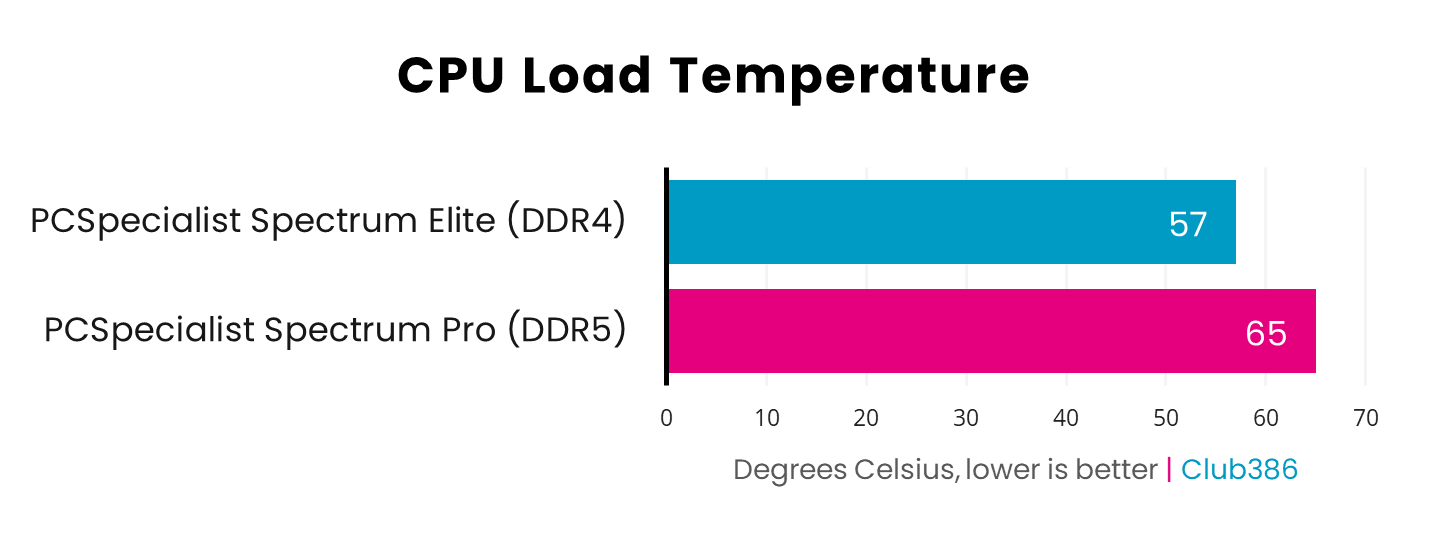
Finally, a look at CPU temperatures sees them rising 14% (+8°C) higher on the Spectrum Pro. While this provides a win for the Elite, both results are still well below the realms of thermal throttling.
Conclusion
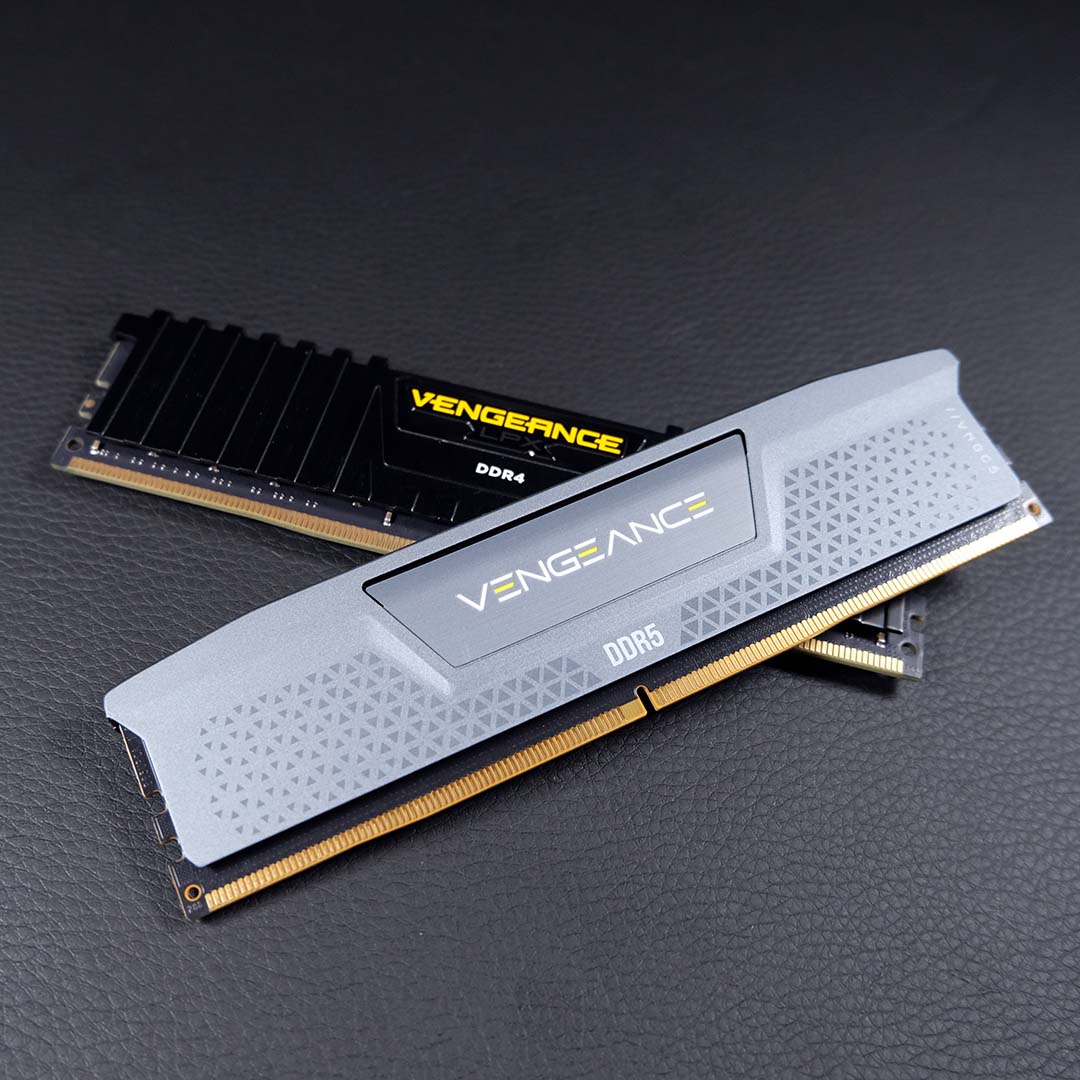
It’s clear that older, more-affordable DDR4 systems still have plenty of life left across gaming and productivity spheres, but come at the price of reduced overall graphics performance in many instances. In addition to higher frame rates, DDR5 platforms such as AM5 have future upgrade paths, compared to the largely dead-end state of AM4 now.
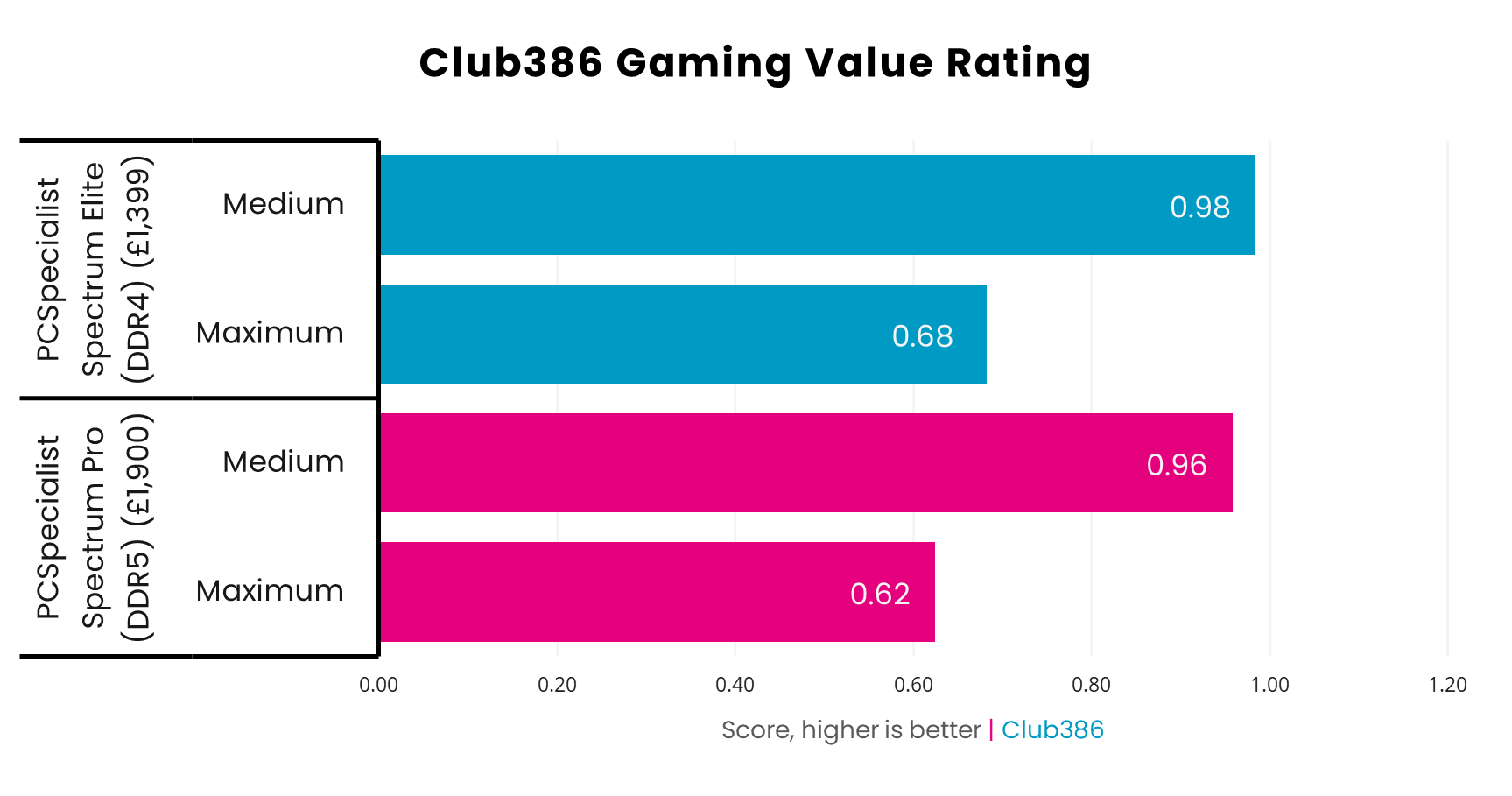
Adding up all average frame rates and dividing them by the cost of the system, we have a pound-per-frame value for each PC. Surprisingly, they’re near-identical, with a slight edge gained by the Spectrum Elite and its DDR4 setup. This is great news for prospective buyers of either system, as it means your cash goes just as far on either rig.
Even removing those seismic Rainbow Six Siege X frame rates from the equation doesn’t shift the scales too much, as Maximum values hold fast at a 0.06p difference, with Medium only widening to 0.08p between the two systems.
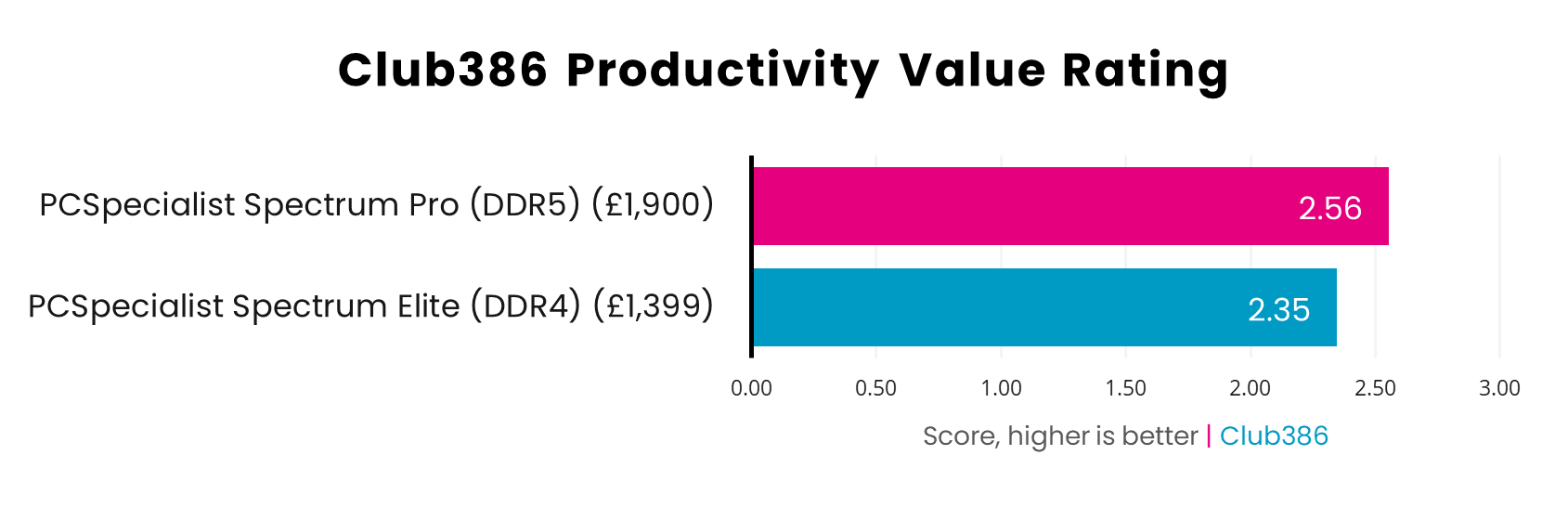
The Spectrum Pro’s advantage in productivity is clearer cut at 9%. Despite its higher price, the DDR5 PC makes your pennies go further, but the Elite isn’t too far behind.
Both systems are great picks for their particular price targets, but I look more favourably on the Spectrum Pro overall. While it is £500 more expensive than the Elite, you’re getting more processor, memory, and graphics performance for all that cash. Importantly, there’s room to build out from this baseline with future CPU and GPU upgrades.
Spectrum Pro (DDR5)
Higher performance
Spectrum Elite (DDR4)
Lower price
By comparison, the Spectrum Elite remains a solid choice if you’re willing to bring down your performance ceiling and forgo a wider breadth of upgradability in return for a lower price. It’s a welcome value-focused option for first-time buyers of gaming PCs, and those looking to switch out ageing systems for something more relatively modern without breaking the bank.
As much as memory shortages drive the decision between a DDR5 and DDR4 system, just remember that buying into either memory type goes beyond those increasingly valuable sticks.
