

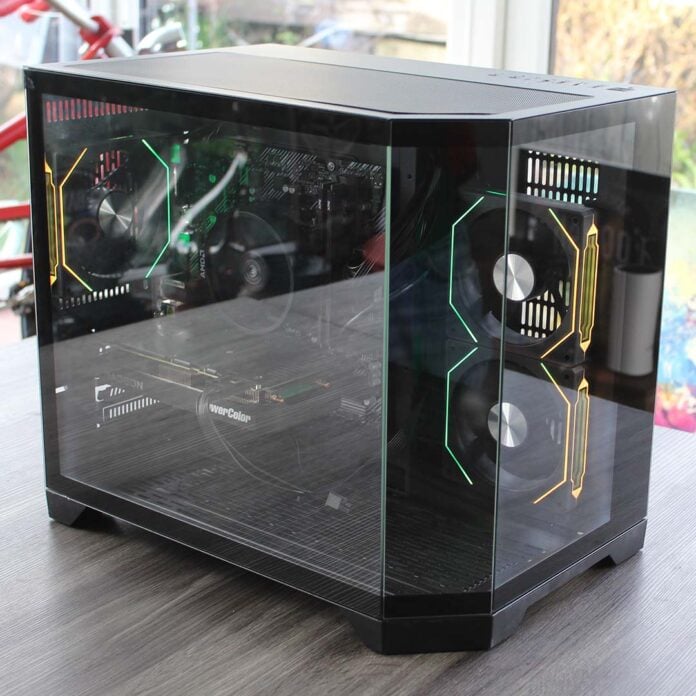
Can you really still build a decent budget gaming PC in these bleak, inflationary times? Stoke-based PC builder AWD-IT has set out to defy the odds and produce a fully assembled PC, complete with one of AMD’s latest RDNA 4 GPUs, for just £839.99. The result is a curious mish-mash of old and new components, which AWD-IT calls the Kalona.
Unsurprisingly, you won’t find 32GB of DDR5 RAM in this system, seeing as that would now take up half the budget. Instead, you get a pair of 8GB DDR4 sticks, plugged into an unashamedly no-frills AMD AM4 motherboard. You do still get an AMD Radeon RX 9060, though, albeit the non-XT version carrying 8GB of VRAM.

AWD-IT Kalona
£839.99
Pros
- Refreshingly low price in current market
- Can cope with some 1080p gaming
- Very quiet
- New GPU
- Low power draw
Cons
- Underwhelming performance
- Little upgrade potential
- Last-gen core components
- Only 8GB of VRAM
- Very basic motherboard
Club386 may earn an affiliate commission when you purchase products through links on our site.
How we test and review products.
The Kalona is a part of AWD-IT’s prebuilt range that’s ready to go at the drop of a hat, and it arrived very quickly, which is a definite plus point if you want your PC now. You can order one today, and it will turn up the next working day. Hitting such a low price will inevitably involve making compromises at the moment, though. The key question is whether this setup has enough power to keep the GPU supplied with frames for 1920×1080 gaming, while still giving you a reasonable all-purpose PC. I’ve been putting the Kalona through its paces over the last couple of weeks to find out.
Specs
| AWD-IT Kalona | |
|---|---|
| CPU | AMD Ryzen 5 5500 |
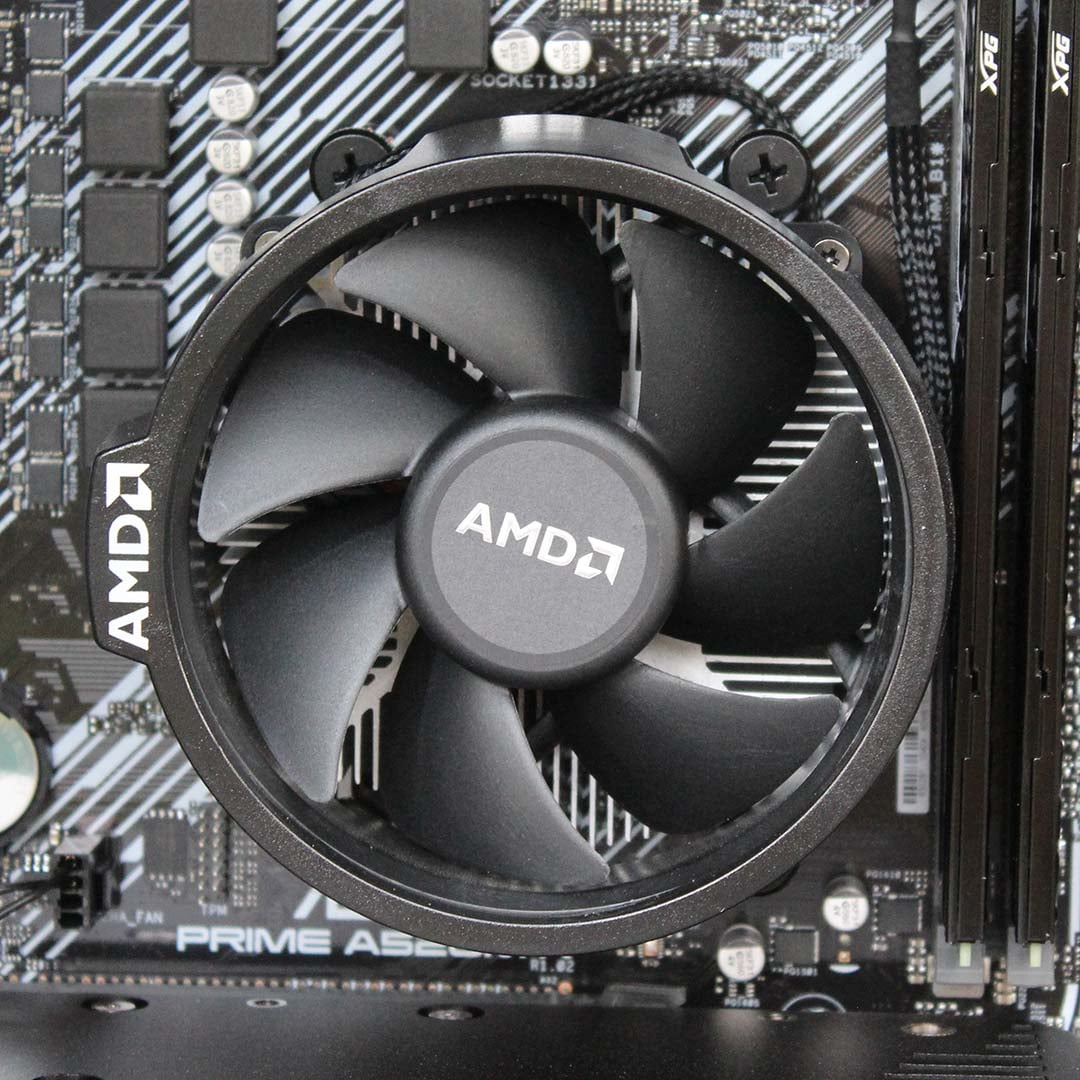
| CPU cooler | AMD Wraith |
| Motherboard | Asus Prime A520M-K |
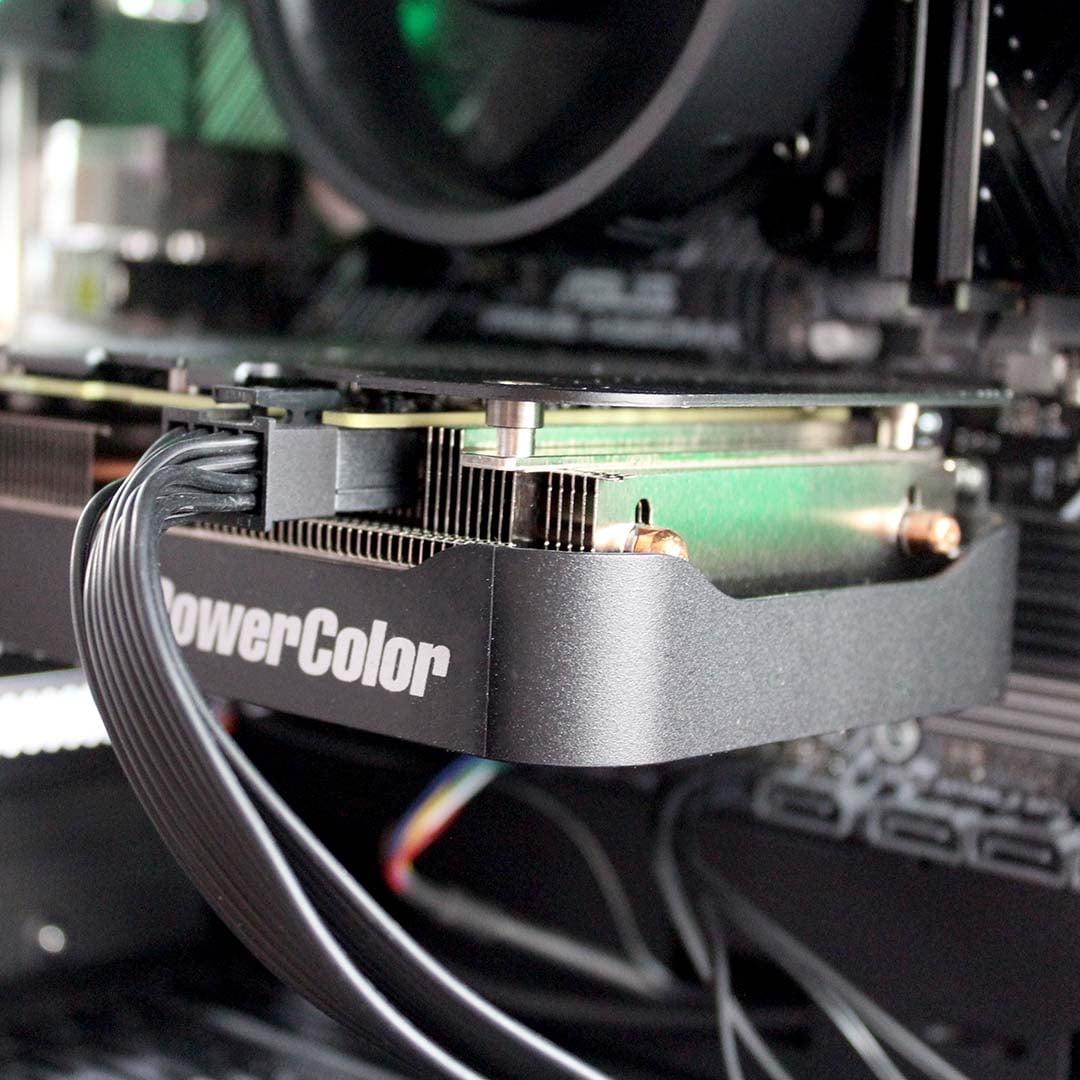
| GPU | PowerColor AMD Radeon RX 9060 Reaper 8GB |
| RAM | 16GB (2x8GB) 3,200MT/s CL16 ADATA XPG Gammix D35 DDR4 |
| SSD | Crucial E100 1TB |
| PSU | CiT FX Pro 600W (80 Plus Bronze) |
| Other features | 1Gb Realtek Ethernet Realtek 8811CU Wi-Fi 5 USB dongle |
| Case | CiT Mars ARGB Gaming Glass (micro-ATX) |
| Operating system | Windows 11 Home |
| Warranty | Three years |
| Price | £839.99 |
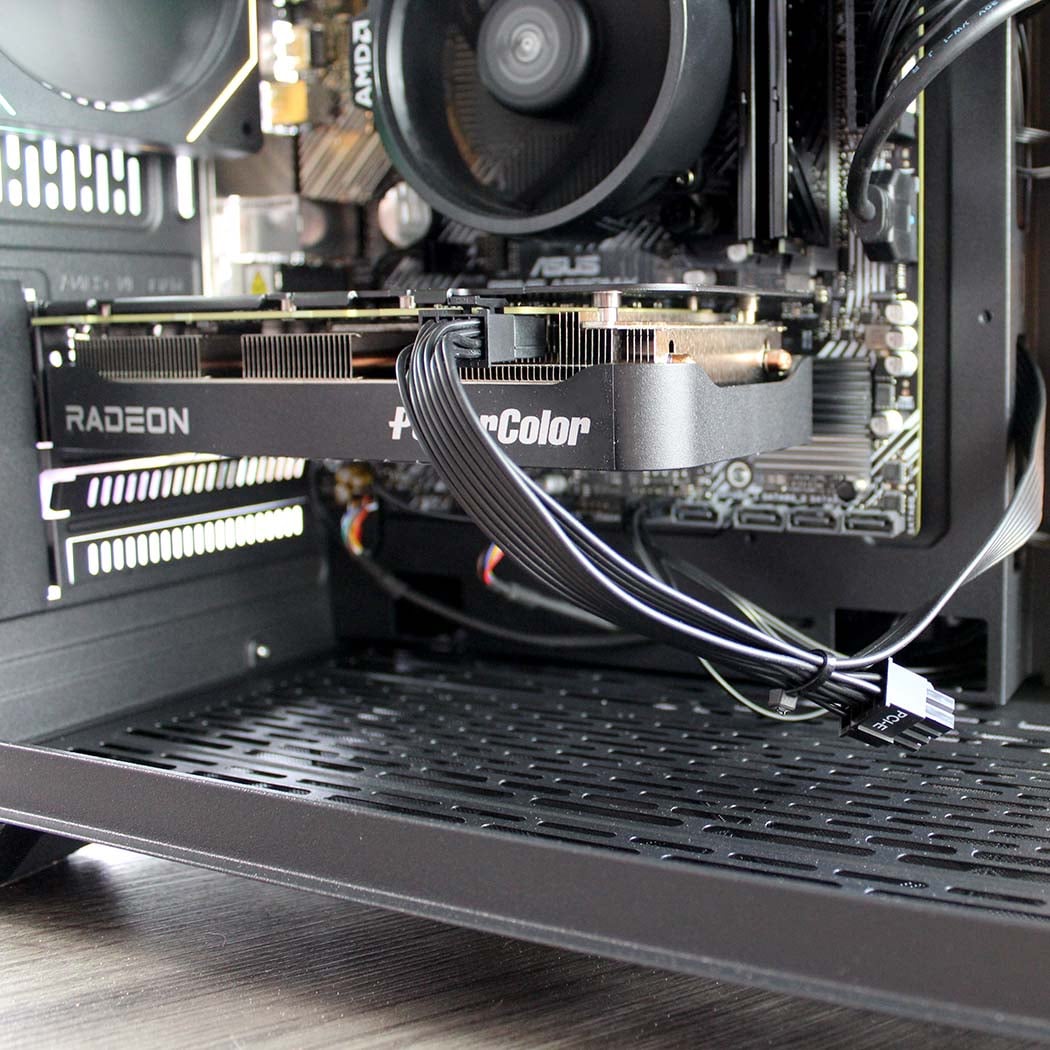
AWD-IT has understandably spent a good chunk of its budget on the GPU, as this component has the biggest impact on gaming performance. Inside the Kalona, you’ll find a basic PowerColor AMD Radeon RX 9060 Reaper 8GB graphics card, based on AMD’s latest RDNA 4 architecture. This OEM-only GPU uses the same Navi 44 chip as the 9060 XT, but with a cut-down spec. The card can only draw 132W, compared to 160W for the 9060 XT, and it has a lower boost clock of 2,990MHz, while the 9060 XT boosts to 3,130MHz. The non-XT GPU also only has 28 of its 32 compute units enabled, giving it 1,792 stream processors, rather than 2,048.
This GPU uses the same Navi 44 chip as the 9060 XT, but with a cut-down spec.
As I mentioned earlier, this card only has 8GB of VRAM. That’s an understandable compromise, given the high price of 16GB cards at the moment, but it will inevitably have an impact on performance.
In our testing, we’ve already found that several of the latest games quickly push past the VRAM barrier when you start upping the settings. The question will be whether you can still get a decent gaming experience out of this 8GB card – more on that later.
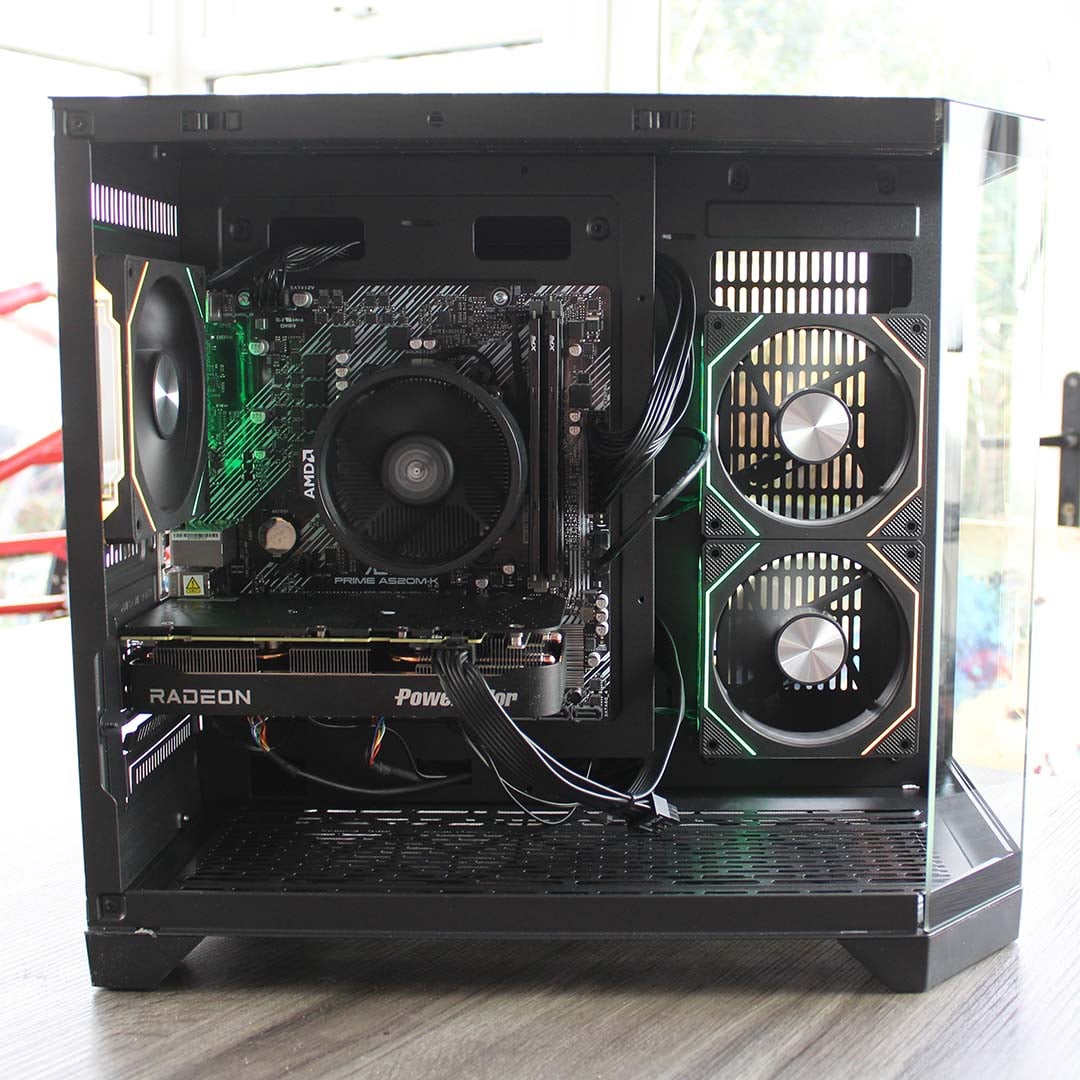
With the newest component out of the way, let’s take a look at the rest of the spec, which is all based on last-gen tech. There’s 16GB of ADATA XPX DDR4 RAM running at 3,200MT/s, with 16-20-20 latency timings. That’s still enough system memory for gaming in most scenarios, and its speed isn’t bad for DDR4 either.
Where the real cost cutting shows is in the choice of motherboard and CPU. Let’s start with the latter, an AMD Ryzen 5 5500. It has six Zen 3 cores, which is a solid start, but this CPU is based on AMD’s newer Cezanne core, rather than the classic Vermeer core. That means it only has 16MB of L3 cache, rather than the 32MB found in the more expensive Ryzen 5 5600XT.
This chip comes with a bundled Wraith cooler, helping AWD-IT to build this gaming PC for such a modest price.
We’ve seen that cache can have a significant impact on gaming performance, so we’ll be intrigued to see how this chip holds up. This budget CPU also only boosts to 4.2GHz, compared to 4.7GHz on the 5600XT, which will also limit its potential. On the plus side, it’s very cheap, and it comes with a bundled Wraith cooler, enabling AWD-IT to build this gaming PC for such a modest price.
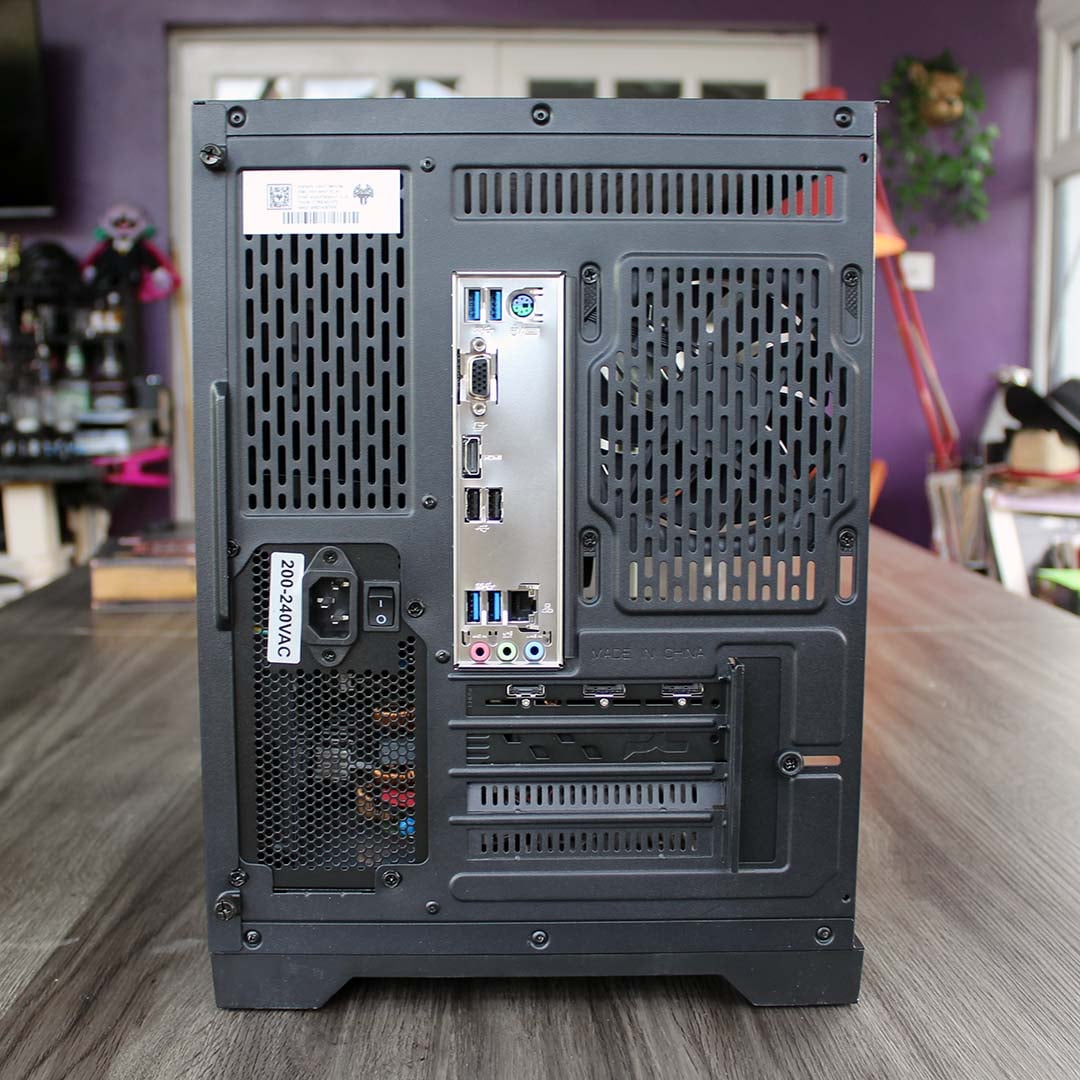
Likewise, the motherboard is about as minimalist as you can get. Based on AMD’s scaled-back A520 chipset, the Asus Prime A520M-K has no PCIe Gen 4 support and a very limited feature set. While its x16 PCIe 3.0 slot still offers just about enough bandwidth for the Radeon RX 9060 GPU, this board holds back the supplied PCIe Gen 4 Crucial E100 SSD in its single M.2 slot, as it can only run at PCIe Gen 3 speeds. You don’t get any truly high-speed ports either, with a mix of USB 2 and 5Gbps USB 3 sockets on the back.
All the gear is powered by a 600W PSU with 80Plus Bronze certification.
I know AWD-IT is trying to hit a price point here, but this board is so limited and restrictive that you can’t help thinking you’d happily pay the extra money for at least a B550 motherboard with PCIe Gen 4 and a USB 3.2 Gen 2 10Gbps port, so you get a bit more flexibility and upgrade headroom. There’s no built-in Wi-Fi or Bluetooth on this board either, but AWD-IT has at least counteracted the former with the inclusion of a basic Realtek Wi-Fi 5 dongle, which worked fine in testing.
All the gear is powered by a CiT FX Pro 600W PSU with 80Plus Bronze certification, which offers more than enough juice for these components.
Design
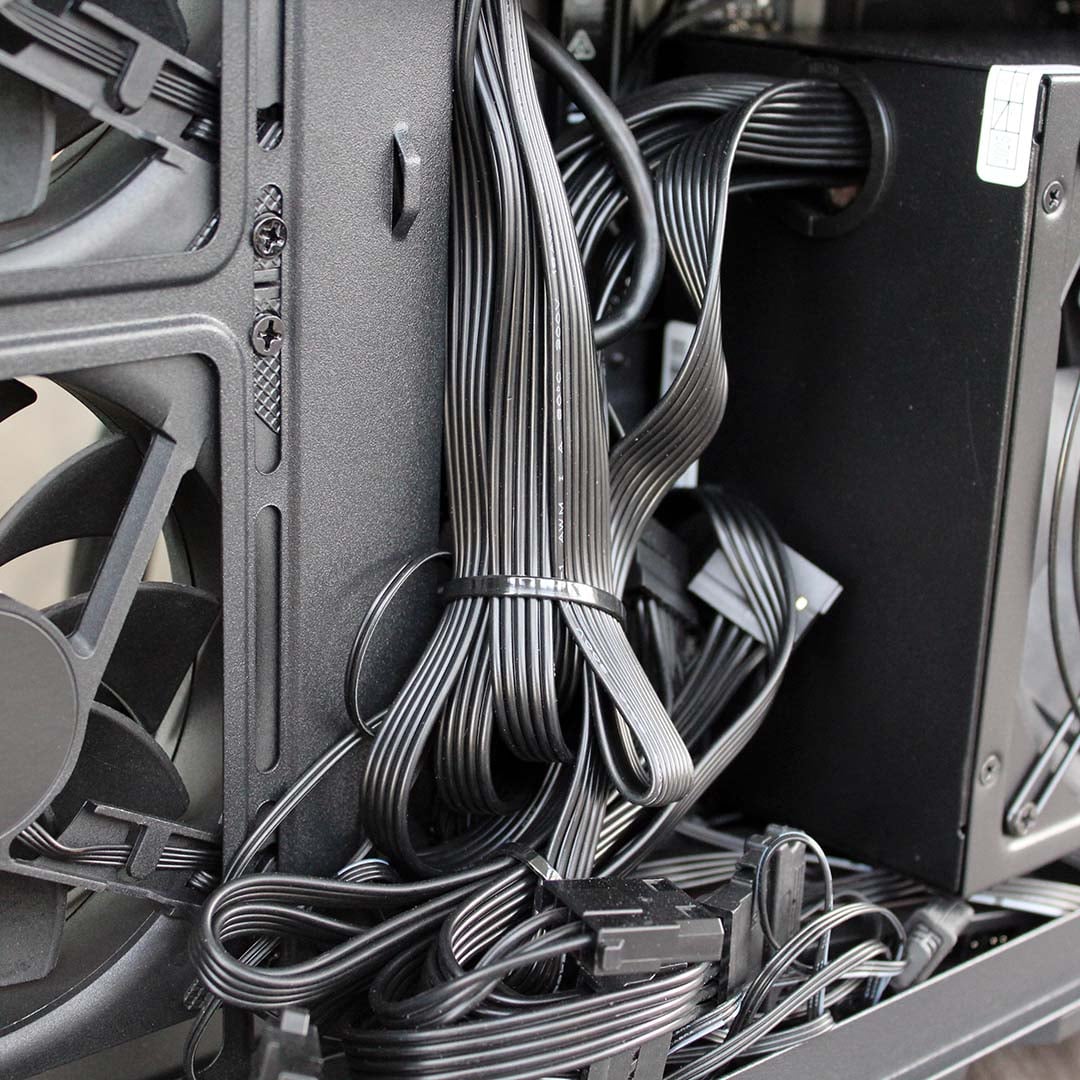
While that budget PSU offers a decent amount of power for the price, it unsurprisingly also has captive cables, rather than modular connections. These are all crudely bunched together out of sight behind the motherboard tray, and while they’re all tied down, it does look like a rat’s nest when you take off the side panel. At least the main interior chamber is kept clutter-free, so you can easily access your components.
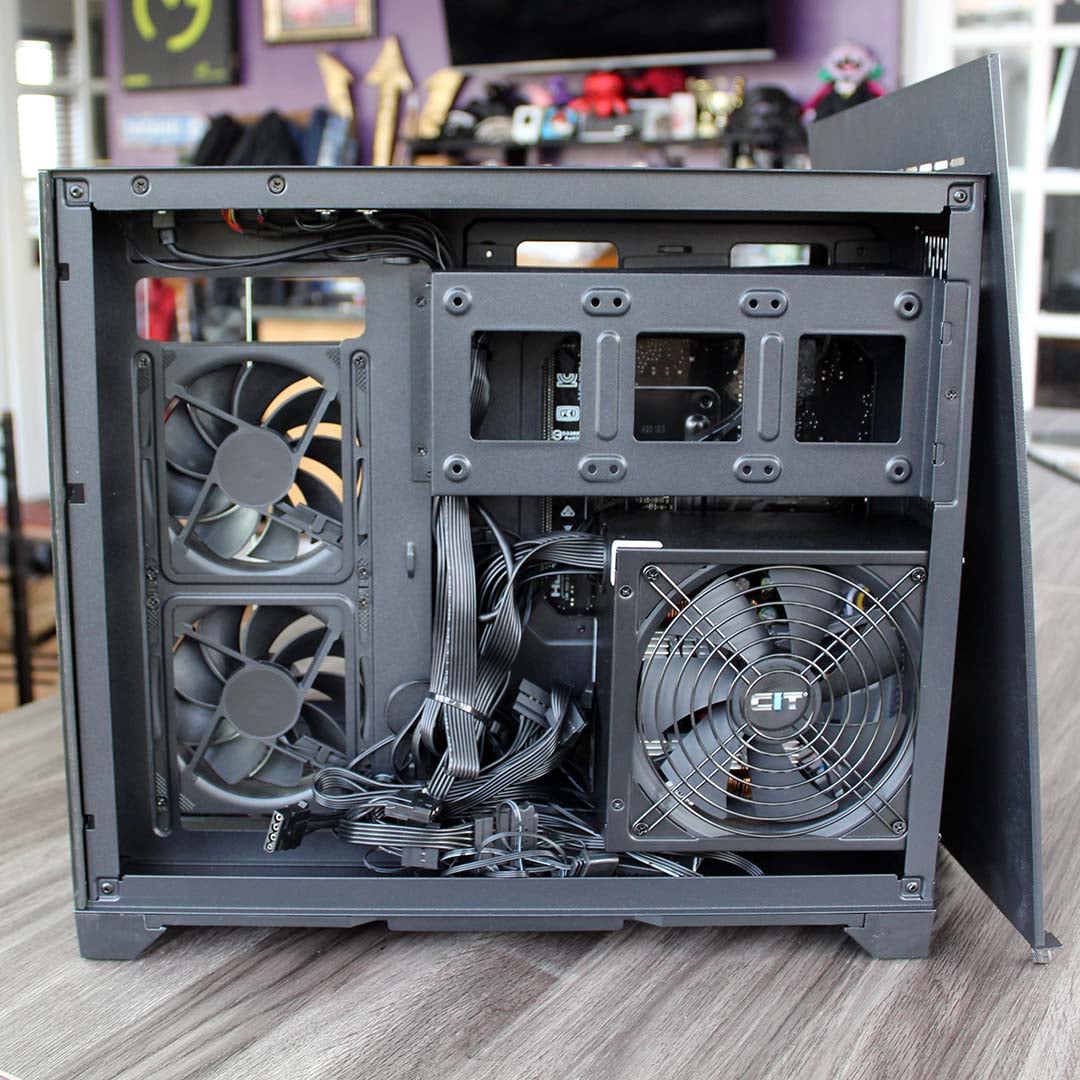
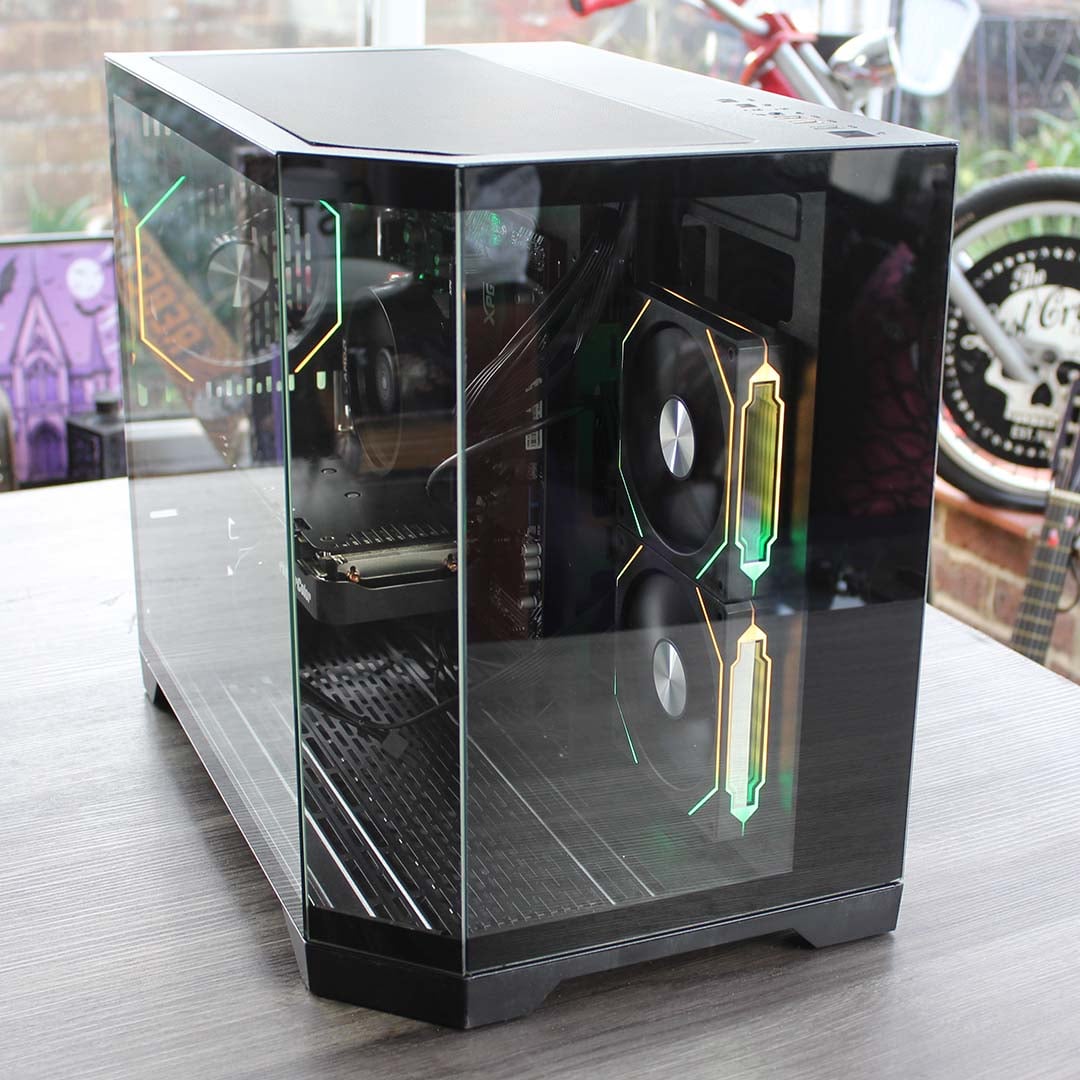
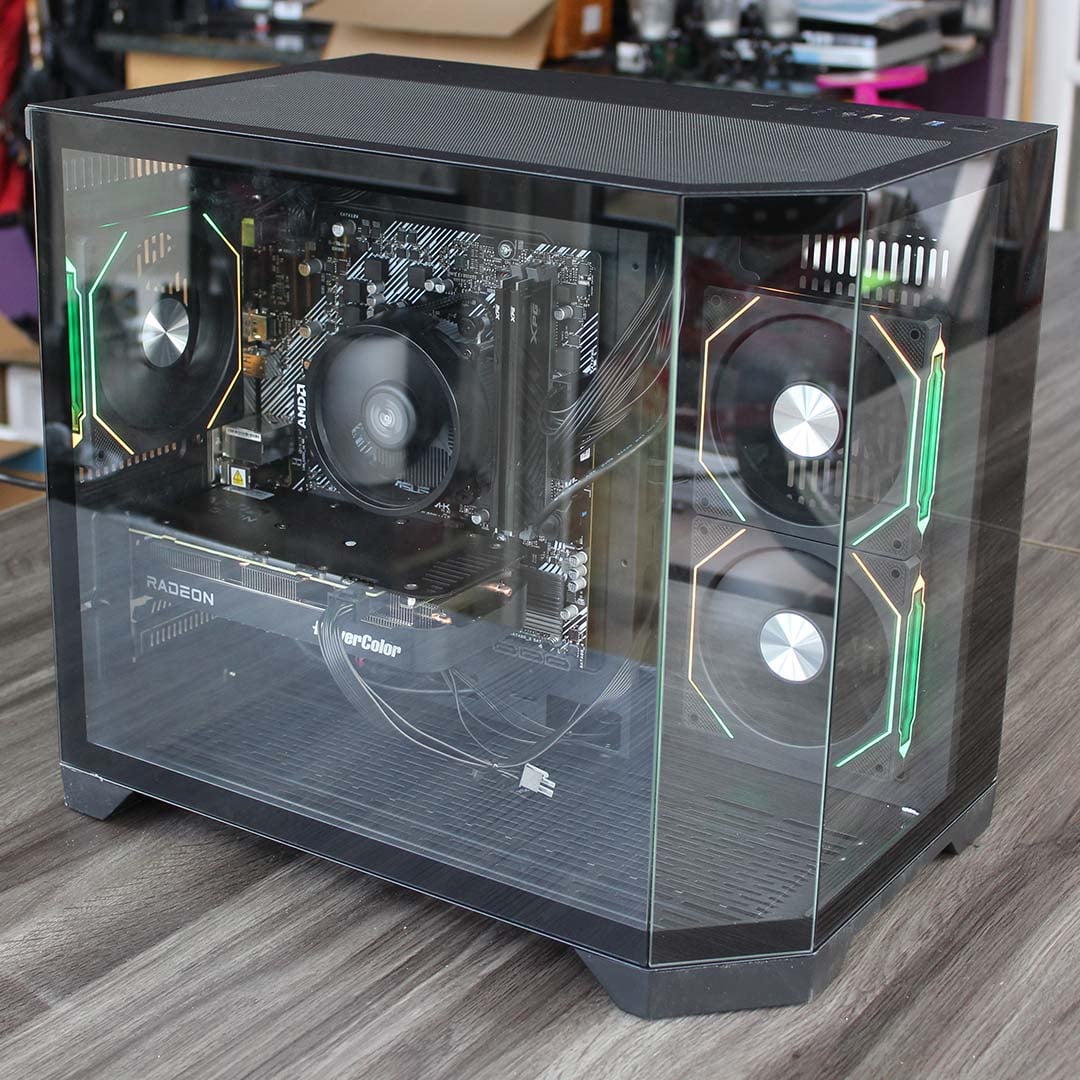
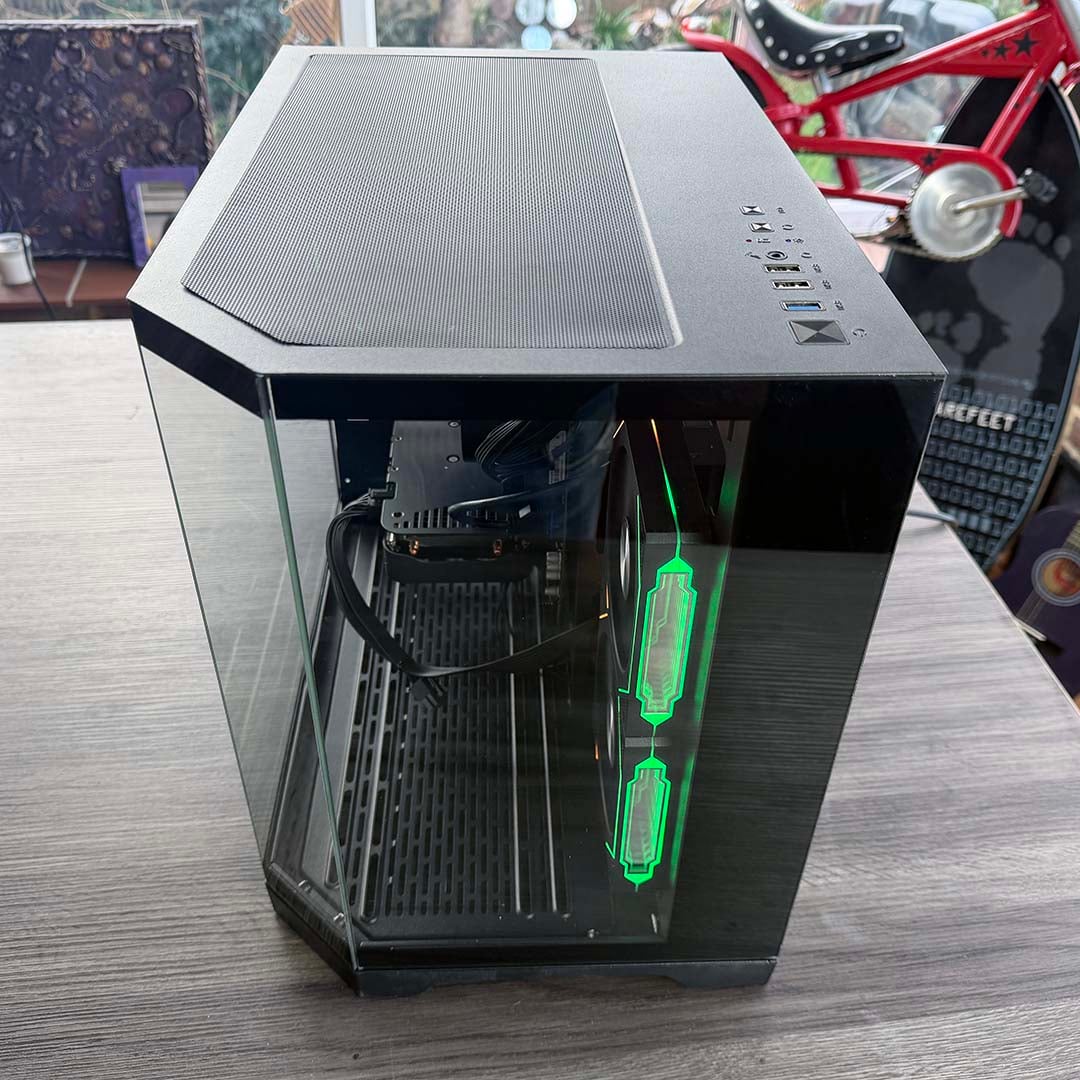
AWD-IT has used a dual-chamber CiT Mars ARGB micro-ATX case for this build, which is small and light, while showing off the lighting from the RGB fans inside the system. Build quality is basic – the dust filter vent in the top just slides off with nothing securing it in place, for example, and it feels insubstantial when you pick it up.
However, it does look quite smart sat on your desk, with its dual-chamber design meaning the PSU and all its cables are kept well and truly out of sight, and the wraparound glass giving you a view into the interior and lights. In all honesty, though, there’s not a lot to see through that window, thanks to the lowly components. With no RGB kit beyond the fans, and no-frills components inside, the aquarium-style view seems wasted on this rig – a straightforward case with a single windowed side panel, or even a solid one, would be fine.
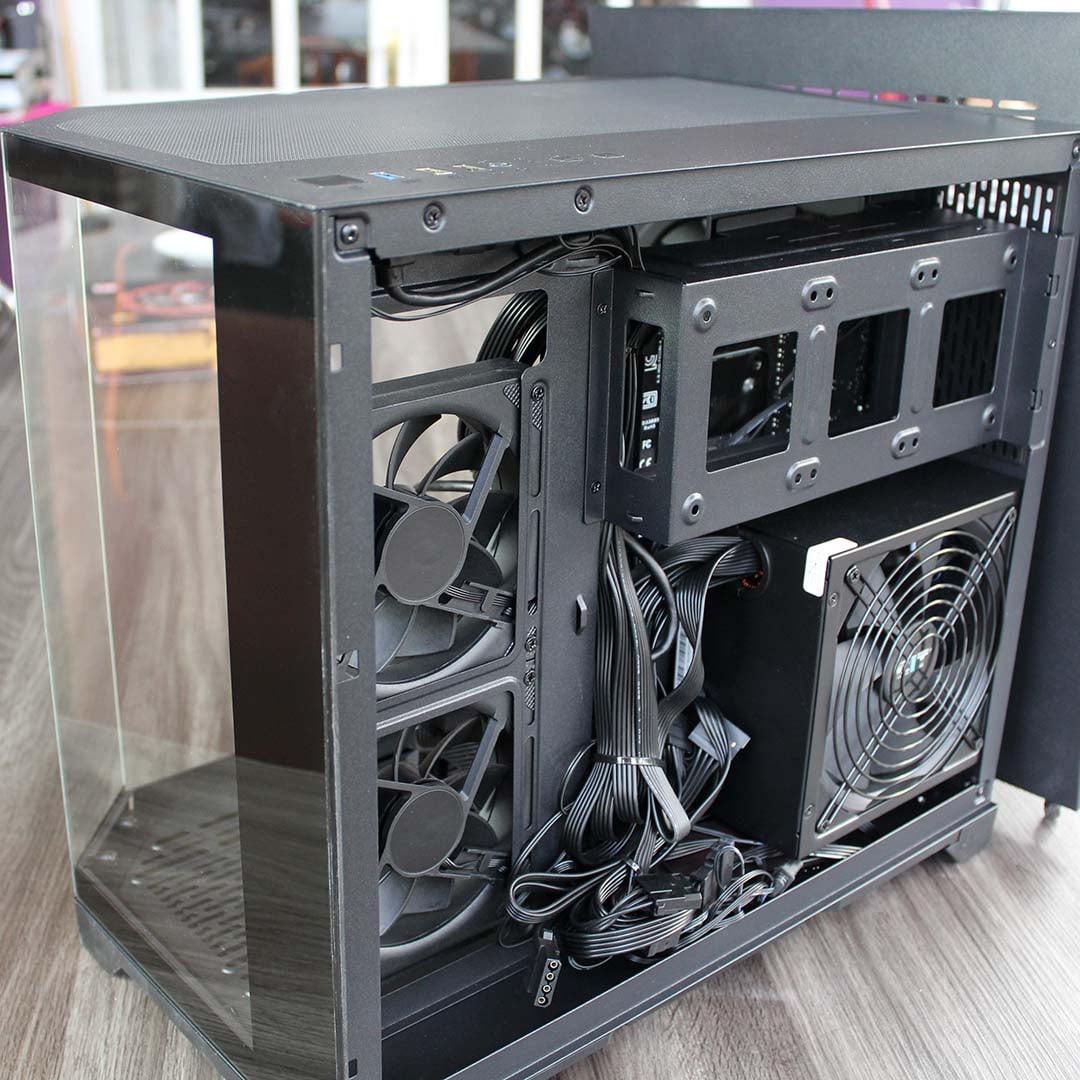
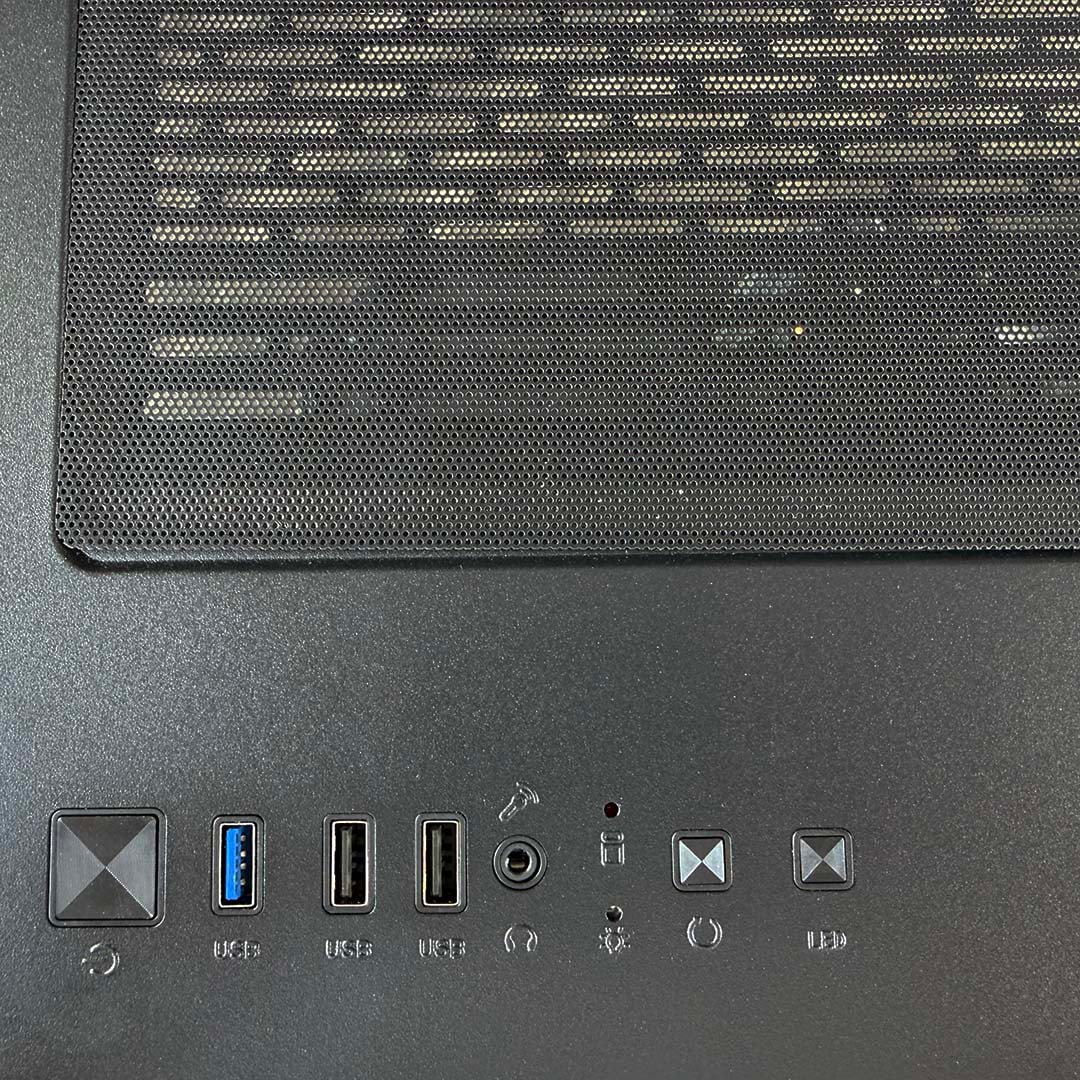
Only the largest of the three see-through panels is removable, and it easily unclips so you can access the interior. Meanwhile, all the key essential ports are provided on the top at the front, including a pair of USB 2 ports and a single USB 3 5Gbps socket. There’s no USB-C, but that’s not an issue given that there’s no USB-C header on the motherboard anyway.
Performance
With just an AMD Ryzen 5 5500 and Radeon RX 9060 inside this machine, I’m not expecting it to set any benchmark records, but I’m hoping I can get it running the latest games at half-decent settings. Accordingly, I’m not only running all our standard maxed-out gaming tests on the Kalona, but also trying some runs at lower settings to see what you can genuinely do with it.
I’m comparing it to a few other PCs we’ve recently reviewed, at various prices, so you can see how it stacks up. However, it’s worth bearing in mind that the Kalona is significantly cheaper than all the other systems in these graphs, and while I’ve listed the prices from when we tested these PCs, these specs will all cost even more money if you buy them now – some of the systems aren’t even available to buy any more, and those that are cost several hundred pounds more. As such, while the Kalona sits at the bottom of many of the following performance graphs, it’s important to remember that it does only cost £839.99 in a very challenging market.
Here are the five other systems I will be comparing to this one, complete with a summary of their core components and links to their reviews:
- PCSpecialist Vortex BF 25 (£1,799 when tested – no longer available)
- AMD Ryzen 7 9800X3D
- Nvidia GeForce RTX 5070 Ti
- Asus Prime B850-Plus
- 32GB DDR5-6000 CL30
- 2TB Samsung 990 Evo Plus
- OcUK Gaming Mach 3.1 (£1,349 when tested – now £1,599)
- AMD Ryzen 7 5700X3D
- Nvidia GeForce RTX 5070
- MSI B550M Pro-VDH WiFi
- 32GB DDR4-3200 CL16
- 1TB MSI Spatium M450 V1
- Novatech Reign Sentinel (£2,269 when tested – now £2,849)
- AMD Ryzen 7 9800X3D
- Nvidia GeForce RTX 5070 Ti
- MSI B850 Gaming Plus WiFi PZ
- 32GB DDR5-5600 CL40
- 2TB Samsung 990 Evo Plus
- CyberpowerPC Ultra R87 Pro (£999 when tested – no longer available)
- AMD Ryzen 7 8700F
- AMD Radeon RX 9060 XT 16GB
- MSI Pro B650-S WiFi
- 32GB DDR5-6000 CL36
- 1TB WD_Black SN7100
- PCSpecialist Aegis Pro R (£999 when tested – no longer available)
- AMD Ryzen 5 7500X3D
- Nvidia GeForce RTX 5060
- Asus Prime B850-Plus WiFi
- 16GB DDR5-5600 CL40
- 1TB Crucial P310
CPU
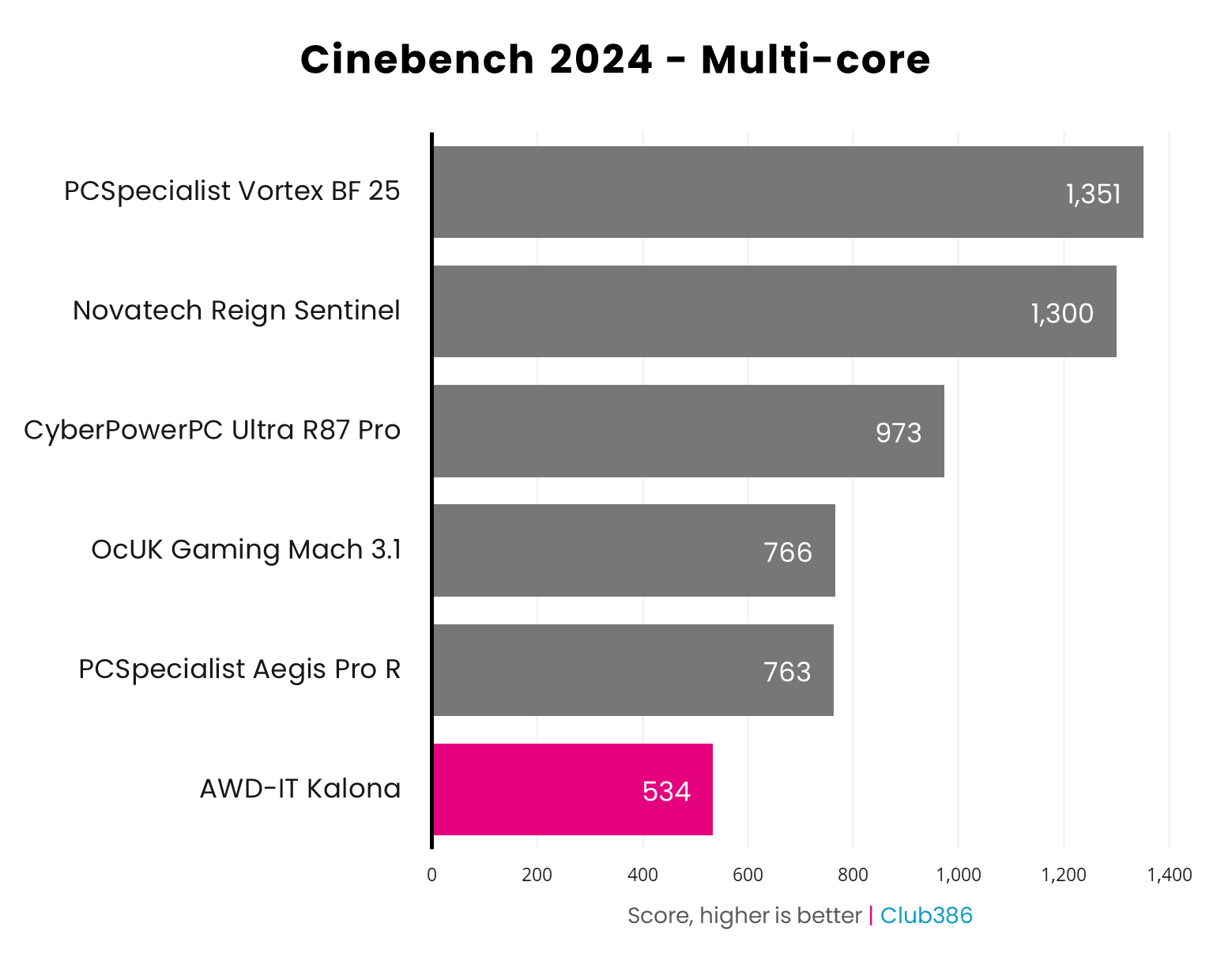
There’s no sugar-coating this situation – the AMD Ryzen 5 5500 is not a powerful multi-threading CPU by any stretch of the imagination. With this Cezanne chip offering six last-gen Zen 3 cores that boost to 4.2GHz, the Kalona only gets a score of 534 in Cinebench’s multi-core rendering benchmark. That’s a good 229 points behind the PCSpecialist Aegis Pro R, which uses a 6-core AMD Ryzen 5 7500X3D with just a 4.5GHz clock speed, albeit for a higher price.
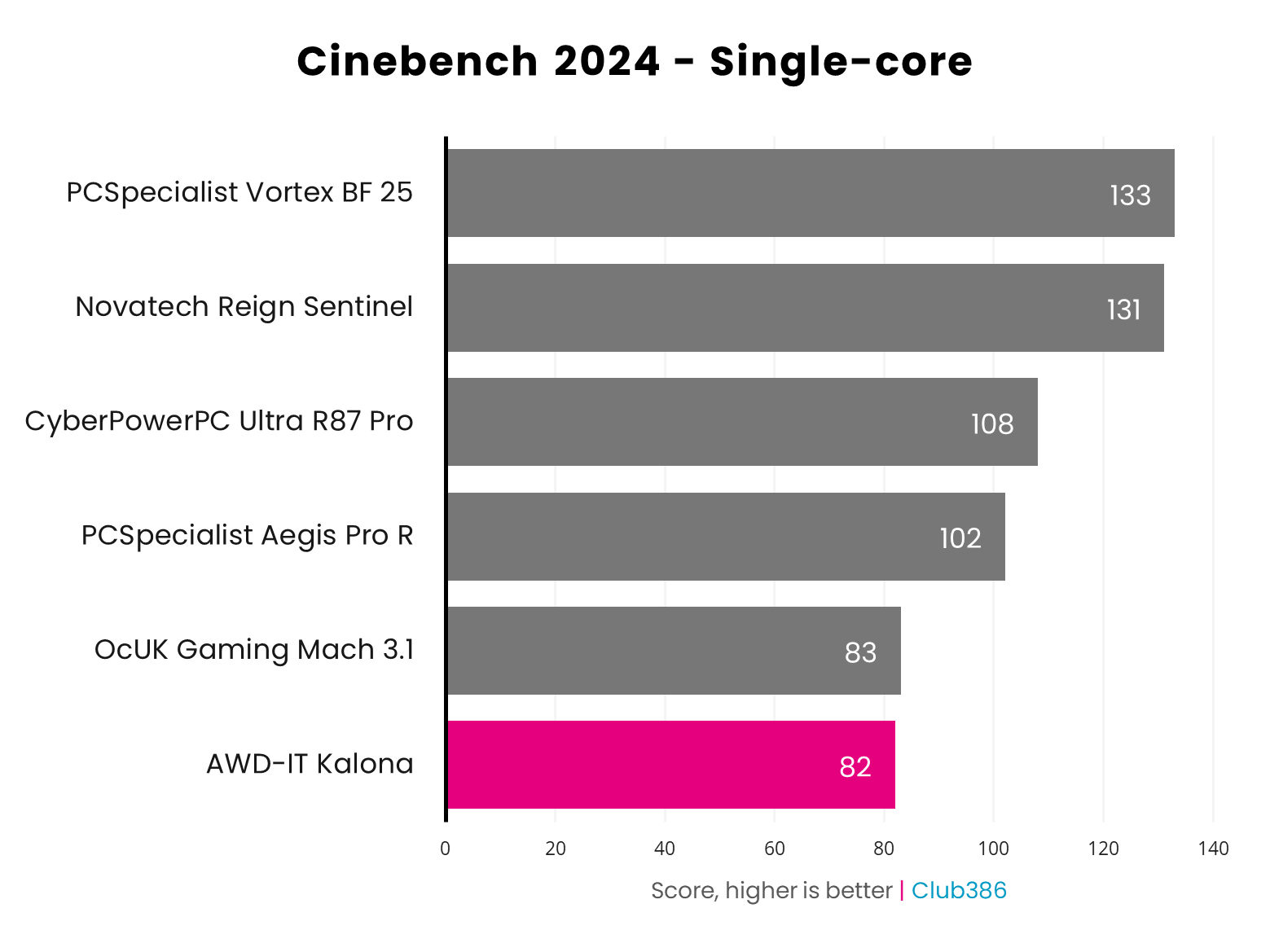
Moving to Cinebench’s single-core test, the Kalona is again at the bottom of the chart, but not by as huge a margin compared to the next chip along. It’s only one point behind the OcUK Gaming Mach 3.1, which is also based on the AMD AM4 platform, with a Ryzen 7 5700X3D in its socket. We’re really seeing the limits of Zen 3 compared to Zen 4 and 5 here, though – the other machines, based on newer AMD CPUs, are much faster.
RAM
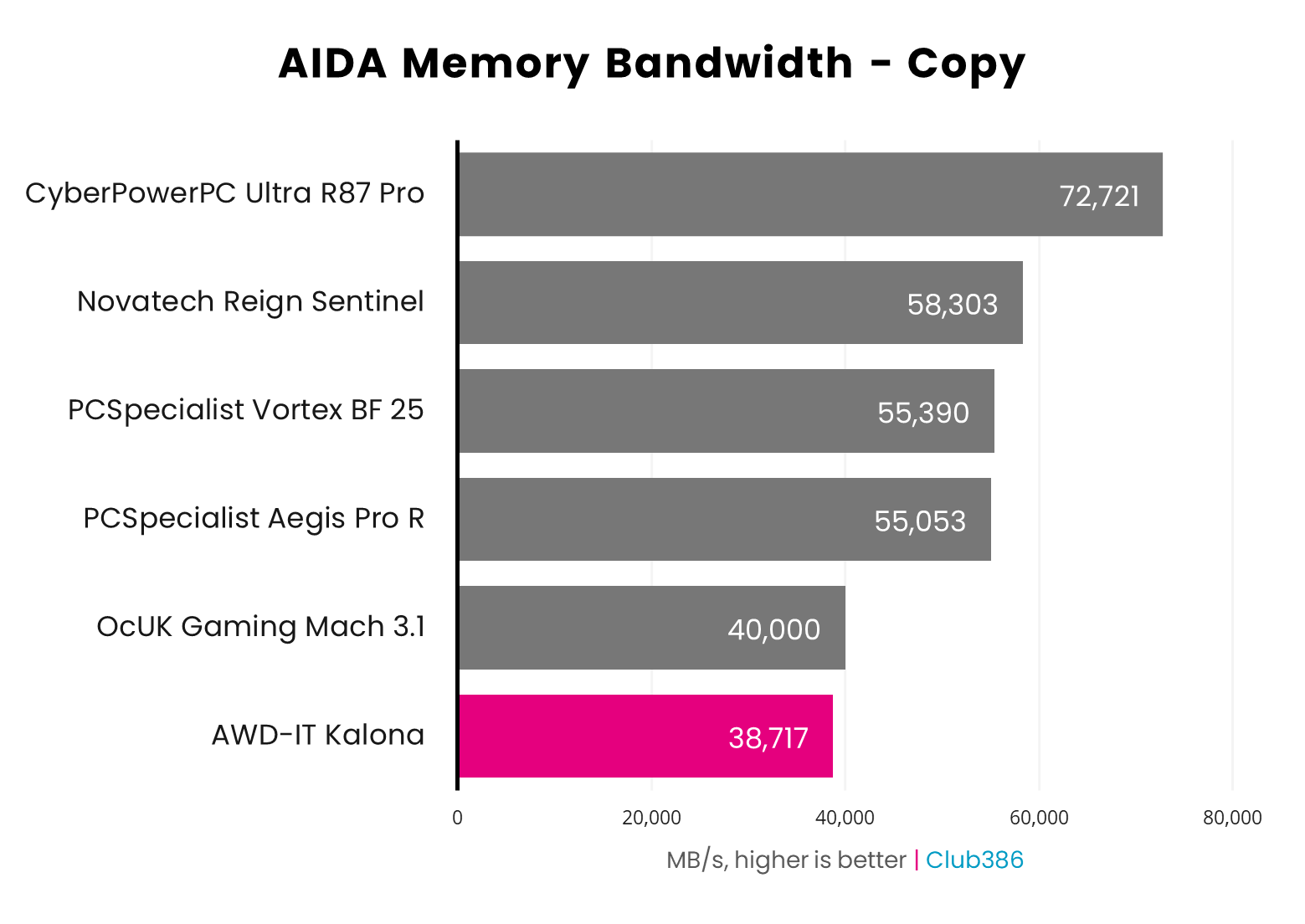
Using DDR4 rather than DDR5 understandably has a big impact on memory bandwidth. As you can see in the AIDA graph below, both the DDR4 systems are a fair way behind the DDR5 rigs when it comes to copying performance. The Kalona’s result of 38,717MB/s puts it at the bottom of the chart, but it’s not far behind the OcUK rig.
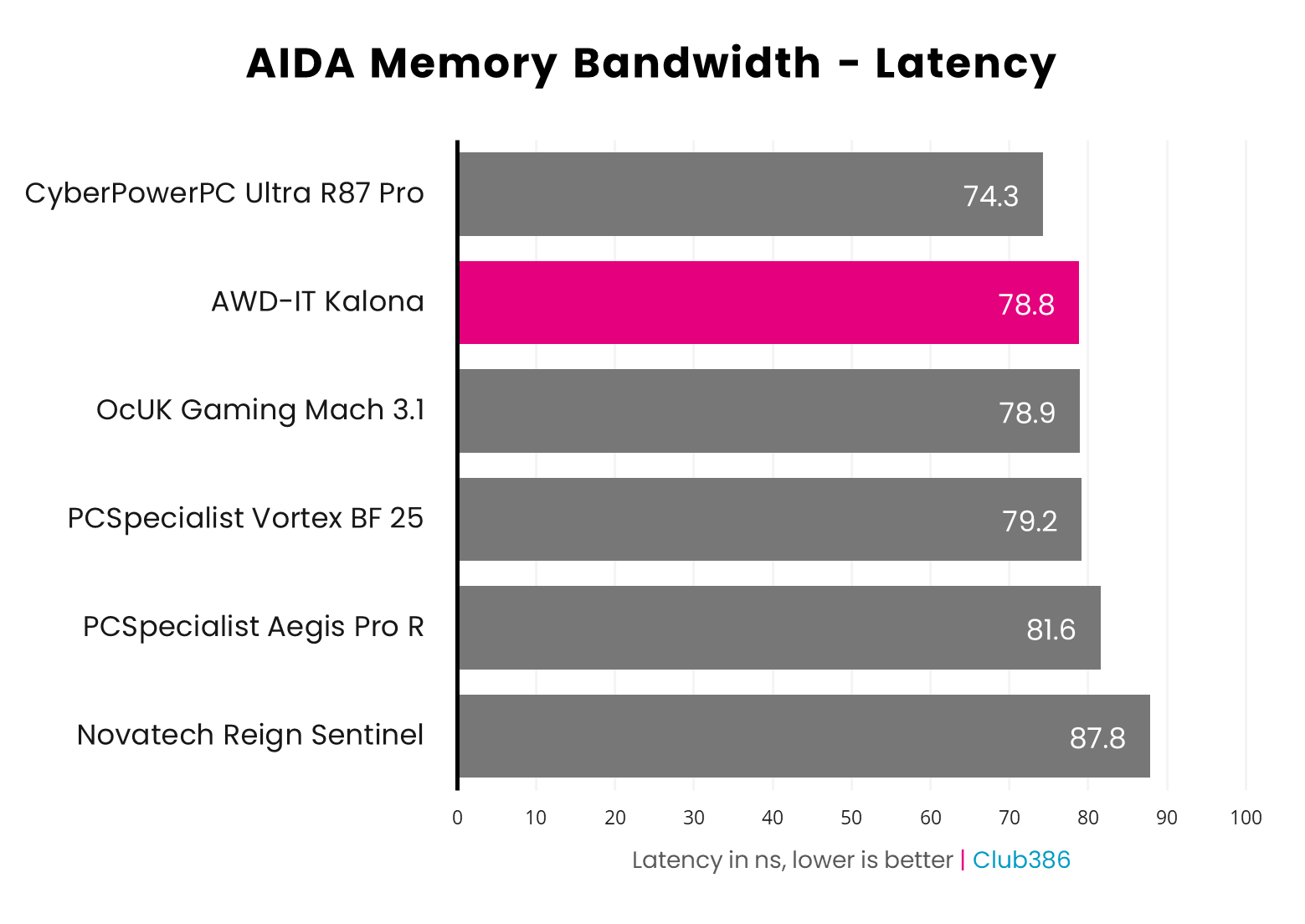
On the plus side, RAM latency isn’t a problem with the CL16 memory kit plugged into the Kalona’s motherboard. AIDA measured the latency of these ADATA XPG Gammix D35 DDR4 modules at 78.8ns – a solid result.
Storage
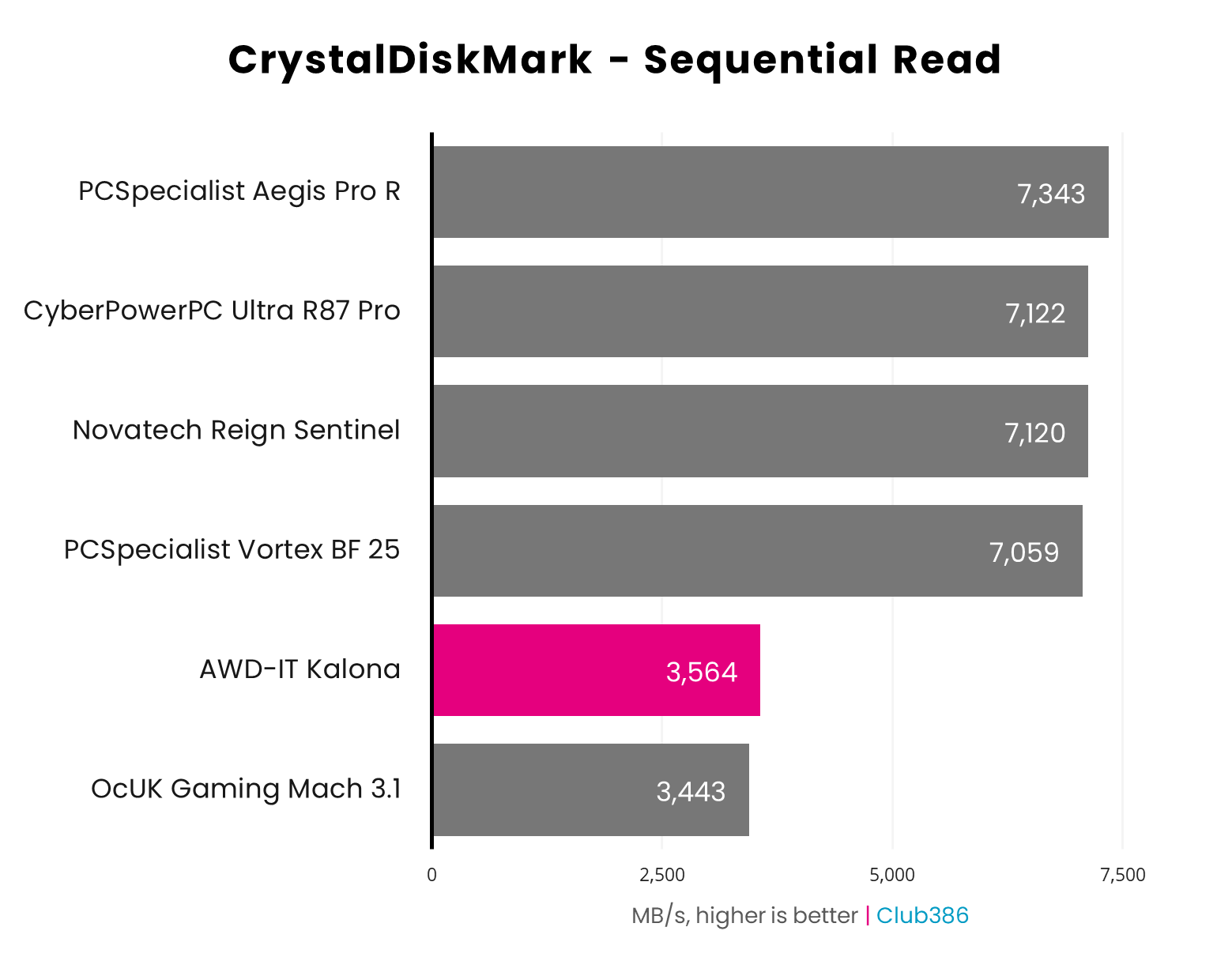
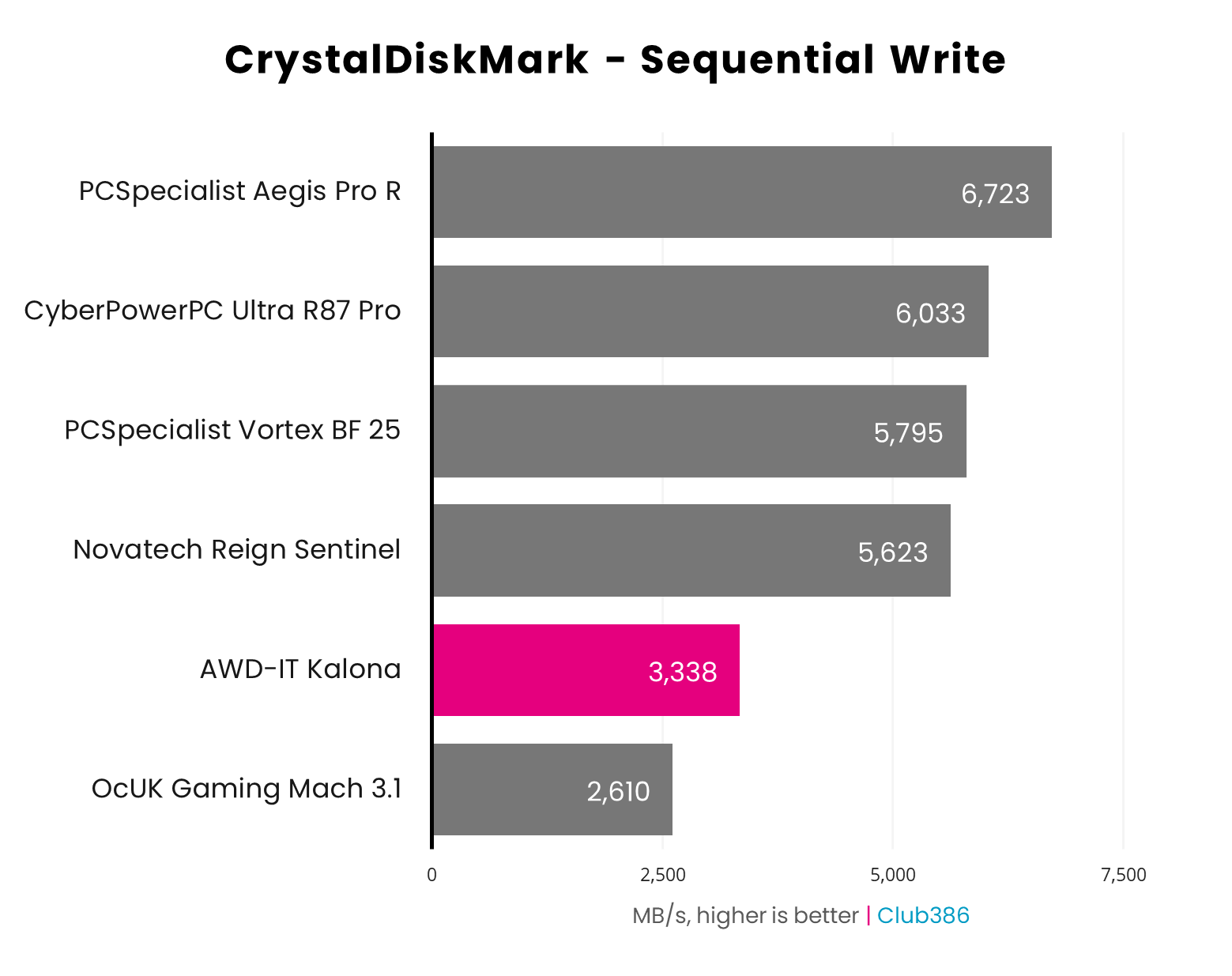
The CrystalDiskMark result below breaks my heart a bit, as I know the PCIe Gen 4 Crucial E100 drive in this machine can go faster (around 5,000MB/s), it’s just held back by the limited PCIe Gen 3 motherboard. That dents its performance hard, meaning this drive can only read at 3,564MB/s – hitting the limit of the PCIe Gen 3 interface.
We see the same situation when it comes to write speeds, although the AWD-IT Kalona is still significantly quicker than OcUK rig here. As you can see, the Kalona is a long way behind PCIe Gen 4 systems, and not because its SSD isn’t any good, but because the motherboard can’t run it at full speed.
However, it’s also worth noting that CrystalDiskMark is a synthetic benchmark that pushes SSDs to their limits in largely theoretical file transfer scenarios. In terms of general responsiveness and system performance, the Kalona’s storage setup does the job fine.
Gaming
Given the cut-down CPU and limited CPU spec, I’m not expecting the AWD-IT Kalona to beat any of these comparison PCs, but I’m hoping it can still achieve half-decent frame rates in our game tests. The Kalona arrives with resizable BAR disabled by default, but it’s easy enough to enable in the BIOS, and I’ve done that to give it a good shot at our gaming tests.
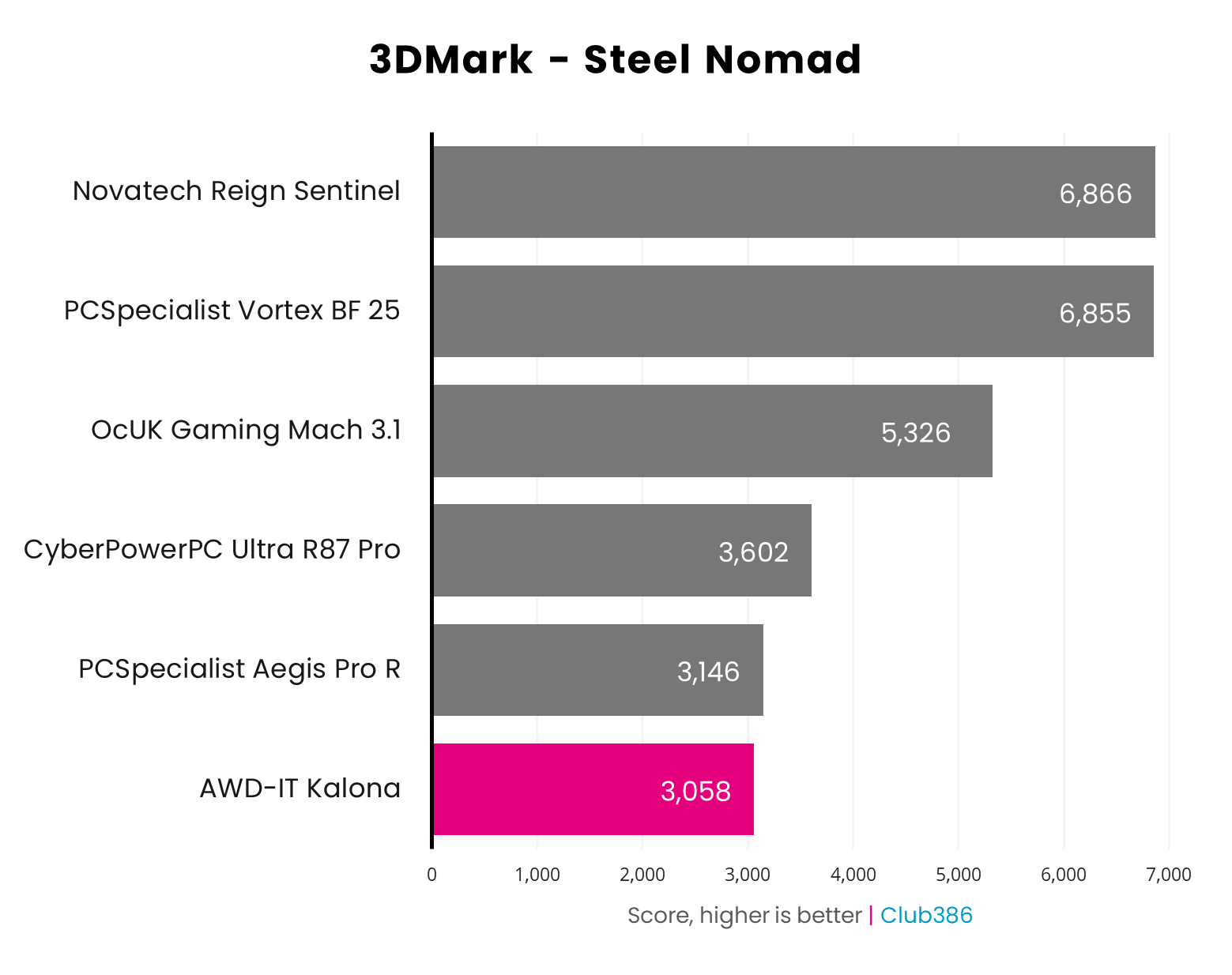
It gets off to a good start in 3DMark Steel Nomad, a test that relies heavily on GPU performance, rather than CPU and RAM speed. The Kalona’s score of 3,058 isn’t far off the PCSpecialist Aegis Pro R, a machine based on a GeForce RTX 5060 and Ryzen 5 7500X3D.
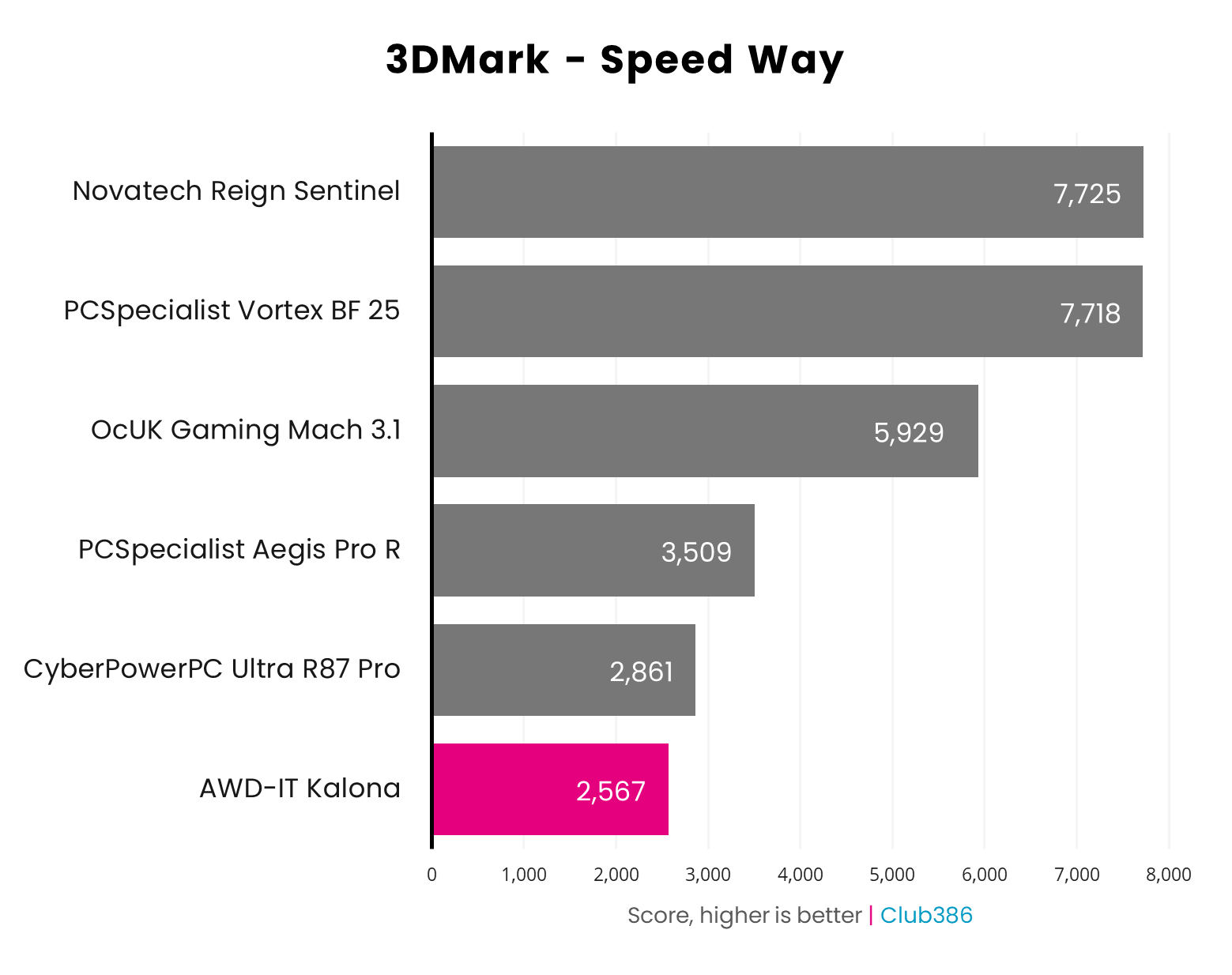
3DMark’s Speed Way result starts to show the Kalona slipping further behind the pack, but its score of 2,567 still isn’t terrible in this super-demanding ray tracing test. Comparatively, the CyberPower Ultra R87 Pro, which uses a full-spec Radeon RX 9060 XT 16GB graphics card, is only 294 points ahead.
When we get to real games, however, you start to see the limits of this system. Its spec creates several barriers – there’s the limited cache and clock speed of the CPU, a lack of VRAM for the GPU, and comparatively slow DDR4 memory, all of which combine to create a scenario where it’s hard for the Kalona to stretch its legs.
| Game | 1080p (Min / Avg) | 1440p (Min / Avg) |
|---|---|---|
| Assassin’s Creed Shadows (Ultra, max RT) | 11 / 16fps | 11 / 14fps |
| Assassin’s Creed Shadows (Medium, min RT, FSR Q) | 46 / 72fps | – |
| Final Fantasy XIV: Dawntrail | 44 / 103fps | 44 / 75fps |
| Forza Motorsport (Ultra, max RT) | 11 / 24fps | 6 / 10fps |
| Forza Motorsport (Medium, RT off, FSR Q) | 16 / 36fps | – |
| Mount & Blade II | 52 / 108fps | 54 / 91fps |
| Rainbow Six Siege X | 115 / 151fps | 74 / 95fps |
Let’s start with a good result, which is Final Fantasy XIV: Dawntrail. In this test, the Kalona hits 103fps at 1920×1080 and 75fps at 2560×1440 – both great results. There’s no change in the minimum frame rates in both these tests, probably because of the limited CPU, but you could happily play this game at high settings on the Kalona.
One game that’s heavily impacted by using a last-gen CPU and DDR4 memory is Mount & Blade II: Bannerlord, as we found in our recent DDR4 vs DDR5 test, and that’s also the case here. The game is perfectly playable at both 1920×1080 and 2560×1440, but there’s a big gulf between these results and those from a DDR5 AM5 rig. As a point of comparison, the RTX 5060-based PCSpecialist Aegis Pro R, with a Ryzen 5 7500X3D, averages 185fps with a much higher minimum of 121fps at 1080p.
you can run Assassin’s Creed Shadows smoothly on the Kalona if you drop down to the Medium graphics preset.
Moving to the really demanding tests in our suite, the Kalona unsurprisingly has no chance of playing Forza Motorsport or Assassin’s Creed Shadows at our brutally hard maxed-out settings, averaging 16fps and 24fps respectively at 1080p. The aforementioned PCSpecialist Aegis Pro R copes better in these tests, averaging just over 30fps at 1920×1080, but you really need to step beyond the budget realms to play these games at top settings.
On the plus side, you can run Assassin’s Creed Shadows smoothly on the Kalona if you drop down to the Medium graphics preset, set ray tracing to Hideout Only, and enable FSR on the Quality setting – it then averages 72fps with a 46fps minimum. However, I really struggled to get a playable result from Forza Motorsport at half-decent settings. Even turning off all ray tracing, setting the graphics preset to Medium, and enabling FSR 2.0 (which looks horrible) still resulted in a clunky 16fps minimum, with a 36fps average, despite these settings sitting in the 8GB VRAM budget.
| Cyberpunk 2077 | 1920×1080 (Min / Avg) |
|---|---|
| RT Ultra native | 22 / 30fps |
| RT Ultra FSR 4 Quality | 41 / 49fps |
| RT Medium native | 30 / 38fps |
| RT Medium FSR 4 Q | 54 / 63fps |
| RT Medium FSR 4 Q + FG x2 | 100 / 115fps |
As I said earlier, there are several factors at play here, and VRAM is definitely one of them. This is really shown up in Cyberpunk 2077. We usually run this game at the ray tracing Overdrive preset to push a system as hard as possible, but I toned this down to the Ultra ray tracing preset for this system. Even so, these settings maxed out the VRAM on the Kalona, resulting in highly variable performance when the memory was saturated. I’ve recorded the best result of 30fps in the table above, but there was a large variation between runs, with the worst result being a 22fps average and 14fps minimum.
I found that dropping down to the Medium ray tracing preset was a good compromise here. It still looks good, even if you don’t get the fancy reflections in puddles. If you then enable FSR 4 on the Quality setting, you can average 63fps with a 54fps minimum. That’s smoothly playable, giving you some headroom to enable frame gen and average 115fps. These settings used 7,505MB of the VRAM, so while it was close to the edge, there was still just enough headroom to run the game smoothly.
Vitals
One area where this system really excels is its low power draw and quiet noise output. That’s largely down to the low-spec components, but AWD-IT also deserves some credit for tuning the cooling system well. This PC is practically inaudible when it’s idle, where total power draw from the mains sits at just 39W.
Running Cinebench’s multi-core test stresses the Wraith cooler hard, with the noise level hitting 43dBA, but the CPU still remained within thermal limits at 89°C, with power draw only increasing to 122W. Impressively, total noise output while running Cyberpunk 2077 stood at just 34dBA – barely more than a low-level hum. CPU and GPU temperatures are kept surprisingly low during gaming sessions, while the power draw peaks at just 212W. That 600W PSU is more than capable of handling this system when it’s running flat out.
| Idle | Load (Cinebench) | Load (Gaming) | |
|---|---|---|---|
| CPU temperature | 39°C | 89°C | 76°C |
| GPU temperature | 42°C | 46°C | 61°C |
| Noise | 30dBA | 43dBA | 34dBA |
| Power consumption | 39W | 122W | 212W |
Conclusion
AWD-IT deserves some credit for this attempt at the seemingly impossible, and the Kalona is genuinely capable of playing most of today’s games at decent settings, despite its low price, and without making a load of horrible fan noise too. It’s hard not to be a bit depressed by what was required to achieve that price, though. Several forces prevent this PC from stretching its legs, whether it’s the motherboard’s omission of PCIe Gen 4 and high-speed ports, the CPU’s lack of cache and clock speed, the limited amount of VRAM, the cut-down GPU, or the reliance on CPU and memory tech that’s now several generations old.
To be clear, these limitations are a product of severe market conditions, rather than AWD-IT trying to fleece its customers, but the end result is a PC that’s hard to recommend. If you can’t stretch your budget beyond this point, then this is as good a PC as you’re going to get. Putting together a very similar spec in PCPartPicker comes up with a price of £846.07, and while that gives you a full 9060 XT GPU, it still only has 8GB of VRAM.
Plus, you then have to build the system yourself, and you don’t get a warranty for your build either. Comparatively, AWD-IT’s comprehensive standard warranty gives you three years of cover. Remarkably, that includes parts and labour for the full three years as well, whereas a lot of system builders only cover parts for the first year as standard. While this PC offers good value for money in a difficult market, though, it’s important to be aware of its limitations, especially as you’re going to have a tough time upgrading this PC in the future.
If there’s any way you can save up a bit more money for at least a Ryzen 5 5600XT, PCIe Gen 4 motherboard, and Intel Arc B580 with 12GB of VRAM, you’ll need to spend around £985, but you’ll get a better-rounded system, even if its CPU and RAM are still based on last-gen tech.
