
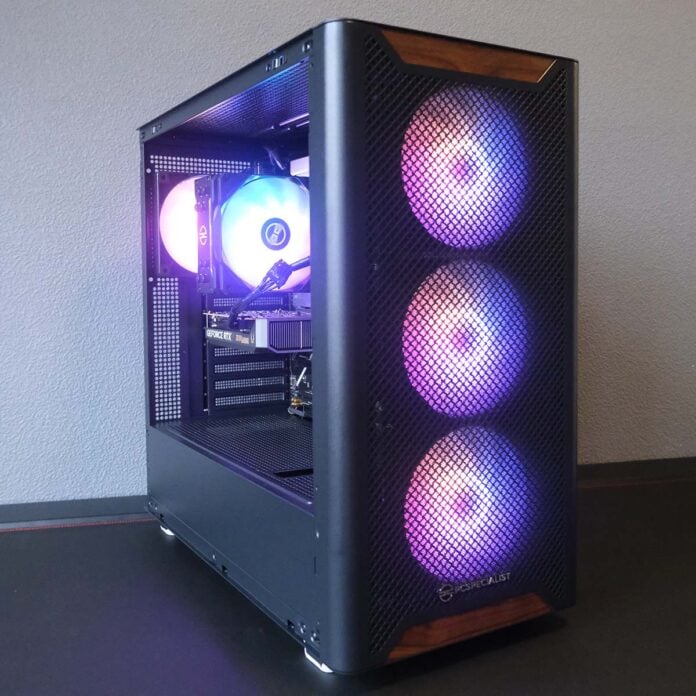
In a world where rising DRAM prices make building your own gaming PC particularly difficult, it’s wise to turn to prebuilds like the PCSpecialist Aegis Pro R to extract the most bang from your buck. At just under £1,000, this system packs an affordable punch that is sure to please gamers rocking a 1080p monitor setup.


PCSpecialist Aegis Pro R
£999
Pros
- Good FHD performance
- Great price
- Solid acoustics and thermals
- Lean power draw
Cons
- RTX 5060 only has 8GB of VRAM
- Relatively low USB bandwidth
- RAM is on the slower side
Club386 may earn an affiliate commission when you purchase products through links on our site.
How we test and review products.
Putting together as close to a like-for-like DIY version of Aegis Pro R as possible, via PCPartPicker, proves £226.04 more expensive at the time of writing. Even subtracting the cost of a Windows 11 licence, you’re still £111.04 better off with PCSpecialist’s offering.
That comparison also doesn’t account for the build time and system stability checks you get when you buy a prebuild, as well as a three-year warranty. It simply makes the most sense to go with this all-in-one package from PCSpecialist with off-the-shelf parts right now.
Specs
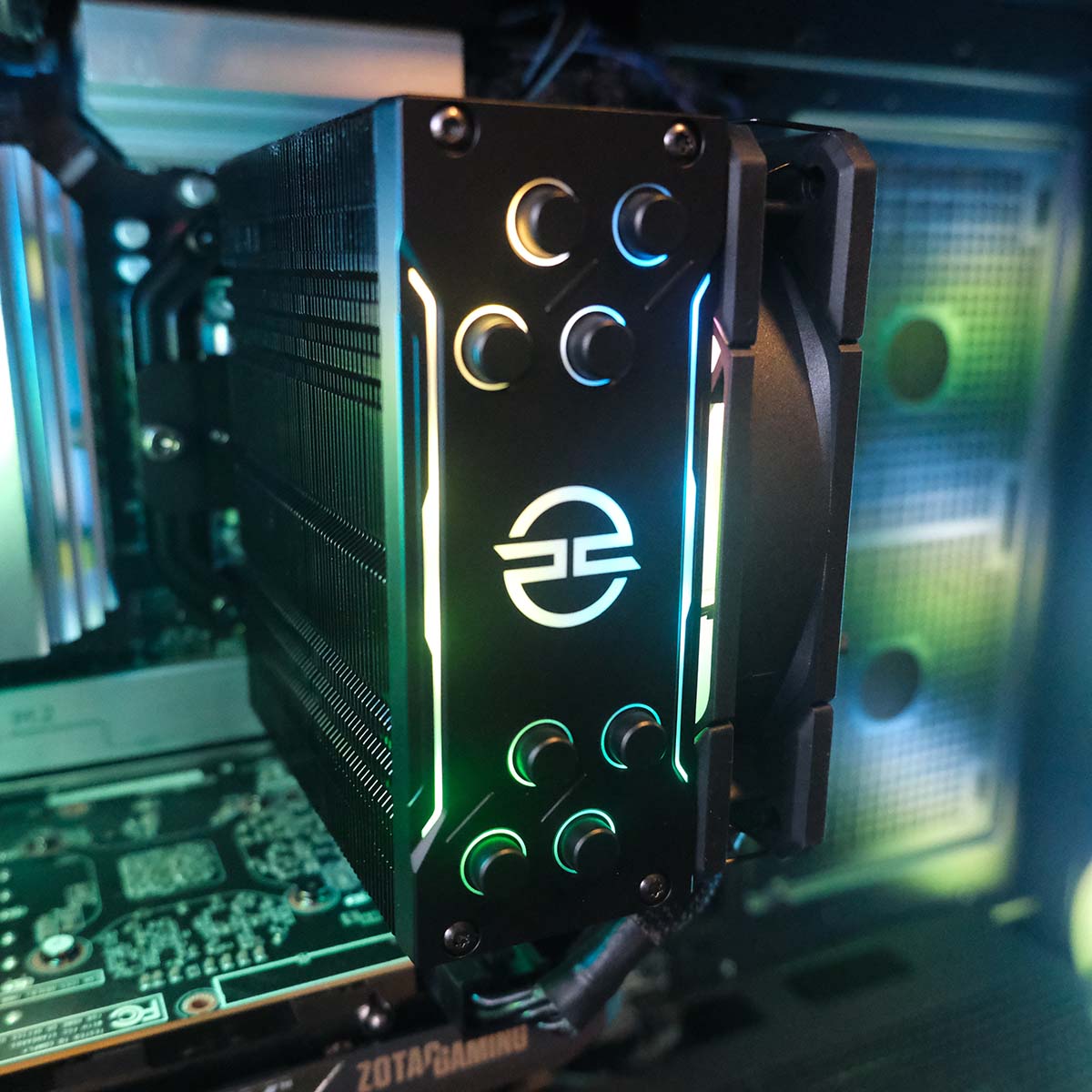
The AMD Ryzen 5 7500X3D in this machine is a big deal for the price. This is the most affordable AM5 processor with AMD’s X3D tech, and it has the same 96MB of L3 cache as its more-expensive siblings. However, it only sports six Zen 5 cores and a rather meagre boost clock of 4.5GHz.
The AMD Ryzen 5 7500X3D in this machine is a big deal for the price.
It’s a solid choice of chip for any system, mostly capable of keeping pace with high-end graphics cards, but I do question its immediate value inside this rig. If present affordability is the name of the game, I would sooner have suggested throwing a Ryzen 5 7600(X) or 9600X inside this machine. However, as a forward-looking option with an eye towards future GPU upgrades, the CPU makes more sense.
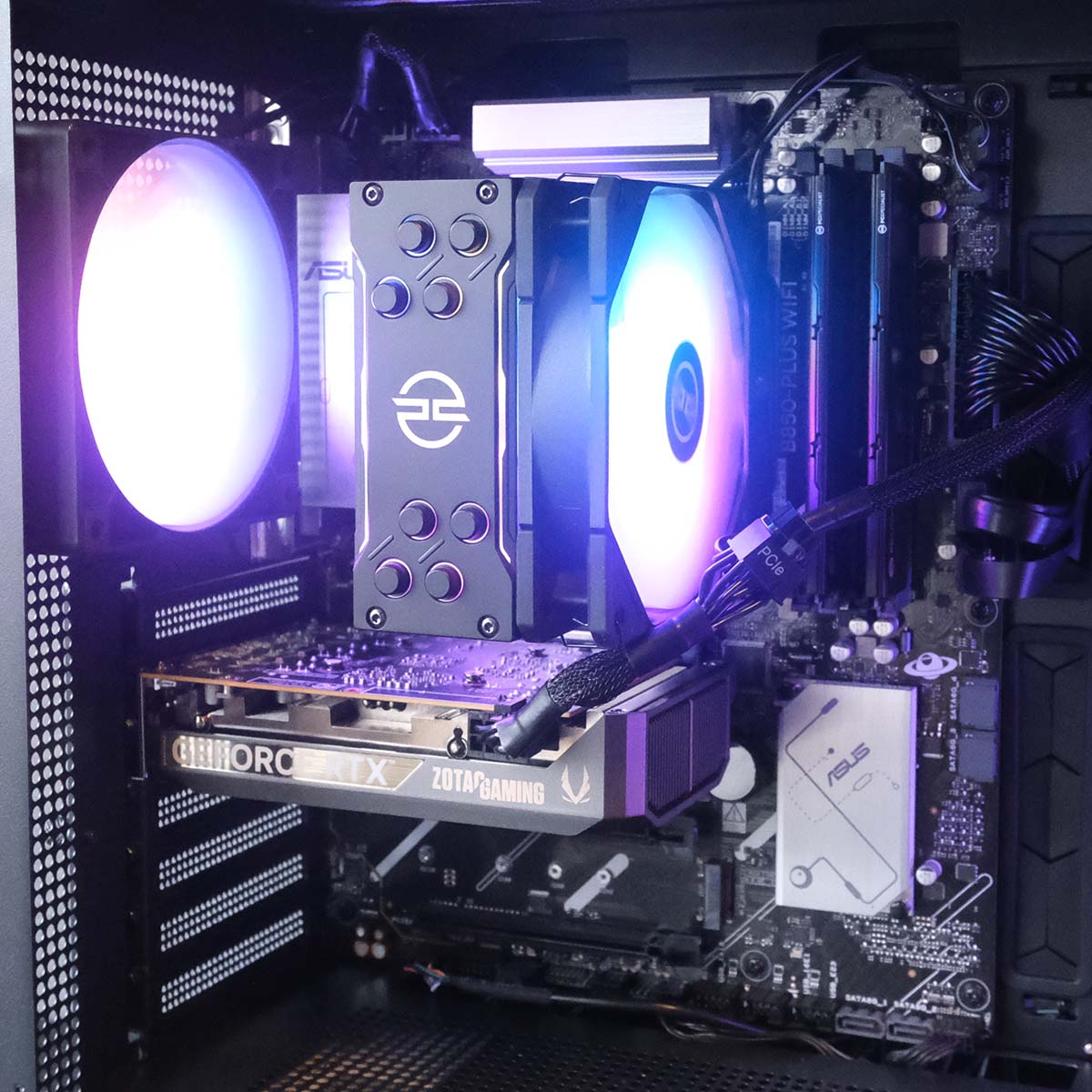
Sat on top of the CPU is a PCSpecialist FrostFlow 100 ARGB V3 air cooler. This heatsink is on the leaner side, but that’s perfectly fine considering it only needs to keep a 65W processor cool. Its fan also puts on a pleasing light show that livens up the interior.
| PCSpecialist Aegis Pro R specs | |
|---|---|
| CPU | AMD Ryzen 5 7500X3D |
| CPU cooler | PCS FrostFlow 100 ARGB V3 |
| Motherboard | Asus Prime B850-Plus WiFi |
| GPU | Zotac GeForce RTX 5060 Solo |
| RAM | 16GB (2x8GB) PCS Pro DDR5-5600 CL40 |
| SSD | Crucial P310 1TB |
| PSU | Corsair CX650 (80 Plus Bronze) |
| Other features | 2.5Gb Ethernet Bluetooth 5.3 Wi-Fi 6E |
| Case | PCS Aegis Black ARGB |
| Operating system | Windows 11 Home |
| Warranty | Three-year |
| Price | £999 |
Flanking the processor is a kit of DDR5 5,600MT/s RAM. While these sticks are a few transfers short of that 6,000MT/s sweet spot for Ryzen 7000 series processors, they’re a cut above base-level 5,200MT/s alternatives. I just wish their timings were tighter, as CL40 is on the looser side. However, given the extreme cost of RAM right now, this is a compromise you need to make if you’re on a tight budget.
Likewise, for a budget-conscious build in these times, 16GB is enough RAM for gaming as well. Better still, that’s across two DIMMs in dual-channel mode, improving memory bandwidth and boosting system performance.
These PCS brand sticks aren’t particularly flashy, lacking any sort of ARGB LEDs, but they get the job done without making the system overpriced. Of course, no one’s exactly spoiled for choice when it comes to RAM in the current market, particularly as far as affordable models are concerned.
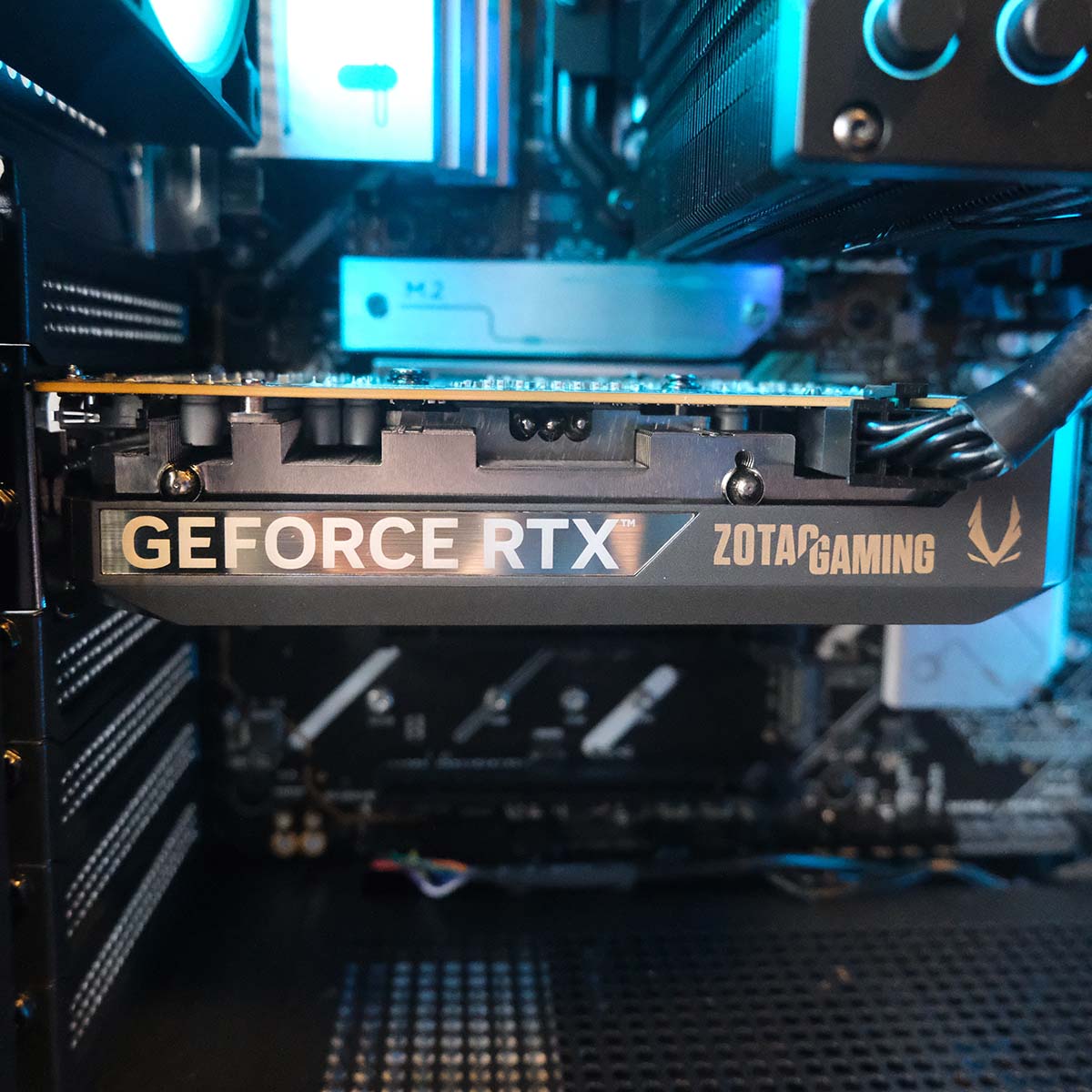
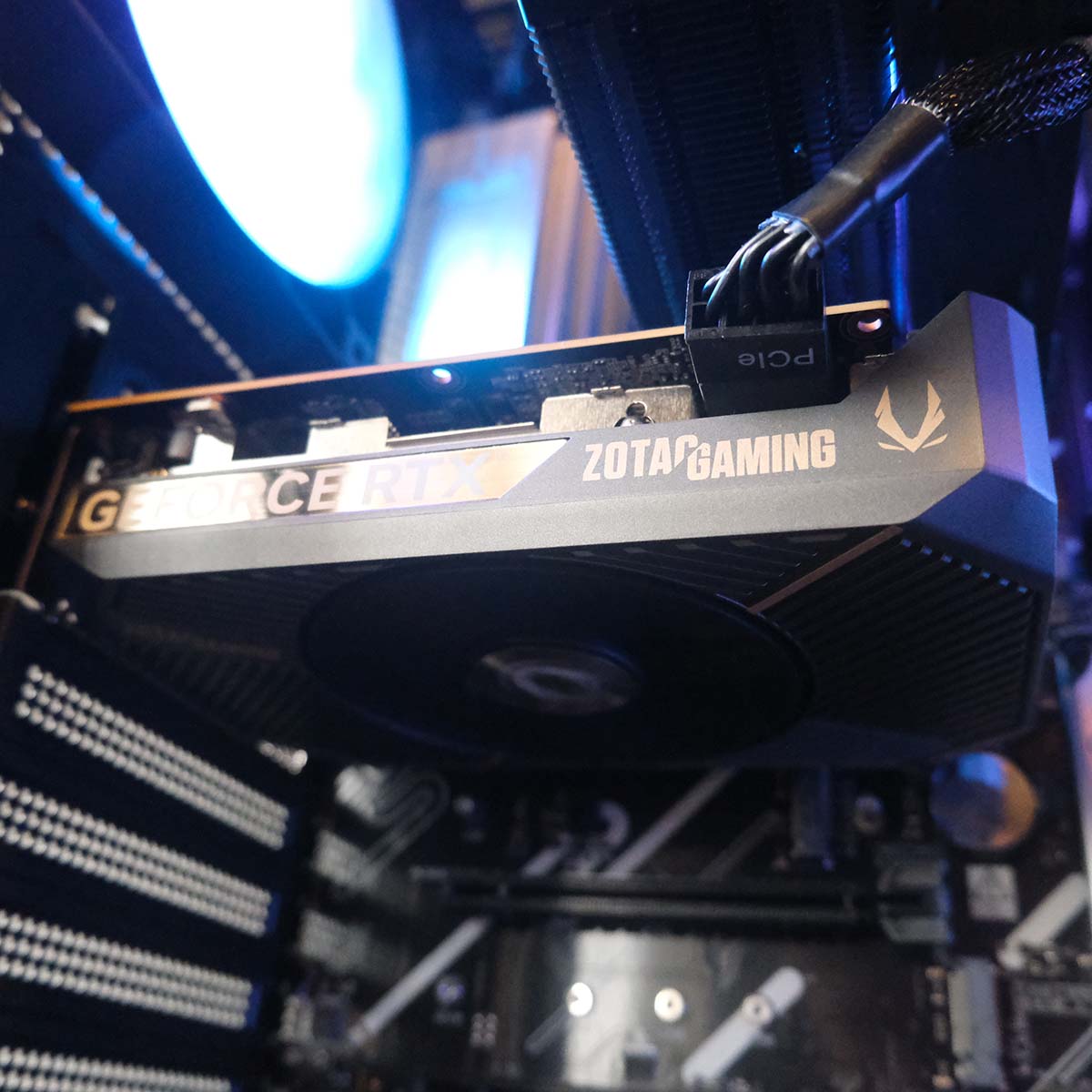
Handling raster and ray tracing in Aegis Pro R is an Nvidia GeForce RTX 5060. This graphics card has sufficient punch for bouts of 1080p gaming, but you will need to work around its 8GB VRAM capacity, even at that resolution.
This graphics card has sufficient punch for bouts of 1080p gaming, but you will need to work around its 8GB VRAM capacity.
Thankfully, Nvidia’s DLSS 4 suite can help alleviate some of this memory management through upscaling. In some cases, you’ll even find enough breathing room to game at 1440p but there’s only so much that Nvidia’s AI-based performance enhancers can do.
The GeForce RTX 5060 Zotac Solo in this system is without a doubt, the smallest graphics card I have seen from this generation. The shroud is a mere 164.5mm long, with a single fan, but it still manages to push boost clocks slightly above stock, going from 2,497MHz to 2,572MHz.
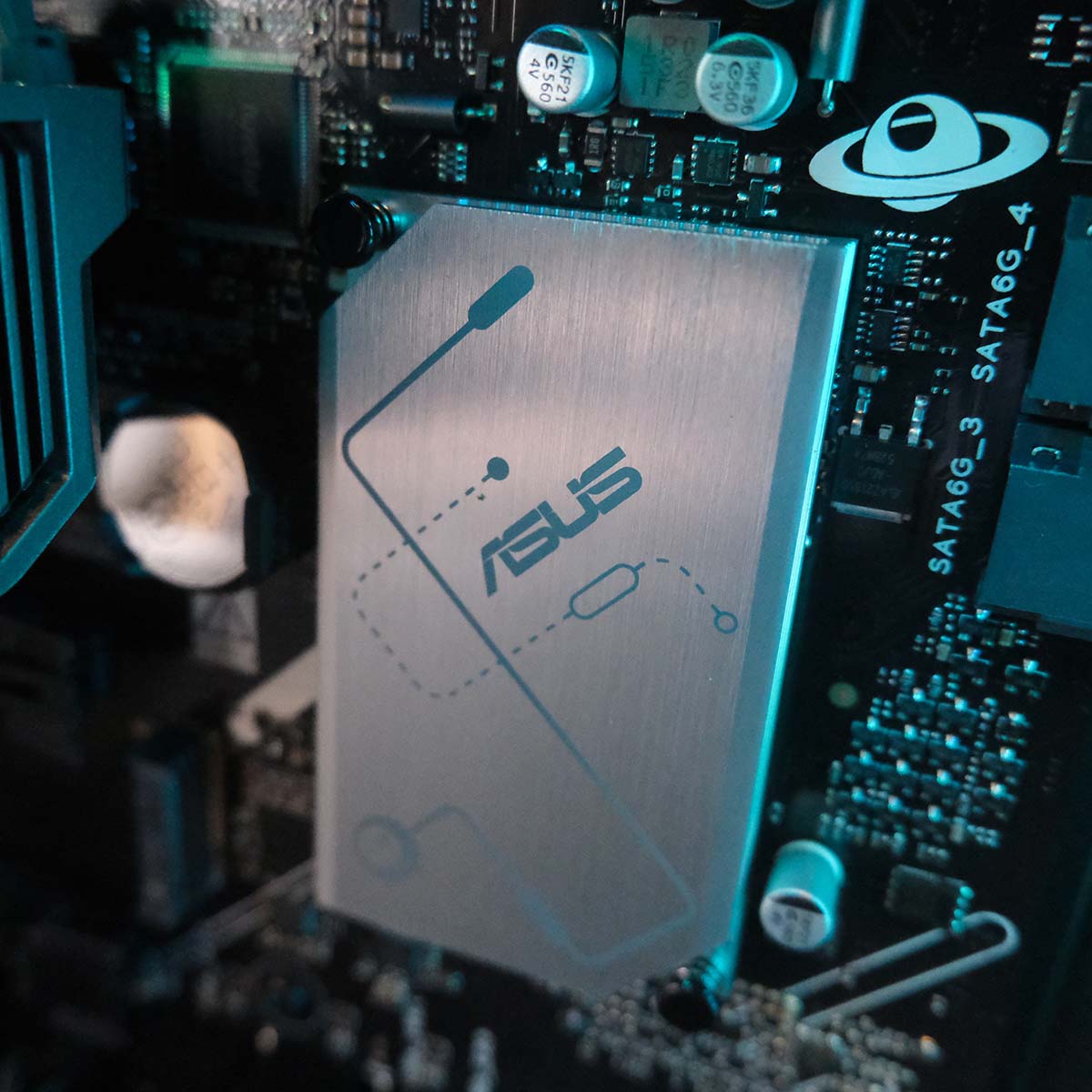
An Asus Prime B850-Plus WiFi serves as the base for Aegis Pro R. Despite being an entry-level motherboard, it offers plenty of features that will easily cater to the needs of most people.
The board offers up PCIe Gen 5 connections across its primary expansion and M.2 slots, and PCSpecialist rightly occupies them with the system’s graphics card and storage out of the gate. There’s room for additional add-in cards and SSDs, but speeds vary across slots so be sure to consult the motherboard’s manual if you plan to make use of them.
Peek underneath the topmost heatsink and you’ll find a 1TB Crucial P310. This Gen 4 SSD offers respective read and write speeds of 7,100MB/s and 6,000MB/s, and while that’s not as fast as the latest Gen 5 drives on paper, it’s plenty quick enough for most people’s needs. That’s more than enough performance for a nippy user experience across your operating system and games.
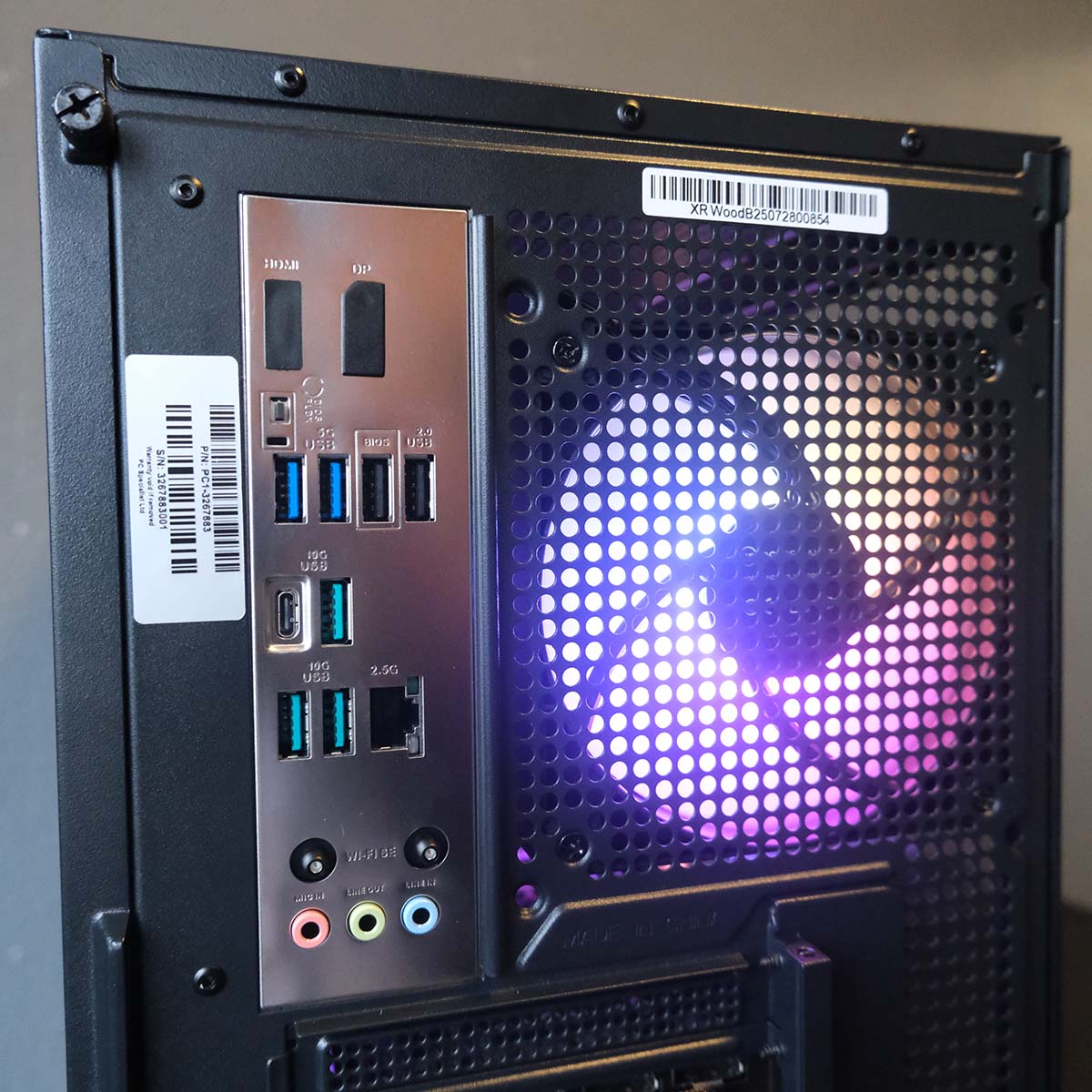
Round back, there are eight USB ports total. There’s understandably no 40Gb or even 20Gb connections on a board of this calibre, but three 10Gb ports (one USB-C and three USB-A) lead the pack and will easily handle the demands of premium peripherals. Once they’re full up, though, there are only two 5Gb and two 480Mb USB-A ports left at your disposal.
You’ll also find solid networking features on this motherboard. The lone 2.5Gb Ethernet port is more than fast enough to keep up with the speed of most broadband connections, ang gives you room to go beyond the Gigabit barrier if you upgrade your router. Those intent on cutting the cord though can also enjoy a speedy and reliable wireless connection via Wi-Fi 6E, with the same aerials also servicing Bluetooth 5.3 support.
There understandably isn’t much in the way of features on this motherboard, save for BIOS Flashback, which is a welcome inclusion. The board’s only really notable omission is a set of debug LEDs, which can be really handy for diagnosing problems, and it’s a shame Asus hasn’t included any such tool here.
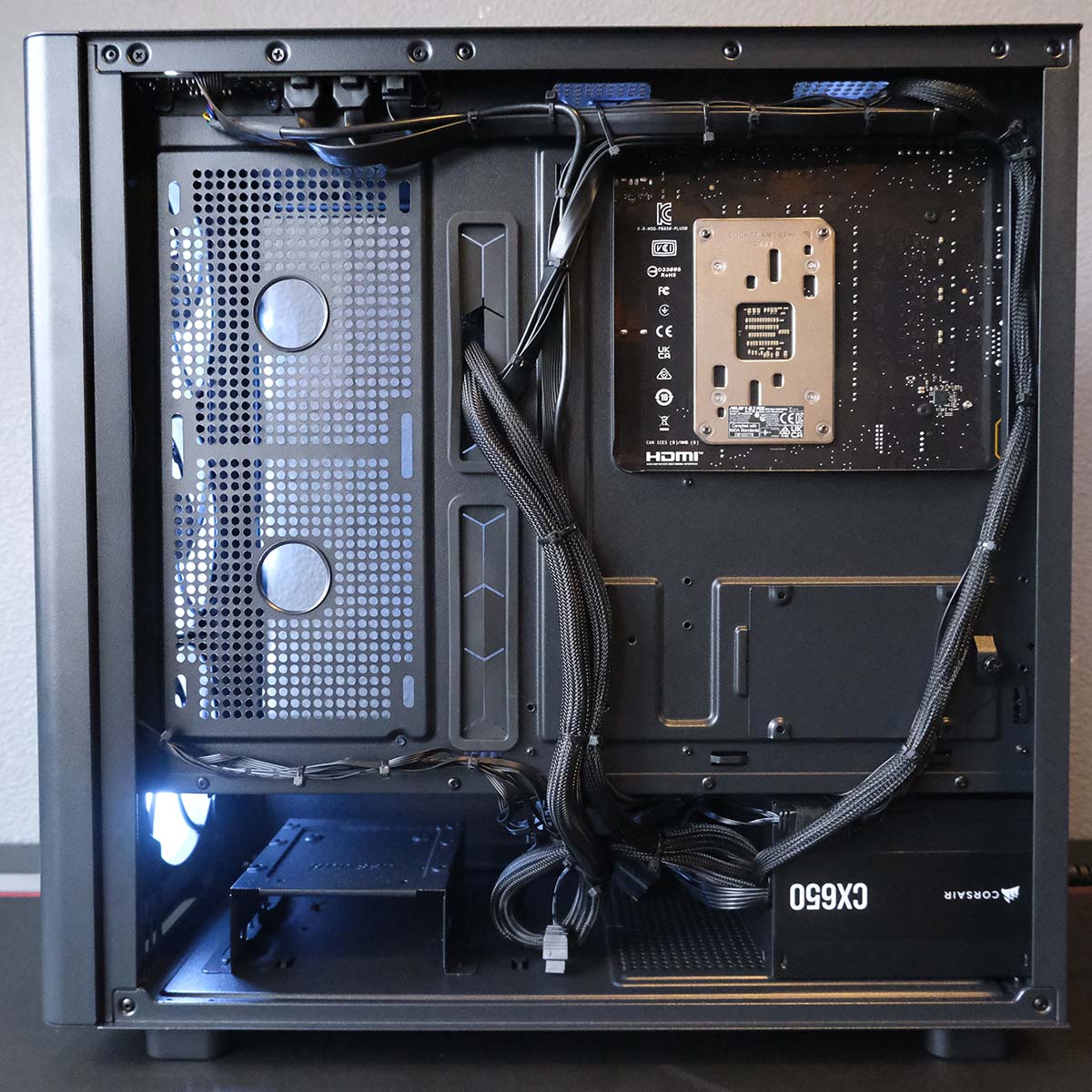
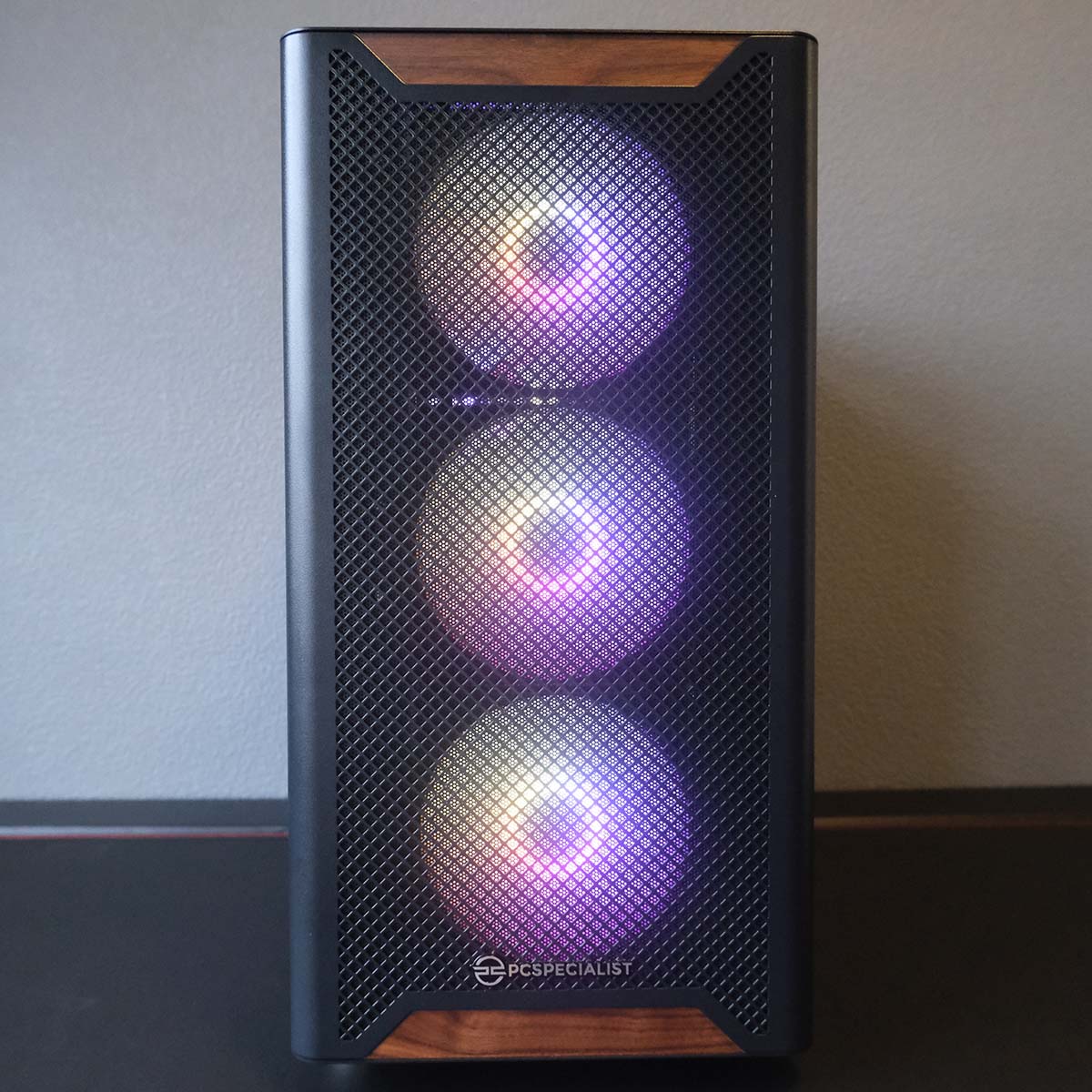
There’s more than enough room inside the PCS Aegis Black ARGB for all these components and then some. The small size of this system’s components creates a lot of dead space inside the chassis, which does look a bit sparse when you stare at it through the tempered glass side panel. Still, there’s beauty in minimalism, and, importantly, room to expand own the road.
There’s beauty in minimalism, and, importantly, room to expand own the road.
PCSpecialist includes four attractive ARGB fans with the case – three intakes on the front and one exhaust on the rear. These blowers provide ample airflow to the rig and are relatively quiet under load using their default fan curve. They’re all running off motherboard headers, so you can tweak their RPM and appearance to your liking via the motherboard BIOS or Asus’ Armoury Crate software.
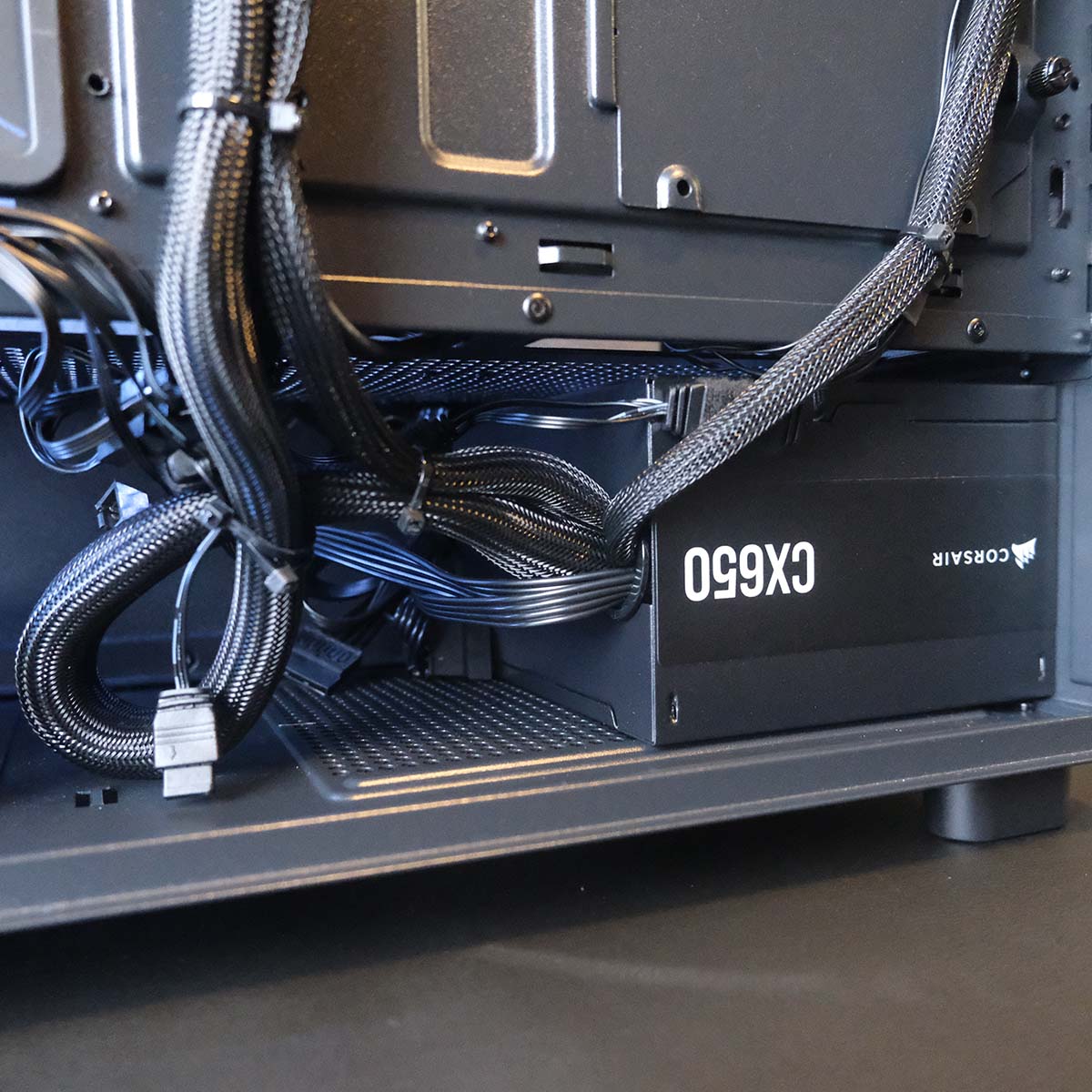
As you can imagine, there isn’t a great deal of cable management necessary for this build. Even so, popping the back panel reveals a tidy assortment of wires, as well as all the leftovers connected to the Corsair CX650 power supply, ready to go whenever you might need them.
Performance
In testing the PCSpecialist Aegis Pro R, I’ll test its CPU, RAM, and SSD but also the calibre of its gaming performance. Given the PC packs a GeForce RTX 5060, I’m benchmarking across FHD (1080p) and QHD (1440p), skipping UHD (2160p) entirely, for reasons that will become clear in my frame rate analyses.
Here are the specifications of other prebuilds to which I’ll be comparing PCSpecialist’s contender, complete with links to the reviews:
- PCSpecialist Vortex BF 25
- AMD Ryzen 7 9800X3D
- Nvidia GeForce RTX 5070 Ti
- Asus Prime B850-Plus
- 32GB DDR5-6000 CL30
- 2TB Samsung 990 Evo Plus
- OcUK Gaming Mach 3.1
- AMD Ryzen 7 5700X3D
- Nvidia GeForce RTX 5070
- MSI B550M Pro-VDH WiFi
- 32GB DDR4-3200 CL16
- 1TB MSI Spatium M450 V1
- Novatech Reign Sentinel
- AMD Ryzen 7 9800X3D
- Nvidia GeForce RTX 5070 Ti
- MSI B850 Gaming Plus WiFi PZ
- 32GB DDR5-5600 CL40
- 2TB Samsung 990 Evo Plus
- PCSpecialist Luna Recon Master
- AMD Ryzen 7 9800X3D
- Nvidia GeForce RTX 5090
- Gigabyte X870 Aorus Elite WiFi7 Ice
- 32GB DDR5-6000 CL40
- 4TB Samsung 9100 Pro
- CyberpowerPC Ultra R87 Pro
- AMD Ryzen 7 8700F
- AMD Radeon RX 9060 XT 16GB
- MSI Pro B650-S WiFi
- 32GB DDR5-6000 CL36
- 1TB WD_Black SN7100
CPU
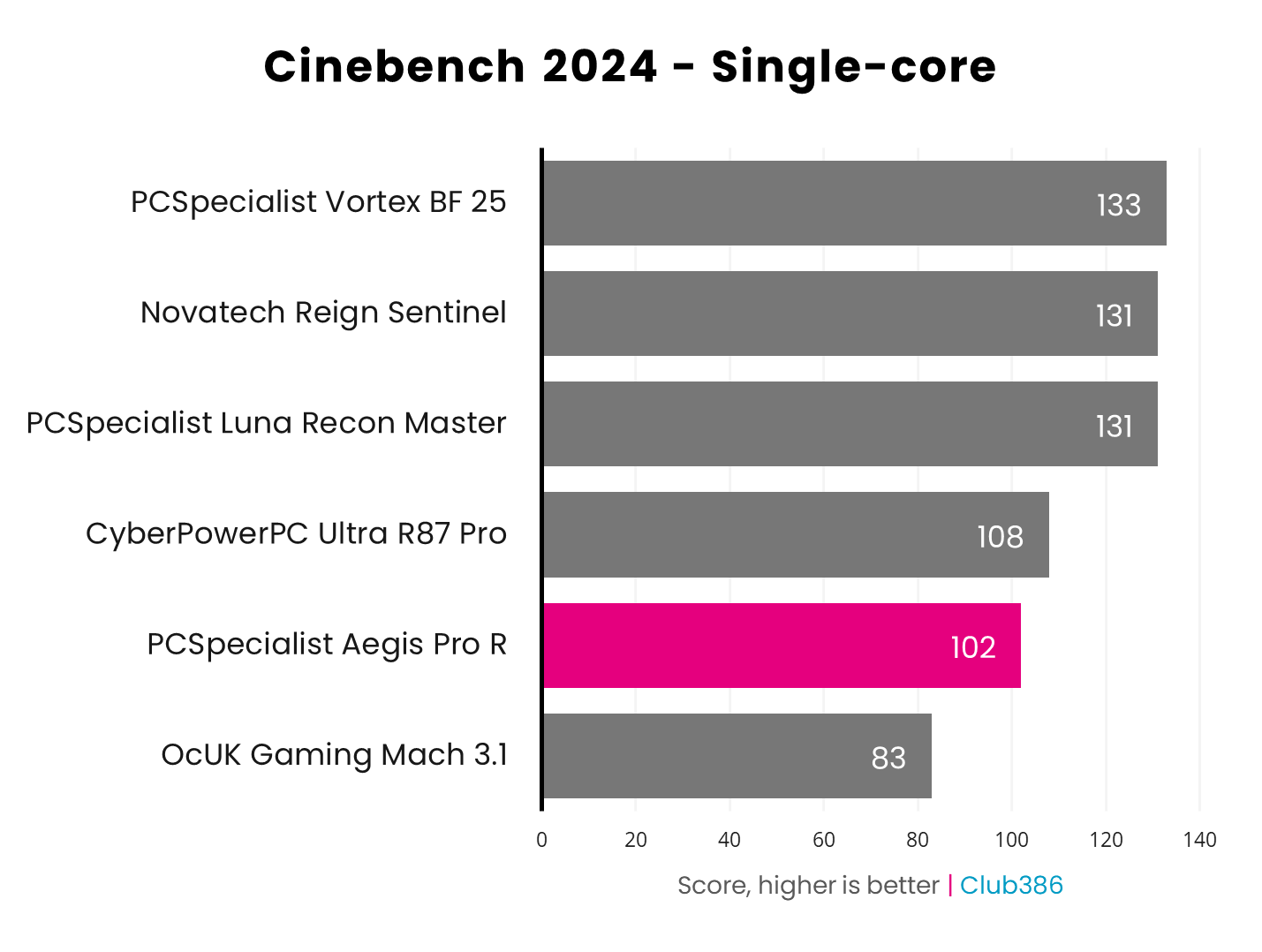
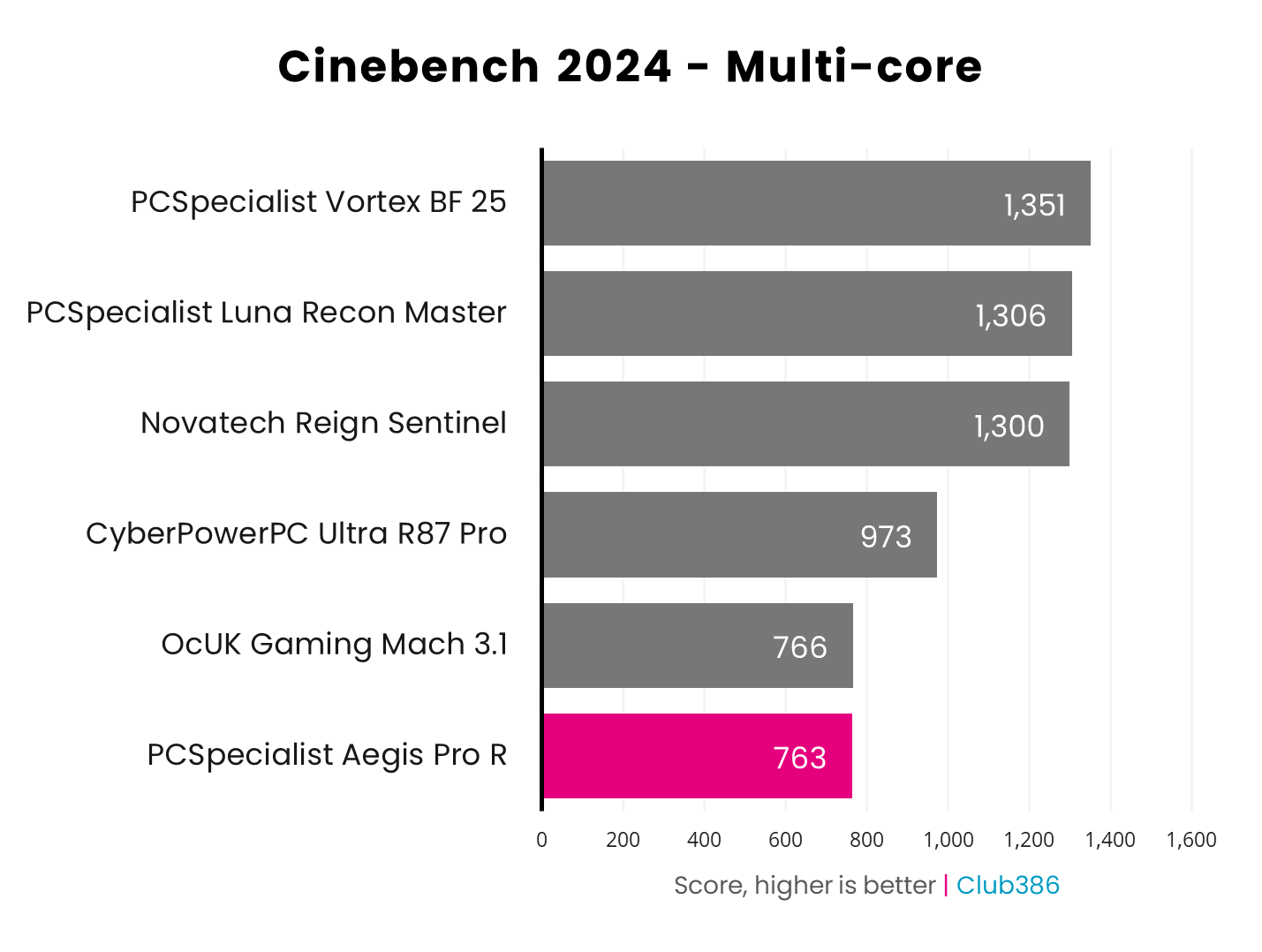
Running Cinebench 2024 on the Aegis Pro R sees its Ryzen 5 7500XD processor score within expectations. CPUS with 3D V-Cache typically score lower in these benchmarks than their closest vanilla counterparts (Ryzen 5 7600X) on account of their lower clock speeds, with all that L3 cache serving no advantage here.
Although the processor sits at the bottom of the table in the multi-core race, placing only three points behind OcUK’s Gaming Mach 3.1, this highlights the architectural improvements AMD has made from Zen 3 to 4. Despite having two fewer cores, the Ryzen 5 7500X3D is within spitting distance of the Ryzen 7 5700X3D.
RAM
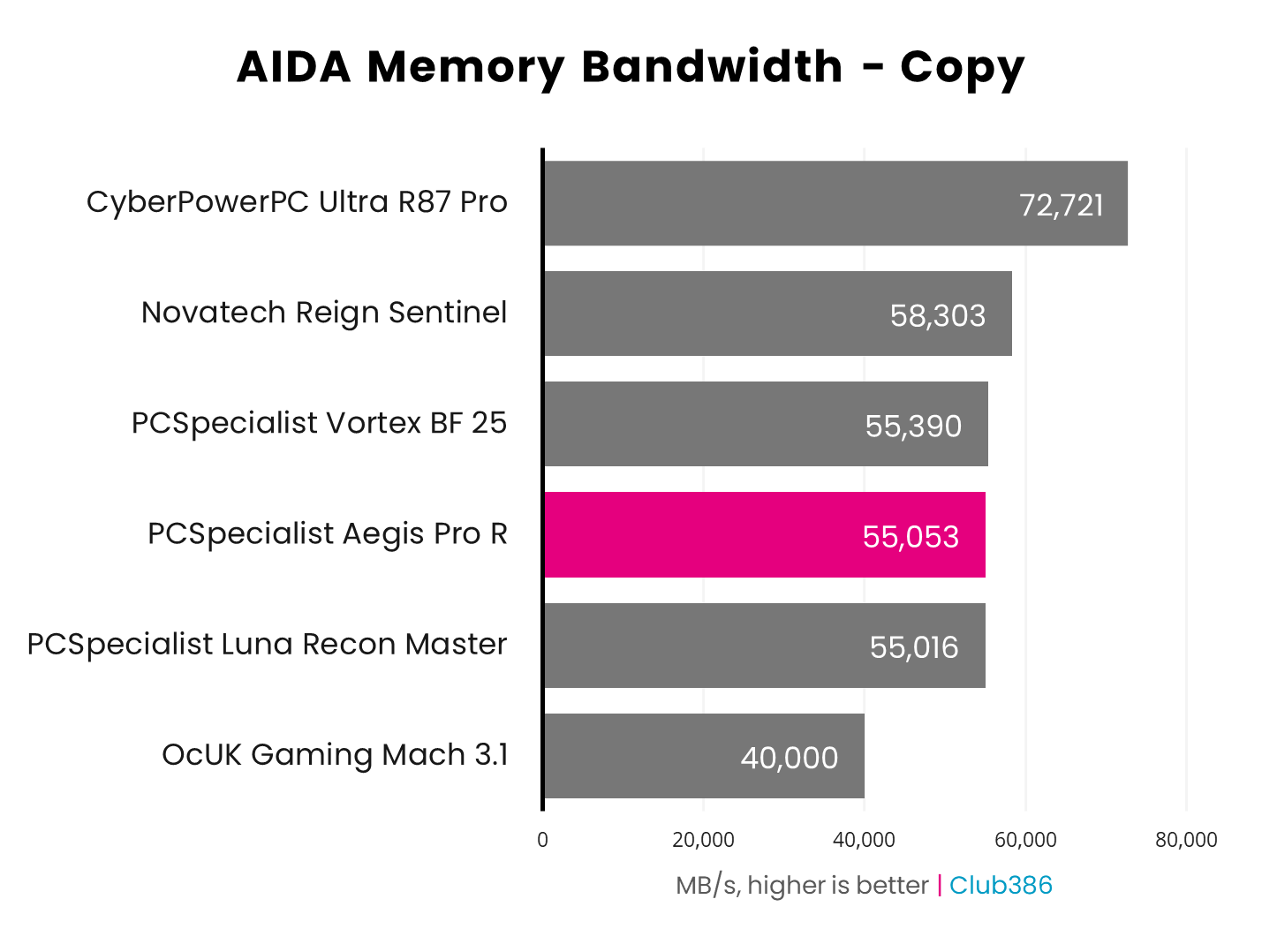
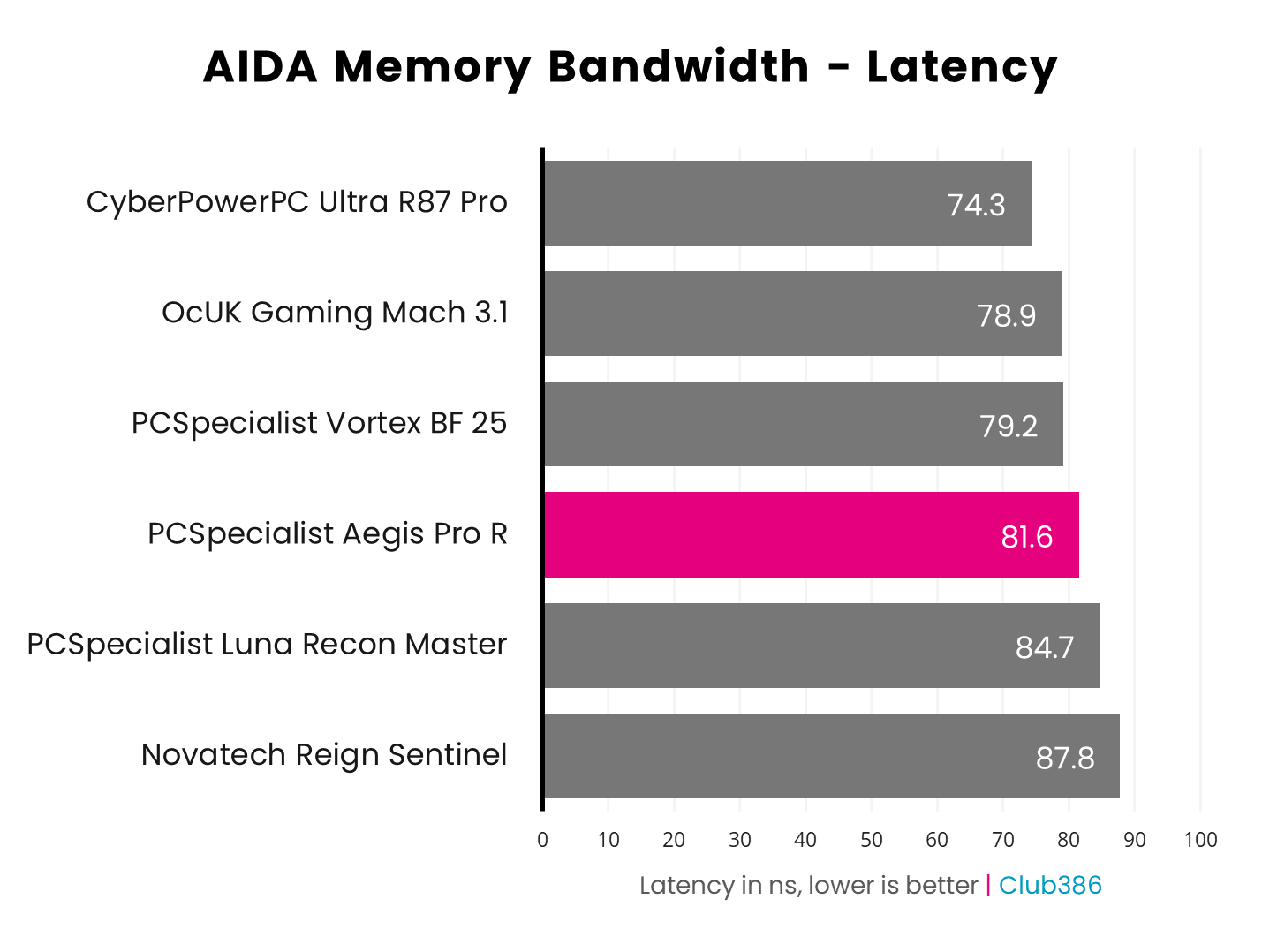
There are no issues with RAM performance here, but nothing especially exciting either. As I suggested earlier, a kit with tighter timings and slightly faster transfer speeds would help elevate the standing of Aegis Pro R relative to other systems in the chart. Lower latency in particular is key to extracting the most out of AMD’s X3D processors.
Storage
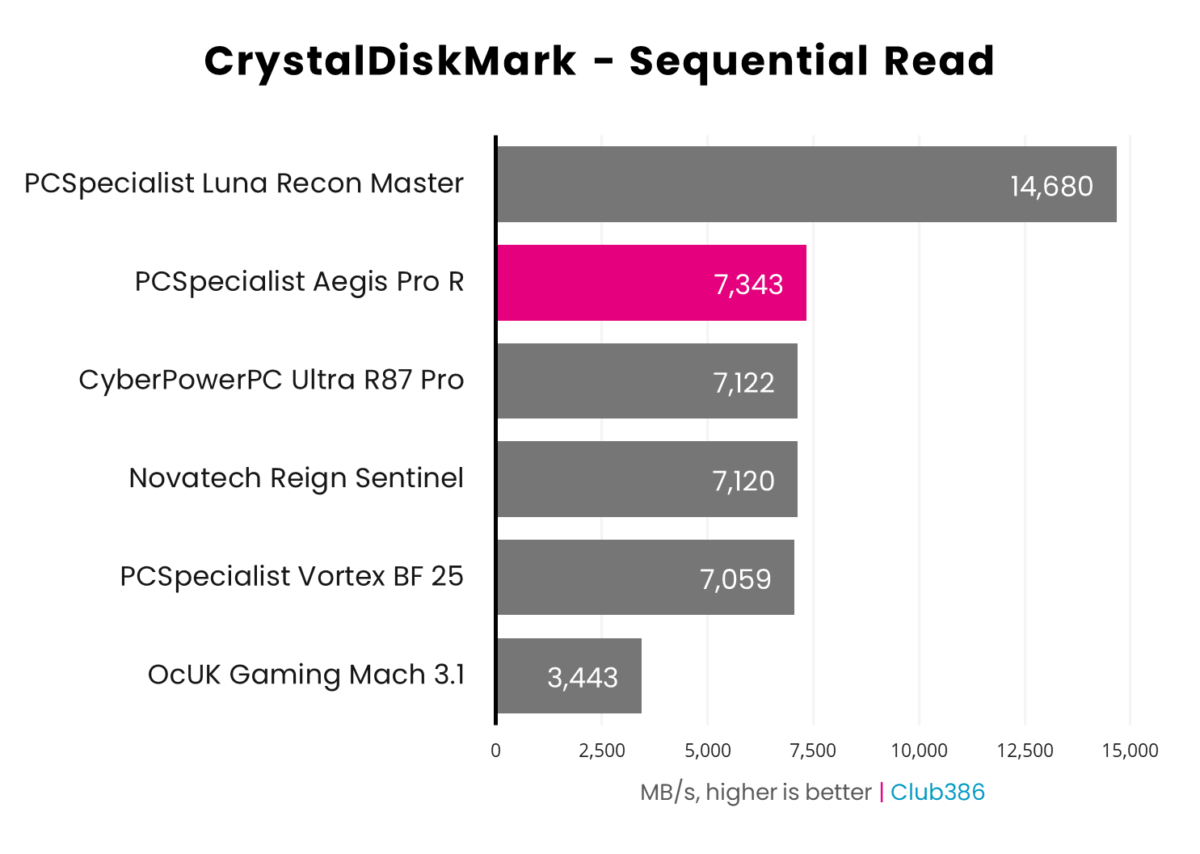
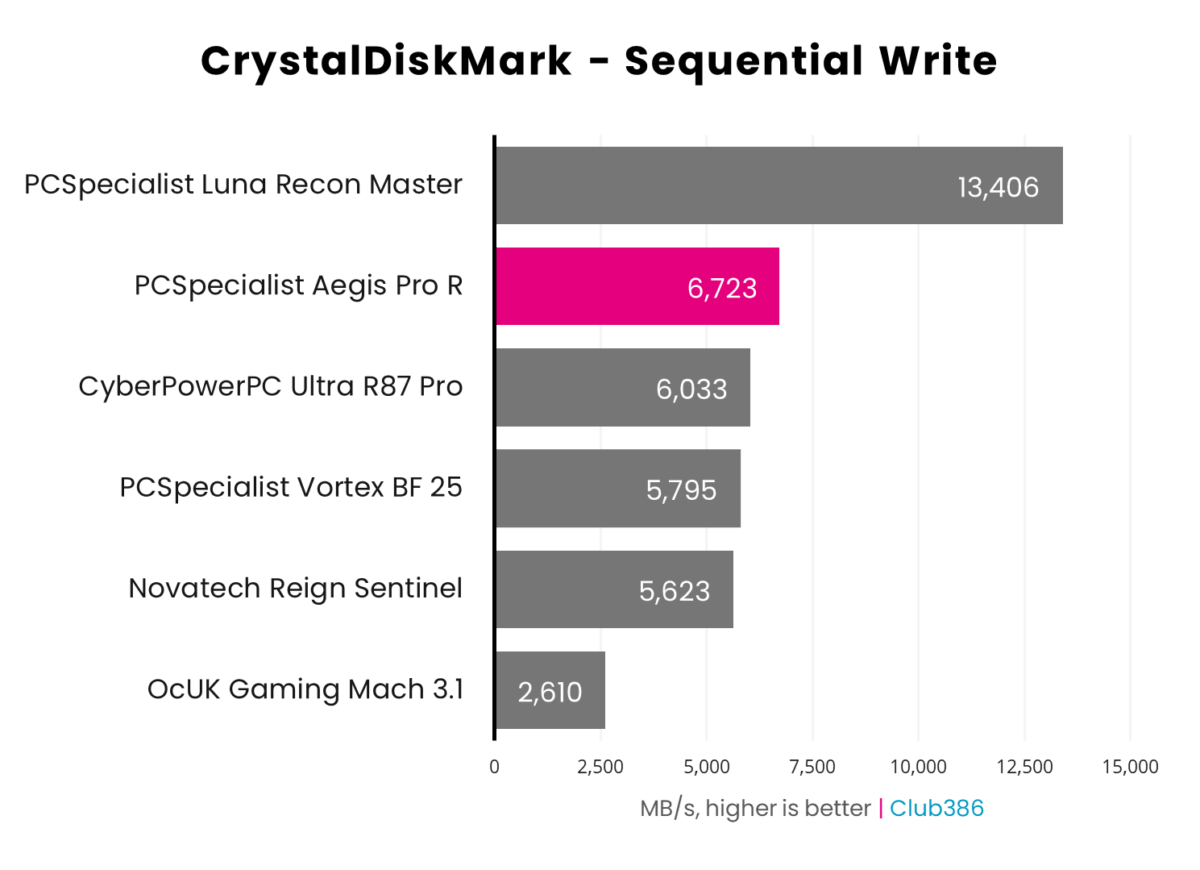
Even after filling up the 1TB Crucial P310, this drive still sails along at its advertised speeds. This is about as fast as SSDs get with a PCIe Gen 4 interface, and it’s more than fast enough to handle the demands of games and your operating system, ensuring both zip along smoothly.
Gaming
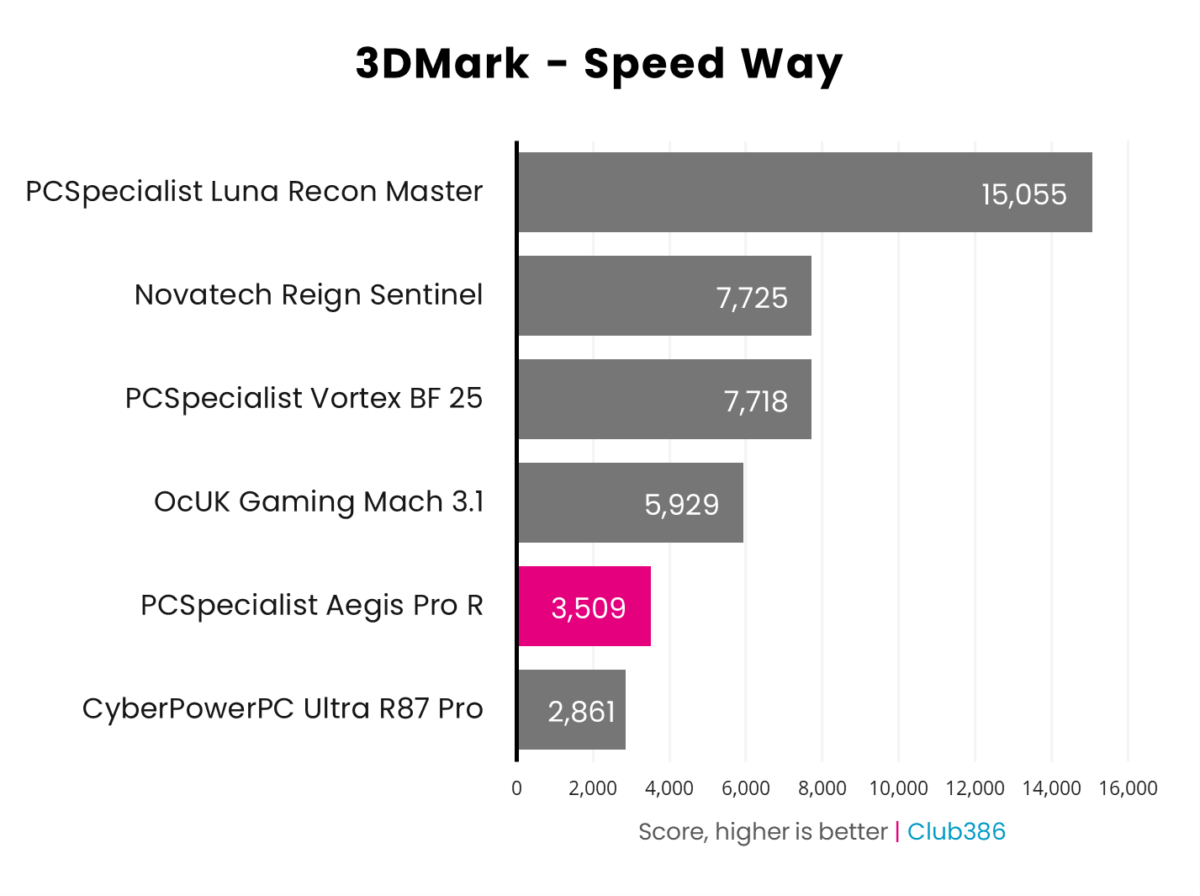
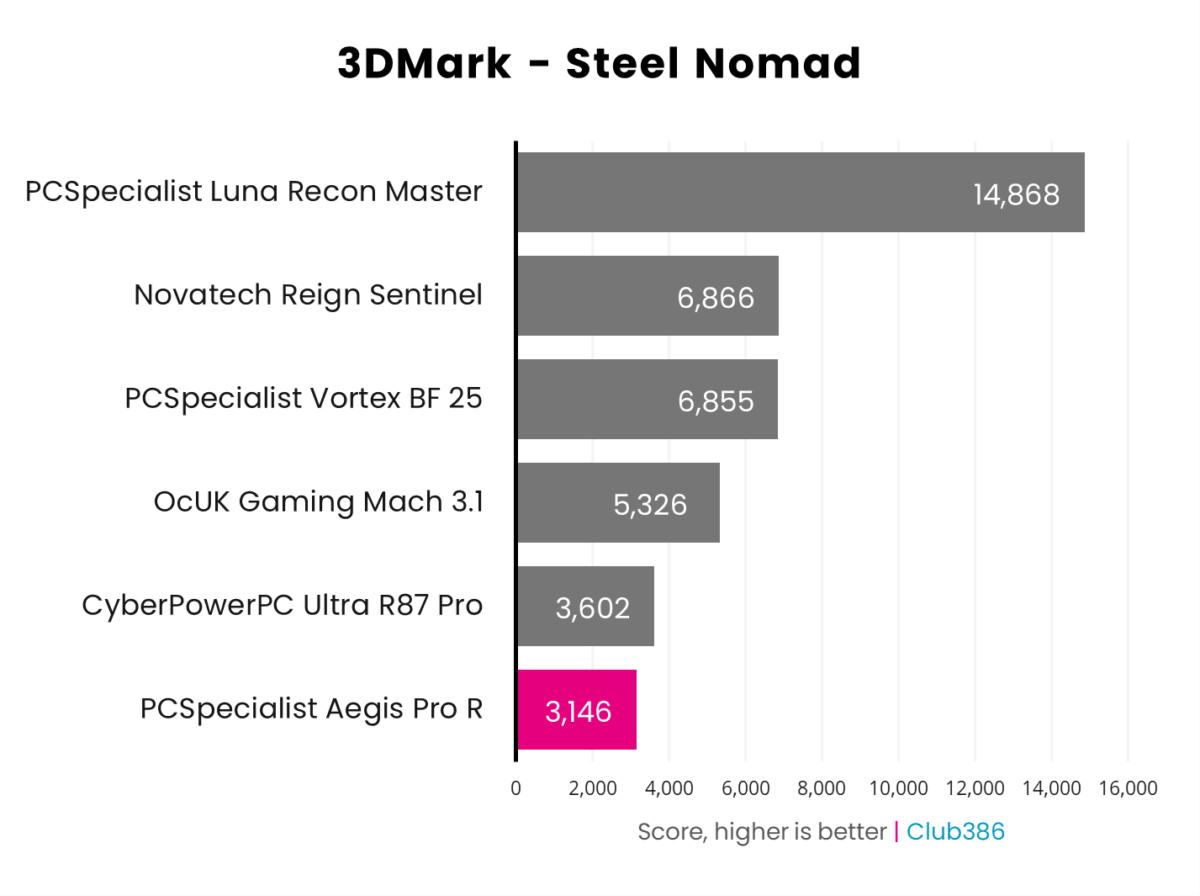
Loading up 3DMark, Speed Way sees the system pull ahead on account of the GeForce RTX 5060’s superior ray tracing pipeline to that of the Radeon RX 9060 XT 16GB inside CyberPowerPC’s Ultra R87 Pro. However, the tables turn in the rasterised plains of 3DMark Steel Nomad, where the Nvidia graphics card now falls behind its AMD rival.
However, neither of these benchmarks are particularly taxing on the memory configuration of either card. As real-world benchmarks below will demonstrate, this one factor can prove transformative to performance, particularly at higher resolutions.
| Game | FPS @ 1080p (Min. / Avg.) | FPS @ 1440p (Min. / Avg.) |
|---|---|---|
| Assassin’s Creed Shadows (RT) | 24 / 31fps | 19 / 23fps |
| Final Fantasy XIV: Dawntrail | 77 / 137fps | 54 / 89fps |
| Forza Motorsport (RT) | 26 / 35fps | 17 / 26fps |
| Mount & Blade II | 121 / 185fps | 91 / 131fps |
| Rainbow Six Siege X | 131 / 180fps | 84 / 112fps |
Running through the test suite, several games flashed up warnings that my chosen settings could prove problematic on account of available VRAM. This isn’t surprising for both Assassin’s Creed Shadows and Forza Motorsport with all their ray tracing bells and whistles firing, but even Rainbow Six Siege X wasn’t happy with my 8GB memory buffer.
Regardless, I was able to capture frame rate data without encountering any major performance issues. This isn’t to say that the warnings were redundant – it’s quite possible that playing for more prolonged periods could have overwhelmed the RTX 5060’s memory configuration in demanding areas.
Just take a look at those Siege X frame rates, pushing 180fps at FHD and 112fps at QHD.
You can circumvent such headaches through careful management of settings and the employment of DLSS 4, and doing so will net you a solid if micromanaged gaming experience. On the plus side, you can get really great performance out of some of games on this GPU, even at QHD. Just take a look at those Siege X frame rates, pushing 180fps at FHD and 112fps at QHD, with Mount & Blade II reaching slightly higher to boot.
Assassin’s Creed Shadows and Forza Motorsport running at maximum settings are just about playable at FHD, with respective average frame rates of 31fps and 35fps, but minimums are below that crucial 30fps threshold. Shifting to QHD, though, proves too much for the system. A reduction in settings or a splash of DLSS is necessary to make that resolution viable, and we would recommend doing the same at 1080p as well.
| Cyberpunk 2077 | 1080p (Min. / Avg.) | 1440p (Min. / Avg.) |
|---|---|---|
| Native | 19 / 24fps | 1 / 1fps |
| DLSS 4 (Quality) | 33 / 41fps | 18 / 24fps |
| DLSS 4 (Q) + FG x2 | 35 / 41fps | 17 / 22fps |
| DLSS 4 (Q) + FG x3 | 34 / 39fps | 13 / 19fps |
| DLSS 4 (Q) + FG x4 | 32 / 37fps | 15 / 20fps |
Running Cyberpunk 2077’s path tracing preset may seem like a fool’s errand on a GeForce RTX 5060, but the card can (just about) meet such steep demands with some upscaling at its side.
At FHD, the game shifts from a choppy 24fps average to a playable 41fps if you enable DLSS Super Resolution at the Quality setting. Nvidia’s upscaler proves transformative at QHD as well, shifting from a 1fps slideshow to 24fps. Shift from ‘Quality’ to ‘Balanced’ and venturing into Night City at a slightly higher resolution on this card is doable. However, the game still isn’t smooth at these settings – I’d be inclined to drop down to running this game at 1080p with the Ultra ray tracing preset, and DLSS on Quality or Balanced, to get the most out of it on this machine.
DLSS Frame Generation can also be another useful tool in Nvidia’s performance suite if used right, but you’ll need a base frame rate of ~60fps to stave off untenable levels of latency. Importantly, the feature also places further strain on a graphics card’s memory buffer, meaning there’s no benefit to enabling it if the VRAM is already pushed to its limit with other graphics settings. You can see this situation playing out in the table above, where enabling frame gen at various settings basically makes no difference, as there’s no room for the memory to breathe.
While DLSS Frame Generation isn’t viable on GeForce RTX 5060 at these settings in CD Projekt Red’s RPG, you can certainly enlist its help at lower settings or in other games. It’s best to view this feature as a situational frame smoother rather than a tool you’ll enable all the time on this graphics card.
Vitals
Sitting idle, the Aegis Pro R hums along almost silently as the system’s noise levels peak at 34dBA. Temperatures and power consumption are similarly modest, at 79W and 27-39°C across the CPU and GPU.
| Idle | Load (Max.) | |
|---|---|---|
| CPU temperature | 39°C | 75°C |
| GPU temperature | 27°C | 65°C |
| Noise | 34dBA | 41-46dBA |
| Power consumption | 79W | 132-238W |
Faced with a gaming load, the rigs now pulls up to 238W. That’s a small lot of ‘leccy in the grand scheme of gaming PCs, which is sure to please anyone trying to keep their energy bills down. Meanwhile, an all-core CPU load sees power consumption peak at 132W.
We can’t complain about operating temperatures either, as neither the graphics card nor processor come close to thermal throttling at 65°C and 75°C, respectively. The system is certainly audible at load while keeping each cool at 41-46dBA, but the noise isn’t bothersome.
Conclusion
The PCSpecialist Aegis Pro R is undeniably a bargain at its £999 asking price, particularly with the ongoing DRAM shortage in mind, saving you over £200 relative to putting together a near-identical system yourself. This PC will serve you well as an esports machine, while also having enough grunt to play more-demanding games at FHD.
While I can forgive the likes of USB bandwidth and RAM speed in favour of affordability, I do wish the prebuild came with more powerful graphics out of the gate, though. Even the slightly more expensive Radeon RX 9060 XT 16GB would feel a more suitable pairing to the Ryzen 5 7500X3D, freeing the system’s frame rate potential from the constraints of its meagre video memory bandwidth.
Still, if you’re happy to manage a few settings, treat the GeForce RTX 5060 as a stopgap, or even rely on Nvidia’s automatic game optimisations, then it’s difficult not to recommend the PCSpecialist Aegis Pro R for gamers on tight budgets.
