
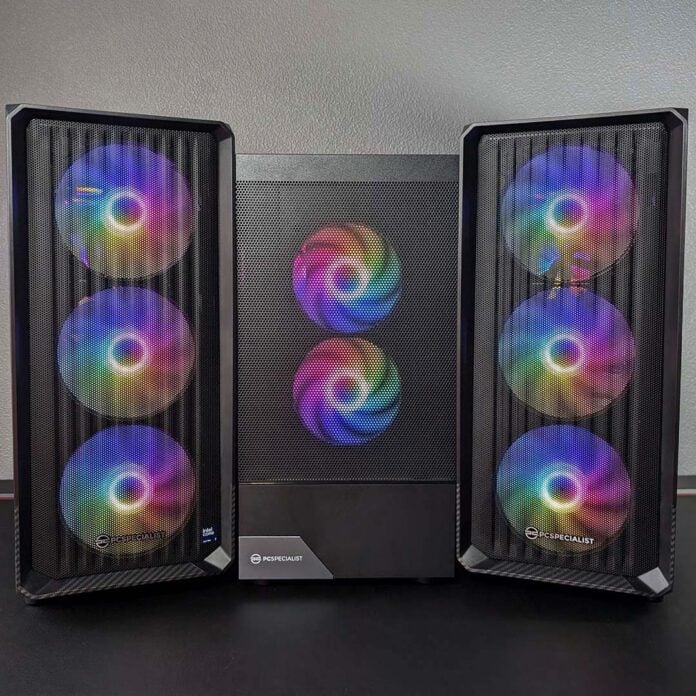
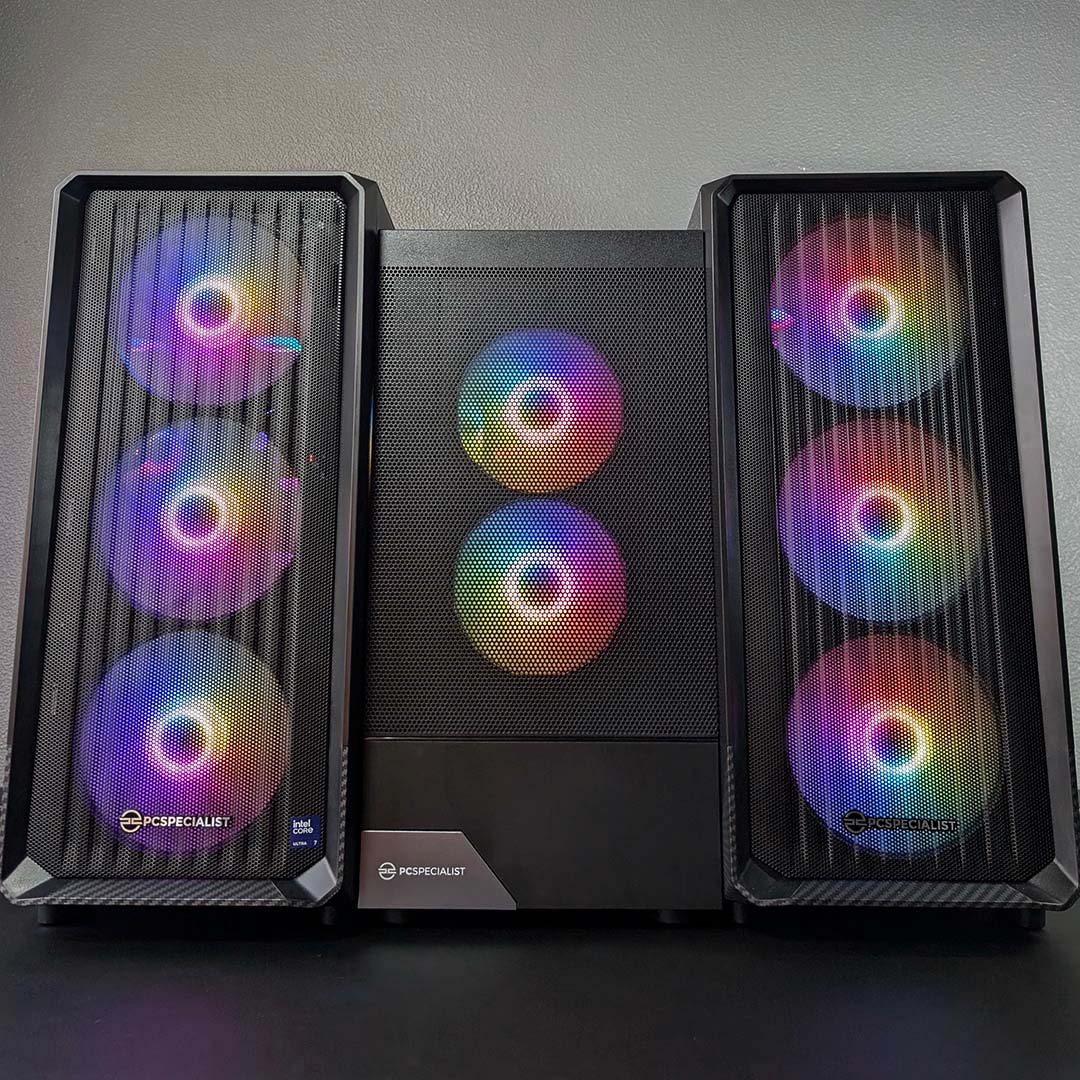
PCSpecialist is starting Black Friday with a proper bang, offering three discounted prebuilt gaming PC deals that will raise eyebrows in all the right ways. The firm has a system on offer for everyone, whether you’re a gamer on a tight budget or a big spender, with rigs that please in terms of both performance and price.
The offerings include the high-end Vortex BF 26 P for £2,499. Then there’s the Ignite BF 26 sitting pretty at £1,999, while the Fusion BF 26 emphasises affordability with an asking price of £1,149.
We’ve put these three gaming PCs through their paces to show which machine is your ideal match. Below you’ll find all the analysis and details you need about their components and performance. Without further ado, let’s get to know this trio of Black Friday systems.
Specs at a glance
We’ll dive into the details of each PC, but here’s a brief rundown of each system’s core specifications.
| Vortex BF 26 P | Ignite BF 26 | Fusion BF 26 | |
|---|---|---|---|
| CPU | Ryzen 7 9800X3D | Core Ultra 7 270K Plus | Ryzen 7 5700X |
| RAM | 32GB DDR5-600 | 32GB DDR5-5600 | 16GB DDR4-3200 |
| MB | B850 (AM5) | B860 (LGA1851) | A520 (AM4) |
| GPU | RTX 5070 Ti 16GB | RTX 5070 12GB | RX 9060 XT 16GB |
| SSD | 2TB PCIe 4.0 | 2TB PCIe 4.0 | 1TB PCIe 4.0 |
| PSU | 750W | 750W | 550W |
| Price | £2,499 | £1,999 | £1,149 |
PCSpecialist Vortex BF 26 P
Price: £2,780 £2,499
The Vortex BF 26 P is the most powerful system in PCSpecialist’s Black Friday sale. Now available for £2,499 thanks to chunky £281 discount, this PC packs an enticing level of performance and collection of creature comforts for the money.
Putting together a DIY build of the Vortex BF 26 P would cost ~£2,733, at the time of writing via PCPartPicker, and that’s sans the convenience of a complete build, testing, and unified warranty. Suffice it to say, PCSpecialist’s sticker price is more than reasonable.

PCSpecialist Vortex BF 26 P
£2,780 £2,499
Pros
- Great FHD/QHD frame rates
- 2TB SSD and 32GB DDR5 combo
- Good price relative to DIY
- Plenty of USB ports
- AM5 upgrade potential
Cons
- Minor cabling gripes
Club386 may earn an affiliate commission when you purchase products through links on our site.
How we test and review products.
An AMD Ryzen 7 9800X3D sits at Vortex BF 26 P’s heart, with eight Zen 5 cores, 16 threads, and a 5.2GHz boost clock. That’s not forgetting 96MB of L3 cache, thanks to an extra 64MB of 3D V-Cache, which will help push frame rates higher than non-X3D CPUs in most games.
An Nvidia GeForce RTX 5070 Ti works alongside the processor. This graphics card boasts 16GB of VRAM and a powerful GB202 die, featuring 8,960 CUDA cores, 70 RT cores, and 280 Tensor cores. This pixel pusher also supports all the latest tools in the DLSS 4.5 software suite, including class-leading upscaling and frame generation.
This CPU and GPU combo makes short work of games at QHD, with room to push up to 4K on occasion. You’ll feel the effects of the 9800X3D more at lower resolutions, as the smaller pixel count places less pressure on the graphics card and more on the processor, but the chip will squeeze out every frame possible.
| PCSpecialist Vortex BF 26 P | |
|---|---|
| CPU | AMD Ryzen 7 9800X3D |
| CPU cooler | PCSpecialist LS-240 AIO Liquid Cooler |
| Motherboard | Gigabyte B850 Eagle WiFi6E |
| GPU | Nvidia GeForce RTX 5070 Ti 16GB |
| RAM | 32GB (2x16GB) Corsair Vengeance DDR5-6000 CL38 |
| SSD | 2TB Kingston NV3 M.2 PCIe 4.0 NVMe SSD |
| PSU | Corsair CX-750 (750W) |
| Networking / wireless | Bluetooth 5.3 1Gbps Ethernet Wi-Fi 6E |
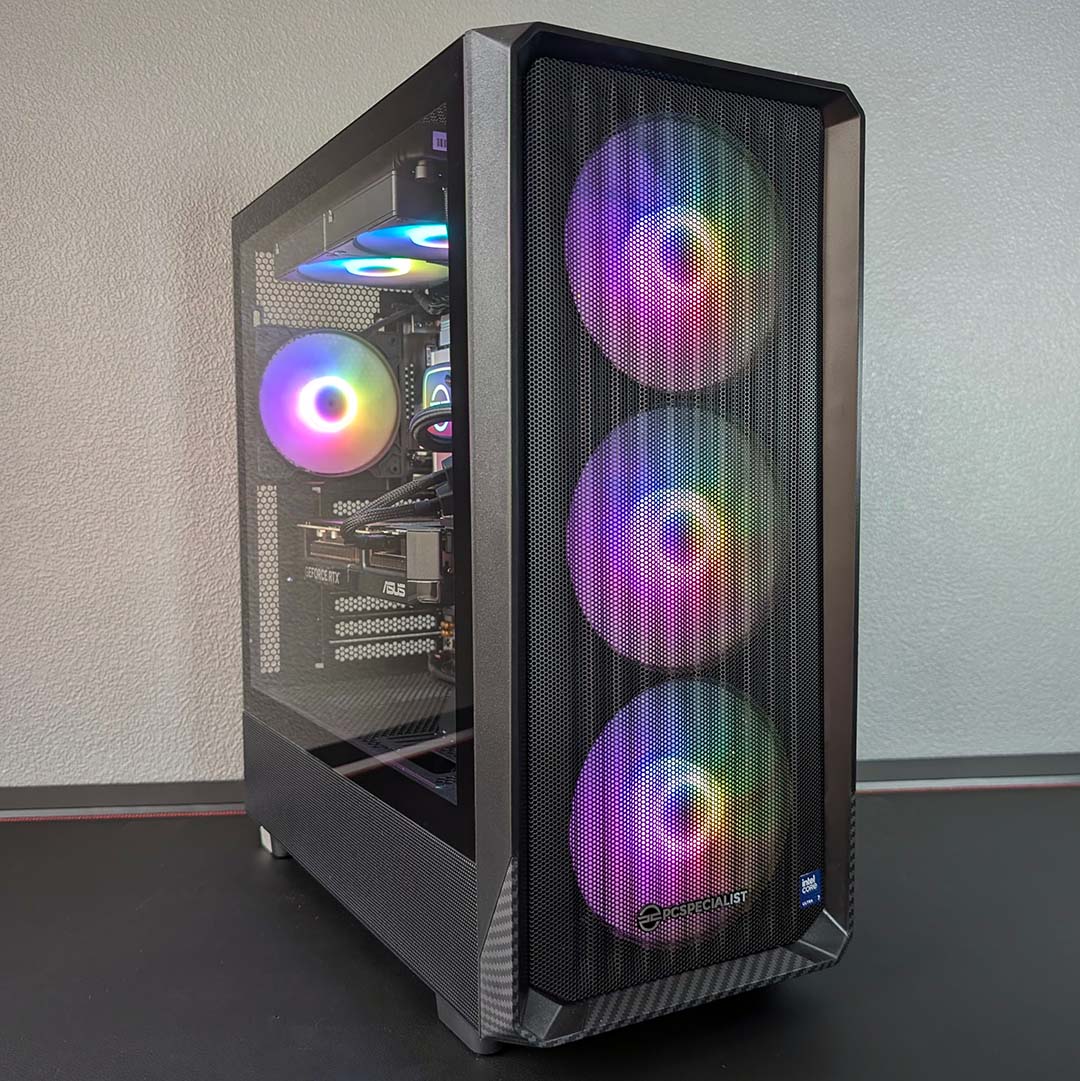
| Case | PCS Spectrum III Black ARGB |
| Operating system | Windows 11 Home |
| Warranty | Three years labour, one year parts, six months collect and return |
| Price | £2,499 |
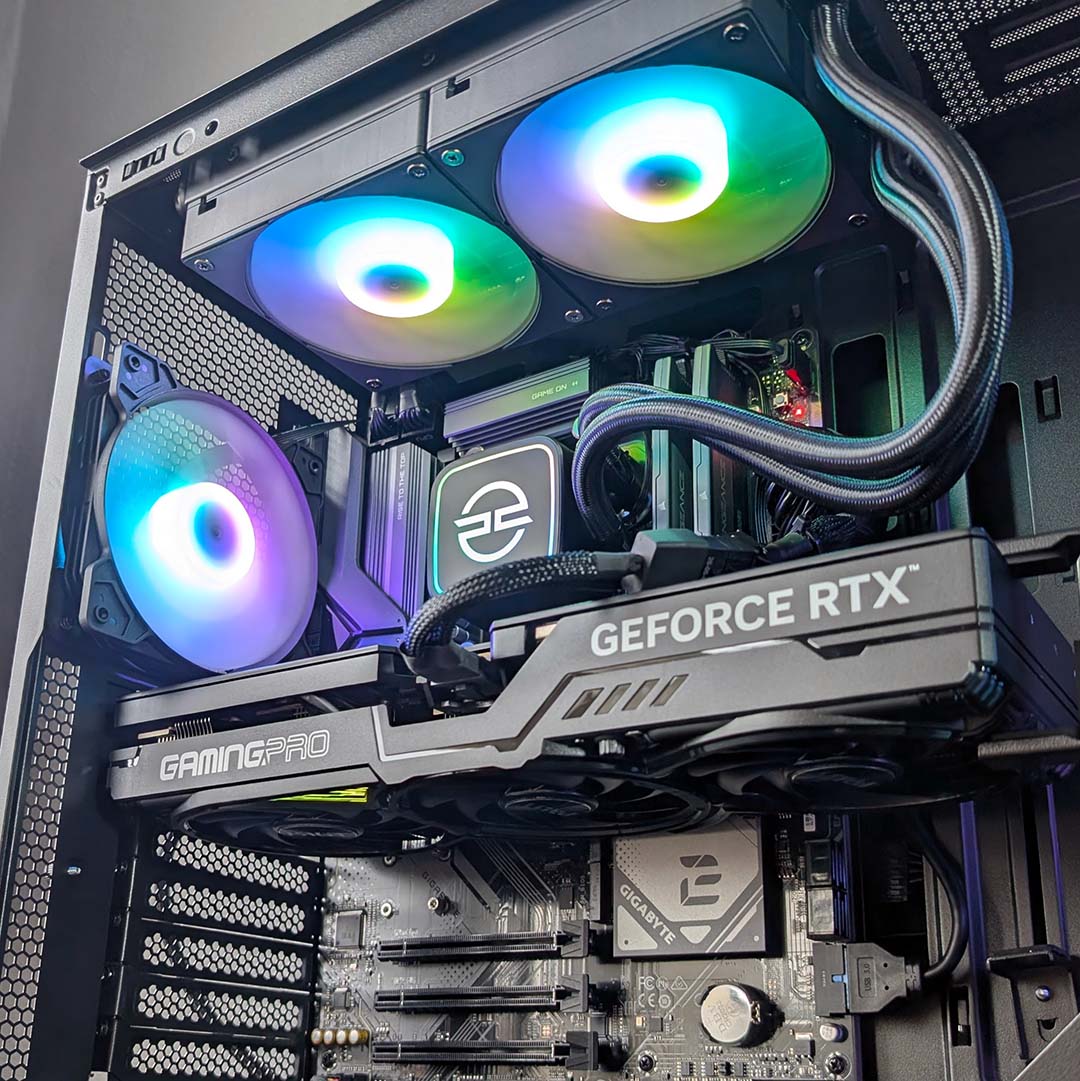
CPU cooling comes courtesy of a PCSpecialist LS-240. This 240mm AIO liquid cooler looks great with A-RGB LEDs across its pump and fans, but more importantly does a great job of keeping the 9800X3D’s operating temperatures in check. That’s not forgetting the support that the case’s three intake spinners provide via fresh air from the front of the case, with another blower sitting round back assisting with exhaust.
Sitting alongside the processor is 32GB of DDR5 RAM, running at 6000MT/s with CL38 timings in a dual-channel configuration. That’s a comfortable capacity and speed for gaming today and the foreseeable future, as well as a decent helping of both for any workstation tasks you may have in mind.
Speaking of capacity, there’s ample storage in the Vortex BF 26 P too via a 2TB Kingston NV3. The PCIe 4.0 NVMe SSD offers respective sequential read and write speeds of 6,000MB/s and 5,000MB/s. In short, games load pleasingly quickly on this drive, but we did find that operating temperatures can rapidly rise under more strenuous loads, resulting in thermal throttling.
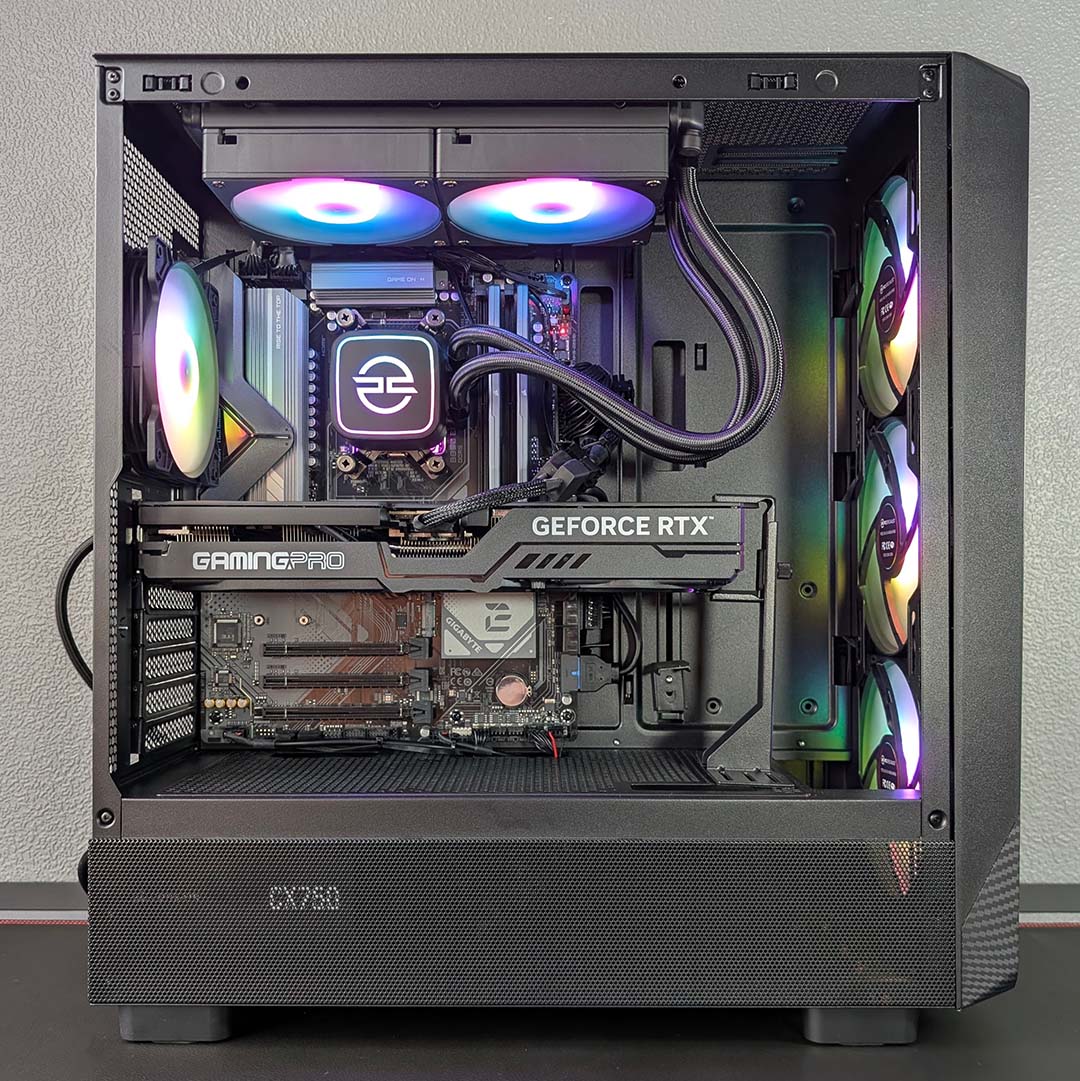
All of this hardware calls a Gigabyte B850 Eagle WiFi6E home, with the motherboard providing the latest and fastest connections across the primary expansion slot and M.2 slot with PCIe 5.0 speeds. This model should also support future Ryzen processors via BIOS updates, opening the door to a CPU upgrade without having to fork out for an entirely new board.
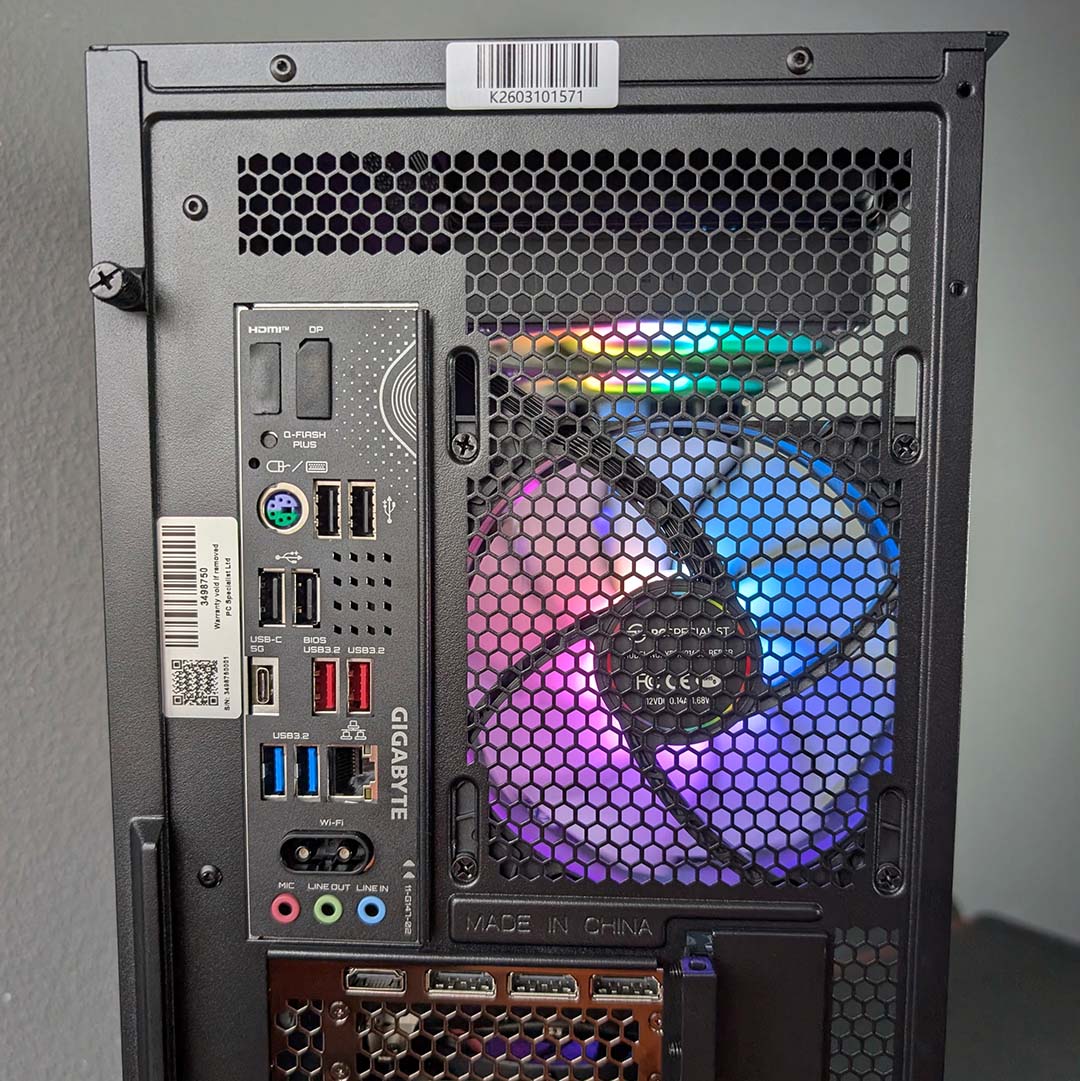
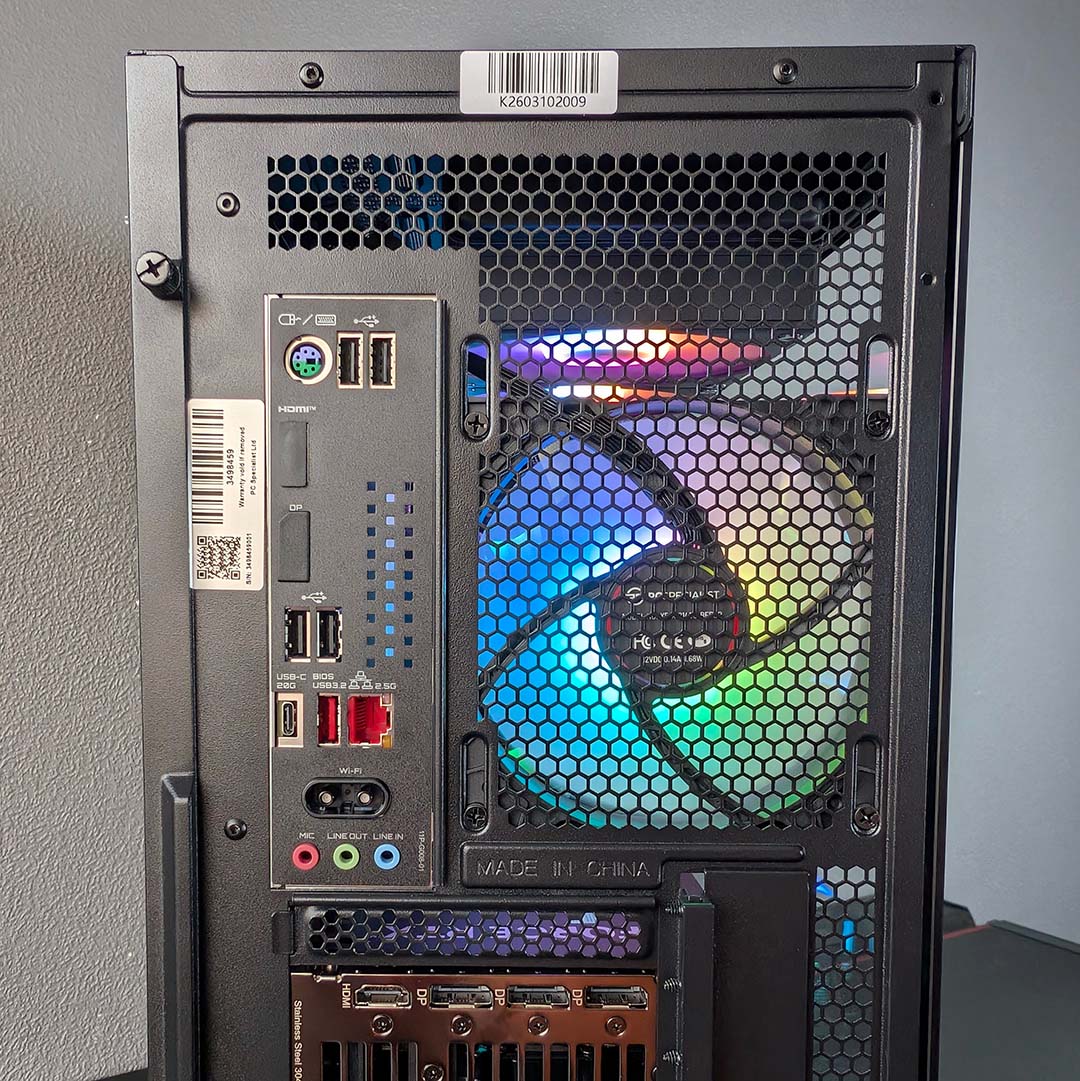
Round back, you’ll find a plentiful assortment of connections. There are four 5Gbps Type-A ports and a lone Type-C input of the same speed ready and waiting to pair with your peripherals, in addition to four 480Mbps Type-A sockets. That’s not forgetting the USBs on the top of the case too, which include a 10Gbps Type-C connection and two 5Gbps Type-As sockets. In terms of networking, the Vortex BF 26 P’s motherboard supports 1Gbps Ethernet as well as Wi-Fi 6E connections.
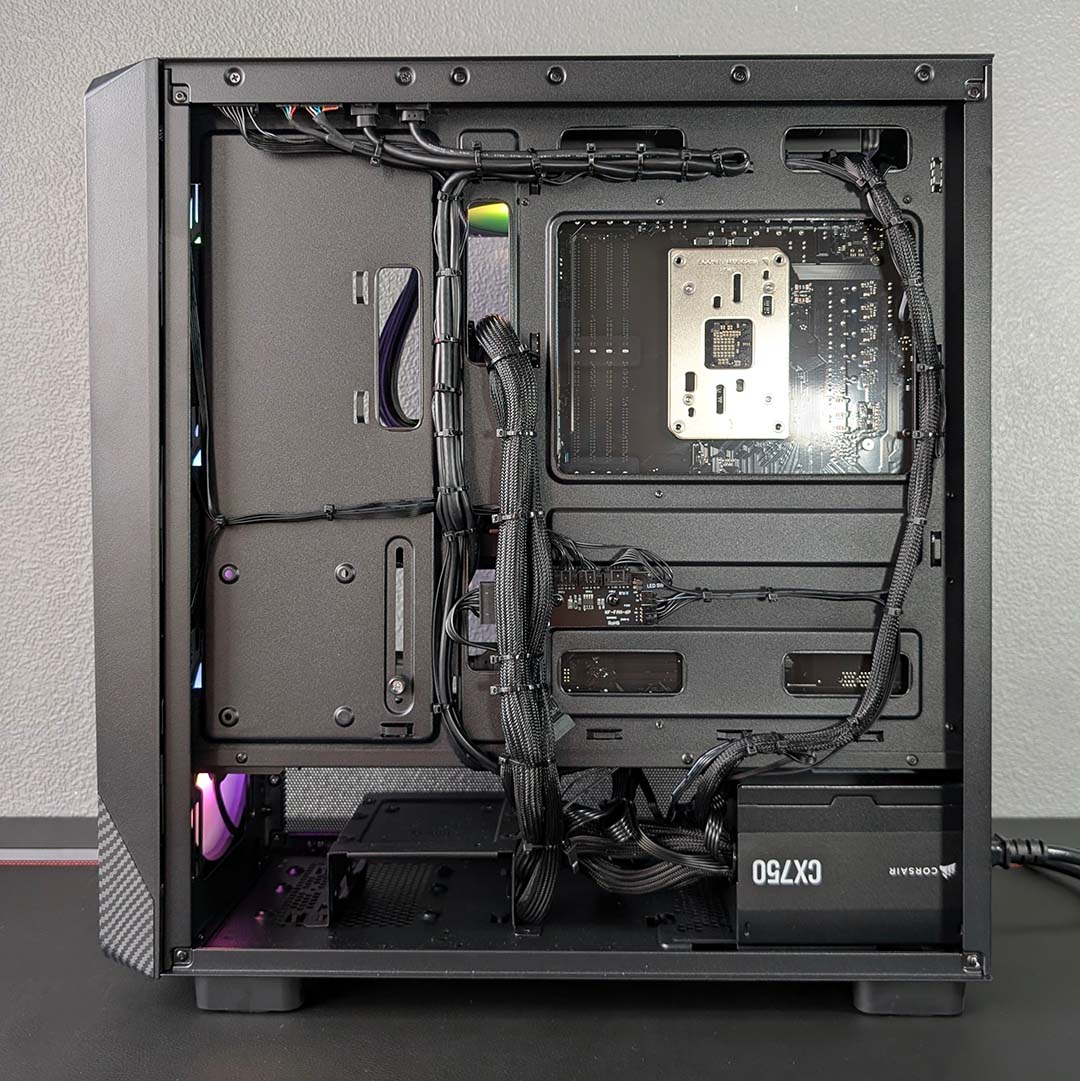
Finally, a Corsair CX750 serves as the system’s power supply. The unit’s 750W capacity falls right in line with Nvidia’s recommendation for the RTX 5070 Ti, but this PSU doesn’t feature a native 16-pin power cable. As such, PCSpecialist has fallen back to an unsightly dongle to feed the graphics card, but does manage to keep the rest of the rig’s cables tidy.
PCSpecialist Ignite BF 26
Price: £2,326 £1,999
For those with £2,000 to spend, the Ignite BF 26 is the system to go for. Costing £1,999, down a whopping £327 from its original price, this machine has the gusto to deliver a good gaming experience across FHD (1920×1080) and QHD (2560×1440) resolutions with excellent multi-core performance to boot.
If you were to build the Ignite BF 26 yourself, you’d end up spending ~£2,060 according to my PCPartPicker build at the time of writing. Once again, PCSpecialist’s offering saves you a welcome chunk of cash relative to the DIY approach. You also don’t have to endure waiting for the parts to arrive, and condense any necessary support down to a single merchant.
PCSpecialist Ignite BF 26
£2,326 £1,999
Pros
- Good FHD/QHD frame rates
- 2TB SSD and 32GB DDR5 combo
- Excellent CPU multi-core pace
- Good price relative to DIY
Cons
- Little platform upgrade potential
- Minor cabling gripes
Club386 may earn an affiliate commission when you purchase products through links on our site.
How we test and review products.
We’re rocking a Core Ultra 7 270K Plus in this build, the best CPU Intel has to offer right now in our eyes. This chip houses eight performance cores and 16 efficient cores for a total of 24, with thread count to match, in addition to a 5.5GHz maximum frequency. Putting these specifications to work in games and other applications frequently returns performance levels that trade blows with class leaders, but power consumption can be on the high side thanks to this processor’s 250W limit.
Where this processor properly shines, though, is in multi-core workflows. Some games will take advantage of the large number of cores that the 270K Plus provides, but the chip is an excellent choice for anyone wanting a jack-of-all-trades for both work and play. We’ve found this CPU can even beat the likes of the Ryzen 9 9950X3D in some cases, despite costing half as much.
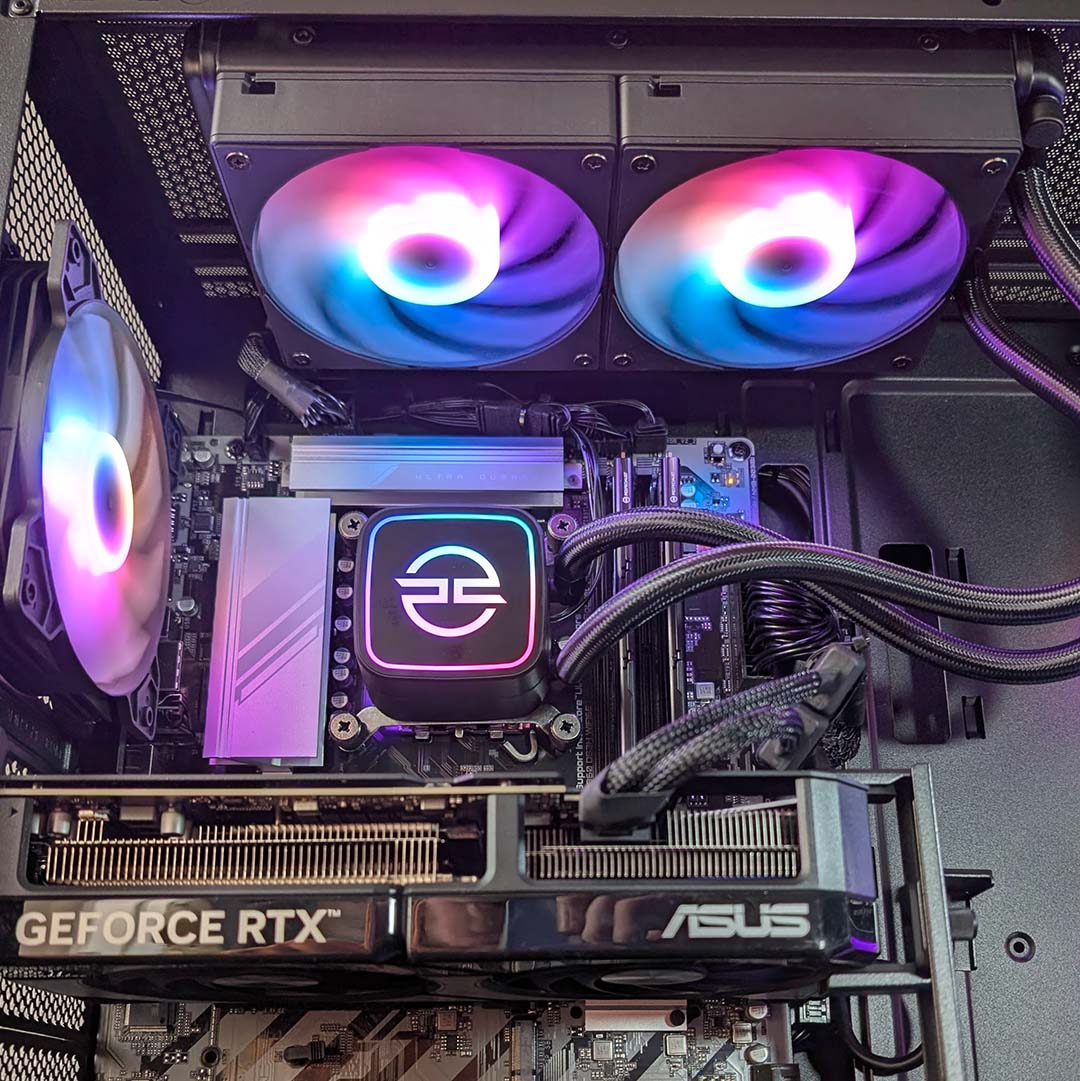
PCSpecialist has outfitted the Ignite BF 26 with a GeForce RTX 5070, which as a slightly cutdown GB204 GPU with 6,144 CUDA cores, 48 RT cores, and 192 Tensor cores for a punchy gaming experience. While the card’s 12GB of VRAM is usually enough to handle the demands of high settings and ray tracing at QHD, it can prove a bottleneck in some circumstances. Turning down settings does combat this potential roadblock, but we’d sooner suggest using DLSS Super Resolution to reduce rendering load if possible.
| PCSpecialist Ignite BF 26 | |
|---|---|
| CPU | Intel Core Ultra 7 270K Plus |
| CPU cooler | PCSpecialist LS-240 AIO Liquid Cooler |
| Motherboard | Gigabyte B860 DS3H WiFi6E |
| GPU | Nvidia GeForce RTX 5070 12GB |
| RAM | 32GB (2x16GB) PCS Pro DDR5-5600 CL46 |
| SSD | 2TB Kingston NV3 M.2 PCIe 4.0 NVMe SSD |
| PSU | Corsair CX-750 (750W) |
| Networking / wireless | Bluetooth 5.3 2.5Gbps Ethernet Wi-Fi 6E |
| Case | PCS Spectrum III Black ARGB |
| Operating system | Windows 11 Home |
| Warranty | Three years labour, one year parts, six months collect and return |
| Price | £1,999 |
Despite costing less than the Vortex BF 26 P, this system shares the same cooler, namely the PCSpecialist LS-240. Cooling the Core Ultra 7 270K Plus while it’s pulling 250W can be challenging, but our tests show the 240mm AIO is more than up to the task of keeping this chip running cool and free of thermal throttling. We also have three intake fans, as well as a single exhaust, aiding airflow, all with A-RGB LEDs.
Furthering similarities between the builds, we have 2TB of PCIe 4.0 storage in play in this PC too, by way of a Kingston NV3. As mentioned earlier, this SSD will keep load times in games feeling nippy, but we did find that operating temperatures can rapidly rise under more strenuous loads, resulting in thermal throttling.
The Ignite BF 26 arrives with 32GB of DDR5. While two sticks net the bandwidth benefits of dual channel operation, these DIMMs are on the slower side at 5,600MT/s with CL46 timings. Faster modules can improve CPU performance in some applications including Cinebench, as we’ve seen through our own 270K Plus testing using 7,200MT/s sticks. Nonetheless, these lower speeds remain perfectly suitable for gaming.
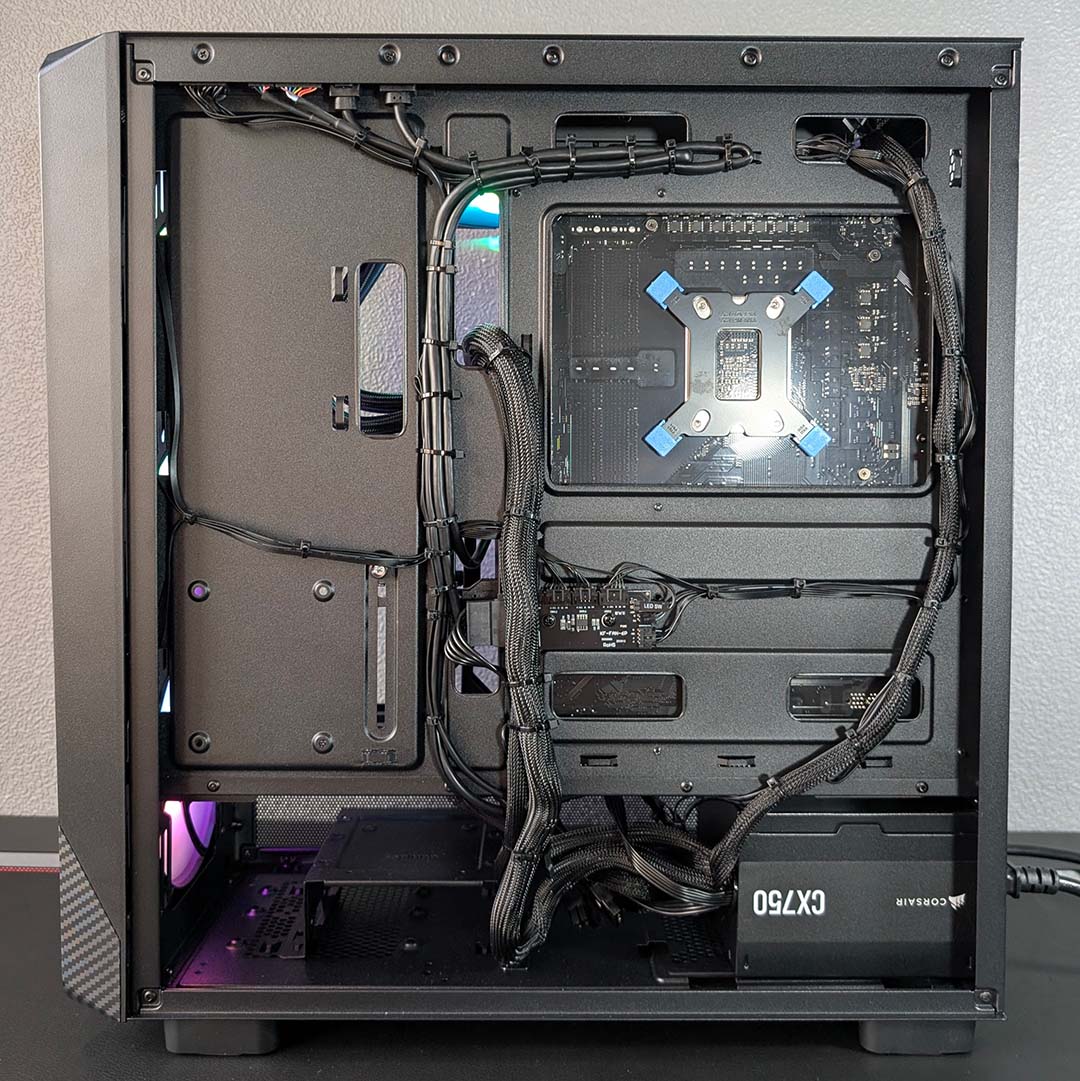
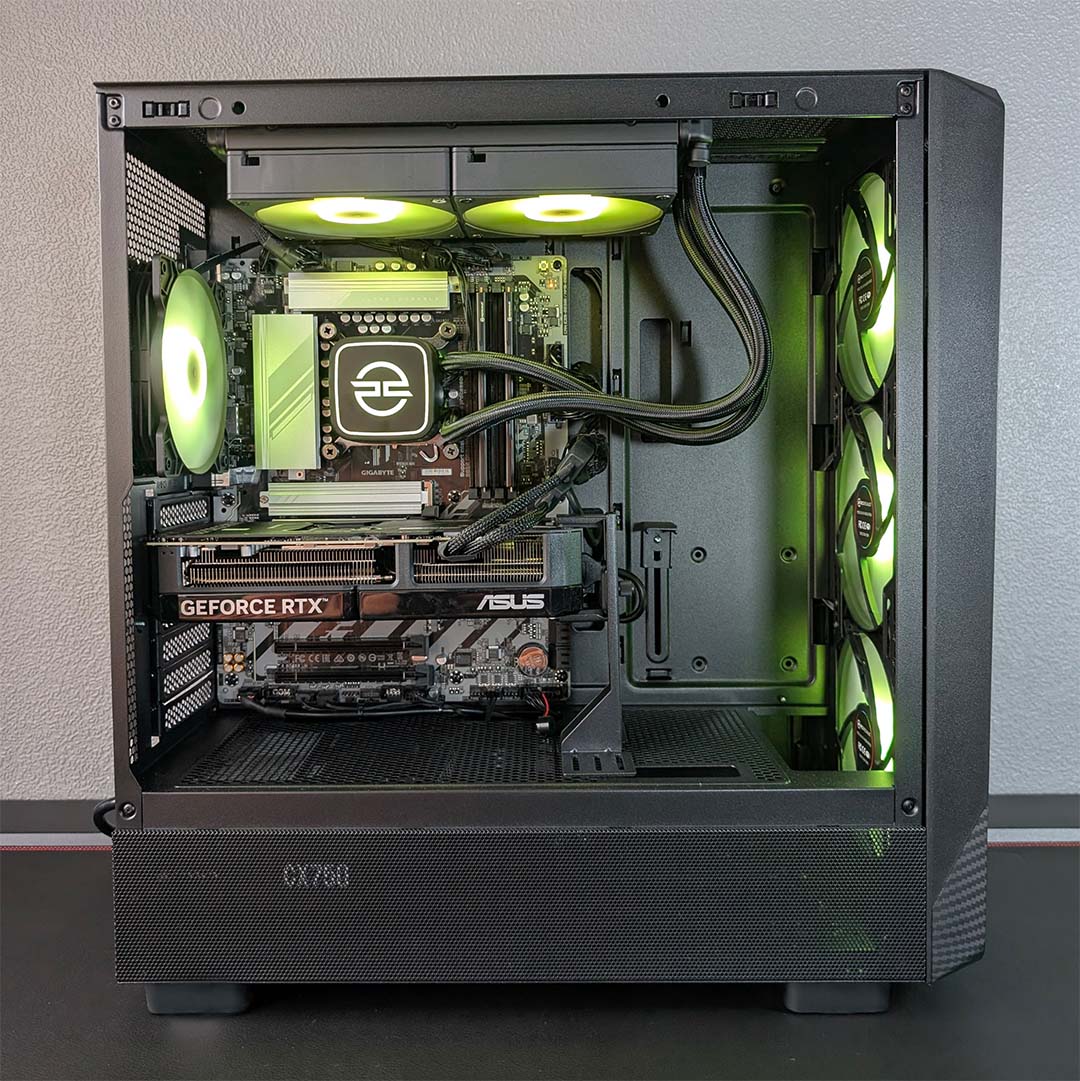
The final mirror between the Ignite BF 26 and Vortex BF 26 P is in the systems’ power supplies, with each using a Corsair CX750. Having 750W at the PC’s disposal provides appreciable headroom for future upgrades and is well within the recommended capacity for a GeForce RTX 5070 (650W). Once again, though, despite tidy cable management round back, there’s an ugly 8-pin-to-16-pin adapter at work in the main chamber.
Finally, let’s talk about the Gigabyte B860 DS3H WiFi6E. This motherboard is suitably solid as LGA1851 boards go, with PCIe 5.0 connections across the main expansion and M.2 slots, with room to expand further with several PCIe 4.0 slots. However, it’s worth noting that this platform won’t receive any future processors, and the Core Ultra 7 270K Plus is about as good as Intel’s current offerings get, with the Core Ultra 9 285K providing small and spotty uplifts.
In terms of USB ports, you’ll find a single 20Gbps Type-C connection, a lone 5Gbps Type-A input, alongside four 480Mb Type-A sockets. That’s not a lot of peripheral ports with which to play, but this will only matter for some high-speed accessories, and you do have front I/O USB ports to supplement this collection. The board at the very least doesn’t skimp on networking, with a 2.5Gbps Ethernet port and Wi-Fi 6E support.
PCSpecialist Fusion BF 26
Price: £1,277 £1,149
The final member of our Black Friday trio is the Fusion BF 26. This is the least powerful of the three systems, but also the most affordable, with PCSpecialist asking a modest £1,149 for this rig, down from £1,277. Such a low cost naturally comes with some cutbacks, but there’s still a solid FHD machine here ripe for the taking if you’re comfortable with its limitations.
You could build this system yourself for ~£1,219 at the time of writing. That means you’re saving a welcome ~£70 by going with this prebuild, all while saving yourself the trouble of piecing together the components yourself.

PCSpecialist Fusion BF 26
£1,277 £1,149
Pros
- Solid FHD/QHD frame rates
- 1TB NVMe SSD
- Lean power consumption
- Good price relative to DIY
Cons
- PCIe 3.0 expansion
- Little platform upgrade potential
Club386 may earn an affiliate commission when you purchase products through links on our site.
How we test and review products.
Part of the reason that the Fusion BF 26 is so affordable comes down to its choice of processor and platform, the AMD Ryzen 7 5700X, prior generation platform, AM4. We’ll discuss the implications of the latter shortly, but let’s focus on specifications first.
This chip packs eight Zen 3 cores with 16 threads, and can run at up to 4.6GHz. Modern alternatives may carry the same number of cores and threads, but underlying architectural advancements and higher clock speeds do show up this CPU’s age. With this in mind, the 5700X is still a decent choice for an AM4 system like this one, but can become a clear a limiting factor in some scenarios.
Although the processor is on the older side, the graphics card comes from current-generation stock. The AMD Radeon RX 9060 XT 16GB was our favourite pixel pusher to recommend for budget and midrange builders before its price went through the roof, in large part thanks to its 16GB VRAM buffer that happily accommodates higher settings. All that memory goes to work with a Navi 44 GPU die, featuring 2,048 shading units, 32 ray tracing cores, and 64 matrix cores for AI.
| PCSpecialist Fusion BF 26 | |
|---|---|
| CPU | AMD Ryzen 7 5700X |
| CPU cooler | PCSpecialist AS-80 |
| Motherboard | Gigabyte A520M H ARGB |
| GPU | AMD Radeon RX 9060 XT 16GB |
| RAM | 16GB (2x8GB) PCS Pro DDR4-3200 |
| SSD | 1TB Kingston NV3 M.2 PCIe 4.0 NVMe SSD |
| PSU | Corsair CX-550 (550W) |
| Networking / wireless | Bluetooth 5.3 1Gbps Ethernet Wi-Fi 6E |
| Case | PCS PRISM III ARGB |
| Operating system | Windows 11 Home |
| Warranty | Three years labour, one year parts, six months collect and return |
| Price | £1,149 |
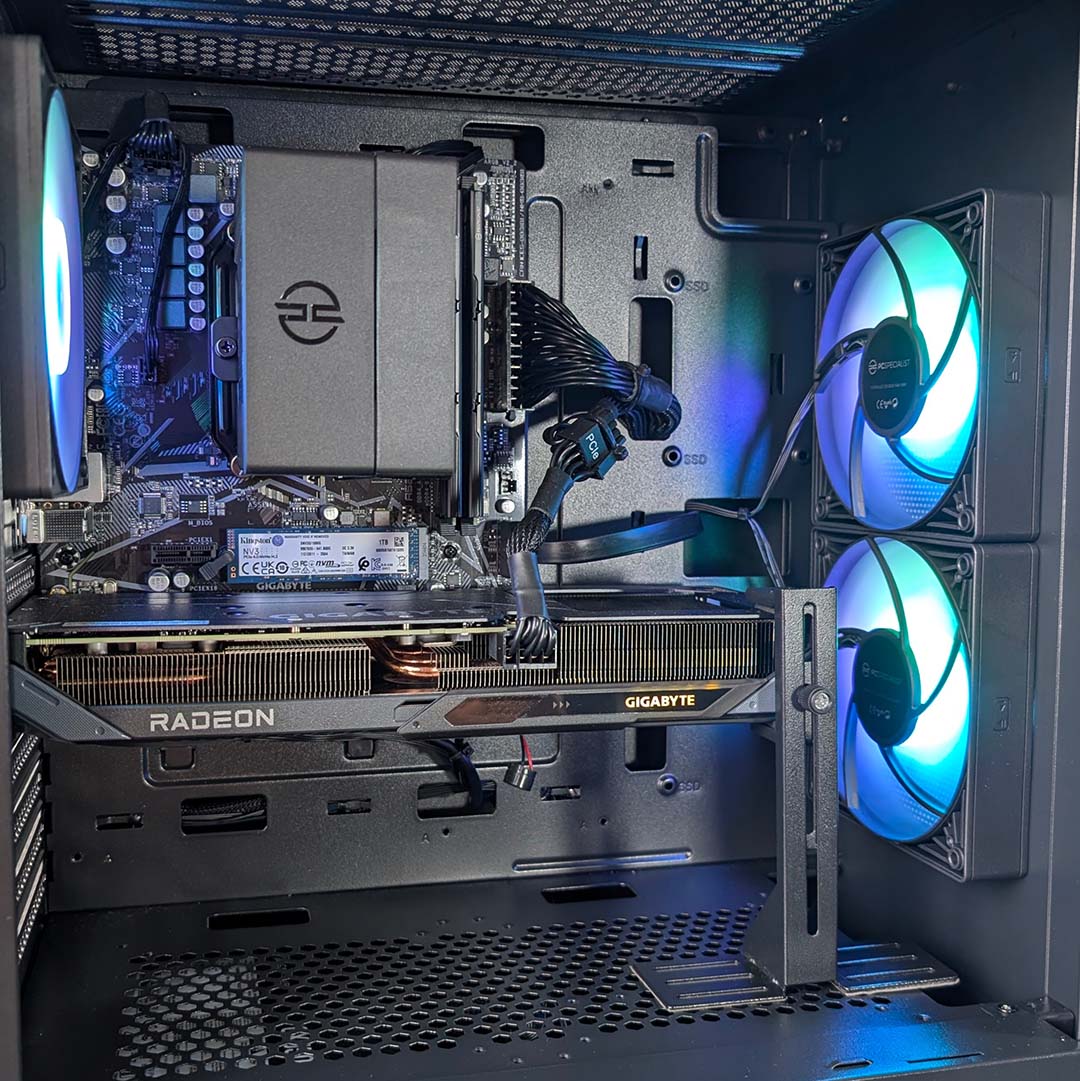
In putting together this affordable build, PCSpecialist has wisely swapped out more extravagant liquid cooling for a cheaper but still competent air cooler. The firm’s AS-80 may lack flash but doesn’t cut corners in terms of managing the operating temperatures of our Ryzen 7 5700X. There’s also two intake fans and a lone exhaust fan, all with A-RGB LEDs, creating a push-pull airflow configuration.
Going with AM4 helps keep costs down by forgoing DDR5 RAM support and using DDR4 DIMMs instead. You’ll find 16GB of dual-channel memory running in this system at 3,200MT/s. While higher capacity sticks with faster speeds are always welcome, this relatively modest combination provides a solid balance of price and performance
Storage is similarly expensive in this climate, but there’s still a sizeable 1TB Kingstone NV3 SSD at play in the Fusion BF 26. The drive is capable of delivering sequential reads of 6,000MB/s, but only via a PCIe 4.0 connection. This PC’s only supports PCIe 3.0, cutting the M.2 SSD’s maximum possible speeds to just 3,500MB/s. You can still expect games to load quickly, but there’s a lot of unrealised throughput that can’t be unlocked without an entirely new motherboard.
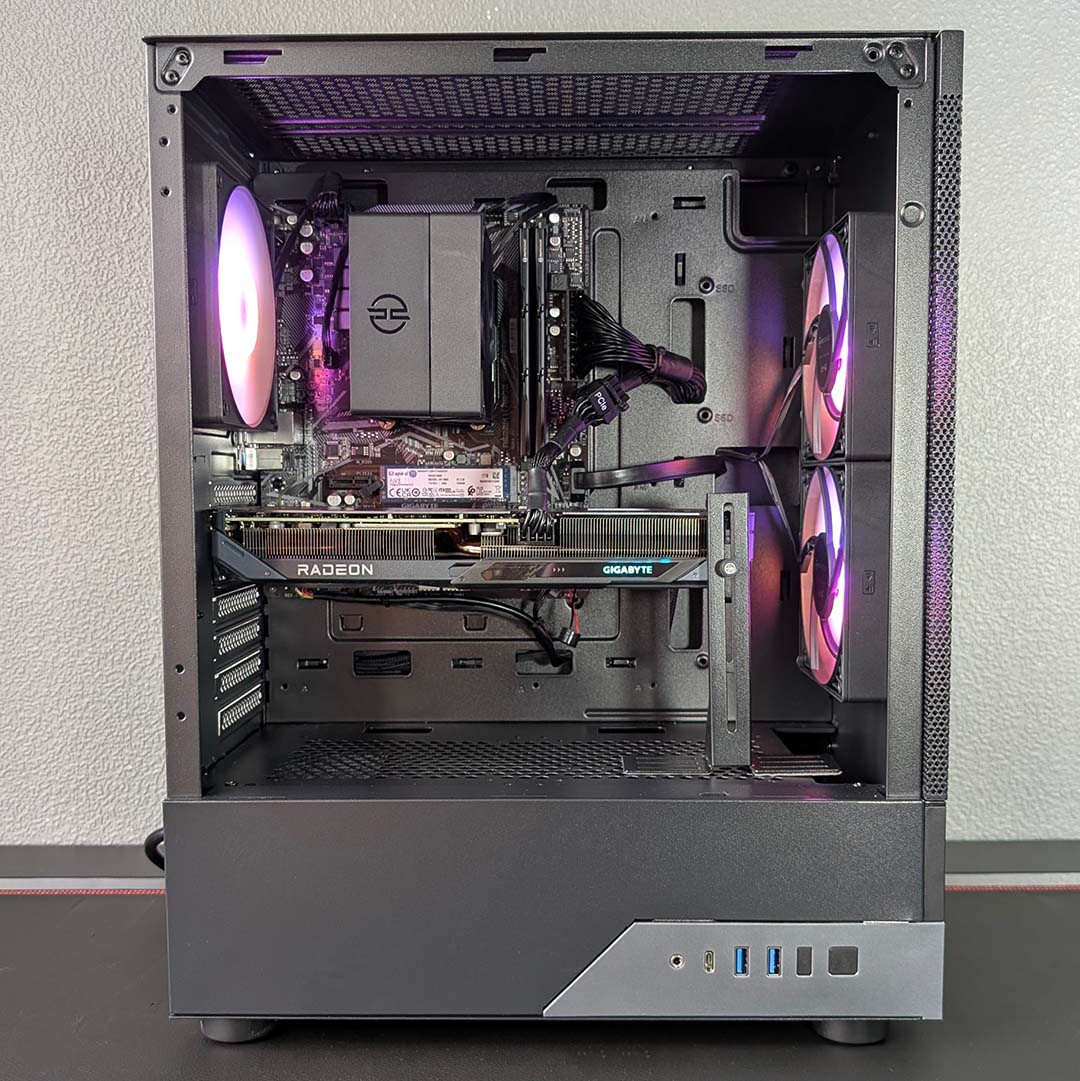
The same PCIe 3.0 connections that hamper storage speeds also curb graphics card performance, albeit to a smaller extent. The Radeon RX 9060 XT 16GB uses a PCIe 5.0 interface, meaning that it only has 16GB/s of bandwidth available to it in this system despite the ability to use up to 64GB/s. However, frame rates will only fall by ~10% of their full potential. This is all a consequence of the A520 chipset, rather than the AM4 platform, where a B550 motherboard would help plug the gap with PCIe 4.0 connections.
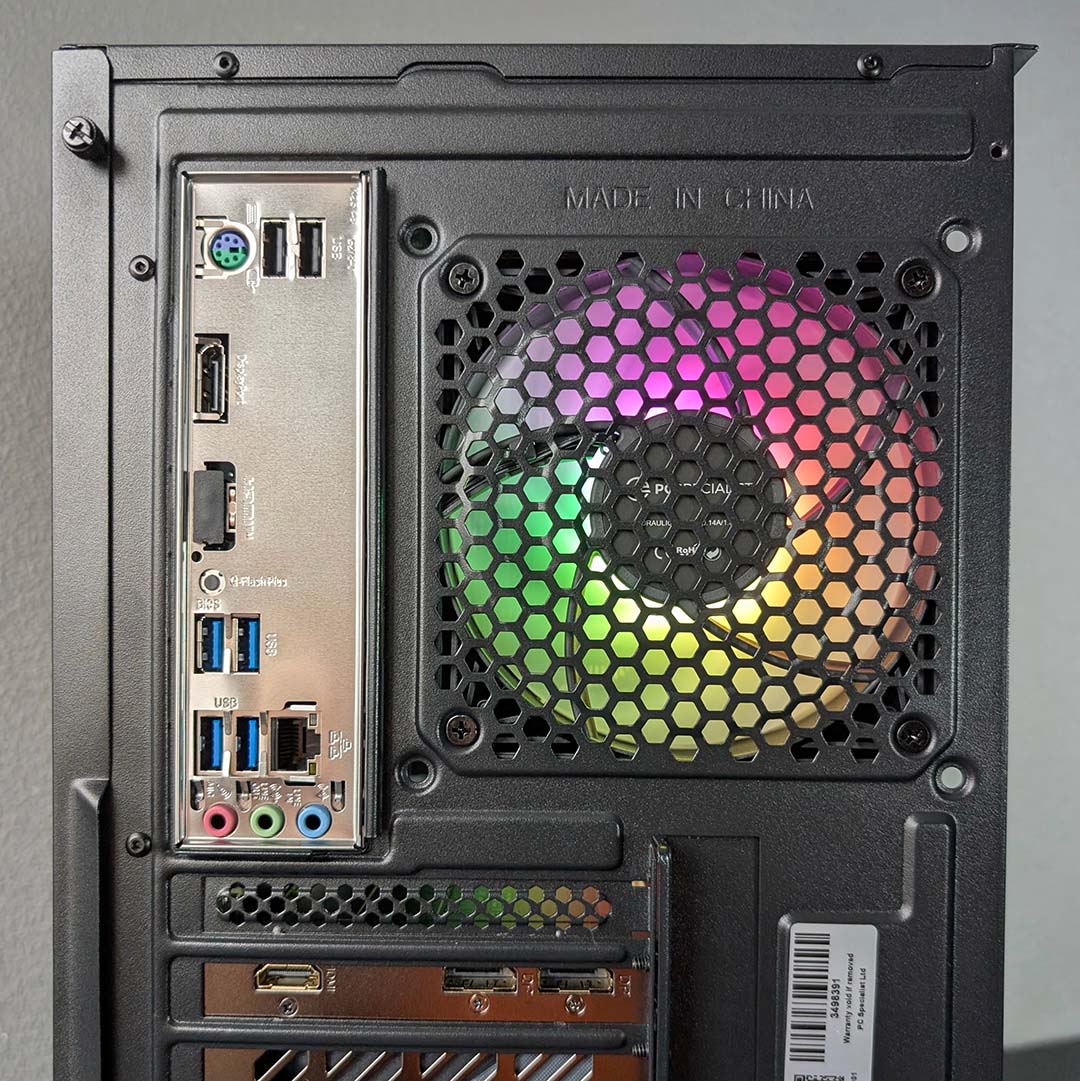
Budget chipsets like A520 typically don’t provide a wealth of connections for rear I/O, but there’s a surprising number of ports available here. While there’s sadly no Type-C input on this board, there are four 5Gbps Type-A connections, in addition two 480Mbps Type-A ports. Like the other systems we have Wi-Fi 6E support, but there’s also 1Gbps Ethernet available to those who’d rather wire in.
Rounding off the rig, we have a Corsair CX550, with a 550W capacity that is a touch above the 450W recommended for the AMD Radeon RX 9060 XT 16GB. There’s no gross-looking 16-pin dongle in this PC, as the graphics card uses a standard 8-pin power connector. However, this small-capacity PSU does leave little headroom to carry over to a more powerful pixel pusher down the road.
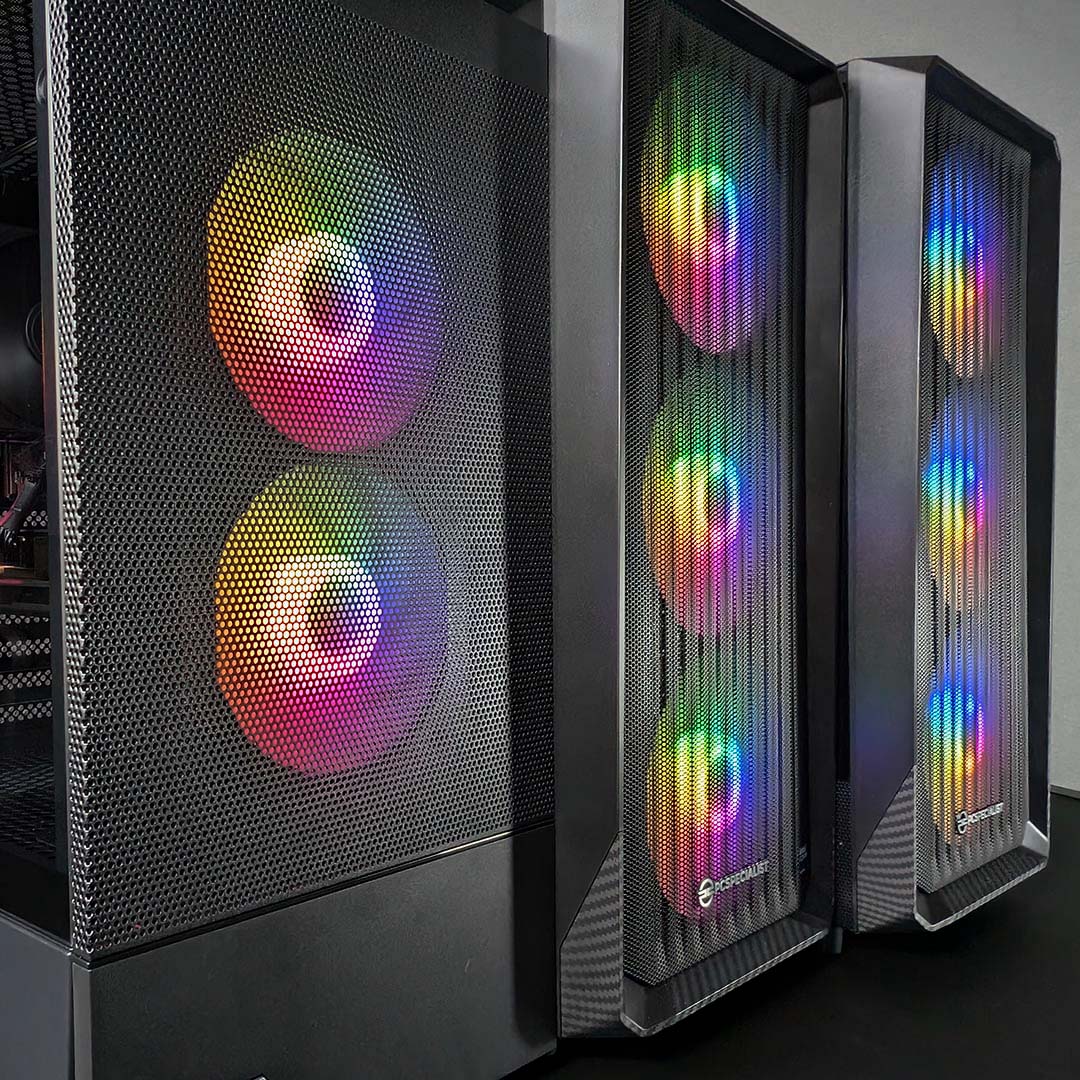
Performance
To assess the performance of these three PCSpecialist systems, I’ve run a condensed version of our benchmark suite with a focus on three titles that all appear in Steam’s Top 100 played games and show off each rig’s capabilities in different ways. However, I’ll also be covering the absolute CPU performance available in each PC via Cinebench 2026, as well as their overall power consumption and operating temperatures.
I’ve limited gaming benchmarks to FHD and QHD for several reasons. Chief among them is applicability, as these resolutions are far and away the most popular among gamers according to the Steam Hardware Survey, with 4K falling a distant third (50.23% vs. 21.82% vs. 5.05%). Every system is also capable of confidently running these resolutions, with only the Vortex BF 26 P having the hardware horsepower to reach for 3840×2160 on occasion.
Cinebench 2026
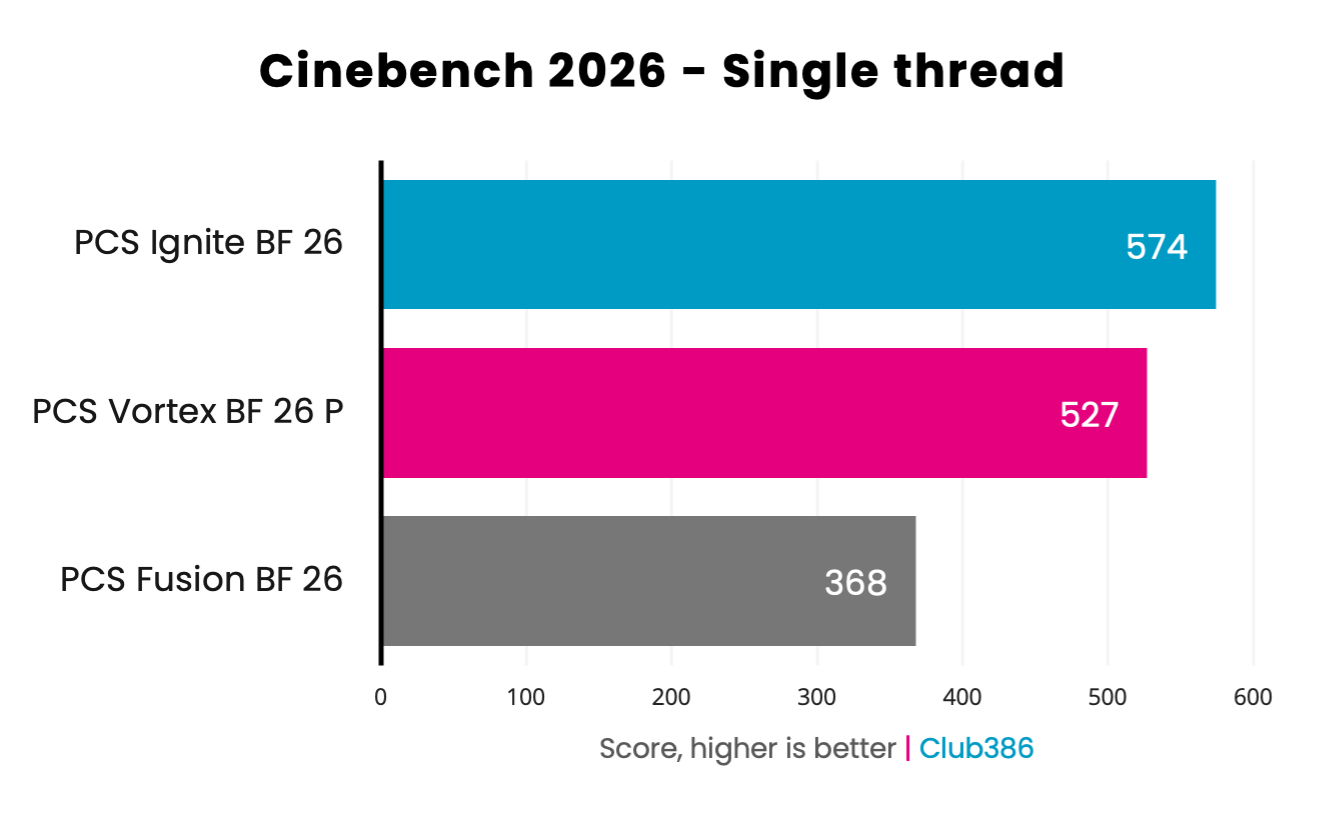
Throwing Cinebench 2026 at each PC reveals demonstrable differences in CPU performance. Clock speeds as well as architectural differences in instructions per clock (IPC) all play their part in determining final single-thread scores.
As the oldest processor in the race, it’s no surprise that the Ryzen 7 5700X in the Fusion BF 26 falls behind its current-generation counterparts with a score of 368. The CPU’s 4.7GHz maximum clock speed is relatively slow by modern standards, but still has enough pep in its step to deliver decent 3D rendering performance.
Moving up to the Ryzen 7 9800X3D in the Vortex BF 26, scoring 527, the processor’s 5.2GHz boost clock combined with Zen 5 IPC and DDR5 memory makes for a more impressive showing. While 3D V-Cache can make a massive difference in games, the technology provides no benefit in this benchmark.
The Ignite BF 26 emerges the overall victor in this race, with the system’s Core Ultra 7 270K Plus flexing its mighty 5.5GHz maximum frequency. Processors don’t get much better than this in terms of raw single-thread performance, which serves the PC well in this workstation-focused benchmark, but gaming performance proves more nuanced.
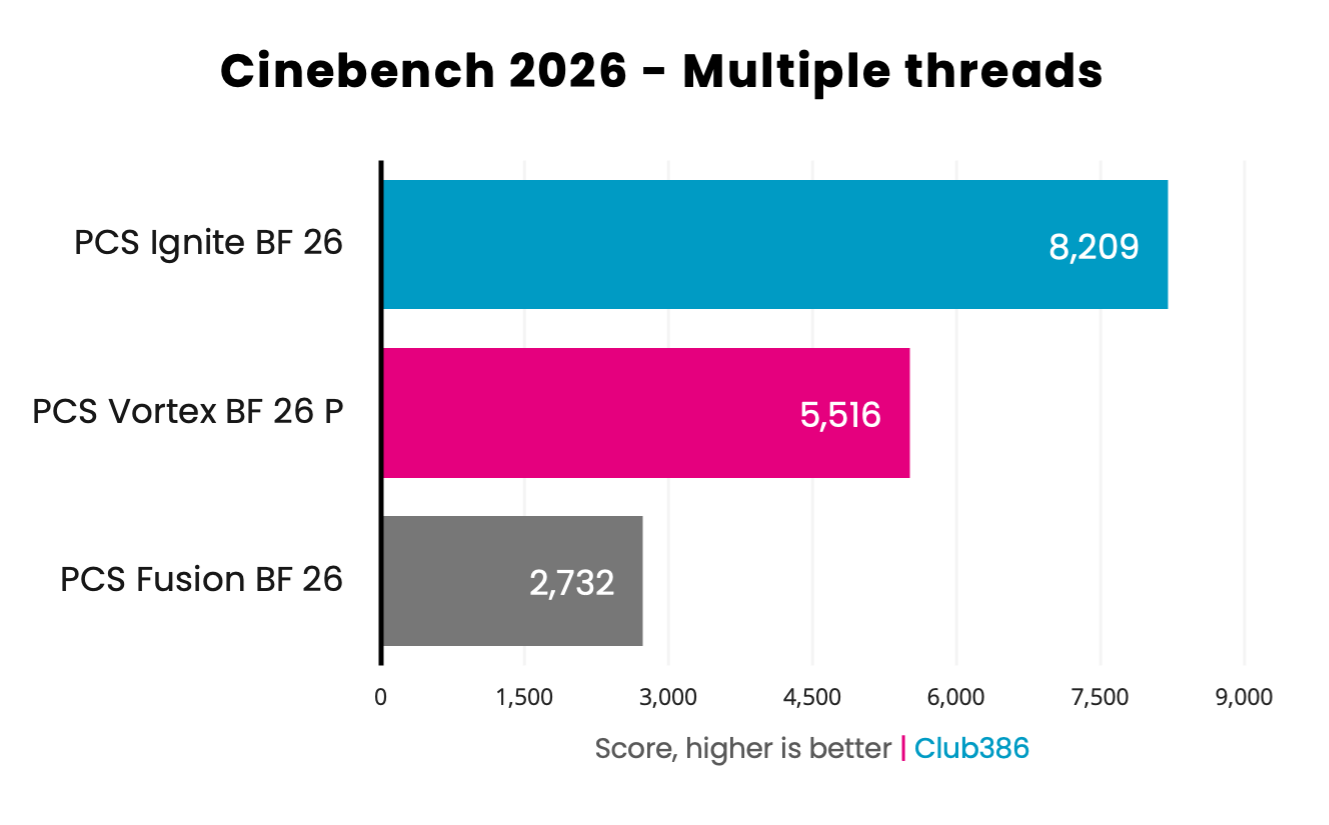
All the factors that dictated single-thread scores are at play in Cinebench 2026’s multi-thread benchmark, but now each processor can throw as many cores as it likes into the mix. More available horsepower should speed up rendering times, in turn boosting scores.
With eight Zen 4 cores at its disposal, the Ryzen 7 5700X in the Fusion BF 26 is notably slower than the other chips in the race, scoring 2,732. Meanwhile, the Vortex BF 26 P scores 5,516 in this bout, which is about what we’d expect from a Ryzen 7 9800X3D.
It’s no surprise to see the Ignite BF 26 at the top of the chart, as the 24-core Core Ultra 7 270K Plus makes short work of this test. While the CPU is the clear winner in this shootout, it’s worth noting that the processor has performance more to give in this regard but we’d need faster, more-expensive RAM in order to realise that potential.
Cyberpunk 2077
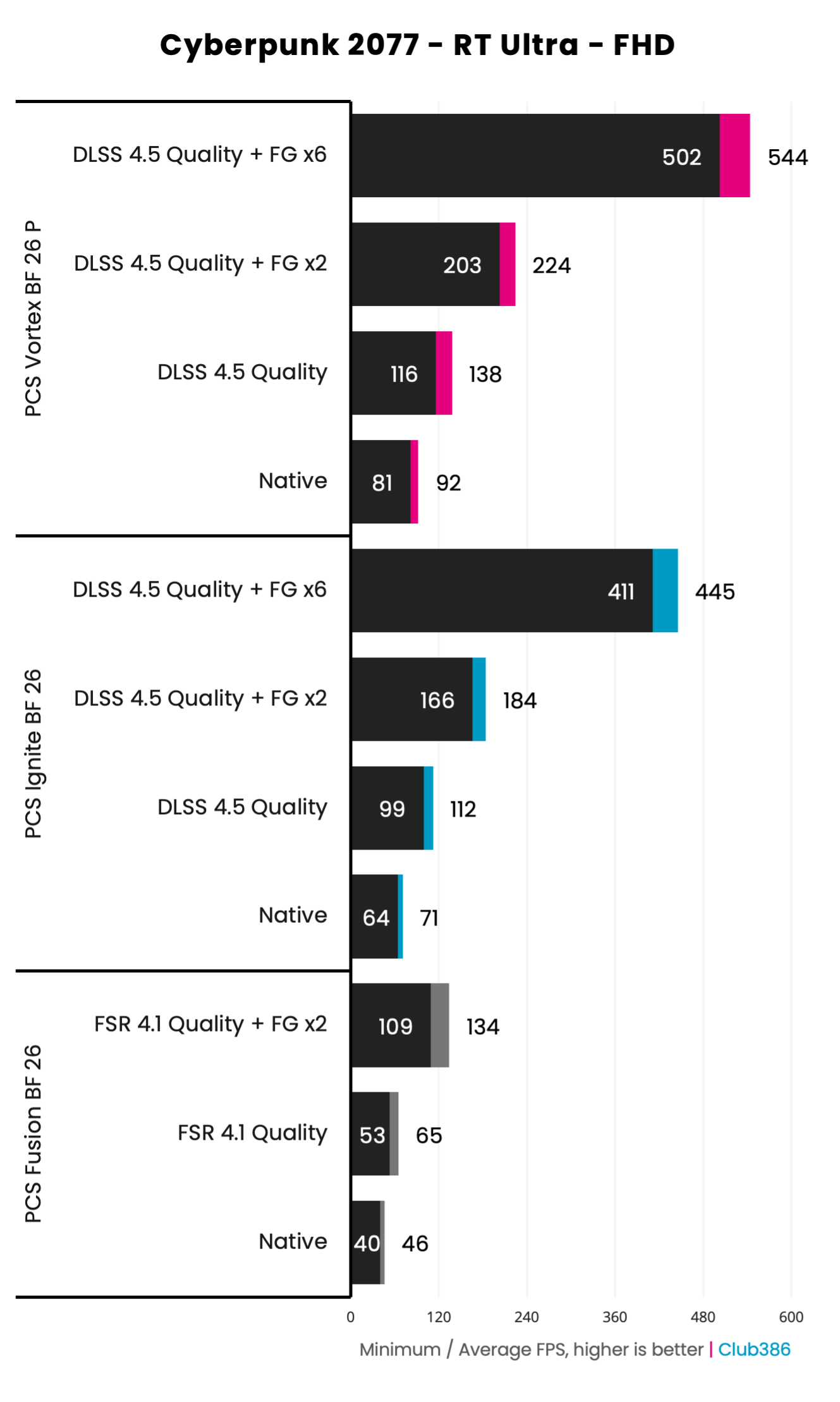
On to the first frame rates, we’re venturing into Night City with our three PCSpecialist systems. Despite launching almost six years ago, Cyberpunk 2077 remains one of the prettiest but heaviest examples of ray traced rendering, with this assessment applying both to its RT Ultra preset (which we’re using here) and the game’s more-demanding path tracing preset, even at FHD (1920×1080).
All three PCs deliver playable frame rates sans any upscaling, but the Fusion BF 26 and its Radeon RX 9060 XT 16GB do require a helping hand to move past their 46fps average. Meanwhile, the Ignite BF 26 confidently cruises at 71fps out the gate thanks to its GeForce RTX 5070. Finally, the GeForce RTX 5070 Ti sees the Vortex BF 26 P approaching triple-digit performance with an impressive 92fps.
Cyberpunk 2077 supports all modern upscalers, giving each system access to high-quality machine-learning upscaling to boost performance at a minimal cost to image quality. Running FSR 4.1 with the Quality preset brings the Fusion BF 26 over the 60fps threshold and is how I’d recommend running the game on this PC. Meanwhile, the DLSS 4.5 Quality preset shoots the Ignite BF 26 all the way up to 112fps and gives the Vortex BF 26 a leg up to 138fps.
Using frame generation won’t benefit performance in the traditional sense, but will improve motion clarity. The Fusion BF 26’s Radeon RX 9060 XT 16GB can inject a single interpolated frame between each traditionally rendered frame into the pipeline, but the GeForce systems have access to a wider range of options. Nvidia offers adaptive frame generation, allowing you to set a target fame rate and have the number of generated frames vary accordingly, as well as the ability to generate up to five additional frames per rendered frame, as you can see in the chart above.
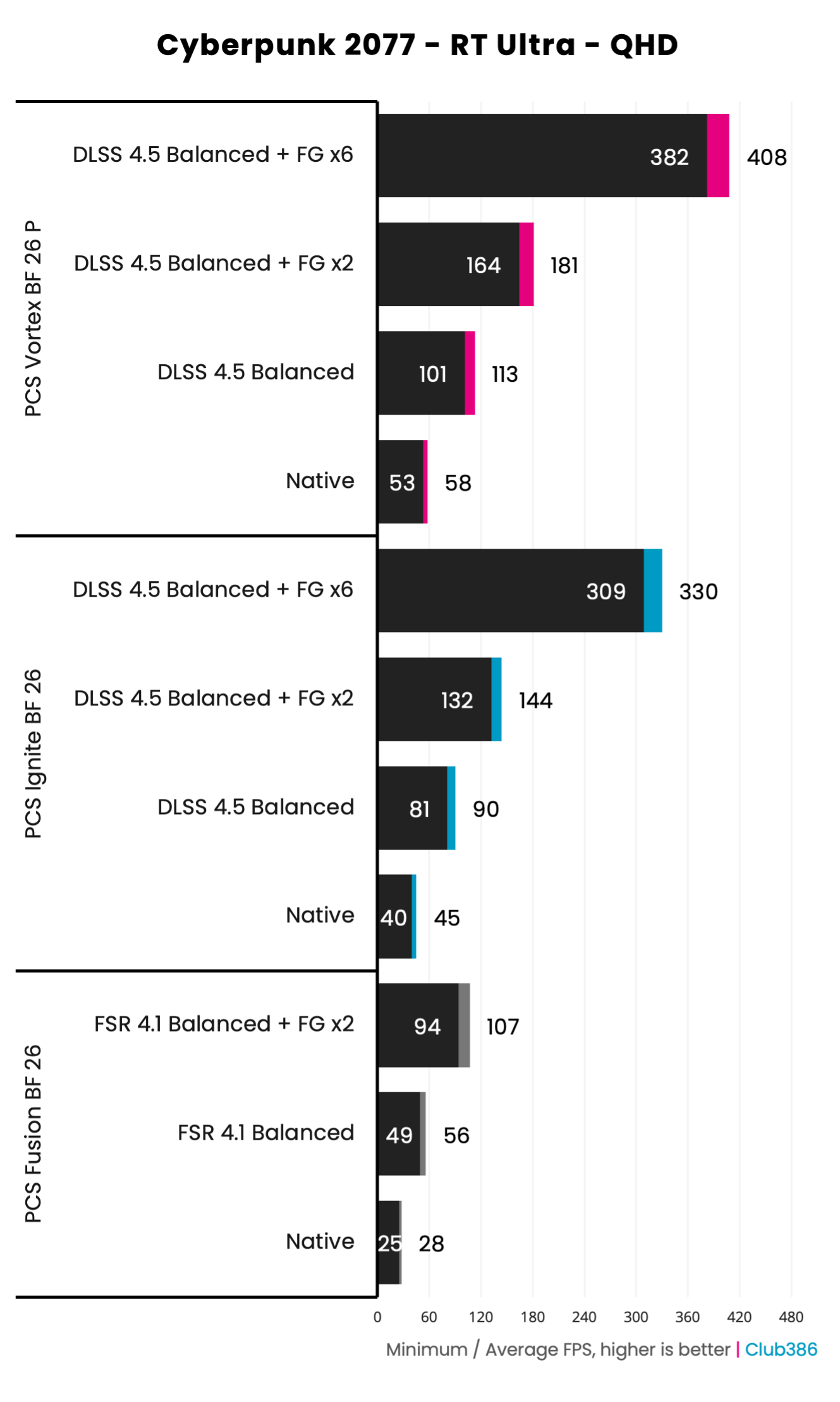
Raising the resolution to QHD (2560×1440) places additional pressure on the GPU. It’s still possible to enjoy Cyberpunk 2077 in all its ray-traced glory on all three of our systems at this resolution, but doing so at a pleasing frame rate unavoidably requires the performance enhancing powers of upscaling.
The Fusion BF 26 demonstrates the biggest need for upscaling, with its frame rate rising from an unplayable 28fps to a more pleasing 56fps using FSR in its Balanced preset. You could achieve 60fps by using the FSR Performance preset, dropping the base resolution prior to upscaling and in turn reducing GPU load, or simply drop to RT Medium instead. It’s certainly possible to enjoy high levels of ray tracing on a budget graphics card like this, but be prepared to tweak a few settings to realise that potential.
Neither the Ignite BF 26 nor Vortex BF 26 P hit 60fps through raw GPU horsepower, but do deliver playable frame rates out the gate with Nvidia’s class-leading RT cores to thank. The DLSS 4.5 Balanced preset puts the systems comfortably above that threshold, as the GeForce RTX 5070 hits 90fps while the GeForce RTX 5070 Ti in the latter PC naturally pushes the performance envelope furthest at 113fps.
Both Nvidia and AMD recommend establishing a base average frame rate of 60fps for an ideal experience with frame generation, in order to establish solid latency before introducing interpolated frames that will push that value higher. As such, the PCs with more-powerful GeForce GPUs are ready to go at these settings and resolution, but the Radeon is a few frames short and requires further consideration.
Rainbow Six Siege
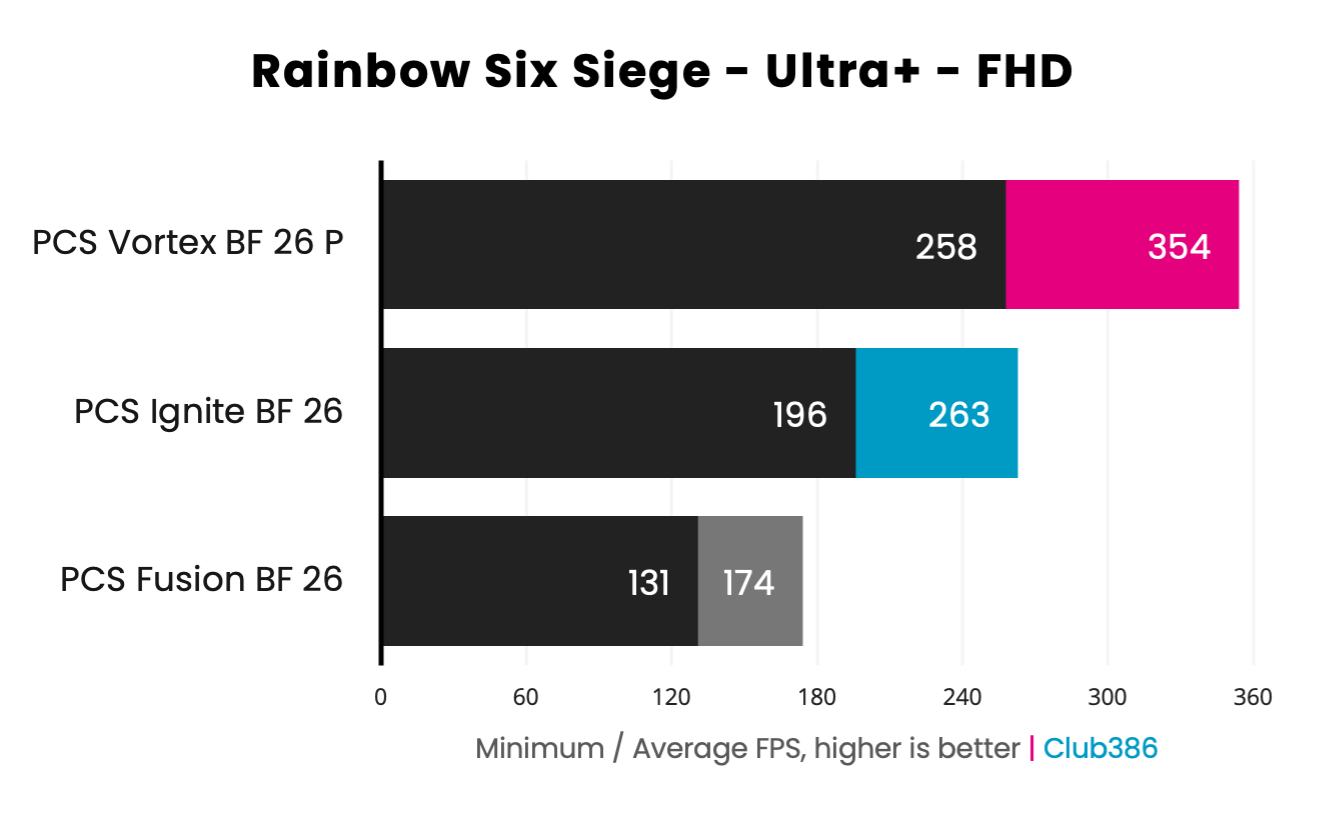
There are plenty of games worth playing that outright don’t feature ray tracing. Esports games like Rainbow Six Siege are welcomingly easy to run at triple-digit frame rates, even at their highest settings, as in this run of benchmarks.
In this arena, the Fusion BF 26 delivers great value as the tactical shooter fires off frames at a butter-smooth rate of 174fps at FHD (1920×1080), that’s pleasingly consistent to boot with a 131fps minimum and invites the use a monitor with a high refresh rate. Not bad going for a £1,149 system.
Moving up the chain, splashing out for the Ignite BF 26 doesn’t near-double our performance in parallel with price but does give frame rates a welcome boost. It’s always worth remembering that part of the price you’re paying for these systems includes features outside of frame rates, like the higher CPU performance we observed earlier, as well as support for PCIe 4.0 storage and more.
However, we do see an average twofold performance increase on the Vortex BF 26 P. Rainbow Six is happily making use of the Ryzen 7 9800X3D’s large cache pool, pushing frame rates well beyond what we’d expect from a GeForce RTX 5070 Ti in this title when paired with a processor sans 3D V-Cache.
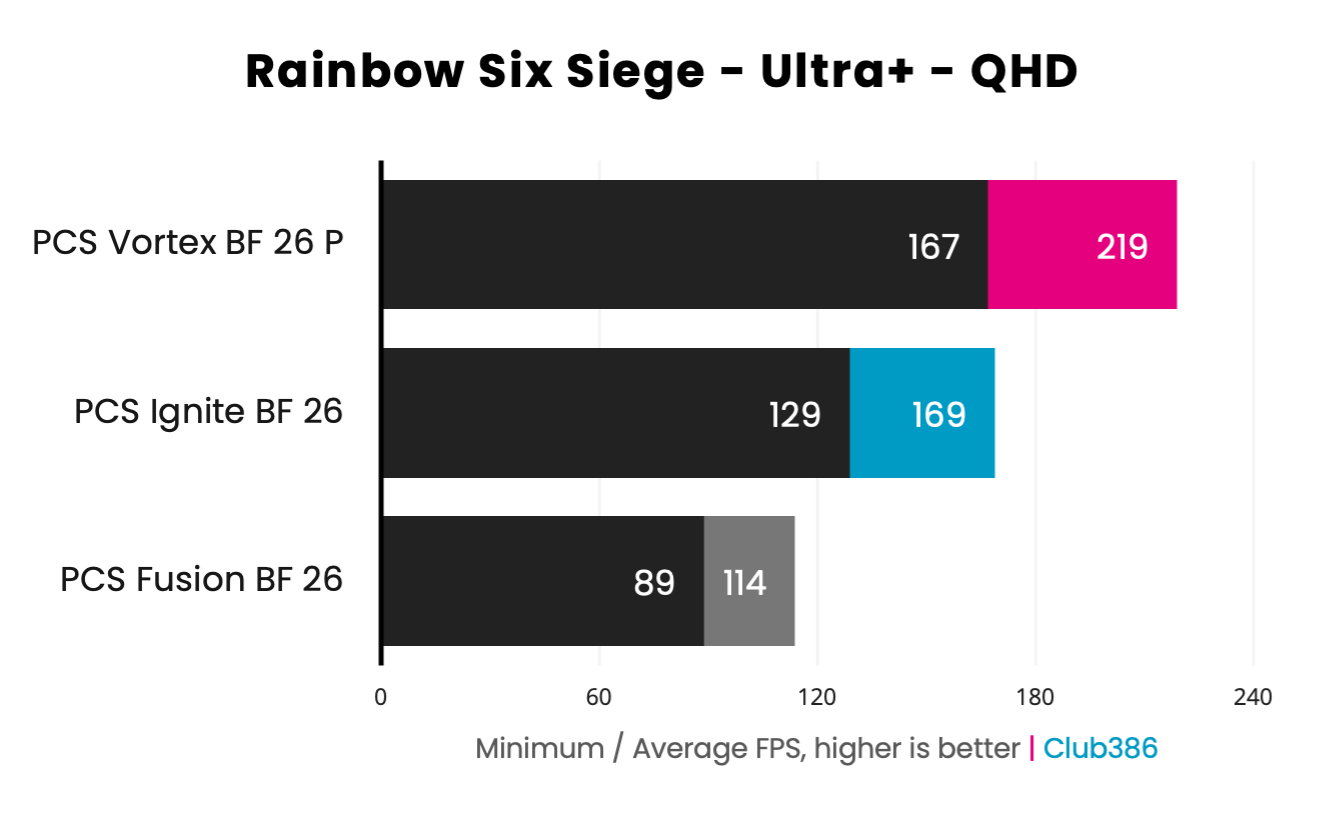
Even at QHD (2560×1440), all three systems still deliver average frame rates in the triple digits. Of course, you can free up some GPU horsepower despite the rise in resolution by turning down other settings to boost performance, while potentially improving your competitive edge with simpler geometry and details.
Maintaining Ultra+ settings, though, the Fusion BF 26 sets the bar at a respectable 114fps average. Meanwhile, the Ignite BF 26 maintains a sturdy 169fps, complete with a 129fps minimum. Up top, the Vortex BF 26 P continues to absolutely shred, achieving 219fps during the same benchmark.
All three of these PCs will deliver a responsive, fluid, and sharp experience in Rainbow Six Siege and other esports games like League of Legends, Valorant, and others. However, it’s worth noting that systems with GeForce GPUs will come with the advantage of wider support for Nvidia Reflex relative to AMD Anti-Lag 2, helping to reduce input latency in more games.
Total War: Warhammer III
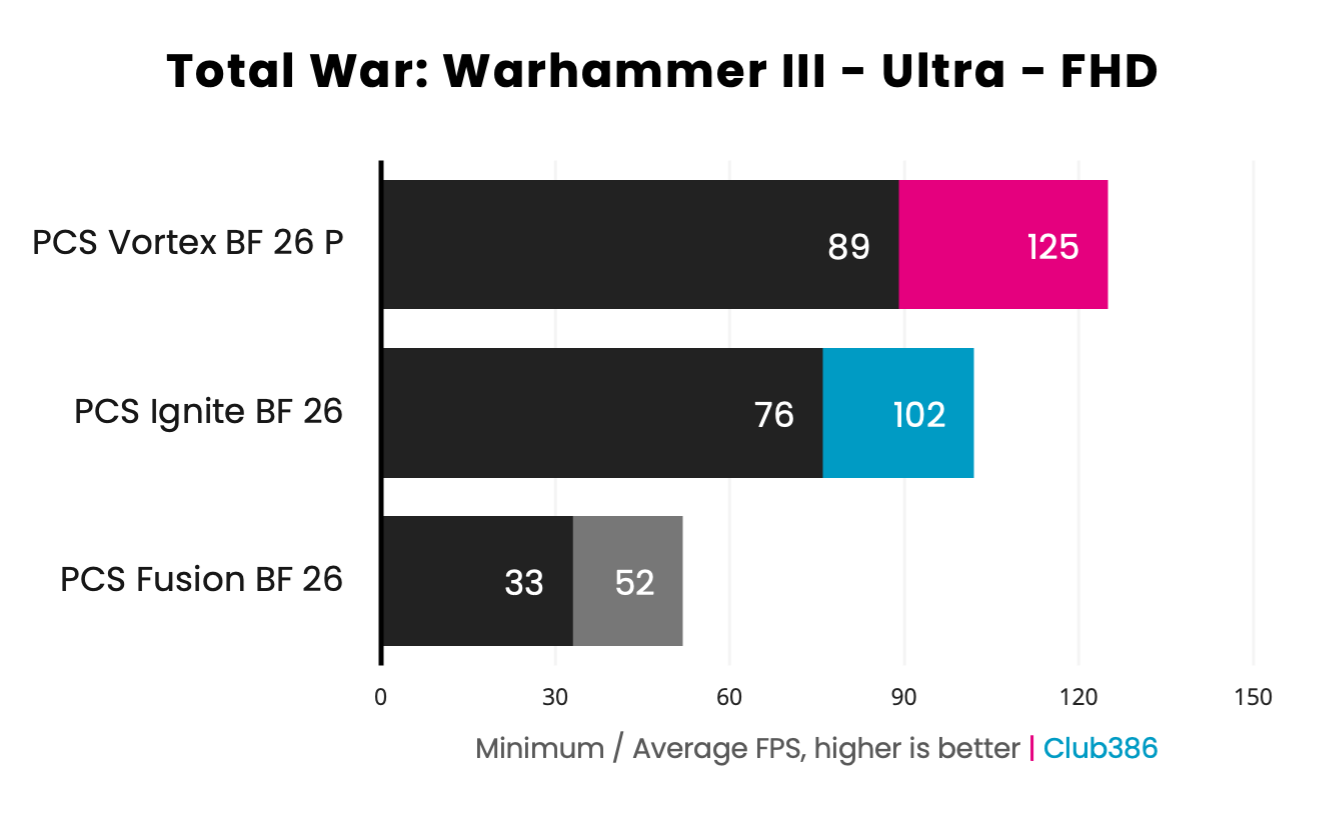
It’s time to put loads of computational pressure on our PCSpecialist rigs, with some gruelling runs of Total War: Warhammer III’s Mirrors of Madness benchmark. This test will make a processor sweat with loads of simultaneous real-time calculations from controllable units and more, but can prove challenging for graphics cards too when you use the game’s Ultra preset.
At FHD (1920×1080) resolution, our Fusion BF 26 is trying its best under the weight of these lofty settings. However, it’s not the GPU but rather the CPU that’s the limiting factor in this case. There are potential upgrade paths that would remedy this problem, with the Ryzen 7 5800X3D being the obvious choice for a welcome performance boost courtesy of 3D V-Cache. In the meantime, though, settings reductions can provide breathing room without spending a penny.
Meanwhile, the Ignite BF 26 and Vortex BF 26 P, with their respective Core Ultra 7 270K Plus and Ryzen 7 9800X3D, have all the processing power necessary alongside their graphics cards to deliver triple-digit frame rates. Despite the latter system boasting fewer cores and threads, 3D V-Cache comes in clutch to turbocharge performance as it will across most but not all games.
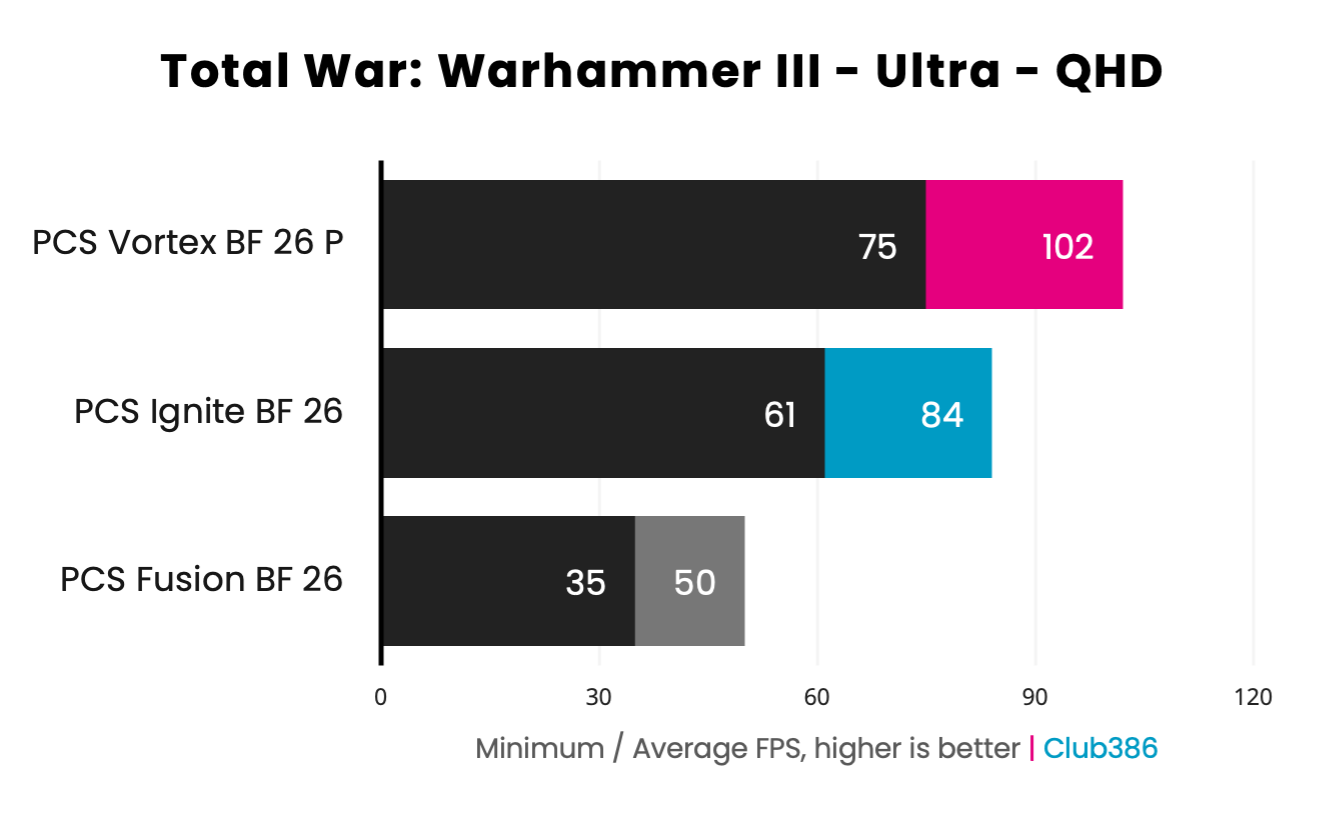
As we increase resolution to QHD (2560×1440), we see that the Fusion BF 26 frame rate has barely moved, indicating a clear CPU bottleneck (that we’ve verified via performance overlay). There’s little reason not to run the game at this resolution on the system given this limitation, but as I mentioned earlier some settings reductions could free up performance for higher frame rates.
Moving up the chain to the Ignite BF 26, the Core Ultra 7 270K Plus and GeForce RTX 5070 combo are happily rendering the battlefield above 60fps across minimum and average frame rates. Total War: Warhammer III sadly doesn’t support any kind of upscaling, so this is as good as you can expect the Ultra preset to run on this system in lieu of future hardware upgrades.
Lastly, the Vortex BF 26 continues to assert its dominance with a 102fps average, despite the increase in pixel count. Per our wider CPU testing, the Ryzen 7 9800X3D is one of the best processors you could want to run this title, with only the Ryzen 9 9950X3D and 9950X3D2 pipping past it. Not every real-time or turn-based strategy game will lean into the benefits of 3D V-Cache, but it’s a true boon here.
Vitals
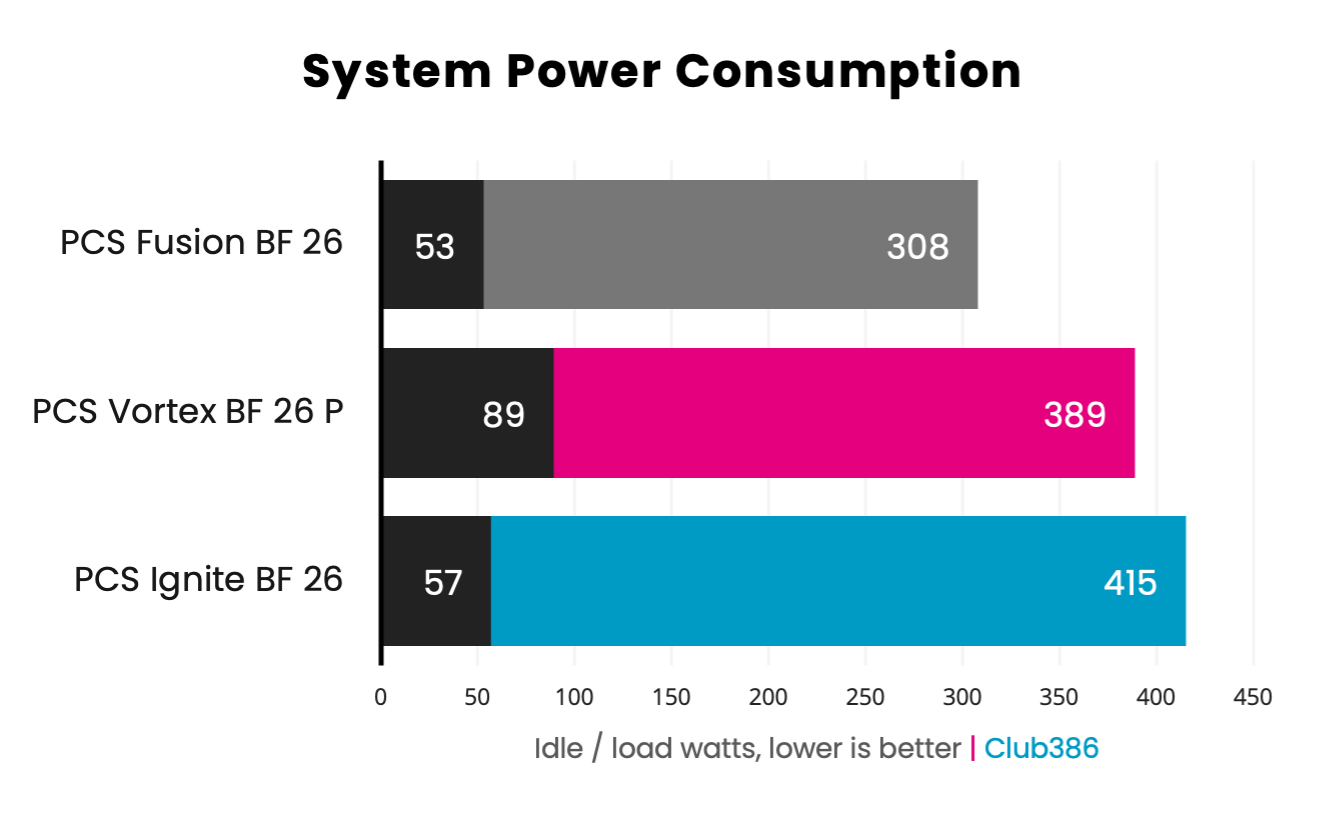
Given the rising cost of electricity in the UK, it’s worth knowing how much power your system draws. We’ve taken our idle values after booting the system from a full shutdown, giving the PC five minutes to address any background tasks or startup apps. Meanwhile, the load results you see in the chart above stem from peak power consumption during an FHD (1920×1080) run of Cyberpunk 2077 using its RT Ultra preset, which is broadly representative of a demanding gaming workload pushing both CPU and GPU.
The Fusion BF 26 expectedly draws the least amount of power from the wall, as both the CPU and GPU in the PC have relatively modest TDPs of 65W and 160W, respectively. While 53W idling isn’t massively below the other two PCSpecialist offerings, the 308W while gaming is appreciably lower.
The Vortex BF 26 comes second on the chart with 389W under load, which is a fantastic result considering its status as a performance leader. Meanwhile, the Ignite BF 26 proves the hungriest at 415W, as the Core Ultra 7 270K Plus pushes power draw higher than the 9800X3D despite the difference in TDP between the GeForce RTX 5070 and RTX 5070 Ti.
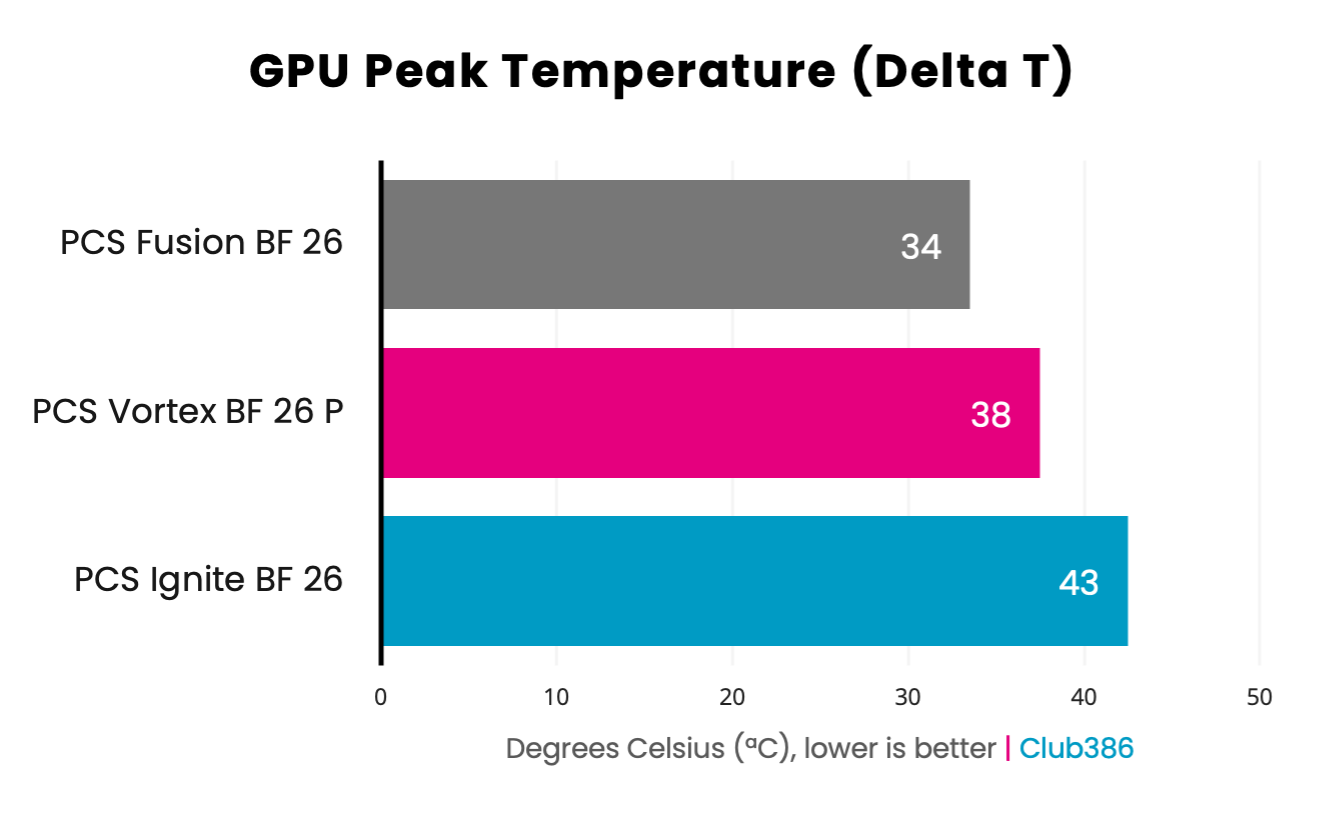
While measuring system power consumption under load during the Cyberpunk 2077 benchmark, we also note peak GPU operating temperatures. Rather than report absolute temperatures, I’m subtracting the ambient temperature of my office to establish a Delta T value. This allows us to more accurately compare results without needing a temperature-controlled environment.
The Fusion BF 26 leads proves the coolest of the bunch at 34°C. This comes as little surprise considering the Radeon RX 9060 XT’s relatively low 160W TDP. Regardless, it’s another win for the budget system, on top of its lean power consumption.
Seeing the Vortex BF 26 P’s GeForce RTX 5070 Ti run cooler than the Ignite BF 26 may seem puzzling, but it’s important to remember that we’re dealing with coolers of varying sizes. The former sports a larger triple-fan design, which can more easily dissipate heat away from the graphics card, while the other sports a smaller dual-fan cooler.
While these temperature differences are interesting, they importantly prove that all three systems suitably manage the thermal loads of their graphics cards. None of these PCs came remotely close to thermal throttling, ensuring maximum pixel pushing performance.
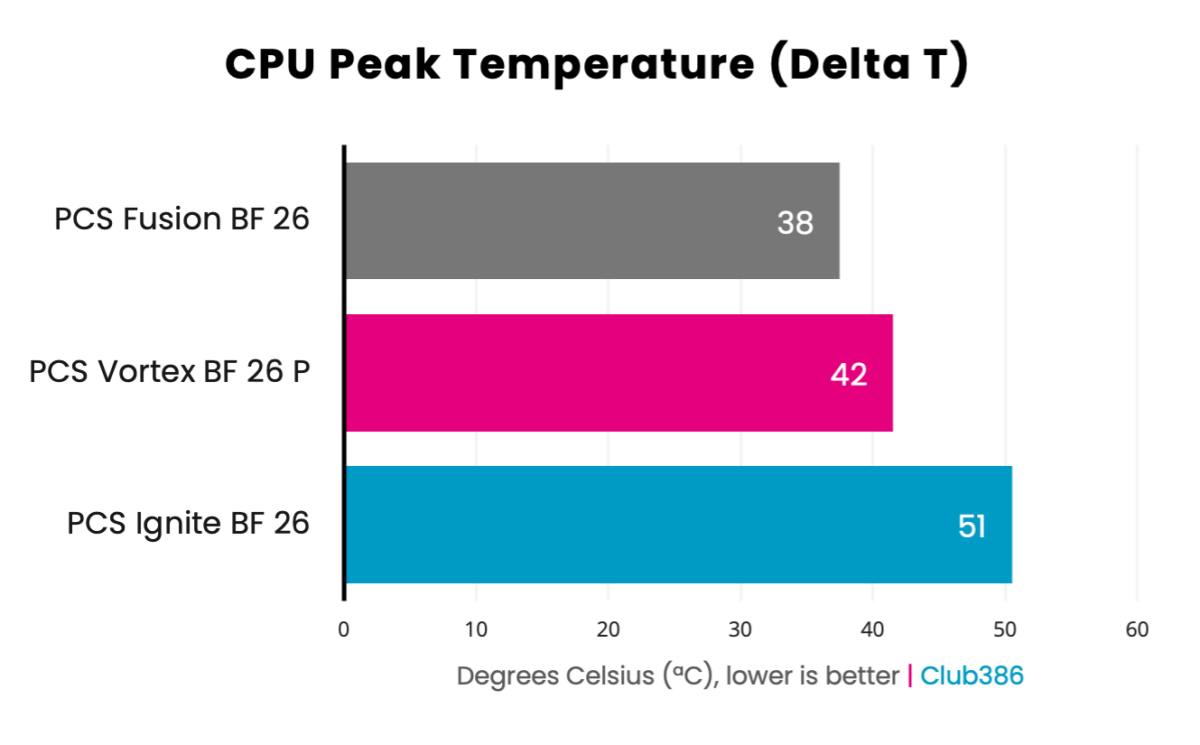
Our final temperature readings concern the CPU, measuring peak thermals during a 10-minute Cinebench 2026 run. This is a worst-case scenario for the processor and cooler, as this benchmark typically pushes the chip much harder than games.
The Ryzen 7 5700X inside the Fusion BF 26 boasts the lowest TDP of the trio at 65W, which makes it far easier to cool. As such, the processor expectedly finishes the 3D rendering workload with the lowest peak temperature.
That said, the Vortex BF 26 P is only 4°C hotter than the Fusion BF 26, despite the Ryzen 7 9800X3D pushing power consumption up to 120W. A combination of a larger case, greater airflow, and water cooling are all to thank for this excellent result.
Finally, the Ignite BF 26 and its Core Ultra 7 270K Plus are markedly hotter under load. The CPU has the same advantages as the 9800X3D system, but a 250W TDP naturally pushes temperatures up much higher. All that said, there’s no sign of thermal throttling.
Conclusion
Whatever your top priority is for a gaming PC, whether that’s affordability, performance, or a measured balance of the two, you will find a worthwhile rig amongst PCSpecialist’s trio. There’s no one-size-fits-all recommendation here, but all are worth considering depending on your budget.
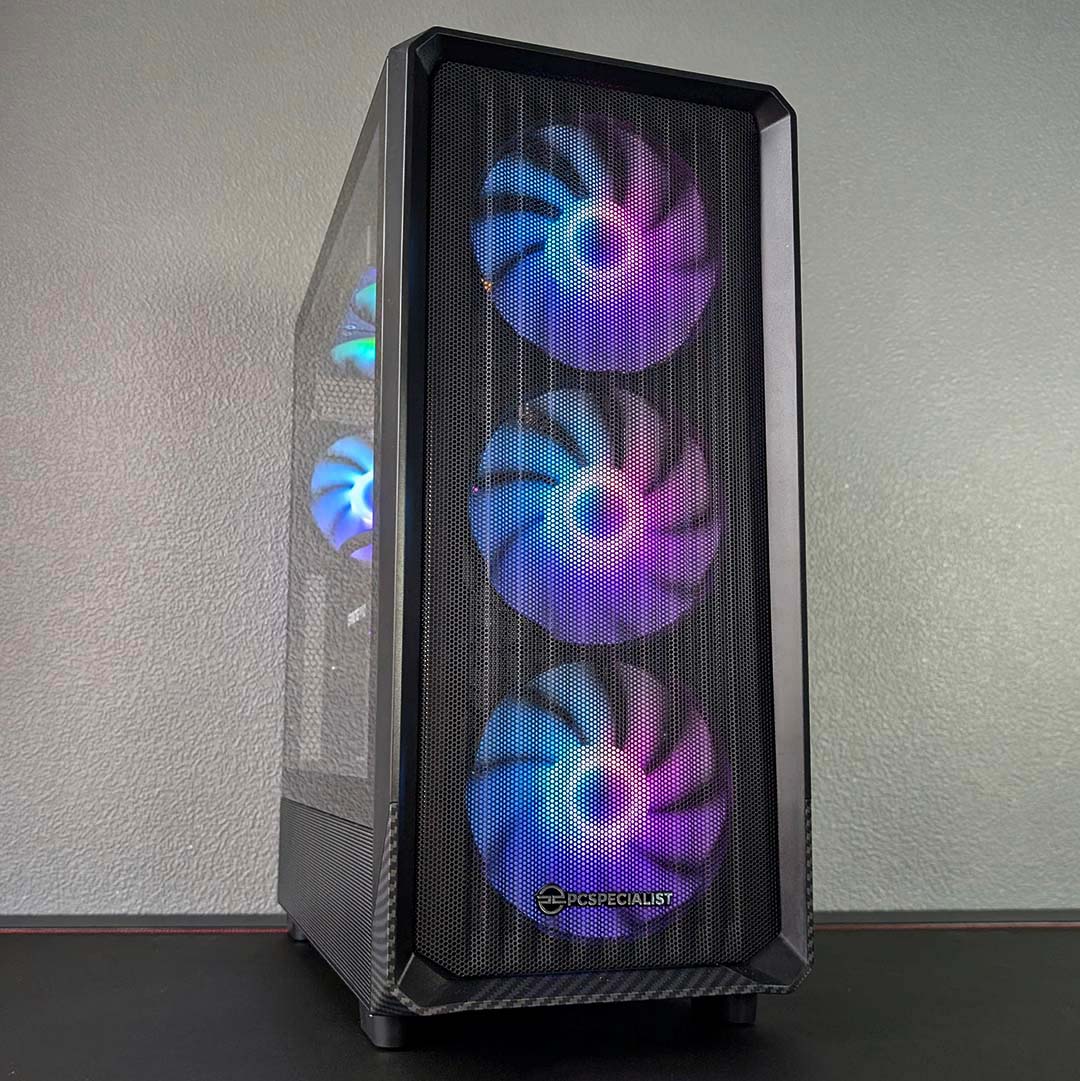
PCSpecialist Vortex BF 26 P
£2,780 £2,499
Commanding a higher asking price but for good reason, the Vortex BF 26 P is an excellent choice of gaming PC.
PCSpecialist Ignite BF 26
£2,326 £1,999
This system provides a good balance of price and performance, while also boasting surprisingly strong multi-core chops for the money.
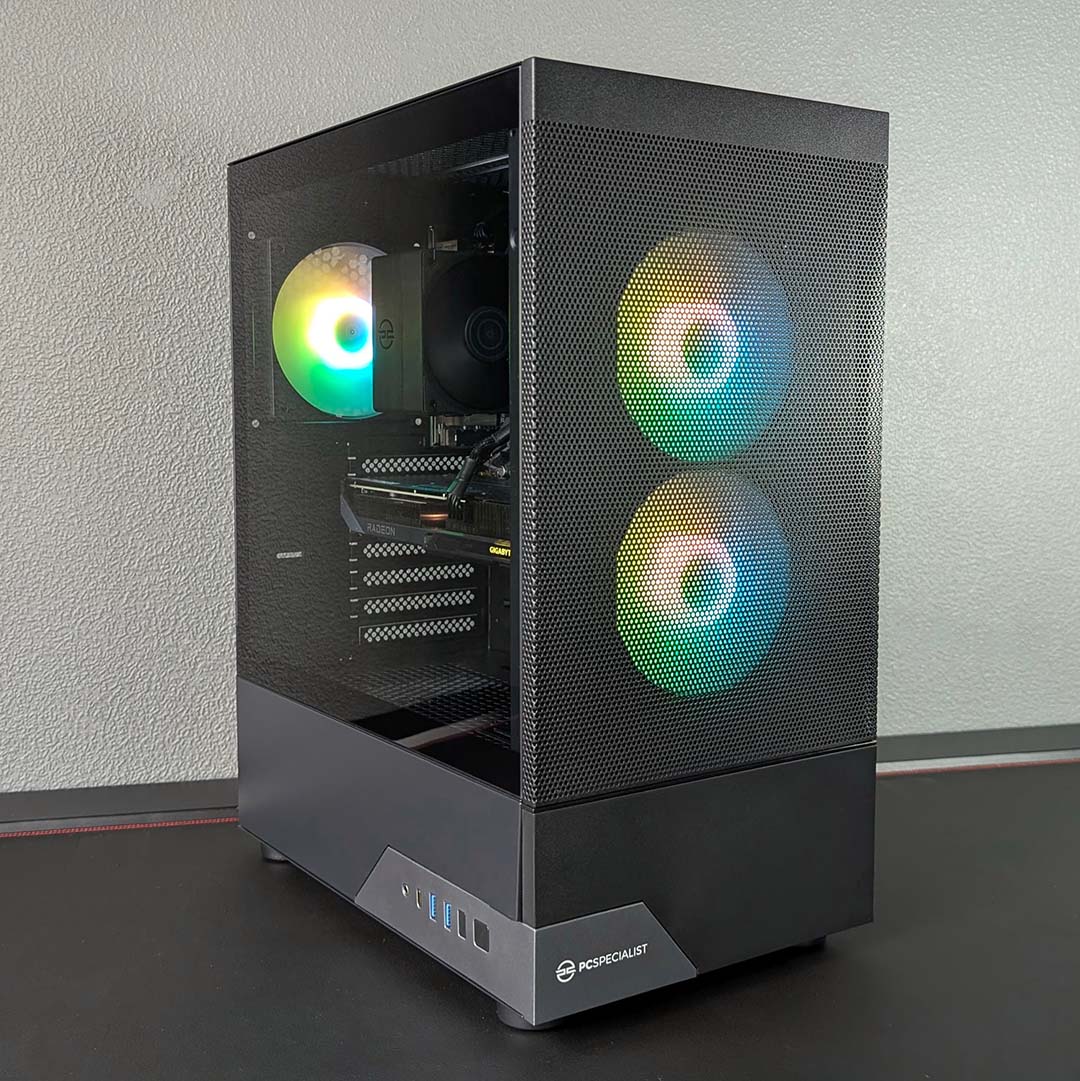
PCSpecialist Fusion BF 26
£1,277 £1,149
For those looking for a good value 1080p gaming PC, this system delivers just that for a little over £1,000.
In terms of availability, these systems will remain at their Black Friday prices while stocks last. We expect these machines to prove popular, so I’d suggest picking one up sooner rather than later.