

You really can’t argue with the CPU that PCSpecialist has chosen to slot into the Cruiser iCue Stealth’s AM5 socket. Not wanting to mess with the proven, formidable formula it perfected with the 9800X3D, AMD simply furnished its killer gaming CPU with an extra 400MHz of clock speed. Now boosting to 5.6GHz, the new Ryzen 7 9850X3D not only has a massive 64MB slice of 3D V-cache under its eight cores to bolster gaming performance, but it now also has the clock speed to enable it to keep up with AMD’s non-X3D chips in other areas.
The only place you can go further from here is AMD’s 16-core Ryzen 9 9950X3D, which might be the overall best CPU right now, but it’s overkill for gaming, and it also adds a big chunk of extra cost. Instead, PCSpecialist has aimed to build a high-end gaming rig for the fairest price possible. That’s a tough ask in today’s climate, but this system does indeed give you an immense amount of gaming power, and while the price is high, it’s reasonable for the spec.

PCSpecialist Cruiser iCue Stealth
£3,099
Pros
- Outstanding cable tidying and build quality
- Great choice of CPU
- Awesome 1440p gaming pace
- Powerful cooling setup
- Handsome case
Cons
- Current market chaos results in a high price
- Struggles with some 4K gaming
- Chassis fans connected to wrong header in our sample, and very loud as a result
Club386 may earn an affiliate commission when you purchase products through links on our site.
How we test and review products.
Specs
| PCSpecialist Cruiser iCue Stealth | |
|---|---|
| CPU | AMD Ryzen 7 9850X3D |
| CPU cooler | Corsair Nautilus 360 RS ARGB |
| Motherboard | Asus TUF Gaming X870-Plus WiFi |
| GPU | Gigabyte Nvidia GeForce RTX 5080 Windforce OC |
| RAM | 32GB (2x16GB) Corsair Vengeance DDR5 6,000MT/s CL30 |
| SSD | Corsair MP600 Pro 4TB |
| PSU | Corsair RM850x (Cybenetics Gold) |
| Other features | Realtek 2.5Gb Ethernet Bluetooth 5.4 Realtek 8922AE Wi-Fi 7 |
| Case | Corsair Frame 4500X RS-R ARGB |
| Operating system | Windows 11 Home |
| Warranty | Three years |
| Price | £3,099 |
Along with the CPU, the other big component in this rig is a Gigabyte Nvidia GeForce RTX 5080 Windforce OC graphics card. While this Nvidia GPU might not be as fast as the mighty RTX 5090, it’s still undoubtedly the best GPU in its league. AMD doesn’t have anything that can compete with its gaming power, and we’ve found it offers tremendous speed at 2560×1440, while also being able to cope with some 4K gaming. The overclocked Gigabyte card used here also gives you a small leg-up over the standard spec, with its boost clock of 2,670MHz providing an extra 53MHz of frequency, while its three fans keep the GPU cool without making a horrendous amount of noise.
There are two other expensive parts of this spec, which are the SSD and memory. We’ve seen RAM prices shoot up to ridiculous heights lately, so it’s no surprise that PCSpecialist hasn’t given this PC a fancy RGB kit. Instead, you get a pair of standard 16GB Corsair Vengeance DDR5 sticks (32GB total), but they look fine in their understated grey heatsinks. Importantly, their effective 6,000MT/s speed is decent for an AMD system, and they have comparatively tight CL30 latency timings too.
Likewise, the 4TB Corsair MP600 Pro SSD offers a fantastic amount of storage space that will enable you to install loads of games. This drive uses the PCIe Gen 4 interface, rather than Gen 5, so it’s not going to break any speed records. However, it’s plenty fast enough for most people’s needs, and that extra capacity makes all the difference to a gaming system, as you don’t need to constantly clear out your drive to make room. Importantly, using a Gen 4 drive significantly reduces the cost at current storage prices.
All this gear plugs into an Asus TUF Gaming X870-Plus WiFi motherboard, which doesn’t have the RGB frills you see on an Asus ROG board, but covers everything you need for a high-end gaming PC. PCIe Gen 5 support extends to both the primary graphics slot and two of its M.2 ports, so you can upgrade to a super-fast SSD at a later date if prices ever come down.
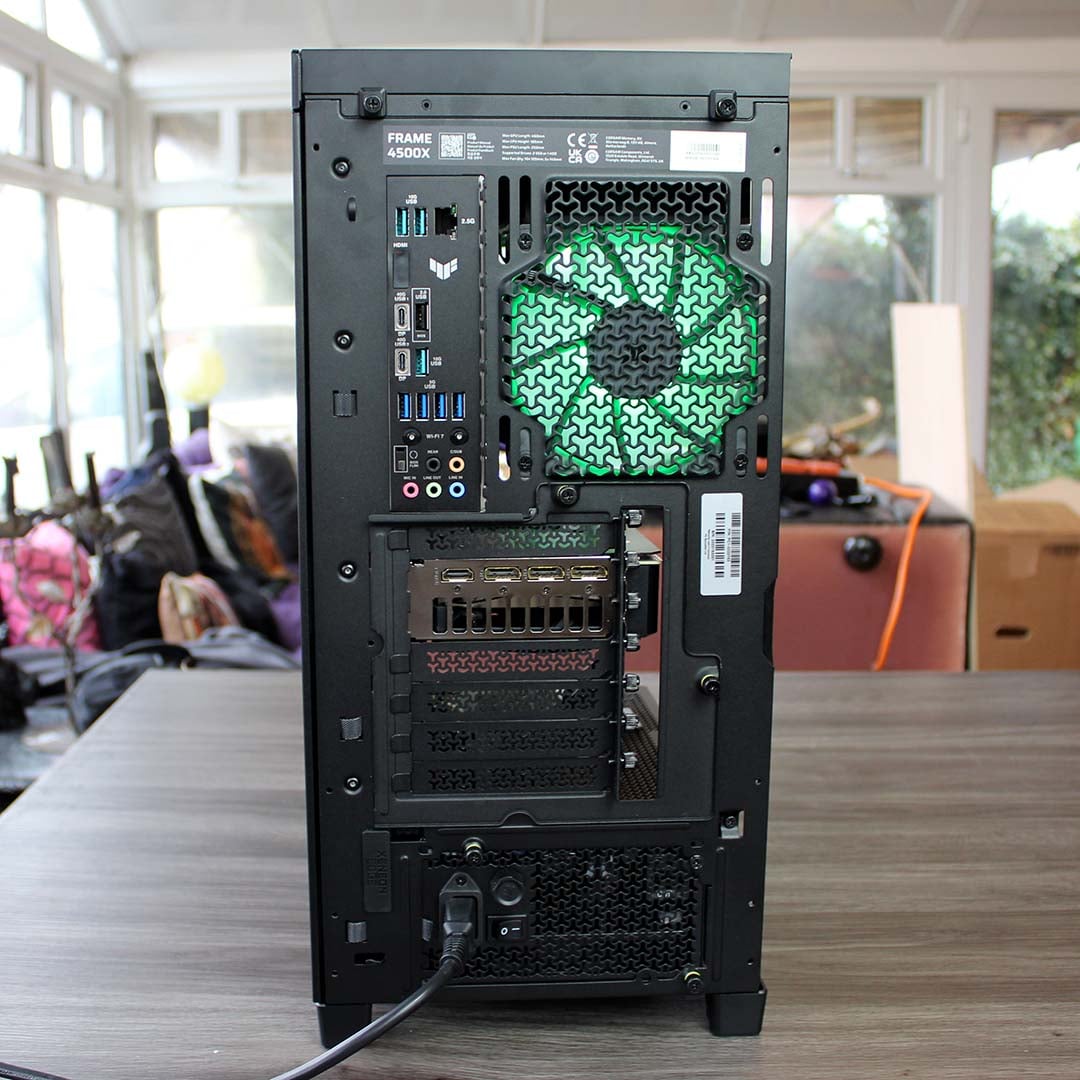
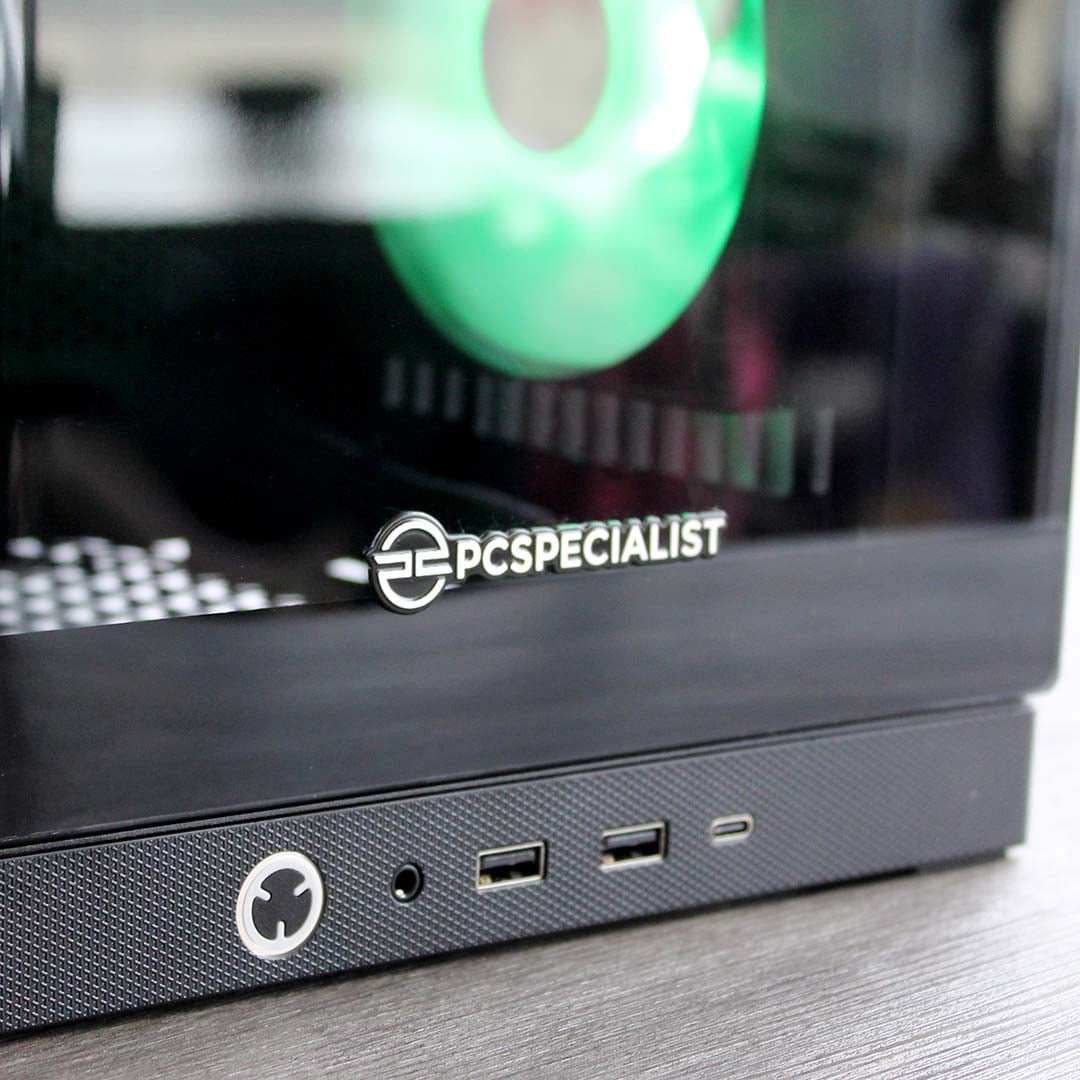
You get a decent array of ports on the back as well, including a pair of 40Gbps USB4 Type-C ports, four standard USB-A 5Gbps ports, and three 10Gbps USB-A sockets. This is where you’ll also find a port for the integrated 2.5Gbps network adapter, as well as connectors for the Wi-Fi 7 antenna. Front-side access is well covered too, with the one USB-C port offering 20Gbps speeds and 30W power delivery, so you can quickly charge up your phone or tablet from it.
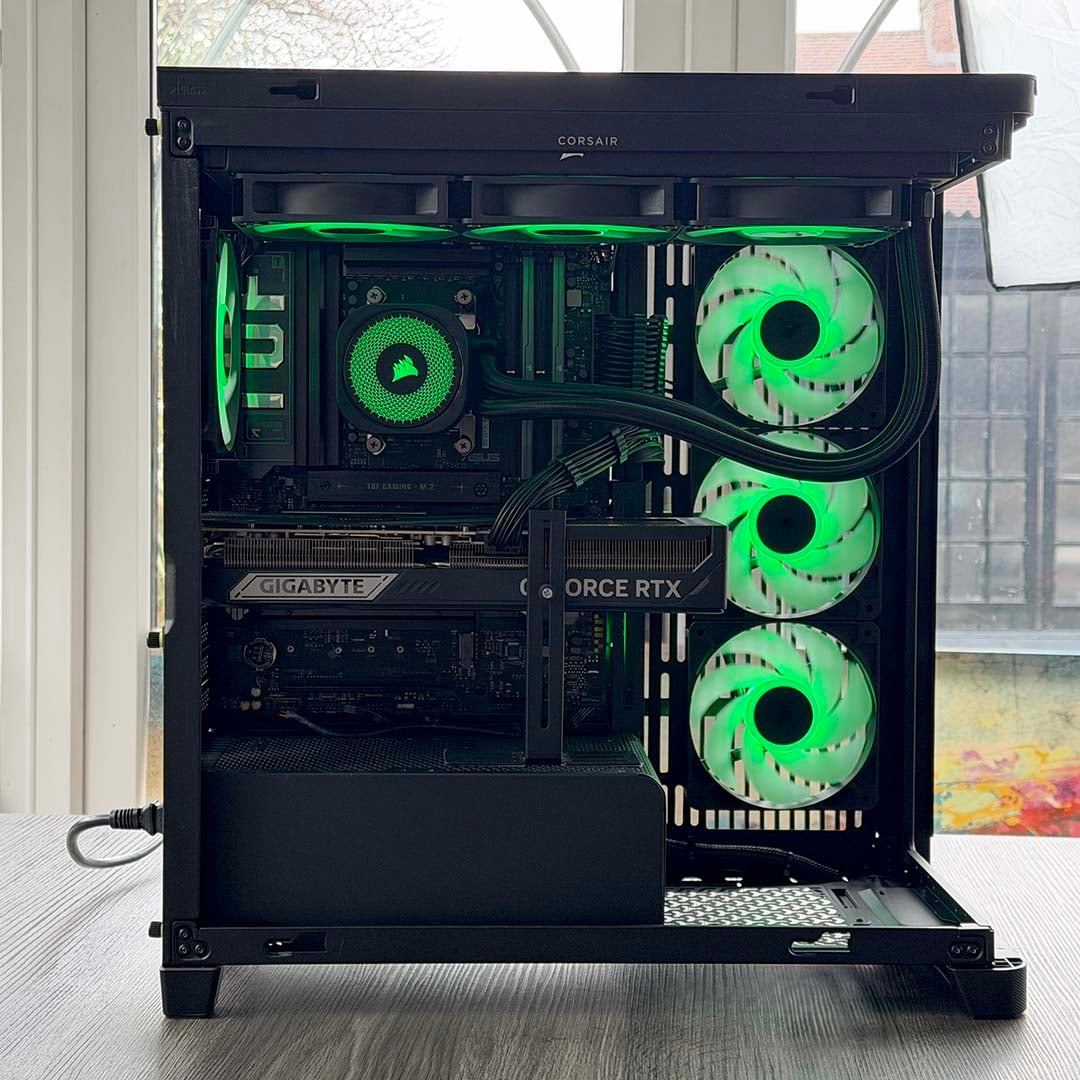
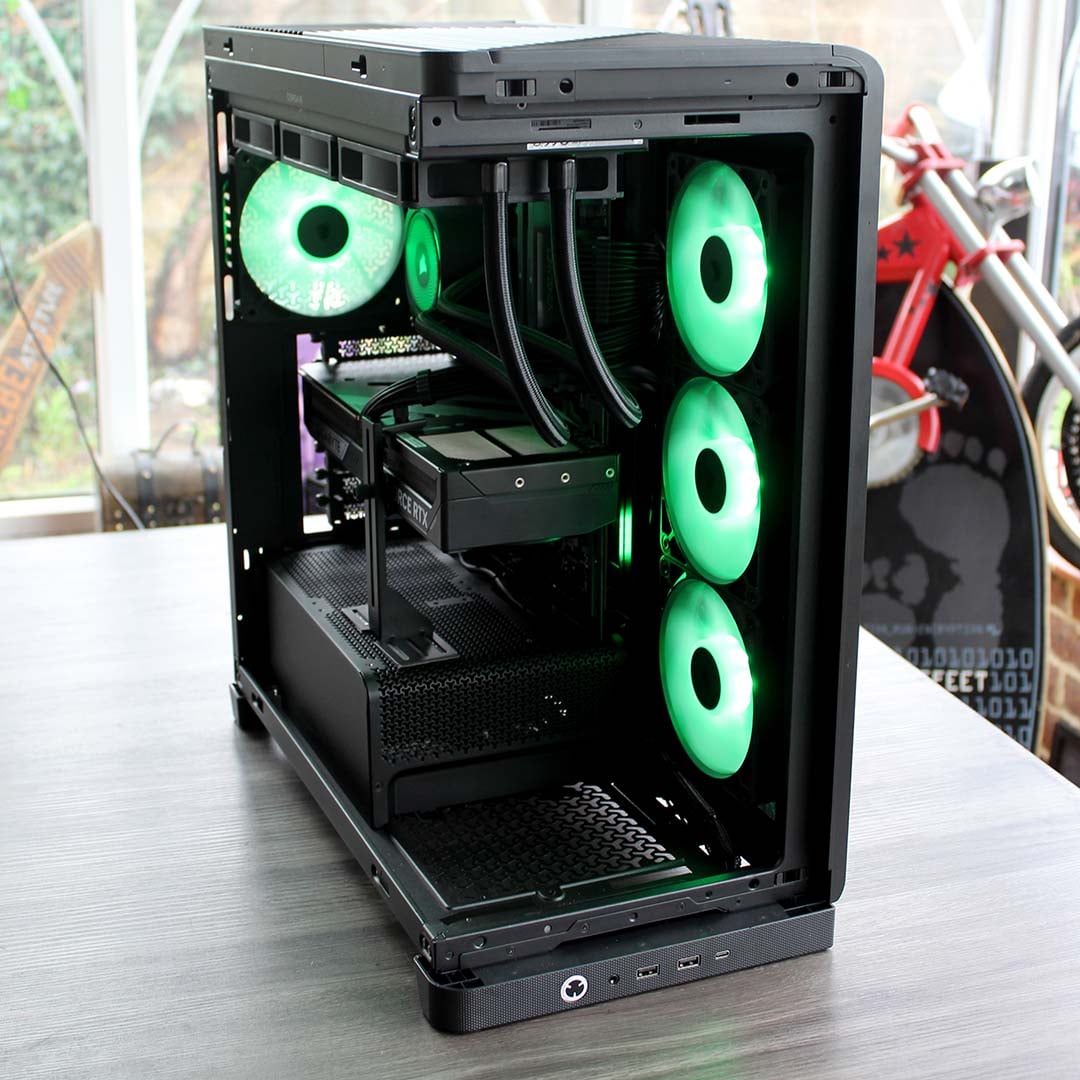
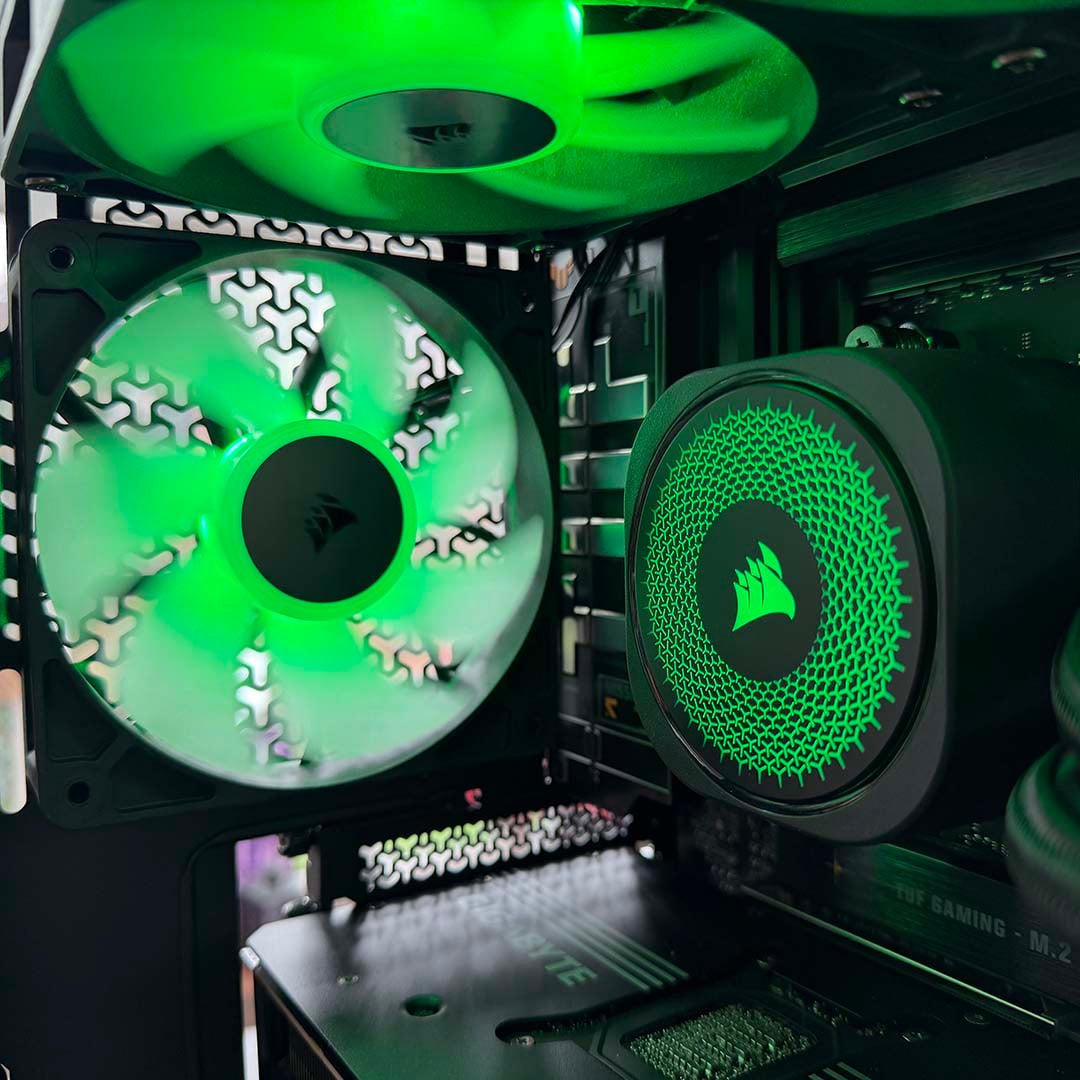
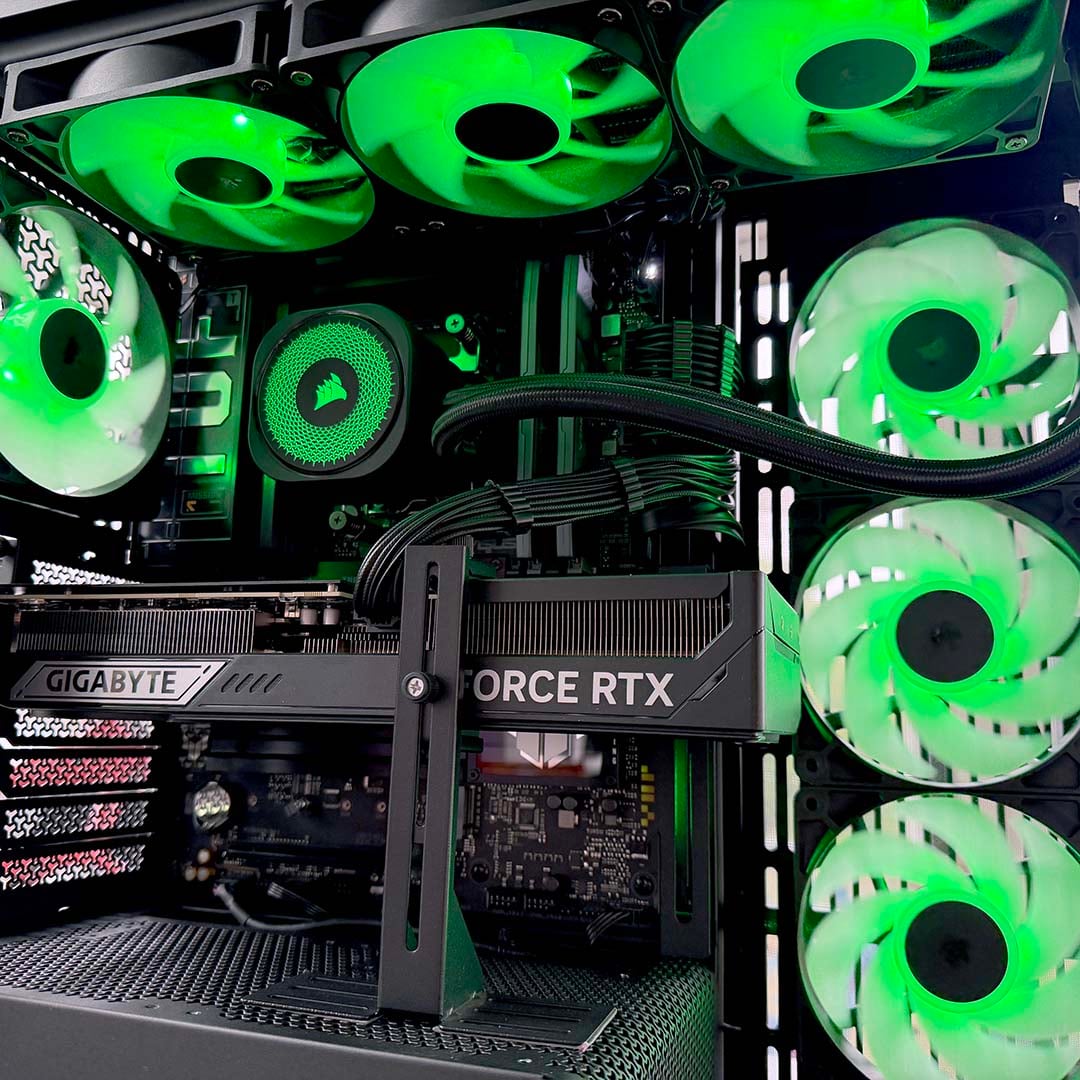
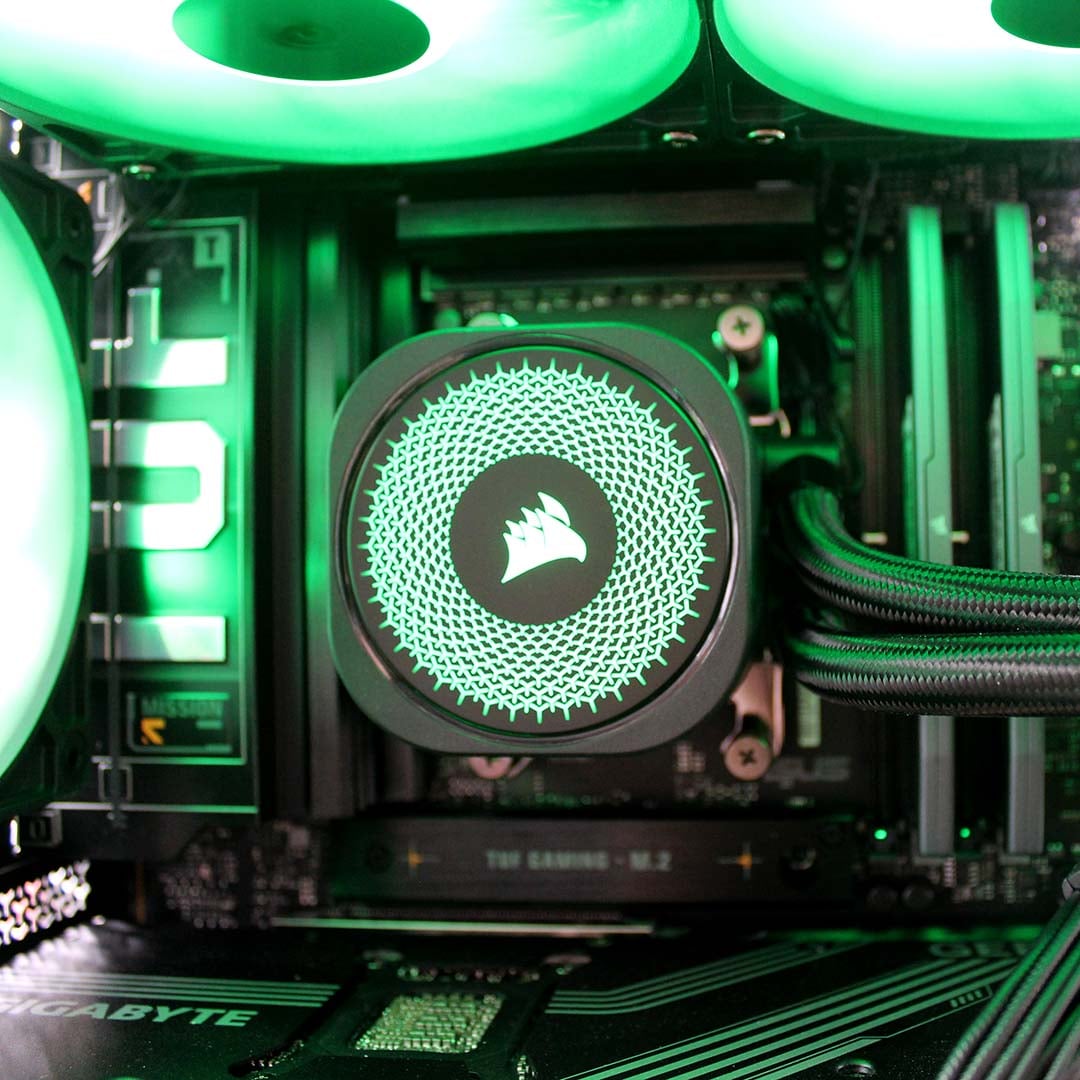
Finally, there’s a massive load of cooling gear in this rig. The CPU is cooled by a Corsair Nautilus 360 RS ARGB, which pumps its liquid through a colossal 360mm radiator in the roof. That means you can easily tame the 8-core CPU in this machine without running the fans at high speeds, so it won’t make too much noise. This cooler is joined by four Corsair RS 120 ARGB fans – three in the front, and one in the back.
Design
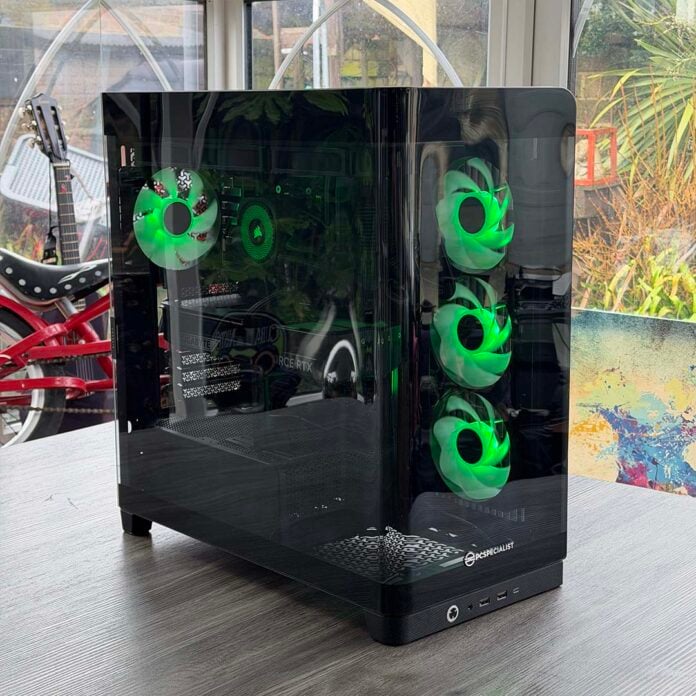
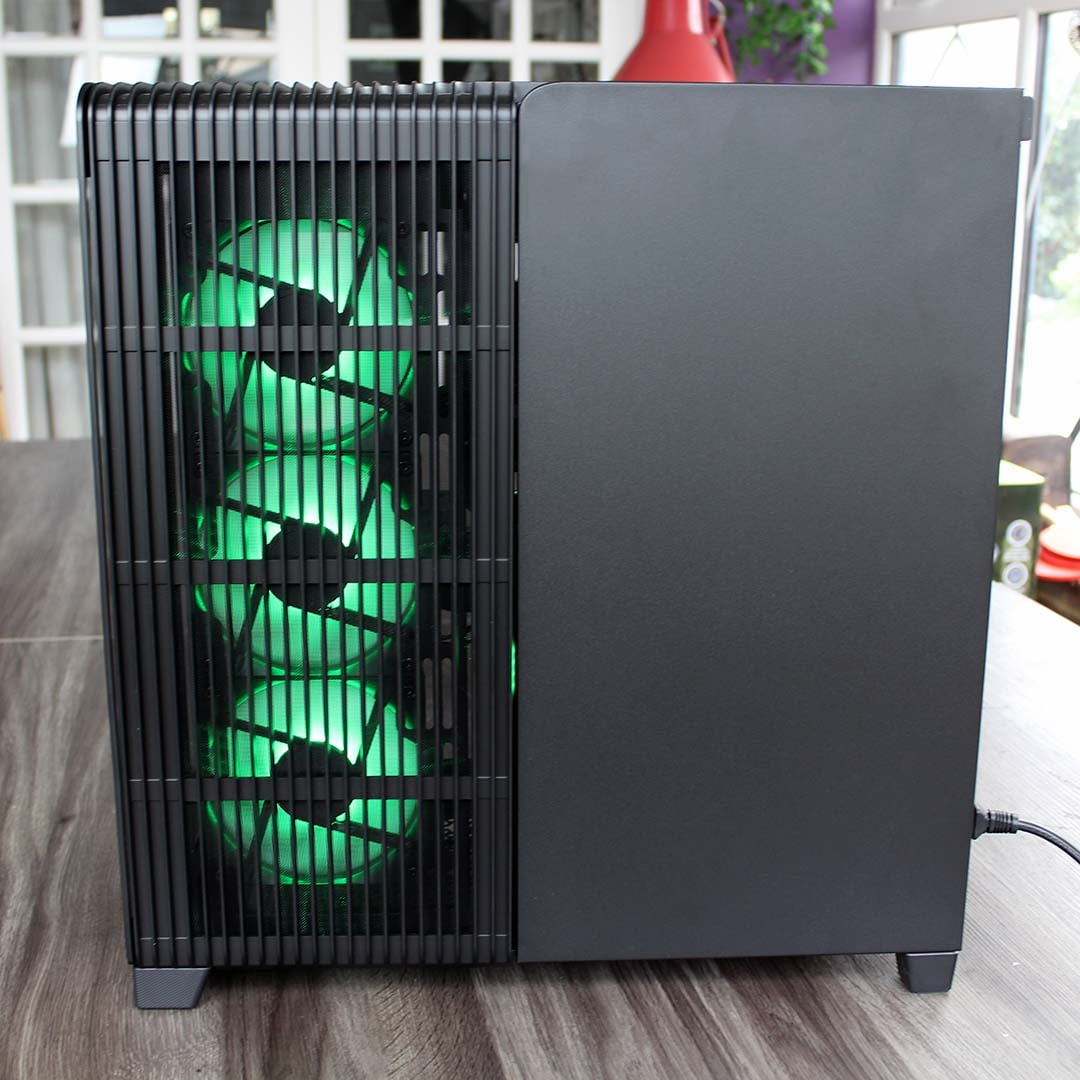
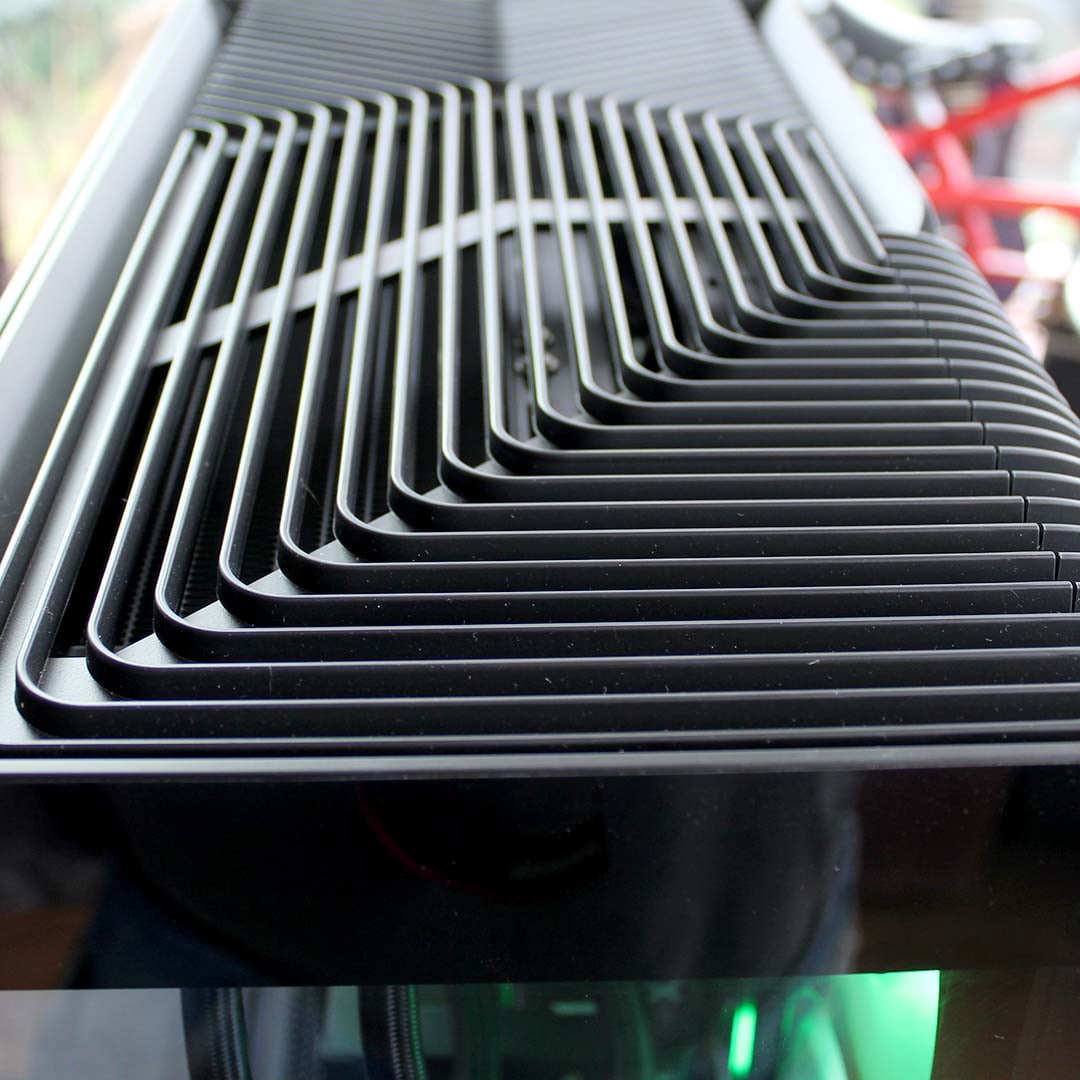
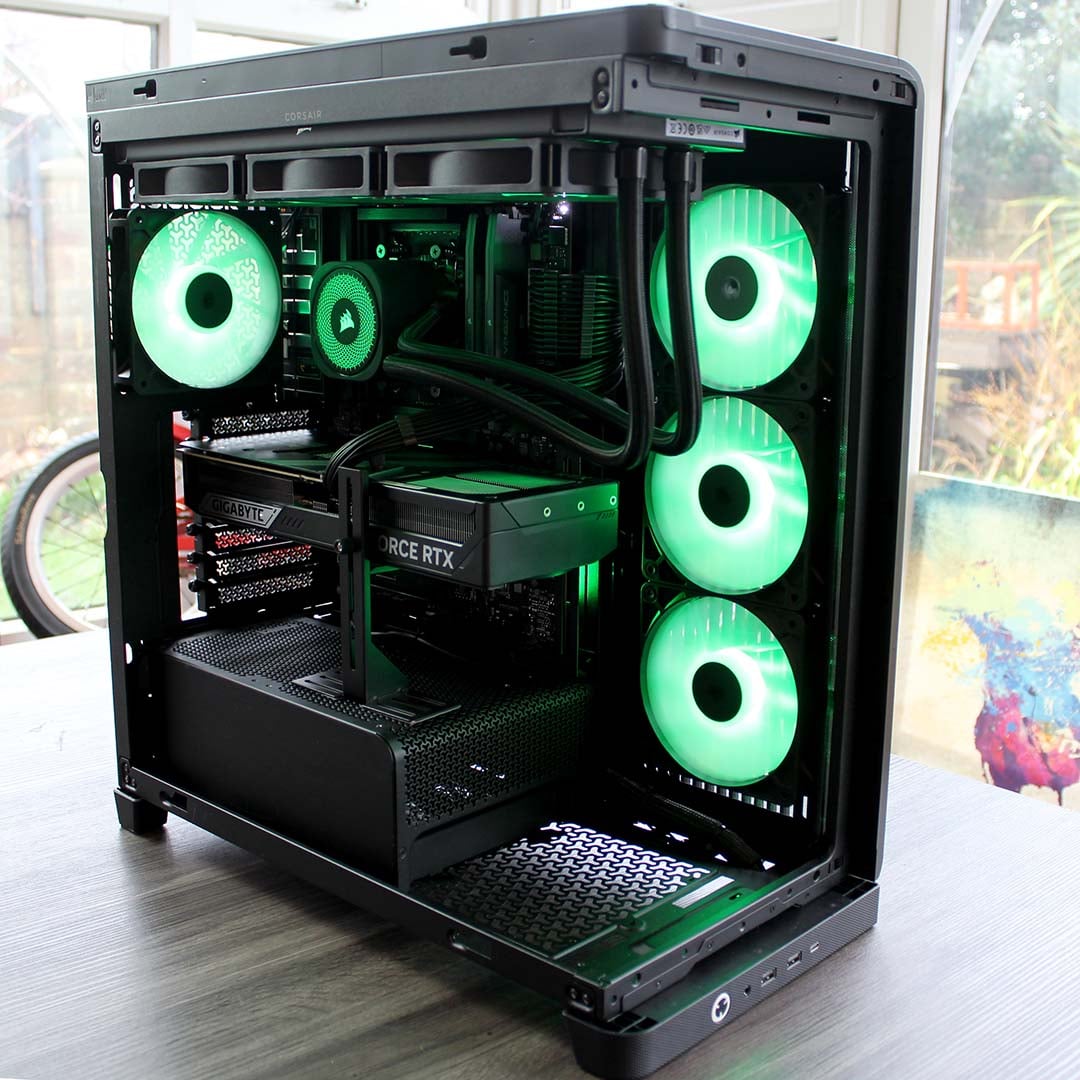
As you’d expect from a PC costing over three grand, the PCSpecialist Cruiser iCue Stealth absolutely looks the business. Its Corsair Frame 4500X RS-R ARGB chassis has a very stylish, single-piece glass side panel that curves around the front, offering an uninterrupted view of the tidy build inside. It’s a really well-designed case, with stylish vents in the top allowing the radiator to exhaust hot air, while its front fans are mounted in the side rather than the front, where they can get cool air through a vent.
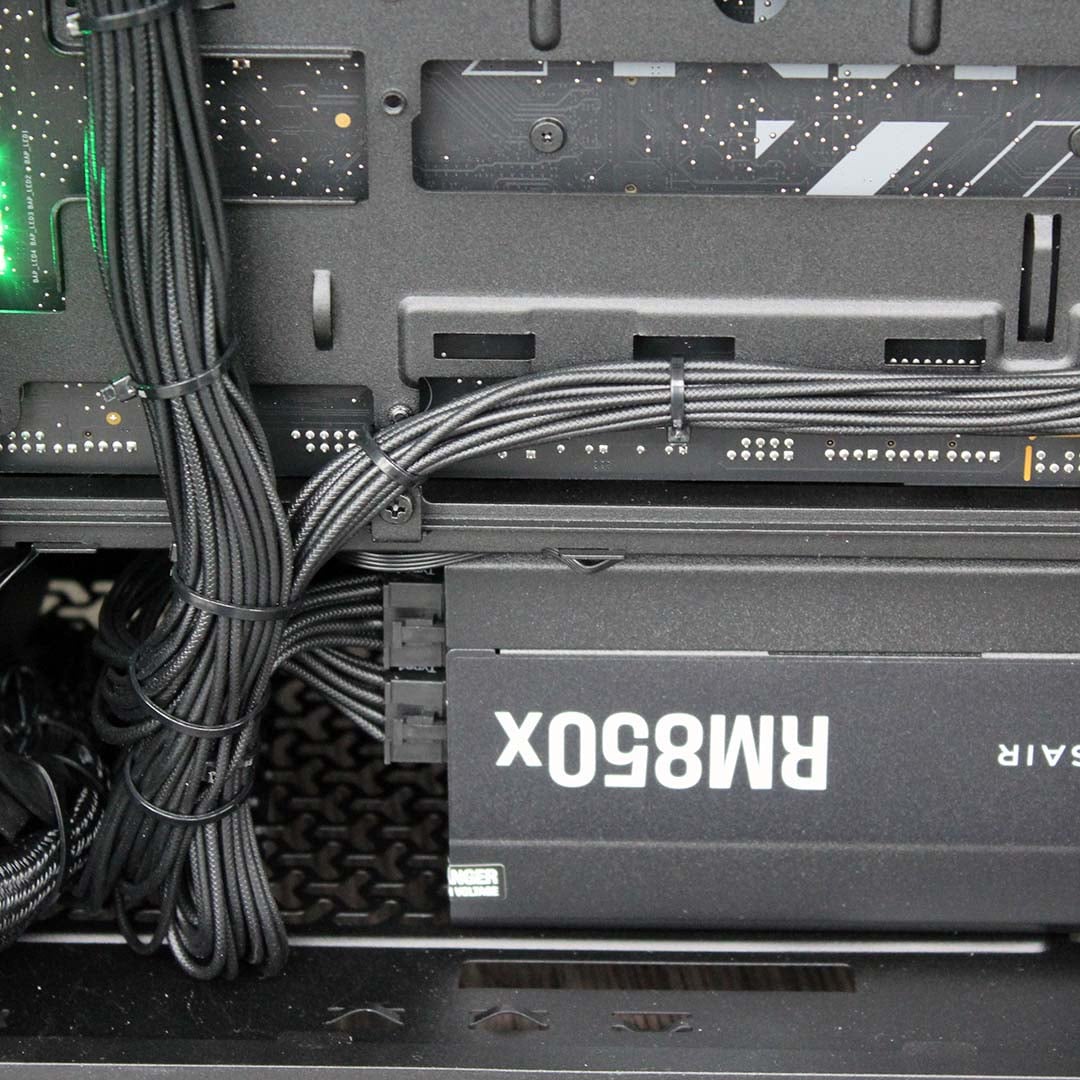
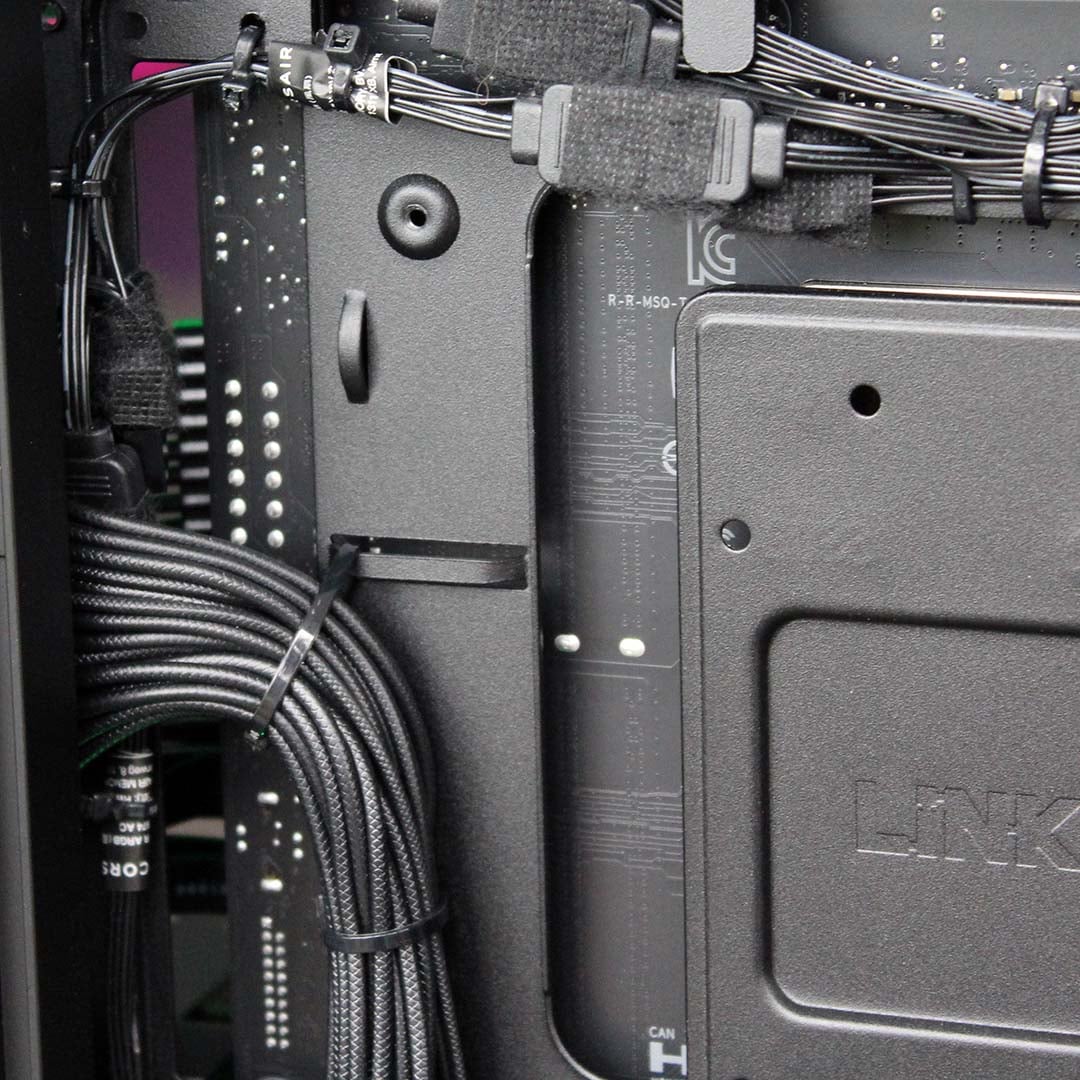
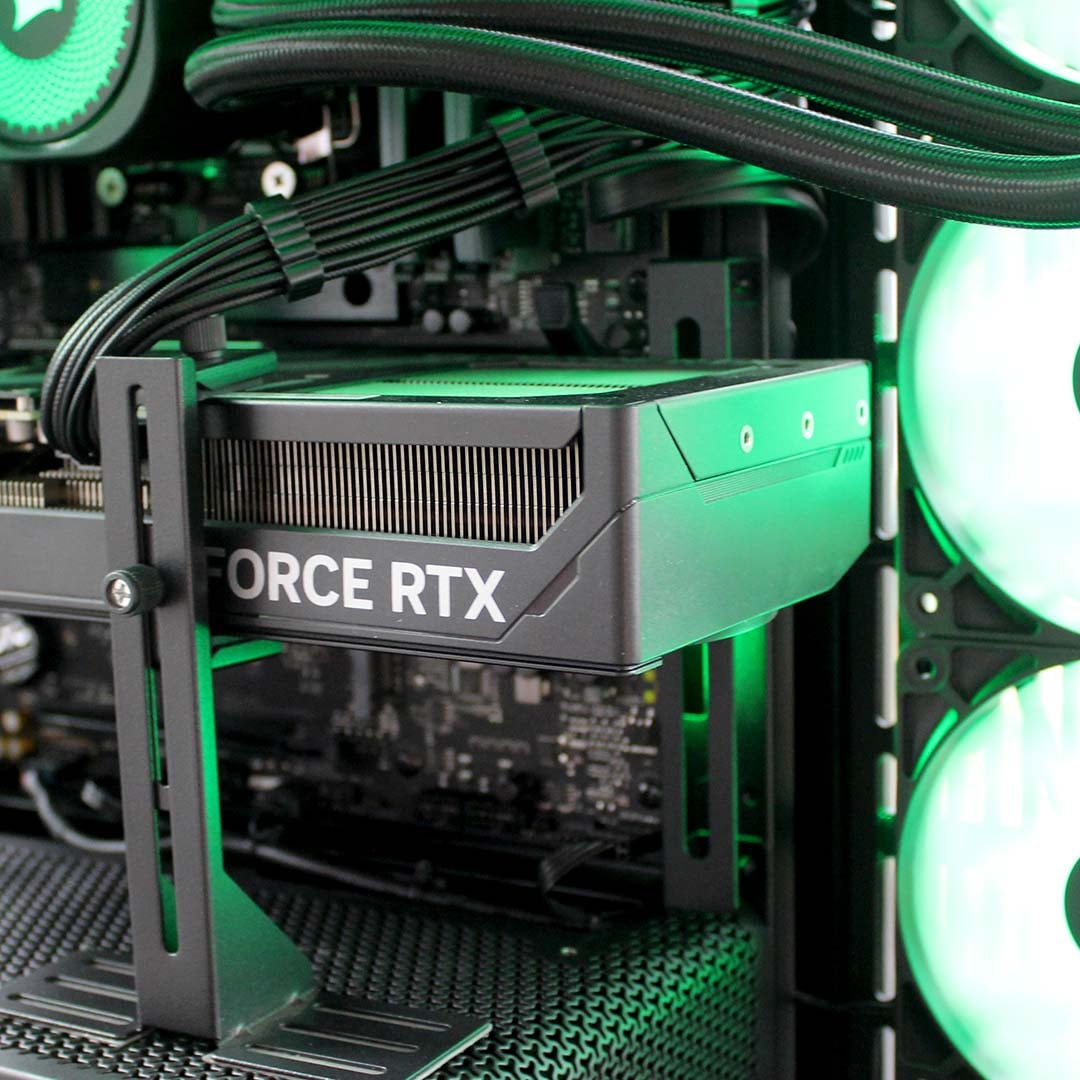
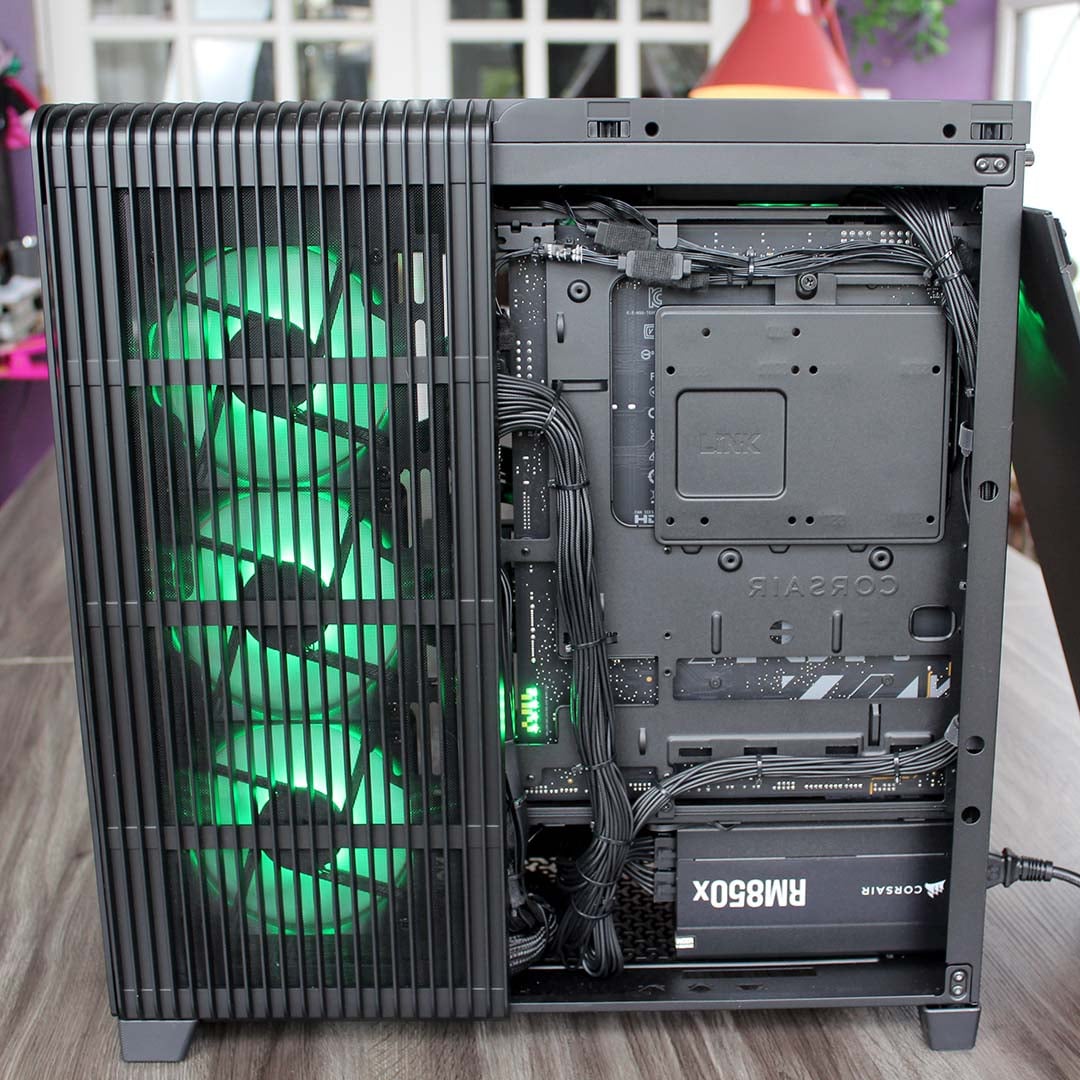
It’s easy to access the interior as well – both the glass panel and rear side panel can be pulled off and secured back in place without tools, or the need to twiddle thumbscrews. There’s a sturdy support bracket under the graphics card to ensure it doesn’t sag, and the cable tidying is immaculate, with all the wires carefully guided through the right holes behind the motherboard and neatly separated into individual strands by combs.

Impressively, this tidiness even extends to the rear of the motherboard tray, with all the individual cables neatly routed with combs and cable ties. I’ve reviewed a lot of professionally built PCs over the last 20 years, and I have to say I’m awed by the cable tidying on display here – it puts the messy wires I’ve seen in Alienware and Acer builds to shame. However, I did identify one hiccup with the cabling.
All the chassis fans were plugged into the AIO pump socket at the bottom right of the motherboard, and appeared to be running at maximum speed when I turned on the machine – it made a horrendous racket, even when idle. I’ve reported this back to PCSpecialist, and the company confirmed that this was a mistake, which won’t be repeated on builds shipped to customers.
To get a feel for how this machine would usually perform thermally, I moved the cable so these fans were powered by a chassis fan header instead, and set them to use the standard fan curve with Asus’ Q Fan feature in the motherboard BIOS. The machine was then whisper-quiet when idle, with the fans spinning up when it was loaded. It was still quite noisy at full chat, and none of the components throttled, so it’s quite possible that PCSpecialist could tune them better. Either way, there’s more than enough cooling power for the components here, and at least the fans weren’t permanently maxed out.
While there’s no RGB on the RAM, there is plenty of lighting elsewhere. It’s fully ARGB-compliant, so you can set it up how you like, but, by default, PCSpecialist has given this PC an eerie green glow – you can imagine the Necrons using it in the Warhammer 40,000 universe. The Corsair logo on the AIO cooler’s pump unit also glows green and carries a stylish touch without the added cost of an LCD.
Understated, stylish, and well built, I take off my hat to PCSPecialist here – this rig looks and feels fantastic. It’s just a shame the fan cables weren’t wired up correctly.
Performance
With a Ryzen 7 9850X3D and a GeForce RTX 5080, we’re expecting this high-end rig to rip through our gaming benchmarks. I’m comparing it to a few other PCs we’ve recently reviewed, at various prices, so you can see how it stacks up. Here are the six other systems I will be comparing to this one, complete with a summary of their core components and links to their reviews:
- PCSpecialist Vortex BF 25
- AMD Ryzen 7 9800X3D
- Nvidia GeForce RTX 5070 Ti
- Asus Prime B850-Plus
- 32GB DDR5-6000 CL30
- 2TB Samsung 990 Evo Plus
- OcUK Gaming Mach 3.1
- AMD Ryzen 7 5700X3D
- Nvidia GeForce RTX 5070
- MSI B550M Pro-VDH WiFi
- 32GB DDR4-3200 CL16
- 1TB MSI Spatium M450 V1
- Novatech Reign Sentinel
- AMD Ryzen 7 9800X3D
- Nvidia GeForce RTX 5070 Ti
- MSI B850 Gaming Plus WiFi PZ
- 32GB DDR5-5600 CL40
- 2TB Samsung 990 Evo Plus
- PCSpecialist Luna Recon Master
- AMD Ryzen 7 9800X3D
- Nvidia GeForce RTX 5090
- Gigabyte X870 Aorus Elite WiFi7 Ice
- 32GB DDR5-6000 CL40
- 4TB Samsung 9100 Pro
- CyberpowerPC Ultra R87 Pro
- AMD Ryzen 7 8700F
- AMD Radeon RX 9060 XT 16GB
- MSI Pro B650-S WiFi
- 32GB DDR5-6000 CL36
- 1TB WD_Black SN7100
- PCSpecialist Aegis Pro R
- AMD Ryzen 5 7500X3D
- Nvidia GeForce RTX 5070 Ti
- Asus Prime B850-Plus WiFi
- 16GB DDR5-5600 CL40
- 1TB Crucial P310
CPU
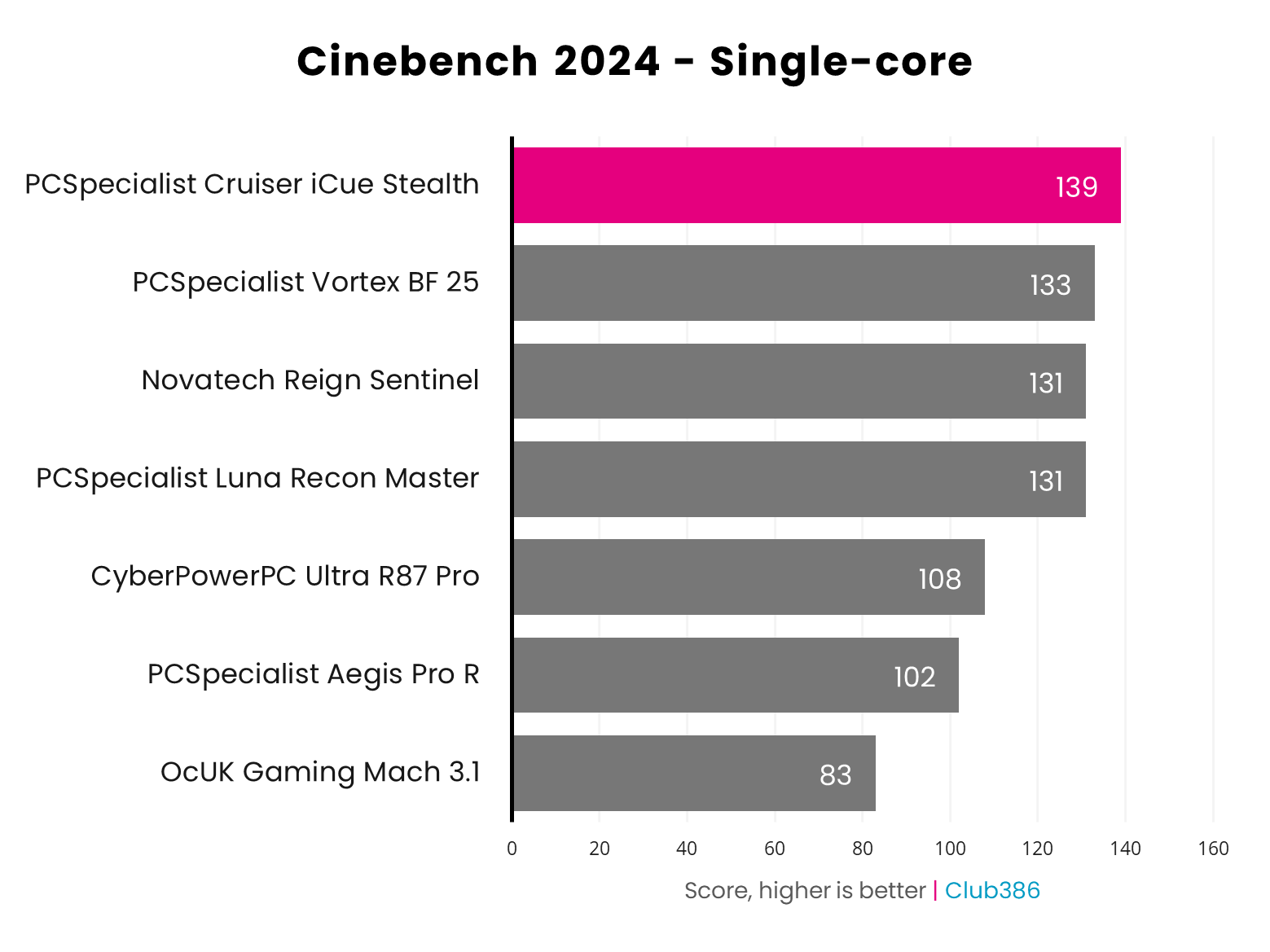
Thanks to its 5.6GHz clock speed, the Ryzen 7 9850X3D excels in single-threaded performance, as shown here in Cinebench. It’s ahead of all three 9800X3D machines, and monitoring in CPU-Z showed it was running at 5.6GHz constantly.
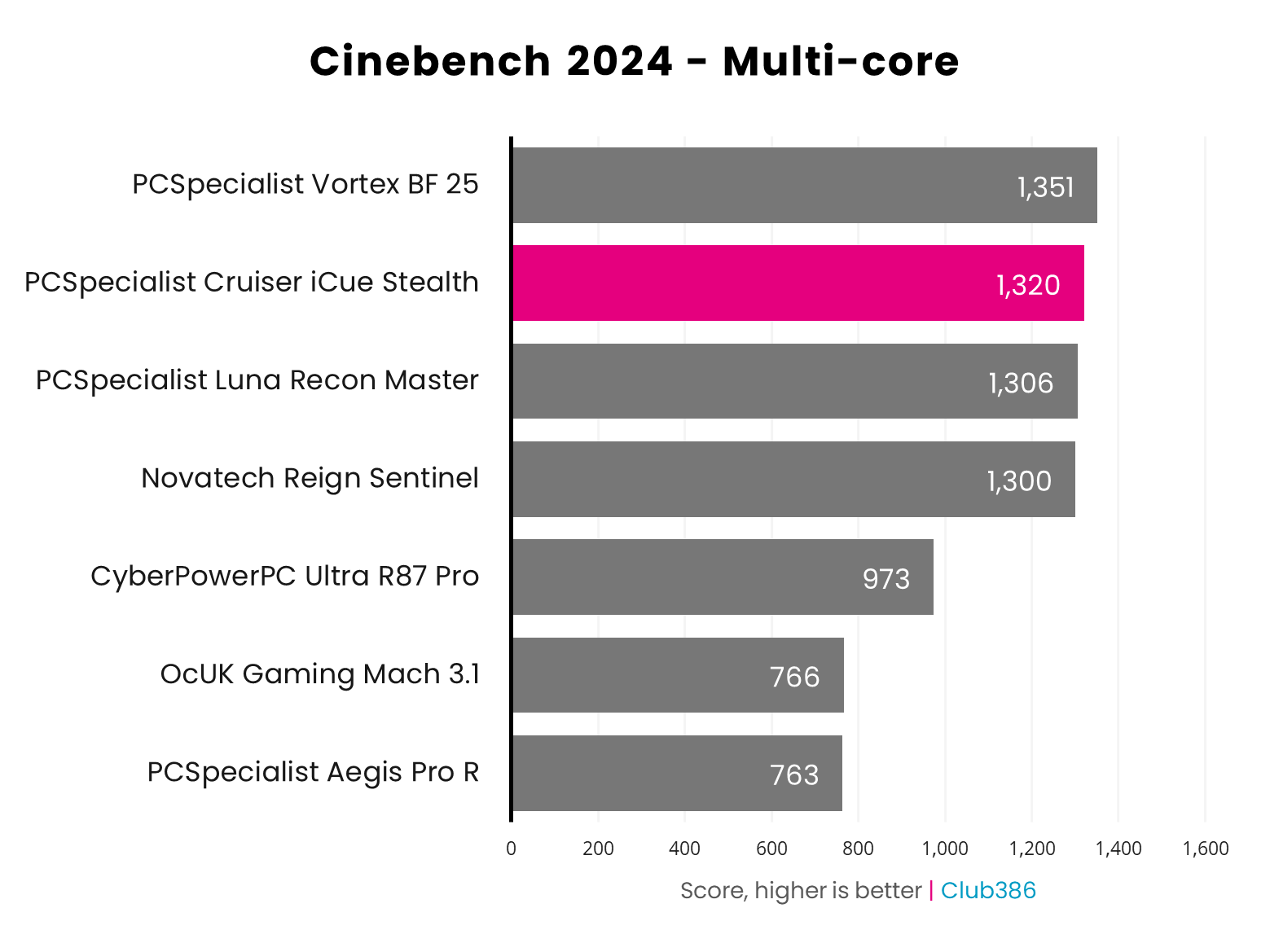
With eight cores at its disposal, the 9850X3D inside this rig is never going to beat a 16-core CPU in Cinebench’s heavily multi-threaded test, but it holds up well. We’ve seen better results from this CPU – it scored 1,360 in our test rig, for example, but that’s with a different motherboard and memory configuration. It’s ahead of two 9800X3D machines here, and all eight of its cores were happily running at around 5,350MHz during this test.
RAM
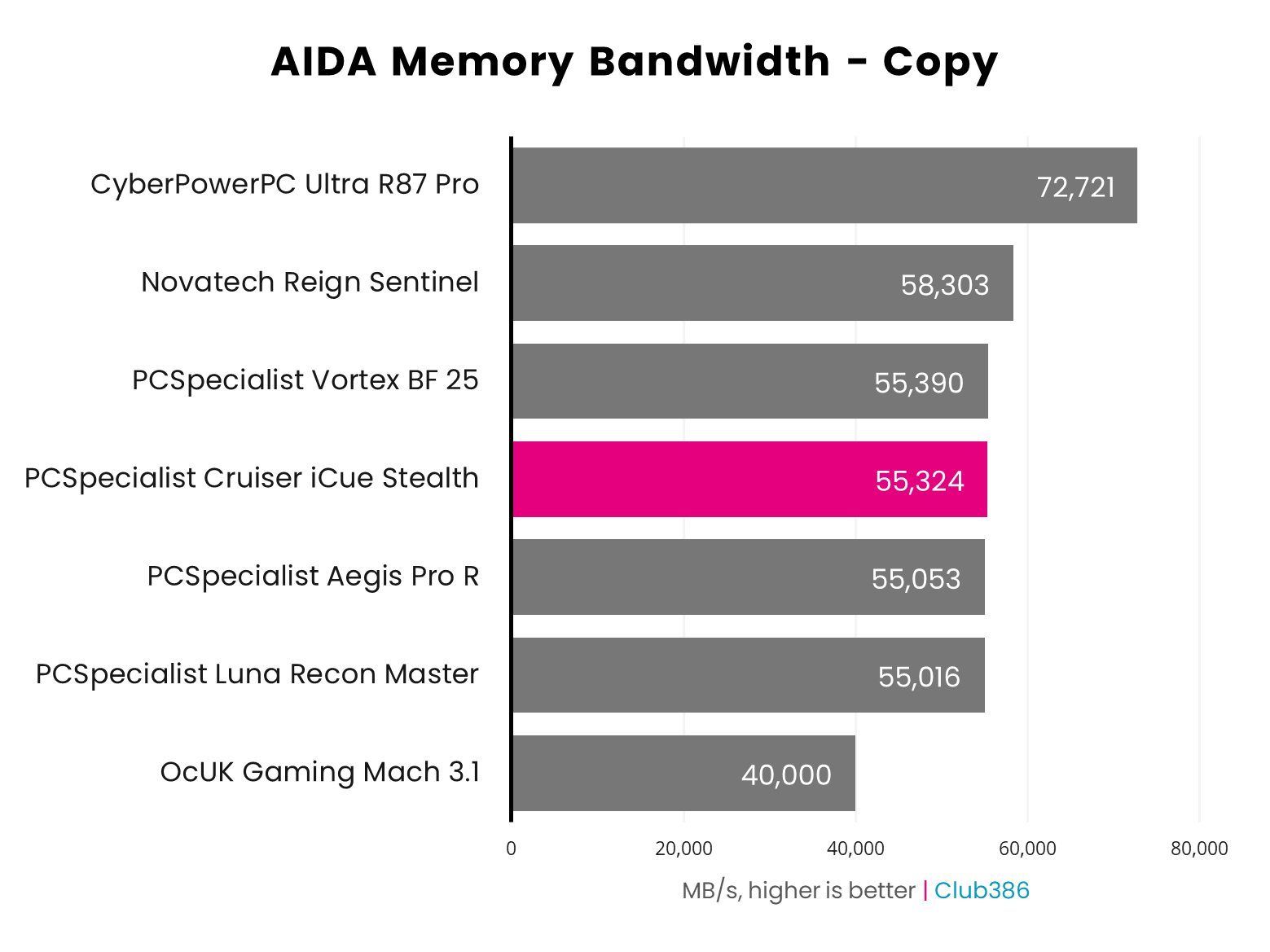
The Cruiser iCue Stealth’s memory might not have any diffused RGB LEDs on top of its heatspreader, but its performance is still on point. The AIDA copy result of 55,324MB/s is in line with results from other 9800X3D machines we’ve tested.
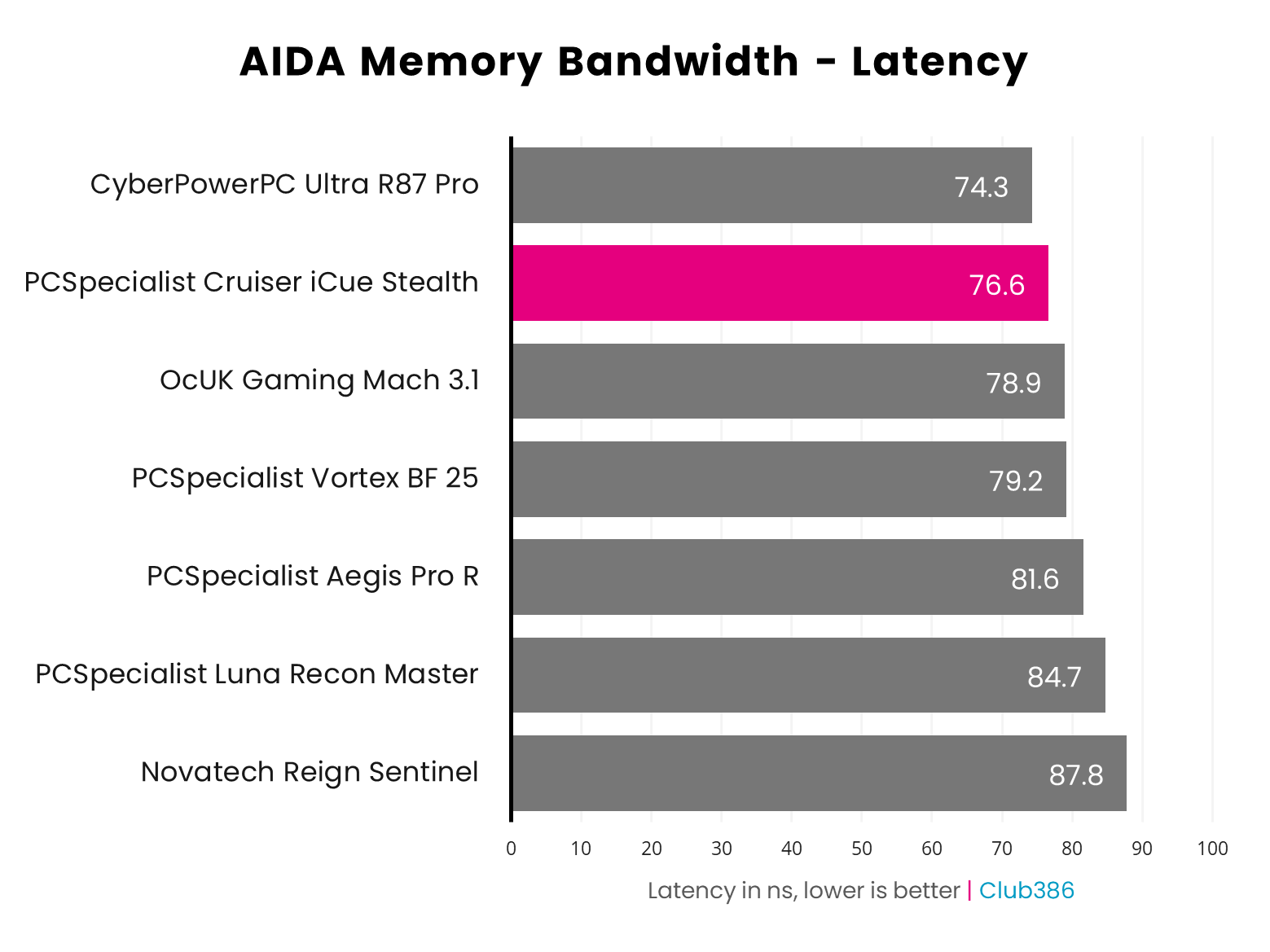
PCSpecialist hasn’t compromised on the performance of this memory to keep down costs, with its Corsair Vengeance RAM offering latency timings of 30-36-36-76. AMD’s Zen 5 systems respond well to low CAS latency (the first figure), and this is represented in AIDA’s results in the graph below. With latency recorded at 76.6ns, this machine’s memory is definitely responsive.
Storage
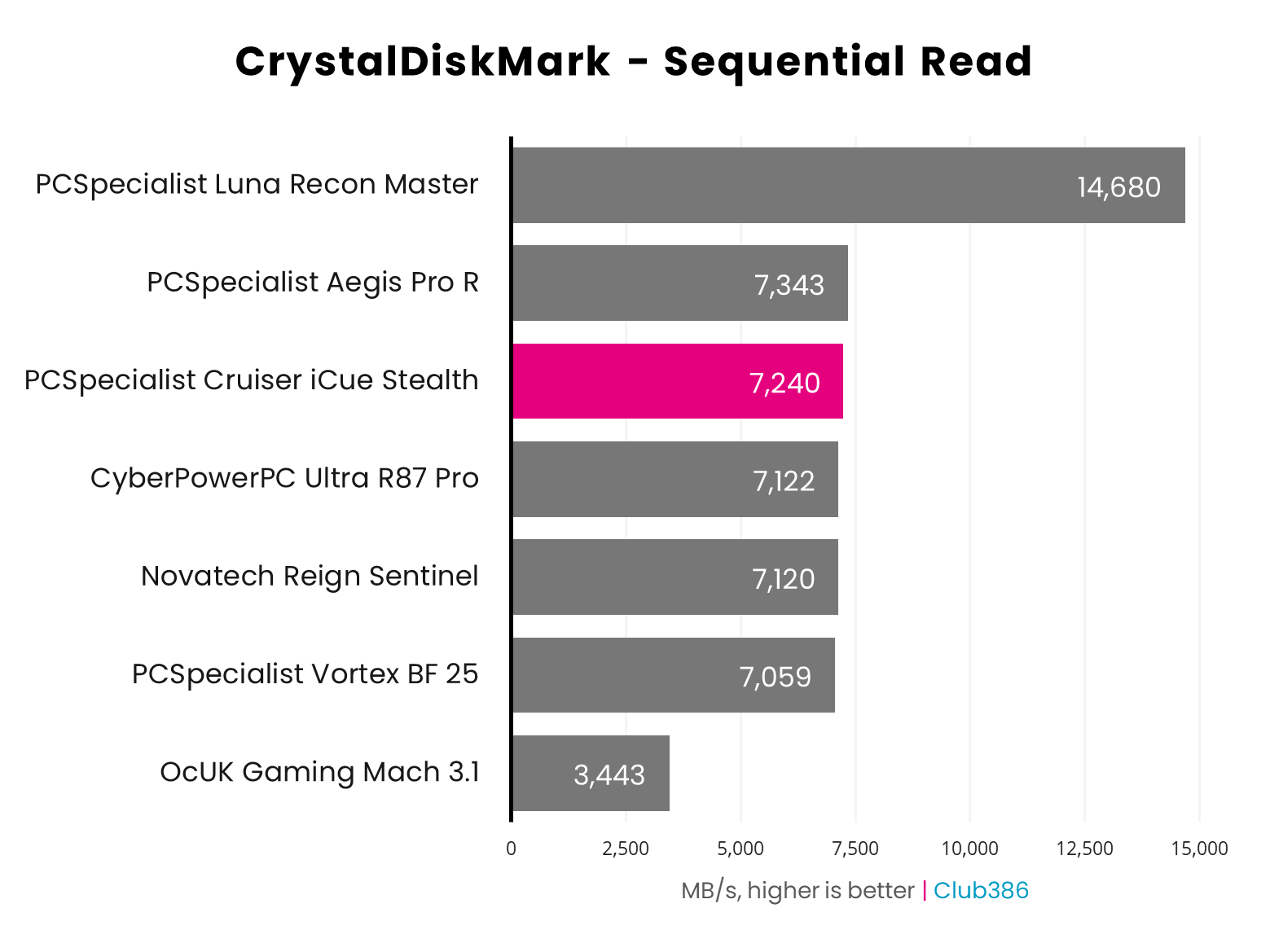
While the Corsair MP600 Pro in this PCSpecialist machine only uses the PCIe Gen 4 interface, it’s at the upper end of performance for such a drive. Its CrystalDiskMark sequential read result of 7,240MB/s puts it ahead of most other machines we’ve tested with PCIe Gen 4 drives. Realistically, you’ll need to make the jump to a PCIe Gen 5 drive to achieve significantly faster performance, and that will add considerable extra cost, without much in the way of real-world benefits.
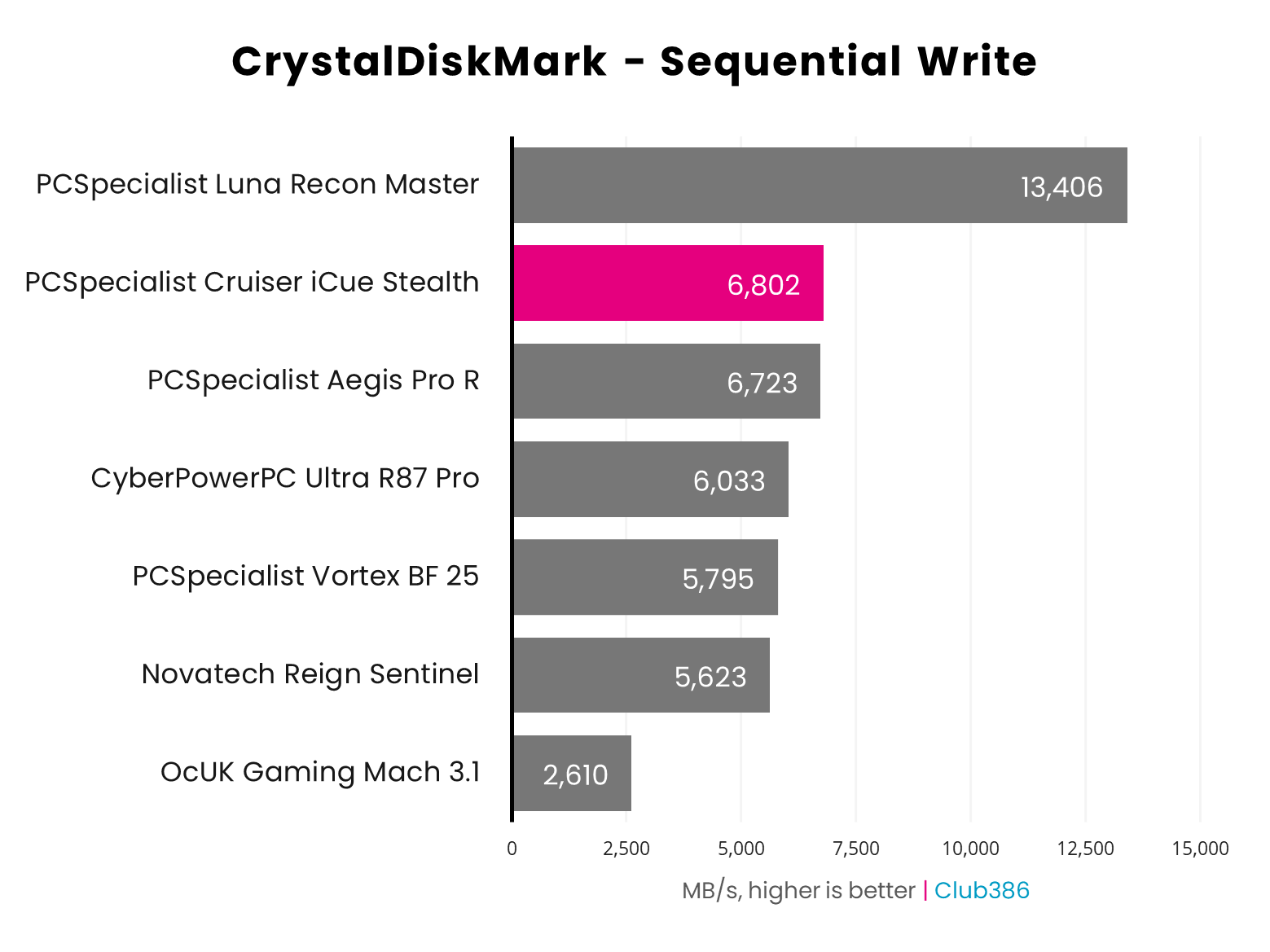
Likewise, this drive’s peak sequential write speed of 6,802MB/s is a top result, being only beaten by the PCIe Gen 5 Samsung 9100 Pro inside PCSpecialist’s top-end Luna Recon Master.
Gaming
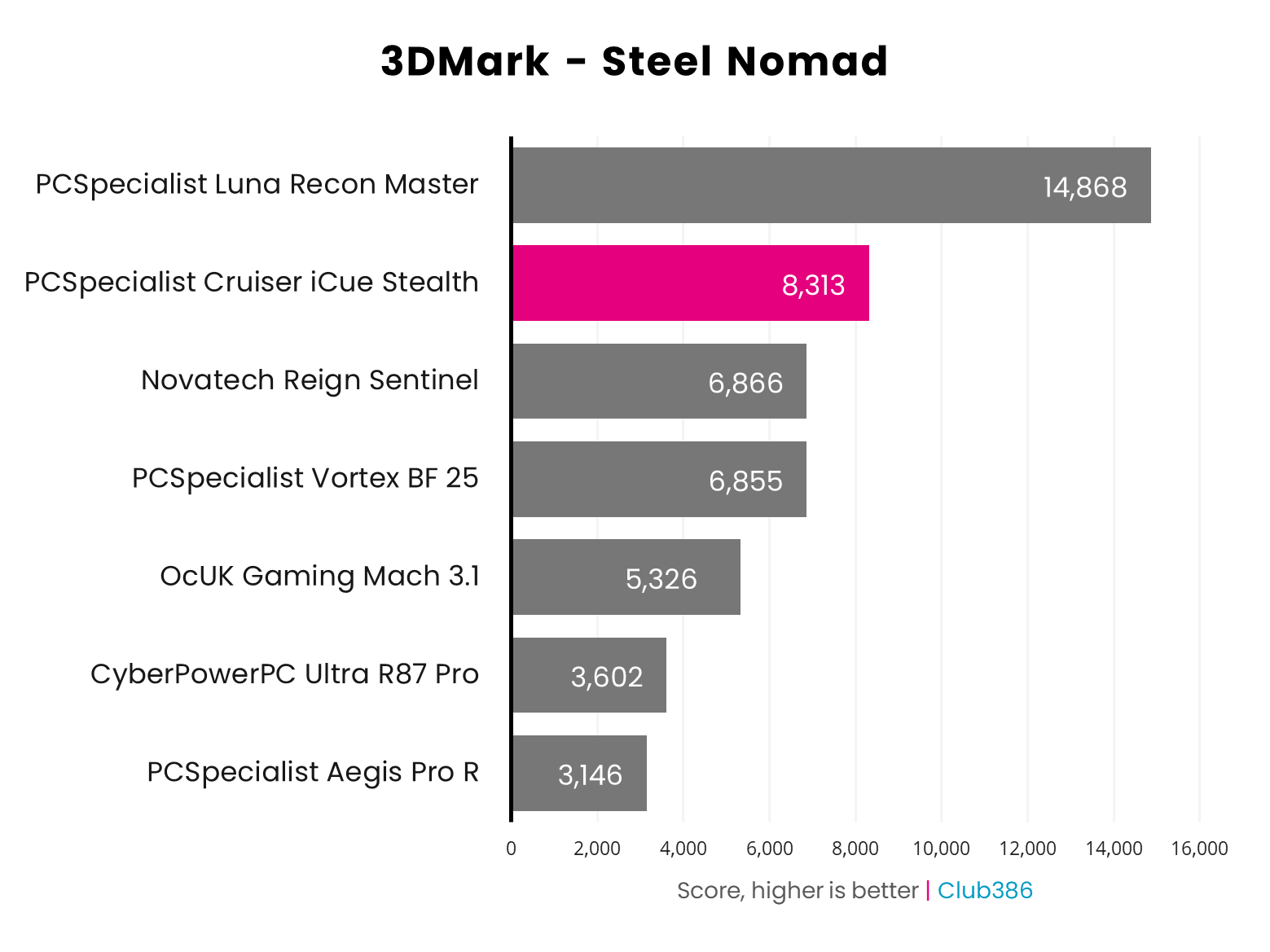
Nvidia’s GeForce RTX 5080 uses the same core GB203 GPU used in the RTX 5070 Ti, but with none of its streaming multiprocessors disabled – this means it has 10,752 CUDA cores, compared to 8,960 in the 5070 Ti. As such, you can expect it to be around 20% quicker than the 5070 Ti, but the RTX 5090 will be well ahead, as it has over twice as many CUDA cores. That’s borne out in the stalwart 3DMark Steel Nomad graphs below. The Luna Recon Master is in front by a long way, thanks to its RTX 5090, but the Cruiser iCUe Stealth is still a good 21% ahead of the 5070 Ti machines.
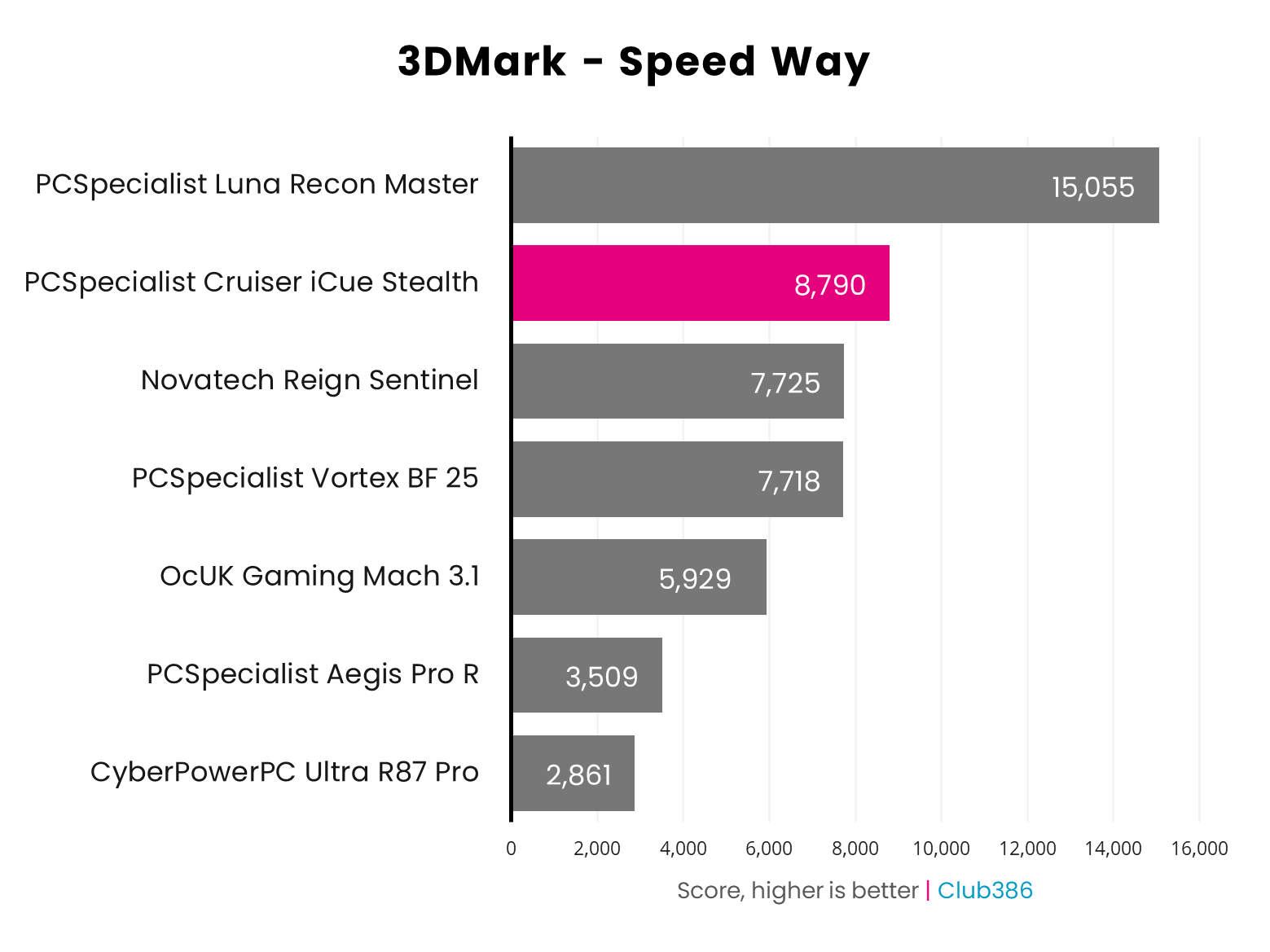
Similarly, 3DMark Speed Way shows off the ray tracing might of this GPU, and again, while the RTX 5090 is king here, the 5080 inside this rig handles ray tracing really well. You won’t get better ray tracing performance from a machine at this price, given that an RTX 5090 card alone currently costs nearly as much as this whole PC.
When it comes to real games, the Cruiser iCue Stealth offers superb performance, particularly if you’re gaming at 2560×1440. Forza Motorsport looks fantastic maxed out at this resolution, where it runs at over 101fps. You can use these settings at 4K as well, with an average of 66fps. Comparatively, the PCSpecialist Vortex BF 25 with its RTX 5070 Ti averages 48fps in this test, showing the advantage of going for an RTX 5080.
| Game | 1080p (Min / Avg) | 1440p (Min / Avg) | 4K (Min / Avg) |
|---|---|---|---|
| Assassin’s Creed Shadows (RT) | 48 / 64fps | 40 / 51fps | 27 / 35fps |
| Assassin’s Creed Shadows (RT + DLSS Quality) | 51 / 76fps | 47 / 62fps | 39 / 50fps |
| Final Fantasy XIV: Dawntrail | 132 / 269fps | 139 / 203fps | 70 / 108fps |
| Forza Motorsport (RT) | 91 / 135fps | 82 / 101fps | 45 / 66fps |
| Mount & Blade II | 238 / 377fps | 210 / 300fps | 131 / 167fps |
| Rainbow Six Siege X | 284 / 377fps | 198 / 260fps | 100 / 130fps |
Most of our other test games run similarly well at 2560×1440, with a huge 300fps average in Mount & Blade II, and 203fps in Final Fantasy XIV: Dawntrail. Rainbow Six Siege runs really smoothly at 260fps as well, but bear in mind that results in this game are no longer comparable to those from earlier PC reviews, due to substantial updates to the game.
The one game that pushed this mighty PC to its limit is Assassin’s Creed Shadows, which we run with all the eye candy maxed out, with ray tracing set to Diffuse + Specular Everywhere. The game runs fine at these settings at 1080p, and if you enable DLSS on the Quality setting, the game still looks great, and averages 62fps at 2560×1440. That gives you a bit of headroom to enable multi frame gen to smooth out motion further.
However, this RTX 5080 rig couldn’t quite smoothly handle Shadows maxed out at 4K, dropping to 35fps with a 27fps minimum, with a 50fps average when you enable DLSS on the Quality setting. It’s still playable at the latter settings, but you’ll ideally want to to lower your settings or use a more aggressive form of DLSS upscaling to make it run smoother.
| Cyberpunk 2077 | 1080p (Min / Avg) | 1440p (Min / Avg) | 4K (Min / Avg) |
|---|---|---|---|
| Native | 50 / 61fps | 32 / 37fps | 15 / 18fps |
| DLSS 4 (Quality) | 91 / 103fps | 63 / 70fps | 33 / 38fps |
| DLSS 4 (Q) + FG x2 | 161 / 179fps | 111 / 123fps | 62 / 69fps |
| DLSS 4 (Q) + FG x3 | 231 / 258fps | 159 / 176fps | 90 / 99fps |
| DLSS 4 (Q) + FG x4 | 298 / 329fps | 202 / 233fps | 115 / 127fps |
Of course, one of the main selling points of Nvidia’s latest GPUs is multi frame gen (MFG), which, as I always point out, isn’t a fix for a broken frame rate, but it can be really useful for smoothing out motion if your game is already running at 60fps or above. As you can see in the table, if you enable DLSS on the Quality setting, which looks fantastic with Nvidia’s new Transformer model, you can average a solid 70fps, and that’s with the game maxed out and using the fancy Ray Tracing Overdrive preset.
Enable 2x frame gen, and the game feels substantially smoother in action as you swing your mouse, averaging 123fps. Turn frame gen up to 4x, and you’re running at 233fps, and while this adds a little extra latency, I found the game was still smooth in action. That’s great if you have a 240Hz monitor. As with Assassin’s Creed Shadows, Cyberpunk 2077 with Overdrive is too much for this rig, but I found it quite happily ran the game with the Ray Tracing Ultra preset at 4K, which still looks great.
Vitals
| Idle | Load (Cinebench) | Load (Gaming) | |
|---|---|---|---|
| CPU temperature | 39°C | 80°C | 82°C |
| GPU temperature | 28°C | 28°C | 69°C |
| Noise | 32dBA | 45dBA | 49dBA |
| Power consumption | 98W | 247W | 482W |
Given that all the chassis fans were plugged into the wrong header at first, and I’ve used a default fan curve, it’s difficult to get an exact handle on how the shipping form of this PC will perform in terms of noise and thermals. What I can say for sure is that the cooling power on offer is absolutely capable of stopping this rig from throttling and overheating. CPU temperature topped out at 82°C while running Cyberpunk, and 80°C in Cinebench, but these were maximum peaks on single cores. The rest of the cores topped out at 76-81°C in Cyberpunk, and were generally running cooler.
When idle with the default fan curve, this PC barely makes any noise, with my noise meter measuring 32dBA. This noise climbs significantly when the chassis fan speeds ramp up, hitting 49dBA while gaming. However, the chassis fans were by far the loudest element here, with the fans attached to the CPU cooler remaining quiet. As I said before, it’s quite possible PCSpecialist could tweak the fan curve to make this machine much quieter when it’s running at full load.
Finally, power draw is in line with expectations for a machine with this spec, and won’t trouble the 850W Corsair RMx PSU. I measured the peak total system power draw at 482W while running Cyberpunk 2077, and 247W with the CPU maxed out in Cinebench 2024’s multi-threaded test.
Conclusion
PCSpecialist has built a great high-end PC with the Cruiser iCue Stealth. AMD’s new Ryzen 7 9850X3D ensures solid gaming performance, while its increased clock speed gives it an edge over 9800X3D machines in single-threaded software. The massive CPU cooler really helps here, ensuring this chip can boost to a sustained 5.6GHz throughout heavy workloads, while not overheating or throttling.
Meanwhile, RTX 5080 graphics card also makes light work of gaming at 2560×1440, even at demanding settings, and it can cope with a fair bit of 4K gaming as well. I’m really pleased to see a healthy 4TB of storage space here as well, even if it’s a PCIe Gen 4 drive, and you get a decent 32GB of memory.
What really stands out to me, though, is the quality of the build. This machine looks fantastic, inside and out, and PCSpecialist is to be commended on its commitment to neat cabling, as well as its inclusion of a graphics card support bracket. It’s a shame our sample had miswired chassis fans, but we’re assured that the machine won’t ship like this to any customers.
Even the cost is reasonable, given the current climate. I know £3,099 is very far from cheap, but that price will barely buy you an RTX 5090 graphics card now, and just 32GB of RAM will set you back a silly amount of money too. Putting this spec into PCPartPicker comes back with a price of £3,158.14, and PCSpecialist has not only undercut that figure, but put together all the pieces in a quality build, complete with a warranty that covers parts for a year and labour for three years. If you’re looking to buy a high-end PC, and you can’t run to the cost of an RTX 5090, the PCSpecialist Cruiser iCue Stealth is a fast, well-built and fairly-priced rig.
