In this comprehensive guide, you can tap into our many years of PC hardware experience and knowledge to find the best graphics card for your gaming PC. Whether you’re looking for the cheapest way to play Rainbow Six Siege at 1080p, or the fastest pixel pusher for playing Cyberpunk 2077 at 4K with all its ray tracing bells and whistles, we’ll point you at the right GPU for the job.
Chaotic RAM prices have made a veritable dog’s breakfast of not just DDR5 and DDR4 upgrades, but graphics cards as well. In particular, it’s hard to find an affordable graphics card with more than 8GB of VRAM, and you may need a good sit down after seeing the current price of a GeForce RTX 5090. You can still buy a solid GPU in 2026, though. It’s just a case of knowing which tech to prioritise for your needs.
We cover all the details you need to know in our guide to the best graphics cards in 2026, where all our recommendations are based on first-hand benchmarking and analysis. You’ll also find all the frame rate data, test scores, and specifications detail you need to make a purchase decision below.
Best GPU shortlist
AMD Radeon RX 9070 XT
Nvidia GeForce RTX 5080
AMD Radeon RX 9070 GRE
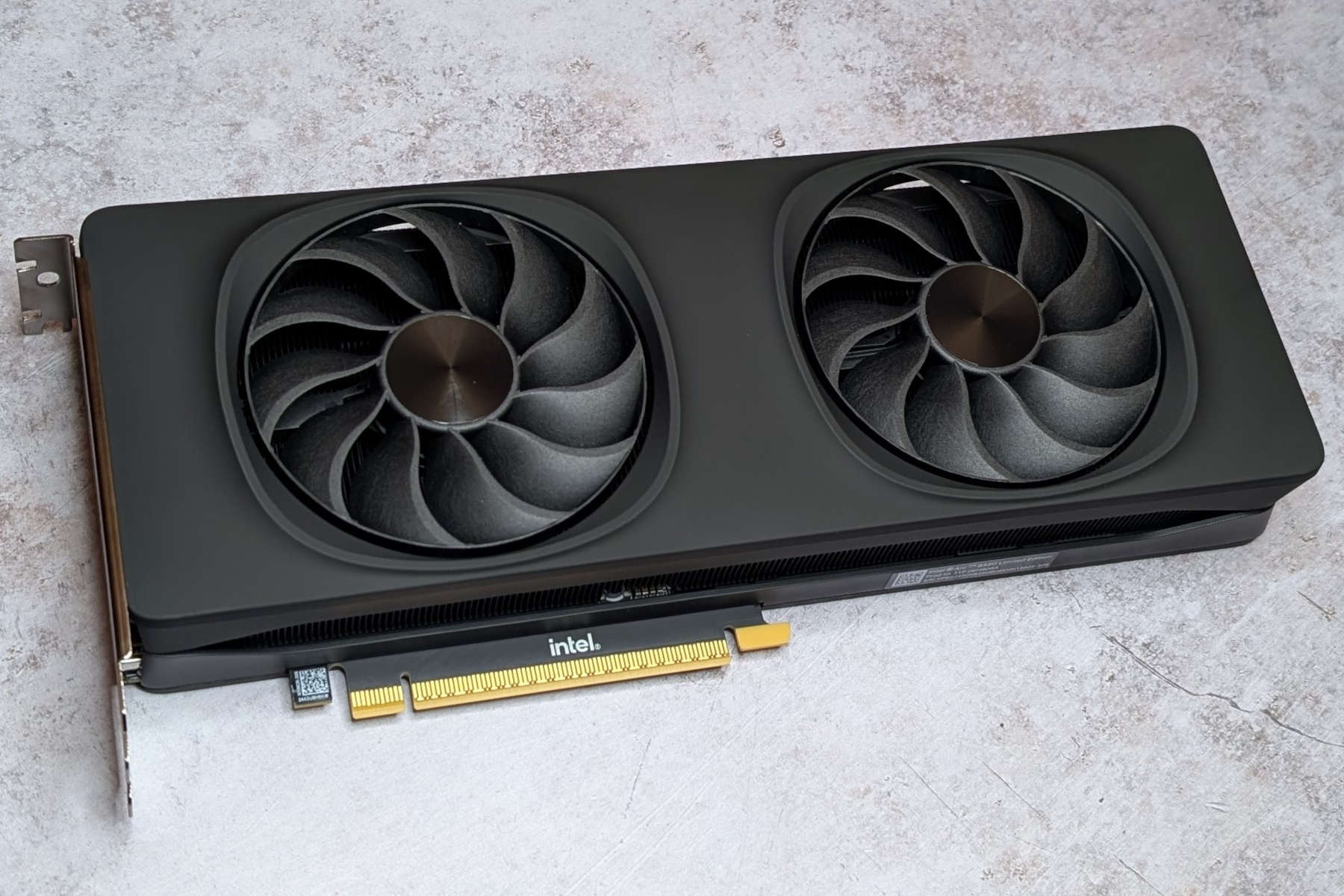
Intel Arc B580
In detail
Best GPU overall
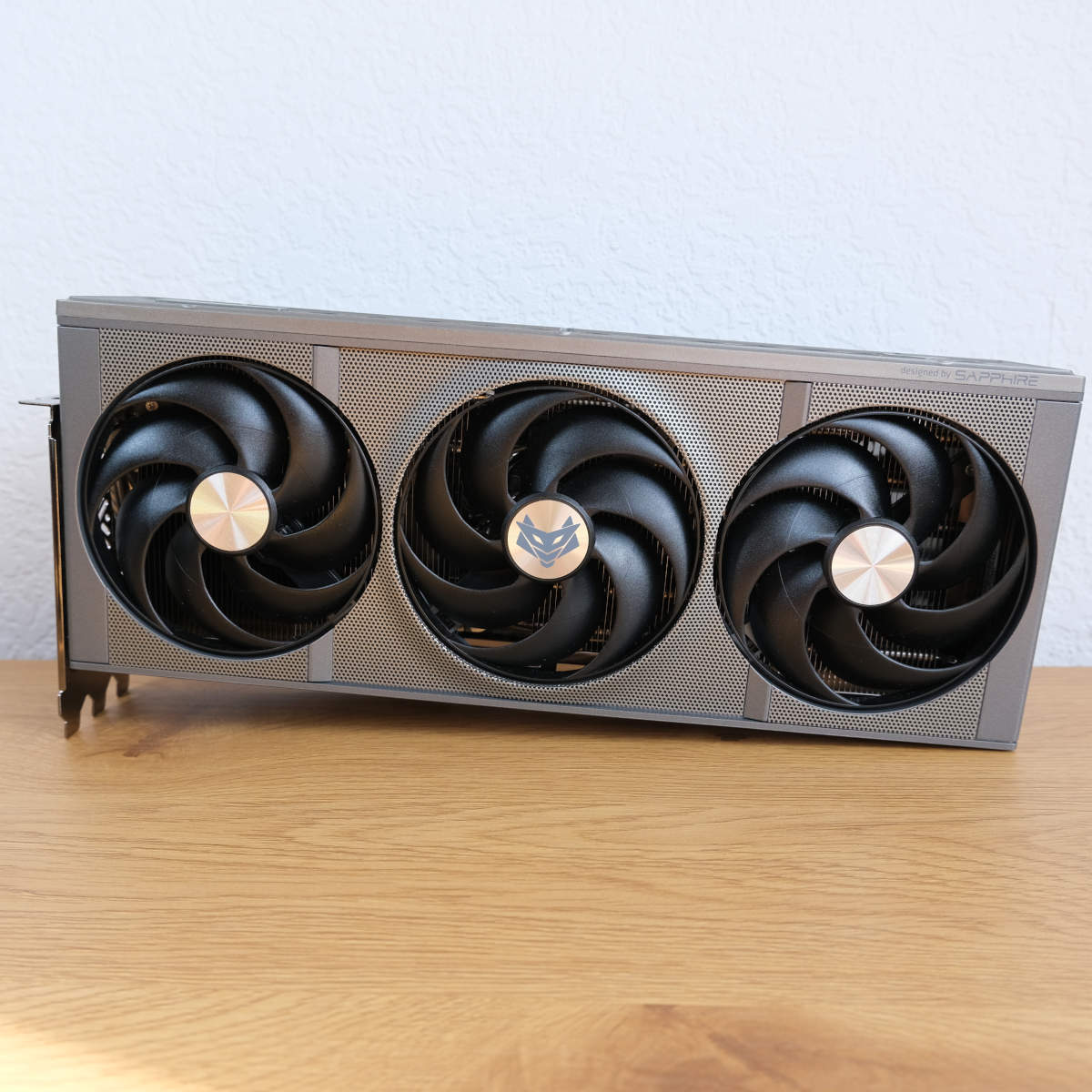
The best GPU overall is the AMD Radeon RX 9070 XT. A welcome surprise at launch back in 2025, this mid-range offering from AMD has transformed from a worthy foe to its Nvidia rivals to becoming our top recommendation in the wake of the RAM crisis. While it’s not the absolute fastest pixel pusher on the planet, it packs plenty of raster and ray tracing oomph combined with a healthy amount of VRAM that happily scales up to 4K. It runs circles around similarly priced GeForce alternatives at the moment.
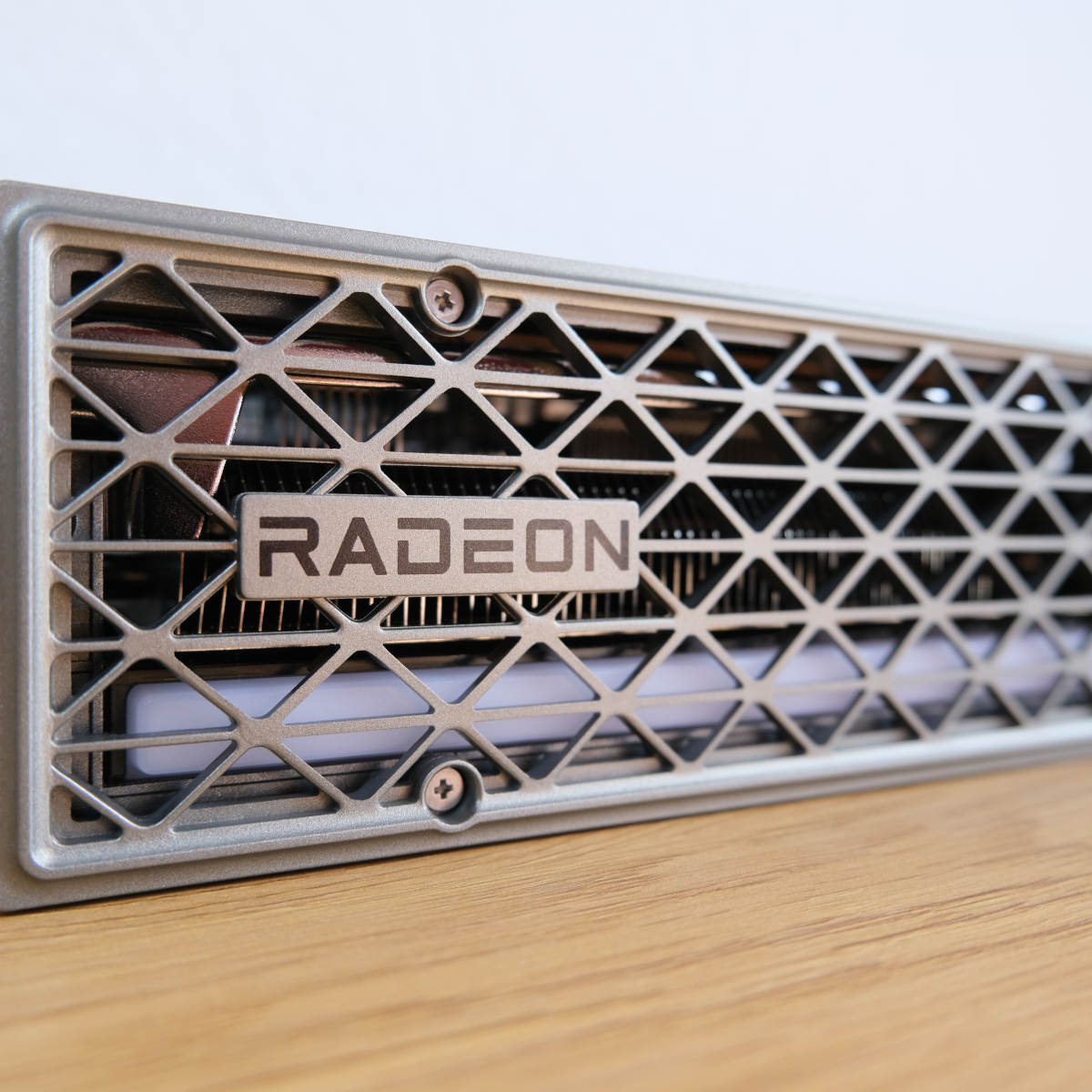

AMD Radeon RX 9070 XT
£739 / $799
Pros
- Solid QHD and 4K pace
- Excellent raster chops
- Great ray tracing performance
- 16GB of GDDR6 VRAM
- FSR 4.1 FP8 support
Cons
- FSR support isn’t as strong as DLSS
- Falls behind in workstation tasks
- ~30% more expensive than launch
Club386 may earn an affiliate commission when you purchase products through links on our site.
How we test and review products.
The 357mm² die inside the RX 9070 XT is the very best AMD’s RDNA 4 architecture has to offer. This Navi 48 XTX GPU has all 64 of its compute units enabled, equipping this GPU with 4,096 streaming processors that provide excellent rasterised rendering performance. In our tests, frame rates frequently better the more expensive GeForce RTX 5070 Ti in this regard, giving the even costlier GeForce RTX 5080 pause on rare occasion.
Ray tracing performance is strong too, with 64 of AMD’s third-generation RT accelerators under its proverbial belt. This setup broadly matches GeForce RTX 5070 pace, greatly narrowing the gap between AMD and Nvidia in this battleground relative to prior efforts. There’s strength enough here to handle some ray tracing workloads natively, but you can understandably expect to require the helping hand of upscaling at higher resolutions.
Unlike Nvidia’s RTX 5070, though, the RX 9070 XT comes part and parcel with 16GB of VRAM. These GDDR6 chips ride on a 256-bit memory bus, netting a maximum theoretical bandwidth of 645GB/s. That’s plenty of capacity and speed to run games at their highest quality settings, even at 4K in some games. Sticking with an older standard of memory also helps keep the cost of this graphics card down in spite of the memory crisis, relative to Nvidia’s GDDR7 alternatives.
| Radeon RX 9070 XT | |
|---|---|
| Architecture | AMD RDNA 4 |
| GPU | Navi 48 |
| Streaming processors | 4,096 |
| RT accelerators | 64 (3rd-gen) |
| AI accelerators | 128 (2nd-gen) |
| Boost clock | 2,970MHz |
| Memory capacity | 16GB GDDR6 |
| Memory speed | 20Gbps |
| Memory interface | 256-bits |
| Memory bandwidth | 640GB/s |
| TDP | 304W |
In addition to refined RT hardware acceleration, RDNA 4 GPUs also arrive with AMD’s second-generation AI accelerators. The RX 9070 XT has 128 of these new cores at its disposal, which brings native support for floating point (FP8) instructions, which the GPU can use to power AMD FSR 4.1. This upscaler is a massive step up from FSR 3.1, using machine learning á la Nvidia DLSS to help improve performance with minimal impact on visual fidelity.
While FSR 4.1 is a huge upgrade on FSR 3.1, though this technology is very much on the backfoot relative to Nvidia’s DLSS software suite when it comes to support and features. The upscaling and frame generation pipeline is becoming more common among modern releases, but upgrading older games requires an FSR 3.1 base, leaving titles with older versions out to dry.
Meanwhile, FSR Ray Regeneration isn’t nearly as prevalent in settings menus as DLSS Ray Reconstruction. We recommend using FSR features where possible, but there’s no getting round the fact that more games support DLSS than the latest version of FSR.
Before looking at some our first-hand benchmarks, let’s talk price. The 9070 XT launched at £569 ($599), with the minimum asking price rising to £739 ($799) at the time of writing. While this 30% (33%) rise in cost is noteworthy, this increase is actually on the smaller side relative to the majority of current-generation graphics cards. This hike feels all the more palatable considering the RTX 5070 now commands around £739 ($849), while the RTX 5070 Ti now regularly sits at the £1,000+ ($1,000+) mark.
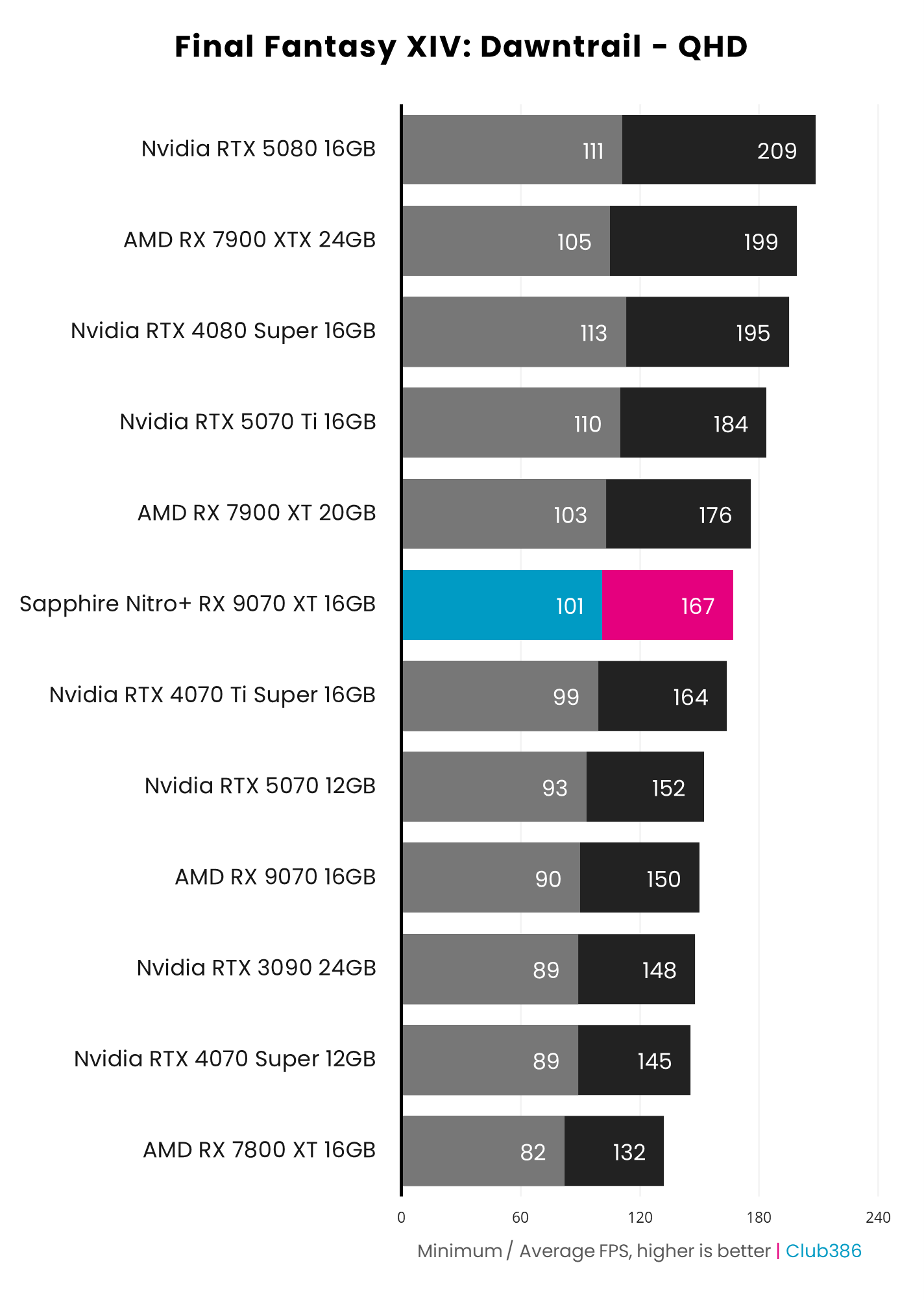
As you can see from the bar chart above, the RX 9070 XT confidently pushes past Nvidia’s RTX 5070 in rasterised realm of Final Fantasy XIV: Dawntrail. This trend manifests across all games we’ve tested at all resolutions, but especially at 4K where AMD’s 16GB of memory helps this graphics card more readily cope with the higher pixel count.
Averaging 167fps is an excellent result for any graphics card in this game, though the RTX 5070 Ti is a touch faster. However, the 10% advantage that the GeForce alternative offers comes at a ~30% price premium, hardly making spending the extra cash worthwhile. Again, this assessment broadly holds true across our gaming benchmark suite.
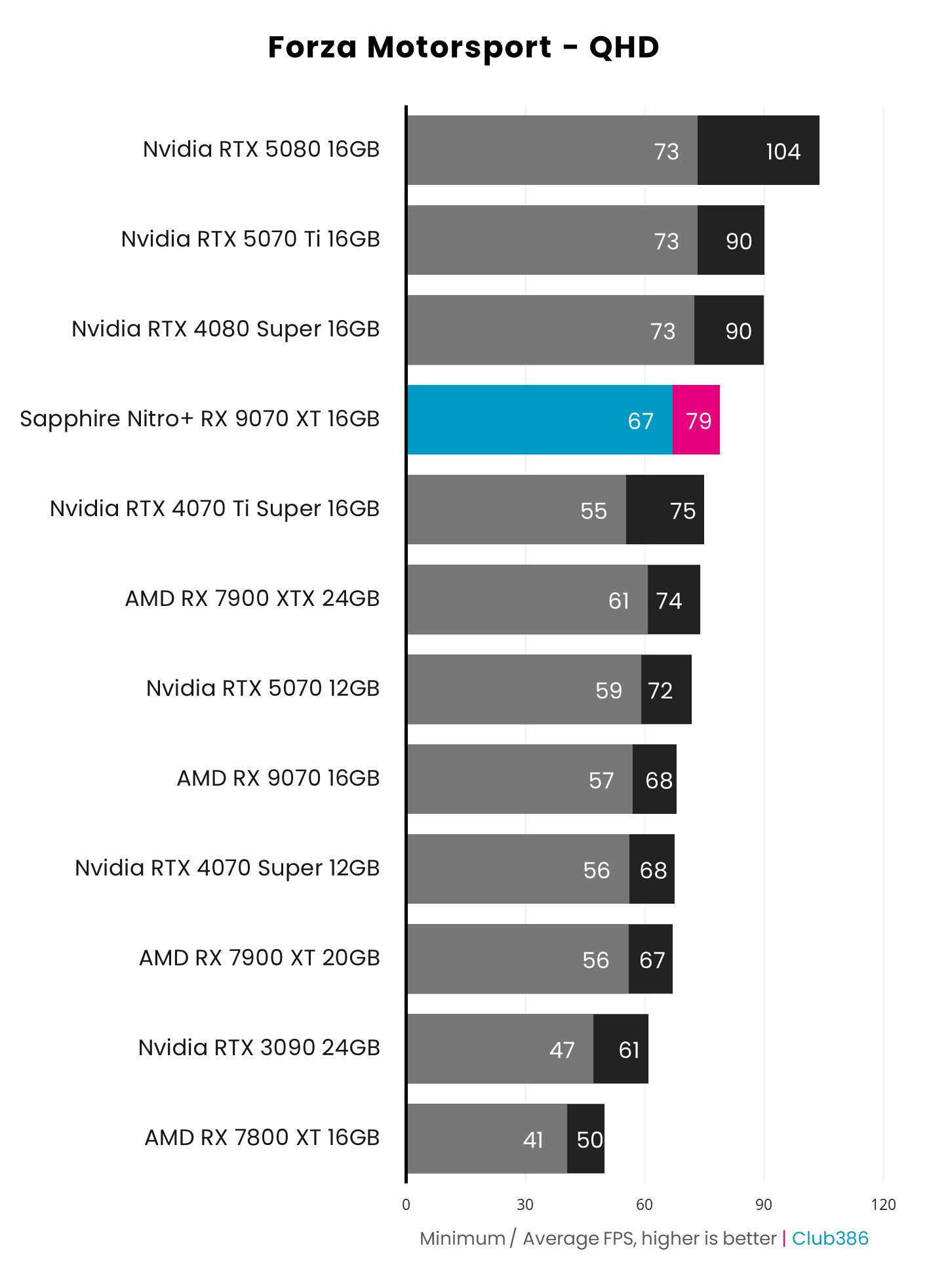
Even with ray tracing in our Forza Motorsport test results, the RX 9070 XT still manages to handily prove itself against both the RTX 5070 and RTX 5070 Ti. A 79fps average with maximum eye candy at QHD sans any upscaling looks delightful, and it both feels and plays wonderfully, with plenty of room to push performance higher via FSR 4.1.
As mentioned earlier, the pressure of path tracing sees the RTX 5070 and RX 9070 XT deliver near-identical performance in our testing using Cyberpunk 2077. It’s in this arena that the RTX 5070 Ti makes more sense, but I’d save your cash and reach for the RTX 5080 if such rendering delights are a priority for your gaming PC.
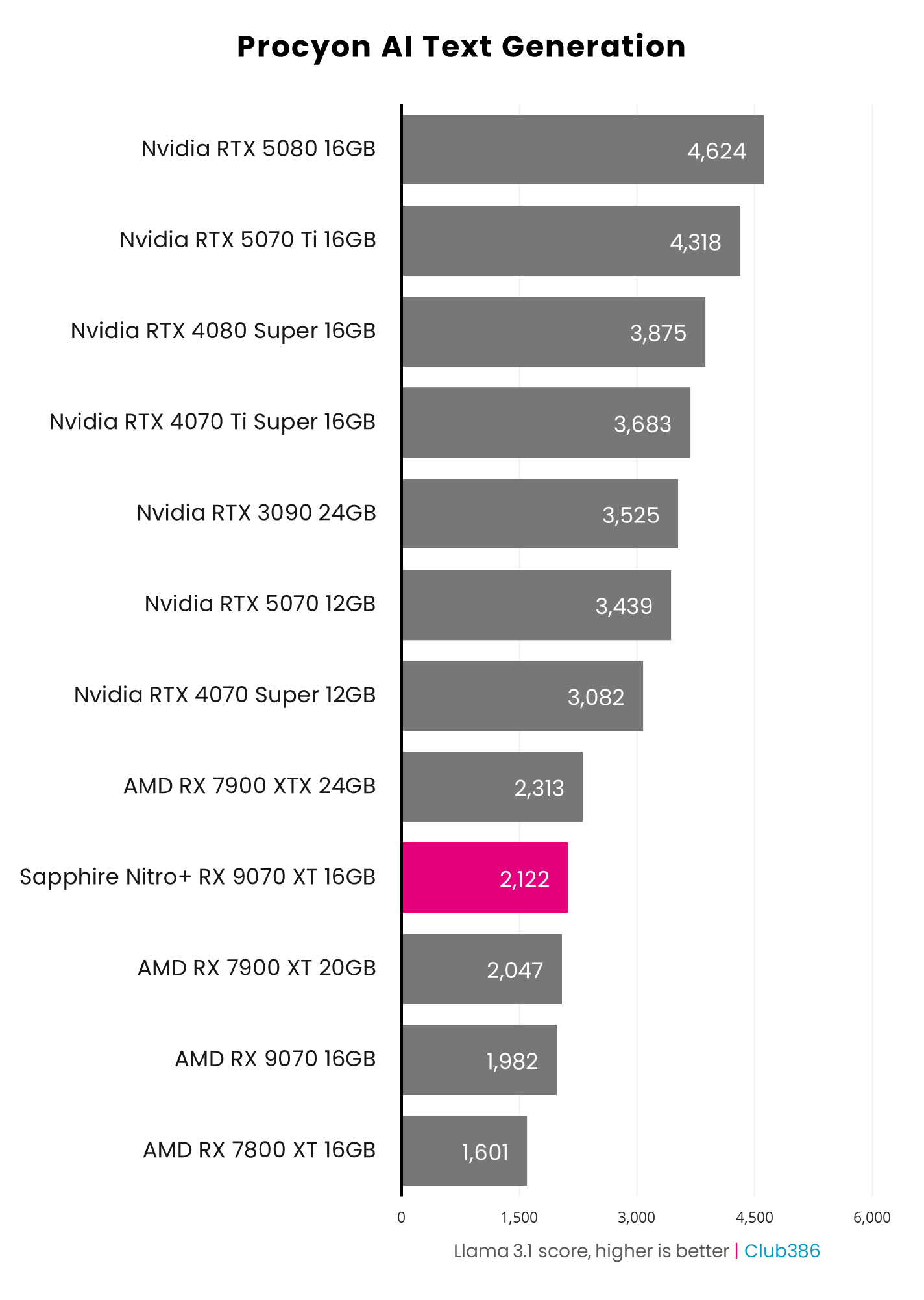
Finally, it’s worth noting that GeForce will typically better serve creative and deep learning professionals better than the RX 9070 XT, thanks to wider support for CUDA, OptiX, and other exclusive APIs. However, for those purely seeking a graphics card that can easily handle today’s most-demanding game releases at their very best without breaking the bank, you can’t go wrong here.
If you can’t quite stretch your budget to reach for an RX 9070 XT, AMD’s Radeon RX 9070 is also worth considering. You can typically find this graphics card for ~£100 / ~$100 cheaper, and it will provide about 90% of the performance that you can expect from its more-powerful sibling, as you can glean from all the benchmark charts above.
Read our full AMD Radeon RX 9070 XT review for a full exploration of this GPU and its performance.
Best high-end GPU
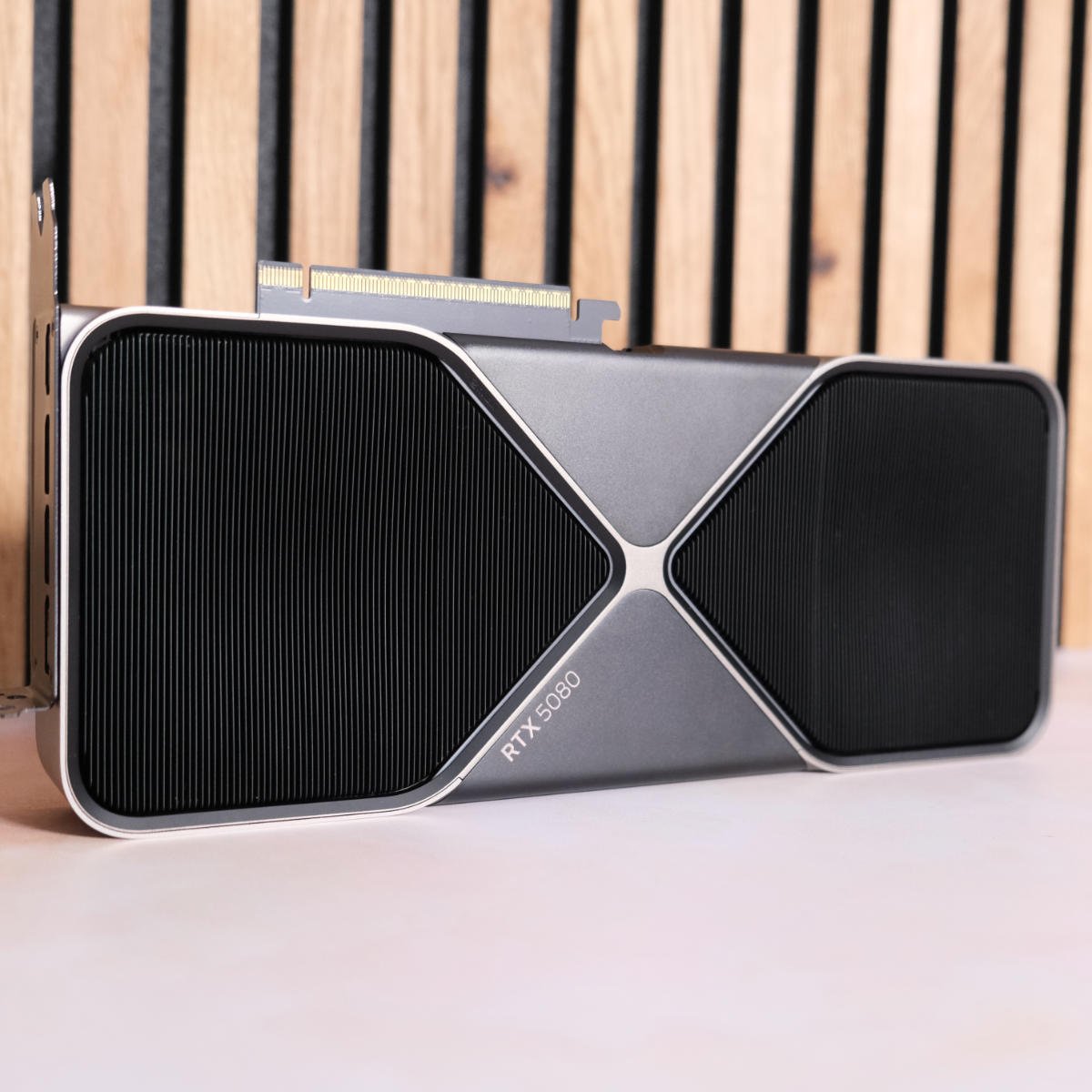
The best high-end GPU is the Nvidia GeForce RTX 5080. There’s no avoiding that the RTX 5090 is a vastly more powerful pixel pusher than Nvidia’s second-in-command, but the firm’s flagship is now so astronomically expensive that it simply isn’t worth considering. Thankfully, this Blackwell deputy still has plenty of kick, practically providing half the performance of its sheriff for far less cash, massively improving its relative value. That’s all while maintaining full support for the full Nvidia DLSS 4.5 suite, making this card a true 4K beast.
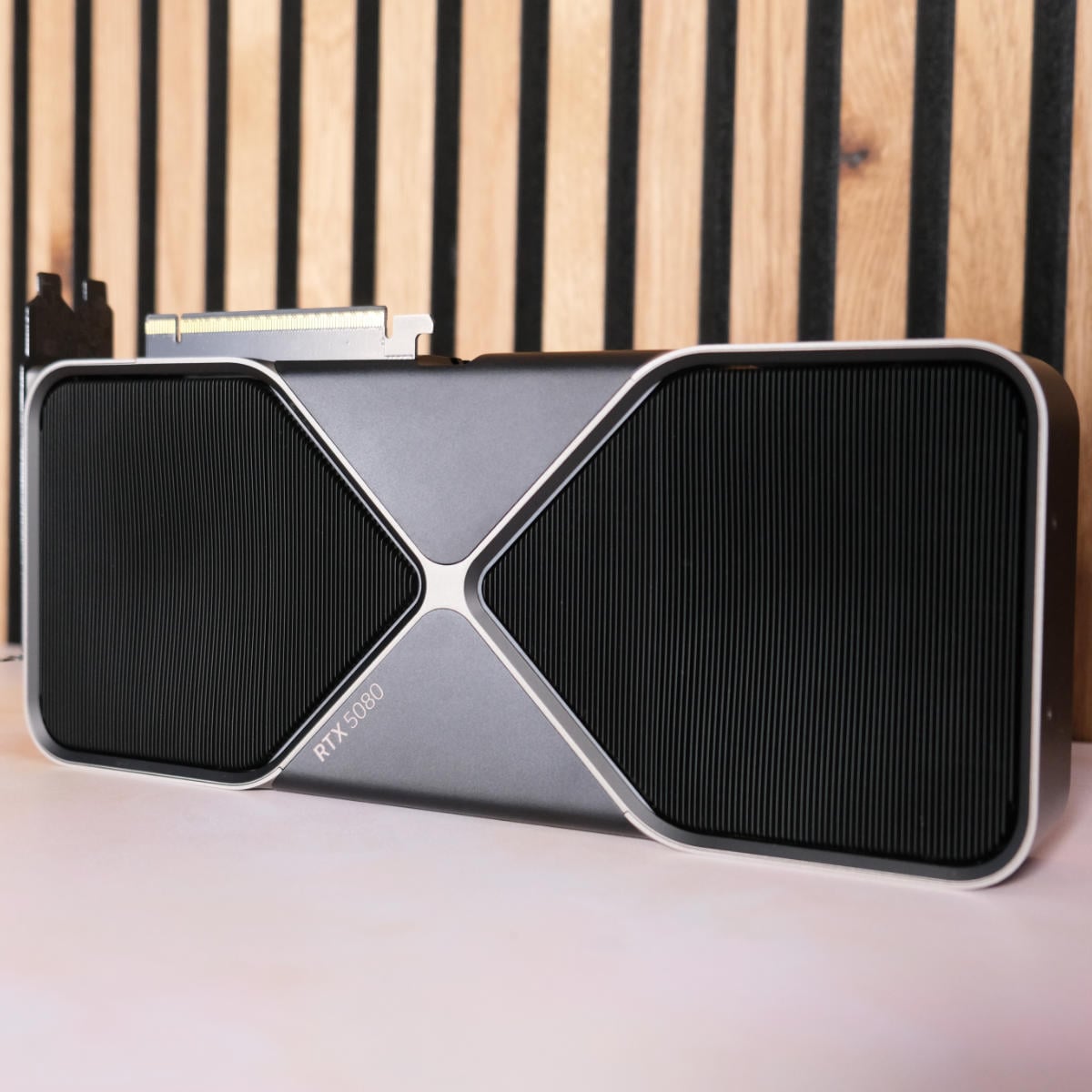
Nvidia GeForce RTX 5080
£1,359 / $1,699
Pros
- Fantastic QHD & 4K pace
- Awesome RT performance
- Great for workstation tasks
- 16GB of GDDR7 VRAM
- Nvidia DLSS 4.5 suite
Cons
- ~40-80% more expensive than launch
- Not much faster than RTX 4080 Super
Club386 may earn an affiliate commission when you purchase products through links on our site.
How we test and review products.
The reason we describe the RTX 5080 as effectively being half an RTX 5080 comes down to a variety of specification comparisons. The GB203 die at its heart is near-enough half the size of the flagship GB202, at 378mm² compared to 750mm², with its CUDA core count similarly sitting at almost 50% on the former, with 10,572 cores compared to its more-powerful sibling’s 21,760.
Where the RTX 5080 truly shines is in ray tracing, with its 84 fourth-generation RT cores offering the fastest performance money can buy bar the RTX 5090. This GPU makes short work of ray tracing graphics presets, even at 4K. You’ll even find room enough to power some path tracing settings at native 1080p if you so desire, but you’re better off putting all that performance to work in tandem with Nvidia DLSS upscaling and frame generation.
Speaking of which, Nvidia continues to offer the most feature-rich performance suite of all the GPU brands. DLSS Super Resolution provides best-in-class upscaled image quality, while both adaptive and multi-frame generation can greatly improve motion clarity by up to 6x. That’s not forgetting Ray Reconstruction, which nets superior denoising in ray tracing relative to standard systems. Suffice to say, you’ll get plenty of work out of the RTX 5080’s 336 fifth-generation Tensor cores.
| Nvidia GeForce RTX 5080 | |
|---|---|
| Architecture | Nvidia Blackwell |
| GPU | GB203 |
| CUDA cores | 10,572 |
| RT cores | 84 (4th-gen) |
| Tensor cores | 336 (5th-gen) |
| Boost clock | 2,617MHz |
| Memory capacity | 16GB GDDR7 |
| Memory speed | 30Gbps |
| Memory interface | 256-bits |
| Memory bandwidth | 960GB/s |
| TDP | 360W |
In lieu of 3GB GDDR7 modules, the RTX 5080 arrives with 16GB of VRAM. These are speedy chips, running at 30Gbps on a 256-bit bus, which all come together to net 960GB/s of maximum bandwidth. While this is typically enough to face off against the demands of most games, even with maximum settings, there are rare instances where the graphics card will buckle without the assistance of Nvidia DLSS.
We’ve found Indiana Jones and the Great Circle at 4K with Full RT path tracing is one such example that will prove difficult for this pixel pusher, owing to its memory capacity. It’s no wonder then that the rumour mill surrounding a potential GeForce RTX 5080 Super 24GB continues to spin, despite the effect of the memory crisis on graphics card pricing making the value of such a release particularly questionable.
While the RTX 5080 is undeniably powerful, cards based on this GPU have notably shot up in price. While Nvidia launched this model at £939 / $999, we’re now seeing stock hitting store shelves for closer to £1,359 / $1,699. That’s an enormous ~40-80% premium over release, but still massively shy of the current cost of an RTX 5090.
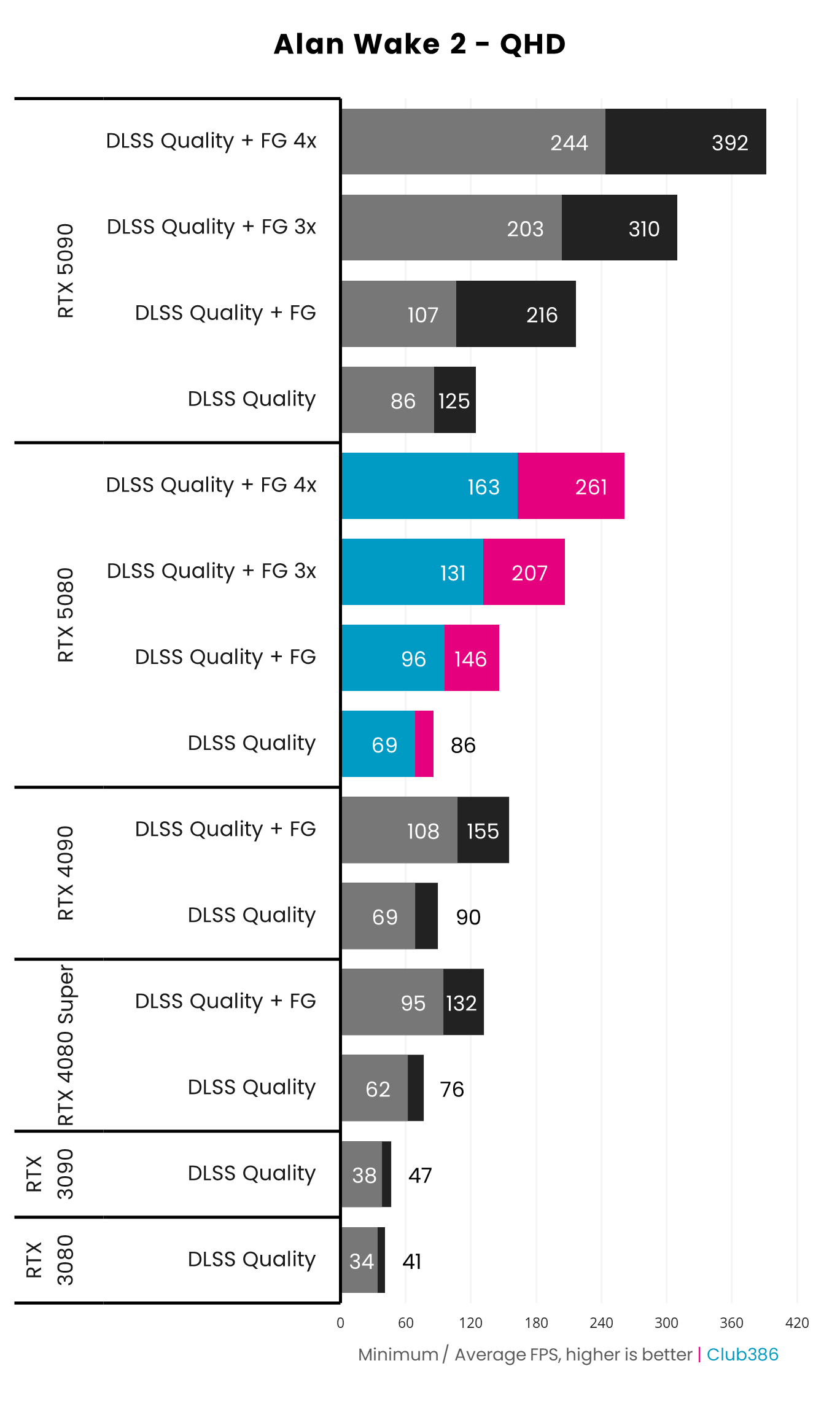
Throwing an RTX 5080 into the path tracing deep end with Alan Wake 2, the benefits of Nvidia DLSS 4.5 are easy to see. Averaging 86fps at this resolution and settings, with the upscaler running in quality mode, it’s just shy of GeForce RTX 4090 performance. Multi-frame generation helps give this Blackwell GPU a leg up by greatly improving motion clarity, moreso than the prior generation.
What’s not apparent on these graphs, however, is the difference in visual quality that Nvidia’s transformer upscaler can bring relative to its older convolutional neural network (CNN). While all GeForce RTX graphics cards can use the newer model, the RTX 5080 can do so with only a small performance penalty, unlike older Ampere and Turing models.
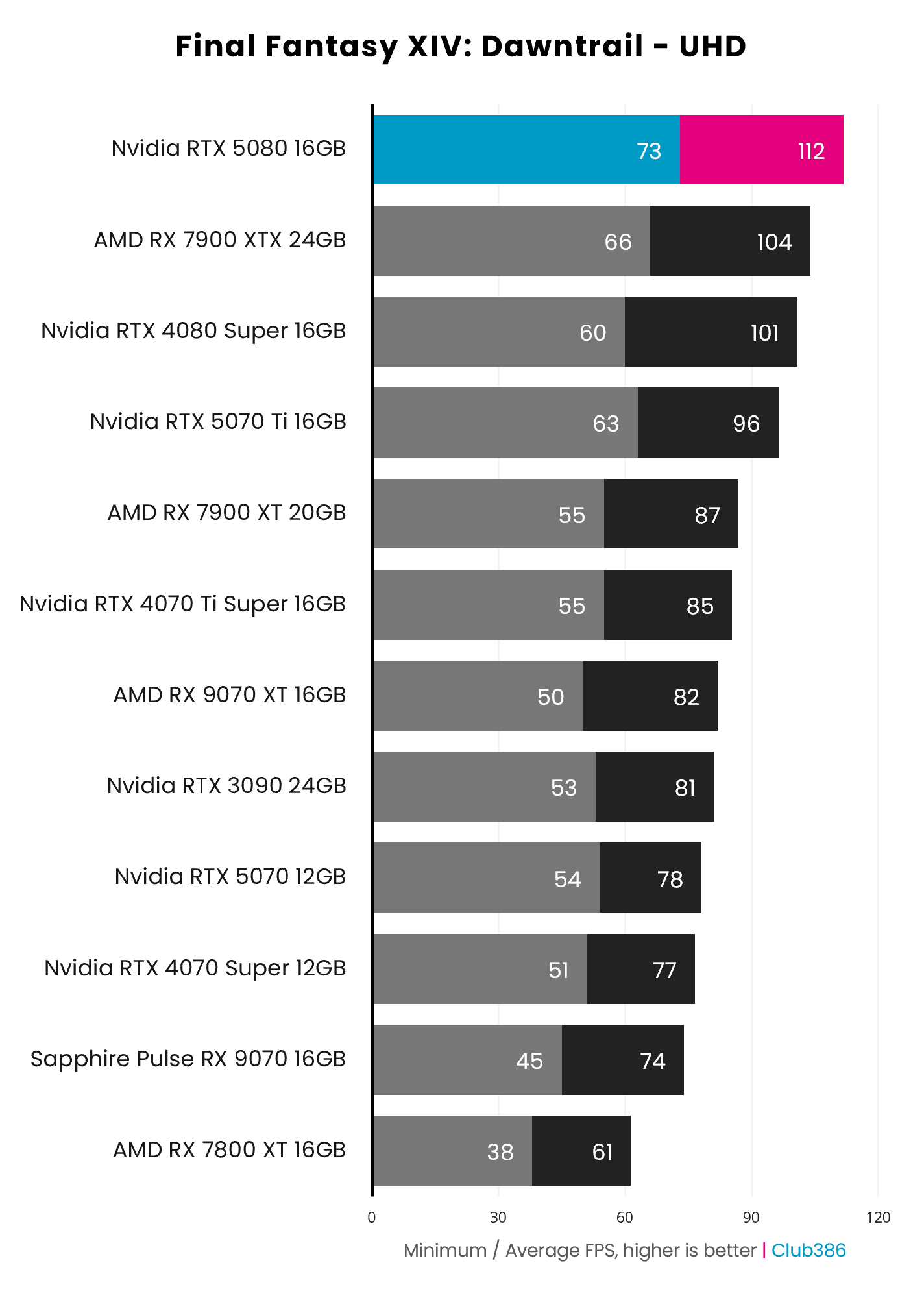
Even without Nvidia DLSS, RTX 5080 performance is awesome to behold. Putting the unobtanium that is the RTX 5090 aside, there’s no other option on the market that can top this FFXIV: Dawntrail chart running at UHD with settings turned up to their highest.
However, if you’re already running a GeForce RTX 4080 Super or RTX 4090, you’ll gain very little in terms of raster frame rates from swapping to the RTX 5080. If you’re running the older but still impressive GeForce RTX 3090 or RTX 3090 Ti, though, you can expect a welcome hefty uplift.
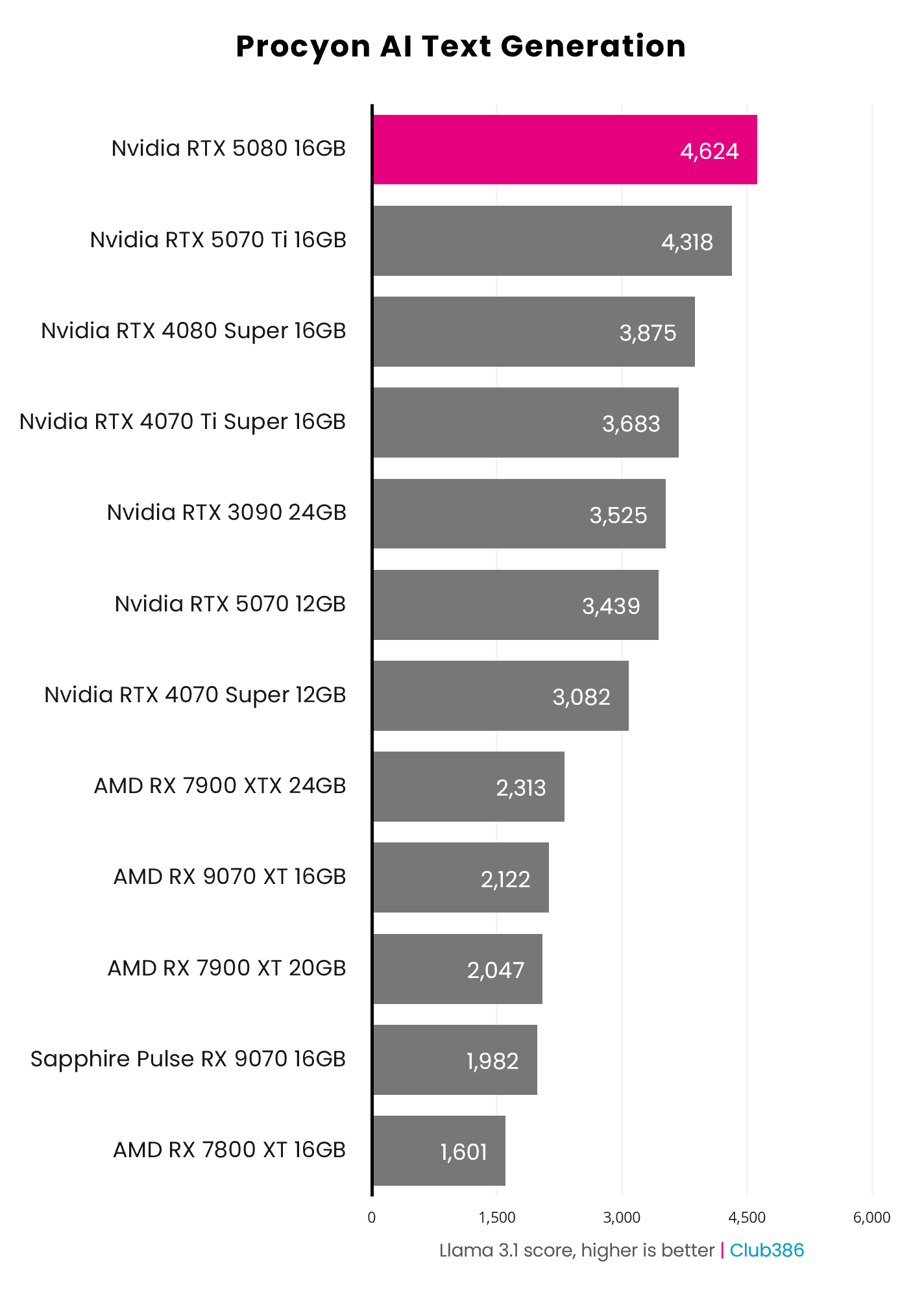
Given how much of a fuss Nvidia makes about AI, it’s no surprise that the RTX 5080 is an excellent choice for running deep learning workloads. However, that 16GB frame buffer can prove an obstacle in running some exceptionally large models.
If you’re someone who uses their PC for both gaming and creative endeavours, then the RTX 5080 is a no-brainer if you can spare the cash. We’ve found this GPU is excellent in Blender and other 3D rendering applications too.
For more detail about this GPU, including all the game and workstation benchmarks, check out our full Nvidia GeForce RTX 5080 review.
Best mid-range GPU
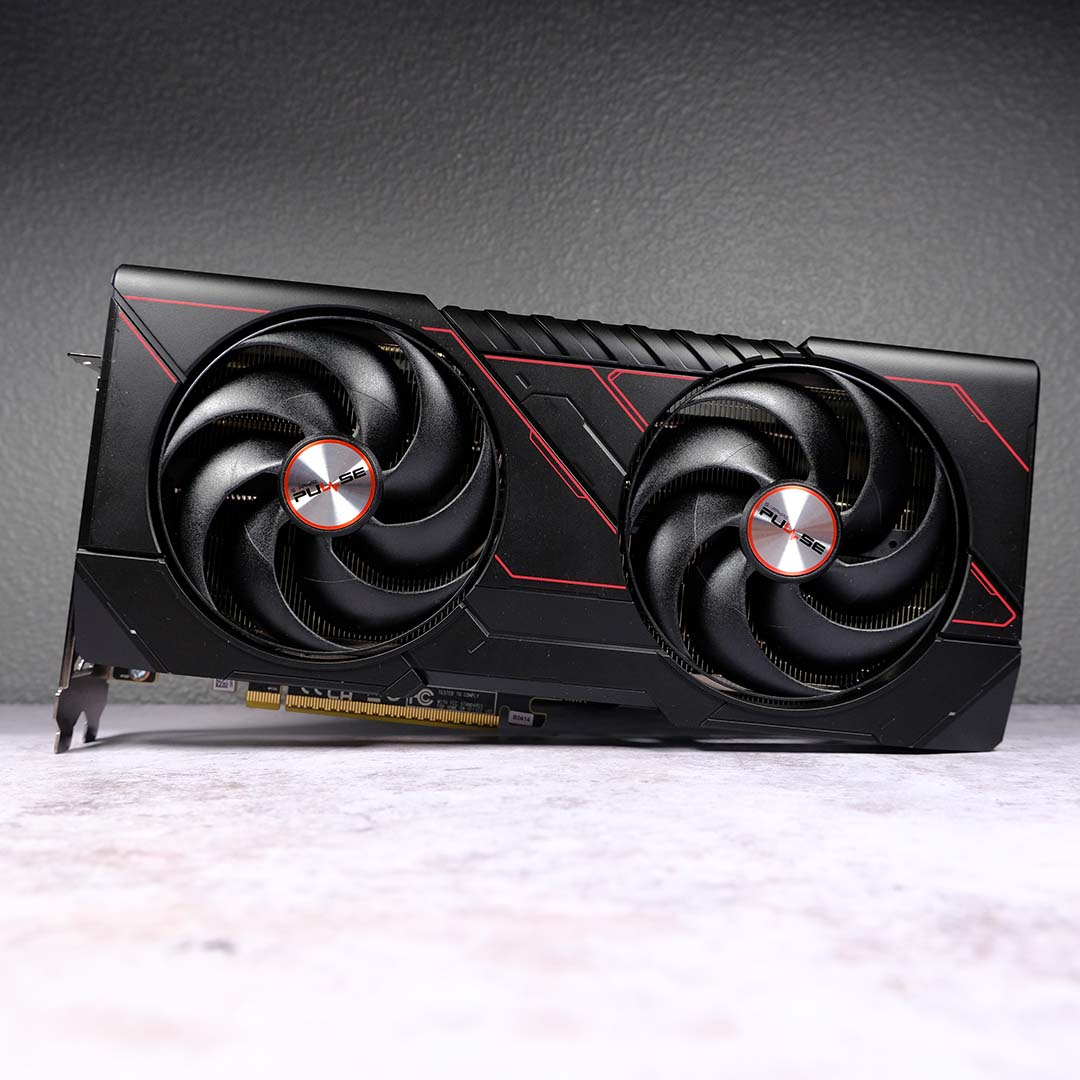
The best mid-range GPU is the AMD Radeon RX 9070 GRE. Market conditions have shifted so dramatically since the launch of this GPU that our former view of this being a middling option has shifted to it now becoming our top pick for most folks. Sometimes enough is just as good as a feast, and that’s exactly what you get here.
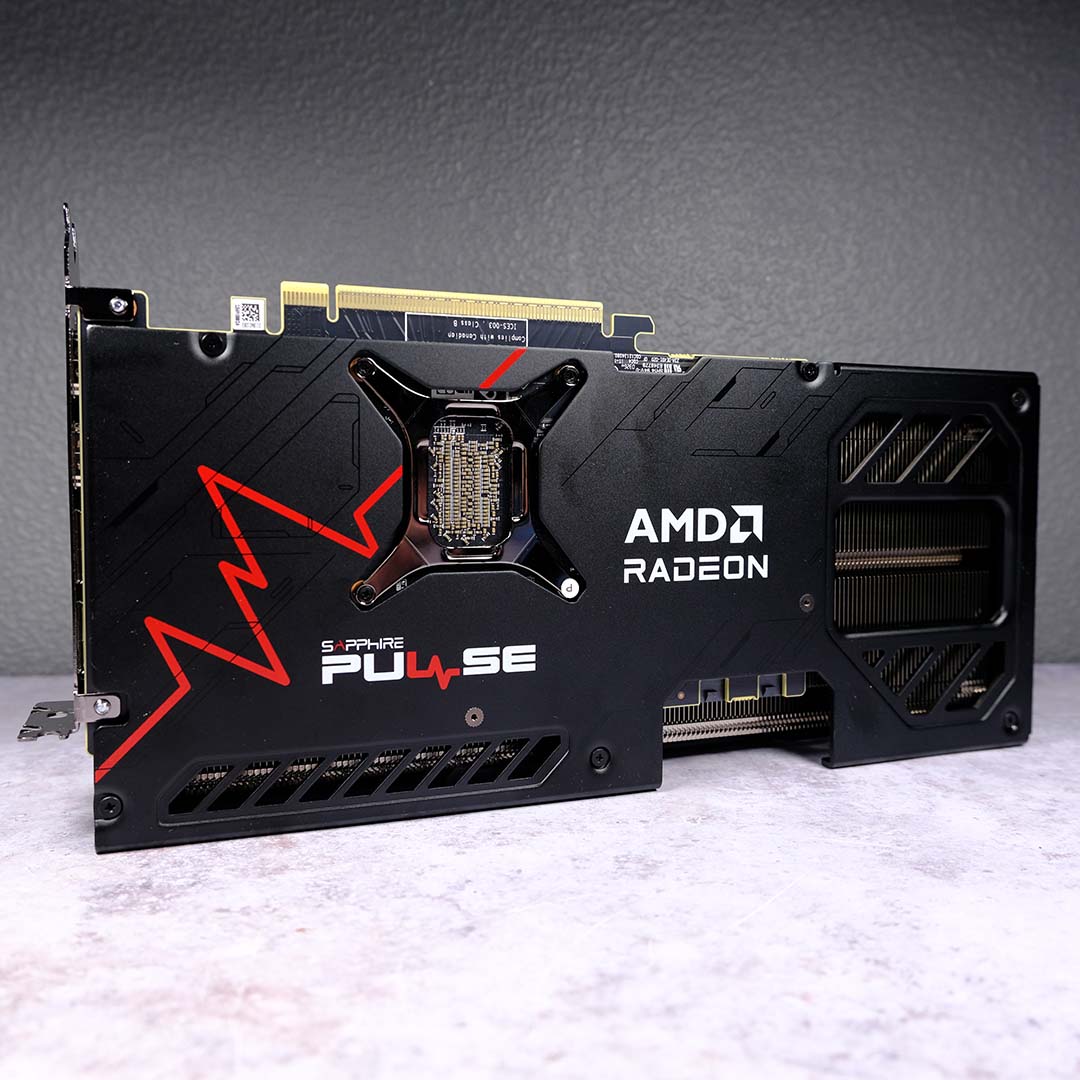

AMD Radeon RX 9070 GRE
£529 / $569
Pros
- Good FHD/QHD performance
- 12GB of GDDR6 VRAM
- Solid raster frame rates
- Decent ray tracing
- FSR 4.1 FP8 support
Cons
- FSR support isn’t as strong as DLSS
- ~5% more expensive than launch
Club386 may earn an affiliate commission when you purchase products through links on our site.
How we test and review products.
As you might have gleaned from its name, the RX 9070 GRE shares much of its core DNA with AMD’s Radeon RX 9070 and RX 9070 XT. In fact, the easiest way to summarise this GPU is as being two-thirds of the latter, with 66% of its core GPU specifications and memory capacity. That said, AMD has made other changes under the hood to reduce this pixel pusher’s sticker price.
We’re still rocking a Navi 48 die on the RX 9070 GRE, but this time with a cutdown design that features 3,072 streaming processors and 48 third-generation ray tracing accelerators. Putting this configuration to work in real-world benchmarks, the 9070 GRE is able to hold its own against the RTX 5070. As we mentioned earlier, that Nvidia GPU is now grossly expensive (£739 / $849), and makes absolutely no sense to purchase over this more-affordable AMD contender from a value perspective.
Like that aforementioned Nvidia rival, the RX 9070 GRE also packs 12GB of VRAM, furthering the two-thirds RX 9070 XT comparisons. However, AMD has trimmed back the memory interface to 192-bits, as well as the speed of the modules to 18Gbps, which altogether result in total bandwidth of 432GB/s. While that’s lower than its siblings’ bandwidth, there’s still enough throughput here to confidently kick back at FHD and QHD resolutions while gaming in the vast majority of circumstances.
| AMD Radeon RX 9070 GRE | |
|---|---|
| Architecture | AMD RDNA 4 |
| GPU | Navi 48 |
| Streaming processors | 3,072 |
| RT accelerators | 48 (3rd-gen) |
| AI accelerators | 96 (2nd-gen) |
| Boost clock | 2,790MHz |
| Memory capacity | 12GB GDDR6 |
| Memory speed | 18Gbps |
| Memory interface | 192-bits |
| Memory bandwidth | 432GB/s |
| TDP | 220W |
For times where raw horsepower isn’t enough, the RX 9070 GRE has AMD’s FSR 4.1 software suite at its disposal by way of its 96 second-generation AI accelerators (again, 66% that of the RX 9070 XT). Machine learning upscaling is the main draw here, to relieve pressure on the GPU and memory buffer, but other features including frame generation and ray regeneration are welcome additional boons.
As an added bonus, unlike the majority of the GeForce RTX 50 series or its RX 9070 siblings, GRE graphics cards don’t feature a 16-pin power connector. No matter what model you pick up, you can expect to find tried-and-tested 8-pin connections, with AMD recommending a reasonable 550W power supply to sate the needs of this GPU.
You’ll find the RX 9070 GRE up for sale at around the £529 / $569. This marks a 4-6% increase in price since launch, the smallest we’ve seen hit the market in the wake of the memory crisis by double digits. Comparatively, the RTX 5070 has shot up by 37-55%, making AMD’s GPU the only reasonably priced mid-range option with 12GB of VRAM left.
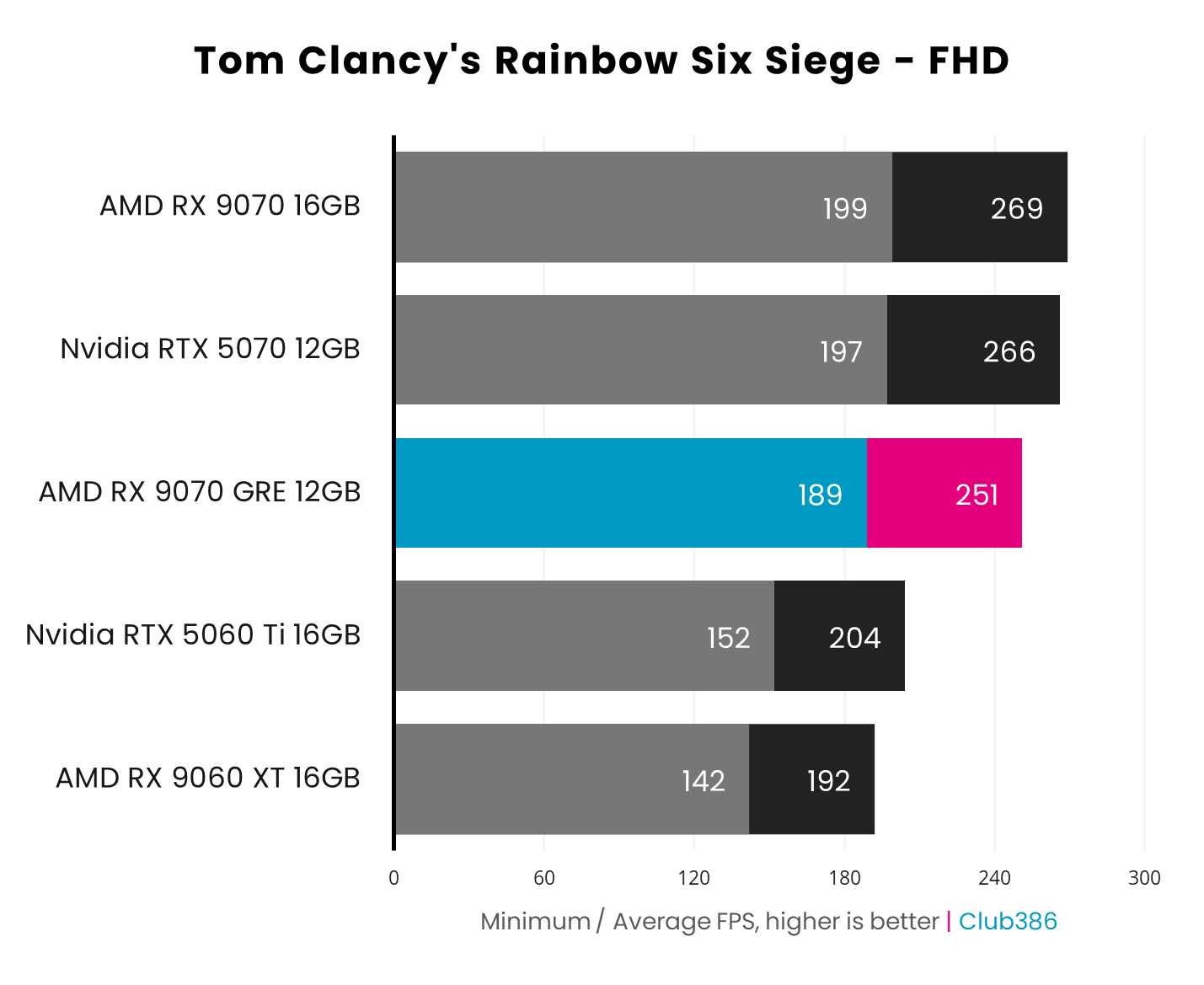
Looking at the Rainbow Six Siege results above, the RX 9070 GRE is more than capable of delivering excellent triple-digit frame rates in excess of 240fps+ in competitive games. That’s within spitting distance of the markedly more expensive RTX 5070 and RX 9070, furthering this GPU’s status as the best-value option.
The RX 9070 GRE also confidently surpasses the Nvidia GeForce RTX 5060 Ti 16GB and AMD Radeon RX 9060 XT 16GB. While we’d love to recommend either of these graphics cards as cheaper alternatives under normal circumstances, both have dramatically increased in price to the point where neither are worth picking up any more.
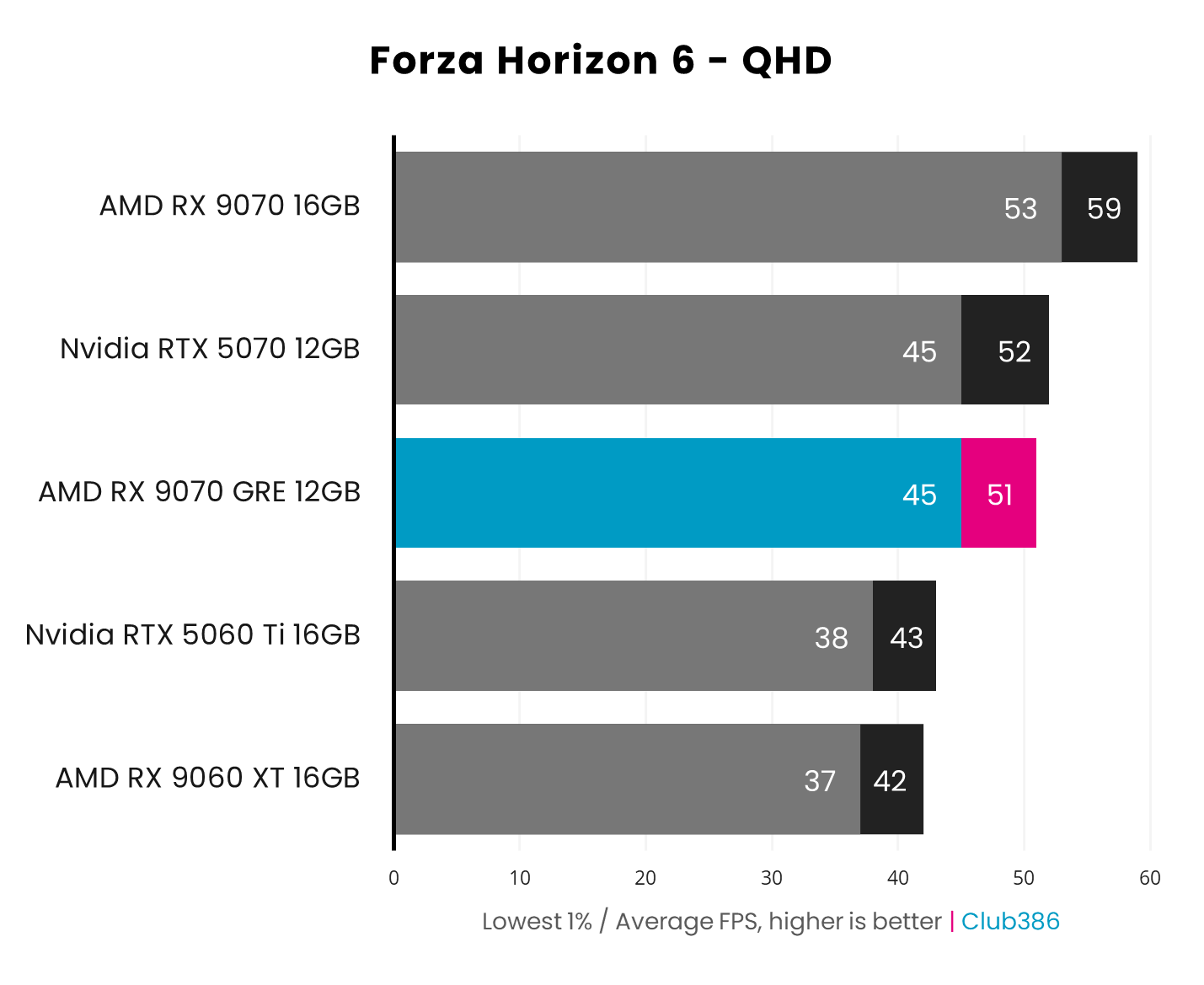
Switching over to ray tracing, the RX 9070 GRE further shows up the now-overpriced RTX 5070 with near-identical performance in Forza Horizon 6 at native QHD. While a 51fps average is a good result, FSR 4.1 can help us plug the gap to that 60fps threshold we’d want in a racing game, or we can just simply drop down to 1080p.
The story is much the same in other ray traced games, such as Assassin’s Creed Shadows, with neck-and-neck performance between the RX 9070 GRE and RTX 5070. The pressures of that game weigh heavier on all graphics cards, and it’s reasonable to expect settings adjustments by way of upscaling or otherwise to get this kind of rendering running well on mid-range hardware.
Read our full AMD Radeon RX 9070 GRE review for more details on this GPU, complete with more gaming and application benchmarks.
Best budget GPU
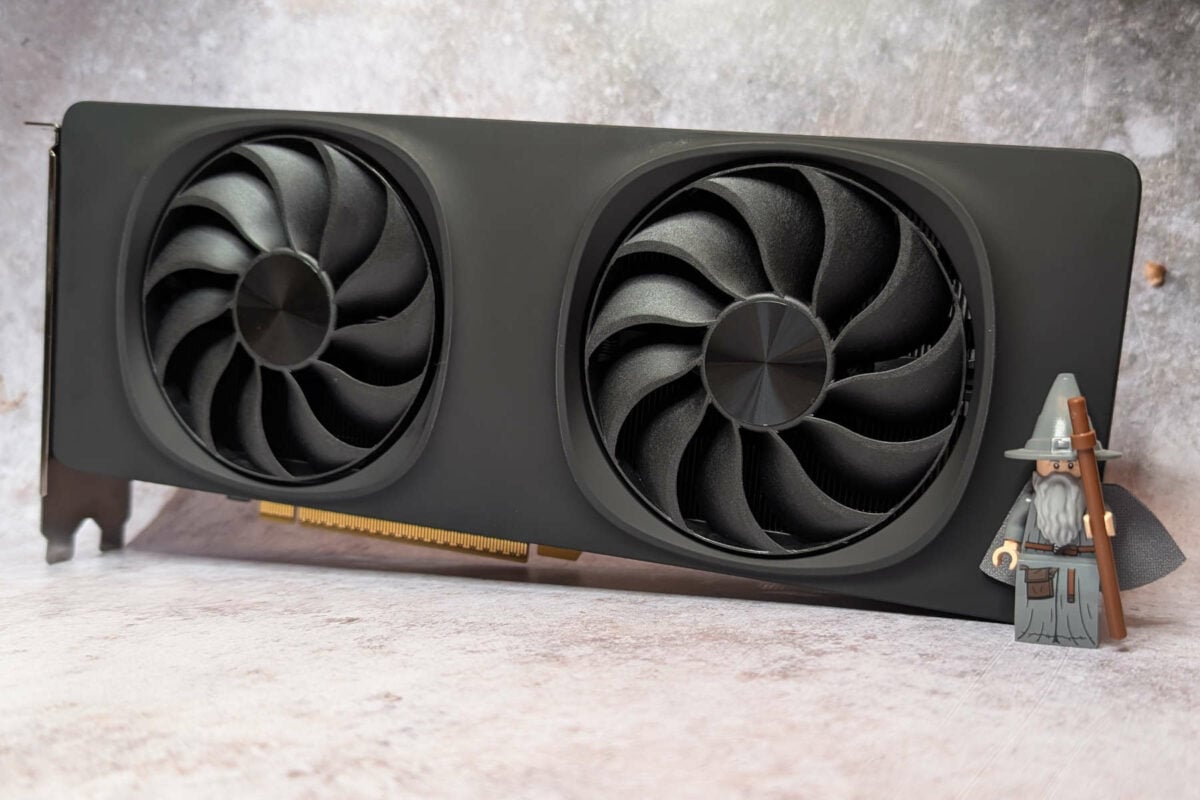
The best budget GPU is the Intel Arc B580. For the first time in decades, there’s now a proper third player in the GPU market, as Intel firmly challenges both AMD and Nvidia. The firm’s Xe2-HPG architecture is a massive improvement over its debut effort, arriving complete with welcome software and feature improvements. Combine all this with more VRAM than you’ll find on similarly priced alternatives and you have yourself a proper high-value hero.
Intel Arc B580
£354 / $369
Pros
- Good FHD/QHD performance
- 12GB of GDDR6 VRAM
- XeSS 2 support
Cons
- Some software gripes
- ~42-46% more expensive than launch
Club386 may earn an affiliate commission when you purchase products through links on our site.
How we test and review products.
8GB graphics cards such as the Nvidia GeForce RTX 5060 often face difficulties running games at their highest quality settings, even at 1080p, with the problem becoming even worse when you reach for 1440p. However, with 12GB of GDDR6 VRAM under its belt, the Arc B580 sidesteps this problem, with an ample 456GB/s of throughput to back up its relatively healthy capacity.
Riding alongside all that memory is the BMG-G21 GPU, the most-powerful chip in Intel’s gaming arsenal for the foreseeable future as any hopes of seeing the beefier BMG-G31 appear in anything other than an Arc Pro B70 and its AI-focused ilk are exceedingly low. Thankfully, the 20 second-generation Xe cores that live inside the petite 368mm² die provide suitably decent raster performance.
There are just as many second-generation ray tracing units whirring away inside the Arc B580. It’s in this type of rendering that this GPU shines a little brighter than its rivals, as they’re more easily able to stretch to higher quality settings and performance thanks to that all-important 12GB memory buffer.
| Intel Arc B580 | |
|---|---|
| Architecture | Intel Xe2-HPG |
| GPU | BMG-G21 |
| Xe-cores | 20 (2nd-gen) |
| Ray tracing units | 20 (2nd-gen) |
| XMX engines | 160 (2nd-gen) |
| Graphics clock | 2,670MHz |
| Memory capacity | 12GB GDDR6 |
| Memory speed | 19Gbps |
| Memory interface | 192-bits |
| Memory bandwidth | 456GB/s |
| TDP | 190W |
Rounding off the second-generation cohort are 160 Xe Matrix Extensions (XMX) engines, which serve as hardware accelerators for AI workloads. In addition to speeding up large language models, they also power other deep learning workflows including Intel XeSS 3. Through that software suite, the Arc B580 has access to high-quality upscaling, multi-frame generation, and lower latency.
Support for XeSS features is more commonplace than it was at the Arc B580 launch, but FSR and DLSS are more prevalent (particularly in older titles). It’s also worth noting that Arc B580 performance for major releases often greatly improves post-launch via driver revisions, highlighting Intel’s infancy in this arena. In fairness, though, neither AMD nor Nvidia has proven entirely blameless or reliable with their software in recent times.
Despite the Arc B580 rising in price by ~42-46%, this GPU’s new asking price of £354 / $369 still remains one of the lowest on the market today. However, stock is proving increasingly hard to find, with no affordable 12GB alternatives to plug the gap, so we’d recommend grabbing one of these graphics cards sooner rather than later.
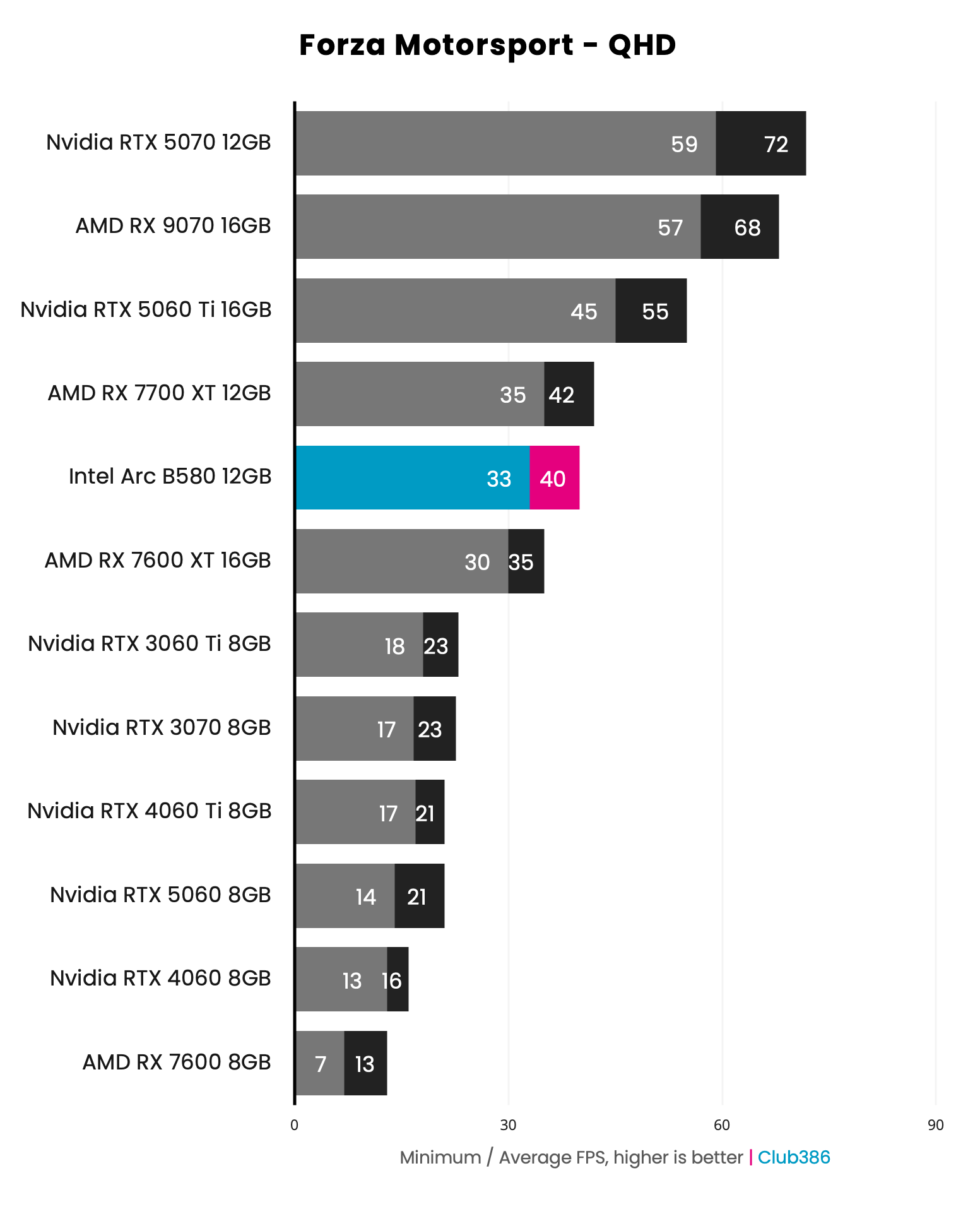
Kicking off performance comparisons with Forza Motorsport highlights just how much further Intel can sit ahead of its competitors in the face of ray tracing, thanks to all that memory. The Arc B580 is twice as fast as both the RTX 5060 and 4060 Ti, with both graphics cards delivering an unpleasant 20fps average as they crumble under their 8GB capacities.
While 40fps at QHD isn’t quite the 60fps we’d prefer for a racing game, this ray tracing frame rate is still playable and an impressive result relative to rivals. XeSS upscaling will help smooth out this result as well.
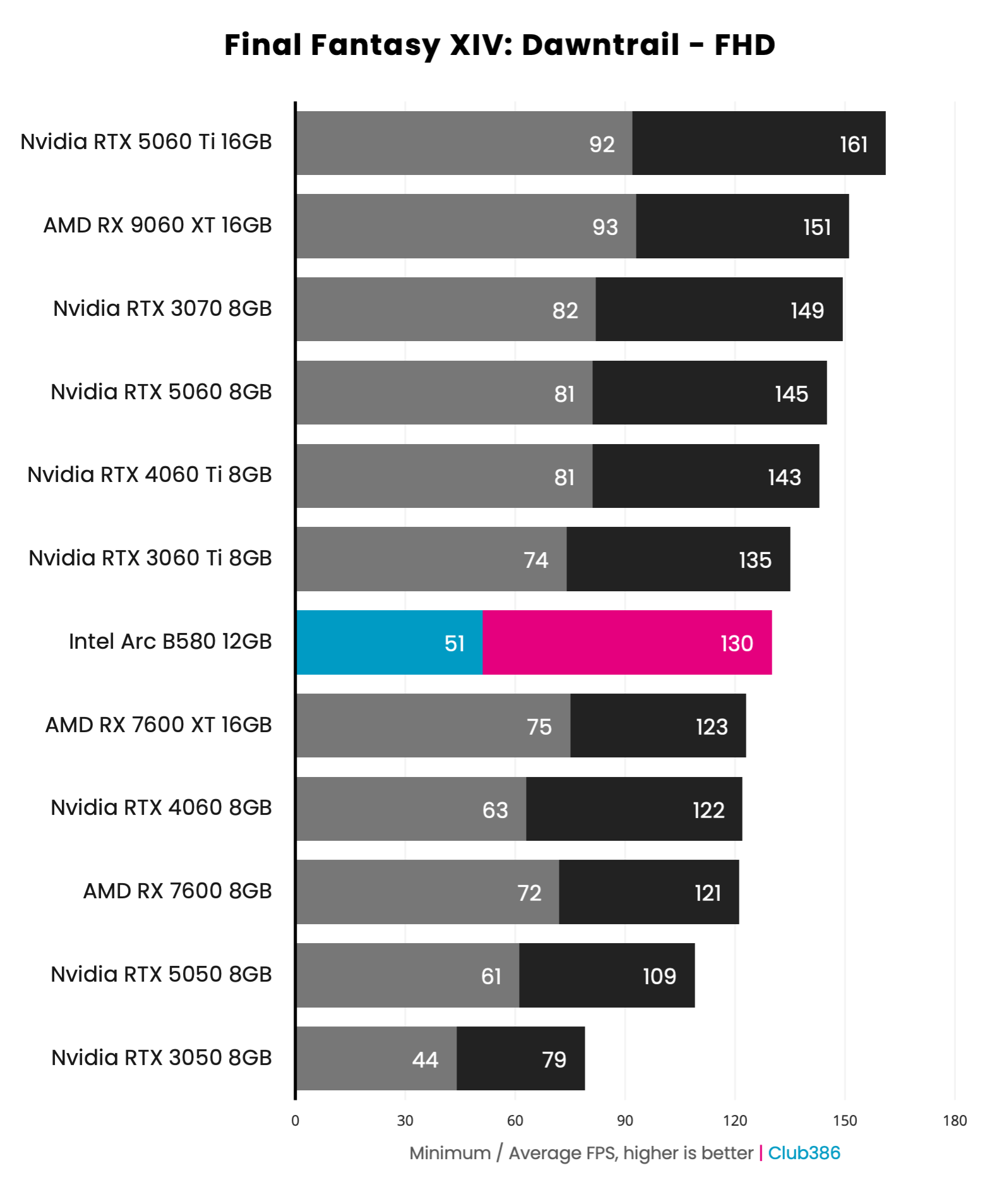
When VRAM is less of a factor, you can expect the Arc B580 to command less of a lead (if any) over its closest competitors. Take the Final Fantasy XIV: Dawntrail performance chart above, where Intel’s contender is 15fps behind the RTX 5060. However, Intel makes up for this in terms of value, as Nvidia’s option can cost 22% more at today’s prices.
The degree to which the Arc B580 kept up with the RTX 5060 could surprisingly vary at launch, particularly in games using APIs other than DirectX. However, Intel has made a lot of progress here, thanks to subsequent driver updates, and continues to do so as mentioned earlier.
Read our full Intel Arc B580 review for all the details about this gaming GPU, including our benchmark data.
FAQ
How much VRAM do I need?
In an ideal world, we recommend having at least 12GB of VRAM for gaming at 1920×1080, 16GB for 2560×1440, and 20GB for 4K. The goalposts have moved considerably over the last couple of years when it comes to GPU memory, and we’re seeing more games saturating memory quickly. If you don’t have enough VRAM, your GPU won’t just be a little bit slower; performance will often halve or worse, as your GPU can’t get the data it needs quickly enough.
Sadly, the current crisis around memory prices means we don’t live in this ideal world, and it’s looking increasingly as though the industry is going to prioritise 8GB cards at the budget end of the market for the next year or so. That means you’ll need to consider making a compromise, either on how much money you’re willing to spend to get more VRAM, or how far you’re prepared to lower your in-game graphics settings.
You can still get decent gaming performance from an 8GB graphics card, just bear in mind that there will be cases where you can’t run your games at high settings, even at 1920×1080, as you won’t have enough VRAM.
Do I need PCIe Gen 5?
Both AMD and Nvidia’s latest graphics cards use a PCIe Gen 5 interface, but that doesn’t mean you need a PCIe Gen 5 motherboard to run them. You will, however, need to keep an eye on the number of lanes available. If your board’s has a PCIe Gen 4 x16 slot, you’ll have more than enough bandwidth to run any graphics card. Higher-end models like the RTX 5080 may see a performance dip of a few percent at most, but it’s nothing you’ll notice.
If you only have PCIe Gen 3, though, there will be a performance drop off, particularly with cards at the cheaper end of the scale, as a lot of these GPUs use fewer PCIe lanes than their high-end counterparts. For example, the RTX 5060 Ti uses eight PCIe Gen 5 lanes, rather than 16. That’s fine on a PCIe Gen 5 motherboard, where you’ll have more than enough bandwidth, but you’ll still only get eight lanes if you put it in a PCIe Gen 3 motherboard, giving you just a quarter of the bandwidth.
What are DLSS, FSR, and XeSS?
Nvidia DLSS, AMD FSR, and Intel XeSS have all become very confusing, and it can be hard to make head or tail of all the various different technologies bundled into these suites. As a general rule, the purpose of DLSS, FSR, and XeSS is to improve performance in your games, particularly when you enable demanding graphical features such as ray tracing. All of them offer a way to upscale resolution, for example, where a game will keep all the text, menus, and HUD at your chosen resolution, but render all the 3D graphics at a lower resolution to speed up frame rates, then use some form of upscaling to minimise the impact on visuals.
Some of these technologies work better than others, especially when it comes to image quality, and they’re not supported by all GPUs. The best ones are the DLSS Transformer model, which works on all Nvidia RTX GPUs, but is much quicker on RTX 4000 and 5000 GPUs than previous ones), and FSR 4, which is now a part of AMD’s FSR Redstone suite and runs on the company’s Radeon RX 9000-series GPUs. Intel’s hardware-based XeSS upscaling works well too.
Previous versions of FSR, however, look poor in comparison, with a lot of noise and blurriness. These models of FSR have the benefit of working on any GPU, whoever made it, but they’re not based on machine learning, and they make your games look bad in comparison.
The other main way these suites can improve performance is by using frame generation, where extra frames are generated in between the ones genuinely rendered by your GPU, in order to give you a smoother frame rate. Nvidia is the king of frame gen right now, with its AI-based frame gen tech working well with minimal artifacts, and its multi-frame-gen tech even enabling you to nearly quadruple your frame rates. You’ll need a good starting point before you switch it on, though, or you’ll get horrible input lag. We recommend only using frame gen if you’re already averaging around 60fps – you can then use it to smooth out motion, which looks great on a monitor with a high refresh rate.
Both Intel and AMD also offer frame gen. AMD’s original FSR frame gen was a bit of a mixed bag, with big variations in performance and visible artifacts, but its new AI-based frame gen tech in FSR Redstone works well. It’s not supported by anywhere near as many games as DLSS, though. Intel also has XeSS frame gen now, including its own 4x multi-frame-gen tech.
Are AMD GPUs bad at ray tracing?
Not any more, but they used to be. AMD had to play a big game of catch-up when Nvidia started dabbling with AI and ray tracing. AMD’s first-gen RDNA GPUs, the Radeon RX 5000 series, had no ray tracing hardware at all, and while its later RDNA 2 and RDNA 3 GPUs rectified this shortfall, they still fell behind the Nvidia competition. Thankfully, that situation has now been resolved, and AMD’s latest Radeon RX 9000 RDNA 4 GPUs are great at both ray tracing and traditional rasterisation.
The only pitfall is path tracing, a highly advanced form of ray tracing that gives you very realistic lighting in games that support it, but is extremely compute-intensive. AMD GPUs can do it, but at such a huge performance cost that it isn’t worthwhile. Nvidia’s GPUs can handle path tracing much better, but even they struggle at higher resolutions – you’ll be lucky to get beyond 1920×1080 on an RTX 5070 Ti.