
DLSS 4.5 has arrived, or at least part of the suite has. The second-generation Transformer model for DLSS Super Resolution is now available to all GeForce RTX cards. In its wake, I’ve taken the opportunity to put the latest version in a head-to-head with DLSS 4. It’s a close race, with a few bumps along the way, but when starved of new hardware, this is one upgrade many gamers will want to get up and running as soon as possible.
For an introduction into what DLSS 4.5 is, please read my coverage of Nvidia’s announcement. Down below, you’ll find instructions on how to inject DLSS 4.5 into compatible games, as well as image quality analysis relative to DLSS 4. As a reminder, this will only cover the Super Resolution portion of the suite, but you can expect follow-up deep dives into x6 Frame Generation and Adaptive Frame Generation when they arrive later this year.
How to enable DLSS 4.5
Come January 13, 2026, the Nvidia App will offer the DLSS 4.5 override out of the box. Until that time, you’ll need to download a beta update to gain access to the new model.
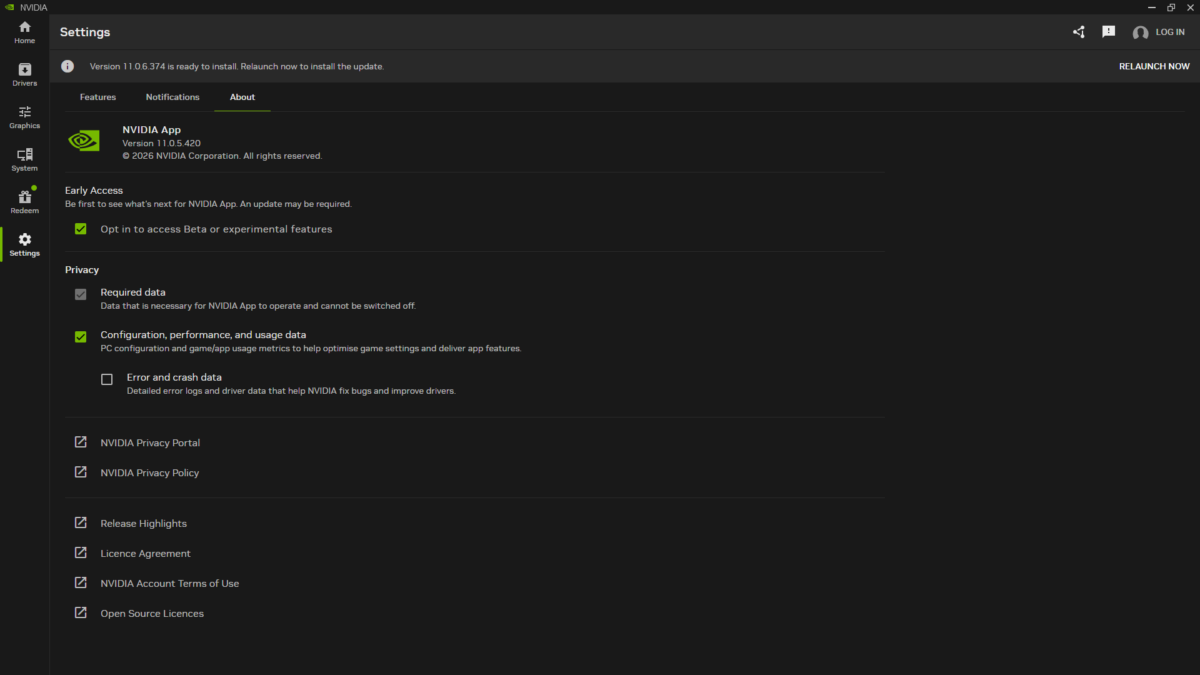
Open the Nvidia App and click the ‘Settings’ tab on the left. Open the ‘About’ section at the top and opt into beta or experimental features by checking the box. Once you’ve done that, you should see a grey notification bar appear, prompting you to update. You’re good to go if you’re running version 11.0.6.374, in tandem with GeForce Game Ready Driver 591.74.
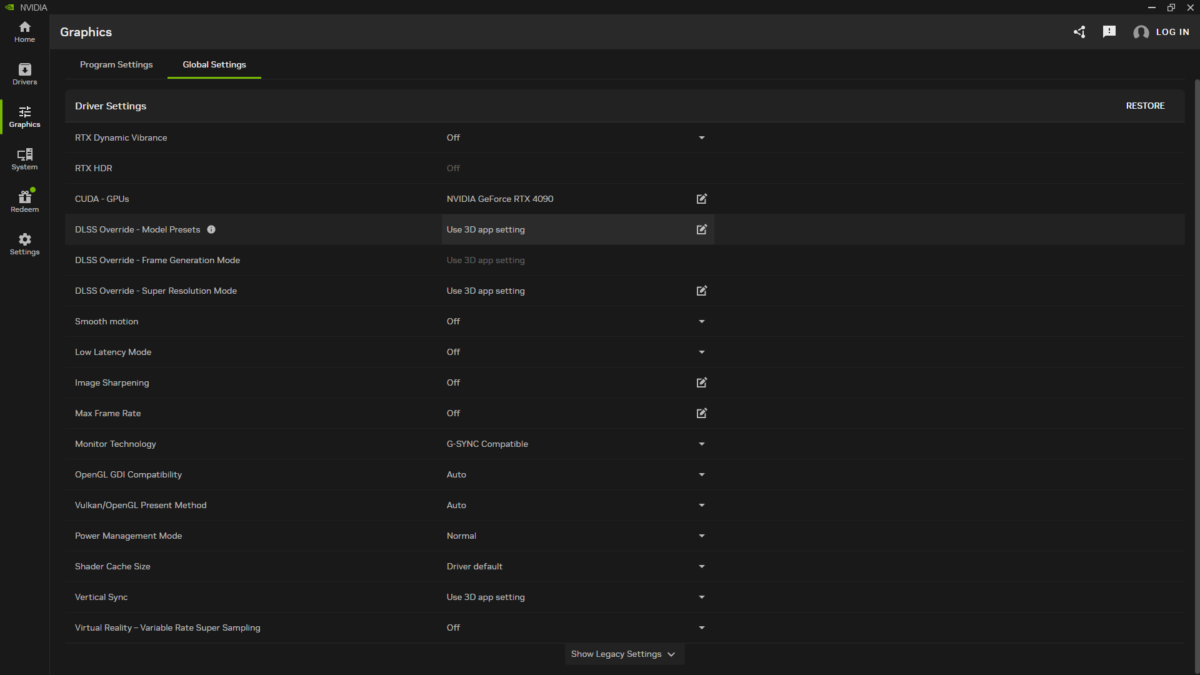
In the ‘Graphics’ tab, again, on the left, you can choose whether to enable DLSS 4.5 on a per-game basis or across your entire library. For the sake of simplicity, I’ll be guiding you on the latter approach but the steps are the same for individual titles. Open the ‘Global Settings’ section at the top, and find the ‘DLSS Override – Model Presets’ row.
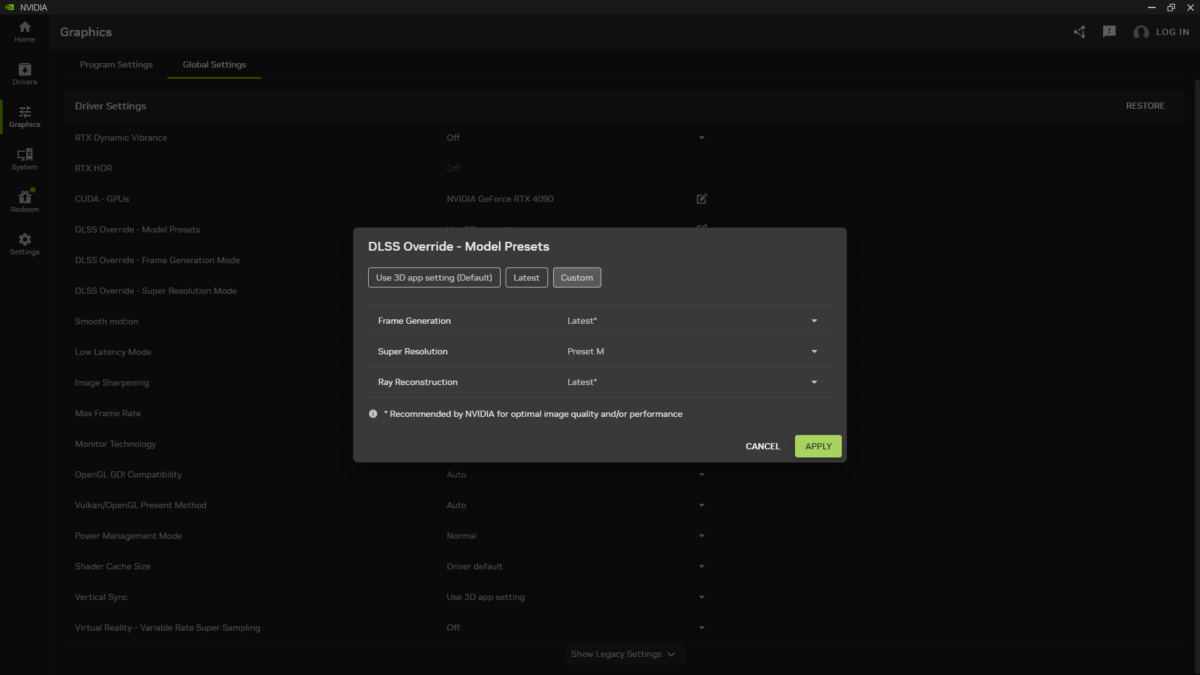
From here, you can customise the DLSS DLL for Frame Generation, Super Resolution, and Ray Reconstruction. The simplest solution to getting DLSS 4.5 up and running is by selecting the ‘Latest’ tab, which will override whatever feature versions a game has with the latest available. Alternatively, you can select particular models (or presets) which run A-M.
In the case of DLSS 4.5, you have two choices. ‘M’ is the latest and closest to default preset, and is what most people will want to use. ‘L’, meanwhile, is most-optimal for 4K ‘Ultra Performance Mode’, and incurs a slightly heavier performance cost. For the sake of completeness, ‘K’ is the DLSS 4 we’ve come to known since January 2025.
You can ensure that an override is working by using the Nvidia Overlay’s statistics feature, which you can access via the Nvidia app or with the keyboard shortcut ‘Alt+R’. You can create your own view or cycle through the presets using ‘Shift+Alt+R’, which includes a ‘DLSS’ profile that explicitly describes if overrides are active and what profile is in use.
Beware of DLSS 4.5 pitfalls
Before we turn to analysing DLSS 4.5, there are a few notes I’d like to pass on. Most importantly, as this affects all GeForce RTX GPUs, DLSS Super Resolution overrides do not work if DLSS Ray Reconstruction is active. I found this out the hard way, and I’d encourage Nvidia to actively highlight this in its app as well as through game settings menus.
Finally, if you’re using a GeForce RTX 30 or 20 series card, this new Super Resolution model will come at a higher performance cost than DLSS 4.5. This is an unavoidable trade-off owing to a lack of hardware support for the FP8 instruction set which DLSS runs on. I still encourage you to try the new version on your GPU, but you should prepare for lower than usual frame rates.
DLSS 4.5 vs. DLSS 4
For this first look at DLSS 4.5, I’m using a GeForce RTX 4090. This former flagship still has plenty of gaming performance to offer, and like other RTX 40 series cards can enjoy this new second-generation Transformer model with minor impact to frame rates. The same, of course, goes for RTX 50 GPUs, whose more-advanced Tensor cores will carry this particular load a little easier.
Cyberpunk 2077 serves as the testing arena for my DLSS showdown. In terms of settings, I’m running the game using its RT Overdrive preset sans DLSS Ray Reconstruction at QHD (1440p). Using the built-in benchmark for a repeatable and comparable scenario, that you can also try for yourself, I’m benchmarking image quality and performance using DLSS 4.5 and 4 in their ‘Performance’ modes, in effect upscaling from HD (720p).
I’ll be zoning in on anti-aliasing quality, ghosting, and temporal stability in my image analysis. These are the three key improvements that DLSS 4.5 should provide, but there are other noticeable differences relative to DLSS 4 if you know where to look.
Image quality
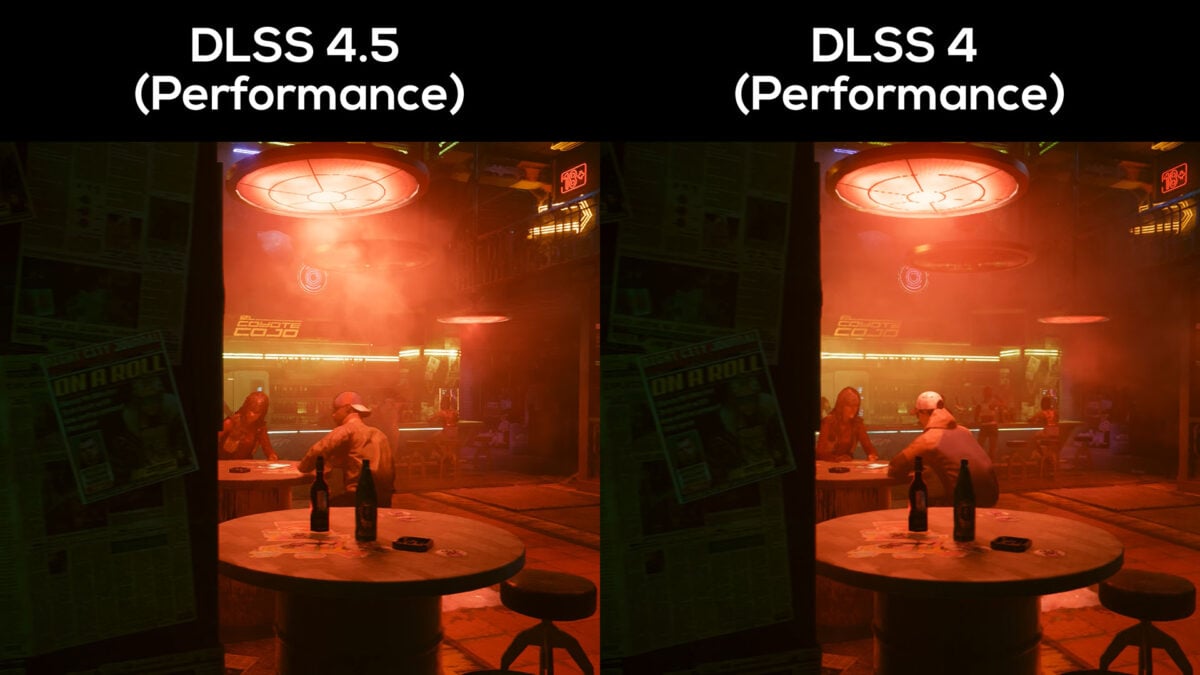
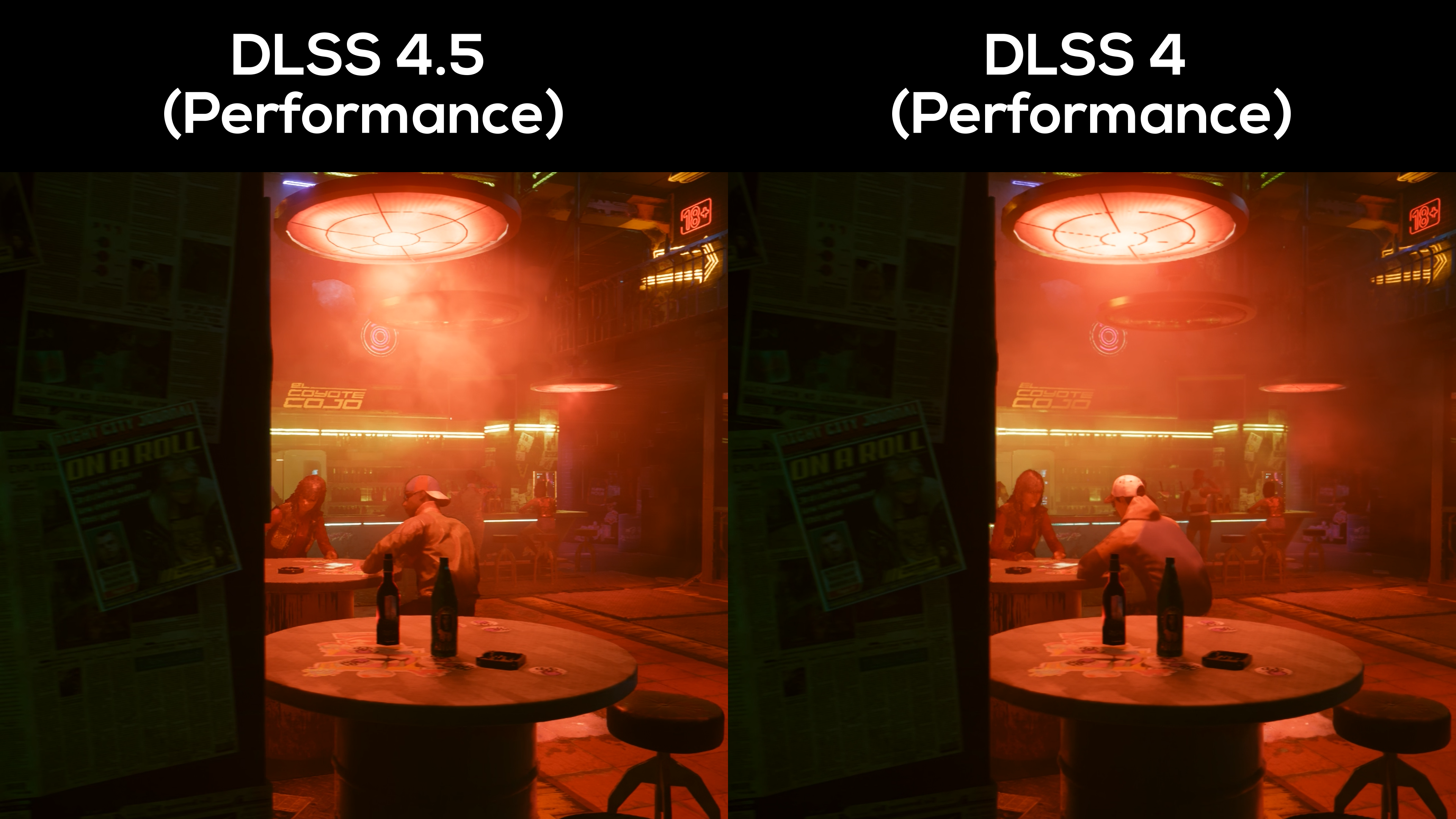
Differences in temporal stability and anti-aliasing are readily apparent, just a couple of seconds into the benchmark. Look at the lamp above the two closest patrons and note how DLSS 4.5 more confidently resolves line detail, both in the subtle ridges of bulb’s glass and its shroud.
The scene as a whole is sharper in DLSS 4.5 too, bringing out more definition is distant and small objects. You can see this by comparing the ashtrays on the tables, as DLSS 4 doesn’t define the shape and contents of either as well as its successor.
Curiously, light sources also appear brighter. This isn’t a consequence of run-to-run deviations in the smoke, as this quality presents itself elsewhere. Check out the LED light strips the run the length of the bar, as well as the neon signs towards the top-right.
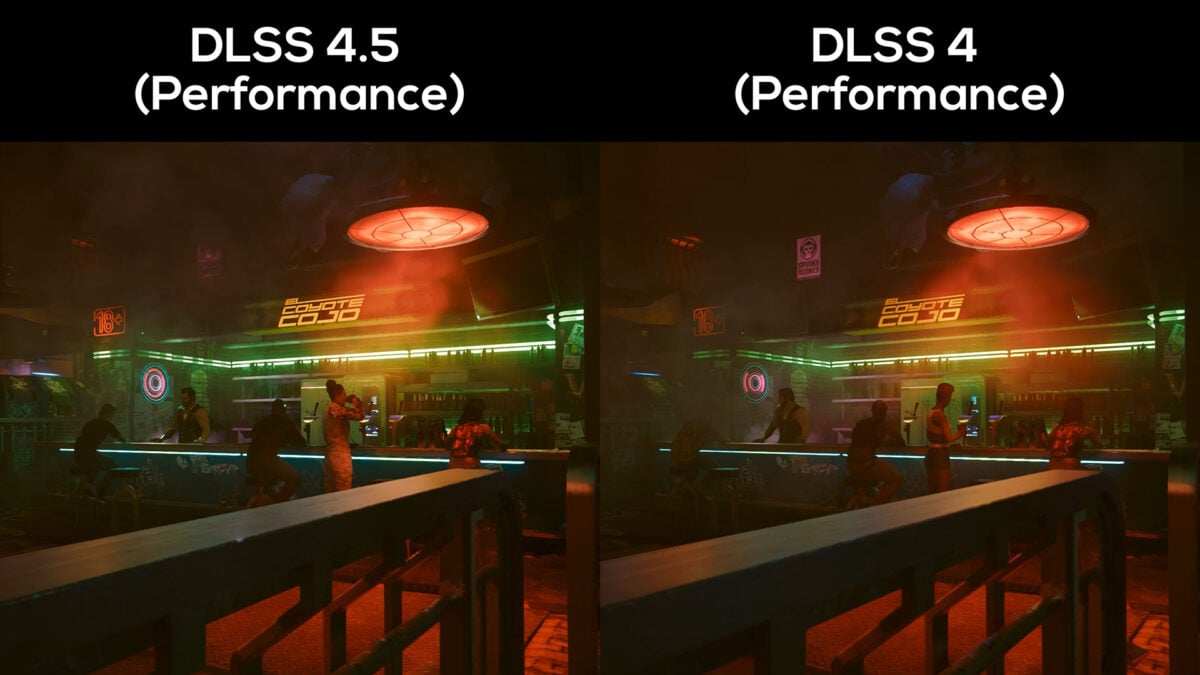
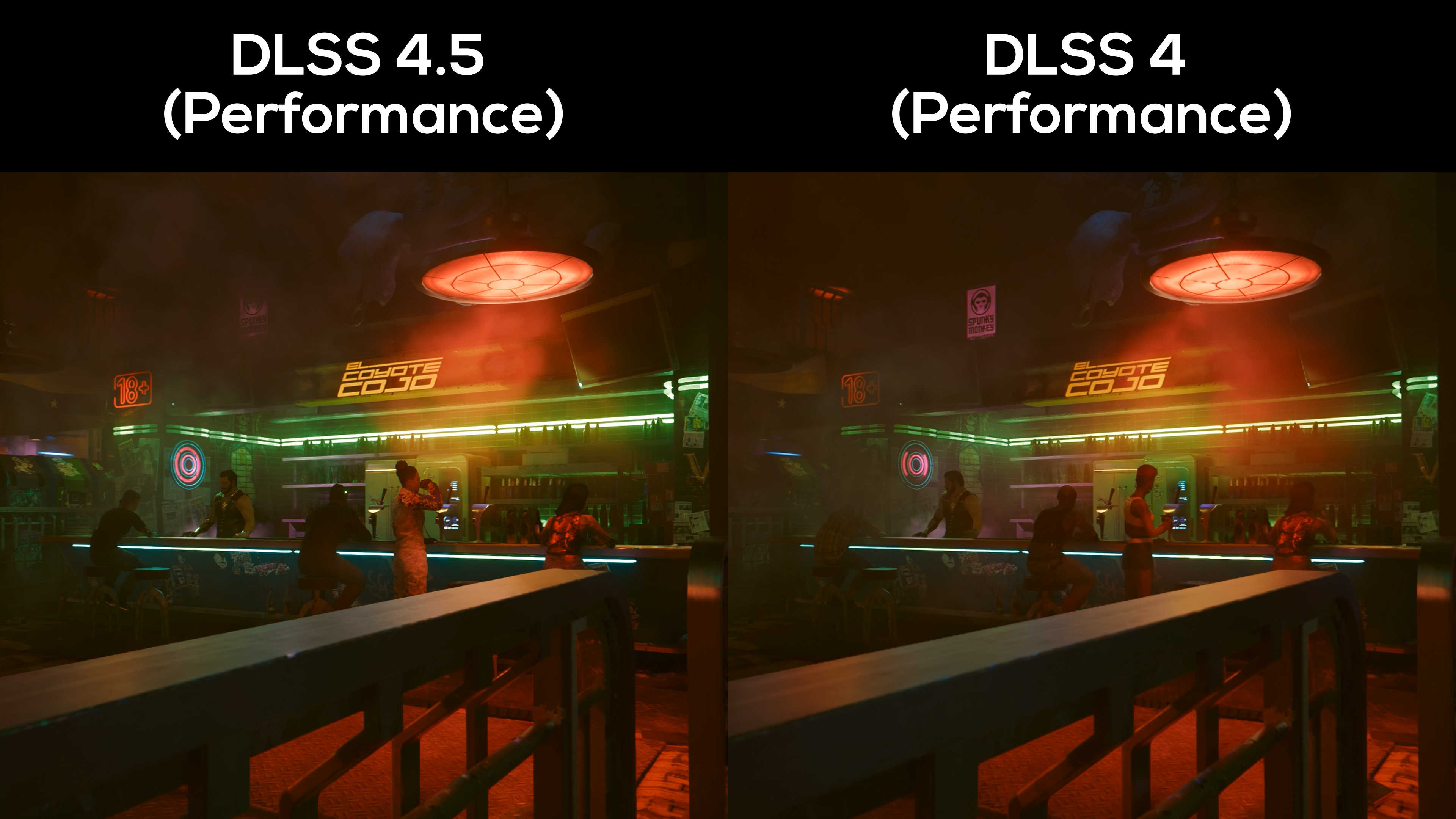
Moving closer to the bar, the light above receives the same glow-up (pun intended) I pointed out earlier. You’ll also see jaggies on the LED light strip closest to the camera present on DLSS 4 disappear as DLSS 4.5 takes over.
Scene detail is clearly higher on DLSS 4.5, with smoke effects exhibiting more definition around the ‘Spunk Monkey’ sign. To my eye, the newer upscaler pulls out more distinctive shapes and colours in the air, almost like I’ve gone from ‘Medium’ to ‘High’ on a fog setting. Check out the metal flooring, whose raised elements look more detailed.
Again, light sources are brighter here too. Comparing the shine of the green LED strips at the back of the bar, DLSS 4.5 looks more true-to-life of a neon glow.
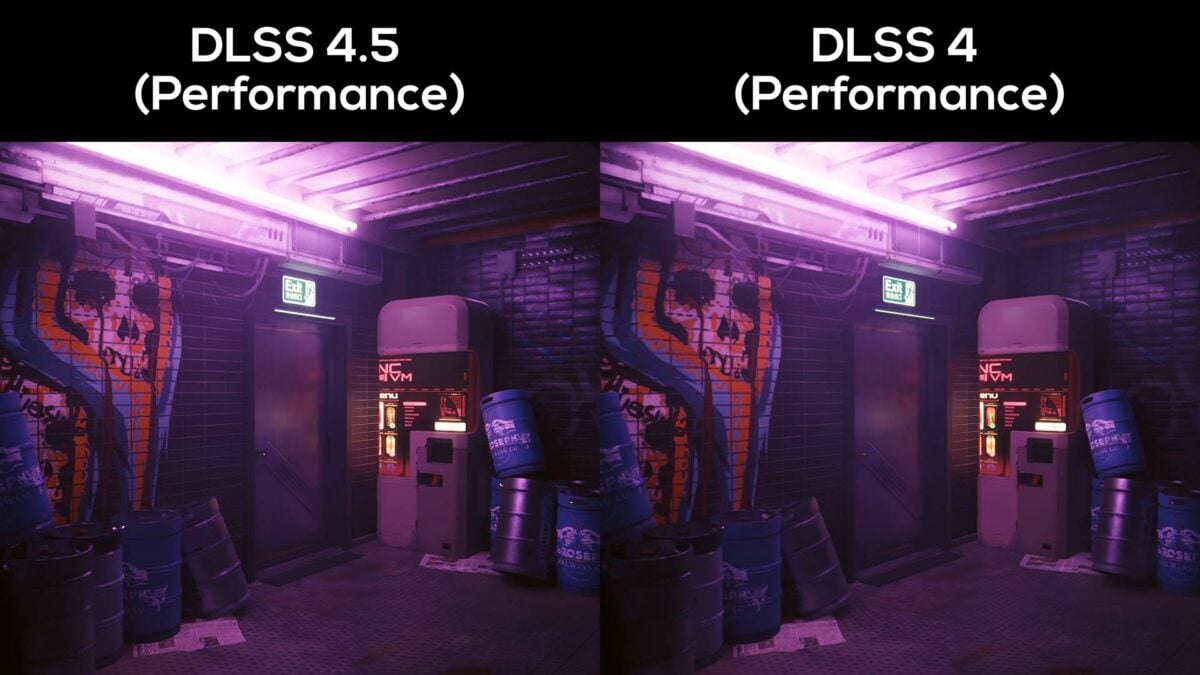
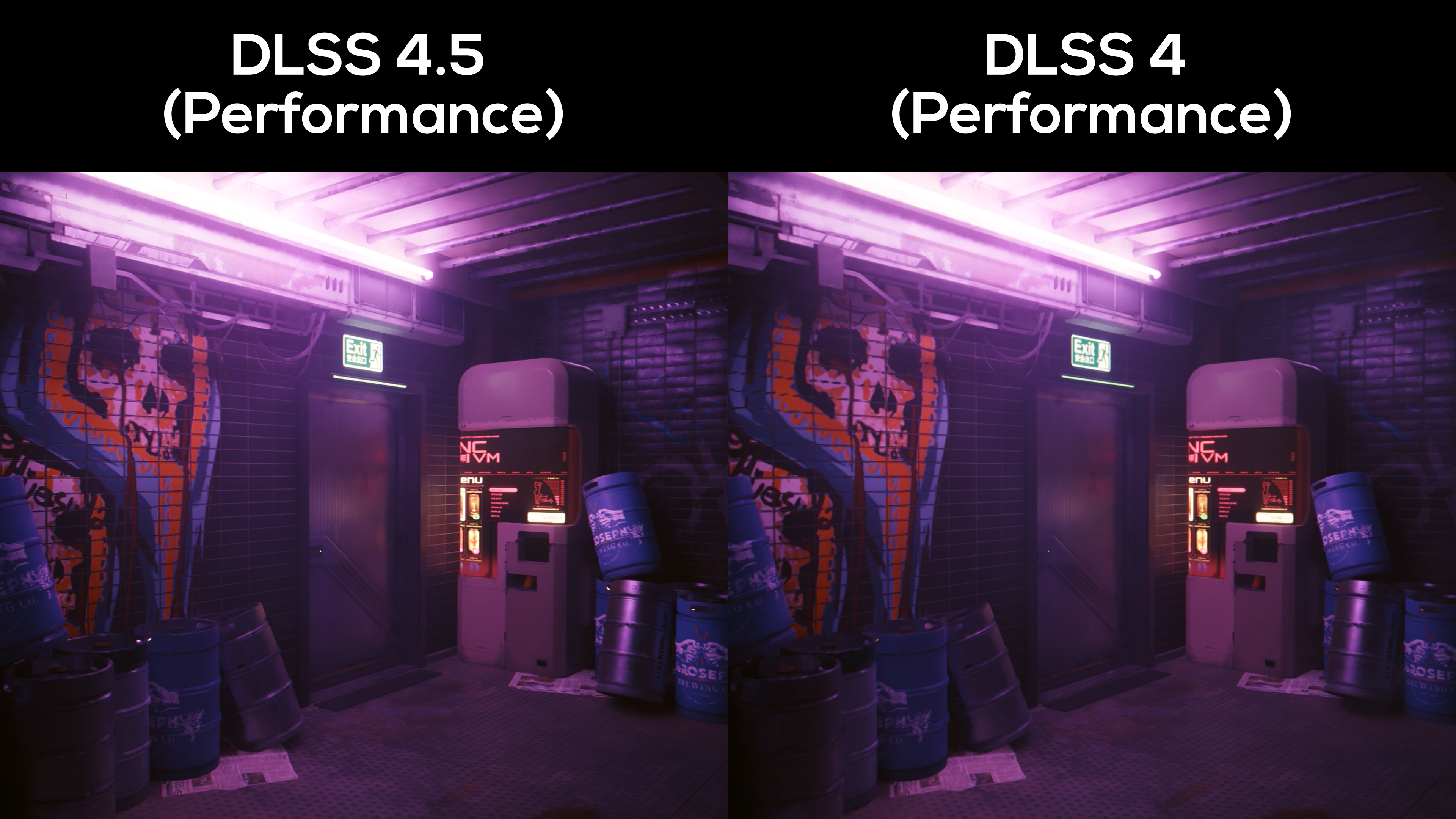
In this storeroom, the printed logo on the Broseph Brewing Co. barrels is sharper using DLSS 4.5, as is the text on the machine next to the exit. It’s a subtle effect but difficult to unsee once you’ve noticed it.
Similarly subtle, the reflection of those machine’s lights is comparatively muddy on DLSS 4 than it is DLSS 4.5. Ideally you’d have DLSS Ray Reconstruction at your disposal for that effect, but the new Super Resolution model does bring out more detail using the game’s built-in denoiser.
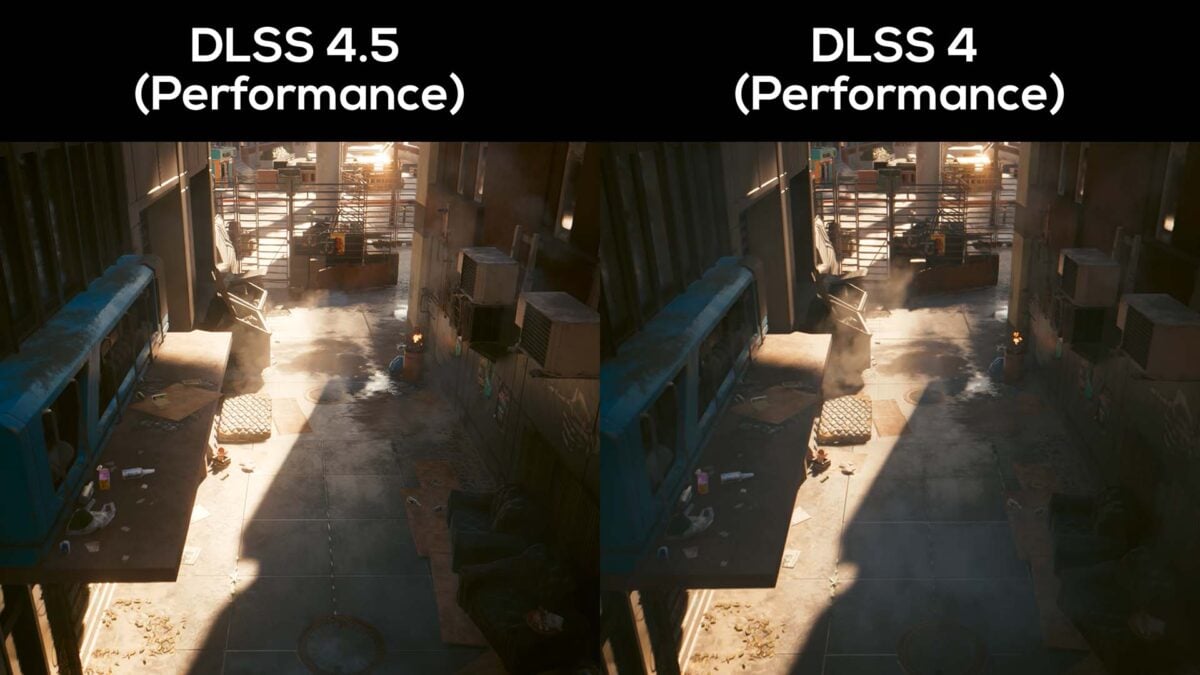
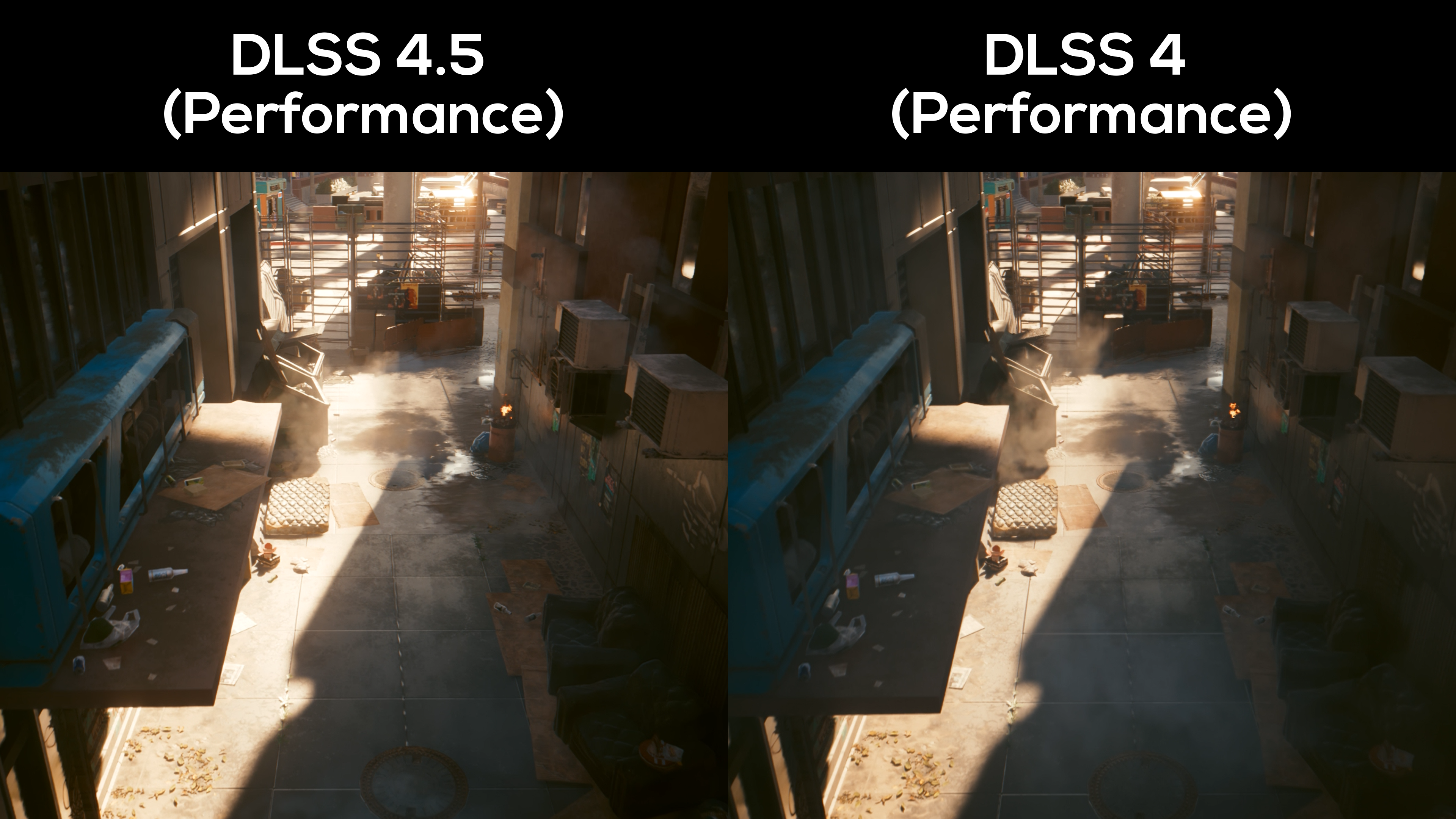
Assessing this alleyway from above, temporal instabilities in DLSS 4 rear their head as the older upscaler can’t settle on how to render the underside of the mattress as the camera pans towards it. DLSS 4.5 shows no such obvious shimmering, and more appropriately dulls line detail as it bakes in the sun.
Likewise, DLSS 4.5 keeps a cooler head while rendering the lines on the dumpster lid closest to the fence. I appreciate that the differences don’t look all that distracting in a still image, but must profess they’re far more appreciably noticeable in motion.
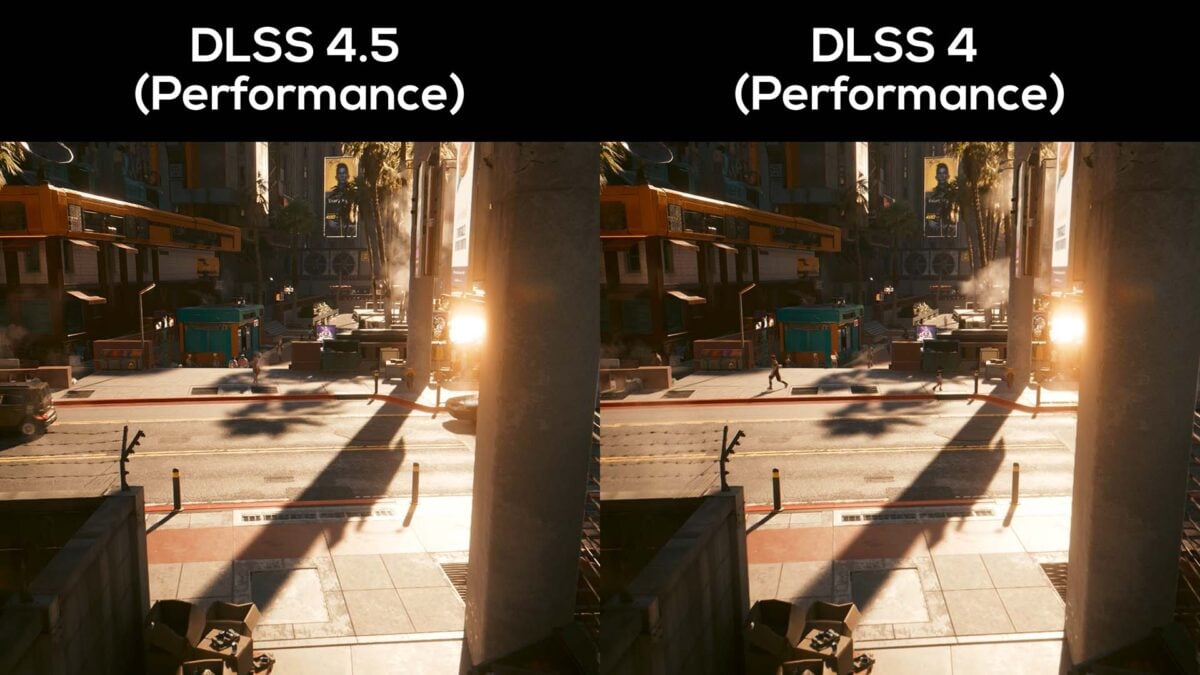
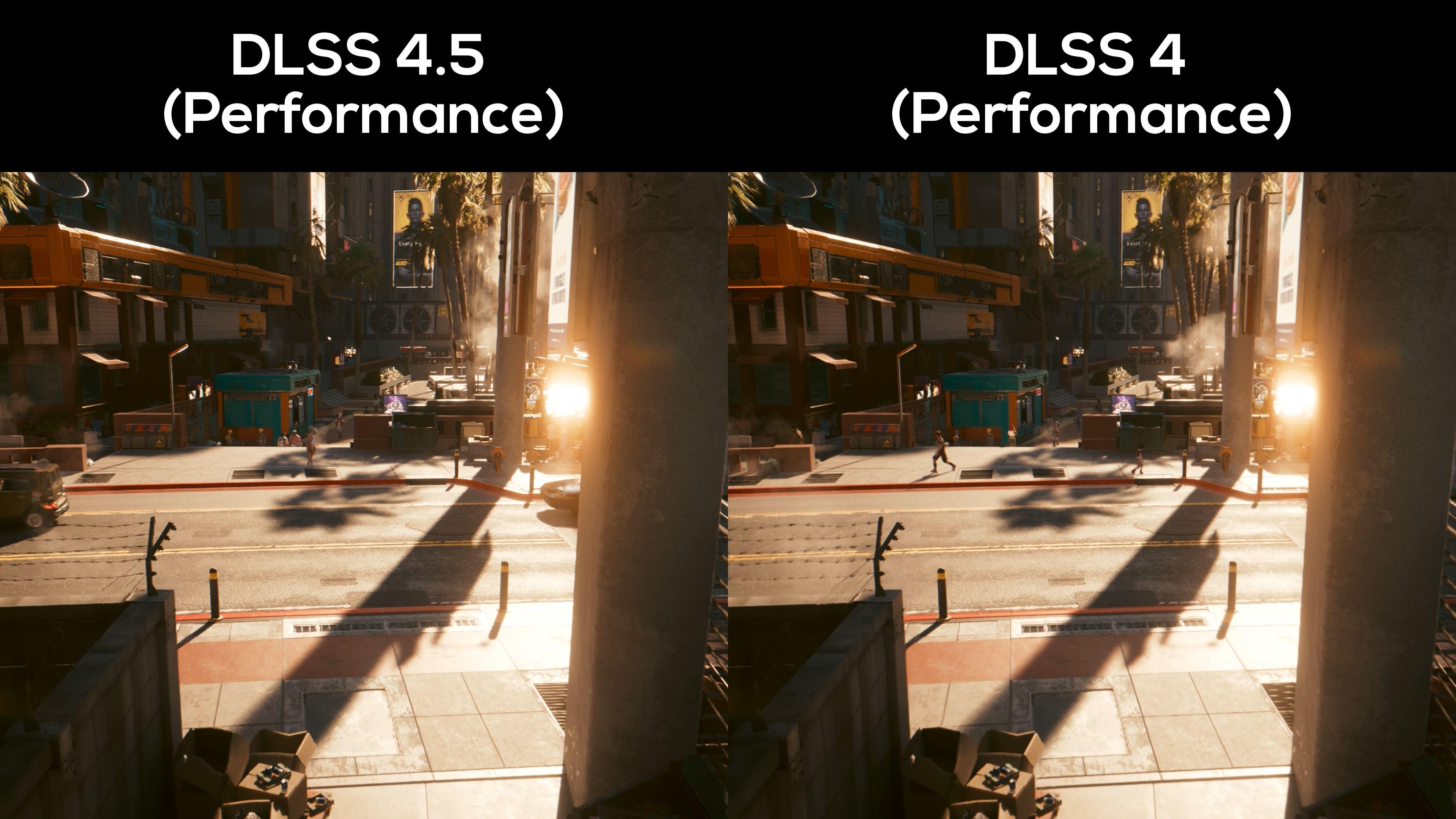
Entering the street, the barbed wire on the left-side of the screen retains more detail in DLSS 4.5. By comparison, the individual wires look as though they’re disintegrating on DLSS 4. The ventilation grille poking out from behind the pillar exhibits similar qualities between the two upscaling models.
Blink and you’ll miss it, the glow from the street lamp across the road has gone from a dull single line to brighter, more well-rounded glow.
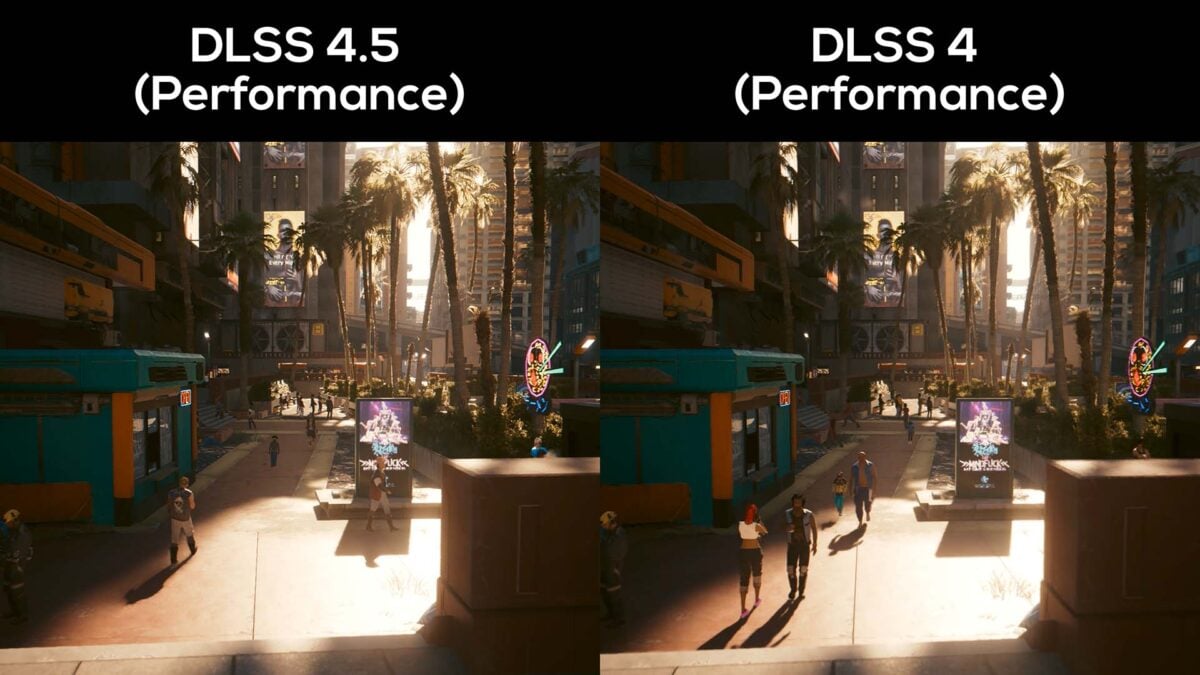
Crossing the street, the neon glow from the noodle bar’s sign on the right-hand side is clearly brighter on DLSS 4.5, as is the street lamp next to it. You can also more easily read the kanji below the former, particularly the thin strip on the bottom-left character.
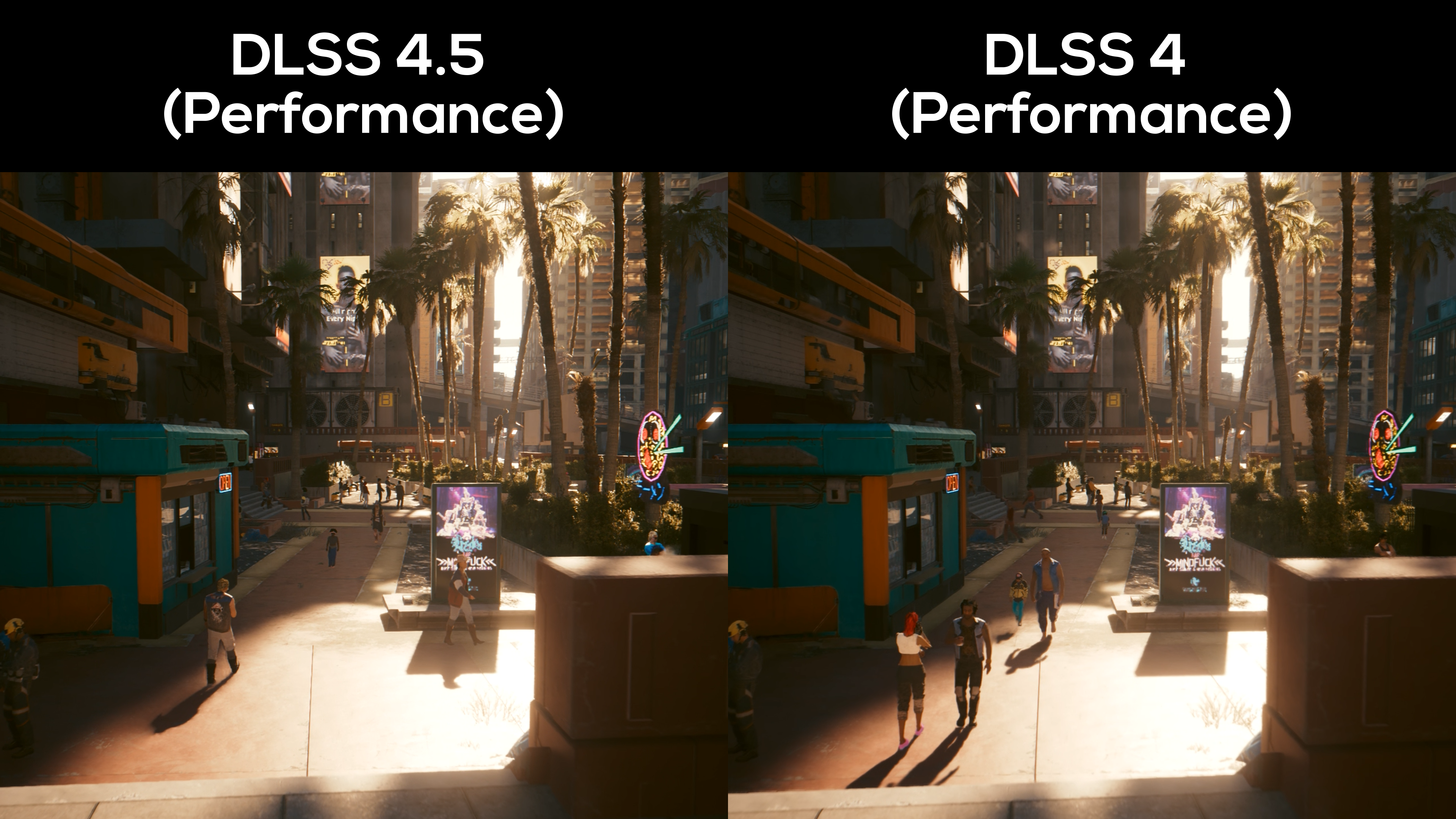
Turning attention to the palm trees, where DLSS 4 presents a softer, muddier, image, DLSS 4.5 is again noticeably sharper. This does make it easier to appreciate each individual leaf stem but gives a slightly crunchy appearance in spots. However, the newer model once again better retains fine line detail, such as the razor-thin stem growing from the stump closest to the camera.
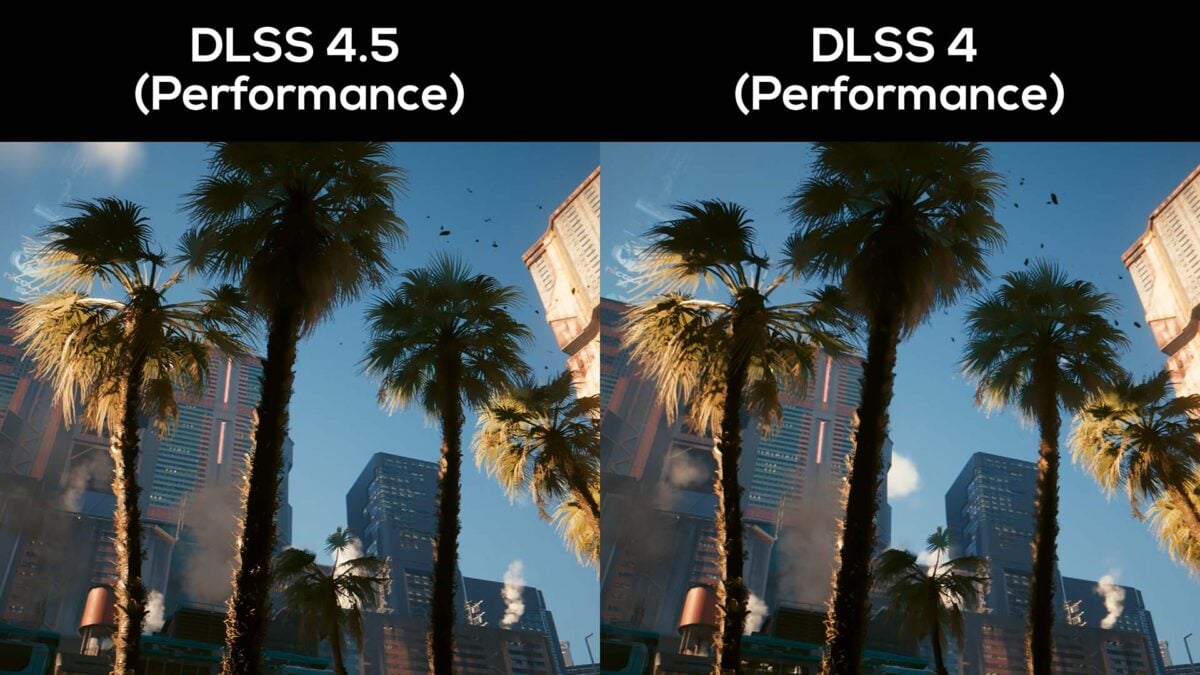
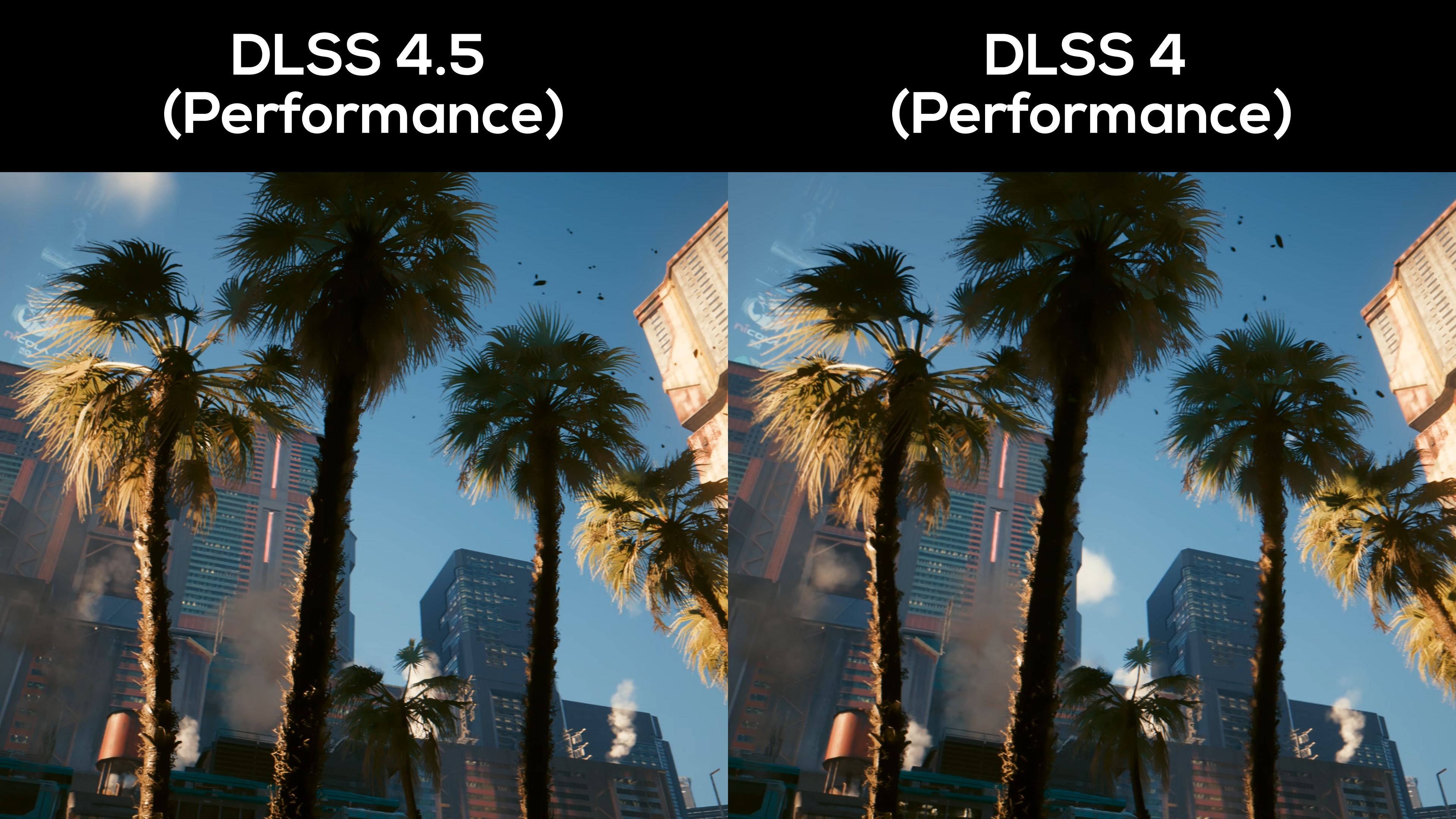
Staring up at the sky, black particles enter the scene. To its credit, DLSS 4 does a good job at keeping ghost trails to a minimum, but the odd instance still crops up. DLSS 4.5 improves on this to the point I struggled to notice any and began to second-guess myself after staring at my captured footage for a while.
Finally, the most noticeable uplift you’ll find in this scene is in the temporal stability and anti-aliasing of the palm tress. Both bark and leaves are richer in detail, with less fringing and muddied textures.
Performance
Here’s where I’d usually go into detail about the performance differences between DLSS 4.5 and 4, but they’re frankly negligible, even on a GeForce RTX 40 series card. Testing every DLSS Super Resolution preset from ‘Quality’ to ‘Ultra Performance’ at QHD, the biggest percentile difference in frame rate amounted to 2.5% at most.
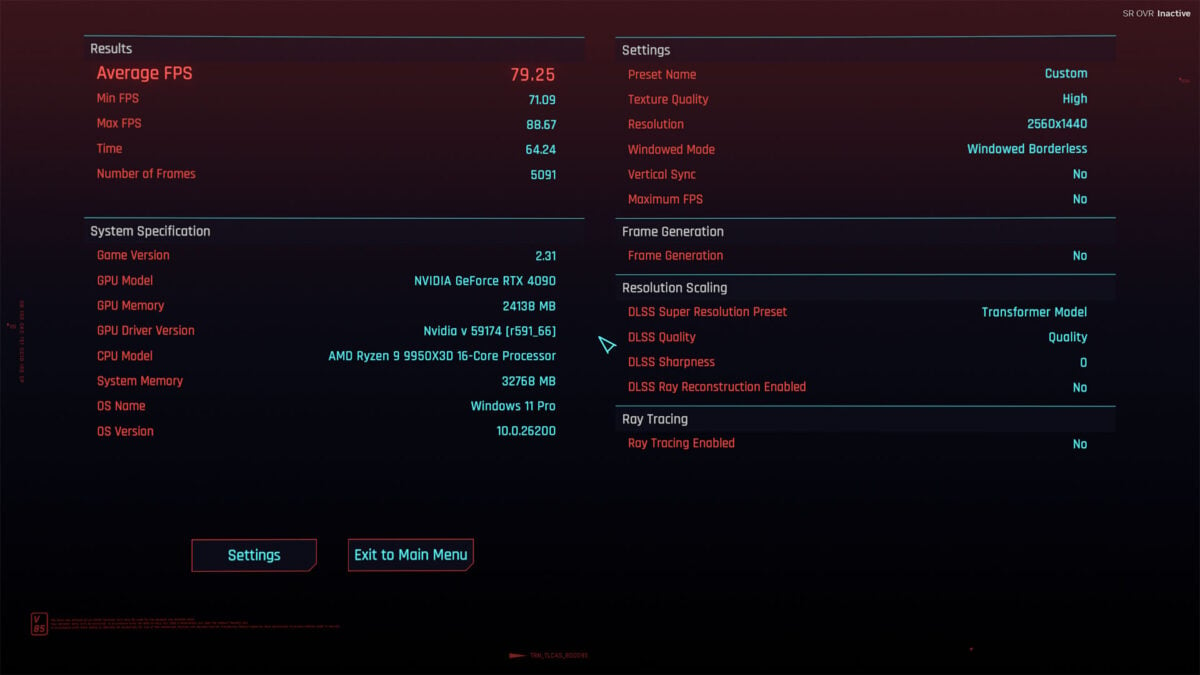
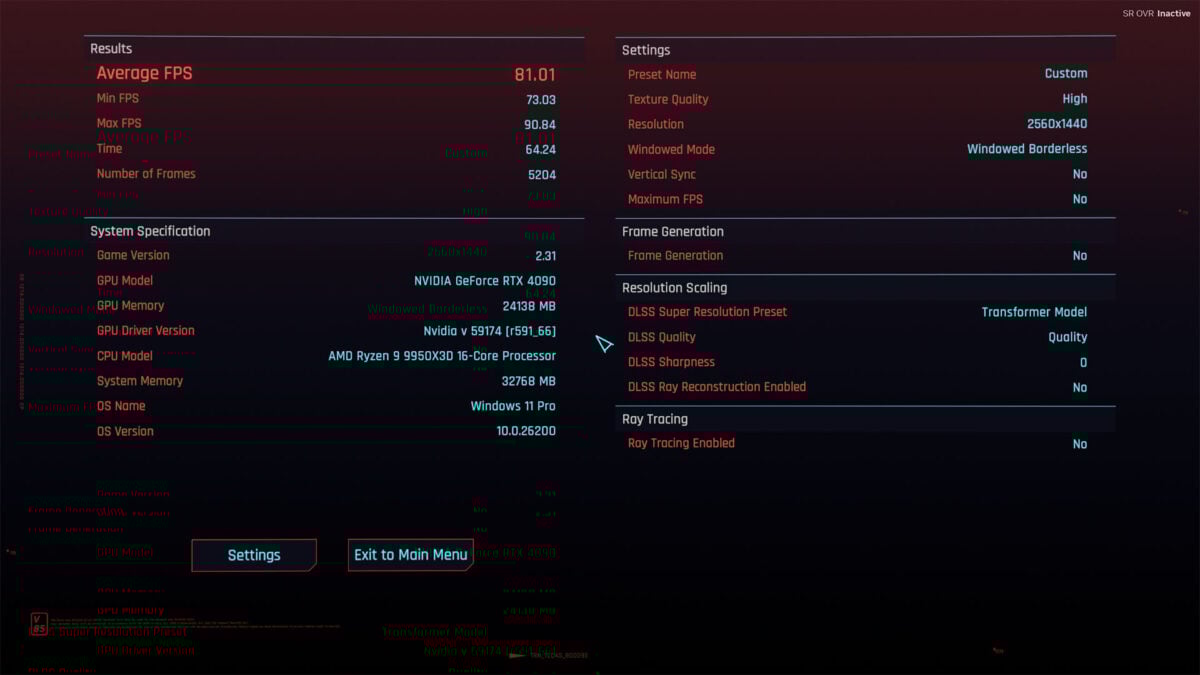
This difference in performance should manifest similarly, if not less so, on RTX 50 series cards. Of course, RTX 30 and 20 series cards will see a larger decrease in frame rate.
Conclusion
The advantages that DLSS 4.5 brings are often subtle, to the degree you could reasonably describe any improvements I pointed out as pixel peeping. However, on occasions that DLSS 4 falters, particularly in motion, the two models couldn’t look more different.
If you have a GeForce RTX 50 or 40 series card, I see no reason not to enable DLSS 4.5 in compatible games. A <3% reduction in performance in favour of superior image quality is a reasonable trade in my book. However, this recommendation is far more tentative for those on older architectures, where case-by-case testing becomes a necessity.
The only real stumbling points for DLSS 4.5 are its incompatibility with DLSS Ray Reconstruction and, by extension, the lack of information that the Nvidia App provides you. Tooltips for each model would be a welcome improvement in bolstering accessibility for these overrides, as would any and all limitations for the feature.
Even with these minor gripes in mind, this upgrade process is miles ahead of what AMD and Intel provide. Though the gap between upscalers has shrunk, Nvidia deserves kudos for the breadth of DLSS 4.5’s reach.