

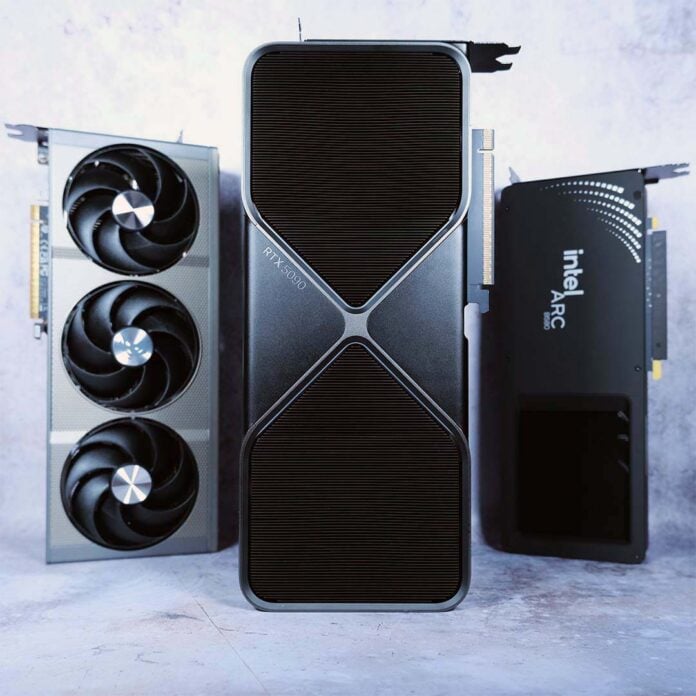
In this comprehensive guide, you can tap into our many years of PC hardware experience and knowledge to find the best GPU for your gaming PC. Whether you’re looking for the cheapest graphics card to play Assassin’s Creed at 1920×1080, or the fastest GPU for playing Cyberpunk 2077 at 4K with all its ray tracing bells and whistles, we’ll point you at the right GPU for the job.
As you will have undoubtedly noticed, it’s not a great time to buy PC components right now. Chaotic RAM prices have made a veritable dog’s breakfast of not just DDR5 and DDR4 upgrades, but GPU prices as well. In particular, it’s hard to find an affordable graphics card with more than 8GB of VRAM, and you may need a good sit-down after seeing the current price of an RTX 5090.
You can still buy a decent PC gaming GPU in 2026, though. It’s just a case of knowing which tech to prioritise for your needs. We cover all the details you need to know in our guide to the best GPUs in 2026, where all our recommendations are based on the Club386 team’s many decades of PC hardware experience and expertise. We include all the benchmark data and specs information you need to make a decision, while showing you exactly which GPU matches your needs and current setup. Anyway, without further ado, let’s show you the GPUs.
Best GPU shortlist
Nvidia GeForce RTX 5090
Nvidia GeForce RTX 5080
Nvidia GeForce RTX 5070 Ti
AMD Radeon RX 9070 XT
AMD Radeon RX 9060 XT
Intel Arc B580
In detail
Best GPU overall
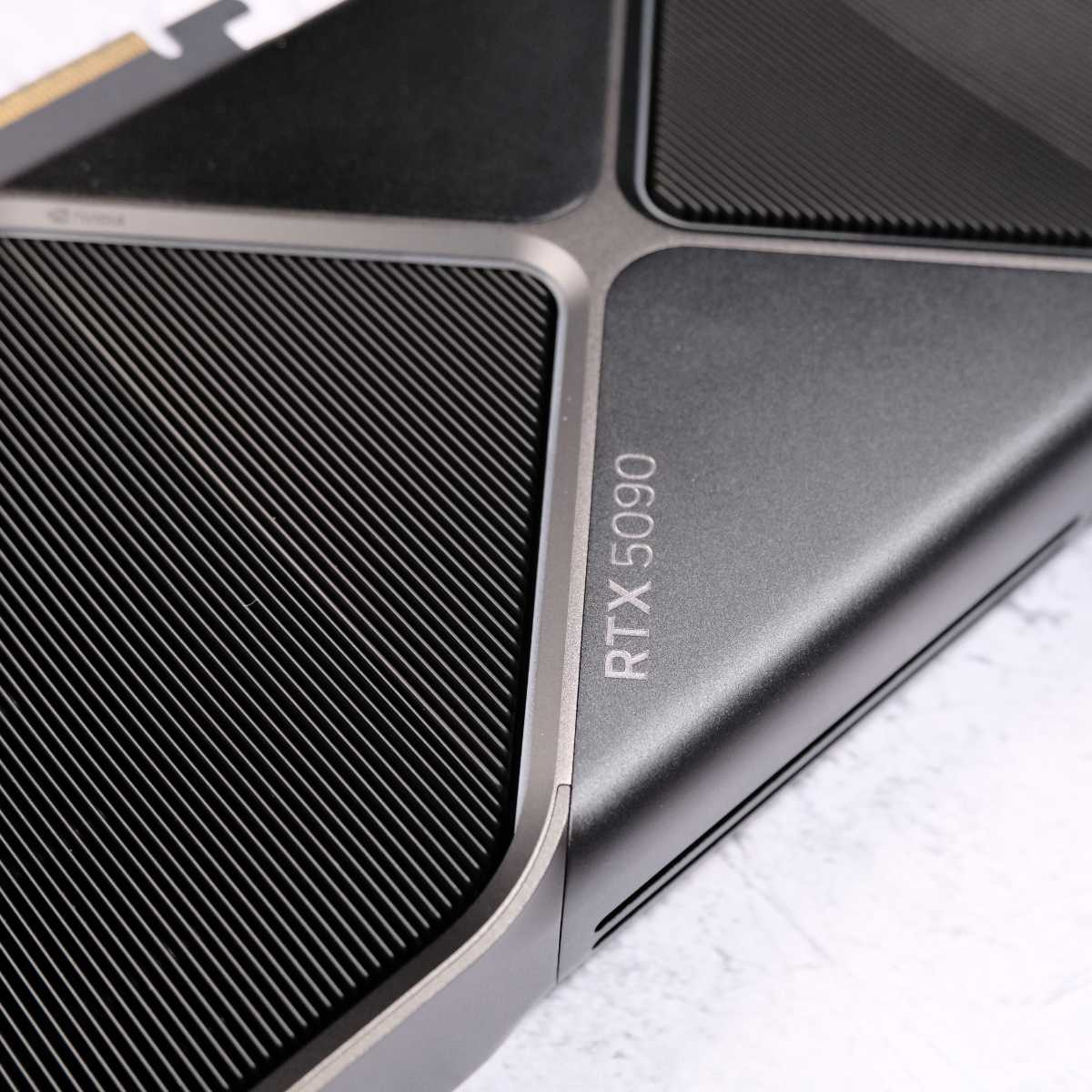
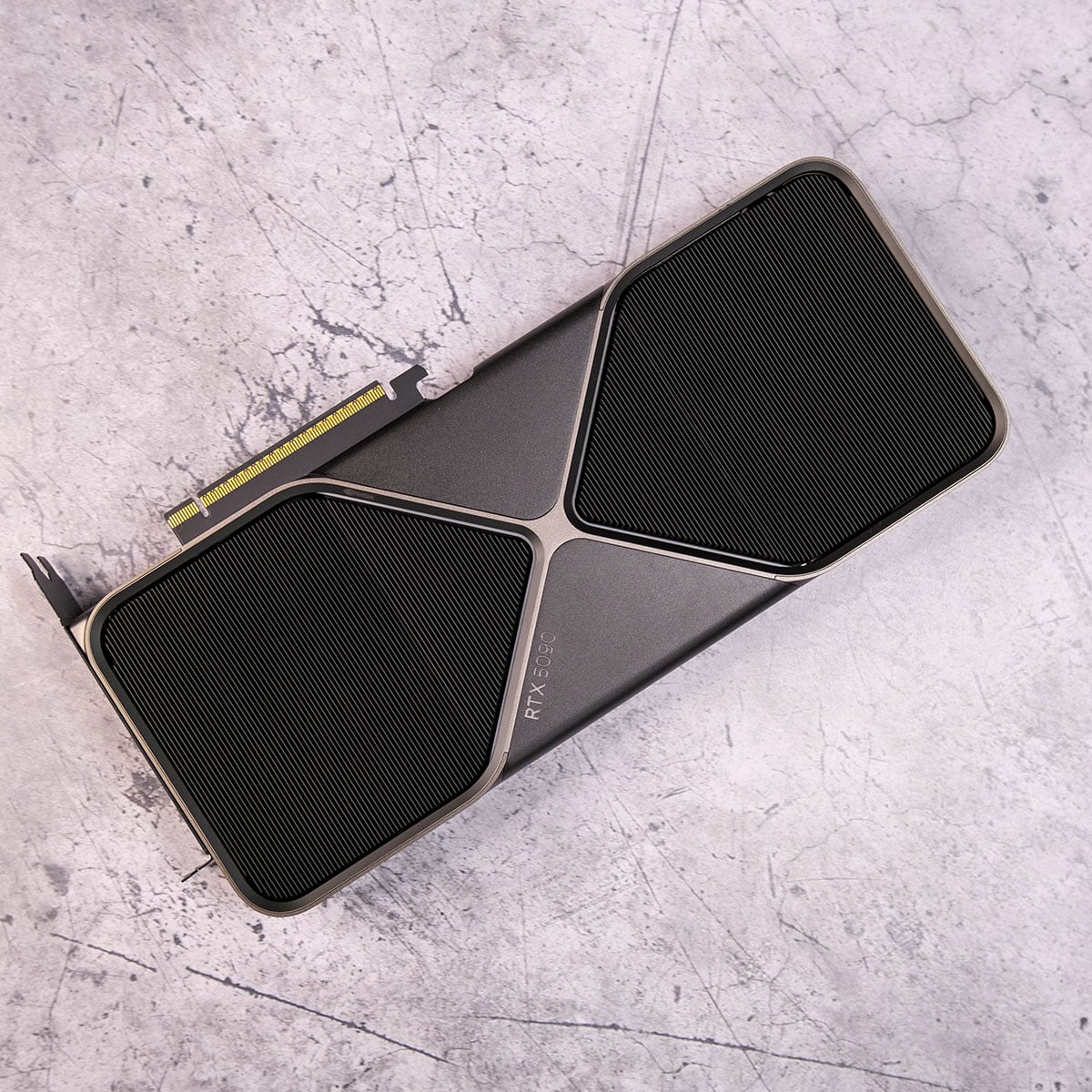
The best GPU overall is the Nvidia GeForce RTX 5090, if you can scrape together enough money for it. Nvidia didn’t hold anything back when it unleashed this monster of a GPU at CES 2025, with Jensen’s team of engineers going all out on creating the ultimate gaming powerhouse. There’s an almost unseemly amount of hardware packed into this whopping, 750mm² chip, and it has loads of super-fast memory at its disposal as well. This flagship GPU is extremely expensive, but it’s also miles ahead of anything else right now. If you want the fastest gaming GPU, the RTX 5090 is it.

Nvidia GeForce RTX 5090
£2,699 / $3,699
Pros
- Fastest GPU ever
- 32GB of GDDR7 memory
- Full DLSS 4 support with MFG
- Incredible 4K gaming performance
Cons
- Extremely expensive
- Impossible to find at MSRP
- Needs hefty PSU
Club386 may earn an affiliate commission when you purchase products through links on our site.
How we test and review products.
Following the mighty RTX 4090 wasn’t going to be an easy task, but Nvidia managed it, mainly by making the GPU physically bigger and bolting another 8GB of VRAM onto the frame buffer. The RTX 5090 uses the same GB202 chip used in Nvidia’s RTX 6000 Pro chips, but with 22 streaming multiprocessors disabled. This means there’s a huge count of 21,760 CUDA cores working in parallel to render your game graphics, compared to 16,384 on the RTX 4090.
You can max out Cyberpunk 2077 at 4K, using the ray tracing overdrive preset, and still get over 200fps.
There’s also a mammoth 32GB of memory, using super-fast GDDR7 VRAM and a wide 512-bit bus. The result is an incredible total memory bandwidth of 1.79TB/s (compared to 1.1TB/s on the 4090), ensuring there are no holdups between the GPU and its VRAM. With this level of power and memory, the RTX 5090 also makes for a very capable AI machine, and its gaming performance is simply phenomenal. You’ll need a hefty PSU to cope with this GPU, though, as it can draw 575W – Nvidia recommends a 1,000W unit as the bare minimum.
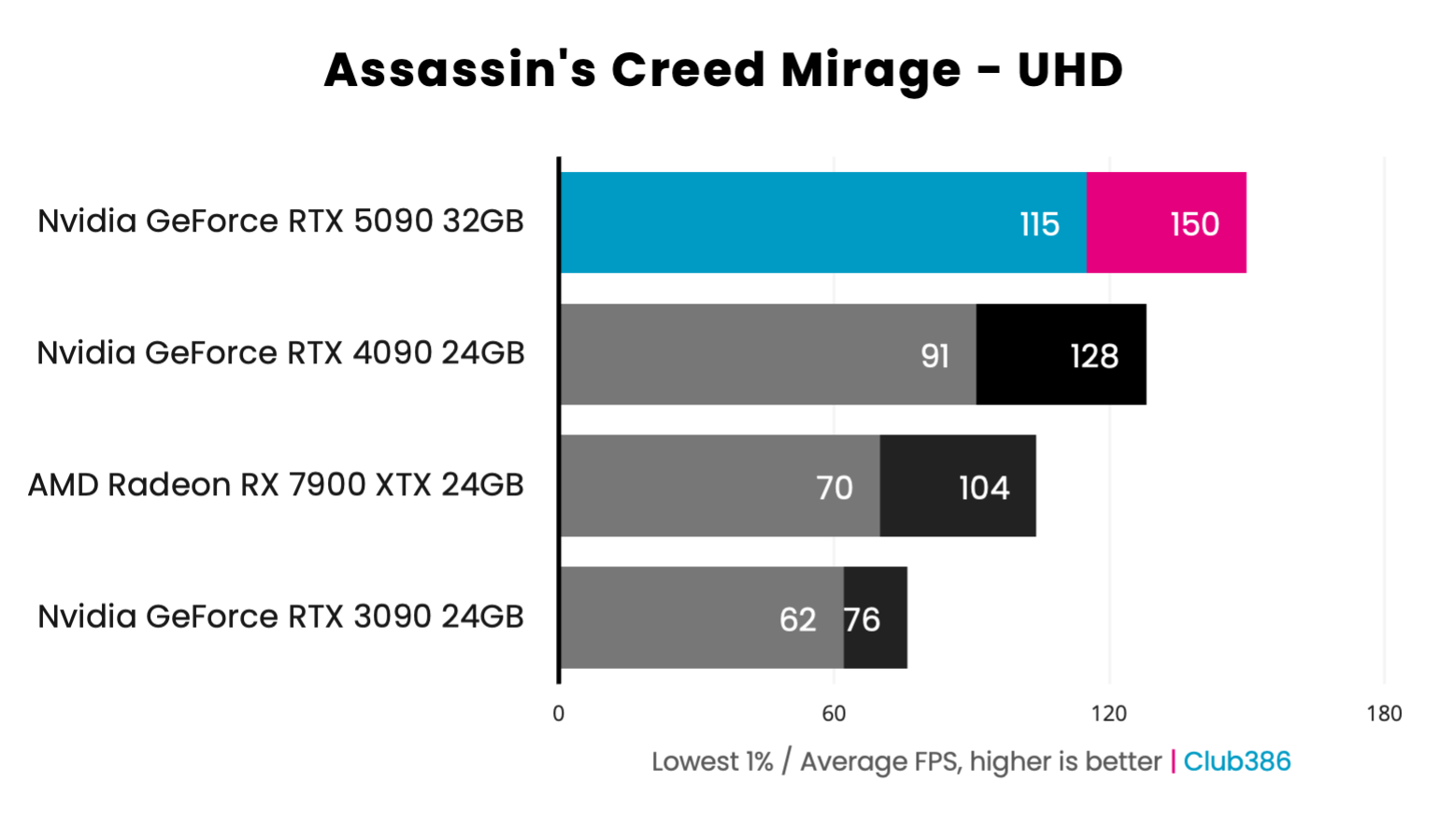
As you can see in the Assassin’s Creed Mirage graph below, the 5090 is 17% quicker than the RTX 4090, and that’s maxed out at 4K, running at 150fps. Even without any help from DLSS, it’s already double the speed of Nvidia’s RTX 3090, and it’s a dab hand at playing the latest games at 4K.
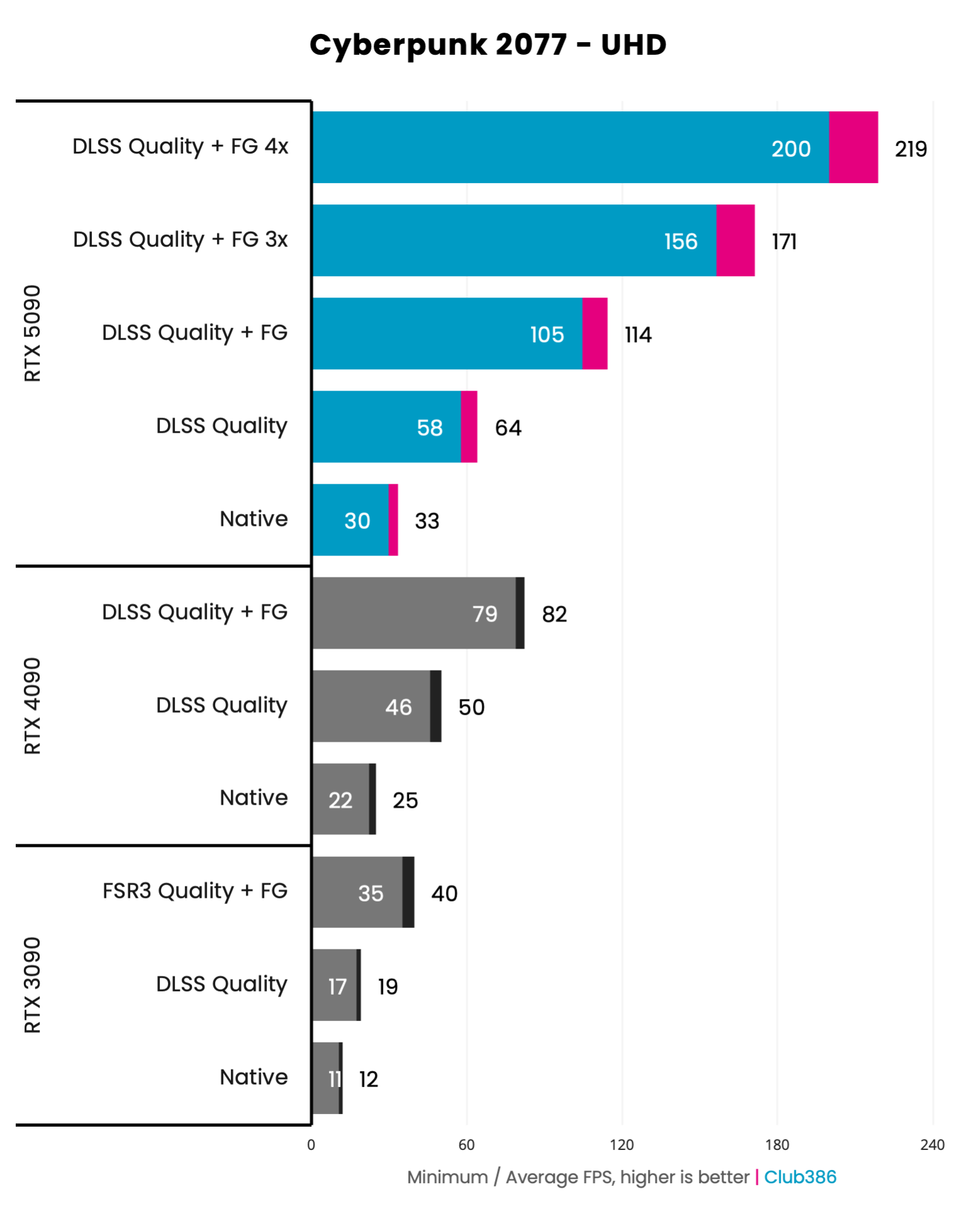
The RTX 5090 also has another trick up its sleeve, on top of its massive render performance, which is DLSS. It has full support for Nvidia’s latest multi-frame-gen (MFG) tech, which can use AI to insert up to an extra five frames between each pair rendered by the GPU, massively smoothing out frame rates. This means you can max out a demanding game like Cyberpunk 2077 at 4K, using the ray tracing overdrive preset, and still get over 200fps – great if you have a monitor with a high refresh rate.
There’s a caveat here, which is that MFG isn’t a fix for a broken frame rate, and we recommend a starting point of 45-60fps before you think about enabling it, but that’s achievable on the 5090. As you can see in the graph below, enabling DLSS upscaling on the Quality setting, which looks fantastic using Nvidia’s new Transformer model, nets you a 64fps average at 4K, enabling you to get an amazing average of 219fps with 4x MFG enabled.
The big hairy bluebottle in the ointment, of course, is price. RTX 5090 was already incredibly expensive with its starting MSRP of $1,999 / £1,939, but demand for its AI power, as well as the current chaos surrounding RAM prices, has pushed up its cost even further. At the time of writing, the cheapest RTX 5090 we could find in the UK was £2,999, with very little stock available, and prices are even higher in the US. There’s no doubt the RTX 5090 is the fastest gaming GPU you can buy, but you can get much better value if you buy a cheaper card instead.
More details, including all our game benchmarks, can be found in our full Nvidia GeForce RTX 5090 review.
| RTX 5090 | Specification |
|---|---|
| CUDA cores | 21,760 |
| RT cores | 170 (4th-gen) |
| Tensor cores | 680 (5th-gen) |
| Peak boost clock | 2,407MHz |
| Memory | 32GB GDDR7 |
| Effective memory speed | 28Gbps |
| Memory interface | 512 bits |
| Memory bandwidth | 1,792GB/s |
| Architecture | Nvidia Blackwell |
| Power | 575W |
Best high-end GPU
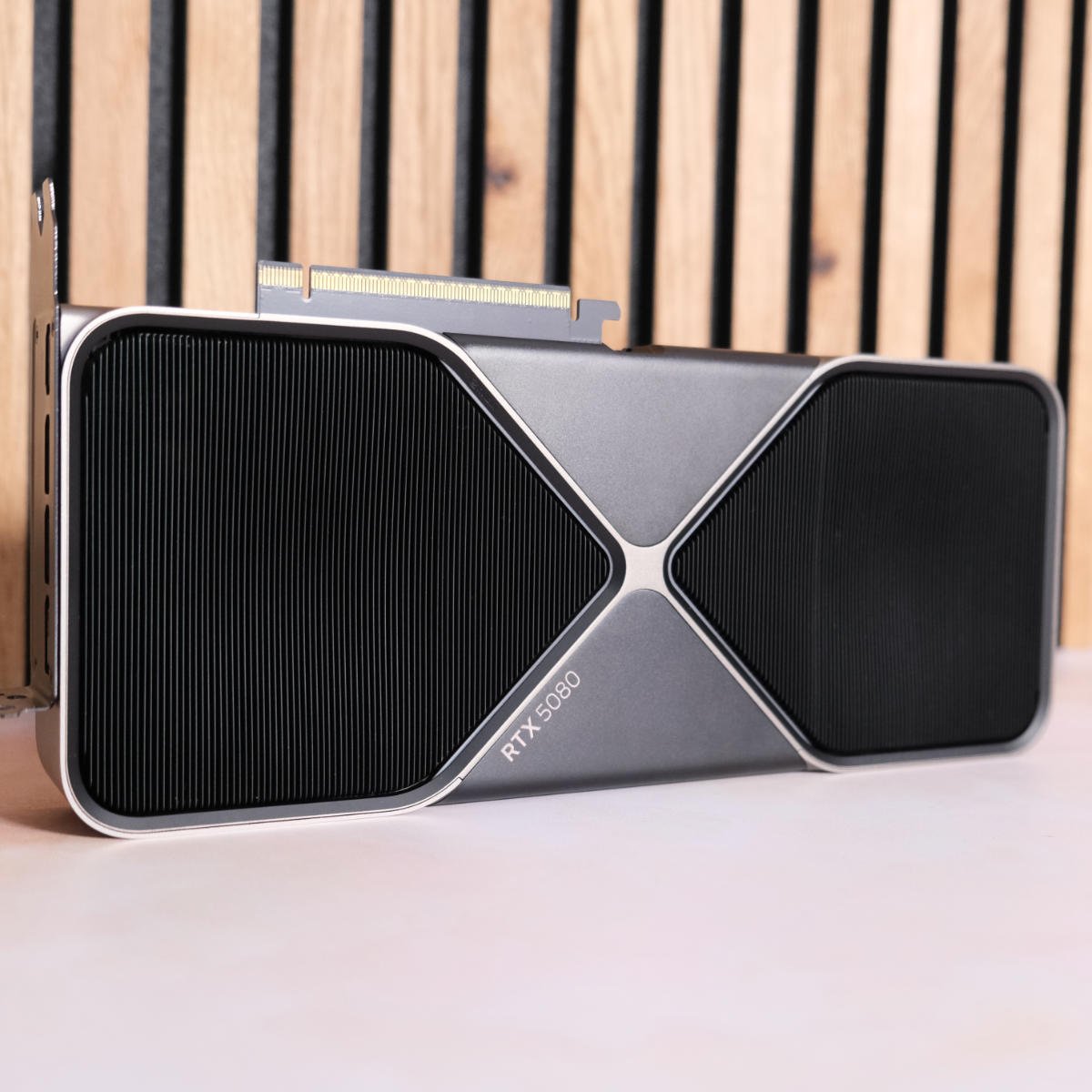
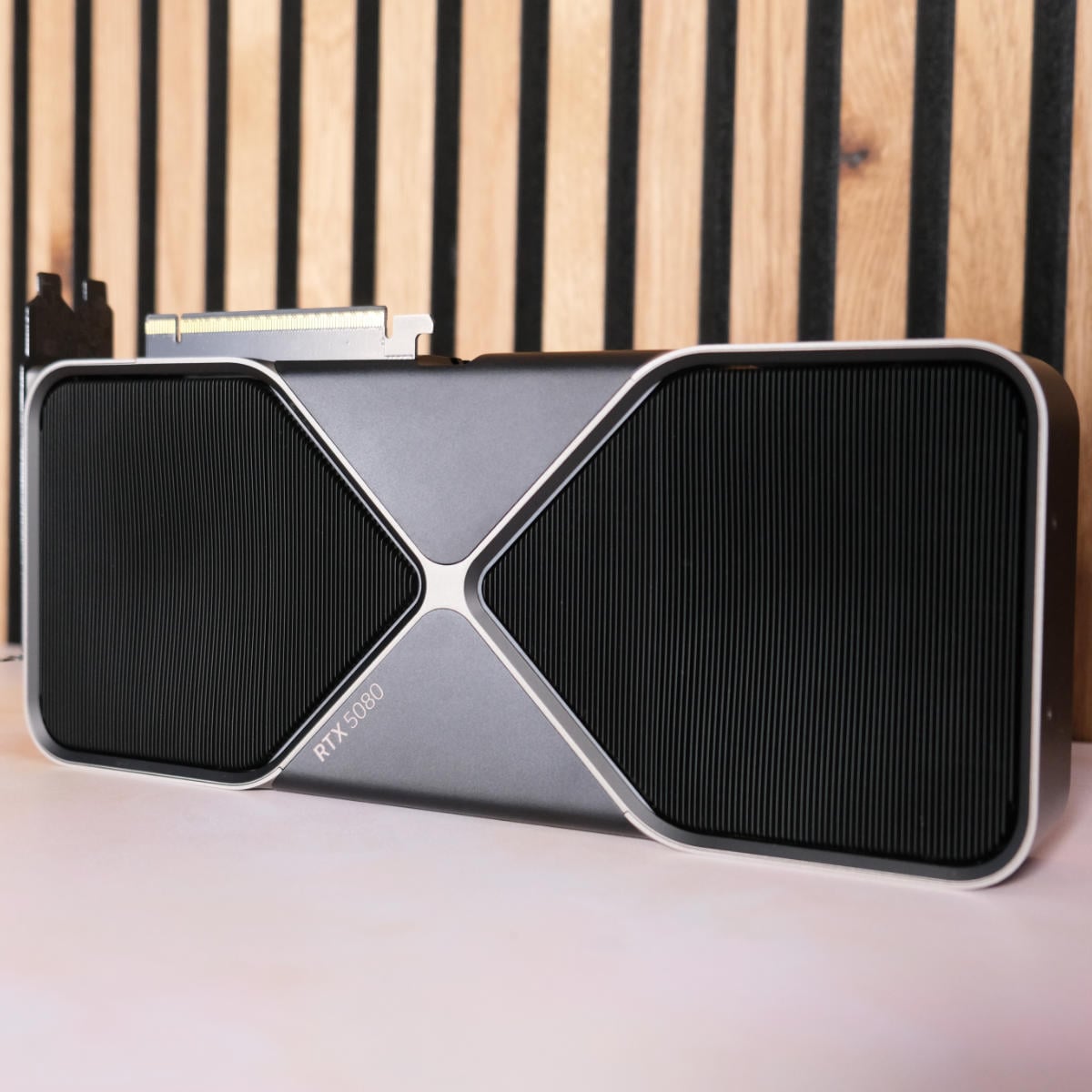
The best high-end GPU is the Nvidia GeForce RTX 5080. In terms of specs, you can think of an RTX 5080 as being basically half an RTX 5090, which means it offers considerably better value than the flagship in the current pricing climate. It’s based on the same Blackwell architecture as the 5090, so it still has full support for Nvidia’s DLSS 4.5 suite, including up to 6x multi frame gen to smooth out your frame rates.

Nvidia GeForce RTX 5080
£1,110 / $1,397
Pros
- Capable of some 4K gaming
- Massively cheaper than 5090
- Multi frame gen support
Cons
- Only 16GB of VRAM
- Hard to find at MSRP now
- Not much faster than RTX 4080 Super
Club386 may earn an affiliate commission when you purchase products through links on our site.
How we test and review products.
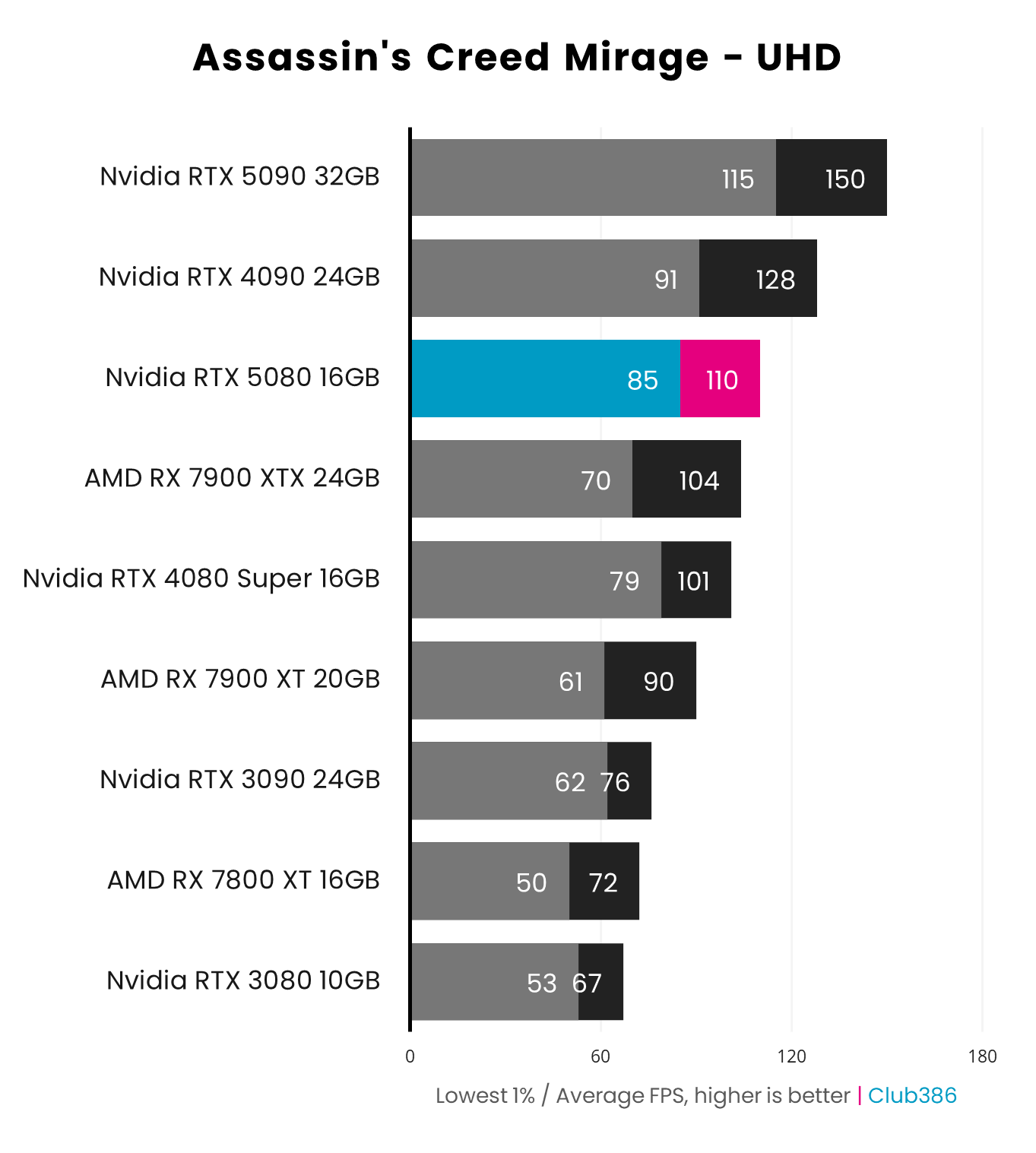
With 10,752 CUDA cores at its disposal, the RTX 5080 doesn’t have anything like the raw rendering power of a 5090, but it can still handle action at 4K, and its QHD (2560×1440) gaming pace is fantastic. As you can see in the graph below, Assassin’s Creed Mirage is perfectly smooth at 4K on the 5080, running at 110fps. It can’t catch the 5090, but it’s well in front of Ampere cards such as the 3080.
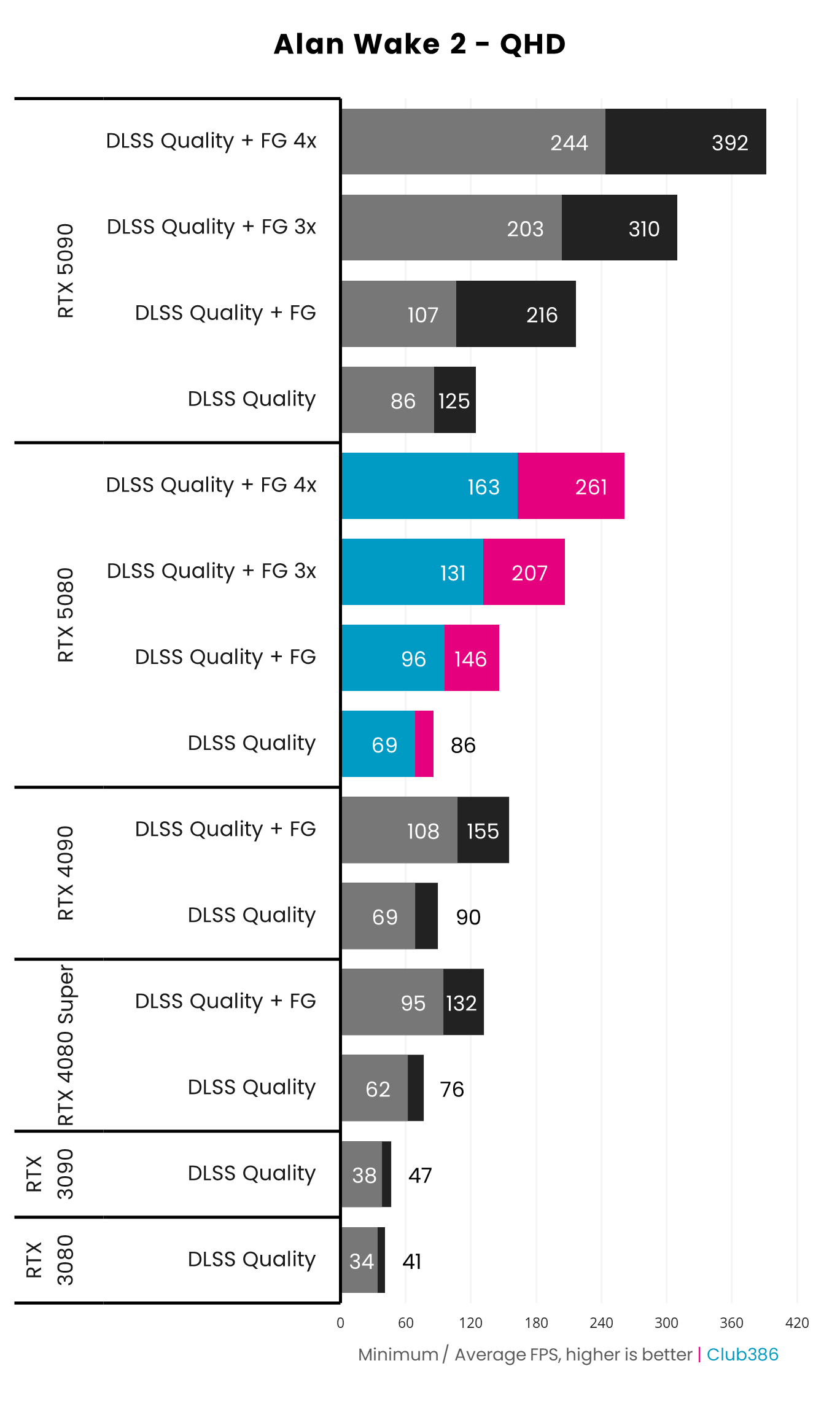
As with the 5090, the 5080’s secret weapon is Nvidia’s DLSS 4.5 suite, enabling you to get super-smooth frame rates with amazing visuals. Running Alan Wake 2 at 2560×1440, the 5080 averages a solid 86fps with DLSS upscaling on the Quality setting, but this goes all the way up to 261fps with 4x multi frame gen enabled.
The 5080’s secret weapon is Nvidia’s DLSS 4.5 suite.
Comparatively, you can only get 132fps out of the RTX 4080 Super, as it only supports 2x frame gen. However, you’ll also notice that the performance difference between 4080 Super and RTX 5080 is very small when you disable frame gen entirely. If you already have an RTX 4080 or 4080 Super, there’s basically no point in upgrading to a 5080, but you get a decent performance boost if you’re upgrading from an RTX 3080 or older.
The other factor to bear in mind about the 5080 is that it only has 16GB of VRAM, just like its predecessor. That’s plenty for gaming at 2560×1440, but we’ve seen some of the latest games go past this point when you max out their settings at 4K. For example, Indiana Jones and the Great Circle falls over if you run its Full RT path tracing mode at 4K with just 16GB of VRAM. There were rumours of an RTX 5080 Super coming out with 24GB of VRAM, but that’s unlikely to see the light of day with current memory shortages.
As with a lot of GPUs, it’s nigh on impossible to find the RTX 5080 available for its $999 / £979 MSRP, largely thanks to the memory pricing crisis. You can still pick one up for £1,139 in the UK at the time of writing, though, which isn’t bad for the performance on offer.
For more detail about this GPU, including all the game benchmarks, check out our full Nvidia GeForce RTX 5080 review.
| RTX 5080 | Specification |
|---|---|
| CUDA cores | 10,752 |
| RT cores | 84 (4th-gen) |
| Tensor cores | 336 (5th-gen) |
| Peak boost clock | 2,617MHz |
| Memory | 16GB GDDR7 |
| Effective memory speed | 30Gbps |
| Memory interface | 256 bits |
| Memory bandwidth | 960GB/s |
| Architecture | Nvidia Blackwell |
| Power | 360W |
Best upper mid-range GPU
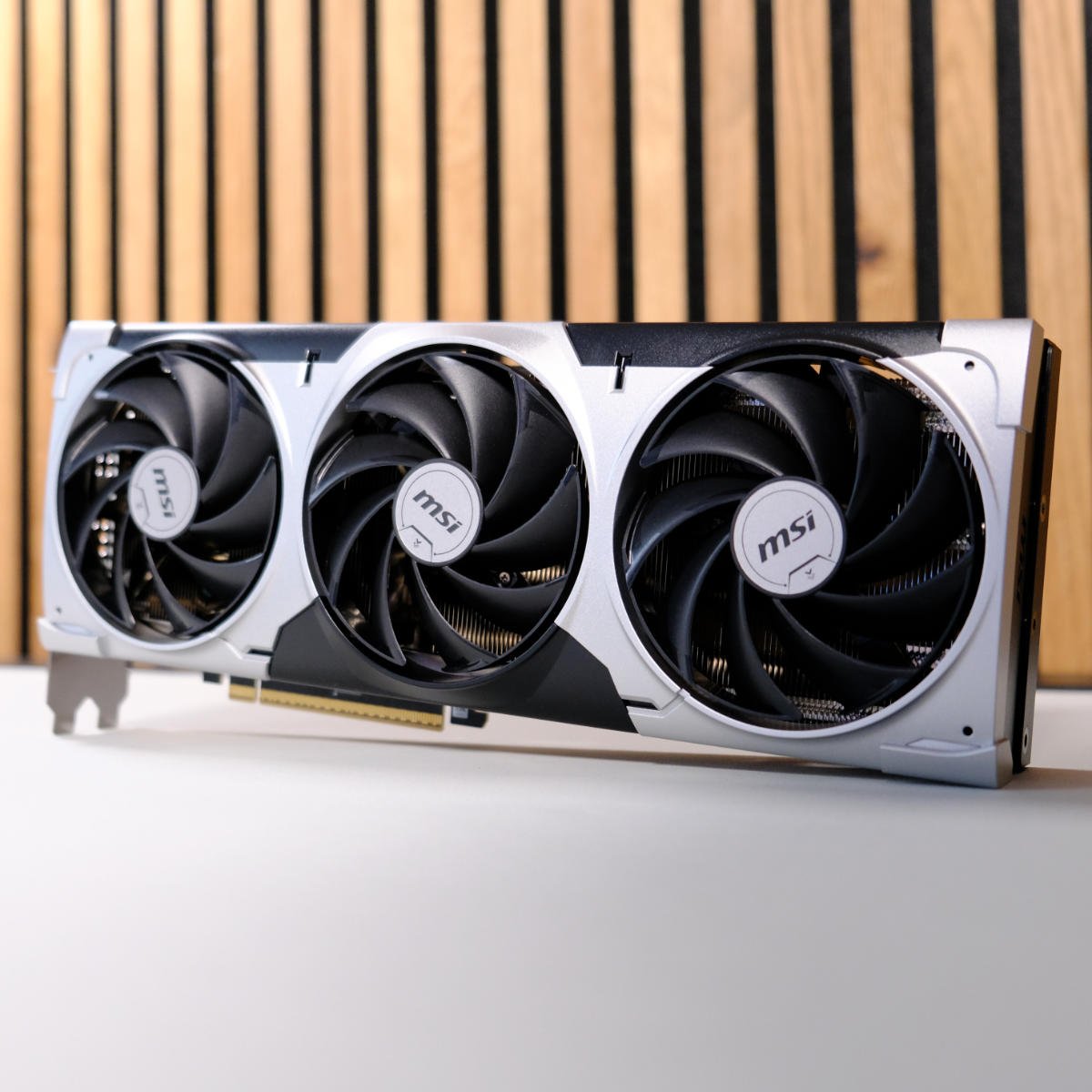
The best upper mid-range GPU is the Nvidia GeForce RTX 5070 Ti. It’s based on the same GB203 chip as the 5080, but with fewer streaming multiprocessors enabled. This gives you 896 CUDA cores, compared to 10,752 on the 5080, but that’s still a decent amount. What’s more, unlike the 12GB 4070 Ti, the 5070 Ti comes with a full 16GB of GDDR7 VRAM, enabling you to play games at higher settings without performance falling off a cliff.
Nvidia GeForce RTX 5070 Ti
£799 / $999
Pros
- Amazing 1440p gaming pace
- 16GB of VRAM
- Great ray tracing performance
Cons
- High price
- Impossible to find at MSRP in US
- Not always much quicker than Radeon RX 9070 XT
Club386 may earn an affiliate commission when you purchase products through links on our site.
How we test and review products.
Sadly, this GPU has been a prime victim of the DRAM shortage, particularly in the US, where it now costs more than the MSRP for an RTX 5080. If you live in the US, then you’ll be better off buying an AMD Radeon RX 9070 XT instead. If you’re in the UK, though, you can pick one up for £799, where it still offers reasonable value.
It shines at 2560×1440, with enough headroom to enable loads of eye candy.
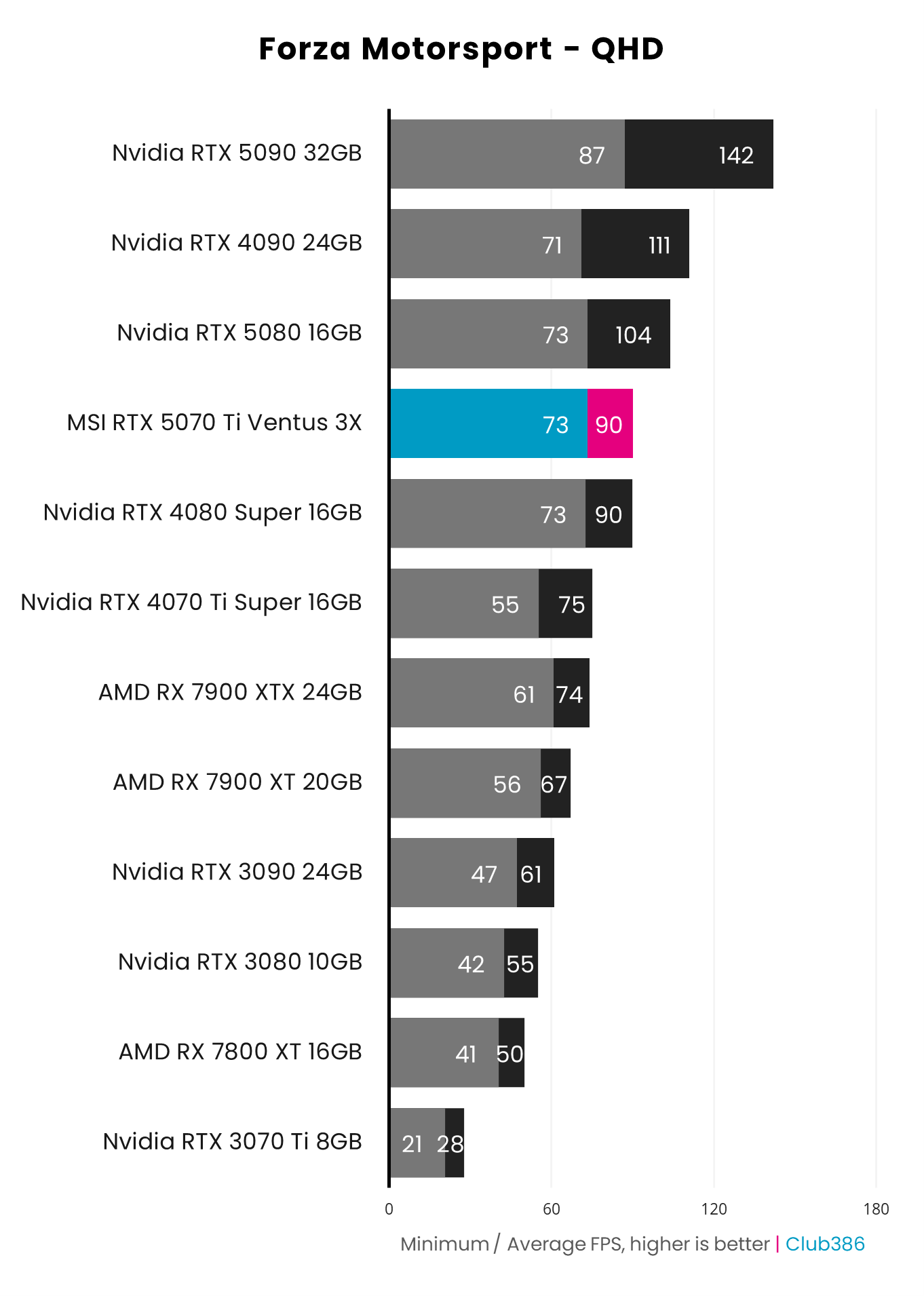
While the 5070 Ti can handle some games at 4K, it really shines at 2560×1440 (QHD), where it has enough headroom to let you enable loads of eye candy. As you can see in the Forza Motorsport benchmarks below, it averages 90fps at this resolution, putting it on par with the last-gen 4080 Super, and it’s significantly quicker than an RTX 3090 as well.
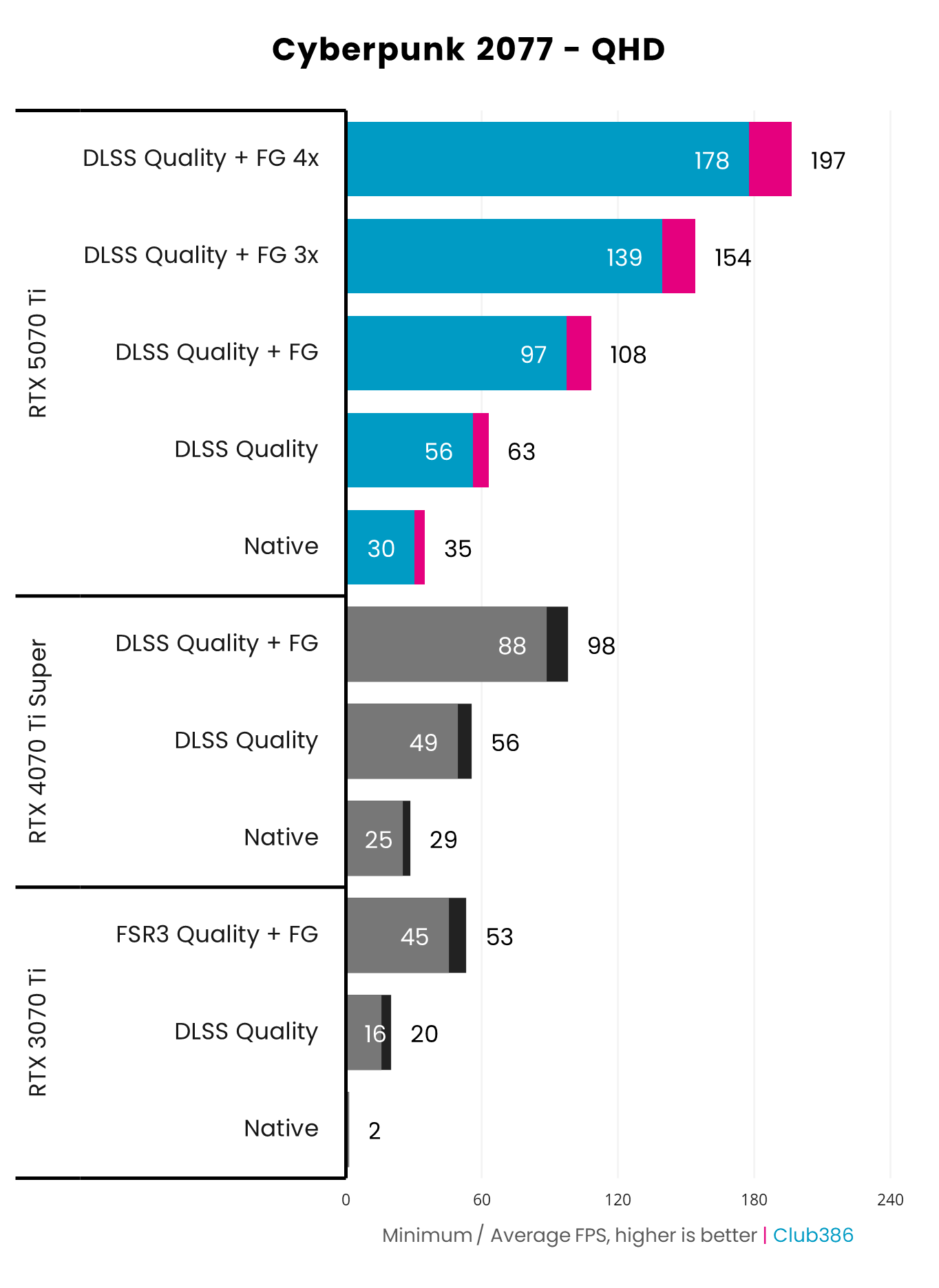
As with Nvidia’s other Blackwell GPUs, one major benefit of the RTX 5070 Ti is its full support for Nvidia’s DLSS 4.5 suite. Enable DLSS upscaling with the Quality setting, which looks great with Nvidia’s new Transformer model, and you’re averaging 63fps in Cyberpunk 2077 with the Overdrive ray tracing preset. That’s already playable, but you can then hit up to 197fps with 4x multi frame gen, meaning you can get smooth motion if you have a monitor with a high refresh rate.
The 5070 Ti is far from a slam dunk at current prices, especially when there’s such fierce competition from the 9070 XT. For an analysis on how these two GPUs compare, check out our full 5070 Ti vs 9070 XT feature. If you can find it at a reasonable price, though, the 5070 Ti is definitely worth considering, largely because of the ubiquity of Nvidia’s DLSS tech, which is found in loads more games than AMD’s FSR 4.
Read our full Nvidia GeForce RTX 5070 Ti review for our full dive into this GPU, including all our game benchmarks.
| RTX 5070 Ti | Specification |
|---|---|
| CUDA cores | 8,960 |
| RT cores | 70 (4th-gen) |
| Tensor cores | 280 (5th-gen) |
| Peak boost clock | 2,452MHz |
| Memory | 16GB GDDR7 |
| Effective memory speed | 28Gbps |
| Memory interface | 256 bits |
| Memory bandwidth | 896GB/s |
| Architecture | Nvidia Blackwell |
| Power | 300W |
Best GPU for most
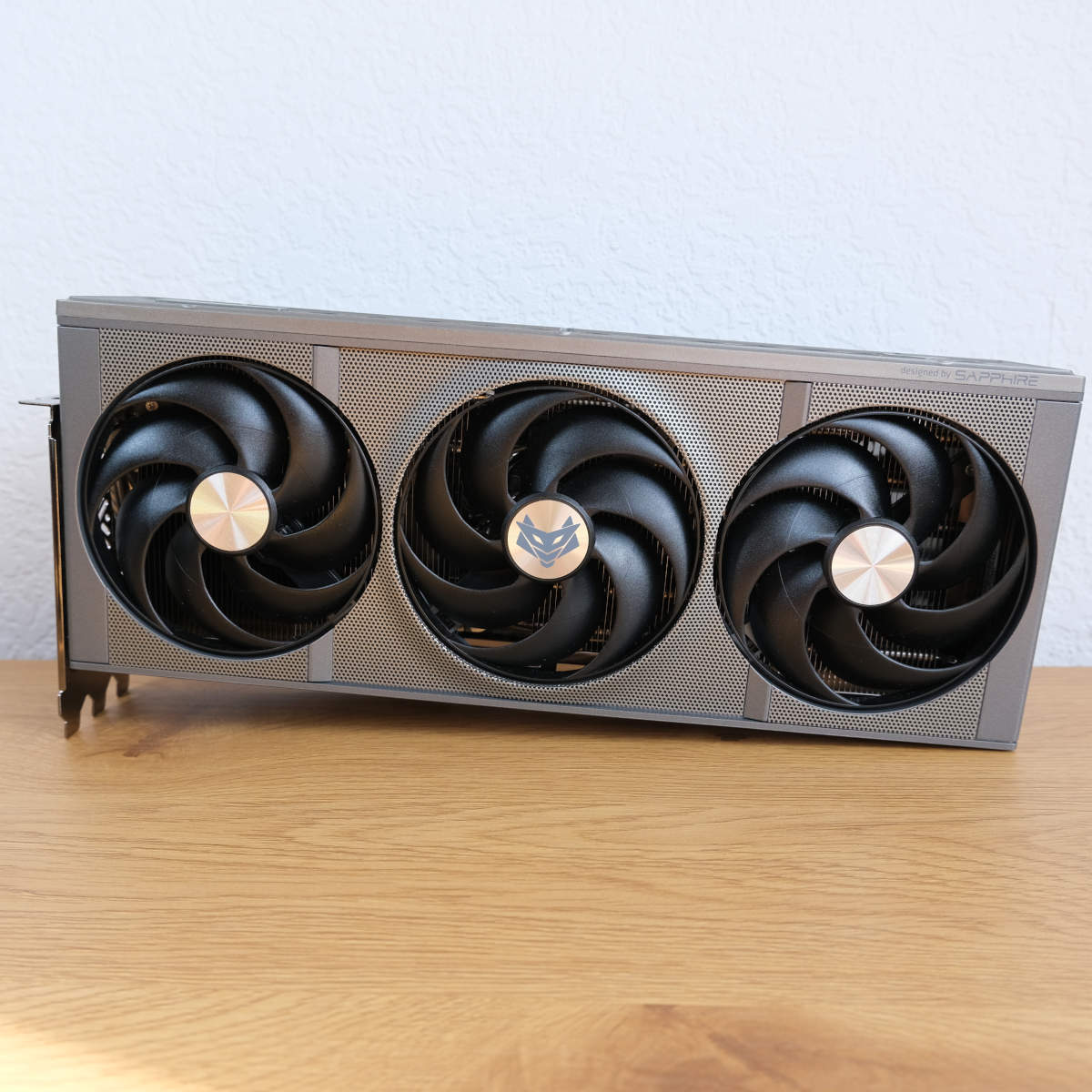
The best GPU for most people is the AMD Radeon RX 9070 XT. With an aggressively competitive price, a full 16GB of VRAM, and AMD’s new FSR 4 upscaling tech in its arsenal, this GPU set the gaming world alight when it launched in 2025. Based on the new RDNA 4 GPU architecture, it shows AMD finally catching up with Nvidia when it comes to ray tracing performance, while also offering a decent alternative to DLSS upscaling.
AMD Radeon RX 9070 XT
£569 / $729
Pros
- Loads of VRAM
- Fantastic rasterisation and ray tracing performance
- FSR 4 works great
Cons
- Struggles with path tracing
- Sometimes hard to find at MSRP
- FSR 4 game support is limited compared to DLSS
Club386 may earn an affiliate commission when you purchase products through links on our site.
How we test and review products.
Unlike Nvidia’s RTX 5070, which still has just 12GB of memory, the 9070 XT has a big 16GB bank of VRAM at its disposal. It uses GDDR6 chips, rather than the latest super-fast GDDR7 RAM used by Nvidia, but capacity is more important at this level of performance. If you don’t have enough VRAM, then performance quickly drops like a stone when your graphics card’s memory gets saturated, as your GPU then has to page much slower system RAM. That’s not a worry when you have 16GB for gaming at 2560×1440.
It even beats Nvidia’s pricier 5070 Ti in some games.
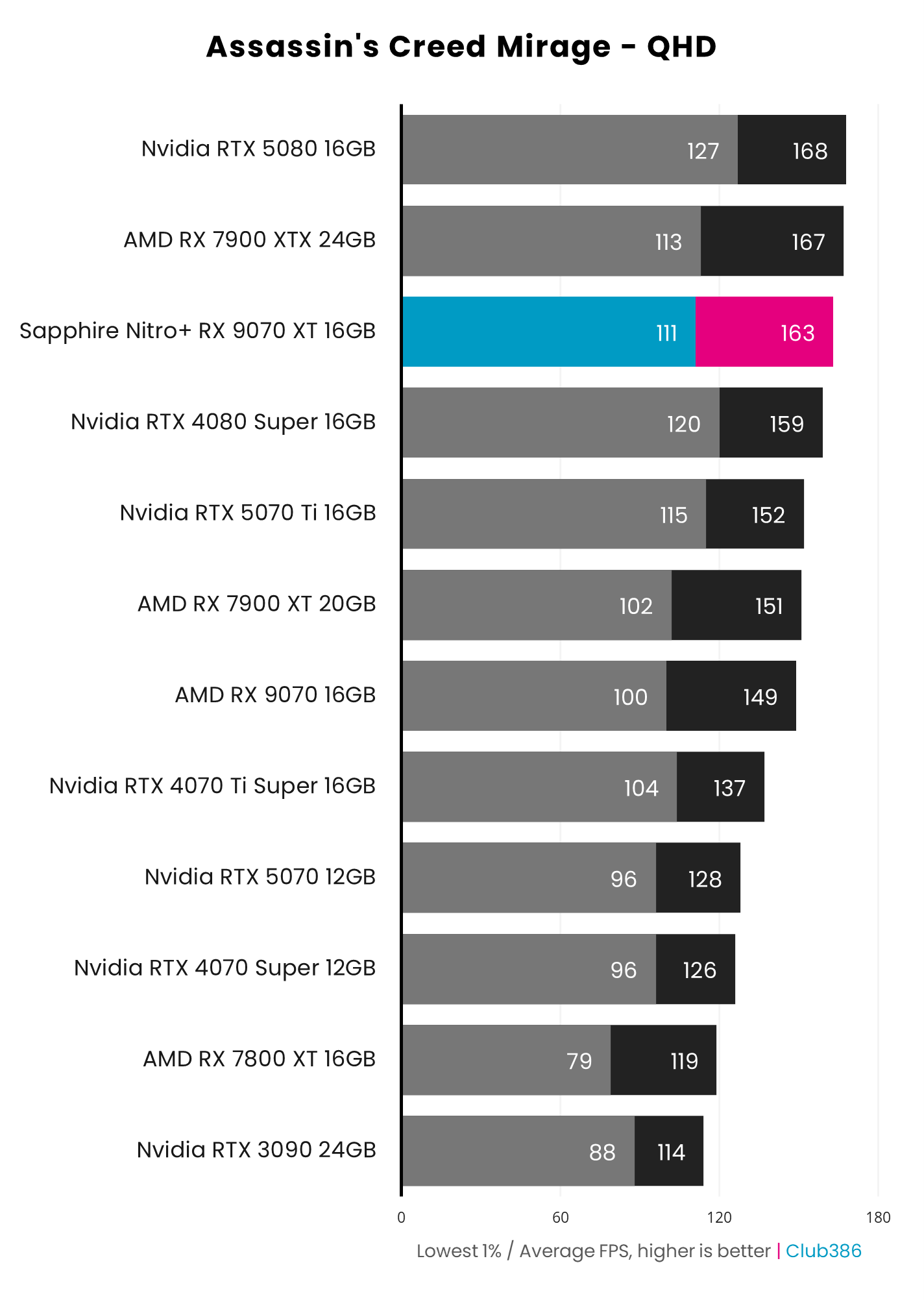
Performance is also fantastic, with our Sapphire Nitro+ OC 9070 XT test card even beating Nvidia’s pricier 5070 Ti in some games. One prime example is Assassin’s Creed Mirage at 2560×1440, where the 9070 XT runs at a massive 163fps – 11fps quicker than the 5070 Ti.
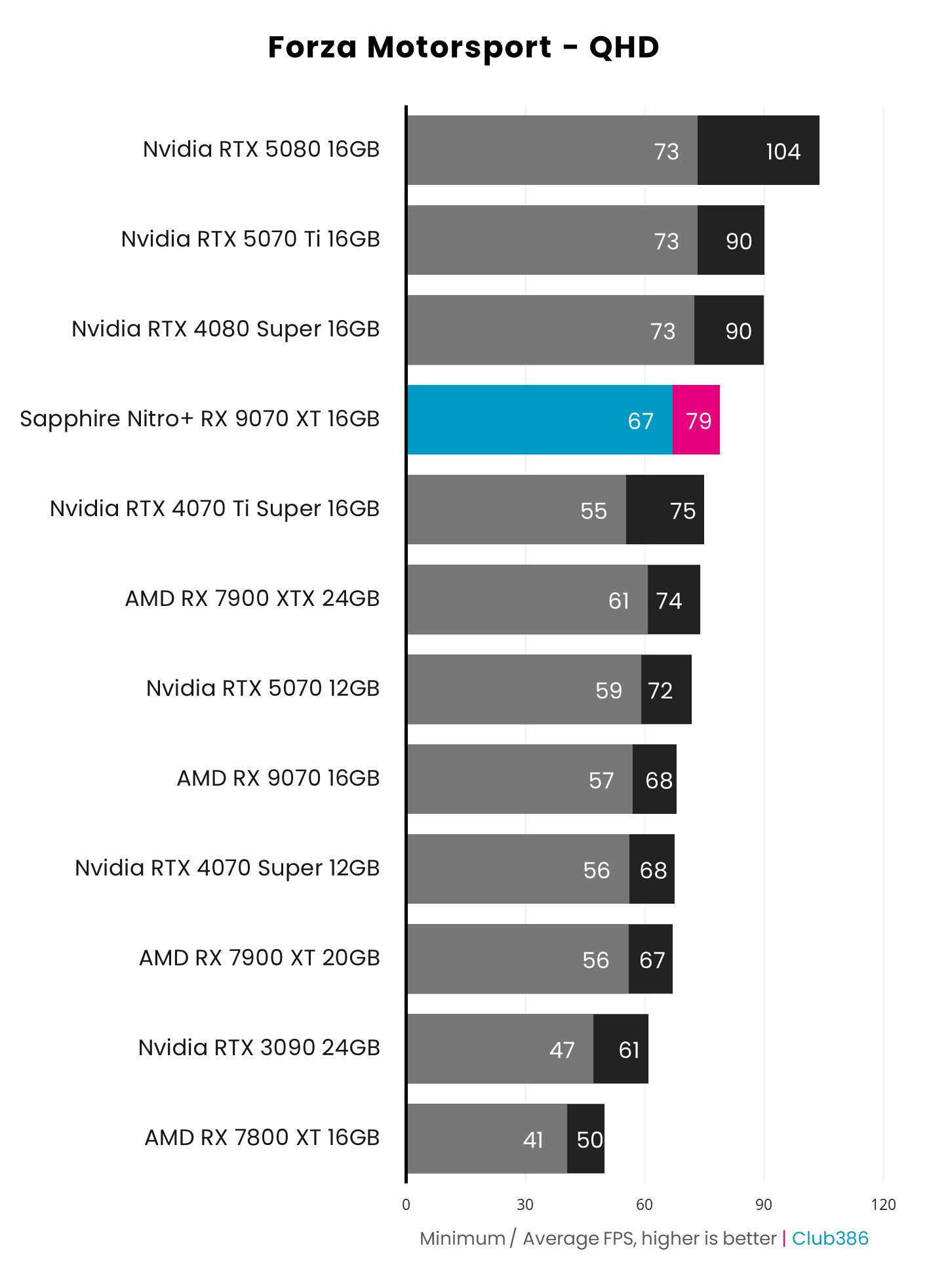
Radeon RX 9070 XT performance falls behind the 5070 Ti in other games, particularly when you crank up ray tracing, but it still holds its own remarkably well for the price – it currently costs £230 less than a 5070 Ti card. In Forza Motorsport maxed out at QHD, for example, the 9070 XT never drops below 67fps, and averages 79fps. It’s in front of the RTX 5070 and only 11fps behind the 5070 Ti – a great result for a GPU in this market sector.
Speaking of price, the amount you need to pay for a 9070 XT has varied considerably since its launch. An initial shortage of supply meant it cost well over MSRP for its first few months after launch, making the 5070 Ti a better buy. Pricing then calmed down toward the end of 2025, the current DRAM crisis has resulted in it creeping up again, but right now it’s back to being a great buy.
At the time of writing, you can pick up a Radeon RX 9070 XT for £569 in the UK, which is a very reasonable price for this GPU. However, its $729 price in the US is less appealing. On the plus side, that’s still massively cheaper than a 5070 Ti in the US, and it remains the best GPU in its league at this price, but it’s a bitter pill to swallow.
The other factor to bear in mind is that Nvidia’s DLSS tech suite is widely supported by a lot of games, and also has multi frame gen, too. Comparatively, AMD’s new FSR 4 tech might look massively better than previous iterations, but it’s not supported by nearly as many games as DLSS, and there’s no sign of multi frame gen yet, either.
Also, AMD’s GPUs notably struggle with advanced ray tracing techniques such as path tracing. That’s not a major issue at this price, as you really need at least an RTX 5070 Ti to run path tracing, even at 1920×1080, but it’s an area where AMD is still behind. Other than that, though, the 9070 XT is a great GPU.
Read our full AMD Radeon RX 9070 XT review for a full exploration of this GPU and its gaming performance.
| RX 9070 XT | Specification |
|---|---|
| Stream processors | 4,096 |
| RT accelerators | 64 |
| AI accelerators | 128 |
| Peak boost clock | 2,970MHz |
| Memory | 16GB GDDR6 |
| Effective memory speed | 20Gbps |
| Memory interface | 256 bits |
| Memory bandwidth | 640GB/s |
| Architecture | AMD RDNA 4 |
| Power | 304W |
Best mainstream GPU
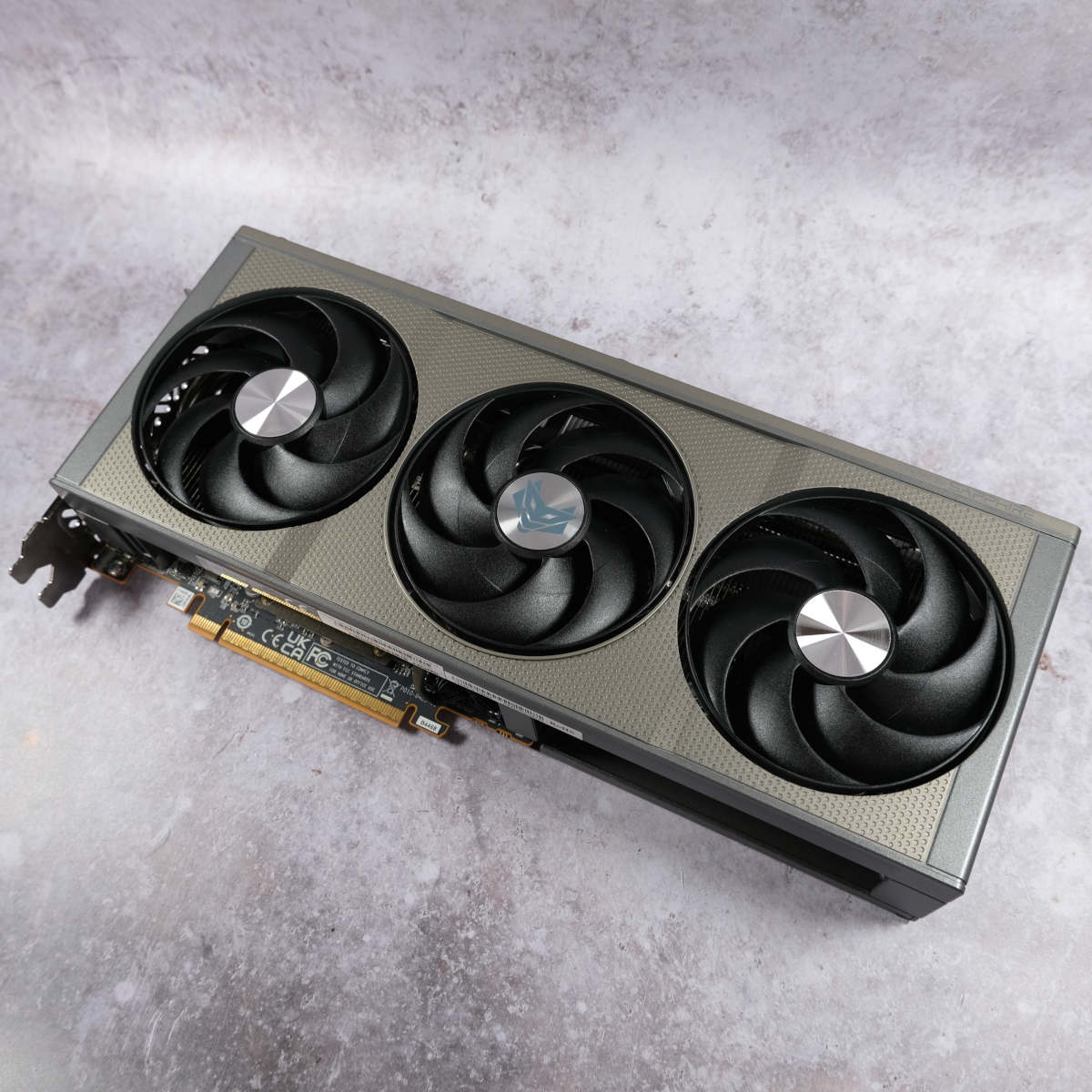
The best mainstream GPU is the AMD Radeon RX 9060 XT. Based on the same RDNA 4 architecture as the 9070 XT, AMD’s latest budget GPU launched with a similarly aggressive price, aiming squarely at Nvidia’s RTX 5060. Unlike Nvidia’s budget GPU, though, the 9060 XT comes in both 8GB and 16GB flavours. They’re both more powerful than the 5060, but the 16GB version hits the sweet spot, as long as you can find it for a fair price.
AMD Radeon RX 9060 XT
£349 / $439
Pros
- Up to 16GB of VRAM
- Solid FHD and QHD gaming pace
- FSR 4 support
Cons
- FSR 4 game support is lacking
- 16GB cards are now much more expensive than 8GB ones
Club386 may earn an affiliate commission when you purchase products through links on our site.
How we test and review products.
That’s been a bit of a problem recently, as the DRAM shortage has resulted in a big price gap opening up between 8GB and 16GB 9060 XT cards. Right now, however, you can currently pick up a 16GB card for £349, which is reasonable for the performance on offer – we’d take advantage of this price while it lasts. As long as the 16GB card price doesn’t go past £399, we’d still advise paying the premium, as 8GB severely limits the settings you can enable in some of the latest games, even if you’re only playing at 1920×1080.
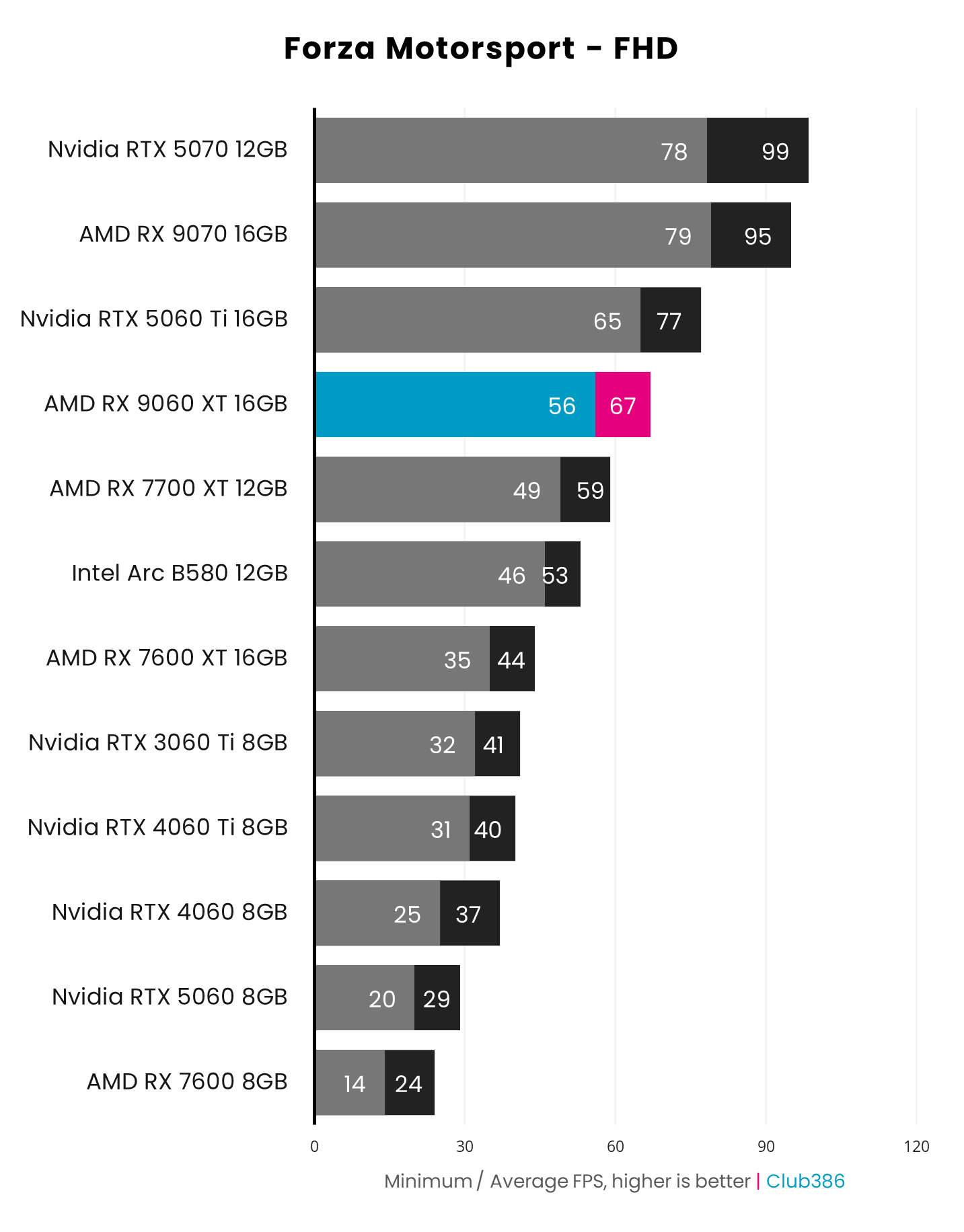
Taking Forza Motorsport as an example, the 16GB 9060 XT happily plays this maxed out at 1080p, averaging 67fps. However, all the 8GB cards really struggle as the game runs out of available VRAM at these settings.
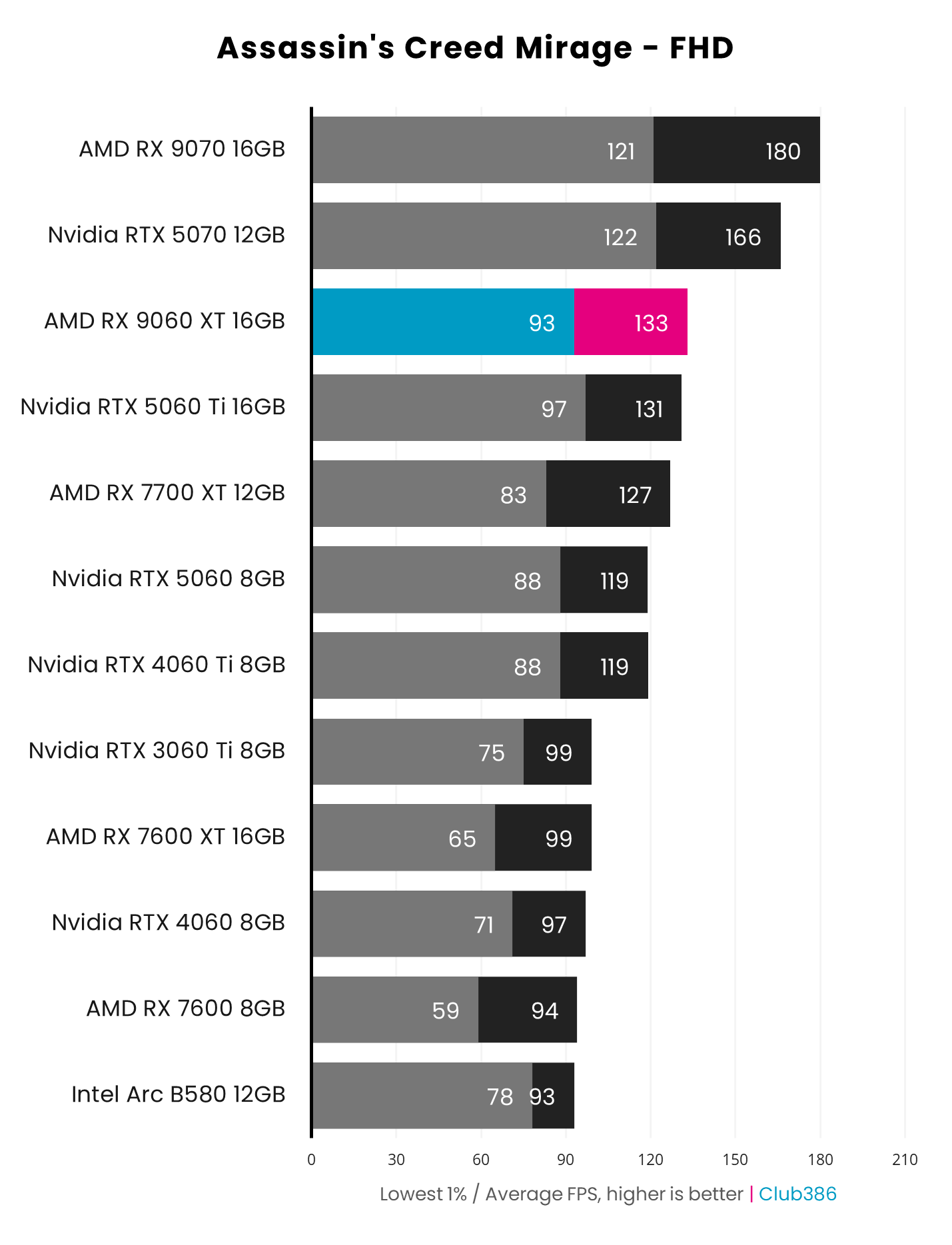
This GPU’s prime competitor is really the RTX 5060 Ti, which has a faster GPU, as well as the benefits of Nvidia’s DLSS suite. It also comes in both 8GB and 16GB versions, but the 8GB one costs £320, and 16GB 5060 Ti cards now cost around £428. As such, the 9060 XT 16GB remains the better buy, even if it’s a little overpriced at the moment. In some games, the 9060 XT also meets the 5060 Ti’s performance, such as Assassin’s Creed Mirage, where its 133fps average at 1920×1080 is a superb result.
As with the 9070 XT, the main point against the 9060 XT is that AMD’s FSR Redstone tech suite isn’t as widely supported as Nvidia DLSS. AMD FSR 4 upscaling looks way better than previous versions of FSR, as does AMD’s latest frame-gen tech, but Nvidia has been in this game longer and has invested heavily in AI tech, giving Team Green the upper hand in certain departments.
AMD FSR 4 upscaling looks way better than previous versions of FSR.
The other main factor, of course, is price, and it’s looking as though 16GB 9060 XT cards (and indeed 16GB RTX 5060 Ti cards) may go the way of the dodo, as the shortage of DRAM chips makes it hard to price 16GB cards competitively. If you can find a 16GB 9060 XT card at a reasonable price, though, go for it while stocks last.
Read our full AMD Radeon RX 9060 XT review for more detail about this gaming GPU, including all our benchmarks.
| RX 9060 XT | Specification |
|---|---|
| Stream processors | 2,048 |
| Ray accelerators | 32 |
| AI accelerators | 64 |
| Peak boost clock | 3,130MHz |
| Memory | 16GB GDDR6 |
| Effective memory speed | 20Gbps |
| Memory interface | 128 bits |
| Memory bandwidth | 320GB/s |
| Architecture | AMD RDNA 4 |
| Power | 160W |
Best budget GPU
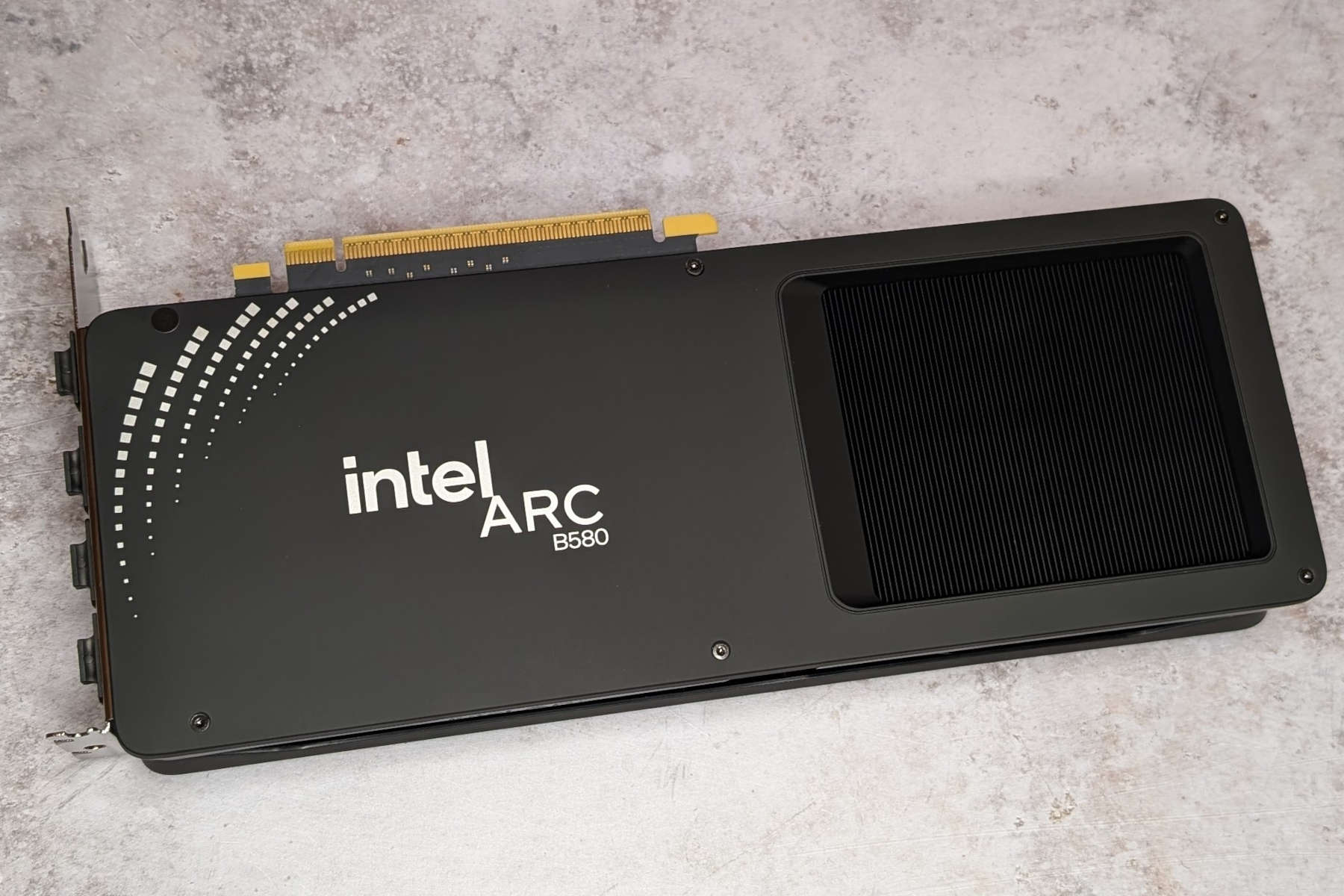
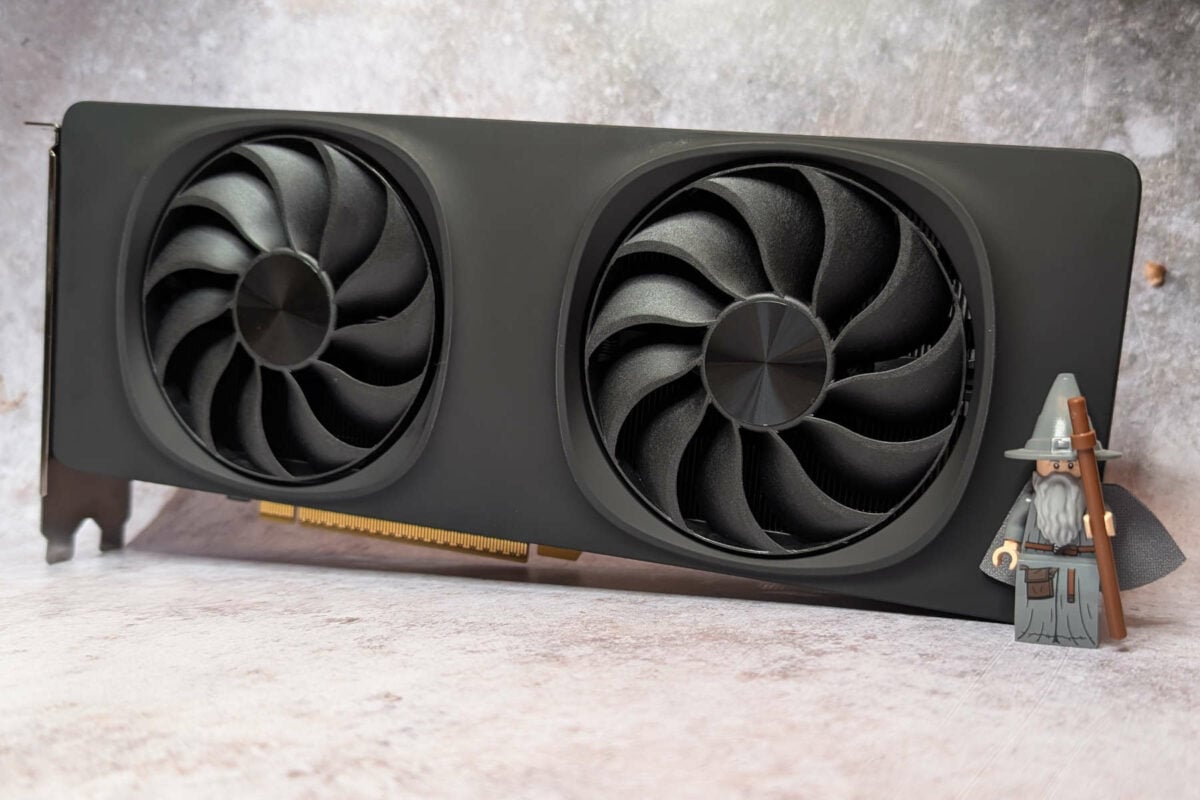
The best budget GPU is the Intel Arc B580. For the first time in decades, there’s now a proper third player in the gaming GPU market, meaning you no longer have to choose between either Nvidia or AMD. Intel has made huge strides with its graphics tech lately, and the Arc B580 offers a satisfying level of GPU power for a surprisingly affordable price. Not only that, but unlike AMD and Nvidia’s sub-£300 graphics offerings, this card comes with a healthy 12GB of memory.
Intel Arc B580
£260
Pros
- 12GB of VRAM is much better than 8GB
- Solid performance
- Supports XeSS frame gen
Cons
- Variable performance in some games
- XeSS game support is limited
Club386 may earn an affiliate commission when you purchase products through links on our site.
How we test and review products.
That extra memory really makes a difference to the settings you can enable in your games. As a case in point, the Intel Arc B580 averages a decent 53fps in Forza Motorsport at 1920×1080 with maxed out settings. However, the 8GB cards struggle in this test. In particular, Nvidia’s GeForce RTX 5060 could only clock up 29fps, as these settings saturate its VRAM.
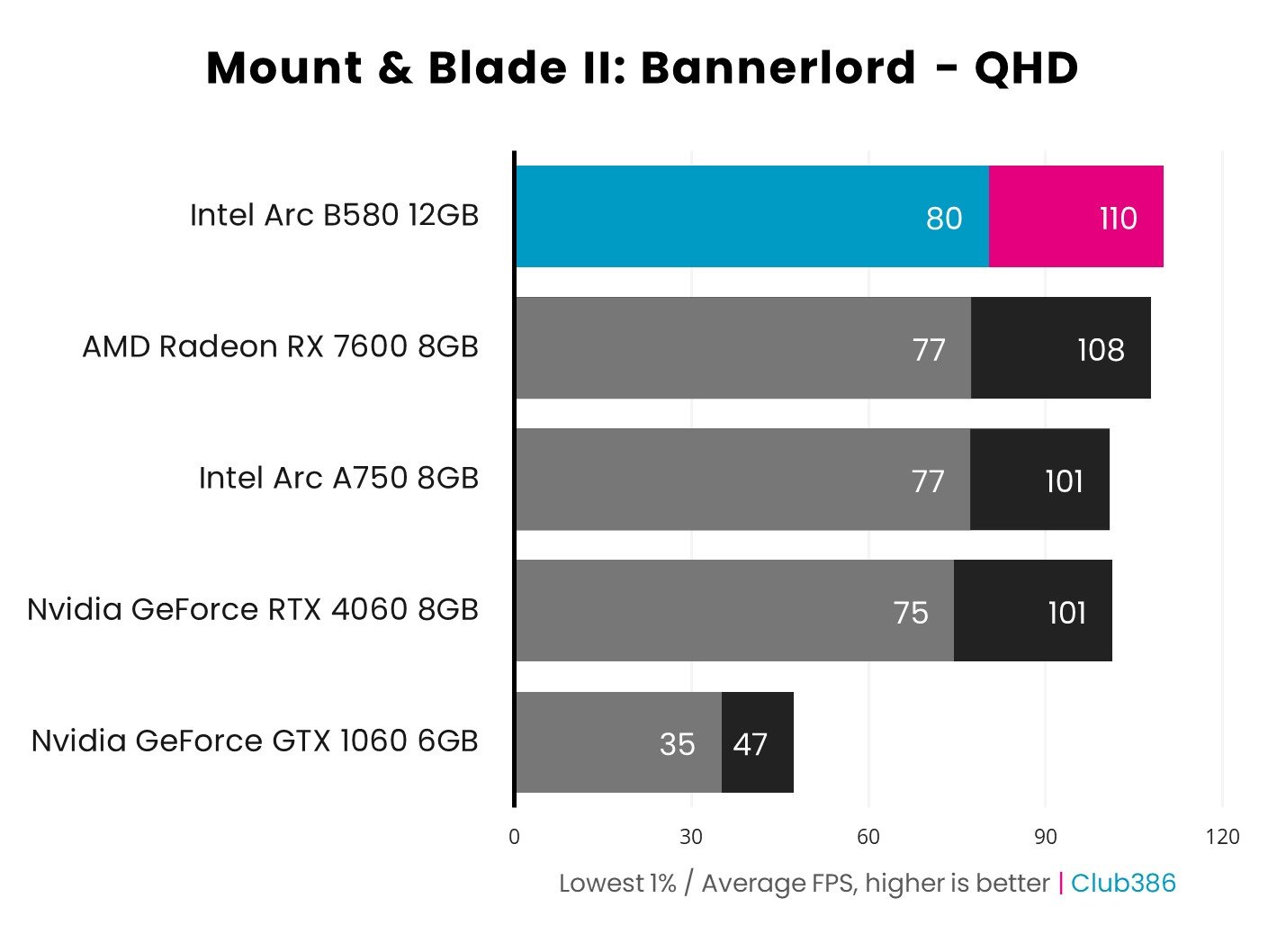
The B580 holds up well in our other benchmarks as well, keeping ahead of the RTX 4060 in Mount & Blade II Bannerlord, where it even provides a smooth frame rate of 110fps at 2560×1440. It achieved a similar feat in our Final Fantasy XIV: Dawntrail benchmark, averaging 90fps at 2560×1440, compared to 81fps on the RTX 4060.
Performance is a mixed bag in some of titles, however. The RTX 5060 is substantially quicker in Assassin’s Creed Mirage, for example, averaging 119fps at 1920×1080, while the B580 could only manage 93fps.
That extra 4GB of VRAM tips the balance, enabling you to push for higher settings.
The other factor to consider, as with any non-Nvidia GPU, is that you don’t get access to all the benefits of DLSS. Intel’s rival XeSS tech does work really well as an upscaler in our tests, and it has frame gen too, but it’s not supported by anywhere near as many games as DLSS. Intel also has its own multi-frame-gen tech now, and it even works on the B580.
We tested it in our Panther Lake GPU benchmarks and found that it worked really well on an Arc B390 in Cyberpunk 2077, but created some weird motion artifacts in Assassin’s Creed: Shadows.
The Arc B580 isn’t a straight winner in this contest, and there are definitely games where the Nvidia RTX 5060 or AMD Radeon RX 9060 XT 8GB will be better. However, that extra 4GB of VRAM tips the balance, enabling you to push for higher settings, while also giving you some future proofing for tomorrow’s games. What’s more, even in the current memory crisis, this 12GB card is currently going for £260, making it much cheaper than the Nvidia and AMD alternatives.
Read our full Intel Arc B580 review for all the details about this gaming GPU, including our benchmark data.
| Arc B580 | Specification |
|---|---|
| Xe2 cores | 20 |
| Ray tracing units | 20 (2nd gen) |
| XMX AI engines | 160 |
| Peak boost clock | 2,850MHz |
| Memory | 12GB GDDR6 |
| Effective memory speed | 19Gbps |
| Memory interface | 192 bits |
| Memory bandwidth | 456GB/s |
| Architecture | Intel Battlemage |
| Power | 190W |
FAQ
How much VRAM do I need?
In an ideal world, we recommend having at least 12GB of VRAM for gaming at 1920×1080, 16GB for 2560×1440, and 20GB for 4K. The goalposts have moved considerably over the last couple of years when it comes to GPU memory, and we’re seeing more and more games saturating memory quickly. If you don’t have enough VRAM, your GPU won’t just be a little bit slower; performance will often halve or worse, as your GPU can’t get the data it needs quickly enough.
If you don’t have enough VRAM, performance will often halve or worse.
Sadly, the current crisis around memory prices means we don’t live in this ideal world, and it’s looking increasingly as though the industry is going to prioritise 8GB cards at the budget end of the market for the next year or so. That means you’ll need to consider making a compromise, either on how much money you’re willing to spend to get more VRAM, or how far you’re prepared to lower your in-game graphics settings.
You can still get decent gaming performance from an 8GB graphics card, just bear in mind that there will be cases where you can’t run your games at high settings, even at 1920×1080, as you won’t have enough VRAM.
Do I need PCIe Gen 5?
All of AMD and Nvidia’s latest GPUs use the PCIe Gen 5 interface, but that doesn’t mean you need a PCIe Gen 5 motherboard to run them. You do need to keep an eye on the number of lanes, though. If your motherboard has a 16x PCIe Gen 4 slot, you’ll still have more than enough bandwidth to run any 16x PCIe Gen 5 GPU up to and including the RTX 5080, and even an RTX 5090 will run at full speed for the most part.
If you only have PCIe Gen 3, however, there will be a performance drop off, particularly with cards at the cheaper end of the scale, as a lot of these GPUs use fewer PCIe lanes than their high-end counterparts. For example, the RTX 5060 Ti uses eight PCIe Gen 5 lanes, rather than 16. That’s fine on a PCIe Gen 5 motherboard, where you’ll have more than enough bandwidth, but you’ll still only get eight lanes if you put it in a PCIe Gen 3 motherboard, giving you just a quarter of the bandwidth.
What are DLSS and FSR?
Nvidia DLSS, AMD FSR, and Intel XeSS have all become very confusing, and it can be hard to make head or tail of all the various different technologies bundled into these suites. As a general rule, the purpose of DLSS, FSR, and XeSS is to improve performance in your games, particularly when you enable demanding graphical features such as ray tracing. All of them offer a way to upscale resolution, for example, where a game will keep all the text, menus, and HUD at your chosen resolution, but render all the 3D graphics at a lower resolution to speed up frame rates, then use some form of upscaling to minimise the impact on visuals.
Some of these technologies work better than others, especially when it comes to image quality, and they’re not supported by all GPUs. The best ones are the DLSS Transformer model, which works on all Nvidia RTX GPUs, but is much quicker on RTX 4000 and 5000 GPUs than previous ones), and FSR 4, which is now a part of AMD’s FSR Redstone suite and runs on the company’s Radeon RX 9000-series GPUs. Intel’s hardware-based XeSS upscaling works well too.
Nvidia is the king of frame generation right now.
Previous versions of FSR, however, look poor in comparison, with a lot of noise and blurriness. These models of FSR have the benefit of working on any GPU, whoever made it, but they’re not based on machine learning, and they make your games look bad in comparison.
The other main way these suites can improve performance is by using frame generation, where extra frames are generated in between the ones genuinely rendered by your GPU, in order to give you a smoother frame rate. Nvidia is the king of frame gen right now, with its AI-based frame gen tech working well with minimal artifacts, and its multi-frame-gen tech even enabling you to nearly quadruple your frame rates. You’ll need a good starting point before you switch it on, though, or you’ll get horrible input lag. We recommend only using frame gen if you’re already averaging around 60fps – you can then use it to smooth out motion, which looks great on a monitor with a high refresh rate.
Both Intel and AMD also offer frame gen. AMD’s original FSR frame gen was a bit of a mixed bag, with big variations in performance and visible artifacts, but its new AI-based frame gen tech in FSR Redstone works well. It’s not supported by anywhere near as many games as DLSS, though. Intel also has XeSS frame gen now, including its own 4x multi-frame-gen tech. The latter doesn’t work on its desktop Arc GPUs yet, but we’re told it’s coming.
Are AMD GPUs bad at ray tracing?
Not any more, but they used to be. AMD had to play a big game of catch-up when Nvidia started dabbling with AI and ray tracing. AMD’s first-gen RDNA GPUs, the Radeon RX 5000 series, had no ray tracing hardware at all, and while its later RDNA 2 and RDNA 3 GPUs rectified this shortfall, they still fell behind the Nvidia competition. Thankfully, that situation has now been resolved, and AMD’s latest Radeon RX 9000 RDNA 4 GPUs are great at both ray tracing and traditional rasterisation.
The only pitfall is path tracing, a highly advanced form of ray tracing that gives you very realistic lighting in games that support it, but is extremely compute-intensive. AMD GPUs can do it, but at such a huge performance cost that it isn’t worthwhile. Nvidia’s GPUs can handle path tracing much better, but even they struggle at higher resolutions – you’ll be lucky to get beyond 1920×1080 on an RTX 5070 Ti.
