

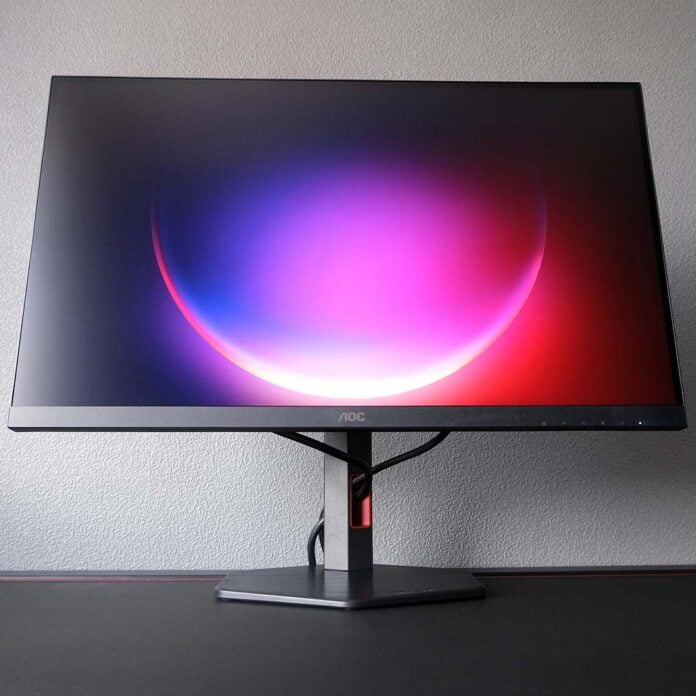
There was a time where 240Hz was off the table for affordable gaming monitors, but the AOC Q27G4ZR is lowering that barrier to entry. Offering a high refresh rate for a surprisingly low price, this gaming display offers speed and value in one package.

AOC Q27G4ZR
£199
Pros
- 240Hz IPS panel
- Excellent brightness
- Solid colour accuracy
- Great value
Cons
- Relatively narrow gamut
- Mild uniformity issues
- No USB hub
Club386 may earn an affiliate commission when you purchase products through links on our site.
How we test and review products.
Retailing for a price of just £199, the Q27G4ZR is surprisingly affordable considering its specifications. AOC has understandably made some compromises to meet this price point, but none of them irreparably dampen the appeal of the monitor.
Specifications
The Q27G4ZR boasts a 27in IPS panel, with a native QHD (2560×1440) resolution, resulting in 109 pixels per inch (PPI) that keeps image output nice and sharp. For context, despite the larger screen size, the increased pixel count results in a sharper image than a 24in FHD alternative, which clocks in at 92PPI, and it’s well worth paying the extra money for this more detailed picture.
The panel’s native 240Hz refresh rate provides a frame time ceiling of 4.17ms, a substantial uplift over 60 and 120Hz panels, which clock in at 16.7ms and 8.3ms, respectively. You’ll need to drive content at 240fps to see and feel the benefits of this specification, but meeting this requirement unlocks great motion clarity and responsiveness.
| AOC Q27G4ZR | |
|---|---|
| Screen size | 27in |
| Resolution | 2560×1440 |
| Refresh rate | 240Hz (260Hz OC) |
| Response time | 1ms (GtG) |
| Panel technology | IPS |
| Panel coating | Matte |
| Variable refresh rate | Adaptive Sync |
| HDR | VESA DisplayHDR 400 |
| Ports | 3.5mm headphone output (x1) DisplayPort 1.4 (x1) HDMI 2.0 (x2) |
| Speakers | 2W (x2) |
| Warranty | Three years |
| Price | £199 |
It is possible to push the refresh rate further on this monitor via a built-in overclock to 260Hz. This isn’t a feature we see all that often on contemporary gaming monitors, as native specs have become much higher over time, diminishing their appeal. Given that an extra 20Hz only reduces your frame time ceiling to 3.85ms, just 0.27ms down from the native refresh rate, and can produce abnormalities in picture output, it holds questionable value to all but the most competitive of gamers.
Of course, no gaming monitor is complete without some form of variable refresh rate, and the Q27G4ZR ticks this box with support for standard Adaptive Sync. While this means the monitor lacks any official nod from AMD or Nvidia, there’s no reason to fret over the lack of branding, as I tested it with G-Sync enabled, and it still worked fine, delivering a pleasingly tear-free experience at 48-240Hz.
Design
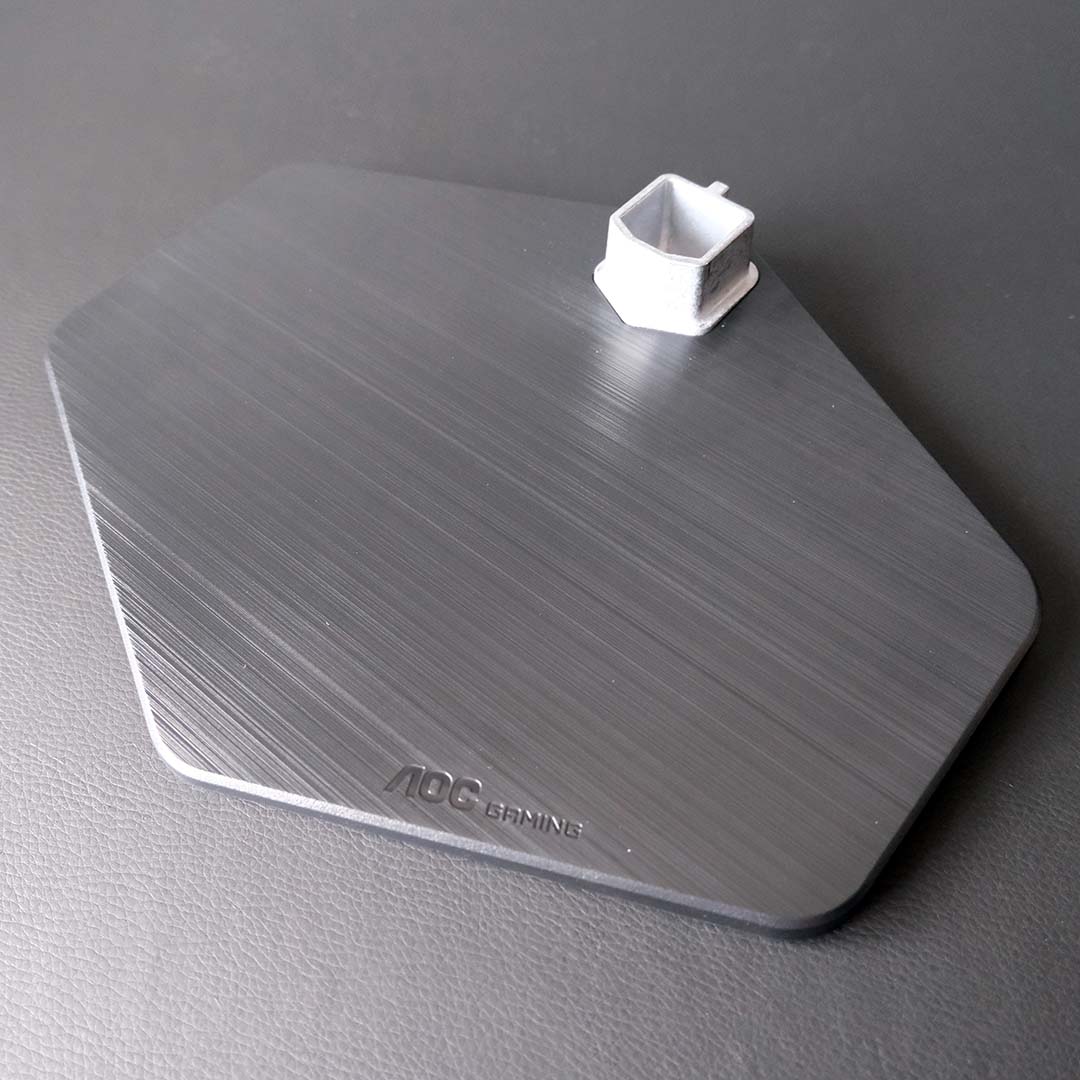
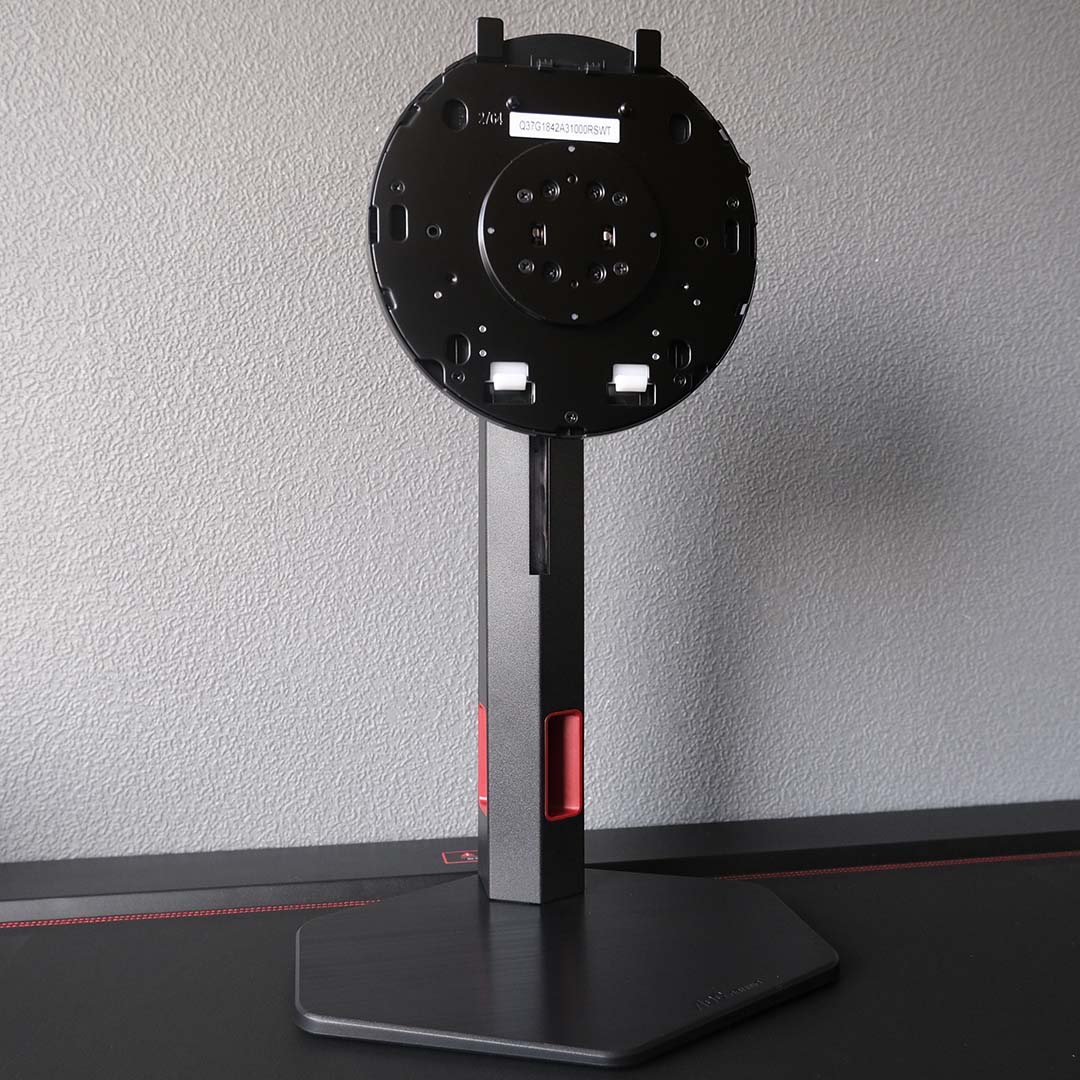
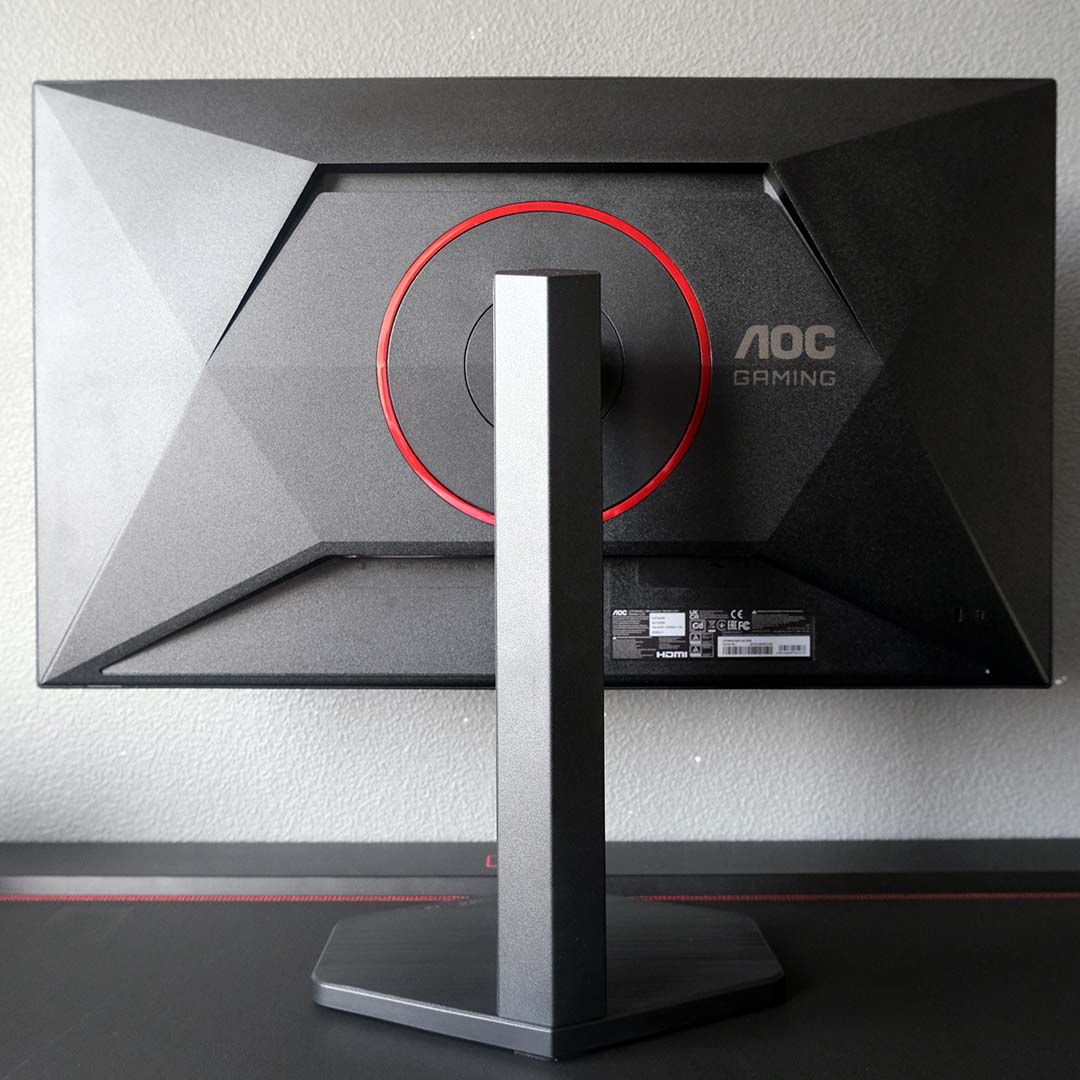
AOC sticks with its tried and tested ‘Gaming’ series design for the Q27G4ZR. That’s no bad thing, though, as the monitor arrives with the same high-quality build and finish you’ll find on more expensive monitors from the brand.
Its base, neck, and panel click together in toolless harmony. The Q27G4ZR’s stand provides 130mm of height adjustment, as well as ±90° of rotation, in addition to ±28° of swivel and a 24° range of tilt. Suffice to say, it’s easy to position the monitor as you’d like in your setup, but you can easily install a 100mm² VESA mount if you’d prefer.
As much as I vibe with the Q27G4ZR’s ergonomics, I’m less keen on its cable management. The hexagonal shape of the monitor’s neck makes it impossible for AOC to insert a centralised cutout, leading to it having two off-axis ones instead. This approach doesn’t create an especially tidy finish, with the grommets’ red accents only bringing further unwanted attention to your wiring.
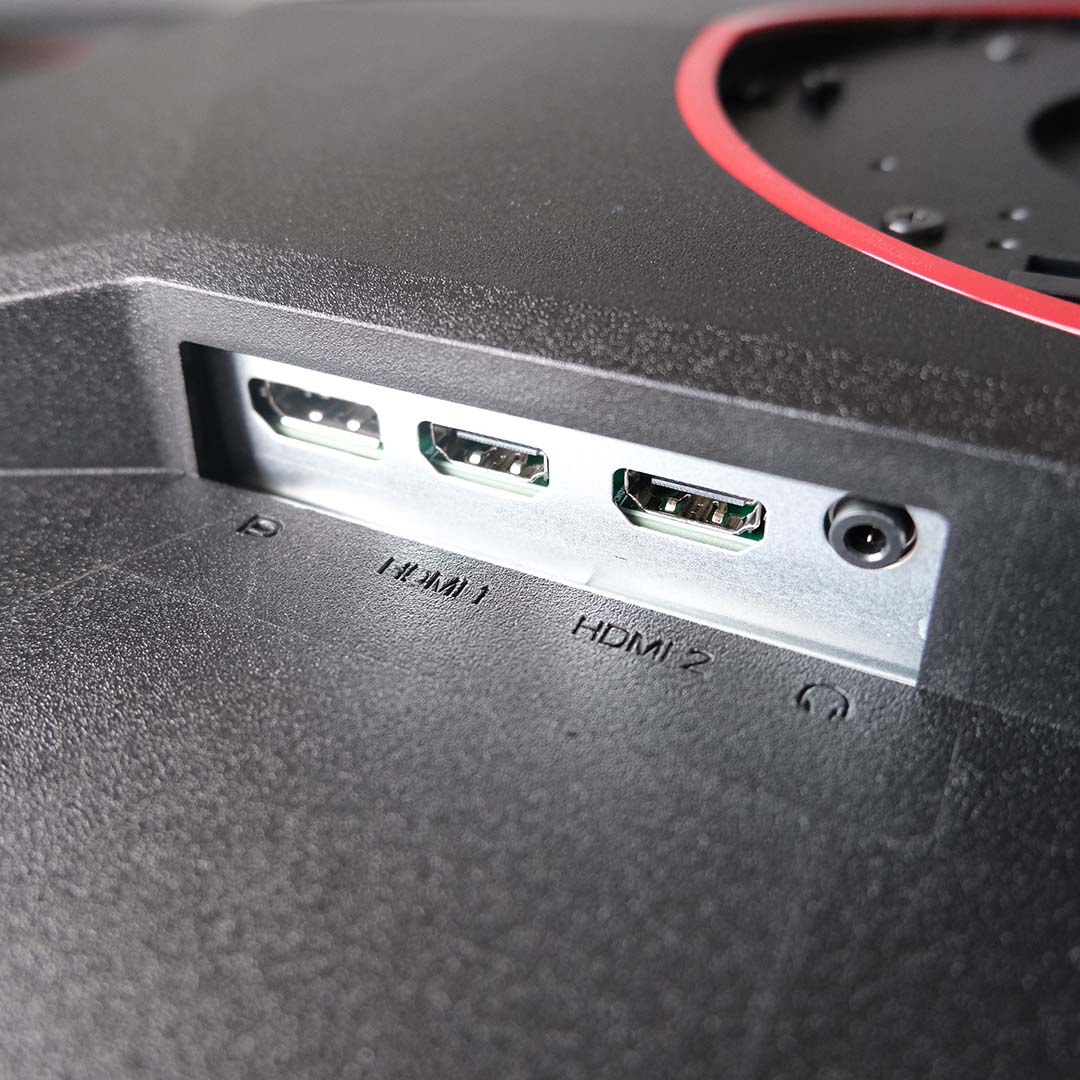
A single DisplayPort 1.4 connector and two HDMI 2.0 ports make up the Q27G4ZR’s trio of display inputs. However, only the former of the two is able to run the monitor at its full refresh rate, via Display Stream Compression (DSC), with the other capping out at 144Hz. HDMI 2.1 would have opened up the ability to use any of the three ports at 240Hz, but would have increased manufacturing costs, so its omission here in service of value is entirely understandable. It will still run at 240Hz when connected to your PC via DisplayPort, and 120Hz is also available for consoles hooked up to the HDMI ports.
AOC doesn’t equip the Q27G4ZR with a USB hub, but peripheral ports are more of a nice-to-have feature in my view than an absolute essential, particularly on budget monitors. That said, you will find similarly priced alternatives that do offer such connections, albeit usually with lower refresh rates than this offering. The question then becomes one of priorities: ports or panel? I lean more to the latter, but there’s no wrong answer – it all depends on your priorities.
Rounding off the port selection, the Q27G4ZR uses a C13 power connector, and without needing an external transformer brick in a win for convenient cable management. You’ll also find a 3.5mm output that you can use to connect a headset or speakers to your PC, sourcing audio through HDMI passthrough.
The Q27G4ZR also comes with dual 2W speakers. These tweeters expectedly aren’t a replacement for a decent set of bookshelf speakers or headset, lacking bass and outputting a tinny noise profile. However, they’re good enough for kicking back with content where audio quality isn’t paramount, such as a YouTube video and Windows notifications.
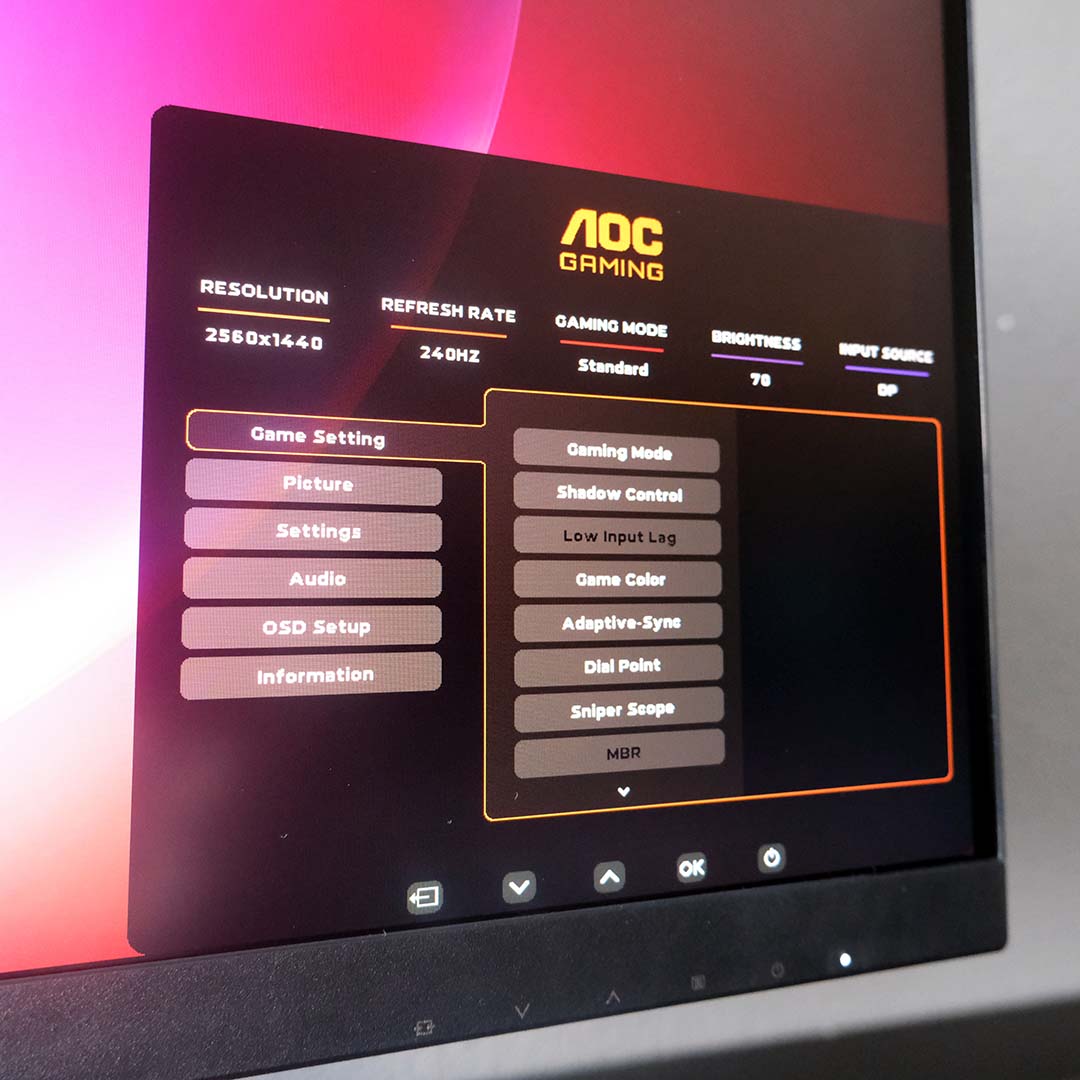
The monitor’s on-screen display (OSD) controls live along the Q27G4ZR’s chin as five buttons. AOC has printed icons for each button on the monitor’s bezel, but these are only useful in a well-lit room, as they’re not visible in darker conditions. As I mentioned in prior reviews, I’d prefer to see AOC adopt joystick OSD controls moving forward, but its G-Menu software serves as a decent alternative in the meantime.
Save for pushing up to a 260Hz via overclock if you’re after the maximum refresh rate possible on this panel, you shouldn’t need to delve into the wider settings menu, as the stock configuration is solid. That said, it’s worth using the monitor’s reset function to prompt the energy-saving pop-up if you missed it on first boot, as choosing to forgo efficiency measures greatly increases the screen’s brightness.
I’m also happy to see clamps for sRGB and DCI-P3 colour spaces, as well as a healthy selection of picture controls for tinkerers to tune the monitor. Additionally, while I’ve never found use for such features, AOC also offers a sniper scope and frame counter in the OSD.
Performance
You can feel the benefits of the Q27G4ZR’s 240Hz panel, relative to 60Hz or 120Hz, across all games but most keenly in first-person shooters. Across sessions lasting several hours in Left 4 Dead 2 and Rainbow Six Siege running at 240fps, low frame times improve input lag and net greater responsiveness, while greater motion clarity makes tracking targets easier.
AOC ships out the Q27G4ZR with its overdrive set to Normal by default, but I found I could use its Fast and Faster presets, increasing panel responsiveness, without any noticeable artefacts. However, Fastest is a step too far, introducing noticeable inverse ghosting.
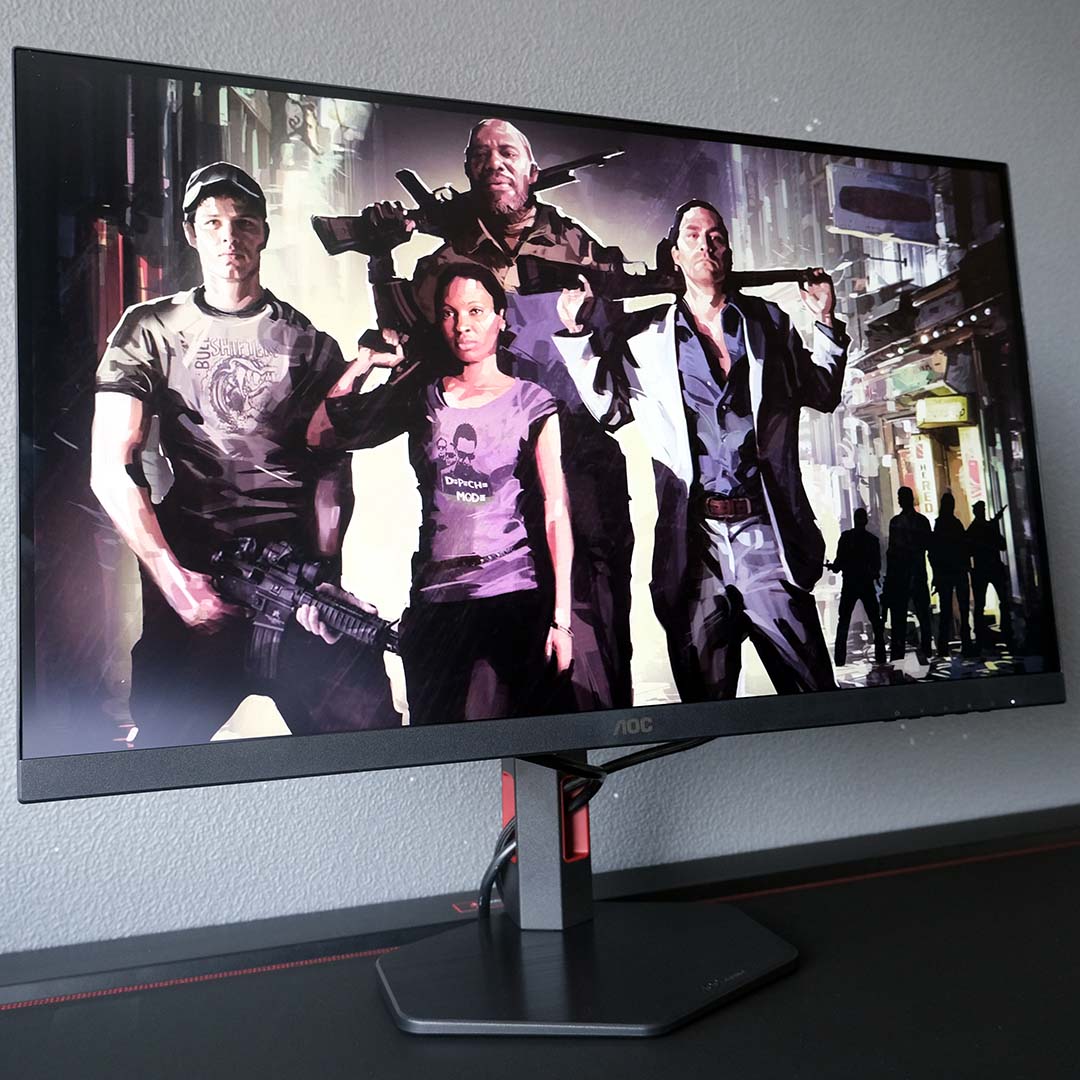
It’s important to remember that overdrive settings will deliver variable performance depending on your frame rate, with lower refresh rates being more prone to artefacts as overdrive increases. As such, it makes sense to stick with default settings on the Q27G4ZR for most games to achieve the most consistent image quality, swapping to Fast or Faster in competitive titles where you can confidently hit 240fps.
Swapping over to Heroes of Might & Magic: The Olden Era, this strategy game’s colour palette provides fertile ground for appreciating the Q27G4ZR’s colour capabilities. While it’s not the punchiest LCD I’ve ever seen, the splendour of the title’s watercolour castles, creatures, and more come to life on this screen in a pleasing enough fashion.
While the Q27G4ZR does boast VESA DisplayHDR 400 certification, its panel doesn’t carry any form of local dimming to assist with contrast. As such, the monitor doesn’t deliver a compelling HDR viewing experience, and you’ll need to spend more cash on a Mini LED or OLED alternative if this feature is a priority for you. All that said, this is a criticism you can levy against most displays of this calibre, and its SDR output remains strong.
Colours
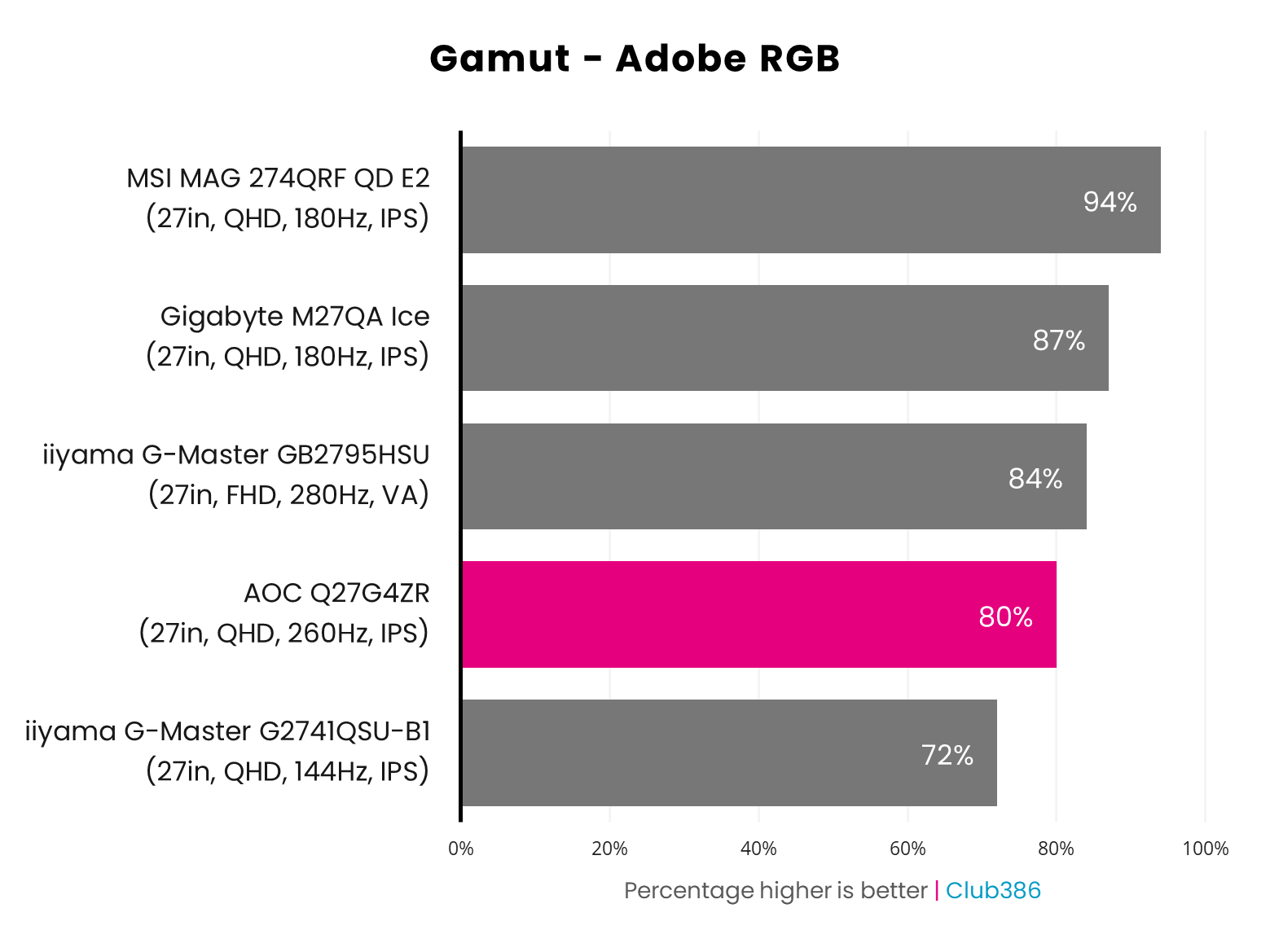
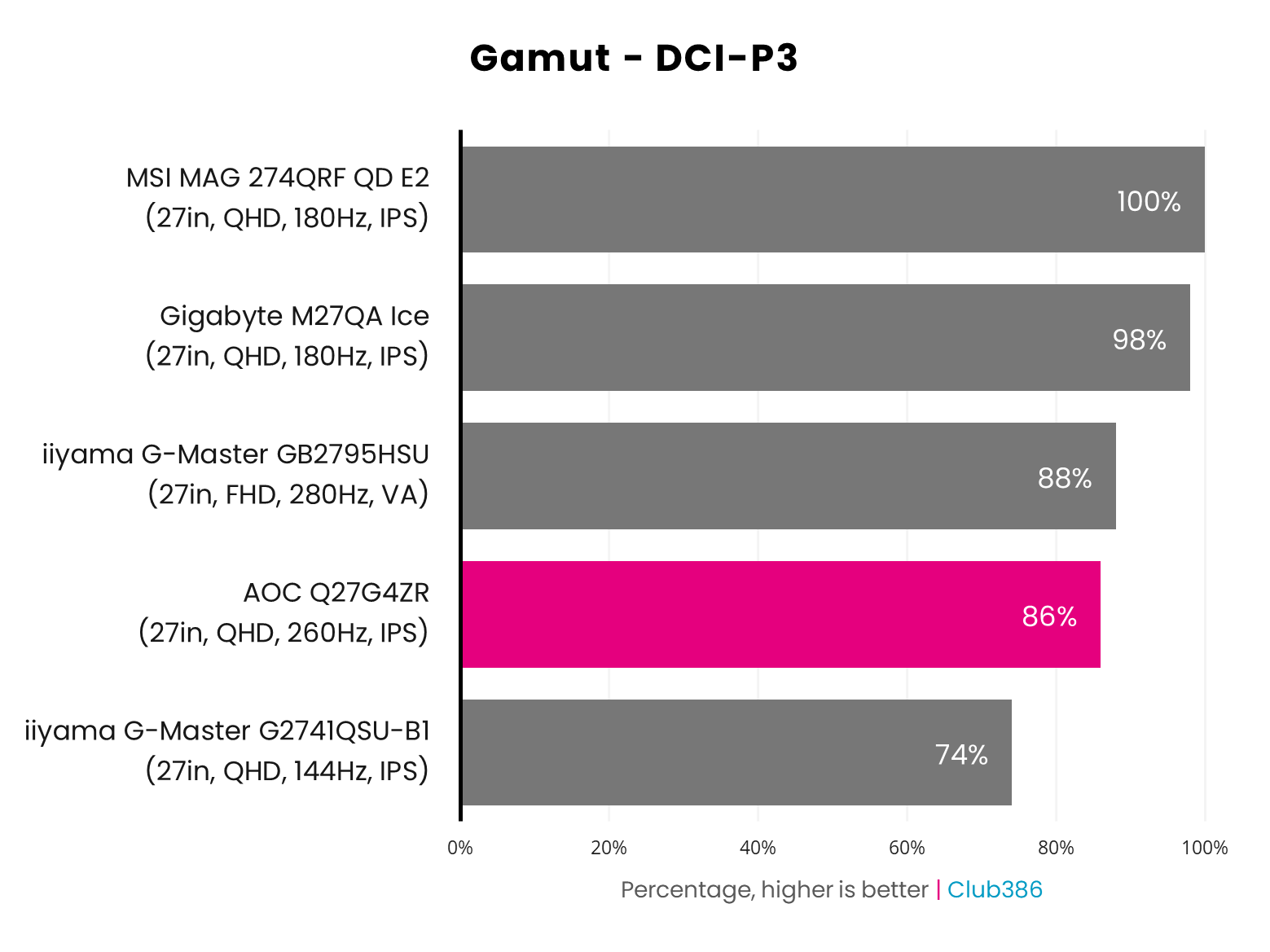
While the Q27G4ZR completely covers the sRGB colour space, its gamut is more middling when swapping over to DCI-P3 at 86%. Naturally, Adobe RGB coverage is also relatively low at 80%.
As the charts above illustrate, we’ve seen IPS panels in this price range offer wider gamuts, typically around the 90%+ mark, but that’s sadly not the case for this AOC offering. These results by no means compromise the monitor’s gaming credentials, but there are more vivid alternatives out there when it comes to colour reproduction.
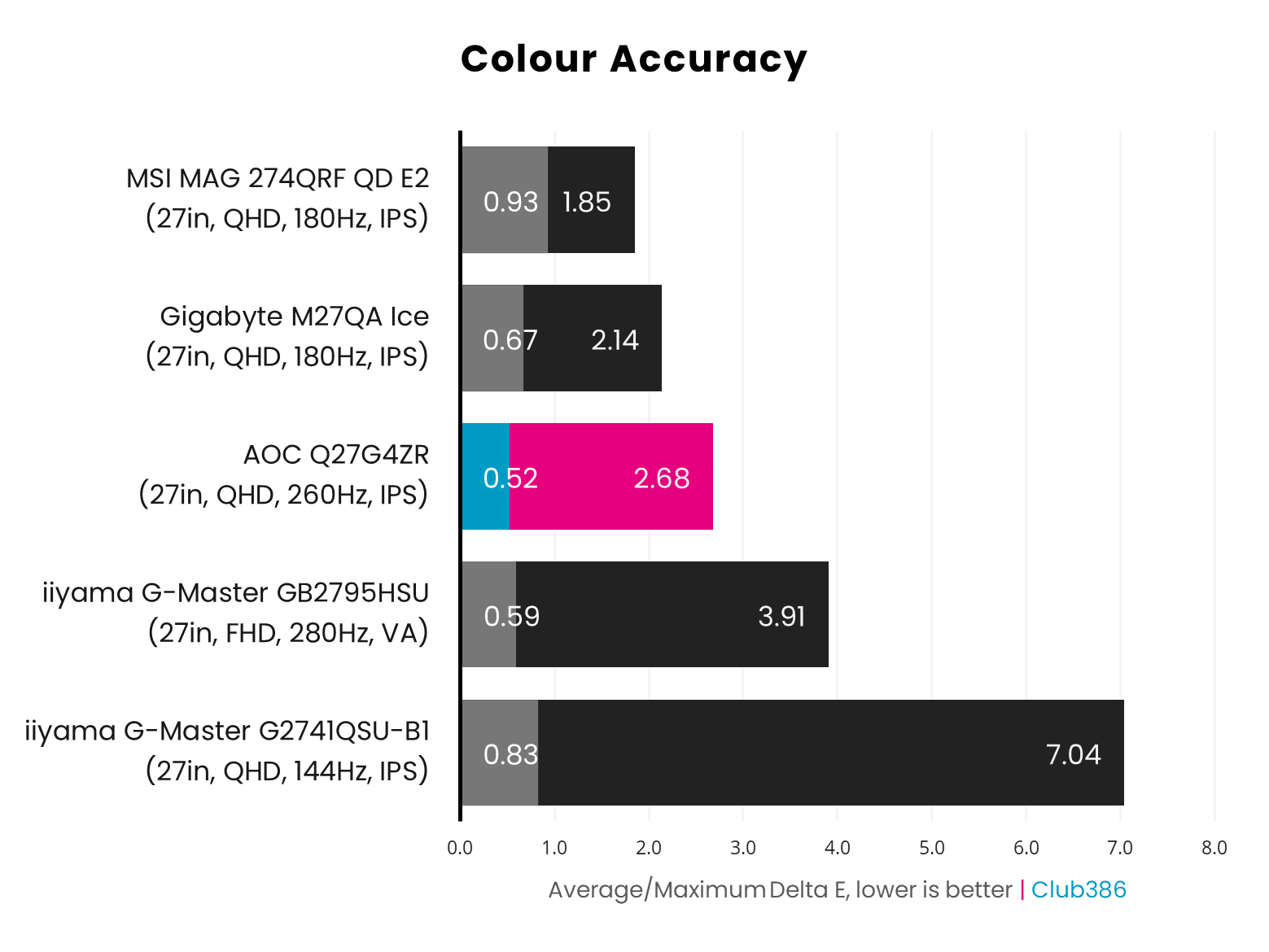
While the Q27G4ZR’s gamut may be relatively narrow, this monitor at least manages to output the colours it can display with a solid degree of accuracy. A 0.52 Delta E average is an excellent result for any panel, and ranks among the best we’ve seen on a budget backlit display.
It’s a shame a rogue blue hue causes a 2.68 Delta E maximum, as the second-highest deviation sits at an impressive 1.28. Regardless, that result isn’t so far away from the ≦2 gold standard to present any noticeable issues during real-world use, and is markedly better than some alternatives in the chart.
Brightness
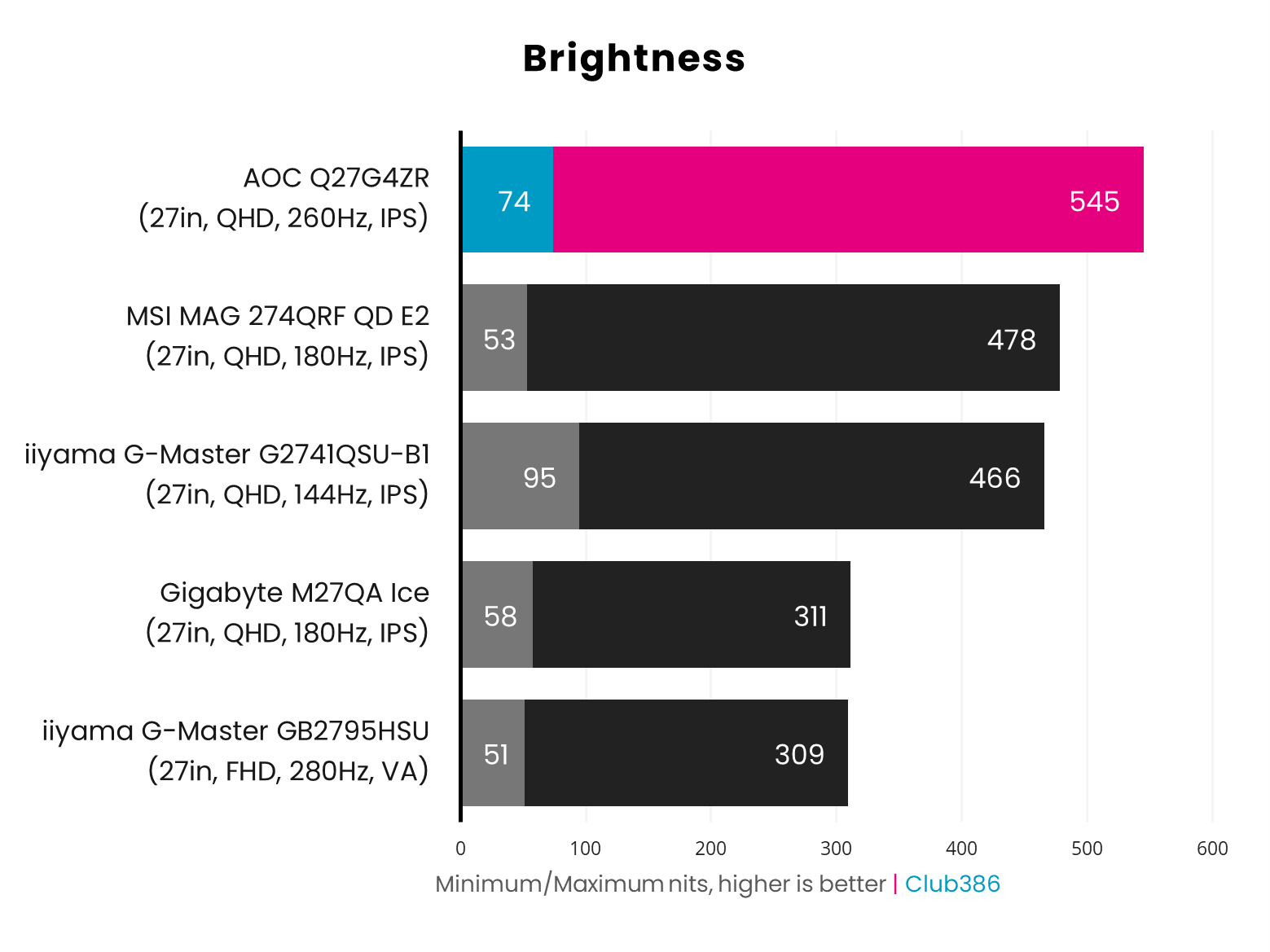
Rocking a peak brightness of 545nits, the AOC Q27G4ZR is far brighter than other panels we’ve tested in the £150-250 price range. Having such a bright screen can help offset the screen’s limited gamut through higher perceived colour saturation, but this quality also greatly improves usability in rooms with lots of ambient light.
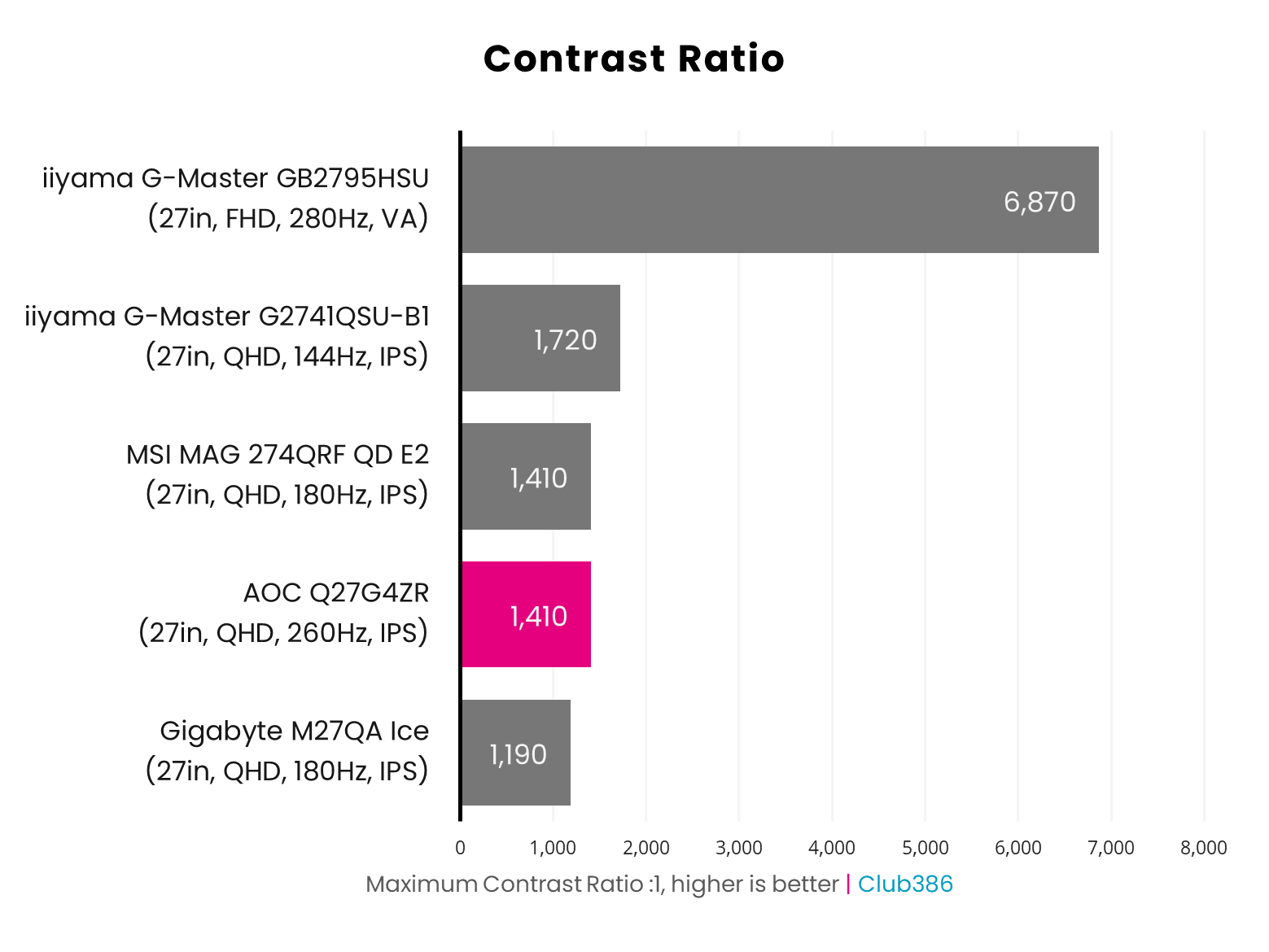
While the AOC Q27G4ZR is bright, this monitor can’t escape the limitations of its panel technology, namely a middling contrast ratio of 1,410:1. This is a relatively decent result for an IPS display, but as the iiyama G-Master GB2795HSU shows, VA is far and away the superior choice in this respect.
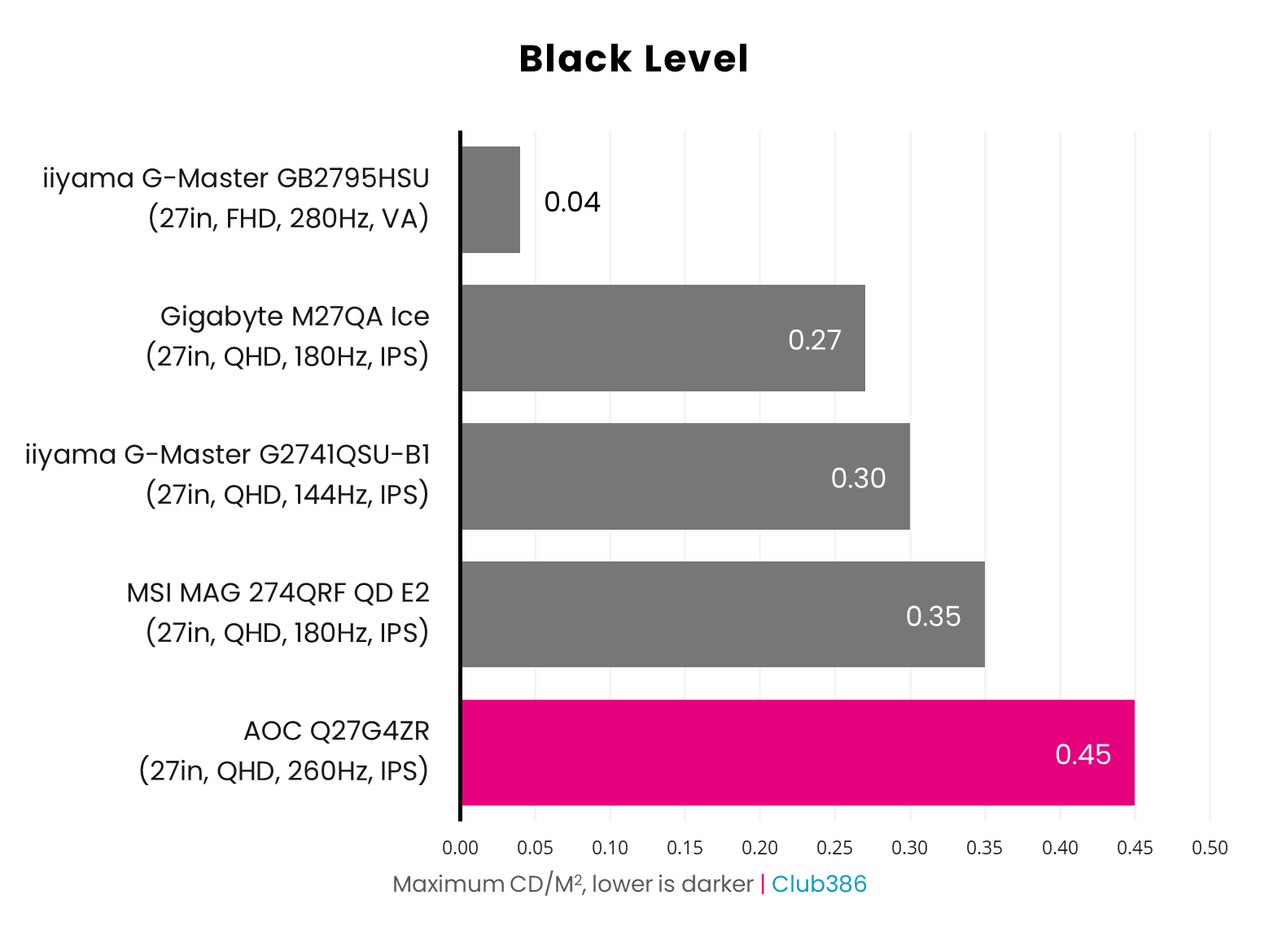
Given the Q27G4ZR’s middling contrast, it should come as no surprise that this monitor’s black levels aren’t particularly low, peaking at 0.45nits. This means darker portions are noticeably greyer in appearance, muddying shadow detail. However, this is a problem you’ll find on all backlit displays bar more expensive Mini LED alternatives.
Uniformity
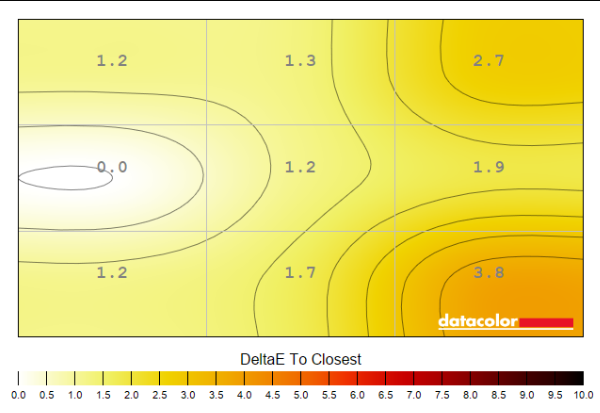
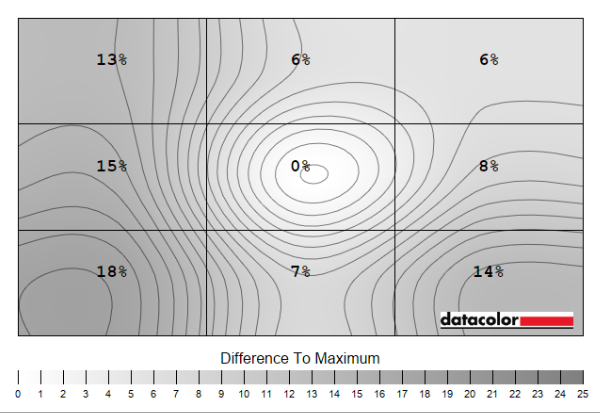
Colour and luminance variation across all backlit panels is unavoidable, but it’s the degree to which screens retain uniformity that separates proverbial wheat from chaff. In the case of the Q27G4ZR, this monitor holds up okay.
There are clear signs of IPS bleed on my review unit, particularly in the left and bottom-left portions of the panel, which manifest as notable luminance deviations of 15-18% (61-74nits). Colour consistently, meanwhile, is much better, with a ≦2 Delta E across all but two corners, peaking at a modest 3.8, which is difficult to notice in real-world use.
Power
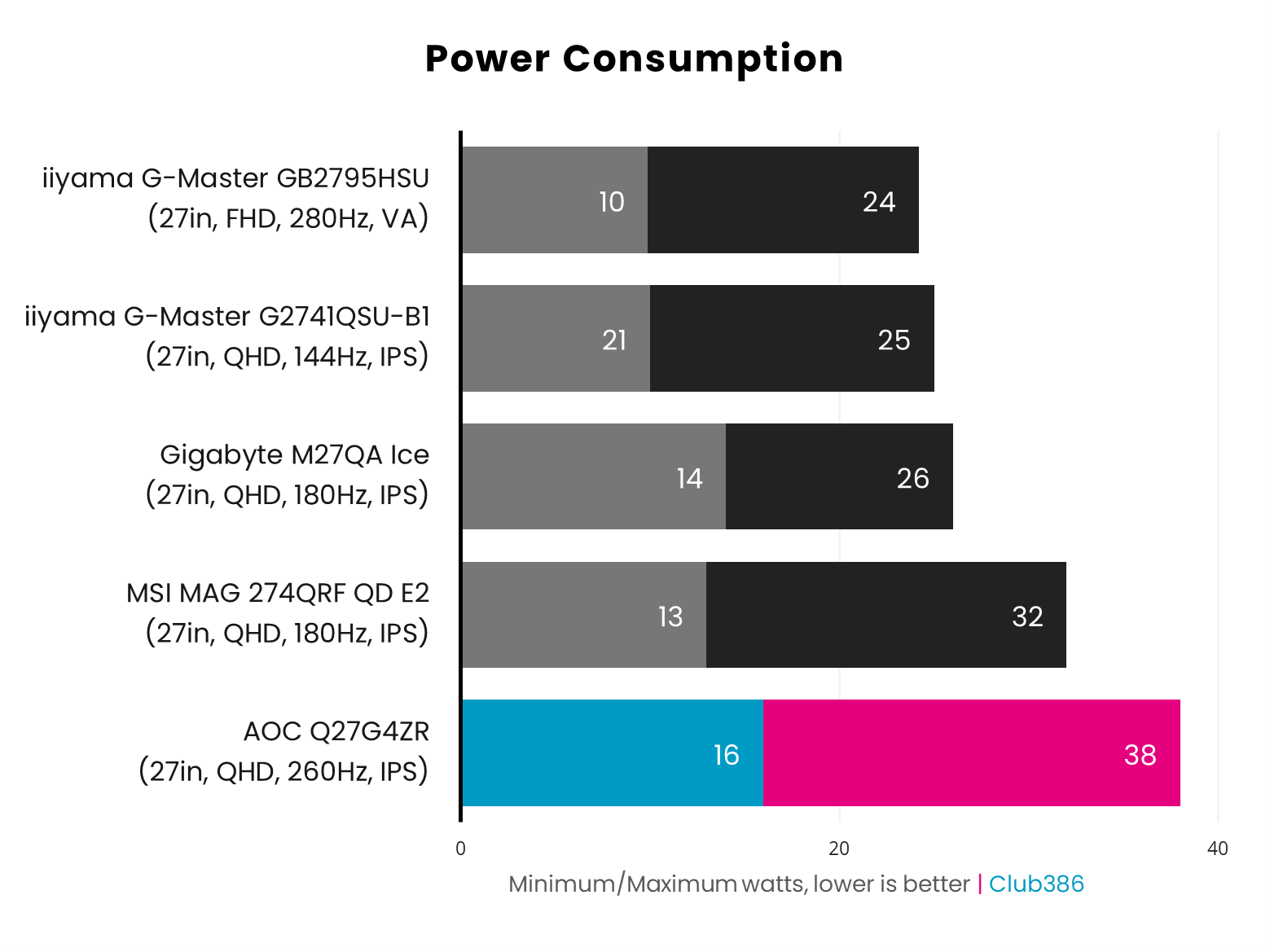
Pulling 16-38W from the wall, the Q27G4ZR’s power consumption is slightly higher than other LCDs we’ve tested, but not by a concerning margin. In any case, this monitor is still appreciably less power-hungry than QD-OLED screens, whose appetites start from 56W+ according to our tests.
Conclusion
At £199, the Q27G4ZR offers solid value as one of the most-affordable QHD/240Hz monitors on the market. Better still, the Fast IPS panel inside this display is a cut above countless cheaper VA alternatives in terms of brightness and responsiveness.
However, at the time of writing, you’ll find the same panel in a Philips Evnia 27M2N3501PA or AOC Q27G42ZE at a lower price. While I’ve not tested either monitor, performance should remain broadly comparable. Note, these are limited-time promotions, with both displays having the same £199 MSRP.
I’d like to see wider gamut coverage and tighter luminance uniformity on a successor, but the Q27G4ZR as it stands offers solid value, particularly to those in search of an affordable 2560×1440 gaming monitor with a high refresh rate.
