
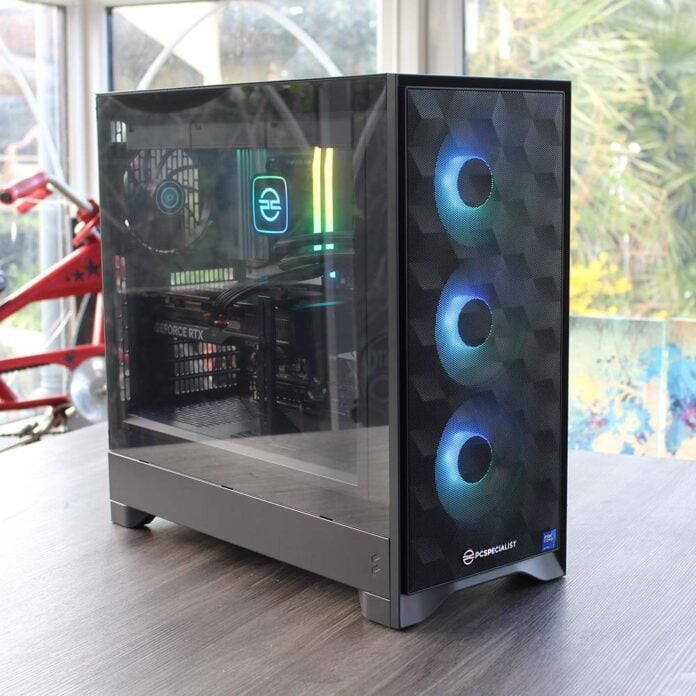
It’s been a while since we reviewed a PC with an Intel CPU inside it because, let’s be honest here, they haven’t been very good lately, particularly when it comes to gaming. Thankfully, however, Intel’s redemption arc is now in full swing. The company’s latest Arrow Lake Refresh chips have had some serious tweaks under the hood, and they’ve been armed with very competitive pricing. PCSpecialist has put the Core Ultra 7 270K Plus from this range inside its Nebula Phantom rig, making for a multi-core beast that can also handle gaming.
Yes, AMD’s X3D chips still rule the gaming waves, but unless you go for a very expensive Ryzen 9 CPU, you’ll end up sacrificing multi-threaded performance in the process. Intel has also priced the 24-core 270K Plus in line with AMD’s 8-core Ryzen 7 9700X, making it the best CPU in its price range if you dabble in multi-threaded workloads, such as 3D rendering and large-scale video encoding, as well as gaming. Plus, it’s half the price of a Ryzen 9 9950X3D.
It’s not all good news, sadly, as you’ll know if you’ve been watching the costs of PC components lately. High RAM prices, as well as rocketing SSD costs, mean this rig costs considerably more than it would have done six months ago. PCSpecialist has done its best to create a competitive package, though, building a very powerful system for £2,349.

PCSpecialist Nebula Phantom
£2,349
Pros
- Fantastic multi-threaded pace
- Solid 1440p gaming performance
- Outstanding build quality
- Quiet operation
Cons
- SSD can’t hit full speed
- AMD X3D CPUs are a bit faster in games
- Future CPU upgrades may need a new motherboard
Club386 may earn an affiliate commission when you purchase products through links on our site.
How we test and review products.
Specs
| PCSpecialist Nebula Phantom | |
|---|---|
| CPU | Intel Core Ultra 7 270K Plus |
| CPU cooler | PCSpecialist LS-360 AIO |
| Motherboard | Asus Prime Z890-P WiFi |
| GPU | Gigabyte Nvidia GeForce RTX 5070 Ti Windforce OC V2 |
| RAM | 32GB (2x16GB) Corsair Vengeance RGB DDR5 6,400MT/s CL36 |
| SSD | Crucial T710 2TB |
| PSU | Corsair RM750e (Cybenetics Gold) |
| Other features | Realtek 2.5Gb Ethernet Bluetooth 5.4 Wi-Fi 7 |
| Case | Fractal Design Pop 2 Air TG RGB |
| Operating system | Windows 11 Home |
| Warranty | Three years |
| Price | £2,349 |
Let’s kick off the specs discussion with that brand new CPU. As we found in our Core Ultra 270K Plus review, Intel now has a seriously competitive weapon in its chip arsenal. Unlike its predecessor, the 265K, this CPU has 16 E-cores, rather than 12. Add those to the bank of eight performance-focused P-cores, and you have 24 cores at your disposal for multi-threaded workloads. It’s basically a Core Ultra 9 285K, but with a slightly slower boost clock of 5.5GHz (rather than 5.7GHz), and some extra tweaking under the heatspreader.
One key example is a 900MHz boost to the die-to-die interconnect between this CPU’s compute tile (containing the CPU cores and NPU), and the I/O tile that contains the memory controller. The result is a big reduction in latency that addresses the shortfall in gaming performance seen in first-gen Arrow Lake CPUs. In the Phantom, this CPU is kept in check by a liquid cooling system with PCSpecialist branding, and a 360mm radiator in the roof, so it shouldn’t have any trouble with throttling.
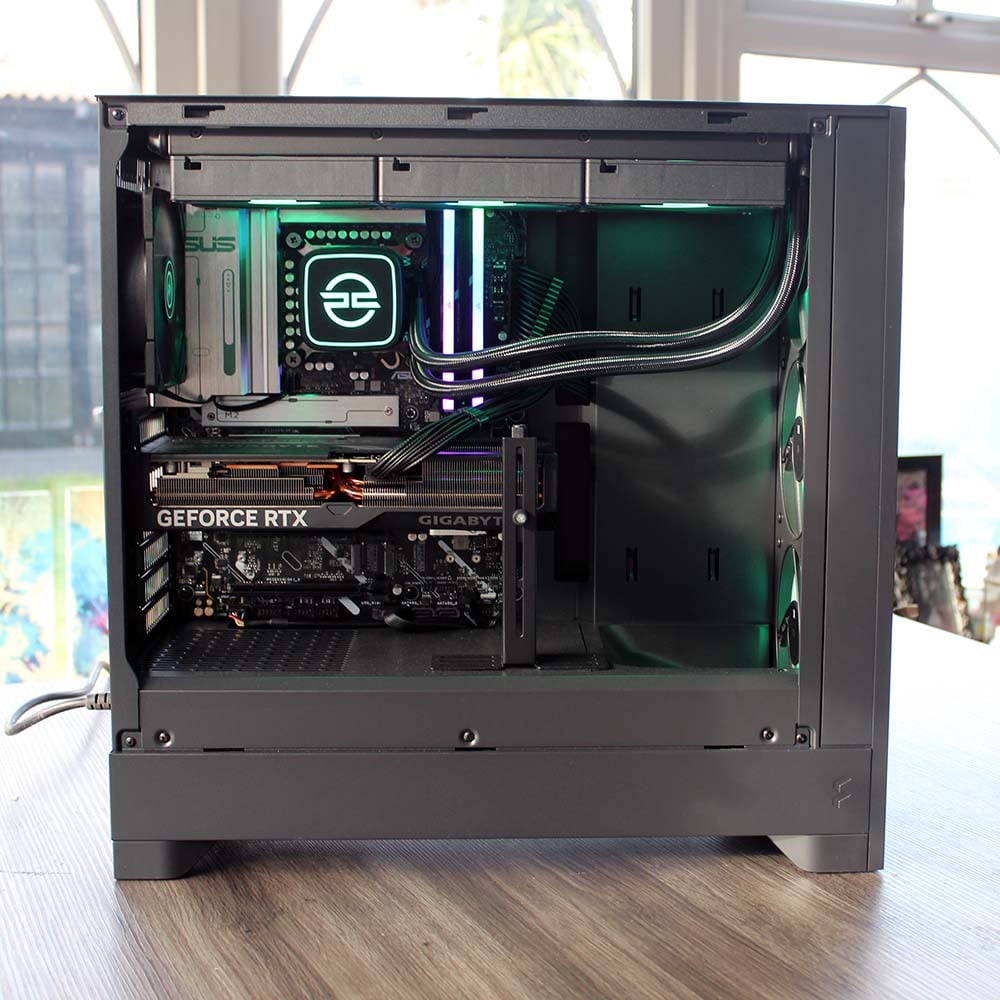
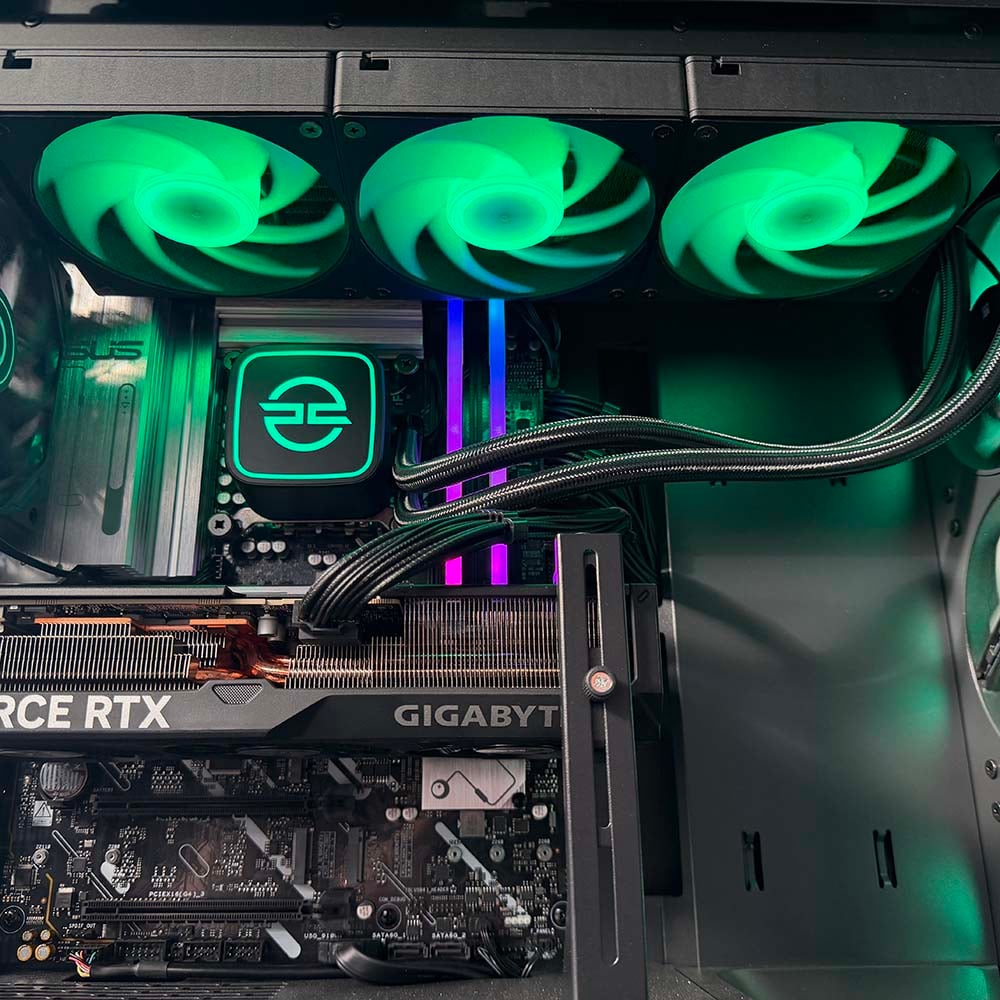
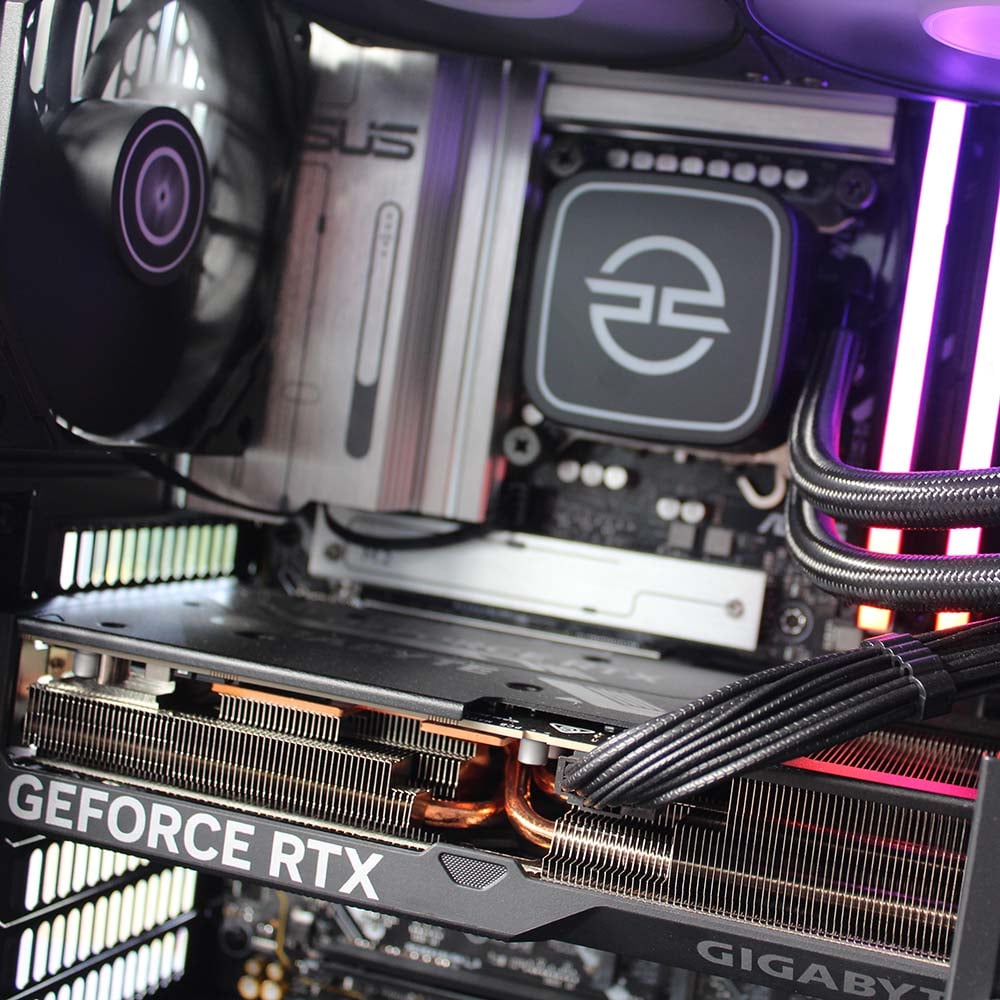
PCSpecialist is serious about gaming pace with this machine as well, installing a Gigabyte Nvidia GeForce RTX 5070 Ti card in its top PCIe Gen 5 slot. There’s a lot of talk about these cards going the way of the dodo shortly, so it’s great to see one in a new PC build. With 16GB of VRAM at its disposal and a beefy GPU containing 8,960 CUDA cores, it’s considerably more powerful than the 12GB RTX 5070. In fact, it’s not far off the pace of an RTX 5080, and it has full support for Nvidia’s DLSS 4.5 tech suite, including multi frame gen.
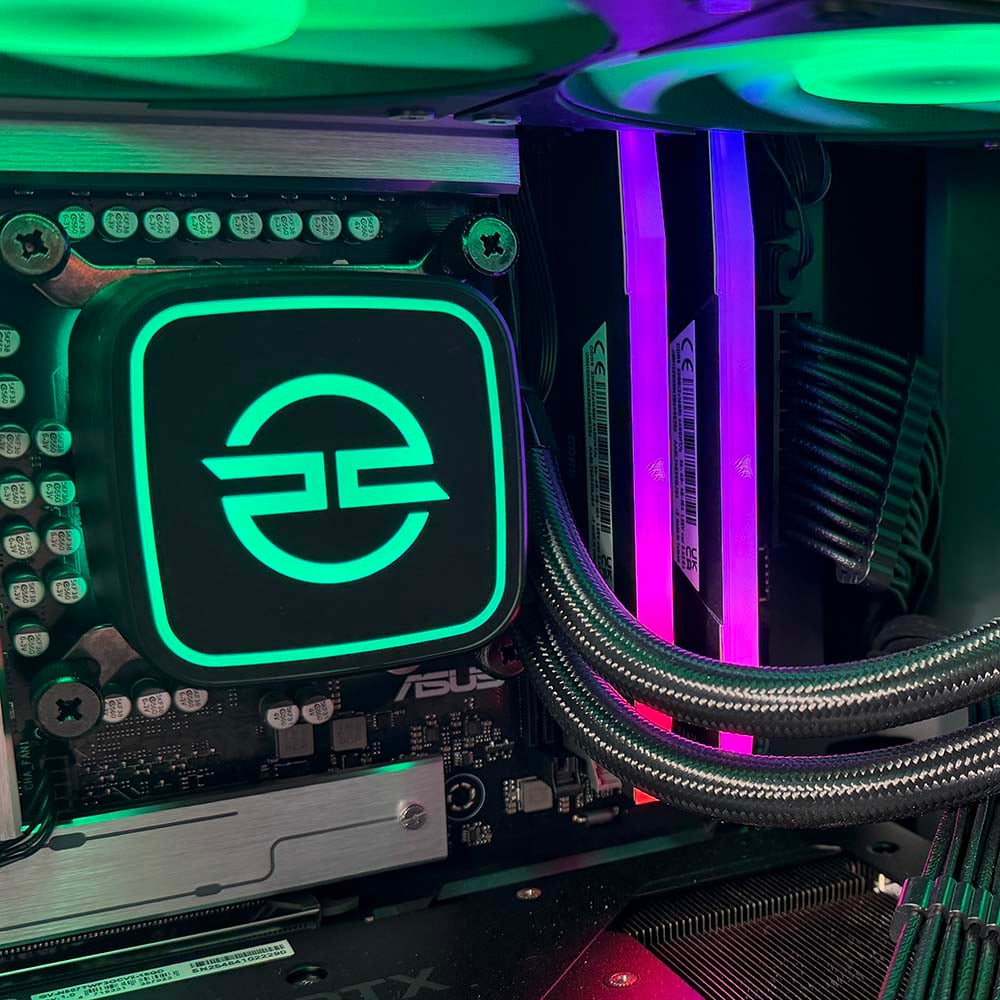
Similarly, I’m really pleased to see a healthy allocation of RAM in this rig, which isn’t a guarantee any more. PCSpecialist has furnished the Phantom with 32GB of Corsair Vengeance RGB DDR5 RAM, running at 6,400MT/s with 48-48-36 latency timings, and the modules even have a strip of diffuse lighting on top of their heatsinks. This memory currently costs over £400 at retail, making it more expensive than the CPU. Likewise, the 2TB Crucial T710 SSD will set you back £340 at the moment, meaning around £750 of this PC’s budget has been spent just on its storage and memory.
That’s undoubtedly a big chunk of cash, but I’d argue that it’s one worth paying. You could definitely save some money by opting for 16GB of slower RAM with a 1TB PCIe Gen 4 SSD, and it’s frustrating that prices are so high. There’s not a lot PCSpecialist can do about these challenging global market conditions, though, and if you’re spending big on a fast CPU and GPU, you really don’t want to be held back by limited RAM and storage.
All these components are connected to a basic Asus Prime Z890-P WiFi motherboard, which covers all the essentials for a high-end PC, without bumping up the price further with frills. Support for PCIe Gen 5 extends to both the top x16 expansion slot, as well as an M.2 SSD slot, plus you get a Thunderbolt 4 USB-C port, and support for Bluetooth 5.4, 2.5Gb Ethernet, and Wi-Fi 7.
However, it’s worth bearing in mind that Intel Core Ultra Series 200 Plus (also known as Arrow Lake Refresh) is expected to be the last range of CPUs that use the LGA1851 socket. Intel hasn’t officially confirmed this, but rumours point to its forthcoming Nova Lake CPUs moving to a new LGA1954 socket, which would mean this PC is at a dead end in terms of future CPU upgrades. You can always replace the motherboard, of course, but this is something to bear in mind when you’re spending a lot of money on a new PC.
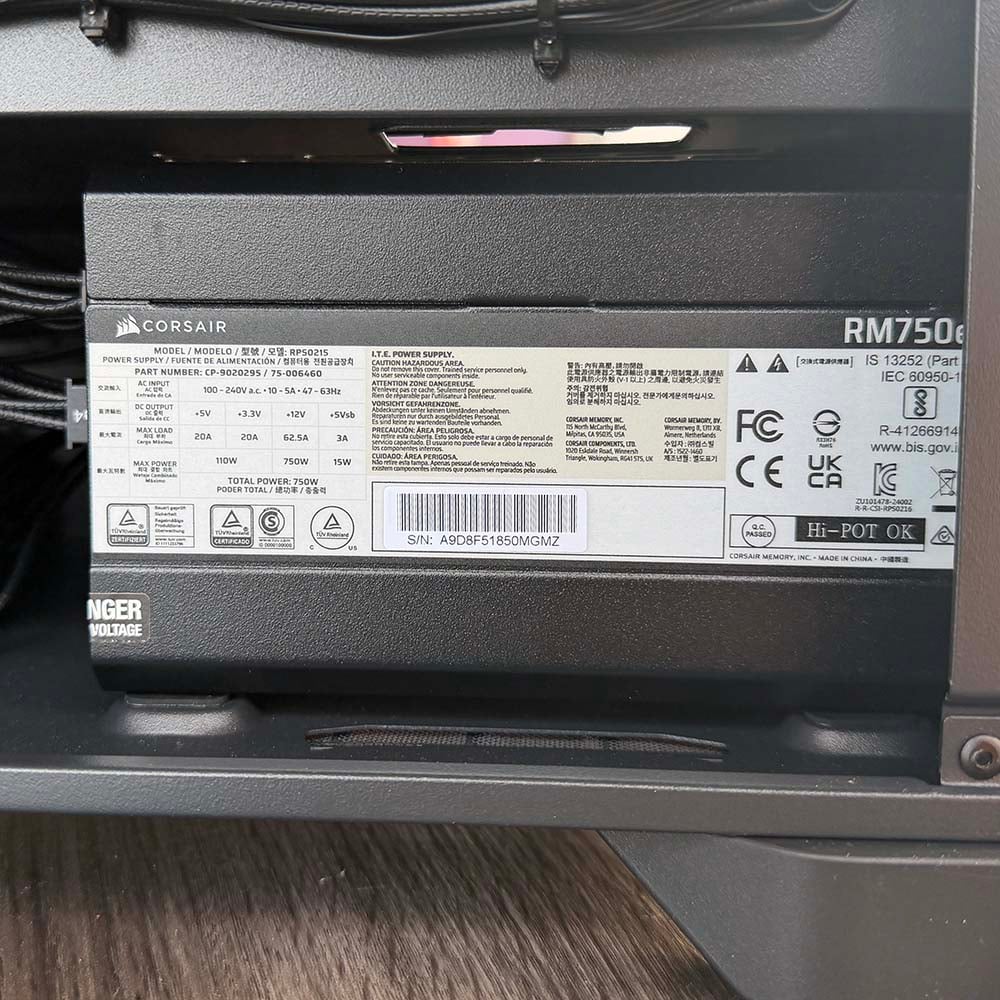
Finally, all the gear is powered by a modular Corsair RM750e PSU, which has more than enough power for this selection of components. It also has Cybenetics Gold certification, which ensures 87-90% efficiency, meaning minimal electricity is wasted.
Design
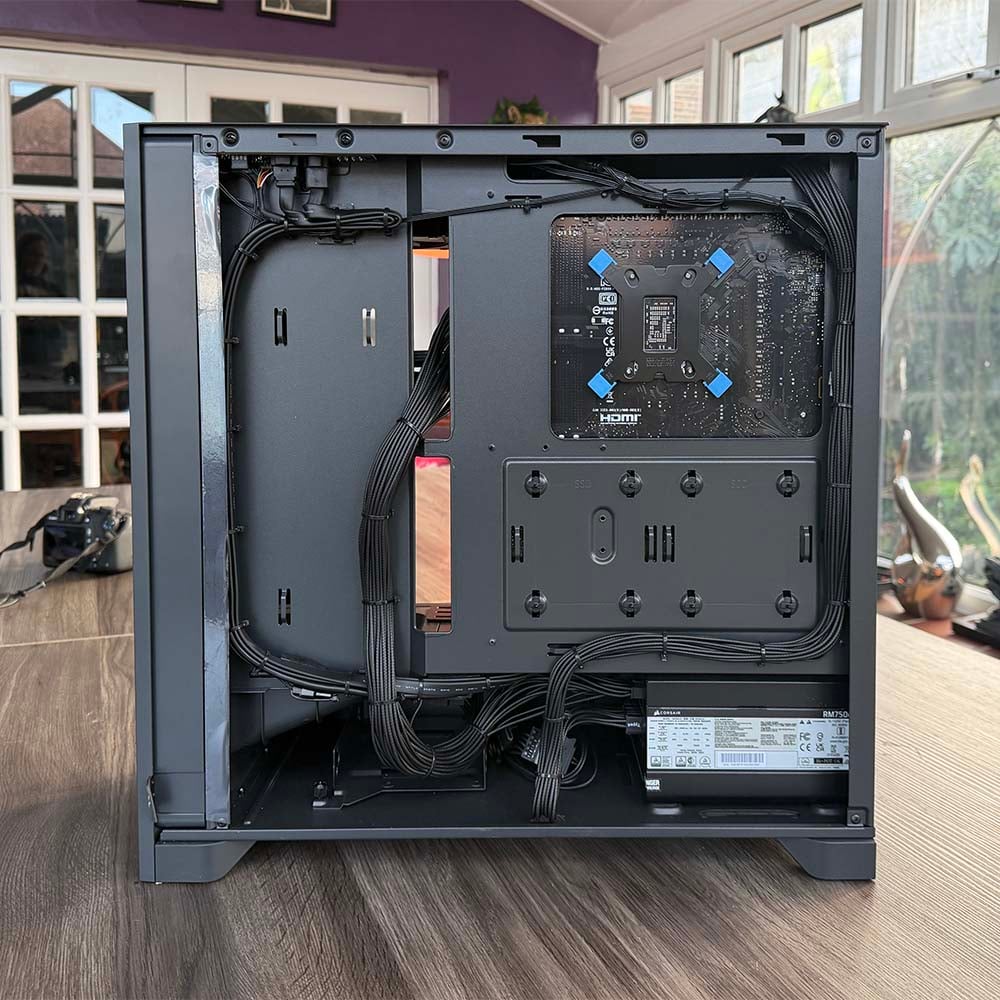
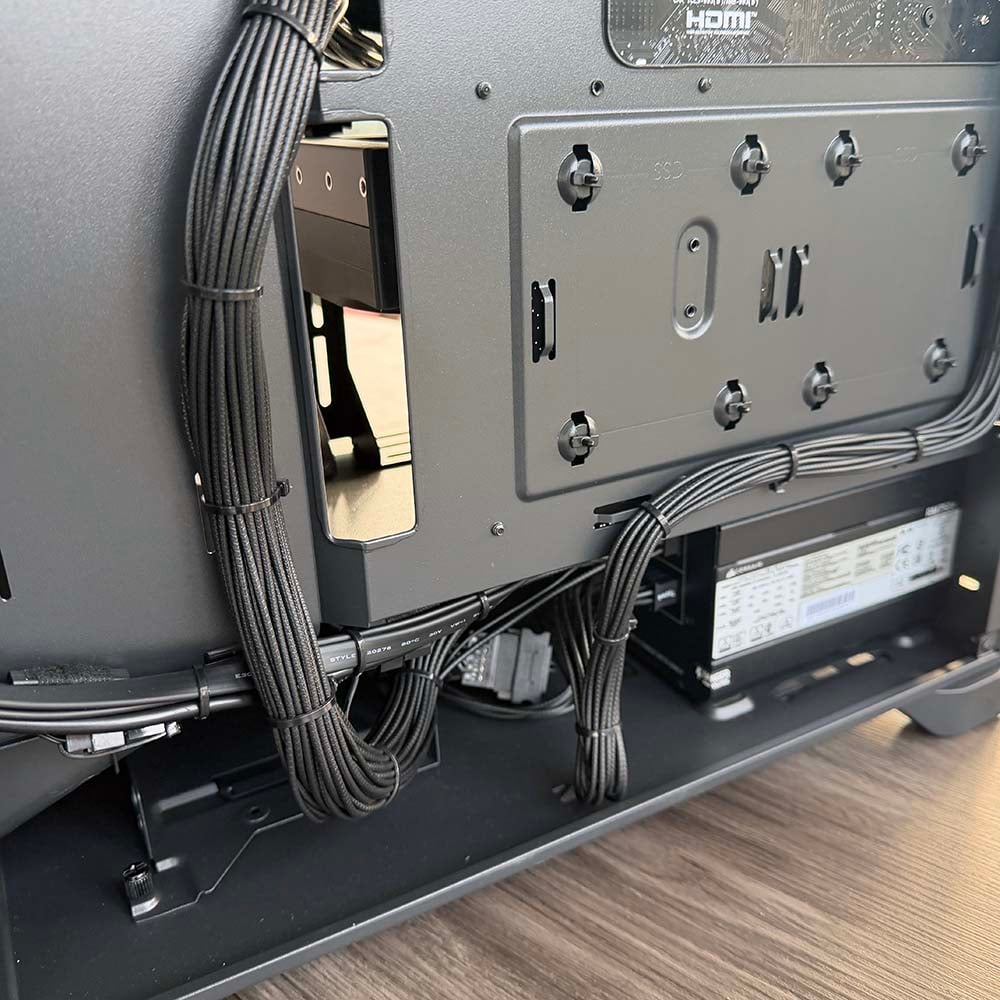
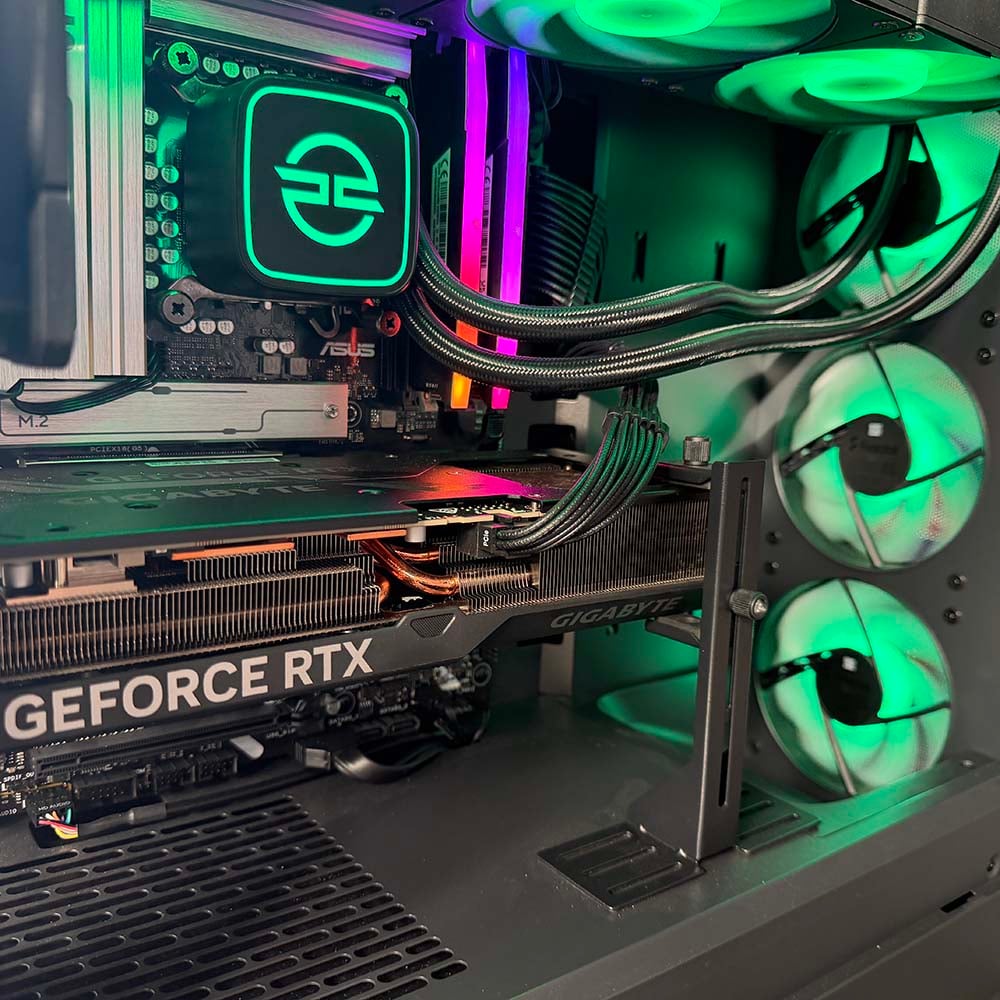
As always, PCSpecialist’s attention to detail when it comes to building a tidy interior is fully on display in this rig, and it’s great to see a sturdy support bracket preventing the graphics card from sagging. Not only is the main motherboard area immaculate, with individually-sleeved cables combed and kept out of the way, but PCSpecialist has also made a real effort to tidy the wires behind the motherboard tray.
There are no big bunches of cables just shoved under the PSU cover – instead, they’ve all been neatly routed around the rear of the chassis, and anchored at regular points with zip ties, keeping areas such as the 2.5in drive mounts clear for easy access. It’s a really pleasing sight, and hats off to PCSpecialist for making the effort here – lots of big PC makers make a real mess of cable tidying, especially once you get behind the rear side panel.
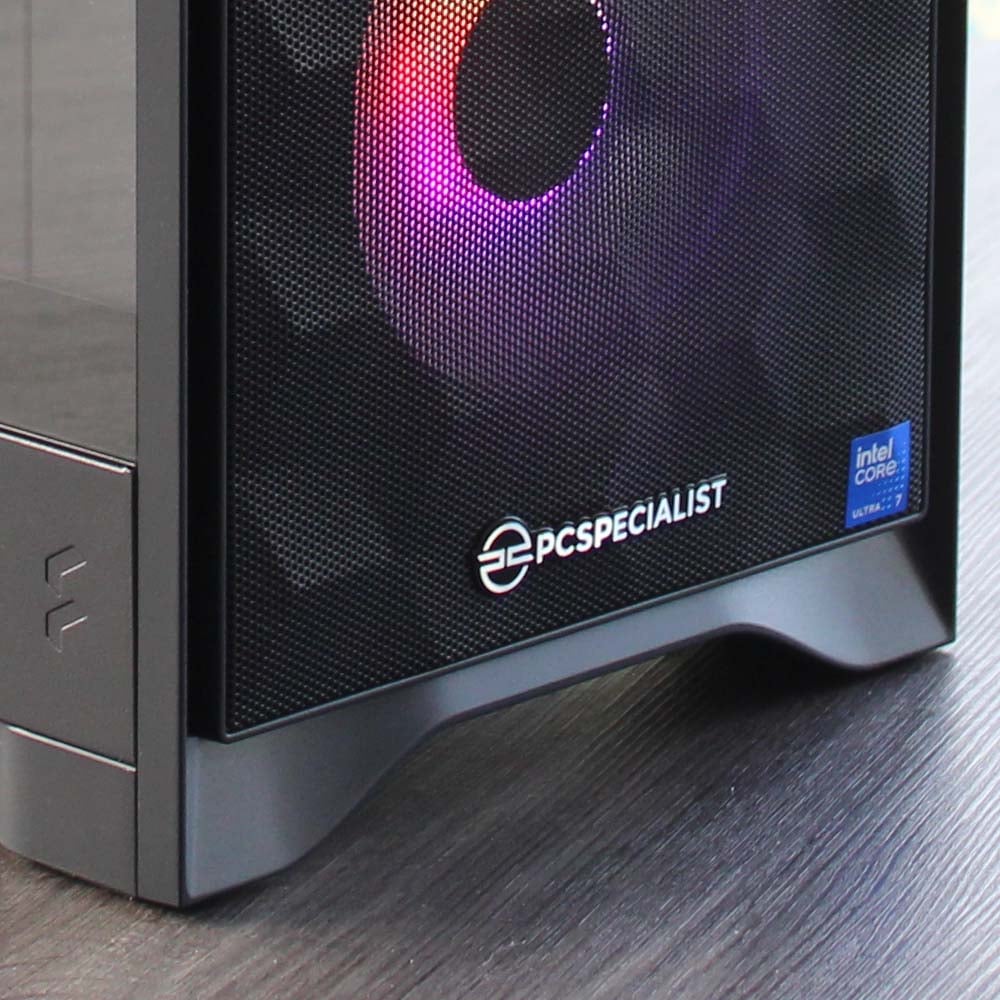
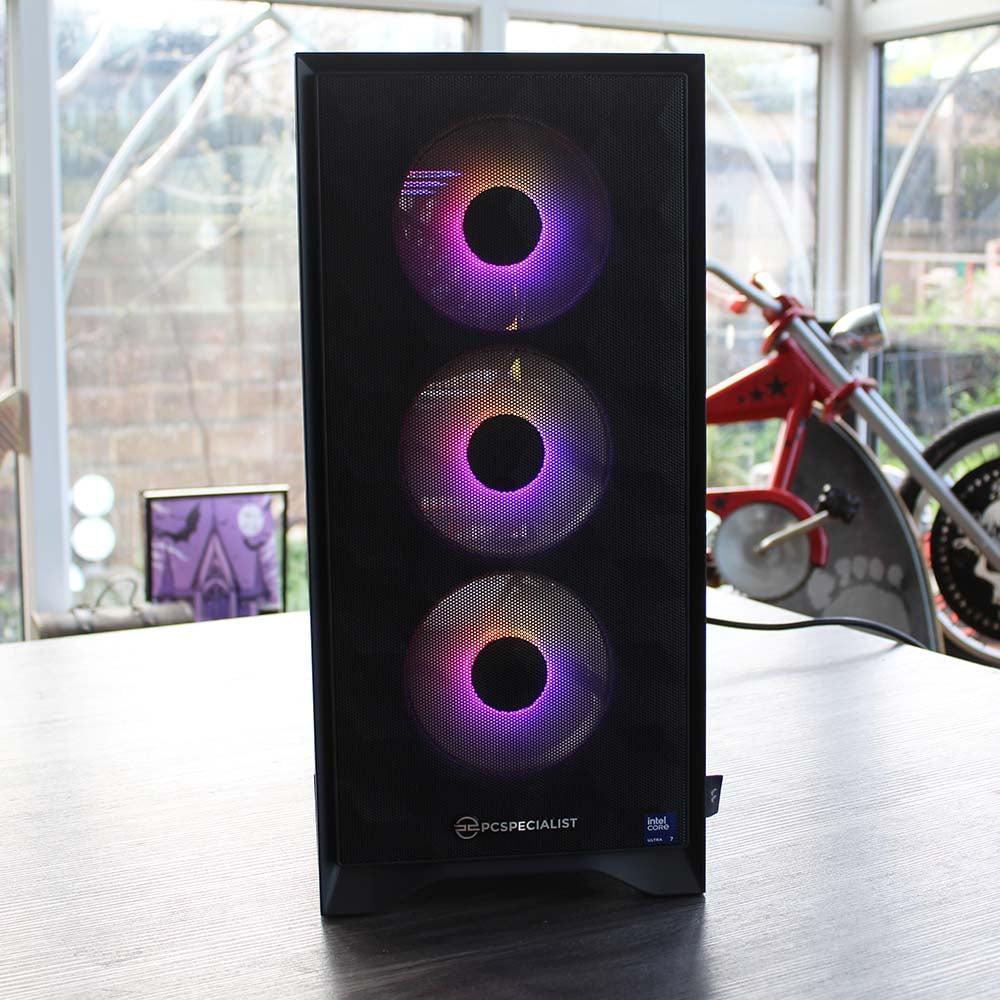
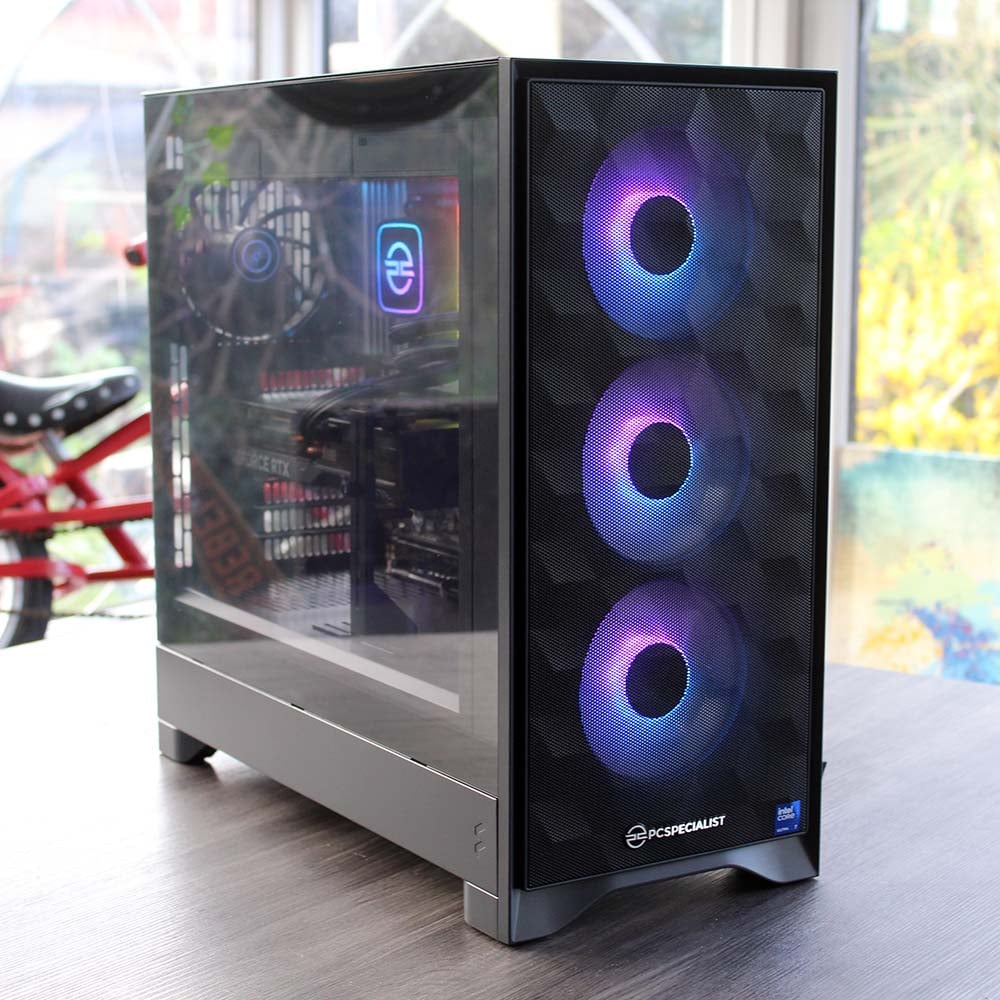
All the gear is installed in a Fractal Design Pop 2 Air TG RGB chassis, which looks the part for a high-end PC. There’s a tempered glass side panel to show off all the lighting inside, while the front is covered in mesh, with three 120mm RGB fans pulling cool air into the case. PCSpecialist has also installed a single 140mm (non-RGB) exhaust fan in the back to push hot air out of the case.
It’s a full-size ATX chassis, but it’s also quite compact, measuring 481mm deep, so it doesn’t take up too much room on your desk. It’s also surprisingly light to pick up, but build quality is still decent. Accessing the insides is really easy as well. There’s a tab on the front, which you just need to pull to release the front panel, and removing the side panels just requires you to twiddle some thumbscrews.
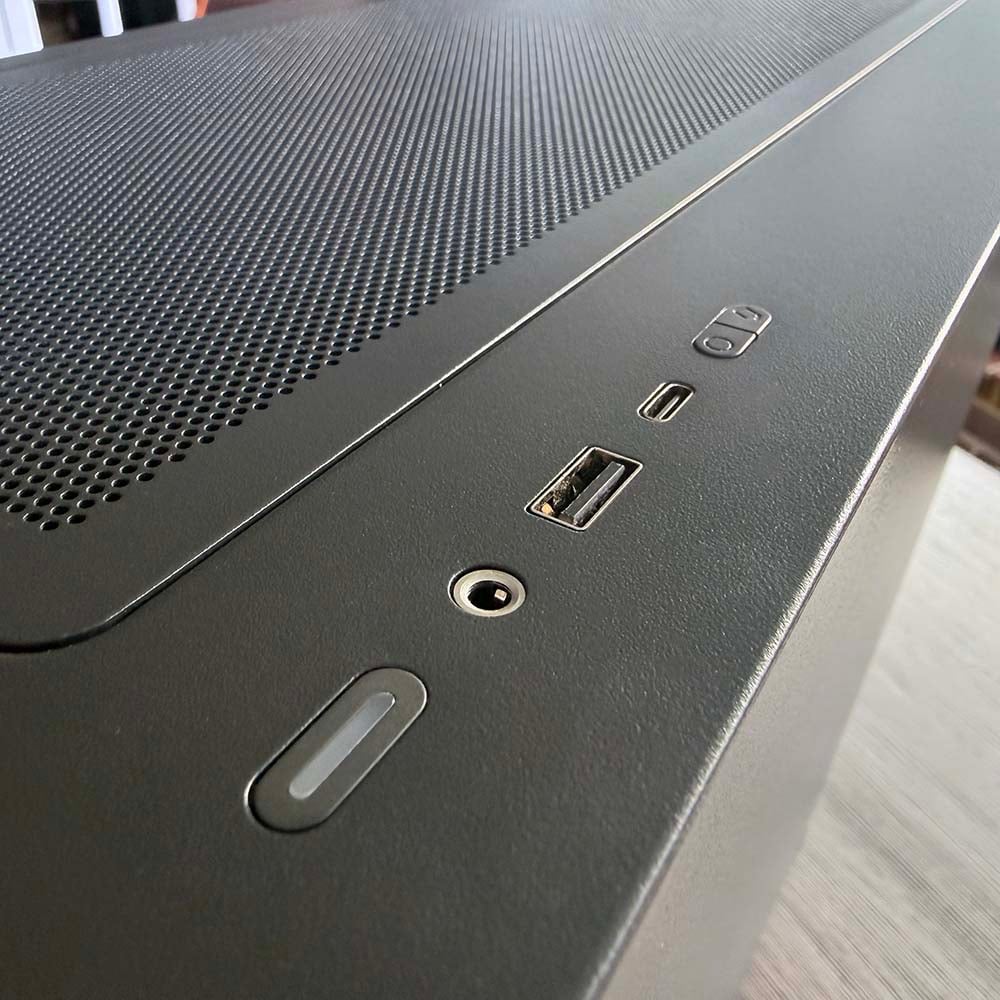
As I mentioned earlier, you get all the essentials in terms of I/O as well. The front panel gives you a standard USB-A port, as well as a USB-C port, although both these ports only offer 5Gb speeds. There’s also an audio jack here, and a pair of buttons to cycle through various RGB lighting effects.
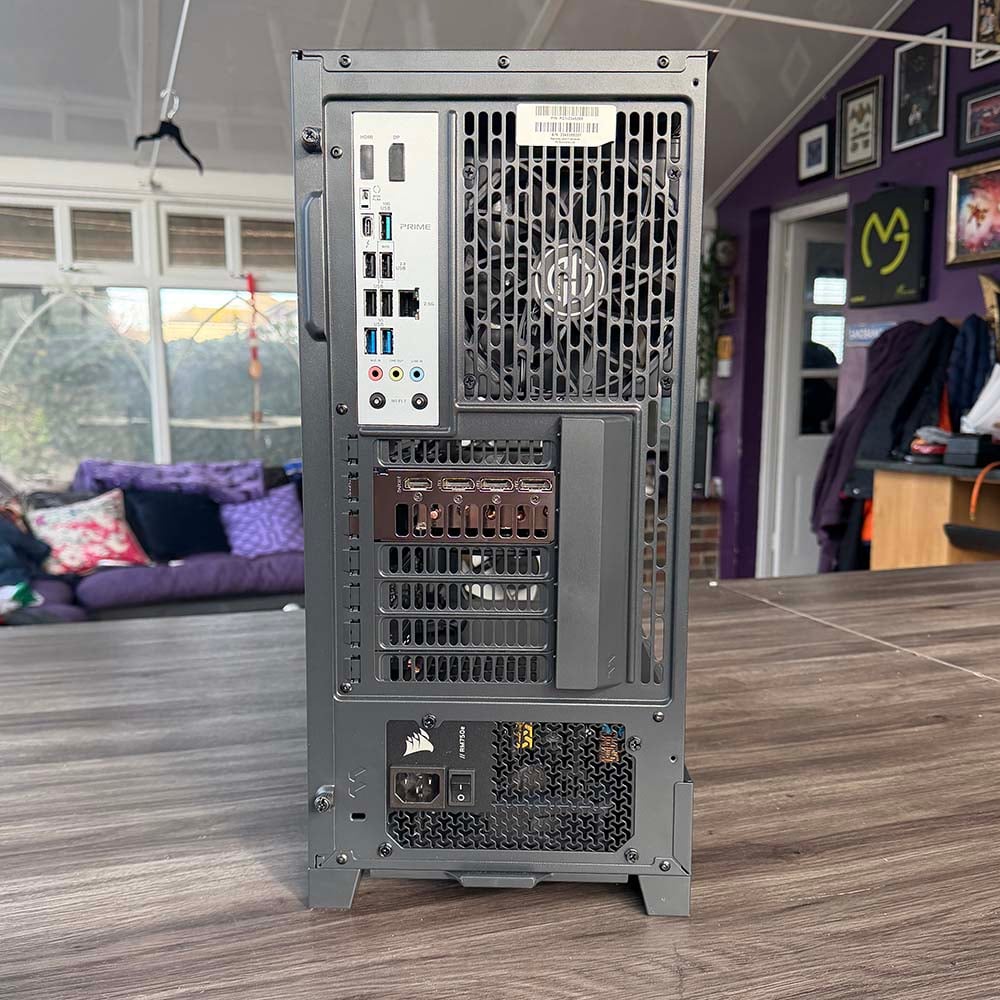
Meanwhile, the rear panel offers up a couple of high-speed ports, including a USB-C socket with Thunderbolt 4 support, as well as 10Gb USB-C and USB-A ports. You’ll get more in the way of high-speed USB-C ports from a more expensive motherboard, but this selection covers most people’s bases.
Performance
With a 24-core CPU in its innards, I’m expecting the Nebula Phantom to make a mockery of 8-core Ryzen 7 9800X3D machines when it comes to heavily multi-threaded software. However, I’m hoping that Intel’s CPU design tweaks mean this 270K Plus machine will still be a capable gaming rig too. I’m comparing it to a few other PCs we’ve recently reviewed, at various prices, so you can see how it stacks up.
Even though most of these systems were reviewed recently, chaotic market conditions mean some of them are no longer available, and some have had considerable price increases. It might look as though the Phantom offers poor value compared to the PCSpecialist Vortex BF 25, for example, which has the same GPU and a 9800X3D for £1,799, but realistically you can’t buy a system with anything like this kind of spec at this price any more.
Here are the six other systems I will be comparing to this one, complete with a summary of their core components and links to their reviews, as well as their reviewed and current prices where appropriate:
- PCSpecialist Vortex BF 25 (£1,799 when tested – no longer available)
- AMD Ryzen 7 9800X3D
- Nvidia GeForce RTX 5070 Ti
- Asus Prime B850-Plus
- 32GB DDR5-6000 CL30
- 2TB Samsung 990 Evo Plus
- Novatech Reign Sentinel (£2,269 when tested – now £2,849)
- AMD Ryzen 7 9800X3D
- Nvidia GeForce RTX 5070 Ti
- MSI B850 Gaming Plus WiFi PZ
- 32GB DDR5-5600 CL40
- 2TB Samsung 990 Evo Plus
- PCSpecialist Luna Recon Master (£3,999 when reviewed – no longer available)
- AMD Ryzen 7 9800X3D
- Nvidia GeForce RTX 5090
- Gigabyte X870 Aorus Elite WiFi7 Ice
- 32GB DDR5-6000 CL40
- 4TB Samsung 9100 Pro
- CyberpowerPC Ultra R87 Pro (£999 when tested – no longer available)
- AMD Ryzen 7 8700F
- AMD Radeon RX 9060 XT 16GB
- MSI Pro B650-S WiFi
- 32GB DDR5-6000 CL36
- 1TB WD_Black SN7100
- PCSpecialist Aegis Pro R (£999 when tested – no longer available)
- AMD Ryzen 5 7500X3D
- Nvidia GeForce RTX 5070 Ti
- Asus Prime B850-Plus WiFi
- 16GB DDR5-5600 CL40
- 1TB Crucial P310
- PCSpecialist Cruiser iCue Stealth (£3,099)
- AMD Ryzen 7 9850X3D
- Nvidia GeForce RTX 5080
- Asus TUF Gaming X870-Plus WiFi
- 32GB DDR5-6000 CL30
- 4TB Corsair MP600
CPU
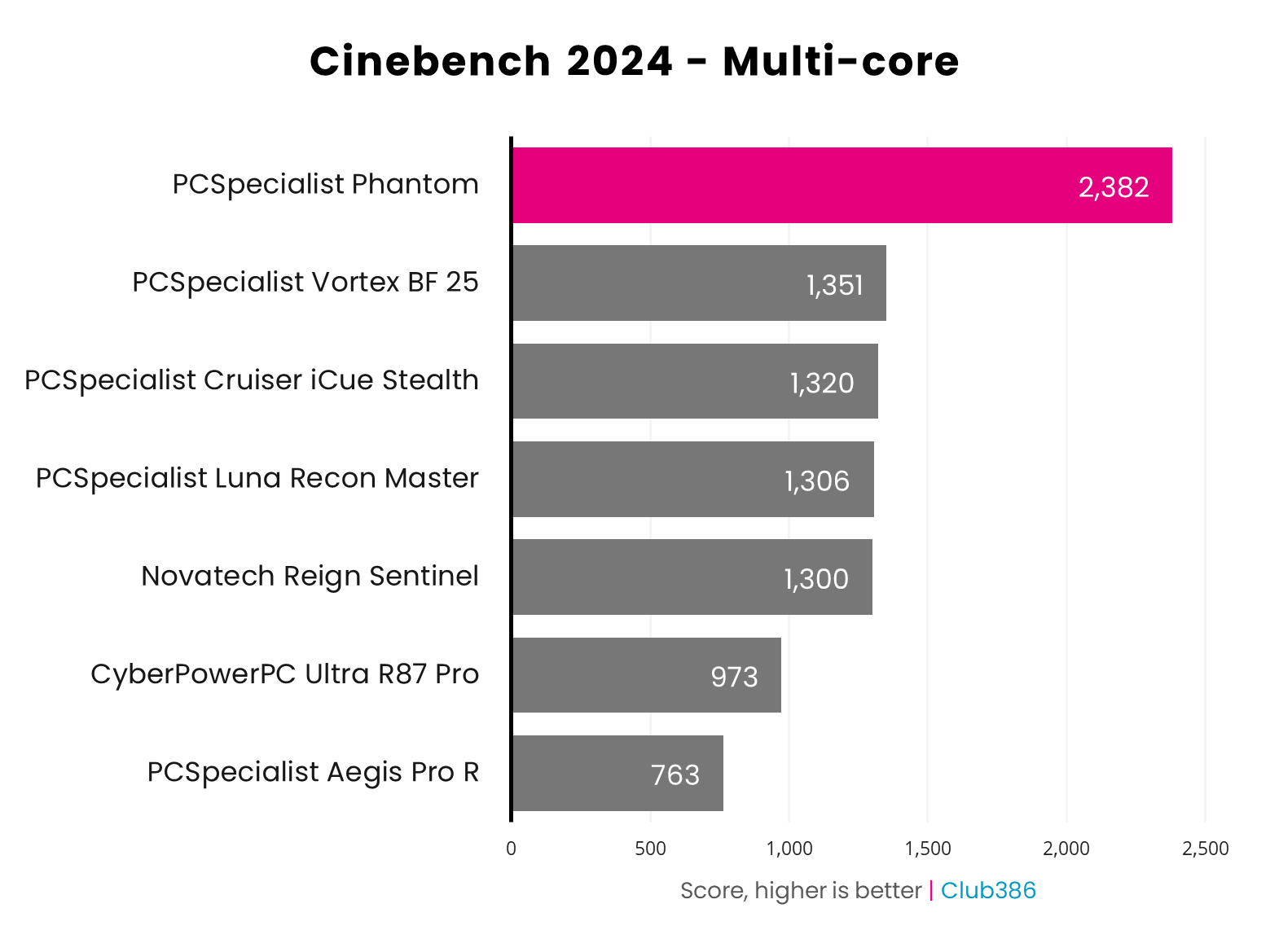
Let’s start off with the area where Intel’s Core Ultra 7 270K Plus excels – multi-threaded performance. As expected, the PCSpecialist Nebula Phantom obliterates rigs with 6-core and 8-core chips in this 3D rendering test. With eight P-cores and 16 E-cores busying away under its heatspreader, this PC’s CPU is a multi-core powerhouse that’s 76% quicker than a 9800X3D rig. I also ran Cinebench 2026 on this PC, where it scored 9,736 in the multi-threaded test, compared to 4,847 from an AMD Ryzen 7 9700X in our test rig.
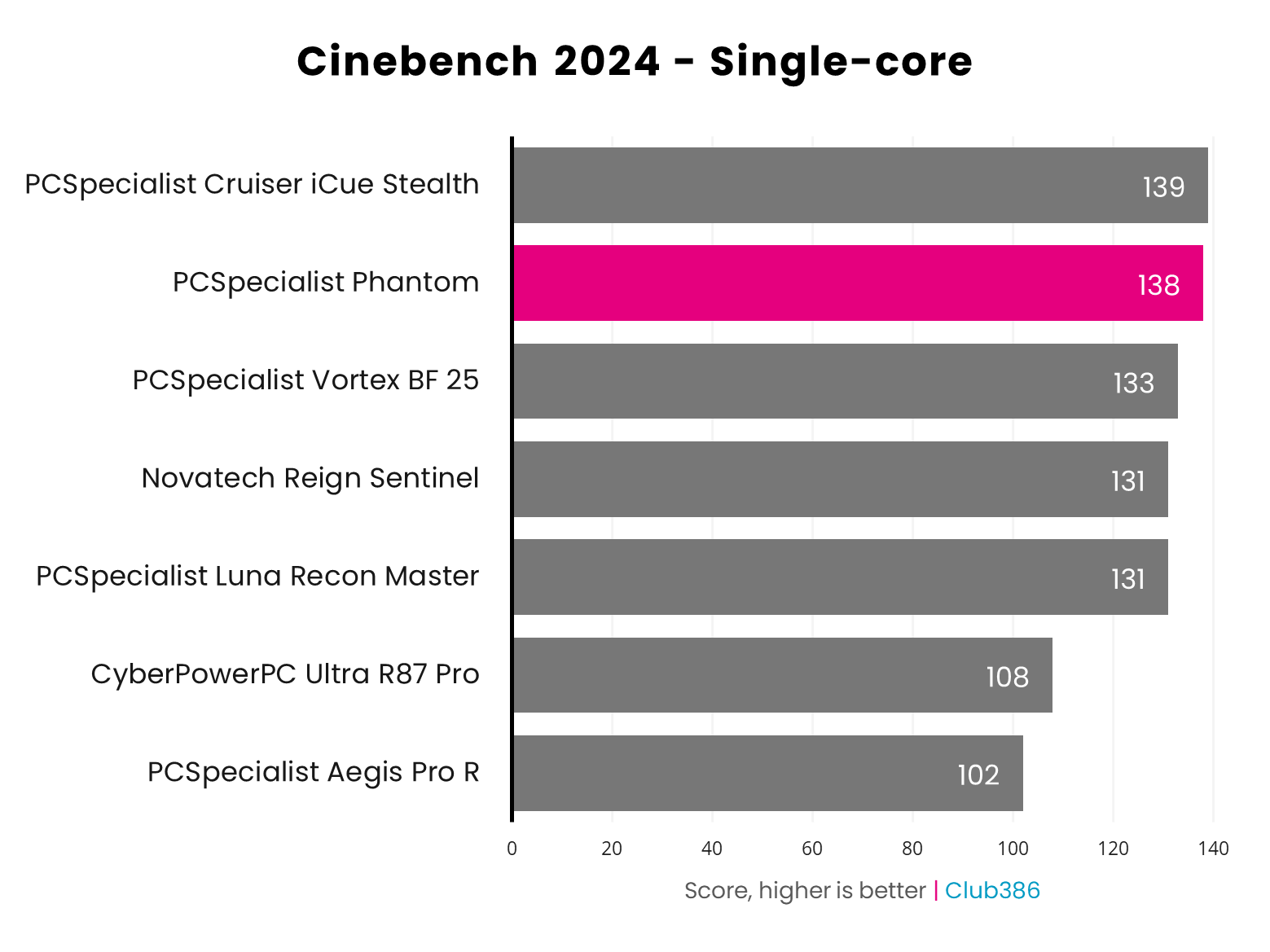
Single-threaded performance is also solid, with the 270K Plus’ 5.5GHz peak turbo clock speed giving it plenty of power. It can’t quite beat the PCSpecialist Cruiser iCue Stealth’s score of 139, with its clocked-up Ryzen 7 9850X3D, but it’s very close. Cinebench 2026’s single-core test gave us a score of 577 in this machine, while the 9700X gets 550 in our test rig. In terms of productivity workloads, this PC is just as powerful as an AMD Ryzen 7 rig when it comes to single-threaded workloads, and has significantly more pace under the hood when it comes to multi-threaded tasks.
RAM
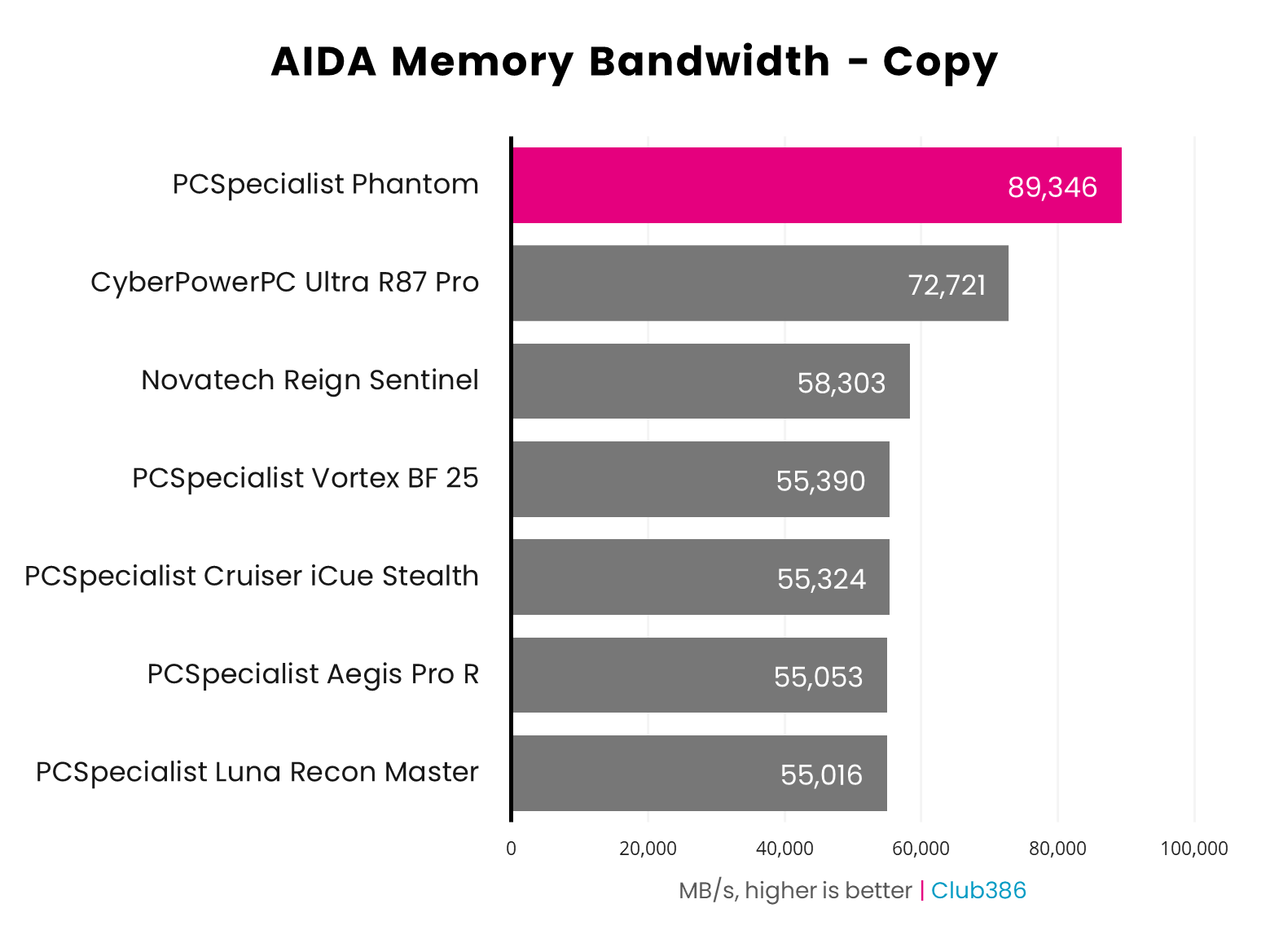
Memory bandwidth is one of Intel’s strong suits, with its latest CPUs officially supporting up to 7,200MT/s memory. Even with the 6,400MT/s RAM supplied in the PCSpecialist Nebula Phantom, this PC clearly has loads of RAM bandwidth in the tank. Its result of 89,346MB/s in AIDA’s memory bandwidth copying test is fantastic, and way ahead of other PCs we’ve recently tested.
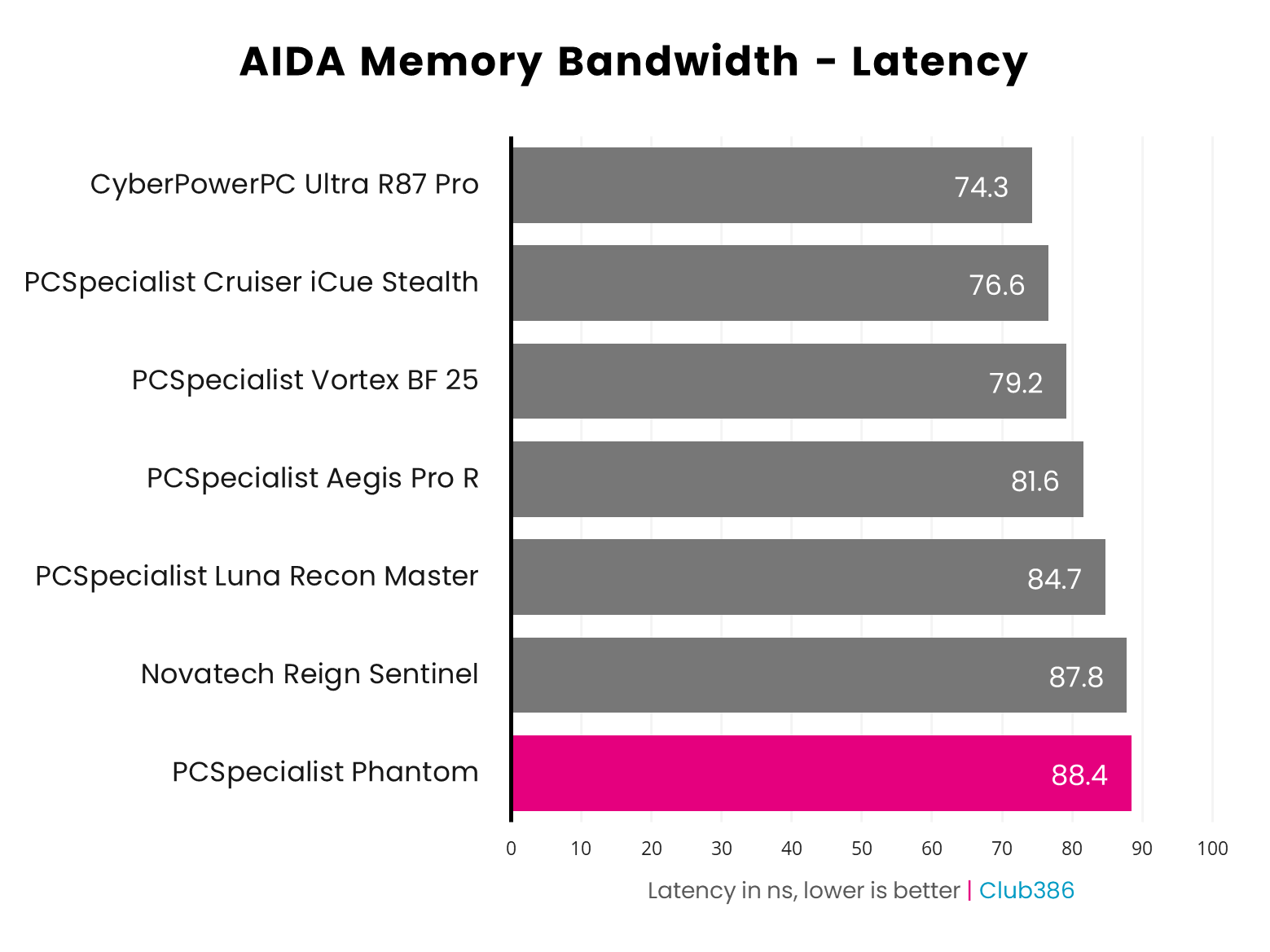
Memory latency is behind the rest of the pack, however, with a result of 88.4ns – a higher result than we expected. A part of this is down to the CL36 latency timings of the Corsair kit used in this machine, compared to CL30 for the PCSpecialist Cruiser iCue Stealth.
Storage
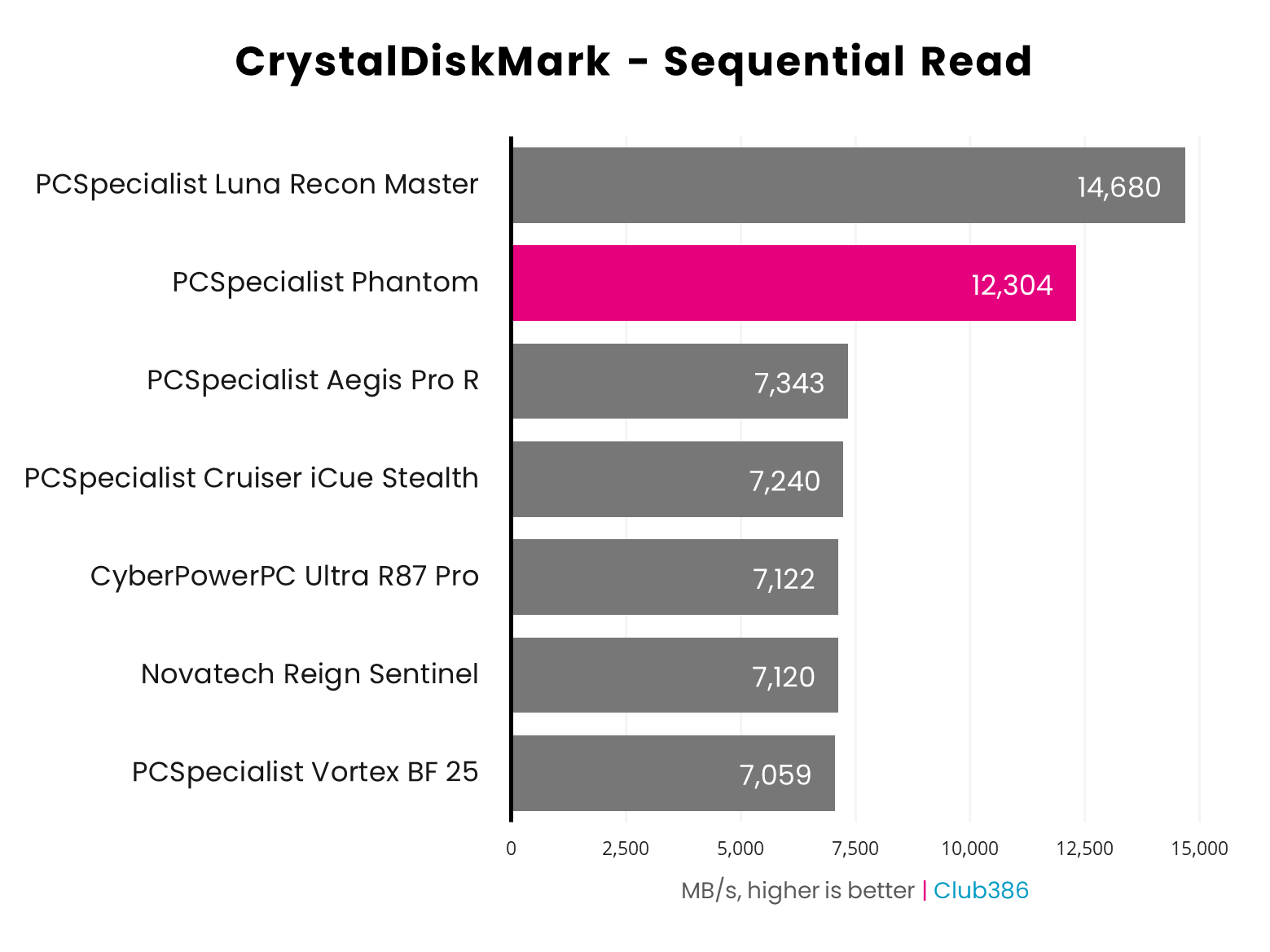
Now we come to a disappointing result from this PC, which is its storage performance. On the face of it, the graph below looks like a massive win for the Phantom. Thanks to its high-speed Crucial T710 SSD’s use of the PCIe Gen 5 interface, its sequential read speed in CrystalDiskMark is well ahead of all the machines with PCIe Gen 4 drives.
However, there’s clearly still an Arrow Lake SSD bottleneck on Intel’s platform. I’ve tested the 2TB Crucial T710 in AMD machines, in which it can happily read at close to its stated top speed of 14,500MB/s, well ahead of the 12,304MB/s it manages in this Intel rig. Suspecting something might be up, I reran this test five times, and the results were all in the same ballpark – there’s a definite bottleneck here.
Thankfully, write speeds are much better. The Phantom’s peak write speed of 13,436MB/s tops the chart, and while it isn’t quite at the 13,800MB/s level claimed by Crucial, this isn’t far off the ~13,500MB/s speed I’ve seen from this drive in AMD machines.
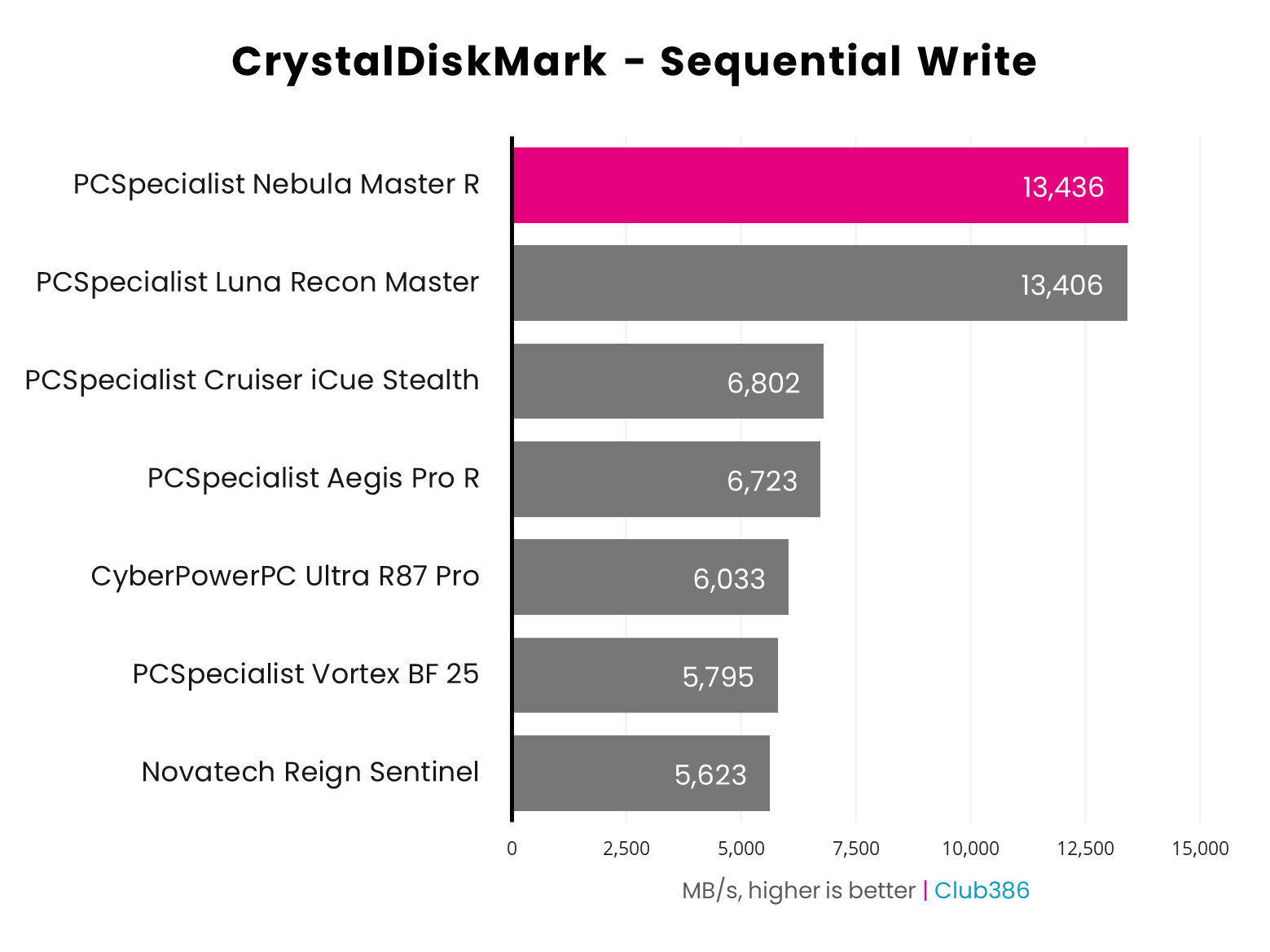
While this PC’s read speed could be higher, it’s worth putting these figures into context. It’s disappointing that the Crucial T710 is around 2,000MB/s off its read top speed in this PC, but bear in mind you’ll only see that level of performance in large-scale sequential file transfers. In terms of game loading times and general system responsiveness, this PC still has a very speedy storage setup.
Gaming
With content creation performance nailed, the next big question is how the Phantom gets on with gaming. Intel’s first-gen Arrow Lake chips struggled with gaming performance, but the 270K Plus’ faster die-to-die clock frequency should substantially reduce the latency that was largely responsible for this bottleneck.
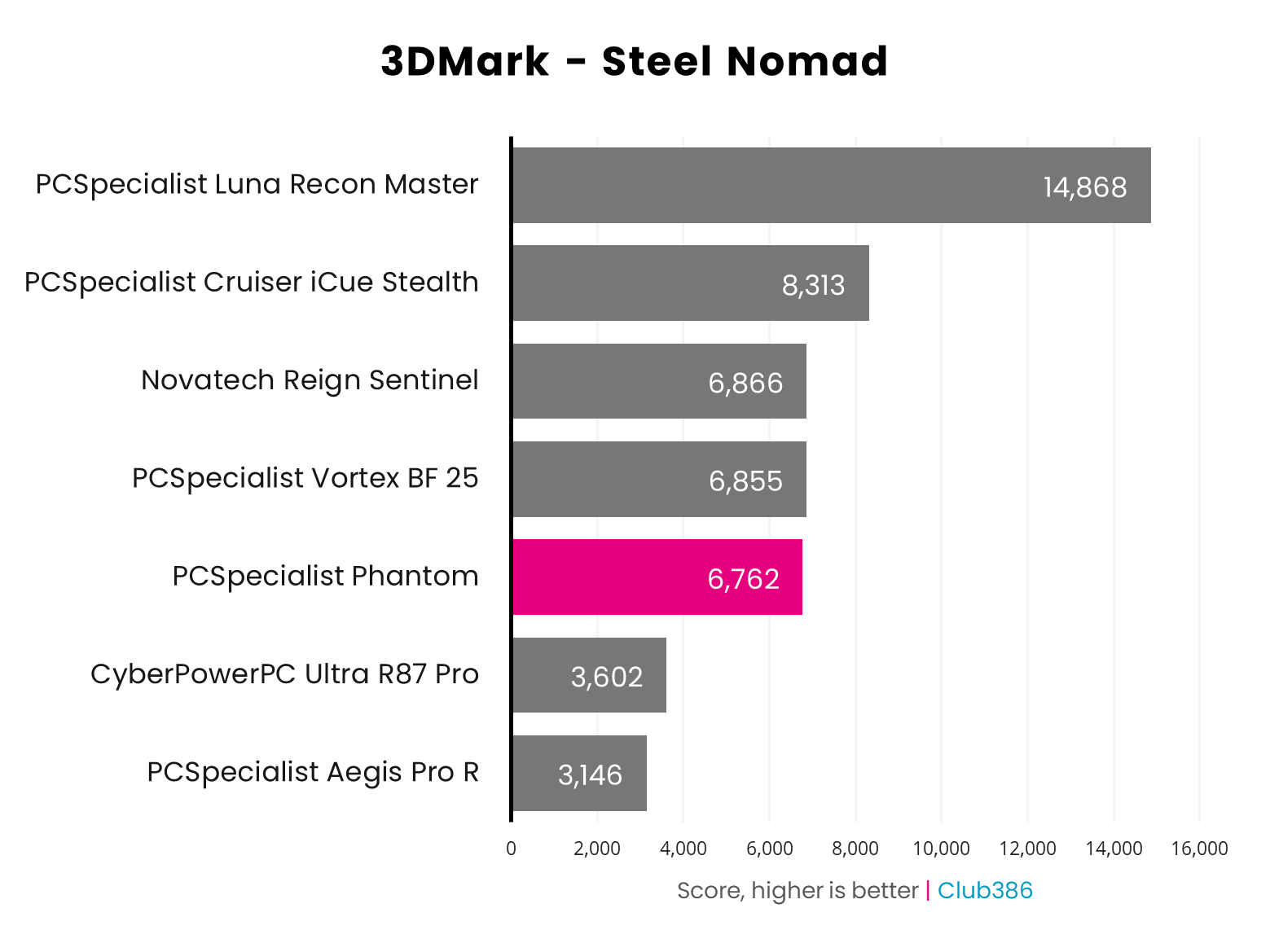
Let’s start by taking a look at 3DMark, where this synthetic benchmark’s Steel Nomad test is in line with other RTX 5070 Ti rigs we’ve tested. We’ve tested two other machines with this GPU, both of which had Ryzen 7 9800X3D CPUs, and they’re only around 1.5% quicker than the Phantom in this test. It’s not as quick as an X3D machine, but the difference is small.
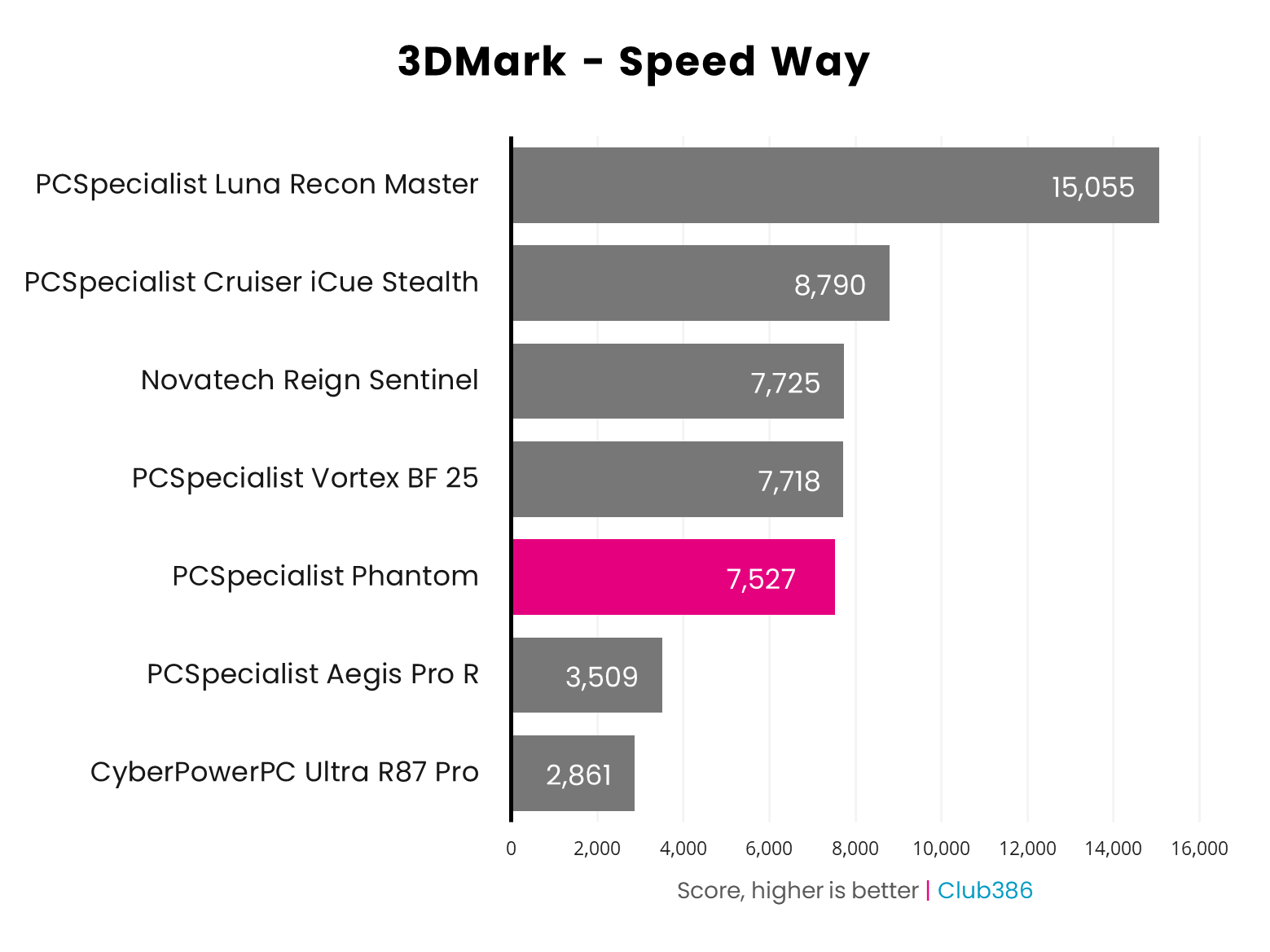
The same goes for 3DMark’s Speed Way test, which focuses on ray tracing performance. This time, there’s around a 2.6% performance boost on offer if you go for a Ryzen 7 9800X3D PC. These results are in the right ballpark for an RTX 5070 Ti machine, though.
Next up, our suite of frame rate tests using real games shows this PC is great for gaming at 2560×1440. Running Assassin’s Creed Shadows at the demanding Ultra High preset, with ray tracing set to Diffuse + Specular Everywhere, was no problem. Even without any help from DLSS, it ran these settings at 1920×1080 with a smooth average of 61fps. Moving up to 2560×1440 slows you down to 48fps, but enabling DLSS on the Quality preset brings it back up to 60fps. That’s a solid enough base to start enabling frame gen if you want even smoother motion.
| Game | 1080p (Min / Avg) | 1440p (Min / Avg) | 4K (Min / Avg) |
|---|---|---|---|
| Assassin’s Creed Shadows (RT) | 47 / 61fps | 39 / 48fps | 27 / 32fps |
| Assassin’s Creed Shadows (RT + DLSS Quality) | 50 / 71fps | 44 / 60fps | 37 / 46fps |
| Final Fantasy XIV: Dawntrail | 89 / 227fps | 91 / 175fps | 61 / 95fps |
| Forza Motorsport (RT) | 82 / 119fps | 72 / 88fps | 39 / 47fps |
| F1 25 (RT) | 79 / 124fps | 56 / 79fps | 29 / 43fps |
| Mount & Blade II | 223 / 349fps | 179 / 261fps | 111 / 150fps |
| Rainbow Six Siege X | 241 / 319fps | 160 / 213fps | 85 / 112fps |
Another top result is F1 25, which I ran at Ultra High settings (with ray tracing but without path tracing), and no DLSS. The game looks fantastic at these settings, and it averages 79fps at 2560×1440, or 124fps at 1920×1080, again giving you a solid base to experiment with frame gen if you want smoother motion.
Our other game tests proved no trouble for this rig, although the results are sometimes higher on an AMD X3D rig. One particular case is Final Fantasy XIV: Dawntrail, which averages 175fps on the Phantom, compared to 184fps on the PC Specialist VorteX BF 25, which has the same GPU and a 9800X3D. That’s not a big difference, but there’s a big jump in the minimum, from 91fps on the Phantom to 116fps on the Vortex.
These results were repeatable over several runs, and were achieved with Intel’s new Binary Performance Optimisation (BPO) tech enabled. AMD’s X3D chips undoubtedly have the upper hand here.
We saw a similar difference in the minimums at 1920×1080 in Forza Motorsport, with 101fps on the 9800X3D machine and 82fps on this 270K Plus rig. There’s barely any difference between the two machines in this game at higher resolutions, though.
On the flipside, Mount & Blade II was generally faster on this Intel 270K Plus machine, with fantastic frame rates at every resolution we test. Finally, Rainbow Six Siege results aren’t comparable to previous reviews, due to a substantial update that affects performance, but the Phantom’s results are still superb, with a 213fps average at 2560×1440.
| Cyberpunk 2077 | 1080p (Min / Avg) | 1440p (Min / Avg) | 4K (Min / Avg) |
|---|---|---|---|
| Native | 48 / 55fps | 29 / 33fps | 14 / 15fps |
| DLSS 4 (Quality) | 84 / 93fps | 57 / 64fps | 29 / 33fps |
| DLSS 4 (Q) + FG x2 | 149 / 165fps | 100 / 110fps | 54 / 60fps |
| DLSS 4 (Q) + FG x3 | 214 / 236fps | 142 / 157fps | 78 / 86fps |
| DLSS 4 (Q) + FG x4 | 275 / 301fps | 181 / 199fps | 99 / 110fps |
Cyberpunk 2077 was the game I really wanted to try on this PC, as it notably struggled in our Core Ultra 9 285K review. Intel has clearly put in a load of work here, as there’s barely any difference between this PC’s results and those from a 9800X3D machine.
I ran this game at the Ray Tracing Overdrive preset with path tracing, just to see what it can really do, and it looks amazing at these settings. You’ll need to enable DLSS on the Quality preset to get a 64fps average at 2560×1440, but the game still looks superb with it enabled, thanks to the AI wizardry of Nvidia’s Transformer model for upscaling.
That’s a solid enough base to enable frame gen to smooth out motion (but not at 4K), with amazing results as you go up the scale. With a 301fps average at 1920×1080 and 199fps at 2560×1440, you could run this demanding game on a monitor with a high refresh rate, and with great graphics.
Vitals
There are loads of fans in this PC – three in the front, one on the back, three on the radiator, and another three on the graphics card. With so much airflow available, PCSpecialist has been able to tune down the speeds, and for the most part you barely hear a peep out of this PC.
| Idle | Load (Cinebench) | Load (Gaming) | |
|---|---|---|---|
| CPU temperature | 38°C | 84°C | 60°C |
| GPU temperature | 37°C | 41°C | 74°C |
| Noise | 32dBA | 53dBA | 38dBA |
| Power consumption | 72W | 368W | 420W |
When idle, you can hardly hear it, with my decibel meter detecting 32dBA. Power draw is also low here, at just 72W. Amazingly, the noise only climbs to 38dBA when running Cyberpunk 2077, with the CPU temperature peaking at 60°C and the GPU hitting 74°C. With a top power draw of 420W, the 750W PSU supplied with this machine is more than up to the job.
The only time when the cooling system really ramped up was during a 10-minute Cinebench multi-threaded run. Keeping all those CPU cores cool when they’re fully loaded really makes the fans spin up, hitting a noisy 53dBA. That kept the CPU cool, though. It peaked at 84°C, and consistently maintained a 5.4GHz boost clock across all its P-cores during the test.
You won’t want to sit next to this PC while it’s running hardcore rendering workloads, but it does keep its components in check when needed, and it’s pleasingly quiet while playing games.
Conclusion
PCSpecialist has built a great PC with the Nebula Phantom. Internal build quality is superb, and its cooling system is quiet when it needs to be, while also capable of keeping a 24-core CPU cool at full load. Component choices are solid too, with Intel’s latest CPU ably dealing with both gaming and multi-threaded workloads in a way that simply isn’t possible on an 8-core Ryzen 7 CPU. Meanwhile, the GPU turns this rig into an excellent 2560×1440 gaming machine, enabling you to turn on all the eye candy.
It’s not perfect, though that’s not the fault of PCSpecialist. Intel’s Arrow Lake platform clearly still hits a bottleneck when it comes to PCIe Gen 5 SSD read speeds, and it looks increasingly likely that you won’t be able to put a more powerful CPU in the motherboard at a later date. The other big issue is outlay, with the cost of 32GB of DDR5 RAM and a 2TB PCIe Gen 5 SSD seriously bumping up the price.
In November last year, just a few months ago, PCSpecialist’s Vortex BF 25 cost £1,799 and gave you a Ryzen 7 9800X3D and RTX 5070 Ti, along with 32GB of RAM and a 2TB SSD. Now you need to pay £2,349 for a machine with a cheaper CPU and similar spec, albeit with a faster SSD. There’s no getting round this any more – we simply have to pay more for our components, but in the current market, the PCSpecialist Nebula Phantom’s price is competitive.
As a point of comparison, the Novatech Reign Sentinel also has a 9800X3D and RTX 5070 Ti, and now costs £2,849, an increase of £580 since our review last year. As such, £2,349 is actually very competitive for the performance, specs and build quality on offer here. If you want to buy this PC, we recommend doing it sooner rather than later, though. It sadly looks as though prices are only going to go up further this year, and the RTX 5070 Ti may not even be available at all by the end of it. If you can afford £2,349, and you want a PC that can handle both multi-threaded workloads and gaming, the PCSpecialist Nebula Phantom is fast, well-built and competitively priced.
