
Club386 endorses products based on our extensive tests and experience. If you make a purchase using our referral links, we may get a small commission at no extra cost to you.
In this guide, we invite you to tap into our massive wealth of PC hardware knowledge to find the very best CPU for your needs. Whether your top priority is hammering through hardcore multi-threaded rendering workloads, maintaining high frame rates in the latest games, or just finding the cheapest CPU that will still do the job, we’ll direct you to the right chip.
CPU specs are a bit of a minefield at the moment, as we’re long past the point where you could just make a decision based on clock speed and the number of cores. Frequency used to be king when it came to gaming performance, for example, but now the huge slice of extra cache AMD’s X3D chips make them formidable gaming CPUs, despite having ostensibly lower frequencies than their non-X3D counterparts.
The huge slice of extra cache AMD’s X3D chips make them formidable gaming CPUs
Despite what many people would have you believe, you also don’t need buckets of CPU cores for gaming – eight will do the job nicely. That’s an important factor when looking at Intel’s CPUs, as it’s only really the P-Cores that are helpful for gaming. However, if priority number one is multi-threaded performance, you really do want as many cores as possible, and faster clock speeds help too.
We’ll cover all this and more in our rundown of the best CPUs in 2026, where all our recommendations are based on the Club386 team’s many decades of PC hardware experience and expertise. We include all the benchmark data and specs information you need to make a decision, while showing you exactly which CPU you should buy for your own preferences. Anyway, without further ado, let’s get this show on the road.
Best CPU shortlist
AMD Ryzen 9 9950X3D
AMD Ryzen 7 9850X3D
AMD Ryzen 5 9600X
AMD Ryzen 5 7500X3D
Intel Core Ultra 5 250K Plus
Intel Core Ultra 7 270K Plus
In detail
Best CPU overall
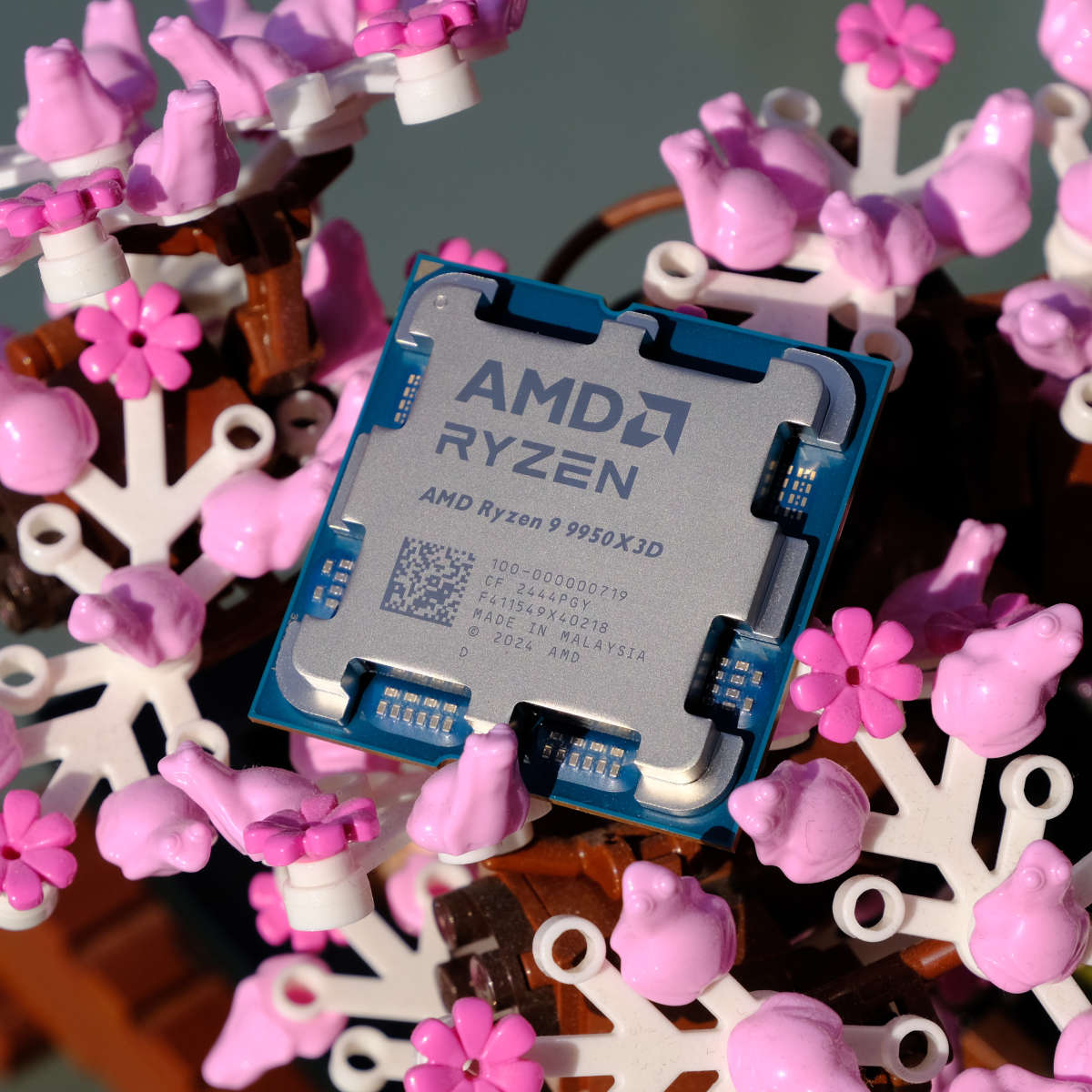
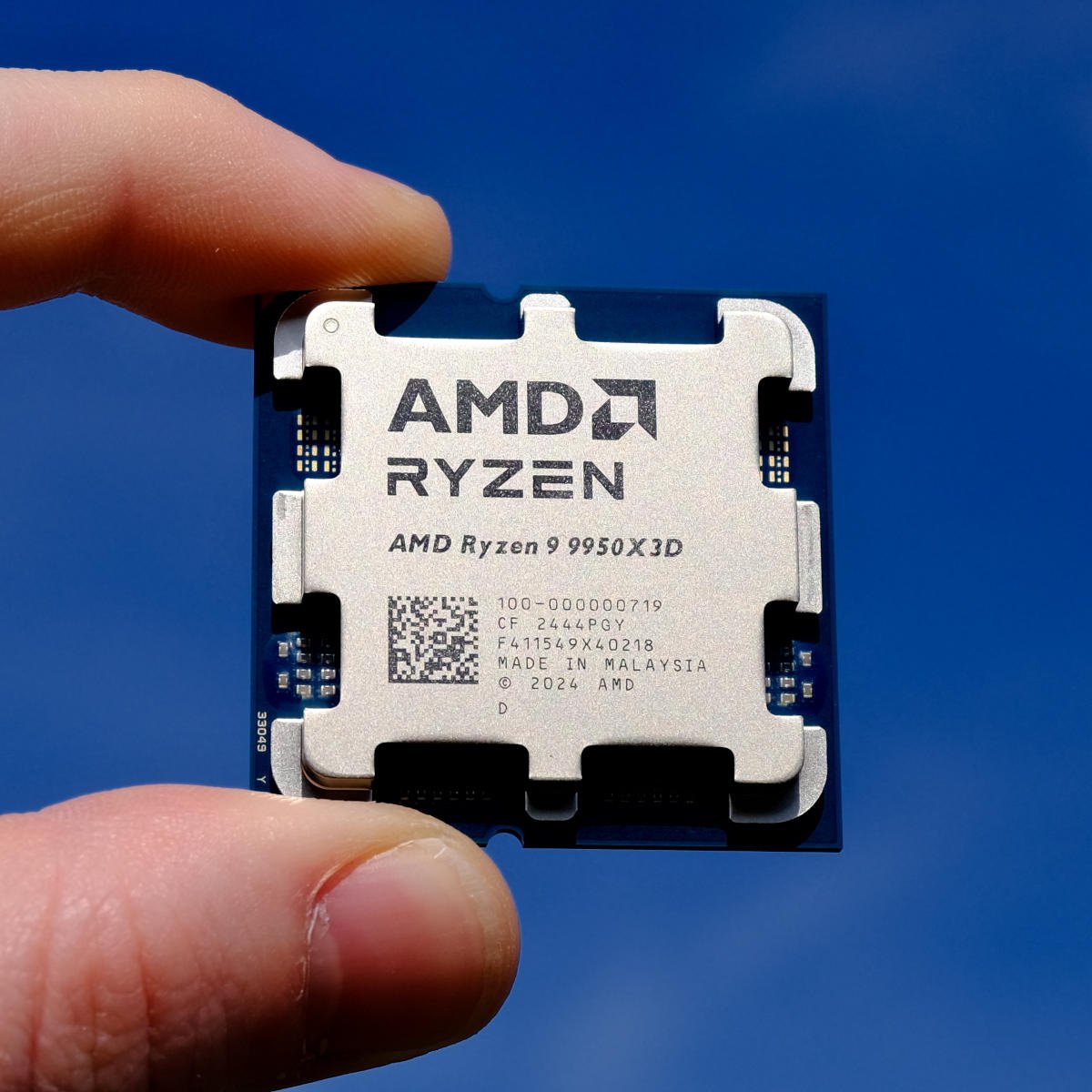
The best CPU overall is the AMD Ryzen 9 9950X3D. AMD absolutely knocked it out the park with this CPU, almost nonchalantly demonstrating that you really could have the best of both worlds in one chip. Awesome gaming frame rates? Check. Massive multi-threaded performance? Double check. Under this chip’s heatspreader you not only get an 8-core chiplet equipped with 3D V-cache, just like the 9850X3D, but you also get another 8-core chiplet with a massive 5.7GHz boost clock.

AMD Ryzen 9 9950X3D
£595 / $679
Pros
- Unparalleled multi-core performance
- Outstanding gaming frame rates
- Surprisingly efficient
- Cool under load
Cons
- 9800X3D and 9850X3D offer better value for gaming
- Very expensive
Club386 may earn an affiliate commission when you purchase products through links on our site.
How we test and review products.
While the 9950X3D has the same number of cores and threads as the previous generation flagship chip, the Ryzen 9 7950X3D, there are some key differences. Firstly, it has the benefits of AMD’s latest Zen 5 architecture, but it also repositions the 3D V-cache chip under its 8-core chiplet, rather than on top of it. This frees up some thermal headroom, meaning this chip not only runs surprisingly cool, but its 3D V-cache-enabled chiplet can also run at a faster clock speed than on the 7950X3D.
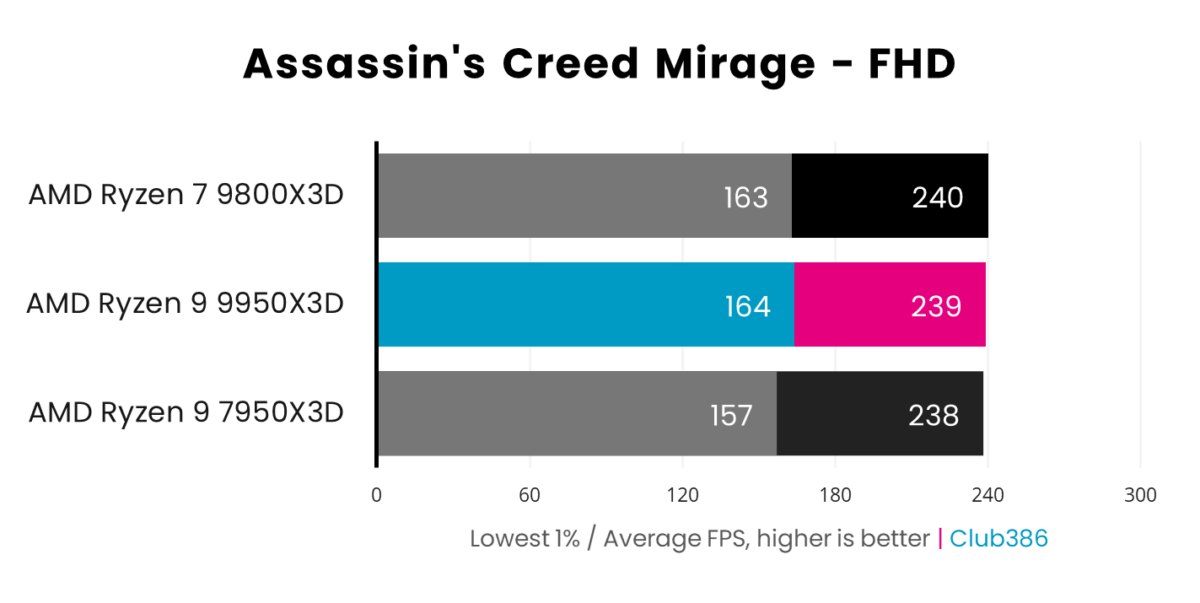
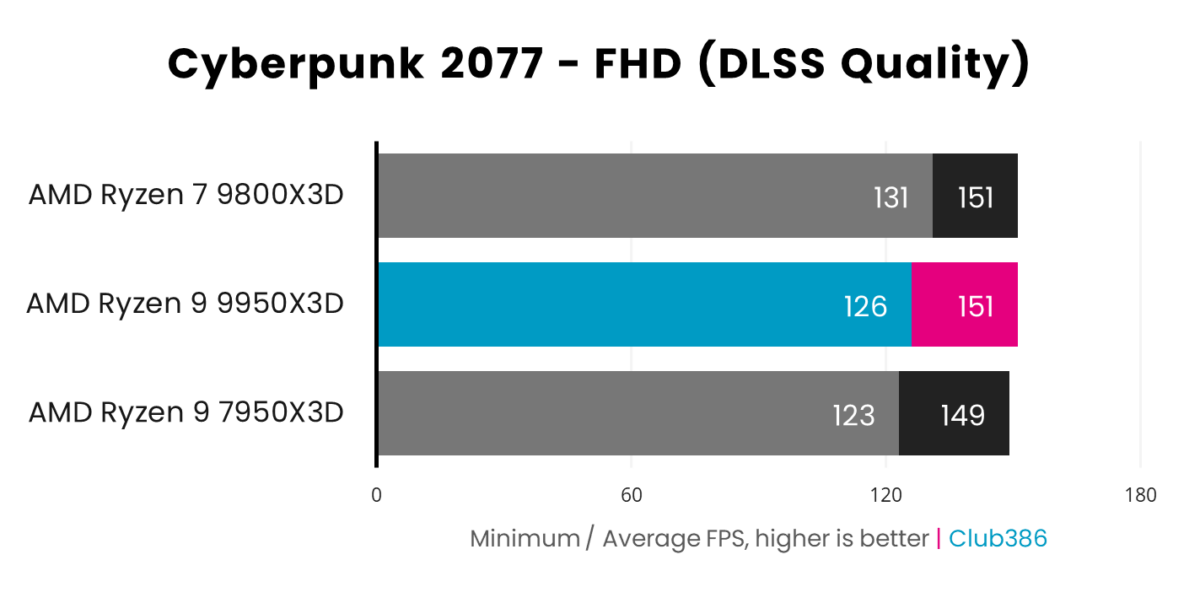
As you can see in the gaming graphs below, the 9950X3D is a formidable chip in Assassin’s Creed Mirage and Cyberpunk 2077. Basically, this 16-core chip is in a similar league to the 9800X3D when it comes to frame rates, while also being quicker than the 7950X3D.
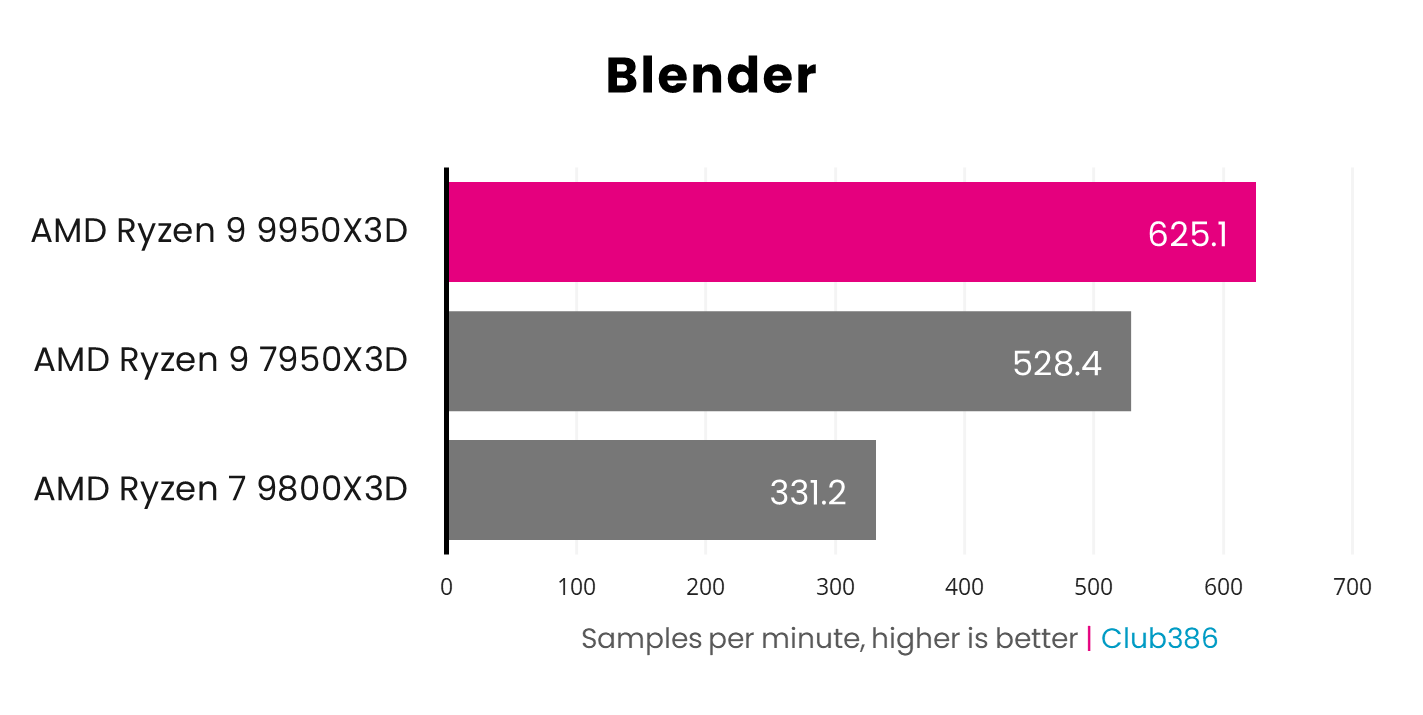
When it comes to multi-threaded number-crunching, though, the 9950X3D is in a whole league of its own. As you can see in the Blender graph below, those 16 cores make it massively quicker than the 8-core 9800X3D, with the 9950X3D clocking up a huge 625.1 samples per minute. It’s substantially quicker than the 7950X3D here too. Comparatively, the Intel Core Ultra 9 285K gets a result of 556.6 in this test, so the 9950X3D really is the king of the castle.
If you need the absolute best processing power, for both gaming and multi-threaded might, there’s simply no beating the 9950X3D. That said, you have to pay for these bragging rights, and the 9950X3D is very far from cheap. For those with deep enough pockets, though, the performance is worth it if you really want the chip that can do it all.
More detail, including all our benchmarks, can be found in our full AMD Ryzen 9 9950X3D review.
| 9950X3D | Specification |
|---|---|
| Cores | 16 |
| Threads | 32 |
| Base clock | 4.3GHz |
| Boost clock | 5.7GHz |
| L3 Cache | 128MB (2 x 32MB on-die, plus 64MB 3D V-cache) |
| Architecture | Zen 5 |
| Socket | AMD 5 |
| Max TDP | 170W |
Best gaming CPU
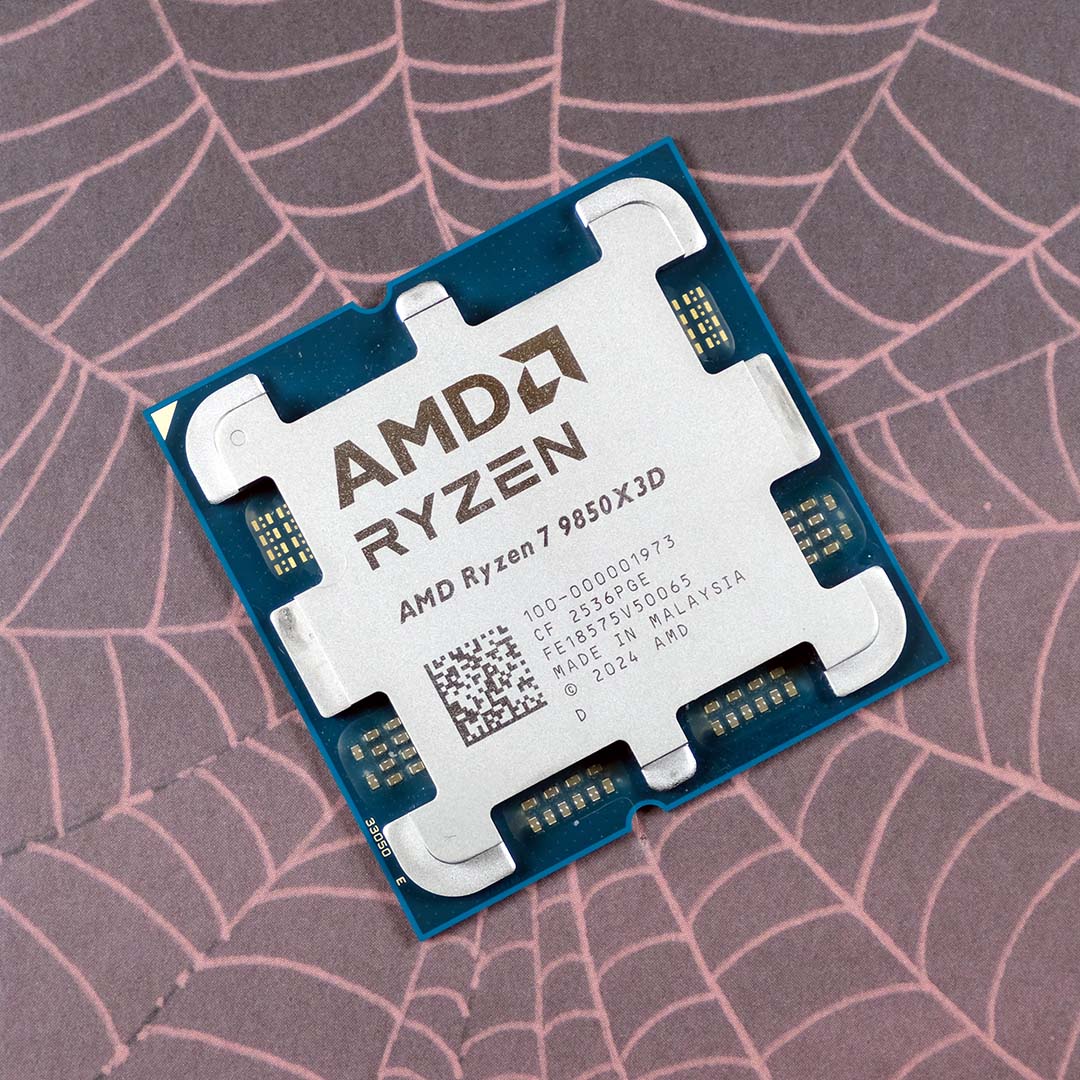
The best gaming CPU is the AMD Ryzen 7 9850X3D. Loaded with a huge stash of cache under its 8-core chiplet, this CPU knocked its predecessor, the 9800X3D, down the pecking order when it released in January 2026. Its eight Zen 5 cores still offer plenty of power for most people’s multi-threading needs, particularly with a new clock speed boost, while the cache sitting makes it a veritable speed demon in games.
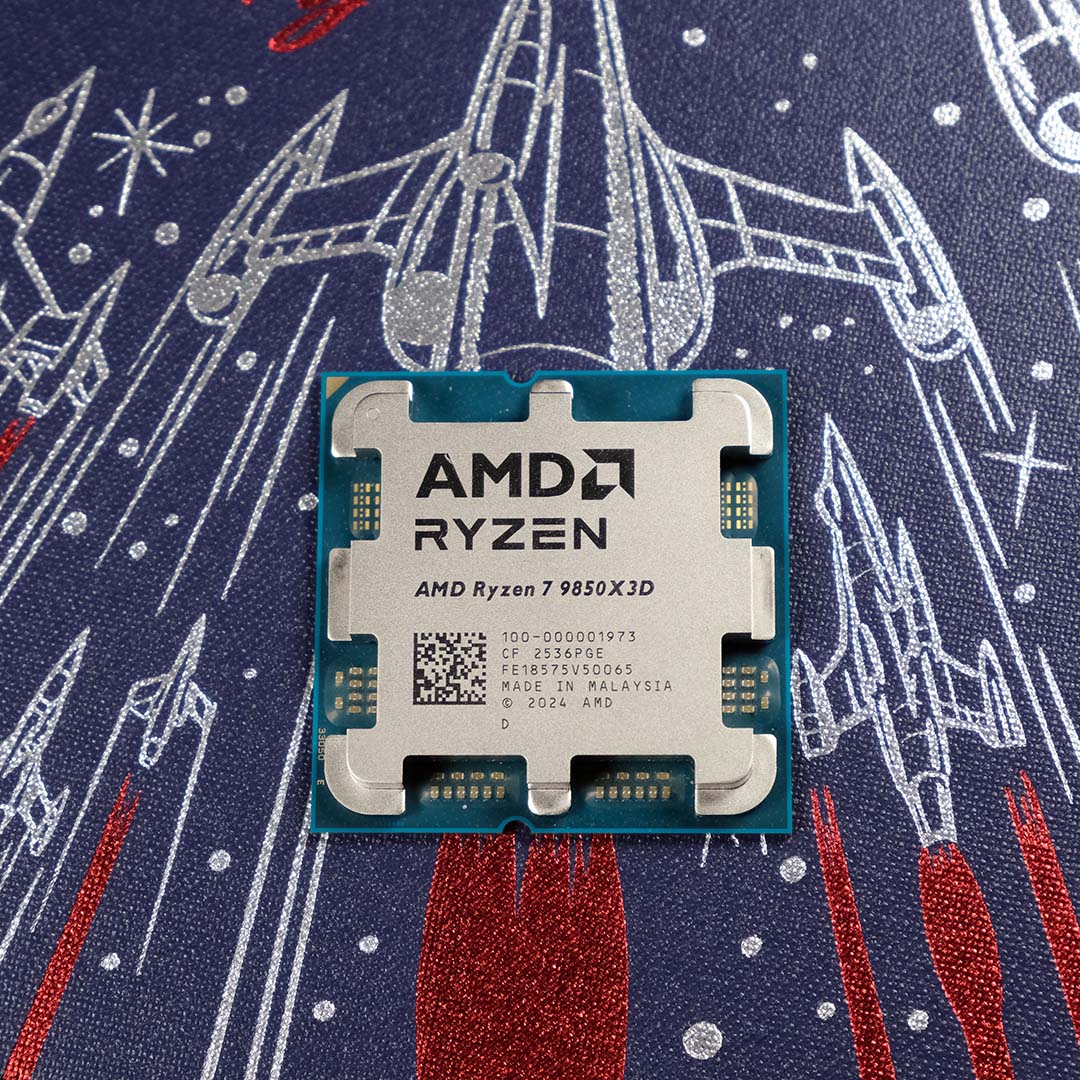

AMD Ryzen 7 9850X3D
£395 / $469
Pros
- Fantastic gaming performance
- Solid multi-core pace
- Drop-in AM5 upgrade
Cons
- Only a small improvement over 9800X3D
- High price
- Only eight cores
Club386 may earn an affiliate commission when you purchase products through links on our site.
How we test and review products.
It’s this huge slice of extra cache that gives the 9850X3D an edge in games, and it’s the main reason why it’s so much more expensive than other 8-core chips. Having all this cache on tap significantly reduces the likelihood of your games having to page your slower system memory for data, meaning your CPU can carry on maintaining your frame rate.
Unlike the 7800X3D, the 9850X3D also has its 3D V-cache under its eight CPU cores, rather than on top of them. This approach already enabled AMD to increase the clock speed to 5.2GHz in the 9800X3D, but it’s now cranked it all the way up to 5.6GHz on the 9850X3D.
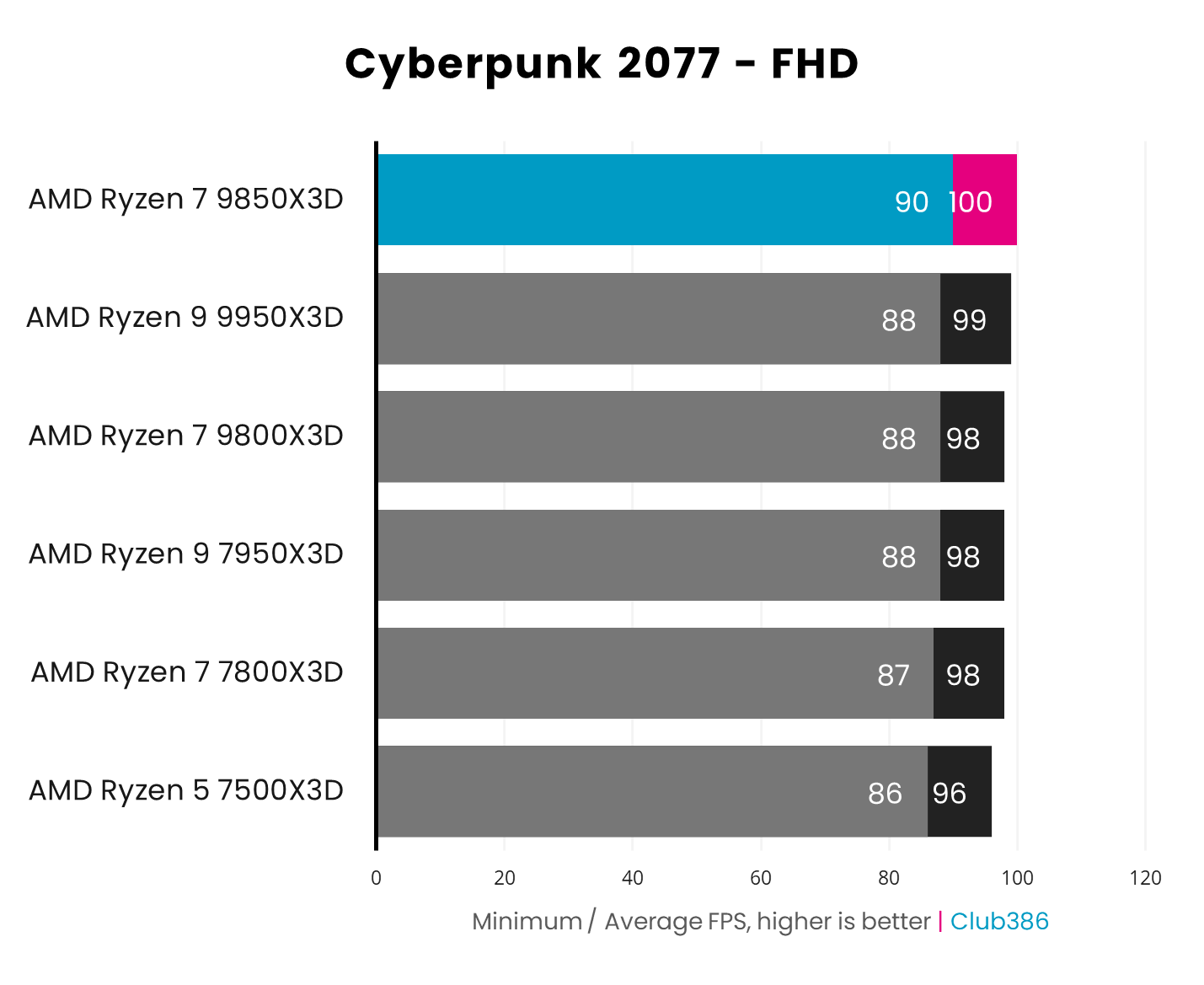
There’s no better CPU for gaming. As you can see in the graph below, the 9850X3D is ahead of the pack in Cyberpunk 2077 running at 1920×1080. It’s worth pointing out, though, that the 9800X3D isn’t far behind at all, and it costs less money – both these CPUs are absolutely worth considering here. For a detailed comparison, have a read of our 9850X3D vs 9800X3D feature, which delves into the benchmarks.
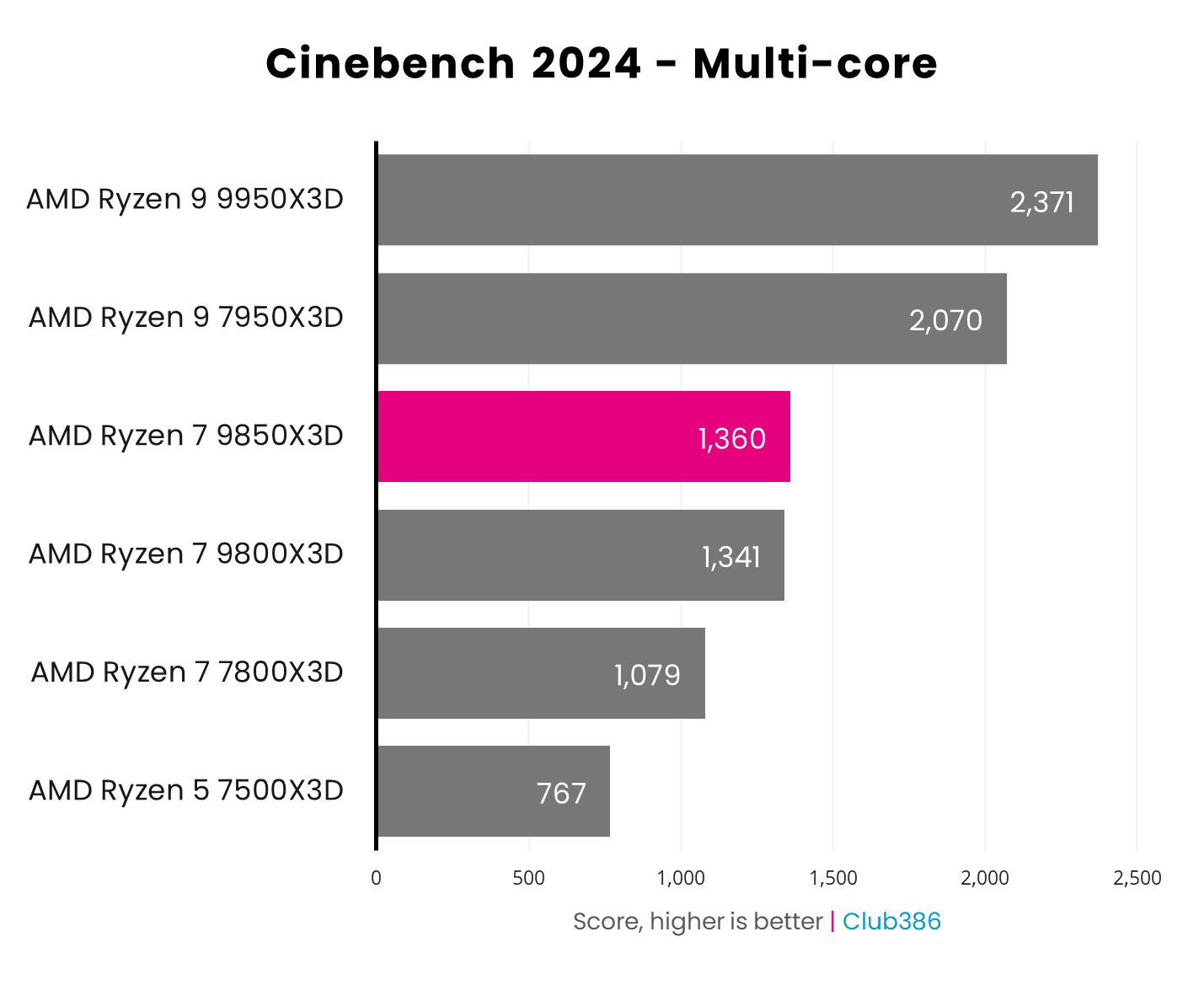
Thanks to that extra clock speed, the 9850X3D is a dab hand at multi-threading and number crunching as well. It’s still an 8-core chip, so you’ll get better multi-threaded performance from chips with more cores, but it offers a significant speed boost over the 7800X3D, and it inches ahead of the 9800X3D as well. You can compare its performance to other CPUs with 3D V-cache in the graph below, and for context, AMD’s 8-core Ryzen 7 9700X scores 1,193 in this test, and Intel’s Core i5-14600K gets 1,399.
What’s more, we’ve found you can even get great gaming performance from this chip if you use its Eco mode, and run it at 65W. You can read our full 9850X3D at 65W feature to take a look at the impact.
If gaming is your top priority, this is currently the chip to buy, and it can handle other workloads well too. The only fly in the ointment is the high price – there’s a lot of demand for this chip, and AMD knows it can charge a premium for it. If you have the cash, you won’t regret buying it, but remember you can also save some money and get very similar performance from a Ryzen 7 9800X3D.
For more detail, including all the benchmarks, check out our full AMD Ryzen 7 9850X3D review.
| 9800X3D | Specification |
|---|---|
| Cores | 8 |
| Threads | 16 |
| Base clock | 4.7GHz |
| Boost clock | 5.6GHz |
| L3 Cache | 96MB (32MB on-die, 64MB 3D V-cache) |
| Architecture | Zen 5 |
| Socket | AMD 5 |
| Max TDP | 120W |
Best budget CPU
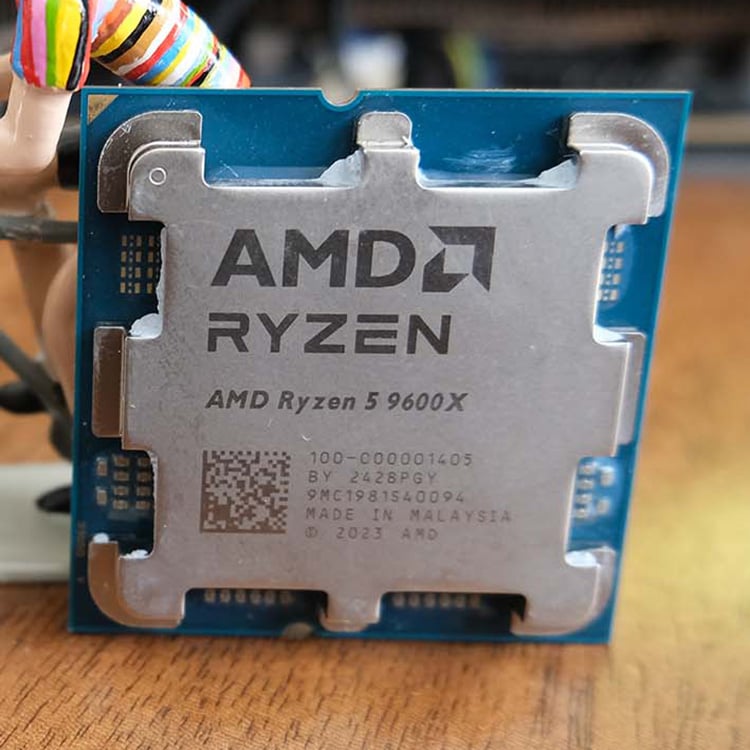
The best budget CPU is the AMD Ryzen 5 9600X. After initially launching with a bafflingly high price, this 6-core chip has since plummeted below the £200 mark, meaning it can now settle comfortably into its niche. It might only have six cores, but they’re based on AMD’s potent Zen 5 architecture and clocked at 5.4GHz, making it a solid choice for gaming if you can’t afford an X3D chip.
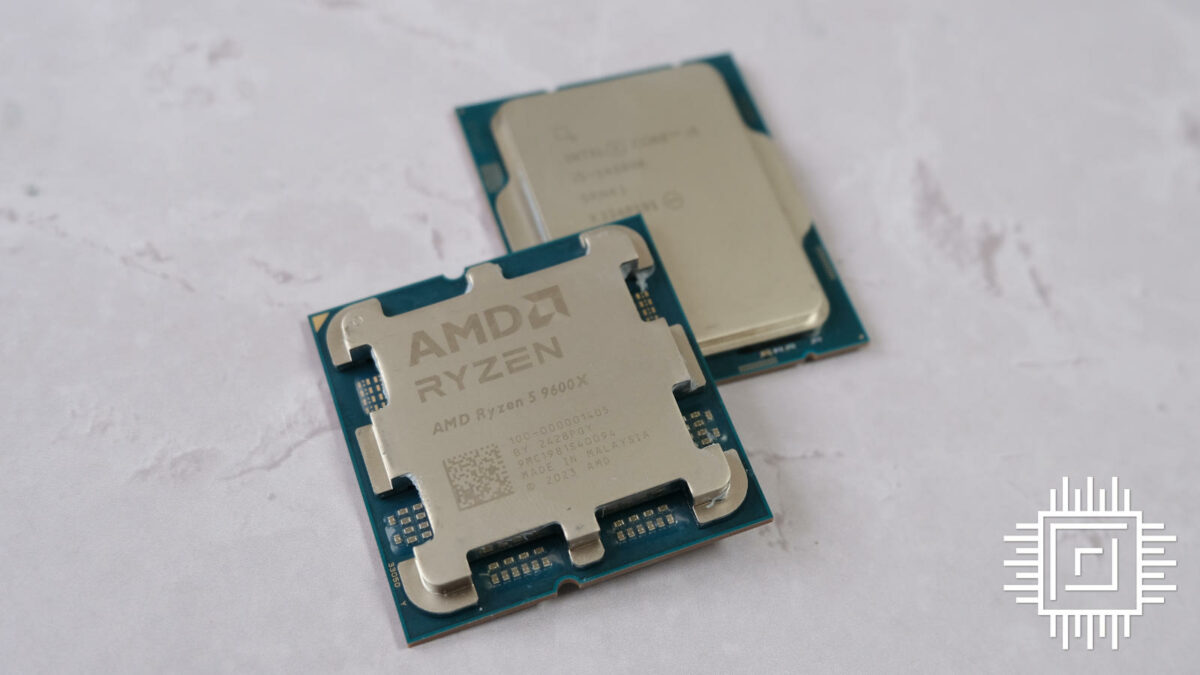

AMD Ryzen 5 9600X
£189 / $199
Pros
- Cheap price now
- Loads of life left in Socket AM5
- Runs extremely cool
- Decent gaming performance
Cons
- Only six cores
- 65W TDP hampers multi-threaded potential
- Core i5-14600K quicker at multi-threading
Club386 may earn an affiliate commission when you purchase products through links on our site.
How we test and review products.
Not everyone can afford loads of cores or a huge stack of 3D V-cache, but the Ryzen 5 9600X shows you can still get a decent CPU without spending a bucketload of cash. We recently pitted it against the nearest-equivalent Intel chip test, and while the latter is undoubtedly a better CPU for multi-threading, the 9600X is a decent choice for gaming.
As you can see in the graph below, for example, the 9600X is quicker in Assassin’s Creed Valhalla, and its average frame rates also beat the Intel chip in Mount & Blade II: Bannerlord, Final Fantasy XIV Dawntrail, and 3DMark Speed Way. That said, there are also some games, such as Cyberpunk 2077, where the Intel chip has the upper hand.

What’s more, Zen 5 is really power-efficient, and doesn’t generate loads of heat, unlike Intel’s Raptor Lake architecture. As you can see in the graph below, the 9600X peaked at just 61.2°C in our tests, almost 23°C cooler than the 14600K. There are a few factors going on here, not least the fact that the 9600X has fewer cores, but the upshot is that you don’t need a mammoth CPU cooler to keep this chip in check.
By default, the 9600X has a TDP of just 65W, meaning you can tame it with a half-decent air cooler easily enough. On the downside, this power limit also gives this CPU less headroom to maintain its 5.4GHz peak boost clock when all its cores are enabled. Some motherboards have a setting that enables you to set the 9600X’s TDP to 130W, though, and while this has a negligible impact on gaming, it can give you a worthwhile improvement in multi-threading performance. Just bear in mind that you’ll need a decent CPU cooler to keep on top of the increased thermal demands.

Importantly, the 9600X’s main advantage over a 14600K is its use of AMD’s AM5 socket. Intel has already moved to a new LGA1851 socket with its Core Ultra 200-series desktop CPUs, and there are rumours that its forthcoming Nova Lake chips will require yet again another socket called LGA1954. This means the LG1700 motherboard you’d buy for a Core i5-14600K is a dead end in terms of upgrading to a next-gen CPU.
Comparatively, AMD has historically supported its sockets for several chip generations, and Asus appears to have confirmed AM5 support for Zen 6, while rumours point to even Zen 7 using Socket AM5 as well. As such, while the Core i5 14600K is arguably a better CPU in this price range, depending on your needs, there’s an extra cost hidden in the lack of socket longevity.
Read our full AMD Ryzen 7 9700X and Ryzen 5 9600X review for more detail about this budget Zen 5 chip.
| 9600X | Specification |
|---|---|
| Cores | 6 |
| Threads | 12 |
| Base clock | 3.9GHz |
| Boost clock | 5.4GHz |
| L3 Cache | 32MB |
| Architecture | Zen 5 |
| Socket | AMD 5 |
| Max TDP | 65W |
Best budget gaming CPU
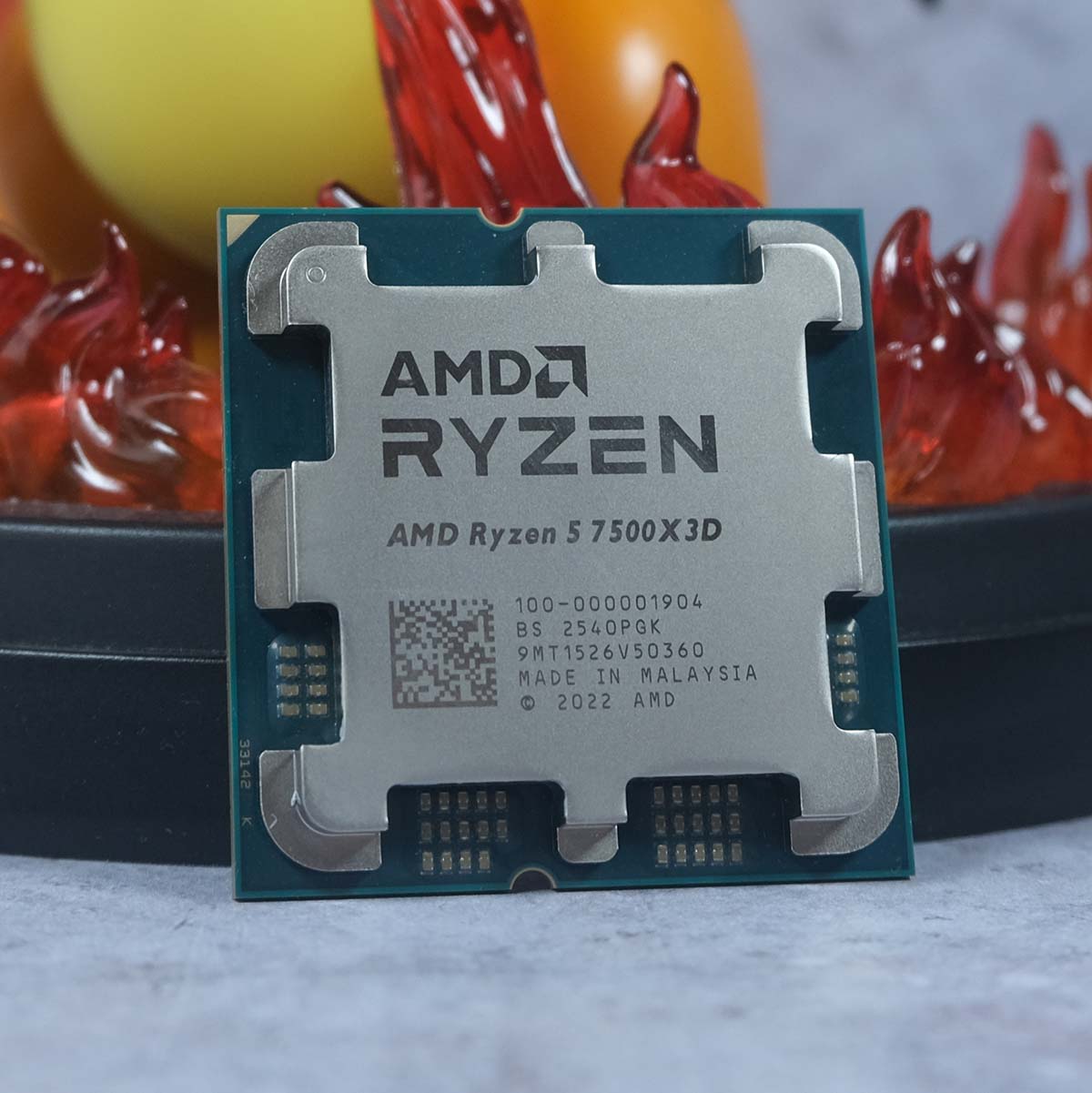
The best budget gaming CPU is the AMD Ryzen 5 7500X3D. Bringing AMD’s 3D V-cache tech to a new low price, this 6-core CPU introduces X3D to the masses. It has a slower clock speed than its bigger siblings, and it only has six cores, but it still offers potent gaming performance for its modest price.
AMD Ryzen 5 7500X3D
£247 / $269
Pros
- Great gaming performance
- Cheaper than other X3D chips
- Doesn’t need a massive cooler
Cons
- Low clock speed
- Only six cores
- Beaten by Core i5-14600K in multi-threading
Club386 may earn an affiliate commission when you purchase products through links on our site.
How we test and review products.
Importantly, this budget X3D chip has the same amount of 3D V-cache as its pricier siblings. This makes all the difference to gaming performance, as it significantly reduces the likeliness of cache misses, and the need to page your PC’s slower system memory. All of which means your CPU can get its head down and focus on maintaining your frame rates.
Check out the Assassin’s Creed Shadows graph below, and you’ll see there’s hardly any difference between the 7500X3D and 7800X3D when it comes to frame rates. Yes, the 7800X3D is clocked higher at 5GHz, and it has two more cores, but it’s the cache that really makes the difference here.
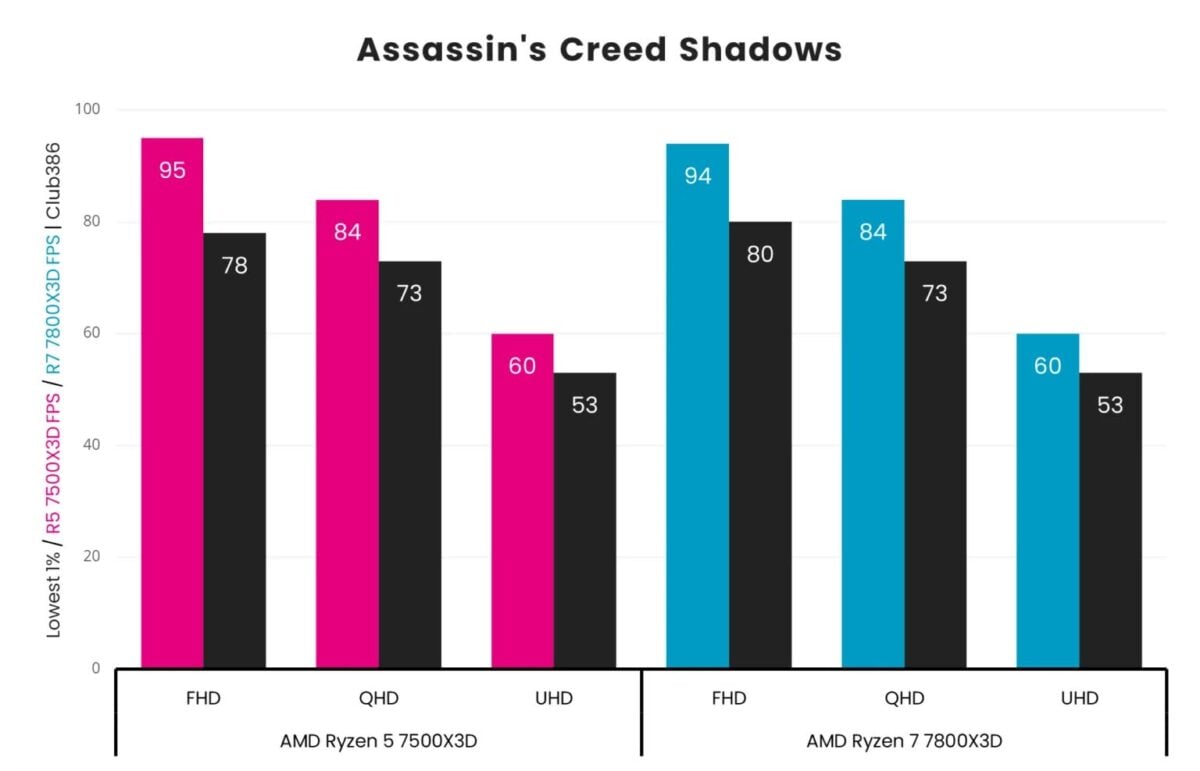
Of course, not every game is as quick on the 7500X3D as higher-end X3D chips. For example, both Forza Motorsport and Rainbow Six Siege X responded well to the 7800X3D’s extra processing power.
It also goes without saying that the comparative lack of cores and clock speed also hurt the 7500X3D in heavily multi-threaded applications. Being based on AMD’s last-gen Zen 4 architecture, it lacks the extra processing power of the company’s Ryzen 9000 Zen 5 chips too.
Not everyone can afford a clocked up 8-core X3D chip, though, and if you don’t have big bucks to spend, the 7500X3D is a great compromise if gaming is your top priority. As an added bonus, the 7500X3D also has a TDP of just 65W, so you only need a respectable air cooler to keep it in check.
Read our full AMD Ryzen 5 7500X3D test for more detail about this budget Zen 5 chip compared to the 7800X3D.
| 9600X | Specification |
|---|---|
| Cores | 6 |
| Threads | 12 |
| Base clock | 4GHz |
| Boost clock | 4.5GHz |
| L3 Cache | 96MB |
| Architecture | Zen 4 |
| Socket | AM5 |
| Max TDP | 65W |
Best budget all-purpose CPU
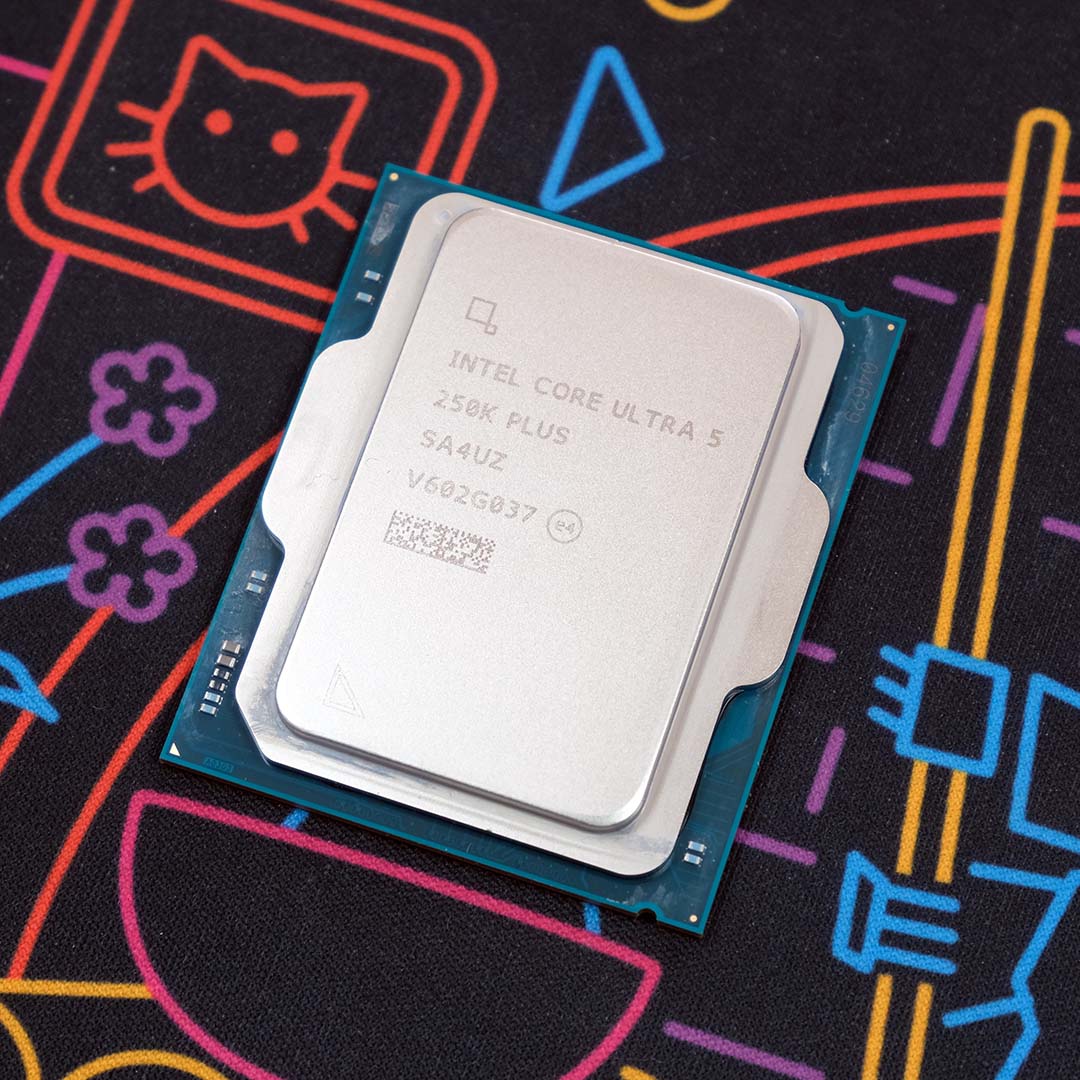
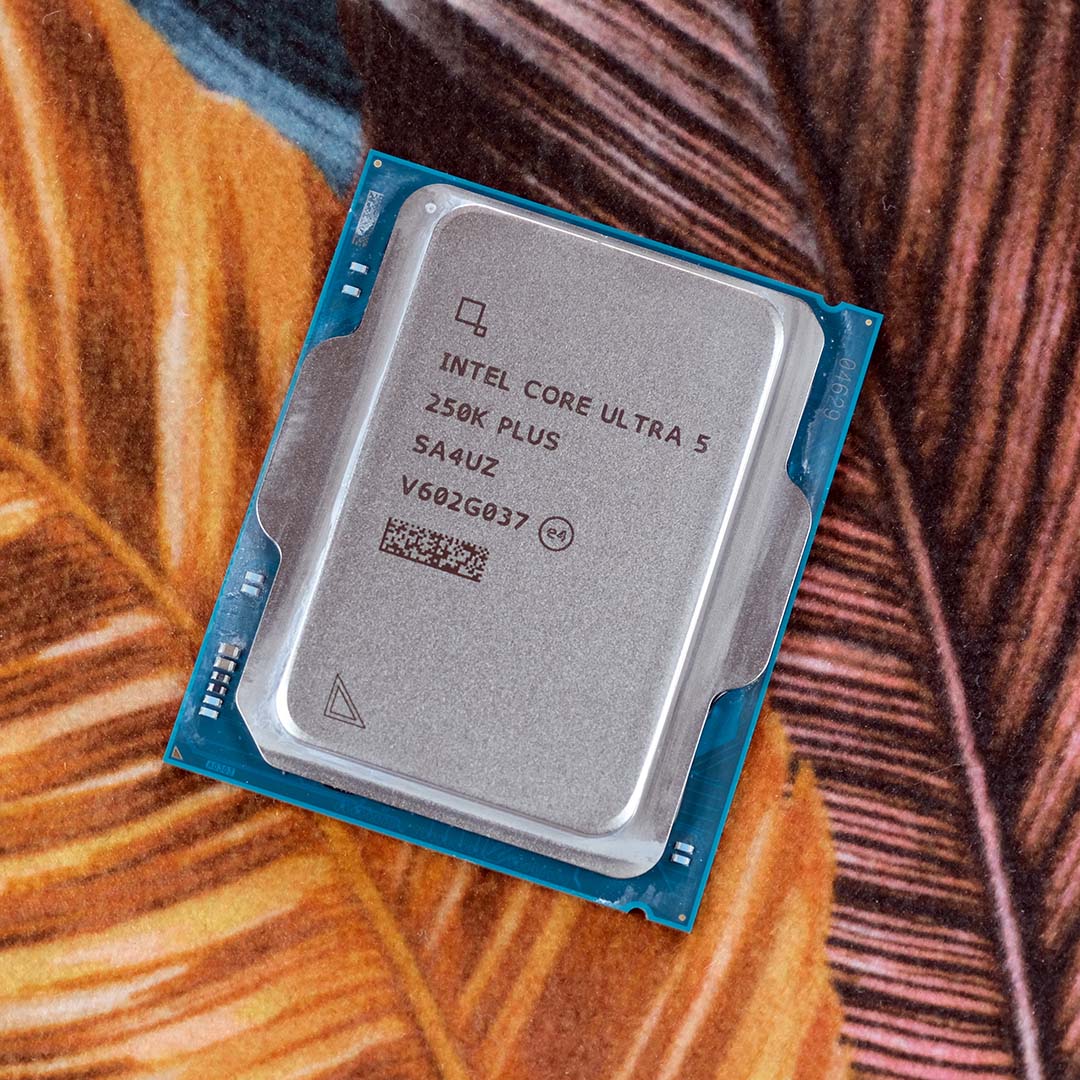
The best budget all-purpose CPU is the Intel Core Ultra 5 250K Plus. Costing just £209, Intel’s latest 18-core Arrow Lake Refresh chip offers solid value for the performance on offer. After the disappointing debut of Intel’s first-gen Arrow Lake CPUs, Intel made some tweaks to massively improve gaming performance, resulting in this great do-it-all chip. There are some caveats, which we’ll get to shortly, but if you want a chip that can do a bit of everything, and you don’t have a huge amount of money to spend, a 250K Plus will do the job tidily.
Intel Core Ultra 5 250K Plus
£209 / $199
Pros
- Great multi-core performance
- Low price
- Decent gaming pace
Cons
- Dead-end CPU socket
- Limits PCIe Gen 5 SSD performance
- AMD CPUs are faster in some games
Club386 may earn an affiliate commission when you purchase products through links on our site.
How we test and review products.
Unlike AMD’s 6-core Ryzen 5 CPUs, the main benefit of buying an Intel Core Ultra 5 250K Plus is that you get loads more cores. You get six P-Cores, which are the ones you want for gaming, but you also get 12 E-Cores – that’s four more than you get in the Core i5-14600K and Core Ultra 5 245K. The latter are basically cut-down cores engineered for power-efficiency, and they really help out when you chuck heavily multi-threaded workloads at this chip.
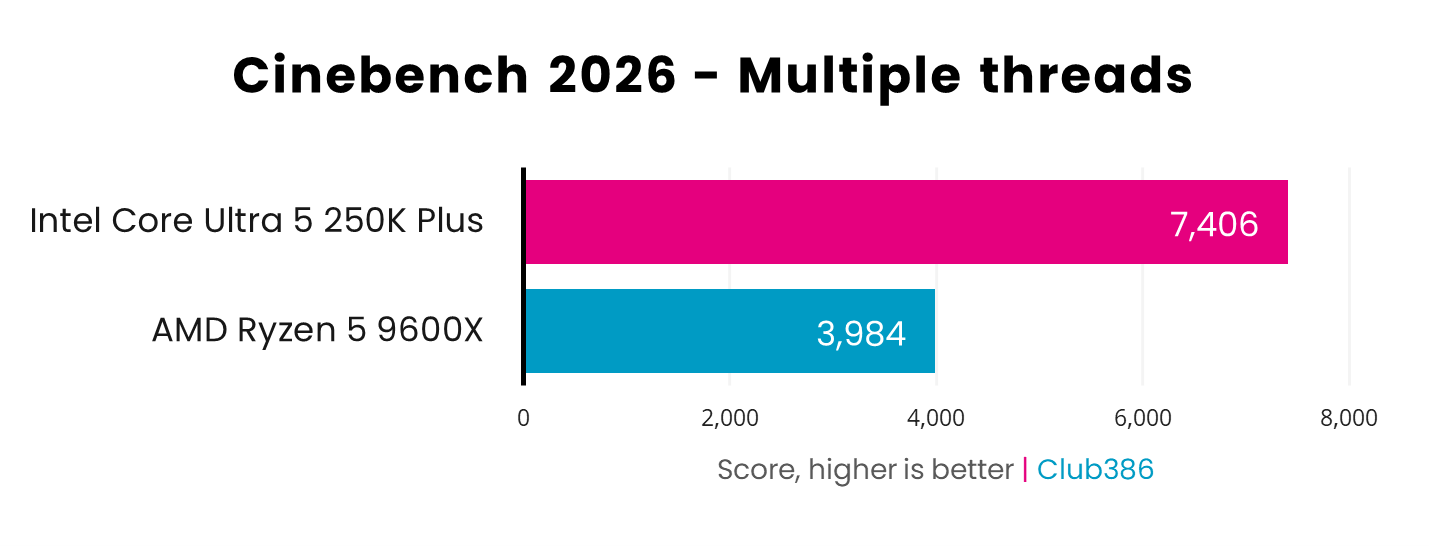
With a total of 18 cores at its disposal, the 250K has a substantial edge over the 9600X when it comes to rendering. Just take a look at the Cinebench multi-threaded benchmark graph below, and you can see that the 250K Plus is a colossal 85.9% quicker than the Ryzen 5 9600X. If you do a fair bit of content creation work that can make good use of extra cores, such as rendering or video encoding, this chip is a great weapon in your multi-threaded arsenal.
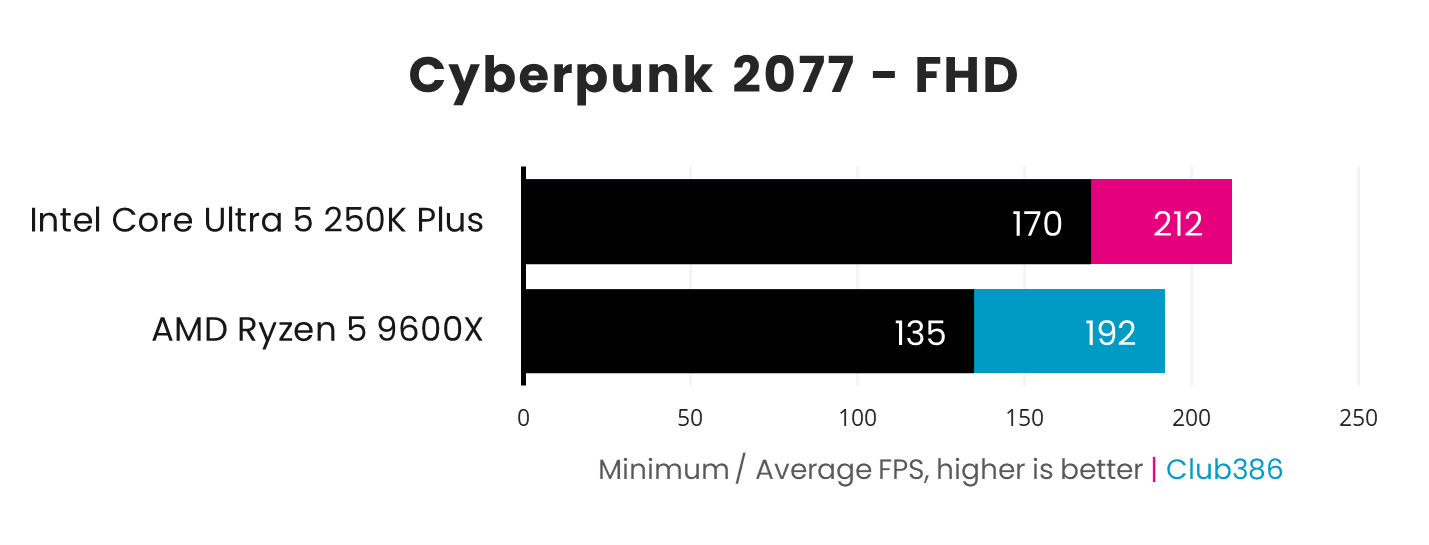
Unlike its predecessor, the 245K, the 250K Plus holds its own in games as well. Intel has increased the speed of the die-to-die interconnect between the compute tile and the CPU’s I/O tile by 900MHz, which massively reduces latency. As a result, this CPU trades blows with the 9600X across our test suite, and even outperforms it in Cyberpunk 2077. The AMD chip generally has the edge in games, but the margins usually aren’t massive.
There are a few factors to note, however. Firstly, this CPU requires an LGA1851 motherboard, and this socket is expected to be retired in the near future, when Intel launches its Nova Lake lineup with a new LGA1954 socket. This means the only upgrade option is really the Core Ultra 7 270K Plus, unless you replace your motherboard.
Secondly, in our tests, we’ve found that Intel’s Arrow Lake platform restricts the read speeds of the latest PCIe Gen 5 SSDs, topping out at around 12,200MB/s. That’s not an issue if you’re using a slower drive, or indeed a PCIe Gen 4 SSD, but it’s something to bear in mind if you’re planning to build a PC with a super-fast drive.
Read our full Intel Core Ultra 5 250K Plus review for more details, including loads of benchmarks, as well as our in-depth 250K Plus vs 9600X comparison.
| 250K Plus | Specification |
|---|---|
| P-Cores | 6 |
| E-Cores | 12 |
| Total cores | 18 |
| Threads | 18 |
| P-Core base / boost clock | 4.2GHz / 5.3GHz |
| E-Core base / boost clock | 3.3GHz / 4.7GHz |
| L3 Cache | 30MB |
| Architecture | Arrow Lake Refresh |
| Socket | LGA1851 |
| Max TDP | 159W |
Best CPU for content creation
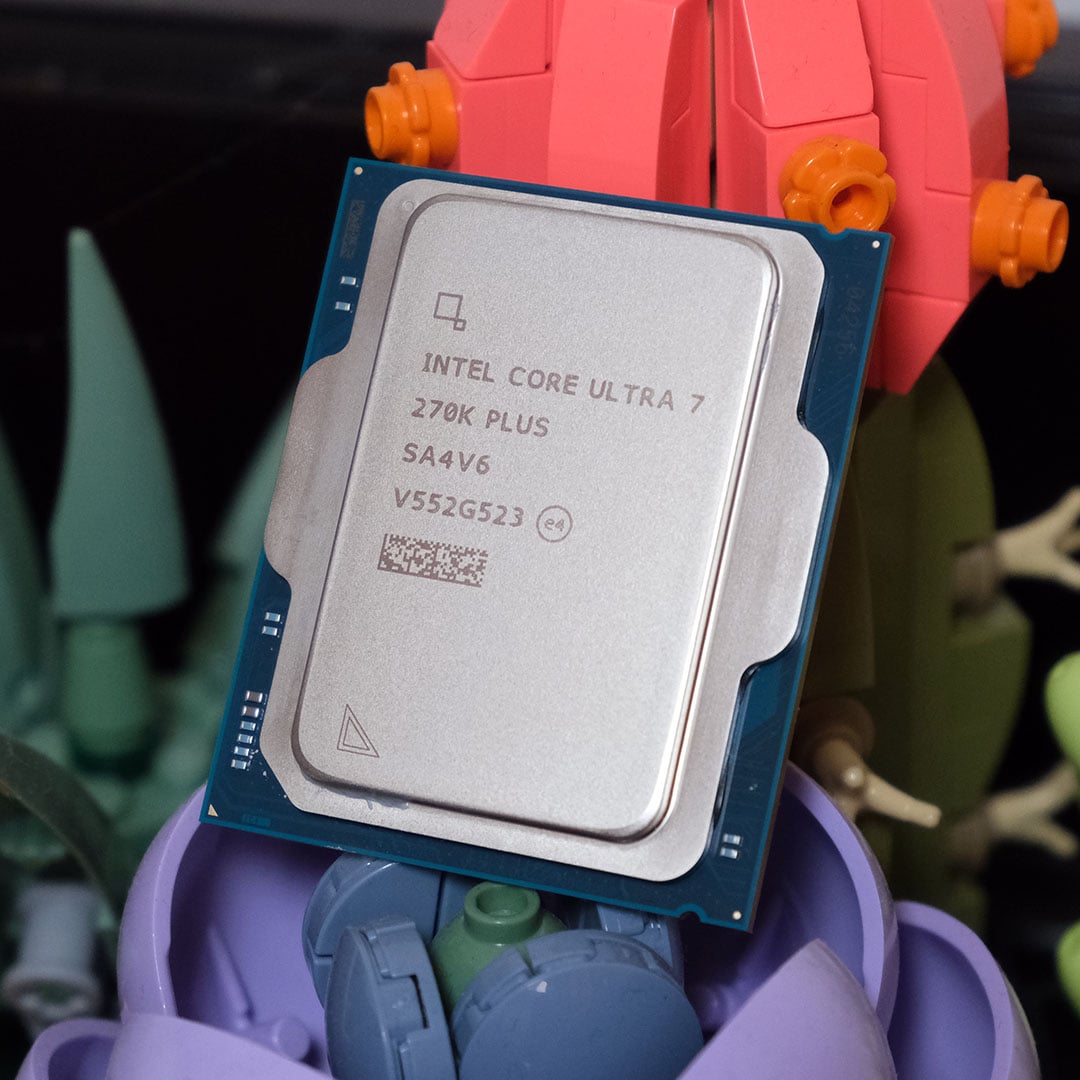
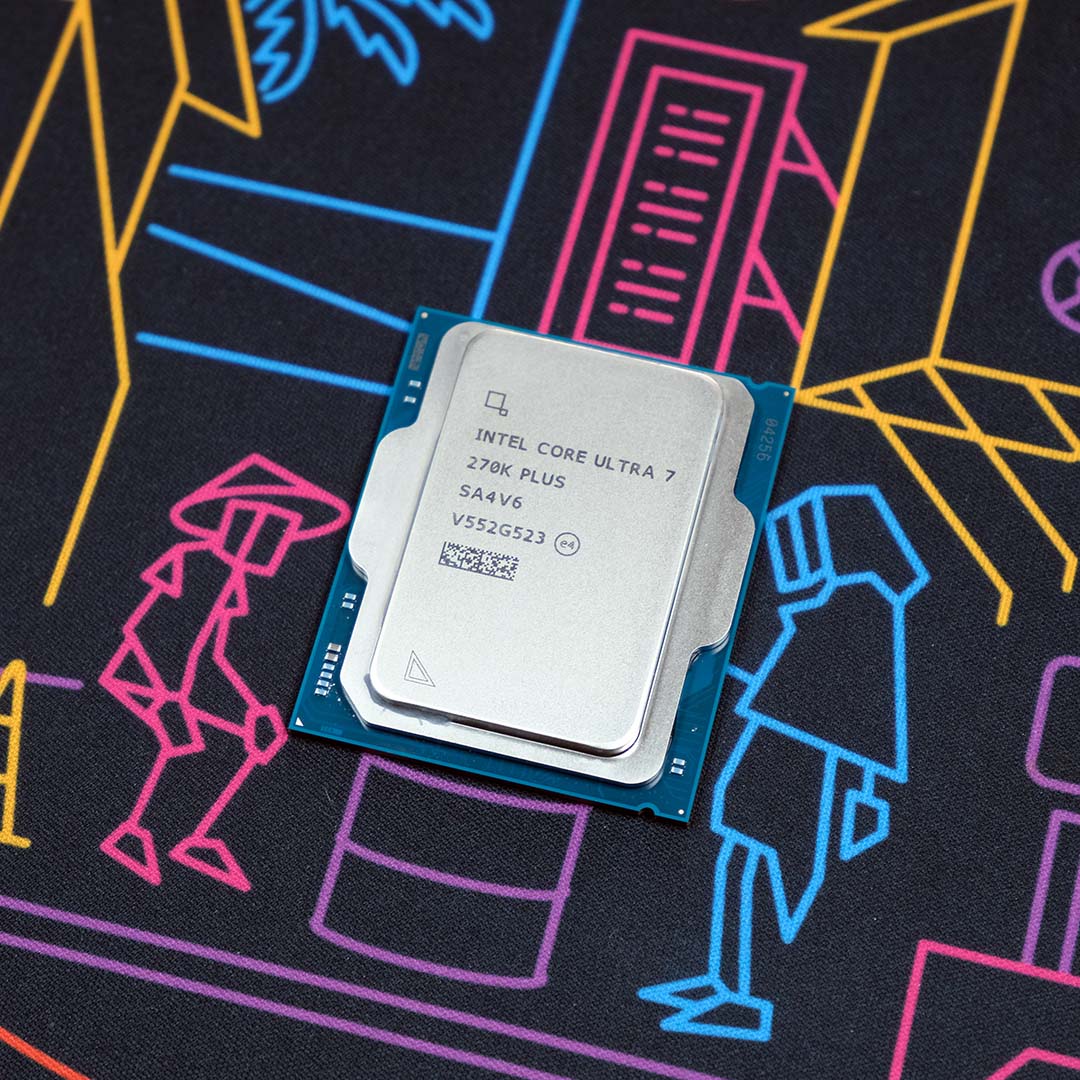
The best CPU for content creation is the Intel Core Ultra 7 270K Plus. While Intel’s Arrow Lake architecture initially proved to be underwhelming when it comes to gaming performance, the company’s latest Arrow Lake Refresh chips go a long way to address this shortfall. Importantly, the 270K Plus gives you 24 cores for the same price as an 8-core AMD CPU. If you want a productivity chip that can churn through multi-threaded workloads without breaking a sweat, the Core Ultra 7 270K Plus is a cracking choice.
Intel Core Ultra 7 270K Plus
£299 / $299
Pros
- Amazing multi-threaded performance
- Much improved gaming pace
- Decent power efficiency
Cons
- Potentially limited socket lifespan
- Can get hot
- Limits PCIe Gen 5 SSD performance
Club386 may earn an affiliate commission when you purchase products through links on our site.
How we test and review products.
With eight P-Cores and 16 E-Cores beavering away under its heatspreader, the 270K Plus is basically a Core Ultra 9 285K at its heart. It has a slightly lower boost clock of 5.5GHz, compared to 5.7GHz on the 285K, but Intel’s latest tweaks mean it’s ultimately a better chip, especially for £299.
These tinkerings include raising the frequency of the die-to-die interconnect by 900MHz, reducing latency and improving gaming pace, and this CPU also supports Intel’s Binary Performance Optimsation (BPO) tech. This clever tool goes right down to the assembly code level of supported software, including several games, to optimise workflow through the chip, and it improves performance even further. Basically, this is the chip to buy, not the 285K.
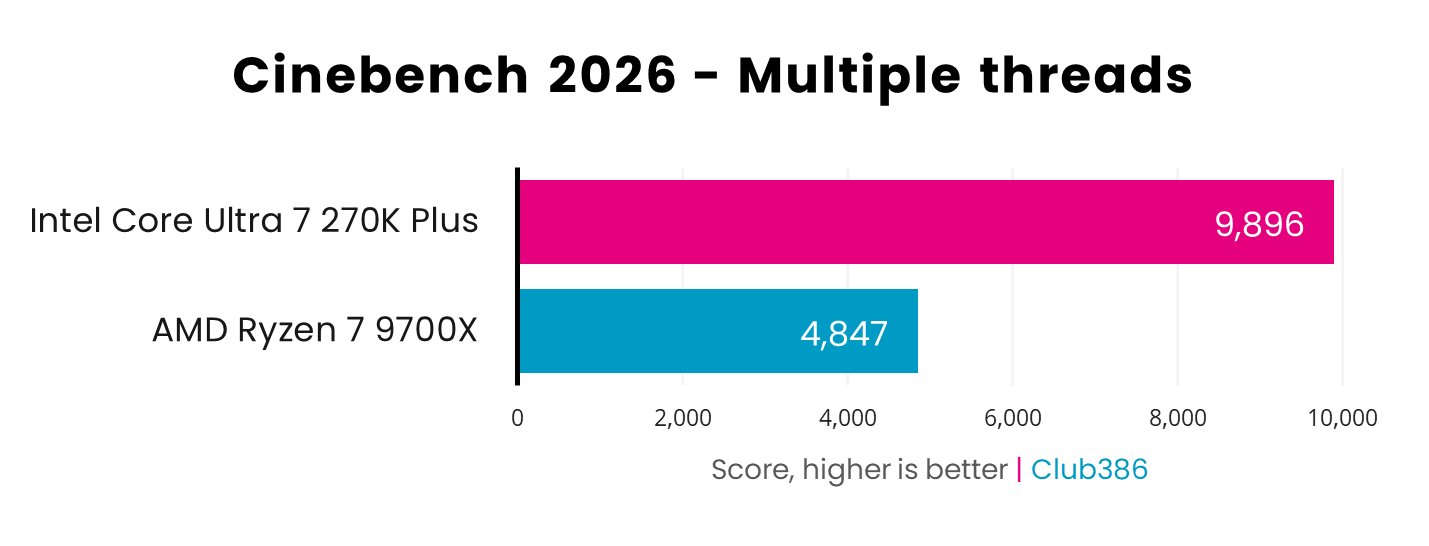
In terms of multi-threaded pace, the Core Ultra 7 270K Plus is massively faster than AMD’s competing Ryzen 7 9700X at the same price. That’s no surprise given the huge difference in core counts, but the graph below gives you a sense of the scale here. The 270K Plus is over twice the speed of the 9700X in Cinebench 2026 – if multi-threaded grunt for 3D rendering is your top priority, this is absolutely the chip to buy.
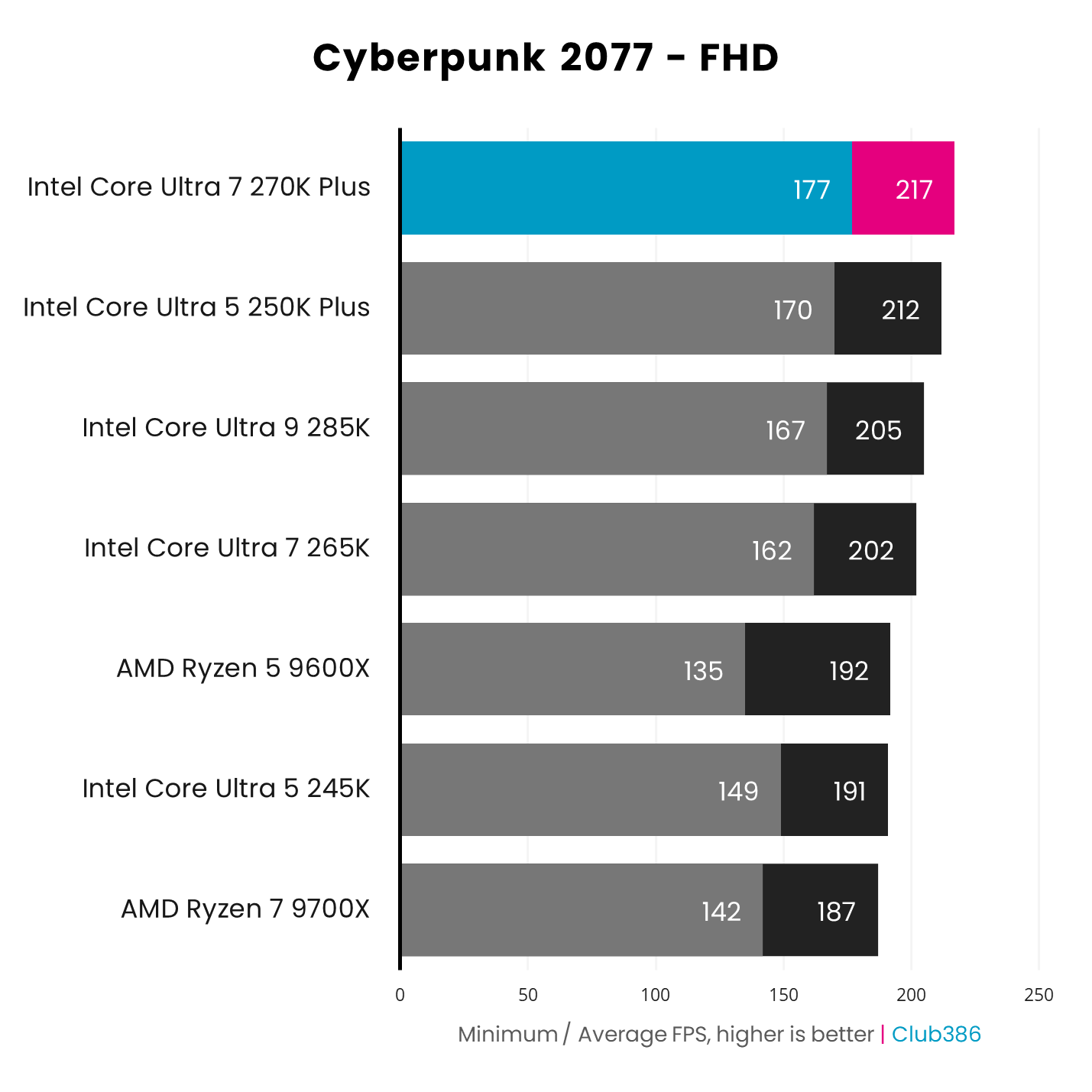
Importantly, you no longer majorly sacrifice gaming performance by opting for this chip, unlike the 285K. As you can see in the graph below, Cyberpunk 2077 even runs better on the 270K Plus than it does on AMD’s non-X3D chips, and it’s a good deal quicker than the 285K, despite its lower clock speed. There are some games where AMD has the upper hand, and if gaming is your top priority, you’ll be better served by an X3D chip with 3D V-cache. However, if you want a CPU that can do it all for a reasonable price, this Intel chip is where it’s at.
It’s not a complete slam dunk for the 270K Plus. One issue is that it requires an LGA1851 motherboard, which you’re unlikely to already own unless you bought a first-gen Arrow Lake system, and this socket is expected to be retired in the near future. That limits your upgrade potential compared to buying into AMD’s AM5 ecosystem.
One factor to bear in mind is that Intel’s Arrow Lake platform has a bottleneck on SSD read performance, topping out at around 12,200MB/s, so you won’t get the most out of the latest super-fast PCIe Gen 5 drives. The 270K Plus also gets hot when all its cores are running at full pelt, so you’ll need a decent cooler – check out our guide to buying the best CPU cooler for our buying advice here.
For more detail and all the benchmarks, read our full Intel Core Ultra 7 270K Plus review, as well as our in-depth 270K Plus vs 9700X performance comparison.
| 270K Plus | Specification |
|---|---|
| P-Cores | 8 |
| E-Cores | 16 |
| Total cores | 24 |
| Threads | 24 |
| P-Core base / boost clock | 3.7GHz / 5.5GHz |
| E-Core base / boost clock | 3.2GHz / 4.7GHz |
| L3 Cache | 36MB |
| Architecture | Arrow Lake Refresh |
| Socket | LGA1851 |
| Max TDP | 250W |
FAQs
Your choice of CPU will have a big impact on your system, whether you’re measuring its gaming frame rates or how long it takes to encode a 4K video. What’s more, your CPU will also dictate some of the other gear in your rig, from the motherboard to the RAM.
What do CPU model numbers mean?
AMD has three main CPU lineups – Ryzen 5 with six cores, Ryzen 7 with eight cores, and Ryzen 9 with 12 or 16 cores. This brand is then followed by a model number, and as a general rule, the higher the number the better your CPU. In the case of AMD’s Ryzen 9 chips, for example, the 9900X has 12 cores while the 9950X has 16. The model number can also refer to clock speeds, and levels of cache. For example, the Ryzen 5 9600 has six cores running at up to 5.2GHz, whereas the Ryzen 5 9500F only boosts to 5GHz.
Look out for letters on the end as well. An ‘F’ on the end means the CPU has no integrated GPU on both Intel and AMD CPUs, while an ‘X’ on the end denotes a CPU with a high clock speed. You also see some AMD CPUs with ‘G’ on the end of the model number, which stands for ‘graphics’ and denotes a more powerful integrated Radeon GPU than the simple one usually supplied in an AMD CPU. Meanwhile, any AMD CPUs with ‘X3D’ on the end of the number are equipped with an extra 64MB of L3 cache, which makes them faster in games.
Intel CPUs, on the other hand, often have a ‘K’ on the end, which means they’re multiplier-unlocked for easy overclocking. Intel has recently changes its branding from Core i-series to Core Ultra, but the principles are the same. Like AMD’s Ryzen chips, you’re looking at Core Ultra 5/Core i5 at the budget end of the scale, Core Ultra 7/Core i7 in the mid range, and Core Ultra 9/Core i9 at the very top end. As with AMD, there will also be a model number after the brand name, which refers to the number of cores and clock speed.
Which board and memory?
All AMD’s latest CPUs require a Socket AM5 motherboard based on a 600-series or 800-series chipset, and they also need DDR5 memory. If you’re currently rocking an AM4 system with a Ryzen 5000-series chip, then you’ll need to upgrade your RAM and motherboard if you want one of the latest chips.
Meanwhile, Intel’s last-gen Raptor Lake CPUs require an LGA1700 motherboard. The full spectrum of boards will work with the latest 14th-gen CPUs, as long as you update the BIOS to the latest version, from old boards based on budget B660 chipsets, to new ones using Intel’s top-end Z790 chipset. Look out for memory here too. Some older LGA1700 boards support DDR4, meaning you can use your old memory if you already have a DDR4 system, which could save you some money while RAM prices are so high. However, most newer LGA1700 boards require DDR5 RAM.
If you’re looking to buy one of Intel’s latest Core Ultra Arrow Lake CPUs then you’ll need a whole different socket again, as well as DDR5 memory. Look out for LGA1851 boards based on Intel’s latest Z890 and B860 chipsets for these chips.
What about socket longevity?
AMD is generally better than Intel at providing an upgrade path for future processors, and this is an important consideration if you plan to keep your system for a while. This means you can use the same motherboard and memory for future, much-improved processors. As a case in point, AMD’s AM4 socket spanned all the way from first-gen Ryzen CPUs to the Ryzen 7 5700X3D with 3D V-cache, and even now we’re still seeing new AM4 chips coming out. Likewise, AM5 is expected to last well into the Zen 6 and possibly Zen 7 era, so you’re likely to get plenty of life out of your AM5 board.
Comparatively, Intel’s LGA1700 socket has already been retired, so if you buy a Core i5-14600K with a new motherboard, you won’t be able to upgrade to a next-gen CPU. It’s looking increasingly likely that future Intel Nova Lake CPUs will use another new socket as well, consigning LGA1851 motherboards to obsolescence. As such, if you’re building a whole new rig from scratch, it’s important to think about how long you plan to use it before upgrading, and whether you’d be willing to buy a whole new motherboard next time you upgrade your CPU.
