

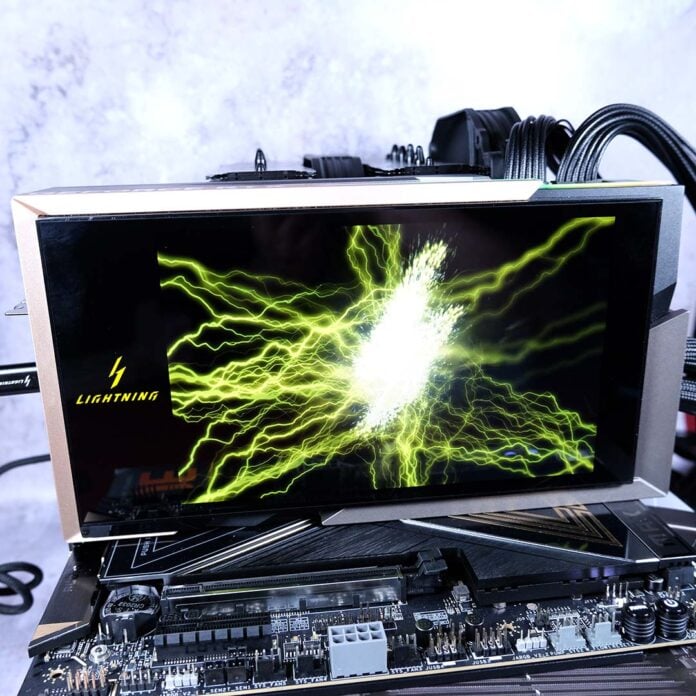
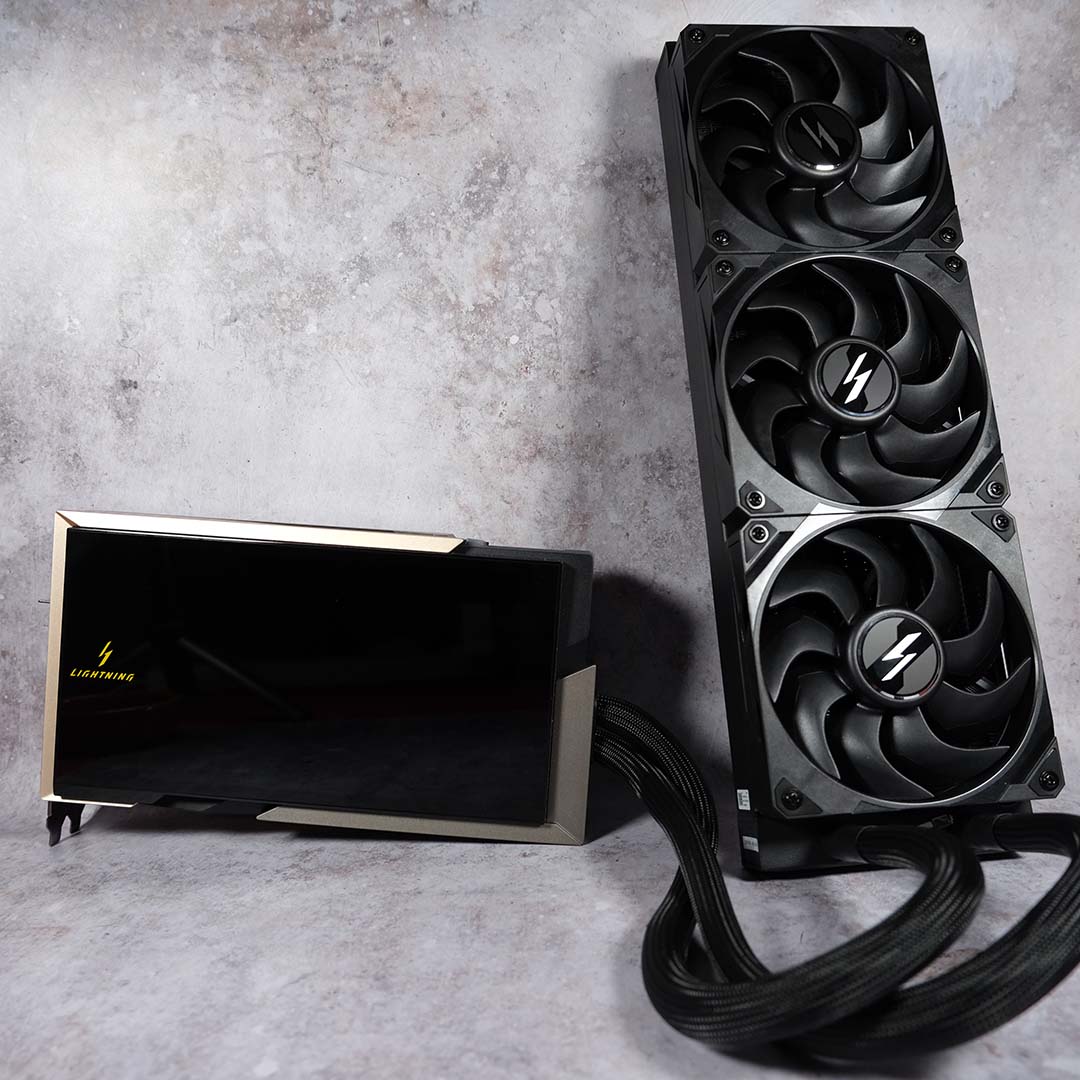
I’ve frequently joked about future Nvidia graphics cards pushing four-digit power budgets, but I never thought I’d see something like the MSI GeForce RTX 5090 Lightning Z actually come to market. Yet, here it is, the world’s first pixel pusher to run at 1,000W, pushing performance of the Blackwell flagship as far as it could reasonably go. It’s a glorious, if expensive, sight to behold.

MSI GeForce RTX 5090 Lightning Z
£4,999
Pros
- Top-tier performance
- Stylish, premium build
- Excellent thermals
- Whisper-quiet acoustics
- 8in LCD display
- Included vertical mount
Cons
- Extraordinarily expensive
- No local software control
- Inelegant USB connection
- Possible instabilities
Club386 may earn an affiliate commission when you purchase products through links on our site.
How we test and review products.
Before we begin, I’d like to remind prospective Lightning Z buyers that it’s a limited edition graphics card. There are only 1,300 units available for purchase worldwide, with a mere 30 making their way to UK shores, making it an exceedingly rare component. Not that I recommend splashing £5,000 on anything without first conducting some research, but you might want to have stock in your basket ready to go if you’re seriously considering picking one up.
Design
As I’ve already covered this card’s specifications and design in our Lightning Z unboxing, this review primarily concerns itself with performance. I strongly recommend reading my prior piece before digesting the frame rates, scores, and more below, as there’s far more to unpack about this graphics card than benchmark results alone.
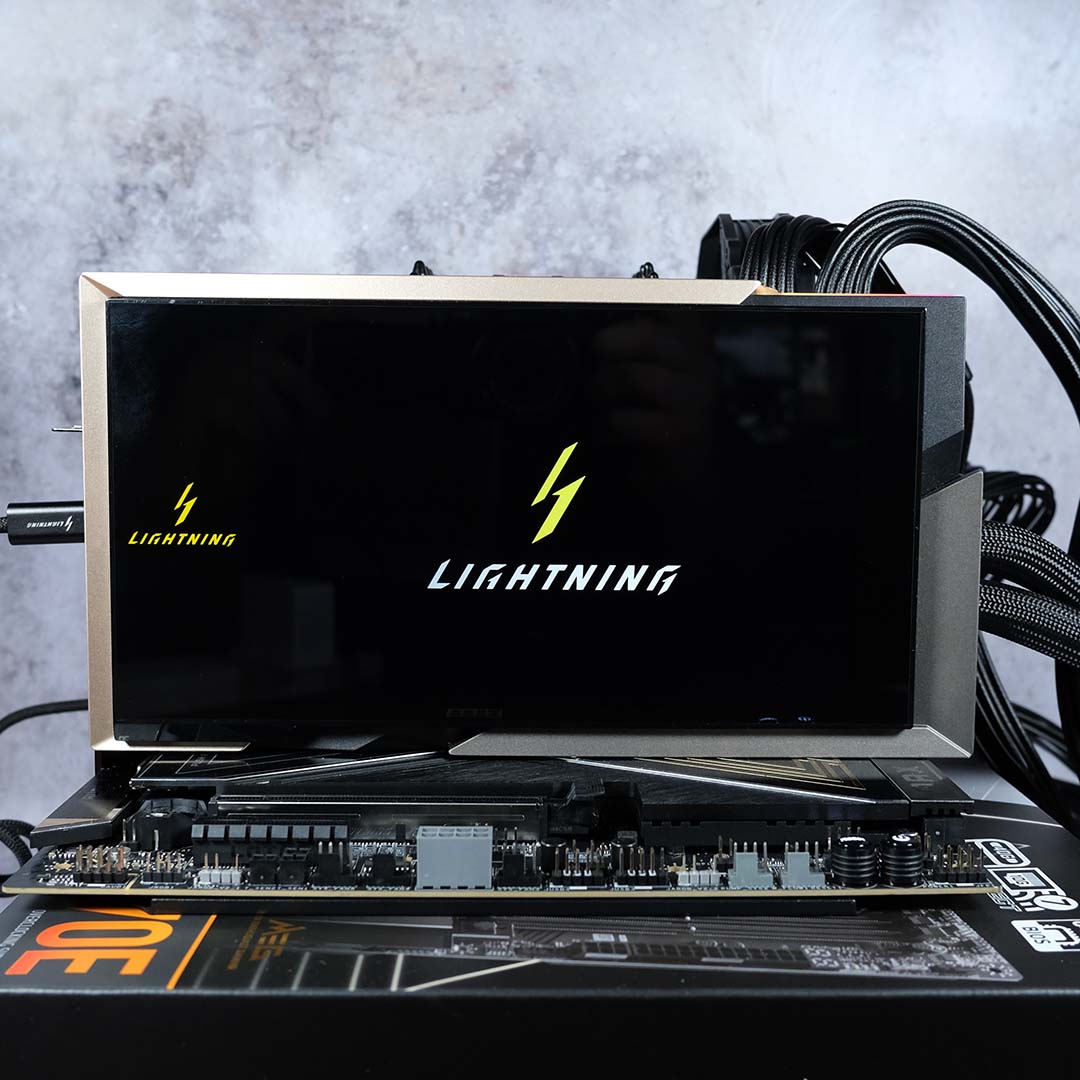
However, for the sake of clarity, there are a few key features that I’d like to zone in on as there’s pertinent to my shortlists of pros and cons. Starting off with that wonderful screen, an 8in LCD running at 800p and 60Hz. This is the first graphics card in the world to sport a built-in panel, eliminating the need for aftermarket displays.
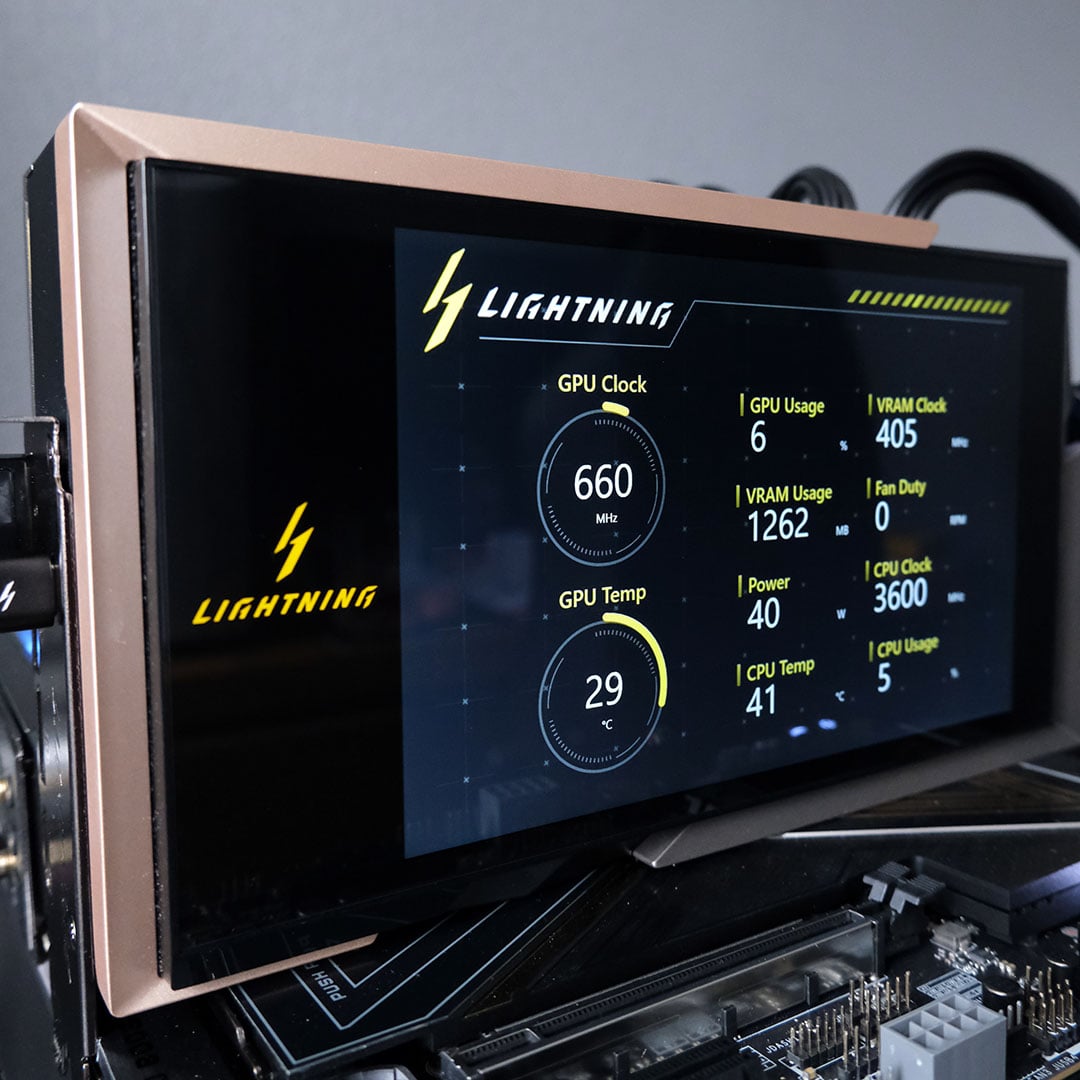
You can put it to use like any other secondary screen, whether you want to display system information or a thematic video hosted on YouTube or elsewhere. However, I do wish MSI had thought of a more elegant system for pairing the screen with the graphics card, as a USB-A to USB-C cable sticking out the back of this £5K graphics card isn’t particularly elegant or sightly.
The same goes for the means of controlling the screen. MSI has curiously opted for web-only controls, despite already building so many additional features into MSI Center. The online-only Lightning Hub works well enough, but I’m not particularly happy that I need to be on the internet to control the card’s RGB features and more.
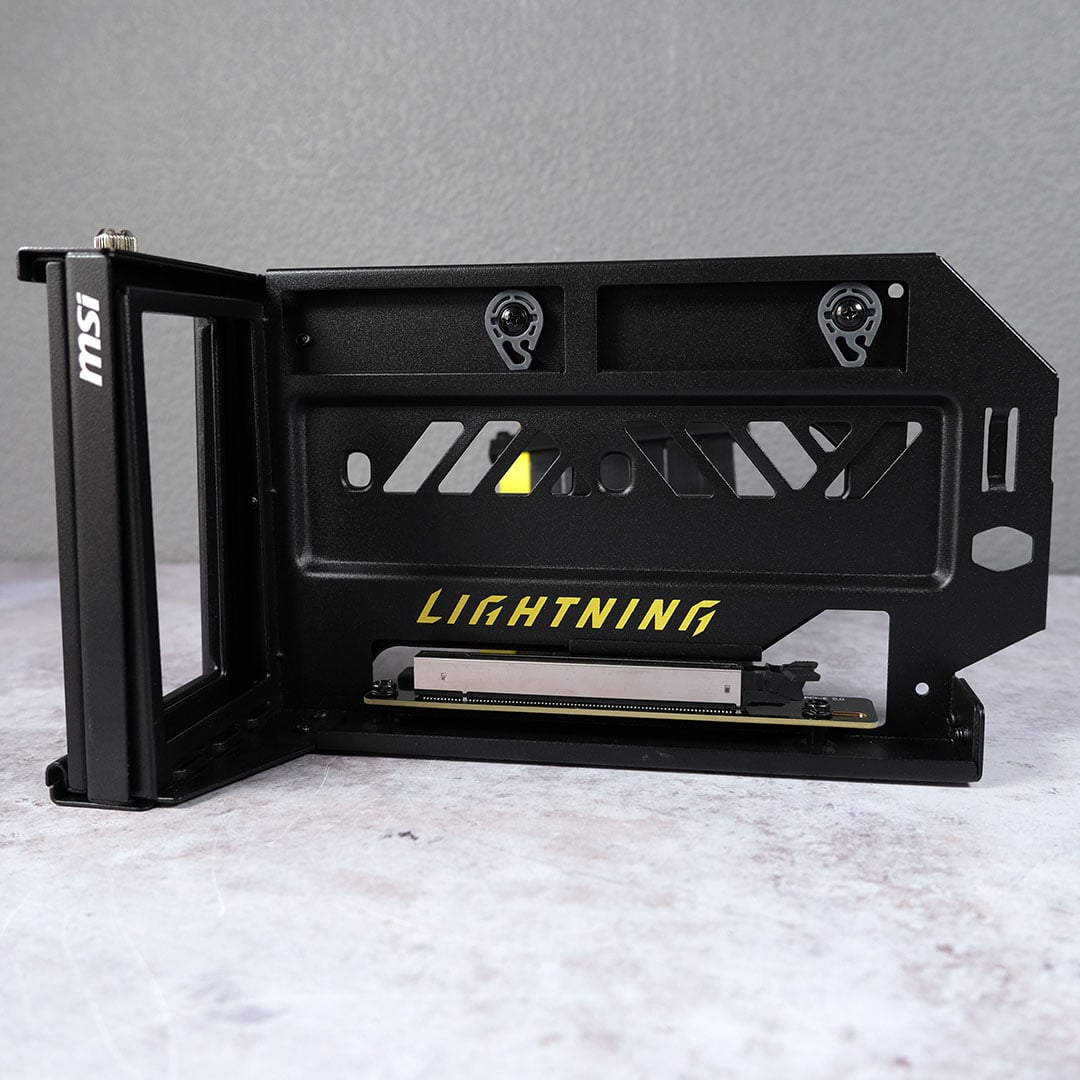
Then there’s MSI’s Graphics Card Holder, a well-built vertical mount that’s an absolute must for this graphics card. The Lightning Z is practically begging to sit vertically inside any case, so its screen can shine out through your chassis’ tempered glass. It’s a welcome accessory, as having to pay extra for a third-party alternative would certainly leave me feeling sour.
Better still, this is a PCIe Gen 5 riser. This means that plugging the Lightning Z into this mount won’t create PCIe compatibility issue, or rob you of any performance. Admittedly, the reduction from dropping down to a Gen 4 connection is minor, but every ounce of power counts when you’re paying this much for a graphics card.
Test methodology
Testing the Lightning Z has proven surprisingly tumultuous, owing to system instabilities. I have not seen similar reports from other outlets, so I believe there’s either a problem with our sample, test bench, or a combination of the two.
It’s impossible for me to eliminate possibilities without a second Lightning Z to hand, which are in understandably short supply. If there were an issue with my test bench, I would expect to see similar errors on my Nvidia GeForce RTX 5090 Founders Edition, but none have come to light.
While benchmarking the Lightning Z, across both its 800W and 1,000W modes, the system grows unstable as time passes. These issues stem from NVLDDMKM driver errors, manifesting as black screens, crashes, and other problems occurring during benchmarks. Despite trying older Game Ready drivers and a multitude of other troubleshooting steps, including fresh Windows installations, alternative power supplies, and BIOS tweaks, nothing worked.
It’s still entirely possible that there’s a problem with my Lightning Z, but I’m willing to give MSI the benefit of the doubt at this point in time, particularly as others in my field haven’t encountered such problems and this same sample seemingly had no issues at other media.
| Lightning Z | Founders Edition | |
|---|---|---|
| Boost clock | 2,730MHz 2,775MHz (MSI Center) | 2,407MHz |
| Power connector(s) | 12V-2×6 (x2) | 12V-2×6 |
| TDP | 800W (OC mode) 1,000W (Extreme mode) | 575W |
| Recommended PSU | 1,500W | 950W |
| Dimensions | 260 x 151 x 61mm (card) 394 x 120 x 56mm (radiator) | 304 x 137 x 40mm |
| MSRP | £4,999 | £1,939 |
With that preamble out of the way, let’s talk test system and methodology. I’ve benchmarked the Lightning Z using its 800W and 1,000W BIOS modes, pitting MSI’s flagship against the RTX 5090 Founders Edition as a point of comparison.
My test rig includes a Ryzen 7 9850X3D, paired with 32GB (2x16GB) of G.Skill Trident Z5 Neo RGB DDR5-6000 CL28 memory. A Noctua NH-D15 chromax.black handles cooling, while storage duties fall to a speedy Samsung 9100 Pro 1TB NVMe SSD. All these components call an MEG X870E Ace Max motherboard home, making for a marriage of MSI premium components.
To analyse gaming performance, I’ve tested each graphics card at 1080p (FHD) and 2160p (4K) resolutions using the maximum quality settings available. My results also include some application testing, alongside acoustic, power, and thermal measurements.
MPG Ai1600TS PCIE5
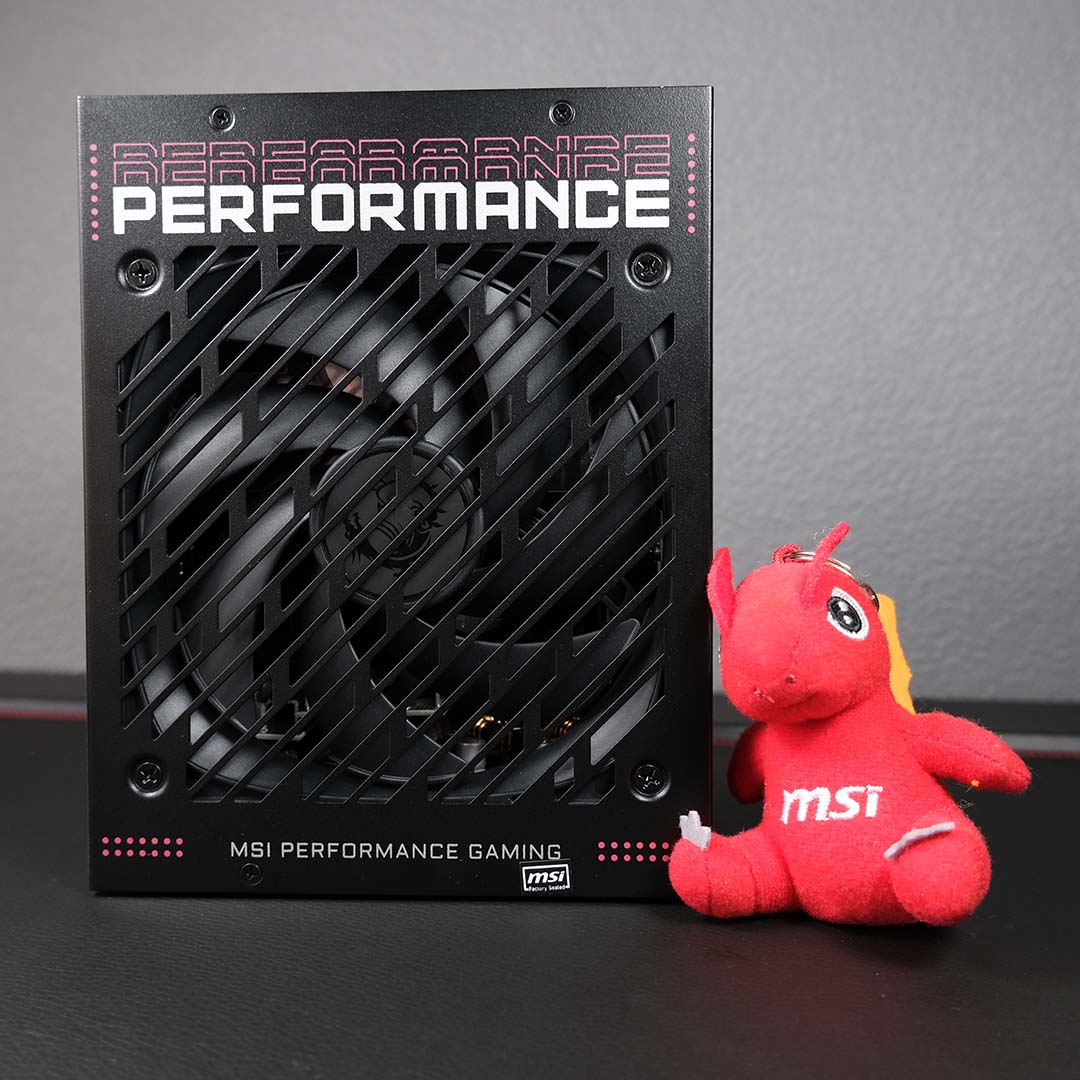
Satiating the power draw of a system such as this one is no easy task, particularly as it requires two 12V-2×6 cables, so I’ll be calling on the MSI MPG Ai1600TS PCIE5 for these benchmarks. Featuring a 1,600W capacity and 80Plus Titanium efficiency, this power supply is certainly up to the task of handling the Lightning Z.
Much as it pleases me to have another MSI component in this system for a themed build of sorts, the main reason I’ve opted for the PSU is its suite of safeguarding features. GPU Safeguard+ monitors currents across both 12V-2×6 cables, providing real-time alerts should problems arise.
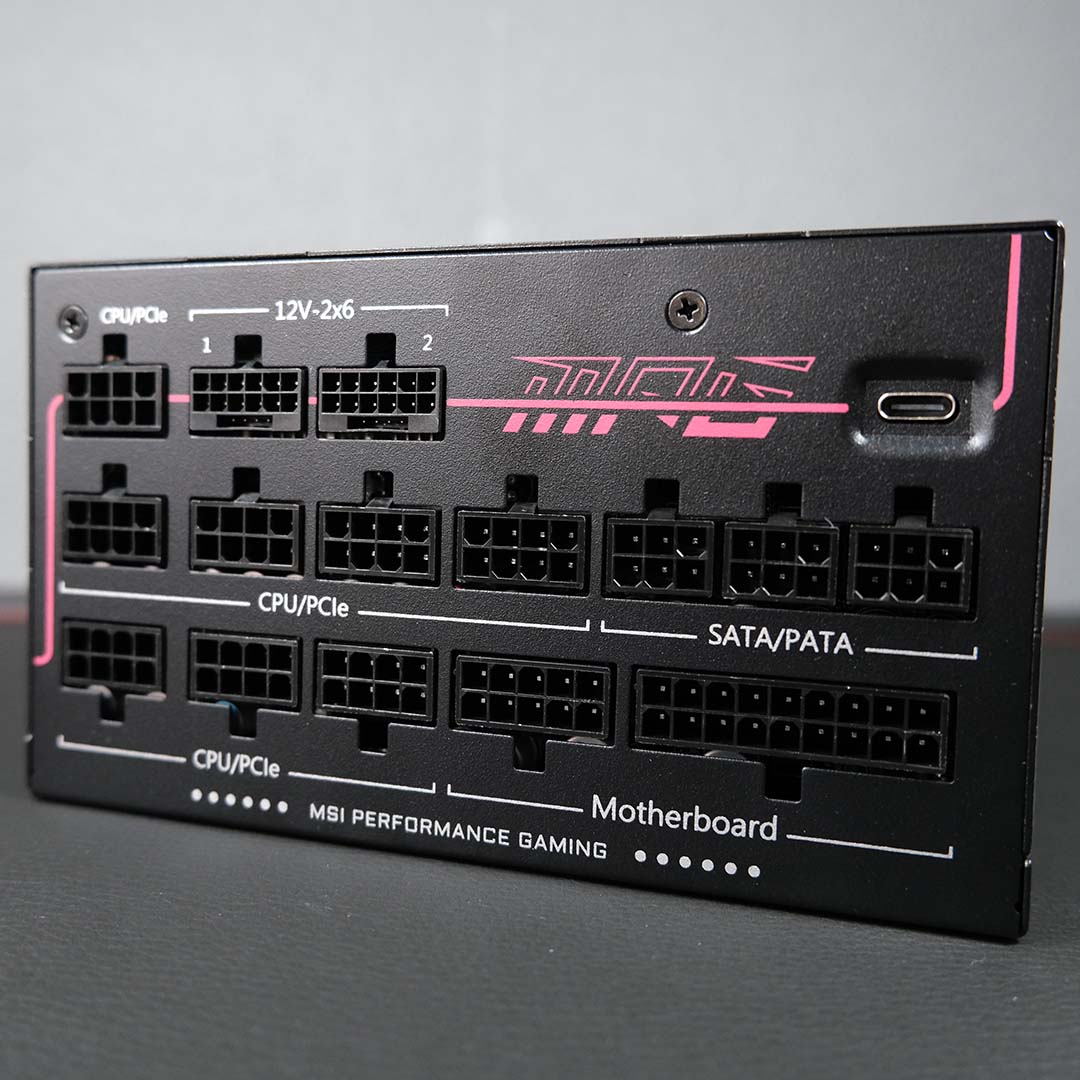
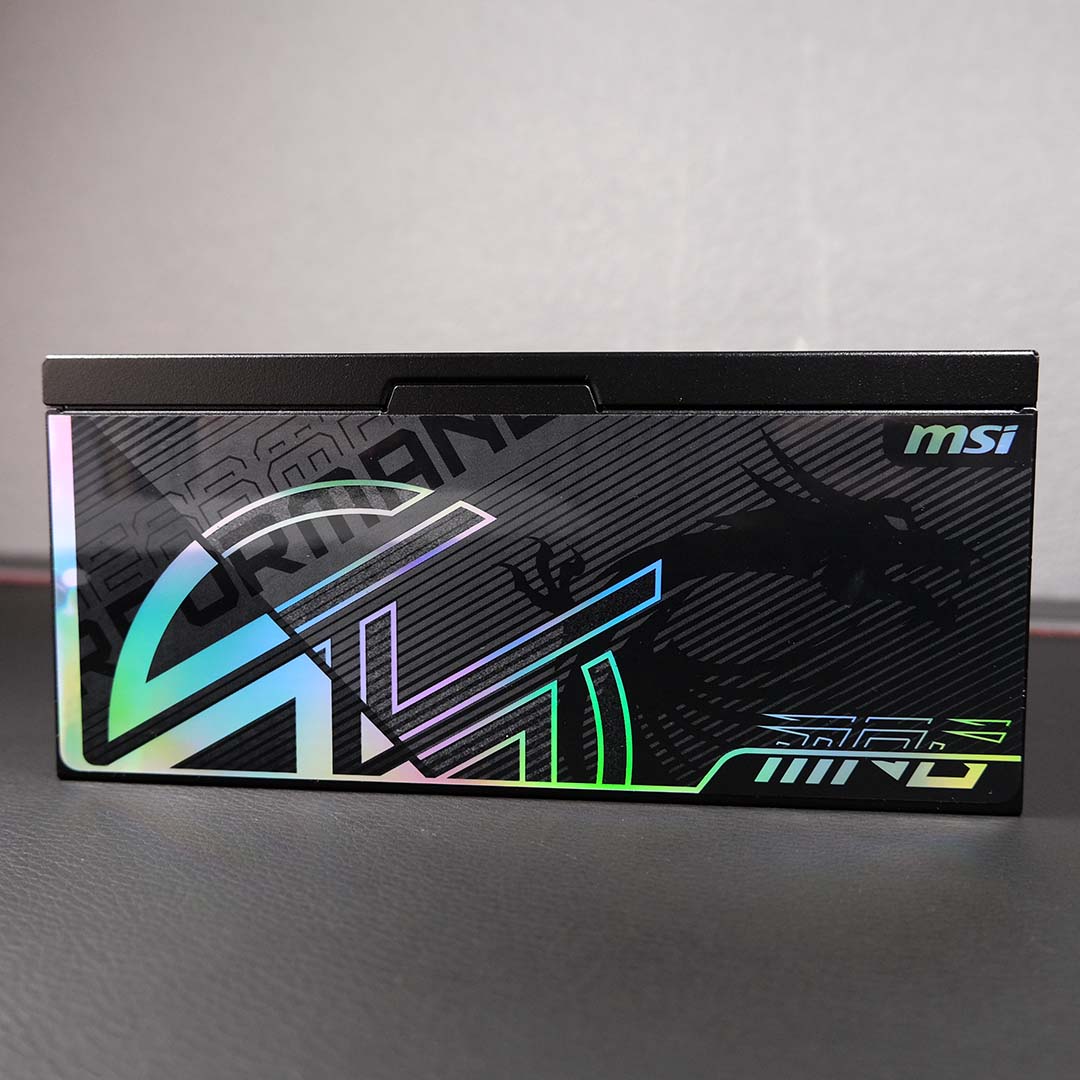
I’m able to monitor power usage myself through the MPG Ai1600TS PCIE5’s dashboard. From here, I can view the PSU’s temperature and fan speed, as well as its output wattage to the GPU, CPU, and more. This tool is part of MSI Center, rather than a discrete application, which some may bemoan, but I’m perfectly content with this consolidated approach.
ATX 3.1 certification brings further peace of mind, as it means the power supply is capable of handling power excursions up to twice a port’s total capacity, rising to three times where the 12V-2×6 are concerned. MSI also employs alloy copper connector terminals for further protection against potential surges, as yet another precaution.
Performance
Apps
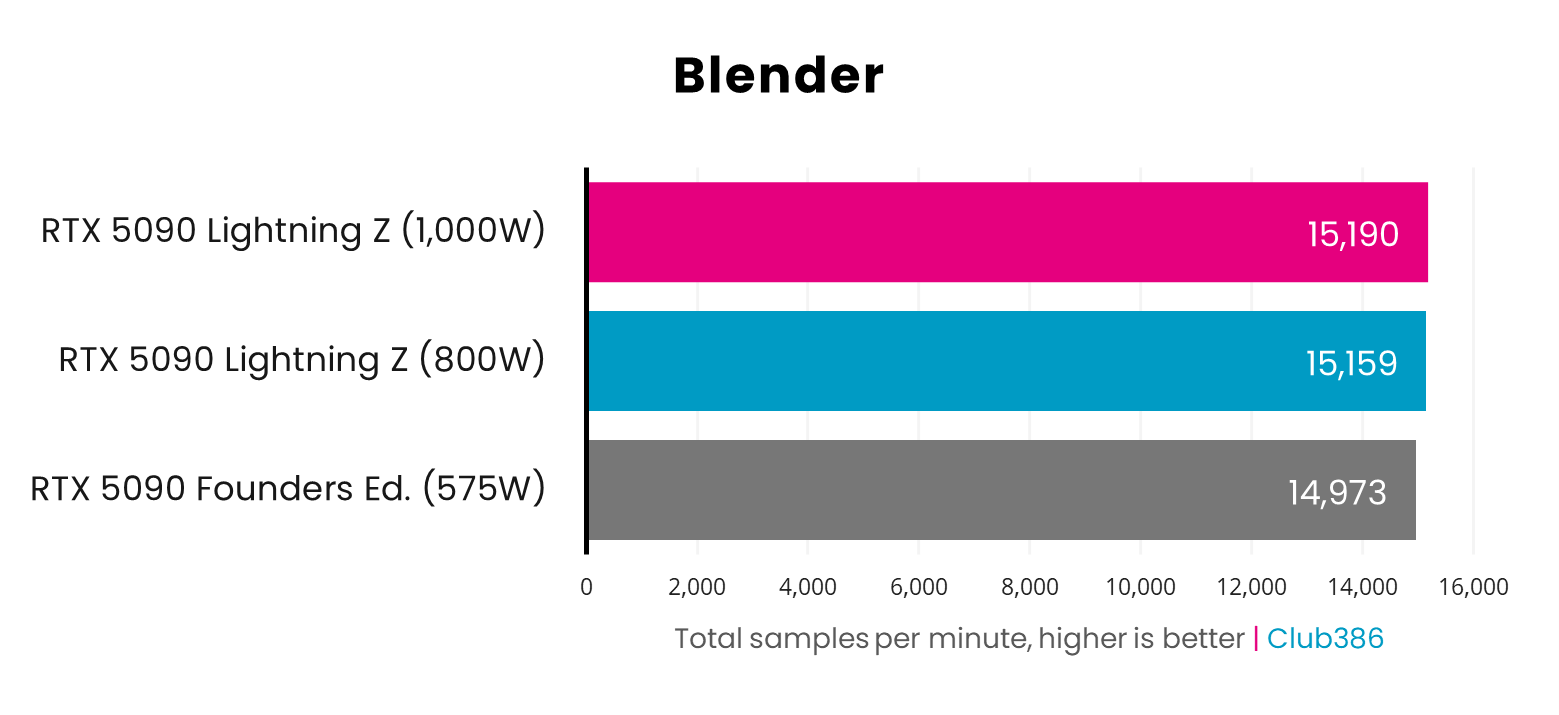
Putting both cards through Blender, the RTX 5090 Lightning Z pulls ahead by a measly 1% (182-217 samples per minute) regardless of power budget. Suffice to say, the Founders Edition and other models are the better value play for creatives.
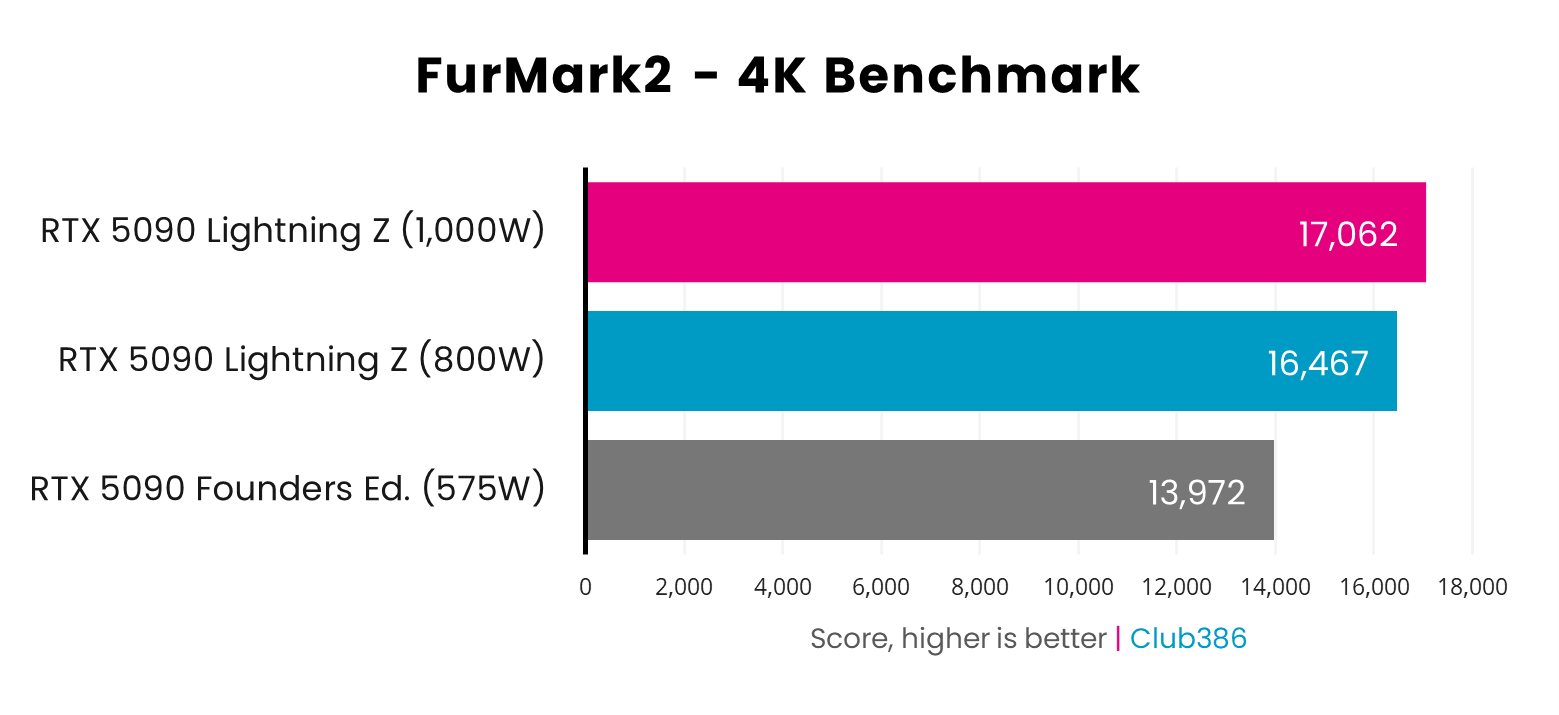
The pressure of FurMark 2 creates a notable performance gap between the two RTX 5090s. This marks one of the few instances where that additional wattage really comes through for the Lightning Z.
While the RTX 5090 Founders Edition accrues a respectable score of 13,972 points, the Lightning Z is faster to the tune of 18% (+2,495 points) at 800W, rising to 22% (+3,090 points) at 1,000W.
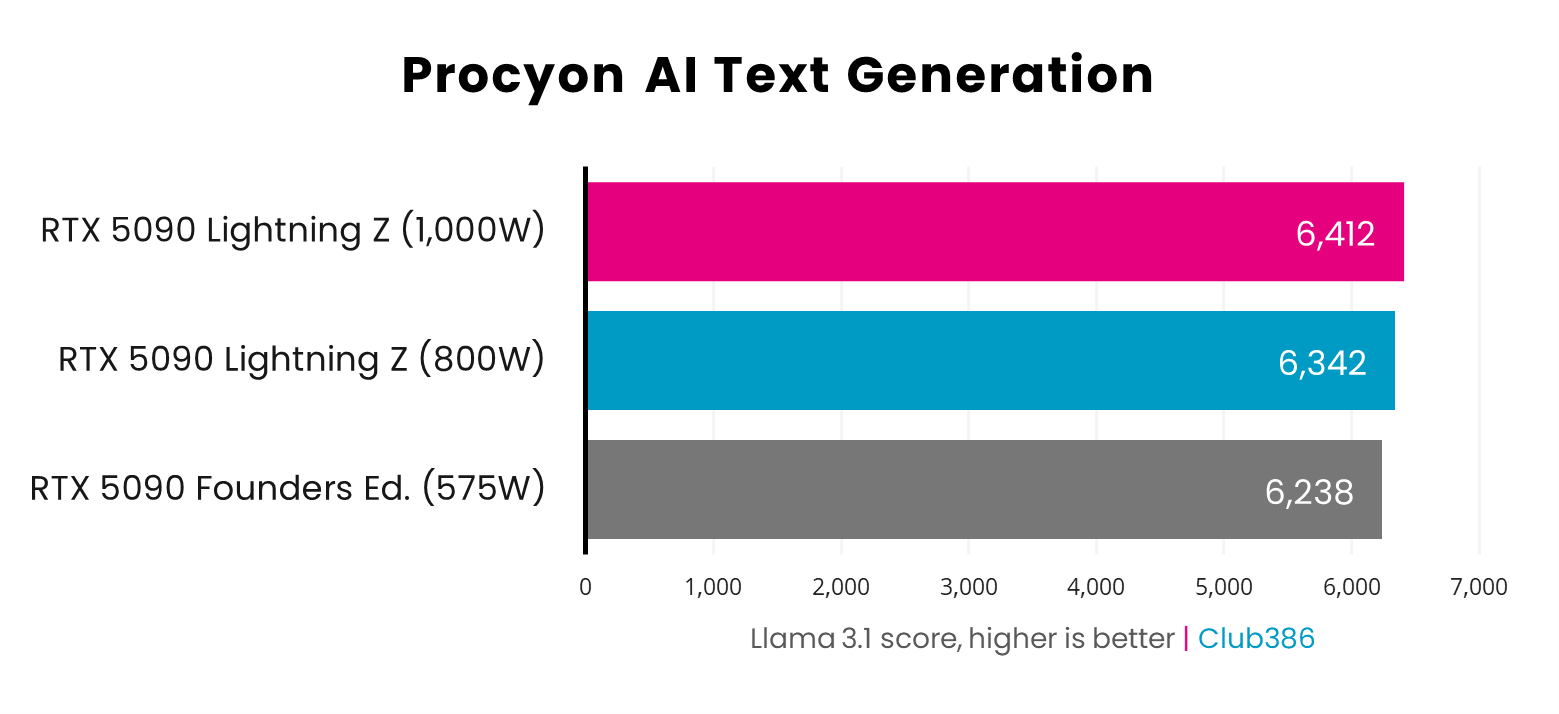
Turning attention to Large Language Model (LLM) performance, both cards handle Llama 3.1 in a similar fashion. The Lightning Z takes the win against the Founders Edition, but only by 2-3% (+106-174 points).
Gaming
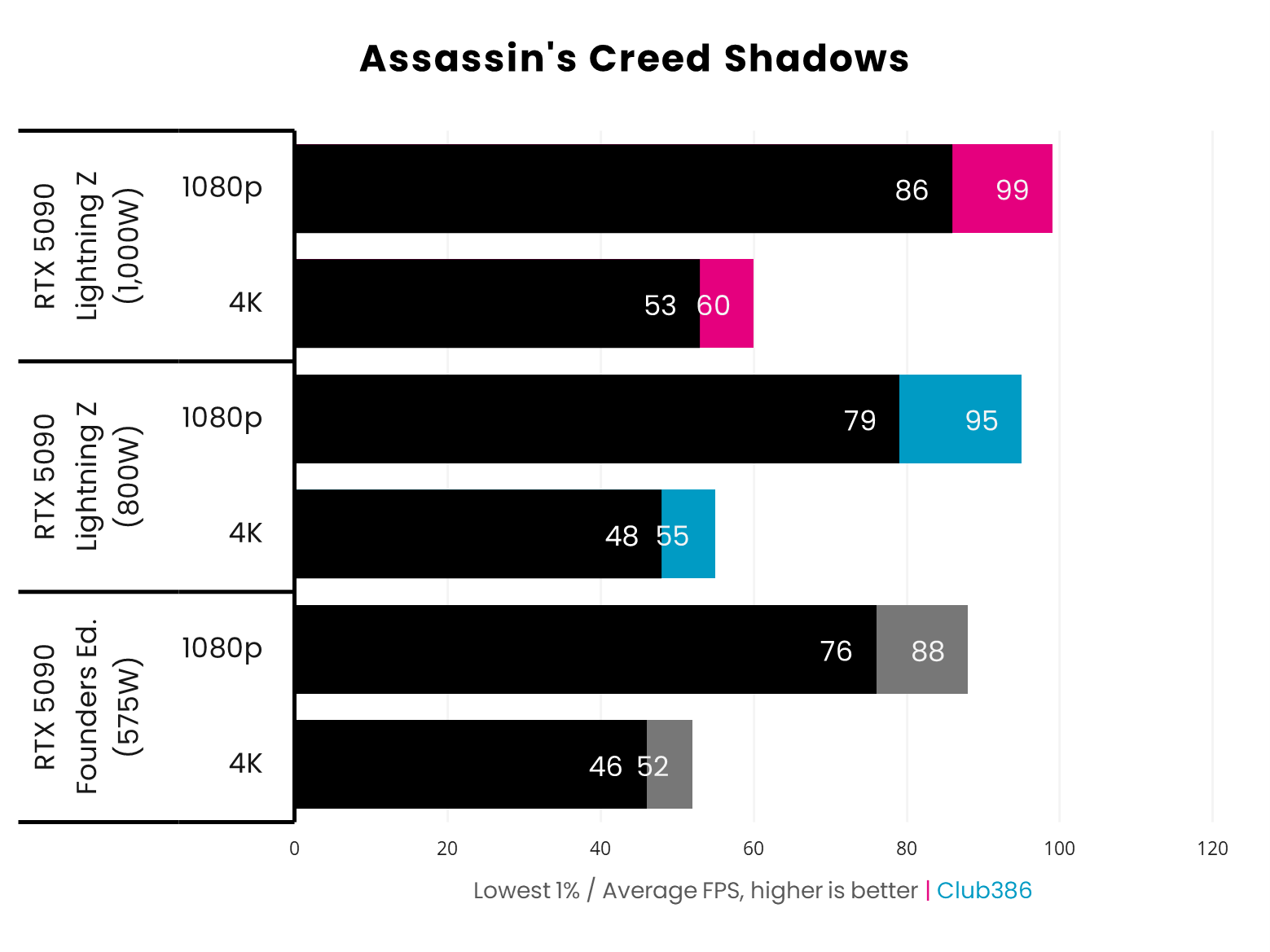
The Lightning Z springs ahead of Nvidia’s RTX 5090 Founders Edition in Assassin’s Creed Shadows. At 4K, frame rates rise by 6-15% (+3/5fps), with similar improvements of 8-13% (+7/11fps) at 1080p.
Any storied graphics card overclocker will tell you that core clocks and higher power budgets will only get you so far in pushing frame rate ceilings. As much as I find the sight of a 60fps average at 4K pleasing (and with no help from DLSS), knowing how many additional watts are necessary for that lead isn’t particularly inspiring.
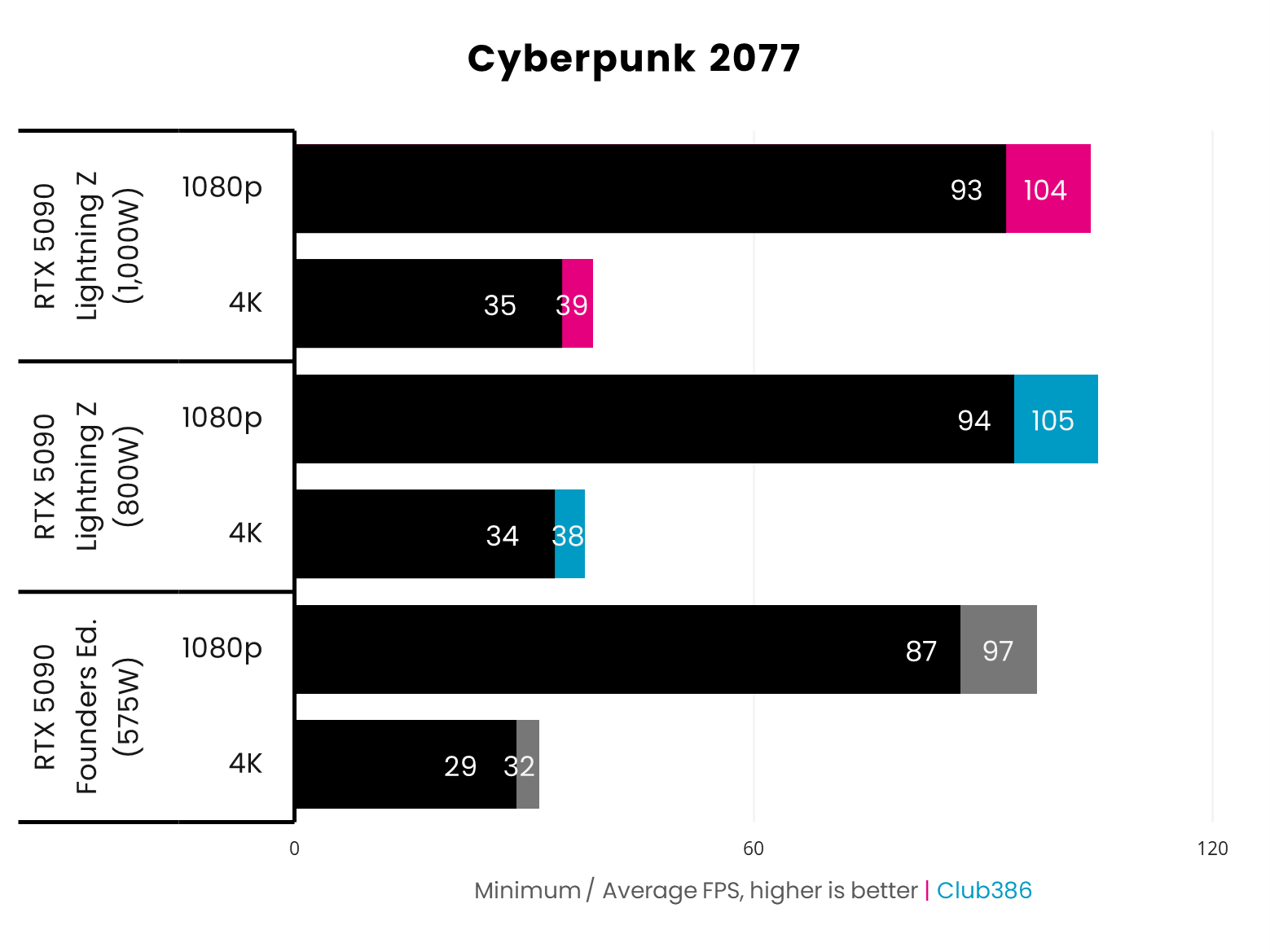
The crushing pressures of path-traced Cyberpunk 2077 in its Overdrive ray tracing made, sans any assistance from DLSS, push both graphics cards to their absolute limits. However, even under such intense loads, the Lightning Z still finds room to push 4K performance beyond the levels of the Founders Edition.
The 4K gains look fantastic in percentage terms, improving by 19-21%, but this only translates into an increase of 6-7fps in real terms. 1080p comparisons bring the shine of the Lightning Z back down to Earth, with performance bumps of 7-8% (+7/8fps). Frame rates are near-identical between the 800W and 1,000W modes in this game.
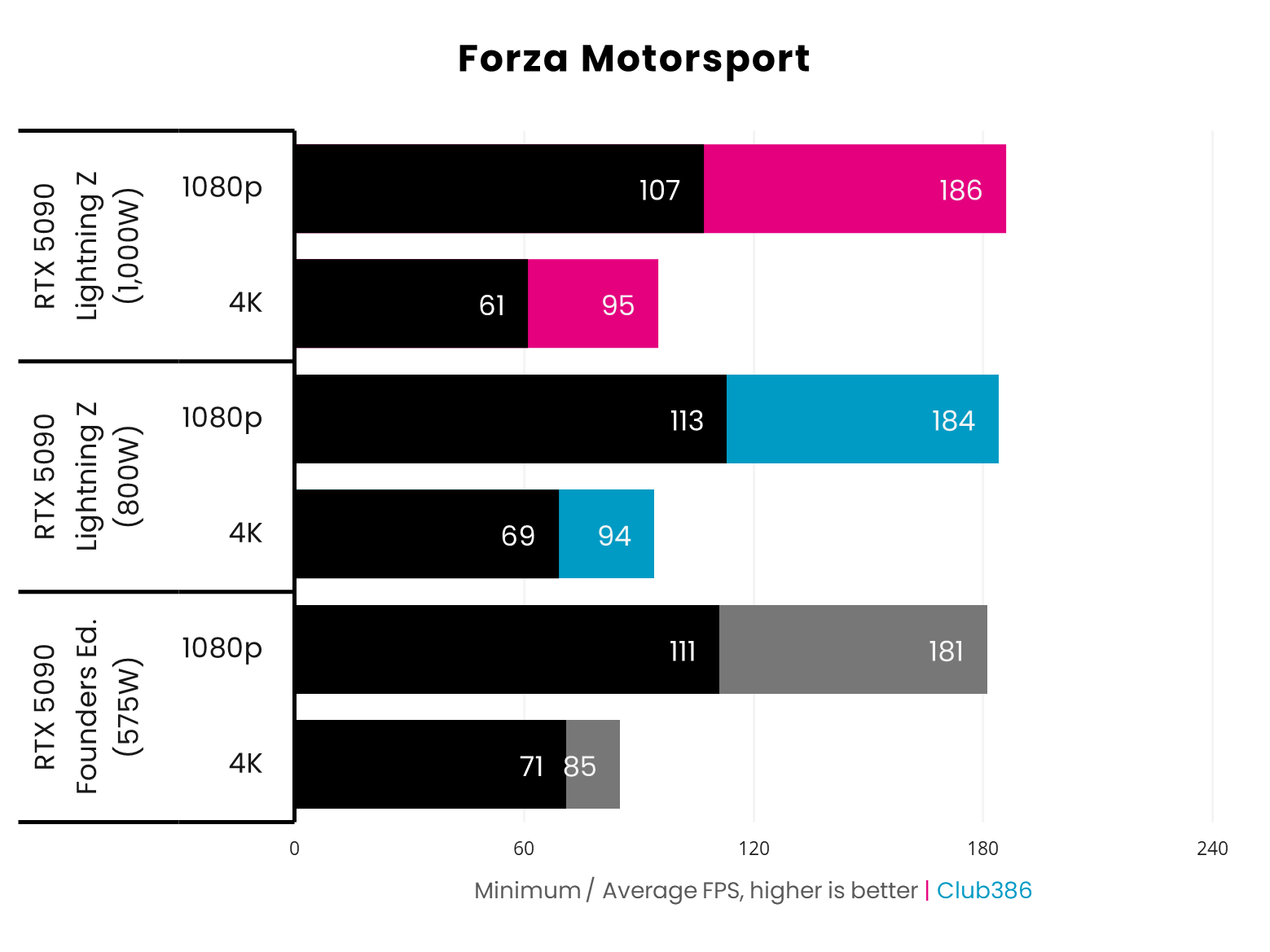
Forza Motorsport at 1080p makes for a close race between the RTX 5090 Founders Edition and Lightning Z, but the latter clinches a win by 2-3% (+3-5fps). Switching to 4K sees Nvidia’s card fall behind, as MSI’s design crosses the finish line with an 11-12% (+9/10fps) advantage.
The highest frame rates lie with the 1,000W mode on the Lightning Z, but only just. We’re talking improvements of 1-2fps at most, tantamount to margin of error territory. In any case, it’s hardly an efficient use of the extra power budget.
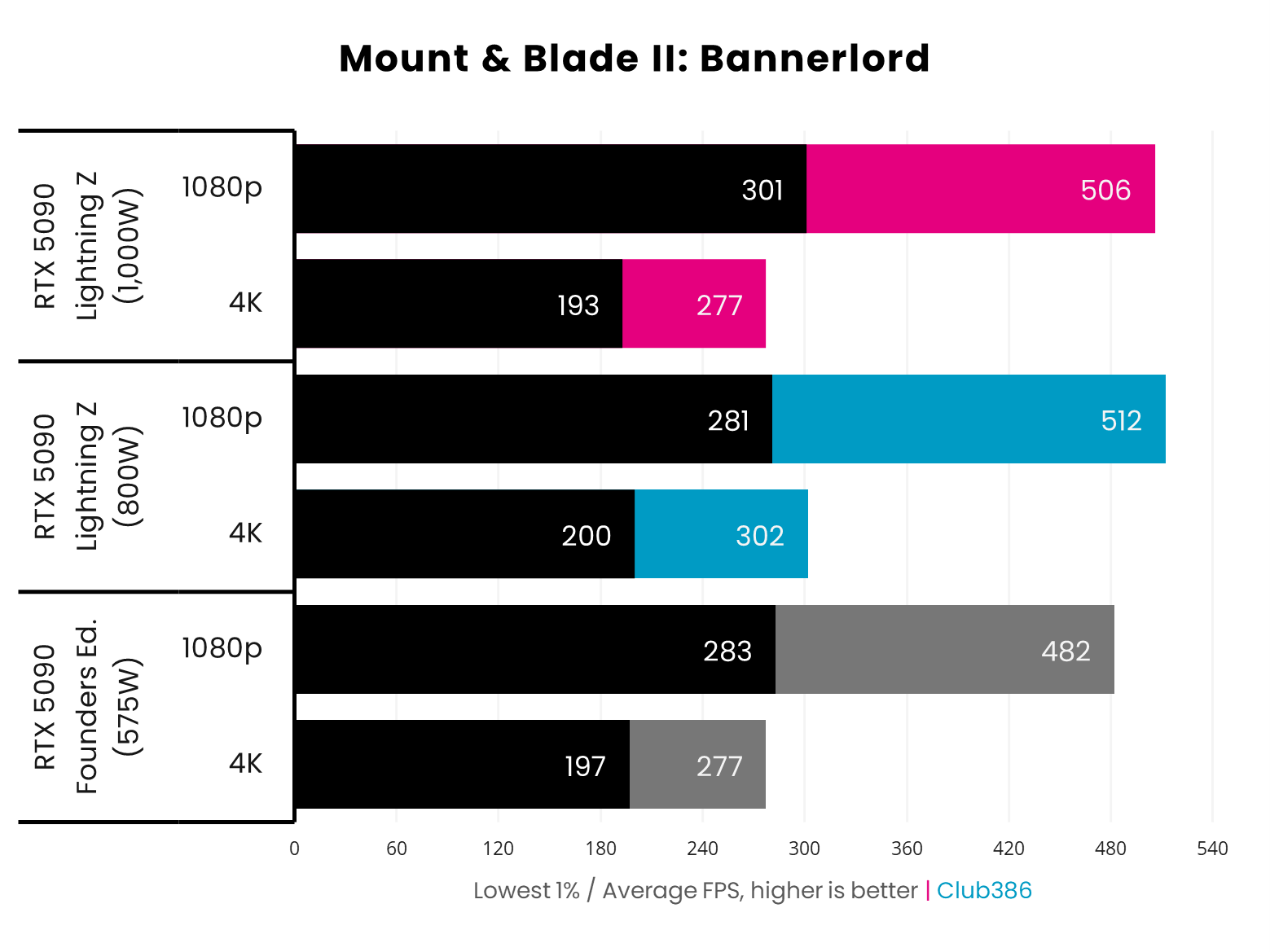
Turning off ray tracing and stepping back into the world of DirectX 11, MSI’s Lightning Z still manages a cool lead over the RTX 5090 Founders Edition. The battle decidedly favours the MSI card at 1080p, with performance improvements of 5-6% (+24-30fps).
However, swords clash all the closer at 4K. The 1,000W mode finds itself in a stalemate with the stock card, but the 800W mode curiously claims a clear victory, rallying frame rates up by 9% (+25fps). As this is the only result in our suite to exhibit such a behaviour, I believe this performance deficit has more to do with the game than the card.
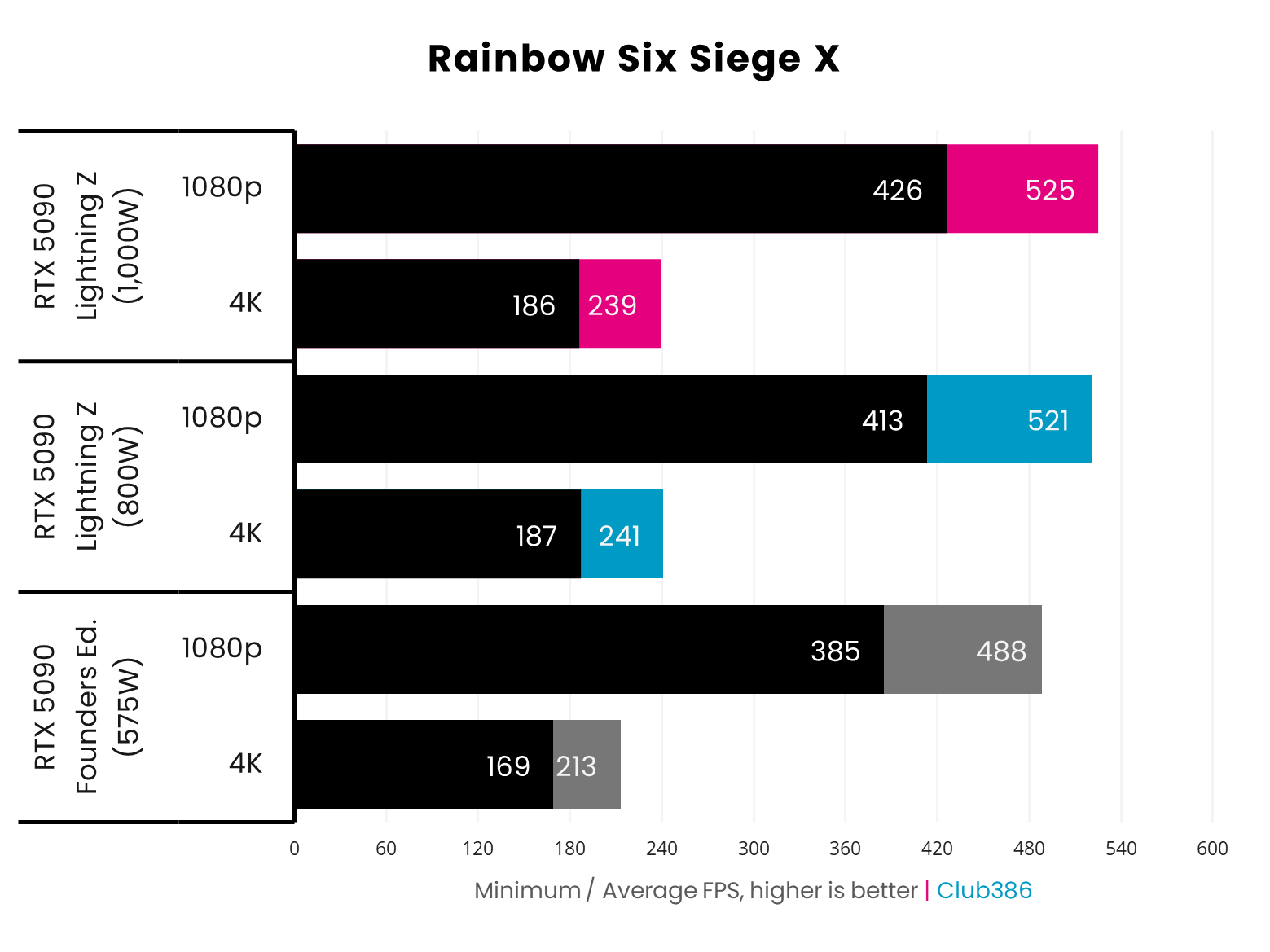
At 4K and 1080p, the Lightning Z barrels ahead of the RTX 5090 Founders Edition in Rainbow Six Siege X. While gains of 7-8% (+33-37fps) at 1080p are impressive, it’s the more-demanding pixel count at 4K that sees the largest improvements of 12-13% (+26-28fps).
Once again, the 1,000W mode takes the frame rate crown at 1080p, but its lead over the 800W mode is wafer-thin (+4fps). The tables turn at 4K, though, as all that extra 200W of power doesn’t provide any additional boost to frame rate.
Vitals
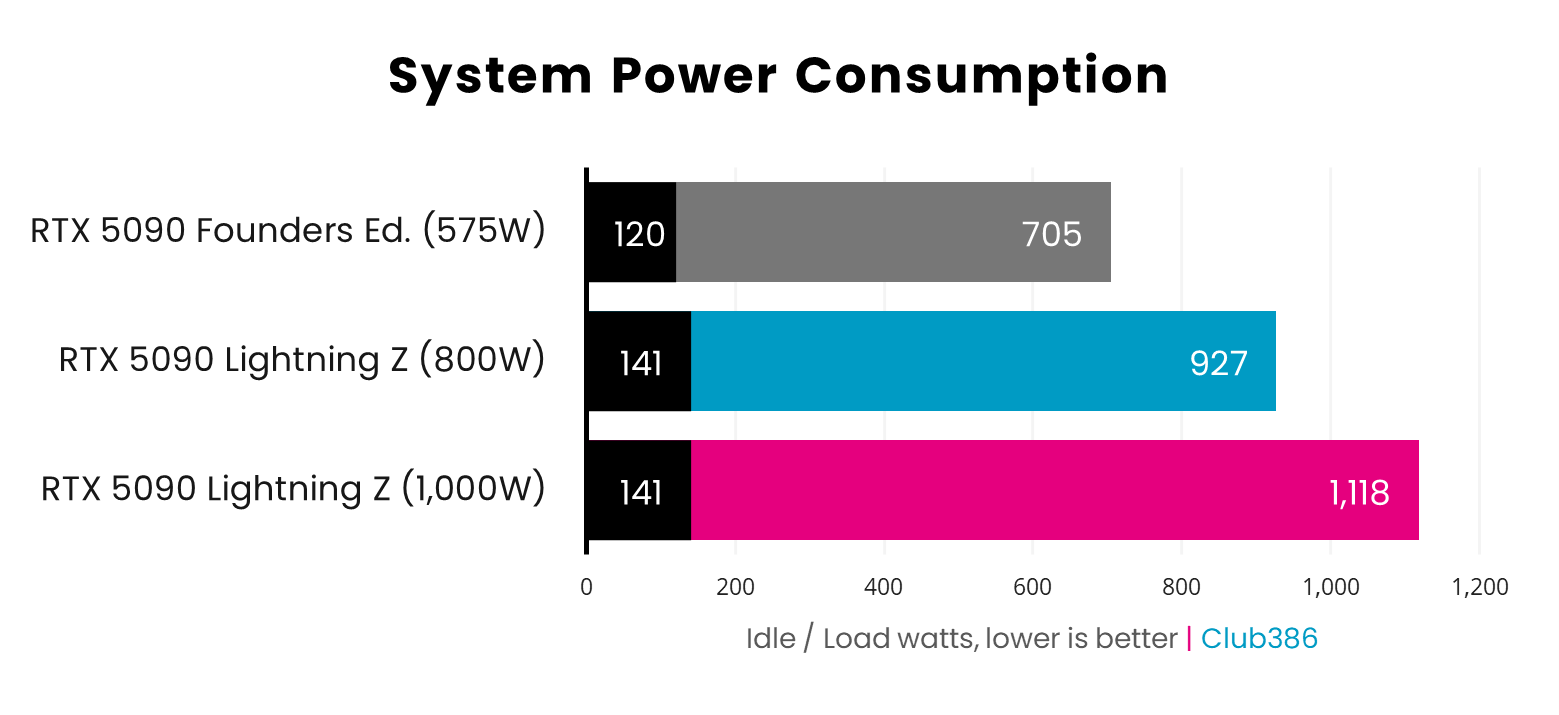
Total system power consumption on the Lightning Z is expectedly higher, relative to the RTX 5090 Founders Edition. In real-world measurements, this difference almost manifests in a 1:1 fashion, rising by 222W using the 800W BIOS and 413W in the 1,000W mode.
That’s a massive 31-59% increase in power consumption, going from Founders Edition to Lightning Z. Considering performance gains are well below either percentage level, MSI’s flagship is far more inefficient than Nvidia’s reference card. Such are the costs of an overclock, screen, and pump.
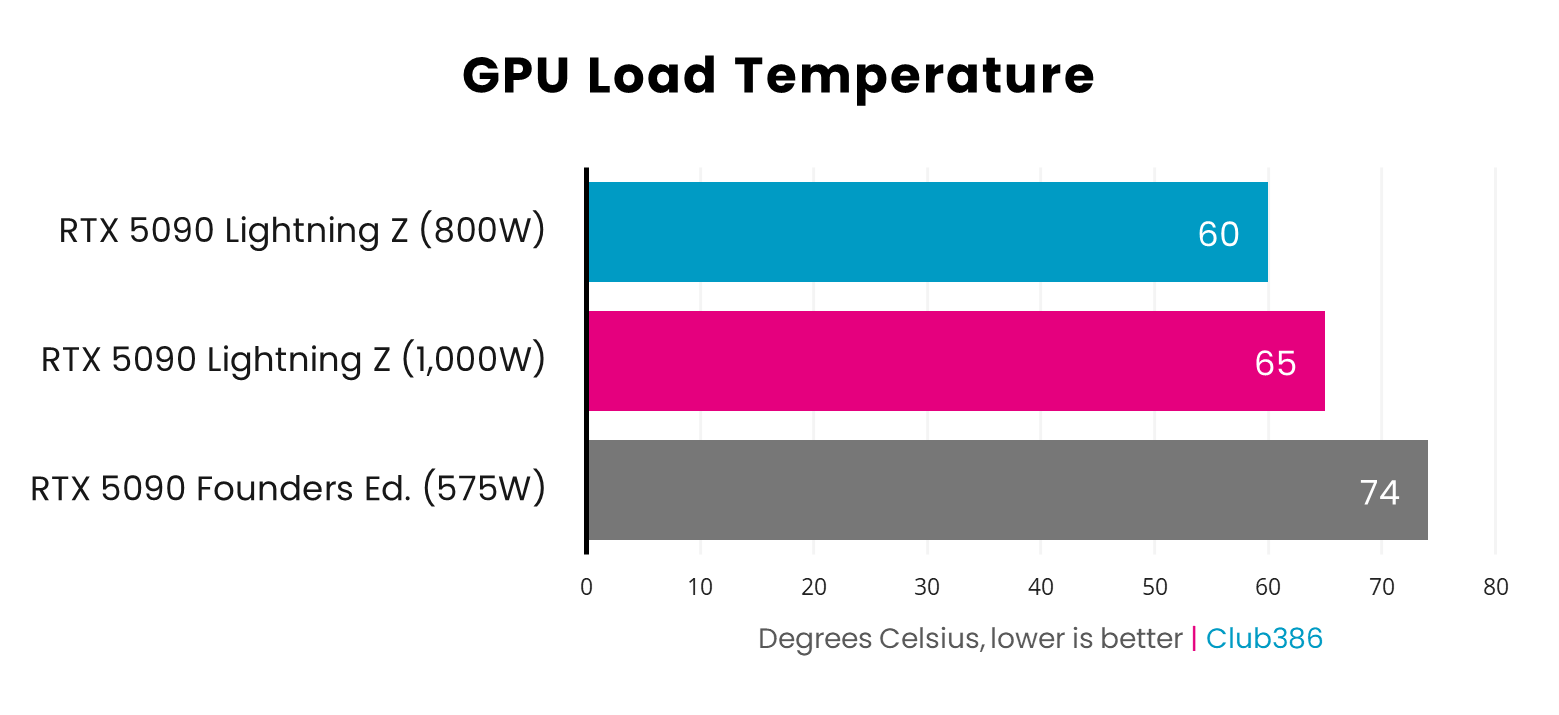
Credit to MSI, the Lightning Z doesn’t get too toasty despite FurMark 2’s best efforts to turn up the heat. Peaking at 60°C at 800W and 65°C at 1,000W, that liquid cooling apparatus is proving its worth, even against the lauded RTX 5090 Founders Edition, which runs at a notably hotter 74°C.
Realistically, however, all temperatures are well within tolerable levels as neither card is thermally throttling. You’ll just need to more readily accommodate the Founders Edition with competent airflow.
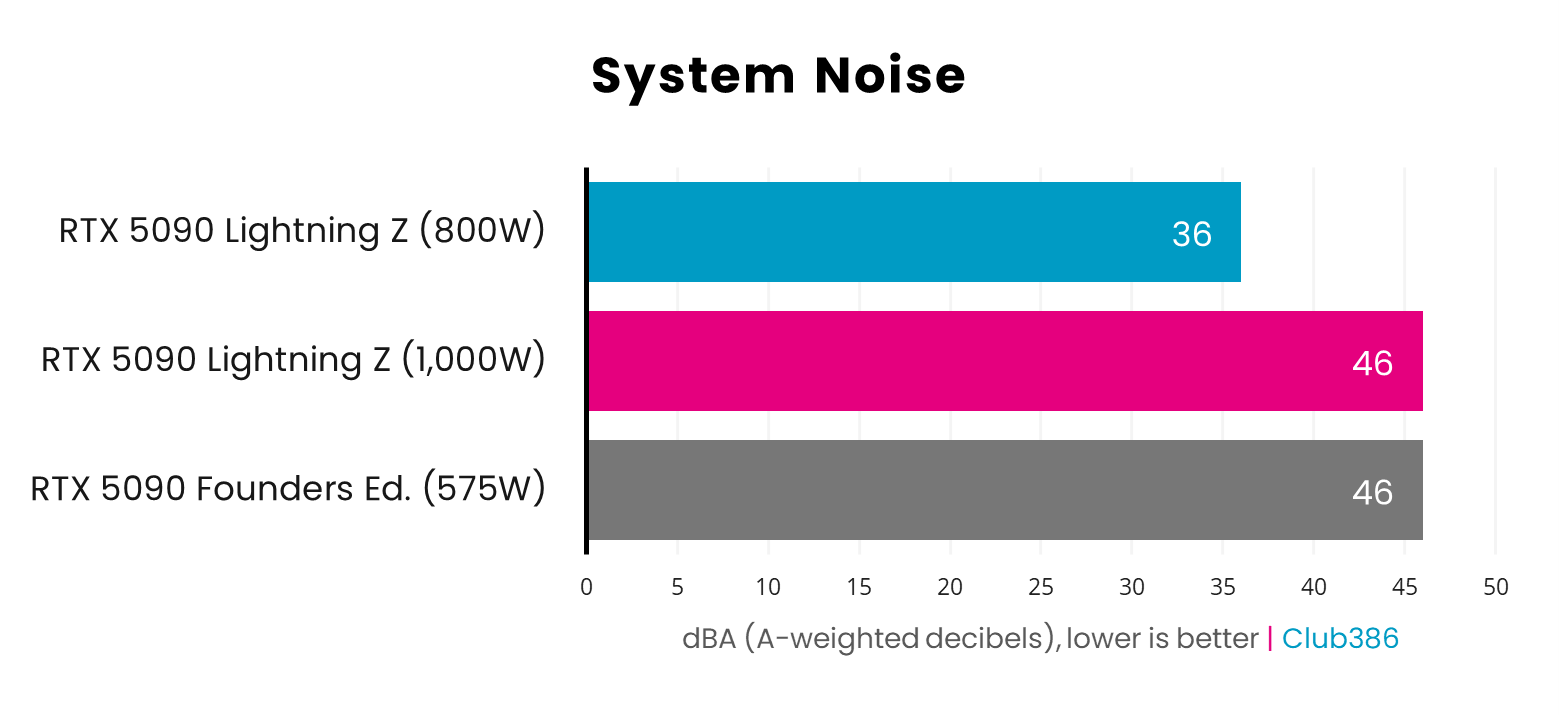
In addition to better thermals, the Lightning Z offers generally superior acoustic performance relative to the RTX 5090 Founders Edition. Heating up both cards under the hellfire of FurMark, MSI’s design is far quieter at 800W and impressively matches the audible but unbothersome level of Nvidia’s cooler at 1,000W.
Not reflected in the values above is the audibility of coil whine, an unfortunate but inescapable bugbear of all modern high-end graphics cards. While some of that bothersome buzz was present on the Lightning Z, it wasn’t as piercing as what the RTX 5090 Founders Edition exhibits whhile running through a FurMark 2 4K benchmark.
Conclusion
Wrapping up my thoughts on the Lightning Z is a difficult ask, as this graphics card has seemingly proven to be uniquely unstable in my testing. However, I remain confident that the problems I’ve had are more the exception than the rule.
In any case, the Lightning Z is one of the most impressive graphics cards I’ve ever seen. Its cooler is nothing short of awesome, both in terms of style and thermoacoustic performance. I’d happily slot this card into a showpiece build, as there’s really nothing else out there like it once the screen is up and running.
As I mentioned in my initial impressions of the card, I do wish controls for the display were available via a local, rather than web, application, and MSI would do well to concoct a more elegant USB connection in a potential successor. These faults do little to diminish the splendour of the card as a whole, though.
You can expect greater performance from the Lightning Z than you would an RTX 5090 Founders Edition, but the uplifts that MSI’s higher overclock and power budget offers fall short of transformative. Nonetheless, those after one of, if not the, fastest example of Nvidia’s best GPU in the GeForce lineup will find it here.
Just remember that those handful of extra frames come at the cost of substantially higher power consumption, much as I can’t imagine a prospective purchaser of the £5,000 Lightning Z is particularly concerned about their energy costs. For those of us with decidedly less disposable cash, I think the confines of a 575W Founders Edition are certainly enough for me.
I’m more interested to see how far professional overclockers can push the Lightning Z, after already breaking several world records, particularly with the available-upon-request 2,500W BIOS, which naturally voids all warranties. Professionals will extract every drop of performance out of this absolute beast of a card, giving us the closest experience to an RTX 5090 Ti we’re ever likely to see for the foreseeable future.
I wish the enthusiast in me could love the Lightning Z more, but it’s difficult to put aside the troubles of my testing. Even with that toil in mind, MSI’s flagship has still impressed me enough to make me want to continue troubleshooting it, and uncover the full glory that this graphics card promises.
