

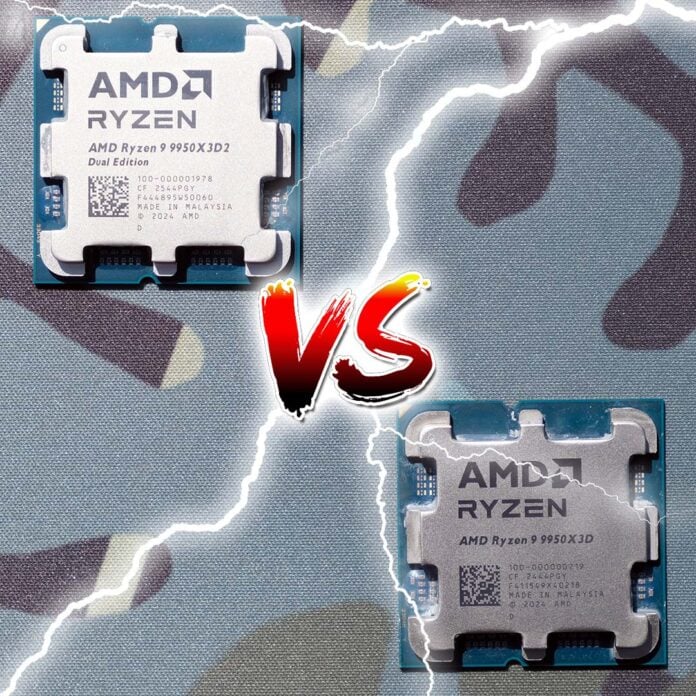
AMD’s latest silicon experiment may be a great showcase of its engineering abilities, but the new flagship Ryzen 9 9950X3D2 also looks a bit like AMD is just showing off, dancing about while shouting “in your face” to Intel. It’s the first 16-core AMD chip to have two slices of 3D V-Cache, one underneath each 8-core chiplet, giving it a huge 192MB of L3 cache. That sounds great, you might think, but then you also see that it’s significantly more expensive than the 9950X3D, and its clock speed isn’t as fast either. Is it worth paying for the extra chip? That’s what I’m here to find out.
You can take a full deep dive into this latest cached-up chip in our full Ryzen 9 9950X3D2 review, where we also compare its performance to other CPUs, including the considerably cheaper Intel Core Ultra 7 270K Plus. In this feature, I’m only concerned with two chips – the 9950X3D2 and 9950X3D, especially as the latter is currently the top pick on our guide to buying the best CPU.
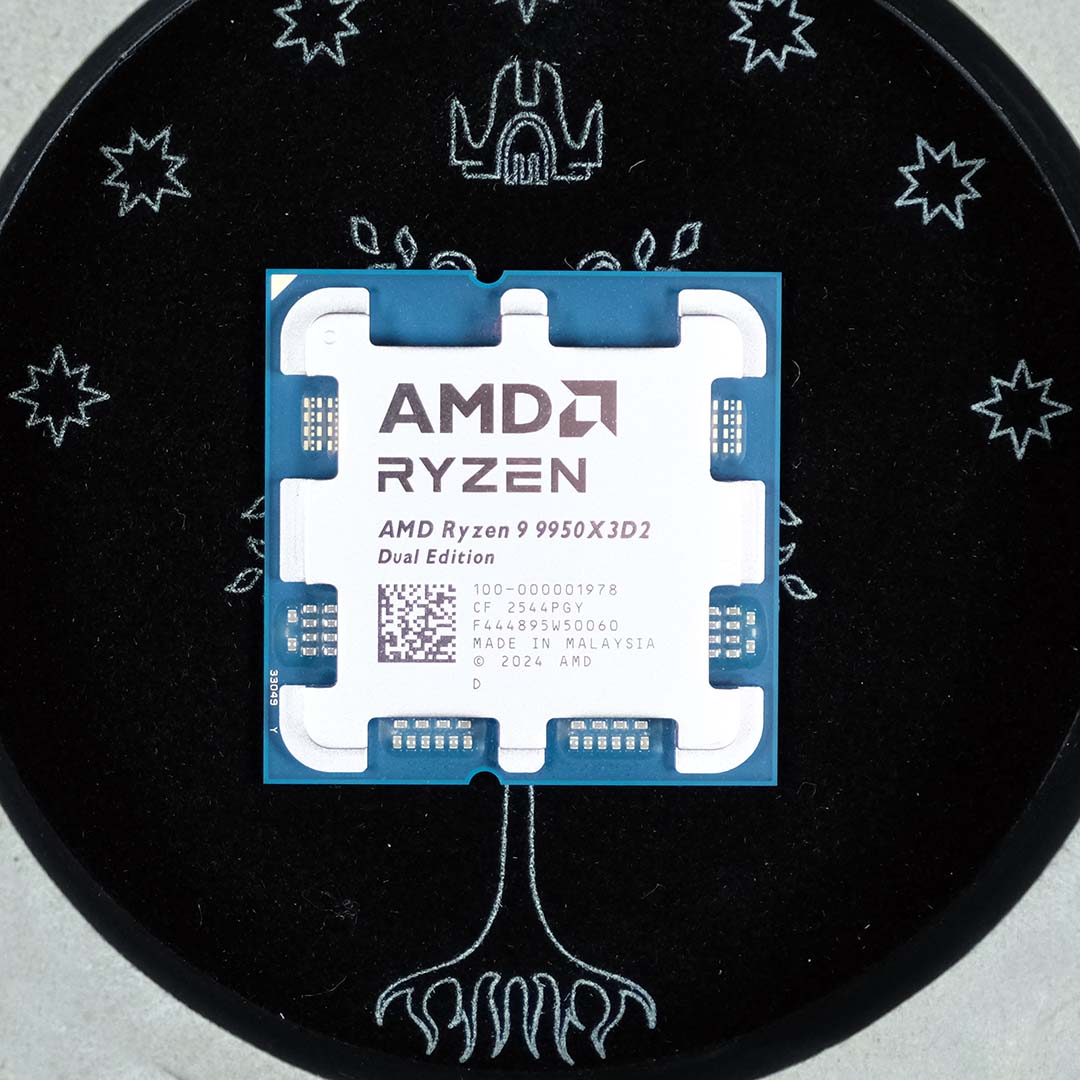
I’ll be comparing their performance across a range of tests, including 3D rendering, content creation, and compression, as well as a variety of game tests. I’ll also take a look at cooling requirements, power efficiency, and ultimately whether the 9950X3D2’s $899 price is justified.
Specifications
As you can see from the table below, most of the core differences between these two chips are small. It’s basically that extra slab of L3 cache that makes the 9950X3D2 stand out. Both these CPUs have 16 cores, which are split across two separate 8-core chiplets under their metal heatspreaders.
| Ryzen 9 9950X3D2 | Ryzen 9 9950X3D | Ratio | |
|---|---|---|---|
| Release date | April 2026 | March 2025 | – |
| Platform | AM5 | AM5 | – |
| Architecture | Zen 5 | Zen 5 | – |
| Cores | 16 | 16 | 1.00 |
| Threads | 32 | 32 | 1.00 |
| TDP | 200W | 170W | 1.18 |
| L2 cache | 16MB | 16MB | 1.00 |
| L3 cache | 192MB | 128MB | 1.50 |
| Base clock | 4.3GHz | 4.3GHz | 1.00 |
| Boost clock | 5.7GHz | 5.6GHz | 0.98 |
| Launch MSRP | $899 | $699 | 1.29 |
Each of these chiplets already contains 32MB of L3 cache, meaning there’s a 64MB total of on-die L3 cache on both these CPUs before you even get to the 3D stuff. Then we get to the 3D V-Cache, which has a few nanosecond latency penalty compared to regular L3 cache – access to 3D V-Cache comes by way of traversing TSVs – but remains significantly faster than system memory, providing a massive high-speed buffer that massively reduces the chances of cache misses and the need to page system RAM. This can help with maintaining frame rates in games, and sometimes bolstering content creation performance as well.
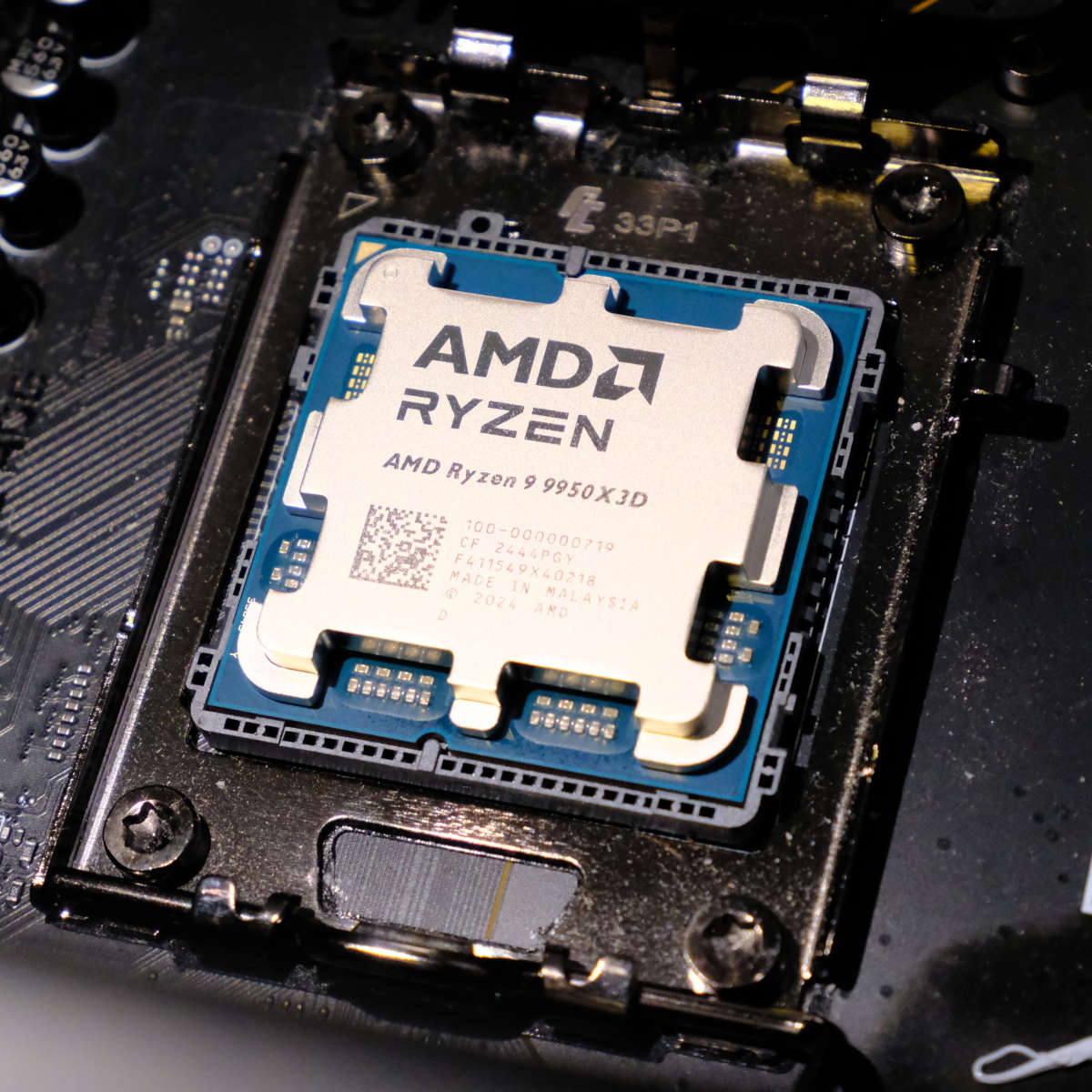
The Ryzen 9 9950X3D, meanwhile, has a single slice of 3D V-Cache under one of its 8-core chiplets, which it uses for gaming, while the other 8-core chiplet comes into play in heavily multi-threaded workloads, and has a faster 5.7GHz boost clock to help it out here.
Conversely, the 9950X3D2 has 3D V-Cache chip under both its 8-core chiplets, meaning all its cores have closer access to a large amount of cache. This has a knock-on effect on thermals and power, though, and AMD has accordingly had to reduce the top boost clock speed to 5.6GHz, and increase the TDP to 200W.
The rest of the specs are identical, with the chunky $200 price premium being the only other main difference between these two CPUs. To put it simply, you get more cache for more cash.
Test methodology
Club386’s CPU test suite gives both the AMD Ryzen 9 9950X3D2 and 9950X3D plenty of room to show off their performance across gaming and productivity workloads.
When benchmarking games, we capture frame rates at 1080p, using High settings without upscaling where possible, to place reasonable performance pressure on the processor, while minimising any bottlenecking from the GPU. Accordingly, we use an Nvidia GeForce RTX 5090 Founders Edition for testing here, as it’s undoubtedly the best GPU when it comes to raw performance.
Test PC
Club386 carefully chooses each component in a test bench to best suit the review at hand. When you view our benchmarks, you’re not just getting an opinion, but the results of rigorous testing carried out using hardware we trust.
Shop Club386 test platform components:
CPU: AMD Ryzen 9 9950X3D2 / AMD Ryzen 9 9950X3D
Cooler: Arctic Liquid Freezer III Pro 420 A-RGB
Motherboard: MSI MEG X870E Ace Max
GPU: Nvidia GeForce RTX 5090 Founders Edition
Memory: 32GB DDR5-6000 CL32 G.Skill Trident Z5 RGB
Storage: 2TB WD_Black SN8100 NVMe SSD
PSU: 1,200W be quiet! Dark Power 14
Chassis: be quiet! Light Base 900 FX
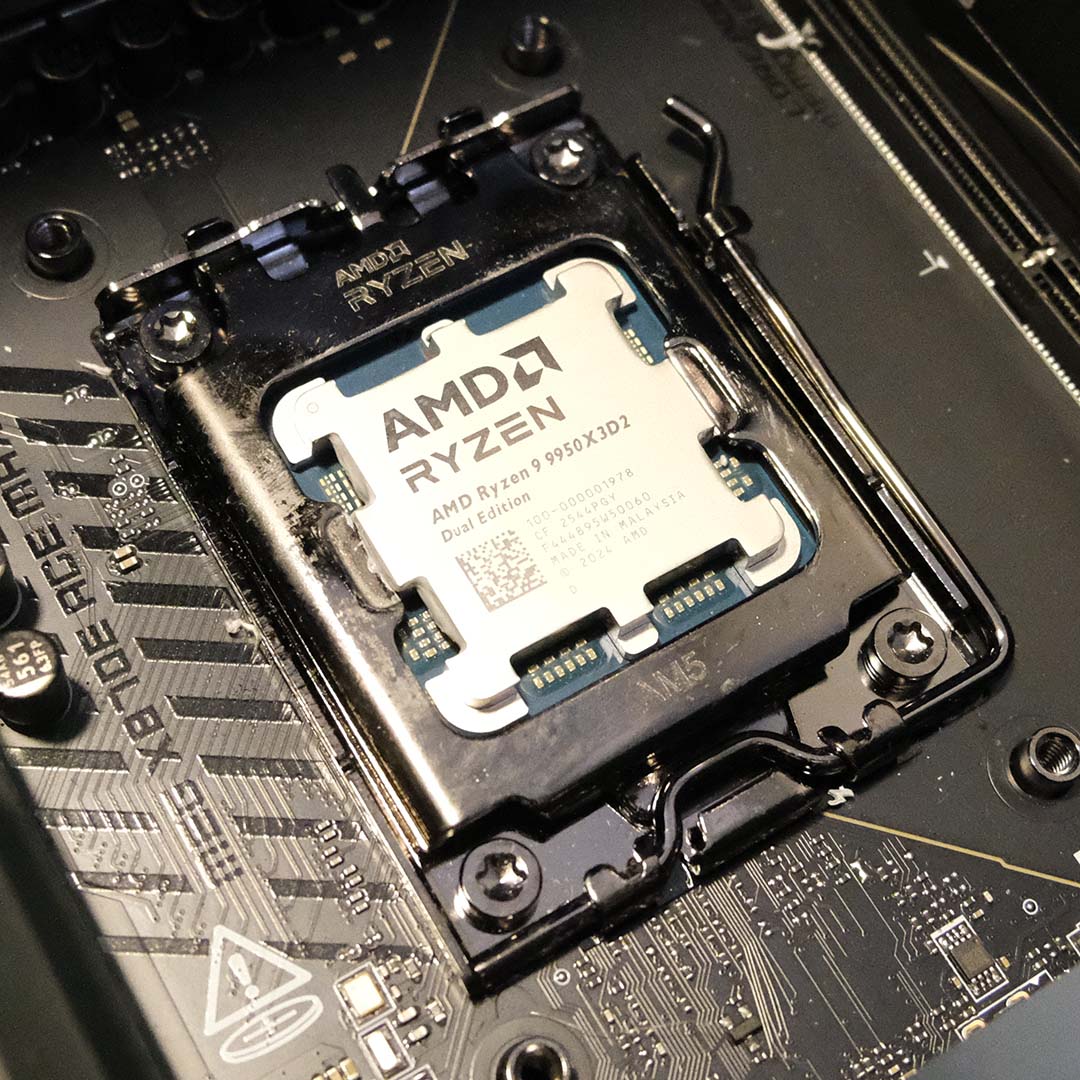
To make this as fair a fight as possible, I’m using the same chassis, cooler, storage, power supply, RAM, and motherboard to test both CPUs. That means we’re using our trusty MSI MEG X870E Max motherboard, as well as a massive Arctic Liquid Freezer III Pro 420 A-RGB cooler and a 1,200W be quiet! Dark Power 14 PSU to handle power and thermals.
App performance
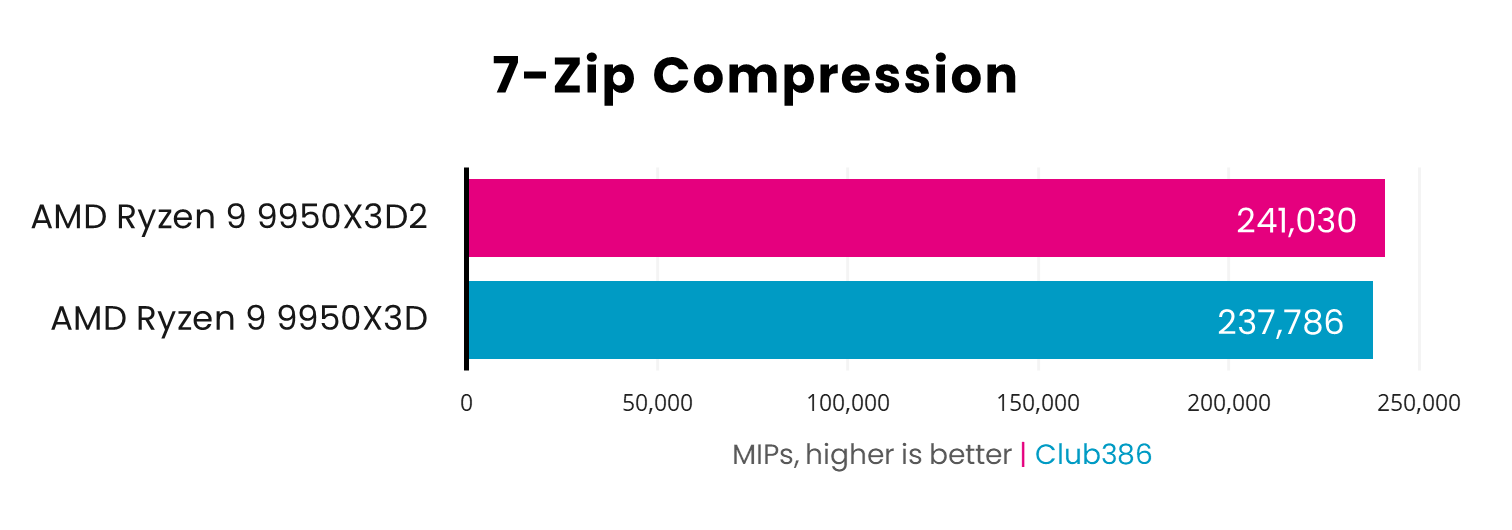
Let’s kick off with our 7-Zip compression test, which benefits from having more cores at its disposal, and also responds slightly to having all that extra cache available to it as well. The difference is tiny, though – we’re talking about a 1.36% performance boost from the 9950X3D2, which is hardly worth an extra $200.
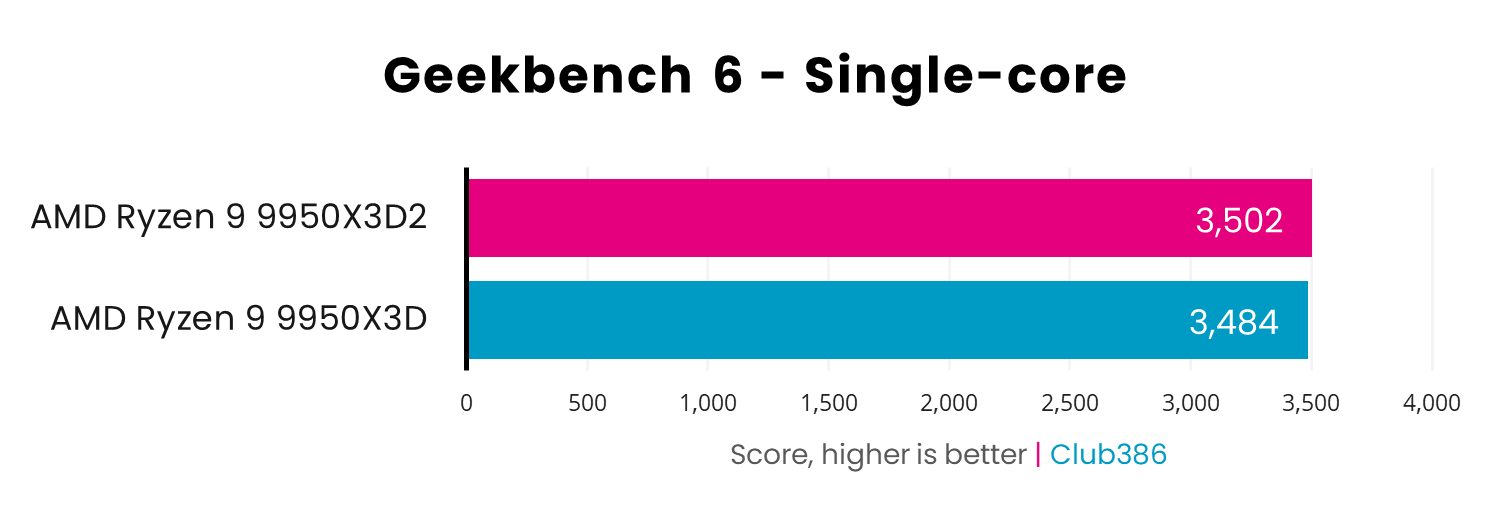
Likewise, the performance difference between these two chips is negligible in Geekbench 6’s single-core rating. It’s interesting that the extra cache appears to make up for the small drop in clock speed, but the difference is so small (0.5%) that it’s barely worth mentioning.
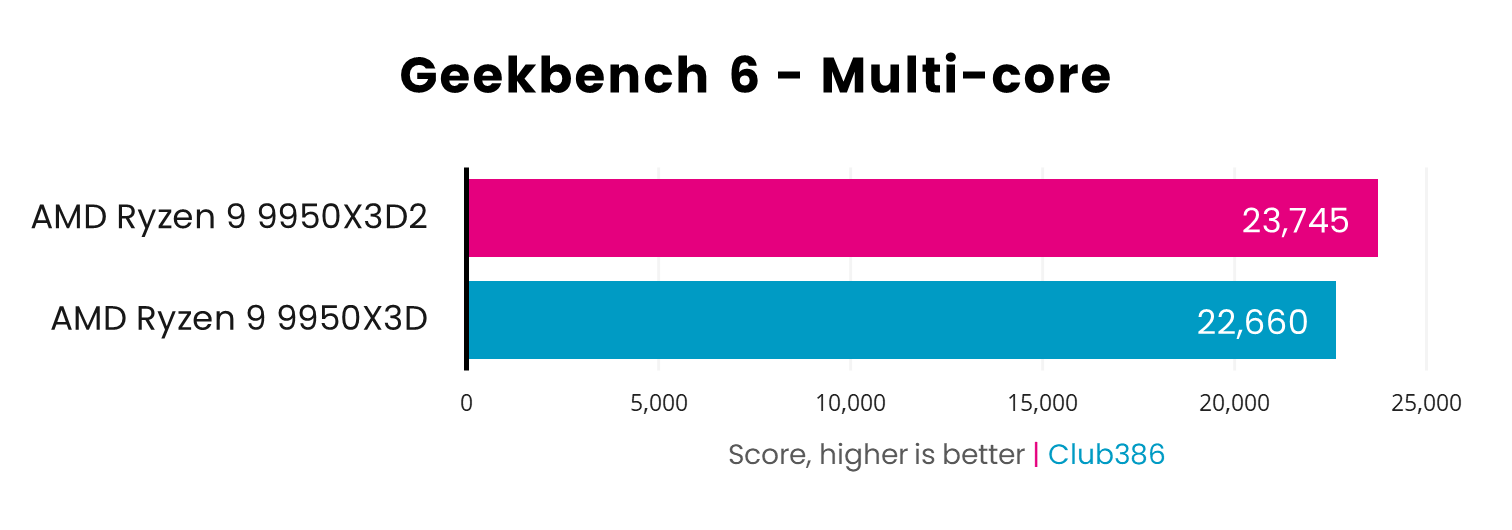
Interestingly, Geekbench 6’s multi-core testing shows the 9950X3D2 starting to pull away from the 9950X3D, with all 16 of its cores clearly benefiting from having more cache at their disposal. We’re looking at a 4.8% performance advantage for the Dual Edition chip here, which doesn’t justify the extra outlay, but is certainly quicker.
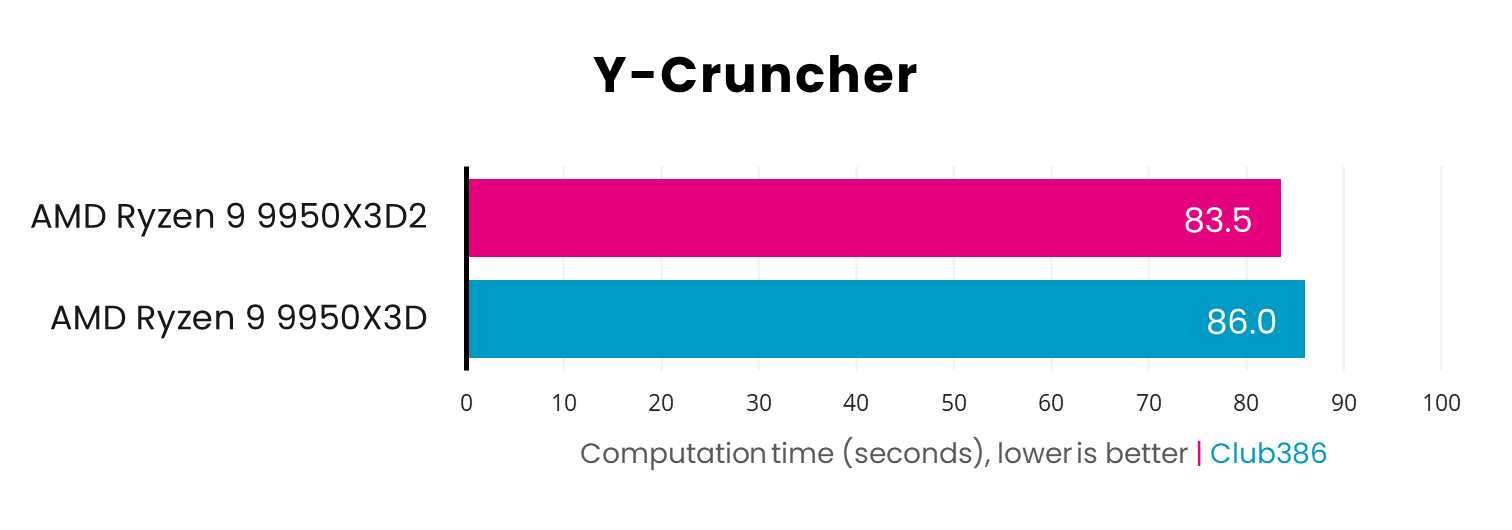
Next up, Y-Cruncher tests these CPUs’ raw number-crunching power, calculating Pi to 5 billion digits. Both these chips are really fast here (comparatively, the Core Ultra 7 270K Plus takes 101.3 seconds), but the extra cache lends the 9950X3D2 a helping hand in this very memory-intensive benchmark. The difference remains small, though, with the Dual Edition chip shaving 2.5 seconds off the time.
Content creation
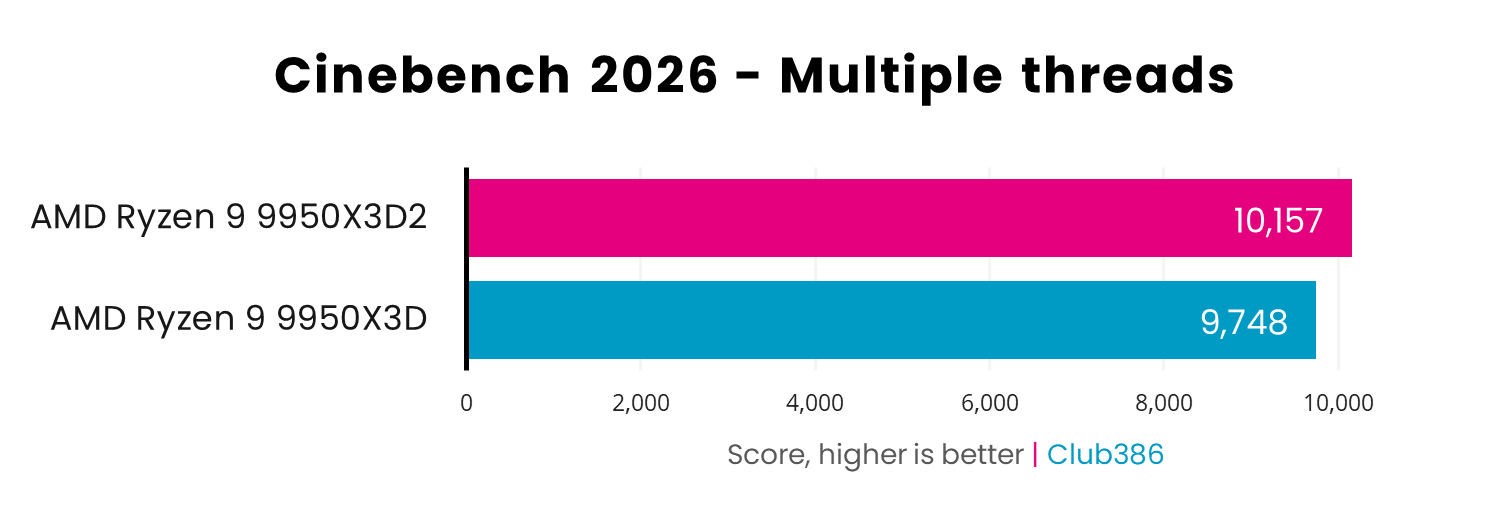
Now we come to a surprising difference between these two CPUs, which we spotted in Cinebench 2026. As you can see, the 9950X3D2 is a fair bit quicker than the 9950X3D in this test, with its extra 64MB of L3 cache coming into play when all its cores are pushed to the limit.
That score of 10,157 is impressive stuff for a desktop CPU – the highest result we’ve seen – and it’s a good 4.2% faster than the 9950X3D.
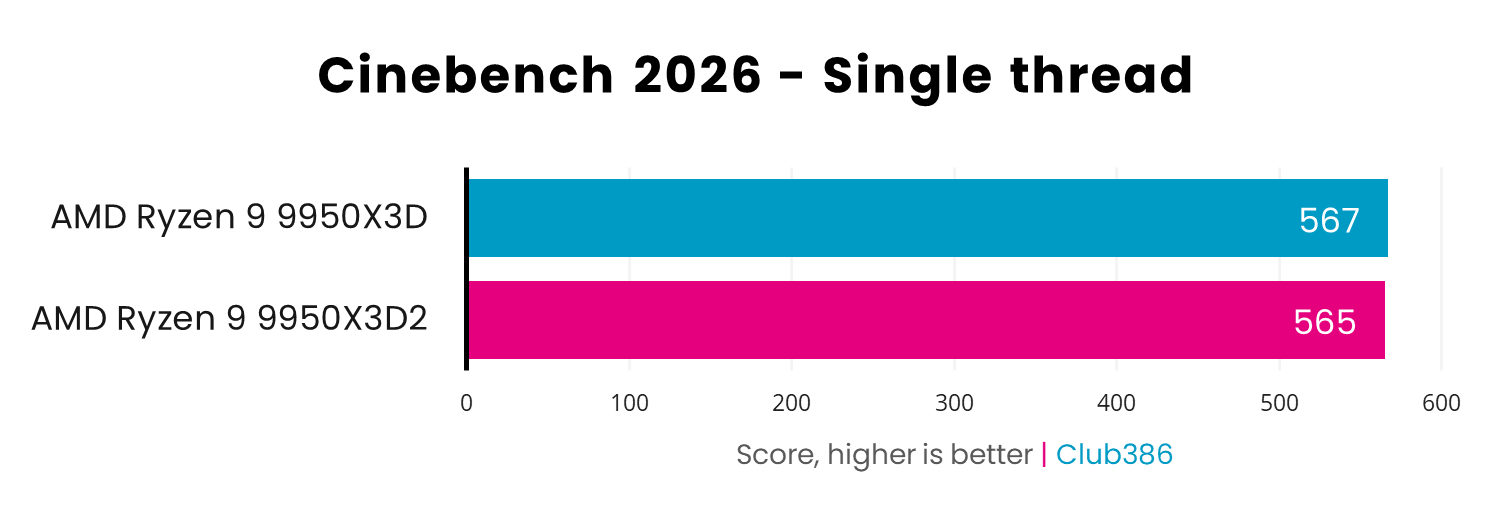
Unsurprisingly, there’s very little difference between these two chips in the single-threaded test, though. In fact, with its faster boost clock, the 9950X3D is very slightly quicker, though the difference is so small it’s practically in margin-of-error-territory.
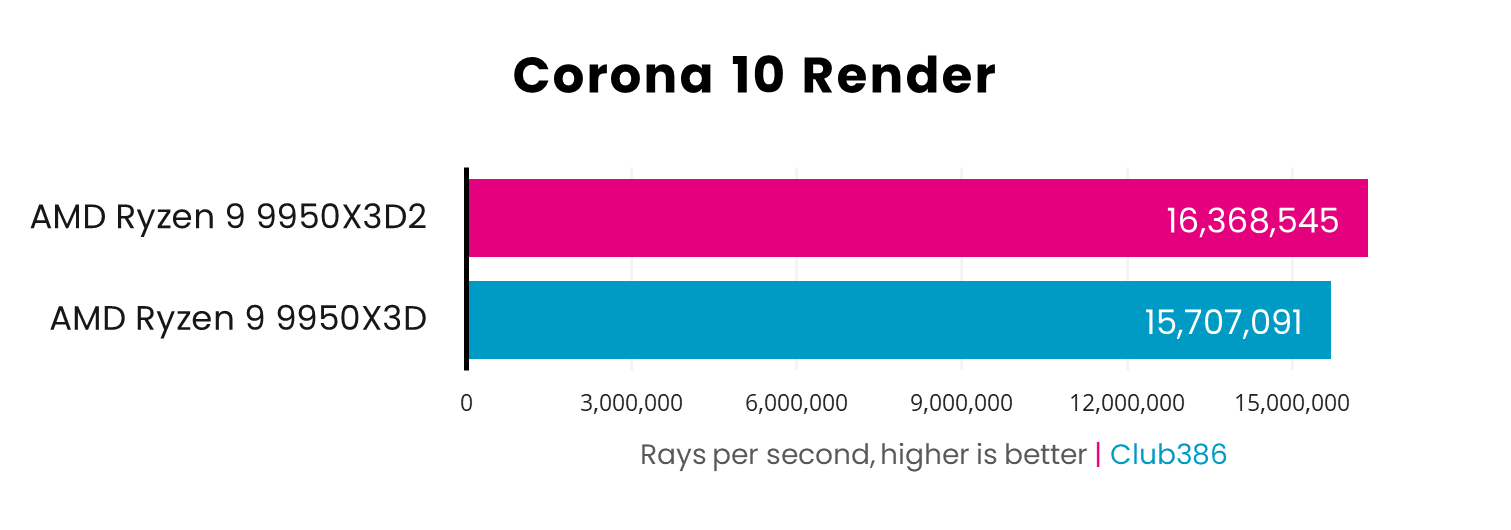
As with Cinebench’s multi-threaded test, Corona 10’s render benchmark again shows a benefit of bolstering 16 cores with a big cache reserve. There’s a performance difference of 4.2% when you step up from the 9950X3D to the Dual Edition.
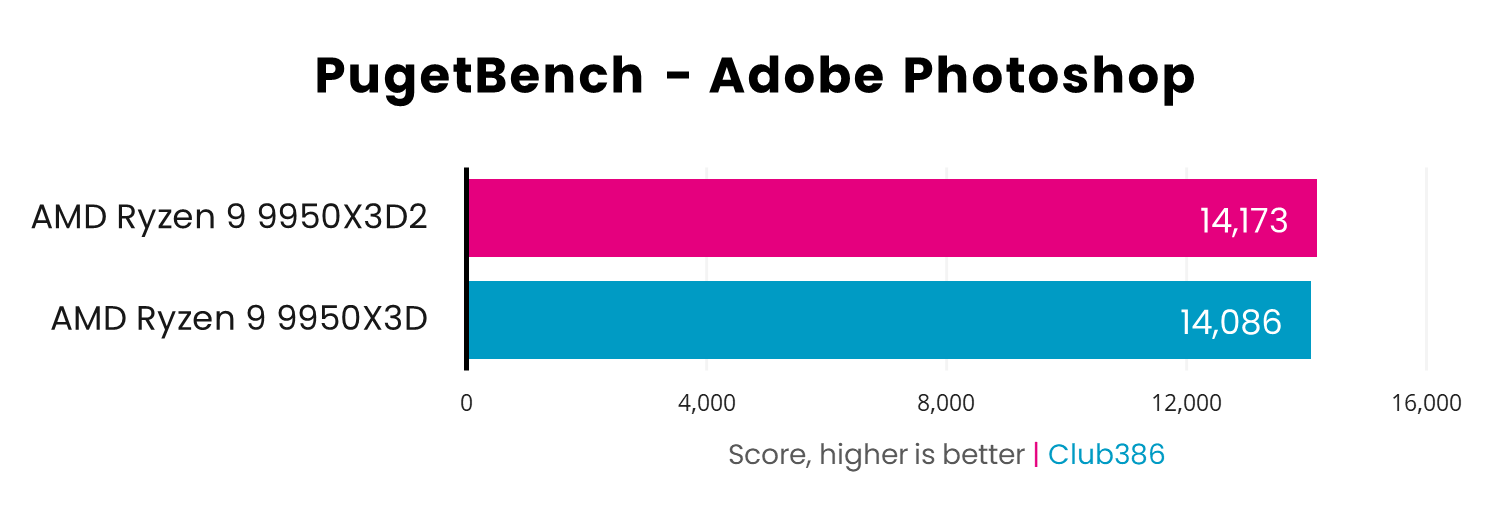
Conversely, Photoshop is barely any quicker on the 9950X3D2, showing that it doesn’t really benefit from all that extra cache. There’s a 0.6% performance boost, which is hardly worth the 28.6% price increase if Photoshop is your main tool.
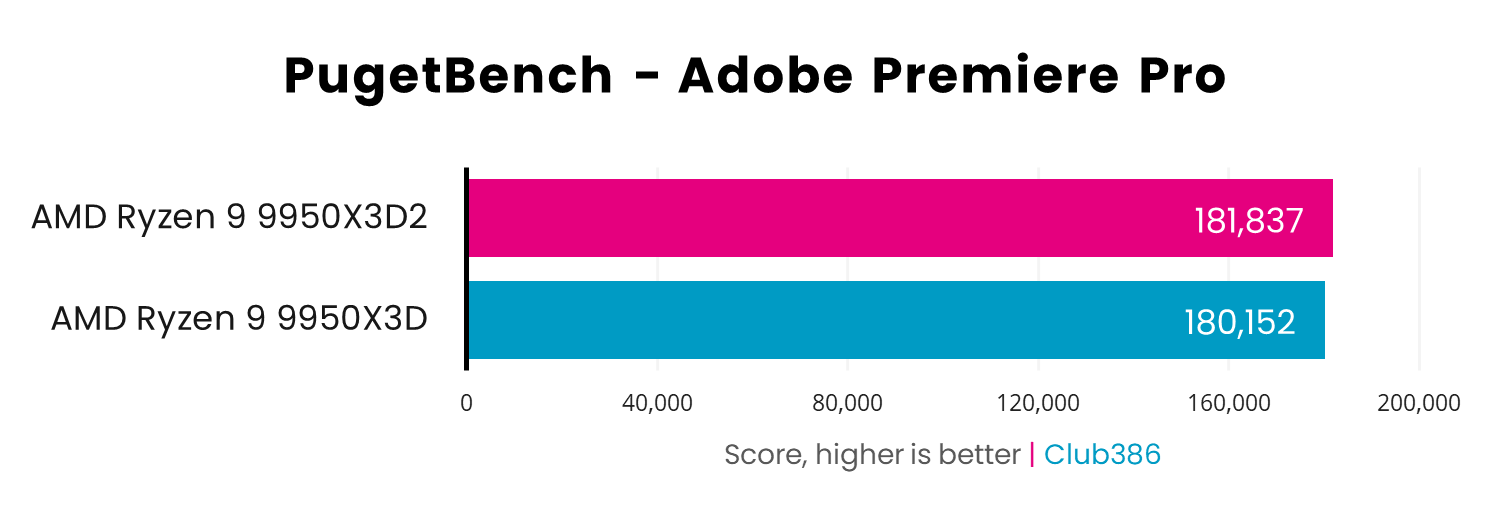
The same goes for video editing with Adobe Premiere Pro. Yes, the 9950X3D2 is technically faster than the 9950X3D, but the difference is so small (less than 1%) that you’re unlikely to notice the difference in day-to-day work.
Gaming
Given the big boost to gaming performance we’ve seen from 8-core chips such as the Ryzen 7 9800X3D, as well as the 16-core 9950X3D, we were really interested to see how an extra dose of 3D V-Cache impacts frame rates. AMD made no mention of gaming performance in the build-up to this chip’s launch, and is positioning the 9950X3D2 as a content creation CPU. Is there any benefit to gaming as well? Let’s take a look.
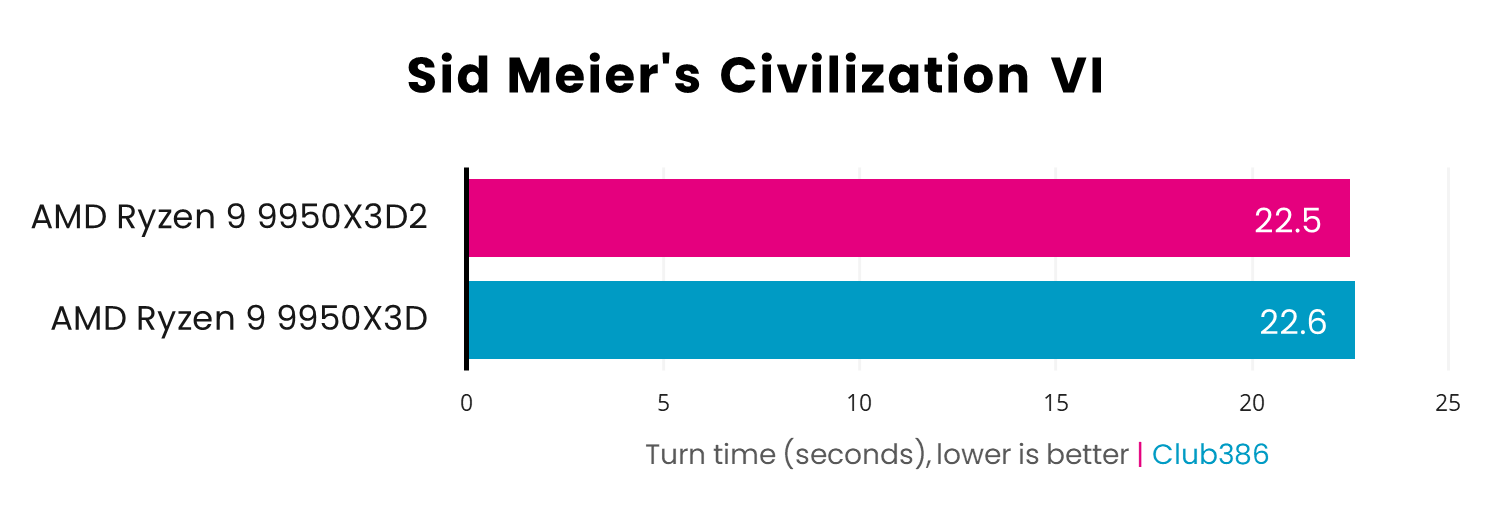
Firstly, Civilization VI shows basically no benefit from the extra cache, with the average turn time dropping by just 0.1 second when using the 9950X3D2. That’s within the margin of error.
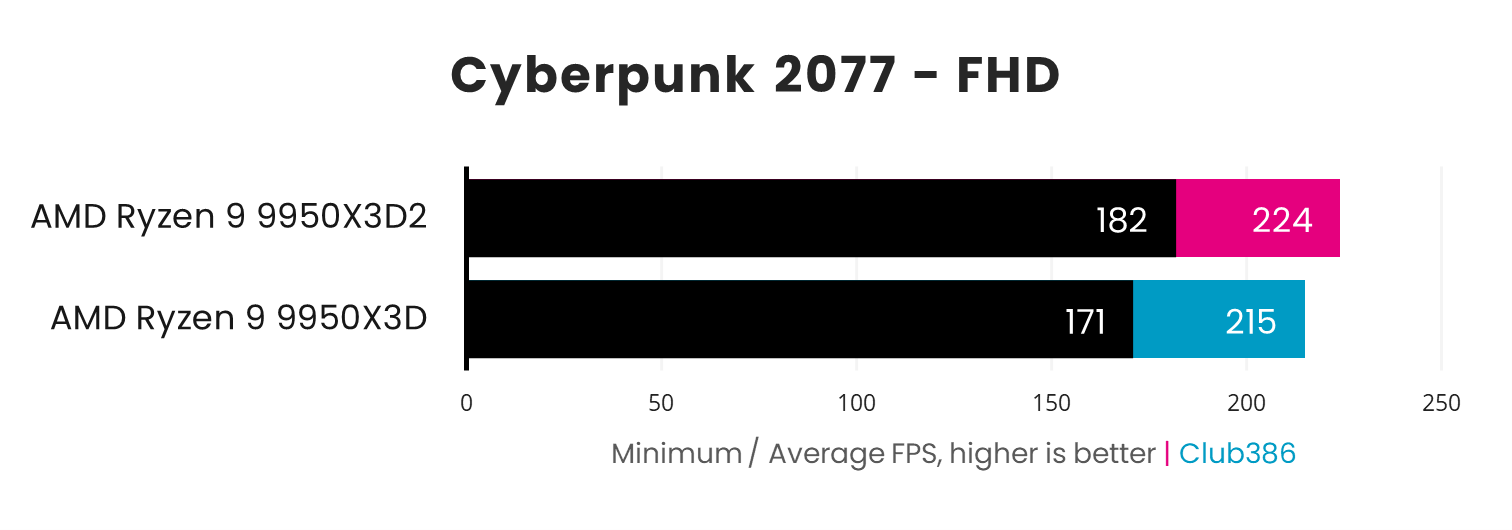
When you start measuring 3D graphics performance, however, you do sometimes see a benefit from all that cache. A case in point is the demanding sci-fi world of Cyberpunk 2077. Running at 1920×1080 at the High graphics preset, the 9950X3D2’s average frame rate is 9fps quicker, and its minimum of 182fps also shows an 11fps improvement. It looks as though having two 3D V-Cache chips helps here.
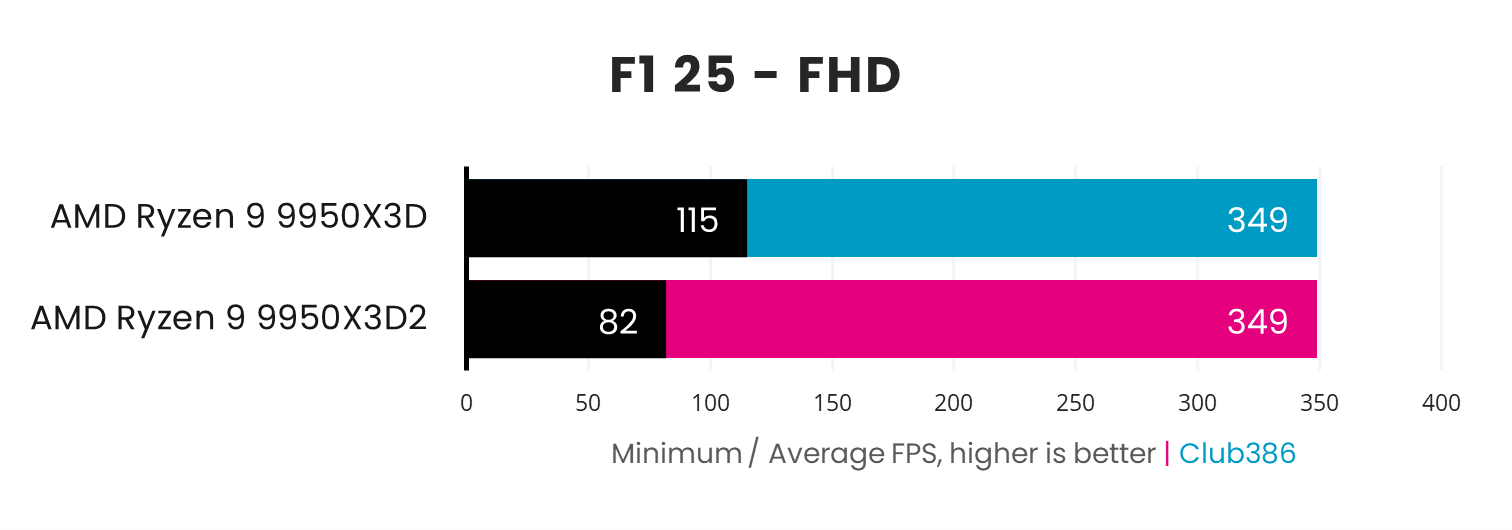
Conversely, one game that isn’t well optimised for dual 3D V-Cache is F1 25. There’s no difference at all when you look at the average frame rates, but the minimum takes a beating on the Dual Edition chip. This odd result was repeatable across multiple runs, and shows there’s still some work to do when it comes to optimising games for this cache-loaded CPU.
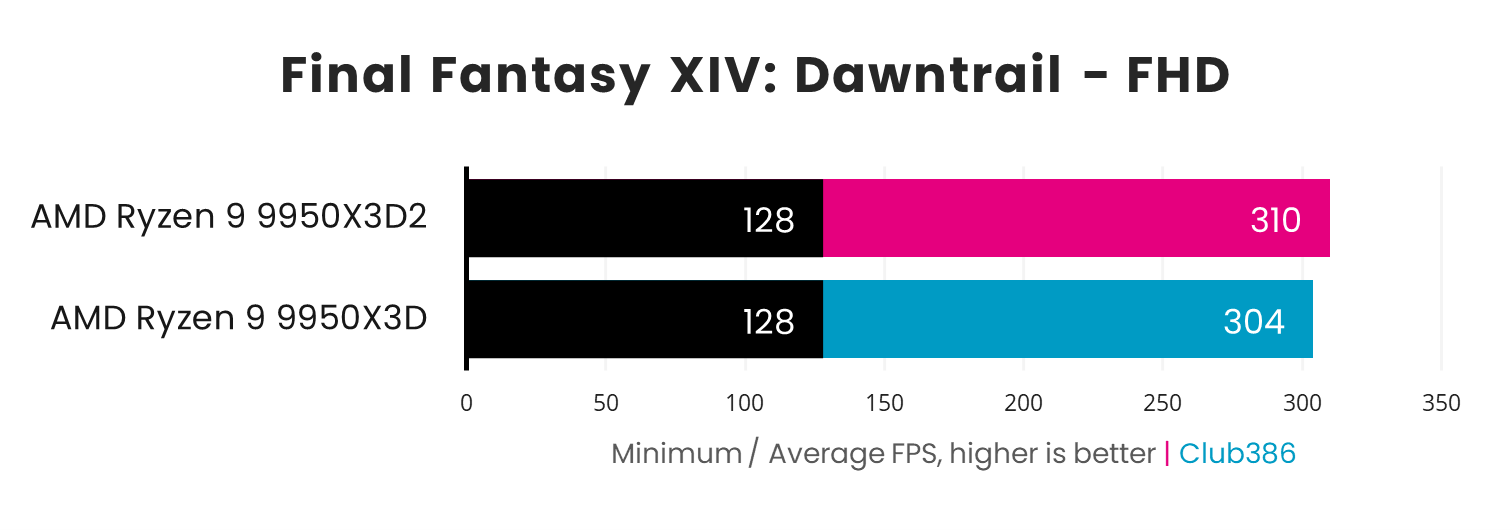
Final Fantasy XIV: Dawntrail shows a small boost (just under 2%) to average frame rates when moving to the Dual Edition chip, while minimums are identical. The difference here isn’t transformative, especially considering the price, but it does show a benefit of the extra cache.
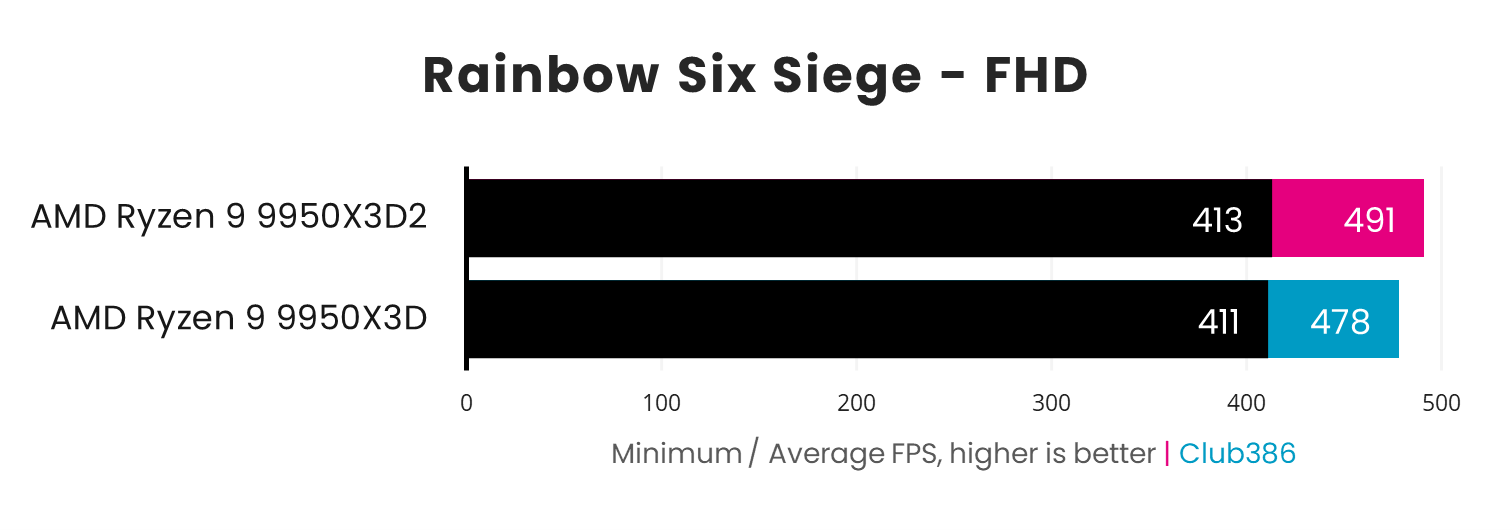
All that extra cache gives you a small boost in fast-paced first person shooters such as Rainbow Six Siege as well, raising the average frame rate from 478fps to 491fps. That works out as a 2.7% performance boost if you opt for the 9950X3D2. Again, that’s far from world-changing, but it’s an improvement nonetheless.
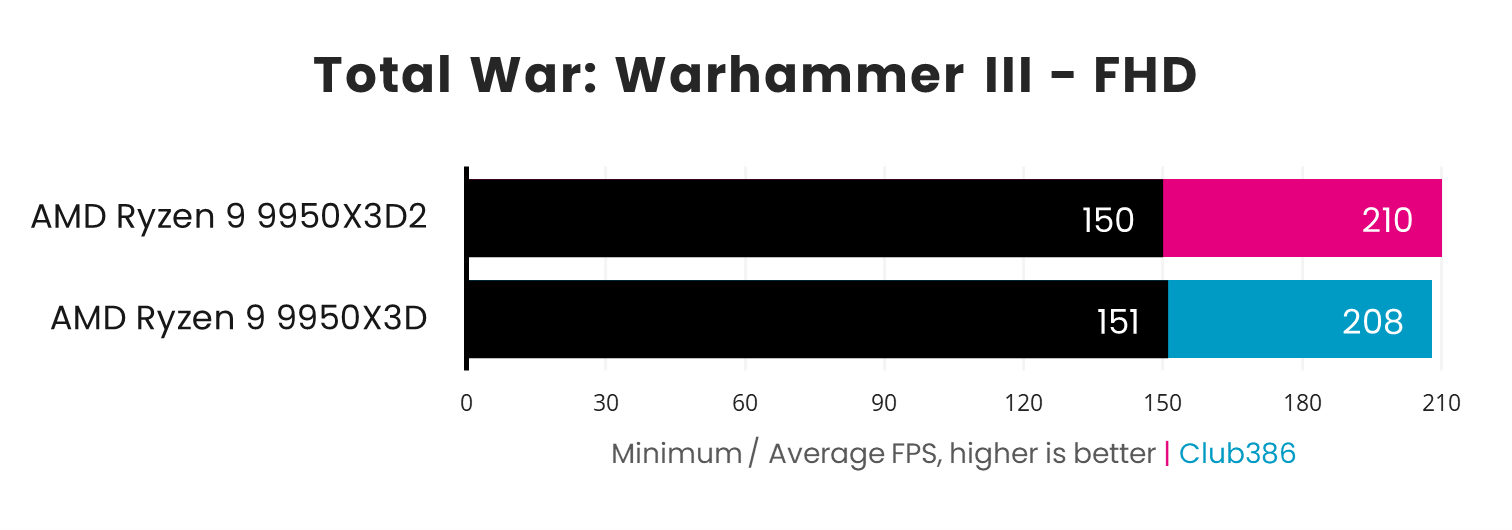
Finally, there’s no noticeable difference between the 9950X3D2 and 9950X3D in Total War: Warhammer III. The minimum is 1fps quicker on the 9950X3D, which is within the margin of error, and there’s a small 2fps boost to the average on the 9950X3D2. Basically, the standard 9950X3D will serve you just as well as the Dual Edition chip in this game.
Power and temperatures
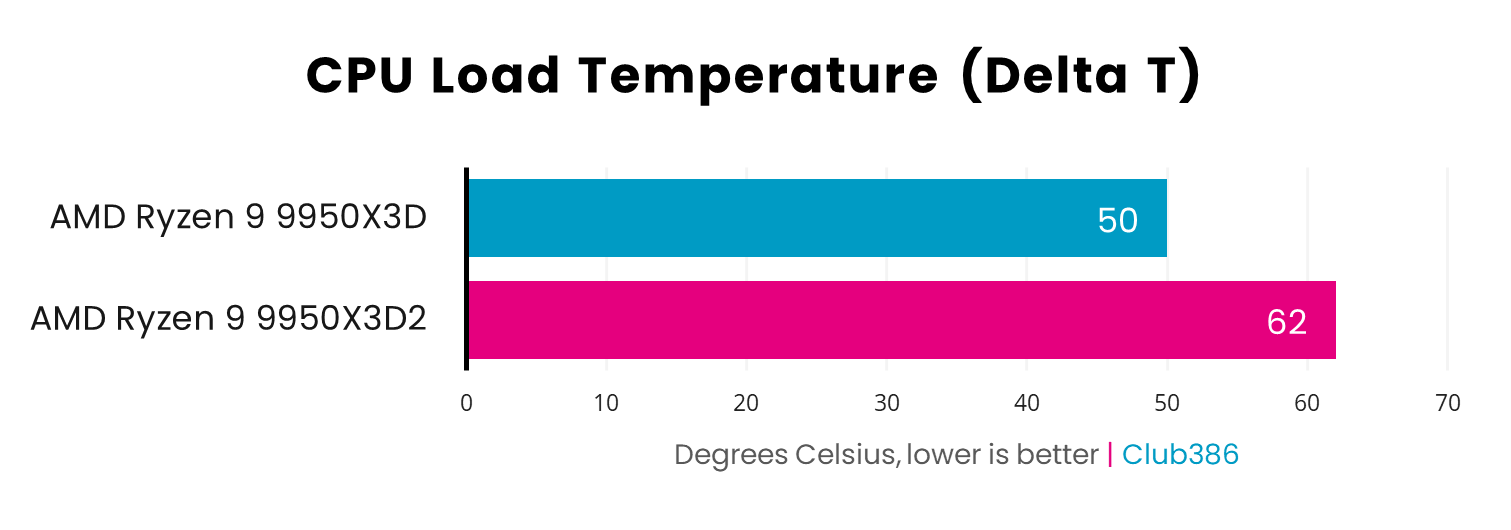
While adding a 64MB sliver of cache under the second 8-core chiplet only gives you a modest performance increase, it has a dramatic impact on temperatures. As you can see in the graph below, the 9950X3D2 Dual Edition runs 12°C warmer than the 9950X3D when all its cores are running flat-out in Cinebench.
Bear in mind that we report the Delta T, rather than the raw CPU temperature, in our results. This means we subtract the ambient room temperature from the peak CPU core temp, to ensure our results are comparable whether we test on warm or cool days. As such, the actual temperature of the 9950X3D2 is a fair bit higher (84°C), and that’s with a 420mm AIO cooler keeping it in check. You’ll want at least a 360mm AIO cooler for this chip.
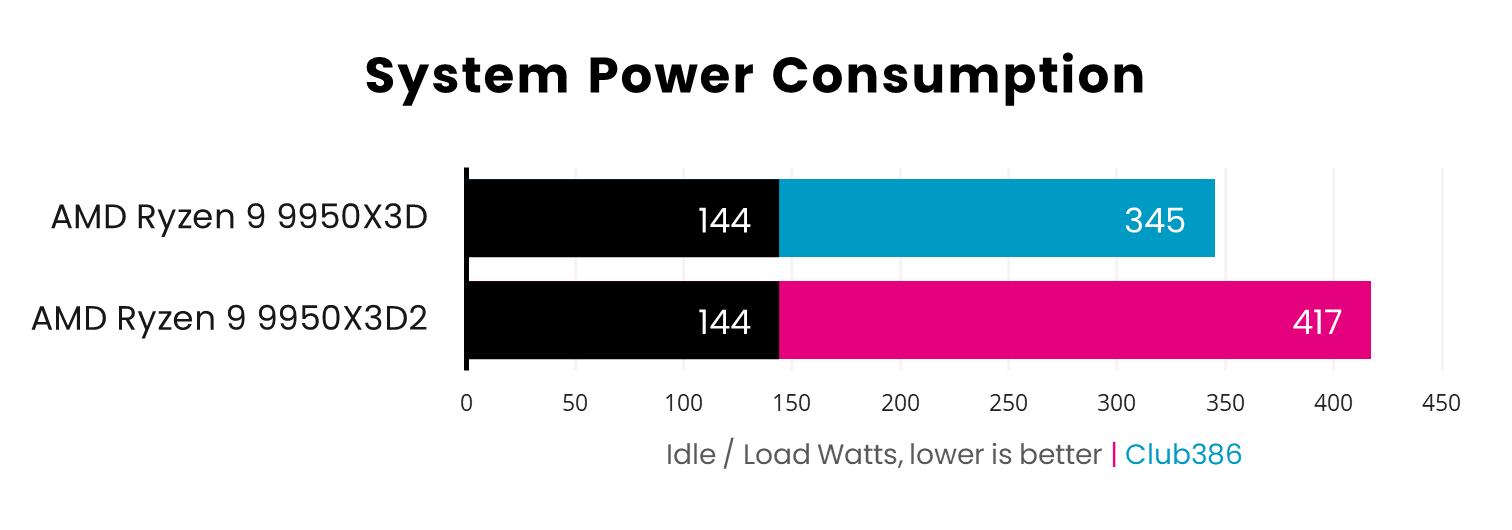
Similarly, there’s a notable impact on power consumption when using a full-chat Dual Edition chip. Reading our whole test system’s power draw from the mains during a multi-threaded Cinebench run, it pulled 417W from the socket with the 9950X3D2 installed, compared with 345W with the 9950X3D. These are the sorts of figures we used to see from Intel’s Raptor Lake chips, such as the Core i9-14900K – that’s a lot of electricity for a PC that isn’t engaging its GPU’s 3D hardware.
Value ratings
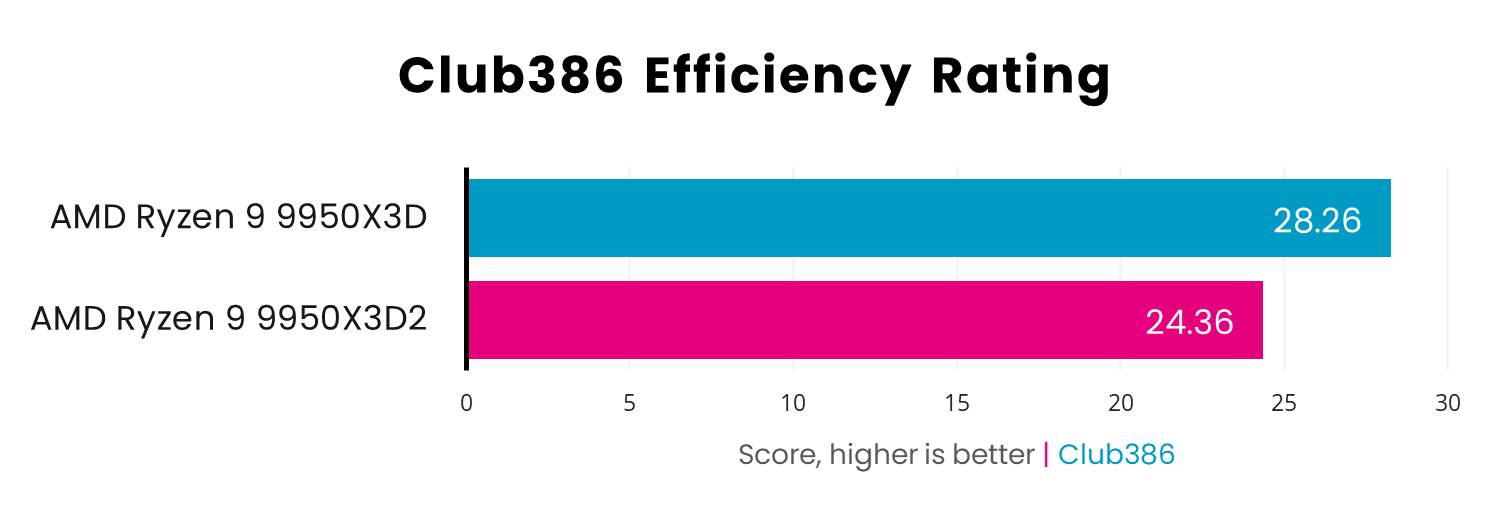
Our Club386 efficiency rating paints a very clear picture of these two CPUs’ pros and cons, with the former offering a small performance boost in some software, but with a substantial increase in power draw. We calculate this rating by simply taking each CPU’s Cinebench multi-threaded scores and dividing them by the power draw. As you can see, the 9950X3D2 is much less efficient than the 9950X3D here. It might be faster, but the benefit is disproportionate to the extra power drawn from the mains.
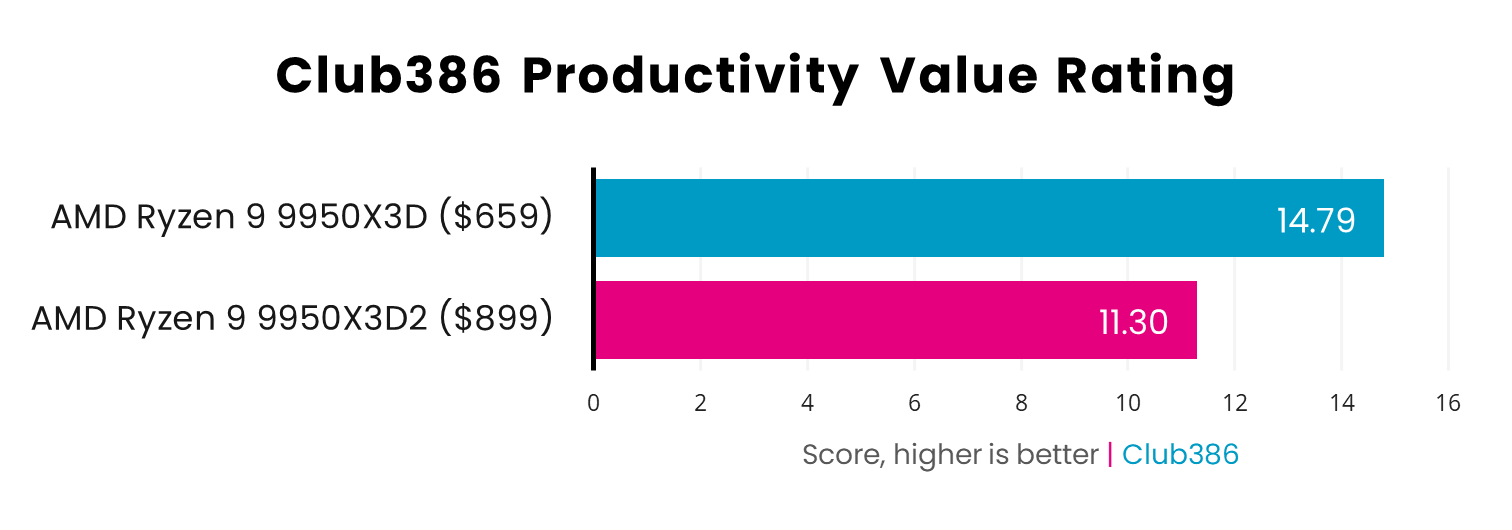
There’s a similarly stark difference between these two chips when you look at our productivity value rating, where we take those same Cinebench 2026 scores again, but this time divide them by each chip’s current price. This graph is very clear – the 9950X3D2 is quicker, yes, but the extra performance simply isn’t justified by the huge increase in price.
Conclusion
There’s no doubt about it – this is a clear win for the standard AMD Ryzen 9 9950X3D. It might not be the very fastest chip on the block any more, but the performance difference is so close you’d be hard-pressed to slide a thin piece of paper between them. There are a few stand-out results, such as Cinebench 2026 and Geekbench 6 multi-threaded scores, as well as Corona 10, but even then, you’re looking at less than a 5% boost in performance.
If you really want the absolute quickest desktop CPU you can buy, then the Ryzen 9 9950X3D2 is definitely it, but the benefits are often small, and in some cases they’re practically negligible. As such, it’s hard to recommend the Dual Edition chip over the 9950X3D when it costs so much more money.
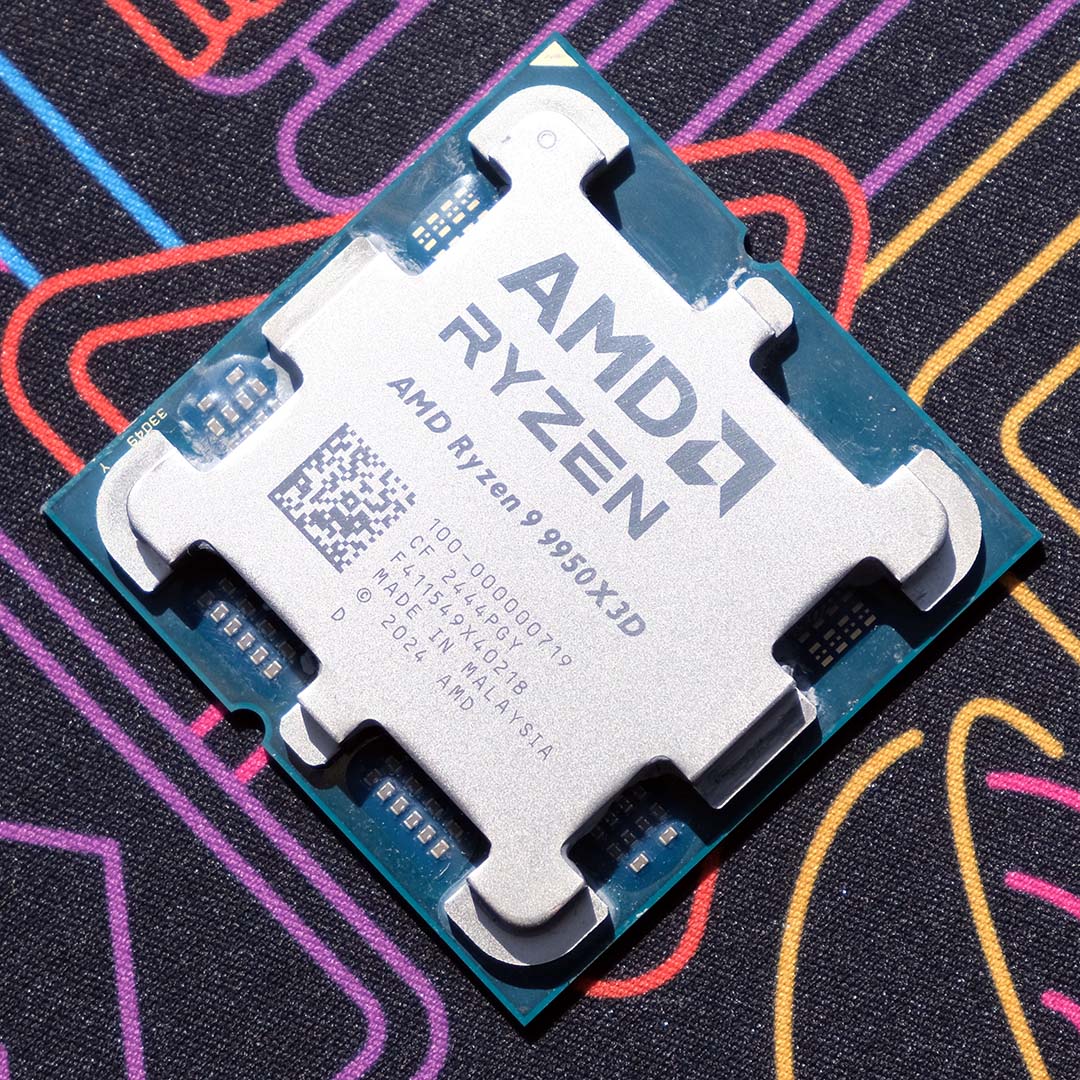
AMD Ryzen 9 9950X3D
There’s no processor like Ryzen 9 9950X3D, delivering class-leading performance that combines the very best of AMD’s Zen 5 core architecture and latest 3D V-Cache designs. Read our review.
Indeed, with its $200 premium over the 9950X3D’s MSRP (and $242 if you look at current real-world pricing), any performance advantage of the 9950X3D2 over the 9950X3D is practically demolished by its poor value. In terms of bang per buck, you’re looking at a 30% improvement if you opt for the 9950X3D instead.
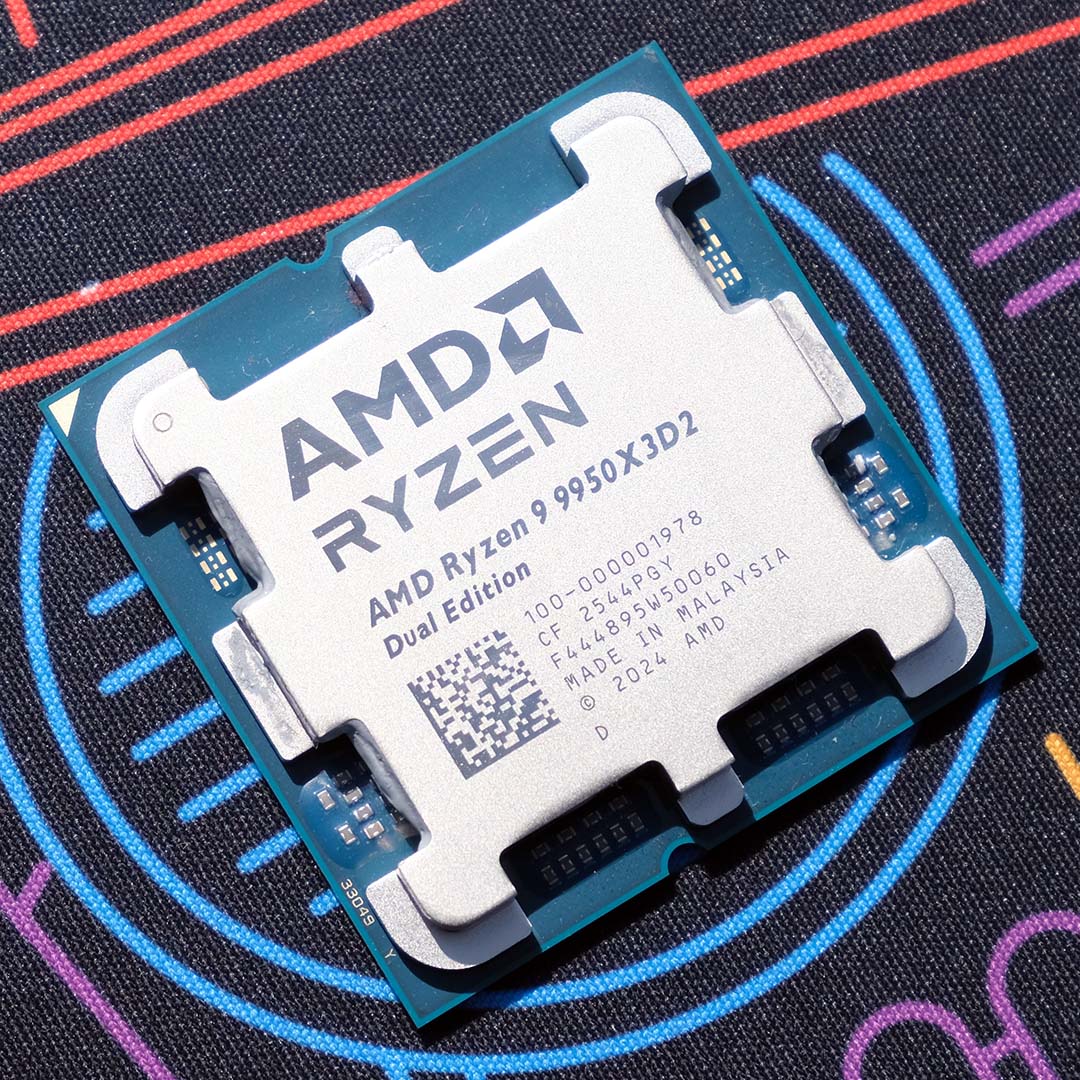
AMD Ryzen 9 9950X3D2
3D V-Cache has finally escaped the confines of single 8-core chiplets via the Ryzen 9 9950X3D2 Dual Edition, a CPU AMD touts as “the ultimate processor for the developers and creators.” Read our review.
Meanwhile, high power draw and hot-running temperatures also make the 9950X3D2 a tough chip to recommend. You’ll need the best CPU cooler you can afford to keep this chip in check, given that it still ran at 82°C with our 420mm Arctic Freezer Liquid III Pro strapped to it, and it draws a lot of juice from the mains as well.
All that said, if you have a big budget and you want the fastest CPU that money can buy, the Ryzen 9 9950X3D2 is it. Whether that’s for 3D rendering work that needs to be done in the absolute quickest time possible, or simply for bragging rights, AMD’s latest flagship is the ultimate CPU right now. For most people, though, the Ryzen 9 9950X3D is nearly as fast, while also being considerably cheaper, cooler-running, and much more power efficient.
