

Nvidia has finally given Ray Reconstruction its long overdue DLSS 4.5 treatment, providing every GeForce RTX graphics card with a welcome boost in ray tracing quality. If (like me) you’re sick and tired of settling for distracting boiling effects, noise, and other artefacts in your ray-traced imagery, this is the upgrade we’ve been eagerly awaiting.
You can try DLSS 4.5 Ray Reconstruction for yourself, via a new Nvidia App and driver update. Like Super Sampling and Frame Generation, it’s possible to bring older games up to speed with this new version through driver injections. Better still, all this promised visual improvement comes at practically no performance cost.
What is DLSS 4.5 Ray Reconstruction?
For those in need of a refresher, DLSS Ray Reconstruction replaces developers’ hand-tuned ray tracing denoisers with (what else?) a bespoke AI alternative from Nvidia. Trained on an enormous dataset, this tech uses the power of neural rendering in tandem with DLSS Super Resolution to produce higher-quality ray-traced effects.
Ray Reconstruction was impressive when it first launched as part of the DLSS 3.5 suite back in 2023, but it’s fallen behind the rest of Nvidia’s software suite since the advent of DLSS 4.5 earlier this year. As I noted in my analysis of DLSS 4.5, a lack of a transformer-model upgrade for the AI denoiser made the tech incompatible with Nvidia’s souped-up Super Resolution upscaling.
As its name suggests, DLSS 4.5 Ray Reconstruction finally brings Nvidia’s denoiser into the transformer fold. In ditching the aged convolutional neural network (CNN) approach, the feature has an expanded training dataset that forms its base and works more efficiently as part of the rendering pipeline.
In real terms, these improvements result in better image quality than the prior version at a negligible cost to frame rate, just like DLSS 4.5 Super Resolution on the last two generations of GeForce GPUs. All RTX graphics cards have access to this denoiser, and the feature can improve the ray tracing quality of all games that supports any version of Ray Reconstruction.
Test methodology
In order to test DLSS 4.5 Super Resolution, I’ve thrown a GeForce RTX 5090 Founders Edition into one of the Club386 9950X3D test rigs. While such a high-end setup isn’t necessary to enjoy the benefits of this feature, it does provide us with ample firepower to showcase Nvidia’s new tech at its very best.
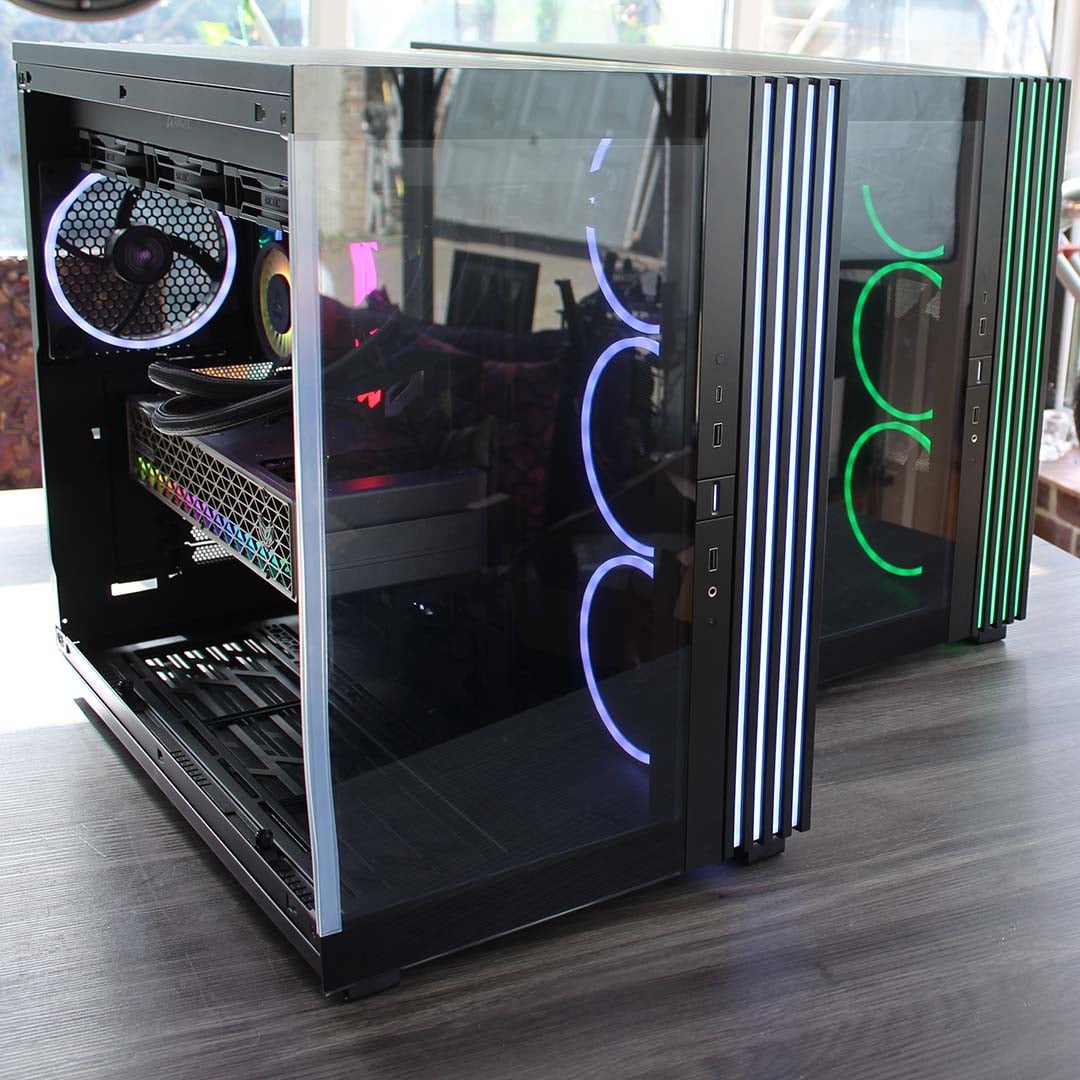
Our 9950X3D Test PCs
Club386 carefully chooses each component in a test bench to best suit the review at hand. When you view our benchmarks, you’re not just getting an opinion, but the results of rigorous testing carried out using hardware we trust.
Shop Club386 test platform components:
CPU: AMD Ryzen 9 9950X3D
Motherboard: MSI MEG X870E Ace Max
Cooler: Arctic Liquid Freezer III 420 Pro ARGB
GPU: Sapphire Nitro+ Radeon RX 9070 XT
Memory: 64GB Kingston Fury Renegade DDR5
Storage: 4TB Sandisk Optimus GX Pro 8100
PSU: be quiet! Dark Power 14 1,200W
Chassis: be quiet! Light Base 900 FX
I’ll be comparing screenshots we’ve captured of games running both DLSS 4.5 Ray Reconstruction and the prior 3.5 version of the tech, namely Alan Wake 2, Cyberpunk 2077, and Resident Evil Requiem. I’ve run all three titles using their path tracing graphics settings at 4K in DLSS Super Resolution Performance mode, minus any post-processing effects that could spoil our analysis, such as motion blur, chromatic aberration, and so on.
Image quality
Resident Evil Requiem
Starting with Resident Evil Requiem, the difference DLSS 4.5 Ray Reconstruction offers here is subtle but impossible to unsee once you notice its benefits. In short, Nvidia’s promise of more detail by way of this technology is apparent if you know where to look.
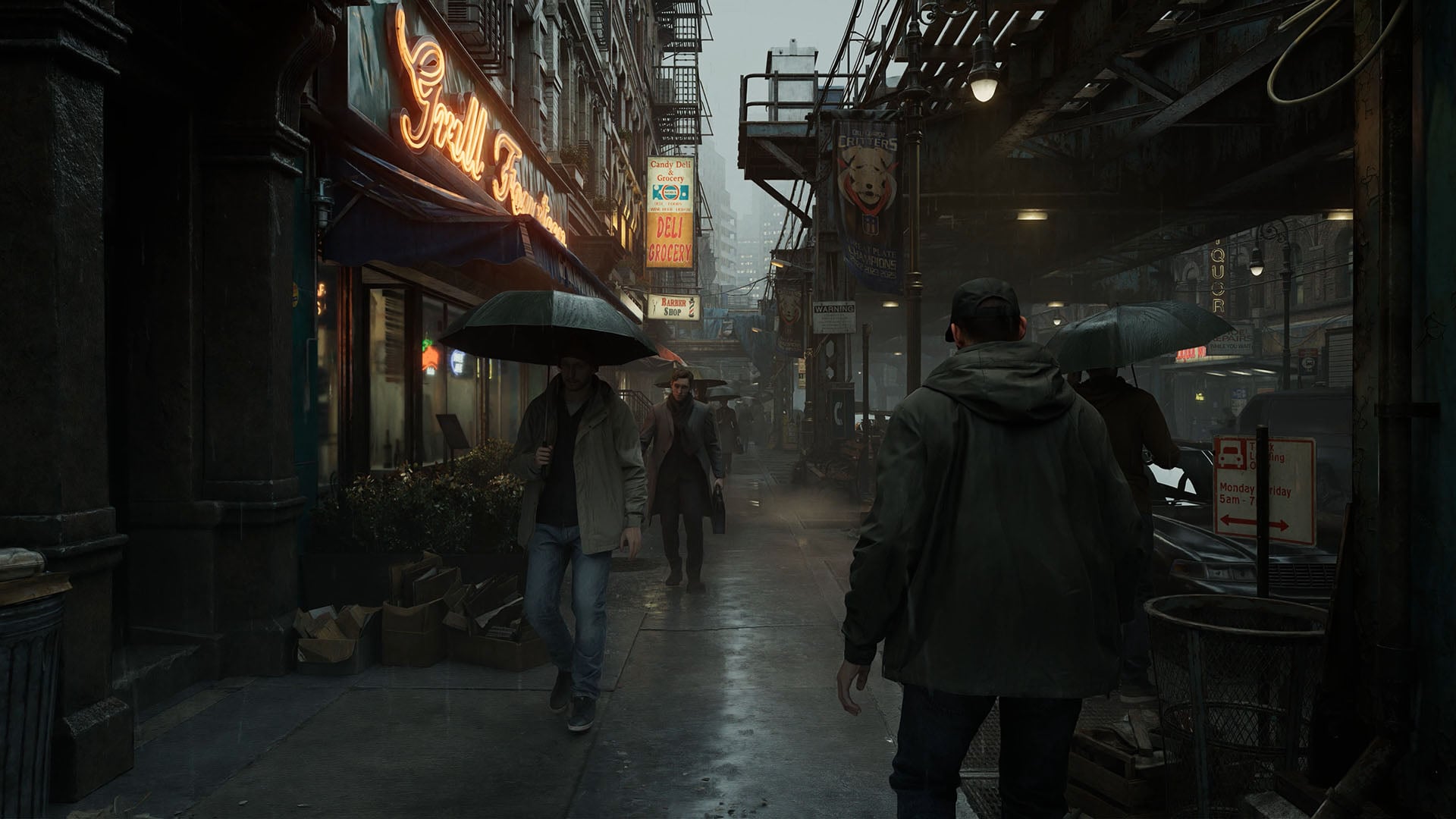
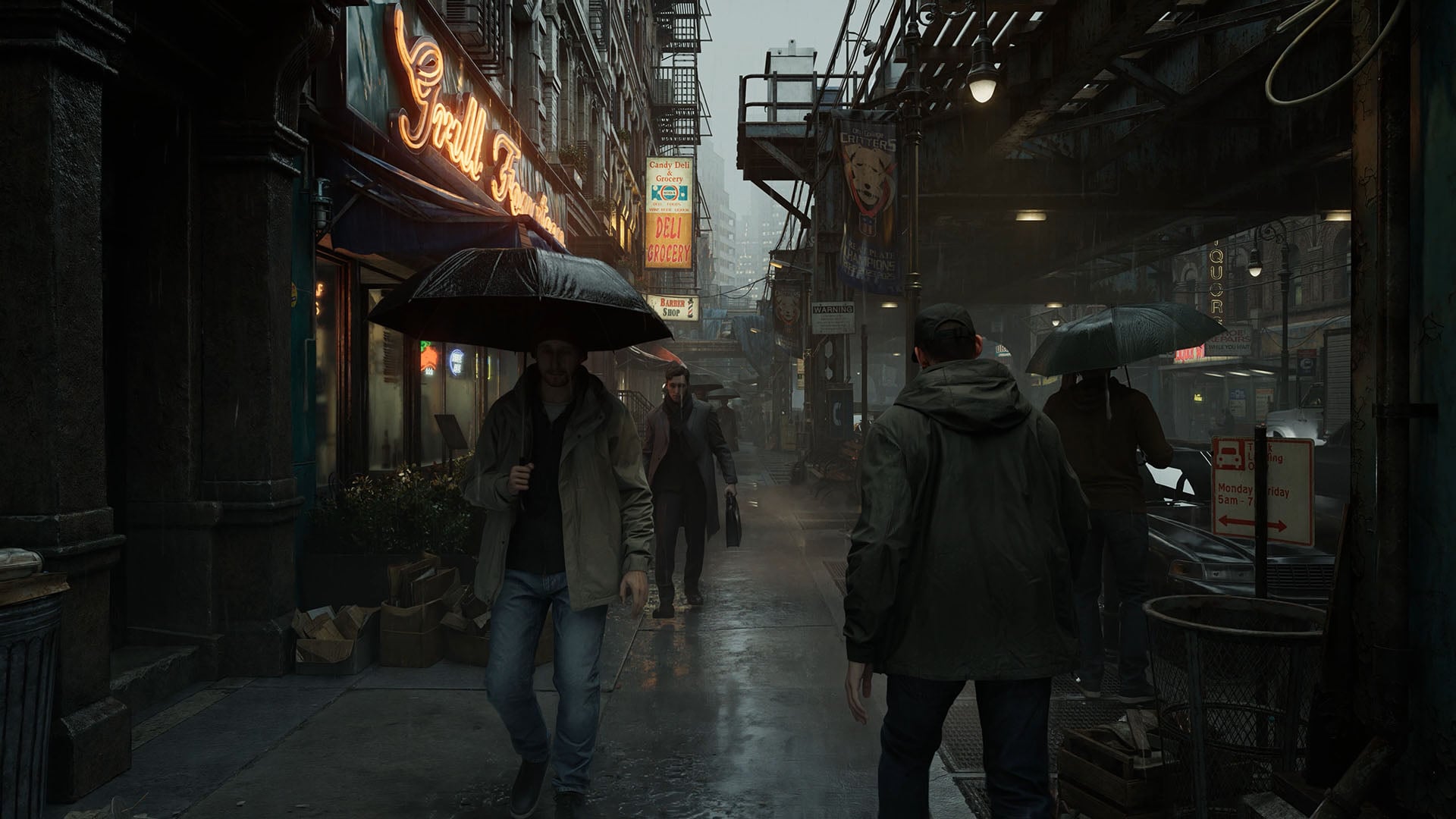
The first difference I noticed between each version of Ray Reconstruction in the scene above was the intensity of the rain. Droplets appear greater in number as both upscaling and denoising improve, retaining more of the individual particle effects. Meanwhile, as they make contact with the ground, their ripple effects are far sharper, showing the strength of the downpour all the more clearly.
Taking my eyes off the rain, there’s far more fine detail across the board. In the example above, this is perhaps most noticeable in the creases and wetness of umbrellas. However, you’ll also find the same qualities in character clothing, with the stonework and pavement on the left appearing far less flat to the eye.
While these images aren’t quite like-for-like, owing to the dynamic nature of this scene, I can also confirm that ray-traced lighting as a whole is sharper because of Ray Reconstruction. Note the detail in the reflection below the dapper gentleman’s foot in the centre of the frame, as well as the neon signs on the left side windows, and the difference in softness between ‘Grill Fourteen’ signs.
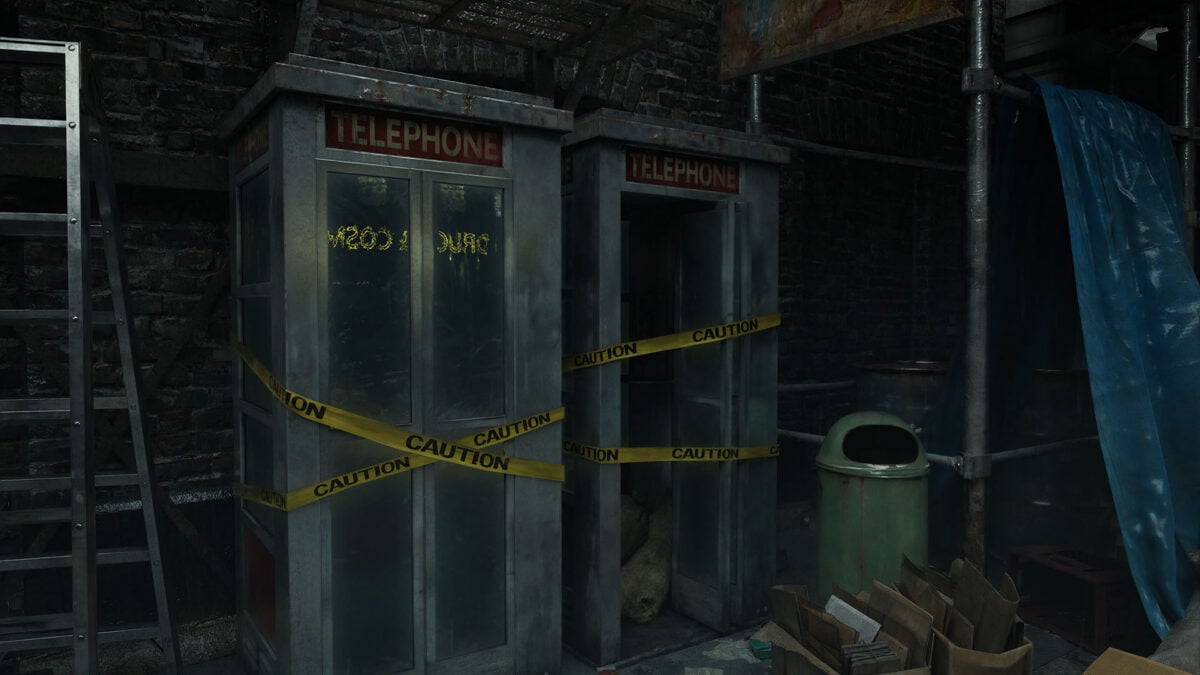
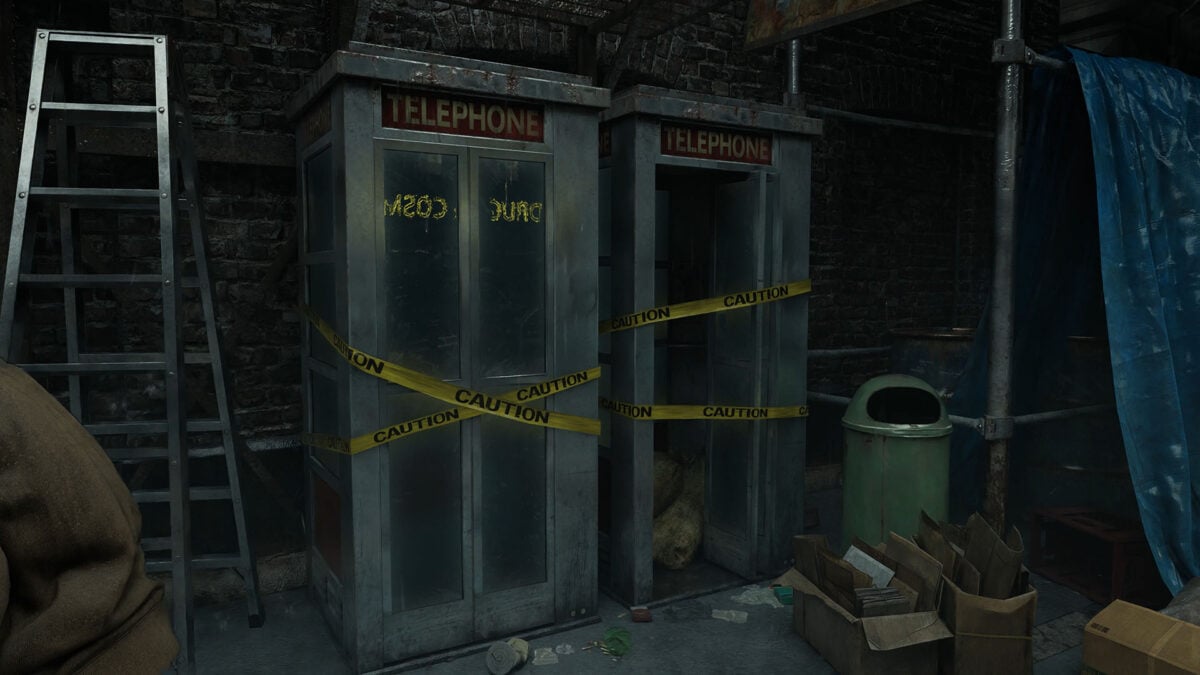
Moving further down the street, we see the same bump in micro detail looking at these telephone booths. There’s more apparent rust on their rooves, just as there are more creases in the blue tarp on the right, and greater retention of individual lines running along the side of the sacks, cardboard, and brick work.
While difficult to illustrate in a static image, there’s less boiling in the scene’s ray traced lighting too. Looking at the rightmost booth using Ray Reconstruction 3.5, light reflections aren’t as stable as they should be and take on a shimmering appearance. It’s as if Capcom made the object out of mimetic polyalloy, for those of you who catch that reference.
Swapping over to Ray Reconstruction 4.5, there’s far less play in how the material interacts with scene lighting, leading to a more stable and less distracting image. That’s not forgetting the improvements to ray traced reflections in the left booth.
Alan Wake 2
Next up, one of the first games to ever support path tracing and Ray Reconstruction: Alan Wake 2. Standing in the room below, the impacts of DLSS 4.5 Ray Reconstruction are evident in both detail and contrast. Starting with the latter, shadow detail across the board is far superior with this version of the denoiser. The hue of the map, wood, carpet, and even character models are all darker and richer, compared to the relatively washed out look of DLSS 3.5.
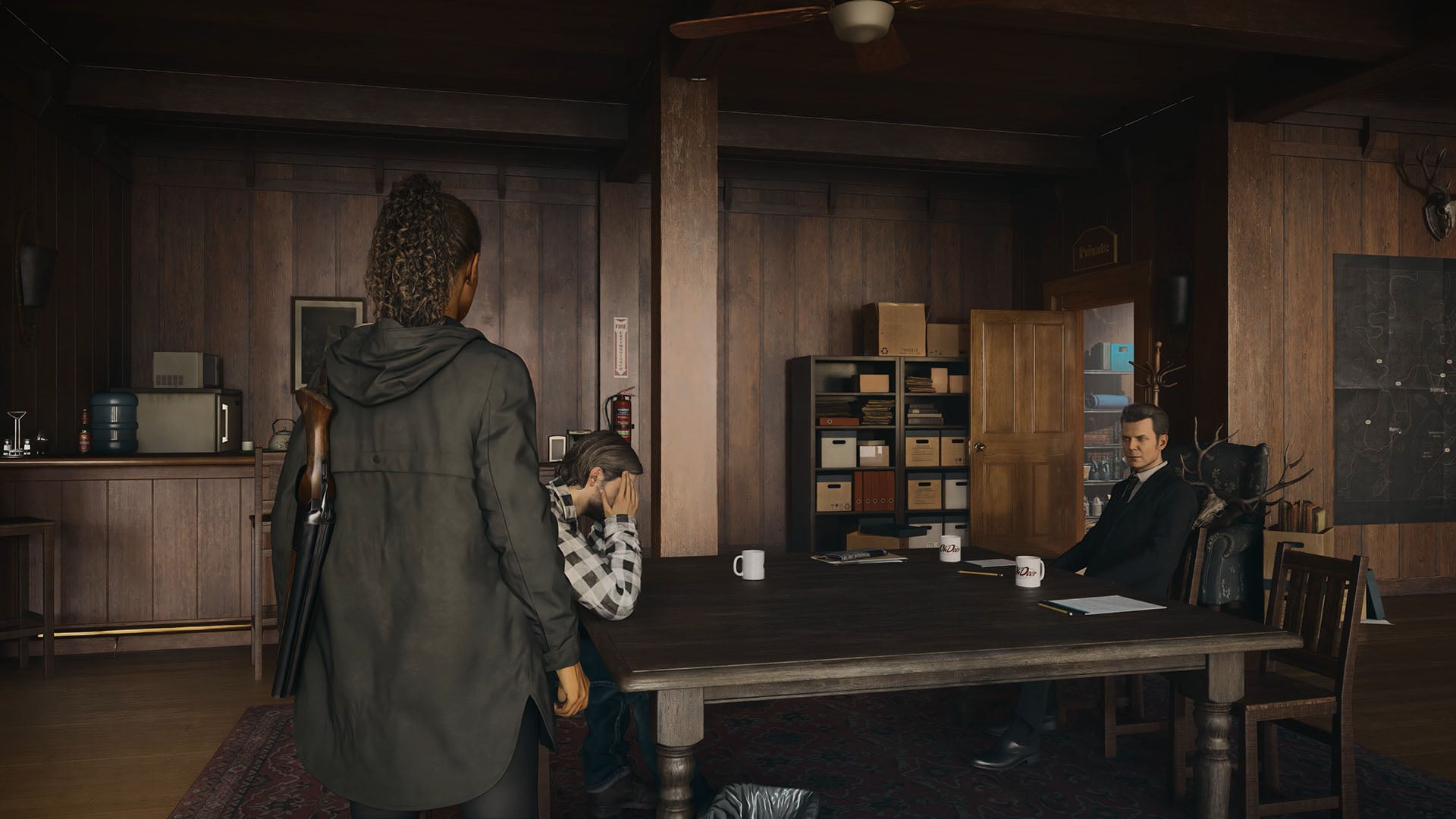
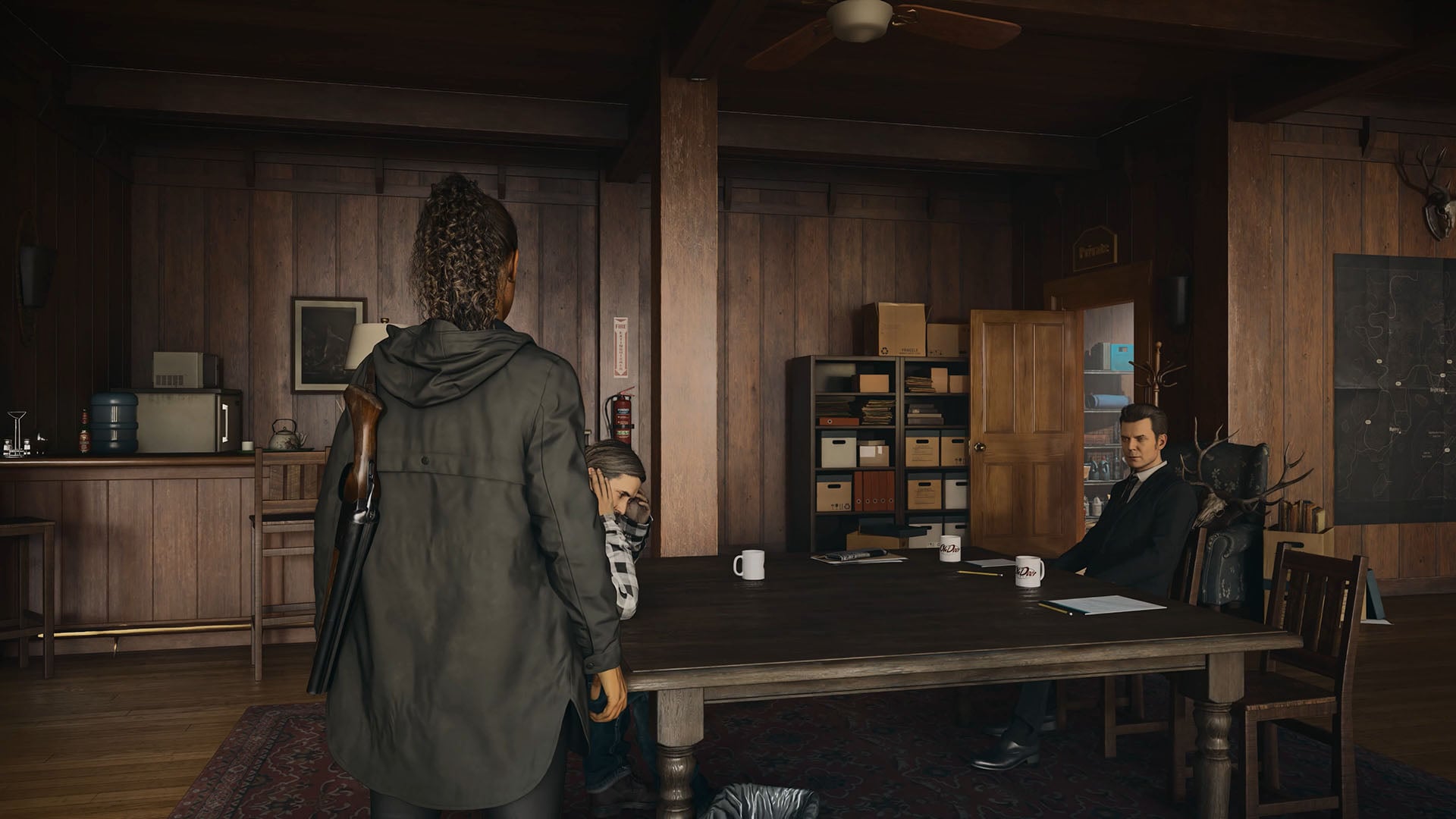
Casting our eyes to the bar on the left, the shadow cast from the nearby chair has far more definition, transforming from a nebulous shade to being a clear extension of the seat’s presence within its environment. You can see this same effect play out in the shadows stemming from the boxes on the shelves in the corner, while the white cups’ reflections atop the table are also clearer.
The most dramatic shift in this scene though, flitting between each version of Ray Reconstruction, is in the massive uptick in wood grain. Whether we’re talking about the floor panels, walls, chairs, or table, they all feature more varied shading and distinguishable details. The flooring in particularly is startling improved.
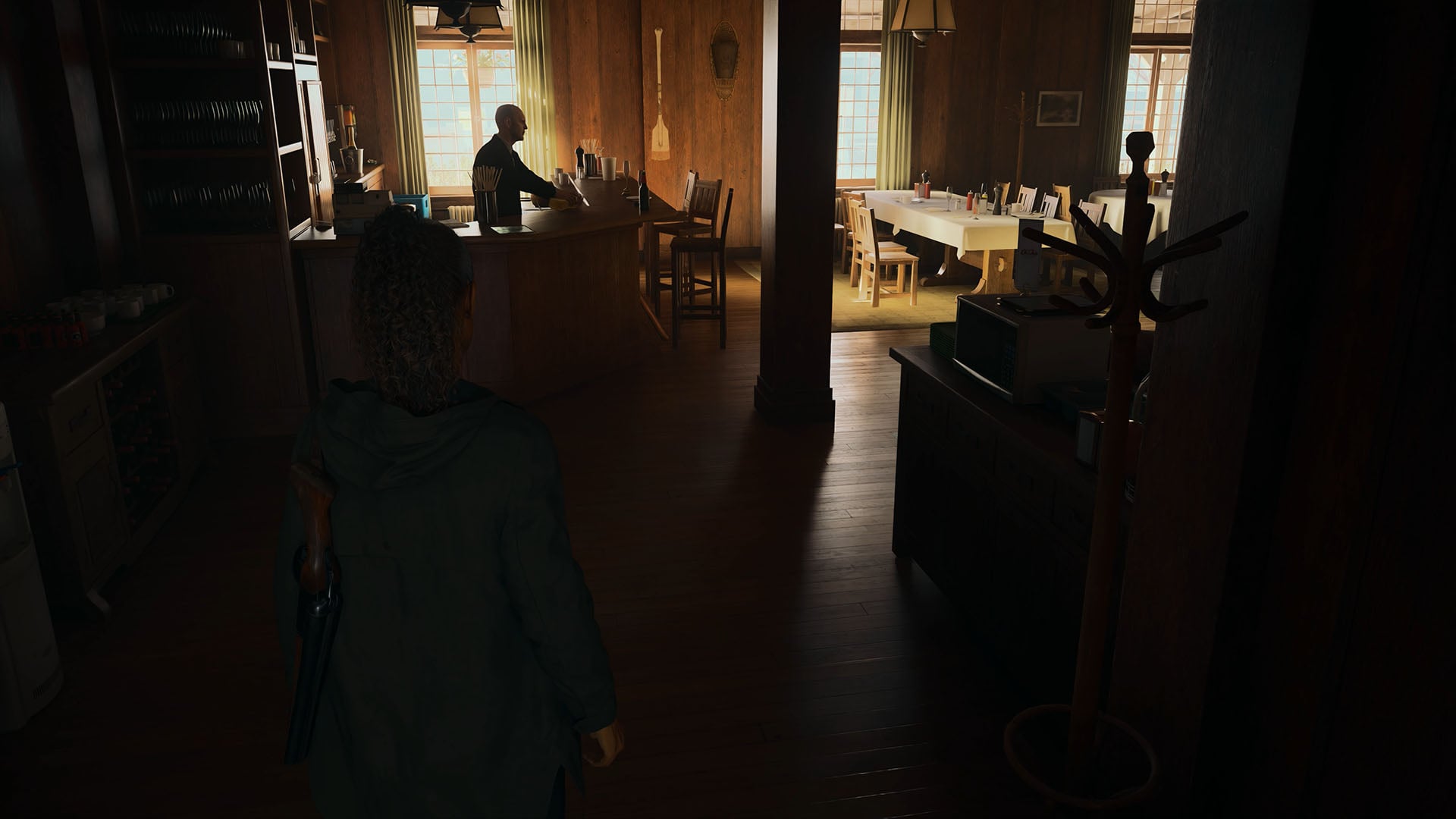
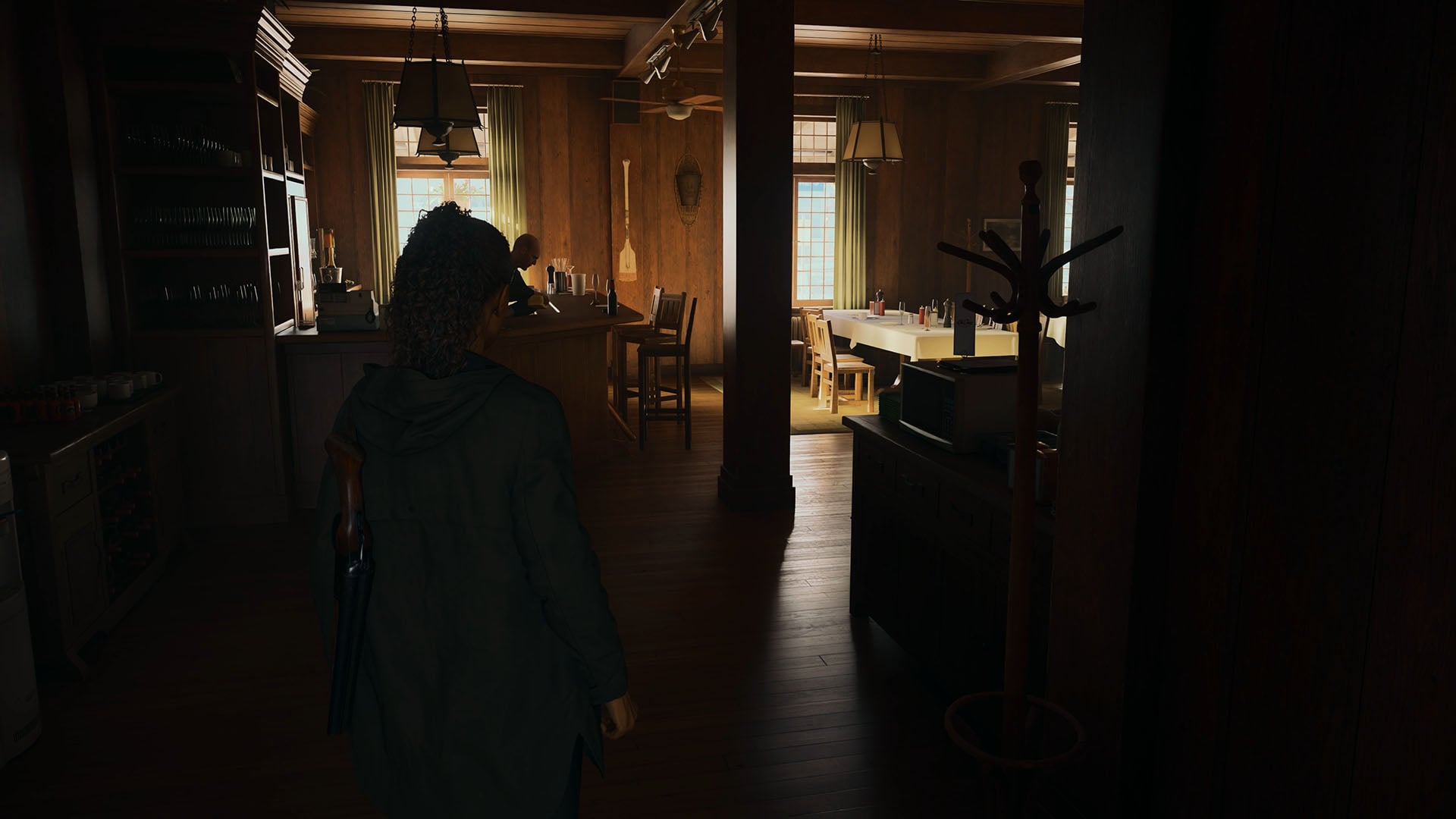
Walking around the Elderwood Palace Lodge, a light shaft on the floor catches my eye. While using DLSS 3.5, this grabs your attention for all the wrong reasons. The temporal stability of the ray tracing used is poor here, with clearly visible boiling artefacts and a distractingly shifting shape.
Swapping over to DLSS 4.5 Ray Reconstruction, the image is far more stable, with defined edges of shadow and light. The feature cleans up the artefacts, leaving us with a sharp, stable, and detail-rich finish. While this is a small part of the scene, examples like this each add to a far greater whole that greatly improves immersion. After all, it only takes one graphical oddity to take you out of a scene.
Performance
Using the built-in Cyberpunk 2077 benchmark, running the game’s path tracing settings with DLSS RR 4.5 results in a negligible performance impact relative to the older version. Dropping to 156fps from a 158fps average translates to a 1% loss in performance, which is practically margin-of-error territory by all accounts.
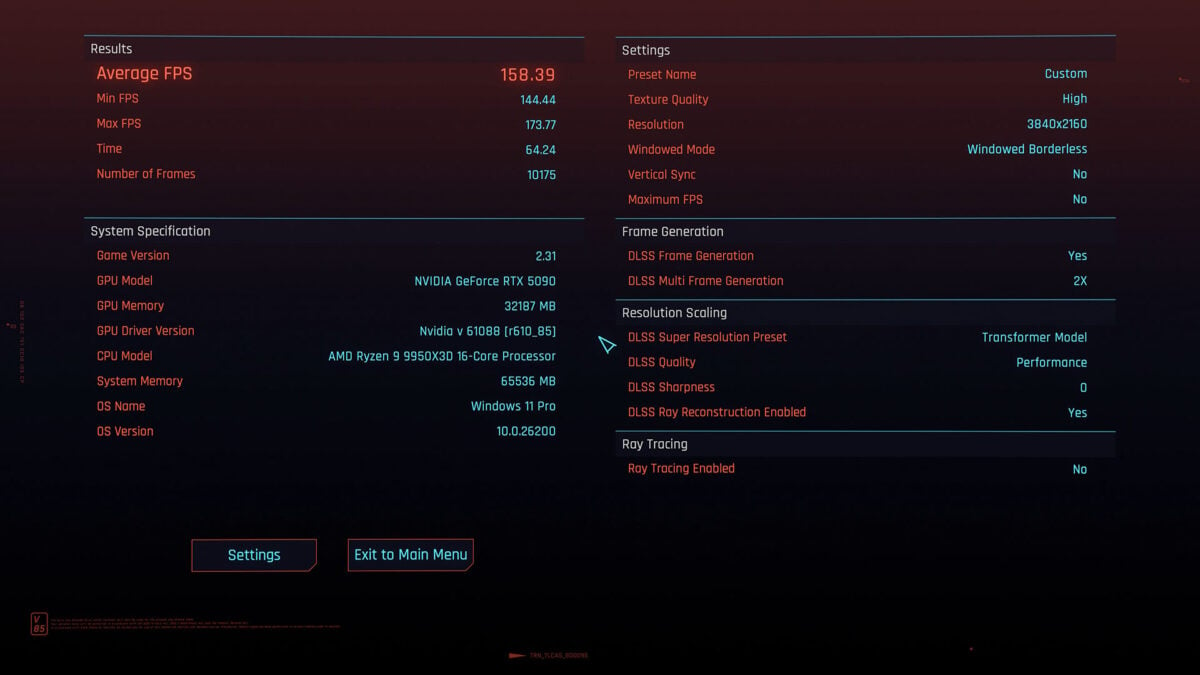
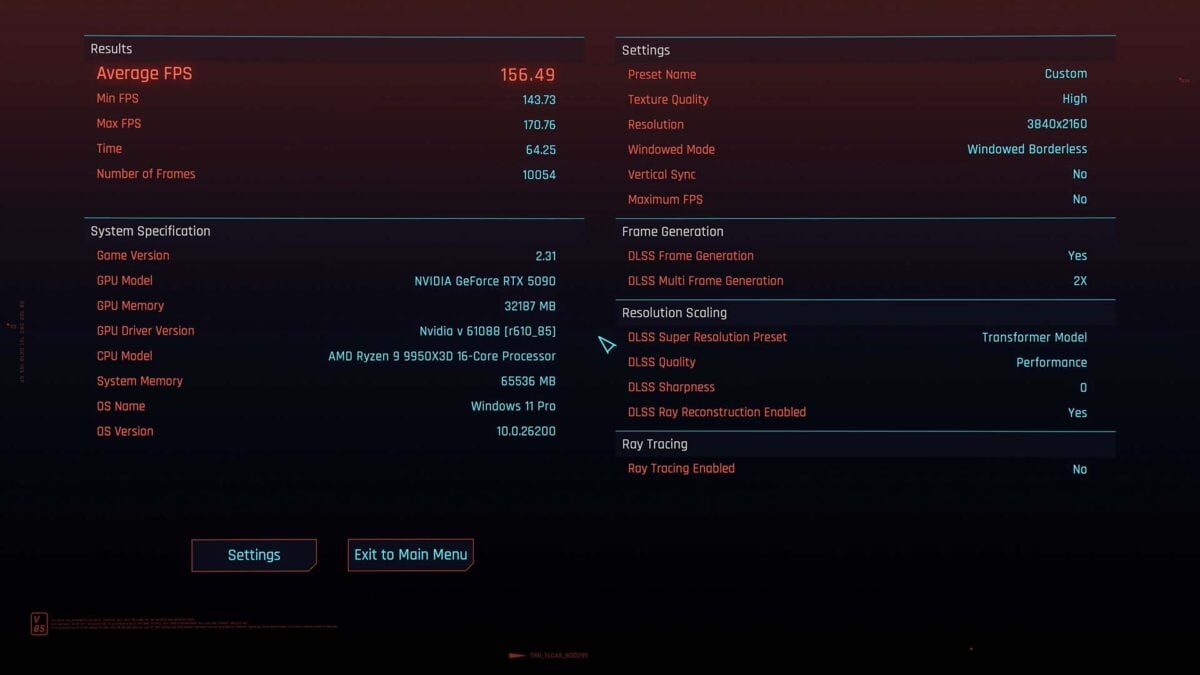
The results screens above reflect the differences we saw running the two versions of Ray Reconstruction with our GeForce RTX 5090 inside a 9950X3D test bench. There’s certainly room to explore the impact of this feature on lower-end processors and/or graphics cards, as well as those with older Tensor cores.
In the meantime, I was able to see how DLSS 4.5 Ray Reconstruction runs on a less powerful configuration using my personal rig, featuring a Ryzen 7 7800X3D and GeForce RTX 4080. While I appreciate this is still a fairly high-end setup, I’m interested to see how far frame rates decrease on the new denoiser running on older graphics card.
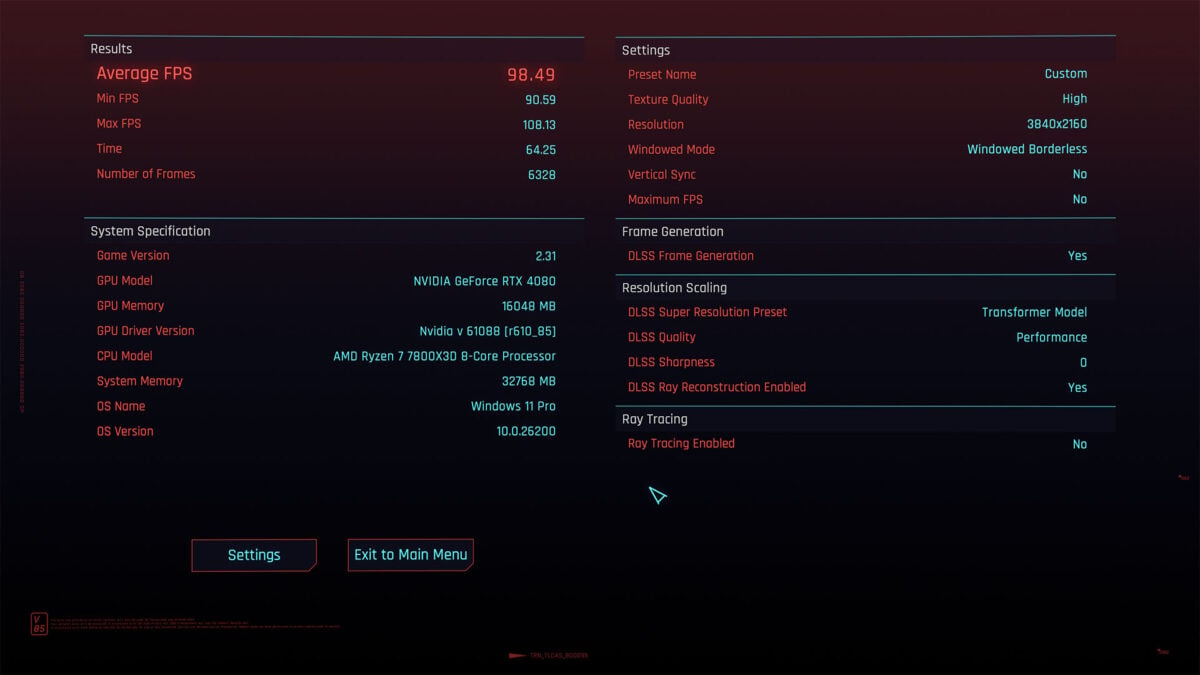
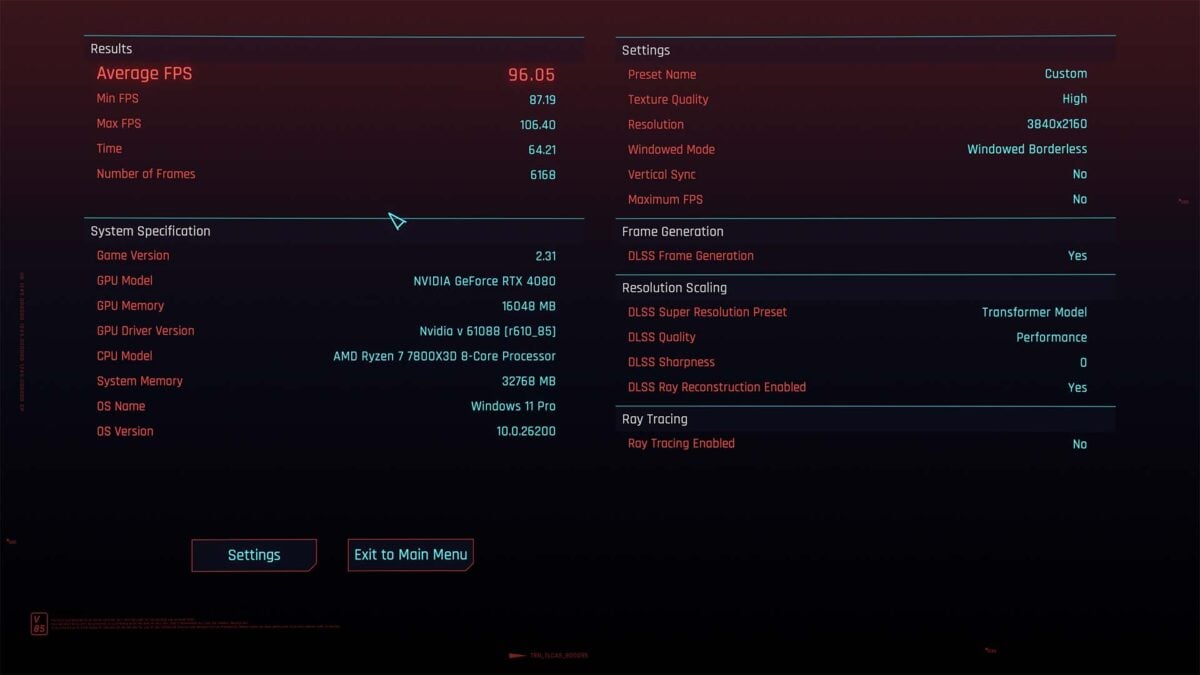
To my pleasant surprise, the transformer model proves similarly efficient on my Lovelace GPU as it does on the Blackwell flagship, with a mere 2fps separating DLSS 4.5 Super Resolution from the older version. I would expect to see bigger dips on Ampere and Turing graphics cards, as we have with the transformer model of Super Resolution, but it’s definitely worth running on a 40 or 50-series GPU.
Conclusion
If you own a GeForce RTX graphics card and plan to enable either ray or path tracing settings, then DLSS 4.5 Ray Reconstruction is a must. This feature brings up the image quality of ray traced effects, both obvious and subtle, up to a far higher and more stable level than the aged DLSS 3.5 version, with negligible cost to frame rate. It’s nothing short of an absolute no brainer.
The only real limitation of Ray Reconstruction is game support. While Nvidia proudly flaunts that there are over 1,000 RTX games and applications on the market featuring some form of DLSS technology, initial support for the new denoiser amounts to a mere 30 titles. The tech is nowhere near as prevalent as DLSS Super Resolution or Frame Generation, but given time I’m hoping it’ll prove just as ubiquitous.
