

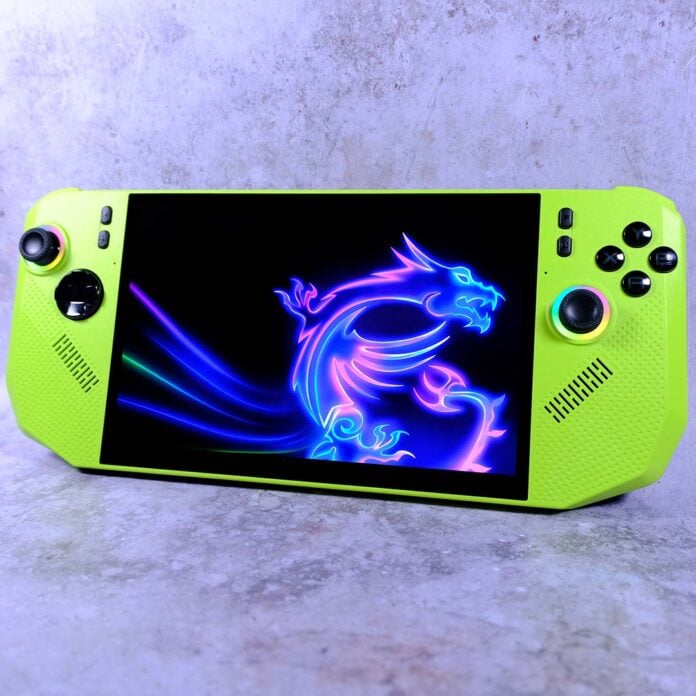
After months of waiting since its Computex 2025 announcement, I finally have my hands on an MSI Claw A8. While this isn’t MSI’s first foray into portable gaming PCs, it’s the first to feature AMD hardware. This inaugural partnership comes together to great effect, crafting an attractive handheld with solid gaming performance.

MSI Claw A8
£850
Pros
- Great APU performance
- Large and punchy 16:10 screen
- High-quality build
- Solid battery life
- Hall effect sticks and triggers
Cons
- Relatively expensive
- No carry case included
- Spotty US availability
Club386 may earn an affiliate commission when you purchase products through links on our site.
How we test and review products.
At the time of writing, the Claw A8 is available in the United Kingdom for £850 with no official word on availability in the United States. MSI certainly has plans to launch its handheld in this territory, but it’s oddly MIA for the moment.
Specs
At the heart of the MSI Claw A8 is a Ryzen Z2 Extreme chip. This silicon is basically the best APU AMD has to offer among its ‘Z’ APU series. The only difference between this chip and AMD’s actual flagship Ryzen AI Z2 Extreme is that the latter’s CPU has an NPU, which really has little use in a gaming handheld.
The Ryzen Z2 Extreme packs eight cores, 16 threads, and maximum boost clocks of 3.3-5GHz. The reason behind this split in frequency comes down to this chip’s collection of full-fat Zen 5 and more compact Zen 5c cores. By designing the CPU portion of its SoC in this way, AMD can offer efficiency that’s appropriate for mobile devices without sacrificing core and thread counts.
| MSI Claw A8 | |
|---|---|
| CPU | AMD Ryzen Z2 Extreme |
| GPU | AMD Radeon 890M |
| RAM | 24GB LPDDR5X-8000 |
| Storage | 1TB PCIe Gen 4 SSD |
| Battery | 80Whr |
| Display | 8in IPS (1920×1200 / 120Hz) |
| Speakers | Yes |
| Connections | 3.5mm Mic-in/Headphone-out (x1) Bluetooth 5.4 microSD card slot (x1) USB-C 40Gb, w/ DP Alt & PD (x2) Wi-Fi 7 |
| OS | Windows 11 Home |
| Weight | 765g |
| Dimensions | 300 (W) x 126 (D) x 24mm (H) |
| Extras | 65W charger Fingerprint reader |
| Price | £850 |
Integrated GPU duties fall to an AMD Radeon 890M, featuring 16 RDNA 3.5 compute units and a 2.9GHz maximum boost frequency. As the name of the architecture implies, this is a refinement rather than a successor to the GPU in AMD’s Ryzen Z2 Extreme’s predecessor. Sadly, that means no official support for the likes of FSR 4 upscaling, but gen-on-gen frame rates should be appreciably higher.
Soldered RAM is par for the course with current-generation mobile chips, cut from either AMD or Intel cloth, and the Ryzen Z2 Extreme is no different. Thankfully, the 24GB of LPDDR5X-8000 memory leaves the Claw A8 with enough capacity and speed to meet modern demands. The system reserves 8GB for GPU VRAM by default, and there’s no need to adjust this amount, but you can do so if you wish via AMD’s software suite.
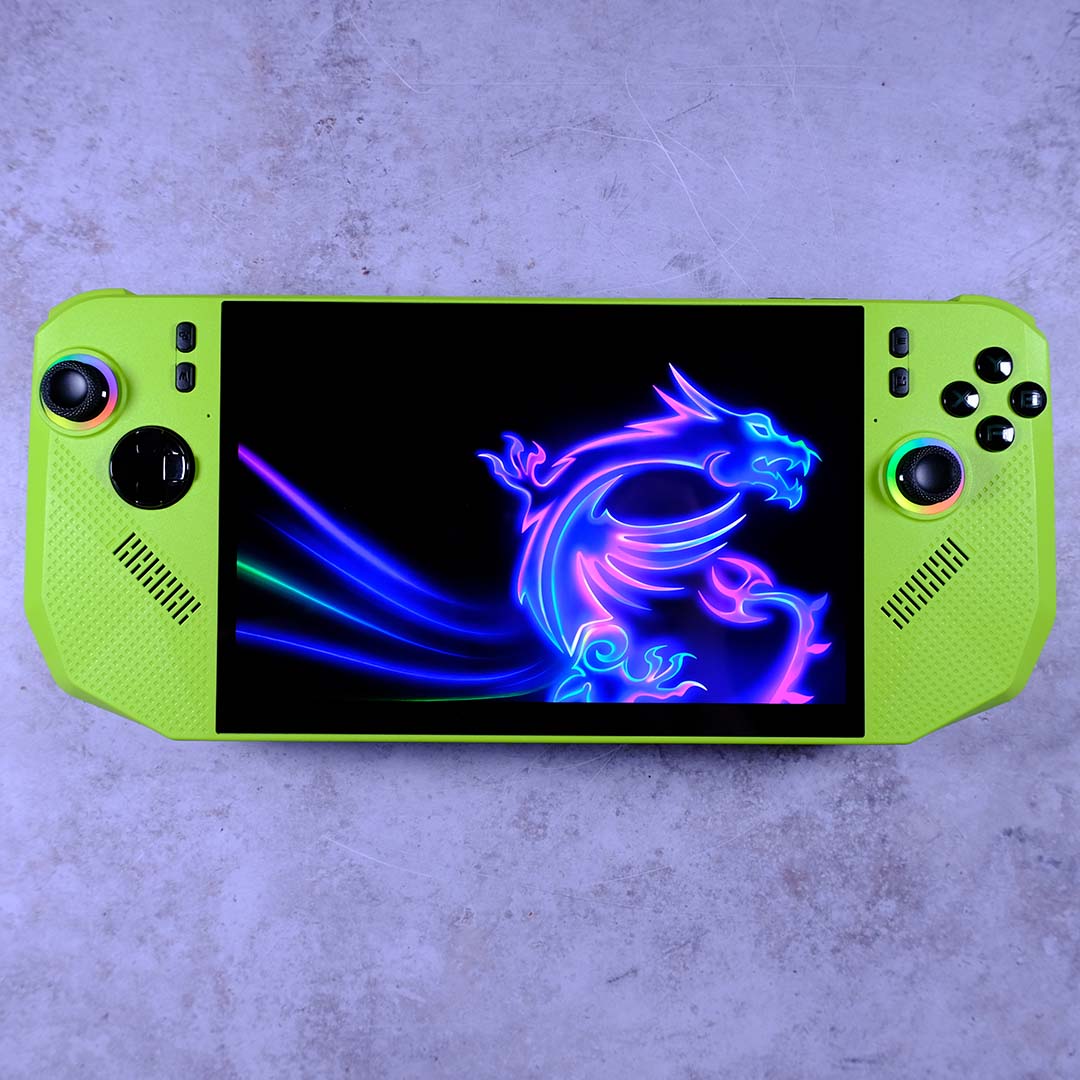
MSI equips the Claw A8 with a screen that’s identical in specification to the one found in its Claw 8 AI+. That’s no bad thing, as this 8in IPS panel boasts an appreciably sharp FHD+ (1200p) resolution and butter-smooth 120Hz refresh rate, complete with variable refresh rate (VRR) support. Colours suitably pop on this display thanks to 500nits of brightness, and its 16:10 aspect ratio enhances immersion that little bit more than shorter 16:9 alternatives.
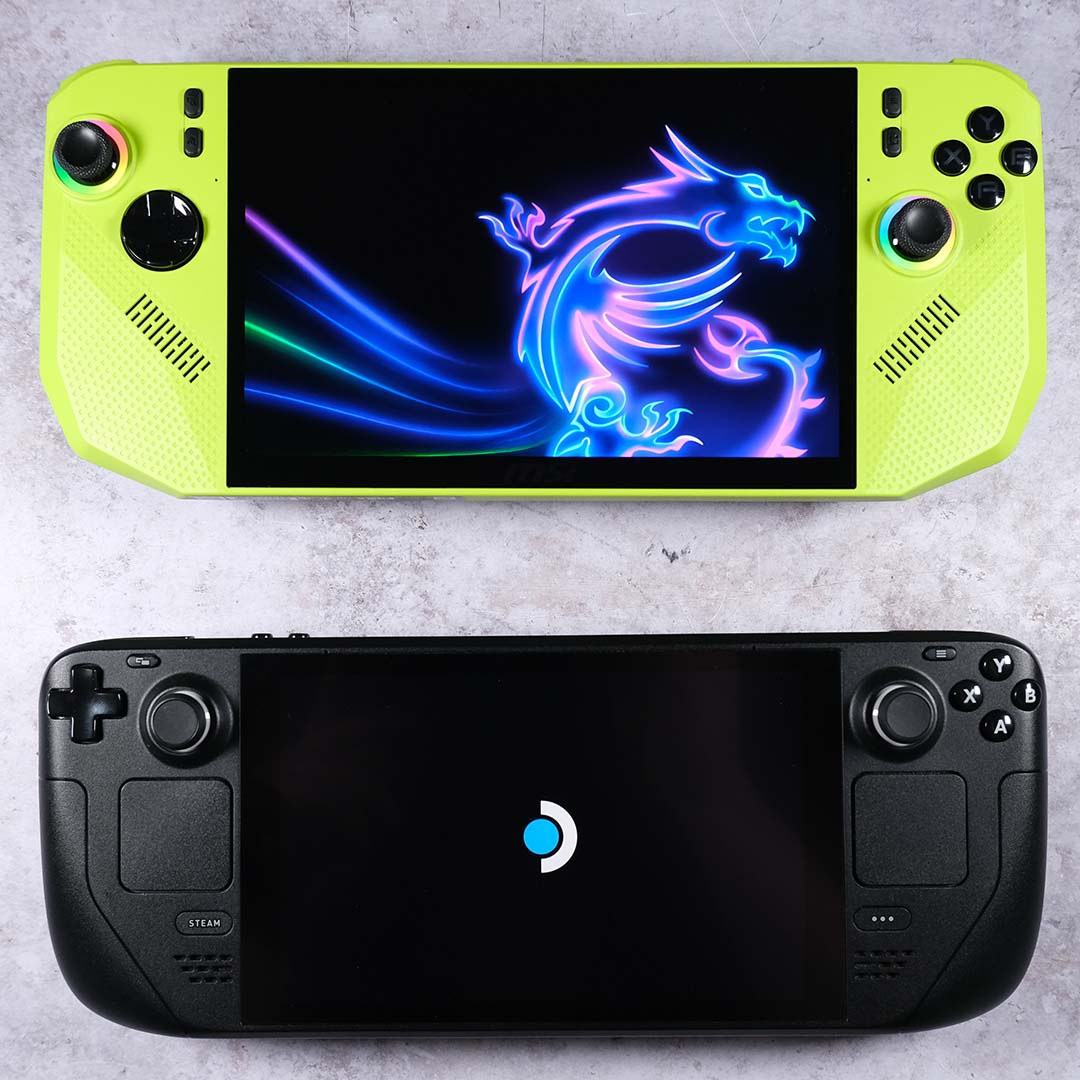
This is about as good as traditional backlit displays get for gaming handhelds. Still, I’d love to see MSI follow Lenovo and Valve and adopt an OLED panel for future handhelds, if only as part of a more-premium SKU. Even with this higher-resolution screen in front of me, it’s difficult to wean myself from the splendour of the Steam Deck OLED’s contrast and HDR performance.
For storage, the Claw A8 comes with a 1TB Gen 4 SSD. This handheld uses full-size 2280 M.2 drives, unlike Valve’s Steam Deck OLED, which opts for the 2230 form factor. These are the same size as those you’ll typically find inside a PC, making any potential swaps for larger capacities simpler. Alternatively, you can create extra space for your game library via a microSD card.
An 80Whr battery also lurks under the hood, matching the charging capacity of other high-end handhelds on the market, including Asus’ ROG Xbox Ally X. Of course, while having a large reserve of power is helpful, what matters is how efficiently the system utilises it. I’ll discuss this in detail later.
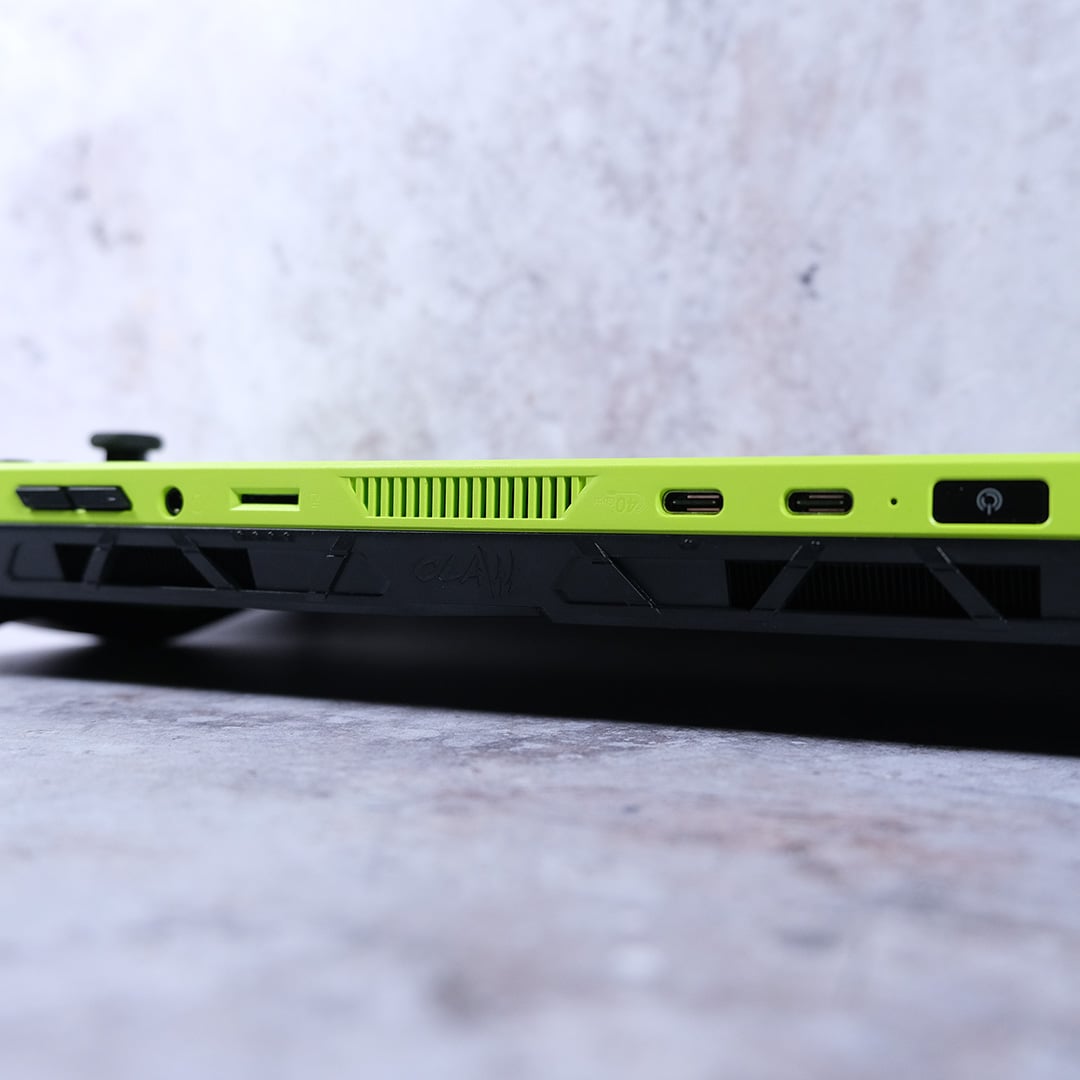
For connections, MSI offers up two USB 4 ports at the top of the device. Either one can hook up to the included 65W charger, and each Type-C port also carries up to 40Gb of bandwidth, as well as support for DP Alt display output. One could reasonably argue that these specifications are a touch overkill for most people’s handheld needs, but they definitely give you some flexibility if you ever want it.
On the wireless front, the Claw A8 supports Wi-Fi 7 and Bluetooth 5.4. While I don’t have the luxury of owning any hardware running these bleeding-edge standards, I had zero issues using this handheld on my Wi-Fi 6E home network and with my SteelSeries Arctis GameBuds. If you’re still not comfortable cutting the cord for audio, though, there’s a 3.5mm combo-jack waiting for your wired cans.
Design
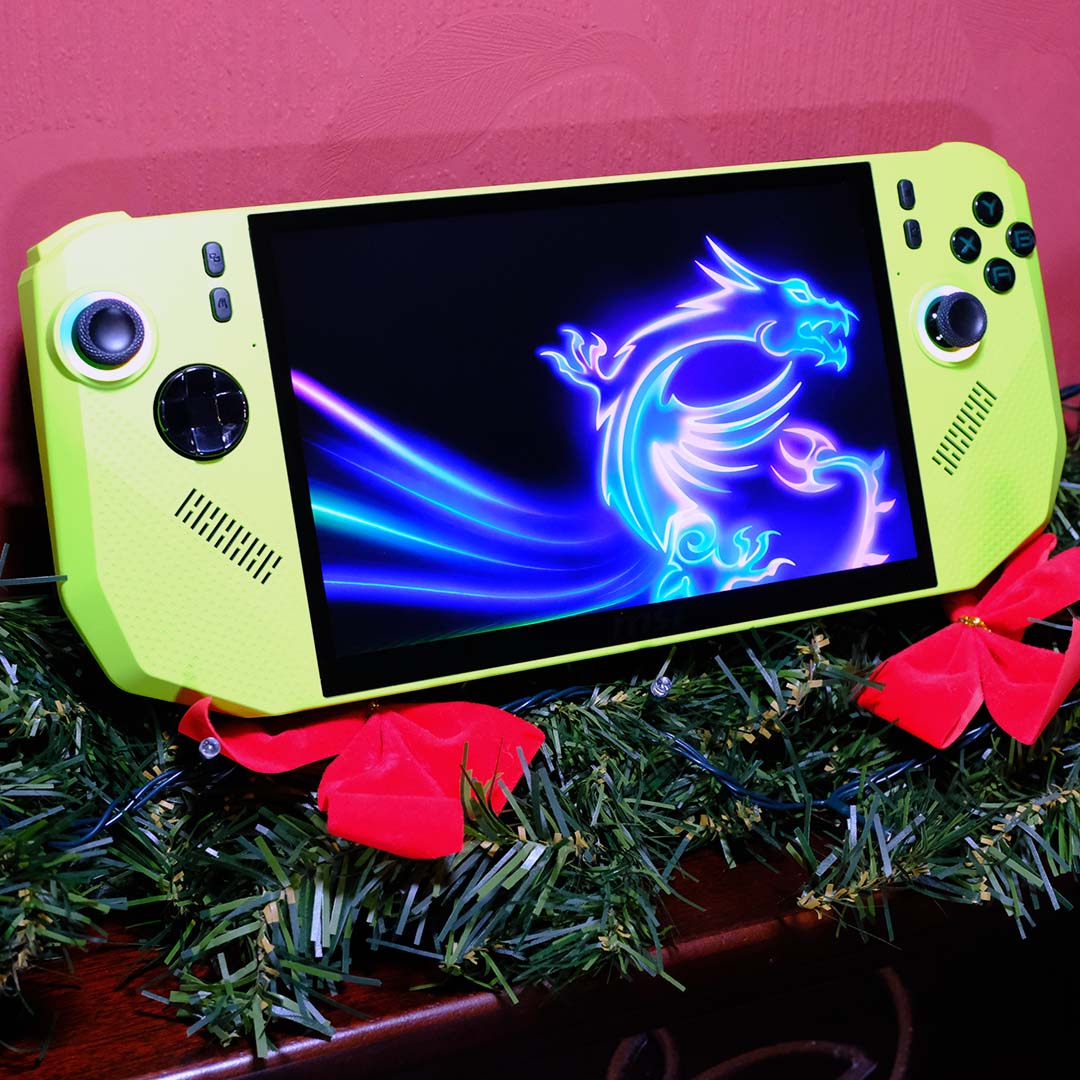
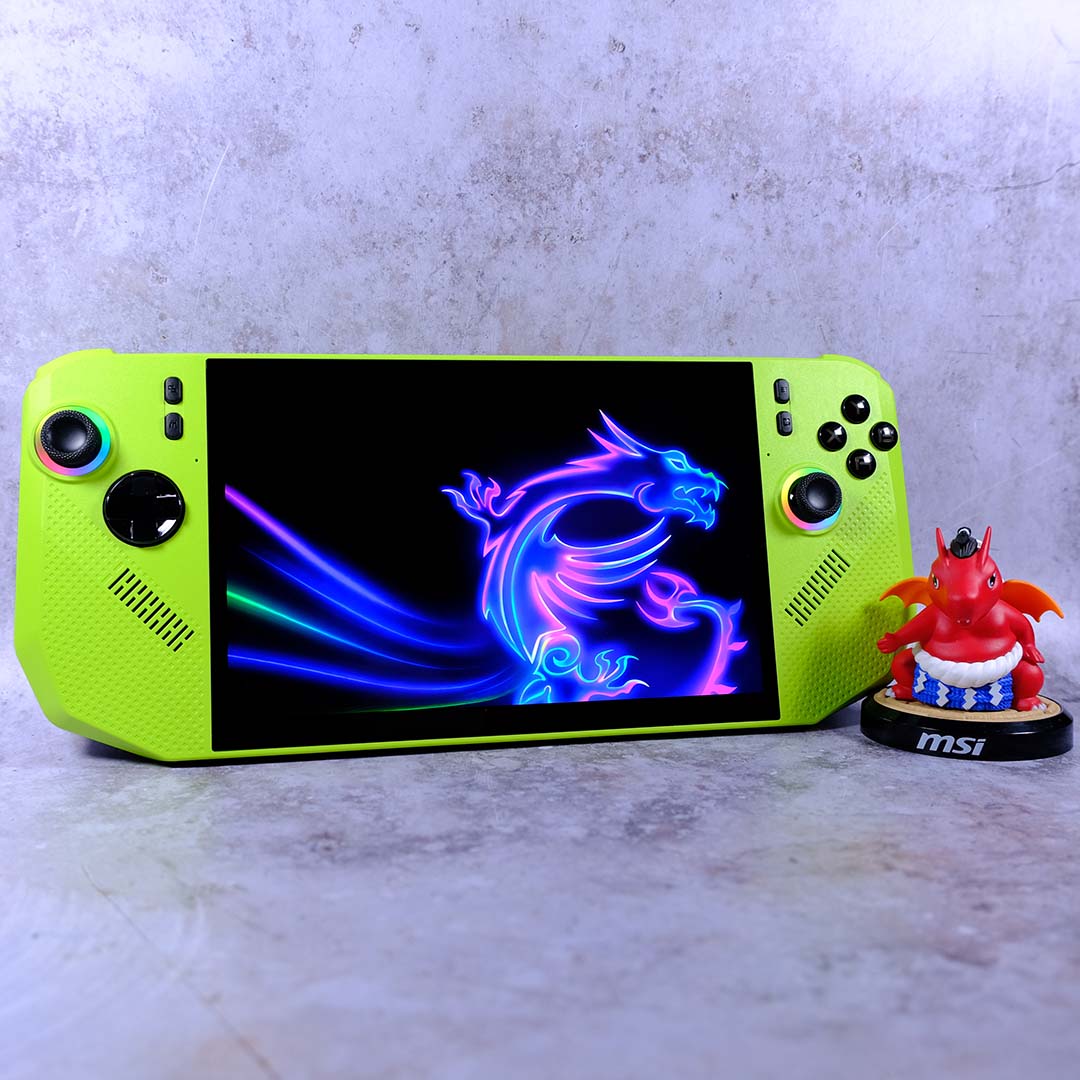
You’ll find the Claw A8 on store shelves in two suits – ‘Neon Green’ and ‘Polar Tempest’. I doubt anyone will take issue with the orthodox white colourway, but the green proved divisive in my own household, let alone anywhere else. It’s certainly striking, and in some ways reminiscent of noughties design sensibilities, such as Nintendo’s Game Boy Color. However, I definitely prefer my hardware to adopt a subtler appearance.
Paint job aside, MSI’s usual high standards for build quality are readily apparent. There’s not a hint of flex nor creaking across the plastic body, which all feel premium to the touch. In terms of heft, the Claw A8 weighs in at 765g and measures 300mm wide, making this handheld nearly identical in size and shape to its not-so-distant relative, MSI’s Claw 8 AI+.
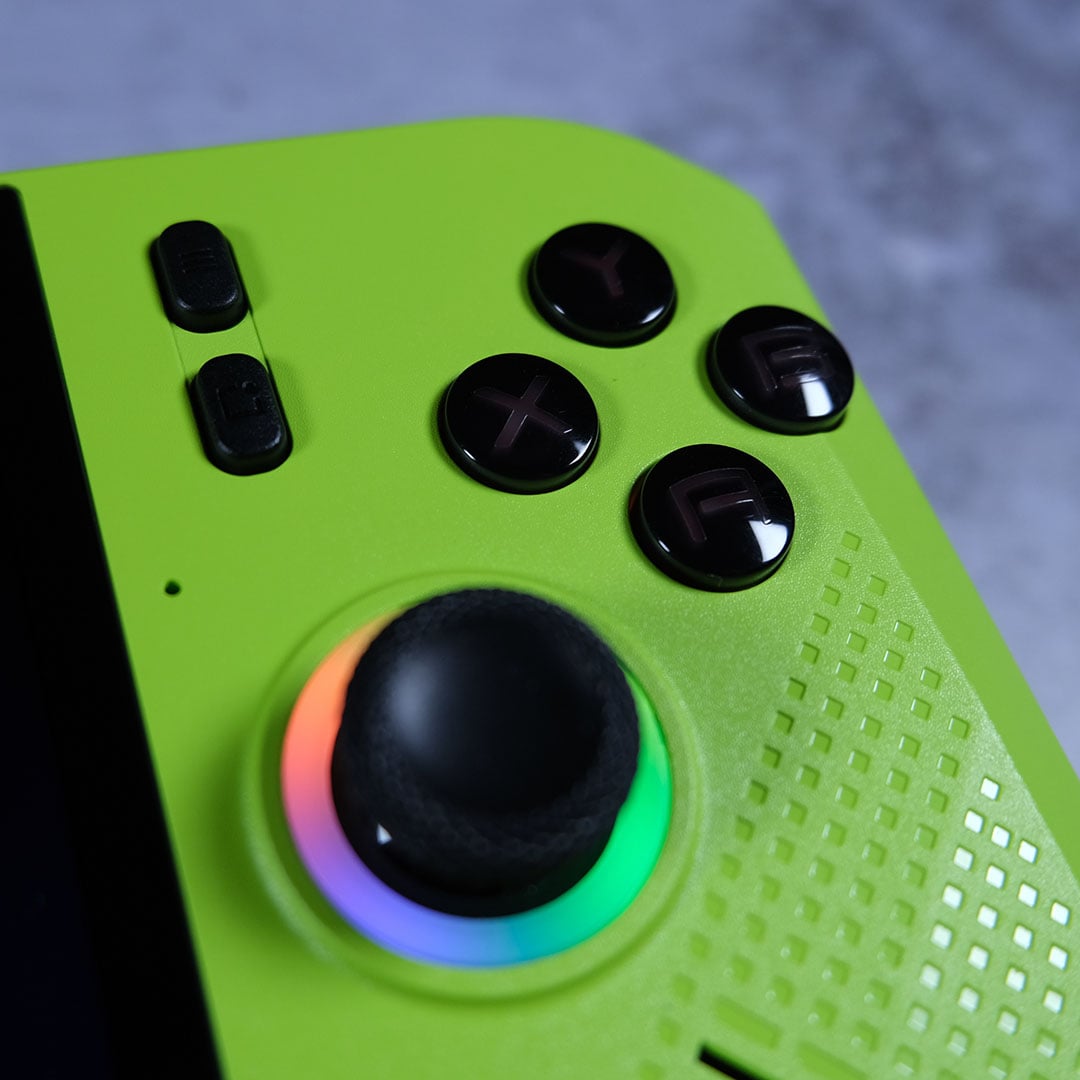
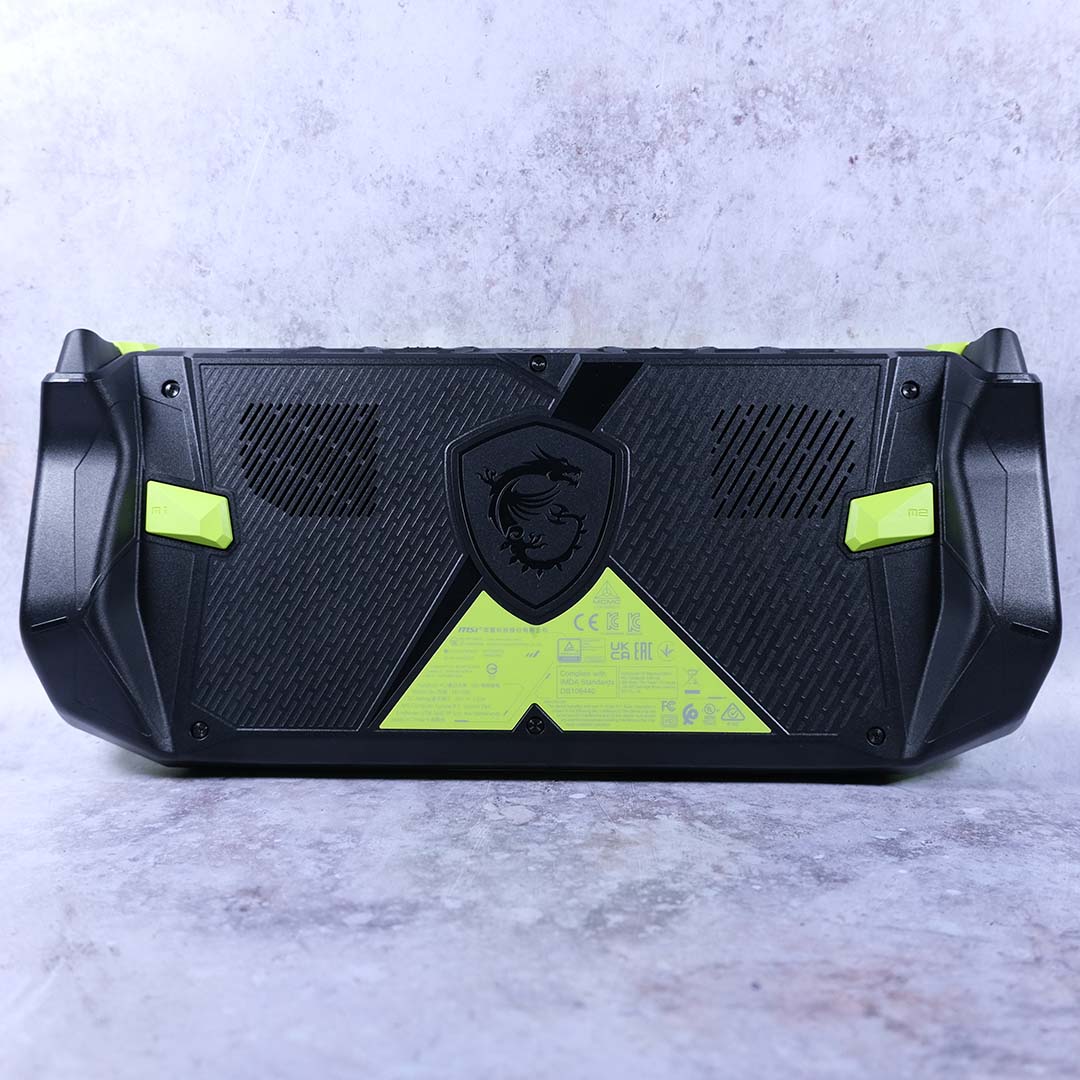
The Claw A8 is comfortable to hold for hours at a time, and feels like an elongated Xbox controller, with the same asymmetrical thumbstick and face button layout. However, I do question the use of blocky, rectangular grips around the back. They’re not uncomfortable to hold, but my grip is definitely more confident holding the rounder nubs of other systems.
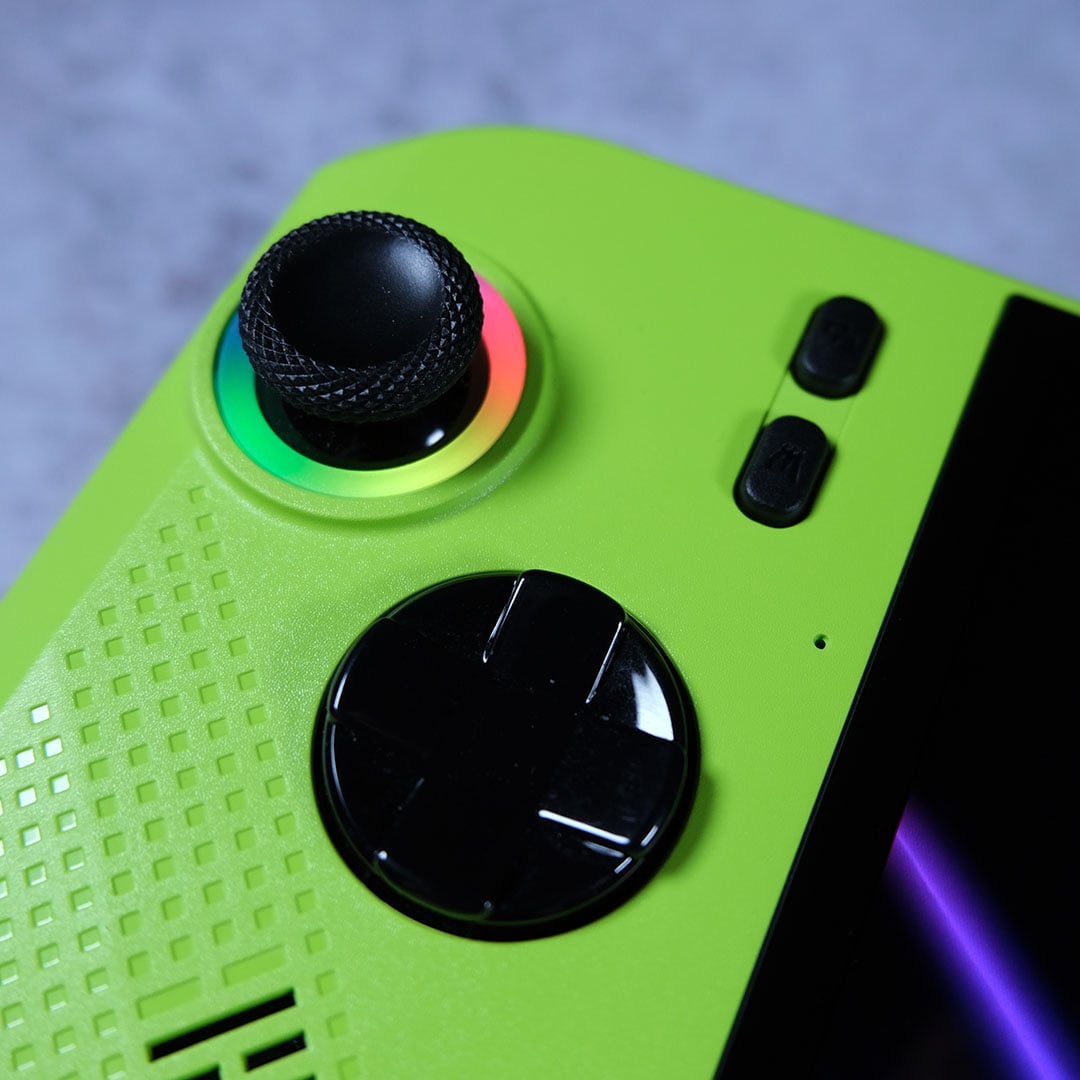
Meanwhile, face buttons and bumpers are nice and large, complete with suitably tactile clicks. Thumbsticks and triggers feel great to use as well, and will long continue to do so thanks to their hall-effect designs. This means you can expect them to last four times longer than the lifespan of traditional alternatives, and with no worries of stick drift. This is a clear win for MSI, with both the ROG Xbox Ally X and Steam Deck OLED falling behind in this regard.
Completing the Claw A8’s face are four buttons towards the top, including your usual ‘menu’ and ‘view’ buttons (which are still ‘start’ and ‘select’ in my heart). The other two provide quick access to MSI Center M an on-screen display (OSD) filled with quick settings. After Asus dropped the ball with its own layout, I feel compelled to congratulate MSI for not rocking the boat here; there’s no danger of muscle memory ruining your gaming experience here.
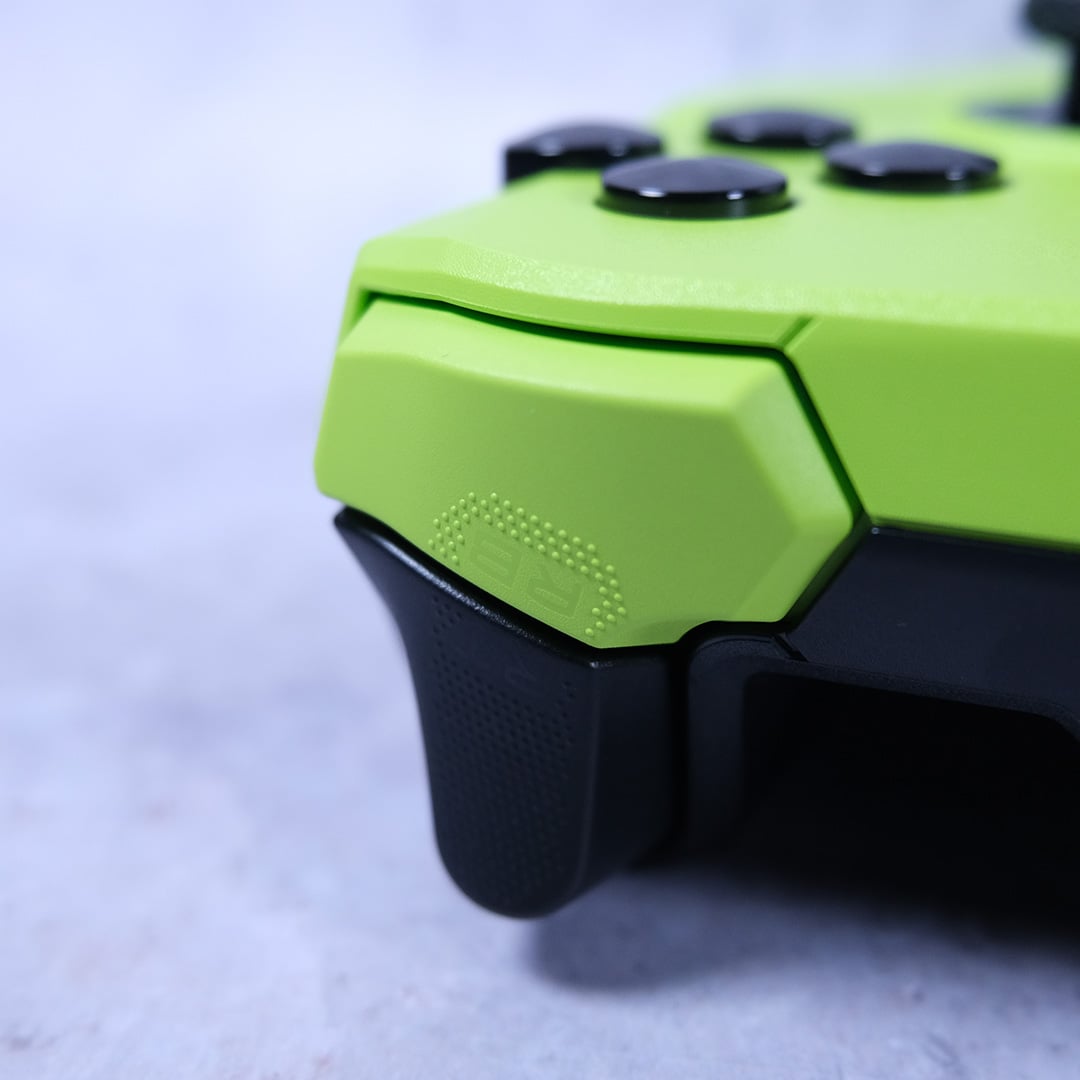
Around the back, you’ll also find two rectangular paddles. Their shape is a step back in my eyes, as the large-area square buttons commonly found on other handhelds are easier to trigger and more comfortable to use. Still, they’re nice to have once you’ve become accustomed to them.
Finally, consider this a call to all handheld manufacturers to include a carrying case with all systems. The Claw A,8 like some other premium portable PCs, perplexingly lacks one as standard. Meanwhile Valve happily ships one with its Steam Deck, and Lenovo follows suit with the Legion Go. I shouldn’t have to fork out extra to protect my already-expensive device from a bad trip in my backpack, sort it out.
Performance
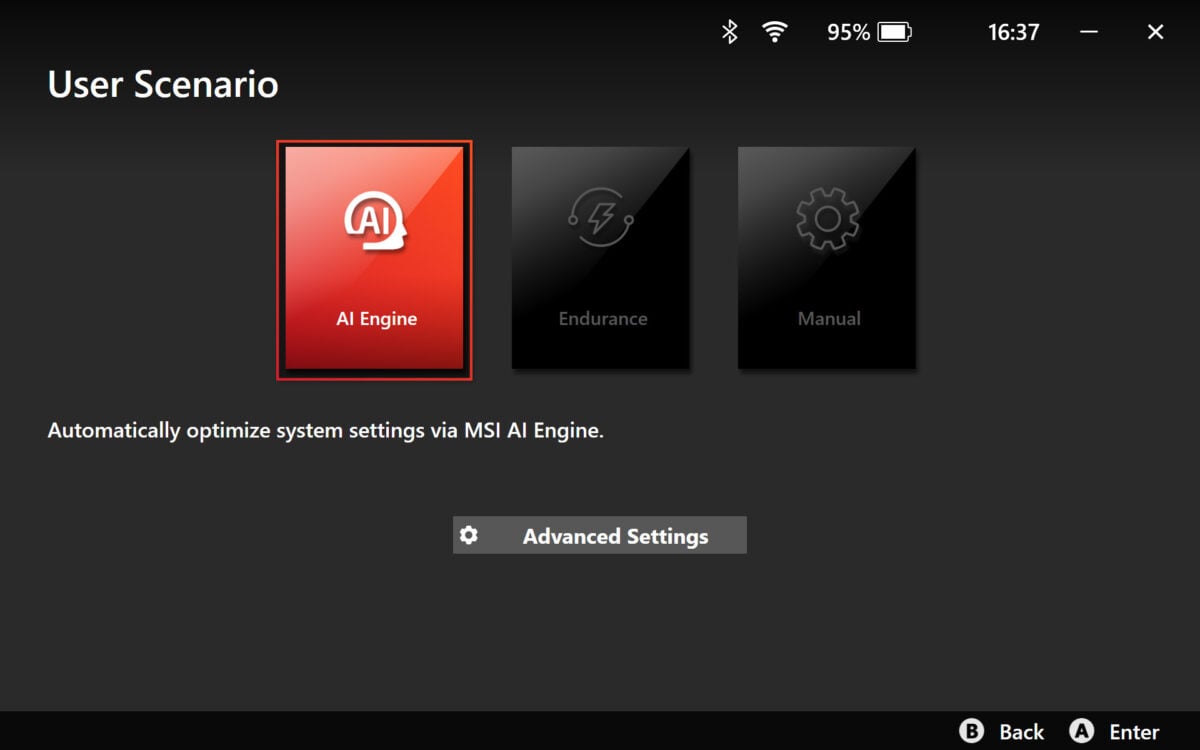
Out of the box, MSI’s Claw A8 runs using MSI’s ‘AI Engine’ performance profile. This feature claims to provide dynamic adjustments, but I’ve never seen it veer from its ‘Balanced’ preset while gaming, which caps the APU TDP at 20W.
However, you can amend power limits to your liking. Through the manual profile, you can push Sustained Power Limit (SPL) up to 35W, the maximum AMD allows the Ryzen Z2 Extreme to draw. Meanwhile, Slow Package Power Tracking (SPPT) and Fast Package Power Tracking (FPPT) can respectively push this figure up to 40W and 48W.
Intriguingly, this puts the Claw A8 ahead of Asus’ ROG Xbox Ally X in terms of stock power limits (20W vs 17W). The tables turn in manual mode, though, with MSI falling behind Asus on SPPT (40W vs 45W) and FPPT (48W vs 55W) limits. These limits apply regardless of whether you connect a charger to the handheld.

Truthfully, these differences in SPPT and FPPT power limits don’t have a significant, if any, bearing on gaming. Both values affect the APU’s ability to draw additional watts in small bursts, but most games place consistent pressure on the system. More pertinently, the 20W SPL should play to the Claw A8’s advantage, even if it’s a far cry from AMD’s default 28W.
We’ve had a fair few handhelds pass through Club386’s halls this year, so the Claw A8 has plenty of competitors. I’ll be comparing MSI’s system to its biggest competition, namely Asus’ ROG Xbox Ally X, as well as alternatives such as the Claw 8 AI+, ROG Ally X, and Steam Deck OLED.
Note that resolutions vary slightly across these devices, owing to their panels’ aspect ratios. I’ve provided disclaimers for each, so you can easily identify which handheld is running at HD/FHD (720p/1080p) and HD+/FHD+ (800p/1200p).
Cyberpunk 2077
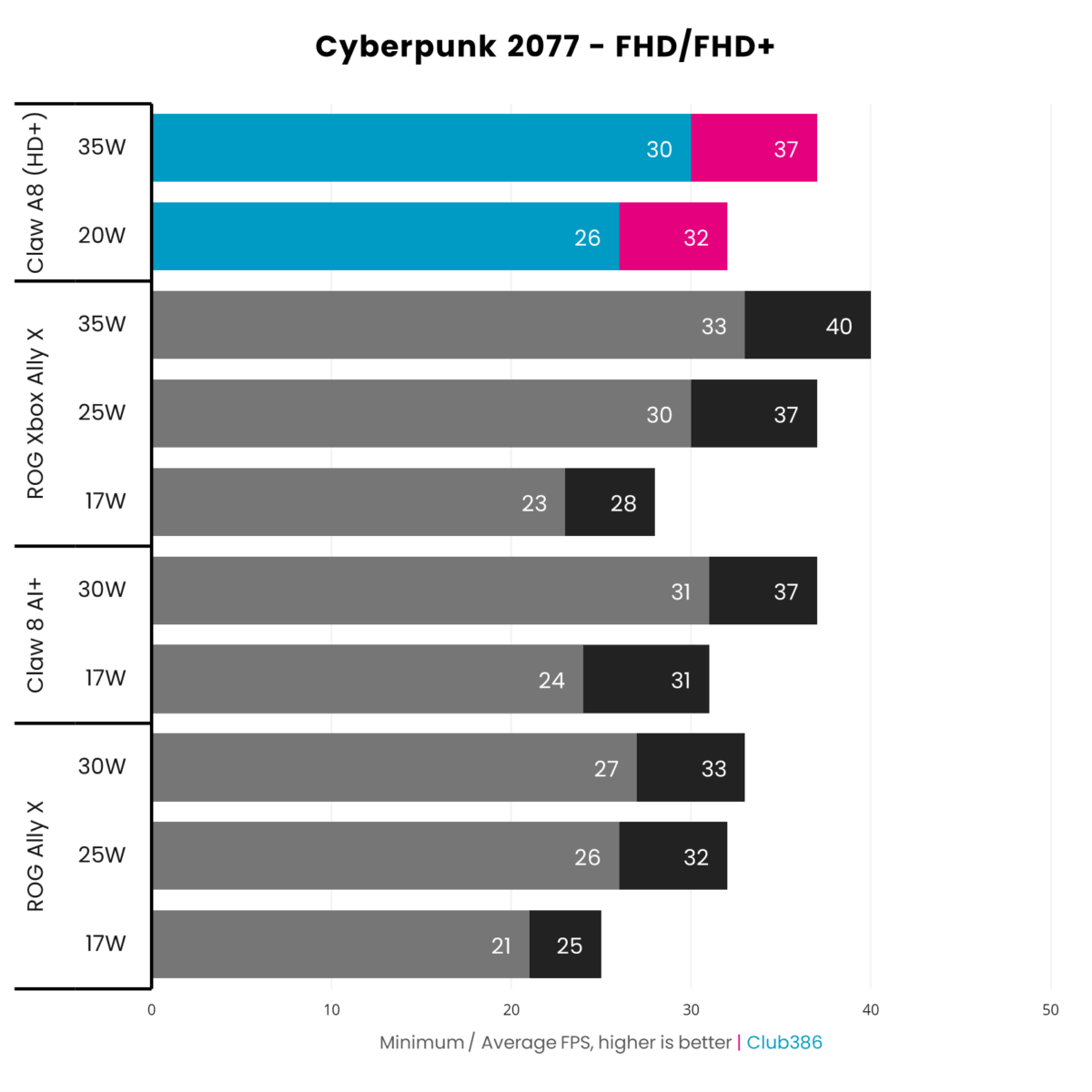
Beginning with Cyberpunk 2077, I’m using the ‘Steam Deck’ graphics settings preset with no upscaling. The Claw A8 provides solid performance at both 20W and 35W, running this game at FHD+, but the former is far and away the more efficient use of watts.
Relative to Asus’ ROG Xbox Ally X, MSI’s handheld takes the frame rate crown at stock settings with a 4fps advantage. These extra frames do come with an additional 3W cost, but there are 230,400 extra pixels in play too. Shift up to 35W, though, and Asus claims victory by 3fps.
Of all these contenders, it’s the MSI Claw 8 AI+ that emerges this judge’s favourite. Whether at 17W or 30W, this Intel Lunar Lake handheld more efficiently provides superior or similar performance to its Ryzen Z2 Extreme rivals.
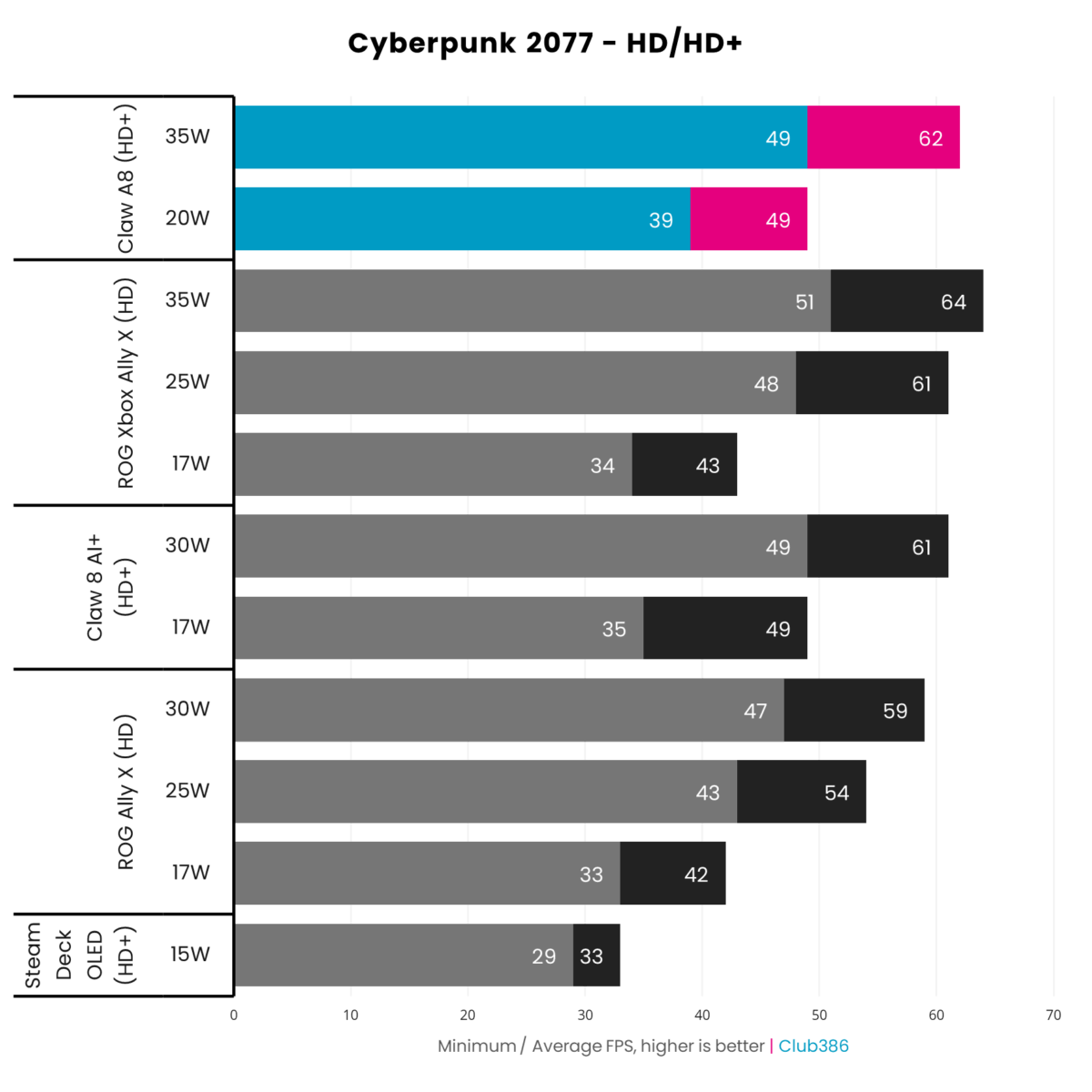
Reducing resolution to HD/HD+ allows Valve’s Steam Deck OLED to enter the fold. This handheld has the lowest power budget of all these systems at 15W, but still delivers a playable experience with a 33fps average.
Put the Steam Deck next to the Claw A8, though, and the difference is night and day. Yes, the newer AMD silicon is using 33% (+5W) more power at stock, but this translates into a welcome 48% (+16fps) increase in frame rate. Performance gains increase to 87% (+29fps) at 35W, but efficiency is an afterthought here as we’re now using 133% (+20W) more watts.
The ROG Xbox Ally X’s story once again plays second fiddle to the Claw A8 at default power settings, but pulls ahead once the Ryzen Z2 Extreme has every watt possible available to it. Similarly, the Claw 8 AI+ slides in as a cool contender, keeping pace while consuming fewer watts.
Forza Horizon 5
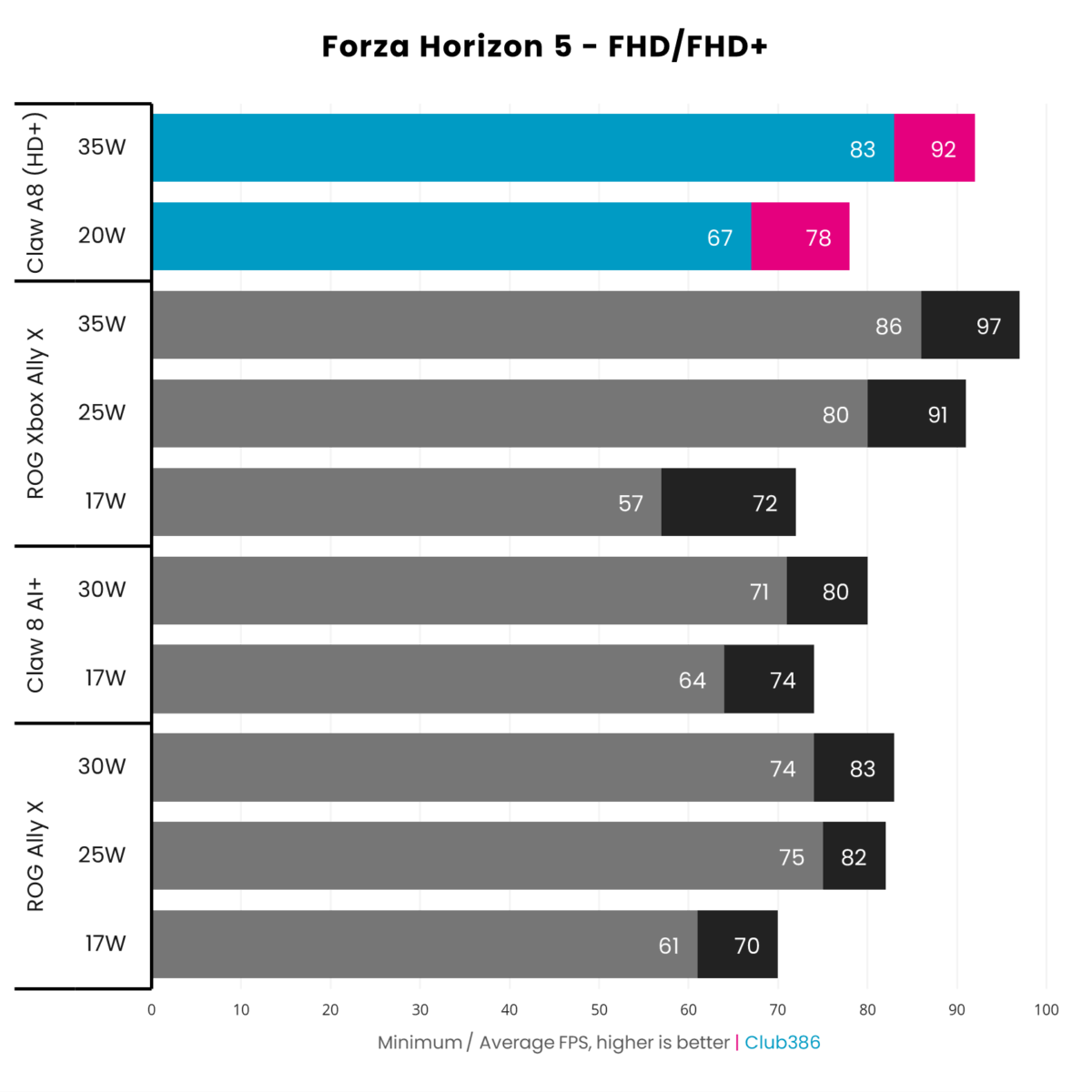
Hitting the road in Forza Horizon 5 using the game’s ‘Low’ preset lays out plenty of track for these handhelds to flex their top speeds. This race relies on both CPU and GPU performance to keep the ride fast and smooth.
This benchmark sees patterns continue from Cyberpunk 2077, as the Claw A8 takes prime podium position using stock wattages. MSI’s handheld falls behind the ROG Xbox Ally X when I push the power pedal to the metal, but only by 5fps.
Curiously, the Claw 8 AI+ holds its own at stock but falls well behind at maximum power draw. There are a few possible reasons for this, such as architectural preference for Zen and RDNA, as well as Intel’s driver optimisations. Either way, those extra watts don’t enable the system to keep up.
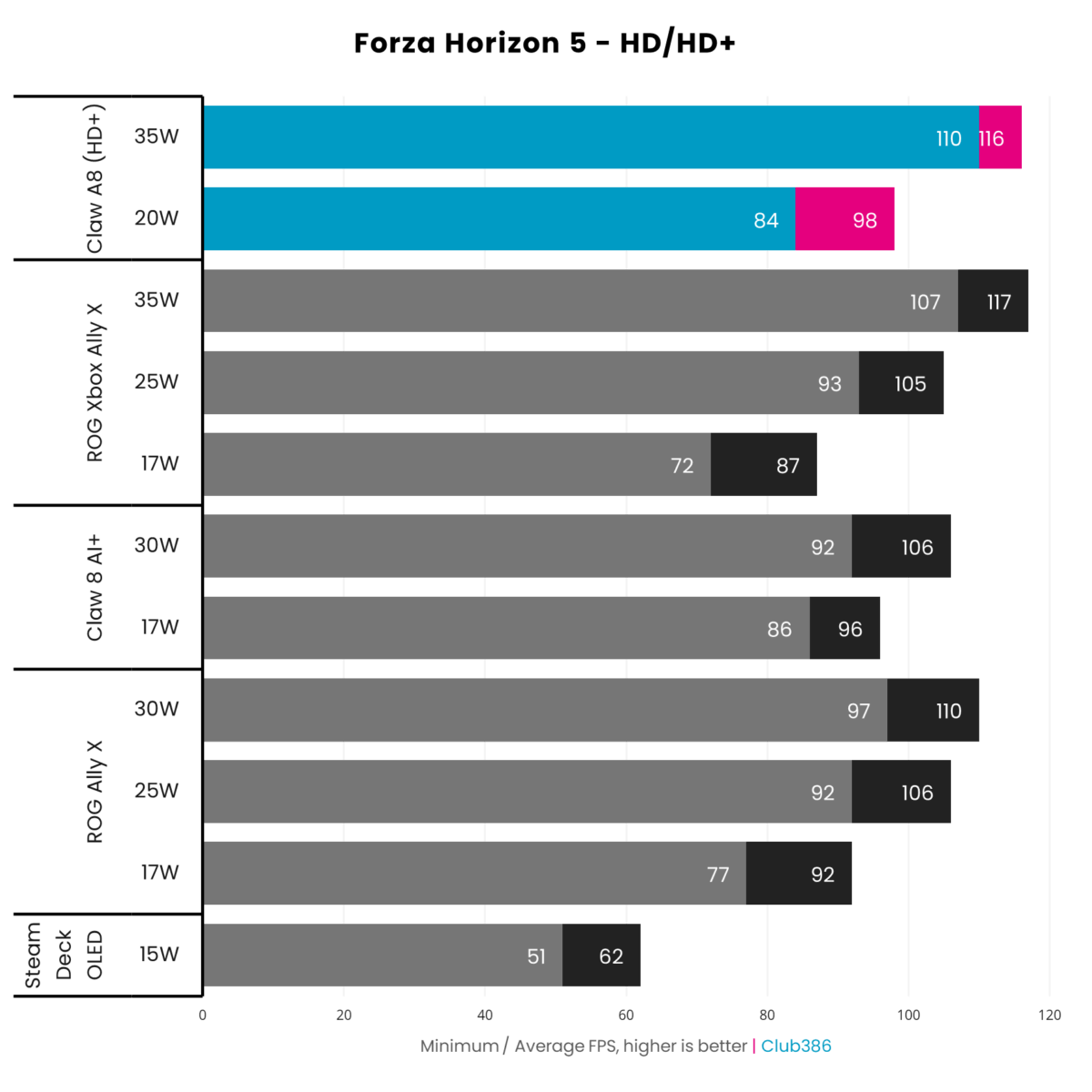
Reduce the resolution load to 720p/800p, and Valve’s Steam Deck OLED sets the frame rate floor with a 62fps average. This is fine as racing game frame rates go, but this aged handheld might as well be an affordable hatchback among sports cars here. It’s solid, but in an altogether different performance class.
First over the finish line at stock power limits is the Claw A8, speeding along at 98fps on average. That’s a 58% performance improvement for a mere 33% increase in power consumption. However, Claw 8 AI+ isn’t far behind at 96fps and 17W. Curiously, the ROG Xbox Ally X sputters along in this 17W race, even falling behind Asus’ original ROG Ally X.
A 35W nitro boost sees the Claw A8 and ROG Xbox Ally X in a photo finish, as the latter clinches the win by a single frame. Rising to 30W gives the Claw 8 AI+ an additional 10fps, which is welcome but not enough to keep up with the more prestigious podium players.
Doom: The Dark Ages
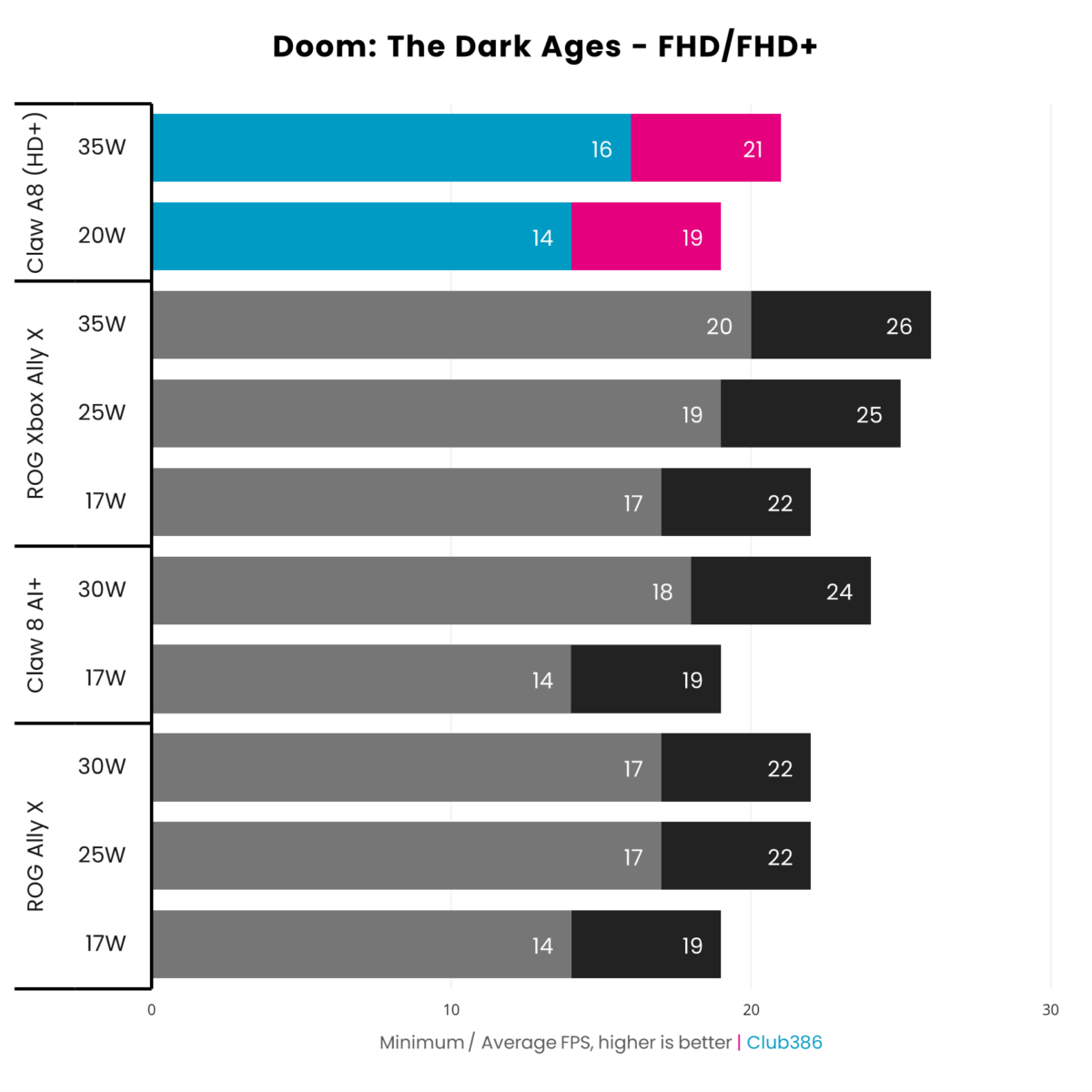
Mandatory ray tracing in Doom: The Dark Ages pushes handhelds to breaking point. Developer id Software has released a more forgiving ‘handheld’ settings preset, but I captured my legacy data for all systems apart from the Claw A8 before this update, using the ‘Low’ preset. As such, these frame rates reflect conditions harsher than necessary for all devices.
The weight of all those rays bears down hardest on MSI’s Claw A8, which delivers the lowest performance out of every device. However, we’re talking differences of 5fps at most in a collection of sub-30fps performance figures, making this shortfall more of an academic observation than anything else.
Of all the handhelds in play, the ROG Xbox Ally X emerges the best performer in terms of raw frame rates at 26fps. Meanwhile, the Claw 8 AI+ once again makes the most efficient use of its power budget, delivering 24fps at 30W.
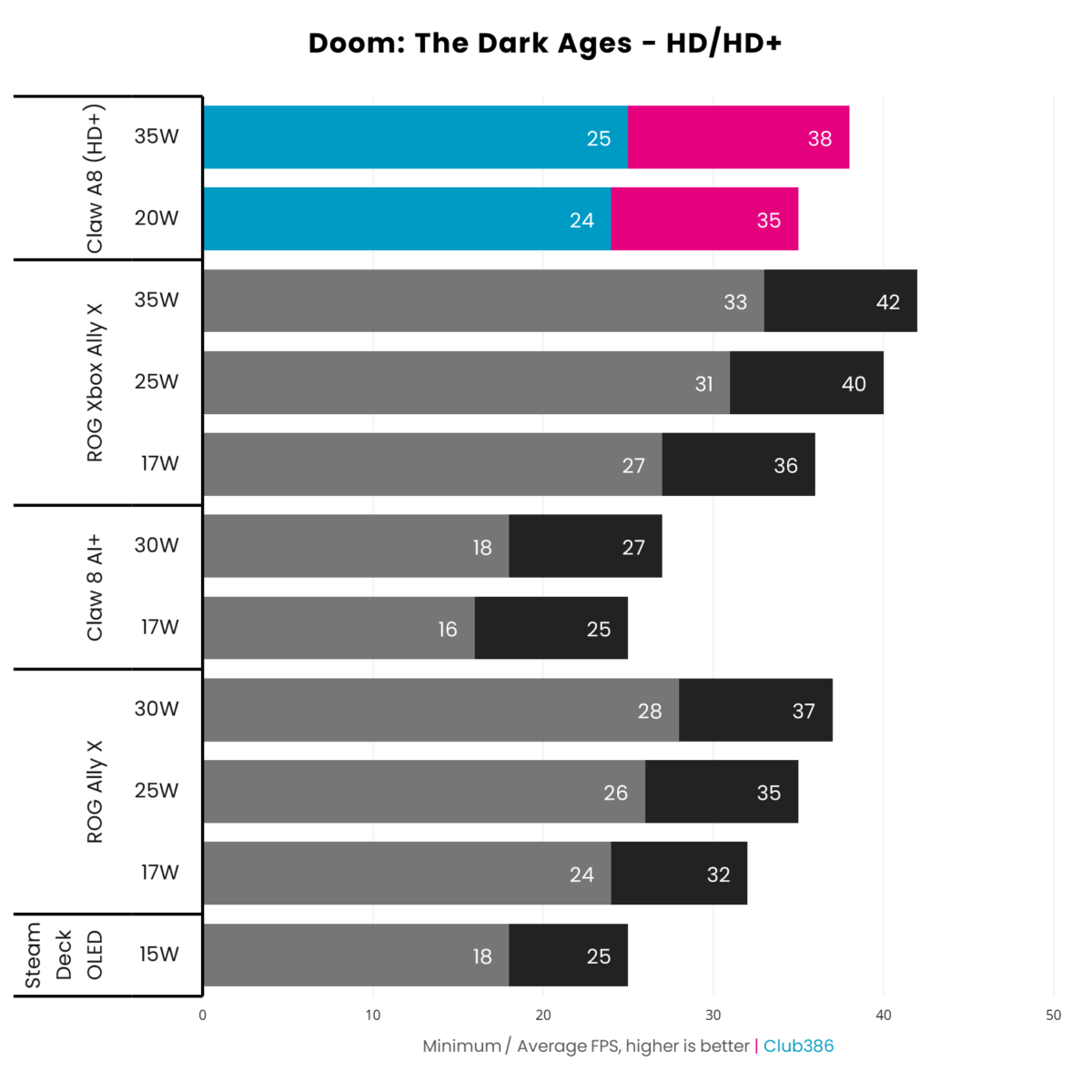
What a difference 56% fewer pixels make. Valve’s Steam Deck OLED sadly can’t muster performance above 30fps at these settings, but the Claw 8 AI+ also suffers the same fate at 27fps. It’s clear to me that there’s still room for improvement with regard to Intel graphics, much as the brand has made massive strides from the dismal days of Alchemist.
Focusing on both Ryzen Z2 Extreme handhelds, the Claw A8 and ROG Xbox Ally X continue to perform similarly, but it’s Asus’ handheld that clinches first place through 1-4fps. Importantly, the latter system also manages to keep 1% lows above 30fps at 25/30W, producing the most fluid experience on the chart.
Software

Windows 11 still has a way to go before it matches the ease of use provided by SteamOS handhelds, but the Xbox Full Screen Experience (XFSE) is certainly a step in the right direction. Now free from its initial exclusivity to the ROG Xbox Ally X, other systems, including MSI’s Claw A8, benefit from Microsoft’s efforts to make its operating system play nice outside the desktop.
I wouldn’t want to use a Windows handheld without XFSE in play. In addition to being more intuitive to navigate via gamepad, it also improves performance. By reducing the number of default background processes, Microsoft frees up RAM usage for primary applications. We’re only talking ~1GB of gains, but I welcome every byte.
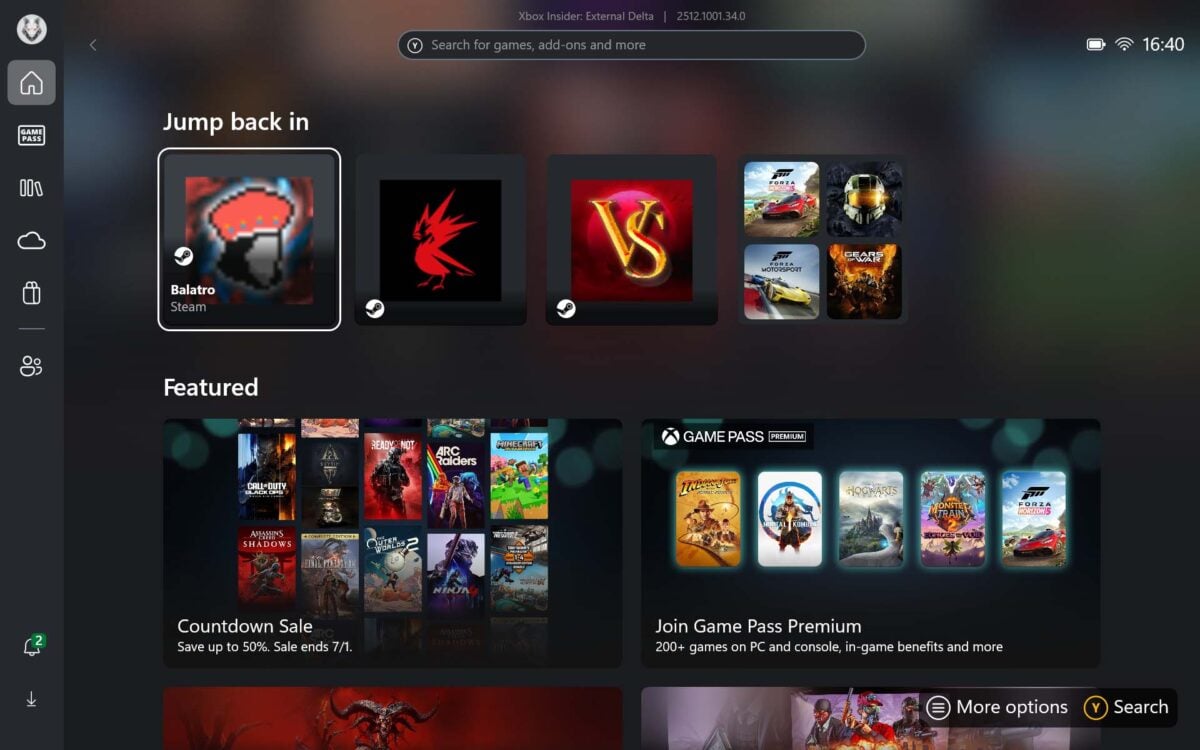
The Xbox app serves as a fine catch-all for your games across various storefronts as well, from Microsoft’s own to the likes of Steam, Epic Games, and so on. Setting up and consolidating my various libraries remains far easier here than it does on SteamOS. Alternatively, you can use MSI Center M to accomplish this same goal, and I’d argue you’re better off sticking to the manufacturer’s app.
MSI Center M not only houses all your games in a convenient carousel and grid, but also serves as a hub for TDP tweaks, system settings, and updates (bar Windows 11 patches). For the majority of my testing, I booted into this suite and didn’t think twice about swapping back to the Xbox App.
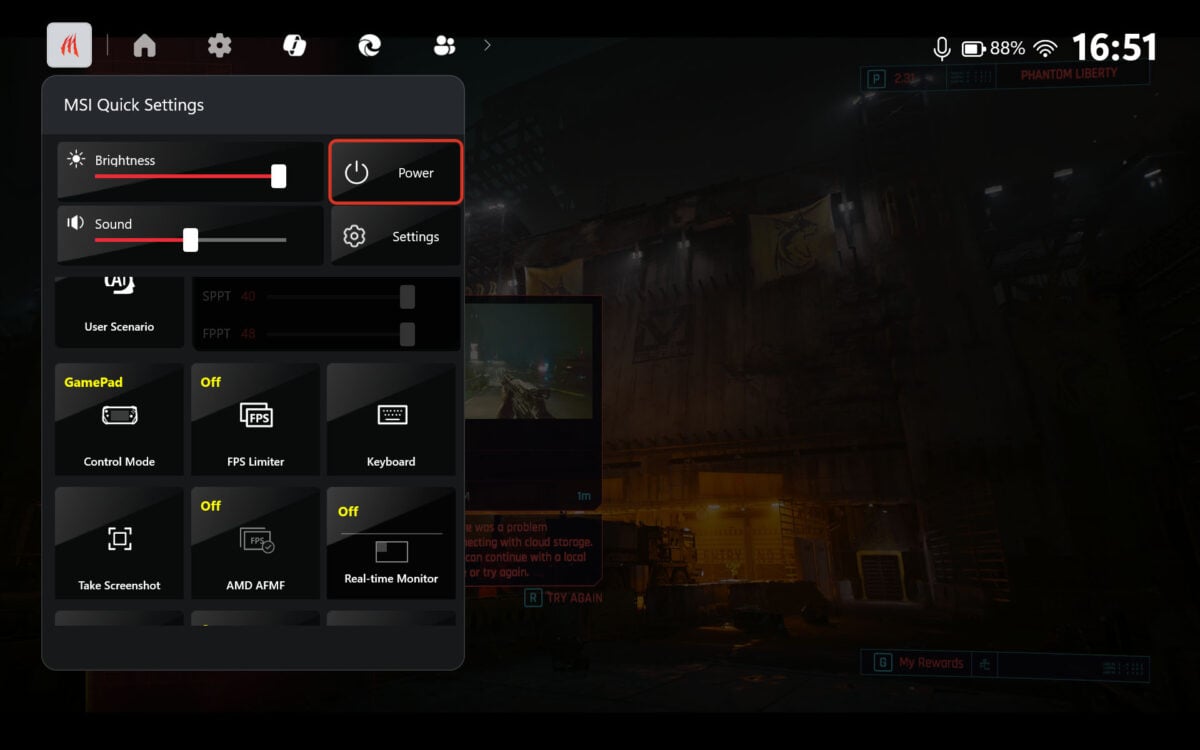
However, you’re likely to spend most of your time in Game Bar. No, this isn’t some seedy pub, but Microsoft’s built-in overlay that features a bespoke MSI Center M tab. From here, you can access control modes (switching from mouse emulation to game pad), configure power settings, and more.
There’s room for improvement in the default tile layout, with Microsoft Copilot feeling like a totally pointless inclusion. That said, you can customise the OSD however you like, making for a properly useful and responsive tool.
Battery
As I mentioned earlier, the 80Whr battery inside MSI’s Claw A8 is plenty of juice for gaming on the go. The amount of system uptime you can expect from this cell depends on how many watts you plan to pull from the electric reservoir.
APU TDP should be your primary concern for power consumption, but the rest of the handheld’s electronics, such as the screen, speakers, and more, require watts too. As such, while AMD’s Ryzen Z2 Extreme may be pulling 20W by default, overall power draw sits around 30-35W in my experience. Shifting up to 35W pushes that ceiling as high as 55W.
Using stock power settings, I was able to kick back with some Cyberpunk 2077 for just shy of two-and-a-half hours. This shrank to just under two hours with maximum watts at the system’s disposal. This is in line with my experience using the ROG Xbox Ally X, so I’m confident this is typical for AMD Ryzen Z2 Extreme handhelds.
Of course, less-demanding games won’t strain the system as hard. Handheld darlings, such as Balatro, Vampire Survivors, and countless others, will play for hours upon hours on the Claw A8 without any immediate need for replenishment from the wall.
Conclusion
MSI’s Claw A8 is another solid addition to the growing roster of Ryzen Z2 Extreme handhelds. This system keeps pace with its contemporaries and offers a substantial upgrade over the ever-popular Steam Deck.
At £850, the Claw A8 is £50 more expensive than the ROG Xbox Ally X. In service of a larger display and hall effect joysticks, this is a premium that’s worth paying. In short, though, you can’t really go wrong with either handheld.
However, if you can find a Ryzen Z1 Extreme handheld for substantially cheaper, then I’d seriously entertain opting for the older chip for maximum value. Just be quick if you’re open to doing so, as retail units are disappearing fast.
Simply put, those that must have best-in-class handheld performance, without the worry of stick drift, for less than a grand, then the Claw A8 is the system to get.
