

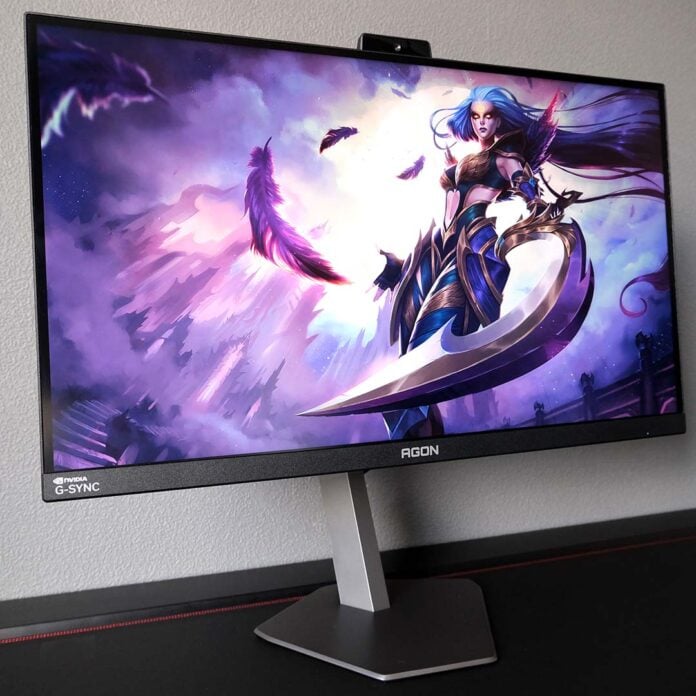
Offering G-Sync Pulsar goodness at the lowest price on the market, the AOC Agon Pro AG276QSG2 holds tempting value as a cost-saving measure for those in search of Nvidia’s motion clarity-enhancing tech. However, the monitor faces fierce competition for the attention of esports gamers that it can’t quite shake off, both from other displays with the same panel, and OLED screens.
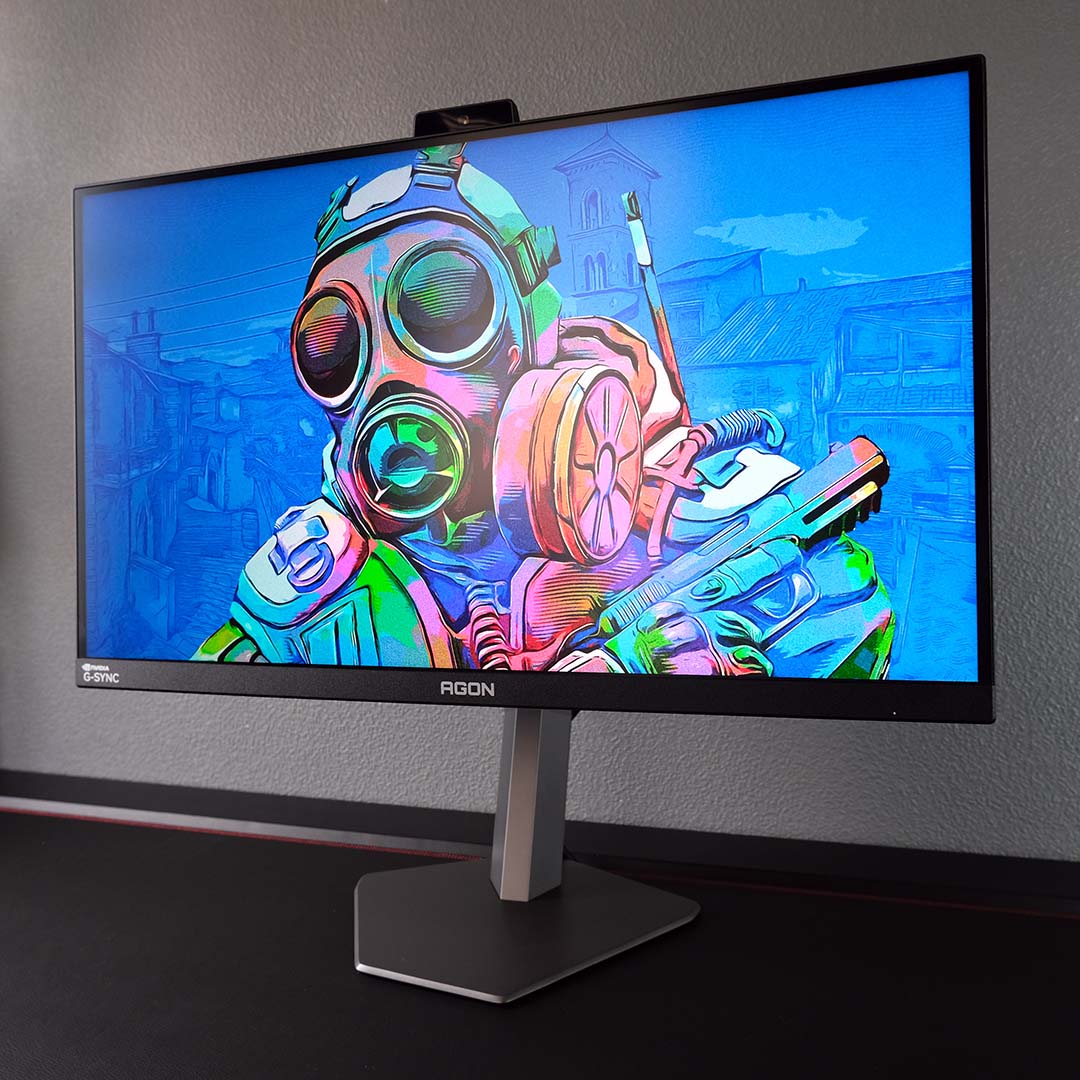

AOC Agon Pro AG276QSG2
£558 / $599
Pros
- Dazzling brightness
- Awesome motion clarity in games
- Decent colour accuracy
- Firmware can be upgraded
- Excellent OSD and software
Cons
- Stiff competition from keenly-priced OLED screens
- Strobing isn’t suitable for all people
- Some uniformity issues
Club386 may earn an affiliate commission when you purchase products through links on our site.
How we test and review products.
At £558 / $599, the AG276QSG2 is relatively low-cost for a G-Sync Pulsar monitor but firmly occupies premium QHD gaming monitor territory. Part of that price tag reflects the display’s specialist technologies, which lean toward an esports audience, but it does make comparisons to similarly priced, general-purpose screens less flattering.
Specifications
The AG276QSG2 arrives with the same display specs as all other G-Sync Pulsar monitors on the market, namely a 27in QHD IPS panel running at 360Hz. Nvidia has ambitions to bring its technology to other panels in the future, showcasing a 32in display earlier this year in conjunction with Acer, but AOC hasn’t announced any other models yet.
A QHD/360Hz combo naturally demands suitably powerful hardware to make the most of its capabilities, but G-Sync Pulsar monitors such as the AG276QSG2 come with an additional soft requirement. While these displays will work with all graphics cards, you’ll only be able to use its strobing technologies with an Nvidia GeForce graphics card, making them a practical necessity for this screen.
| AOC Agon Pro AG276QSG2 | |
|---|---|
| Screen size | 27in |
| Resolution | 2560×1440 |
| Refresh rate | 360Hz |
| Response time | 1ms (GtG) |
| Panel technology | IPS |
| Variable refresh rate | Nvidia G-Sync Pulsar |
| HDR | HDR10 |
| Ports | 3.5mm audio-out (x1) DisplayPort 1.4 (x1) HDMI 2.1 (x2) USB 3.2 Gen 1 (5Gb) Type-A, downstream (x3) USB Type-B, upstream (x1) USB Micro-B, upstream (x1) |
| Speakers | 2W (x2) |
| Warranty | Three years |
| Price | £558 / $599 |
I strongly recommend pairing the AG276QSG2, and its G-Sync Pulsar peers, with at least a GeForce RTX 5070. The card’s 12GB frame buffer will cope with the majority of new games’ VRAM requirements at QHD, and its GB205 chip will provide sufficient base performance for the Nvidia DLSS 4.5 suite to plug any frame rate gaps in the way of achieving 360Hz. Just don’t forget to pack a suitably powerful processor too, such as a Ryzen 7 9800X3D or Core Ultra 7 270K Plus.
Finally, the AG276QSG2 is capable of outputting an HDR signal, but it lacks any VESA DisplayHDR certification, nor does it sport any local dimming zones. The latter is a non-negotiable requirement for proper HDR in my eyes, so I recommend sticking with SDR on this monitor for the best picture quality.
Design
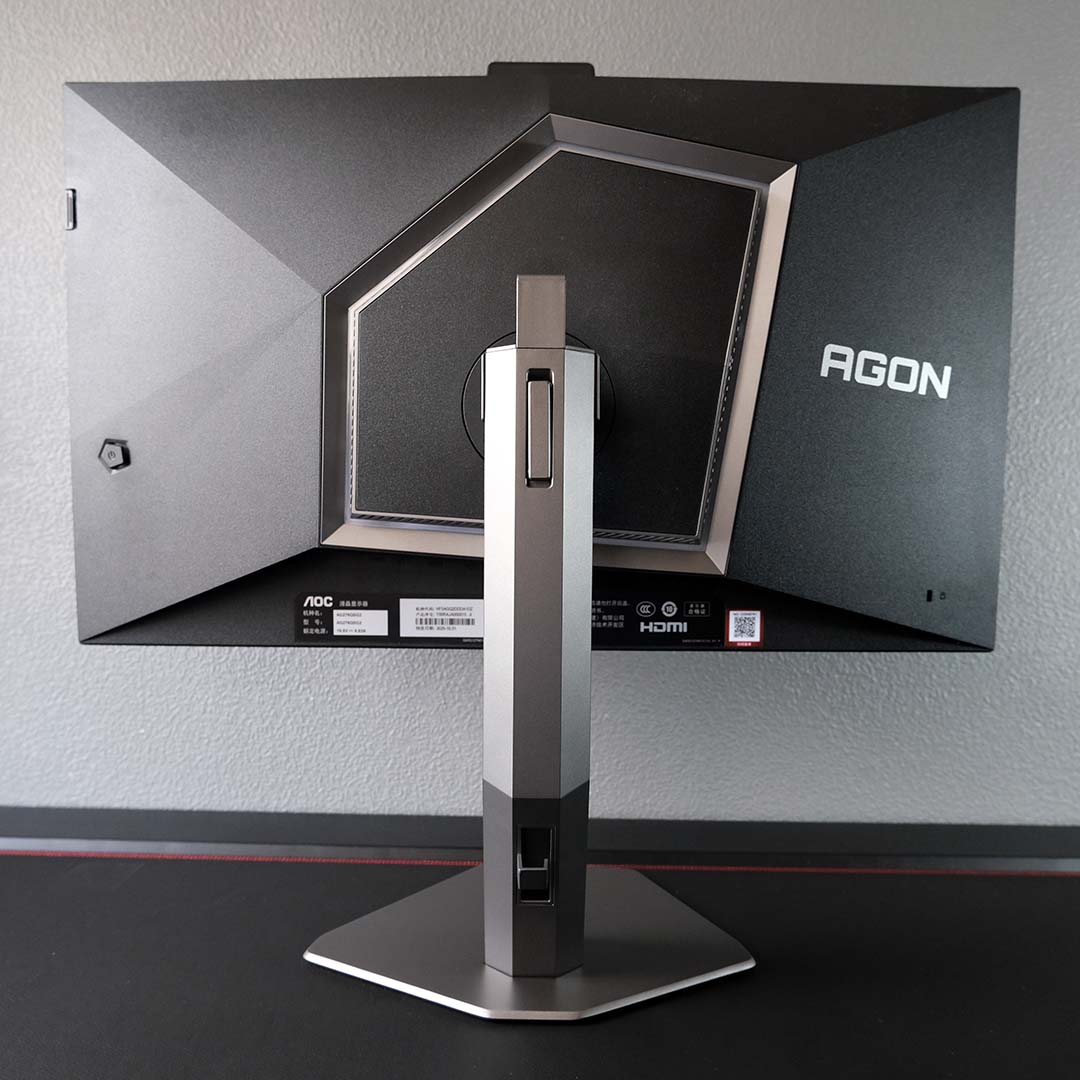
As part of AOC’s Agon Pro family, the AG276QSG2 arrives with aesthetics that lean more into its gaming identity than the company’s other monitors. While this appearance won’t suit everyone’s tastes, it does offer decent build quality.
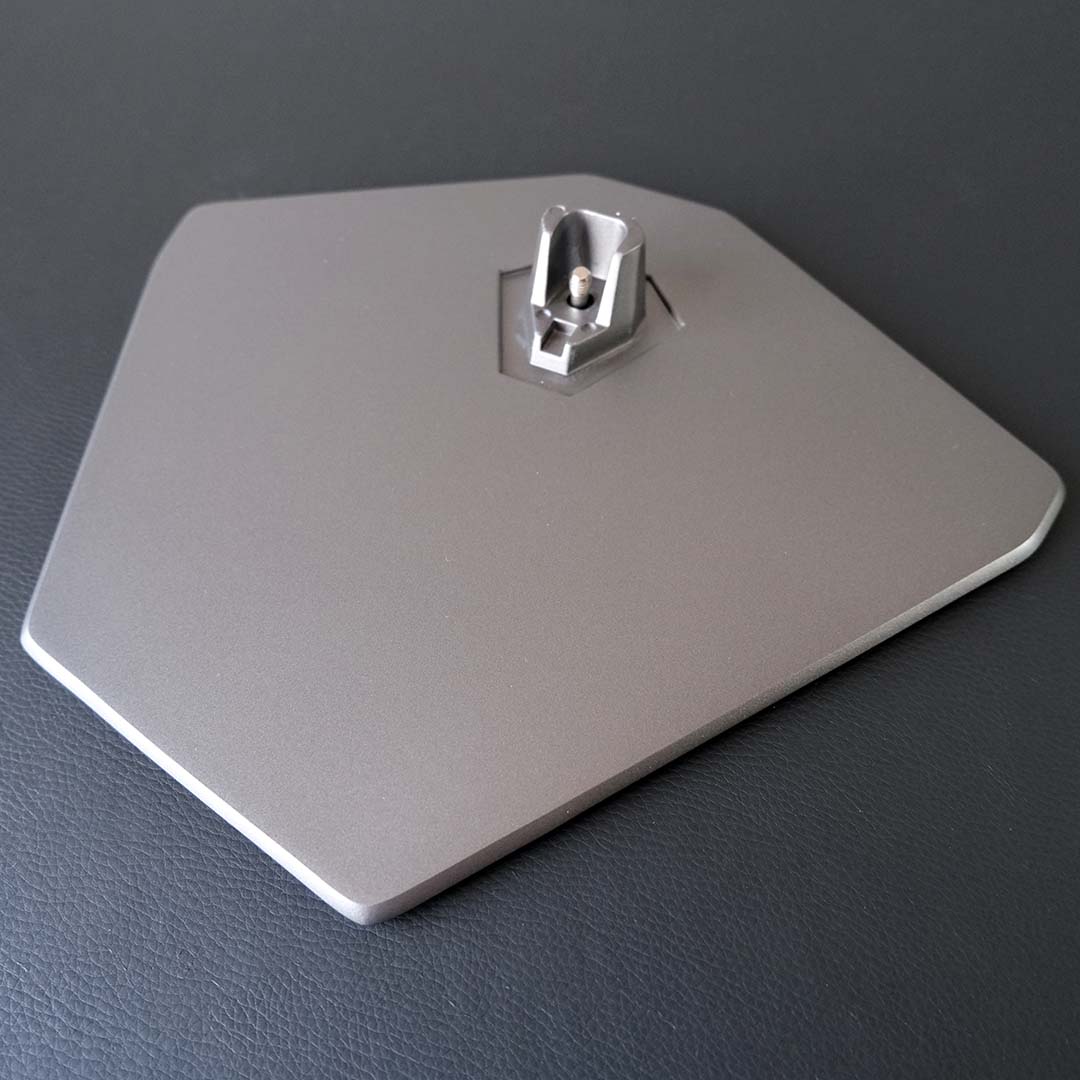
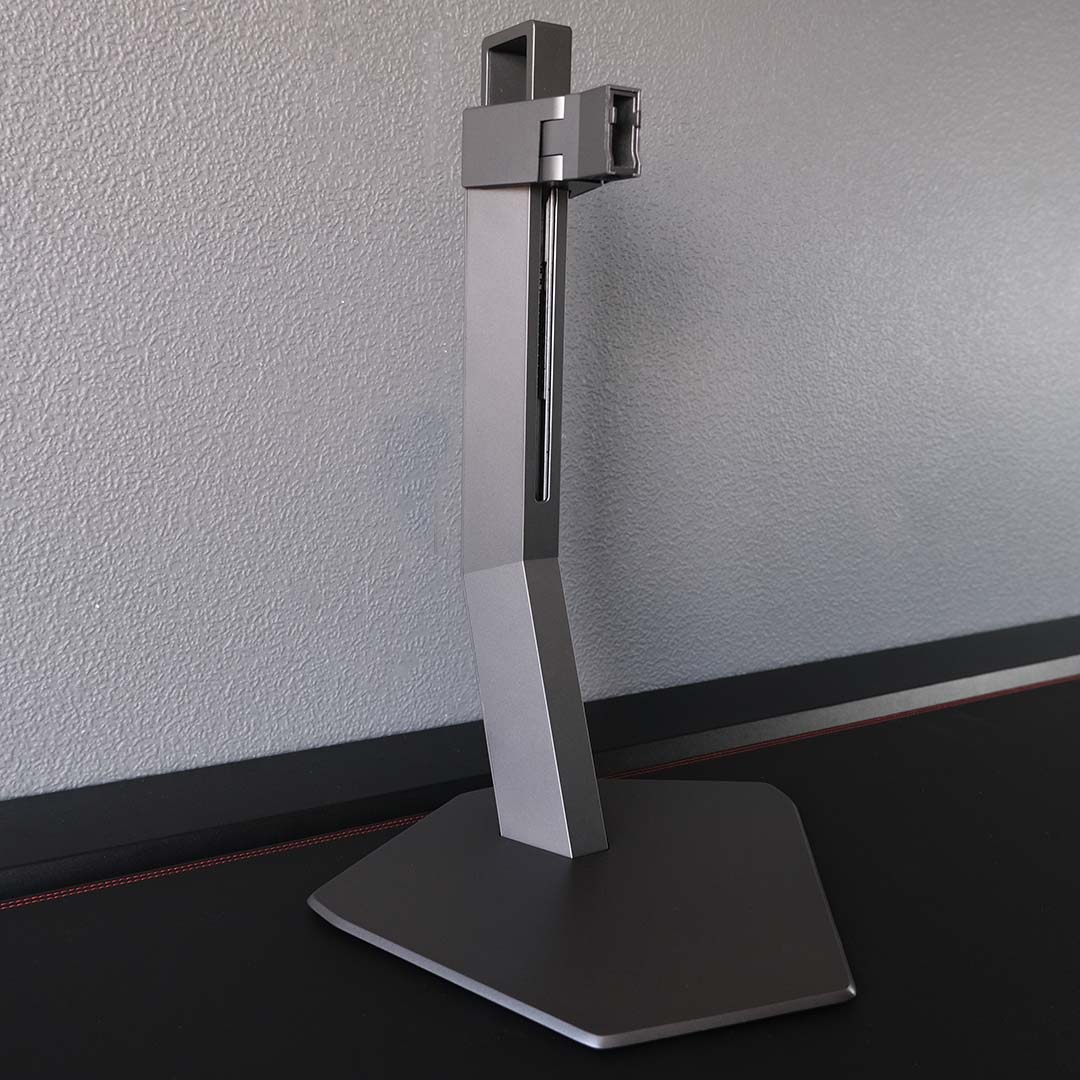
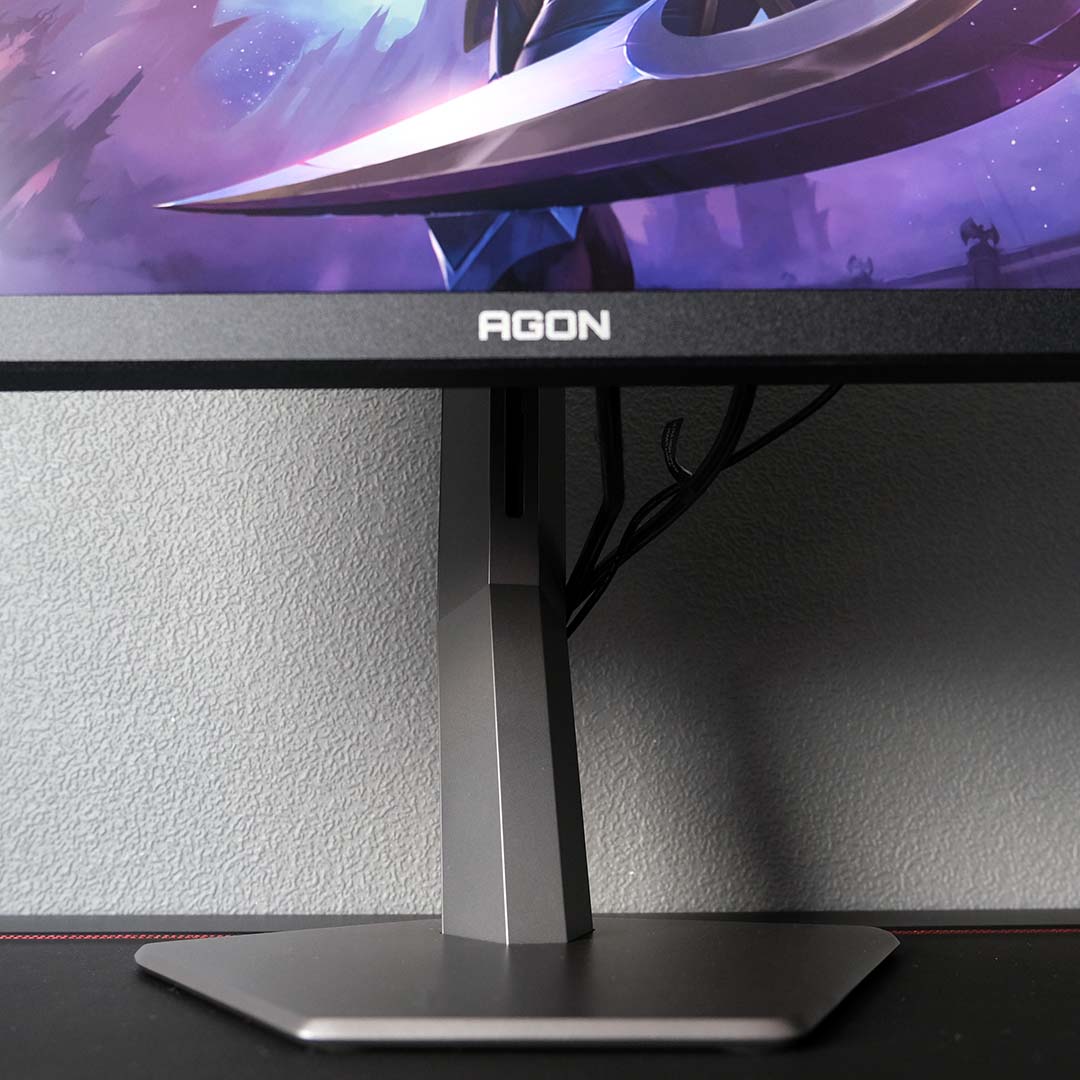
There’s no need to grab a screwdriver when popping the AG276QSG2 together, as its base, neck, and screen click together in toolless harmony. Alternatively, you can place this display on a monitor arm instead, but that does require installing a separate plate, which AOC bundles in the packaging.
Ergonomics are solid on the AG276QSG2, with 130mm of height adjustment, ±18.5° of swivel, a tilt range of 21.5°, and the ability to rotate 90° clockwise and counterclockwise. Suffice to say, it’s very easy to position this monitor comfortably within your setup.
The silvery metallic finish across the AG276QSG2’s stand is also pleasing to the eye, and a cool alternative to the usual black and white shades we see on monitors. That said, the disconnect between the neck and base’s orientation bothers my tastes, almost as if Dalí or Picasso designed this stand. There’s nothing explicitly wrong with AOC’s approach, but it just doesn’t look right to me.
Cable management is solid on the AG276QSG2, with a single hook on the back of the monitor’s neck keeping any sagging at bay. I wish the space for wiring was slightly larger/longer, to more easily accommodate thicker wires, but the system still works well. Shout out to the built-in headset perch too.
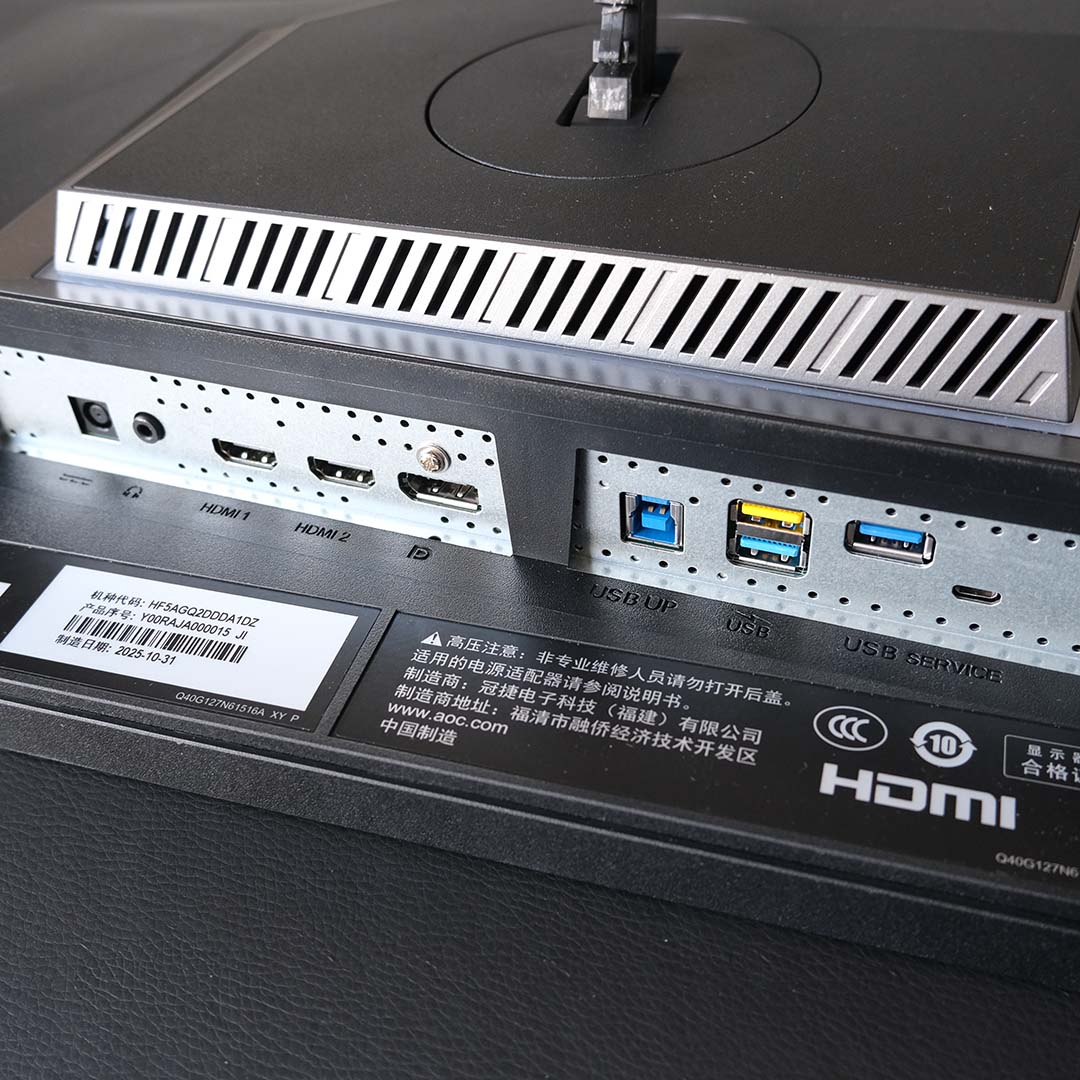
For display inputs, the AG276QSG2 offers up two HDMI 2.1 ports and a single DisplayPort 1.4 socket. The latter is the only port with support for G-Sync Pulsar and capable of running the display at 360Hz, making it the primary port for your PC.
You’ll find three 5Gb USB Type-A ports as well, ready and waiting to receive your peripherals. AOC sweetens this setup with a yellow ‘Fast Charge’ port, which can more quickly juice up any battery-powered devices.
There’s also a micro-USB port, which is only used for firmware updates. This isn’t a feature you’ll find on every G-Sync Pulsar monitor, bolstering the AG276QSG2’s value, but I’d argue it’s an important one to prioritise, as you’re forgoing new features and improvements without one.
In addition to its 3.5mm jack, the AG276QSG2 also boasts a dual 2W speaker array. While the latter wouldn’t be my first choice of audio output, as they sound particularly thin, they’re useful in a pinch if you don’t have a headset or dedicated speaker setup.
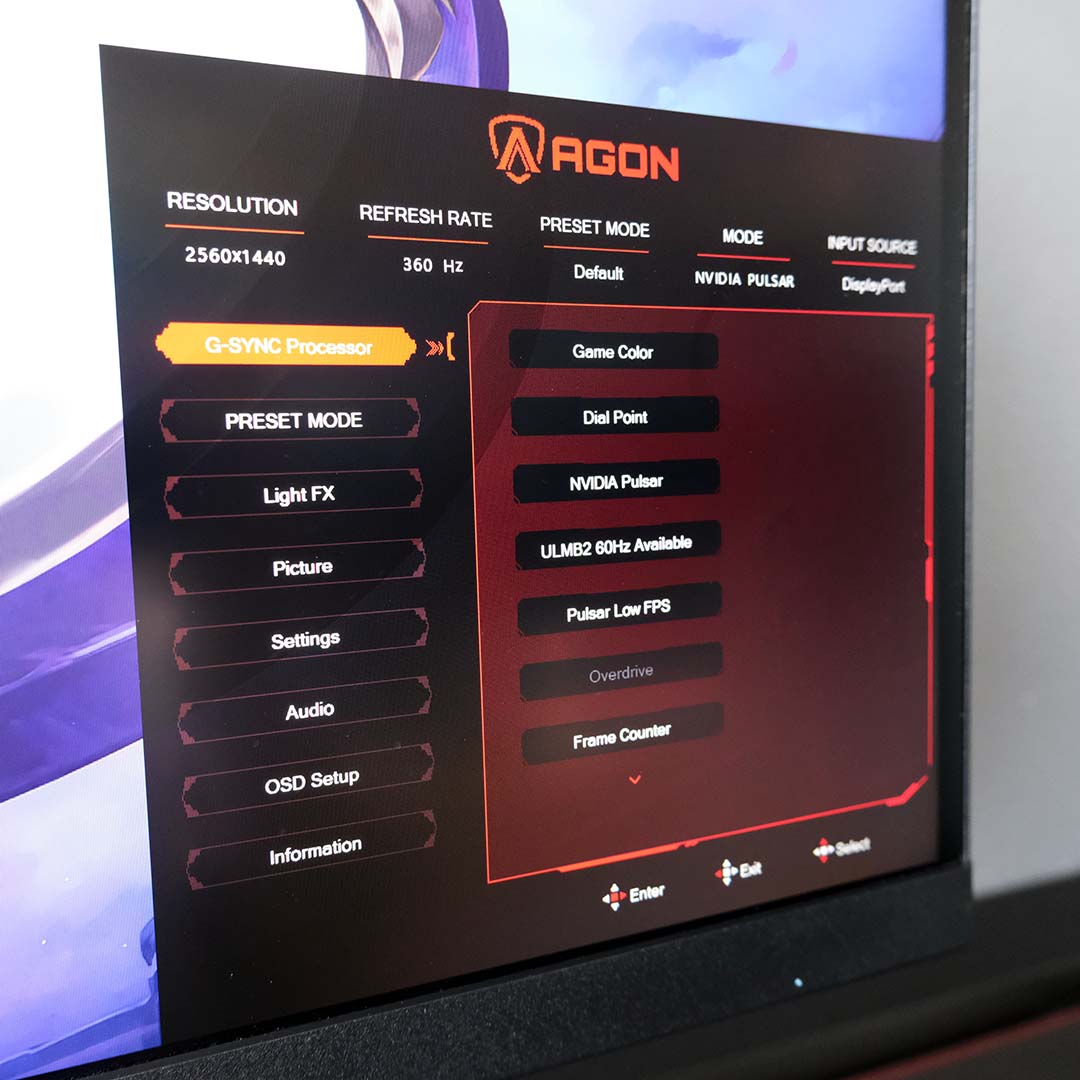
Comparing the OSD design on the AG276QSG2 to other Agon Pro monitors, I’m glad to see AOC has greatly improved the look and layout of its monitor firmware. Settings are much easier to find than previously, and I greatly prefer this lighter, more legible colour scheme.
OSD controls are available either via a joystick, which sits at the centre-right edge of the AG276QSG2’s rear chassis. Alternatively, you can use Windows to adjust your settings through AOC G-Menu. I’m glad to have both options, as each works well, although the G-Sync Pulsar settings are only available through the physical controls.
Outside of toggling G-Sync Pulsar and Nvidia ULMB2 (ultra low motion blur), there’s little reason to dive into the OSD beyond firmware upgrades, as you can access most of the settings through G-Menu. I’m personally glad to see there are no crosshairs or sniper scopes cluttering the menus.
Like other monitors, the AG276QSG2 defaults to an efficient display profile out of the box, at the cost of brightness. Thankfully, AOC does offer you choice to tip the scales the other way via an on-screen prompt after first boot up, and this is the way I prefer to use the monitor.
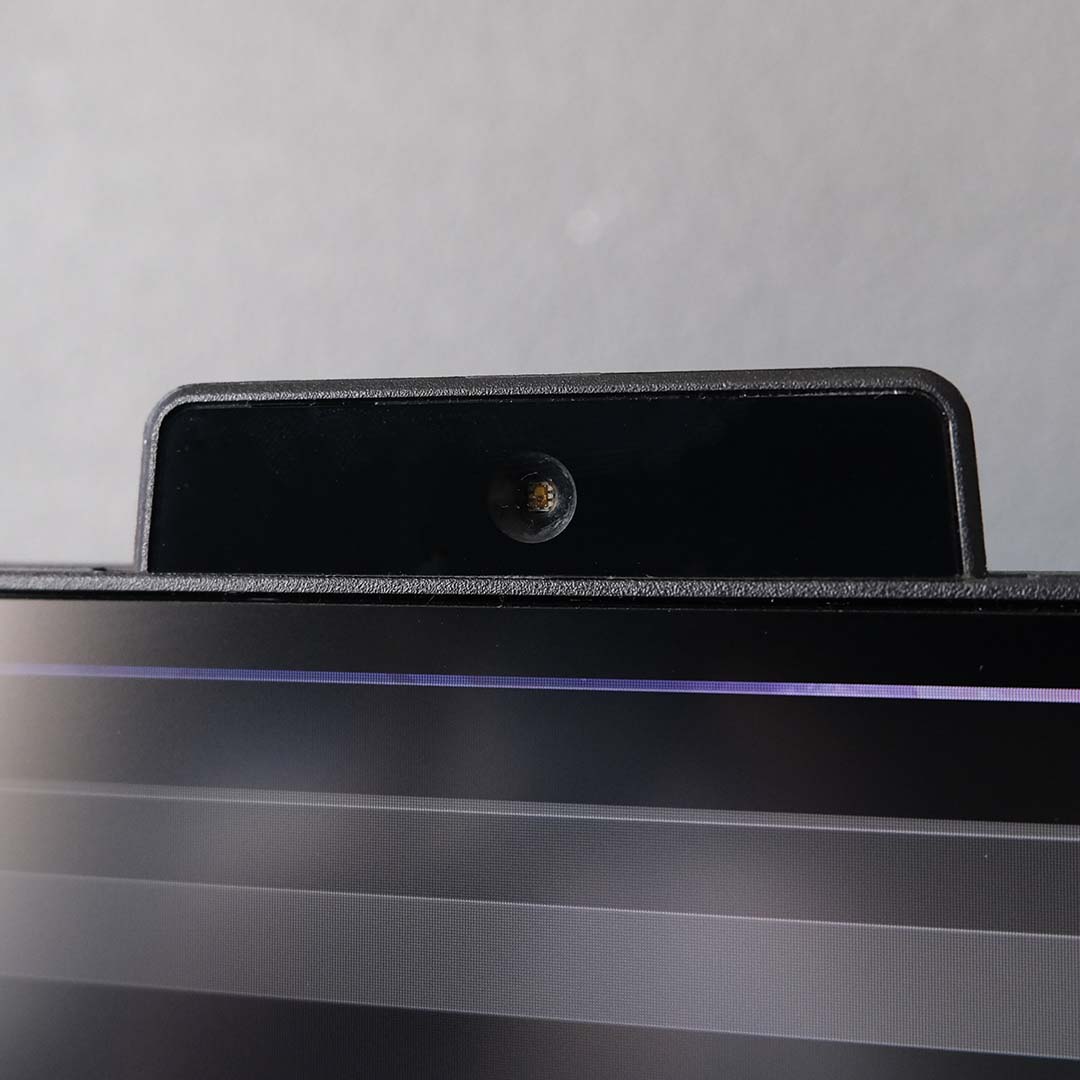
All G-Sync Pulsar monitors arrive part and parcel with a built-in light sensor; the AG276QSG2 is no exception. This device analyses the ambient lighting of your surroundings and aims to improve image quality through on-the-fly brightness and colour temperature adjustments. In practice, the results are a mixed bag.
Starting with the positive, Ambient Adaptive Luminance is a genuinely useful feature. As someone who spends hours at a time at my screen, with varying degrees of sunlight beaming through my office window, having brightness seamlessly increase and decrease in response saves strain on my eyes.
I’m less sold on the usefulness of Ambient Adaptive Colour. Shifting colour temperatures above a 6,500K white point does reduce eye strain, particularly in low light conditions, but can dramatically affect the look of a game. Its effects are a step too far for my tastes, but the feature is at least optional.
Performance
Despite Nvidia announcing the technology several years ago, it isn’t until now that we’re seeing the first G-Sync Pulsar monitors, such as the AG276QSG2, come to market. As such, it’s important to understand how the feature promises 1,000Hz+ of motion clarity on a 360Hz panel before we get into what it’s like to use a display like this one.
Credit where it’s due, Nvidia has put together a solid G-Sync Pulsar explainer in the video above. In short, though, the technology is a marriage of variable refresh rate (VRR) and strobing.
These two features are prevalent on most modern LCD monitors, but have remained mutually exclusive until the advent of G-Sync Pulsar. Pairing VRR and strobing without noticeable flickering has proven challenging, but Nvidia has sussed a method of doing so, providing tear-free gameplay experiences with enhanced motion clarity.
As I mentioned earlier, it’s important to note that you’ll need a GeForce graphics card to enjoy the benefits of G-Sync Pulsar. Nvidia says this is due to driver-level tunings, and there’s no sign of an open-source approach benefiting Radeon or Arc cards anytime soon.
For more details, give my G-Sync Pulsar announcement coverage a read, as well as Nvidia’s own blog post.
Blur Busters’ UFO test pattern provides the best way to analyse the benefits G-Sync Pulsar offers in a controlled test environment. Toggling the feature on and off, there’s an appreciable uptick in motion clarity while active.
Nvidia claims “4x effective motion clarity” in its marketing materials for G-Sync Pulsar. In short, this means 360Hz should appear close to 1440Hz, with 90Hz acting as the monitor’s base refresh rate, and feeling like a 360Hz screen in action.
It’s impossible for me to put the former scenario to the test, but adopting the other makes for a close imitation – at 90Hz, this monitor does feel incredibly smooth and responsive. It’s not quite on the same level as native motion clarity at 360Hz, but it’s still clear this technology works and is well worth turning on.
I spent the majority of my time testing the AG276QSG2 via Counter-Strike 2, my preferred choice of competitive FPS. However, I dabbled in some rounds of Rainbow Six Siege and League of Legends too.
Like all good performance-enhancing features, G-Sync Pulsar works its magic without proving distracting. This can make the tech harder to appreciate once you become accustomed to it. However, turning it off will make you quickly realise just how big an impact this strobing tech has on motion clarity.
As much as esports titles benefit from G-Sync Pulsar, you can expect motion clarity improvements across other games too. Panning across the world map in Civilization VI or my park in Jurassic World Evolution, for example, is much smoother and less juddery on this monitor than other LCDs, particularly where text legibility and detail is concerned.
I’m fortunate enough to enjoy G-Sync Pulsar without any problems, but there is the chance that others won’t. Strobing can cause eye strain and headaches in some folks, even after just a few minutes of play. As such, if possible, I strongly recommend trying the technology or those similar to it, such as BFI (black frame insertion) before committing to a purchase.
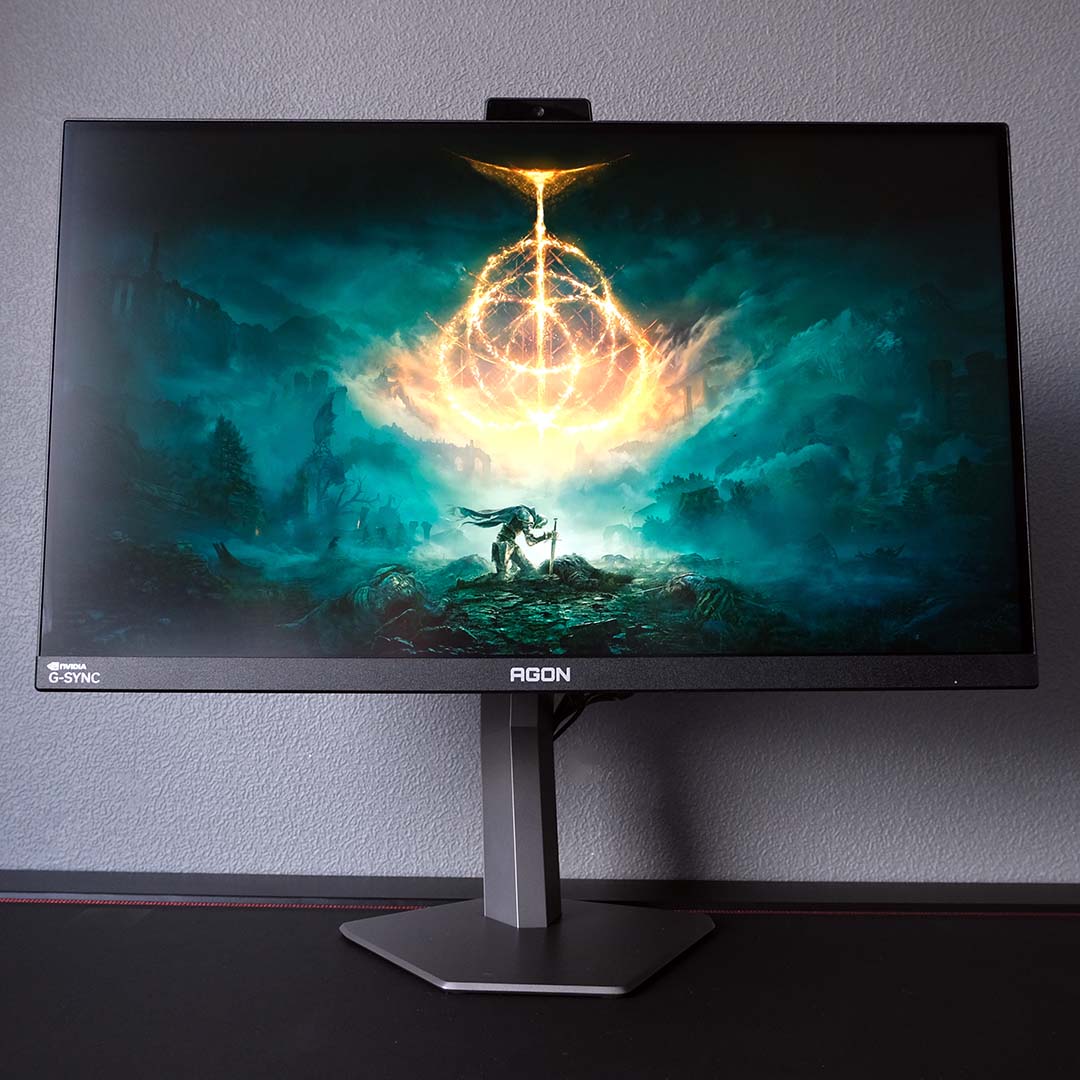
ULMB2 is the other standout technology that the AG276QSG2 offers, increasing motion clarity in games with frame rates locked to 60fps. Taking the feature for a whirl, I returned to The Lands Between in Elden Ring, keen to see how Nvidia’s trickery could smooth out FromSoftware’s RPG.
Using ULMB2 does mean giving up VRR, but that’s hardly a problem when I can hit 60fps in Elden Ring without fail, removing the risk of tearing. Like G-Sync Pulsar, motion clarity is much improved, as character animations, fast-moving enemies, and more all appear smoother to the eye with less blur.
Of course, the same caveats that affect G-Sync Pulsar, namely the suitability of pulsing for your eyes, also affect ULMB2. This is great tech if your biology can stomach it, but definitely try before you buy if you can.
Colours
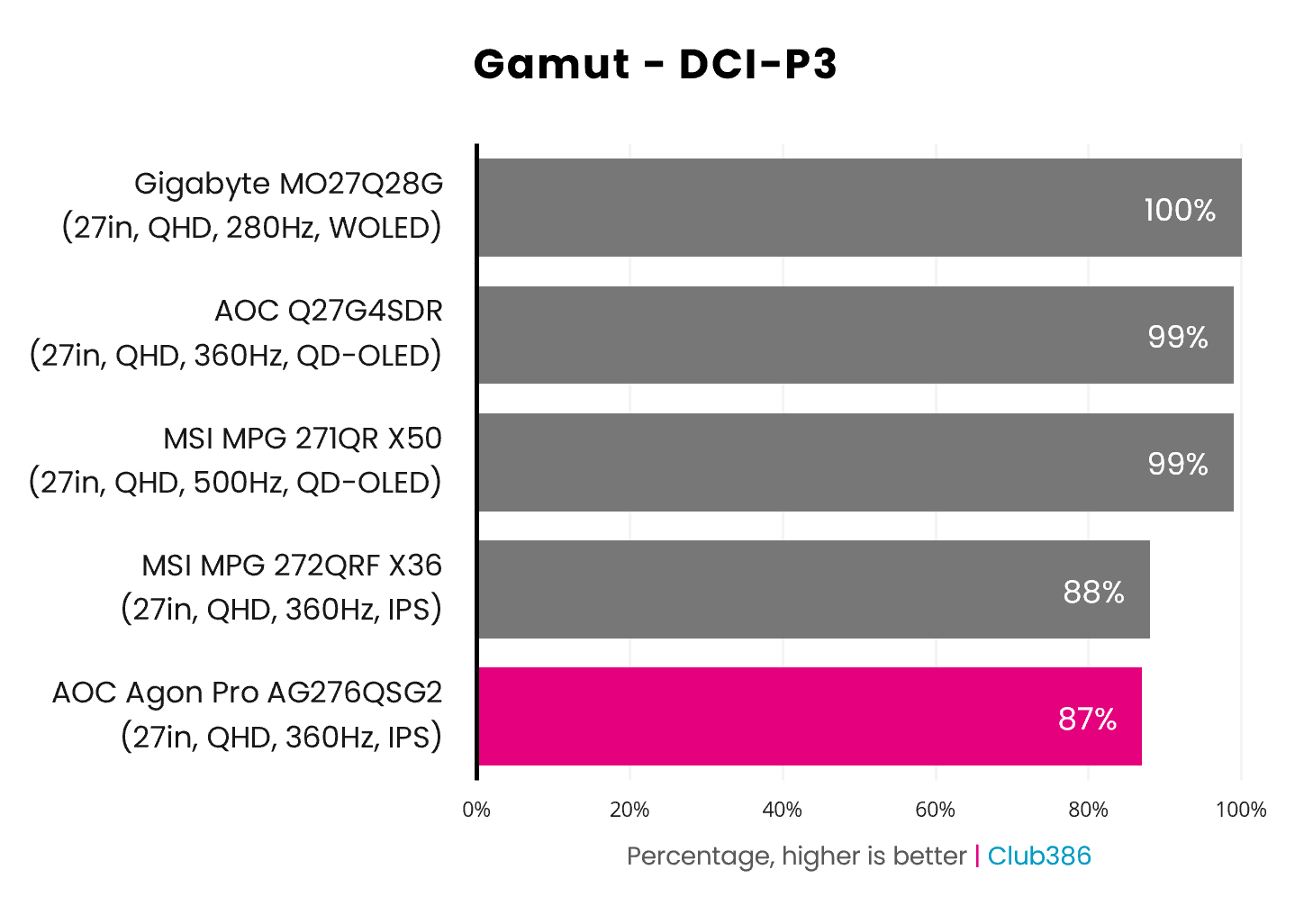
The AG276QSG2’s gamut expectedly closely mirrors the MSI MPG 272QRF X36, as both G-Sync Pulsar monitors share the same panel. Just 87% coverage of the DCI-P3 colour space is lower than I’d expect from an IPS panel, let alone one that costs just shy of £560 / $600, with cheaper models frequently offering 90%+ coverage.
That price also invites competition from a slew of WOLED and QD-OLED monitors, all of which provide appreciably superior gamut coverage. These self-emissive displays also have the advantage of per-pixel dimming, trumping the HDR performance of the AG276QSG2, making their DCI-P3 coverage a true boon.
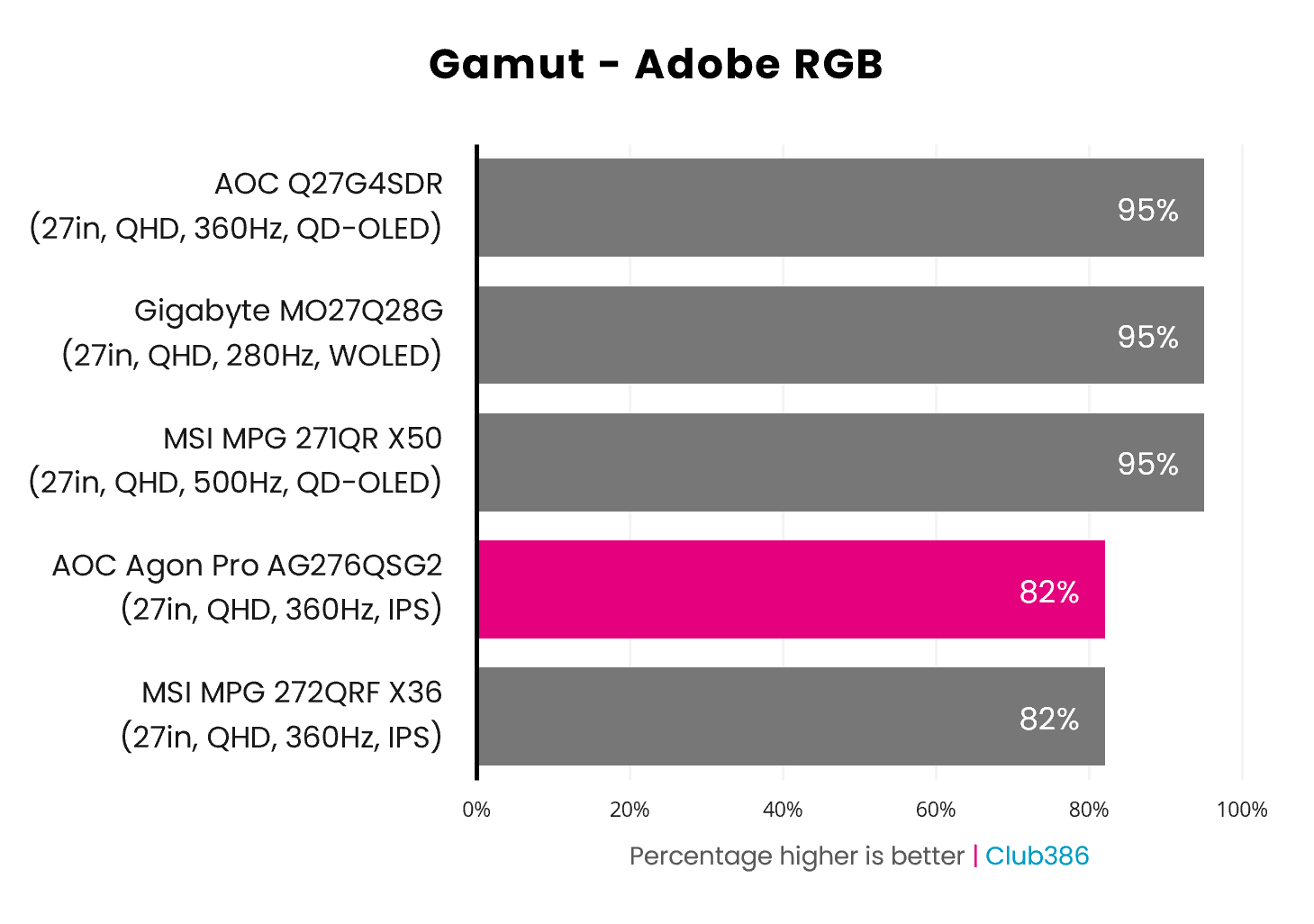
Adobe RGB coverage is similarly on the lower side at 82%, both relative to QD-OLED/WOLED alternatives and prior results we’ve recorded on IPS panels. In fairness to the AG276QSG2, the importance of this colour space is more pertinent to creative professionals, who are far from the target audience of G-Sync Pulsar monitors.
That said, these results do hamper the versatility of G-Sync Pulsar monitors relative to OLEDs. Even with the latter technology’s sometimes problematic handling of text clarity taken into consideration, there’s no denying that these self-emissive screens offer a better all-round balance for similar cash.
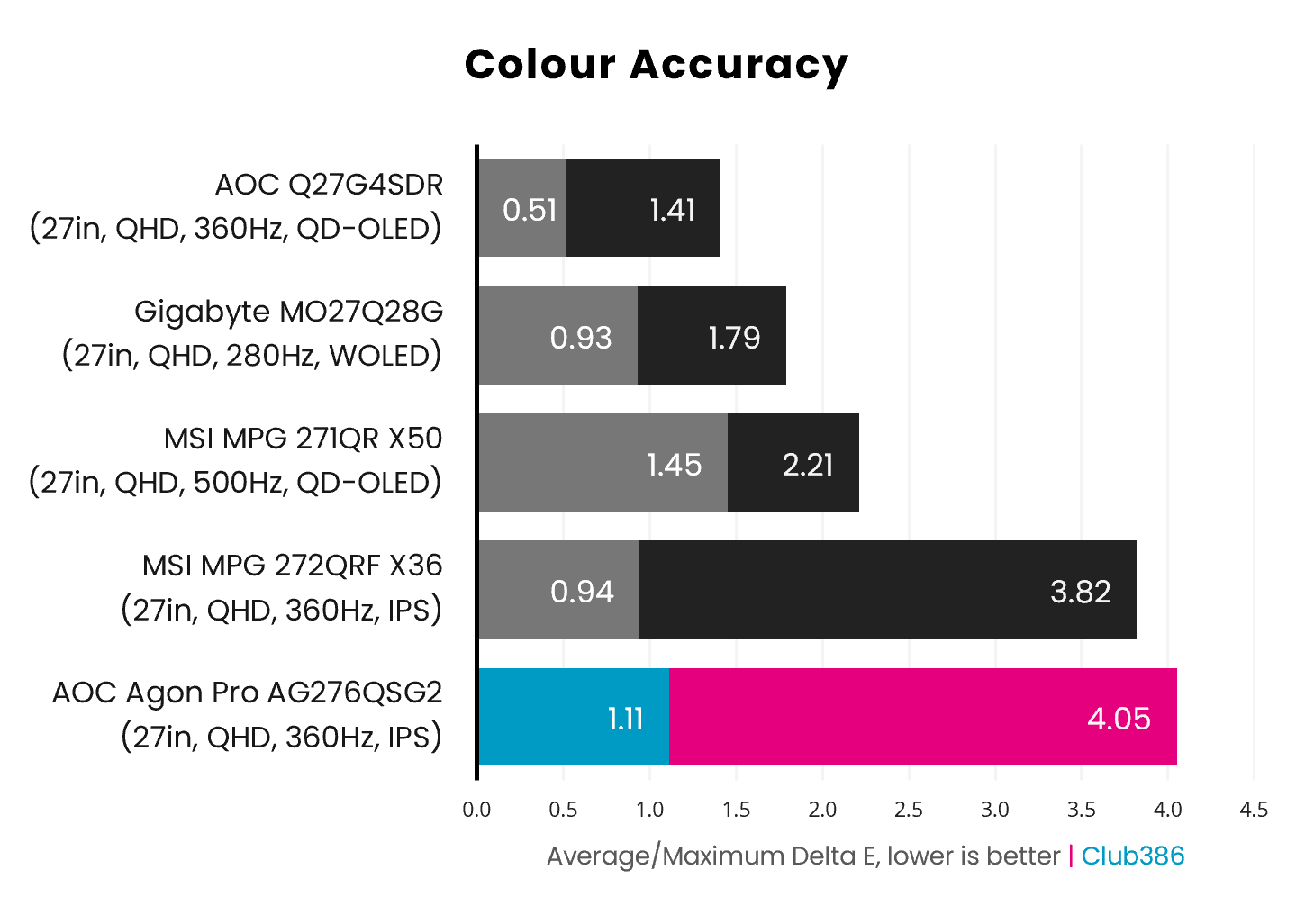
Colour accuracy on the AG276QSG2 is within expectations for this G-Sync Pulsar panel, with a 1.11 Delta E average, which is a great result. One blue hue creates a 4.05 Delta E maximum, the same one that gives the MPG 272QRF X36 its 3.82 maximum, but it’s not uncommon to see an outlier when it comes to colour accuracy. On average, this is an excellent result.
Brightness
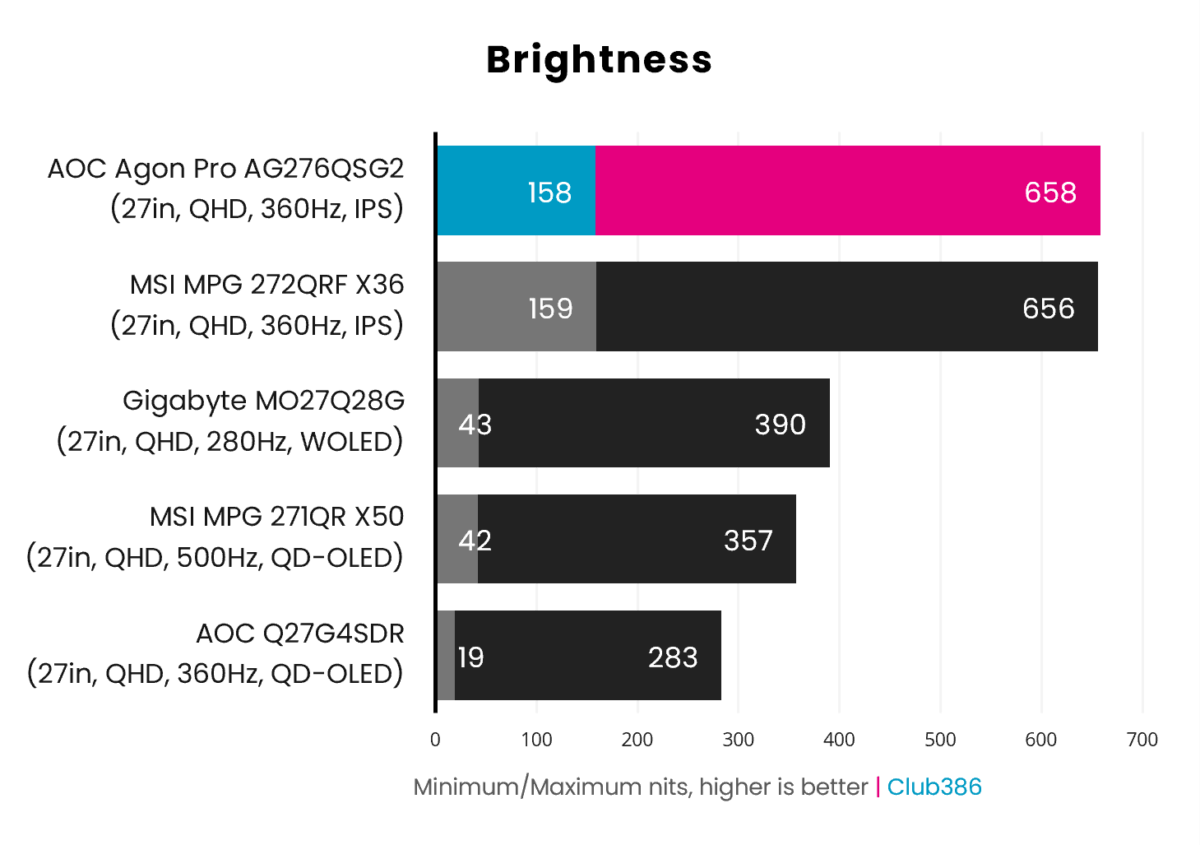
Brightness remains a strength of G-Sync Pulsar monitors, hitting 658nits on the AG276QSG2. Plenty of LCDs and, importantly, the brightest OLED monitor we’ve tested, the MO27Q28G at 390nits, appear relatively dim compared to AOC’s offering.
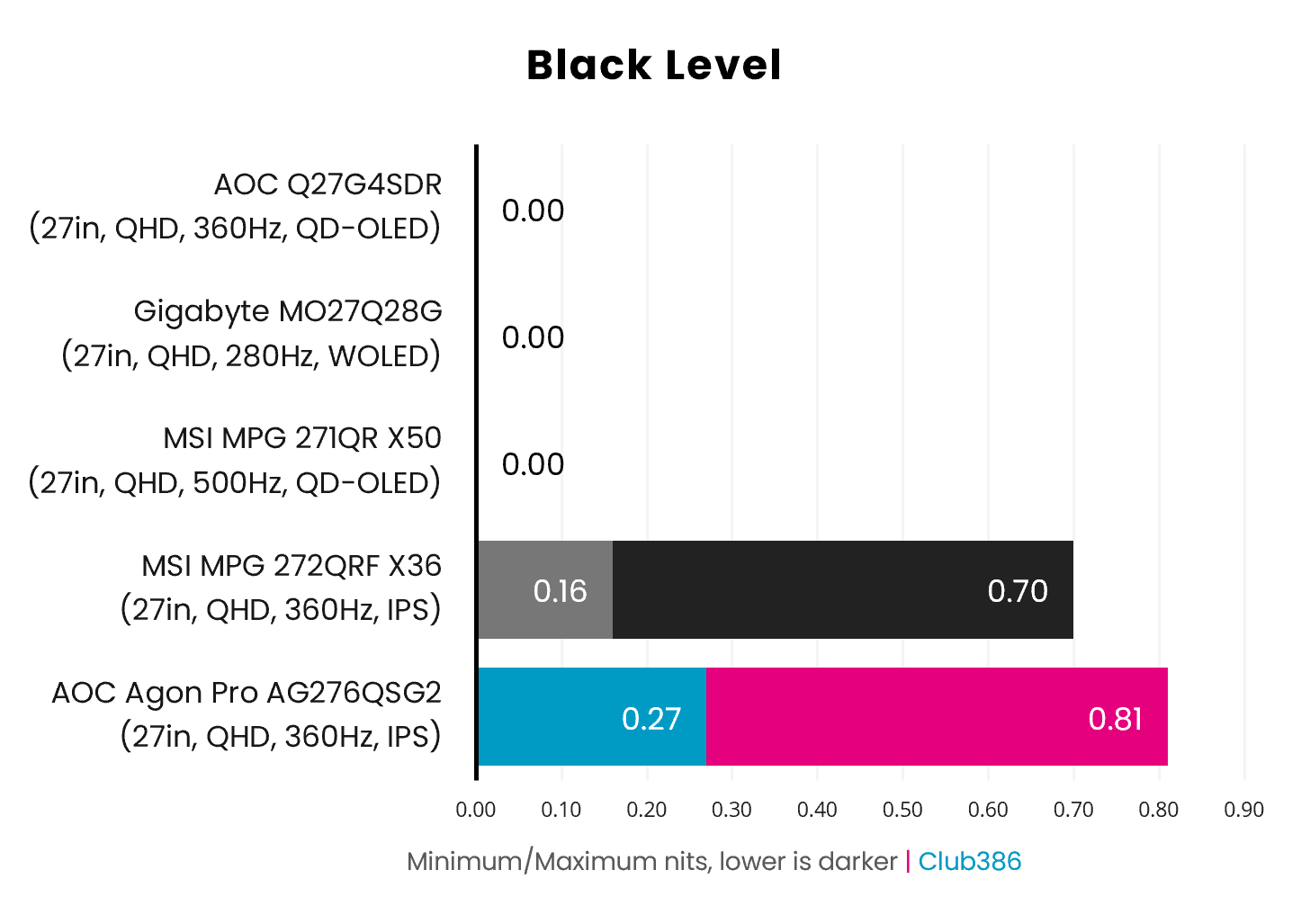
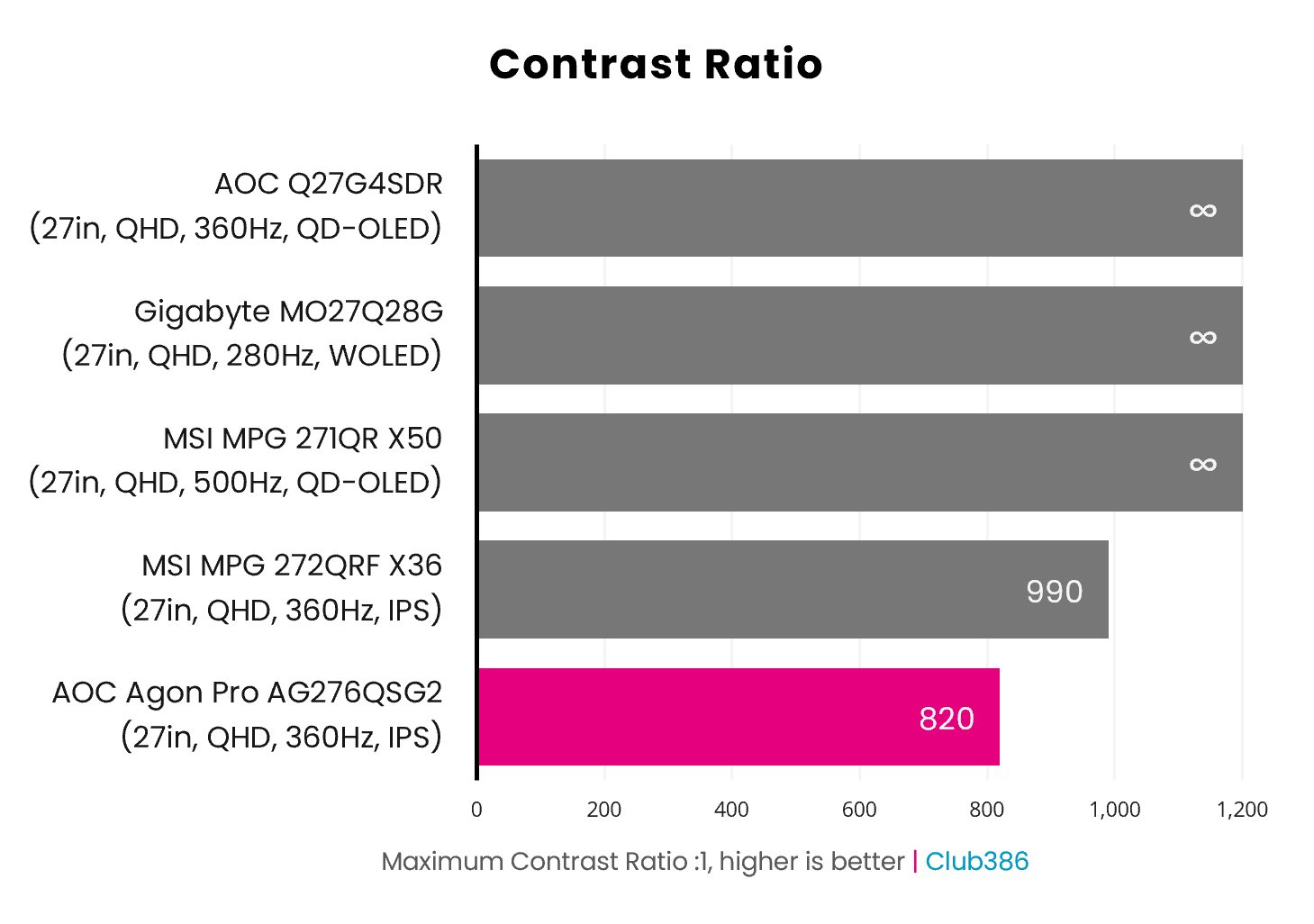
With the OLED comparison points on our chart offering theoretically infinite contrast, this part of the review turns into a two-horse race between the two G-Sync Pulsar monitors. The MPG 272QRF X36 does offer technically superior contrast and black levels, but there’s really not much in it between the two panels in real terms.
Uniformity
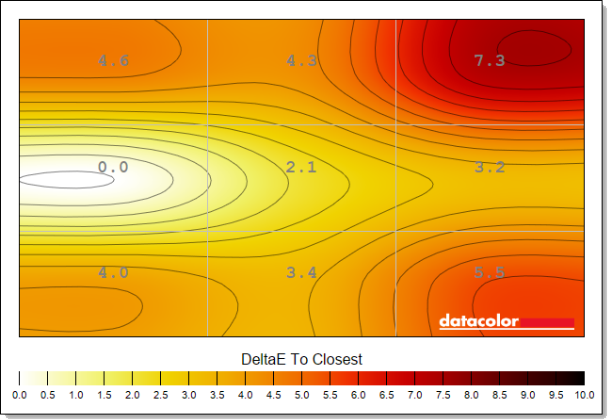
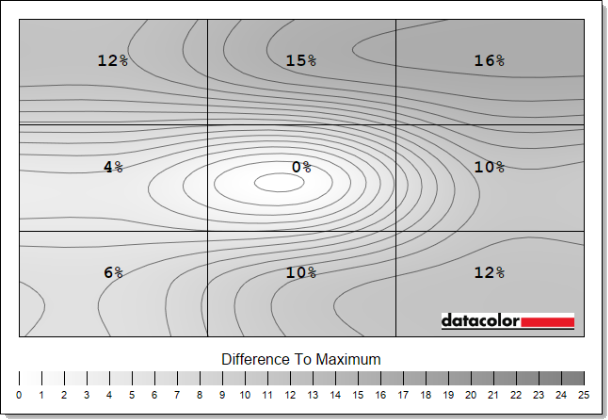
The biggest stumbles for the AG276QSG2 stem from its uniformity. While this quality varies between units, the backlight on my review sample shows signs of large deviations.
By and large, colours don’t remain consistent across the panel, with differences peaking at a surprisingly high 7.3 Delta E maximum. Meanwhile, luminance is also inconsistent, with the top third of the screen proving 12-16% dimmer than the centre.
Power
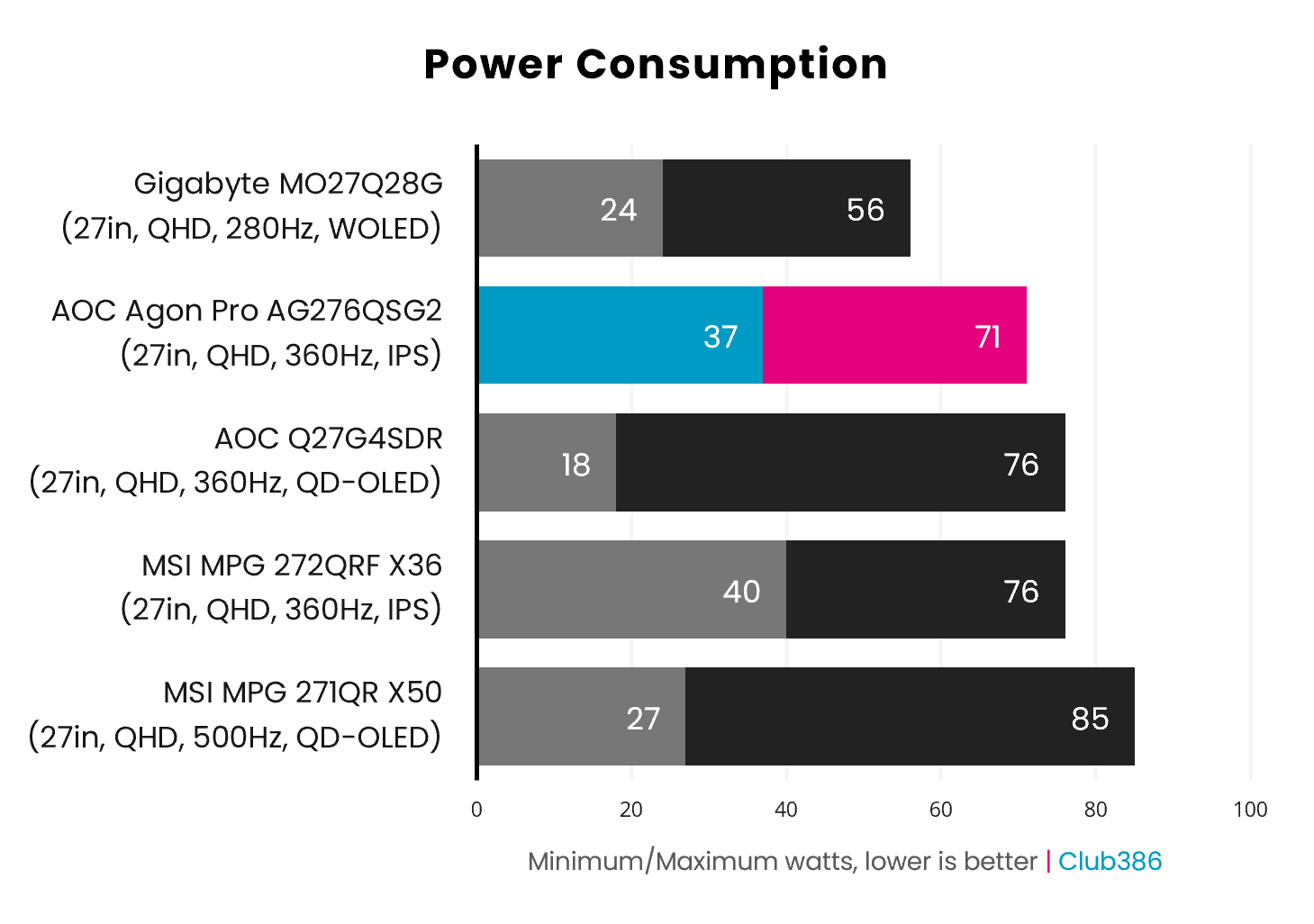
Pulling 71W from the wall, the AG276QSG2 is a smidge less power-hungry than the MPG 272QRF X36 (76W). However, we’re still talking about wattages that are more in line with a QD-OLED monitor than an LCD model. On the plus side, this screen is also considerably brighter than the OLED monitors we’ve tested, and this naturally increases the power draw.
Conclusion
The AG276QSG2 is the most-affordable route to owning a G-Sync Pulsar monitor, undercutting competitors by as much as £40 ($50). Motion clarity and other image quality measurements are largely in the same ballpark as alternatives using the same panel, although the AG276QSG2 faces the same uphill battles as every other G-Sync Pulsar monitor. Chief among them is the potential unsuitability of strobing for some gamers, which is impossible to diagnose without experiencing the technology first-hand.
Then there’s the growing affordability of QD-OLED and WOLED monitors. While the fastest self-emissive screens can’t quite match the motion clarity of G-Sync Pulsar, they’re perilously close and offer vastly superior image quality and even specifications. For context, you can pick up a 500Hz model for the same price as an AG276QSG2.
For esports enthusiasts who can’t tolerate the risk of burn-in, and demand nothing less than the finest motion clarity LCD panels have to offer, the AG276QSG2 is a solid option for a competitive price. For most people, though, an OLED screen will offer a better balance for gaming and general use.
