

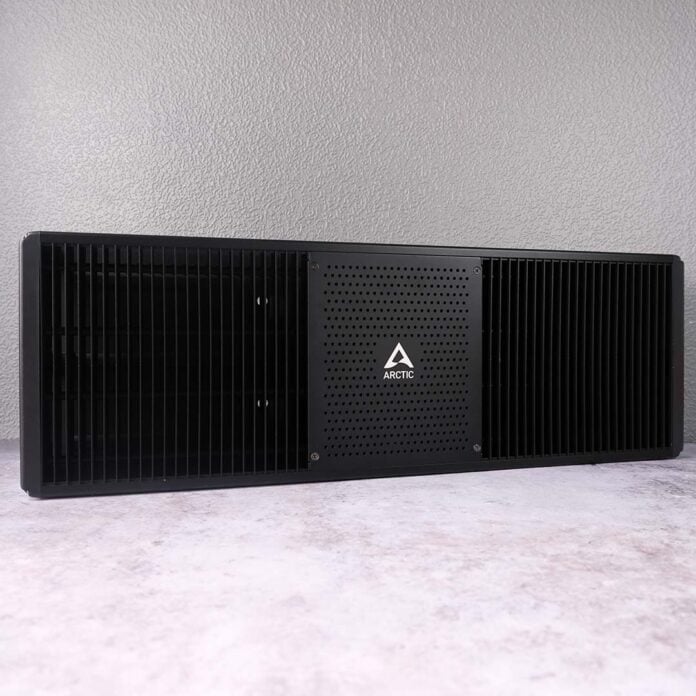
The Senza AI 370 builds on Arctic’s prior efforts to deliver a unique passively-cooled PC that fits under your desk, with some welcome design refinements and a solid boost in performance, thanks to a more-powerful processor under the hood. The system is undeniably all the better than its predecessors for these changes, but this newer model and all its upgrades arrive at a much higher price.

Arctic Senza AI 370
£1,199
Pros
- Silent under load
- Solid thermal management
- Excellent build quality
- Low power consumption
- Some gaming chops
Cons
- Soldered RAM
- Demands a wooden surface
Club386 may earn an affiliate commission when you purchase products through links on our site.
How we test and review products.
Costing £1,199 (€1,199), the Senza AI 370 is far more expensive than prior models, which launched at €600-730 back in 2024. While the newer SoC accounts for some of this increase, the effects of the ongoing DRAM and NAND crises have undoubtedly left Arctic (like many manufacturers) with little wiggle room in its pricing.
Specifications
While the prior generation of Senza systems featured a choice of two desktop AM4 processors, namely the Ryzen 7 5700G and Ryzen 5 5500GT, Arctic has chosen a single mobile processor to power its latest model, specifically the Ryzen AI 9 HX 370. This chip offers a welcome selection of generational improvements to connections and performance, proving an all-round upgrade.
The CPU’s four Zen 5 and eight Zen 5c cores, combined with their 24 threads and 5.1GHz maximum boost clock, give the Senza AI 370 a healthy amount of processing grunt that will meet the demands of most tasks with little difficulty. Arctic provides the chip with 50W of power by default, with the option to push up to 60W via the BIOS, but I found doing so doesn’t provide any meaningful gains.
In terms of integrated graphics, the Ryzen AI 9 HX 370 packs a Radeon 890M. This is the same iGPU you’ll find powering Ryzen Z2 Extreme handhelds, such as the MSI Claw A8, offering 16 RDNA 3 compute units. While it’s by no means a replacement for a dedicated desktop graphics card, it’s a reasonably efficient and powerful relative to alternatives in the mobile arena.
| Arctic Senza AI 370 | |
|---|---|
| CPU | AMD Ryzen AI 9 HX 370 |
| RAM | 32GB LPDDR5X 8,000MT/s, quad channel |
| GPU | AMD Radeon 890M |
| SSD | 1TB PCIe Gen 4 NVMe SSD |
| PSU | 120W, external |
| Connections | 2.5Gb LAN 3.5mm (x2) Bluetooth 5.3 DisplayPort 2.1 HDMI 2.1 USB 4 (40Gb) Type-C, with DP Alt Mode (x1) USB 4 (40Gb) Type-C (x1) USB 3.2 Gen 2 (10Gb) Type-A (x2) USB 3.2 Gen 1 (5Gb) (x1) USB 2 (480Mb) Type-A (x2) Wi-Fi 7 |
| Operating system | Windows 11 Pro |
| Dimensions (W x D x H) | 536 x 180 x 50mm |
| Warranty | Two-years |
| Price | £1,199 |
32GB of LPDDR5X-8000 RAM surrounds the CPU, providing the system with ample memory capacity and speed, particularly for the integrated GPU. However, this approach impacts upgradability, made all the more frustrating by the fact that the Ryzen AI 9 HX 370 does support (LP)DDR5-5600 sticks. Importantly, adopting the latter approach would’ve also afforded Arctic the ability to sell the Senza AI 370 as a barebones kit, reducing the system’s price.
Arctic ships the Senza AI 370 with a 1TB PCIe Gen 4 SSD, complete with a built-in heatsink. Despite the lack of active airflow, the drive is able to keep its cool at a modest 40°C under load. There are sadly no other M.2 slots to expand the system’s storage pool, so you’ll need to either install an aftermarket drive or lean on external additions via USB or cloud. Thankfully, every driver you need for a fresh installation, whether you’re using Linux or Windows, is available on the PC’s product page.
Like prior Senza systems, this latest model uses an external 120W PSU, providing plenty of power for the Ryzen AI 9 HX 370 and supporting components. While I usually loathe having to manage an AC adapter, it makes complete sense for Arctic to go down this path for the sake of removing another thermal concern and minimising its chassis footprint. Better still, the company has made considerations to fit the brick into wider cable management, rather than leave it dangling from the PC, as I’ll discuss later.
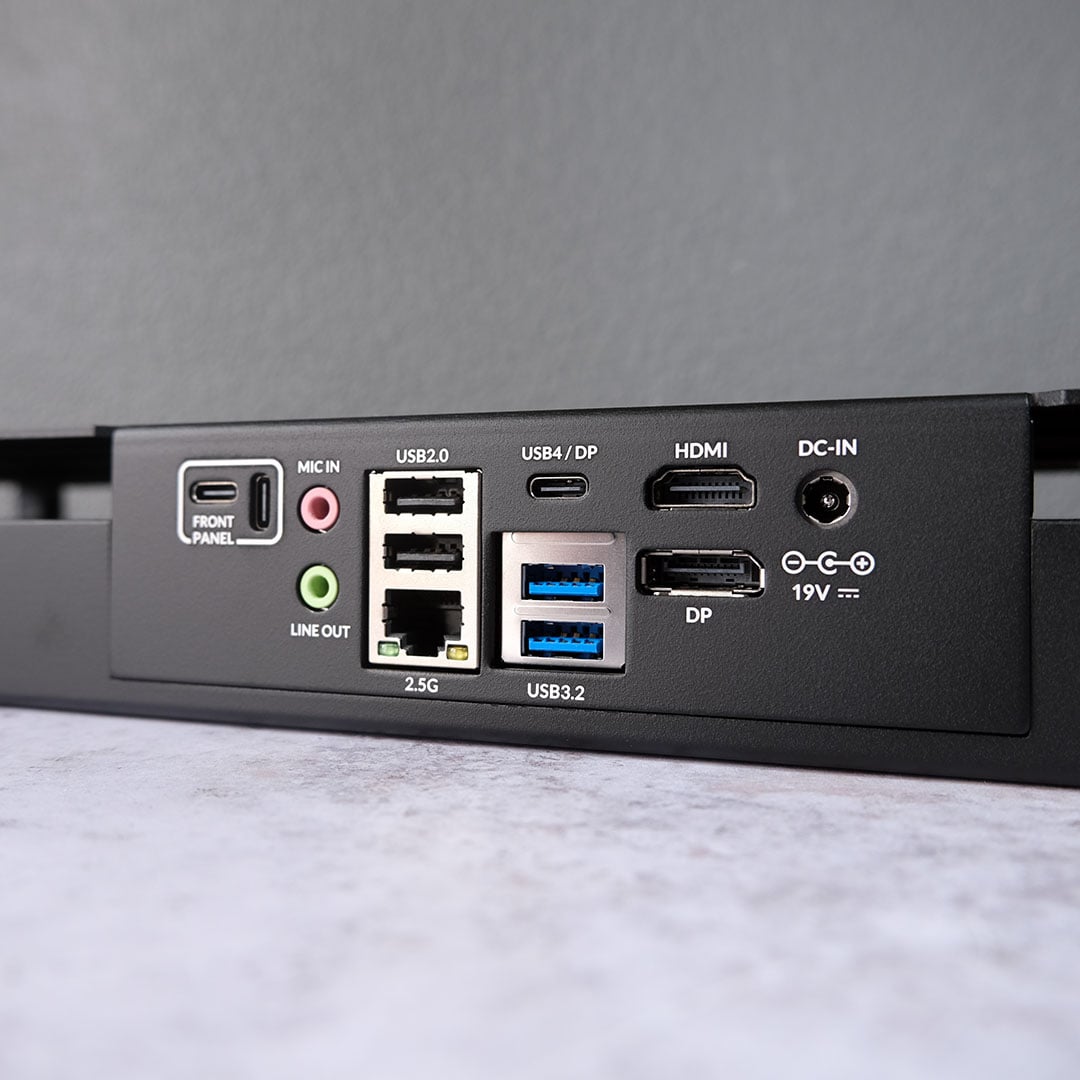
You’ll find the majority of the Senza AI 370’s ports on the rear of its chassis. You can easily put together a high-end multi-monitor setup using this system, thanks to the inclusion of DisplayPort 2.1, HDMI 2.1, and a USB 4 port complete with DP Alt mode support. Personally, I’d stick to the traditional connection types and save the USB-C port for data transfers, given its 40Gb speed.
Additionally, two 10Gb Type-A ports and two 480Mb Type-A inputs round off the USB selection on the chassis. However, another 40Gb USB-C and 5Gb USB-A port are readily available via the Sena AI 370’s front panel – a neat little cabled hub that plugs into the main unit and brings several ports to the front of your desk for easy access. I absolutely love having USB 4 speeds within easy reach through this accessory, both for my current stock of peripherals and those that will benefit from its bandwidth in the future.
For networking, Arctic equips the Senza AI 370 with a 2.5Gb Ethernet port as well as Wi-Fi 7, which brings Bluetooth 5.3 along with it. Both ports were able to make full use of my 1Gb broadband connection without issue. That said, I installed my review unit under a table with no side surrounds or dividers, which is an ideal scenario for wireless communications. I’d certainly take the makeup of your desk into consideration when deciding to cut the cord or not with this system.
Design
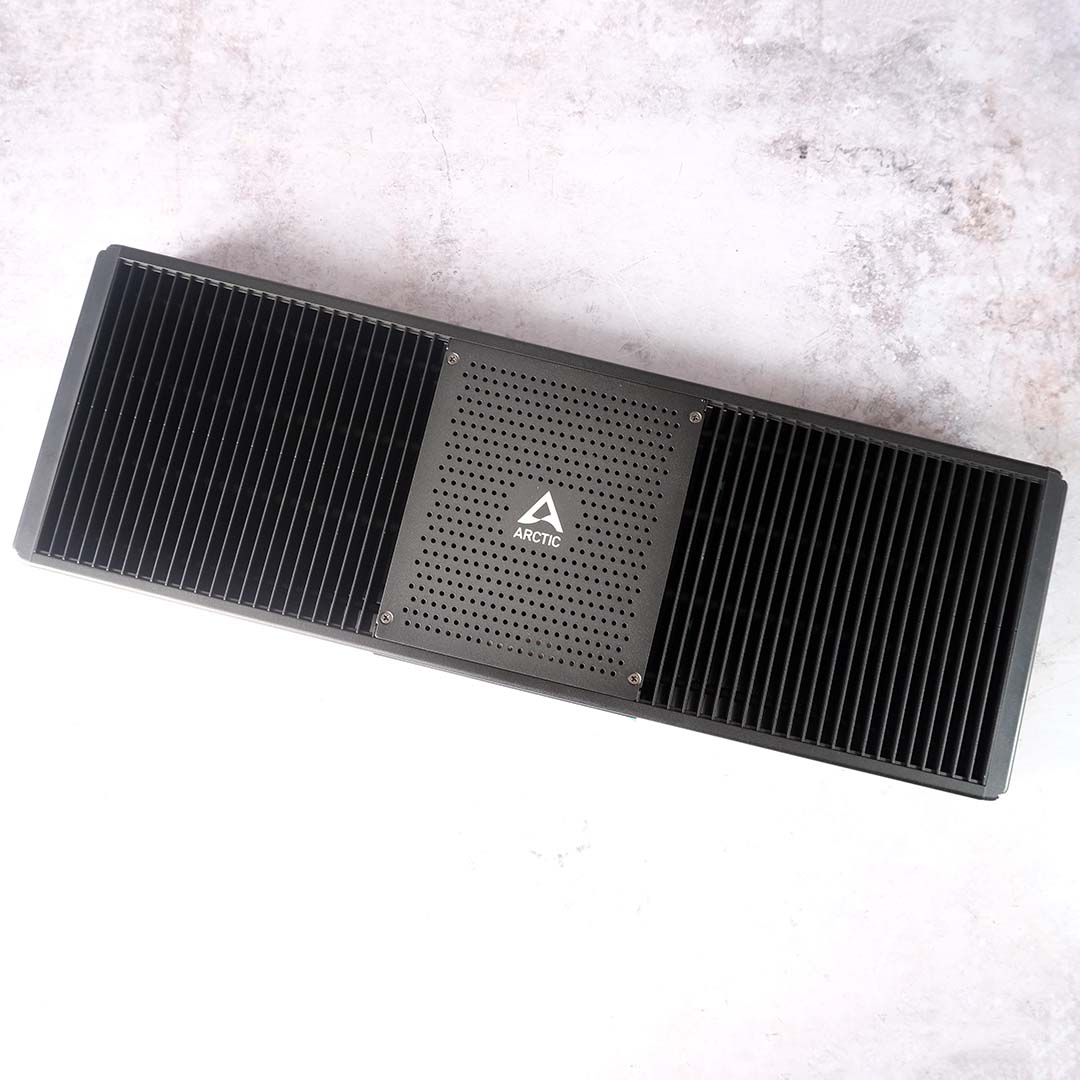
At first glance, it’s difficult to distinguish the Senza AI 370 from its older siblings, as they’re the exact same size and share identical colouring and high-quality metal materials. That’s no bad thing, of course, as Arctic nailed the design of its chassis on the first try, somehow making what’s essentially a big heatsink carry an air of elegance.
Speaking of elegance, the Senza AI 370 does away with prior systems’ non-removable cables for the aforementioned front panel accessory. This makes handling the system during installation easier and eliminates a potential point of failure too – any win for repairability is worth celebrating in my book.
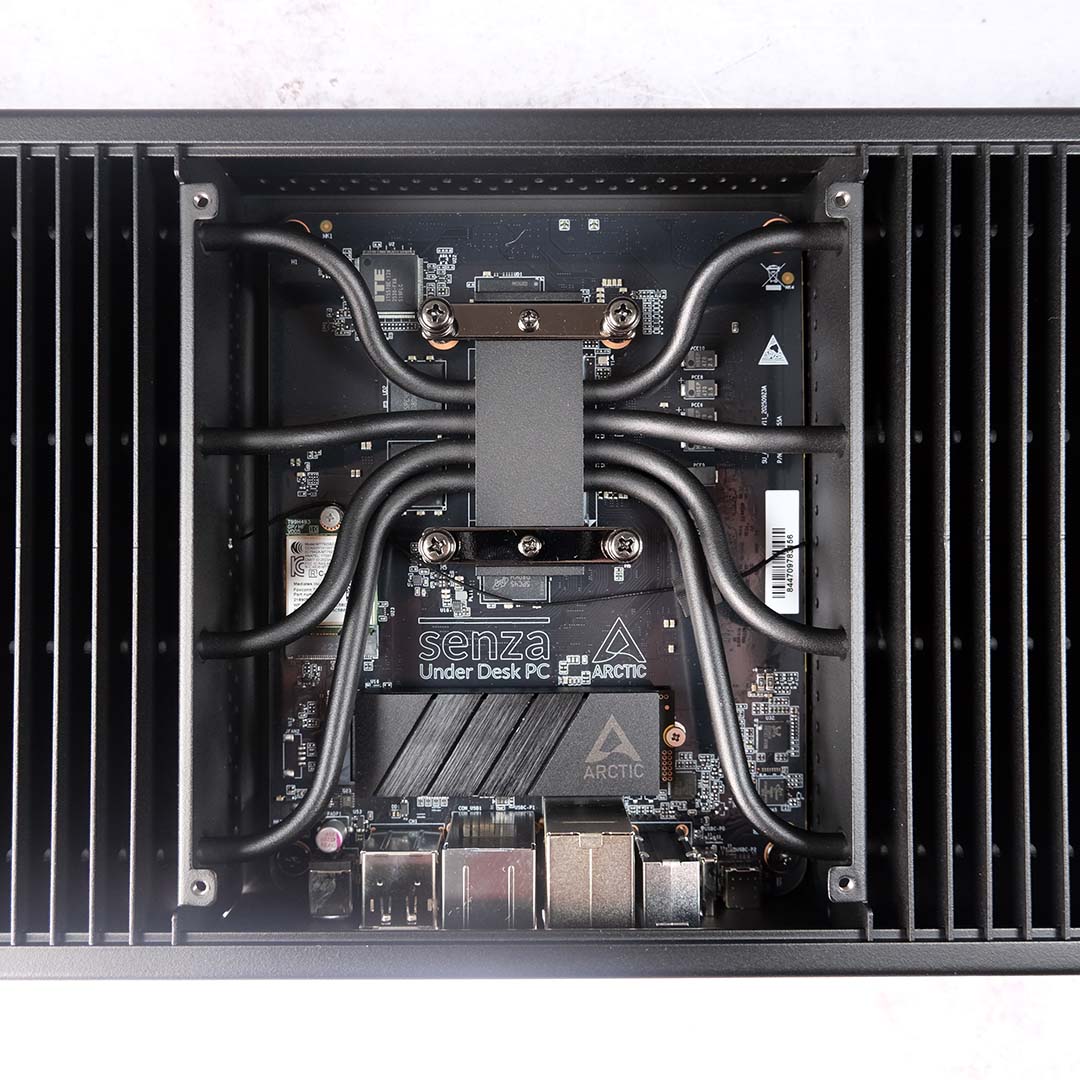
Accessing the internals of the system is simple, requiring the removal of four obvious Philips-head screws from the faceplate. Admittedly, there isn’t much reason to poke around here, save to admire the eight chunky heatpipes flowing off the CPU, but you will need that screwdriver handy if you’re planning to install a new SSD.
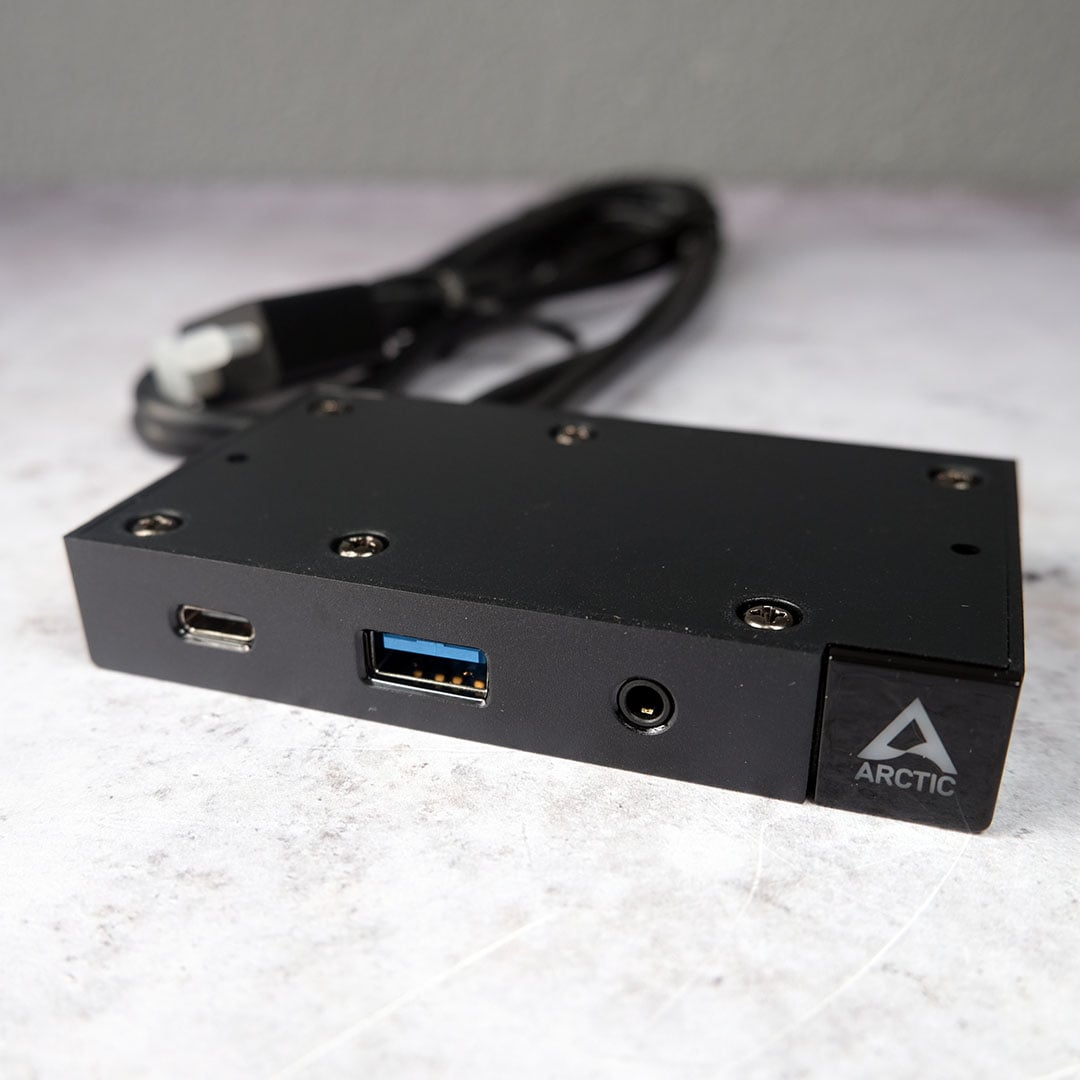
Turning attention to the front panel accessory, it now connects to the chassis via a unique dual USB-C connector, but Arctic has made other changes to the box too. USB ports now face outwards from the desk, rather than pointing downwards. I personally prefer this approach as it saves on knee room, but you’ll still need to be mindful of any devices you have plugged into it, as no one wants to cry over a broken and bent dongle.
Similarly, the power button now faces towards you, but the reset button is curiously only available via a pinhole. The latter hasn’t featured on any chassis I’ve owned in the past several years, so I’ve grown accustomed to its absence. On the plus side, you won’t accidentally reset your PC if you knock the reset button, but it will be a faff having to find a pin to use it instead.
As there’s no whir of fans to indicate that the system is powering on, the white LED of the power button and traffic indicators on the Ethernet port are your only clear signals prior to an image on your monitor. It’s an unusually eerie feeling to have zero feedback during a boot cycle, and not one with which I’m entirely comfortable, even now. A visible debug code would be high on my wishlist for a Senza AI 370 successor.
Installation
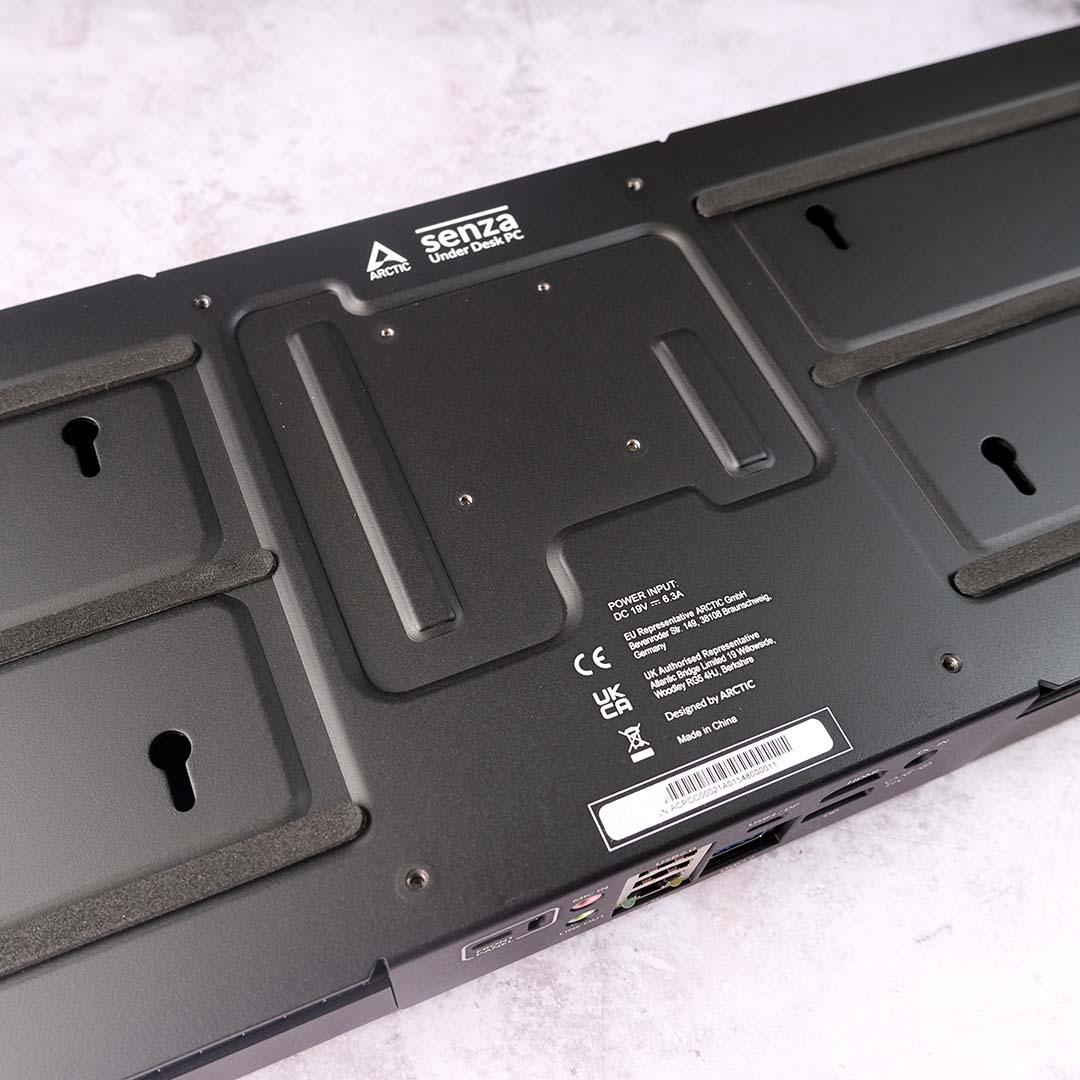
As much as the Senza AI 370 is a turnkey system on paper, installing it as Arctic intends requires more preparation and effort than a typical PC. For starters, as it requires screws, Arctic only supports installation on a wooden desk with enough space underneath it to accommodate the chassis, power supply, and front panel. While Arctic doesn’t explicitly rule out glass or metal surfaces, it strongly discourages installation with them.
Unfortunately for me, that rules out my Secretlab Magnus desk. However, not one to give up at the first hurdle, I won’t settle for anything less than being able to test this Senza AI 370 as intended. With this in mind, I’ve picked up a run-of-the-mill Ikea table from Facebook marketplace to pair with this system that should prove broadly representative of most setups out there.
While it’s possible to install the system onto an already standing desk, it’s naturally much easier if you flip over the surface, so you’re not fighting against gravity. Just make sure you don’t disorientate yourself, or you’ll end up unintentionally installing parts of the system on the side you didn’t intend. Yes, I am speaking from experience.
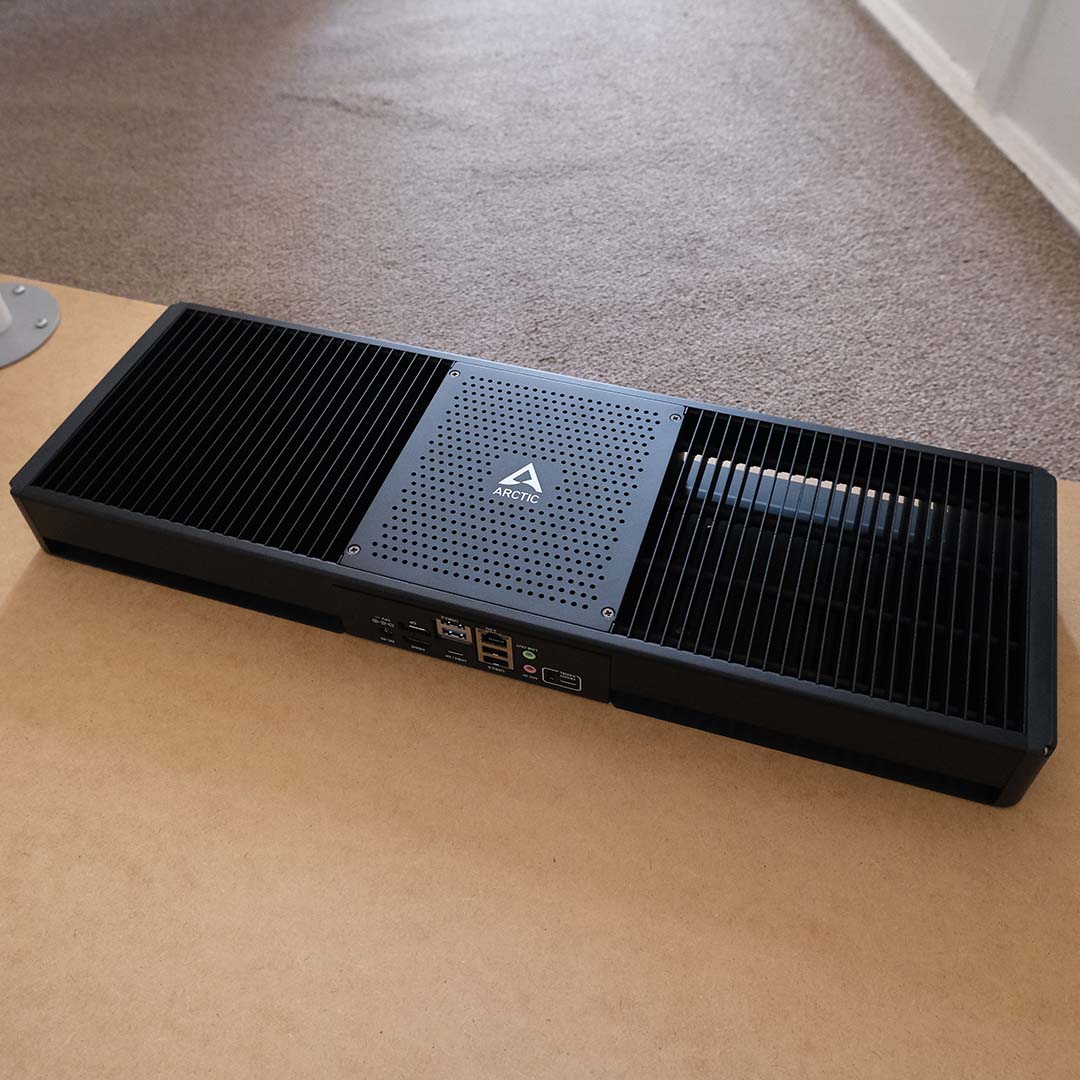
Arctic supplies everything to install the Senza AI 370 bar screwdrivers, so you’ll need your own Philips or Torx head at the ready (screws are provided with both types of head). There’s no paper manual in the packaging, but the company does provide easy-to-follow video instructions on YouTube, accessible via QR code.
The supplied screw holes template makes it easy to line up the case mounts, with clear instructions on which direction to face the system’s ports. If, for whatever reason, you need a new one, you can also print one out across two sheets of A4 via Arctic’s website.
Passing the screws through my surface was a little difficult at first, requiring some initial brute force to create a hole into which they could settle. Once they’re in, though, marrying them to the Senza AI 370 is easy, as you can see them through the heatsink grills, even allowing you to tighten everything up once you’re happy with placement.
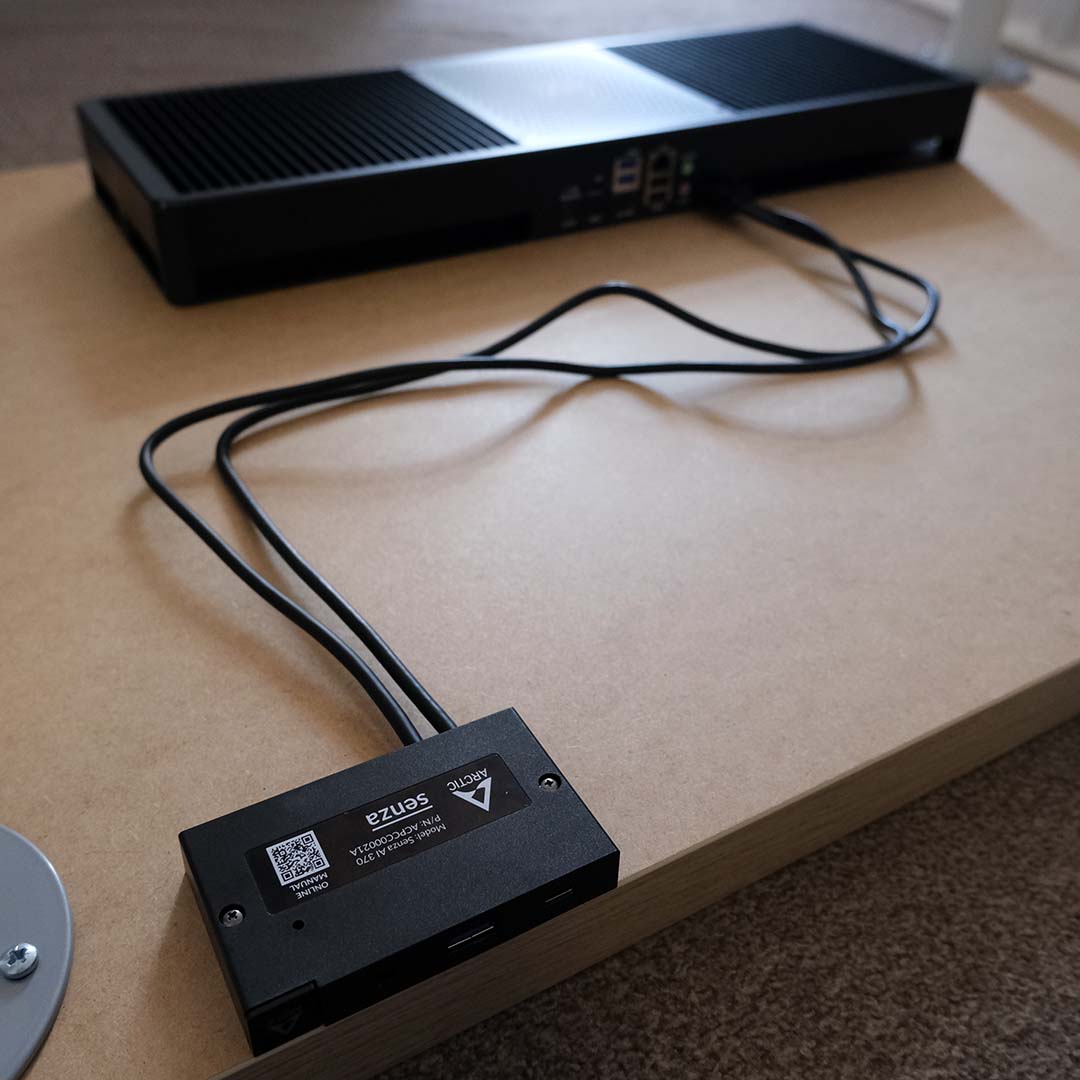
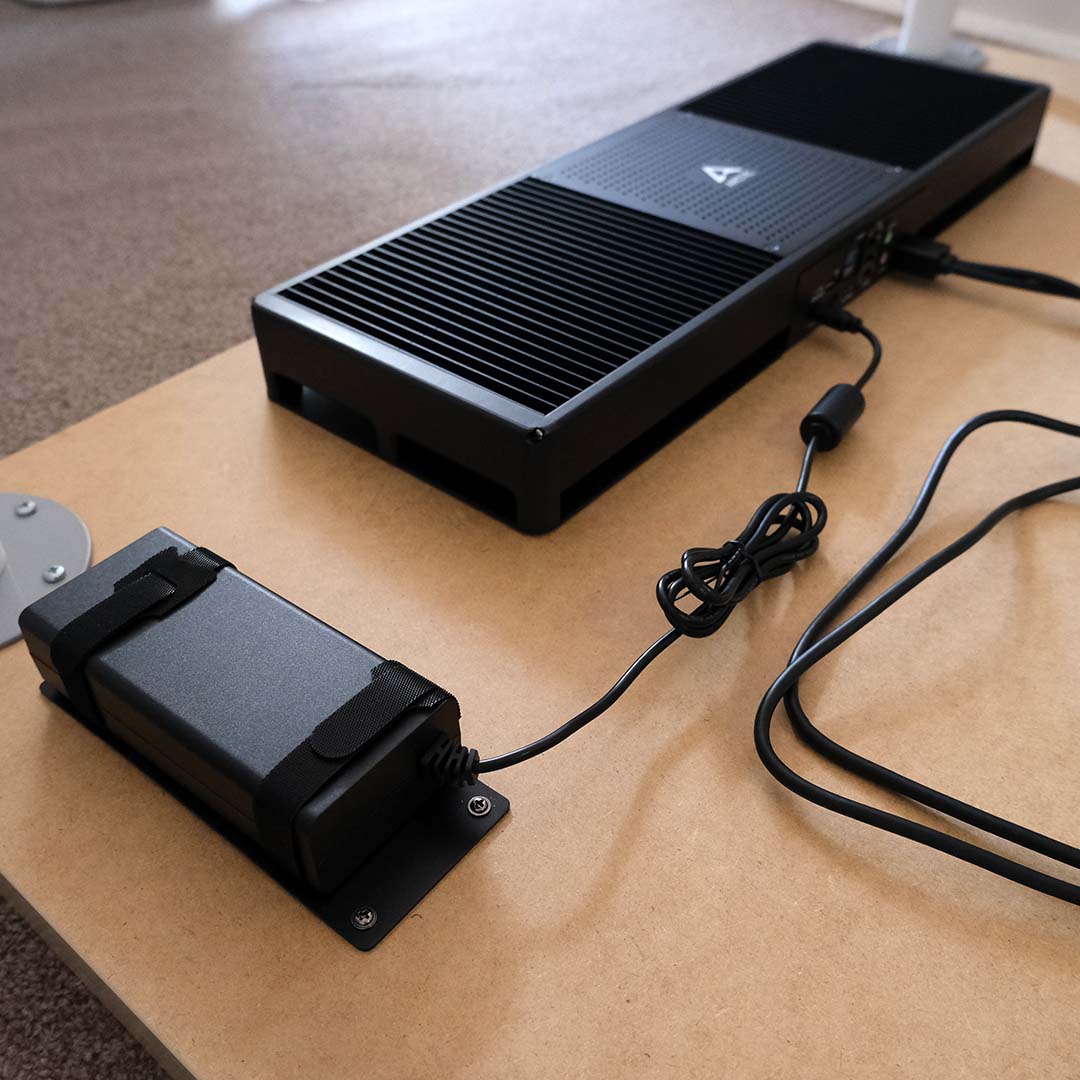
Next comes the front panel add-on, which attaches to your desk via two screws, and you’ll need to line them up by eye. It’s a straightforward step, but the screws’ smaller head size did cause a moment of frustration for me, as I foolishly tried to continue using the larger screwdriver from the chassis installation. If in doubt, go smaller.
The power supply is a touch more elaborate, arriving with Velcro straps that you’ll need to feed through a holder card before screwing in the entire apparatus. Those straps then hug the AC adapter, ensuring it doesn’t fall down, but some horizontal wiggle room remains.
With those three components in place, now begins cable management for the Senza AI 370. Arctic supplies 10 hooks with adhesive bottoms and screws to tidy up all your wires, which work well to keep any sagging at bay and deliver a clean finish. There’s also a cable sleeve you can use to hide any cables dropping from your display.
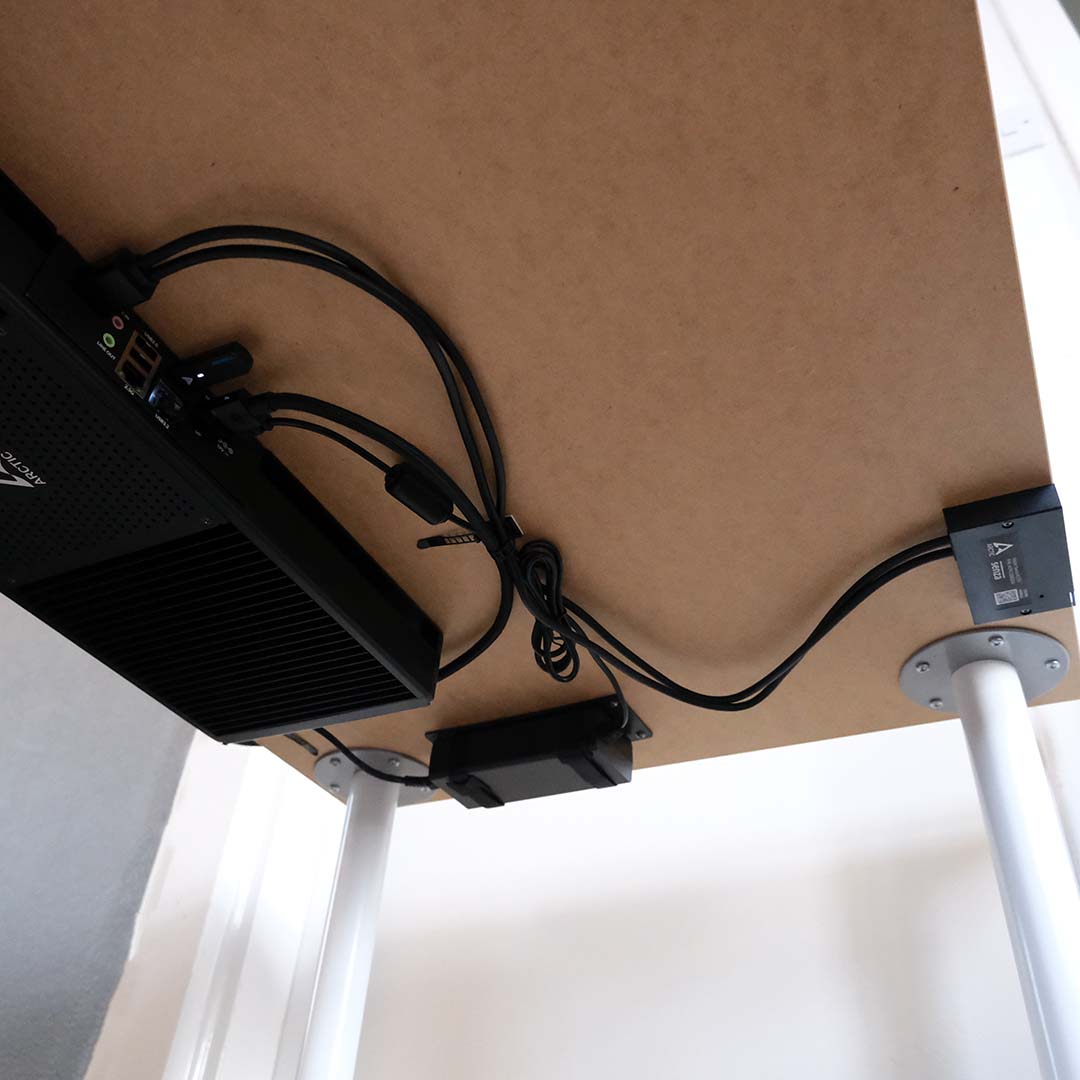
As someone who’s put together hundreds of computers and has a hands-on mindset for DIY jobs, installing the Senza AI 370 was very straightforward. While I can see this process being a touch intimidating for less experienced hands, it’s still well within the capabilities of most folks.
Of course, you can completely forgo this process entirely and run the system upside down, atop your desk. However, doing so defeats the intent behind Arctic’s design, and at that point, you’re better off considering a mini PC or NUC instead.
Performance
Arctic bills the Senza AI 370 as a system for the workspace first and foremost, so I’ve put its general computing chops to the test using a variety of applications to stress the CPU, RAM, and SSD.
However, I’m also keen to see how well the PC handles a spot of gaming. Considering the chip in question, I’ve limited testing to 1080p, much as the display connections are capable of outputting up to 8K signals.
Apps
Kicking off proceedings with AIDA64, the 32GB LPDDR5X-8000 memory inside the Senza AI 370 absolutely flies through AIDA64’s bandwidth benchmarks. The 108.66GB/s write speed is particularly impressive, while copy and read bandwidth remain strong at 84.3k and 90.1k, respectively. Latency, though, is a touch high at 110.1ns.
However, conducting these RAM tests produced some coil whine from the system. This is the only instance I noticed the Senza AI 370 emit such a noise, which is entirely forgivable given the hyper-intense nature of the AIDA64 benchmark.
Shifting attentions to the system’s SSD, we have no problem achieving high-end PCIe Gen 4 speeds from the storage system. Even after two back-to-back runs of CrystalDiskMark, the drive kicks back at a cool 40°C. Kudos to Arctic’s heatsink.
| Application | Result |
|---|---|
| AIDA64 | 84,342MB/s (copy) 90,082MB/s (read) 108.66GB/s (write) 110.1ns (latency) |
| Cinebench 2026 | 639 (single-core) 476 (single-thread) 4,756 (multi-thread) |
| CrystalDiskMark | 6,918MB/s (seq. read) 6,090MB/s (seq. write) |
| Geekbench 6 | 2,927pts (single-core) 15,324pts (multi-core) |
| PCMark 10 | 9,476 |
Running Cinebench 2026, the Ryzen AI 9 HX 370 delivered respective single-thread and multi-thread scores of 476 and 4,756. That puts the chip a stone’s throw from a desktop Core Ultra 5 245K (514) in terms of single-core performance, and right on the heels of the Ryzen 7 9700X in multi-core.
Results are much the same in Geekbench 6, with the CPU delivering comparable performance to the aforementioned chips once again. That’s no small feat considering the smaller power budget (50W) in play, relative to the 65-159W enjoyed by the desktop comparison chips. Finally, a PCMark 10 score of 9,476 cements the Senza AI 370 as a smooth operator for any general desktop task.
Gaming
The Senza AI 370 isn’t a gaming powerhouse, but it’s still capable of running lightweight titles. After all, the silent system is rocking the same Radeon 890M integrated graphics as the likes of an MSI Claw A8 handheld. Adjusting expectations with this similarity in mind, some games are understandably off limits, but there are surprisingly decent frame rates to uncover too.
By default, AMD Software Adrenalin Edition reserves a paltry 0.5GB of VRAM for the Radeon 890M. This piddly pool of memory doesn’t prove problematic, as the integrated graphics delves into the shared pool regardless, but it does starve the system of its full potential. Thankfully, we can manually adjust capacity, and I’ve settled on 16GB to provide an equal amount of RAM to the GPU and CPU. In doing so, performance can increase substantially.
Assigning 16GB of VRAM to the Radeon 890M sees F1 25 performance increase by a whopping 32-34%, bringing the racing game up to speed with a 59fps minimum frame rate and 96fps average at low settings. Meanwhile, Cyberpunk 2077 jumps by a welcome 17-18% in light of the higher memory capacity, providing enough headroom to enjoy a faultless 30fps experience, where the 2GB experience falls short.
| Game | 0.5GB VRAM (Min / Avg) | 16GB VRAM (Min / Avg) | Difference |
|---|---|---|---|
| Cyberpunk 2077 (Steam Deck, No FSR) | 29 / 36fps | 34 / 42fps | +18% / +17% |
| F1 25 (Low) | 44 / 73fps | 59 / 96fps | +34% / +32% |
| FFXIV: Dawntrail (Standard (Desktop)) | 37 / 54fps | 38 / 56fps | +2% / +4% |
| Rainbow Six Siege (Low) | 111 / 132fps | 128 / 151fps | +15% / +14% |
| Total War: Warhammer III (Low) | 24 / 45fps | 28 / 51fps | +17% / +13% |
Increasing the memory buffer isn’t a silver bullet for every game, as frame rates in Final Fantasy XIV: Dawntrail are near-identical regardless of VRAM capacity. Total War: Warhammer III does see a welcome 13-17% jump in performance, but a 28fps minimum paired with a 51fps average is less than ideal for a smooth gameplay experience.
Switching to lightweight esports titles, the Senza AI 370 finds room to surprise with triple-digit performance in Rainbow Six Siege. The competitive FPS glides along at a smooth 128-151fps with 16GB of VRAM, a solid frame rate for competitive shooters by any standard.
Handhelds with the same integrated graphics and larger classic desktop systems will offer better value for gaming than the Senza AI 370, with better or similar frame rates for a lower asking price. Of course, neither form factor will be as stealthy as Arctic’s offering, both in terms of physical presence and noise levels.
Vitals
As expected, the Senza AI 370 doesn’t miss a beat when it comes to thermals. Neither an all-core workload in Cinebench 2026 nor the Cyberpunk 2077 benchmark forces the system to break a sweat, falling well short of its CPU’s thermal limits of 100°C. For context, my office temperature fluctuated between 20 and 22°C during testing.
I’ve included measurements for both 50W and 60W in the table below, but haven’t included them in the prior ones, as there was no change in performance, bar a minor ~100-point increase in Cinebench 2026. As such, I recommend sticking with the former power budget, which is active by default.
| Value | Arctic Senza AI 370 |
|---|---|
| CPU temperature (delta T) | 50W: 49°C 60W: 50°C |
| GPU temperature (delta T) | 50W: 28°C 60W: 33°C |
| Power consumption | 50W: 12-79W 60W: 19-88W |
In terms of power consumption, the Senza AI 370 practically sips watts from the wall, with a peak draw of 79-88W depending on the TDP set in BIOS. That’s welcomingly efficient given the performance we’ve seen out of the Ryzen AI 9 HX 370.
Conclusion
There’s nothing on the market quite like the Senza AI 370, bar its predecessors. The closest alternatives I can think of are Apple’s MacBook Air laptops, on account of their surprisingly effective passive cooling that doesn’t sacrifice much performance. It’s difficult to describe how much you come to appreciate silent operation once you become accustomed to it, as my laptop and desktops now sound far louder than they used to by comparison.
Arctic’s £1,199 price is in line with mini PCs sporting similar specifications, namely those offering a Ryzen AI 9 HX 370 processor, 32GB of DDR5 RAM, and a 1TB SSD. There are cheaper barebones kits on the market, such as the Sapphire Edge AI 370 for £660, but add on the cost of memory and storage, and you’re right back up to the cost of a Senza AI 370.
With that market reality in mind, the question then becomes whether you’re comfortable trading in upgradability and performance for silence and neat aesthetics. At the time of writing, I can pick up a complete system from a retailer for the same cost with more powerful graphics and a comparable processor. It does only come with 16GB of RAM, but going with a classic rig opens the door to upgrading capacity down the road.
There’s no denying that the Senza AI 370 carries a unique appeal, particularly for someone like me who regularly works from their home office. This is an undeniably elegant and well-thought-out system, and I’d love to see how its value stacks up in a world where DRAM and SSDs don’t cost an arm and a leg. That’s a problem for all computers now, though, and Arctic has done a great job of building an unobtrusive, silent, and powerful PC that’s suitable for both home and office work environments.
