

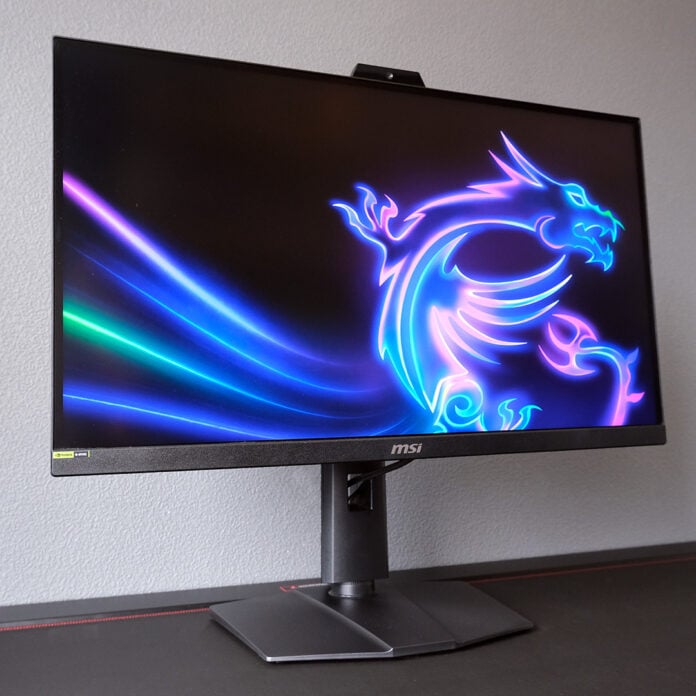
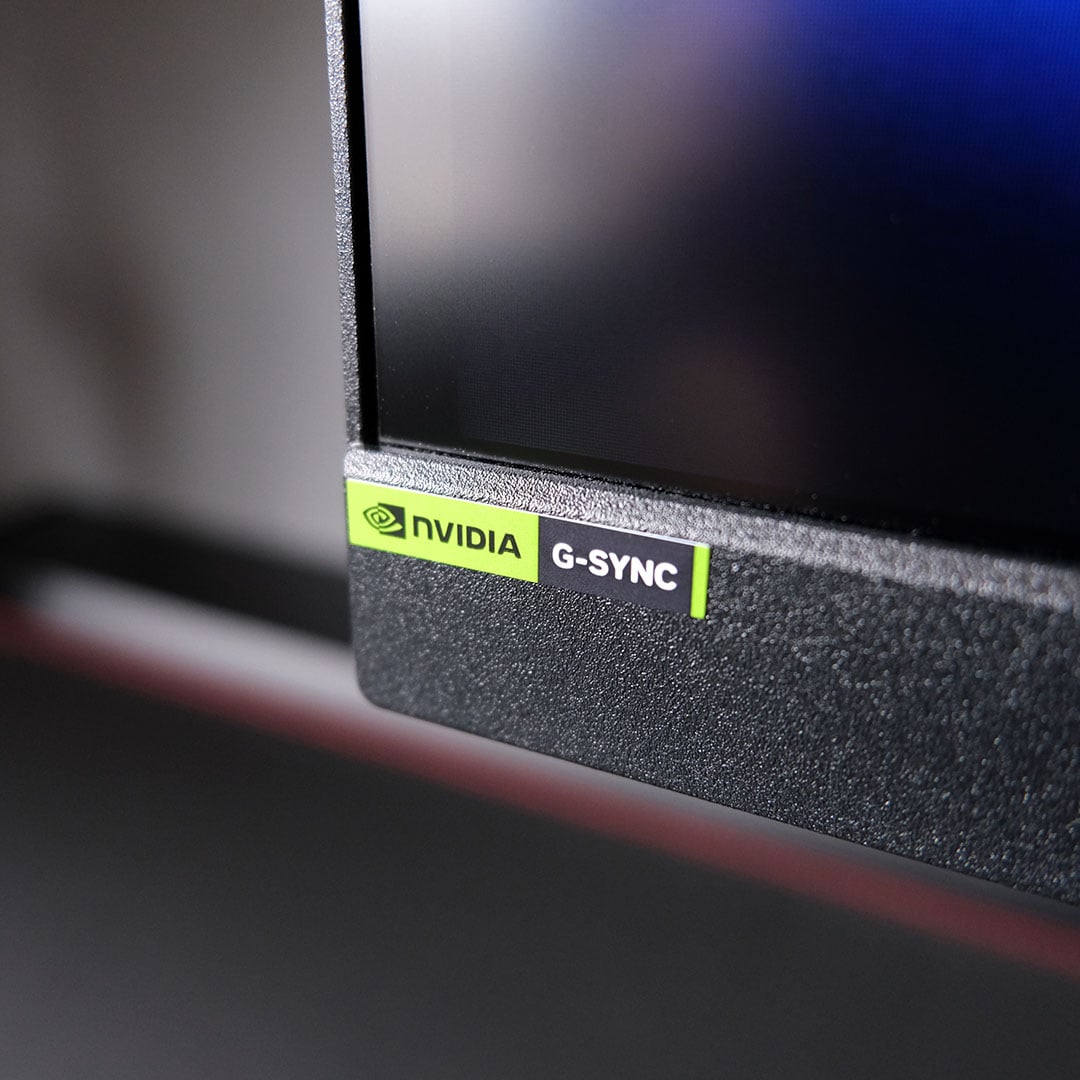
After a longer wait than we initially expected, the first Nvidia G-Sync Pulsar monitors have finally arrived. These screens, including the MSI MPG 272QRF X36 I’m testing here, promise to greatly improve LCD motion clarity to the point where these IPS screens can rival, and even surpass, OLEDs. The technology certainly accomplishes this goal, but not without a few important caveats.

MSI MPG 272QRF X36
£599 / $650
Pros
- Class-leading motion clarity
- Excellent brightness
- Solid colour accuracy
- USB hub
- Upgradable firmware
Cons
- Strobing isn’t suitable for everyone
- Middling uniformity
- Relatively power hungry
Club386 may earn an affiliate commission when you purchase products through links on our site.
How we test and review products.
One example is the price. You’ll find the MPG 272QRF X36 on store shelves for £599 / $650. In the UK, that puts this monitor in the middle of the G-Sync Pulsar price pack, with the floor starting at £550. In the US, this model matches its most affordable competitors on the market.
Specifications
The MPG 272QRF X36 sports a 27in IPS panel, with a native QHD resolution and 360Hz refresh rate. You’ll find this same panel in every G-Sync Pulsar monitor on the market at launch, so it’s down to manufacturer tuning and features to provide differentiation.
Making the most out of such specifications demands high-end hardware, although esports games will run suitably well on less-powerful components. However, there’s little point in grabbing this monitor without a GeForce graphics card, as that’s a necessity for G-Sync Pulsar compatibility.
| MSI MPG 272QRF X36 | |
|---|---|
| Screen size | 27in |
| Resolution | 2560×1440 |
| Refresh rate | 360Hz |
| Response time | 0.5ms (GtG) |
| Panel technology | IPS |
| Variable refresh rate | Nvidia G-Sync Pulsar |
| HDR | HDR 10 |
| Ports | 3.5mm audio-out (x1) DisplayPort 1.4a (x1) HDMI 2.1 (x2) USB-A 5Gb, downstream (x3) USB-B 5Gb, upstream (x1) USB Micro-B 480Mb (x1) |
| Speakers | None |
| Warranty | Three years |
| Price | £599 / $650 |
Of course, Nvidia DLSS 4.5 goes a long way toward addressing the need for expensive hardware, especially now 6x multi frame gen is available. All the same, I’d suggest pairing this monitor with a pixel pusher at least as powerful as the GeForce RTX 5070, not forgetting a suitably speedy processor, such as the Core Ultra 7 270K Plus or Ryzen 7 9800X3D.
While the MPG 272QRF X36 is technically capable of displaying HDR content, its IPS panel lacks any local dimming zones á la Mini LED or OLED. With this in mind, I recommend sticking to SDR experiences for the best picture quality.
Design
Save for the top-mounted sensor (more on that later), you could easily mistake the MPG 272QRF X36 for any number of MSI monitors. That’s by no means a negative, though, as both aesthetics and build are of a pleasing quality.
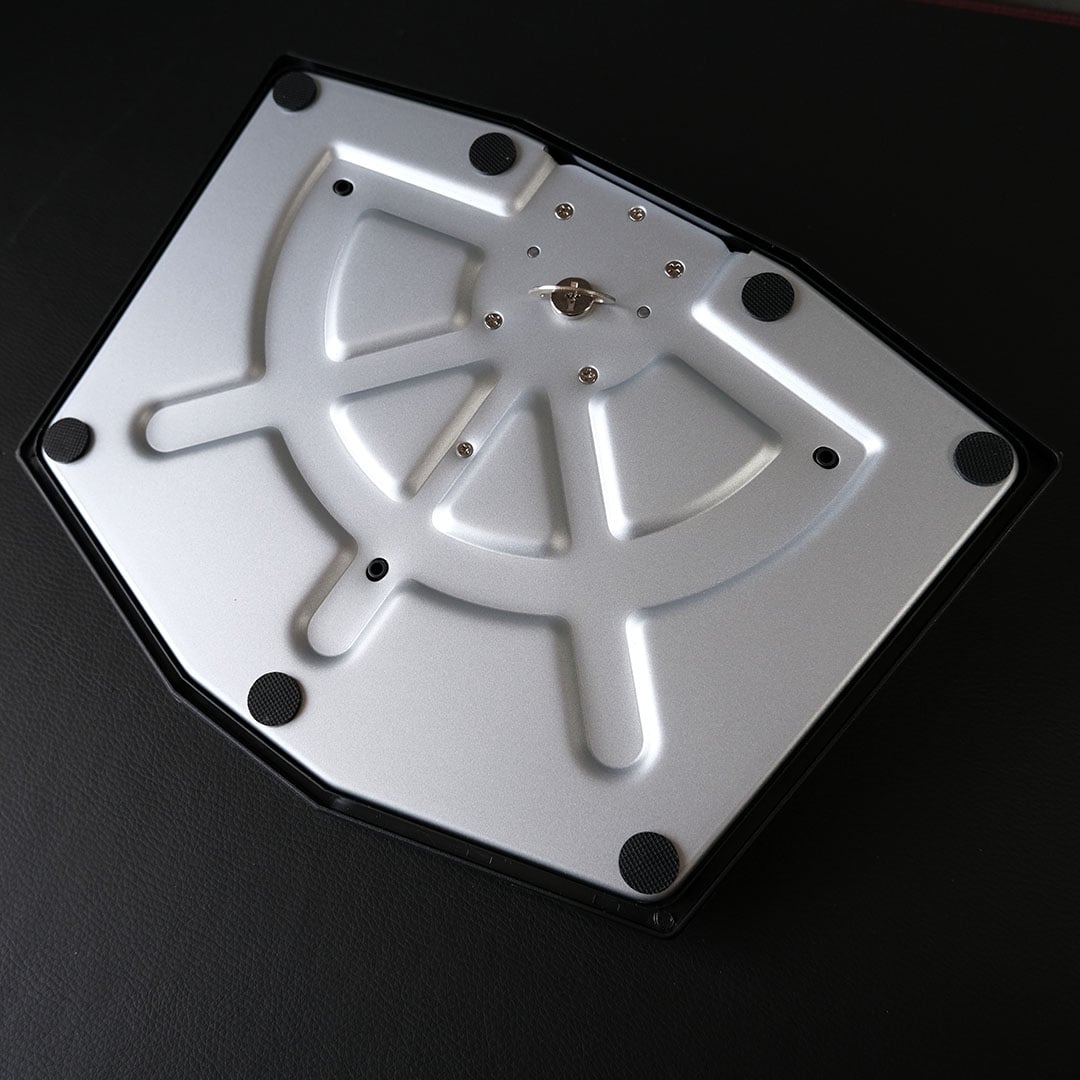
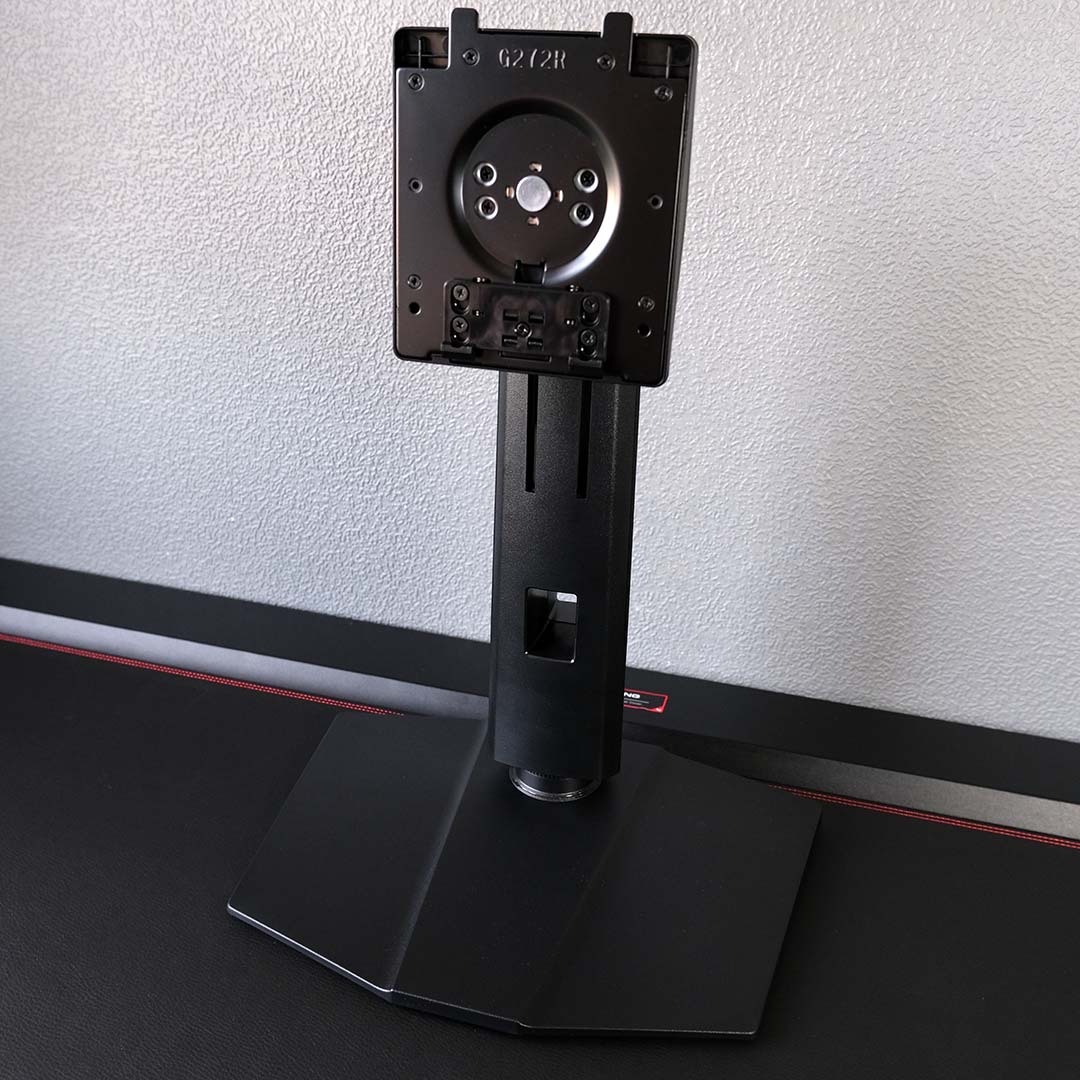
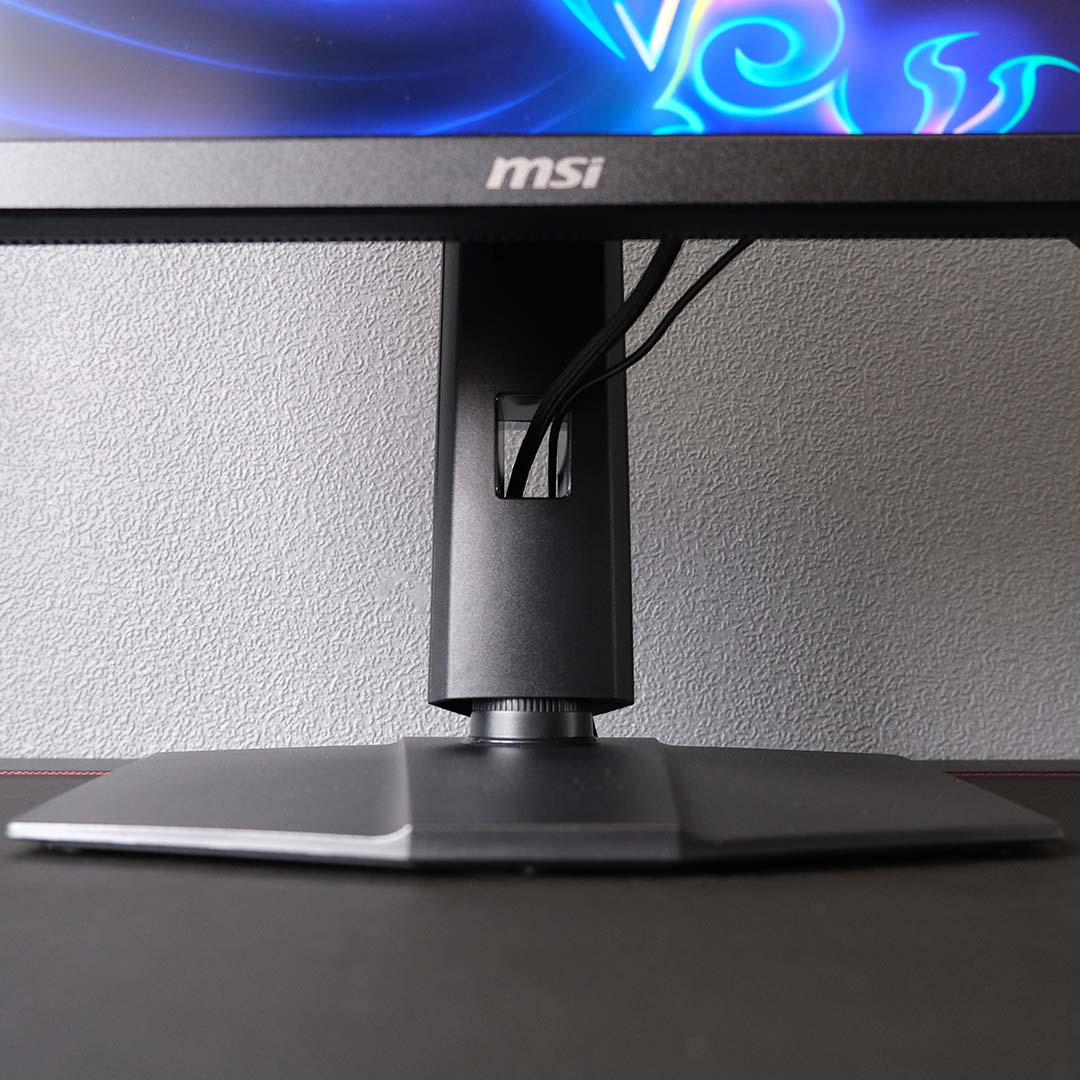
Constructing the monitor is nice and straightforward, requiring zero tools. All you need to do is feed the stand’s teeth into the screen until they click, and tighten up the base’s captive screw.
Getting the screen into the right position for your setup is easy too. The panel can rotate 90 degrees or swivel 30 degrees in either direction, while offering 25 degrees of tilt and 130mm of height adjustment. Alternatively, you can fit the display to an arm with a 100mm2 VESA mount.
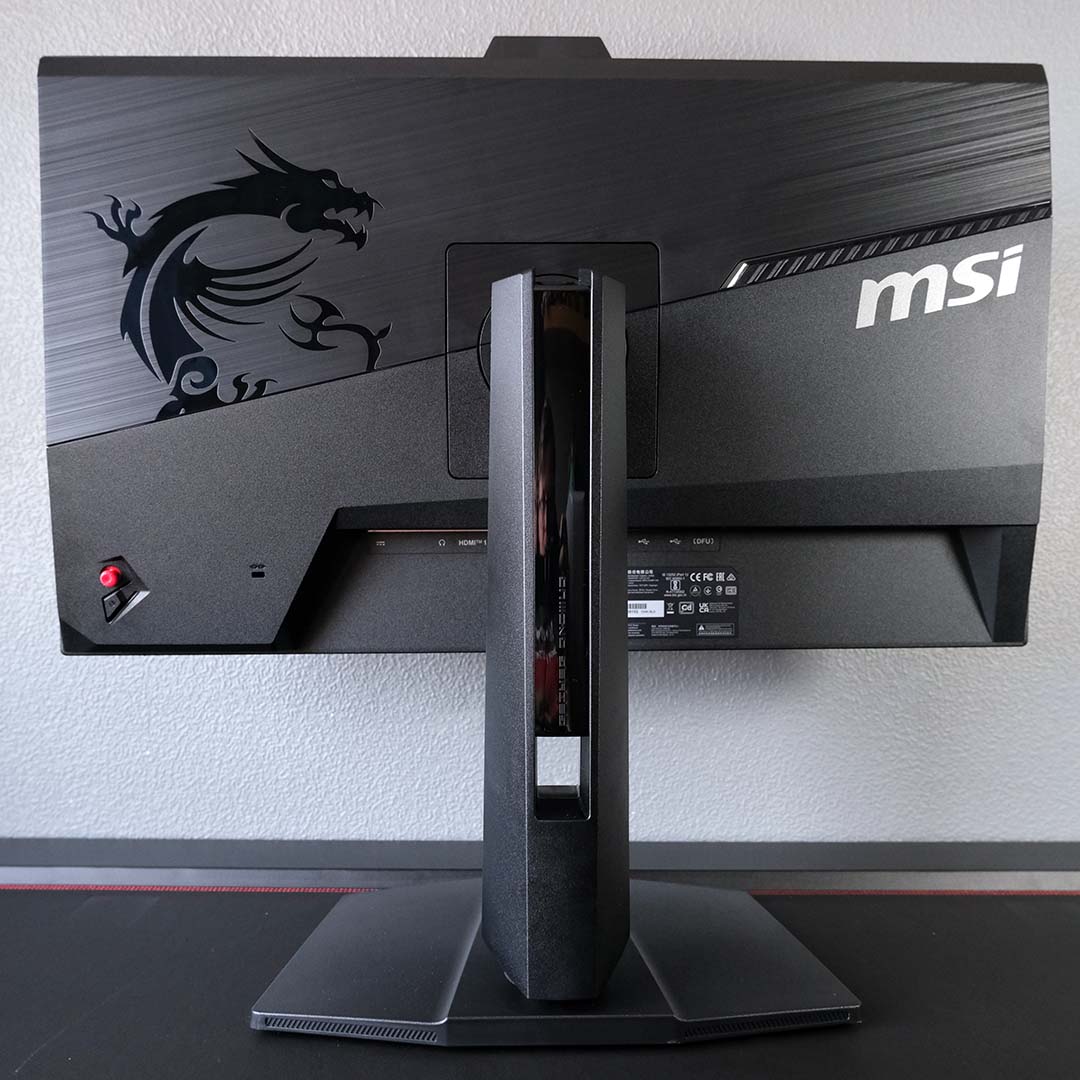
From the front, the MPG 272QRF X36 gives an understated appearance through a uniform matte black colour scheme. Around back, you’ll find a grey brushed plate that provides a pleasing contrast. There’s also a largely pointless RGB LED, but MSI perhaps knowingly leaves this off by default.
The only gripe I have with the monitor’s construction is with regards to cable management. As I’ve mentioned in prior reviews, I’d love to see MSI do something to combat cable slack and provide a cleaner overall finish to its displays once wires enter the frame.
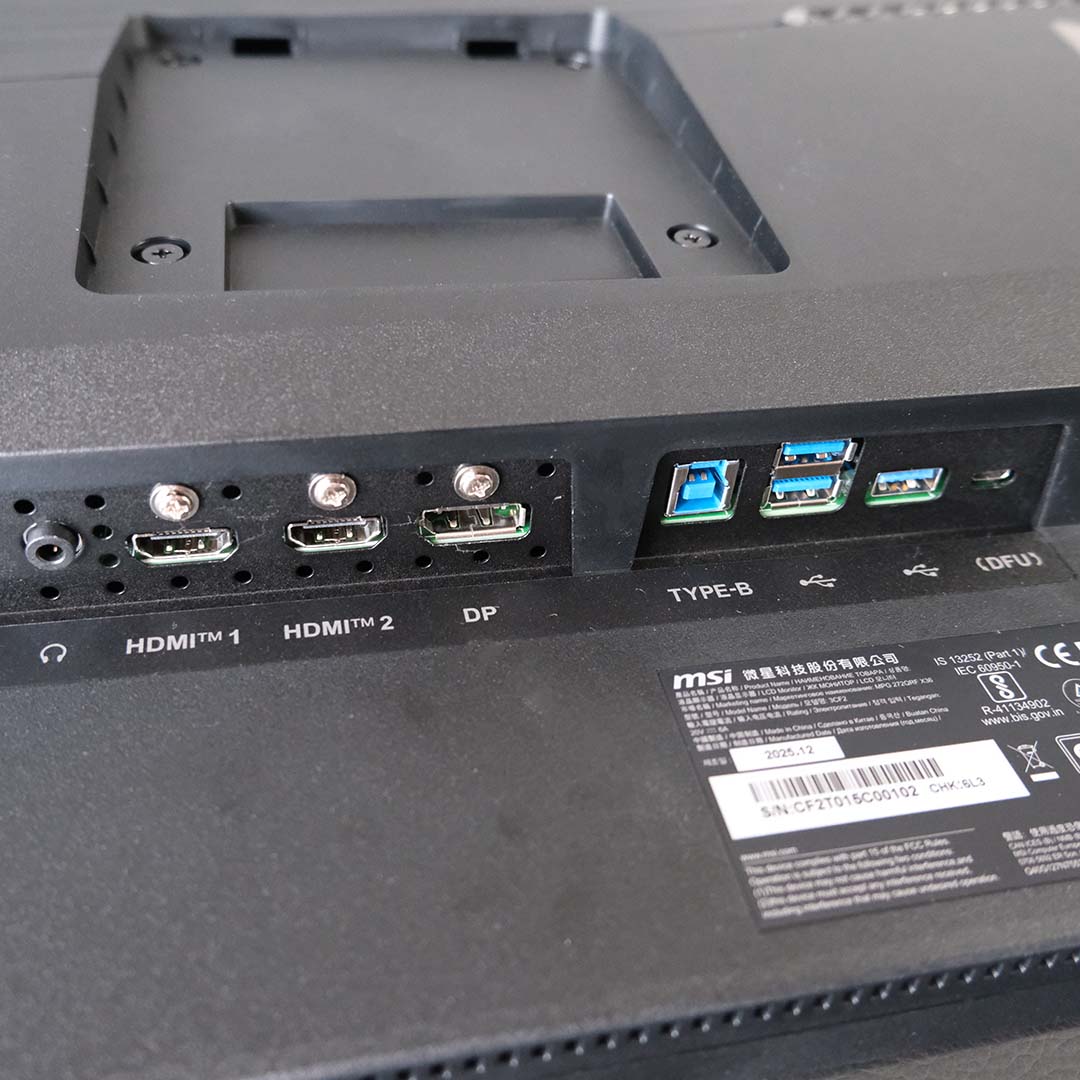
On the underside of the MPG 272QRF X36, you’ll find two HDMI 2.1 ports and a single DisplayPort 1.4a input. You’ll want to connect your PC to the latter to hit 360Hz and enable G-Sync Pulsar support, as the other connections cap out at 120Hz but will pair well with consoles.
You’ll also find a USB Micro-B input among the ports, specifically for firmware updates. This feature isn’t available on all G-Sync Pulsar monitors, separating MSI’s offering from some competitors, and Nvidia is already publishing patches complete with improvements as well as new features.
There’s room for peripherals here too, via three 5Gb USB-A ports, which connect to your PC via a USB-B cable. I’ll always welcome a hub on my monitor, if only to free up another input on my motherboard, while also bringing the ports nearer to you.
Finally, there’s a 3.5mm output if you’re planning to use the HDMI audio out function of your graphics card. This is of little use to me as I rock a USB headset and speakers, but more options are always a plus.
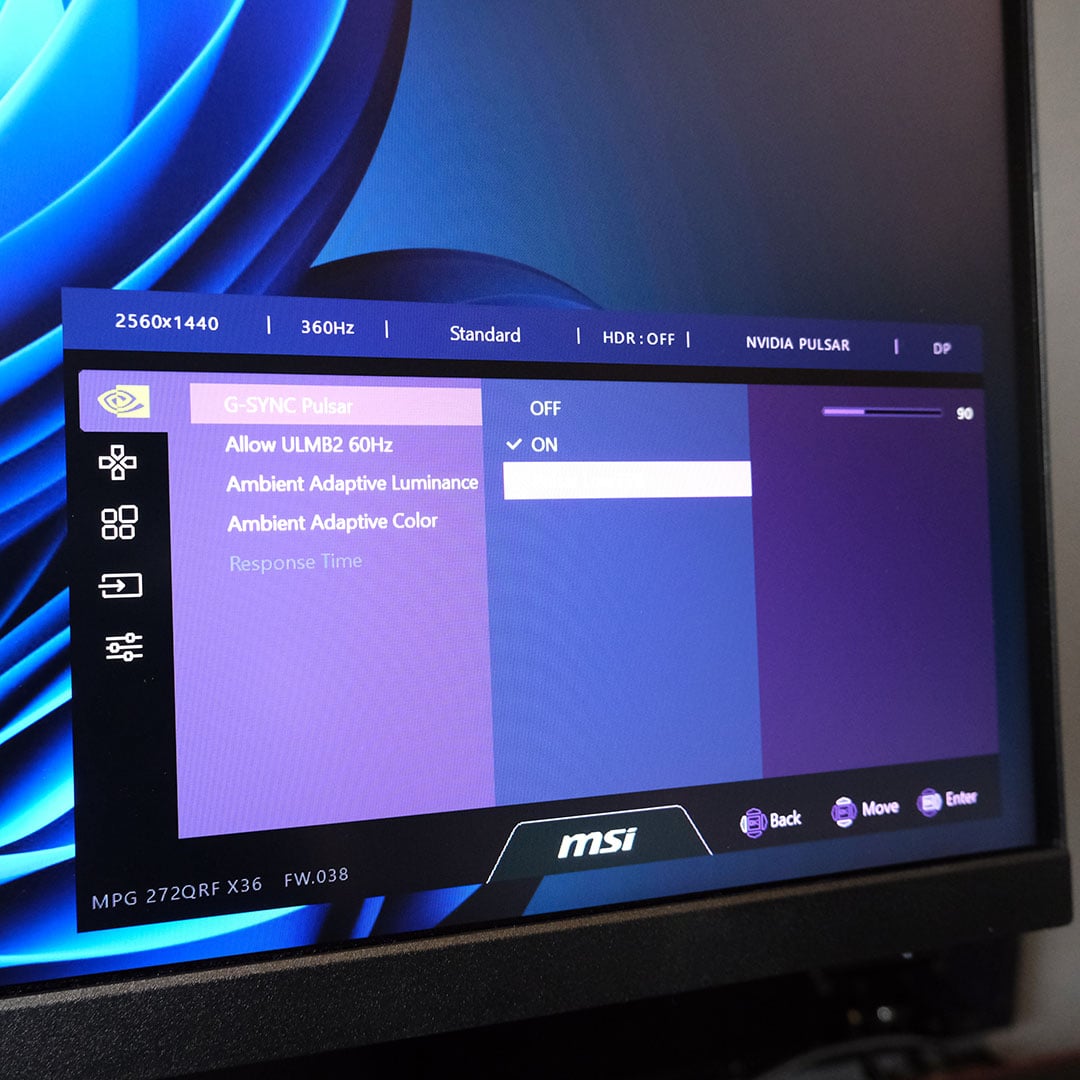
The MSI’s on-screen display (OSD) menu system is easily accessible, with a red joystick on the right-hand side of the screen serving as its controller. I’d normally recommend using the MSI Gaming Intelligence app, but this program curiously doesn’t detect the MPG 272QRF X36 as a supported monitor.
The display uses its Eco picture preset out of the box, but a first-boot message will prompt you to switch to Standard if you’re intent on gaming, which is how I’d recommend using the monitor. I’m also glad to see MSI include an sRGB clamp should the need arise for it.
You’ll find useful at-a-glance information along the top of the OSD. This readout contains information about your current resolution, refresh rate, and more, while crucially serving as an indicator for whether standard G-Sync, Pulsar, or ULMB2 is active.
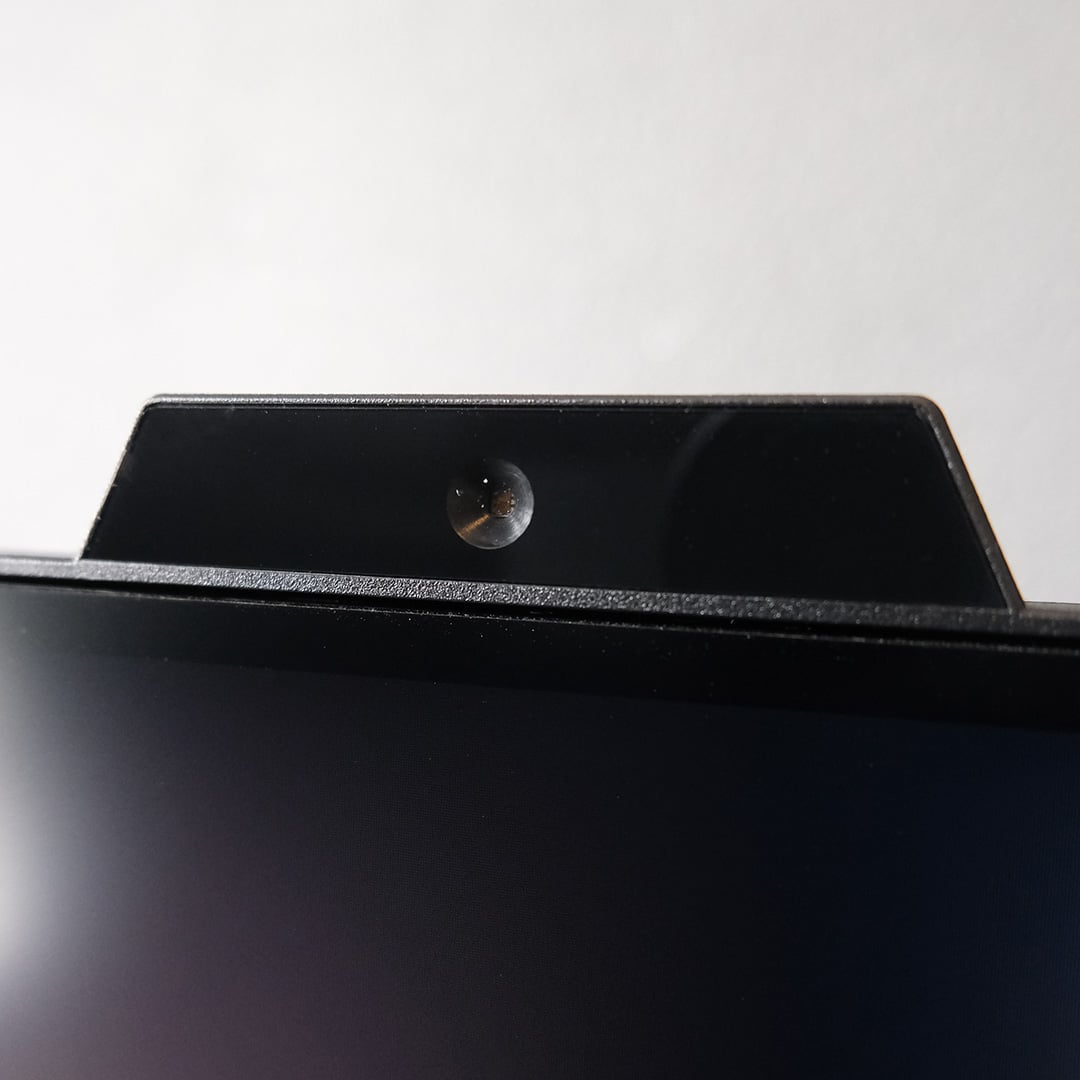
Finally, let’s talk about that sensor at the top of the MPG 272QRF X36. This isn’t the AI Care Sensor you’ll find on MSI QD-OLEDs, though it serves a similar purpose in terms of managing the brightness and colour temperature of your screen.
Beginning with the former, Ambient Adaptive Luminance is the better of the two functions in my eyes. Beginning the day in my office with dull lighting, the sensor analyses ambient lighting and brings down the monitor’s brightness to alleviate eye strain. As the sun begins to shine through my window, it’ll bump up its luminance gradually, maintaining comfort. It’s subtle and useful, just how it should be.
However, Ambient Adaptive Colour isn’t a feature I like using, although it functions well enough. While I appreciate the usefulness of cranking up colour temperatures to warmer hues for greater comfort during work, it’s not a feature I want for games, as doing so affects their look too much for my taste. Thankfully, it’s entirely optional, so I happily leave it off.
Performance
Before diving into how the MPG 272QRF X36 performs, it’s important to first have an understanding of how Nvidia G-Sync Pulsar works and affects the monitor. In short, this new feature is a combination of two longstanding technologies, namely Variable Refresh Rate (VRR) and backlight strobing, two features that have been mutually exclusive until now, thanks to recent innovations.
As Gerrit Slavenburg, G-Sync senior director of architecture, explains in the video above, pairing VRR with strobing techniques is a problem that Nvidia has spent over ten years trying to solve. This process isn’t as simple as varying pulses proportional to refresh rate, as doing so results in visible flickering.
The solution actually harkens back to the days of CRT displays, using a 10-step ‘rolling scan’ strobing technique that provides pixels time to transition before the next frame displays. This reduces LCD blur, enhances clarity, and removes flicker. Presto.
As a reminder, G-Sync Pulsar requires a GeForce graphics card, owing to driver-level tunings for frame delivery and pacing. It’s unclear whether the technology will ever become compatible with Arc or Radeon GPUs, but there’s no sign of such efforts coming to pass anytime soon.
For further detail on all the nuts and bolts of G-Sync Pulsar, I strongly recommend reading my announcement coverage, Nvidia’s own blog post on the technology, and Ben’s Pulsar hands-on piece from CES.
As soon as I had the MPG 272QRF X36 set up, I wasted no time in loading up the Blur Busters Test UFO pattern. I then spent the next several minutes enabling and disabling G-Sync Pulsar via the OSD, and came away from the experience pleasantly surprised. In short, this feature is the real deal.
Any content running at 360Hz is going to provide excellent motion clarity out of the gate, with each frame holding for 2.8ms before a refresh occurs. However, turning on G-Sync Pulsar provides further clarity still. In this particular case, I’m able to more clearly distinguish the outline of the spaceship, as well as the individual white dots on its red body.
Nvidia claims Pulsar effectively boosts motion clarity by 4x, meaning this monitor should perform akin to a 1,440Hz screen, but I’m not convinced that’s the exact case. Dropping down to 90Hz, the results are better than you’d expect for a 90Hz screen, but certainly not a replacement for a native 360Hz. Regardless, what matters is that objects in motion are visibly clearer using the feature, with no tearing, noticeable overshoot or ghosting.
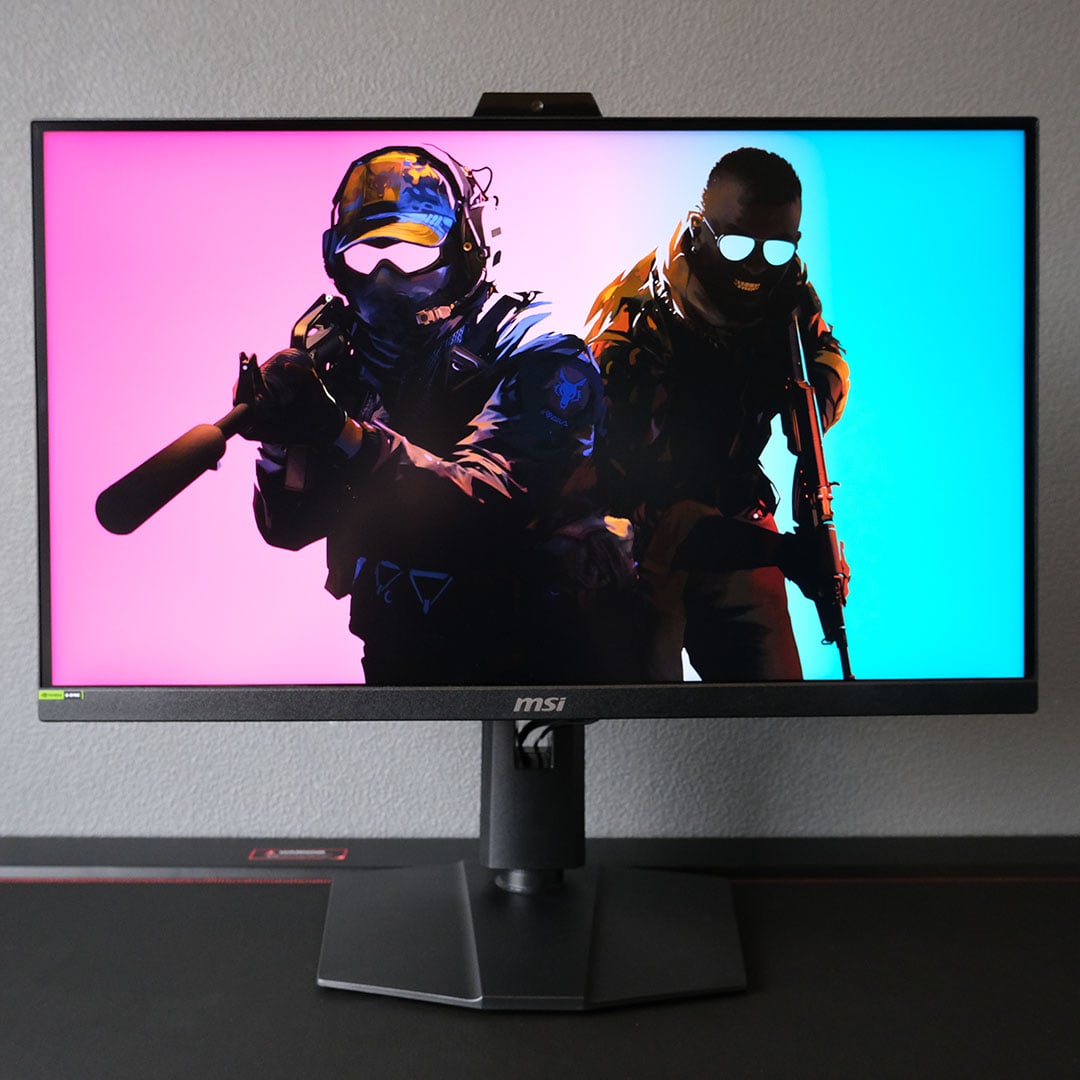
Keen to test G-Sync Pulsar in a real-world setting, I loaded up Counter-Strike 2 and ran through countless rounds of deathmatch to give me plenty of fast-moving targets to track. While the benefits of the feature were difficult to notice in this environment, particularly as my concentration leaned more towards landing shots than pixel peeping, I’d rather use Pulsar than not.
This is as good as LCDs get relative to OLED’s instant pixel response times, with G-Sync Pulsar giving MSI’s MPG 272QRF X36 the speed necessary to compete with 360Hz and even 500Hz self-emissive displays. That’s all without the risk of burn-in too, which is more of a concern if you’re the type of person who religiously plays a single game with constant static HUD elements.
I also tried G-Sync Pulsar in other titles, including Sid Meier’s Civilization VI. Quick pans across the map feel smoother, and the details of my ever-expanding empire’s buildings and landscapes retain more detail as I move my mouse cursor. Text legibility also improves thanks to the feature. Once blurry landscapes and text were now more legible during camera movements, making for an altogether more pleasant experience.
I spent hours playing games on the MPG 272QRF X36 with G-Sync Pulsar without issue, as I have with other strobing technologies, but others won’t be so fortunate. Rapidly flashing a backlight doesn’t play nice with some eyes, resulting in unpleasant eye strain and even headaches after a few minutes of use. This hampers the broad appeal of MSI’s monitor and others using the technology, and I’d suggest trying the likes of ULMB2 or alternatives prior to purchasing.
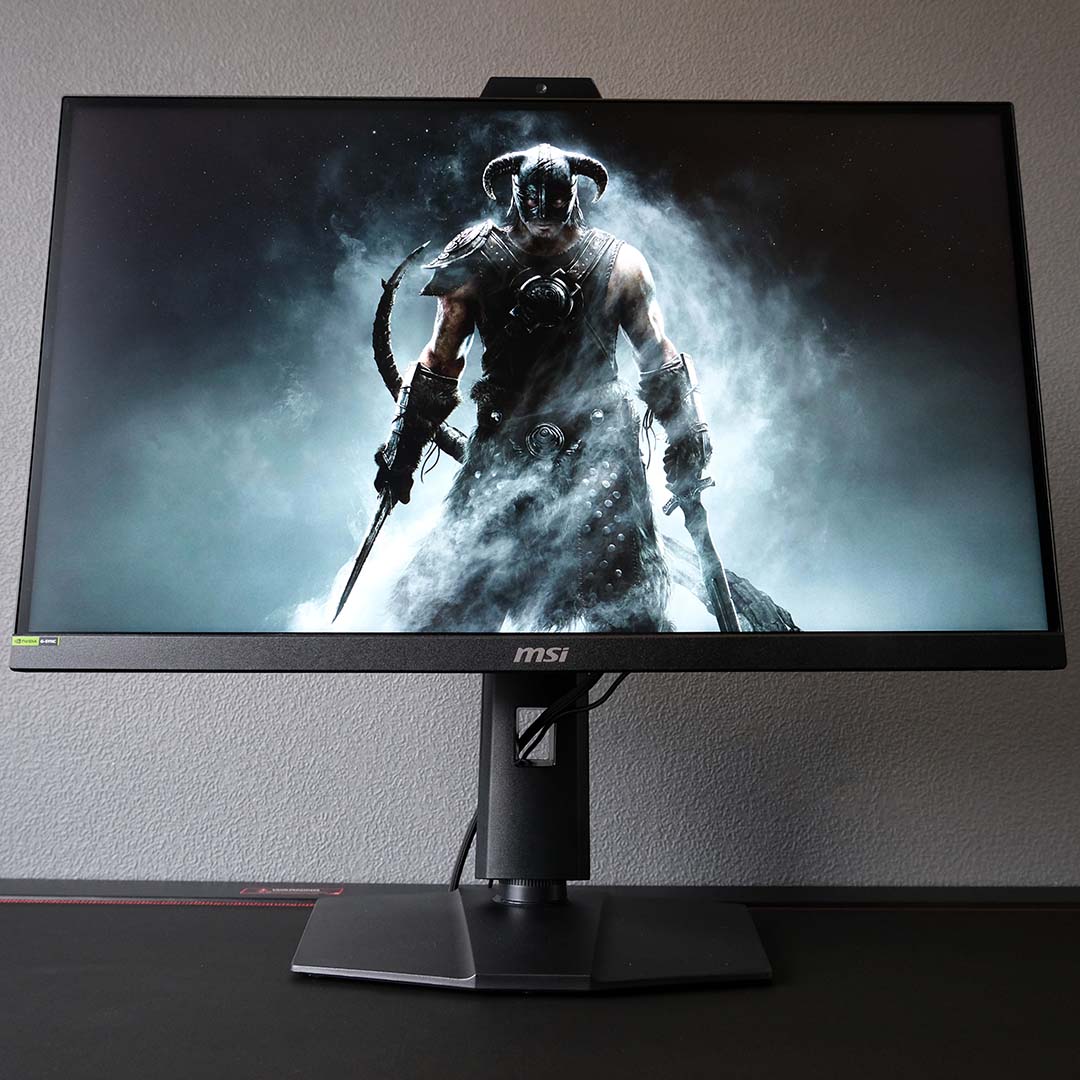
Stepping away from G-Sync Pulsar, I loaded up The Elder Scrolls V: Skyrim to test out ULMB2 at 60Hz. Bethesda’s RPG doesn’t reach above 60fps without modding, making it the perfect example of a game that stands to benefit from this feature. Doing so comes at the cost of VRR, but I’m able to constantly hit my frame rate target with plenty of overhead anyway, effectively eliminating any risk of tearing.
As with Pulsar, motion clarity is higher in this mode. Fast-moving objects are admittedly few and far between in Skyrim, but the fluidity of walking character models, sword swings, and other actions is better with ULMB2. However, the same caveat with regards to strobing suitability applies here too.
Like all other hardware upgrades, be it resolution, screen size, or refresh rate, G-Sync Pulsar and ULMB2 won’t automatically make you a professional sharpshooter. However, the feature will provide more room for you to perform at your best, shaving blur off a target so you can more easily land all-important plays.
Colours
For all results discussed below, I’ve used the monitor’s Standard preset. I’ve also enabled G-Sync Pulsar and will highlight any differences as they become relevant.
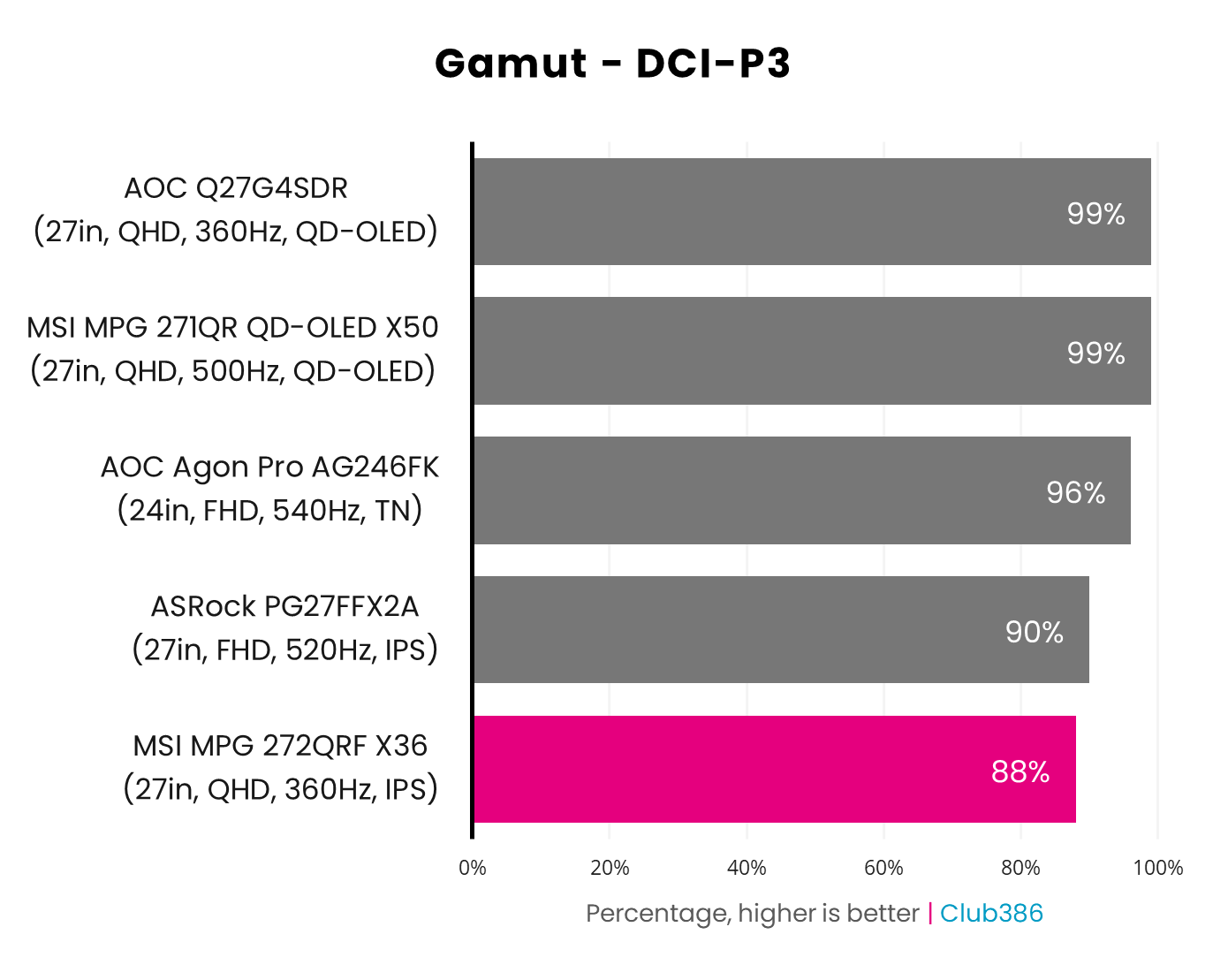
The MSI’s 88% coverage of DCI-P3 is relatively low for an IPS screen, as these panels more often than not measure at 90%+. For context, the MPG 272QRF X36’s gamut pales when compared to alternatives at a third of its cost, such as the Gigabyte M27QA Ice, which covers 98% of this gamut.
QD-OLED panels also handily trump this IPS screen by a large margin with 99% coverage, with these self-emissive screens providing more varied shades of colour as a result. This is true of the best we’ve tested, such as MSI’s own MPG 271QR QD-OLED X50, as well as the high-value hero that is the AOC Q27G4SDR.
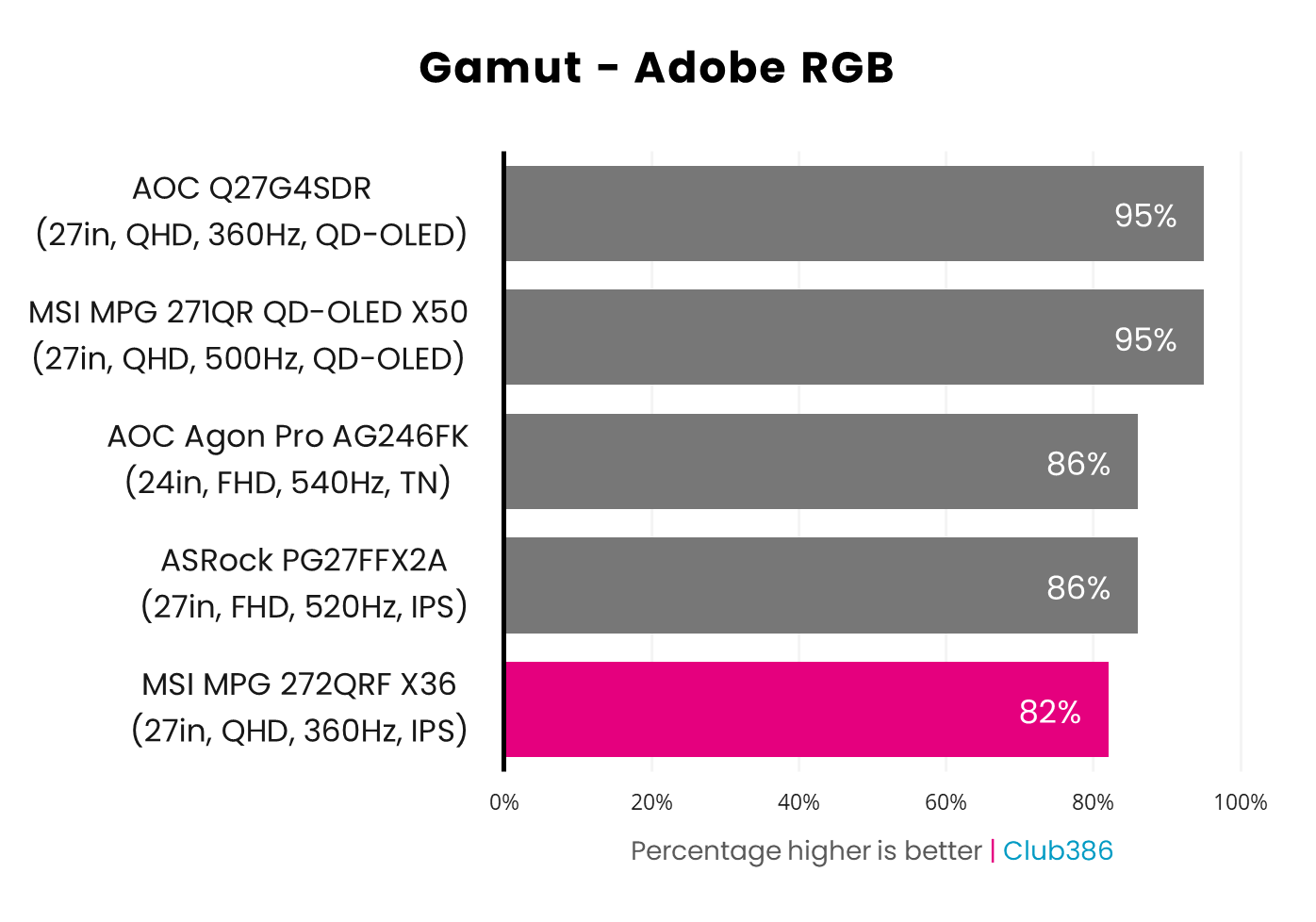
Expanding horizons to the Adobe RGB colour space, as expected, doesn’t change the monitor’s fortunes much. However, gamut here isn’t a huge concern for gaming displays and is more pertinent to professional colour-sensitive work such as graphic design.
That said, this is still a relatively low result for an IPS panel. Moreover, the QD-OLED panels we’ve tested prove more versatile, each boasting 95% coverage compared to the MPG 272QRF X36’s 82%.
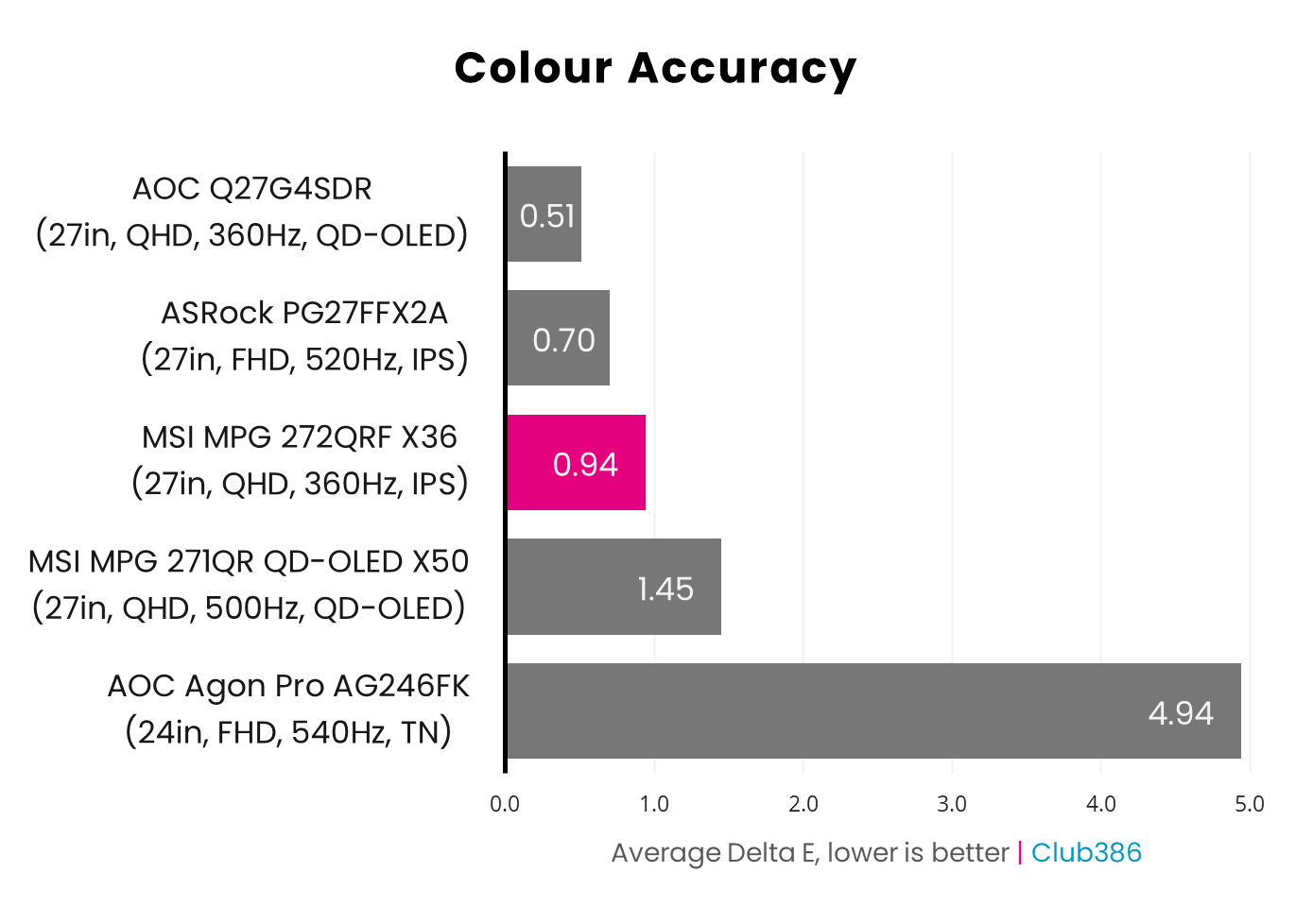
True to MSI’s product page, the MPG 272QRF X36 arrives with a <2 average Delta E, meaning colours are generally accurate beyond the perception of the human eye. The monitor does trip over on some shades, but its 3.82 maximum Delta E doesn’t result in egregious inaccuracies by any means.
To this IPS panel’s credit, these results compete with MSI’s MPG 271QR QD-OLED X50. However, the AOC Q27G4SDR tops the chart, with both average and maximum Delta Es of <2.
Brightness
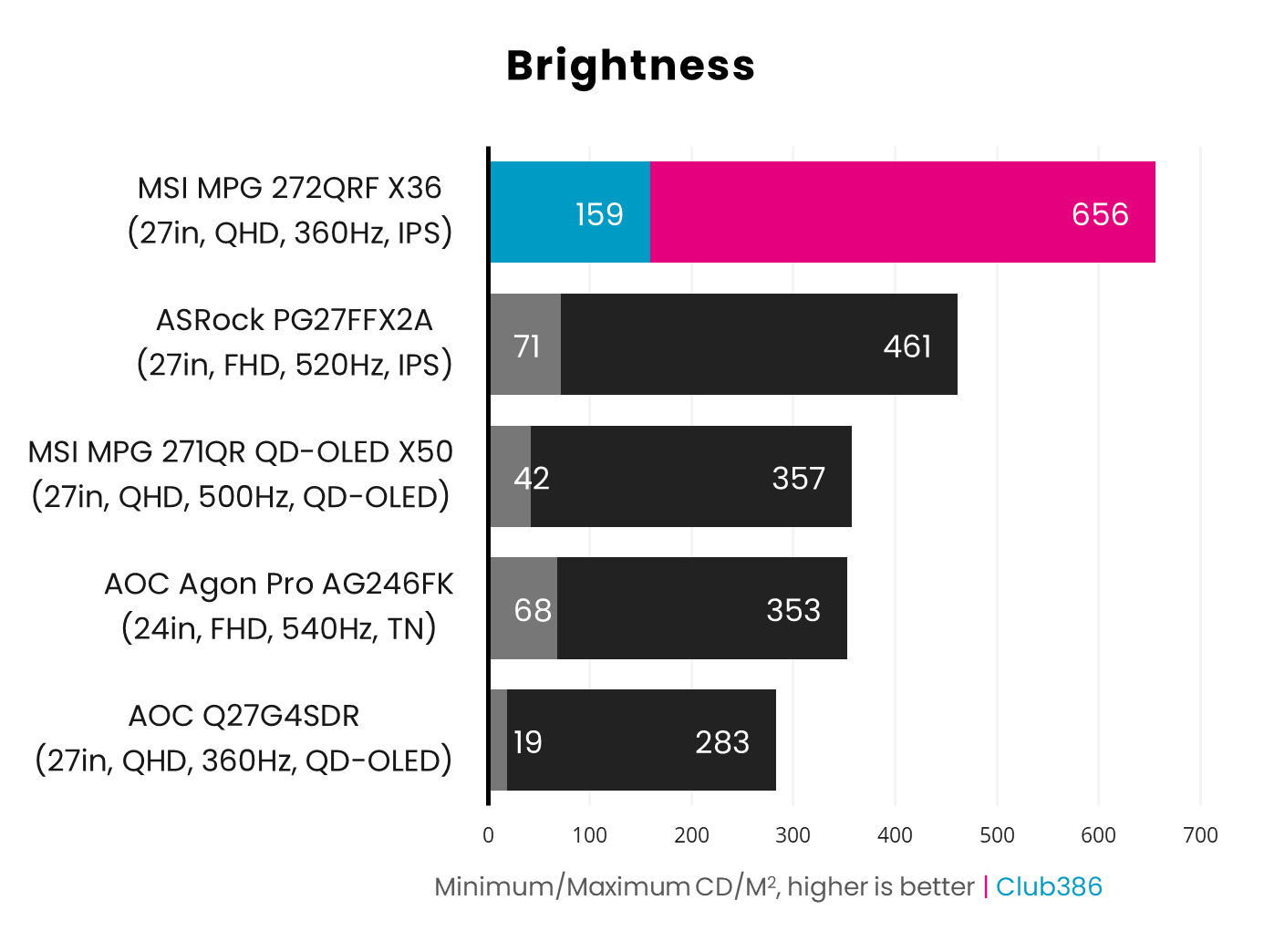
If there’s one area where backlit displays continue to dominate, it’s brightness. The MPG 272QRF X36 quite literally shines above the rest of the monitors in our chart and actually boasts one of the brightest panels we’ve ever tested at 656nits. G-Sync Pulsar is pushing lumens up so high, at both ends of the scale. Disabling the feature brings down the brightness range to 59-596cd/m2.
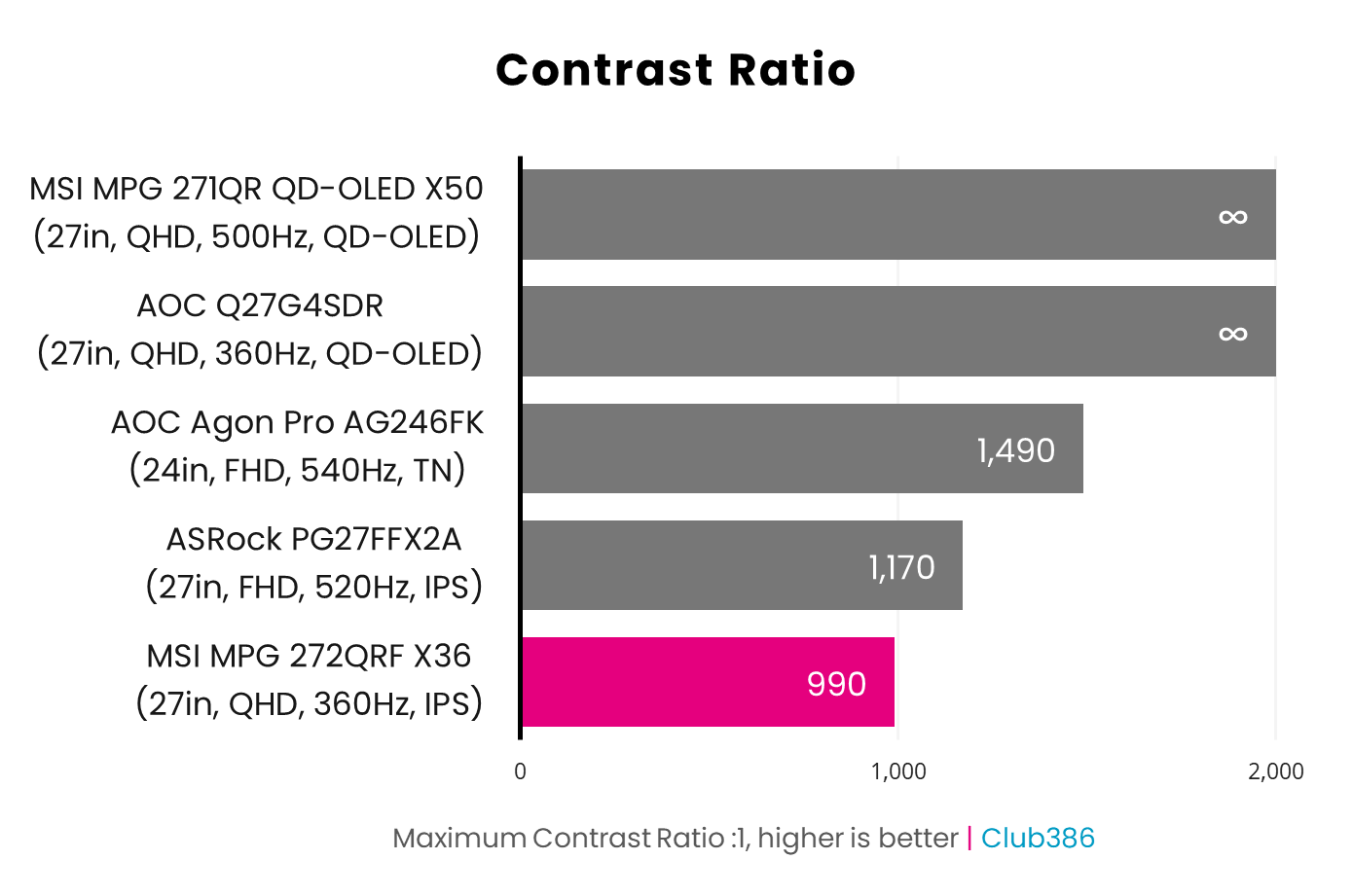
All that brightness doesn’t translate into a large contrast ratio for the MPG 272QRF X36, clocking in at 990:1. As with gamut, this is among the lower results we’ve recorded for IPS panels, as we’d usually expect at least ~1,200:1.
Of course, opting for any QD-OLED panel nets an effectively infinite contrast ratio as each pixel can turn off completely, resulting in perfect black levels.
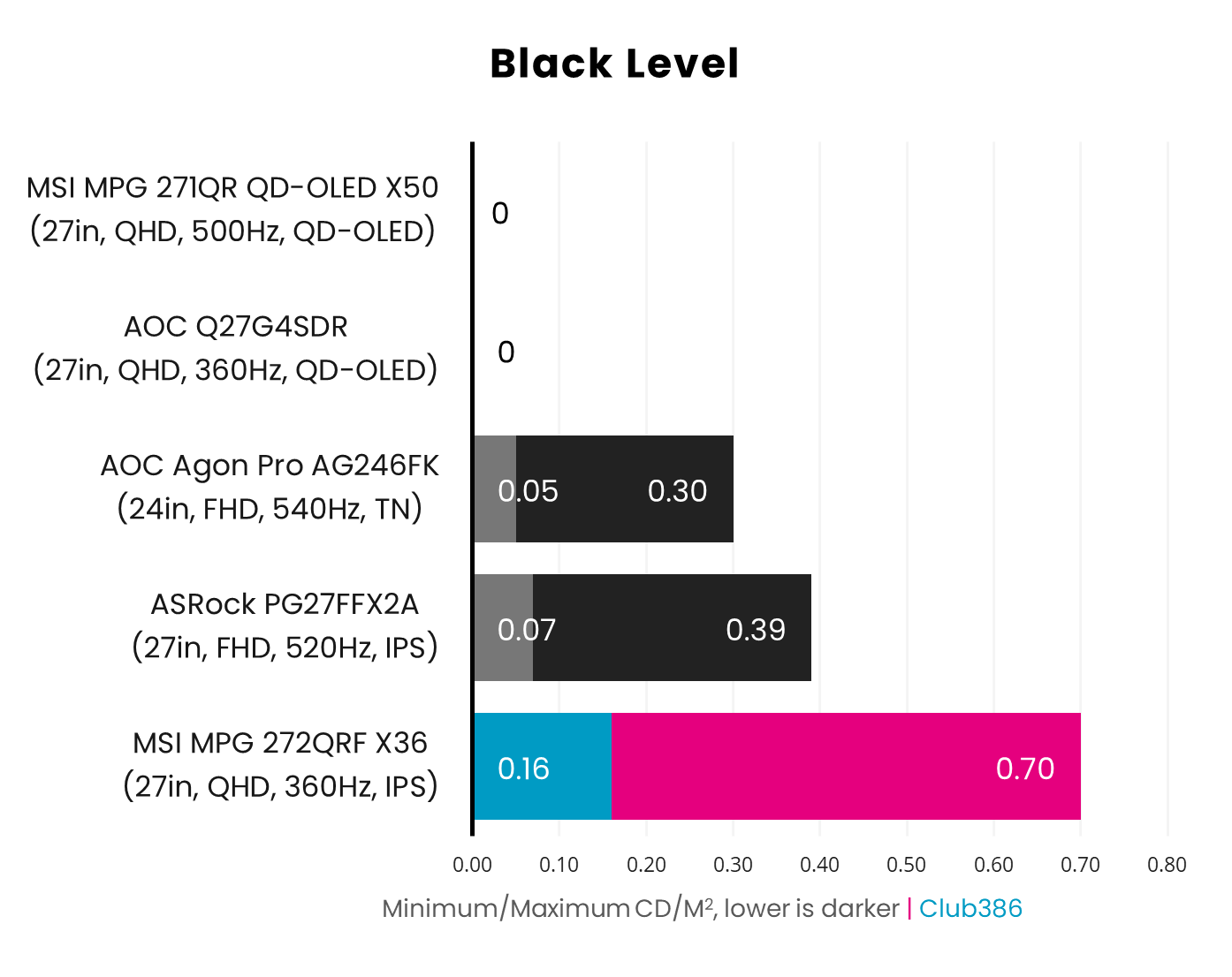
Given the high brightness and low contrast of the MPG 272QRF X36, it comes as no surprise that the monitor’s black levels are relatively high. As such, dark areas of the screen appear noticeably grey, even by typical IPS standards.
Turning off G-Sync Pulsar does allow them to settle a touch more, at 0.06-0.65, but that drop doesn’t translate into a tangible difference.
Uniformity
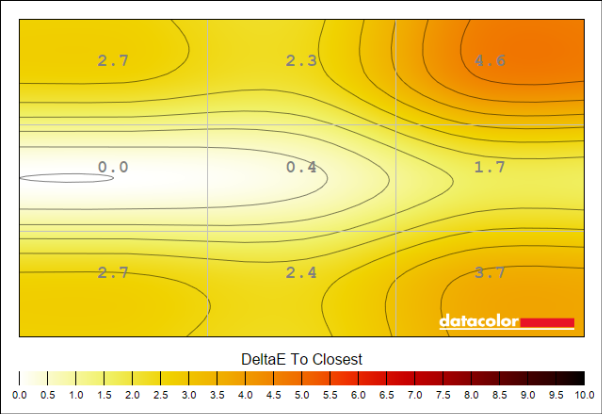
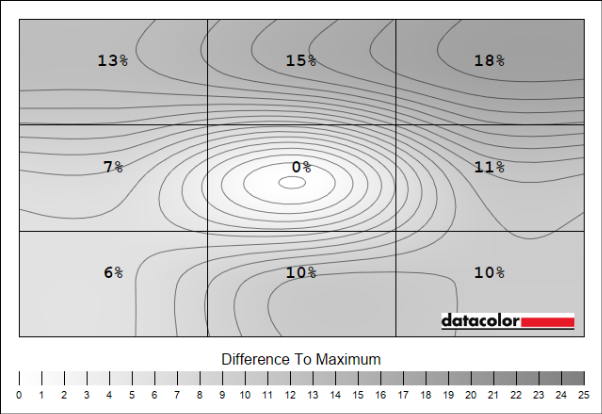
Backlights create problems for panel uniformity across all IPS monitors, and the MPG 272QRF X36 is no exception. Both colour and luminance deviation is noticeably high in the top-right corner of my sample, which isn’t surprising given the IPS bleed that’s apparent to the naked eye in that area.
This isn’t enough of a problem to prove distracting in games, but a QD-OLED panel will offer vastly superior uniformity across both colours and luminance..
Power
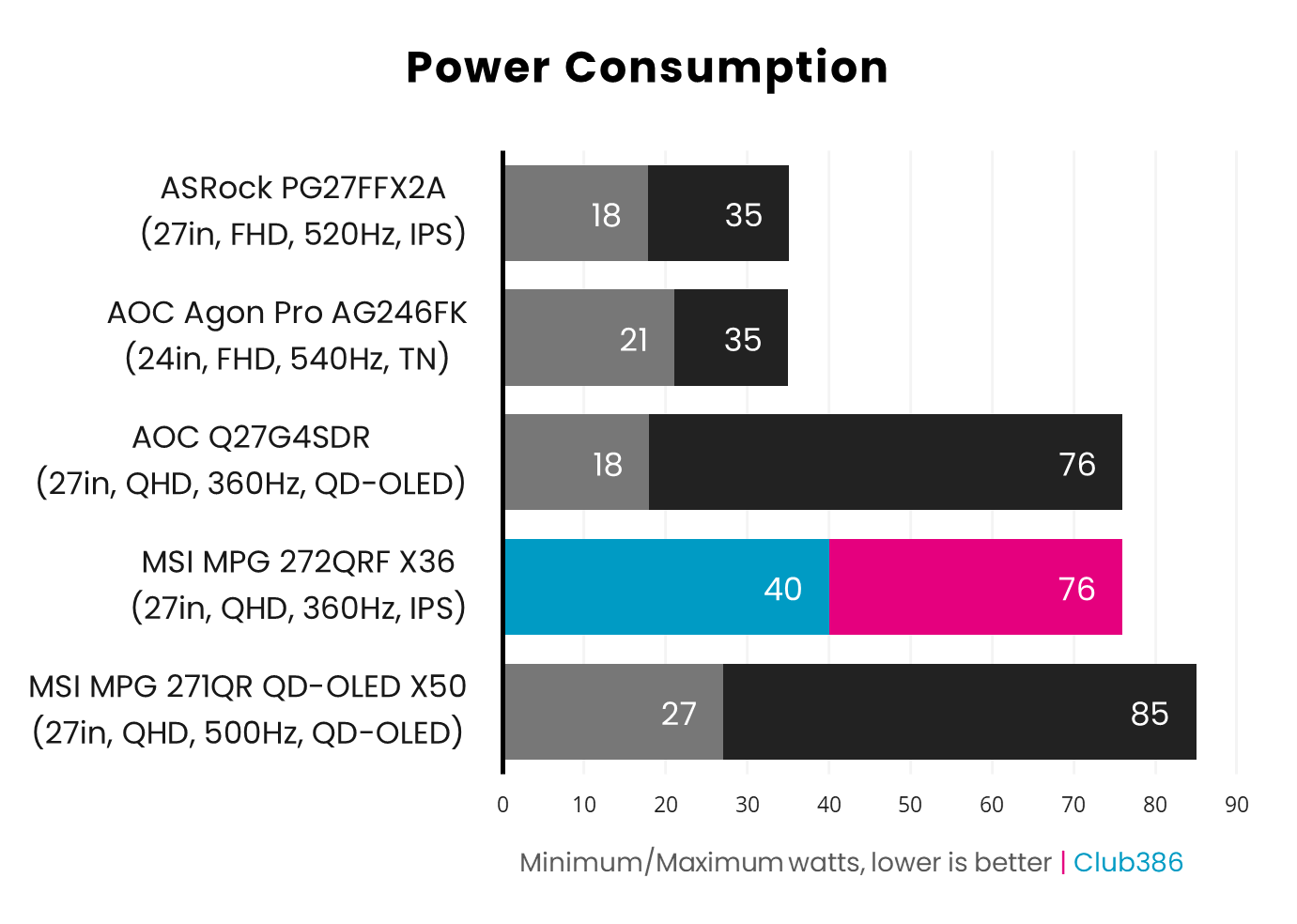
Power consumption on the MPG 272QRF X36 is closer to a QD-OLED than IPS panel. This is true regardless of whether G-Sync Pulsar is active, with the draw from the wall falling to 32-63W once the feature is off.
Conclusion
G-Sync Pulsar elevates the MPG 272QRF X36 beyond the capabilities of other LCD monitors, successfully pushing motion clarity to new heights for the display technology. I’ve little doubt screens of this ilk will become the new standard for esports, across personal setups and competitions.
Beyond that market, though, recommending the likes of the MPG 272QRF X36 becomes more difficult. Unrivalled motion clarity is a big boon, but the method by which the monitor achieves this won’t appeal to everyone. That’s not forgetting the surprising shortfalls in gamut and panel uniformity too.
Then there’s the matter of price and the problem that affordable OLED monitors present to G-Sync Pulsar displays. Maximum bang for buck now lies with these self-emissive screens, with similar specifications for less cash, in addition to superior colour and contrast. Even motion clarity isn’t too far behind that most folks won’t think twice.
While I don’t think everyone should own a G-Sync Pulsar monitor, it’s a great fit for esports enthusiasts with the right biological temperament. In any case, I’m keen to see this feature evolve. Come on Nvidia, let’s see this tech on a Mini LED screen.
