

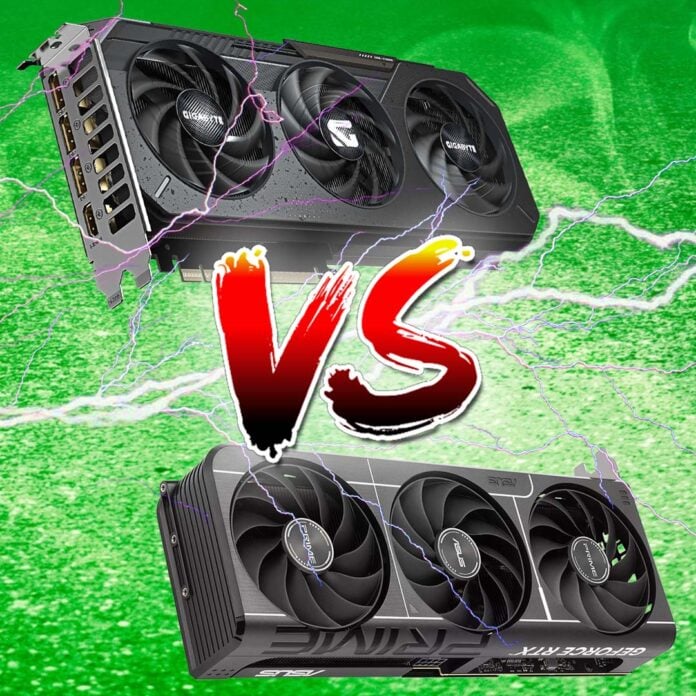
Graphics card prices are bananas right now, prompting the question as to whether it’s still worth paying a bigger chunk of change for an RTX 5060 Ti 16GB over the more affordable RTX 5060 Ti 8GB. To find out, we’ve got our hands on graphics cards with both VRAM capacities, benchmarked them across applications and games, and put together all our results in this showdown.
Specifications
The RTX 5060 Ti 16GB and 8GB are identical in every respect, bar their differing memory capacity. You’ll even find the same cooler designs for each model on the market. As such, it’s doubly important to look out for VRAM indicators on backplates and packaging, as there are no other ways to differentiate them until either pixel pusher makes it into your PC.
| RTX 5060 Ti 16GB | RTX 5060 Ti 8GB | Ratio | |
|---|---|---|---|
| Released | Apr 2025 | Apr 2025 | – |
| Codename | Blackwell | Blackwell | – |
| GPU | GB206 | GB206 | – |
| Process | TSMC N4P | TSMC N4P | – |
| Transistors | 21.9bn | 21.9bn | 1.00 |
| Die size | 181mm² | 181mm² | 1.00 |
| Streaming multiprocessors | 36 of 36 | 36 of 36 | 1.00 |
| CUDA cores | 4,608 | 4,608 | 1.00 |
| Boost clock | 2,572MHz | 2,572MHz | 1.00 |
| RT cores | 36 (4th-gen) | 36 (4th-gen) | 1.00 |
| Tensor cores | 144 (5th-gen) | 144 (5th-gen) | 1.00 |
| ROPs | 48 | 48 | 1.00 |
| Memory | 16GB | 8GB | 2.00 |
| Mem. type | GDDR7 | GDDR7 | – |
| Mem. clock | 28Gbps | 28Gbps | 1.00 |
| Mem. interface | 128-bit | 128-bit | 1.00 |
| Mem. bandwidth | 448GB/s | 448GB/s | 1.00 |
| Board power | 180W | 180W | 1.00 |
| Launch MSRP | £399 / $429 | £349 / $379 | 1.13 |
Both versions of the RTX 5060 Ti feature a GB206 GPU, measuring a paltry 181mm², complete with all 36 of the die’s streaming multiprocessors (SMs) enabled. This means each graphics card arrives with 4,608 CUDA cores, alongside 36 ray tracing (RT) cores and 144 Tensor cores. Even stock boost clocks are identical at 2,572MHz, but this can vary across models owing to board partner overclocks.
With the above in mind, the only reason the RTX 5060 Ti 16GB and 8GB should show any substantial differences in frame rates or application performance comes down solely to their VRAM capacities. We’re dealing with identical GDDR7 memory modules running at 28Gbps, as well as the same 128-bit interfaces. This gives both graphics cards a total maximum memory bandwidth of 448GB/s.
When the RTX 5060 Ti first launched, you could purchase the 16GB model for a mere £50 ($50) premium over the 8GB version. Fast forward to 2026, though, and the memory crisis has turned this small pricing gap into an enormous chasm. At the time of writing, you can find the smaller capacity from £449 ($499) while the larger alternative will now cost you a minimum of £679 ($799).
Test methodology
I’ve benchmarked the RTX 5060 Ti 16GB and 8GB cards in our AMD Ryzen 9 9950X3D test benches. While this PC’s specifications are certainly much higher than a typical PC I’d expect to be running either of these graphics cards, my priority here is testing absolute performance between the cards.
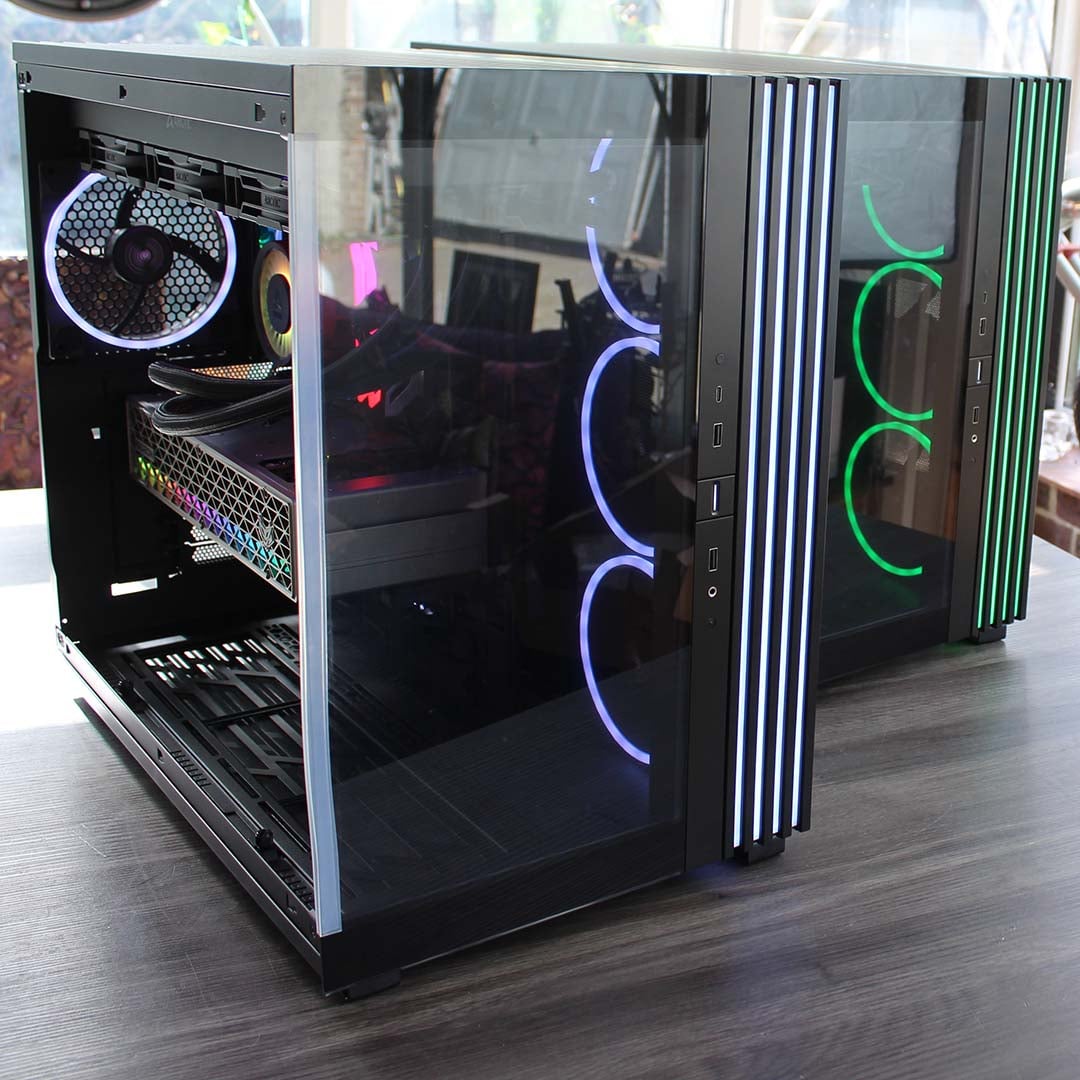
Our 9950X3D Test PCs
Club386 carefully chooses each component in a test bench to best suit the review at hand. When you view our benchmarks, you’re not just getting an opinion, but the results of rigorous testing carried out using hardware we trust.
Shop Club386 test platform components:
CPU: AMD Ryzen 9 9950X3D
Motherboard: MSI MEG X870E Ace Max
Cooler: Arctic Liquid Freezer III 420 Pro ARGB
GPU: Sapphire Nitro+ Radeon RX 9070 XT
Memory: 64GB Kingston Fury Renegade DDR5
Storage: 4TB Sandisk Optimus GX Pro 8100
PSU: be quiet! Dark Power 14 1,200W
Chassis: be quiet! Light Base 900 FX
In addition to application tests, I’ve also put both the RTX 5060 Ti 16GB and 8GB through a series of gaming benchmarks at both 1080p (FHD) and 1440p (QHD). The larger capacity model has room to run some games at 4K without encountering performance woes stemming from an overloaded buffer. However, the horsepower of the GB202 GPU in each graphics card is generally better off running at the resolutions I’ll be discussing.
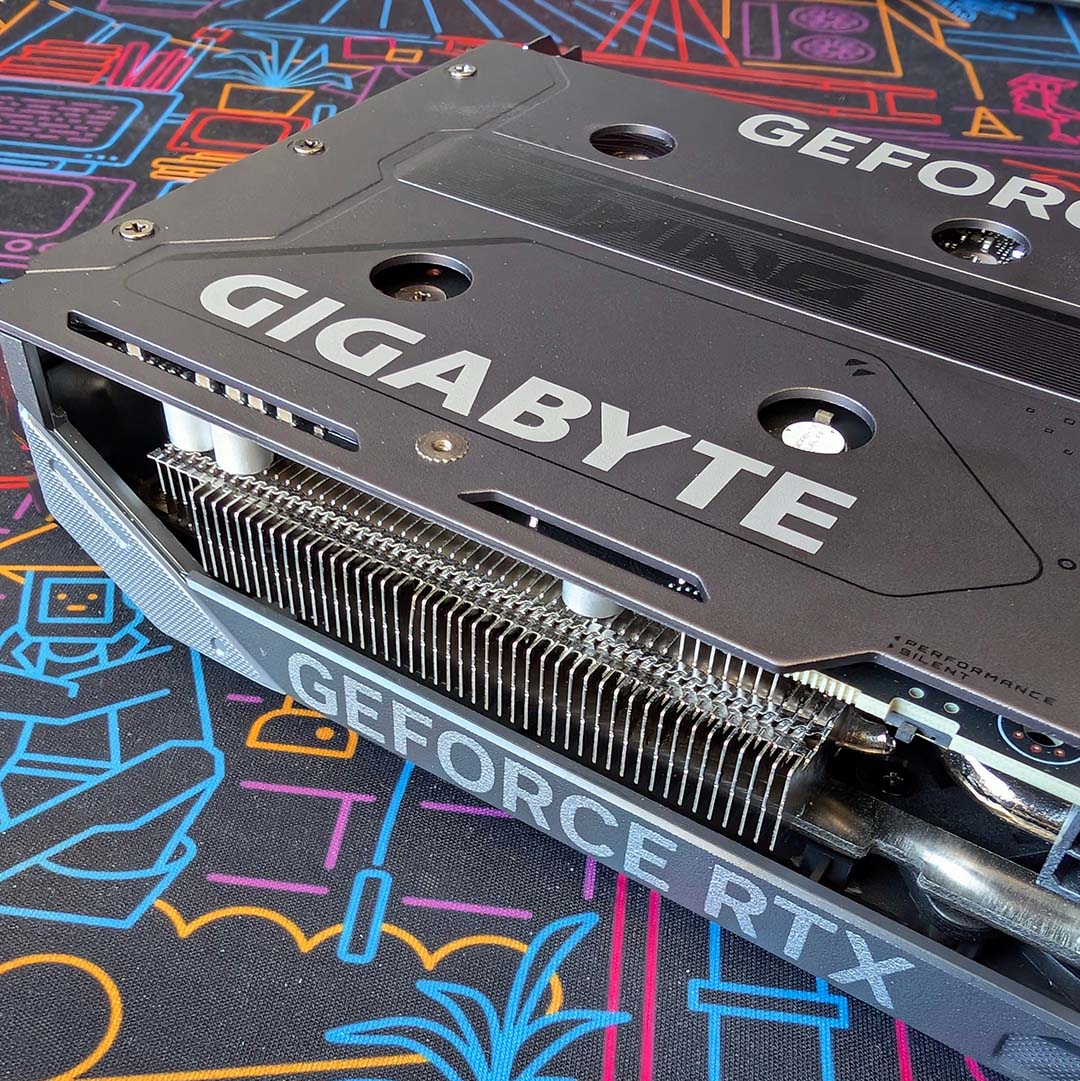
There’s no Founders Edition model available for either the 16GB or 8GB version of the RTX 5060 Ti. While it’s possible to find the same cooler designs for each memory capacity, as I mentioned earlier, I’m using two different graphics cards for these tests. Our proverbial test subjects include an Asus Prime GeForce RTX 5060 Ti 16GB OC and Gigabyte RTX 5060 Ti 8GB Gaming OC.
The Gigabyte model has a slightly higher factory overclock, sitting at 2,647MHz relative to the Asus’ 2,617MHz. However, this small frequency advantage won’t massively separate the two graphics cards in terms of performance or other models, if at all. Each cooler sports three fans, but we won’t be discussing noise levels or operating temperatures, given the designs aren’t entirely like-for-like.
Performance
Apps
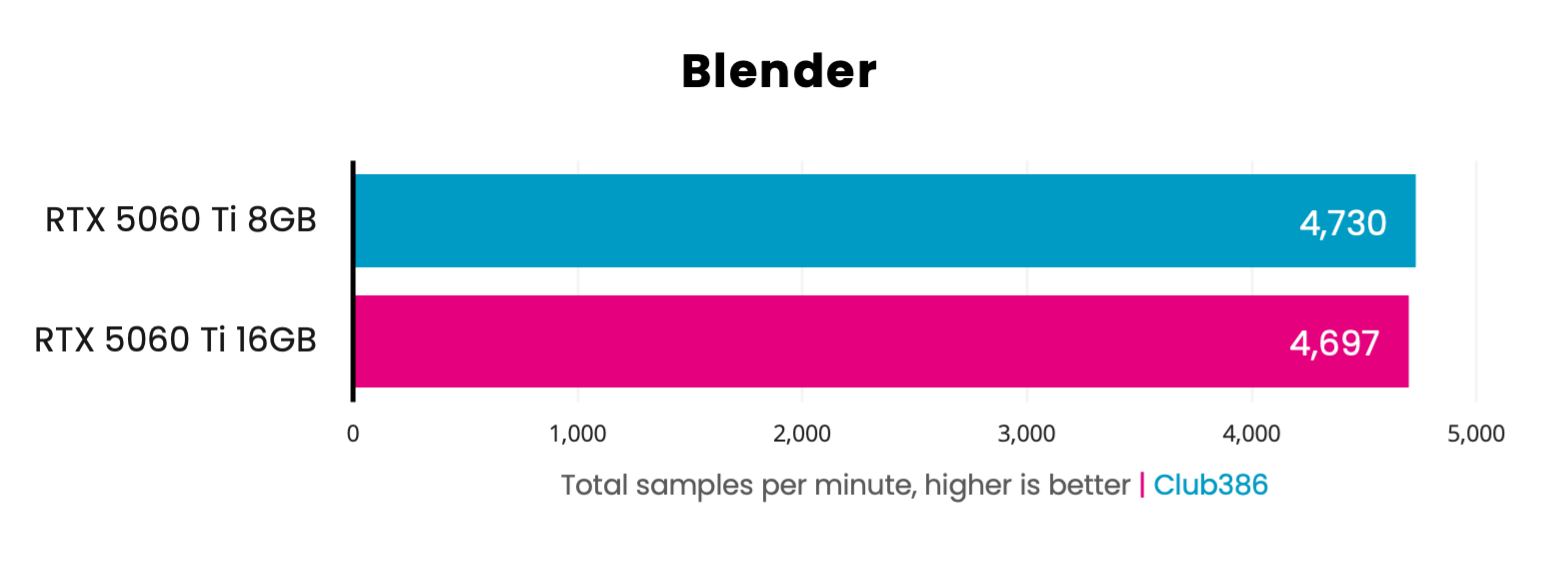
Blender’s system requirements recommend 8GB of VRAM, allowing both graphics cards to handle the application’s stock benchmark scenes with similar gusto. The RTX 5060 Ti 16GB is 33 samples per minute behind its lower-capacity sibling, but this lead is margin-of-error territory. It’s worth noting that some 3D rendering projects will benefit from more video memory, particularly if you plan to make use of the Cycles path-traced renderer.
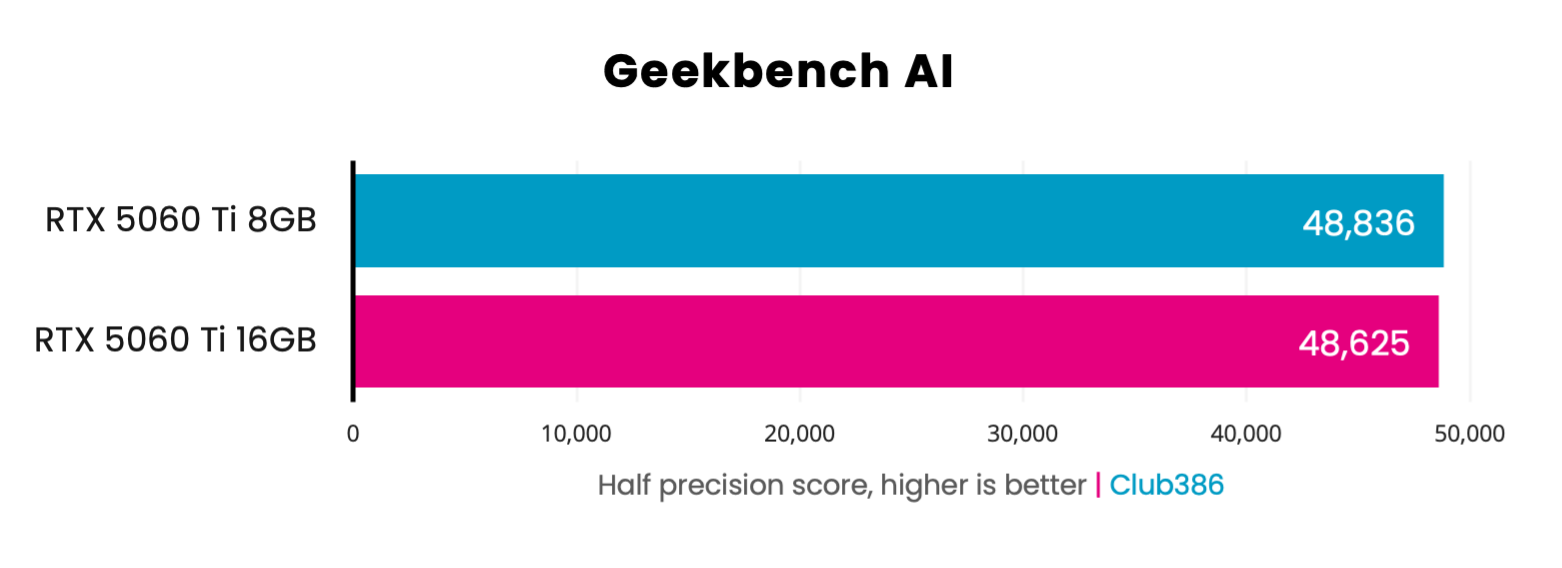
Running a DirectML workload on each graphics card via Geekbench AI, FP16 performance is practically identical across both the RTX 5060 Ti 16GB and 8GB. However, the former’s greater memory capacity will open doors to larger models that will be outright inaccessible to the other.
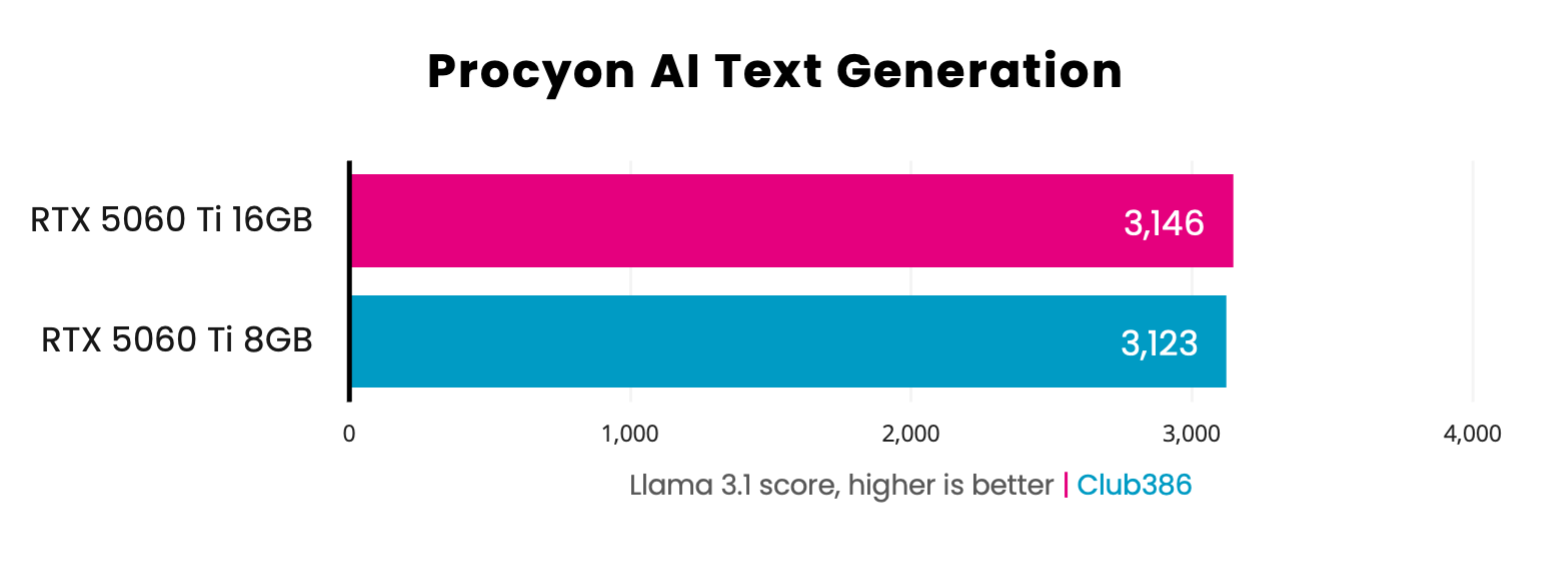
The story is much the same in Procyon’s AI Text Generation benchmark, but the RTX 5060 Ti 16GB clinches an inconsequential lead this time around with an additional 23 points over the 8GB model’s result.
We’re highlighting Llama 3.1 scores in this chart, but noticed massive slowdowns in token generation on the smaller capacity graphics card using Llama 2. While that is an older version, it serves to highlight that not every AI model will neatly fit into an 8GB buffer.
Gaming
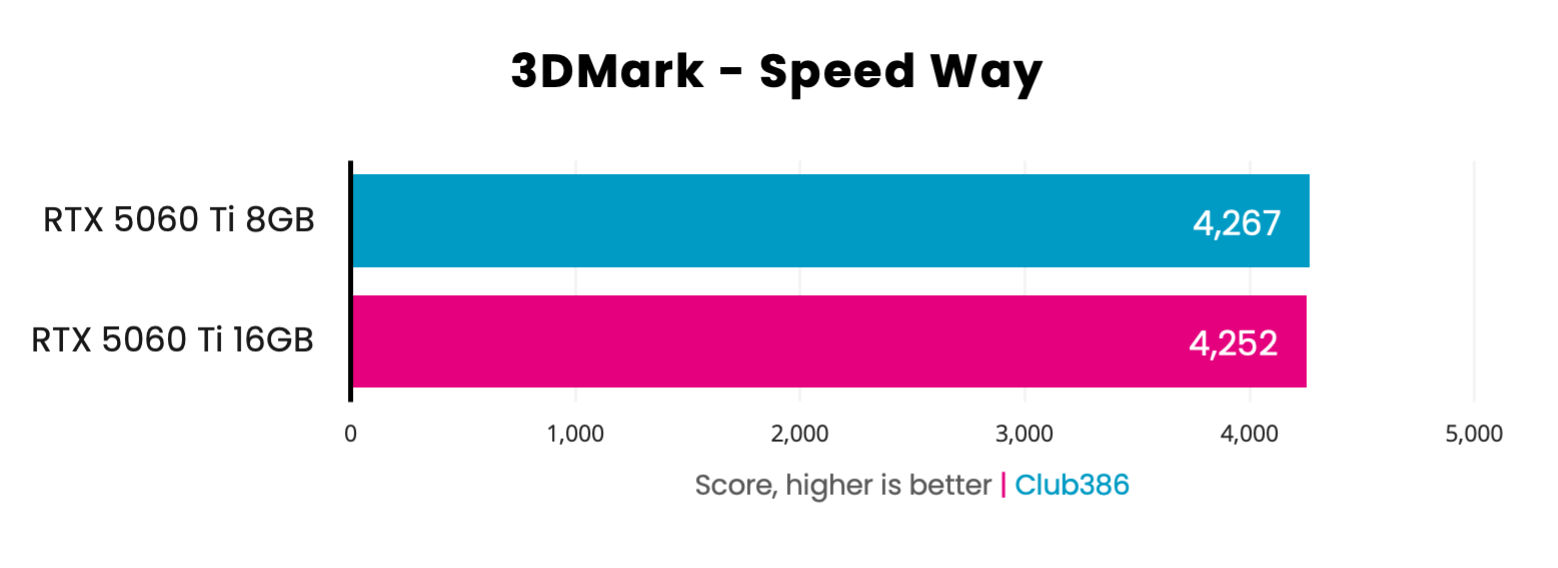
Before we dive into real-world gaming benchmarks, 3DMark Speed Way gives us an approximation of how ray tracing performance on each of the graphics cards stacks up. Given this test can fit into an 8GB VRAM envelope, there’s unsurprisingly no notable difference in scores here. However, this won’t always be the case when it comes to this kind of rendering.
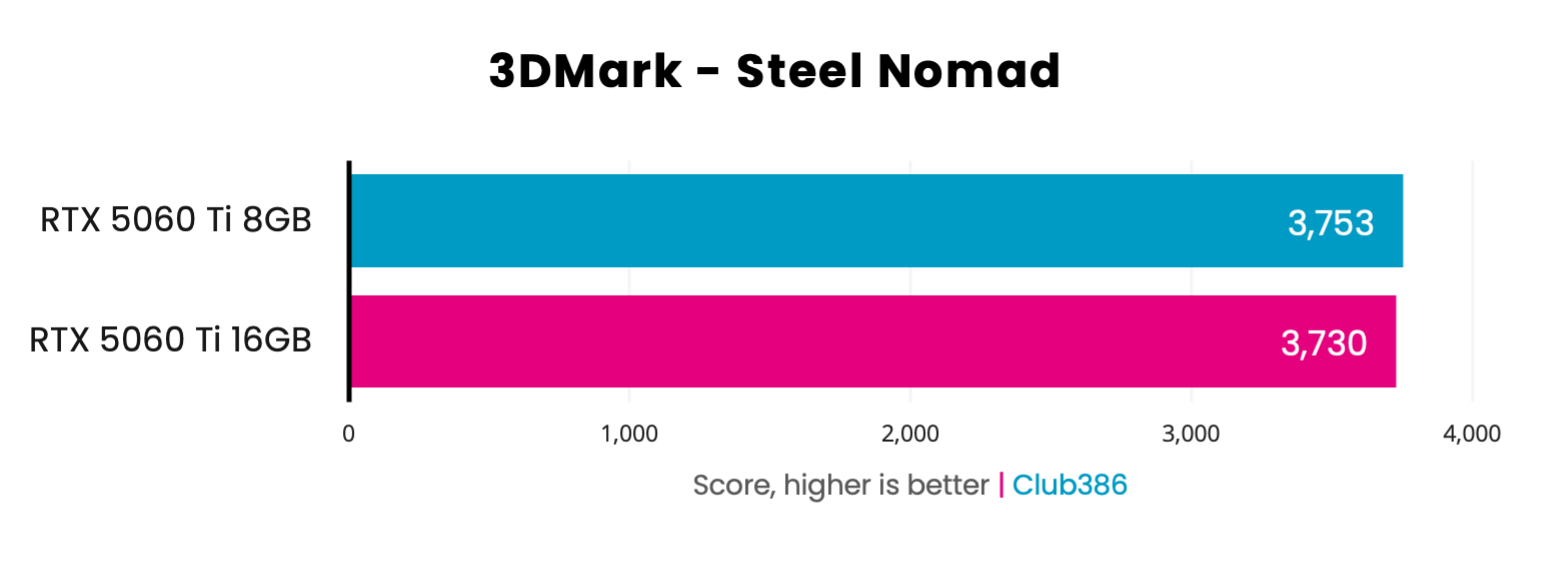
Moving on to 3DMark Steel Nomad, the RTX 5060 Ti 16GB and 8GB are once again neck and neck. This benchmark runs at 4K but doesn’t place too much pressure on the memory bandwidth and capacity available on either graphics card, leading to yet another draw.
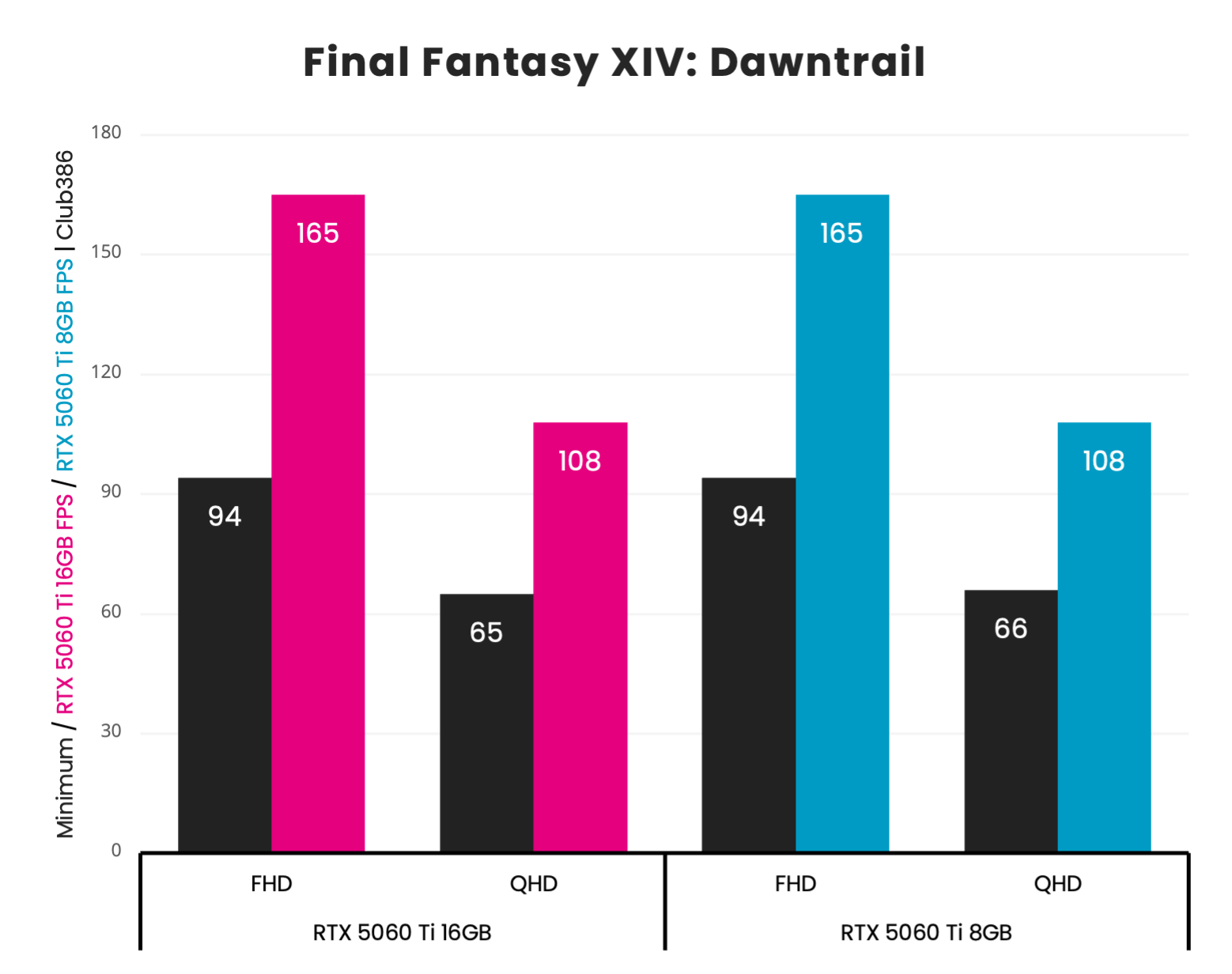
Final Fantasy XIV: Dawntrail serves as our first taste of real-world gaming benchmarks, and the RTX 5060 Ti 16GB and 8GB each provide near-identical performance using the game’s maximum preset. The only difference in these results is a 1fps lead to the latter in terms of minimum QHD frame rate, which is well within the bounds of run-to-run variance.
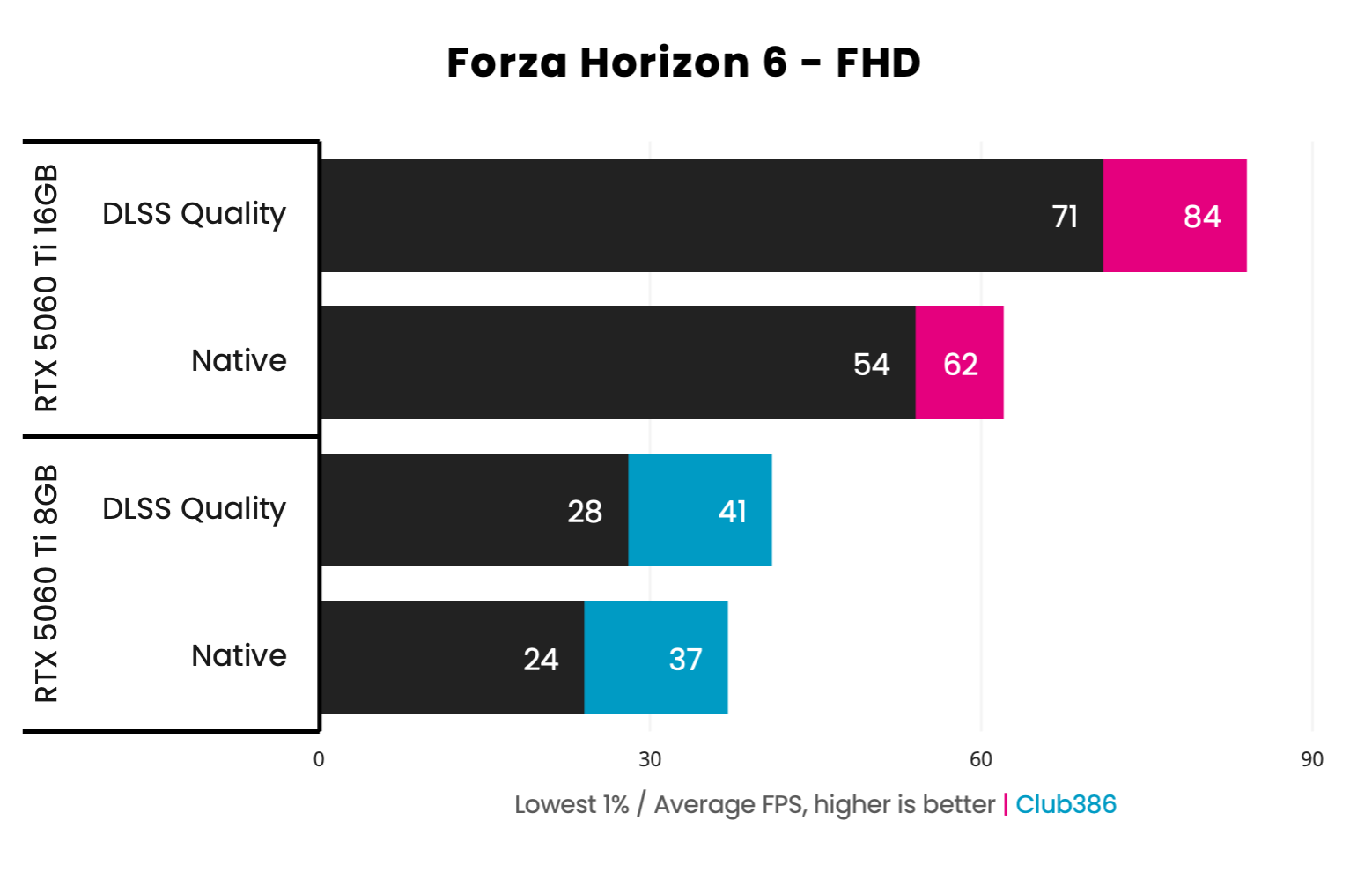
Forza Horizon 6 is surprisingly forgiving on GPUs, even while using its Extreme + RT preset, but this racing game provides us with our first example of major performance differences between the RTX 5060 Ti 16GB and 8GB. Those ray tracing effects require a large chunk of video memory, allowing the higher-capacity graphics card to cruise without a hitch while the smaller sibling sputters and stalls.
The RTX 5060 Ti 16GB crosses the finish line averaging 62fps at native FHD, while the 8GB model is decidedly slower at 37fps, netting a whopping 68% advantage to the former. Turning on DLSS Quality upscaling to relieve some pressure only widens this gap to 105%. That’s not forgetting the stark differences in lowest 1% frame rates too, with the 16GB graphics card providing a far smoother baseline.
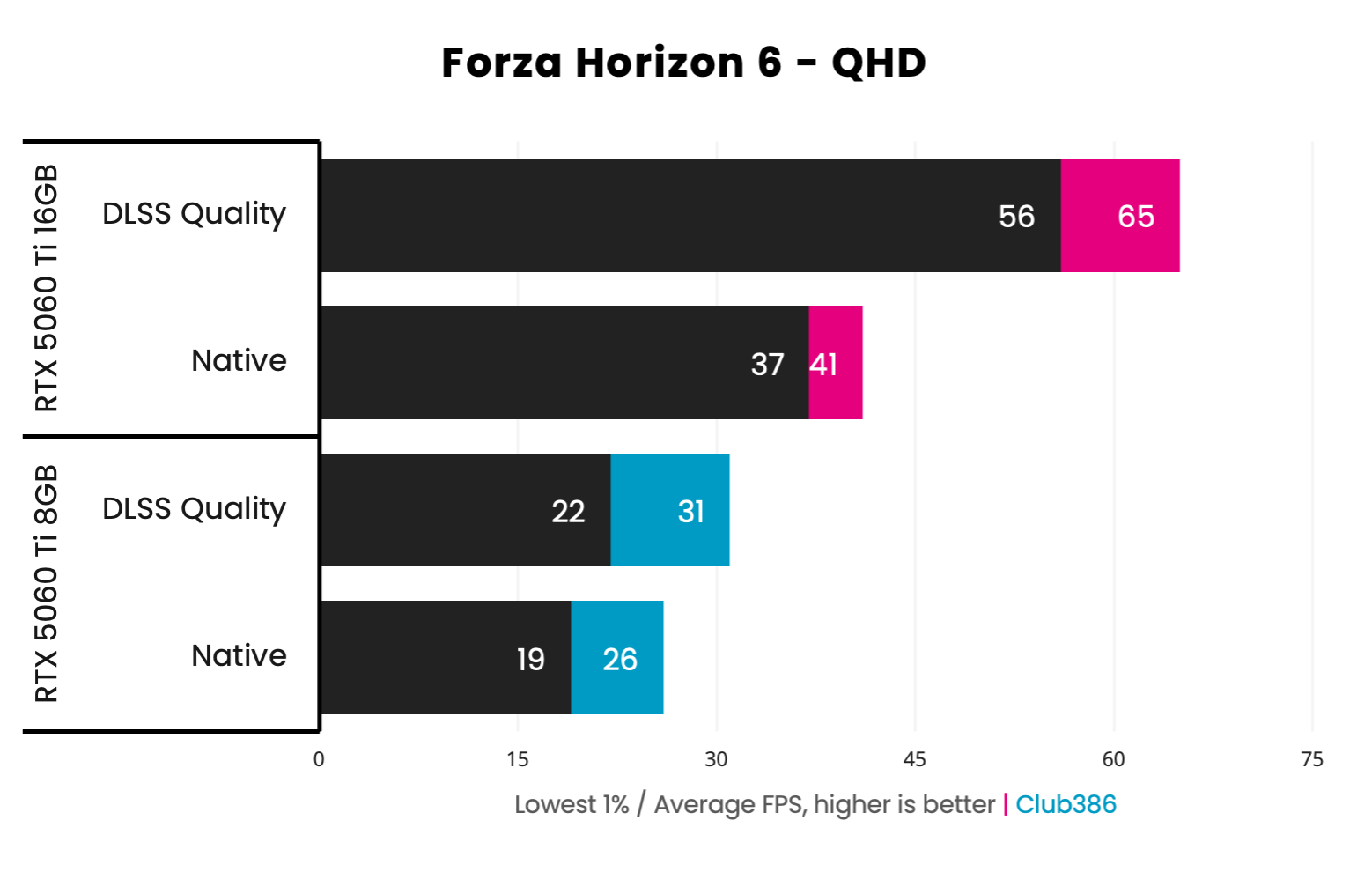
Raising our resolution to QHD sees the RTX 5060 Ti 16GB slow down to 41fps, but a dose of DLSS helps bring this graphics card back up to speed with performance rising to 65fps. The story isn’t nearly as rosy for the RTX 5060 Ti 8GB, which runs at an unplayable 26fps out the gate, rising to a mere 31fps with assistance from upscaling but with a troublingly low 1% result of 22fps.
As a reminder, the only difference between these two GPUs is their VRAM capacity. There’s enough horsepower from the die to run Forza Horizon 6 as the 16GB model demonstrates, but the 8GB buffer size hamstrings performance on the more affordable graphics card.
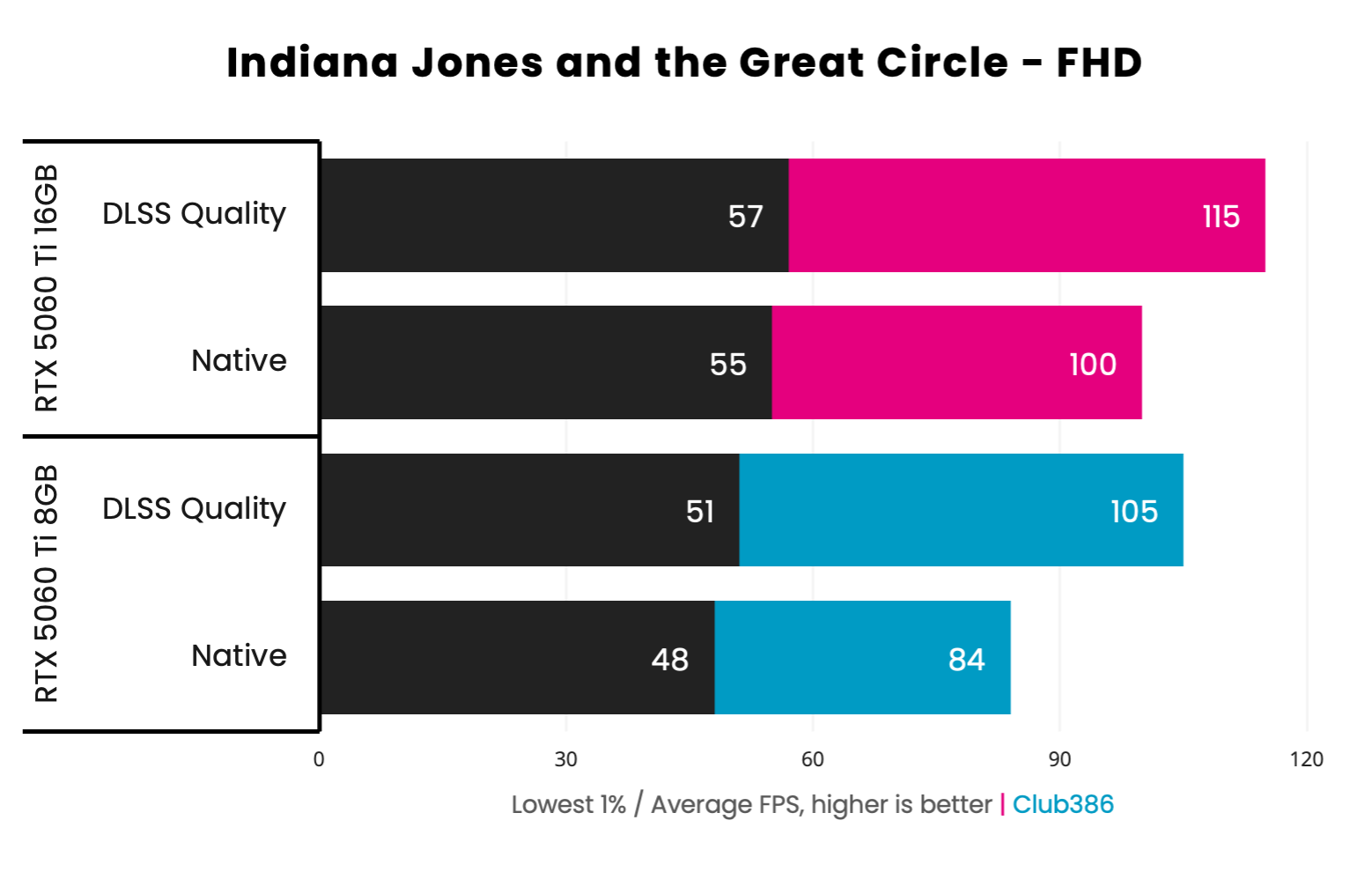
I once said Indiana Jones and the Great Circle proves 8GB GPUs belong in a museum. Benchmarking both versions of the RTX 5060 Ti using the game’s Ultra preset, sans path tracing, it’s a claim I’d still wholeheartedly stand by, if not for the ongoing memory crisis driving higher-capacity graphics card prices through the roof.
Performance differences between the two pixel pushers at FHD range between 10-16fps, with a relative lack of video memory being entirely to blame for the 8GB’s shortfall. However, these charts don’t demonstrate the several crashes I endured while trying to get the game running on the smaller-capacity card, which did not appear on the 16GB version.
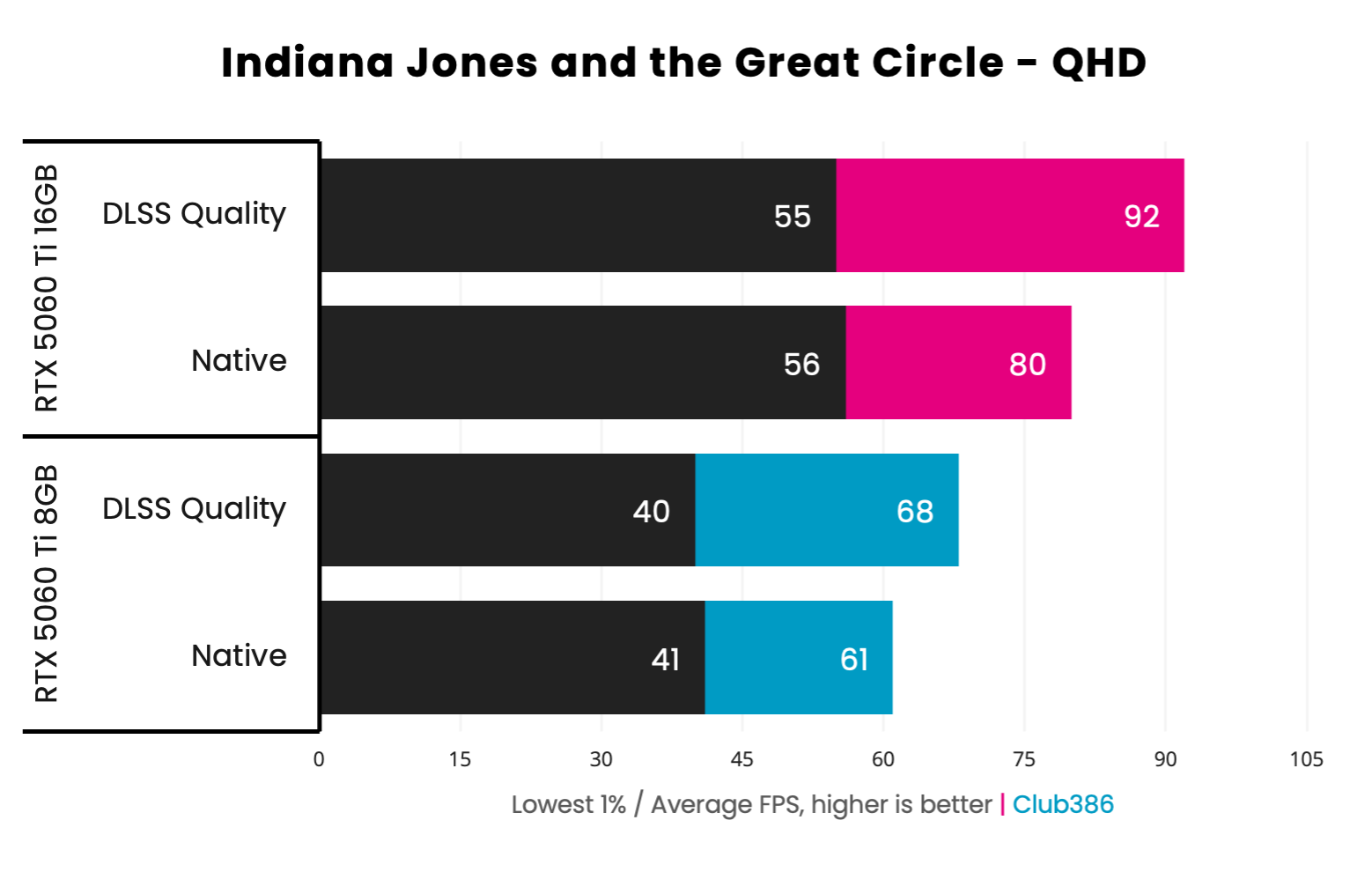
Increase the resolution to QHD, and the RTX 5060 Ti 16GB confidently pulls away from its 8GB sibling, with average frame rate differences now growing to 19-24fps. That’s 33% more performance at native 1440p, increasing to 35% with DLSS Quality upscaling in play.
Those same crashes I mentioned earlier while running Indiana Jones at FHD rear their heads again at QHD, exclusively on the RTX 5060 Ti 8GB. This is the most exceptionally extreme reaction from a game that I’ve seen across my testing, and it’s entirely down to the relatively low VRAM capacity buckling under the pressure of these settings.
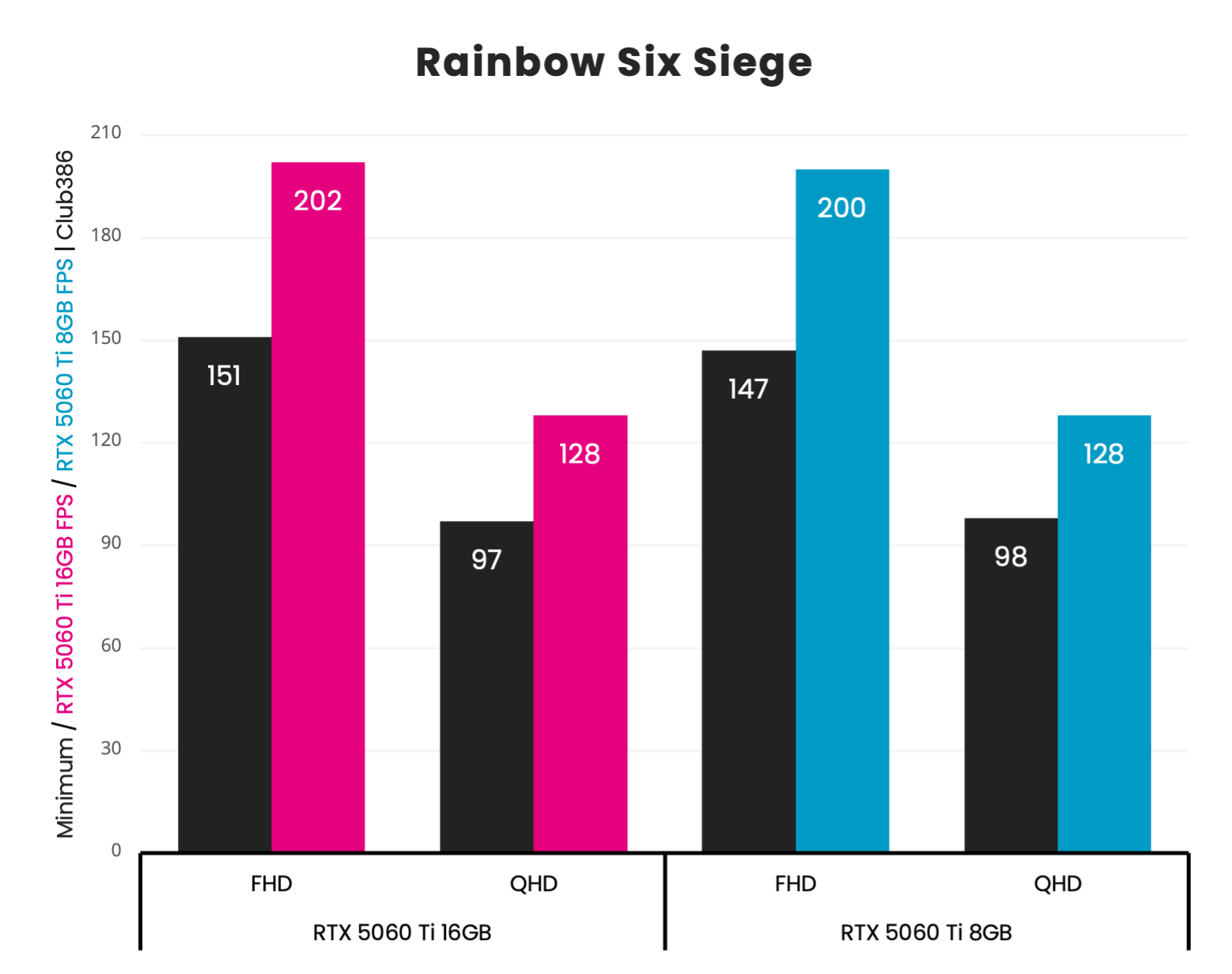
Returning to rasterised rendering in Rainbow Six Siege, frame rates on both the RTX 5060 Ti 16GB and 8GB are expectedly neck and neck. Esports titles like Ubisoft’s shooter are one of the few areas that graphics cards with lower VRAM make sense, particularly if you’re building a PC to primarily play graphically undemanding competitive games.
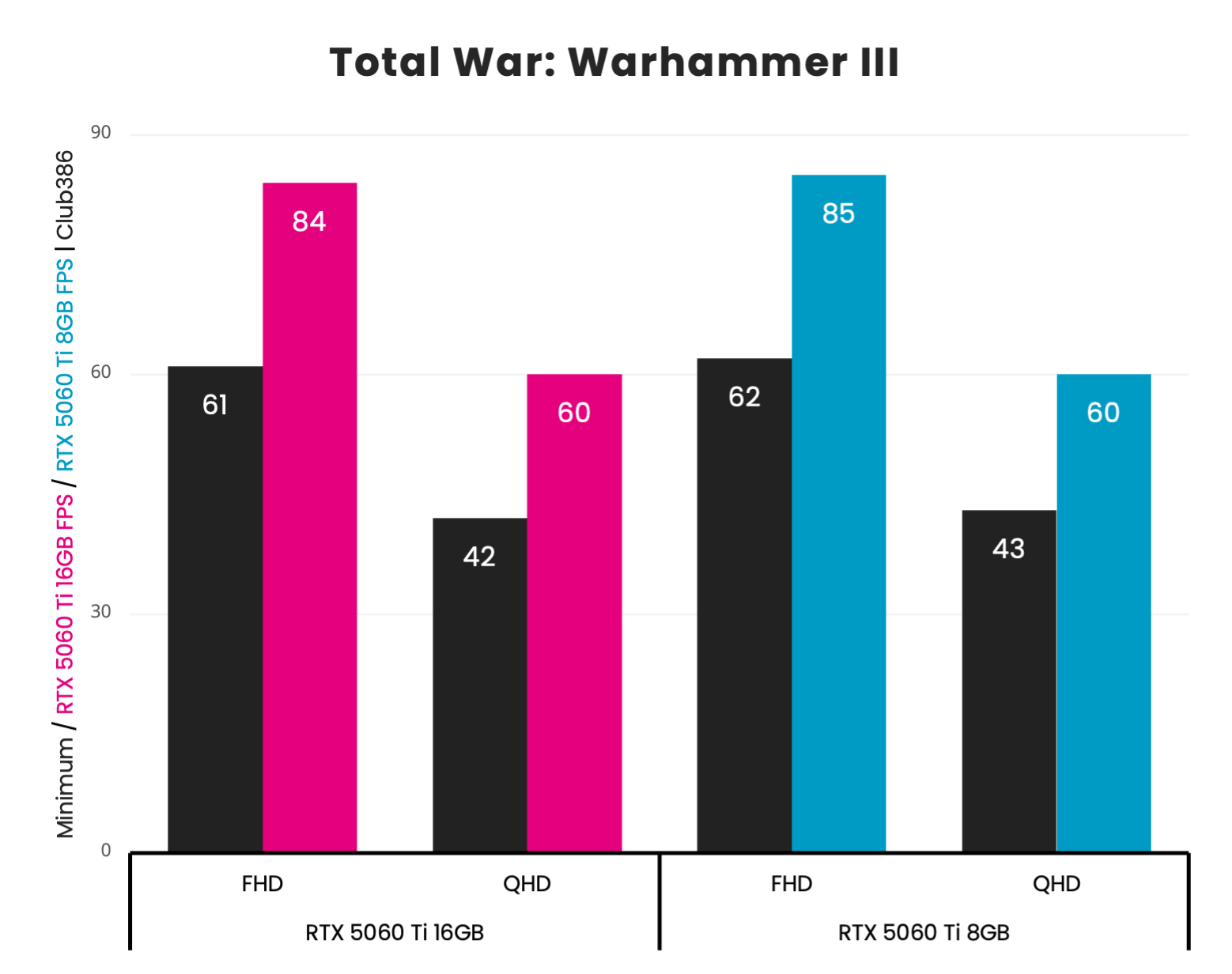
Loading up Total War: Warhammer III we see yet another dead heat between the RTX 5060 Ti 16GB and 8GB. This is the only game in our suite to not feature any upscaling, so this is as good as frame rates get using the Ultra preset in this RTS.
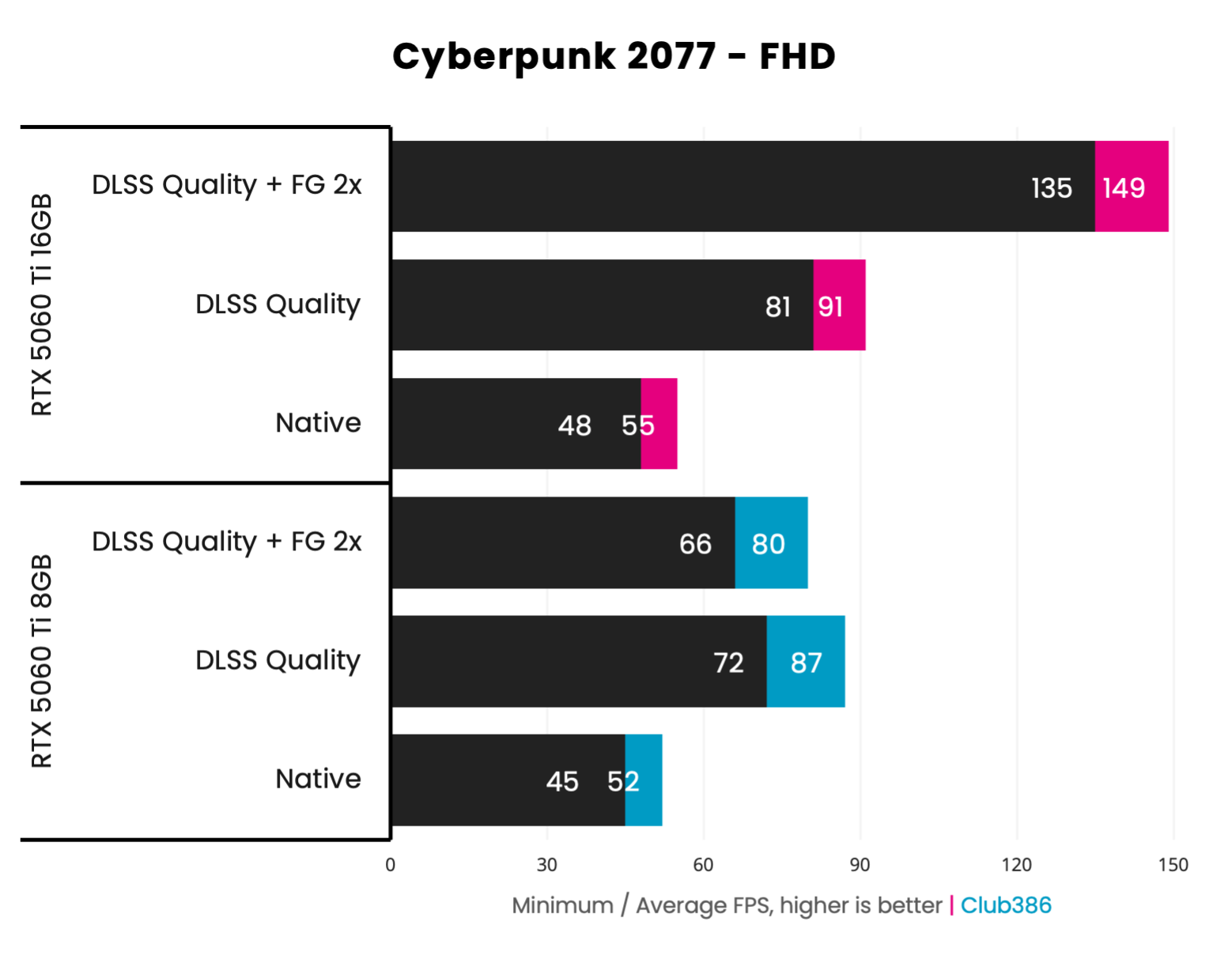
Cyberpunk 2077 closes out our benchmarks, with the game’s RT Ultra preset once again highlighting the impact varying memory capacities have on ray traced rendering. Frame rate differences between the RTX 5060 Ti 16GB and 8GB are rather small at first, with 3-4fps separating average performance at native FHD with DLSS Quality. However, the latter graphics card falls apart once frame generation enters the pipeline.
DLSS frame generation places additional pressure on the memory buffer, and actually leads to a performance regression on the RTX 5060 Ti 8GB as the pixel pusher simply doesn’t have enough VRAM at its disposal. By comparison, the 16GB model happily rises from 91fps to 149fps running in 2x mode, with room to push up to 6x.
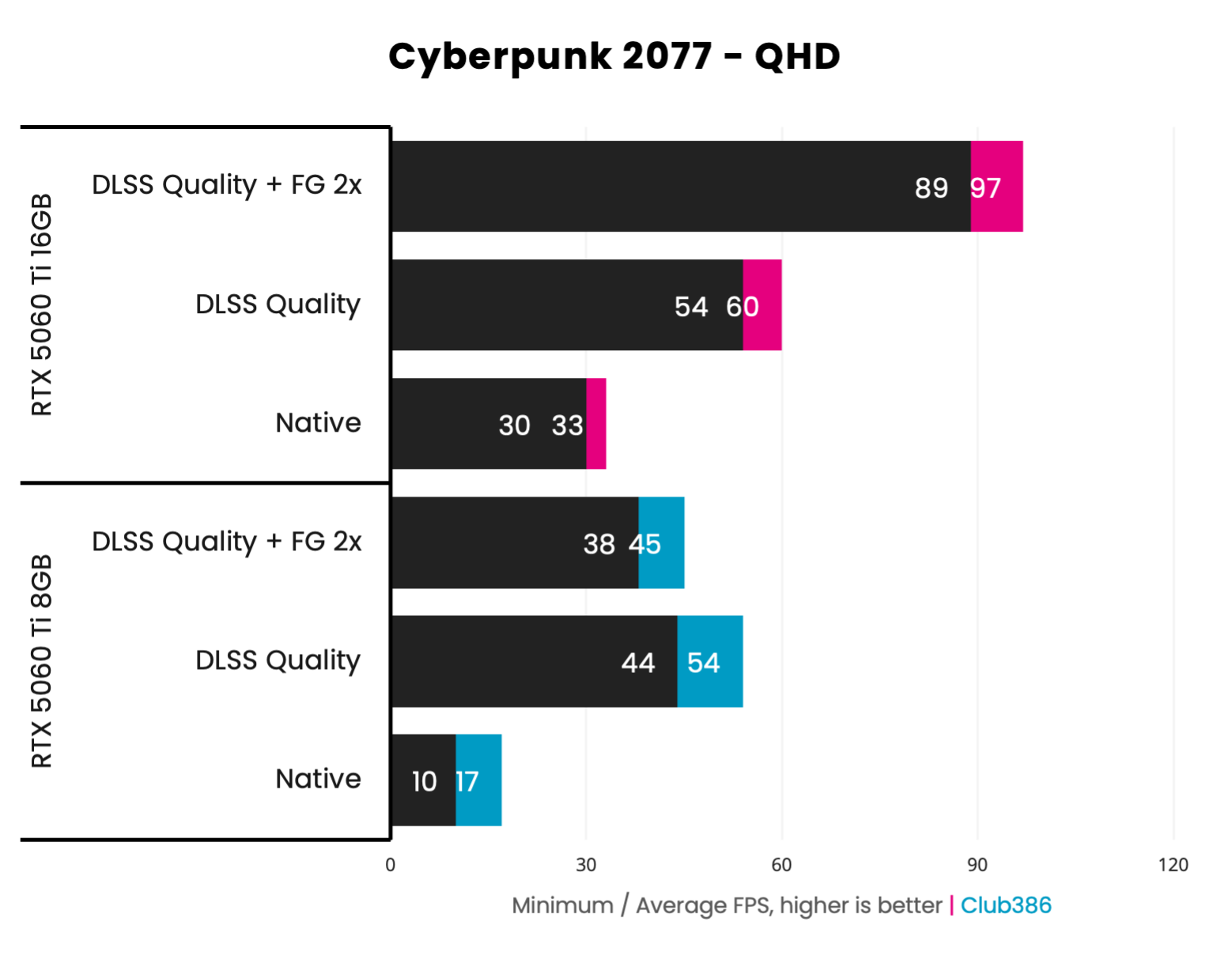
While the RTX 5060 Ti 16GB can just about rise to the challenge of Cyberpunk 2077 at QHD, clinching a 33fps average, the 8GB version absolutely crumbles with an unplayable 17fps result. Turning on DLSS upscaling helps close the gap between the two graphics cards, but that extra VRAM affords the 16GB version a 6-10fps advantage across its minimum and average frame rates.
Once again, piling frame generation on top of the RTX 5060 Ti 8GB asks too much of the available memory capacity, with a net negative impact on performance. This isn’t an issue for the 16GB model, which enjoys enhanced motion clarity without issue.
Power draw
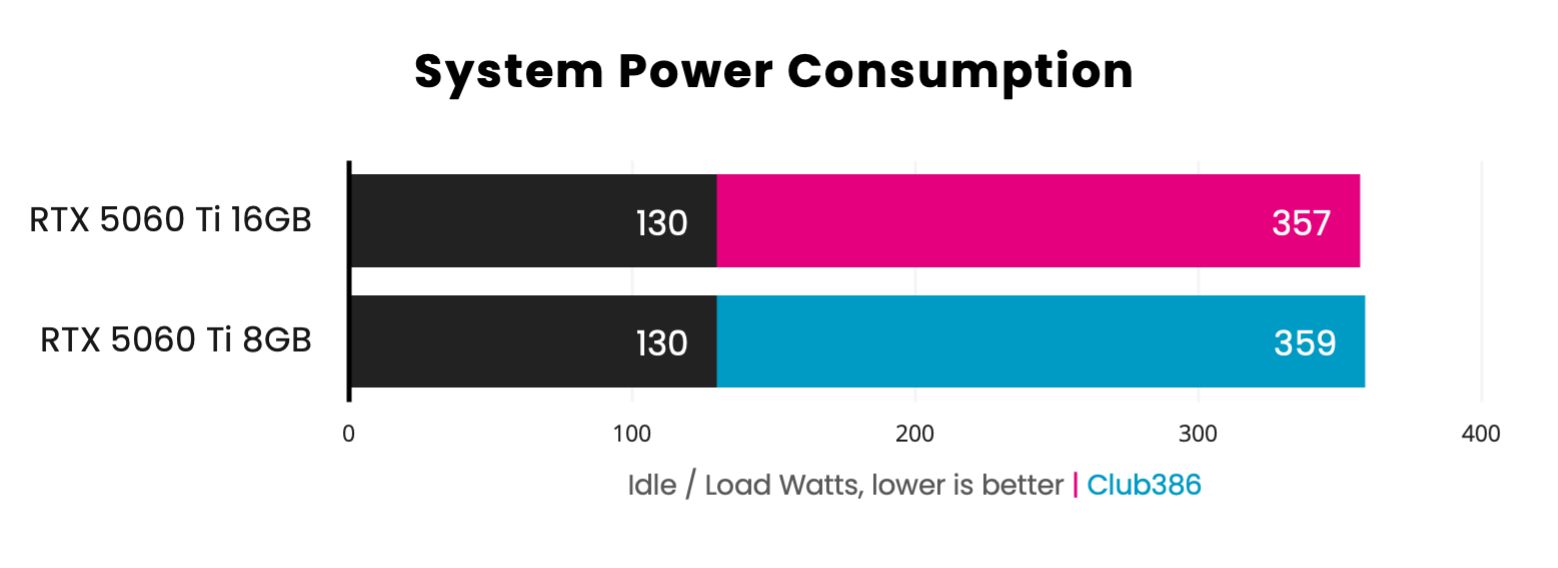
As expected, system power consumption shows minimal differences between the two RTX 5060 Ti graphics cards. In a bid to avoid power consumption differences arising from oversaturated memory capacities, I ran each pixel pusher through a run of FurMark 2’s QHD benchmark, which led to the results above.
Loading HWiNFO in the background, both versions of the RTX 5060 Ti reported maximum GPU power draw as 180W, matching their on-paper specifications.
Conclusion
Once upon a time, I would have unquestionably recommended the RTX 5060 Ti 16GB over the 8GB model, as that formerly £50 ($50) premium granted a far more versatile and reliably high performing graphics card. However, with the higher-capacity version now costing an extra £230 (or 51%) at the time of writing, it offers extremely poor value relative to the more affordable option.
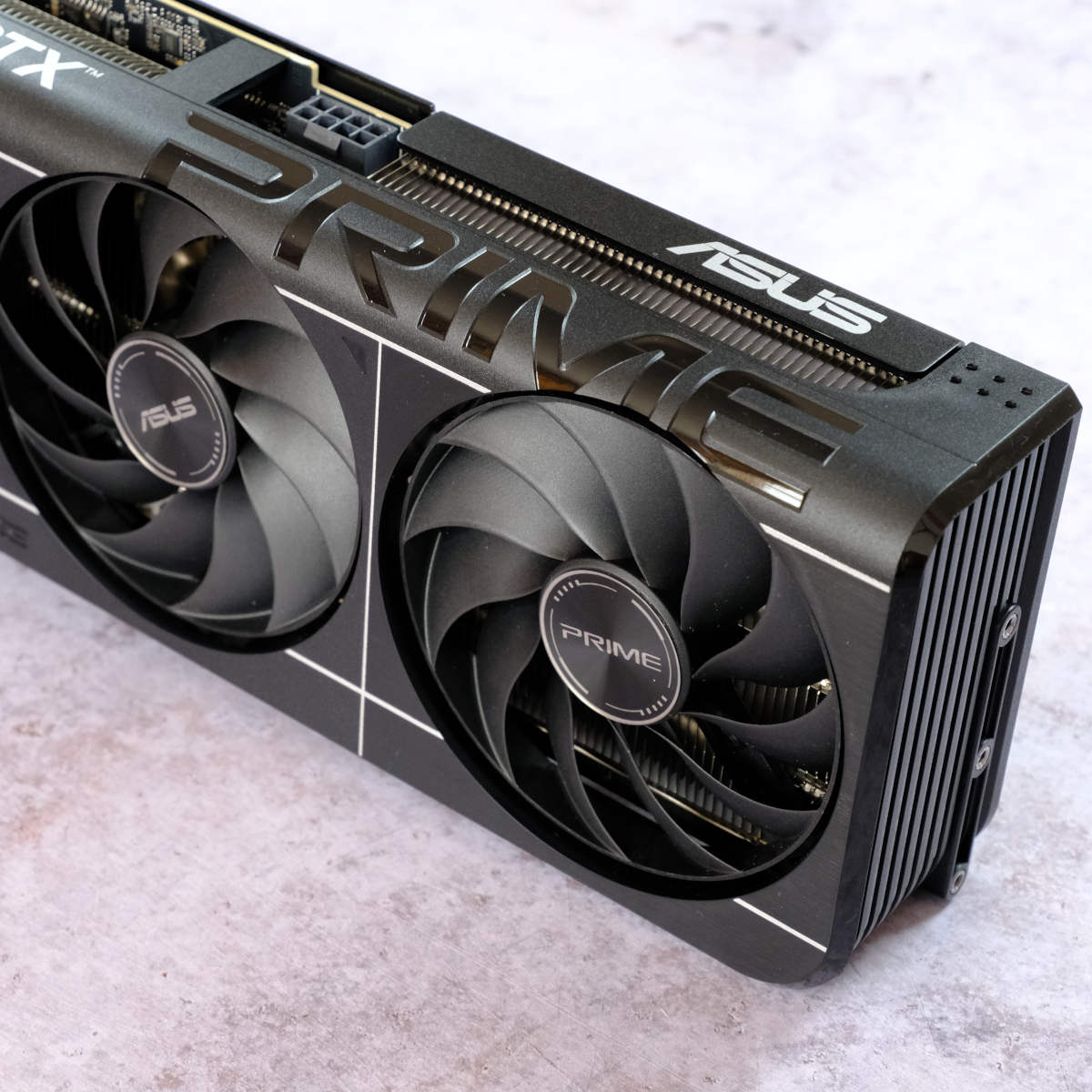
Nvidia GeForce RTX 5060 Ti 16GB
More memory nets better ray tracing performance, but the RTX 5060 Ti 16GB currently commands a huge premium over the 8GB model. Read our review.
Nvidia GeForce RTX 5060 Ti 8GB
You’ll need to work around the limitations of the RTX 5060 Ti 8GB’s VRAM capacity, but this choice offers far better value overall given current graphics card prices.
In this economy, the RTX 5060 Ti 8GB makes far more sense now, despite its clear limitations in the face of settings like ray tracing and frame generation that demand more VRAM. However, expanding our scope beyond the GeForce duo, it’s worth considering the Radeon RX 9060 XT 8GB at the same price (£449), while the RX 9060 XT 16GB is also available without as big a premium (£599).
For more graphics cards chatter, check out our picks of the best GPUs on the market.