

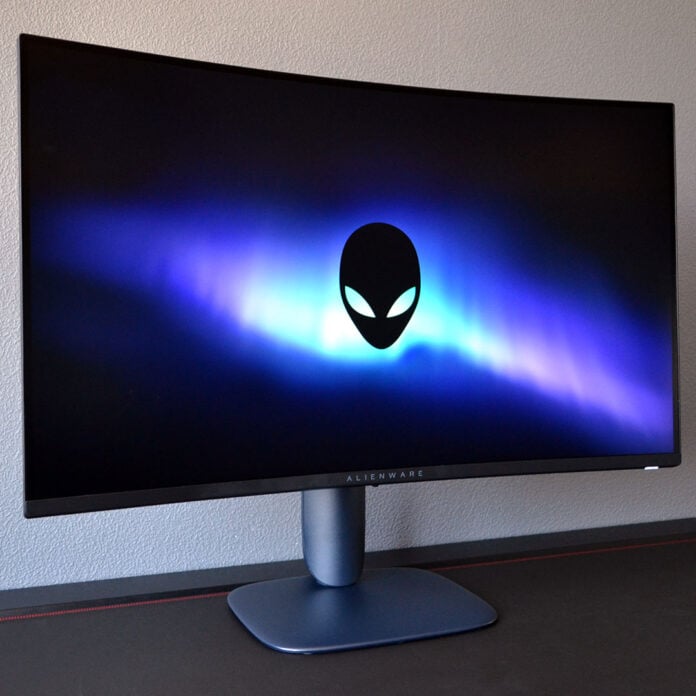
Aiming to provide a premium look and feel for an affordable price, the Alienware AW3226DM ticks a lot of boxes for its modest cost of £269 / $299. Its large panel and high refresh rate are enticing on their own, and while this display has some rough edges elsewhere, the package as a whole, with its pleasingly round curves and top build quality, is of an undeniably great standard.

Alienware AW3226DM
£269 / $299
Pros
- 32in/QHD/240Hz combo
- Excellent brightness
- Good colour accuracy
- Solid contrast
- USB hub
Cons
- Poor backlight uniformity
Club386 may earn an affiliate commission when you purchase products through links on our site.
How we test and review products.
With that price, the AW3226DM positions itself between budget displays and increasingly affordable OLED monitors. It’s also based on a VA panel, which is a bit of a rarity these days. VA screens traditionally offer deeper blacks and higher contrast than their IPS counterparts, but at the cost of poor response times and obvious ghosting artefacts. As we’ll see, though, the Alienware AW3226DM bucks this trend.
Specifications
The screen at the core of the AW3226DM is a QHD (2560×1440) VA panel, with a sizable 32in diagonal. This resolution and size combination is naturally not as sharp as a 27in screen with the same resolution, as it has a lower pixel density. However, it provides the same level of sharpness as a 24in FHD (1920×1080) display at 92PPI (pixels per inch) while being appreciably larger. Bigger is better in this case.
As someone used to running a 32in 4K panel, the difference in pixel count is obvious to my eye, but it’s still pleasantly sharp. Furthermore, I’m glad to see Alienware employ a 1500R curvature on the panel. While some people prefer flat panels, I find curved screens enhance immersion, as they envelope your peripheral vision while also providing less eye strain over long gaming sessions.
| Alienware AW3226DM | |
|---|---|
| Screen size | 32in |
| Resolution | QHD (2560×1440) |
| Refresh rate | 240Hz |
| Response time | 1ms (GtG) |
| Panel technology | VA |
| Panel coating | Matte |
| Variable refresh rate | AMD FreeSync Premium VESA AdaptiveSync |
| HDR | VESA DisplayHDR 400 |
| Ports | DisplayPort 1.4 (x1) HDMI 2.1 (x2) USB-A 5Gb (x1) USB-B 5Gb (x1) USB-C 5Gb, 15W PD (x1) |
| Speakers | No |
| Features | Console mode eARC HDMI CEC TÜV-certified low blue light |
| Warranty | Three years |
| Price | £269 / $299 |
Running at a refresh rate of 240Hz, the AW3226DM promises to deliver great motion clarity and responsiveness, with frame times as fast as 4.17ms. This feels and looks far smoother than 60Hz (16.67ms), and gives you an appreciable uplift over 120Hz (8.33ms), benefitting both cinematic and competitive games.
That is, of course, providing your hardware can provide enough frames per second to match the frame rate. Hitting 240fps while running at QHD is no mean feat, requiring the likes of a GeForce RTX 5070 or Radeon RX 9070 GRE at the very least, with a helping hand from upscaling and frame generation.
You can also expect a tear-free experience thanks to variable refresh rate support (VRR), taking the form of AMD FreeSync Premium and the brand-agnostic VESA AdaptiveSync. Alienware doesn’t specify a floor from which VRR starts, but the feature typically works from 48Hz upwards, so be sure to keep your frame rate above 48fps to enjoy the feature.
Design
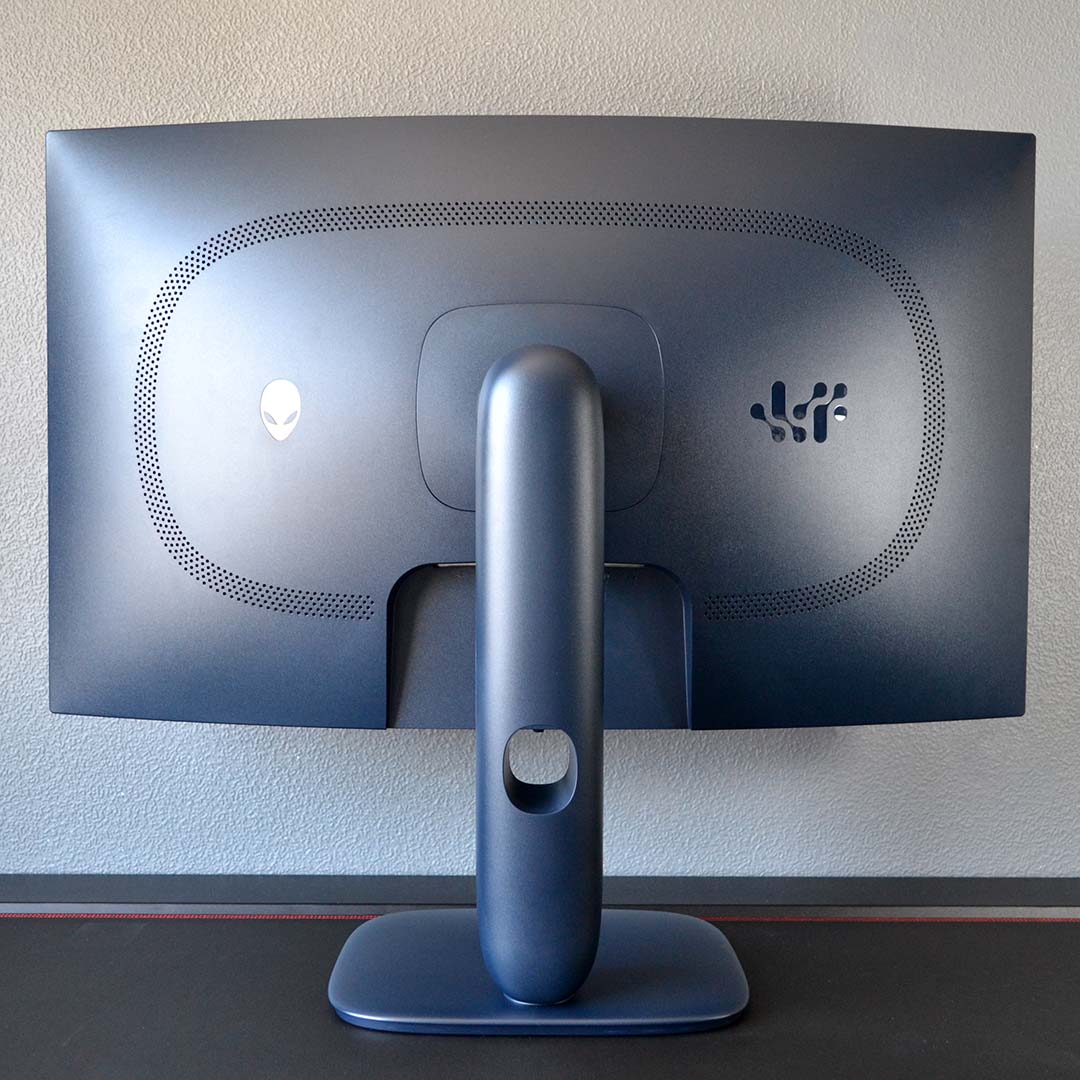
In a sharp and angular market, Alienware takes a softer, rounder path to monitor design. In the case of the AW3226DM, the company also further differentiates its offerings through an all-dark-blue colour scheme. Combine these factors with great build quality, and you have a uniquely attractive display on your hands.
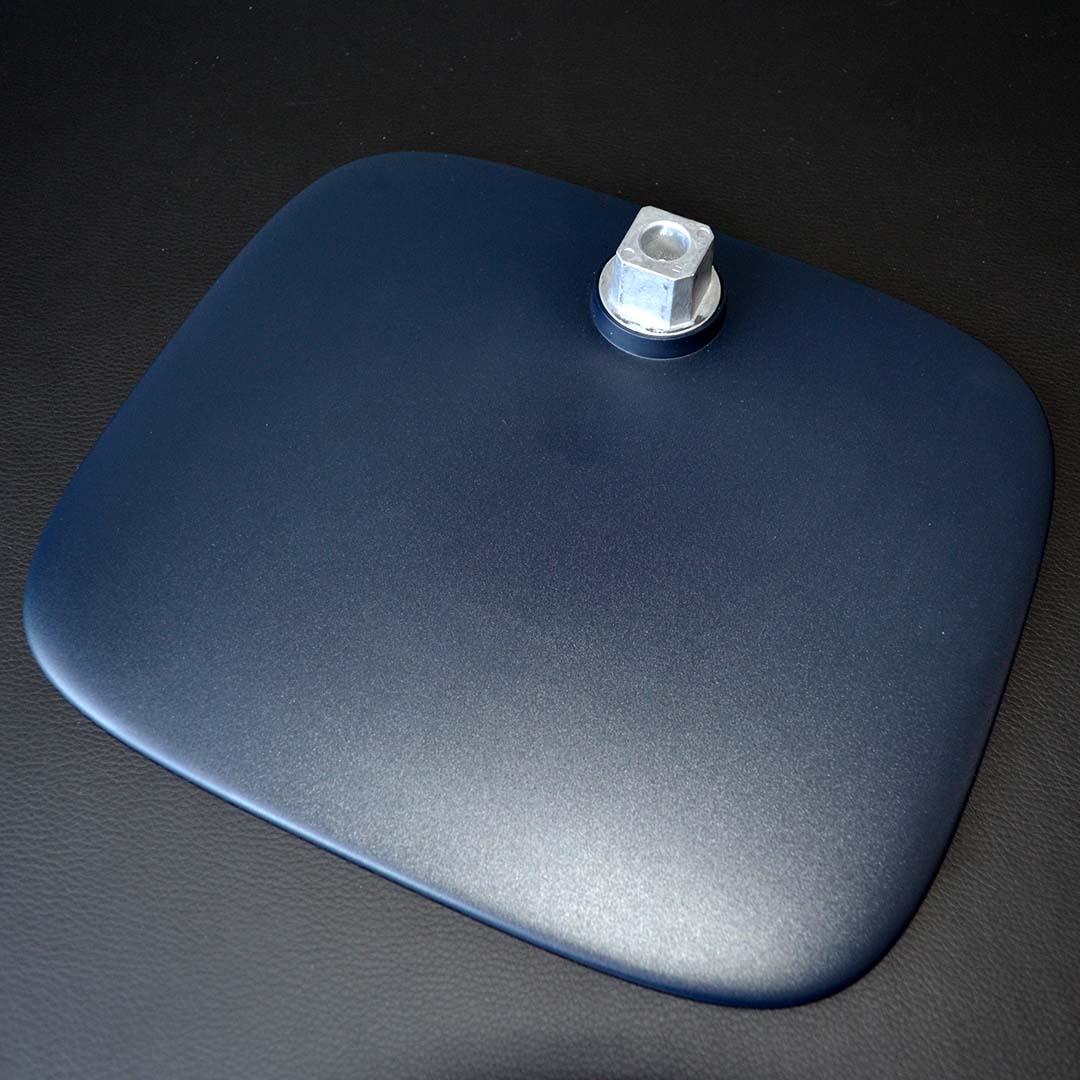
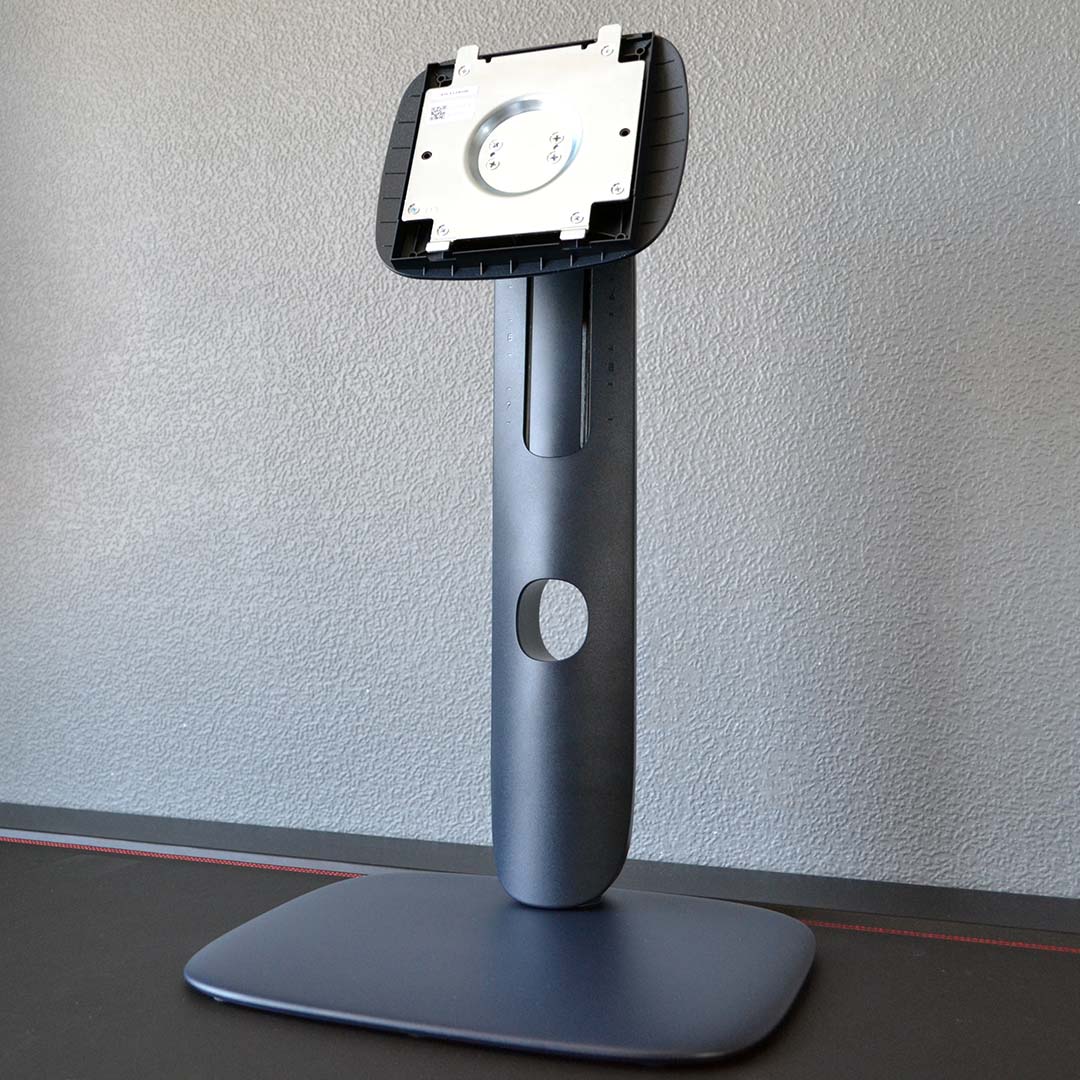
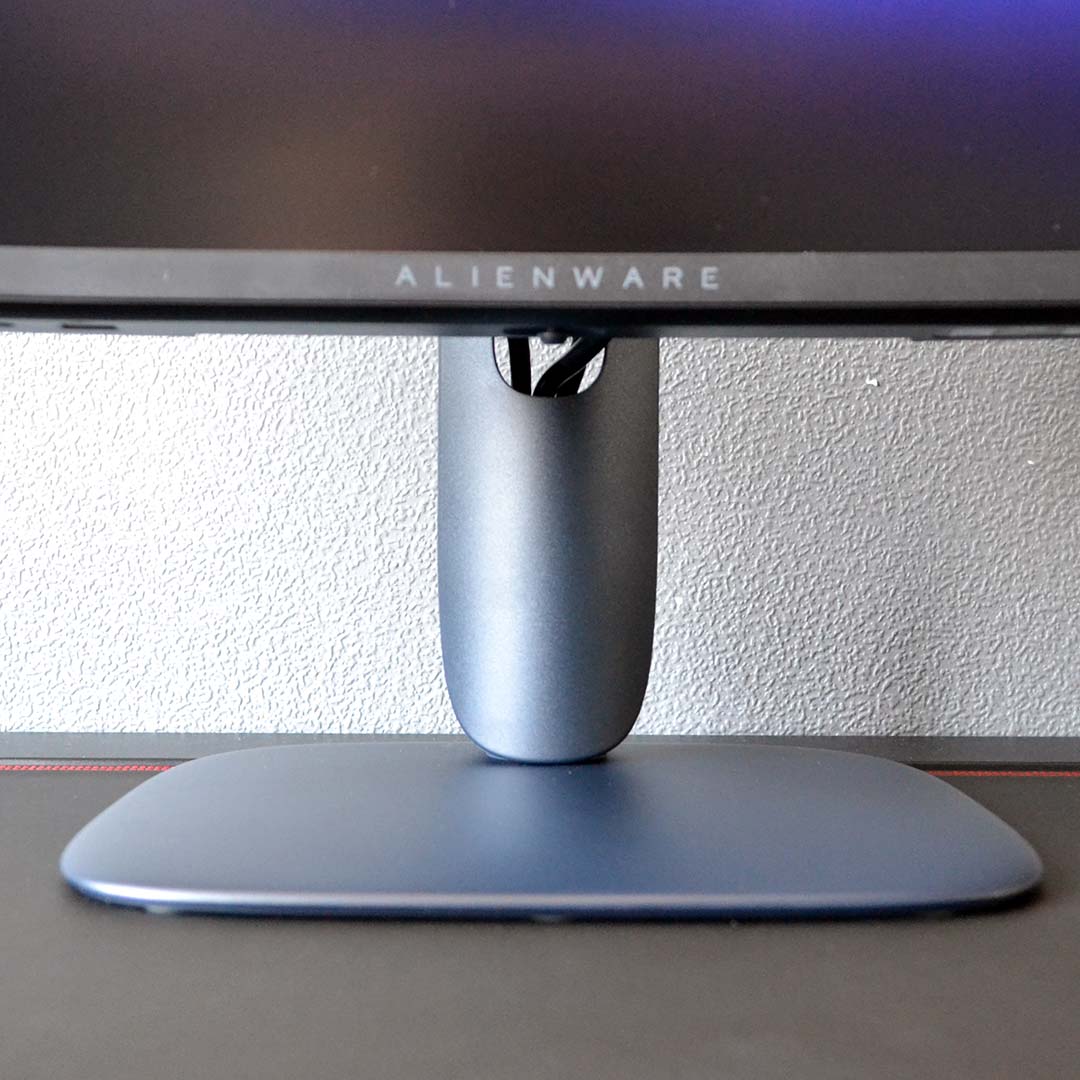
Building the AW3226DM is a simple task. Its base pairs with the monitor’s neck using a captive screw, with the newly-completed stand marrying to your screen with a satisfying click, no tools necessary. For those with monitor arms that can support panels weighing 7kg, the option of using a 100mm² VESA mount is available.
The stock stand doesn’t offer a large variety of ergonomic tweaks, but that’s often the case with panels of this size. There’s no rotation or swivel mechanism here, but there is 110mm of height adjustment and a 26° range of tilt with which to play. I had little difficulty getting the AW3226DM exactly where I wanted it.
Alienware fits a large cutout into the centre of the monitor’s stand, making the process of cable routing an absolutely doddle. Better still, even in its tallest position, the AW3226DM does a solid job of keeping wires mostly out of sight.
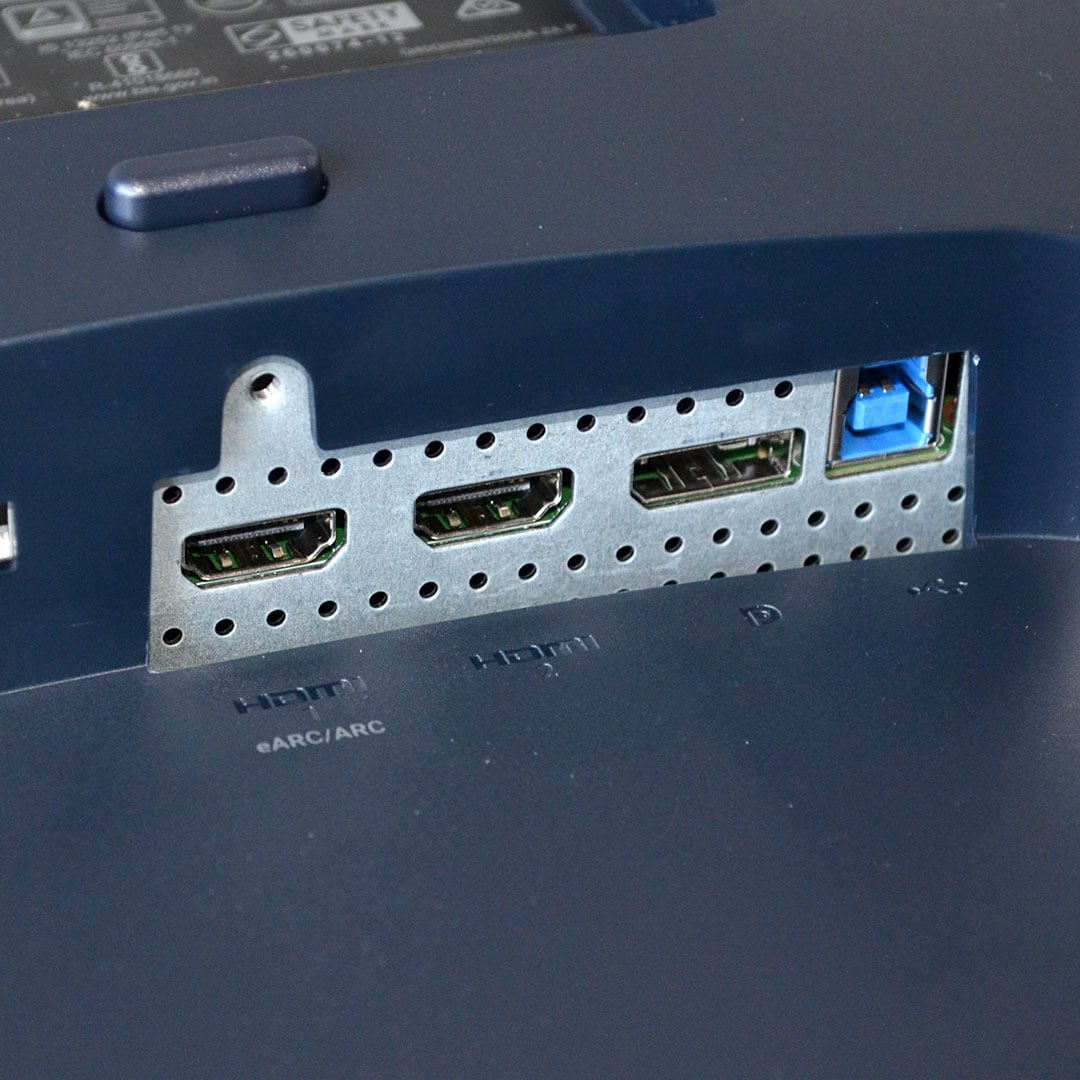
Alienware outfits the AW3226DM with a single DisplayPort 1.4 and two HDMI 2.1 inputs. The latter ports are the prime choice for those with output devices sporting matching specs, as they’re capable of delivering the monitor’s full resolution and refresh rate without any compression.
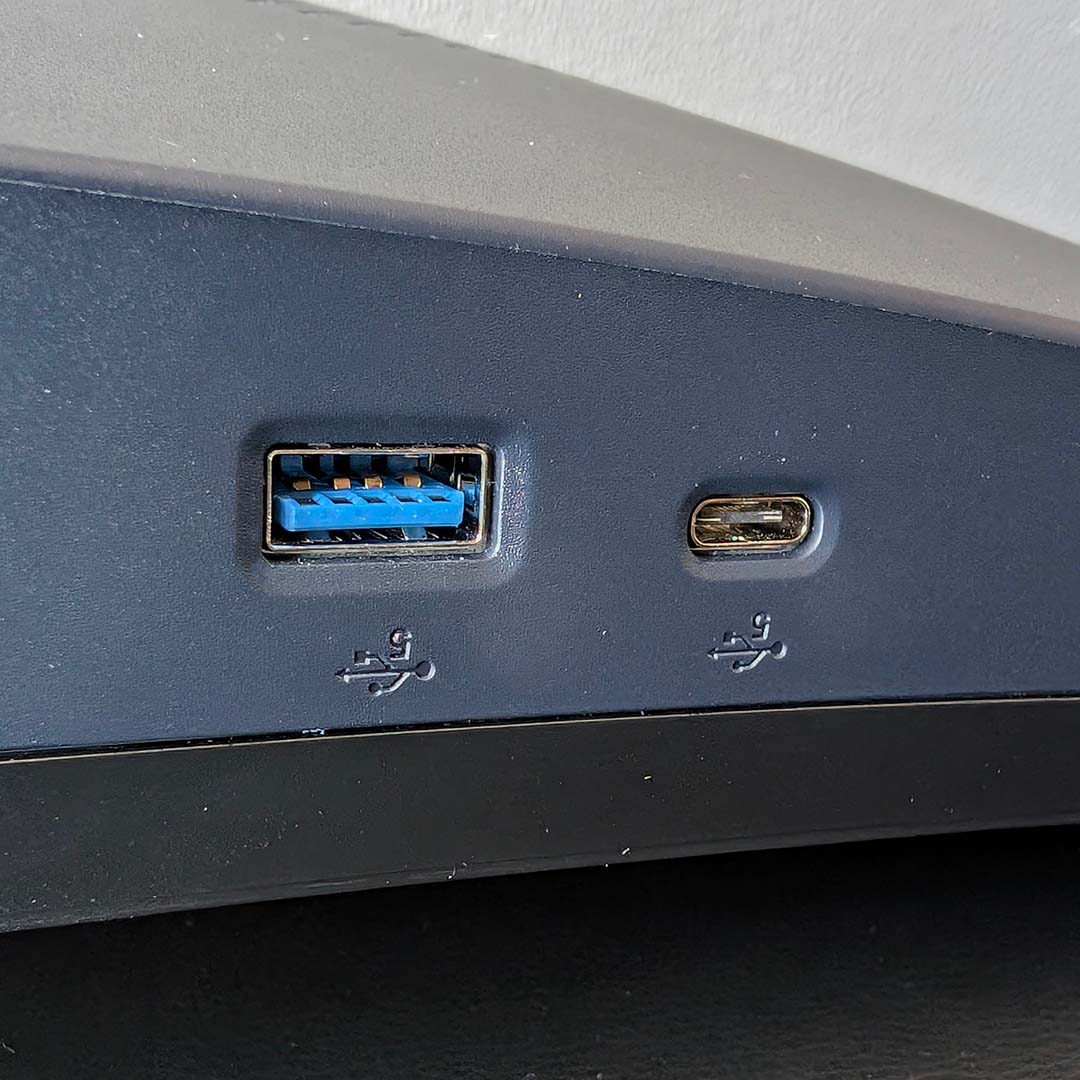
You’ll find a USB-B port nestling next to the display inputs for connection to your PC, but you’ll need to look further afield to find the ports it services. Downward firing from the monitor’s chin are two 5Gb ports, one USB-A and a USB-C (complete with 15W of power delivery). I love this placement, as it’s much easier to access than rooting around the back of the chassis and wastes less cable length.
There’s no 3.5mm jack in this port array, but the AW3226DM does offer eARC/ARC support. This is typically a feature you’ll find on TVs, rather than gaming monitors, but it’s a welcome feature for those with AV receivers or soundbars in their gaming setup.
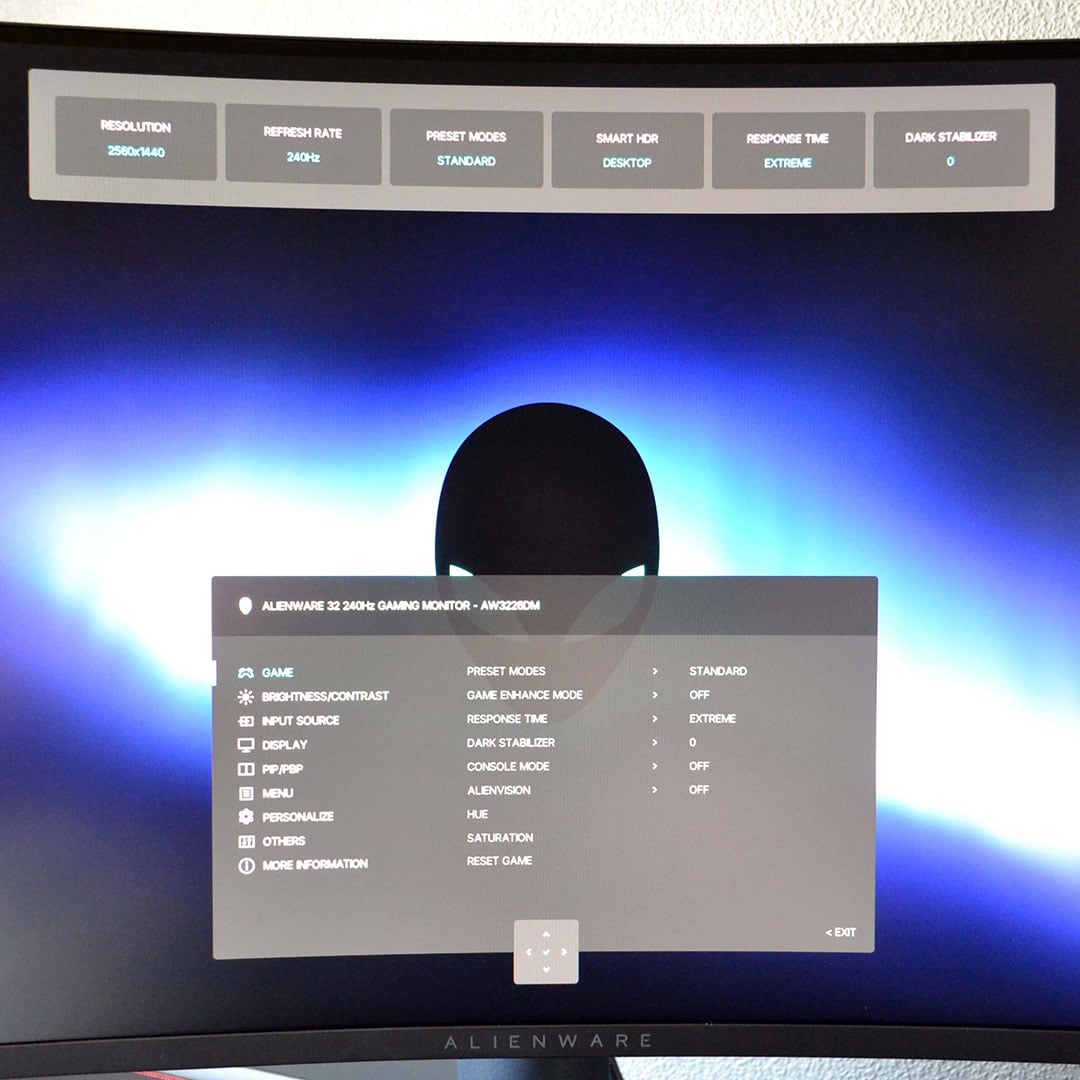
A quad-directional joystick, sitting under the bottom-centre of the panel, serves as the control system for the AW3226DM’s on-screen display (OSD). You can control the monitor via Alienware Command Center if you prefer, but there’s little reason to reach for this software given the intuitive OSD layout and physical controls.
Without getting ahead of our deeper testing, there isn’t much reason for PC users to dive into the OSD. Those planning to connect consoles to the monitor, though, will want to enable Console Mode to ensure full compatibility with Nintendo, PlayStation, and Xbox systems. This feature caps the refresh rate at 120Hz (the maximum for consoles) and allows for a 4K signal to be received, effectively downsampling the image to 1440p, while enabling source tone mapping. On that front, don’t miss HDMI CEC for mirrored power states, as Alienware doesn’t enable this feature out of the box.
There’s also an sRGB clamp within the Preset Modes selection, which staves off oversaturation in some SDR content. I should also mention that Dolby Vision is active by default, which is worth toggling depending on the HDR content you’re consuming on the monitor. Lastly, you’ll also find a customisable built-in crosshair under the Alienvision section, although I’ve never found much use for this feature.
Performance
First-person games are prime showcases for the benefits of high refresh rates, competitive shooters doubly so. Playing many matches of Counter-Strike 2 on the AW3226DM, the monitor delivered an excellent gaming experience.
The panel’s 240Hz refresh rate, combined with steadfast response times, makes landing precise shots on fast-moving targets all the easier. All good monitors should fade into the background in these games, free of impediments such as ghosting as you immerse yourself in a game or match, and the AW3226DM does just that.
This may come as a surprise to you if you’re up on monitor tech, as VA panels are traditionally poor when it comes to ghosting in fast-paced action. However, the AW3226DM is genuinely up to the job, as we’ll see when we come to response times later.
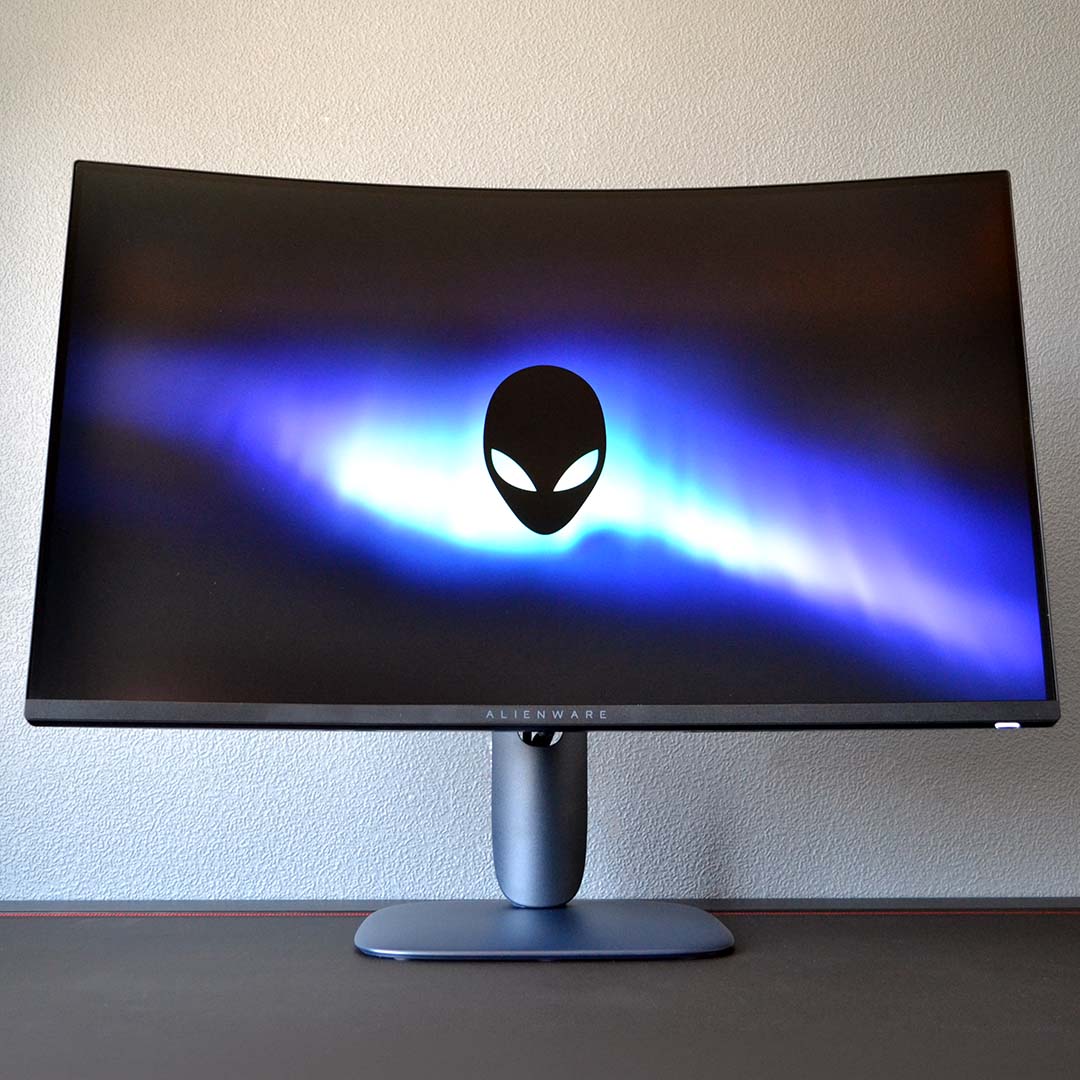
The many shadowy corners of Phasmophobia may not feel as oppressively dark as they do on my QD-OLED monitor, but this VA panel delivers suitably engrossing contrast. This quality is plain while ghost hunting, but also in lighter scenes more broadly, such as the many breathtaking landscapes in Ghost of Tsushima.
You can enable HDR on the AW3226DM, but a lack of local dimming makes this feature largely pointless. Thankfully, the SDR viewing experience is plenty punchy.
Colours
Dell claims the AW3226DM covers the entirety of the sRGB colour space, alongside 95% of DCI-P3. While we’d normally provide first-hand gamut measurements, we’re currently in the midst of reassessing our test equipment and process for this performance category. Regardless, you can expect a satisfyingly punchy and vibrant viewing experience from the monitor.
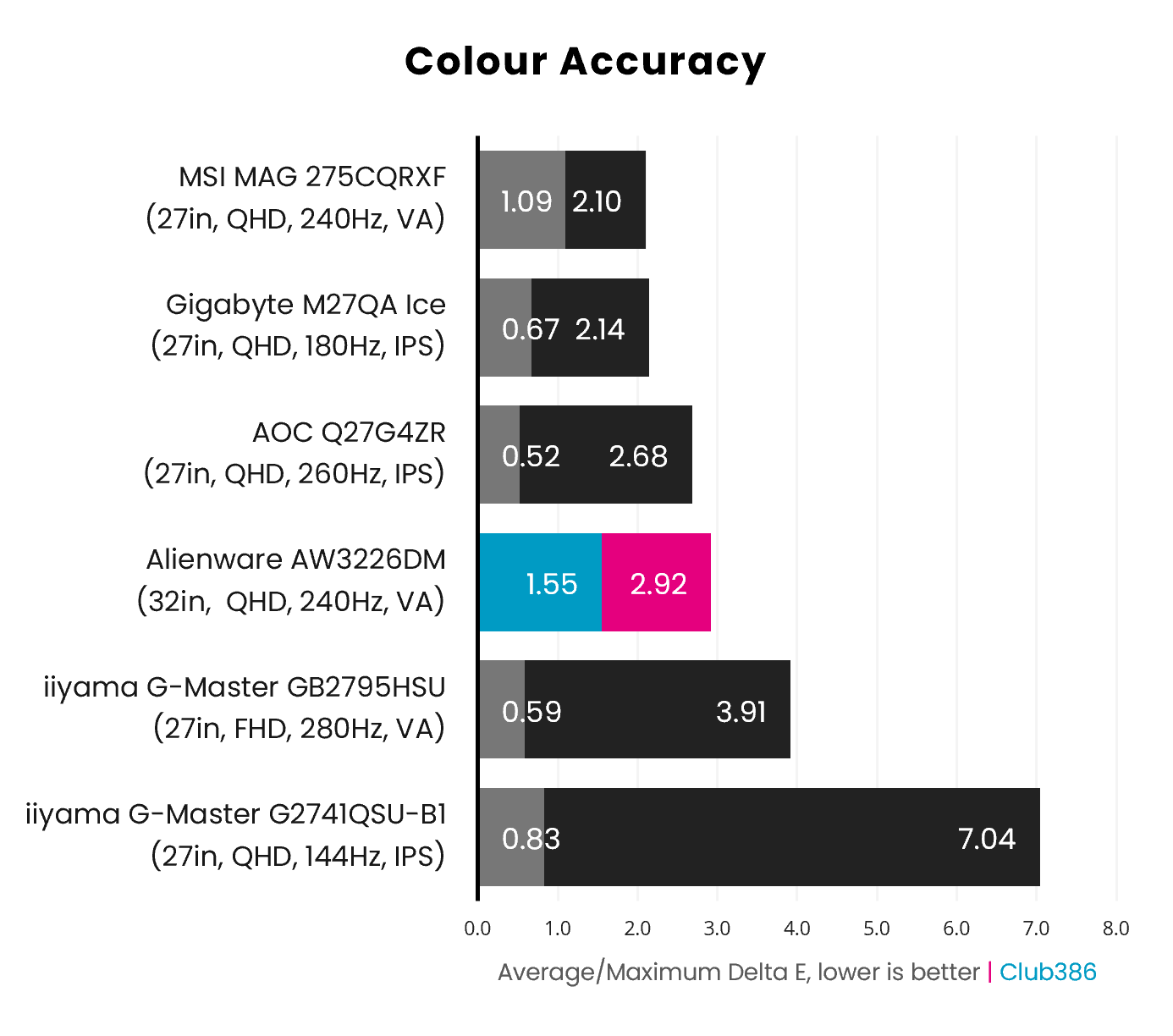
Colour accuracy measurements of ≤2.00 (Delta E) are ideal for any gaming monitor, and the AW3226DM performs admirably in adhering to this threshold. A 1.55 Delta E average is a great result. Near-black hues give the panel some bother and create a 2.92 Delta E maximum, but this isn’t far off the mark at all – this is a solid screen in terms of colour accuracy.
Brightness
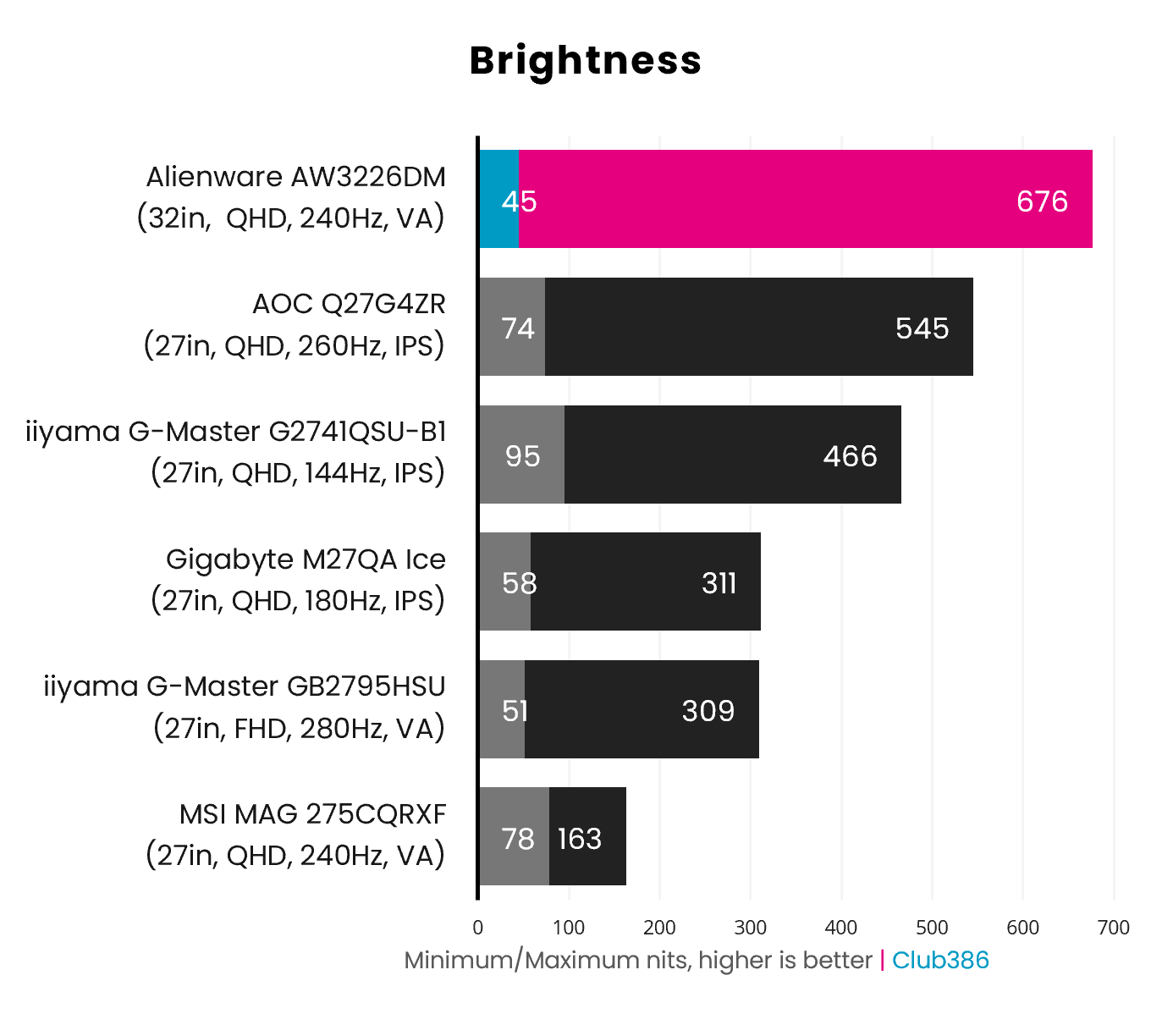
While VA panels typically rank among the dimmer panels on the market, the AW3226DM firmly bucks that trend. At 100% brightness, the monitor delivers a blindingly bright peak luminance of 676nits, managing to beat some of the brightest IPS displays we’ve tested.
However, the monitor actually arrives running at 75% brightness, which is darker at 275nits. That’s a whopping 400nits hidden behind a 25% slider that many folks may not think twice to explore, which is all the more a shame considering those extra nits come at no cost to colour accuracy in our tests.
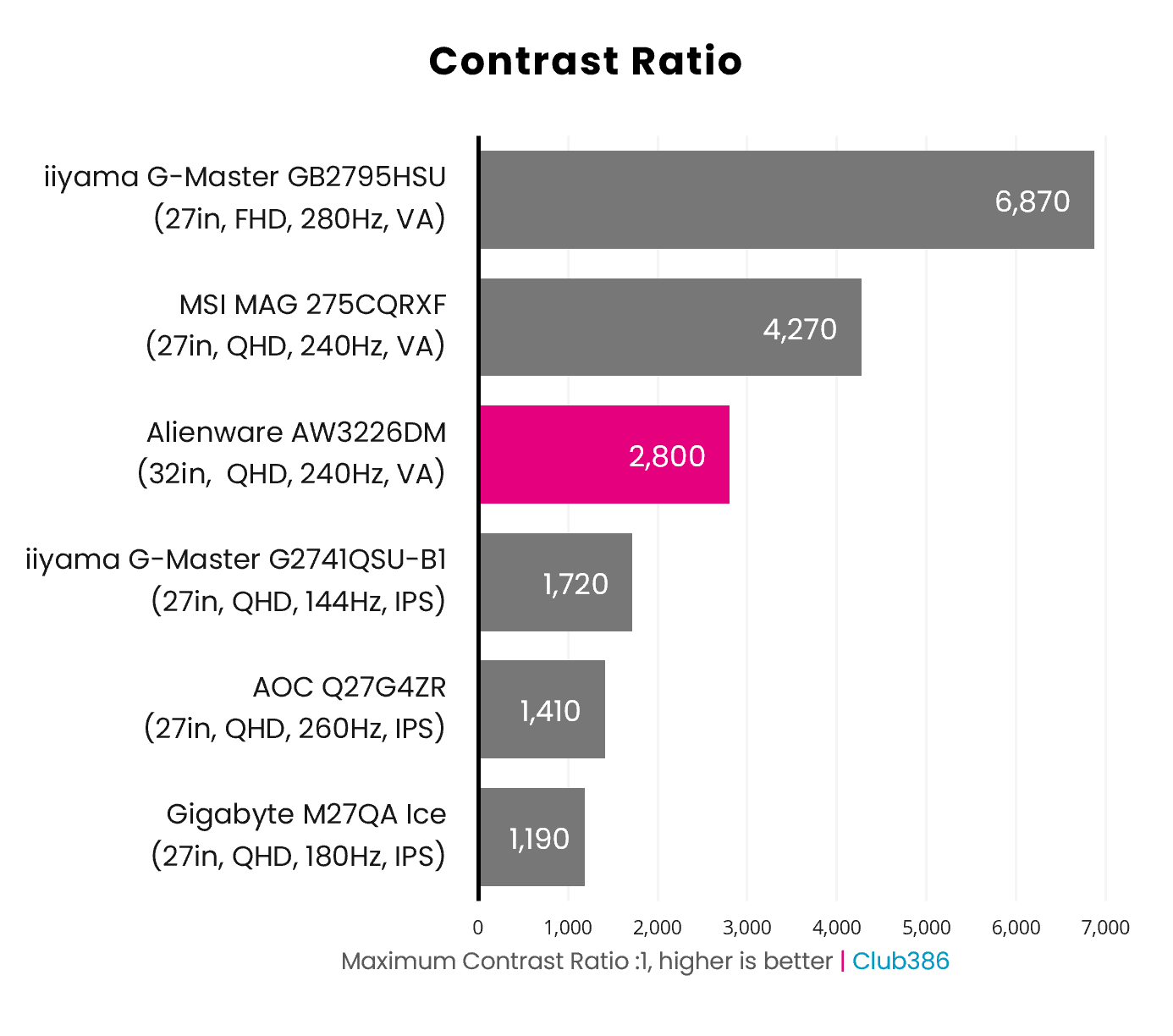
The AW3226DM expectedly trumps every IPS monitor on the board when it comes to contrast, with its VA panel offering a maximum ratio of 2,800:1. While that’s better than the alternative panel tech, this VA panel’s capabilities are on the lower end of what we’ve seen from the same types of display elsewhere.
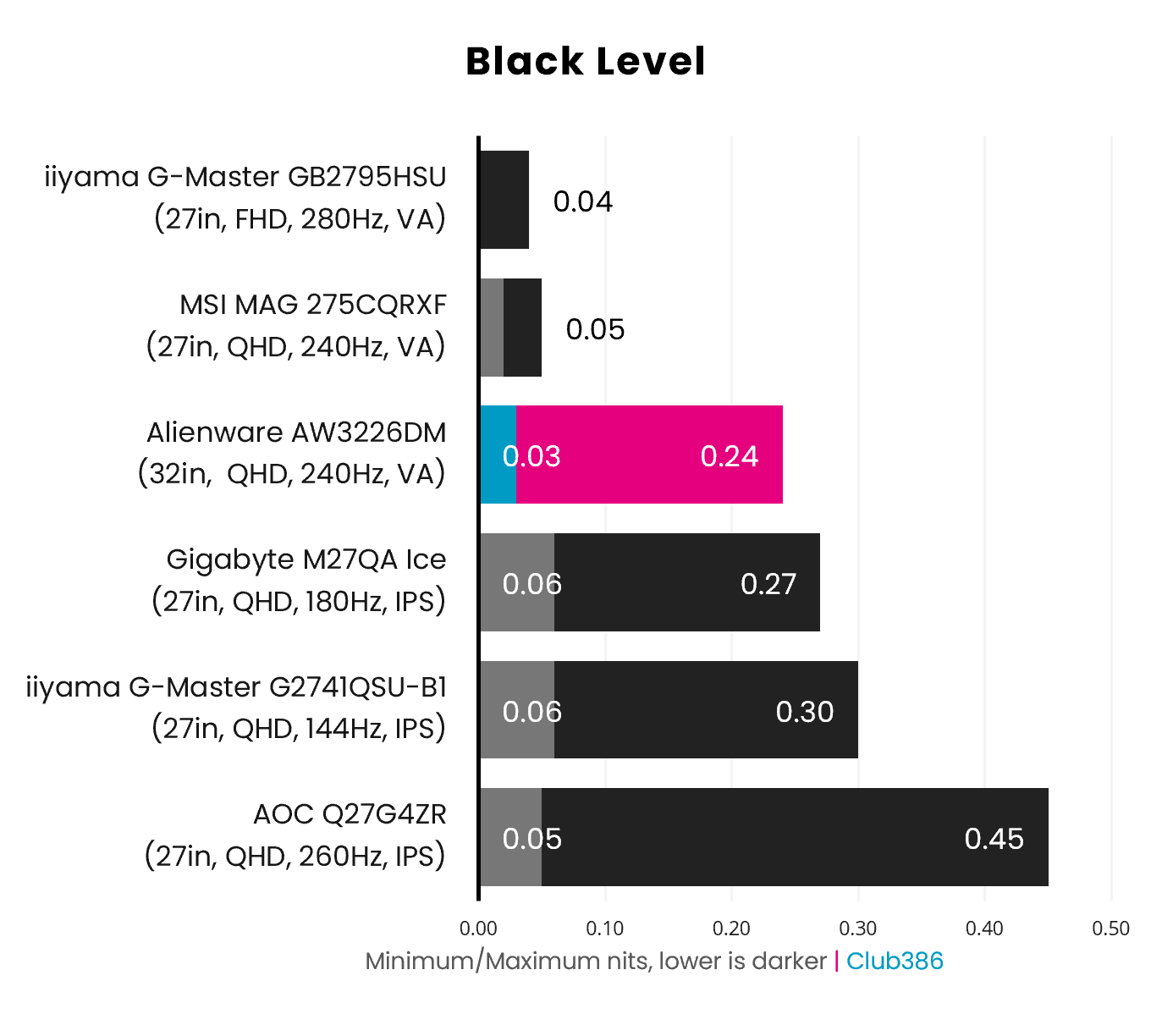
Given the AW3226DM’s high contrast ratio, relative to IPS monitors, it’s no surprise that its minimum black level luminance is lower. However, that high level of brightness does come at the expense of raised shadow detail, rising from 0.11 at 75% to an unexpectedly high 0.24 at 100%.
Uniformity
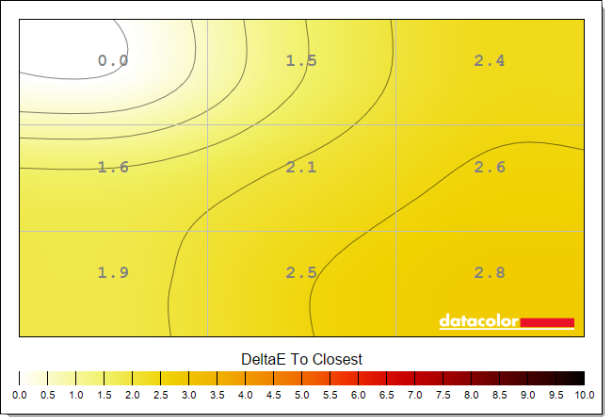
Colour uniformity on the AW3226DM is solid, with deviations peaking at a 2.8 Delta E. This is slightly above the perceptible threshold of 2.0, but not so far off the mark as to be of any distraction or issue while gaming.
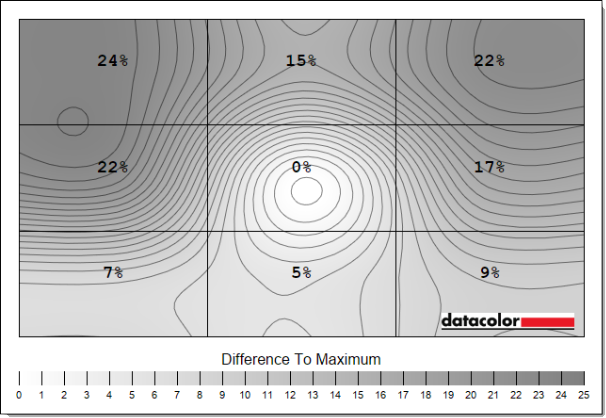
While colours are relatively consistent across the screen, luminance is less so. Ideally, I’d expect differences of up to 10% from a VA panel, but the AW3226DM’s screen is well over that mark at 15-24%. This amounts to notable differences of 74nits at stock settings, rising to a whopping shortfall of 154nits at 100% brightness.
Response times
We’ve recently come into possession of an Nvidia LDAT, with the AW3226DM serving as the maiden voyage for this testing equipment. You can expect overshoot as well as grey-to-grey measurements in future monitor reviews to come, as below.
For those in need of context, grey-to-grey (GtG) response times describe how quickly a monitor can shift between varying levels of brightness and colours. Overshoot, meanwhile, refers to when a monitor shifts past its target before quickly correcting, which can manifest as visible artefacts.
| AW3226DM 240Hz | Fast | Super Fast | Extreme |
|---|---|---|---|
| Avg. GtG | 3.5ms | 3.1ms | 2.7ms |
| Max. GtG | 10.4ms | 11.1ms | 10.1ms |
| Avg. overshoot | 0.0% | 1.9% | 5.3% |
| Max. overshoot | 0.3% | 23.3% | 43.0% |
To deliver a true 240Hz experience, the AW3226DM needs to keep pixel transition times at or below 4.17ms. Thankfully, the panel’s default Fast overdrive setting maintains an average transition time of 3.5ms, with negligible levels of visible overshoot (ghosting) to boot. This setting is so good, in fact, that there’s little reason to entertain the Super Fast or Extreme options as they’re far more unruly.
Across the 8-bit greyscale range, the VA panel expectedly struggles most with transitioning from full black (0), with grey-to-grey response times peaking at a glacial 10.4ms when shifting to a dark hue (64). Credit where it’s due, though, the AW3226DM hits the mark the vast majority of the time, providing a responsive experience free of noticeable ghosting or smearing.
| AW3226DM 60Hz | Fast | Super Fast | Extreme |
|---|---|---|---|
| Avg. GtG | 3.1ms | 2.7ms | 2.4ms |
| Max. GtG | 4.8ms | 4.3ms | 4.2ms |
| Avg. overshoot | 4.8% | 9.7% | 15.1% |
| Max. overshoot | 76.2% | 72.5% | 80.3% |
The panel’s response times shine brightest at its native refresh rate, but 60Hz performance is relatively solid too. Both average and maximum grey-to-grey timings are well above the 16.67ms par, with average overshoot peaking at a mere 4.8% using the default Fast overdrive mode.
Once again, transitioning from absolute black (0) to dark hues sees the panel stumble a touch, with overshoot peaking at 76.2% at stock. However, these remain exceptional results, as the vast majority of shifts fall under the ideal threshold of 15%. In any case, there’s no need to shift from the default overdrive setting regardless of your frame rate.
Power
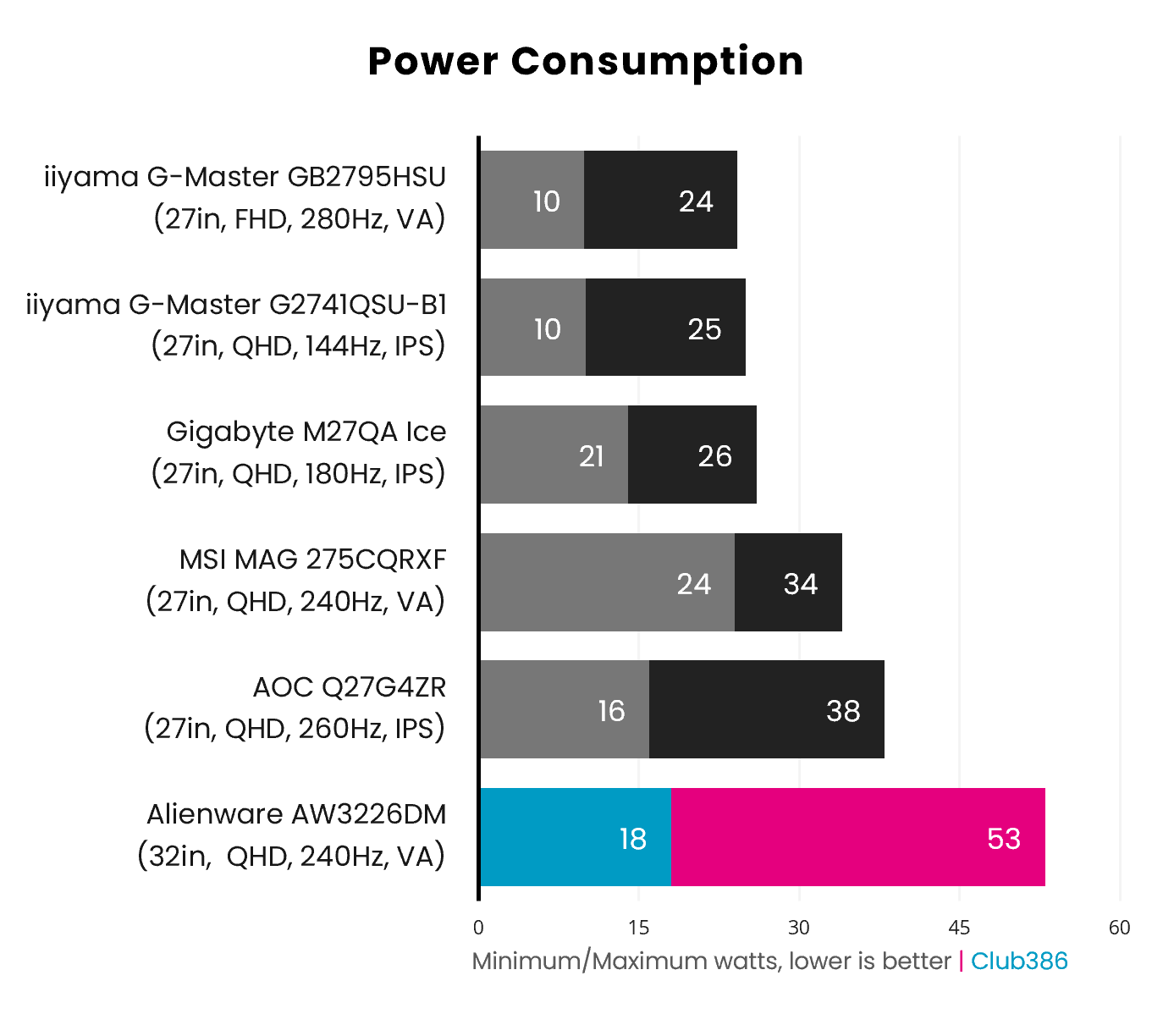
At its absolute dimmest, displaying an all-black screen, the AW3226DM pulls a mere 18W from the wall. However, shifting gears to maximum brightness and a full-white slide sees power consumption climb to 53W.
Relative to other LCDs, the monitor has a larger appetite for electricity. In fact, peak-to-peak, this panel mirrors recent WOLED screens such as the Gigabyte MO27Q28G, albeit while outputting far greater brightness (676nits vs. 390nits).
Conclusion
I didn’t expect the AW3226DM to surprise me as much as it has. In addition to offering the expected solid contrast and colour accuracy, this VA panel is exceptionally bright and responsive. These qualities come together in strong fashion, crafting a well-rounded gaming experience in their wake.
The only hesitation I have regarding the screen’s performance concerns backlight uniformity. Deviations are surprisingly high, even for a VA panel. Some users may not notice this problem, but it’s one my eyes can’t unsee.
At £269 / $299, the AW3226DM massively undercuts like-for-like alternatives such as the Samsung Odyssey G65B, which currently commands a $479 asking price. However, there are cheaper 165/180Hz options available starting from $229, such as the LG UltraGear 32GS60QC-B.
Paying an additional $70 for a higher refresh rate, in addition to a USB hub and other creature comforts, makes a lot of sense, especially with the build quality and responsiveness on offer. In any case, Alienware has priced its offering justly, making for a potential mainstream darling for those in search of a large, bright, and high-contrast gaming monitor.
