

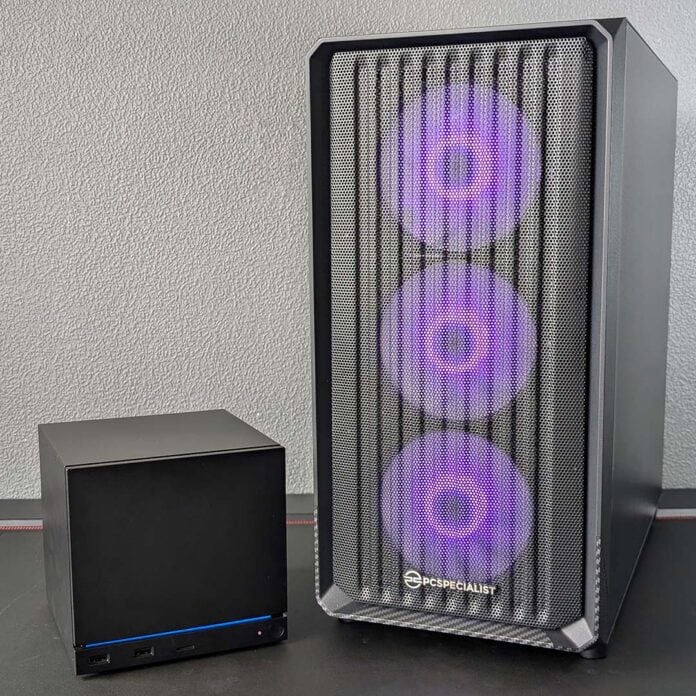
Valve’s Steam Machine is an undeniably charming and petite gaming system, but it’s also far from perfect. This is particularly true when it comes to the specs and performance you get for your money, and there’s a lot of talk about how much more you’ll get from a standard gaming PC, even if it doesn’t have the Steam Machine’s dinky dimensions. Keen to see just how much you could get for under a grand in the middle of the memory crisis, PCSpecialist sent us its £999 Zircon C Spark to pitch against the Steam Machine.
In addition to performance comparisons, I’ll highlight the differences in design between the two systems, as well as the broader advantages and limitations of choosing one system over the other. After all, there are some features that a Steam Machine alternative simply can’t offer, but this same truth goes both ways as well.
Specifications
As I discuss in our Steam Machine review, it’s impossible to build a like-for-like alternative with off-the-shelf components, as the system sports semi-custom hardware. While this does make attempts to match Valve’s petite form factor and specifications undeniably difficult, this same conundrum also opens the door to more powerful kit.
Enter the PCSpecialist Zircon Spark C. Costing £999, this gaming PC is a touch more expensive than the Steam Machine, but it offers a welcome increase in gaming and general compute performance. Before we dive into benchmarks, though, let’s run through exactly what this rig offers and the differences compared to Valve’s black box.
| PCSpecialist Zircon Spark C | Steam Machine | |
|---|---|---|
| CPU | AMD Ryzen 5 5600XT, 4.8GHz | Semi-custom 6-core AMD Zen 4, 4.8GHz |
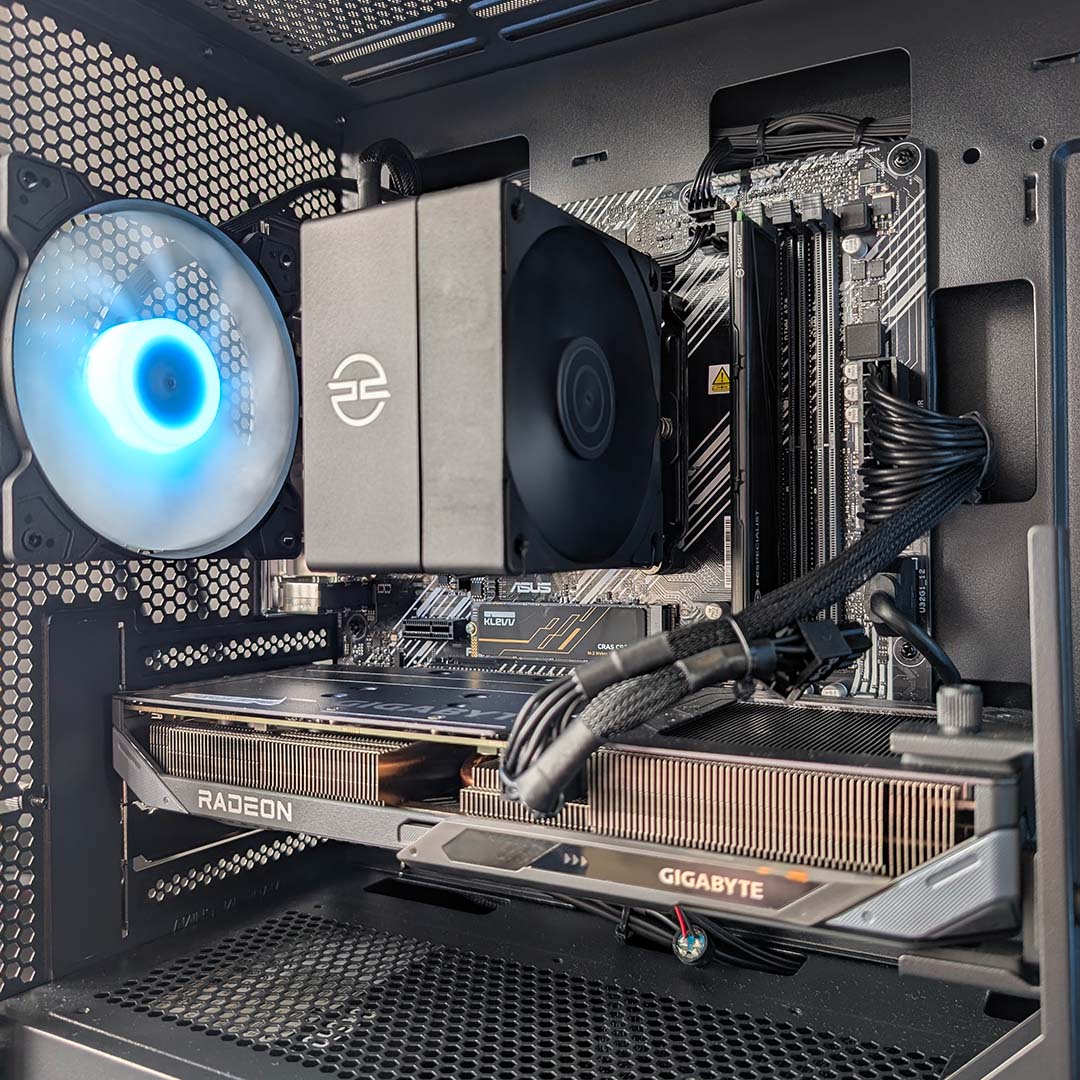
| CPU cooler | PCSpecialist AS-80 | Custom air cooler |
| Motherboard | Asus Prime A520M-A II | Custom mainboard |
| GPU | AMD Radeon RX 9060 XT 8GB (32 compute units) | Semi-custom AMD RDNA 3 8GB (28 compute units) |
| RAM | 16GB (2x8GB) DDR4-3200 | 16GB DDR5-5600 (single-channel) |
| SSD | 1TB PCIe Gen 4 NVMe SSD | 512GB or 2TB PCIe Gen 4 NVMe SSD |
| PSU | 550W | 300W |
| Connections | Gigabit Ethernet 3.5mm audio (x3) Bluetooth 5.3 VGA (x1) HDMI (x2) DisplayPort (x2) PS/2 USB-A, 480Mb (x3) USB-A, 5Gb (x5) USB-C, 10Gb (x1) Wi-Fi 6E | Gigabit Ethernet 2.4GHz Steam Controller receiver Bluetooth 5.3 DisplayPort (x1) HDMI (x1) microSD card slot USB-A, 480Mb (x2) USB-A, 5Gb (x2) USB-C, 10Gb (x1) Wi-Fi 6E |
| Case | PCS Spectrum III Compact ARGB | Steam Machine chassis |
| Operating system | Windows 11 Home | SteamOS 3 |
| Dimensions (H x W x L) | 446 x 211 x 453mm | 152 x 156 x 162mm |
| Warranty | Three years labour, one year parts, six months collect and return | One year |
| Price | £999 | From £879 |
The most obvious difference between the Steam Machine and any alternative is size. Measuring 152 x 156 x 162mm, Valve has put together a marvellously small system. By comparison, the Zircon Spark C is wider but notably almost three times as tall and long (446 x 211 x 453mm). That said, the PCS Spectrum III Compact ARGB is trim for a standard PC with its micro-ATX form factor.
PCSpecialist and other system manufacturers do offer prebuilds with mini-ITX chassis, such as the Fractal Design Terra, which is closer to Steam Machine size, but at a higher price. Regardless, try as you might, you simply won’t get anything as compact as what Valve’s offering, as we’re talking about setups that accommodate different component classes.
For instance, the Steam Machine features a semi-custom processor, motherboard, and discrete graphics chip that closely resemble components you’ll find in a laptop or handheld. While this approach saves on chassis space, there’s no way to upgrade this hardware like you can on a standard PC. There’s no going beyond the performance this configuration offers, like a console, bar changes to system RAM and storage.
Meanwhile, the Zircon Spark C and other prebuilds afford you the ability to improve the system over time, piece by piece. Take the system’s Ryzen 5 5600XT, a perfectly competent 6-core processor for gaming that can keep pace with the Steam Machine. Should you wish, you can swap that chip out for a more-powerful Ryzen 7 5800X3D at any time, for greater CPU performance via more cores and cache.
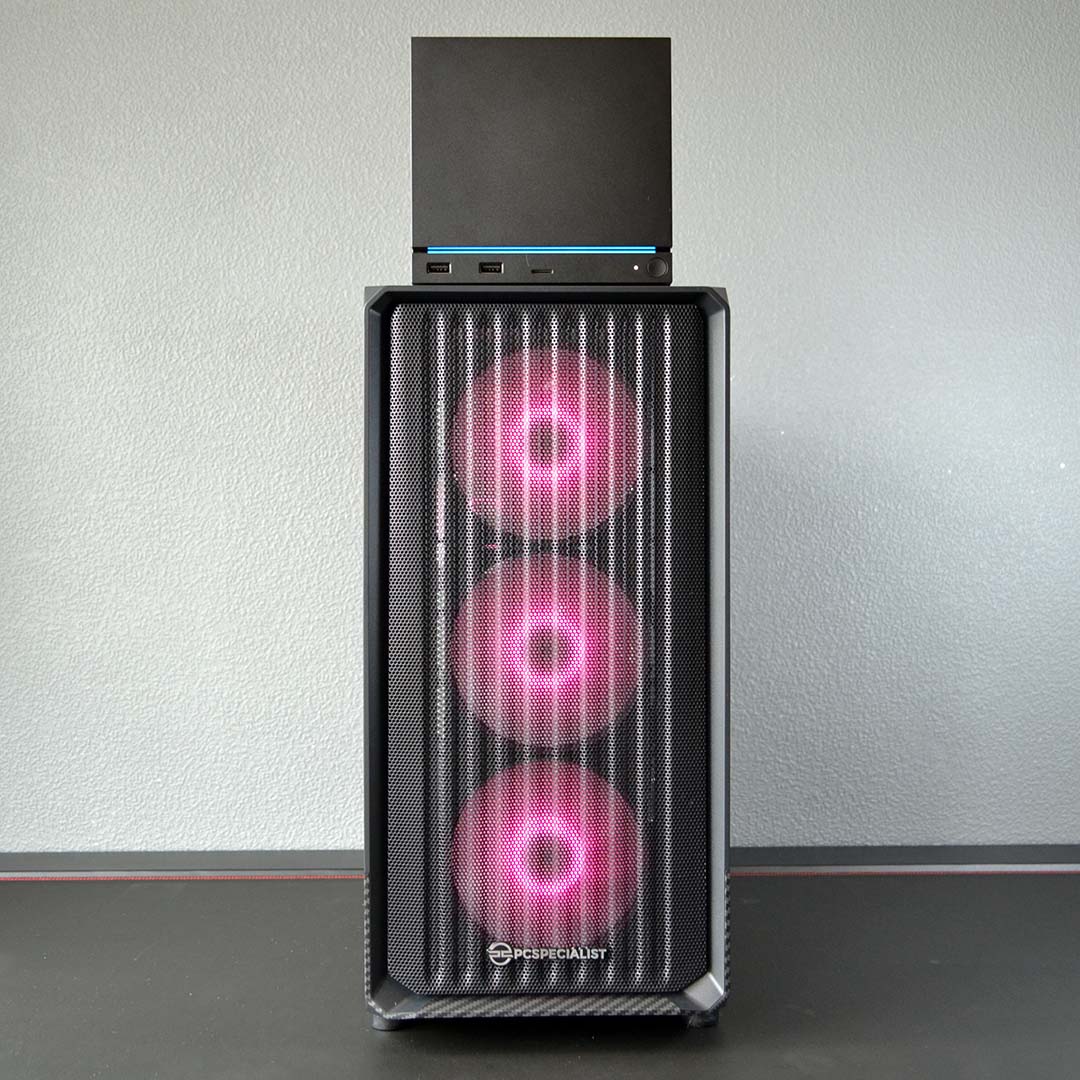
This upgradability applies to the Radeon RX 9060 XT 8GB inside the Zircon Spark C too, although this graphics card runs circles around the Steam Machine’s discrete GPU off the bat. There’s no competition between the two in terms of raw performance, particularly when ray tracing enters the frame, but each faces the same limitations stemming from the 8GB VRAM buffer.
The specs of both machines will serve you well for 1080p gaming, with the odd dabble of 1440p too with the right settings and some help from FSR upscaling. Once again, though, the Steam Machine will never be able to grow past these limits, while the Zircon Spark C offers more performance now, and will happily accept a new graphics card in the future with more memory.
Alternatively, there’s room to push the Radeon RX 9060 XT 8GB further via a motherboard swap. This graphics card features a PCIe Gen 5.0 x16 interface, while the Asus Prime A520M-A II inside the Zircon Spark C is only able to provide PCIe Gen 3.0 x16 bandwidth. This effectively caps throughput at Gen 5 x4 speeds, throttling performance potential. Even then, though, its frame rates still dwarf those of the Steam Machine.
While an alternative motherboard based on AMD’s B550 chipset would alleviate this bottleneck to an extent, via a PCIe Gen 4 x16 slot, adding this upgrade incurs an additional £50 premium. I’d personally recommend spending that extra cash if possible, but this gives you an insight into the difficult realities facing PC builders in the face of the ongoing DRAM crisis. You simply can’t make a PC that ticks all the basic boxes for under a grand any more.
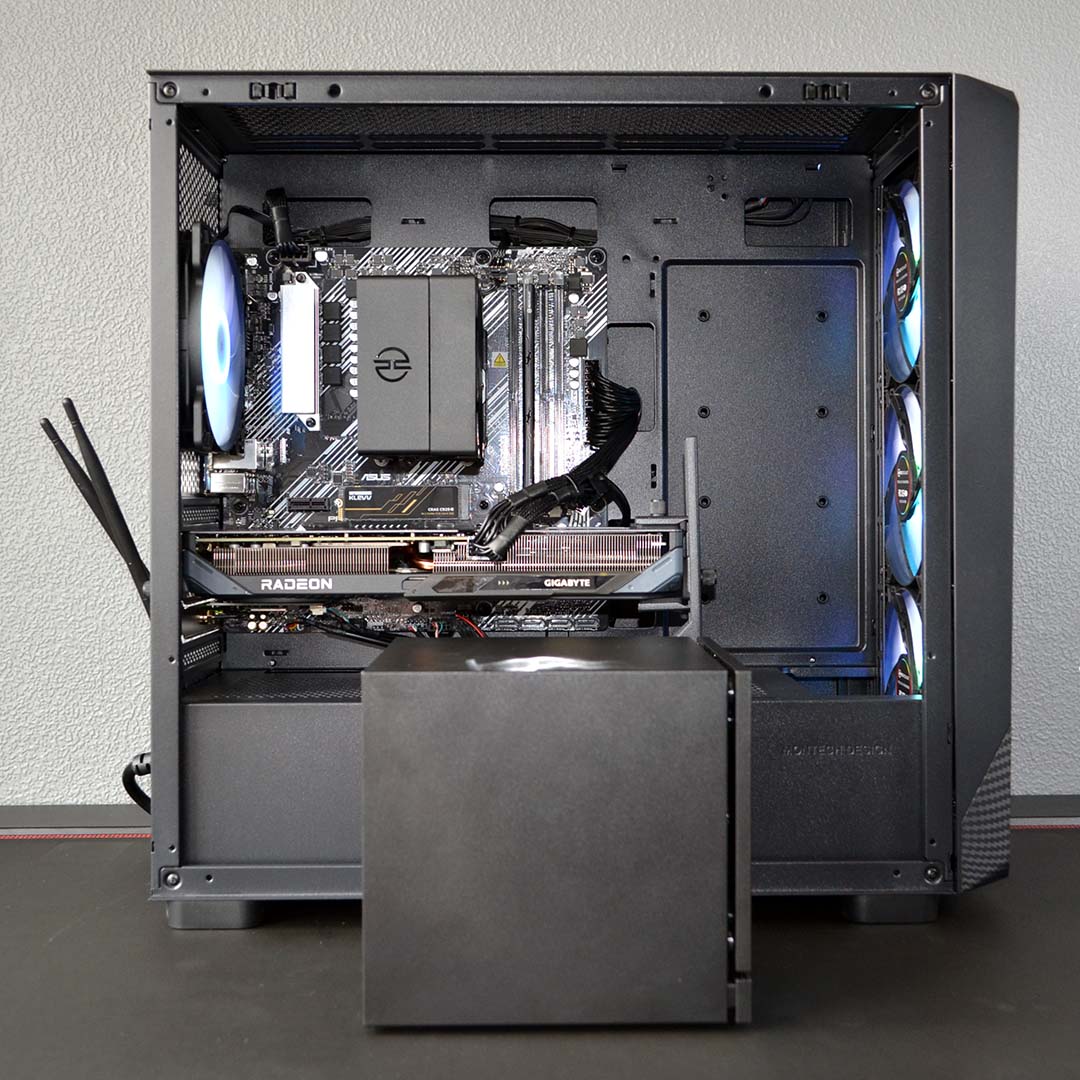
Speaking of RAM, the Zircon Spark C sports 16GB of DDR4-3200 memory. Our sample arrived with a single stick, owing to supply available at the time, but PCSpecialist is now offering the same capacity and speed in a dual-channel configuration at no additional cost. Comparatively, the Steam Machine just has a single stick of DDR5 memory, which is faster than the DDR4 memory in the Zircon C Spark, but its bandwidth is also hit by the lack of dual-channel support.
Opting for DDR4 is a necessity of the AM4 platform, but it also helps keep the Zircon Spark C price down. At the time of writing, an 8GB DDR4 DIMM running at 3,200MT/s is available for as little as £78, while an 8GB SODIMM at 5,600MT/s costs a whopping £150. There’s little chance of this price disparity changing anytime soon, so acquiring additional memory capacity or speedier sticks is much easier away from the Steam Machine.
That’s not forgetting the ease of upgradability either. In order to access the Steam Machine’s RAM, you’ll need to deconstruct much of the system to gain access to the SODIMM slots. This isn’t as simple as loosening a few screws, as there are ribbon cables and more obstructing the way. Meanwhile, memory in prebuilds such as the Zircon Spark C is easy to access, and adding or replacing sticks only requires the flick of a plastic tab or two.
This same ease applies to storage, with the Zircon Spark C actually packing more capacity than a base model Steam Machine. That said, the motherboard’s PCIe Gen 3.0 interface again limits the PCSpecialist machine’s Gen 4.0 SSD to Gen 3.0 speeds. That’s unfortunate in terms of peak read and write speeds, but it does still give you enough pace for gaming.
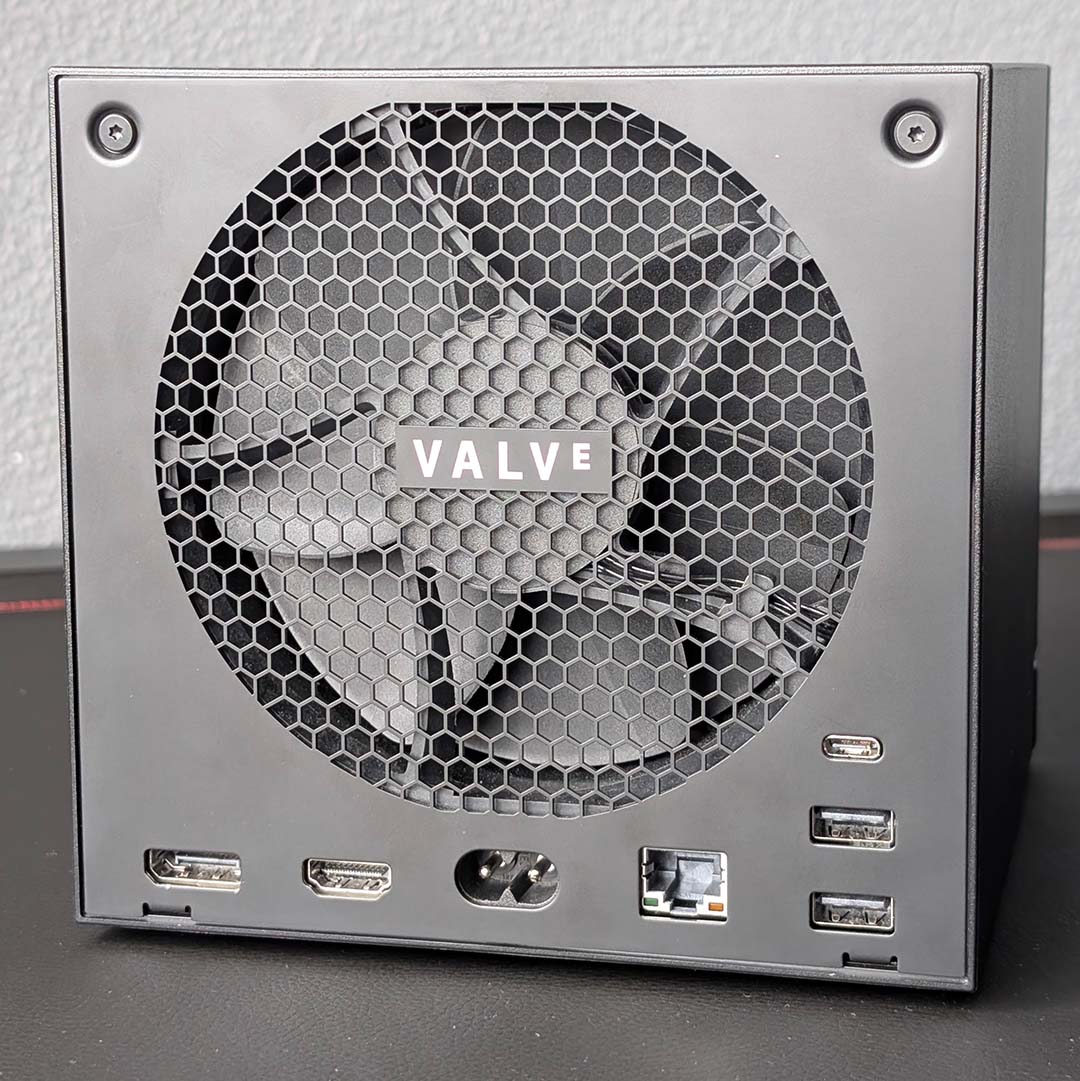
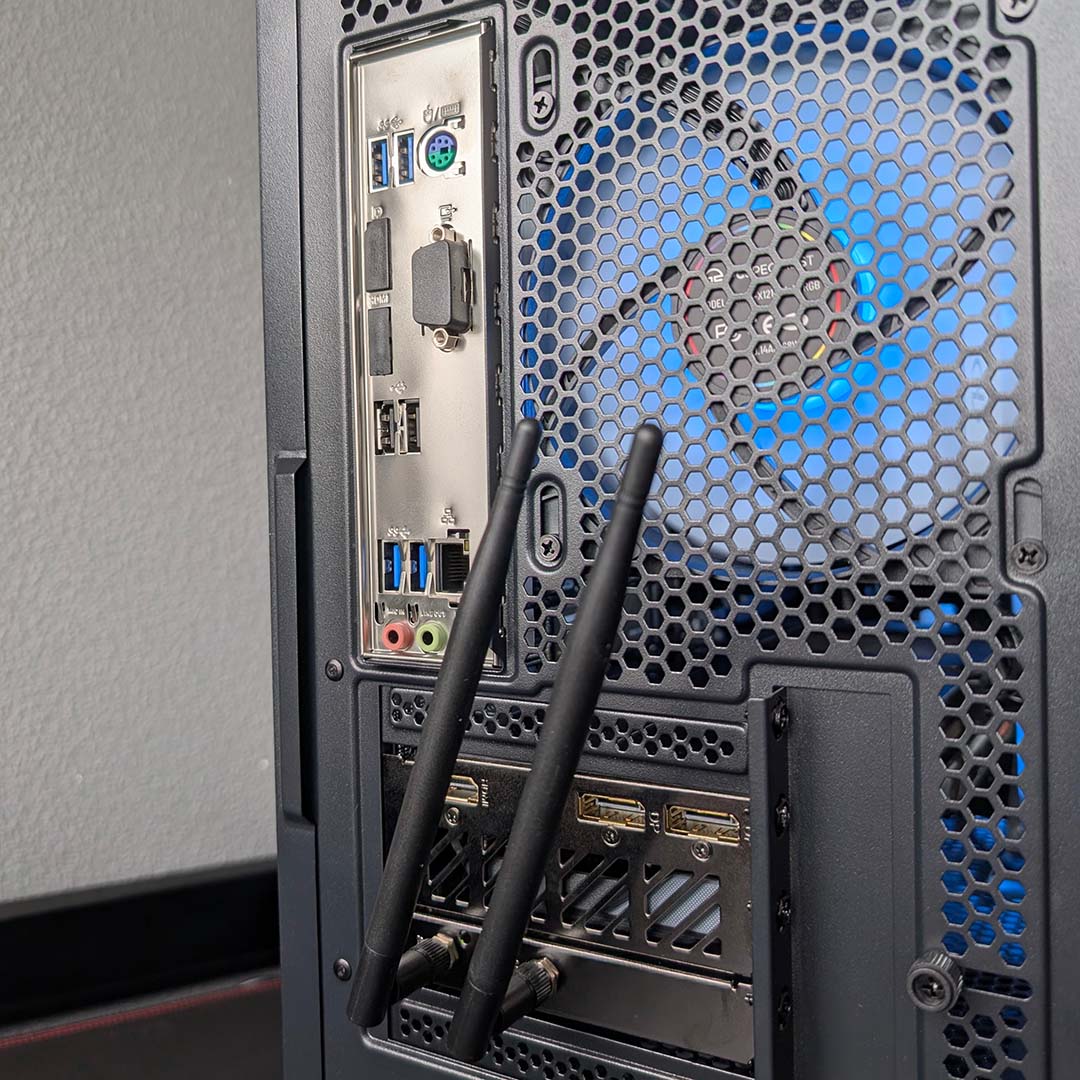
Coming back to size, a larger motherboard and case affords a prebuilt PC a greater breadth of connections relative to the Steam Machine. In the case of PCSpecialist’s Zircon Spark C, we’re talking double the amount of USB-A inputs for a start, allowing the system to play host to more peripherals beyond a controller, headset, keyboard, and mouse.
It’s worth noting that the Steam Machine does feature a built-in 2.4GHz receiver for Steam Controllers, provided you have one. I’d argue the system feels incomplete without one, as the Zircon Spark C would without a keyboard and mouse, increasing the buy-in for Valve’s PC to £938. Regardless, you’ll still need to reserve one USB port for the pad’s charging puck.
Similarly, the Steam Machine hides away its Wi-Fi 6E aerials within its chassis. Prebuilds rely on external aerials or receivers for wireless connections, which, while easy to hide away, will never be as invisible as those inside Valve’s offering. For those who prefer wired networking, you can expect a minimum of gigabit Ethernet across budget-friendly systems like the Zircon Spark C and Steam Machine.
The Radeon RX 9060 XT also provides the Zircon Spark C with newer display outputs, namely DisplayPort 2.1 and HDMI 2.1, while the Steam Machine falls back to DisplayPort 1.4 and HDMI 2.0. While this technically makes the prebuild more capable of displaying a wider range of resolutions and refresh rates, without compression, the system can’t offer HDMI CEC for simultaneous power states between device and display, unlike the proverbial GabeCube.
Gaming
I’ve benchmarked both the Zircon Spark C and Steam Machine at native FHD and QHD resolutions, as well as exploring how FSR upscaling can help boost performance. Both systems support FSR 4, with the Steam Machine benefiting from AMD’s recent efforts to port the feature to older RDNA 3 GPUs.
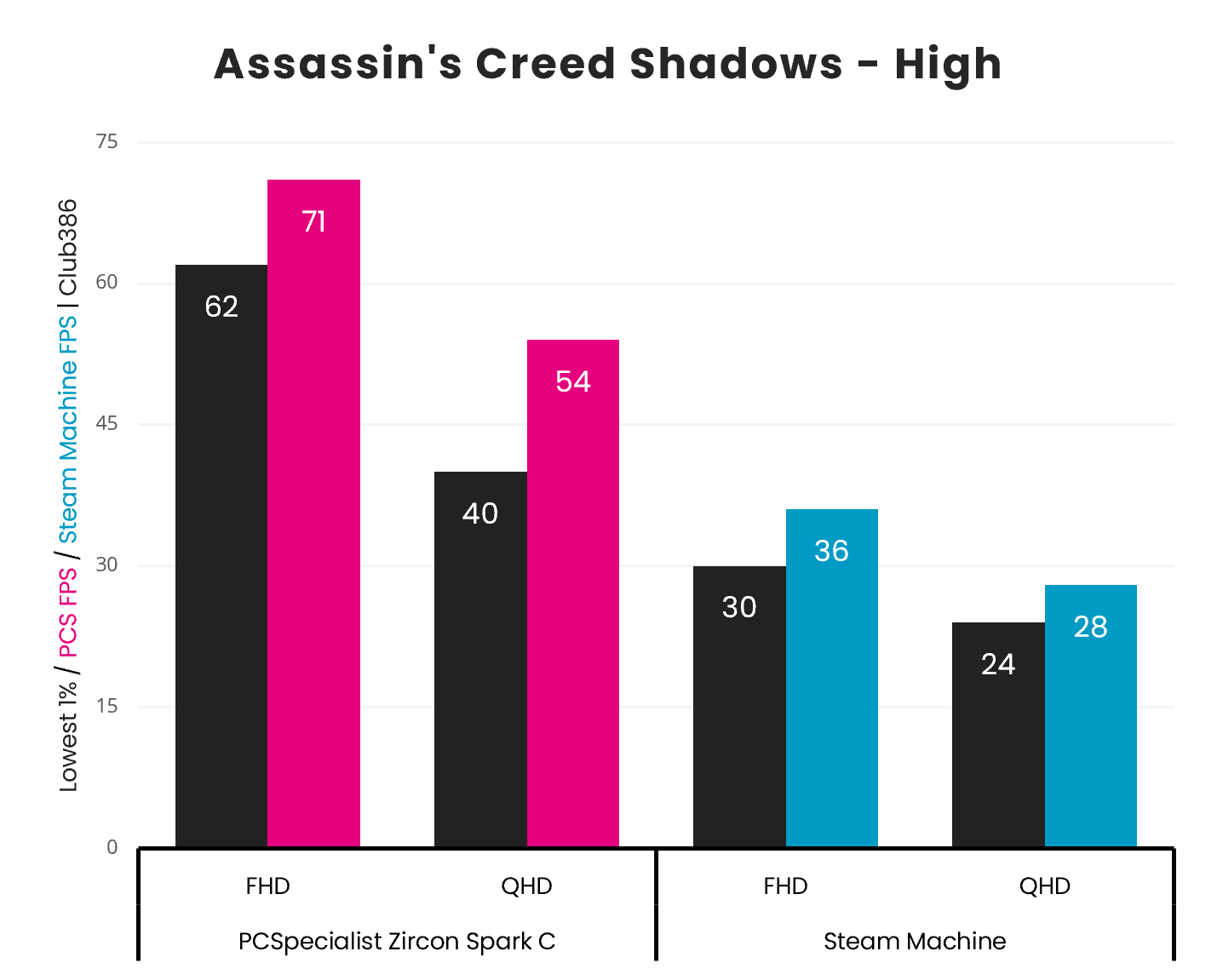
Beginning with Assassin’s Creed Shadows, using the game’s High preset with minimal ray tracing, the gargantuan gap in performance between the prebuilt PC and Valve’s Steam Machine is obvious.
The Zircon Spark C, with its Radeon RX 9060 XT 8GB, practically laps Valve’s system, with a 93-97% advantage across resolutions.
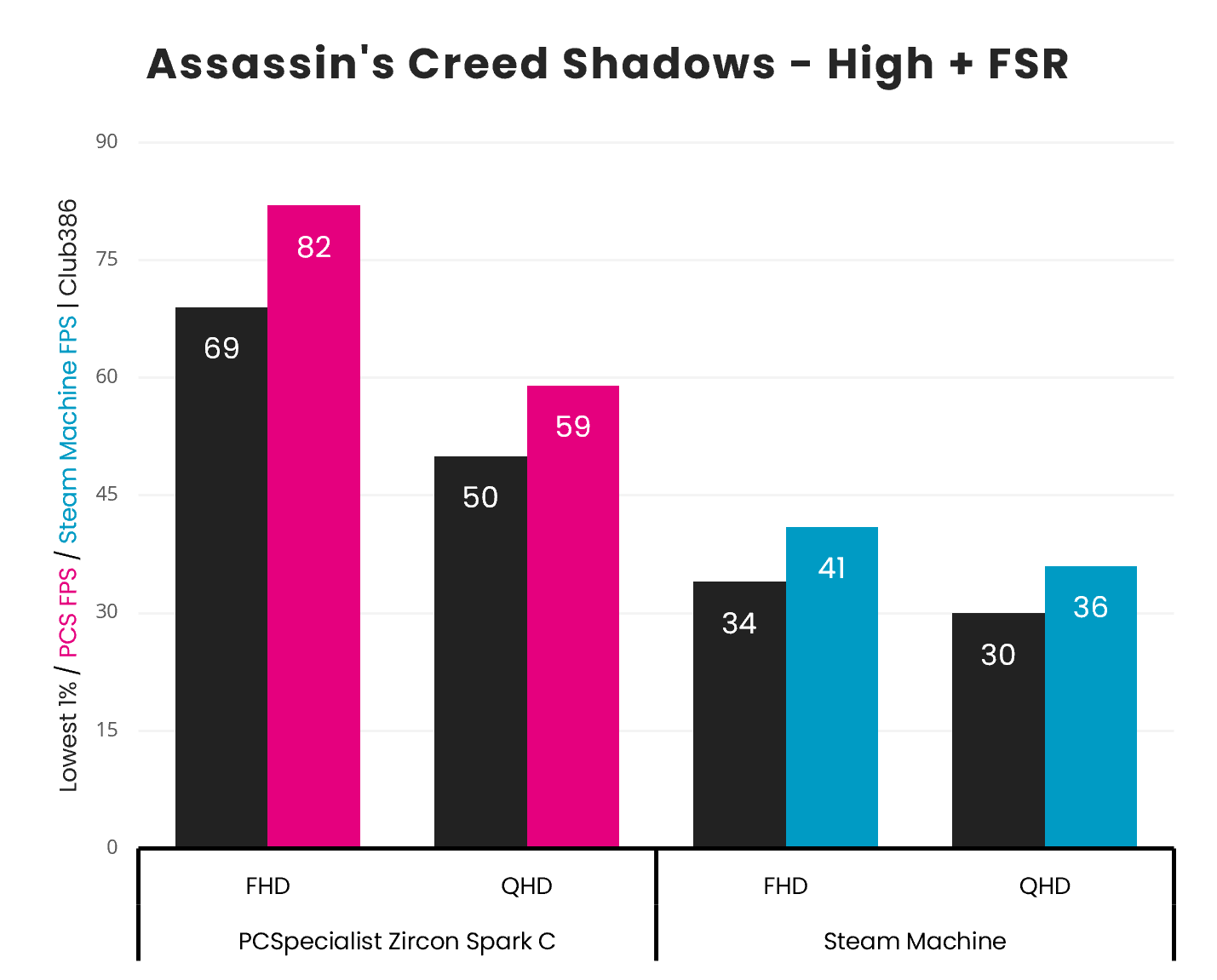
Turning on FSR 4 sees frame rates improve by a welcome 14-15% at 1080p across the two systems. In real terms, the Zircon Spark C enjoys an additional 11fps, while the Steam Machine improves by a relatively small 5fps.
Moving to QHD, the Steam Machine’s performance rises by 8fps, finally providing a playable frame rate for Assassin’s Creed Shadows at the resolution. Meanwhile, the prebuild jumps up by 5fps, just shy of the ideal 60fps threshold.
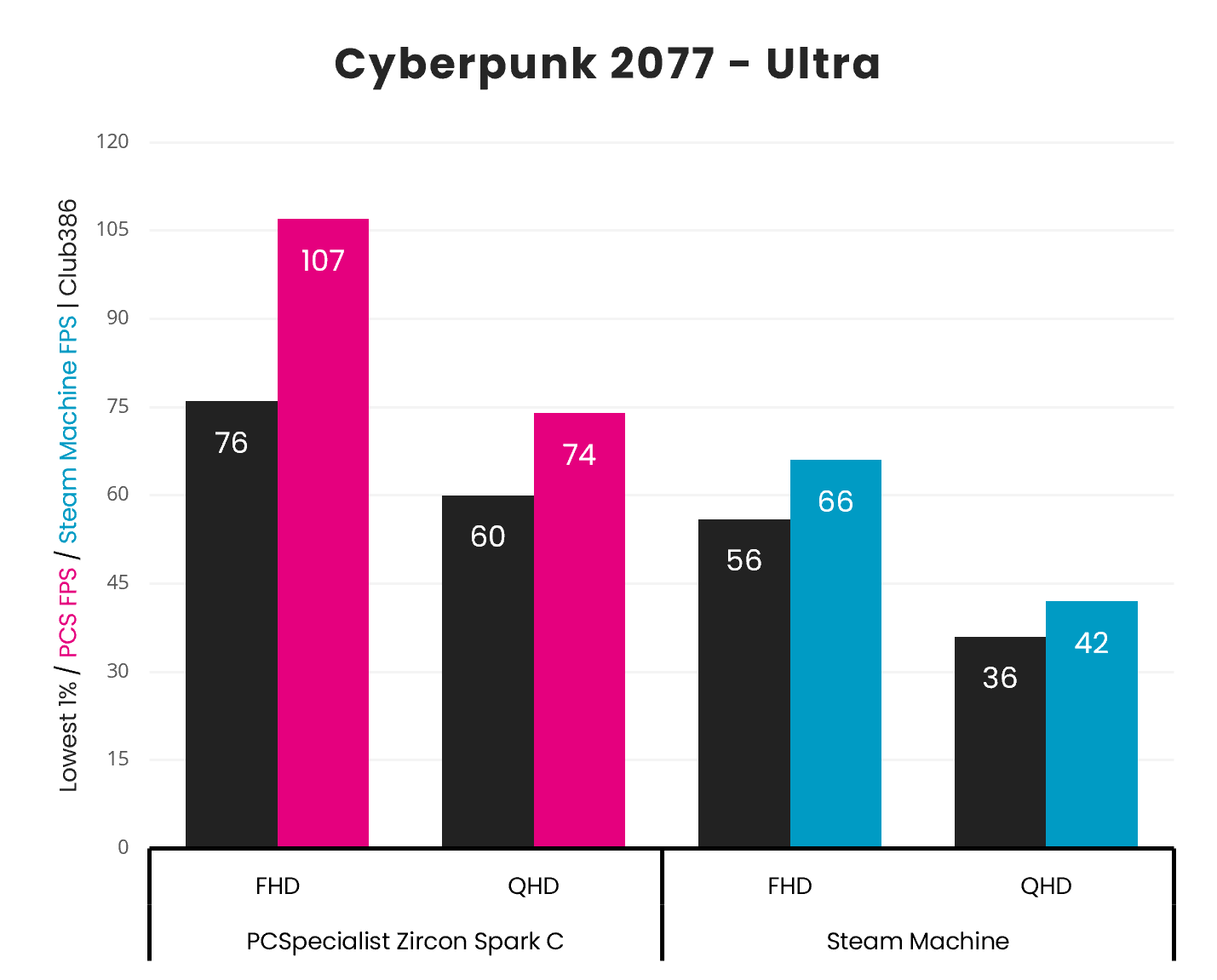
Next comes Cyberpunk 2077, with maximum rasterised splendour via its Ultra preset. In Night City, the difference in performance between the Zircon Spark C and Steam Machine shrinks but remains stark.
At 1080p, the prebuild is a notable 62% ahead of Valve’s black box. Meanwhile, increasing the resolution to 1440p sees this lead grow to 76%. Importantly, PCSpecialist’s offering is providing a 60fps+ experience at both resolutions.
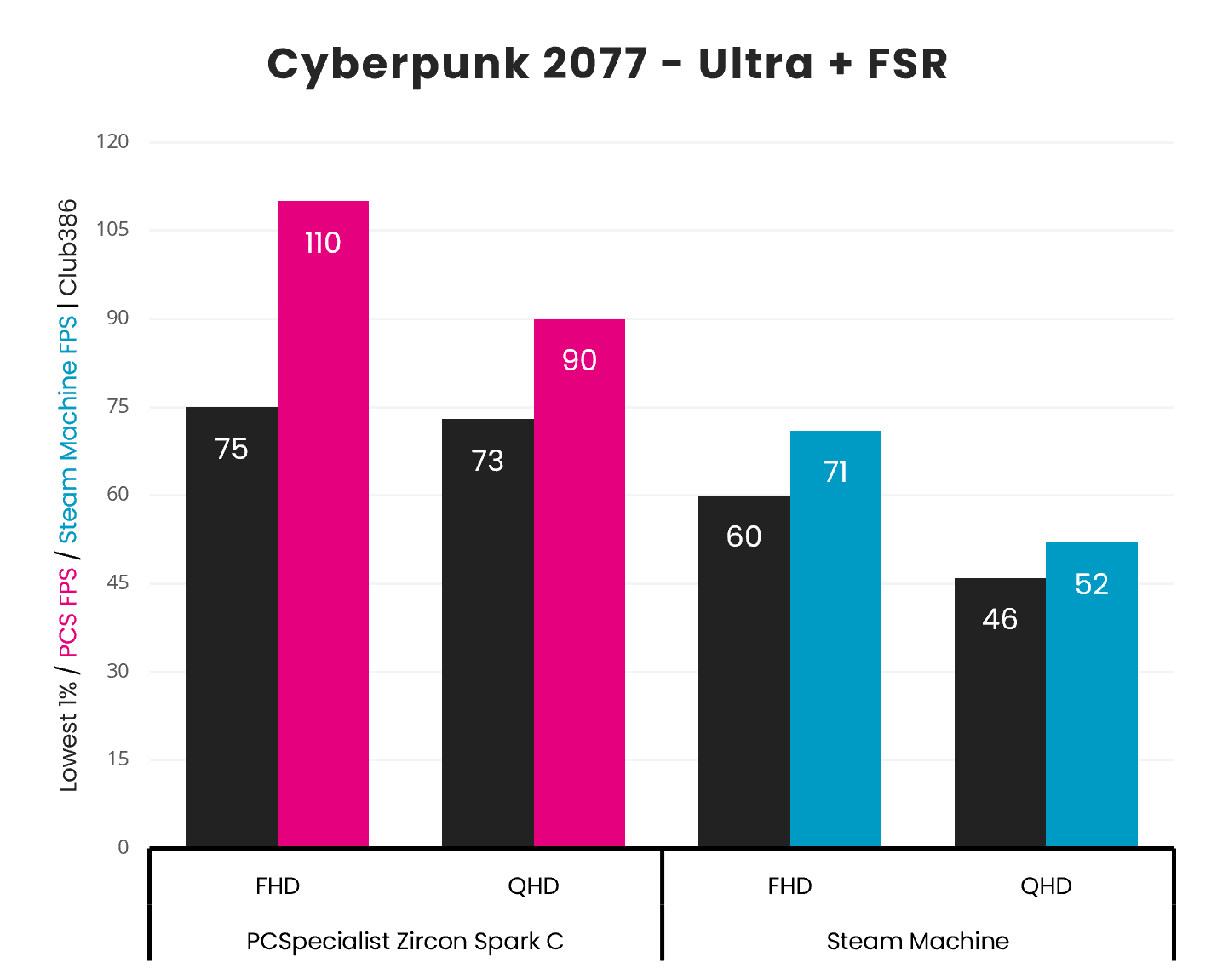
FSR does little to push FHD frame rates higher on the Zircon Spark C, owing to a CPU bottleneck. However, swapping to a QHD target resolution sees performance rise by a welcome 22% relative to native.
On the Steam Machine, FHD sees a similarly meagre rise of 5fps with FSR enabled. At QHD, performance increases by a welcome 24%, but the Zircon Spark C is still able to maintain a 55-73% lead across resolutions.
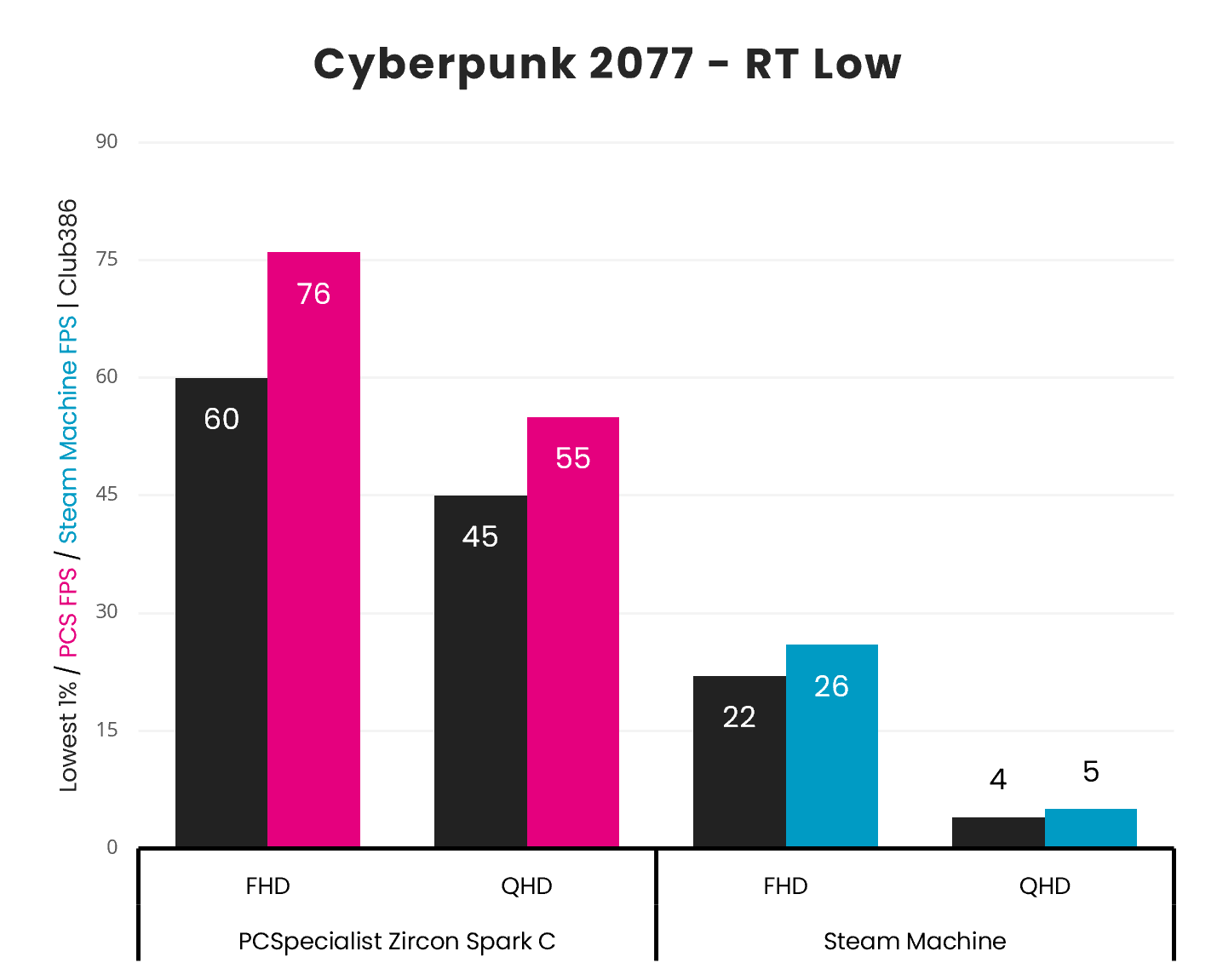
Both systems are capable of ray tracing, but only one produces playable frame rates in the face of Cyberpunk 2077’s RT Low preset. How does shifting from a 5fps average to 55fps sound at 2560×1440?
The advantage that the Radeon RX 9060 XT 8GB inside the Zircon Spark C offers over the Steam Machine in this test is truly staggering. This is in large part thanks to its RDNA 4 GPU’s newer, more-powerful ray tracing accelerators.
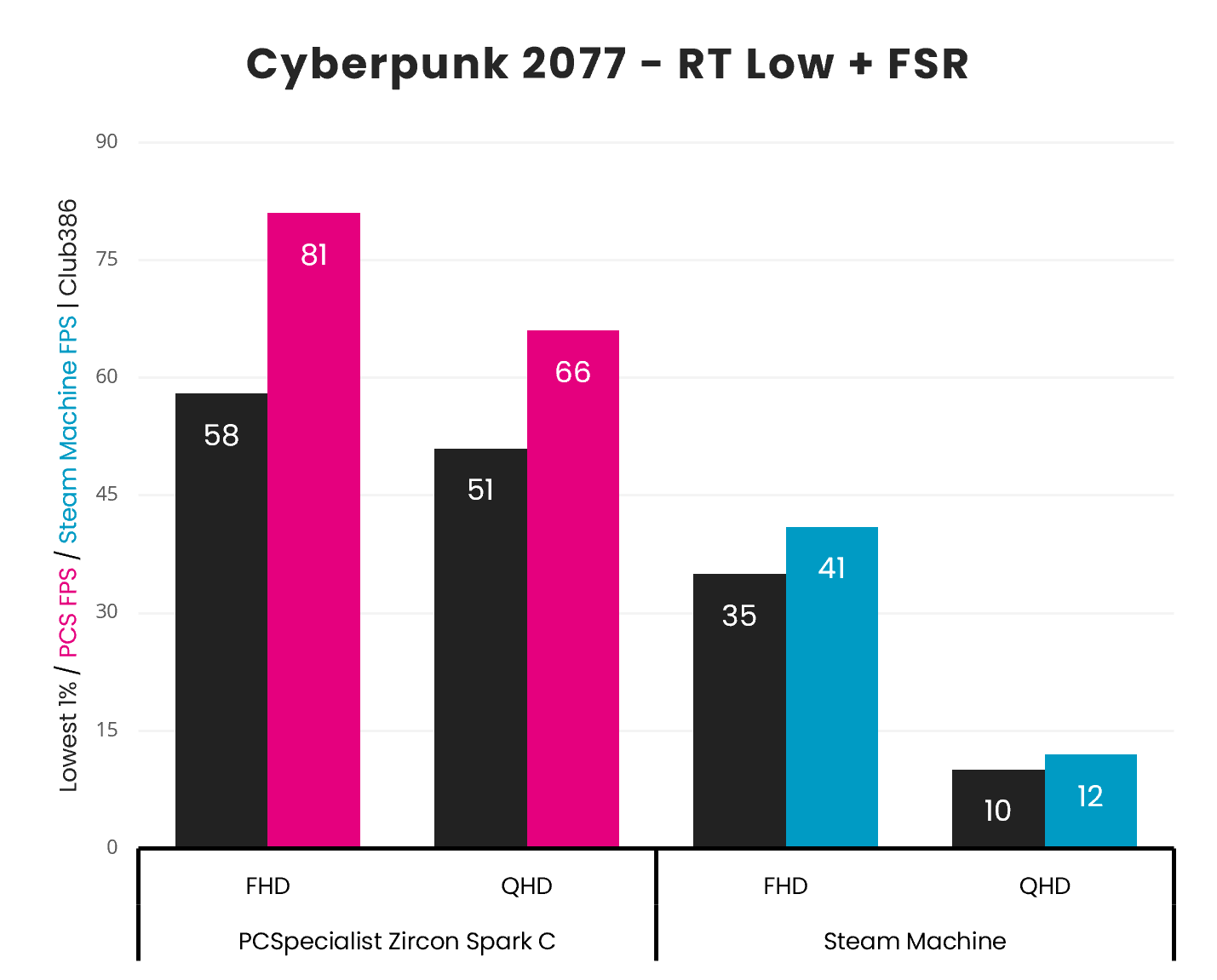
Enabling FSR at this setting lifts the Steam Machine out of the trenches at FHD, with a 41fps average. However, the system is still miles behind the 81fps that the Zircon Spark C is offering at the same resolution.
Meanwhile, QHD sees PCSpecialist’s rig push past the 60fps threshold as Valve’s system barely scrapes a double-digit frame rate. Suffice to say, the Zircon Spark C is in a completely different performance class in this benchmark.
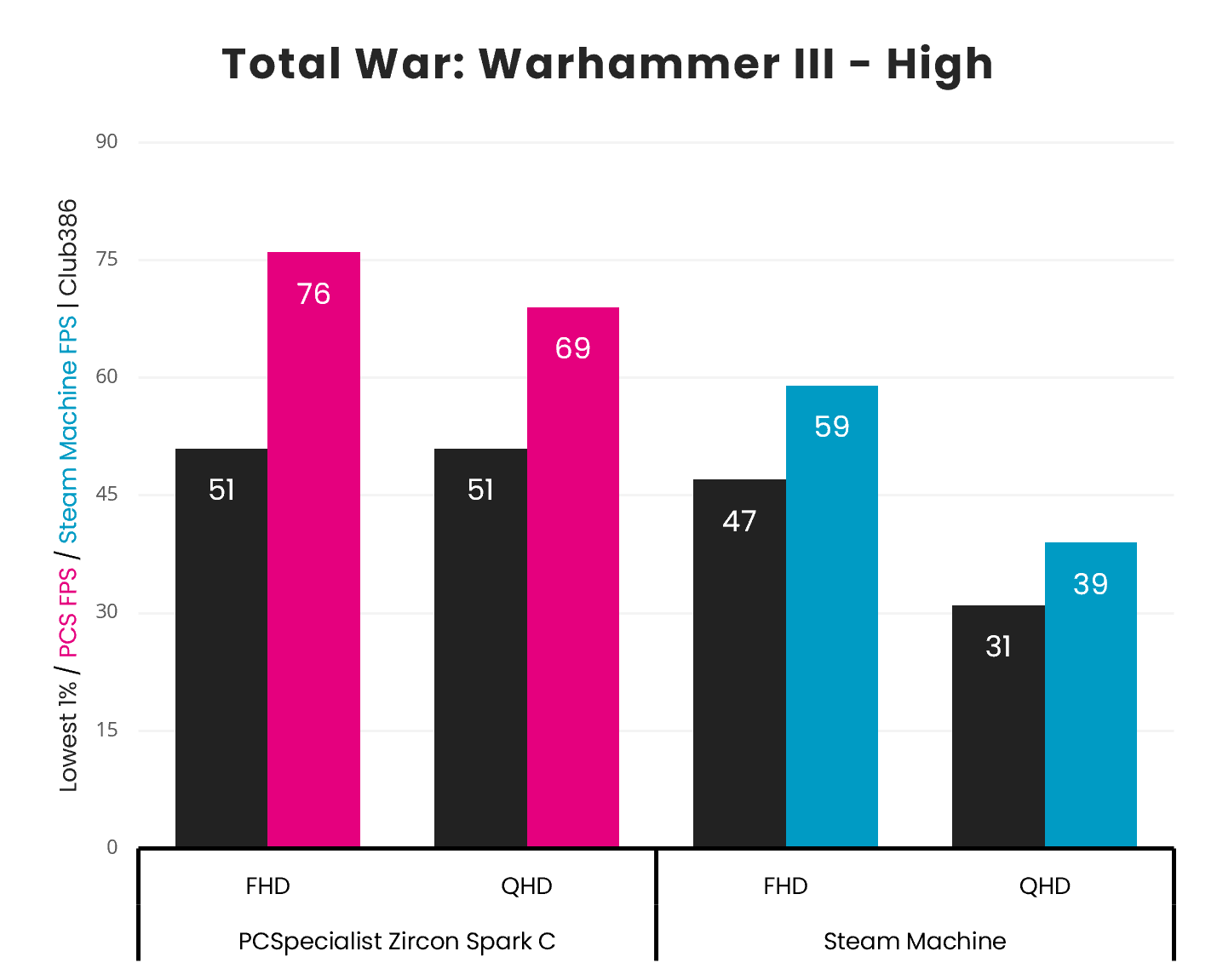
Total War: Warhammer III shows a relatively small gap between the Zircon Spark C and Steam Machine at FHD, at just 28%. However, the prebuild is confidently punching above 60fps at this resolution, while its rival falls short of that threshold.
Turning up the load with a QHD resolution, the PCSpecialist system barely flinches with a 69fps average. Meanwhile, the performance of Valve’s contender falls more sharply to 39fps, creating a huge 77% difference in frame rates.
To conclude our gaming section, I’m calling on Rainbow Six Siege. This choice of game isn’t in service of comparing frame rates, but to highlight differences in software compatibility.
Ubisoft’s competitive FPS simply doesn’t work on the Steam Machine, owing to the developer’s unwillingness to accommodate SteamOS and Linux as a whole. It’s for this reason that you can’t play the likes of other popular titles on Valve’s system, such as League of Legends or Fortnite.
As a Windows system, the Zircon Spark C faces no such incompatibilities. Better still, esports games like Siege and others run excellently on the PC, averaging 131fps at 2560×1440.
Conclusion
Despite carrying a higher price, the Zircon Spark C is undeniably a smarter buy over the Steam Machine for those in search of maximum bang per buck. We’re talking about a 13% premium for frame rates that are frequently 50%+ higher, approaching 100% in some cases. In terms of value for money, the comparison isn’t even close.
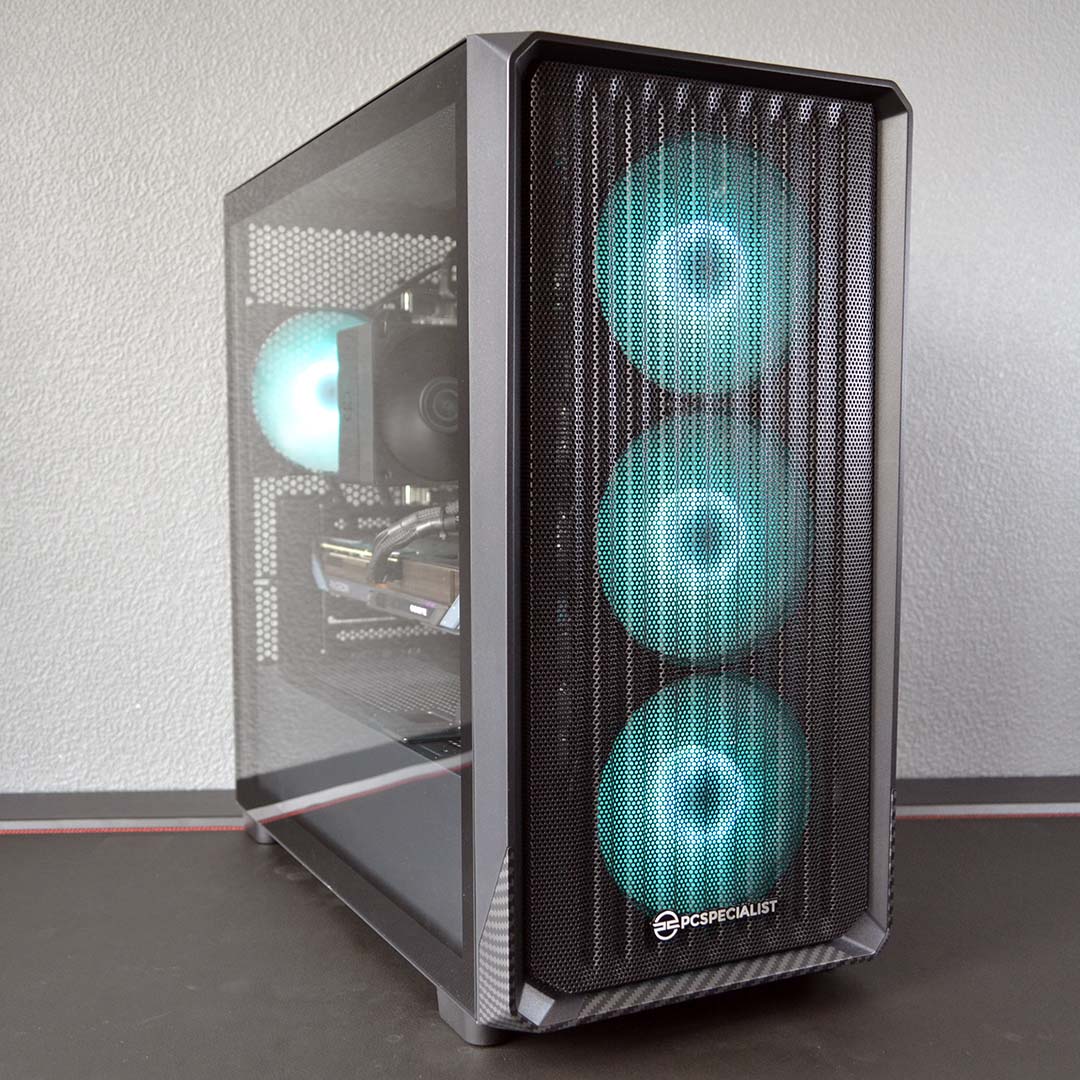

PCSpecialist Zircon Spark C
£999
Pros
- Solid FHD & QHD pace
- Better value than Steam Machine
- Upgradable components
- Immediately available
Cons
- Larger than Steam Machine
- Basic PCIe Gen 3 motherboard
Club386 may earn an affiliate commission when you purchase products through links on our site.
How we test and review products.
Availability is also a big factor here. Prebuilds like the Zircon Spark C are available for immediate purchase, while any hopes of purchasing a Steam Machine come with an unknowably long wait time, as Valve chips away at its reservation queue.
There’s no denying that the Steam Machine holds unique advantages over the likes of the Zircon Spark C and other prebuilds. Not least of all is the system’s size, which is practically impossible to match from any prebuild. Then there’s the out-of-the-box console-like experience, which, combined with the form factor, makes this system extremely easy to slip into your living room.
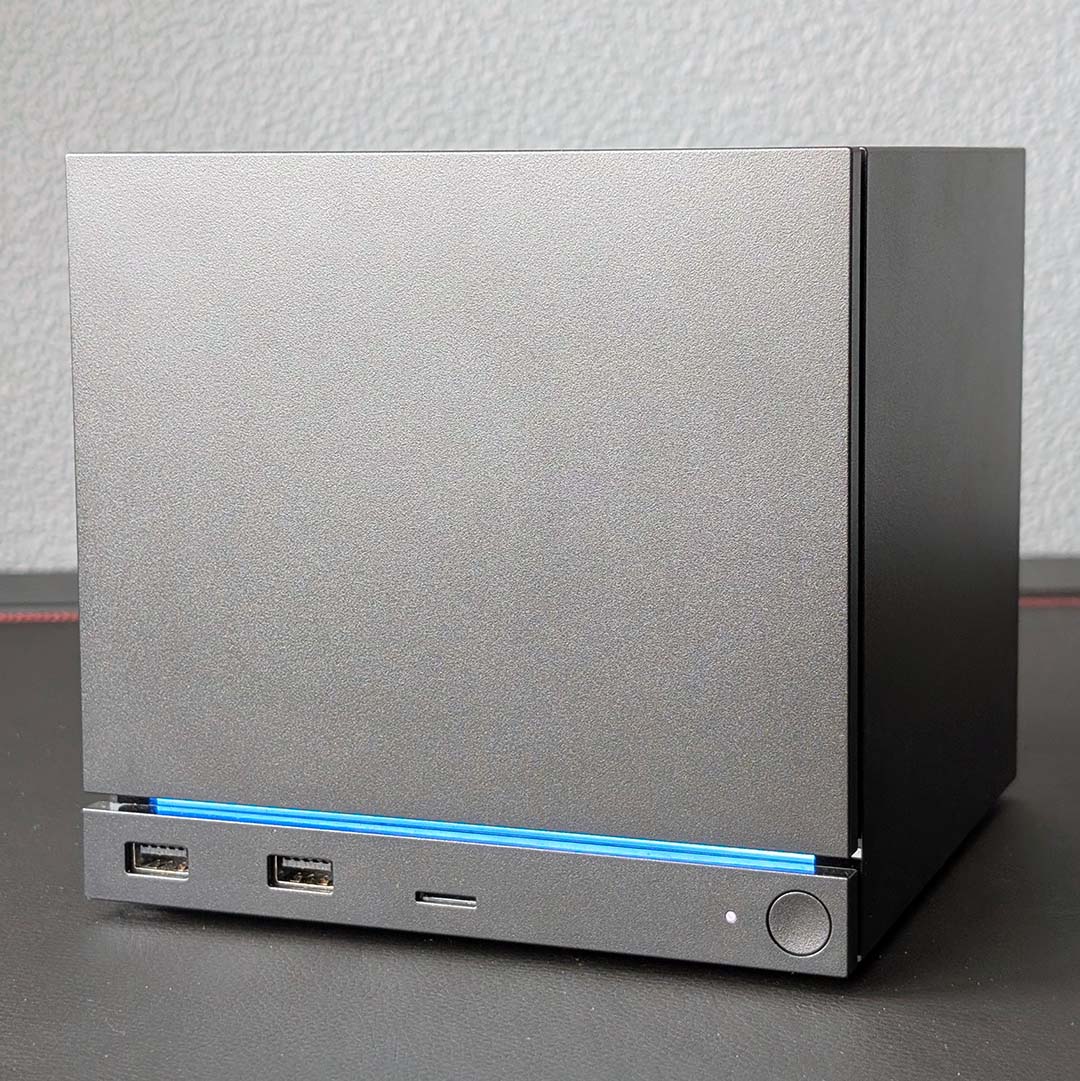
Steam Machine
£879 / $1,049
Pros
- Impressively compact design
- Whisper-quiet operation
- Solid thermals
- Convenient couch PC experience
Cons
- Disappointing performance
- Some SteamOS quirks
- Steam Controller costs extra
- Waitlist for stock
Club386 may earn an affiliate commission when you purchase products through links on our site.
How we test and review products.
From my perspective, the Steam Machine makes the most sense as a secondary system for your living room, if you can afford it – the small form factor, good looks, and sofa-friendly OS are all excellent. However, anyone looking for an affordable entry into PC gaming, or in search of an upgrade to their current rig, would do much better to steer in the direction of the Zircon Spark C and other prebuilds.
When it comes to performance, as well as game compatibility and upgrade options, there’s simply no ignoring the greater value a decent prebuilt PC offers.
