Microsoft has started preview-testing image support on Notepad for Windows 11, with a recent email to members of its Windows Insider scheme highlighting a bunch of new features for the veteran text editor. From a simple and light text app with basic formatting capabilities, Notepad looks as though it’s slowly being updated with new features such as a formatting toolbar, table support, and AI text generation.
According to tech site Windows Latest, this new image integration feature is being teased via emails sent to Windows Insider members ahead of a general rollout. The update is set to add a new button to the toolbar that allows the integration of images into Notepad, a feat that was impossible until now. It looks as though Notepad is now going to handle image integration in a similar way to Word and WordPad.
Speaking of which, Microsoft has always maintained multiple text editing apps within its different Windows releases, but since the removal of WordPad, Notepad became the de facto text editing app, at least for those not owning Microsoft Office or some other third-party software. WordPad supported multiple file formats, text alignment, and embedded objects like charts, among other features. As a result, it looks as though Notepad will need to be upgraded to fill the gap. This should give users a good enough text editor for basic notes and writing, without any extra cost.
Not only that, but Notepad will also get some AI text tools, such as Write to generate new content from a prompt, Rewrite to produce an improved version of the existing text, and Summarise to reduce long text into key points. These AI features will be available in two flavours: a cloud-based system using Microsoft’s Azure servers, which requires a subscription, and on-device using a PC’s built-in NPU.
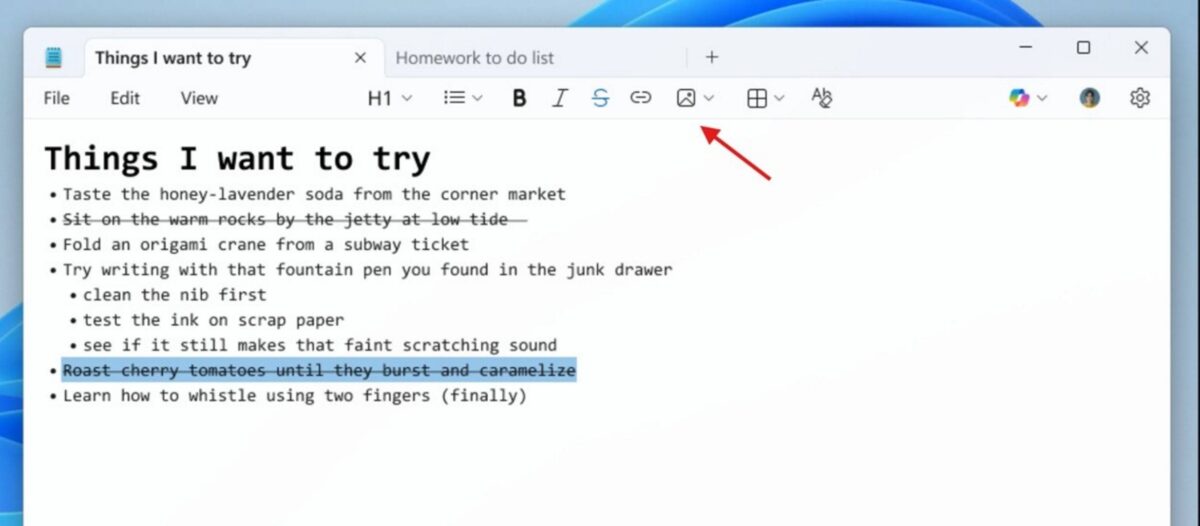
Like the rest of Notepad’s features, image insertion will apparently be turned on by default, but its performance impact is minimal according to Windows Latest’s sources. If you don’t like it or prefer to keep the clean and basic design of Notepad, you can apparently disable it from the app’s settings.
On a personal note, while I understand the need for such features now that WordPad has gone the way of the dodo, I cannot help but feel Microsoft is going about it the wrong way. Notepad doesn’t need any updates; it’s a basic text app that does its job perfectly. Perhaps a free version of Word would have been better, removing the need to develop new tools for Notepad, all while serving as a demo for the full Office experience.
What’s more, these add-ons could open new venues of attack via Notepad, and that’s not a doomsday scenario; just last month, a high-severity vulnerability (tracked as CVE-2026-20841) was disclosed in a new version of Notepad.