Microsoft has acknowledged that a storage bug related to Windows 11’s Capability Access Manager service consumes valuable free space over time. In fact, according to Windows Latest and Reddit user reports, this bug can take up to 500GB of your SSD capacity if it’s left unchecked.
Capability Access Manager is a Windows system service (camsvc) that tracks and manages app permissions. It records when applications request access to privacy-sensitive resources, such as your webcam, microphone, and location, storing these usage logs in a local SQLite database. Naturally, this log file is only supposed to occupy a few megabytes, but a bug is causing it to balloon into gigabyte territories, silently swallowing up free storage space.
While its size increase seems to be gradual rather than sudden, some users are report it taking up 200GB or even 513GB. This includes tech site Windows Latest, which found it hogging a massive 89GB. In fact, it’s the slow size increase that makes the bug particularly problematic, as it makes it hard to detect, unless you keep an eye on your remaining free space constantly. What’s more, the file in question (CapabilityAccessManager.db-wal) is hidden away in your Windows System files, or ‘System & reserved,’ which makes it hard to spot.
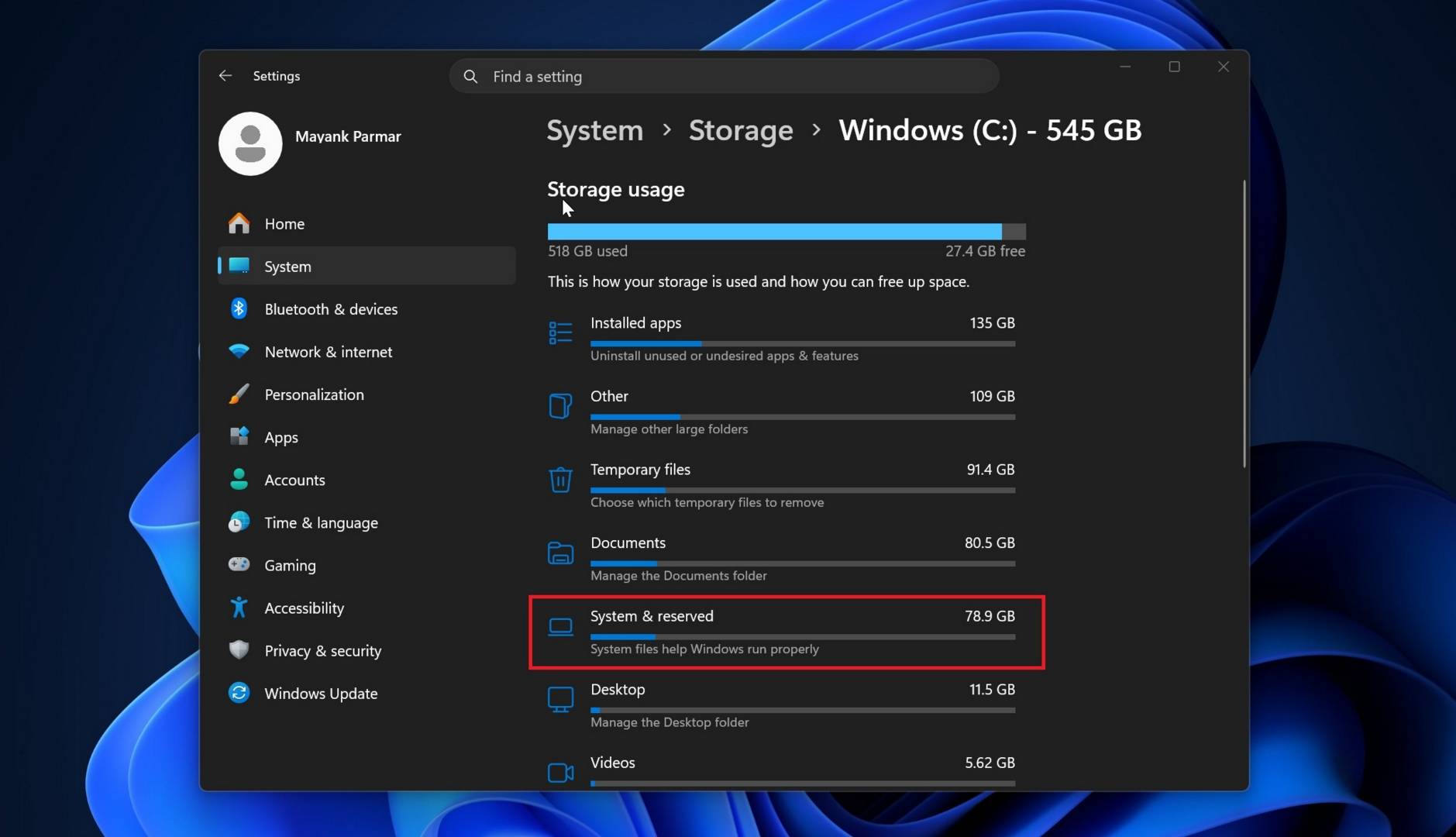
To check if you’re affected, open Settings > Storage > System & reserved in Windows, then check System storage. If it’s using hundreds of gigabytes, you likely have the bug. That said, to be 100% sure, you can use the following command line in your Windows Command Prompt, which you’ll need to run as an administrator.
robocopy “C:\ProgramData\Microsoft\Windows\CapabilityAccessManager” “%TEMP%\CAMCheck” /L /B /R:0 /W:0 /BYTES /NP
If CapabilityAccessManager.db-wal takes just up a few megabytes, you’re good, but if it’s hoarding gigabytes, you’re affected.
Thankfully, Microsoft has acknowledged the issue and released a fix that will come alongside Windows 11’s June KB5095093 update. “This update improves disk space usage for the CapabilityAccessManager.db-wal file,” the update’s changelog reads. This update is expected to reach regular (non-Insider) users starting July 14. Note that workarounds exist to rebuild the file and regain your lost space, but it’s recommended to wait for the update just to be safe.
While Microsoft claims to strive towards a better Windows 11 experience, there always seems to be an annoying bug hiding somewhere. This is one of the reasons several people (including me) are still on Windows 10; it just works, and there’s no Copilot AI, no ads, and no feature updates bringing bugs with them. Plus, with the recent extended Windows 10 security updates, I’m not leaving it anytime soon.